DEPARTMENT OF COMPUTER SCIENCE
ENGINEERING AND INFORMATION TECHNOLOGY
 Math quiz is application for Android devices. The purpose
of the application is to encourage students in solving
mathematical expressions. The application allows students
a fun way to solve mathematical expressions. It is intended
for students who loves to take challenges to calculate
swiftly.
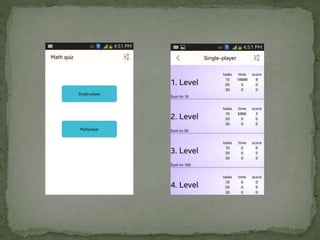
 Tasks are divided into 10 levels by the type and difficulty
level of mathematical operations. Each level is divided into
3 tasks of 10, 20 and 30 questions each.
 User can select the level and the task of no. of question he
wants to take.
 Applications records the minimum time and maximum
score of the user against each level corresponding to each
section.
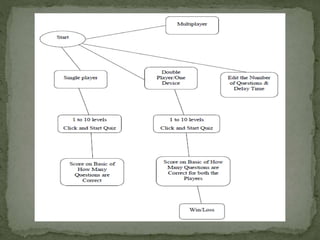
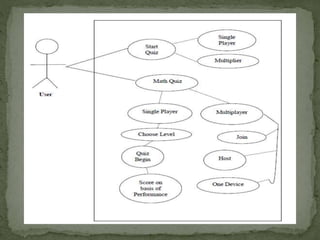
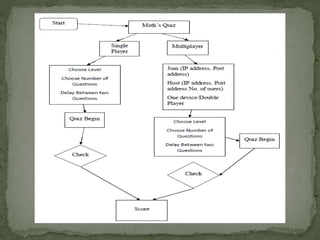
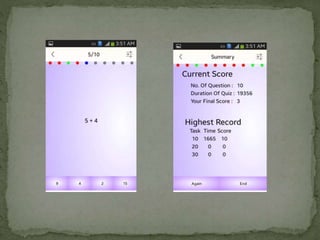
 Single Player feature : Single player game has a question and 4
multiple choice answers to a question of which only one is correct. User
can press the option of his wish. If the option is correct then
increments the score else it highlights the correct option and then
moves to the next question. At the end it show the score of the game
and if you scored more than the previous highest score the score is
published against the level selection.
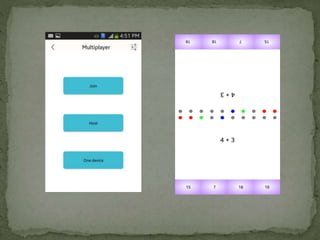
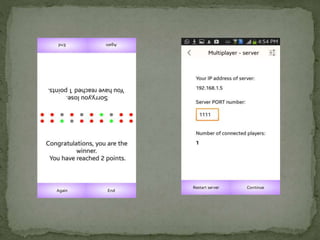
 Two Player Feature : In this 2 player can play the game
simultaneously sitting opposite to each other. In this feature screen is
divided into two halves, both the screens are laterally inverted, thus
half screen is showing question/answer to 1 player while other is
showing to other player.. At the end it shows the final score to each
player and gives a congratulation message to the winner.
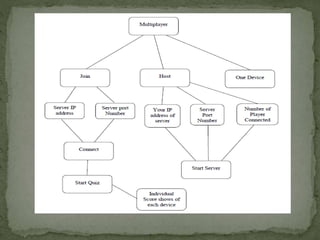
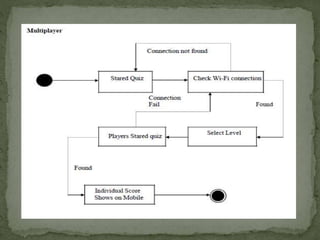
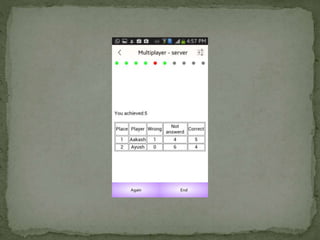
 Multiplayer Feature : This application also allows many users to play
the Math’s Quiz simultaneously via challenging others. In this any
player can host the server, and others can join via server by giving IP
Address of Host Device. Notification comes to server when any client
joins that server. Hence the Quiz is played simultaneously and at the
end result is shown on each device.
 SQLite (for database) : SQLite is an Open Source database. SQLite
supports standard relational database features like SQL syntax,
transactions and prepared statements.
 Eclipse (for Android App Development) : Eclipse is a multi-
language Integrated development environment (IDE) comprising a
base workspace and an extensible plug system for customizing the
environment. It is written mostly in Java.
 Android SDK : The Android SDK provides you the API libraries and
developer tools necessary to build, test, and debug apps for Android. If
you're a new Android developer, we recommend you download the
ADT Bundle to quickly start developing apps .
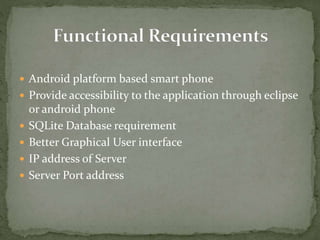
 Android platform based smart phone
 Provide accessibility to the application through eclipse
or android phone
 SQLite Database requirement
 Better Graphical User interface
 IP address of Server
 Server Port address
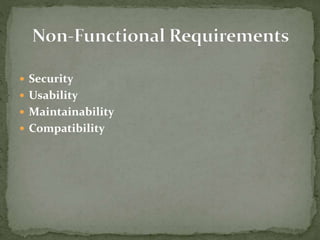
 Security
 Usability
 Maintainability
 Compatibility
Testing Objectives
 To ensure that during operation the system will perform as per specification.
 To make sure that the system makes user requirement during operations.
Testing Principles
 All tests should be traceable to user requirements.
 Tests should be planned long before testing begins.
Test Case Design
A rich variety of test case design methods have evolved for software. These
methods provide the developer with a systematic approach to testing.
 Black-Box Testing
 White-Box Testing
Type of Test Comments/Explanations Software Component
Requirements
Testing
Since there is the use of
Android and SQLite for
database so need an android
phone.
Android Phone
Unit Testing The whole project is divide
in to many functionality.
Hence all the units were
individually tested. Some of
the units are:
Regular Expression,
String matching
Performance This Testing is applied on
details searching which is
providing search result.
Database searching
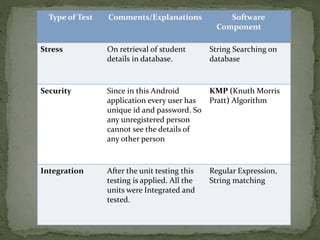
Type of Test Comments/Explanations Software
Component
Stress On retrieval of student
details in database.
String Searching on
database
Security Since in this Android
application every user has
unique id and password. So
any unregistered person
cannot see the details of
any other person
KMP (Knuth Morris
Pratt) Algorithm
Integration After the unit testing this
testing is applied. All the
units were Integrated and
tested.
Regular Expression,
String matching
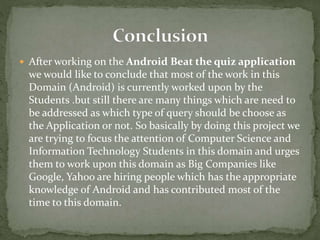
 After working on the Android Beat the quiz application
we would like to conclude that most of the work in this
Domain (Android) is currently worked upon by the
Students .but still there are many things which are need to
be addressed as which type of query should be choose as
the Application or not. So basically by doing this project we
are trying to focus the attention of Computer Science and
Information Technology Students in this domain and urges
them to work upon this domain as Big Companies like
Google, Yahoo are hiring people which has the appropriate
knowledge of Android and has contributed most of the
time to this domain.
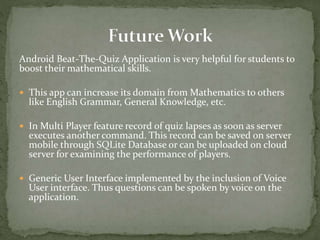
Android Beat-The-Quiz Application is very helpful for students to
boost their mathematical skills.
 This app can increase its domain from Mathematics to others
like English Grammar, General Knowledge, etc.
 In Multi Player feature record of quiz lapses as soon as server
executes another command. This record can be saved on server
mobile through SQLite Database or can be uploaded on cloud
server for examining the performance of players.
 Generic User Interface implemented by the inclusion of Voice
User interface. Thus questions can be spoken by voice on the
application.
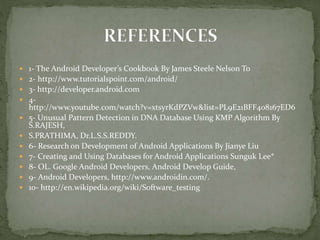
 1- The Android Developer’s Cookbook By James Steele Nelson To
 2- http://www.tutorialspoint.com/android/
 3- http://developer.android.com
 4-
http://www.youtube.com/watch?v=xtsyrKdPZVw&list=PL9E21BFF408167ED6
 5- Unusual Pattern Detection in DNA Database Using KMP Algorithm By
S.RAJESH,
 S.PRATHIMA, Dr.L.S.S.REDDY.
 6- Research on Development of Android Applications By Jianye Liu
 7- Creating and Using Databases for Android Applications Sunguk Lee*
 8- OL. Google Android Developers, Android Develop Guide,
 9- Android Developers, http://www.androidin.com/.
 10- http://en.wikipedia.org/wiki/Software_testing
 Project Supervisor – Mrs. K Rajalakshmi
Group Members
 Aakash Sharma Ayush Kumar Singh
 (10103633) (10103485)

Android Beat the-quiz application

  • 1.
    DEPARTMENT OF COMPUTERSCIENCE ENGINEERING AND INFORMATION TECHNOLOGY
  • 3.
     Math quizis application for Android devices. The purpose of the application is to encourage students in solving mathematical expressions. The application allows students a fun way to solve mathematical expressions. It is intended for students who loves to take challenges to calculate swiftly.  Tasks are divided into 10 levels by the type and difficulty level of mathematical operations. Each level is divided into 3 tasks of 10, 20 and 30 questions each.  User can select the level and the task of no. of question he wants to take.  Applications records the minimum time and maximum score of the user against each level corresponding to each section.
  • 4.
     Single Playerfeature : Single player game has a question and 4 multiple choice answers to a question of which only one is correct. User can press the option of his wish. If the option is correct then increments the score else it highlights the correct option and then moves to the next question. At the end it show the score of the game and if you scored more than the previous highest score the score is published against the level selection.  Two Player Feature : In this 2 player can play the game simultaneously sitting opposite to each other. In this feature screen is divided into two halves, both the screens are laterally inverted, thus half screen is showing question/answer to 1 player while other is showing to other player.. At the end it shows the final score to each player and gives a congratulation message to the winner.  Multiplayer Feature : This application also allows many users to play the Math’s Quiz simultaneously via challenging others. In this any player can host the server, and others can join via server by giving IP Address of Host Device. Notification comes to server when any client joins that server. Hence the Quiz is played simultaneously and at the end result is shown on each device.
  • 5.
     SQLite (fordatabase) : SQLite is an Open Source database. SQLite supports standard relational database features like SQL syntax, transactions and prepared statements.  Eclipse (for Android App Development) : Eclipse is a multi- language Integrated development environment (IDE) comprising a base workspace and an extensible plug system for customizing the environment. It is written mostly in Java.  Android SDK : The Android SDK provides you the API libraries and developer tools necessary to build, test, and debug apps for Android. If you're a new Android developer, we recommend you download the ADT Bundle to quickly start developing apps .
  • 14.
     Android platformbased smart phone  Provide accessibility to the application through eclipse or android phone  SQLite Database requirement  Better Graphical User interface  IP address of Server  Server Port address
  • 15.
     Security  Usability Maintainability  Compatibility
  • 22.
    Testing Objectives  Toensure that during operation the system will perform as per specification.  To make sure that the system makes user requirement during operations. Testing Principles  All tests should be traceable to user requirements.  Tests should be planned long before testing begins. Test Case Design A rich variety of test case design methods have evolved for software. These methods provide the developer with a systematic approach to testing.  Black-Box Testing  White-Box Testing
  • 23.
    Type of TestComments/Explanations Software Component Requirements Testing Since there is the use of Android and SQLite for database so need an android phone. Android Phone Unit Testing The whole project is divide in to many functionality. Hence all the units were individually tested. Some of the units are: Regular Expression, String matching Performance This Testing is applied on details searching which is providing search result. Database searching
  • 24.
    Type of TestComments/Explanations Software Component Stress On retrieval of student details in database. String Searching on database Security Since in this Android application every user has unique id and password. So any unregistered person cannot see the details of any other person KMP (Knuth Morris Pratt) Algorithm Integration After the unit testing this testing is applied. All the units were Integrated and tested. Regular Expression, String matching
  • 25.
     After workingon the Android Beat the quiz application we would like to conclude that most of the work in this Domain (Android) is currently worked upon by the Students .but still there are many things which are need to be addressed as which type of query should be choose as the Application or not. So basically by doing this project we are trying to focus the attention of Computer Science and Information Technology Students in this domain and urges them to work upon this domain as Big Companies like Google, Yahoo are hiring people which has the appropriate knowledge of Android and has contributed most of the time to this domain.
  • 26.
    Android Beat-The-Quiz Applicationis very helpful for students to boost their mathematical skills.  This app can increase its domain from Mathematics to others like English Grammar, General Knowledge, etc.  In Multi Player feature record of quiz lapses as soon as server executes another command. This record can be saved on server mobile through SQLite Database or can be uploaded on cloud server for examining the performance of players.  Generic User Interface implemented by the inclusion of Voice User interface. Thus questions can be spoken by voice on the application.
  • 27.
     1- TheAndroid Developer’s Cookbook By James Steele Nelson To  2- http://www.tutorialspoint.com/android/  3- http://developer.android.com  4- http://www.youtube.com/watch?v=xtsyrKdPZVw&list=PL9E21BFF408167ED6  5- Unusual Pattern Detection in DNA Database Using KMP Algorithm By S.RAJESH,  S.PRATHIMA, Dr.L.S.S.REDDY.  6- Research on Development of Android Applications By Jianye Liu  7- Creating and Using Databases for Android Applications Sunguk Lee*  8- OL. Google Android Developers, Android Develop Guide,  9- Android Developers, http://www.androidin.com/.  10- http://en.wikipedia.org/wiki/Software_testing
  • 28.
     Project Supervisor– Mrs. K Rajalakshmi Group Members  Aakash Sharma Ayush Kumar Singh  (10103633) (10103485)