CAPSTONE PROJECT (PART –II) REPORT
(Project Term JANUARY-MAY, 2017)
SURVIVAL OF THE FASTEST
( UNITY 5.6 of 3, ANDROID STUDIO SDK 2.3)
Submitted by
RAVIJOT SINGH Registration Number : 11308058
KOTI REDDY Registration Number :
SUNIL KUMAR Registration Number:
Project Group Number :
Under the Guidance of
MR. MAKUL MAHAJAN
Discipline of Computer Science and Information Technology
Lovely Professional University, Phagwara
DECLARATION
We hereby declare that the project work entitled “SURVIVAL OF THE FASTEST” is an authentic
record of our own work carried out as requirements of Capstone Project (Part-II) for the award of
degree of B.Tech in CSE ( Programme Name ) from Lovely Professional University, Phagwara,
under the guidance of MR. MAKUL MAHAJAN, during JANUARY to MAY, 2017).
Project Group Number:
Name of Student 1: RAVIJOT SINGH
Registration Number: 11308058
Name of Student 2: KOTI REDDY
Registration Number:
Name of Student 3: SUNIL KUMAR
Registration Number:
(RAVIJOT SINGH )
(KOTI REDDY)
(SUNIL KUMAR)
CERTIFICATE
This is to certify that the declaration statement made by this group of students is correct to the best
of my knowledge and belief. The Capstone Project Proposal based on the technology / tool learnt is
fit for the submission and partial fulfilment of the conditions for the award of B.Tech in CSE from
Lovely Professional University, Phagwara.
Name : MR. MAKUL MAHAJAN
U.ID: 14575
Designation : LECTURER
Signature of Mr. Makul Mahajan
ACKNOWLEDGEMENT
It is a pleasure to find myself penning down these lines to express my sincere thanks to all my
coordinators to give me this opportunity of preparing this project, to enhance my professional
practice.
This project required hard work, sincerity and devotion that I tried my best to put in this project and
in turn gained a lot of knowledge and confidence from this project.
We are grateful to our Project Guide Mr. Makul Mahajan for the inspiration and the constructive
suggestions that helped me in preparation of the project Survival of the fastest.
Finally I thank the almighty god with whose grace I was always motivated and deeply engrossed
with my project during the entire duration from its conception to success.
Ravijot singh
Koti Reddy
Sunil Kumar
INDEX
SECTION.............................................................................................................................. PAGE NO
SECTION: 1 INTRODUCTION..................................................................................................1
1.2. Target Audience and Beneficiaries………………………………………..........2
SECTION: 2 PROFILE OF THE PROJECT………………………………………………..3
2.1 BACKGROUND…………................................................................................ 3
2.1.1 ANDROID DEVELOPMENT………….................................................... 4
2.2 PURPOSE ........................................................................................................... 4
2.3 SCOPE .................................................................................................................5
SECTION: 3 EXISTING APPLICATIONS………………………………………………..5
3.1 INTRODUCTION TO EXISTING APPLICATIONS……………………...5
3.1.1 MICROMACHINE…………..………………………………………………..6
3.1.2 REAL WORLD RACING………………….……………………………………..7
3.1.3 RETRO RACING…………………………….…………………………………..8
3.2 SELECTING FEATURES FROM EXISTING SYSTEM………………….…..9
SECTION: 4 FRAMEWORK…………………………………………………………………..10
4.1 TOOLS AND TECHNIQUES USED………………………………………………………11
4.1.1 ANDROID………………………......…………………………………………11
4.1.2 UNITY…………………………………………………………………………..12
4.2 ANALYSIS………………………………………….……………………………..13
4.2.1 FEASIBILITY STUDY……………..………………………………………….13
4.3 PROJECT PLAN…………………………………………………………………..15
SECTION: 5 SOFTWARE REQUIREMENT ANALYSIS…………………………………18
5.1 INTRODUCTION…………….………………………………………………….18
5.2 GENERAL DISCRIPTION……………………………………………………21
5.2.1 CONSTRAINTS………….………………………………………………..21
5.2.2 DEPENDENCIES…………………………………………………………….21
5.3 SPECIFIC REQUIREMENTS…….……………………………………………..21
5.3.1 LOGICAL DATA REQUIREMENTS………………………………………....21
5.3.2 FUNCTIONAL REQUIREMENTS…………………………………………….21
5.3.3 TECHNICAL REQUIREMENTS………………………………………………..22
5.3.4 SOFTWARE REQUIREMENTS………………………………………………….22
5.3.5 QUALITY REQUIREMENTS……………...…………………………………..23
SECTION: 6 DESIGN…………………………………………………………………………..23
6.1 SYSTEM DESIGN………………………………………………………………23
6.2 DESIGN NOTATIONS…………………………………………………………25
6.2.1 DATA FLOW DIAGRAM……………………………………………………..26
6.3 DETAILED DESIGN………………………………………………………….32
6.4 FLOW CONTROL………………………………………………………………34
SECTION: 7 TESTING………………………………………………………………………….37
7.1 FUNCTION TESTING…………………….………………………..…………..37
7.2 STRUCTURAL TESTING……………………………………………………..37
7.3 LEVEL OF TESTING…………………….……………………………………..38
SECTION: 8 IMPLEMENTATION…………………………………………………………..41
8.1 SNAPSHOTS……………………………………………………………………..41
8.1.1 START PAGE…………………………….……………………………………..41
8.1. 2 LEVELS PAGE…………………………………………………………………43
8.1.2.1 HARD LEVEL…………………………………………………………………44
8.1.2.2 HARDER LEVEL……………………………………………………………..45
8.1.3 ON COLLISION……………………………………………………………….46
SECTION: 9 PROJECT LEGACY………………………………………………..…………..47
9.1 CURRENT STATUS OF THE PROJECT…………………………….……..47
9.2 REMAINING AREA OF CONCERN………………………………………..47
SECTION: 10 USER MANUAL……………………………………………………………….48
10.1 A COMPLETE DOCUMENT OF THE SOFTWARE DEVELOPED…….48
SECTION: 11 SOURCE CODE……………………………………………………………….49
11.1 UIMANAGER………………………………………………………………....49
11.2 TRACKMOVE………………………………………………………………....50
11.3 CARCONTROLLER………….……………………………………………....51
11.4 ENEMYMOVE………………………………………………………………....53
11.5 CARSPAWNER………………………………………………………………....54
11.6 ENEMYDESTROYE…………………………………………………………....54
11.7 AUDIOMANAGER………………………………………………………......55
SECTION 12 BIBLIOGRAPHY………………………………………………..………....56
Section:1
INTRODUCTION
For this final project, our group would like to implement a Car Racing Game based on the Android
system. We try to implement a simple car game based on the basic design. The object of this game
is to survive as long as possible and get to the High scores in the shortest possible time while avoiding
the obstacles on the tracks.
In the fast growing field of software engineering and development and even more rapidly growing
sector of game development the future is hard to predict. We are working with this game as our final
year Capstone project and ass a part of our degree we choose this type of work for doing better with
development cycle, development period, graphics, scripting, adopting new technology, animation.
In general, software project is a project focusing on creation of software. Consequently, Success can
be measured by a taking look at the resulting software.
In a game project ,the product is game. But and here comes the point : A game is much more than
just its software. It has to provide content to become enjoyable. Just like a web server: Without
content the server is useless, and the quality cannot be measured. This has an important effect on the
game project as a whole. The software part of the project is not the only one, and it must be
considered in connection to all the other parts: The environment of the game, The story, characters,
game plays, and the artwork.
The purpose of this document is to outline all aspects of the project created as part of the final year
project for the CSE course. Over the following document I shall, explain the reasons for the game,
explain how the game works and give you my idea for the future of this game and others which will
be made from it.
The main aim of this project report is to highlight the features as follows: -
.To show how the project is developed.
.To show the details of graphics and design.
.To show how the user can work with the software.
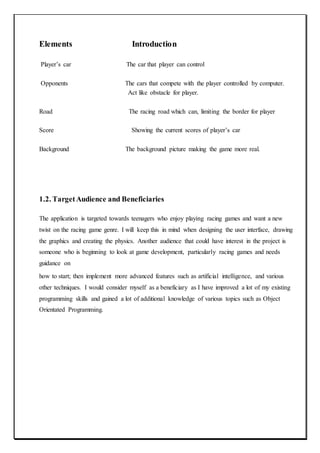
Elements Introduction
Player’s car The car that player can control
Opponents The cars that compete with the player controlled by computer.
Act like obstacle for player.
Road The racing road which can, limiting the border for player
Score Showing the current scores of player’s car
Background The background picture making the game more real.
1.2. TargetAudience and Beneficiaries
The application is targeted towards teenagers who enjoy playing racing games and want a new
twist on the racing game genre. I will keep this in mind when designing the user interface, drawing
the graphics and creating the physics. Another audience that could have interest in the project is
someone who is beginning to look at game development, particularly racing games and needs
guidance on
how to start; then implement more advanced features such as artificial intelligence, and various
other techniques. I would consider myself as a beneficiary as I have improved a lot of my existing
programming skills and gained a lot of additional knowledge of various topics such as Object
Orientated Programming.
Section:2
PROFILE OF THE PROJECT
2.1 BACKGROUND
This project is creation and implementation of game using the Android system and our Final year
project. The reasons for creating the game on the Android system are many, The android market
currently has the largest market share of the mobile devices and is growing, it eliminates the need
for expensive hardware as most(if not all) the Android development tools are freely available. The
reason for developing a Mobile game is that it is currently growing and vibrant market with more
people playing mobile games than tradition games on console meaning a greater market share
potential and can be developed without needing a team of people. Lastly why develop a game, A
game is unlike anything we have developed before needing a lot of planning and logical thinking
but the structure of the game constantly changing states presented a unique challenge and we’ve
always has a keen interest games in which we why we wish to understand how they worked. The
project proposal for this game contains a plan for the development of a racing game however as
stated before this idea is more accessible and allows for greater enjoyment while still implementing
several key racing concepts (movement, collisions).
2.1.1 ANDROID DEVELOPMENT
Before actually discussing Android development, I will briefly talk about the Android platform.
Android is an operating system based on the Linux kernel and designed predominantly for
touchscreen mobile devices such as smartphones and tablets. It was first developed by Android Inc.,
which Google backed financially and later bought in 2005. Android was officially revealed in 2007
along with the founding of the Open Handset Alliance - a group of hardware, software, and
telecommunication companies keen to progress open standards for mobile devices (Android, n.d.).
Android provides a rich application framework that allows anyone to build innovative apps and
games for mobile devices. Android development is the process of creating applications for the
Android operating system. They are usually developed in the JAVA programming language using
the Android SDK, but there are many other development tools available to use. As of July 2013,
more than 1 million applications have been developed for Android (Warren, 2013). Android devices
can be interacted with using touch inputs, such as swiping, tapping and pinching. There is also
internal hardware such as accelerometers, gyroscopes and proximity sensors that also allow a unique
form of interaction.
2.2 PURPOSE
 The purpose of this project was the creation of an easy to use, pick up and play game that
could be played by all ages as long as they have an android phone and a touch screen. The
reason was as stated above there are more casual gamers than traditional gamers meaning a
larger potential market. Developing on the Android platform will mean we have to program
in JAVA or C# and get to grips with the Android SDK. I will also have to learn the
fundamentals of game programming and stick to the lifecycle associated with developing
games. The Android SDK does not provide a comprehensive set of tools to create a game
straight away; it does require a lot of extra work. I could potentially create my own
framework or perhaps use an existing one, to ease the process and produce software that is
appealing and efficient
 The purpose of this document is to set up the requirements for the development of Android
2D car racing game. The intended customer is really anyone with an android device. A car
game is simple and fun to play making it available to anyone.
2.3 SCOPE
The scope of the project is to develop an Android 2d car game. The system shall use the Android
accelerometer to detect movement for turning the car. The Android type will be 2.3.
This game idea was suggested by other students and refined after talking to a lecturer. This project
will be built in Unity(game development tool) tested using Android sdk(this a tool-kit). I will run
the project on an android phone when finished for testing purposes but most testing will take place
on the android emulator(called android emulator and comes with the android sdk). This project has
a six month time restraint.
Section:3
EXISTING APPLICATIONS
3.1 INTRODUCTIONTO EXISTING APPLICATIONS:
There are many racing games that exist in today’s market which have been around for many years.
They range from ultra-realistic simulations such as Gran Turismo, which take into account many
factors to make the game as close to the real thing as possible, to the casual arcade racer such as
Mario Kart. I used my personal knowledge of the games to discover existing applications and search
engines to discover more of them. The ones I had not heard of, I tried out
3.1.1MICROMACHINE
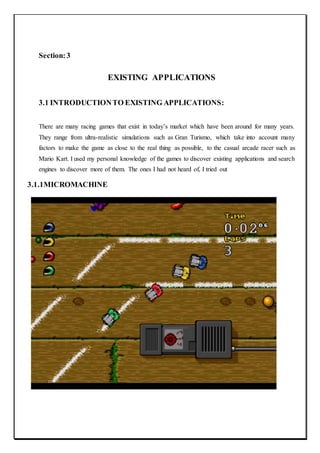
Micro Machines is one of the first top down racing games and at the time of its release, received
very good reviews. It involves racing miniatures of various vehicle types across a particular terrain
found around the house; for example, on a desk, in the sandpit and even a snooker table. The game
is available to play on NES, Amiga, PlayStation 2, Xbox, GameCube, Game Boy Advance and
various other consoles (Servo, 2002). We will aim to mimic its style and simplicity.
3.1.2. REALWORLD RACING
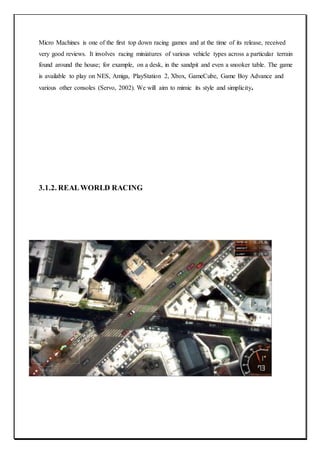
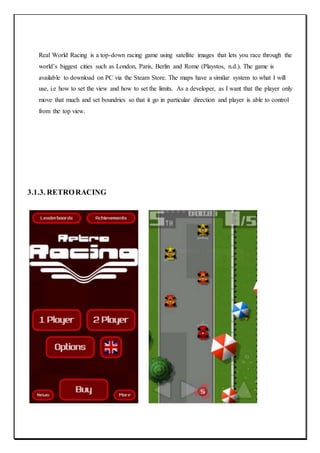
Real World Racing is a top-down racing game using satellite images that lets you race through the
world’s biggest cities such as London, Paris, Berlin and Rome (Playstos, n.d.). The game is
available to download on PC via the Steam Store. The maps have a similar system to what I will
use, i.e how to set the view and how to set the limits. As a developer, as I want that the player only
move that much and set boundries so that it go in particular direction and player is able to control
from the top view.
3.1.3. RETRORACING
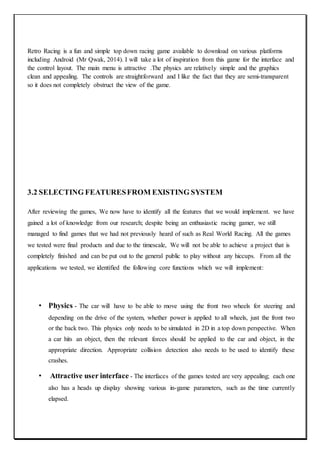
Retro Racing is a fun and simple top down racing game available to download on various platforms
including Android (Mr Qwak, 2014). I will take a lot of inspiration from this game for the interface and
the control layout. The main menu is attractive .The physics are relatively simple and the graphics
clean and appealing. The controls are straightforward and I like the fact that they are semi-transparent
so it does not completely obstruct the view of the game.
3.2 SELECTING FEATURESFROM EXISTING SYSTEM
After reviewing the games, We now have to identify all the features that we would implement. we have
gained a lot of knowledge from our research; despite being an enthusiastic racing gamer, we still
managed to find games that we had not previously heard of such as Real World Racing. All the games
we tested were final products and due to the timescale, We will not be able to achieve a project that is
completely finished and can be put out to the general public to play without any hiccups. From all the
applications we tested, we identified the following core functions which we will implement:
• Physics - The car will have to be able to move using the front two wheels for steering and
depending on the drive of the system, whether power is applied to all wheels, just the front two
or the back two. This physics only needs to be simulated in 2D in a top down perspective. When
a car hits an object, then the relevant forces should be applied to the car and object, in the
appropriate direction. Appropriate collision detection also needs to be used to identify these
crashes.
• Attractive user interface - The interfaces of the games tested are very appealing; each one
also has a heads up display showing various in-game parameters, such as the time currently
elapsed.
• Artificial Intelligence - All the games tested had some form of AI to make the game more
challenging and fun to play. One thing to note was that each of the cars in the game were not as
powerful as the player’s cars, to make the game winnable by the player.
• Graphics - This is very important to make the game more appealing;
• Camera - All top down games have the same camera, the player in the centre and a view of
the world around it.
4.0. FRAMEWORK
To create the application , We will use various tools to ease the process. The first thing to do is to
decide how, We are going to approach the project. There are numerous ways of developing
games for Android phones: We do the whole thing in pure C# using the Unity and create my own
framework to handle graphics and other aspects of the game, use an existing framework or even a
fully-fledged game engine with lots of high level methods.
There is an extensive list of engines and frameworks to use, so it is a good idea to distinguish
between them. A framework gives the developer control over every aspect of the game
development environment. However, this comes at a price of having to figure out your own way of
doing things (for example, how you organize your game world, how you handle screens and
transitions, and so on). An engine is more streamlined for specific tasks. It dictates how you should
do things, giving you easy-to-use modules for common tasks and a general architecture for your
game. With this crucial difference in mind, for my purposes, We think it would be best to use a
Engine rather than an framework. Choosing a Engine will be difficult, so before We decide which
one to use We have made a list of requirements that should be met in order for me to use it:
* The language is not too important, however I would prefer C#.
* It must be free to develop using it; paying for it to be publishing is ok, but I would prefer the
whole thing to be free;
* Cross platform is an advantage, however, it may mean that it will work well on one platform, but
there may be issues or bugs on another. So if it worked natively on Android it would be better;
* Documentation is very important, there must be an extensive list of documentation to describe how
to utilize the various functions
With those in mind, below is a table comparing the features of Android Game Engines.
Engine Name Primary
programmin
g Language
Scripting Cross
Platfor
m
2D,3D
Orientatio
n
Target Platform
ANVIL C++, C# Yes 3D Windows,PlayStation
3, PlayStation 4, PlayStation
Vita, Wii U, Xbox 360, Xbox
One
ELECTRON
TOOLSET
C# NWScript No 3D Windows
HERO
ENGINE
C++, C# Hero script
Language
No 3D Windows
OPEN
SIMULATO
R
C# LSL Yes 3D
UNITY C, C++, C# Mono unity
script
Yes 2D, 3D Windows,OS X, Linux Xbox
360, Xbox One, Wii U, New
3DS, PlayStation 4, PlayStation
Vita, Windows
Phone,iOS, Android, BlackBerr
y 10, Tizen, Unity Web
Player, Windows
Store, WebGL, Oculus
Rift, Gear VR, Android
TV, Samsung SmartTV
UNREAL
ENGINE
C++, C#,
Assembly
GLSL,Cg,HLSL
,
unrealScript,
C++
Yes 3D Cross-platform
Each of the Engines have their strengths and weaknesses. The reason We would like for it to be
cross-platform, is because it will allow for quick deployment and testing, especially if it can be
compiled and run on a desktop. Taking everything into account, the one which we will use is
UNITY, because of its ability to be cross-platform, it is open source(Unity Personel) and it has a
very active forum (UNITY 5.6 of 3). With UNITY you code everything in C# and then it ports the
code to different platforms, for example with the Android, it translates the C# code to Java.
4.1. TOOLS AND TECHNIQUES USED
4.1.1 ANDROID
Android is a mobile operating system (OS) based on the Linux kernel and currently developed by
Google. With a user interface based on direct manipulation, Android is designed primarily for
touchscreen mobile devices such as smartphones and tablet computers, with specialized user
interfaces for televisions (Android TV), cars (Android Auto), and wrist watches (Android Wear).
The OS uses touch inputs that loosely correspond to real-world actions, like swiping, tapping,
pinching, and reverse pinching to manipulate on-screen objects, and a virtual keyboard. Despite
being primarily designed for touchscreen input, it also has been used in game consoles, digital
cameras, regular PCs (e.g. the HP Slate 21) and other electronics.
Android is popular with technology companies which require a ready-made, low-cost and
customizable operating system for high-tech devices. Android's open nature has encouraged a large
community of developers and enthusiasts to use the open-source code as a foundation for
community-driven projects, which add new features for advanced users or bring Android to devices
which were officially, released running other operating systems.
Android, Inc. was founded in Palo Alto, California in October 2003 by Andy Rubin (co-founder of
Danger), Rich Miner (co-founder of Wildfire Communications, Inc.), Nick Sears (once VP at
TMobile), and Chris White (headed design and interface development at WebTV) to develop.
Android SDK: The Android SDK provides the API libraries and developer tools necessary to
build, test, and debug apps for Android.
4.1.2 UNITY
Unity is an entire ecosystem of tools and services designed for people who want to build a successful
business by creating multiplatform games and interactive content. The Unity ecosystem is available
to anyone who downloads the Unity engine. The Unity engine integrates into one unparalleled
platform the tools to create 2D and 3D interactive content; collaboration solutions; rapid
multiplatform deployment, and retention, advertising and analytics services to grow your business.
Unity is a cross-platform game creation system developed by Unity Technologies, including a game
engine and integrated development environment (IDE). It is used to develop video games for web
sites, desktop platforms, consoles, and mobile devices. First announced only for Mac OS, at Apple‟s
Worldwide Developers Conference in 2005, it has since been extended to target more than fifteen
platforms. It is now the default software development kit (SDK) for the Nintendo Wii U.
Unity is notable for its ability to target games to multiple platforms. Within a project, developers
have control over delivery to mobile devices, web browsers, desktops, and consoles. Supported
platforms include BlackBerry 10, Windows Phone 8, Windows, OS X, Linux (mainly
Ubuntu)[citation needed], Android, iOS, Unity Web Player (including Facebook), Adobe Flash,
PlayStation 3, PlayStation 4, PlayStation Vita, Xbox 360, Xbox One, Wii U, and Wii. It includes an
asset server and Nvidia's PhysX physics engine. Unity Web Player is a browser plugin that is
supported in Windows and OS X only. Unity is the default software development kit (SDK) for
Nintendo's Wii U video game console platform, with a free copy included by Nintendo with each
Wii U developer license. Unity Technologies calls this third party provisioning of a free SDK, an
"industry first".
4.2 ANALYSIS
4.2.1 FEASIBILITYSTUDY
A Feasibility study is undertaken to determine the possibility or portability of either improving the
existing system or developing a completely new system.
Feasibility is the measure of how beneficial or practical the development of information system will be
to an organization. The feasibility study involves following criteria.
 Wheather the identified user needs may be satisfied using current software and hardware
technologies.
 The study will decide if the proposed system will be cost-effective and if it can be developed
given existing budgetary constraints.
 The result should inform the decision of whether to go ahead with a more detailed analysis.
There are three methods of feasibility study.
1. Technical feasibility
2. Economic feasibility
3. Behavior feasibility
Technicalfeasibility: It is measure of the practicality of specific technical solution and the
availability of technical resources and expertise. Technical feasibility is computer oriented. The
“Profile Manager”, “Flappy Bird” and “Nightmare” and is technical feasible because of the
following reasons
 In Game hardware and software requirement are easily available.
 The games have a good GUI interface.
 The games will have user friendly form and screen.
To check whether the module technically feasible or not we have to give the following two
question answer.
Q-1 Is the proposed systempractical?
Ans. The proposed system is definitely practical as we have all the resources available. Also
building up this module requires the minimum amount of hardware & software is easily
available. So, the proposed system is extremely efficient and practical.
Q-2 Do we currently possess the necessary technology?
Ans. Looking into the system requirement, we can see that we possess all the hardware and
software requirements. Also the technology used is easily available and deployed all around the
world.
Economic feasibility:- It is a measure of the cost-effectiveness of a project or solution. This is
often called a cost-benefit analysis. Economic feasibility deals with the cost and benefits of the
information system.
In the economic feasibility, the development cost of the system is evaluated weighing it against
the ultimate benefit derived from the new system. It is found that the benefit from the new system
would be more than the cost and time involved in its development.
The Game is Economical feasible because of the following reasons.
Game requires less time to react for the user.
The cost of the hardware and software are normal.
GUI interface.
The system provides the services for the decision making. As this not begins a conversion of the
present module into and rather begins creating a new module from scratch, the cost of the module
includes cost of the module development; implementation and it not include the maintenance.
OperationalFeasibility: Operational feasibility covers two aspects. One is the technical
performance aspect and other is the acceptance. Operational feasibility determines how the
proposed system will fit in the current operations and what, if any job restructuring and retraining
may be needed to implement the system.
In the system operational feasibility checks, whether the user who is going to use the system is able
to work with the software’’s with which the system is coded and also the mind of the user going to
use the system. If the user does not understand or is able to work on the system further
development is of waste
Behavioralfeasibility:- Behavior feasibility determines how much effort will go in the
proposed information system and in education and training efficiency on the new system
It is a measure of how well the solution will work in the organization. It is also a measure of how
people feel about the application. Behavior feasibility is people oriented. Some question arises in
the behavior feasibility, we discuss on this question.
Q-1 Is the problem worth solving or will the solution to the problem work?
Ans. Yes, the problem is off course worth solving because the system existing today is more time
consuming and full of extra content like advertisement, other application link etc. so, the problem
is worth solving.
Q-2 How the end-user feels about the problem?
Ans. This Game provides a best operator specification through its user friendliness. That is any
kind of training is not required to play the game. So, the non-technical person can use it.
4.3 PROJECTPLAN
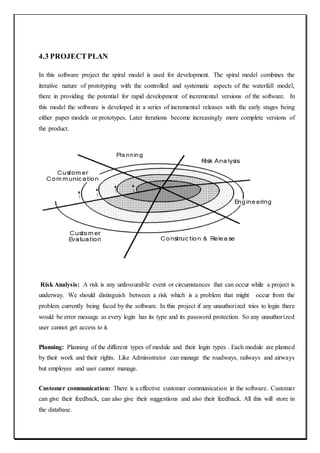
In this software project the spiral model is used for development. The spiral model combines the
iterative nature of prototyping with the controlled and systematic aspects of the waterfall model,
there in providing the potential for rapid development of incremental versions of the software. In
this model the software is developed in a series of incremental releases with the early stages being
either paper models or prototypes. Later iterations become increasingly more complete versions of
the product.
Risk Analysis: A risk is any unfavourable event or circumstances that can occur while a project is
underway. We should distinguish between a risk which is a problem that might occur from the
problem currently being faced by the software. In this project if any unauthorized tries to login there
would be error message as every login has its type and its password protection. So any unauthorized
user cannot get access to it.
Planning: Planning of the different types of module and their login types . Each module are planned
by their work and their rights. Like Administrator can manage the roadways, railways and airways
but employee and user cannot manage.
Customer communication: There is a effective customer communication in the software. Customer
can give their feedback, can also give their suggestions and also their feedback. All this will store in
the database.
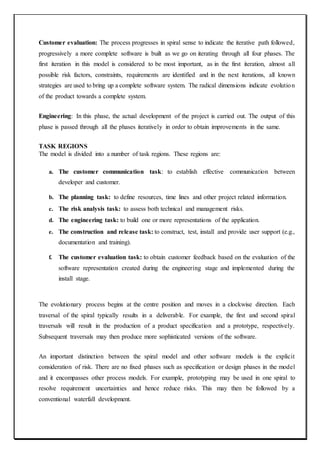
Customer evaluation: The process progresses in spiral sense to indicate the iterative path followed,
progressively a more complete software is built as we go on iterating through all four phases. The
first iteration in this model is considered to be most important, as in the first iteration, almost all
possible risk factors, constraints, requirements are identified and in the next iterations, all known
strategies are used to bring up a complete software system. The radical dimensions indicate evolution
of the product towards a complete system.
Engineering: In this phase, the actual development of the project is carried out. The output of this
phase is passed through all the phases iteratively in order to obtain improvements in the same.
TASK REGIONS
The model is divided into a number of task regions. These regions are:
a. The customer communication task: to establish effective communication between
developer and customer.
b. The planning task: to define resources, time lines and other project related information.
c. The risk analysis task: to assess both technical and management risks.
d. The engineering task: to build one or more representations of the application.
e. The construction and release task: to construct, test, install and provide user support (e.g.,
documentation and training).
f. The customer evaluation task: to obtain customer feedback based on the evaluation of the
software representation created during the engineering stage and implemented during the
install stage.
The evolutionary process begins at the centre position and moves in a clockwise direction. Each
traversal of the spiral typically results in a deliverable. For example, the first and second spiral
traversals will result in the production of a product specification and a prototype, respectively.
Subsequent traversals may then produce more sophisticated versions of the software.
An important distinction between the spiral model and other software models is the explicit
consideration of risk. There are no fixed phases such as specification or design phases in the model
and it encompasses other process models. For example, prototyping may be used in one spiral to
resolve requirement uncertainties and hence reduce risks. This may then be followed by a
conventional waterfall development.
Each of the regions is populated by a set of work tasks called a task set that are adapted to
characteristics of the project to be undertaken. For small projects the number of tasks and their
formality is low. Conversely, for large projects the reverse is true.
Why we selectedSPIRAL MODELto work on?
• The spiral model is a realistic approach to the development of large-scale software products
because the software evolves as the process progresses. In addition, the developer and the
client better understand and react to risks at each evolutionary level.
• The model uses prototyping as a risk reduction mechanism and allows for the development
of prototypes at any stage of the evolutionary development.
• It maintains a systematic stepwise approach, like the classic life cycle model, but
incorporates it into an iterative framework that more reflect the real world.
If employed correctly, this model will reduce risks before they become problematic, as consideration
of technical risks are considered at all stages.
Section:5
SOFTWARE REQUIREMENT ANALYSIS
5.1 INTRODUCTION
The project is being developed in Unity engine. Unity engine is used as front end. And for back
end C# is used. We use Android sdk to switch the platform to Android in Unity.
C# is used for event Handling. Android SDK tools are used to provide platform for android
development.
Unity (engine)
• A 3D engine of course, is a physics engine that handles the laws and behaviors of various
game objects.
• It also handles the rendering of graphics, lighting and physics like gravity and momentum
and may even have some gameplay elements included.
• If you want to create a 3D engine from scratch, you’ll need to code everything from the way
a glass falls off a table down to the way it bounces and refracts light on the way down.
• Unity3D is one of the simplest and has an interface that makes it almost ‘game maker’ like.
It also has the advantage of being truly cross platform.
• you can build a game in Unity3D and then publish it to Android, iOS, Windows, Windows
Mobile, MacOS, Linux… even PS4 and Xbox One.
C#
 C# executes faster and it has some language features which provide significant advantages
over UnityScript.
 Developing with C# has advantage of Visual studio. It provides better code compilation
features than Mono develop.
 The majority of Assets on stores are developed using C# or offer both JS and C#.
 C# is popular, mature, native to .NET and JS.
Advantages of C# over JS in Unity
 Both languages are great, but most people find that JS is best for smaller projects and C# as
the better documented.
 Most plugins in Unity are written in C# (or C# wrapped dlls ) but you can access them even
from Js.
 Performance in C# is superior, but not a deal breaker for Js.
 Functionalities used to be much better in C#, low level access doesn't really exist in either of
them, though you can use pointers in C# and do marshalling etc .
Android SDK
We have to switch the platform to android from Unity.
The following steps are involved in switching the platform.(by default platform is Linux ,Mac
Standlone).
 Go to the Android developers site(http://developer.android.com/sdk/index.html).
 Download the Android SDK Tools (also referred to on the site as "the command line
tools"), rather than the full download of Android Studio.
 Unzip the downloaded file. The resulting directory is the directory that contains the
Android SDK Tools.
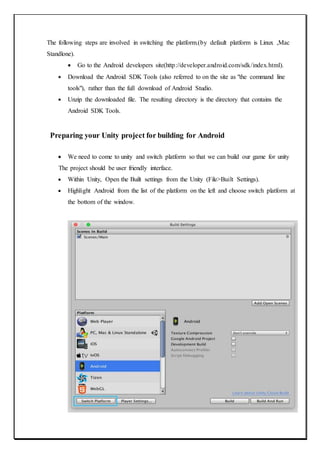
Preparing your Unity project for building for Android
 We need to come to unity and switch platform so that we can build our game for unity
The project should be user friendly interface.
 Within Unity, Open the Built settings from the Unity (File>Built Settings).
 Highlight Android from the list of the platform on the left and choose switch platform at
the bottom of the window.
5.2. GENERALDISCRIPTION
5.2.1 Constraints
1) The Space can be limited if not properly handled.
2) The project will only work within a particular platform.
3) Shortcomings in software design.
4) GUI is only in English.
5) Can unable to fulfil user’s expectations from game.
5.2.3 Dependencies
The project depends upon the following:-
1) The project depends on the design document.
2) Depends upon the Platform..
3) depend upon the policies so that people can use it.
4) Depend upon well defined requirements.
5) Project depends upon the users and Administrator.
5.3 SPECIFIC REQUIREMENTS
5.3.1 Logical Data Requirements
For developing this project, developer use different types of data which will be mentioned in Design
document.
5.3.2 Functional Requirements
 Physics - the car will have to be able to move using the front two wheels for
steering and depending on the drive of the system, whether power is applied to
all wheels, just the front two or the back two. This physics only needs to be
simulated in 2D in a top down perspective. When a car hits an object it, such as
another car or building, it will disappeared.
 User interface - the interface will consists of various screens, they must all be
attractive and appealing; below is a list of them:
* Main menu - this should be the first screen shown and is the main
access point to other screens;
* Levels screen - change various levels in game and its parameters; .
* Game screen - where the user actually plays the game;
# Pause screen - shown when the user wishes to pause the game
 Artificial Intelligence - should have some additional cars that the player can race
against to make the game more entertaining for the user.
 Graphics - We will draw the majority of the graphics ourself and will try to make
them as appealing as possible.
 Camera - to make my game consistent with the top down genre, the camera will
follow the player and render everything that is in view.
 Adapt - the game should be able to adapt to various Android screen sizes.
 Consistent - the game should use an attractive colour scheme and use clear fonts
 Small download - the size of the file is important, Android users do not like
unnecessary large files on their phone; I aim to make the game under 25MB.
 Run well - the game must run with a minimum of 30 frames per second.
5.3.3 Technical requirements
Tools- , Android JDK-2.3(software development kit-2.3),Unity(5.6 of 3) game engine
Technologies used- C#
5.3.4 Software Requirements
• Android SDK 2.1 or Later.
• Unity 5.4 or Later
• Mono Developer
• Visual-Studio is strongly recommended.
5.3.5 Quality Requirements
The Quality of System will be determined and analyzed using various factors:
• Compatible to all platform versions.
• Compatible to requirements
• Scalability
• Correctness
• Completeness
• Fault – Tolerance
• Proper Documentation
Section:6
DESIGN
6.1 SYSTEM DESIGN
Systems design is simply the design of systems. It implies a systematic and rigorous approach to
design—an approach demanded by the scale and complexity of many systems problems.
The purpose of System Design is to create a technical solution that satisfies the functional
requirements for the system. At this point in the project lifecycle there should be a Functional
Specification , containing a complete description of the operational needs of the various
organizational entities that will use the new system. The challenge is to translate all of this
information into Technical Specifications that accurately describe the design of the system, and that
can be used as input to System Construction.
The Functional Specification produced during System Requirements Analysis is transformed into a
physical architecture. System components are distributed across the physical architecture, usable
interfaces are designed and prototyped, and Technical Specifications are created for the Application
Developers, enabling them to build and test the system.
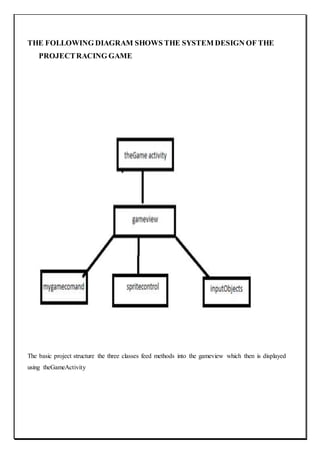
THE FOLLOWING DIAGRAM SHOWS THE SYSTEM DESIGN OF THE
PROJECTRACING GAME
The basic project structure the three classes feed methods into the gameview which then is displayed
using theGameActivity
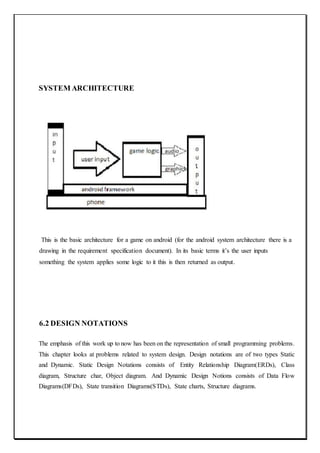
SYSTEM ARCHITECTURE
This is the basic architecture for a game on android (for the android system architecture there is a
drawing in the requirement specification document). In its basic terms it’s the user inputs
something the system applies some logic to it this is then returned as output.
6.2 DESIGN NOTATIONS
The emphasis of this work up to now has been on the representation of small programming problems.
This chapter looks at problems related to system design. Design notations are of two types Static
and Dynamic. Static Design Notations consists of Entity Relationship Diagram(ERDs), Class
diagram, Structure char, Object diagram. And Dynamic Design Notions consists of Data Flow
Diagrams(DFDs), State transition Diagrams(STDs), State charts, Structure diagrams.
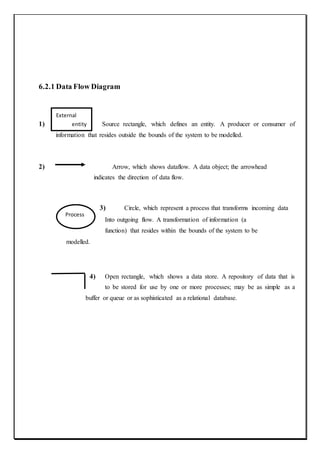
6.2.1 Data Flow Diagram
External
1) entity Source rectangle, which defines an entity. A producer or consumer of
information that resides outside the bounds of the system to be modelled.
2) Arrow, which shows dataflow. A data object; the arrowhead
indicates the direction of data flow.
3) Circle, which represent a process that transforms incoming data
Into outgoing flow. A transformation of information (a
function) that resides within the bounds of the system to be
modelled.
4) Open rectangle, which shows a data store. A repository of data that is
to be stored for use by one or more processes; may be as simple as a
buffer or queue or as sophisticated as a relational database.
Process
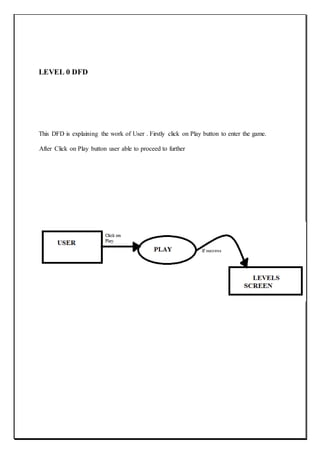
LEVEL 0 DFD
This DFD is explaining the work of User . Firstly click on Play button to enter the game.
After Click on Play button user able to proceed to further
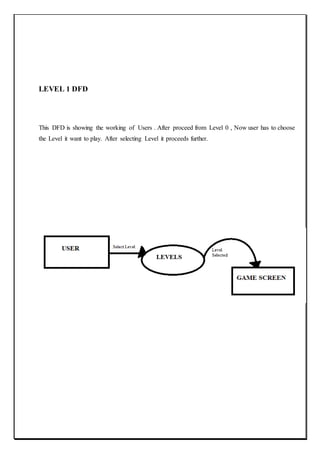
LEVEL 1 DFD
This DFD is showing the working of Users . After proceed from Level 0 , Now user has to choose
the Level it want to play. After selecting Level it proceeds further.
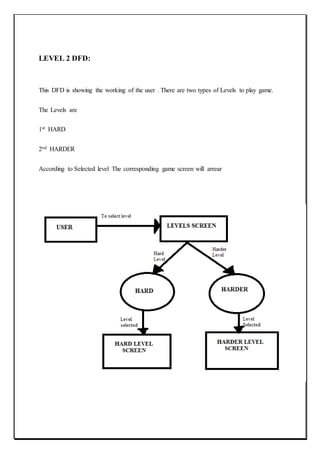
LEVEL 2 DFD:
This DFD is showing the working of the user . There are two types of Levels to play game.
The Levels are
1st HARD
2nd HARDER
According to Selected level The corresponding game screen will arrear
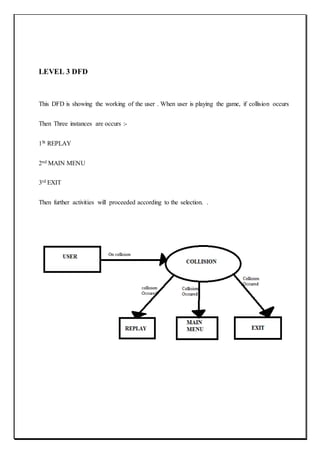
LEVEL 3 DFD
This DFD is showing the working of the user . When user is playing the game, if collision occurs
Then Three instances are occurs :-
1St REPLAY
2nd MAIN MENU
3rd EXIT
Then further activities will proceeded according to the selection. .
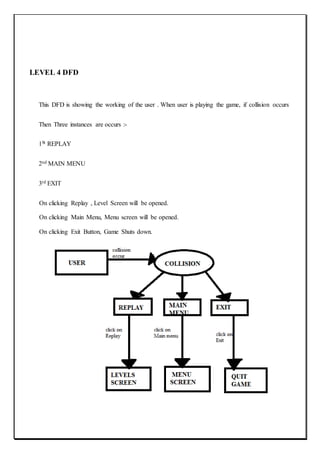
LEVEL 4 DFD
This DFD is showing the working of the user . When user is playing the game, if collision occurs
Then Three instances are occurs :-
1St REPLAY
2nd MAIN MENU
3rd EXIT
On clicking Replay , Level Screen will be opened.
On clicking Main Menu, Menu screen will be opened.
On clicking Exit Button, Game Shuts down.
6.3 DETAILED DESIGN
Detailed design of the system is the last design activity before implementation begins. The hardest
design problems must be addressed by the detailed design or the design is not complete. The detailed
design is still an abstraction as compared to source code, but should be detailed enough to ensure
that translation to source is a precise mapping instead of a rough interpretation.
The detailed design should represent the system design in a variety of views where each view uses
a different modeling technique. By using a variety of views, different parts of the system can be
made clearer by different views. Some views are better at elaborating a systems states whereas other
views are better at showing how data flows within the system. Other views are better at showing
how different system entities relate to each through class taxonomies for systems that are designed
using an object-oriented approach.
A template for detailed design would not be of much use since each detailed design is likely to be
unique and quite different from other designs. What is helpful in regards to guidance on detailed
design are examples. This page provides some detailed design content for the example microwave
oven system that is referenced periodically by this website.
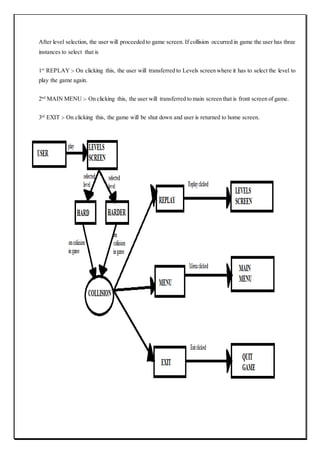
The detailed diagram for Survival of the Fastest is:-
After front screen (Main Menu) open, the user has to click on Play button to proceed further. if user clicks the
play button then it will proceeded to the Levels page where user has to select the level to play the game .
After level selection, the user will proceeded to game screen. If collision occurred in game the user has three
instances to select that is
1st
REPLAY :- On clicking this, the user will transferred to Levels screen where it has to select the level to
play the game again.
2nd
MAIN MENU :- On clicking this, the user will transferred to main screen that is front screen of game.
3rd
EXIT :- On clicking this, the game will be shut down and user is returned to home screen.
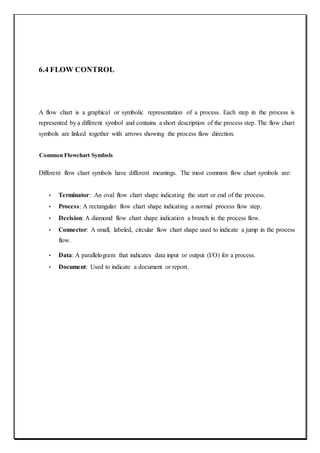
6.4 FLOW CONTROL
A flow chart is a graphical or symbolic representation of a process. Each step in the process is
represented by a different symbol and contains a short description of the process step. The flow chart
symbols are linked together with arrows showing the process flow direction.
Common Flowchart Symbols
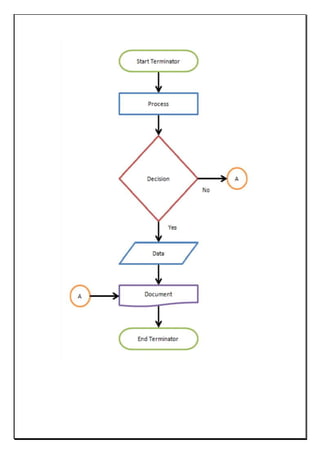
Different flow chart symbols have different meanings. The most common flow chart symbols are:
• Terminator: An oval flow chart shape indicating the start or end of the process.
• Process: A rectangular flow chart shape indicating a normal process flow step.
• Decision: A diamond flow chart shape indication a branch in the process flow.
• Connector: A small, labeled, circular flow chart shape used to indicate a jump in the process
flow.
• Data: A parallelogram that indicates data input or output (I/O) for a process.
• Document: Used to indicate a document or report.
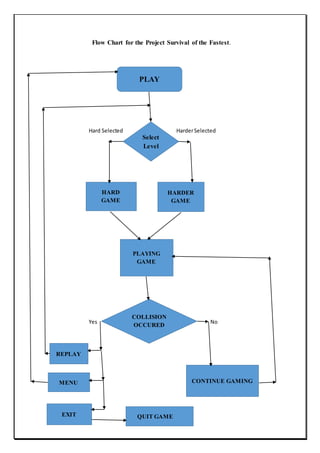
Flow Chart for the Project Survival of the Fastest.
Hard Selected HarderSelected
Yes No
PLAY
Select
Level
HARD
GAME
HARDER
GAME
PLAYING
GAME
COLLISION
OCCURED
REPLAY
MENU
EXIT
CONTINUE GAMING
QUIT GAME
Section: 7
TESTING
7.1 FUNCTIONAL TESTING
Function testing verifies that each function of the software application operates in conformance with
the requirement specification. The testing mainly involves black box testing and it is not concerned
with the source code. The functionality of the system by providing appropriate input, verifying the
output and comparing the actual result with expected result.
Functional testing can be performed on survival of the fastest to check that the appropriate output is
coming from the input provided. Each Activity in Survival of the fastest include validation in which
the next activity is depend upon the user choice.
7.2 STRUCTURAL TESTING
The structural testing is the testing of the structure of the system or component. Structural testing is
often referred to as ‘white box’ or ‘glass box’ or ‘clear-box testing’ because in structural testing,
testing is done to check what is happening inside the system. In structural testing the testers are
required to have the knowledge of the internal implementations of the code. Here the testers require
knowledge of how the software is implemented, how it works.
In Survival of the fastest structural testing is done to check how the loops in the software are working.
Different test cases may be derived to exercise the loop once, twice, and many times. This may be
done regardless of the functionality of the software. Structural testing checks whether the code
written is correct or not. The code in tour and travel is written correctly and is error free. It check
that the menu option is working properly or not. And all the menu Items including the correct link
to the correct from.
7.3 LEVEL OF TESTING
There are different levels during the process of Testing.Levels of testing include the different
methodologies that can be used while conducting Software Testing. Following are the main
levels of Software Testing:
• Functional Testing.
• Non-Functional Testing.
Functional Testing
Functional testing can be performed on survival of the fastest to check that the appropriate output is
coming from the input provided. Each Activity in Survival of the fastest include validation in which
the next activity is depend upon the user choice.
i. Unit Testing
Is this testing is done by the developers on the individual units of source code assigned area. The
developers use test data that is separate from the test data of the quality assurance team. The goal
of unit testing is to isolate each part of the program and show that individual parts are correct in
terms of requirements and functionality.
In this we have tested each and every module separately just to know that they are working properly
and giving the desired output.
ii. Integration Testing
The testing of combined parts of an application to determine if they function correctly together is
Integration testing.
In this phase of testing we are emphasizing on how two or more applications or functions are
working with each other . like how are they activities are depend upon each other, which activity is
come under which module.
iii. System Testing
This is the next level in the testing and tests the system as a whole. Once all the components are
integrated, the application as a whole is tested rigorously to see that it meets Quality Standards.
This type of testing is performed by a specialized testing team.
System testing is so important because of the following reasons:
• System Testing is the first step in the Software Development Life Cycle, where the
application is tested as a whole.
• The application is tested thoroughly to verify that it meets the functional and technical
specifications.
• The application is tested in an environment which is very close to the production
environment where the application will be deployed.
• System Testing enables us to test, verify and validate both the business requirements as well
as the Applications Architecture
• iv. Alpha Testing
This test is the first stage of testing and will be performed amongst the teams (developer and QA
teams). Unit testing, integration testing and system testing when combined are known as alpha
testing. During this phase, the following will be tested in the application:
• Spelling Mistakes
• Broken Links
• Cloudy Directions
• The Application will be tested on machines with the lowest specification to test loading times
and any latency problems.
v. Beta Testing
This test is performed after Alpha testing has been successfully performed. In beta testing a sample
of the intended audience tests the application. Beta testing is also known as pre-release testing.
Beta test versions of software are ideally distributed to a wide audience on the Web, partly to give
the program a "real-world" test and partly to provide a preview of the next release. In this phase
the audience will be testing the following:
• Users will install, run the application and send their feedback to the project team.
• Typographical errors, confusing application flow, and even crashes.
• Getting the feedback, the project team can fix the problems before releasing the software to
the actual users.
• The more issues you fix that solve real user problems, the higher the quality of your
application will be.
• Having a higher-quality application when you release to the general public will increase
customer satisfaction.
Non-Functional Testing
This section is based upon the testing of the application from its non-functional attributes.
Nonfunctional testing of Software involves testing the Software from the requirements which are
non functional in nature related but important a well such as performance, security, user interface
etc.
Some of the important and commonly used non-functional testing types are mentioned as follows:
i. Performance Testing
It is mostly used to identify any bottlenecks or performance issues rather than finding the bugs in
software. There are different causes which contribute in lowering the performance of software:
• Network delay.
• Client side processing.
• Database transaction processing. Load balancing between servers.
• Data rendering.
•
Performance testing is considered as one of the important and mandatory testing type in terms of
following aspects:
• Speed (i.e. Response Time, data rendering and accessing)
• Capacity
• Stability
• Scalability
Section: 8
IMPLEMENTATION
8.1 SNAPSHOT
8.1.1 START PAGE
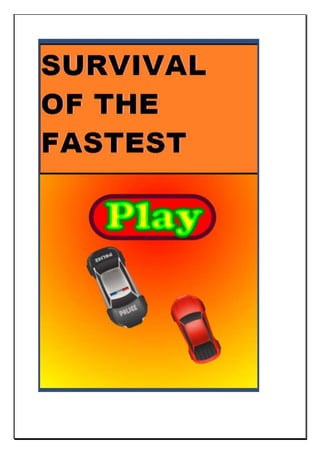
The start page also known as Main Menu, User will click on Play button .This page is created in MS
Window Paint . The Play button is used from UI components of Unity. Event Handling and Activity
Sequencing is done in C#.
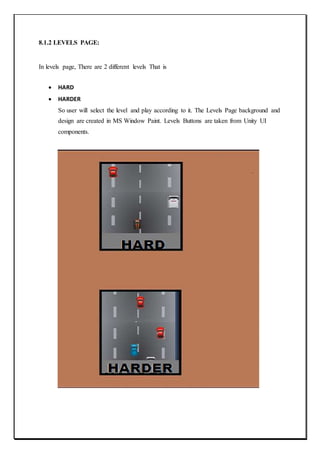
8.1.2 LEVELS PAGE:
In levels page, There are 2 different levels That is
 HARD
 HARDER
So user will select the level and play according to it. The Levels Page background and
design are created in MS Window Paint. Levels Buttons are taken from Unity UI
components.
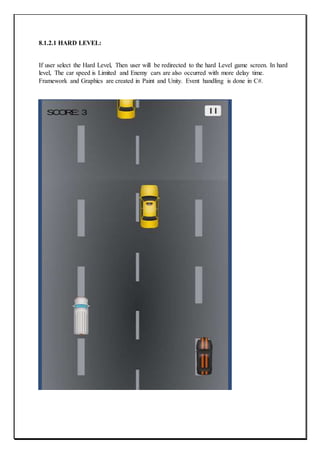
8.1.2.1 HARD LEVEL:
If user select the Hard Level, Then user will be redirected to the hard Level game screen. In hard
level, The car speed is Limited and Enemy cars are also occurred with more delay time.
Framework and Graphics are created in Paint and Unity. Event handling is done in C#.
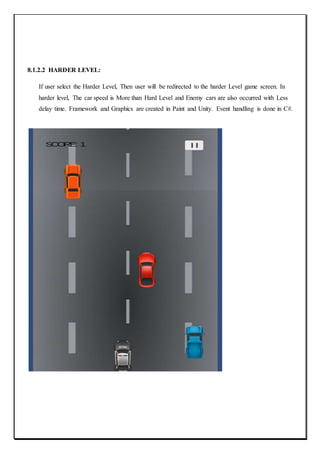
8.1.2.2 HARDER LEVEL:
If user select the Harder Level, Then user will be redirected to the harder Level game screen. In
harder level, The car speed is More than Hard Level and Enemy cars are also occurred with Less
delay time. Framework and Graphics are created in Paint and Unity. Event handling is done in C#.
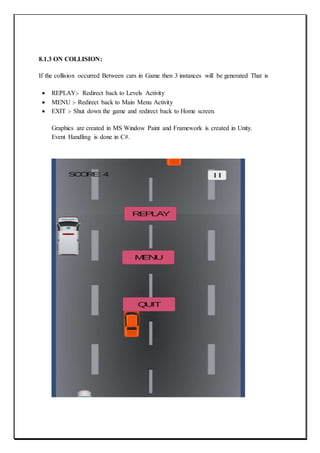
8.1.3 ON COLLISION:
If the collision occurred Between cars in Game then 3 instances will be generated That is
 REPLAY:- Redirect back to Levels Activity
 MENU :- Redirect back to Main Menu Activity
 EXIT :- Shut down the game and redirect back to Home screen.
Graphics are created in MS Window Paint and Framework is created in Unity.
Event Handling is done in C#.
Section:9
PROJECTLEGACY
9.1 CURRENT STATUS OF THE PROJECT
The proposed system is concerned with the following areas:
• Creating of playable game.
• Containing Graphics and Framework.
• Automatically generating the instances.
• Moving the Car on track
• Creating enemy cars randomly on track.
• Creating Enemy cars at different delays.
• Enemy cars are act as hurdles for user’s car.
• Increasing scores with moving car.
• Accelerometer to move the car left and right.
9.2 REMAINING AREA OF CONCERN
Many more areas can be included in the proposed system such that it can be have more levels and
activities.
This will make the system Attractive and more general.
Area which can be included in the system are:-
• Settings activity that can be occurred after Menu in which user can choose the controls and
other options like audio settings or also vehicle settings.
.
• Accelerator and brakes can be added to the game for better controls. It can make our project
more general and Attractive.
Section:10
USER MANUAL
10.1 A COMPLETE DOCUMENT OF THE SOFTWARE DEVELOPED.
First of all there is a start page, under start page there is main menu
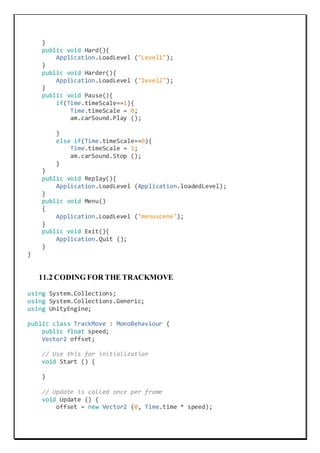
UIManager: In UIManager, all the Fuctions are defined and call in their respected components.
Functions like Play(), Pause(), Menu(), Audio(), Start(), Update(), Exit(), Awake() etc are defined
under UIManager. Components like audio, Scores are also defined in UIManager.
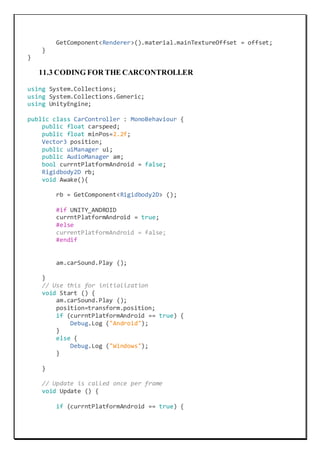
TrackMove: In this the movement of track is defined. Means directions and speed of track is defined
under TrackMove module.
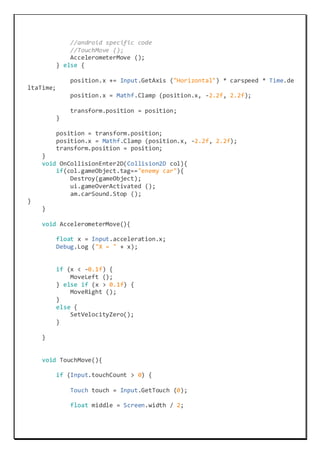
CarController: In this controlling of user’s car is defined. All the components like direction, speed
movements, controls etc are defined in CarController Module. The functions like Accelerometer(),
TouchMove(), MoveLeft(), MoveRight() etc are defined under this module.
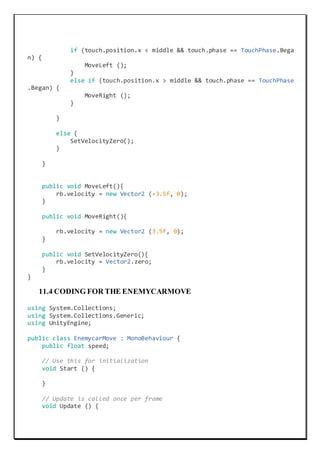
EnemyCarMove: In this movement of enemy car is defined. Means the direction and speed of car
is defined under this module.
CarSpawner: In this position, cars, delay timers etc are defined. Delay timer means after after how
many delay next car will be created. Random.range() function is for creating enemy cars randomly
after particular delay.
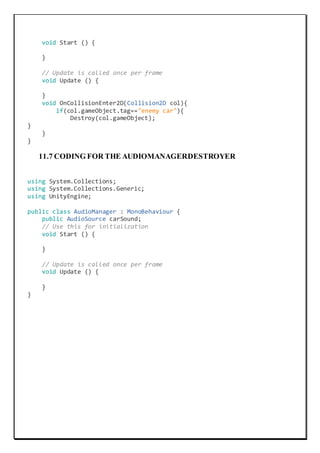
EnemyDestroyer: In this, what happens on collision is defined. Means OnCollisionEnter2D()
method is defined under this module. Here we define that on Collision user’s car will be destroyed.
AudioManager : In this, we are define that which audio source will be played when car is moving
or destroyed.
Section:11
SOURCE CODE
11.1 CODING FOR THE UIMANAGER
using System.Collections;
using System.Collections.Generic;
using UnityEngine;
using UnityEngine.UI;
public class uiManager : MonoBehaviour {
//public Button[] buttons;
public Button[] buttons;
public Text scoreText;
bool gameOver;
int score;
public AudioManager am;
// Use this for initialization
void Start () {
gameOver = false;
score = 0;
InvokeRepeating ("scoreUpdate", 7.5f, 0.8f);
}
// Update is called once per frame
void Update () {
scoreText.text = "SCORE: " + score;
}
void scoreUpdate(){
if (gameOver == false) {
score += 1;
}
}
public void gameOverActivated(){
gameOver = true;
foreach (Button button in buttons) {
button.gameObject.SetActive(true);
}
}
public void Play()
{
Application.LoadLevel ("Levels");
}
public void Hard(){
Application.LoadLevel ("Level1");
}
public void Harder(){
Application.LoadLevel ("level2");
}
public void Pause(){
if(Time.timeScale==1){
Time.timeScale = 0;
am.carSound.Play ();
}
else if(Time.timeScale==0){
Time.timeScale = 1;
am.carSound.Stop ();
}
}
public void Replay(){
Application.LoadLevel (Application.loadedLevel);
}
public void Menu()
{
Application.LoadLevel ("menuscene");
}
public void Exit(){
Application.Quit ();
}
}
11.2 CODING FOR THE TRACKMOVE
using System.Collections;
using System.Collections.Generic;
using UnityEngine;
public class TrackMove : MonoBehaviour {
public float speed;
Vector2 offset;
// Use this for initialization
void Start () {
}
// Update is called once per frame
void Update () {
offset = new Vector2 (0, Time.time * speed);
GetComponent<Renderer>().material.mainTextureOffset = offset;
}
}
11.3 CODING FOR THE CARCONTROLLER
using System.Collections;
using System.Collections.Generic;
using UnityEngine;
public class CarController : MonoBehaviour {
public float carspeed;
public float minPos=2.2f;
Vector3 position;
public uiManager ui;
public AudioManager am;
bool currntPlatformAndroid = false;
Rigidbody2D rb;
void Awake(){
rb = GetComponent<Rigidbody2D> ();
#if UNITY_ANDROID
currntPlatformAndroid = true;
#else
currentPlatformAndroid = false;
#endif
am.carSound.Play ();
}
// Use this for initialization
void Start () {
am.carSound.Play ();
position=transform.position;
if (currntPlatformAndroid == true) {
Debug.Log ("Android");
}
else {
Debug.Log ("Windows");
}
}
// Update is called once per frame
void Update () {
if (currntPlatformAndroid == true) {
//android specific code
//TouchMove ();
AccelerometerMove ();
} else {
position.x += Input.GetAxis ("Horizontal") * carspeed * Time.de
ltaTime;
position.x = Mathf.Clamp (position.x, -2.2f, 2.2f);
transform.position = position;
}
position = transform.position;
position.x = Mathf.Clamp (position.x, -2.2f, 2.2f);
transform.position = position;
}
void OnCollisionEnter2D(Collision2D col){
if(col.gameObject.tag=="enemy car"){
Destroy(gameObject);
ui.gameOverActivated ();
am.carSound.Stop ();
}
}
void AccelerometerMove(){
float x = Input.acceleration.x;
Debug.Log ("X = " + x);
if (x < -0.1f) {
MoveLeft ();
} else if (x > 0.1f) {
MoveRight ();
}
else {
SetVelocityZero();
}
}
void TouchMove(){
if (Input.touchCount > 0) {
Touch touch = Input.GetTouch (0);
float middle = Screen.width / 2;
if (touch.position.x < middle && touch.phase == TouchPhase.Bega
n) {
MoveLeft ();
}
else if (touch.position.x > middle && touch.phase == TouchPhase
.Began) {
MoveRight ();
}
}
else {
SetVelocityZero();
}
}
public void MoveLeft(){
rb.velocity = new Vector2 (-3.5f, 0);
}
public void MoveRight(){
rb.velocity = new Vector2 (3.5f, 0);
}
public void SetVelocityZero(){
rb.velocity = Vector2.zero;
}
}
11.4 CODING FOR THE ENEMYCARMOVE
using System.Collections;
using System.Collections.Generic;
using UnityEngine;
public class EnemycarMove : MonoBehaviour {
public float speed;
// Use this for initialization
void Start () {
}
// Update is called once per frame
void Update () {
transform.Translate (new Vector3 (0, -
1, 0) * speed * Time.deltaTime);
}
}
11.5 CODING FOR THE CARSPAWNER
using System.Collections;
using System.Collections.Generic;
using UnityEngine;
public class CarSpawner : MonoBehaviour {
public GameObject[] cars;
int carNo;
public float maxPos = 2.3f;
float timer;
public float delayTimer;
// Use this for initialization
void Start () {
timer = delayTimer;
}
// Update is called once per frame
void Update () {
timer -= Time.deltaTime;
if(timer<=0){
Vector3 carPos = new Vector3 (Random.Range (-
2.5f, 2.6f), transform.position.y, transform.position.z);
carNo = Random.Range (0, 7);
Instantiate (cars[carNo], carPos, transform.rotation);
timer = delayTimer;
}
}
}
11.6 CODING FOR THE ENEMYDESTROYER
using System.Collections;
using System.Collections.Generic;
using UnityEngine;
public class EnemyDestroyer : MonoBehaviour {
// Use this for initialization
void Start () {
}
// Update is called once per frame
void Update () {
}
void OnCollisionEnter2D(Collision2D col){
if(col.gameObject.tag=="enemy car"){
Destroy(col.gameObject);
}
}
}
11.7 CODING FOR THE AUDIOMANAGERDESTROYER
using System.Collections;
using System.Collections.Generic;
using UnityEngine;
public class AudioManager : MonoBehaviour {
public AudioSource carSound;
// Use this for initialization
void Start () {
}
// Update is called once per frame
void Update () {
}
}
Section:12
Bibliography
1. www.google.com
2. www.tutorialspoint.com
3. www.youtube.com/user/Unity3D
4. https://unity3d.com
5. www.wikipedia.org

Report on car racing game for android

  • 1.
    CAPSTONE PROJECT (PART–II) REPORT (Project Term JANUARY-MAY, 2017) SURVIVAL OF THE FASTEST ( UNITY 5.6 of 3, ANDROID STUDIO SDK 2.3) Submitted by RAVIJOT SINGH Registration Number : 11308058 KOTI REDDY Registration Number : SUNIL KUMAR Registration Number: Project Group Number : Under the Guidance of MR. MAKUL MAHAJAN Discipline of Computer Science and Information Technology Lovely Professional University, Phagwara
  • 2.
    DECLARATION We hereby declarethat the project work entitled “SURVIVAL OF THE FASTEST” is an authentic record of our own work carried out as requirements of Capstone Project (Part-II) for the award of degree of B.Tech in CSE ( Programme Name ) from Lovely Professional University, Phagwara, under the guidance of MR. MAKUL MAHAJAN, during JANUARY to MAY, 2017). Project Group Number: Name of Student 1: RAVIJOT SINGH Registration Number: 11308058 Name of Student 2: KOTI REDDY Registration Number: Name of Student 3: SUNIL KUMAR Registration Number: (RAVIJOT SINGH ) (KOTI REDDY) (SUNIL KUMAR)
  • 3.
    CERTIFICATE This is tocertify that the declaration statement made by this group of students is correct to the best of my knowledge and belief. The Capstone Project Proposal based on the technology / tool learnt is fit for the submission and partial fulfilment of the conditions for the award of B.Tech in CSE from Lovely Professional University, Phagwara. Name : MR. MAKUL MAHAJAN U.ID: 14575 Designation : LECTURER Signature of Mr. Makul Mahajan
  • 4.
    ACKNOWLEDGEMENT It is apleasure to find myself penning down these lines to express my sincere thanks to all my coordinators to give me this opportunity of preparing this project, to enhance my professional practice. This project required hard work, sincerity and devotion that I tried my best to put in this project and in turn gained a lot of knowledge and confidence from this project. We are grateful to our Project Guide Mr. Makul Mahajan for the inspiration and the constructive suggestions that helped me in preparation of the project Survival of the fastest. Finally I thank the almighty god with whose grace I was always motivated and deeply engrossed with my project during the entire duration from its conception to success. Ravijot singh Koti Reddy Sunil Kumar
  • 5.
    INDEX SECTION.............................................................................................................................. PAGE NO SECTION:1 INTRODUCTION..................................................................................................1 1.2. Target Audience and Beneficiaries………………………………………..........2 SECTION: 2 PROFILE OF THE PROJECT………………………………………………..3 2.1 BACKGROUND…………................................................................................ 3 2.1.1 ANDROID DEVELOPMENT………….................................................... 4 2.2 PURPOSE ........................................................................................................... 4 2.3 SCOPE .................................................................................................................5 SECTION: 3 EXISTING APPLICATIONS………………………………………………..5 3.1 INTRODUCTION TO EXISTING APPLICATIONS……………………...5 3.1.1 MICROMACHINE…………..………………………………………………..6 3.1.2 REAL WORLD RACING………………….……………………………………..7 3.1.3 RETRO RACING…………………………….…………………………………..8 3.2 SELECTING FEATURES FROM EXISTING SYSTEM………………….…..9 SECTION: 4 FRAMEWORK…………………………………………………………………..10 4.1 TOOLS AND TECHNIQUES USED………………………………………………………11
  • 6.
    4.1.1 ANDROID………………………......…………………………………………11 4.1.2 UNITY…………………………………………………………………………..12 4.2ANALYSIS………………………………………….……………………………..13 4.2.1 FEASIBILITY STUDY……………..………………………………………….13 4.3 PROJECT PLAN…………………………………………………………………..15 SECTION: 5 SOFTWARE REQUIREMENT ANALYSIS…………………………………18 5.1 INTRODUCTION…………….………………………………………………….18 5.2 GENERAL DISCRIPTION……………………………………………………21 5.2.1 CONSTRAINTS………….………………………………………………..21 5.2.2 DEPENDENCIES…………………………………………………………….21 5.3 SPECIFIC REQUIREMENTS…….……………………………………………..21 5.3.1 LOGICAL DATA REQUIREMENTS………………………………………....21 5.3.2 FUNCTIONAL REQUIREMENTS…………………………………………….21 5.3.3 TECHNICAL REQUIREMENTS………………………………………………..22 5.3.4 SOFTWARE REQUIREMENTS………………………………………………….22 5.3.5 QUALITY REQUIREMENTS……………...…………………………………..23 SECTION: 6 DESIGN…………………………………………………………………………..23 6.1 SYSTEM DESIGN………………………………………………………………23 6.2 DESIGN NOTATIONS…………………………………………………………25 6.2.1 DATA FLOW DIAGRAM……………………………………………………..26 6.3 DETAILED DESIGN………………………………………………………….32
  • 7.
    6.4 FLOW CONTROL………………………………………………………………34 SECTION:7 TESTING………………………………………………………………………….37 7.1 FUNCTION TESTING…………………….………………………..…………..37 7.2 STRUCTURAL TESTING……………………………………………………..37 7.3 LEVEL OF TESTING…………………….……………………………………..38 SECTION: 8 IMPLEMENTATION…………………………………………………………..41 8.1 SNAPSHOTS……………………………………………………………………..41 8.1.1 START PAGE…………………………….……………………………………..41 8.1. 2 LEVELS PAGE…………………………………………………………………43 8.1.2.1 HARD LEVEL…………………………………………………………………44 8.1.2.2 HARDER LEVEL……………………………………………………………..45 8.1.3 ON COLLISION……………………………………………………………….46 SECTION: 9 PROJECT LEGACY………………………………………………..…………..47 9.1 CURRENT STATUS OF THE PROJECT…………………………….……..47 9.2 REMAINING AREA OF CONCERN………………………………………..47 SECTION: 10 USER MANUAL……………………………………………………………….48 10.1 A COMPLETE DOCUMENT OF THE SOFTWARE DEVELOPED…….48 SECTION: 11 SOURCE CODE……………………………………………………………….49 11.1 UIMANAGER………………………………………………………………....49 11.2 TRACKMOVE………………………………………………………………....50 11.3 CARCONTROLLER………….……………………………………………....51
  • 8.
    11.4 ENEMYMOVE………………………………………………………………....53 11.5 CARSPAWNER………………………………………………………………....54 11.6ENEMYDESTROYE…………………………………………………………....54 11.7 AUDIOMANAGER………………………………………………………......55 SECTION 12 BIBLIOGRAPHY………………………………………………..………....56
  • 9.
    Section:1 INTRODUCTION For this finalproject, our group would like to implement a Car Racing Game based on the Android system. We try to implement a simple car game based on the basic design. The object of this game is to survive as long as possible and get to the High scores in the shortest possible time while avoiding the obstacles on the tracks. In the fast growing field of software engineering and development and even more rapidly growing sector of game development the future is hard to predict. We are working with this game as our final year Capstone project and ass a part of our degree we choose this type of work for doing better with development cycle, development period, graphics, scripting, adopting new technology, animation. In general, software project is a project focusing on creation of software. Consequently, Success can be measured by a taking look at the resulting software. In a game project ,the product is game. But and here comes the point : A game is much more than just its software. It has to provide content to become enjoyable. Just like a web server: Without content the server is useless, and the quality cannot be measured. This has an important effect on the game project as a whole. The software part of the project is not the only one, and it must be considered in connection to all the other parts: The environment of the game, The story, characters, game plays, and the artwork. The purpose of this document is to outline all aspects of the project created as part of the final year project for the CSE course. Over the following document I shall, explain the reasons for the game, explain how the game works and give you my idea for the future of this game and others which will be made from it. The main aim of this project report is to highlight the features as follows: - .To show how the project is developed. .To show the details of graphics and design. .To show how the user can work with the software.
  • 10.
    Elements Introduction Player’s carThe car that player can control Opponents The cars that compete with the player controlled by computer. Act like obstacle for player. Road The racing road which can, limiting the border for player Score Showing the current scores of player’s car Background The background picture making the game more real. 1.2. TargetAudience and Beneficiaries The application is targeted towards teenagers who enjoy playing racing games and want a new twist on the racing game genre. I will keep this in mind when designing the user interface, drawing the graphics and creating the physics. Another audience that could have interest in the project is someone who is beginning to look at game development, particularly racing games and needs guidance on how to start; then implement more advanced features such as artificial intelligence, and various other techniques. I would consider myself as a beneficiary as I have improved a lot of my existing programming skills and gained a lot of additional knowledge of various topics such as Object Orientated Programming.
  • 11.
    Section:2 PROFILE OF THEPROJECT 2.1 BACKGROUND This project is creation and implementation of game using the Android system and our Final year project. The reasons for creating the game on the Android system are many, The android market currently has the largest market share of the mobile devices and is growing, it eliminates the need for expensive hardware as most(if not all) the Android development tools are freely available. The reason for developing a Mobile game is that it is currently growing and vibrant market with more people playing mobile games than tradition games on console meaning a greater market share potential and can be developed without needing a team of people. Lastly why develop a game, A game is unlike anything we have developed before needing a lot of planning and logical thinking but the structure of the game constantly changing states presented a unique challenge and we’ve always has a keen interest games in which we why we wish to understand how they worked. The project proposal for this game contains a plan for the development of a racing game however as stated before this idea is more accessible and allows for greater enjoyment while still implementing several key racing concepts (movement, collisions). 2.1.1 ANDROID DEVELOPMENT Before actually discussing Android development, I will briefly talk about the Android platform. Android is an operating system based on the Linux kernel and designed predominantly for touchscreen mobile devices such as smartphones and tablets. It was first developed by Android Inc., which Google backed financially and later bought in 2005. Android was officially revealed in 2007 along with the founding of the Open Handset Alliance - a group of hardware, software, and telecommunication companies keen to progress open standards for mobile devices (Android, n.d.). Android provides a rich application framework that allows anyone to build innovative apps and games for mobile devices. Android development is the process of creating applications for the Android operating system. They are usually developed in the JAVA programming language using the Android SDK, but there are many other development tools available to use. As of July 2013, more than 1 million applications have been developed for Android (Warren, 2013). Android devices can be interacted with using touch inputs, such as swiping, tapping and pinching. There is also
  • 12.
    internal hardware suchas accelerometers, gyroscopes and proximity sensors that also allow a unique form of interaction. 2.2 PURPOSE  The purpose of this project was the creation of an easy to use, pick up and play game that could be played by all ages as long as they have an android phone and a touch screen. The reason was as stated above there are more casual gamers than traditional gamers meaning a larger potential market. Developing on the Android platform will mean we have to program in JAVA or C# and get to grips with the Android SDK. I will also have to learn the fundamentals of game programming and stick to the lifecycle associated with developing games. The Android SDK does not provide a comprehensive set of tools to create a game straight away; it does require a lot of extra work. I could potentially create my own framework or perhaps use an existing one, to ease the process and produce software that is appealing and efficient  The purpose of this document is to set up the requirements for the development of Android 2D car racing game. The intended customer is really anyone with an android device. A car game is simple and fun to play making it available to anyone. 2.3 SCOPE The scope of the project is to develop an Android 2d car game. The system shall use the Android accelerometer to detect movement for turning the car. The Android type will be 2.3. This game idea was suggested by other students and refined after talking to a lecturer. This project will be built in Unity(game development tool) tested using Android sdk(this a tool-kit). I will run the project on an android phone when finished for testing purposes but most testing will take place on the android emulator(called android emulator and comes with the android sdk). This project has a six month time restraint.
  • 13.
    Section:3 EXISTING APPLICATIONS 3.1 INTRODUCTIONTOEXISTING APPLICATIONS: There are many racing games that exist in today’s market which have been around for many years. They range from ultra-realistic simulations such as Gran Turismo, which take into account many factors to make the game as close to the real thing as possible, to the casual arcade racer such as Mario Kart. I used my personal knowledge of the games to discover existing applications and search engines to discover more of them. The ones I had not heard of, I tried out 3.1.1MICROMACHINE
  • 14.
    Micro Machines isone of the first top down racing games and at the time of its release, received very good reviews. It involves racing miniatures of various vehicle types across a particular terrain found around the house; for example, on a desk, in the sandpit and even a snooker table. The game is available to play on NES, Amiga, PlayStation 2, Xbox, GameCube, Game Boy Advance and various other consoles (Servo, 2002). We will aim to mimic its style and simplicity. 3.1.2. REALWORLD RACING
  • 15.
    Real World Racingis a top-down racing game using satellite images that lets you race through the world’s biggest cities such as London, Paris, Berlin and Rome (Playstos, n.d.). The game is available to download on PC via the Steam Store. The maps have a similar system to what I will use, i.e how to set the view and how to set the limits. As a developer, as I want that the player only move that much and set boundries so that it go in particular direction and player is able to control from the top view. 3.1.3. RETRORACING
  • 16.
    Retro Racing isa fun and simple top down racing game available to download on various platforms including Android (Mr Qwak, 2014). I will take a lot of inspiration from this game for the interface and the control layout. The main menu is attractive .The physics are relatively simple and the graphics clean and appealing. The controls are straightforward and I like the fact that they are semi-transparent so it does not completely obstruct the view of the game. 3.2 SELECTING FEATURESFROM EXISTING SYSTEM After reviewing the games, We now have to identify all the features that we would implement. we have gained a lot of knowledge from our research; despite being an enthusiastic racing gamer, we still managed to find games that we had not previously heard of such as Real World Racing. All the games we tested were final products and due to the timescale, We will not be able to achieve a project that is completely finished and can be put out to the general public to play without any hiccups. From all the applications we tested, we identified the following core functions which we will implement: • Physics - The car will have to be able to move using the front two wheels for steering and depending on the drive of the system, whether power is applied to all wheels, just the front two or the back two. This physics only needs to be simulated in 2D in a top down perspective. When a car hits an object, then the relevant forces should be applied to the car and object, in the appropriate direction. Appropriate collision detection also needs to be used to identify these crashes. • Attractive user interface - The interfaces of the games tested are very appealing; each one also has a heads up display showing various in-game parameters, such as the time currently elapsed.
  • 17.
    • Artificial Intelligence- All the games tested had some form of AI to make the game more challenging and fun to play. One thing to note was that each of the cars in the game were not as powerful as the player’s cars, to make the game winnable by the player. • Graphics - This is very important to make the game more appealing; • Camera - All top down games have the same camera, the player in the centre and a view of the world around it. 4.0. FRAMEWORK To create the application , We will use various tools to ease the process. The first thing to do is to decide how, We are going to approach the project. There are numerous ways of developing games for Android phones: We do the whole thing in pure C# using the Unity and create my own framework to handle graphics and other aspects of the game, use an existing framework or even a fully-fledged game engine with lots of high level methods. There is an extensive list of engines and frameworks to use, so it is a good idea to distinguish between them. A framework gives the developer control over every aspect of the game development environment. However, this comes at a price of having to figure out your own way of doing things (for example, how you organize your game world, how you handle screens and transitions, and so on). An engine is more streamlined for specific tasks. It dictates how you should do things, giving you easy-to-use modules for common tasks and a general architecture for your game. With this crucial difference in mind, for my purposes, We think it would be best to use a Engine rather than an framework. Choosing a Engine will be difficult, so before We decide which one to use We have made a list of requirements that should be met in order for me to use it: * The language is not too important, however I would prefer C#. * It must be free to develop using it; paying for it to be publishing is ok, but I would prefer the whole thing to be free; * Cross platform is an advantage, however, it may mean that it will work well on one platform, but there may be issues or bugs on another. So if it worked natively on Android it would be better; * Documentation is very important, there must be an extensive list of documentation to describe how to utilize the various functions
  • 18.
    With those inmind, below is a table comparing the features of Android Game Engines. Engine Name Primary programmin g Language Scripting Cross Platfor m 2D,3D Orientatio n Target Platform ANVIL C++, C# Yes 3D Windows,PlayStation 3, PlayStation 4, PlayStation Vita, Wii U, Xbox 360, Xbox One ELECTRON TOOLSET C# NWScript No 3D Windows HERO ENGINE C++, C# Hero script Language No 3D Windows OPEN SIMULATO R C# LSL Yes 3D UNITY C, C++, C# Mono unity script Yes 2D, 3D Windows,OS X, Linux Xbox 360, Xbox One, Wii U, New 3DS, PlayStation 4, PlayStation Vita, Windows Phone,iOS, Android, BlackBerr y 10, Tizen, Unity Web Player, Windows Store, WebGL, Oculus Rift, Gear VR, Android TV, Samsung SmartTV UNREAL ENGINE C++, C#, Assembly GLSL,Cg,HLSL , unrealScript, C++ Yes 3D Cross-platform Each of the Engines have their strengths and weaknesses. The reason We would like for it to be cross-platform, is because it will allow for quick deployment and testing, especially if it can be compiled and run on a desktop. Taking everything into account, the one which we will use is UNITY, because of its ability to be cross-platform, it is open source(Unity Personel) and it has a very active forum (UNITY 5.6 of 3). With UNITY you code everything in C# and then it ports the code to different platforms, for example with the Android, it translates the C# code to Java.
  • 19.
    4.1. TOOLS ANDTECHNIQUES USED 4.1.1 ANDROID Android is a mobile operating system (OS) based on the Linux kernel and currently developed by Google. With a user interface based on direct manipulation, Android is designed primarily for touchscreen mobile devices such as smartphones and tablet computers, with specialized user interfaces for televisions (Android TV), cars (Android Auto), and wrist watches (Android Wear). The OS uses touch inputs that loosely correspond to real-world actions, like swiping, tapping, pinching, and reverse pinching to manipulate on-screen objects, and a virtual keyboard. Despite being primarily designed for touchscreen input, it also has been used in game consoles, digital cameras, regular PCs (e.g. the HP Slate 21) and other electronics. Android is popular with technology companies which require a ready-made, low-cost and customizable operating system for high-tech devices. Android's open nature has encouraged a large community of developers and enthusiasts to use the open-source code as a foundation for community-driven projects, which add new features for advanced users or bring Android to devices which were officially, released running other operating systems. Android, Inc. was founded in Palo Alto, California in October 2003 by Andy Rubin (co-founder of Danger), Rich Miner (co-founder of Wildfire Communications, Inc.), Nick Sears (once VP at TMobile), and Chris White (headed design and interface development at WebTV) to develop. Android SDK: The Android SDK provides the API libraries and developer tools necessary to build, test, and debug apps for Android. 4.1.2 UNITY Unity is an entire ecosystem of tools and services designed for people who want to build a successful business by creating multiplatform games and interactive content. The Unity ecosystem is available to anyone who downloads the Unity engine. The Unity engine integrates into one unparalleled platform the tools to create 2D and 3D interactive content; collaboration solutions; rapid multiplatform deployment, and retention, advertising and analytics services to grow your business. Unity is a cross-platform game creation system developed by Unity Technologies, including a game engine and integrated development environment (IDE). It is used to develop video games for web sites, desktop platforms, consoles, and mobile devices. First announced only for Mac OS, at Apple‟s
  • 20.
    Worldwide Developers Conferencein 2005, it has since been extended to target more than fifteen platforms. It is now the default software development kit (SDK) for the Nintendo Wii U. Unity is notable for its ability to target games to multiple platforms. Within a project, developers have control over delivery to mobile devices, web browsers, desktops, and consoles. Supported platforms include BlackBerry 10, Windows Phone 8, Windows, OS X, Linux (mainly Ubuntu)[citation needed], Android, iOS, Unity Web Player (including Facebook), Adobe Flash, PlayStation 3, PlayStation 4, PlayStation Vita, Xbox 360, Xbox One, Wii U, and Wii. It includes an asset server and Nvidia's PhysX physics engine. Unity Web Player is a browser plugin that is supported in Windows and OS X only. Unity is the default software development kit (SDK) for Nintendo's Wii U video game console platform, with a free copy included by Nintendo with each Wii U developer license. Unity Technologies calls this third party provisioning of a free SDK, an "industry first". 4.2 ANALYSIS 4.2.1 FEASIBILITYSTUDY A Feasibility study is undertaken to determine the possibility or portability of either improving the existing system or developing a completely new system. Feasibility is the measure of how beneficial or practical the development of information system will be to an organization. The feasibility study involves following criteria.  Wheather the identified user needs may be satisfied using current software and hardware technologies.  The study will decide if the proposed system will be cost-effective and if it can be developed given existing budgetary constraints.  The result should inform the decision of whether to go ahead with a more detailed analysis. There are three methods of feasibility study. 1. Technical feasibility 2. Economic feasibility
  • 21.
    3. Behavior feasibility Technicalfeasibility:It is measure of the practicality of specific technical solution and the availability of technical resources and expertise. Technical feasibility is computer oriented. The “Profile Manager”, “Flappy Bird” and “Nightmare” and is technical feasible because of the following reasons  In Game hardware and software requirement are easily available.  The games have a good GUI interface.  The games will have user friendly form and screen. To check whether the module technically feasible or not we have to give the following two question answer. Q-1 Is the proposed systempractical? Ans. The proposed system is definitely practical as we have all the resources available. Also building up this module requires the minimum amount of hardware & software is easily available. So, the proposed system is extremely efficient and practical. Q-2 Do we currently possess the necessary technology? Ans. Looking into the system requirement, we can see that we possess all the hardware and software requirements. Also the technology used is easily available and deployed all around the world. Economic feasibility:- It is a measure of the cost-effectiveness of a project or solution. This is often called a cost-benefit analysis. Economic feasibility deals with the cost and benefits of the information system. In the economic feasibility, the development cost of the system is evaluated weighing it against the ultimate benefit derived from the new system. It is found that the benefit from the new system would be more than the cost and time involved in its development.
  • 22.
    The Game isEconomical feasible because of the following reasons. Game requires less time to react for the user. The cost of the hardware and software are normal. GUI interface. The system provides the services for the decision making. As this not begins a conversion of the present module into and rather begins creating a new module from scratch, the cost of the module includes cost of the module development; implementation and it not include the maintenance. OperationalFeasibility: Operational feasibility covers two aspects. One is the technical performance aspect and other is the acceptance. Operational feasibility determines how the proposed system will fit in the current operations and what, if any job restructuring and retraining may be needed to implement the system. In the system operational feasibility checks, whether the user who is going to use the system is able to work with the software’’s with which the system is coded and also the mind of the user going to use the system. If the user does not understand or is able to work on the system further development is of waste Behavioralfeasibility:- Behavior feasibility determines how much effort will go in the proposed information system and in education and training efficiency on the new system It is a measure of how well the solution will work in the organization. It is also a measure of how people feel about the application. Behavior feasibility is people oriented. Some question arises in the behavior feasibility, we discuss on this question. Q-1 Is the problem worth solving or will the solution to the problem work? Ans. Yes, the problem is off course worth solving because the system existing today is more time consuming and full of extra content like advertisement, other application link etc. so, the problem is worth solving. Q-2 How the end-user feels about the problem? Ans. This Game provides a best operator specification through its user friendliness. That is any kind of training is not required to play the game. So, the non-technical person can use it.
  • 23.
    4.3 PROJECTPLAN In thissoftware project the spiral model is used for development. The spiral model combines the iterative nature of prototyping with the controlled and systematic aspects of the waterfall model, there in providing the potential for rapid development of incremental versions of the software. In this model the software is developed in a series of incremental releases with the early stages being either paper models or prototypes. Later iterations become increasingly more complete versions of the product. Risk Analysis: A risk is any unfavourable event or circumstances that can occur while a project is underway. We should distinguish between a risk which is a problem that might occur from the problem currently being faced by the software. In this project if any unauthorized tries to login there would be error message as every login has its type and its password protection. So any unauthorized user cannot get access to it. Planning: Planning of the different types of module and their login types . Each module are planned by their work and their rights. Like Administrator can manage the roadways, railways and airways but employee and user cannot manage. Customer communication: There is a effective customer communication in the software. Customer can give their feedback, can also give their suggestions and also their feedback. All this will store in the database.
  • 24.
    Customer evaluation: Theprocess progresses in spiral sense to indicate the iterative path followed, progressively a more complete software is built as we go on iterating through all four phases. The first iteration in this model is considered to be most important, as in the first iteration, almost all possible risk factors, constraints, requirements are identified and in the next iterations, all known strategies are used to bring up a complete software system. The radical dimensions indicate evolution of the product towards a complete system. Engineering: In this phase, the actual development of the project is carried out. The output of this phase is passed through all the phases iteratively in order to obtain improvements in the same. TASK REGIONS The model is divided into a number of task regions. These regions are: a. The customer communication task: to establish effective communication between developer and customer. b. The planning task: to define resources, time lines and other project related information. c. The risk analysis task: to assess both technical and management risks. d. The engineering task: to build one or more representations of the application. e. The construction and release task: to construct, test, install and provide user support (e.g., documentation and training). f. The customer evaluation task: to obtain customer feedback based on the evaluation of the software representation created during the engineering stage and implemented during the install stage. The evolutionary process begins at the centre position and moves in a clockwise direction. Each traversal of the spiral typically results in a deliverable. For example, the first and second spiral traversals will result in the production of a product specification and a prototype, respectively. Subsequent traversals may then produce more sophisticated versions of the software. An important distinction between the spiral model and other software models is the explicit consideration of risk. There are no fixed phases such as specification or design phases in the model and it encompasses other process models. For example, prototyping may be used in one spiral to resolve requirement uncertainties and hence reduce risks. This may then be followed by a conventional waterfall development.
  • 25.
    Each of theregions is populated by a set of work tasks called a task set that are adapted to characteristics of the project to be undertaken. For small projects the number of tasks and their formality is low. Conversely, for large projects the reverse is true. Why we selectedSPIRAL MODELto work on? • The spiral model is a realistic approach to the development of large-scale software products because the software evolves as the process progresses. In addition, the developer and the client better understand and react to risks at each evolutionary level. • The model uses prototyping as a risk reduction mechanism and allows for the development of prototypes at any stage of the evolutionary development. • It maintains a systematic stepwise approach, like the classic life cycle model, but incorporates it into an iterative framework that more reflect the real world. If employed correctly, this model will reduce risks before they become problematic, as consideration of technical risks are considered at all stages. Section:5 SOFTWARE REQUIREMENT ANALYSIS 5.1 INTRODUCTION The project is being developed in Unity engine. Unity engine is used as front end. And for back end C# is used. We use Android sdk to switch the platform to Android in Unity. C# is used for event Handling. Android SDK tools are used to provide platform for android development. Unity (engine) • A 3D engine of course, is a physics engine that handles the laws and behaviors of various game objects.
  • 26.
    • It alsohandles the rendering of graphics, lighting and physics like gravity and momentum and may even have some gameplay elements included. • If you want to create a 3D engine from scratch, you’ll need to code everything from the way a glass falls off a table down to the way it bounces and refracts light on the way down. • Unity3D is one of the simplest and has an interface that makes it almost ‘game maker’ like. It also has the advantage of being truly cross platform. • you can build a game in Unity3D and then publish it to Android, iOS, Windows, Windows Mobile, MacOS, Linux… even PS4 and Xbox One. C#  C# executes faster and it has some language features which provide significant advantages over UnityScript.  Developing with C# has advantage of Visual studio. It provides better code compilation features than Mono develop.  The majority of Assets on stores are developed using C# or offer both JS and C#.  C# is popular, mature, native to .NET and JS. Advantages of C# over JS in Unity  Both languages are great, but most people find that JS is best for smaller projects and C# as the better documented.  Most plugins in Unity are written in C# (or C# wrapped dlls ) but you can access them even from Js.  Performance in C# is superior, but not a deal breaker for Js.  Functionalities used to be much better in C#, low level access doesn't really exist in either of them, though you can use pointers in C# and do marshalling etc . Android SDK We have to switch the platform to android from Unity.
  • 27.
    The following stepsare involved in switching the platform.(by default platform is Linux ,Mac Standlone).  Go to the Android developers site(http://developer.android.com/sdk/index.html).  Download the Android SDK Tools (also referred to on the site as "the command line tools"), rather than the full download of Android Studio.  Unzip the downloaded file. The resulting directory is the directory that contains the Android SDK Tools. Preparing your Unity project for building for Android  We need to come to unity and switch platform so that we can build our game for unity The project should be user friendly interface.  Within Unity, Open the Built settings from the Unity (File>Built Settings).  Highlight Android from the list of the platform on the left and choose switch platform at the bottom of the window.
  • 28.
    5.2. GENERALDISCRIPTION 5.2.1 Constraints 1)The Space can be limited if not properly handled. 2) The project will only work within a particular platform. 3) Shortcomings in software design. 4) GUI is only in English. 5) Can unable to fulfil user’s expectations from game. 5.2.3 Dependencies The project depends upon the following:- 1) The project depends on the design document. 2) Depends upon the Platform.. 3) depend upon the policies so that people can use it. 4) Depend upon well defined requirements. 5) Project depends upon the users and Administrator. 5.3 SPECIFIC REQUIREMENTS 5.3.1 Logical Data Requirements For developing this project, developer use different types of data which will be mentioned in Design document. 5.3.2 Functional Requirements  Physics - the car will have to be able to move using the front two wheels for steering and depending on the drive of the system, whether power is applied to all wheels, just the front two or the back two. This physics only needs to be simulated in 2D in a top down perspective. When a car hits an object it, such as another car or building, it will disappeared.
  • 29.
     User interface- the interface will consists of various screens, they must all be attractive and appealing; below is a list of them: * Main menu - this should be the first screen shown and is the main access point to other screens; * Levels screen - change various levels in game and its parameters; . * Game screen - where the user actually plays the game; # Pause screen - shown when the user wishes to pause the game  Artificial Intelligence - should have some additional cars that the player can race against to make the game more entertaining for the user.  Graphics - We will draw the majority of the graphics ourself and will try to make them as appealing as possible.  Camera - to make my game consistent with the top down genre, the camera will follow the player and render everything that is in view.  Adapt - the game should be able to adapt to various Android screen sizes.  Consistent - the game should use an attractive colour scheme and use clear fonts  Small download - the size of the file is important, Android users do not like unnecessary large files on their phone; I aim to make the game under 25MB.  Run well - the game must run with a minimum of 30 frames per second. 5.3.3 Technical requirements Tools- , Android JDK-2.3(software development kit-2.3),Unity(5.6 of 3) game engine Technologies used- C# 5.3.4 Software Requirements • Android SDK 2.1 or Later. • Unity 5.4 or Later • Mono Developer • Visual-Studio is strongly recommended.
  • 30.
    5.3.5 Quality Requirements TheQuality of System will be determined and analyzed using various factors: • Compatible to all platform versions. • Compatible to requirements • Scalability • Correctness • Completeness • Fault – Tolerance • Proper Documentation Section:6 DESIGN 6.1 SYSTEM DESIGN Systems design is simply the design of systems. It implies a systematic and rigorous approach to design—an approach demanded by the scale and complexity of many systems problems. The purpose of System Design is to create a technical solution that satisfies the functional requirements for the system. At this point in the project lifecycle there should be a Functional Specification , containing a complete description of the operational needs of the various organizational entities that will use the new system. The challenge is to translate all of this information into Technical Specifications that accurately describe the design of the system, and that can be used as input to System Construction. The Functional Specification produced during System Requirements Analysis is transformed into a physical architecture. System components are distributed across the physical architecture, usable interfaces are designed and prototyped, and Technical Specifications are created for the Application Developers, enabling them to build and test the system.
  • 31.
    THE FOLLOWING DIAGRAMSHOWS THE SYSTEM DESIGN OF THE PROJECTRACING GAME The basic project structure the three classes feed methods into the gameview which then is displayed using theGameActivity
  • 32.
    SYSTEM ARCHITECTURE This isthe basic architecture for a game on android (for the android system architecture there is a drawing in the requirement specification document). In its basic terms it’s the user inputs something the system applies some logic to it this is then returned as output. 6.2 DESIGN NOTATIONS The emphasis of this work up to now has been on the representation of small programming problems. This chapter looks at problems related to system design. Design notations are of two types Static and Dynamic. Static Design Notations consists of Entity Relationship Diagram(ERDs), Class diagram, Structure char, Object diagram. And Dynamic Design Notions consists of Data Flow Diagrams(DFDs), State transition Diagrams(STDs), State charts, Structure diagrams.
  • 33.
    6.2.1 Data FlowDiagram External 1) entity Source rectangle, which defines an entity. A producer or consumer of information that resides outside the bounds of the system to be modelled. 2) Arrow, which shows dataflow. A data object; the arrowhead indicates the direction of data flow. 3) Circle, which represent a process that transforms incoming data Into outgoing flow. A transformation of information (a function) that resides within the bounds of the system to be modelled. 4) Open rectangle, which shows a data store. A repository of data that is to be stored for use by one or more processes; may be as simple as a buffer or queue or as sophisticated as a relational database. Process
  • 34.
    LEVEL 0 DFD ThisDFD is explaining the work of User . Firstly click on Play button to enter the game. After Click on Play button user able to proceed to further
  • 35.
    LEVEL 1 DFD ThisDFD is showing the working of Users . After proceed from Level 0 , Now user has to choose the Level it want to play. After selecting Level it proceeds further.
  • 36.
    LEVEL 2 DFD: ThisDFD is showing the working of the user . There are two types of Levels to play game. The Levels are 1st HARD 2nd HARDER According to Selected level The corresponding game screen will arrear
  • 37.
    LEVEL 3 DFD ThisDFD is showing the working of the user . When user is playing the game, if collision occurs Then Three instances are occurs :- 1St REPLAY 2nd MAIN MENU 3rd EXIT Then further activities will proceeded according to the selection. .
  • 38.
    LEVEL 4 DFD ThisDFD is showing the working of the user . When user is playing the game, if collision occurs Then Three instances are occurs :- 1St REPLAY 2nd MAIN MENU 3rd EXIT On clicking Replay , Level Screen will be opened. On clicking Main Menu, Menu screen will be opened. On clicking Exit Button, Game Shuts down.
  • 39.
    6.3 DETAILED DESIGN Detaileddesign of the system is the last design activity before implementation begins. The hardest design problems must be addressed by the detailed design or the design is not complete. The detailed design is still an abstraction as compared to source code, but should be detailed enough to ensure that translation to source is a precise mapping instead of a rough interpretation. The detailed design should represent the system design in a variety of views where each view uses a different modeling technique. By using a variety of views, different parts of the system can be made clearer by different views. Some views are better at elaborating a systems states whereas other views are better at showing how data flows within the system. Other views are better at showing how different system entities relate to each through class taxonomies for systems that are designed using an object-oriented approach. A template for detailed design would not be of much use since each detailed design is likely to be unique and quite different from other designs. What is helpful in regards to guidance on detailed design are examples. This page provides some detailed design content for the example microwave oven system that is referenced periodically by this website. The detailed diagram for Survival of the Fastest is:- After front screen (Main Menu) open, the user has to click on Play button to proceed further. if user clicks the play button then it will proceeded to the Levels page where user has to select the level to play the game .
  • 40.
    After level selection,the user will proceeded to game screen. If collision occurred in game the user has three instances to select that is 1st REPLAY :- On clicking this, the user will transferred to Levels screen where it has to select the level to play the game again. 2nd MAIN MENU :- On clicking this, the user will transferred to main screen that is front screen of game. 3rd EXIT :- On clicking this, the game will be shut down and user is returned to home screen.
  • 41.
    6.4 FLOW CONTROL Aflow chart is a graphical or symbolic representation of a process. Each step in the process is represented by a different symbol and contains a short description of the process step. The flow chart symbols are linked together with arrows showing the process flow direction. Common Flowchart Symbols Different flow chart symbols have different meanings. The most common flow chart symbols are: • Terminator: An oval flow chart shape indicating the start or end of the process. • Process: A rectangular flow chart shape indicating a normal process flow step. • Decision: A diamond flow chart shape indication a branch in the process flow. • Connector: A small, labeled, circular flow chart shape used to indicate a jump in the process flow. • Data: A parallelogram that indicates data input or output (I/O) for a process. • Document: Used to indicate a document or report.
  • 43.
    Flow Chart forthe Project Survival of the Fastest. Hard Selected HarderSelected Yes No PLAY Select Level HARD GAME HARDER GAME PLAYING GAME COLLISION OCCURED REPLAY MENU EXIT CONTINUE GAMING QUIT GAME
  • 44.
    Section: 7 TESTING 7.1 FUNCTIONALTESTING Function testing verifies that each function of the software application operates in conformance with the requirement specification. The testing mainly involves black box testing and it is not concerned with the source code. The functionality of the system by providing appropriate input, verifying the output and comparing the actual result with expected result. Functional testing can be performed on survival of the fastest to check that the appropriate output is coming from the input provided. Each Activity in Survival of the fastest include validation in which the next activity is depend upon the user choice. 7.2 STRUCTURAL TESTING The structural testing is the testing of the structure of the system or component. Structural testing is often referred to as ‘white box’ or ‘glass box’ or ‘clear-box testing’ because in structural testing, testing is done to check what is happening inside the system. In structural testing the testers are required to have the knowledge of the internal implementations of the code. Here the testers require knowledge of how the software is implemented, how it works. In Survival of the fastest structural testing is done to check how the loops in the software are working. Different test cases may be derived to exercise the loop once, twice, and many times. This may be done regardless of the functionality of the software. Structural testing checks whether the code written is correct or not. The code in tour and travel is written correctly and is error free. It check that the menu option is working properly or not. And all the menu Items including the correct link to the correct from.
  • 45.
    7.3 LEVEL OFTESTING There are different levels during the process of Testing.Levels of testing include the different methodologies that can be used while conducting Software Testing. Following are the main levels of Software Testing: • Functional Testing. • Non-Functional Testing. Functional Testing Functional testing can be performed on survival of the fastest to check that the appropriate output is coming from the input provided. Each Activity in Survival of the fastest include validation in which the next activity is depend upon the user choice. i. Unit Testing Is this testing is done by the developers on the individual units of source code assigned area. The developers use test data that is separate from the test data of the quality assurance team. The goal of unit testing is to isolate each part of the program and show that individual parts are correct in terms of requirements and functionality. In this we have tested each and every module separately just to know that they are working properly and giving the desired output. ii. Integration Testing The testing of combined parts of an application to determine if they function correctly together is Integration testing. In this phase of testing we are emphasizing on how two or more applications or functions are working with each other . like how are they activities are depend upon each other, which activity is come under which module.
  • 46.
    iii. System Testing Thisis the next level in the testing and tests the system as a whole. Once all the components are integrated, the application as a whole is tested rigorously to see that it meets Quality Standards. This type of testing is performed by a specialized testing team. System testing is so important because of the following reasons: • System Testing is the first step in the Software Development Life Cycle, where the application is tested as a whole. • The application is tested thoroughly to verify that it meets the functional and technical specifications. • The application is tested in an environment which is very close to the production environment where the application will be deployed. • System Testing enables us to test, verify and validate both the business requirements as well as the Applications Architecture • iv. Alpha Testing This test is the first stage of testing and will be performed amongst the teams (developer and QA teams). Unit testing, integration testing and system testing when combined are known as alpha testing. During this phase, the following will be tested in the application: • Spelling Mistakes • Broken Links • Cloudy Directions • The Application will be tested on machines with the lowest specification to test loading times and any latency problems.
  • 47.
    v. Beta Testing Thistest is performed after Alpha testing has been successfully performed. In beta testing a sample of the intended audience tests the application. Beta testing is also known as pre-release testing. Beta test versions of software are ideally distributed to a wide audience on the Web, partly to give the program a "real-world" test and partly to provide a preview of the next release. In this phase the audience will be testing the following: • Users will install, run the application and send their feedback to the project team. • Typographical errors, confusing application flow, and even crashes. • Getting the feedback, the project team can fix the problems before releasing the software to the actual users. • The more issues you fix that solve real user problems, the higher the quality of your application will be. • Having a higher-quality application when you release to the general public will increase customer satisfaction. Non-Functional Testing This section is based upon the testing of the application from its non-functional attributes. Nonfunctional testing of Software involves testing the Software from the requirements which are non functional in nature related but important a well such as performance, security, user interface etc. Some of the important and commonly used non-functional testing types are mentioned as follows: i. Performance Testing It is mostly used to identify any bottlenecks or performance issues rather than finding the bugs in software. There are different causes which contribute in lowering the performance of software: • Network delay.
  • 48.
    • Client sideprocessing. • Database transaction processing. Load balancing between servers. • Data rendering. • Performance testing is considered as one of the important and mandatory testing type in terms of following aspects: • Speed (i.e. Response Time, data rendering and accessing) • Capacity • Stability • Scalability Section: 8 IMPLEMENTATION 8.1 SNAPSHOT 8.1.1 START PAGE The start page also known as Main Menu, User will click on Play button .This page is created in MS Window Paint . The Play button is used from UI components of Unity. Event Handling and Activity Sequencing is done in C#.
  • 50.
    8.1.2 LEVELS PAGE: Inlevels page, There are 2 different levels That is  HARD  HARDER So user will select the level and play according to it. The Levels Page background and design are created in MS Window Paint. Levels Buttons are taken from Unity UI components.
  • 51.
    8.1.2.1 HARD LEVEL: Ifuser select the Hard Level, Then user will be redirected to the hard Level game screen. In hard level, The car speed is Limited and Enemy cars are also occurred with more delay time. Framework and Graphics are created in Paint and Unity. Event handling is done in C#.
  • 52.
    8.1.2.2 HARDER LEVEL: Ifuser select the Harder Level, Then user will be redirected to the harder Level game screen. In harder level, The car speed is More than Hard Level and Enemy cars are also occurred with Less delay time. Framework and Graphics are created in Paint and Unity. Event handling is done in C#.
  • 53.
    8.1.3 ON COLLISION: Ifthe collision occurred Between cars in Game then 3 instances will be generated That is  REPLAY:- Redirect back to Levels Activity  MENU :- Redirect back to Main Menu Activity  EXIT :- Shut down the game and redirect back to Home screen. Graphics are created in MS Window Paint and Framework is created in Unity. Event Handling is done in C#.
  • 54.
    Section:9 PROJECTLEGACY 9.1 CURRENT STATUSOF THE PROJECT The proposed system is concerned with the following areas: • Creating of playable game. • Containing Graphics and Framework. • Automatically generating the instances. • Moving the Car on track • Creating enemy cars randomly on track. • Creating Enemy cars at different delays. • Enemy cars are act as hurdles for user’s car. • Increasing scores with moving car. • Accelerometer to move the car left and right. 9.2 REMAINING AREA OF CONCERN Many more areas can be included in the proposed system such that it can be have more levels and activities. This will make the system Attractive and more general. Area which can be included in the system are:- • Settings activity that can be occurred after Menu in which user can choose the controls and other options like audio settings or also vehicle settings. . • Accelerator and brakes can be added to the game for better controls. It can make our project more general and Attractive.
  • 55.
    Section:10 USER MANUAL 10.1 ACOMPLETE DOCUMENT OF THE SOFTWARE DEVELOPED. First of all there is a start page, under start page there is main menu UIManager: In UIManager, all the Fuctions are defined and call in their respected components. Functions like Play(), Pause(), Menu(), Audio(), Start(), Update(), Exit(), Awake() etc are defined under UIManager. Components like audio, Scores are also defined in UIManager. TrackMove: In this the movement of track is defined. Means directions and speed of track is defined under TrackMove module. CarController: In this controlling of user’s car is defined. All the components like direction, speed movements, controls etc are defined in CarController Module. The functions like Accelerometer(), TouchMove(), MoveLeft(), MoveRight() etc are defined under this module. EnemyCarMove: In this movement of enemy car is defined. Means the direction and speed of car is defined under this module. CarSpawner: In this position, cars, delay timers etc are defined. Delay timer means after after how many delay next car will be created. Random.range() function is for creating enemy cars randomly after particular delay. EnemyDestroyer: In this, what happens on collision is defined. Means OnCollisionEnter2D() method is defined under this module. Here we define that on Collision user’s car will be destroyed. AudioManager : In this, we are define that which audio source will be played when car is moving or destroyed.
  • 56.
    Section:11 SOURCE CODE 11.1 CODINGFOR THE UIMANAGER using System.Collections; using System.Collections.Generic; using UnityEngine; using UnityEngine.UI; public class uiManager : MonoBehaviour { //public Button[] buttons; public Button[] buttons; public Text scoreText; bool gameOver; int score; public AudioManager am; // Use this for initialization void Start () { gameOver = false; score = 0; InvokeRepeating ("scoreUpdate", 7.5f, 0.8f); } // Update is called once per frame void Update () { scoreText.text = "SCORE: " + score; } void scoreUpdate(){ if (gameOver == false) { score += 1; } } public void gameOverActivated(){ gameOver = true; foreach (Button button in buttons) { button.gameObject.SetActive(true); } } public void Play() { Application.LoadLevel ("Levels");
  • 57.
    } public void Hard(){ Application.LoadLevel("Level1"); } public void Harder(){ Application.LoadLevel ("level2"); } public void Pause(){ if(Time.timeScale==1){ Time.timeScale = 0; am.carSound.Play (); } else if(Time.timeScale==0){ Time.timeScale = 1; am.carSound.Stop (); } } public void Replay(){ Application.LoadLevel (Application.loadedLevel); } public void Menu() { Application.LoadLevel ("menuscene"); } public void Exit(){ Application.Quit (); } } 11.2 CODING FOR THE TRACKMOVE using System.Collections; using System.Collections.Generic; using UnityEngine; public class TrackMove : MonoBehaviour { public float speed; Vector2 offset; // Use this for initialization void Start () { } // Update is called once per frame void Update () { offset = new Vector2 (0, Time.time * speed);
  • 58.
    GetComponent<Renderer>().material.mainTextureOffset = offset; } } 11.3CODING FOR THE CARCONTROLLER using System.Collections; using System.Collections.Generic; using UnityEngine; public class CarController : MonoBehaviour { public float carspeed; public float minPos=2.2f; Vector3 position; public uiManager ui; public AudioManager am; bool currntPlatformAndroid = false; Rigidbody2D rb; void Awake(){ rb = GetComponent<Rigidbody2D> (); #if UNITY_ANDROID currntPlatformAndroid = true; #else currentPlatformAndroid = false; #endif am.carSound.Play (); } // Use this for initialization void Start () { am.carSound.Play (); position=transform.position; if (currntPlatformAndroid == true) { Debug.Log ("Android"); } else { Debug.Log ("Windows"); } } // Update is called once per frame void Update () { if (currntPlatformAndroid == true) {
  • 59.
    //android specific code //TouchMove(); AccelerometerMove (); } else { position.x += Input.GetAxis ("Horizontal") * carspeed * Time.de ltaTime; position.x = Mathf.Clamp (position.x, -2.2f, 2.2f); transform.position = position; } position = transform.position; position.x = Mathf.Clamp (position.x, -2.2f, 2.2f); transform.position = position; } void OnCollisionEnter2D(Collision2D col){ if(col.gameObject.tag=="enemy car"){ Destroy(gameObject); ui.gameOverActivated (); am.carSound.Stop (); } } void AccelerometerMove(){ float x = Input.acceleration.x; Debug.Log ("X = " + x); if (x < -0.1f) { MoveLeft (); } else if (x > 0.1f) { MoveRight (); } else { SetVelocityZero(); } } void TouchMove(){ if (Input.touchCount > 0) { Touch touch = Input.GetTouch (0); float middle = Screen.width / 2;
  • 60.
    if (touch.position.x <middle && touch.phase == TouchPhase.Bega n) { MoveLeft (); } else if (touch.position.x > middle && touch.phase == TouchPhase .Began) { MoveRight (); } } else { SetVelocityZero(); } } public void MoveLeft(){ rb.velocity = new Vector2 (-3.5f, 0); } public void MoveRight(){ rb.velocity = new Vector2 (3.5f, 0); } public void SetVelocityZero(){ rb.velocity = Vector2.zero; } } 11.4 CODING FOR THE ENEMYCARMOVE using System.Collections; using System.Collections.Generic; using UnityEngine; public class EnemycarMove : MonoBehaviour { public float speed; // Use this for initialization void Start () { } // Update is called once per frame void Update () {
  • 61.
    transform.Translate (new Vector3(0, - 1, 0) * speed * Time.deltaTime); } } 11.5 CODING FOR THE CARSPAWNER using System.Collections; using System.Collections.Generic; using UnityEngine; public class CarSpawner : MonoBehaviour { public GameObject[] cars; int carNo; public float maxPos = 2.3f; float timer; public float delayTimer; // Use this for initialization void Start () { timer = delayTimer; } // Update is called once per frame void Update () { timer -= Time.deltaTime; if(timer<=0){ Vector3 carPos = new Vector3 (Random.Range (- 2.5f, 2.6f), transform.position.y, transform.position.z); carNo = Random.Range (0, 7); Instantiate (cars[carNo], carPos, transform.rotation); timer = delayTimer; } } } 11.6 CODING FOR THE ENEMYDESTROYER using System.Collections; using System.Collections.Generic; using UnityEngine; public class EnemyDestroyer : MonoBehaviour { // Use this for initialization
  • 62.
    void Start (){ } // Update is called once per frame void Update () { } void OnCollisionEnter2D(Collision2D col){ if(col.gameObject.tag=="enemy car"){ Destroy(col.gameObject); } } } 11.7 CODING FOR THE AUDIOMANAGERDESTROYER using System.Collections; using System.Collections.Generic; using UnityEngine; public class AudioManager : MonoBehaviour { public AudioSource carSound; // Use this for initialization void Start () { } // Update is called once per frame void Update () { } }
  • 63.
    Section:12 Bibliography 1. www.google.com 2. www.tutorialspoint.com 3.www.youtube.com/user/Unity3D 4. https://unity3d.com 5. www.wikipedia.org