“
1
Welcome to Our
Presentation
A Complete
Android Application for
Student Portal System
Project
3
Supervised By:
Md. Tahzib-Ul-Islam
Assistant professor
Department Of CSE
Dhaka International University
Presented By:
Md. Abir Ahmed Akash (20)
Mahmudul Hasan Murad (27)
Md. Rabbi (29)
S.M. Fazla Rabbi (37)
Md. Taraquzzaman Sharif (39)
Batch: E-53rd (2nd Shift)
Team
4
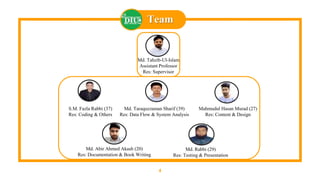
Md. Tahzib-Ul-Islam
Assistant Professor
Res: Supervisor
S.M. Fazla Rabbi (37)
Res: Coding & Others
Md. Taraquzzaman Sharif (39)
Res: Data Flow & System Analysis
Mahmudul Hasan Murad (27)
Res: Content & Design
Md. Abir Ahmed Akash (20)
Res: Documentation & Book Writing
Md. Rabbi (29)
Res: Testing & Presentation
Contents
5
Introduction
Definition
Pros & Cons
Planning & Req. Analysis
Process Model
Use Case Model
Data Flow Diagram
ER Diagram
Project Design
Design View
Workflow & Methodology
Activity Lifecycle
Conclusions
Limitations
Future Scopes
Statement
Q & A
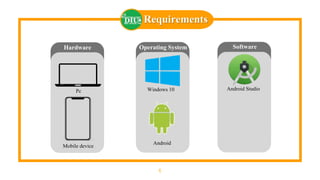
Requirements
6
Hardware
Mobile device
Pc
Operating System
Android
Windows 10
Software
Android Studio
7
Introduction
Overview
8
“Student Portal: An Android Application for institutional
Services” the platform is conceived as an online based
Institutional help android mobile application.
By using our application people get all services of an
educational institute such as looking account details in app
and get details of transactions to recognize and get other
information like academic result, routine, education material
in app and notify by authority
Objectives
9
 To make an easy platform for a students to get any
Institutional help.
 To notify students from anywhere any time, so it will
reduce their valuable time.
 To allow each student for quality Institutional and
educational service.
 To allow a student to create their profile and keep
Institutional history.
 To maintain quality of Institutional management.
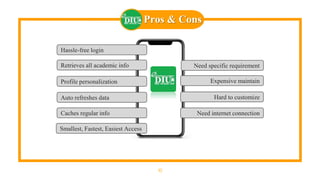
Pros & Cons
10
Hassle-free login
Retrieves all academic info
Profile personalization
Auto refreshes data
Caches regular info
Need specific requirement
Expensive maintain
Hard to customize
Need internet connection
Smallest, Fastest, Easiest Access
11
Background Study
12
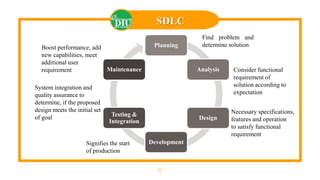
SDLC
Planning
Analysis
Design
Development
Testing &
Integration
Maintenance
Find problem and
determine solution
Consider functional
requirement of
solution according to
expectation
Necessary specifications,
features and operation
to satisfy functional
requirement
Signifies the start
of production
Boost performance, add
new capabilities, meet
additional user
requirement
System integration and
quality assurance to
determine, if the proposed
design meets the initial set
of goal
13
Planning & Requirement
Analysis
14
Process Model
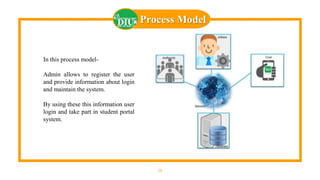
In this process model-
Admin allows to register the user
and provide information about login
and maintain the system.
By using these this information user
login and take part in student portal
system.
15
Use Case Model
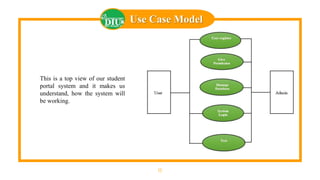
This is a top view of our student
portal system and it makes us
understand, how the system will
be working.
16
Data Flow Diagram
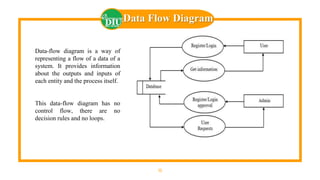
Data-flow diagram is a way of
representing a flow of a data of a
system. It provides information
about the outputs and inputs of
each entity and the process itself.
This data-flow diagram has no
control flow, there are no
decision rules and no loops.
17
ER Diagram
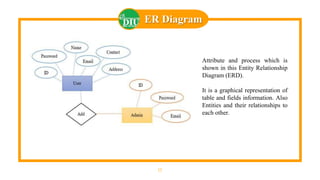
Attribute and process which is
shown in this Entity Relationship
Diagram (ERD).
It is a graphical representation of
table and fields information. Also
Entities and their relationships to
each other.
18
Workflow & Methodology
19
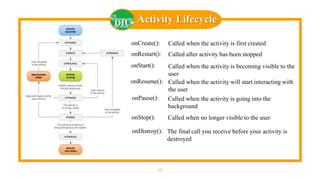
onCreate(): Called when the activity is first created
onRestart(): Called after activity has been stopped
onStart(): Called when the activity is becoming visible to the
user
onResume(): Called when the activity will start interacting with
the user
onPause(): Called when the activity is going into the
background
onStop(): Called when no longer visible to the user
onDistroy(): The final call you receive before your activity is
destroyed
Activity Lifecycle
20
MVC
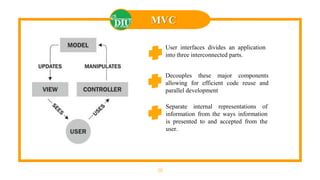
Separate internal representations of
information from the ways information
is presented to and accepted from the
user.
Decouples these major components
allowing for efficient code reuse and
parallel development
User interfaces divides an application
into three interconnected parts.
21
Project Design
22
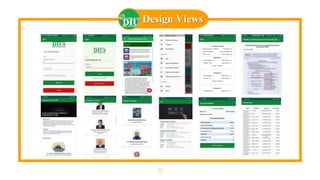
Design Views
23
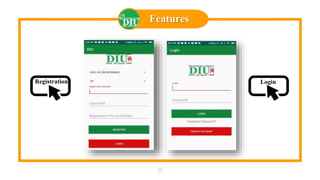
Features
LoginRegistration
24
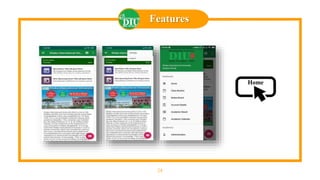
Features
Home
25
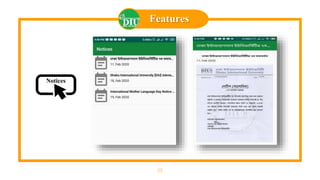
Features
Notices
26
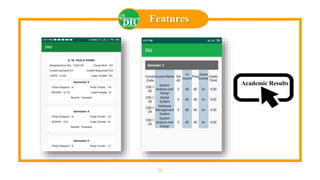
Features
Academic Results
27
Features
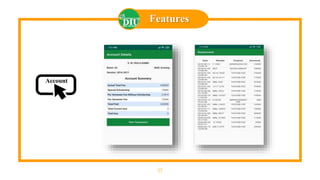
Account
28
Features
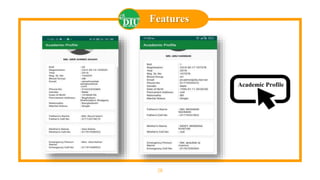
Academic Profile
29
Conclusions
30
Limitations
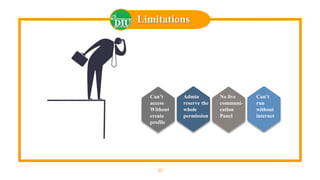
Can’t
access
Without
create
profile
Admin
reserve the
whole
permission
No live
communi-
cation
Panel
Can’t
run
without
internet
31
Future Scopes
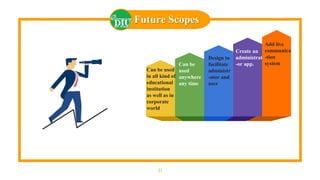
Can be used
in all kind of
educational
institution
as well as in
corporate
world
Can be
used
anywhere
any time
Design to
facilitate
administr
-ator and
user
Create an
administrat
-or app.
Add live
communica
-tion
system
32
Statement
Today, almost 90% plus student have mobile devices in their palms as
communication technology. Instead of websites, mobile apps are
trending. It is the Era of technology and when it comes to institutional
services and educational care, the institution managements are
required to take prompt decisions and implement them timely in order
to fast the information and data pass process. So here we discussed
how the application is helping the educational society as a whole in
providing accurate and prompt services to the students.
The name of our project is – “A Complete
Android Application for Student Portal System”. We
have face different problems to prepare this project. Finally,
we have succeeded to prepare our project.
33
Q & A
Thank You
34
A Complete
Android Application for
Student Portal System

Final Project presentation (on App devlopment)