ANDROID APPLICATION
DEVELOPMENT IN
AUSTRALIA
Contents
•
•
•
•
•
•
•
•
•
History
Introduction of android
Android versions
Android architecture
Security
Features of android
Advantages of android
Disadvantage of android
HISTORY OF ANDROID
Android Inc.founded in Palo Alto, California
,United States in October 2003 by Andy
Rubin, Rich miner, Nick sears and Chris
white to develop Android.
WHAT IS ANDROID?
• It is a open source software platform and operating system for
mobile devices
• Based on the Linux kernel
• Developed by Google and later the Open Handset Alliance (OHA)
– Allows writing managed code in the Java language
• Android has its own virtual machine i.e. DVM(Dalvik Virtual
Machine),which is used for executing the android application.
• Google purchased the initial developer of the software , android
incorporated in 2005.
Open Handset Alliance
• The open handset alliance(OHA) is a
business alliance of firm to develop
open standard for mobile devices.
• Devoted to advancing open standards
for mobile devices
• Develop technologies that will
significantly lower the cost of developing
and distributing mobile devices and
services.
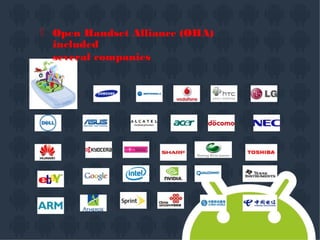
 Open Handset Alliance (OHA)
included
several companies
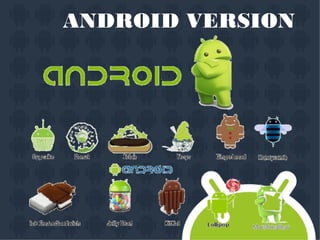
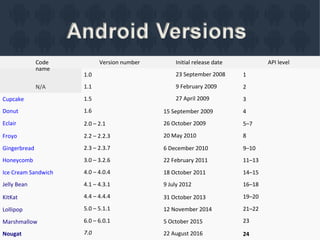
ANDROID VERSION
Code
name
N/A
Version number Initial release date
23 September 2008
9 February 2009
27 April 2009
API level
1.0
1.1
1.5
1.6
1
2
Cupcake
Donut
Eclair
3
15 September 2009
26 October 2009
20 May 2010
4
2.0 – 2.1 5–7
8Froyo 2.2 – 2.2.3
2.3 – 2.3.7
3.0 – 3.2.6
4.0 – 4.0.4
4.1 – 4.3.1
4.4 – 4.4.4
5.0 – 5.1.1
6.0 – 6.0.1
7.0
Gingerbread
Honeycomb
Ice Cream Sandwich
Jelly Bean
6 December 2010
22 February 2011
18 October 2011
9 July 2012
9–10
11–13
14–15
16–18
19–20
21–22
23
KitKat 31 October 2013
12 November 2014
5 October 2015
22 August 2016
Lollipop
Marshmallow
Nougat 24
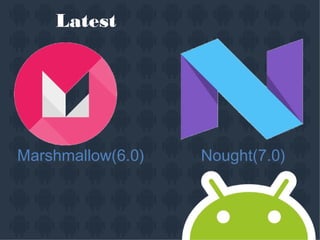
Latest
Marshmallow(6.0) Nought(7.0)
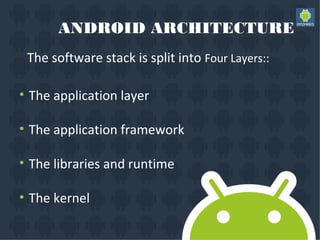
ANDROID ARCHITECTURE
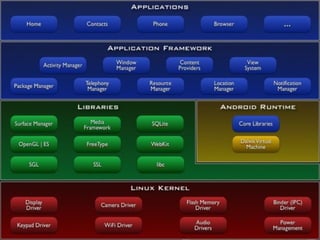
The software stack is split into Four Layers::
•
•
•
•
The application layer
The application framework
The libraries and runtime
The kernel
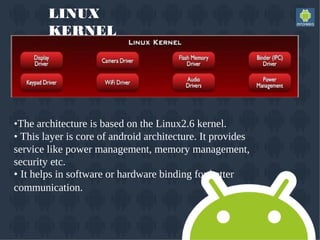
LINUX
KERNEL
•The architecture is based on the Linux2.6 kernel.
• This layer is core of android architecture. It provides
service like power management, memory management,
security etc.
• It helps in software or hardware binding for better
communication.
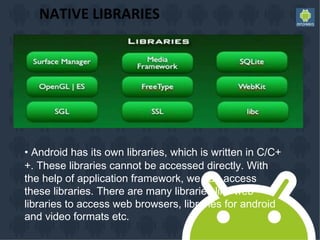
NATIVE LIBRARIES
• Android has its own libraries, which is written in C/C+
+. These libraries cannot be accessed directly. With
the help of application framework, we can access
these libraries. There are many libraries like web
libraries to access web browsers, libraries for android
and video formats etc.
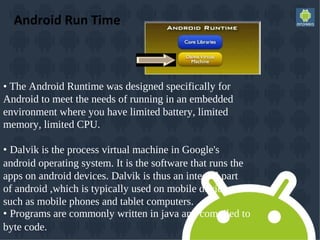
Android Run Time
• The Android Runtime was designed specifically for
Android to meet the needs of running in an embedded
environment where you have limited battery, limited
memory, limited CPU.
• Dalvik is the process virtual machine in Google's
android operating system. It is the software that runs the
apps on android devices. Dalvik is thus an integral part
of android ,which is typically used on mobile devices
such as mobile phones and tablet computers.
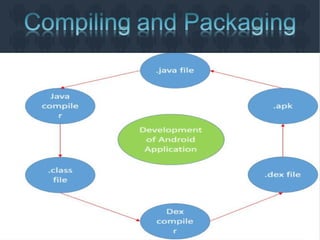
• Programs are commonly written in java and compiled to
byte code.
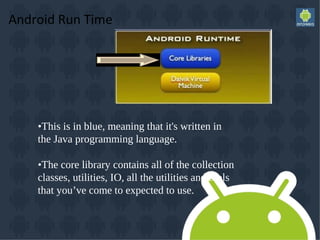
Android Run Time
•This is in blue, meaning that it's written in
the Java programming language.
•The core library contains all of the collection
classes, utilities, IO, all the utilities and tools
that you’ve come to expected to use.
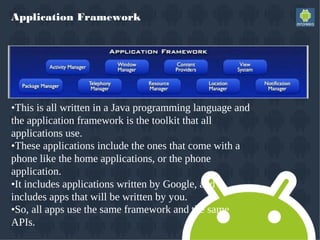
Application Framework
•This is all written in a Java programming language and
the application framework is the toolkit that all
applications use.
•These applications include the ones that come with a
phone like the home applications, or the phone
application.
•It includes applications written by Google, and it
includes apps that will be written by you.
•So, all apps use the same framework and the same
APIs.
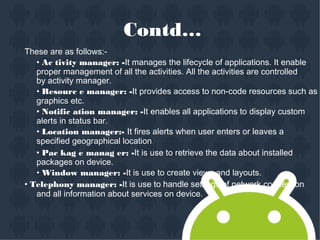
Contd…
These are as follows:-
• Ac tivity manager: -It manages the lifecycle of applications. It enable
proper management of all the activities. All the activities are controlled
by activity manager.
• Resourc e manager: -It provides access to non-code resources such as
graphics etc.
• Notific ation manager: -It enables all applications to display custom
alerts in status bar.
• Location manager:- It fires alerts when user enters or leaves a
specified geographical location.
• Pac kag e manag er: -It is use to retrieve the data about installed
packages on device.
• Window manager: -It is use to create views and layouts.
• Telephony manager: -It is use to handle settings of network connection
and all information about services on device.
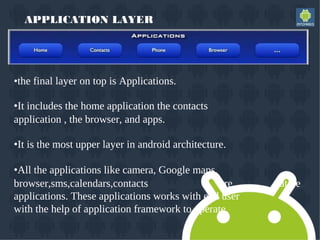
APPLICATION LAYER
•the final layer on top is Applications.
•It includes the home application the contacts
application , the browser, and apps.
•It is the most upper layer in android architecture.
•All the applications like camera, Google maps,
browser,sms,calendars,contacts are native
applications. These applications works with end user
with the help of application framework to operate.
Security
• Android is a multi-process system, in which each
application (and parts of the system) runs in its own
process. Most security between applications and the
system is enforced at the process level through
standard Linux facilities, such as user and group IDs
that are assigned to applications.
C
• Android is designed having multi layer security which provides flexibility for this
platform. When attackers attempt attack on device, android platform help to
reduce the portability of the attack.
There are key components of android security which are described as follows:




Design review:-when a security model is designed then it will be reviewed by the
developers so that risk level will be very less while using the model.
Code review and penetrating testing:-the goal of this code review is that in which
it will be checked that how the system will become strong?
Open source and community review:-android uses open source technologies
that have significant external review such as Linux kernel.
Incident response:-android team enables the rapid mitigation of vulnerabilities
to ensure that potential risks to all android users are minimized.
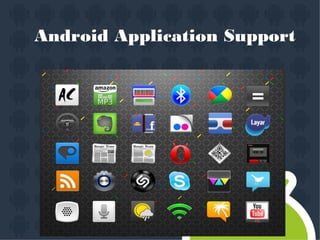
Android Application Support
Android App Developement

Android App Developement

  • 1.
  • 2.
    Contents • • • • • • • • • History Introduction of android Androidversions Android architecture Security Features of android Advantages of android Disadvantage of android
  • 3.
    HISTORY OF ANDROID AndroidInc.founded in Palo Alto, California ,United States in October 2003 by Andy Rubin, Rich miner, Nick sears and Chris white to develop Android.
  • 4.
    WHAT IS ANDROID? •It is a open source software platform and operating system for mobile devices • Based on the Linux kernel • Developed by Google and later the Open Handset Alliance (OHA) – Allows writing managed code in the Java language • Android has its own virtual machine i.e. DVM(Dalvik Virtual Machine),which is used for executing the android application. • Google purchased the initial developer of the software , android incorporated in 2005.
  • 5.
    Open Handset Alliance •The open handset alliance(OHA) is a business alliance of firm to develop open standard for mobile devices. • Devoted to advancing open standards for mobile devices • Develop technologies that will significantly lower the cost of developing and distributing mobile devices and services.
  • 6.
     Open HandsetAlliance (OHA) included several companies
  • 7.
  • 8.
    Code name N/A Version number Initialrelease date 23 September 2008 9 February 2009 27 April 2009 API level 1.0 1.1 1.5 1.6 1 2 Cupcake Donut Eclair 3 15 September 2009 26 October 2009 20 May 2010 4 2.0 – 2.1 5–7 8Froyo 2.2 – 2.2.3 2.3 – 2.3.7 3.0 – 3.2.6 4.0 – 4.0.4 4.1 – 4.3.1 4.4 – 4.4.4 5.0 – 5.1.1 6.0 – 6.0.1 7.0 Gingerbread Honeycomb Ice Cream Sandwich Jelly Bean 6 December 2010 22 February 2011 18 October 2011 9 July 2012 9–10 11–13 14–15 16–18 19–20 21–22 23 KitKat 31 October 2013 12 November 2014 5 October 2015 22 August 2016 Lollipop Marshmallow Nougat 24
  • 9.
  • 10.
    ANDROID ARCHITECTURE The softwarestack is split into Four Layers:: • • • • The application layer The application framework The libraries and runtime The kernel
  • 13.
    LINUX KERNEL •The architecture isbased on the Linux2.6 kernel. • This layer is core of android architecture. It provides service like power management, memory management, security etc. • It helps in software or hardware binding for better communication.
  • 14.
    NATIVE LIBRARIES • Androidhas its own libraries, which is written in C/C+ +. These libraries cannot be accessed directly. With the help of application framework, we can access these libraries. There are many libraries like web libraries to access web browsers, libraries for android and video formats etc.
  • 15.
    Android Run Time •The Android Runtime was designed specifically for Android to meet the needs of running in an embedded environment where you have limited battery, limited memory, limited CPU. • Dalvik is the process virtual machine in Google's android operating system. It is the software that runs the apps on android devices. Dalvik is thus an integral part of android ,which is typically used on mobile devices such as mobile phones and tablet computers. • Programs are commonly written in java and compiled to byte code.
  • 16.
    Android Run Time •Thisis in blue, meaning that it's written in the Java programming language. •The core library contains all of the collection classes, utilities, IO, all the utilities and tools that you’ve come to expected to use.
  • 17.
    Application Framework •This isall written in a Java programming language and the application framework is the toolkit that all applications use. •These applications include the ones that come with a phone like the home applications, or the phone application. •It includes applications written by Google, and it includes apps that will be written by you. •So, all apps use the same framework and the same APIs.
  • 18.
    Contd… These are asfollows:- • Ac tivity manager: -It manages the lifecycle of applications. It enable proper management of all the activities. All the activities are controlled by activity manager. • Resourc e manager: -It provides access to non-code resources such as graphics etc. • Notific ation manager: -It enables all applications to display custom alerts in status bar. • Location manager:- It fires alerts when user enters or leaves a specified geographical location. • Pac kag e manag er: -It is use to retrieve the data about installed packages on device. • Window manager: -It is use to create views and layouts. • Telephony manager: -It is use to handle settings of network connection and all information about services on device.
  • 19.
    APPLICATION LAYER •the finallayer on top is Applications. •It includes the home application the contacts application , the browser, and apps. •It is the most upper layer in android architecture. •All the applications like camera, Google maps, browser,sms,calendars,contacts are native applications. These applications works with end user with the help of application framework to operate.
  • 20.
    Security • Android isa multi-process system, in which each application (and parts of the system) runs in its own process. Most security between applications and the system is enforced at the process level through standard Linux facilities, such as user and group IDs that are assigned to applications.
  • 21.
    C • Android isdesigned having multi layer security which provides flexibility for this platform. When attackers attempt attack on device, android platform help to reduce the portability of the attack. There are key components of android security which are described as follows:     Design review:-when a security model is designed then it will be reviewed by the developers so that risk level will be very less while using the model. Code review and penetrating testing:-the goal of this code review is that in which it will be checked that how the system will become strong? Open source and community review:-android uses open source technologies that have significant external review such as Linux kernel. Incident response:-android team enables the rapid mitigation of vulnerabilities to ensure that potential risks to all android users are minimized.
  • 22.