Hassan Abid
Google Developers Expert - Android
Singapore
What’s new in Android Pie
Introduction
● Twitter : hassanabidpk
● Facebook : https://www.facebook.com/hassanabidpk89
● Google Developers Expert - Android since March 2016
● Working at Live Streaming Platform Startup in SIngapore
(BeLive.sg)
● Worked in Seoul (South Korea) for over 5 years (Video Streaming
SDK, Video Editing app)
Get App at http://belive.sg/
Features 1/2
● Indoor Positioning with Wi-Fi RTT
● Display Cutout
● Notifications
● Multi-camera support
● ImageDecoder for drawables and bitmaps
● Animations
Features 2/2
● HDR VP9 Video, HEIF Image Compression
● JobSchedular
● Neural Networks API 1.1
● Accessibility
● Rotation
● Text
Biggest Change??
Adaptive Battery (Read more here)
Indoor Positioning with Wi-Fi RTT
● Use Wi-Fi RTT (Round-Trip-Time) API to measure the distance to
nearby RTT-capable Wi-FI AP (also Wi-Fi Aware devices)
Requirements
● Device Must have 802.11 mcc FTM standard
● Device Must be running Android 9
● Location and Wi-Fi scanning enabled
● Must have ACCESS_FINE_LOCATION permission
● Access-Point must have IEEE 802.11mc
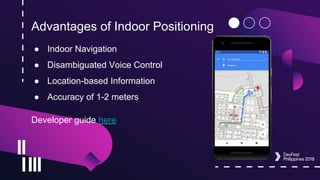
Advantages of Indoor Positioning
● Indoor Navigation
● Disambiguated Voice Control
● Location-based Information
● Accuracy of 1-2 meters
Developer guide here
Indoor Positioning RTT API
API Name API Level Remarks
RTT Package [doc]
WifiRttManager
28 Full support
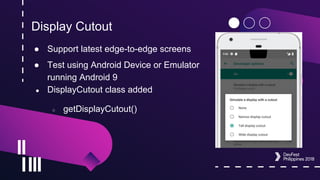
Display Cutout
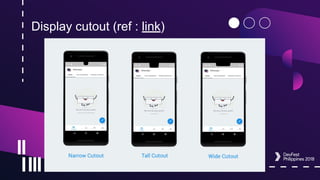
● Support latest edge-to-edge screens
● Test using Android Device or Emulator
running Android 9
● DisplayCutout class added
○ getDisplayCutout()
Display cutout (ref : link)
Display Cutout
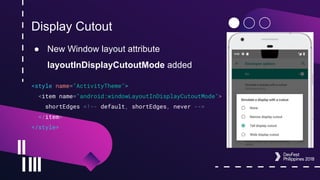
● New Window layout attribute
layoutInDisplayCutoutMode added
<style name="ActivityTheme">
<item name="android:windowLayoutInDisplayCutoutMode">
shortEdges <!-- default, shortEdges, never -->
</item>
</style>
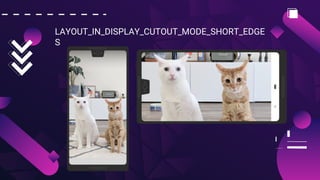
LAYOUT_IN_DISPLAY_CUTOUT_MODE_SHORT_EDGE
S
LAYOUT_IN_DISPLAY_CUTOUT_MODE_NEVER
Best Practices
● Don't let the cutout area obscure any important text, controls,
or other information
● Avoid hard-coding the status bar height (use
WindowInsetsCompat)
● Use shortEdges or never cutout modes if your app needs to
transition into and out of fullscreen mode
● See more on Android Developers site
DisplayCutout API
API Name API Level Remarks
DisplayCutout[doc] 28 Full support
DispalyCutoutCompat[doc] Other API Levels with
androidx support library
androidx.core:core:1.0.0
Full Support
Notifications
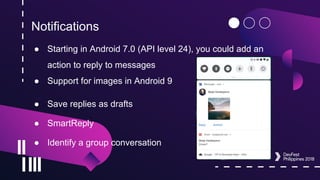
● Starting in Android 7.0 (API level 24), you could add an
action to reply to messages
● Support for images in Android 9
● Save replies as drafts
● SmartReply
● Identify a group conversation
Notifications
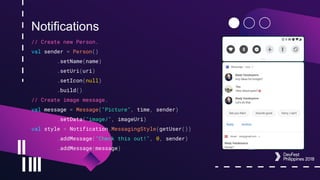
// Create new Person.
val sender = Person()
.setName(name)
.setUri(uri)
.setIcon(null)
.build()
// Create image message.
val message = Message("Picture", time, sender)
.setData("image/", imageUri)
val style = Notification.MessagingStyle(getUser())
.addMessage("Check this out!", 0, sender)
.addMessage(message)
Notifications
● Android 8.0 introduced Notification Channels
● Blocking channel groups
● New broadcast intent types
○ The Android system now sends broadcast intents when the blocking
state of notification channels and channel groups’ changes
Notification API
API Name API Level Remarks
Person[doc] 28 Use with targetSDKVersion
28
Notification.MessagingStyle (Person user) 28 Other constructors are
deprecated
addMessage (CharSequence text, long
timestamp, Person sender)
28 Person Should be null for
messages by the current
use
Multi-Camera support
● On devices running Android 9, you can access streams
simultaneously from two or more physical cameras.
● Support for external USB/UVC cameras on supported
devices
● Improvements in Session Parameters to reduce delays
ImageDecoder class
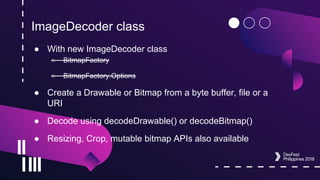
● With new ImageDecoder class
○ BitmapFactory
○ BitmapFactory.Options
● Create a Drawable or Bitmap from a byte buffer, file or a
URI
● Decode using decodeDrawable() or decodeBitmap()
● Resizing, Crop, mutable bitmap APIs also available
ImageDecoder class
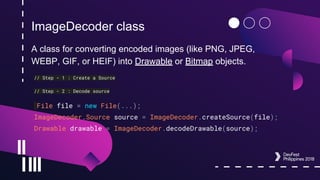
A class for converting encoded images (like PNG, JPEG,
WEBP, GIF, or HEIF) into Drawable or Bitmap objects.
// Step - 1 : Create a Source
// Step - 2 : Decode source
File file = new File(...);
ImageDecoder.Source source = ImageDecoder.createSource(file);
Drawable drawable = ImageDecoder.decodeDrawable(source);
ImageDecoder - Change settings
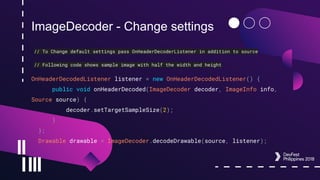
// To Change default settings pass OnHeaderDecoderListener in addition to source
// Following code shows sample image with half the width and height
OnHeaderDecodedListener listener = new OnHeaderDecodedListener() {
public void onHeaderDecoded(ImageDecoder decoder, ImageInfo info,
Source source) {
decoder.setTargetSampleSize(2);
}
};
Drawable drawable = ImageDecoder.decodeDrawable(source, listener);
ImageDecoder - GIF and WEBP
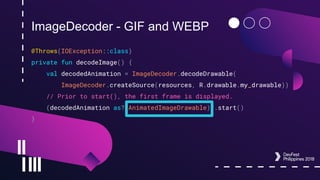
@Throws(IOException::class)
private fun decodeImage() {
val decodedAnimation = ImageDecoder.decodeDrawable(
ImageDecoder.createSource(resources, R.drawable.my_drawable))
// Prior to start(), the first frame is displayed.
(decodedAnimation as? AnimatedImageDrawable)?.start()
}
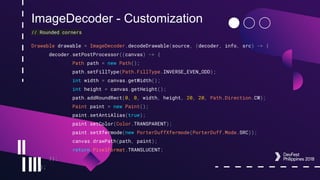
ImageDecoder - Customization
// Rounded corners
Drawable drawable = ImageDecoder.decodeDrawable(source, (decoder, info, src) -> {
decoder.setPostProcessor((canvas) -> {
Path path = new Path();
path.setFillType(Path.FillType.INVERSE_EVEN_ODD);
int width = canvas.getWidth();
int height = canvas.getHeight();
path.addRoundRect(0, 0, width, height, 20, 20, Path.Direction.CW);
Paint paint = new Paint();
paint.setAntiAlias(true);
paint.setColor(Color.TRANSPARENT);
paint.setXfermode(new PorterDuffXfermode(PorterDuff.Mode.SRC));
canvas.drawPath(path, paint);
return PixelFormat.TRANSLUCENT;
});
});
ImageDecoder
API Name API Level Remarks
ImageDecoder[doc] 28 Full support (Should use
targetSDK 28)
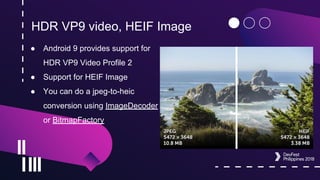
HDR VP9 video, HEIF Image
● Android 9 provides support for
HDR VP9 Video Profile 2
● Support for HEIF Image
● You can do a jpeg-to-heic
conversion using ImageDecoder
or BitmapFactory
Data cost sensitivity in JobScheduler
● JobScheduler is Android's central service to help you manage
scheduled tasks or work across Doze, App Standby, and
Background Limits
● In Android 9.0, Jobs can declare data size, signal prefetching
and specify network requirements
○ Provided by carrier
Neural Network API 1.1.1
● The Neural Networks API was introduced in Android 8.1
(API level 27)
● In Android 9.0, nine new APIS are added
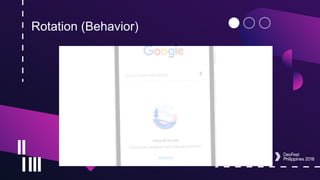
Rotation (Behavior)
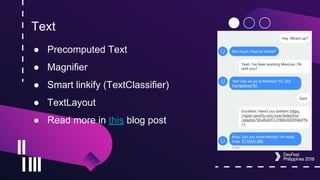
Text
● Precomputed Text
● Magnifier
● Smart linkify (TextClassifier)
● TextLayout
● Read more in this blog post
PreComputed Text
API Name API Level Remarks
PrecomputedText [doc] 28 Full Support
PrecomputedTextCompat[doc] 21-27 Use internal Text layout
cache
PrecomputedTextCompat 14 - 20 Does Nothing
Magnifier
API Name API Level Remarks
Magnifier [doc] 28 Only API Level 28 and high
TextClassifier (Smart Linkify)
API Name API Level Remarks
TextClassifier[doc] 26+ Full Support
TextView (Text Layout)
API Name API Level Remarks
TextView [doc] Target SDK : 28 New APIS : lineHeight,
firstBaselineToTopHeight,
lastBaselineToBottomHeigh
t
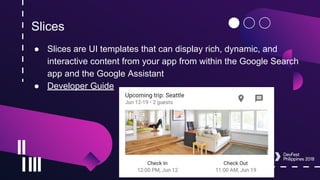
Slices
● Slices are UI templates that can display rich, dynamic, and
interactive content from your app from within the Google Search
app and the Google Assistant
● Developer Guide
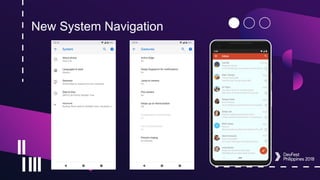
New System Navigation
Security
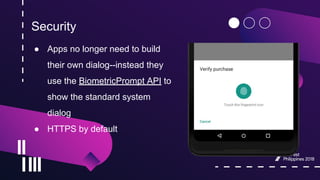
● Apps no longer need to build
their own dialog--instead they
use the BiometricPrompt API to
show the standard system
dialog
● HTTPS by default
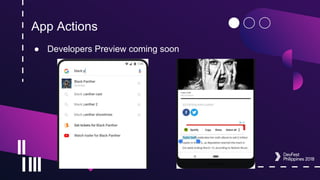
App Actions
● Developers Preview coming soon
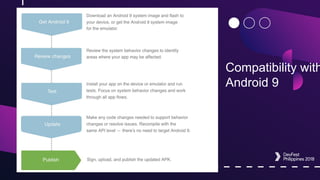
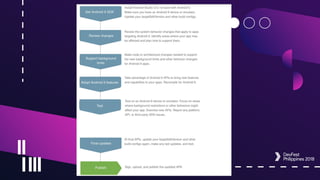
Migrating App to Android 9.0
Checking compatibility and updating targetSdkVersion
Compatibility with
Android 9
Summary
Summary
● Android Pie SDK is now more Kotlin friendly
● Display Cutout
● Notifications
● TextClassifier enhancements using Machine Learning
● Slices
● ImageDecoder
● New System Navigation
● Etc.
Appendix
https://android-developers.googleblog.com/2018/08/introducing-android-9-pie.html
https://developer.android.com/about/versions/pie/android-9.0
https://developer.android.com/about/versions/pie/android-9.0-migration#bfa
https://medium.com/exploring-android/exploring-android-p-display-cutouts-42885e8a2a96
https://developer.android.com/guide/actions/
https://developer.android.com/guide/slices/
Thank You

What's new in Android Pie

  • 2.
    Hassan Abid Google DevelopersExpert - Android Singapore What’s new in Android Pie
  • 3.
    Introduction ● Twitter :hassanabidpk ● Facebook : https://www.facebook.com/hassanabidpk89 ● Google Developers Expert - Android since March 2016 ● Working at Live Streaming Platform Startup in SIngapore (BeLive.sg) ● Worked in Seoul (South Korea) for over 5 years (Video Streaming SDK, Video Editing app)
  • 4.
    Get App athttp://belive.sg/
  • 6.
    Features 1/2 ● IndoorPositioning with Wi-Fi RTT ● Display Cutout ● Notifications ● Multi-camera support ● ImageDecoder for drawables and bitmaps ● Animations
  • 7.
    Features 2/2 ● HDRVP9 Video, HEIF Image Compression ● JobSchedular ● Neural Networks API 1.1 ● Accessibility ● Rotation ● Text
  • 8.
  • 9.
    Indoor Positioning withWi-Fi RTT ● Use Wi-Fi RTT (Round-Trip-Time) API to measure the distance to nearby RTT-capable Wi-FI AP (also Wi-Fi Aware devices) Requirements ● Device Must have 802.11 mcc FTM standard ● Device Must be running Android 9 ● Location and Wi-Fi scanning enabled ● Must have ACCESS_FINE_LOCATION permission ● Access-Point must have IEEE 802.11mc
  • 10.
    Advantages of IndoorPositioning ● Indoor Navigation ● Disambiguated Voice Control ● Location-based Information ● Accuracy of 1-2 meters Developer guide here
  • 11.
    Indoor Positioning RTTAPI API Name API Level Remarks RTT Package [doc] WifiRttManager 28 Full support
  • 12.
    Display Cutout ● Supportlatest edge-to-edge screens ● Test using Android Device or Emulator running Android 9 ● DisplayCutout class added ○ getDisplayCutout()
  • 13.
  • 14.
    Display Cutout ● NewWindow layout attribute layoutInDisplayCutoutMode added <style name="ActivityTheme"> <item name="android:windowLayoutInDisplayCutoutMode"> shortEdges <!-- default, shortEdges, never --> </item> </style>
  • 15.
  • 16.
  • 17.
    Best Practices ● Don'tlet the cutout area obscure any important text, controls, or other information ● Avoid hard-coding the status bar height (use WindowInsetsCompat) ● Use shortEdges or never cutout modes if your app needs to transition into and out of fullscreen mode ● See more on Android Developers site
  • 18.
    DisplayCutout API API NameAPI Level Remarks DisplayCutout[doc] 28 Full support DispalyCutoutCompat[doc] Other API Levels with androidx support library androidx.core:core:1.0.0 Full Support
  • 19.
    Notifications ● Starting inAndroid 7.0 (API level 24), you could add an action to reply to messages ● Support for images in Android 9 ● Save replies as drafts ● SmartReply ● Identify a group conversation
  • 20.
    Notifications // Create newPerson. val sender = Person() .setName(name) .setUri(uri) .setIcon(null) .build() // Create image message. val message = Message("Picture", time, sender) .setData("image/", imageUri) val style = Notification.MessagingStyle(getUser()) .addMessage("Check this out!", 0, sender) .addMessage(message)
  • 21.
    Notifications ● Android 8.0introduced Notification Channels ● Blocking channel groups ● New broadcast intent types ○ The Android system now sends broadcast intents when the blocking state of notification channels and channel groups’ changes
  • 22.
    Notification API API NameAPI Level Remarks Person[doc] 28 Use with targetSDKVersion 28 Notification.MessagingStyle (Person user) 28 Other constructors are deprecated addMessage (CharSequence text, long timestamp, Person sender) 28 Person Should be null for messages by the current use
  • 23.
    Multi-Camera support ● Ondevices running Android 9, you can access streams simultaneously from two or more physical cameras. ● Support for external USB/UVC cameras on supported devices ● Improvements in Session Parameters to reduce delays
  • 24.
    ImageDecoder class ● Withnew ImageDecoder class ○ BitmapFactory ○ BitmapFactory.Options ● Create a Drawable or Bitmap from a byte buffer, file or a URI ● Decode using decodeDrawable() or decodeBitmap() ● Resizing, Crop, mutable bitmap APIs also available
  • 25.
    ImageDecoder class A classfor converting encoded images (like PNG, JPEG, WEBP, GIF, or HEIF) into Drawable or Bitmap objects. // Step - 1 : Create a Source // Step - 2 : Decode source File file = new File(...); ImageDecoder.Source source = ImageDecoder.createSource(file); Drawable drawable = ImageDecoder.decodeDrawable(source);
  • 26.
    ImageDecoder - Changesettings // To Change default settings pass OnHeaderDecoderListener in addition to source // Following code shows sample image with half the width and height OnHeaderDecodedListener listener = new OnHeaderDecodedListener() { public void onHeaderDecoded(ImageDecoder decoder, ImageInfo info, Source source) { decoder.setTargetSampleSize(2); } }; Drawable drawable = ImageDecoder.decodeDrawable(source, listener);
  • 27.
    ImageDecoder - GIFand WEBP @Throws(IOException::class) private fun decodeImage() { val decodedAnimation = ImageDecoder.decodeDrawable( ImageDecoder.createSource(resources, R.drawable.my_drawable)) // Prior to start(), the first frame is displayed. (decodedAnimation as? AnimatedImageDrawable)?.start() }
  • 28.
    ImageDecoder - Customization //Rounded corners Drawable drawable = ImageDecoder.decodeDrawable(source, (decoder, info, src) -> { decoder.setPostProcessor((canvas) -> { Path path = new Path(); path.setFillType(Path.FillType.INVERSE_EVEN_ODD); int width = canvas.getWidth(); int height = canvas.getHeight(); path.addRoundRect(0, 0, width, height, 20, 20, Path.Direction.CW); Paint paint = new Paint(); paint.setAntiAlias(true); paint.setColor(Color.TRANSPARENT); paint.setXfermode(new PorterDuffXfermode(PorterDuff.Mode.SRC)); canvas.drawPath(path, paint); return PixelFormat.TRANSLUCENT; }); });
  • 29.
    ImageDecoder API Name APILevel Remarks ImageDecoder[doc] 28 Full support (Should use targetSDK 28)
  • 30.
    HDR VP9 video,HEIF Image ● Android 9 provides support for HDR VP9 Video Profile 2 ● Support for HEIF Image ● You can do a jpeg-to-heic conversion using ImageDecoder or BitmapFactory
  • 31.
    Data cost sensitivityin JobScheduler ● JobScheduler is Android's central service to help you manage scheduled tasks or work across Doze, App Standby, and Background Limits ● In Android 9.0, Jobs can declare data size, signal prefetching and specify network requirements ○ Provided by carrier
  • 32.
    Neural Network API1.1.1 ● The Neural Networks API was introduced in Android 8.1 (API level 27) ● In Android 9.0, nine new APIS are added
  • 33.
  • 34.
    Text ● Precomputed Text ●Magnifier ● Smart linkify (TextClassifier) ● TextLayout ● Read more in this blog post
  • 35.
    PreComputed Text API NameAPI Level Remarks PrecomputedText [doc] 28 Full Support PrecomputedTextCompat[doc] 21-27 Use internal Text layout cache PrecomputedTextCompat 14 - 20 Does Nothing
  • 36.
    Magnifier API Name APILevel Remarks Magnifier [doc] 28 Only API Level 28 and high
  • 37.
    TextClassifier (Smart Linkify) APIName API Level Remarks TextClassifier[doc] 26+ Full Support
  • 38.
    TextView (Text Layout) APIName API Level Remarks TextView [doc] Target SDK : 28 New APIS : lineHeight, firstBaselineToTopHeight, lastBaselineToBottomHeigh t
  • 39.
    Slices ● Slices areUI templates that can display rich, dynamic, and interactive content from your app from within the Google Search app and the Google Assistant ● Developer Guide
  • 40.
  • 41.
    Security ● Apps nolonger need to build their own dialog--instead they use the BiometricPrompt API to show the standard system dialog ● HTTPS by default
  • 42.
    App Actions ● DevelopersPreview coming soon
  • 43.
    Migrating App toAndroid 9.0 Checking compatibility and updating targetSdkVersion
  • 44.
  • 46.
  • 47.
    Summary ● Android PieSDK is now more Kotlin friendly ● Display Cutout ● Notifications ● TextClassifier enhancements using Machine Learning ● Slices ● ImageDecoder ● New System Navigation ● Etc.
  • 48.
  • 49.