Introduction to Cross-Platform
Hybrid Mobile App Development
Zafer AYAN - Oct 14 2017
About Me
Zafer AYAN
@zaferayan
ozcanzaferayan@gmail.com
Full Stack Developer - ISBAK
What is the
Hybrid Mobile App?
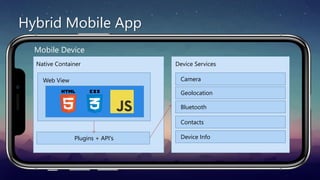
Hybrid Mobile App
Mobile Device
Device Services
Camera
Geolocation
Bluetooth
Contacts
Device Info
Native Container
Web View
Plugins + API's
Why we develop
Hybrid Mobile App?
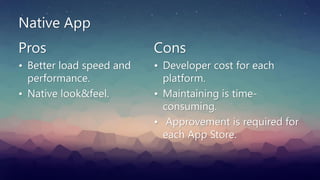
Native App
Pros
• Better load speed and
performance.
• Native look&feel.
Cons
• Developer cost for each
platform.
• Maintaining is time-
consuming.
• Approvement is required for
each App Store.
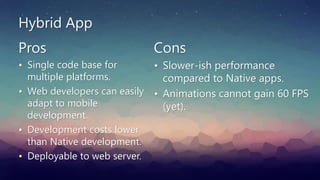
Hybrid App
Pros
• Single code base for
multiple platforms.
• Web developers can easily
adapt to mobile
development.
• Development costs lower
than Native development.
• Deployable to web server.
Cons
• Slower-ish performance
compared to Native apps.
• Animations cannot gain 60 FPS
(yet).
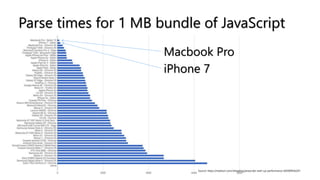
Macbook Pro
iPhone 7
Source: https://medium.com/reloading/javascript-start-up-performance-69200f43b201
Parse times for 1 MB bundle of JavaScript
Hybrid apps can be updated without
submission to app store.
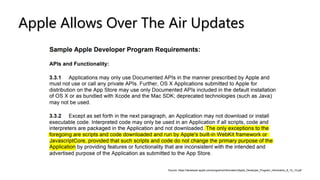
Apple Allows Over The Air Updates
Source: https://developer.apple.com/programs/information/Apple_Developer_Program_Information_8_12_15.pdf
• A cloud service that pushes /www directory to users
directly.
• Supports Cordova and React Native projects.
• Tracks usage statistics for each platform.
• Manages alpha, beta and production deployments
seperately.
• You can serve your own CodePush service on your
server.
Hybrid App Frameworks
• Apache Cordova (is free)
• Adobe PhoneGap
• Intel XDK
• Telerik NativeScript
• IBM Worklight
• Monaca (tool for Onsen UI)
• And so on...
Android Compatibility
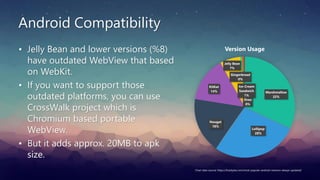
• Jelly Bean and lower versions (%8)
have outdated WebView that based
on WebKit.
• If you want to support those
outdated platforms, you can use
CrossWalk project which is
Chromium based portable
WebView.
• But it adds approx. 20MB to apk
size.
Marshmallow
32%
Lollipop
28%
Nougat
18%
KitKat
14%
Jelly Bean
7%
Gingerbread
0%
Ice-Cream
Sandwich
1%
Oreo
0%
Version Usage
Chart data source: https://fossbytes.com/most-popular-android-versions-always-updated/
Development Phase
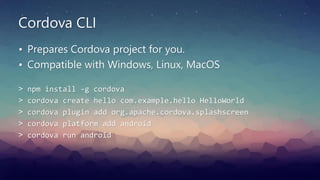
Cordova CLI
> npm install -g cordova
> cordova create hello com.example.hello HelloWorld
> cordova plugin add org.apache.cordova.splashscreen
> cordova platform add android
> cordova run android
• Prepares Cordova project for you.
• Compatible with Windows, Linux, MacOS
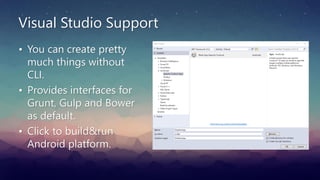
Visual Studio Support
• You can create pretty
much things without
CLI.
• Provides interfaces for
Grunt, Gulp and Bower
as default.
• Click to build&run
Android platform.
Always prepare your apps as
SPA (Single Page Application)
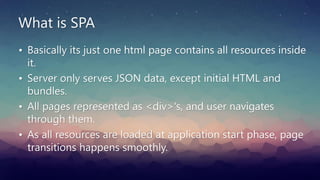
What is SPA
• Basically its just one html page contains all resources inside
it.
• Server only serves JSON data, except initial HTML and
bundles.
• All pages represented as <div>'s, and user navigates
through them.
• As all resources are loaded at application start phase, page
transitions happens smoothly.
Native Look&Feel UI frameworks
• Framework7
• Ionic 2
• OnsenUI
• JQuery Mobile
• And so on...
Best Practices
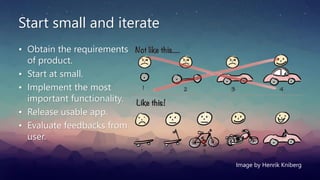
Start small and iterate
• Obtain the requirements
of product.
• Start at small.
• Implement the most
important functionality.
• Release usable app.
• Evaluate feedbacks from
user.
Image by Henrik Kniberg
For User Interface
• Just use any SPA UI framework you familiar with.
• They are all well tested and documented.
• Have built-in features that protects you from common
issues such as detecting touch events and distinguish
between element clicking and scrolling.
For Architecture
• Automate your tasks with Grunt or Gulp or Webpack.
• Use as few as possible plugins on your projects.
• Obfuscate/uglify your businness logic.
• Enable over-the-air updates for your app.
• Log all operations and errors and to be informed from
them.
Demo
Questions?
Thank you!
• Slides: slideshare.com/
• Email: ozcanzaferayan@gmail.com

Introduction to Cross-Platform Hybrid Mobile App Development

  • 1.
    Introduction to Cross-Platform HybridMobile App Development Zafer AYAN - Oct 14 2017
  • 2.
  • 3.
    What is the HybridMobile App?
  • 4.
    Hybrid Mobile App MobileDevice Device Services Camera Geolocation Bluetooth Contacts Device Info Native Container Web View Plugins + API's
  • 5.
  • 6.
    Native App Pros • Betterload speed and performance. • Native look&feel. Cons • Developer cost for each platform. • Maintaining is time- consuming. • Approvement is required for each App Store.
  • 7.
    Hybrid App Pros • Singlecode base for multiple platforms. • Web developers can easily adapt to mobile development. • Development costs lower than Native development. • Deployable to web server. Cons • Slower-ish performance compared to Native apps. • Animations cannot gain 60 FPS (yet).
  • 8.
    Macbook Pro iPhone 7 Source:https://medium.com/reloading/javascript-start-up-performance-69200f43b201 Parse times for 1 MB bundle of JavaScript
  • 9.
    Hybrid apps canbe updated without submission to app store.
  • 10.
    Apple Allows OverThe Air Updates Source: https://developer.apple.com/programs/information/Apple_Developer_Program_Information_8_12_15.pdf
  • 11.
    • A cloudservice that pushes /www directory to users directly. • Supports Cordova and React Native projects. • Tracks usage statistics for each platform. • Manages alpha, beta and production deployments seperately. • You can serve your own CodePush service on your server.
  • 12.
  • 13.
    Hybrid App Frameworks •Apache Cordova (is free) • Adobe PhoneGap • Intel XDK • Telerik NativeScript • IBM Worklight • Monaca (tool for Onsen UI) • And so on...
  • 14.
    Android Compatibility • JellyBean and lower versions (%8) have outdated WebView that based on WebKit. • If you want to support those outdated platforms, you can use CrossWalk project which is Chromium based portable WebView. • But it adds approx. 20MB to apk size. Marshmallow 32% Lollipop 28% Nougat 18% KitKat 14% Jelly Bean 7% Gingerbread 0% Ice-Cream Sandwich 1% Oreo 0% Version Usage Chart data source: https://fossbytes.com/most-popular-android-versions-always-updated/
  • 15.
  • 16.
    Cordova CLI > npminstall -g cordova > cordova create hello com.example.hello HelloWorld > cordova plugin add org.apache.cordova.splashscreen > cordova platform add android > cordova run android • Prepares Cordova project for you. • Compatible with Windows, Linux, MacOS
  • 17.
    Visual Studio Support •You can create pretty much things without CLI. • Provides interfaces for Grunt, Gulp and Bower as default. • Click to build&run Android platform.
  • 18.
    Always prepare yourapps as SPA (Single Page Application)
  • 19.
    What is SPA •Basically its just one html page contains all resources inside it. • Server only serves JSON data, except initial HTML and bundles. • All pages represented as <div>'s, and user navigates through them. • As all resources are loaded at application start phase, page transitions happens smoothly.
  • 20.
    Native Look&Feel UIframeworks • Framework7 • Ionic 2 • OnsenUI • JQuery Mobile • And so on...
  • 21.
  • 22.
    Start small anditerate • Obtain the requirements of product. • Start at small. • Implement the most important functionality. • Release usable app. • Evaluate feedbacks from user. Image by Henrik Kniberg
  • 23.
    For User Interface •Just use any SPA UI framework you familiar with. • They are all well tested and documented. • Have built-in features that protects you from common issues such as detecting touch events and distinguish between element clicking and scrolling.
  • 24.
    For Architecture • Automateyour tasks with Grunt or Gulp or Webpack. • Use as few as possible plugins on your projects. • Obfuscate/uglify your businness logic. • Enable over-the-air updates for your app. • Log all operations and errors and to be informed from them.
  • 25.
  • 26.
  • 27.
    Thank you! • Slides:slideshare.com/ • Email: ozcanzaferayan@gmail.com