
GROUP MEMBERS
WAQAS AHMAD
REG#13PWELE4321
HAROON MUHAMMAD
REG#13PWELE4312
HAYAT ULLAH
REG#13PWELE4310
Supervised by-
Shakil muhammad
ANDRIOD APPLICATIONS AND
GAMES DEVOLEPEMENT
What is android ?
Android is a mobile operating system (OS) based on the Linux
kernel and currently developed by Google .
Android's source code is released by Google under open source
licenses and it is free.
Why android ?
Large Number of Android Phone
Manufacturers Companies
Samsung
HTC
LG
Amazon
Motorola
ASUS
ZTE
Sony
Different android versions
Android 2.2 - Froyo
Android 2.3 - Gingerbread
Android 3.X - Honeycomb
Android 4.0 - Ice Cream Sandwich
Android 4.1-4.3 - Jelly Bean
Android 4.4 - Kit Kat
Android 5.0 - Lollipop
Other Reason For developing android
Apps and Games
Open source
Easy to use
Large number of user
How to develop/build android apps
Different ways to develop android apps
Offline
Using android developer software i.e. ADT SDK ADK
Online
Using web
http://ibuildapp.com/
www.appmakr.com/
Working with developer
software
Two main parts
Developer software
Android Emulator
Developer software
Writing source code
for the application
Usually java language
is used .
Programming Part
Programming Part
Developer software
Drag and drop different element i.e.
Text View
Edit Text
Buttons
Graphic Part
Developer software
Developer software
Graphic Part
Building first android application
Step 1
Idea for developing application
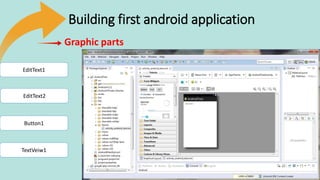
Getting graphic element which we have required for
example
Text view Edit text and Button and drop to the graphic part.
Building first android application
EditText1
EditText2
TextVeiw1
Button1
Graphic parts
Step 2
Writing Source code
Int a;
Int b;
Int c;
c=a + b;
Building first android application
Step 3
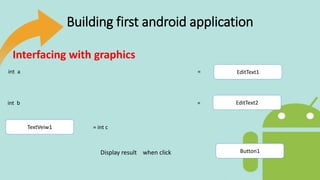
Interfacing with graphics
Assigning value form graphic part
to the variable of program source code.
Building first android application
EditText1
EditText2
TextVeiw1
Button1
int a =
int b =
= int c
Display result when click
Interfacing with graphics
Building first android application
int a =2;
int b=3;
int c=2+3;
EditText1
EditText2
TextVeiw1
Button1
Programming Part
Graphic Part
Saving the Project
After doing all the step save the project.
And the test your app on android emulator .
Building first android application
Android Emulator
What is android emulator
It is virtual machine which allow you to run your android application
Examples of virtual machine
Blue stacks
Virtual box
You wave
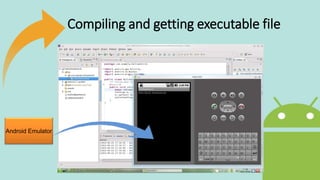
Compiling and getting executable file
Frist check the app for errors
Compile program
Run app on emulator
Get executable file .apk
Compiling and getting executable file
Android Emulator
Uploading app to Market
Different android markets
Amazon android market
Google Playstore
Mobogenie
Conclusion
This presentation is meant to give an idea about android apps and
games development and to utilize your basic programming skills.
Any Question ?

Andriod apps