Introduction to
Networks
Lecture-03
Introduction to Computing
Engr. Sadia Jabeen
1
2
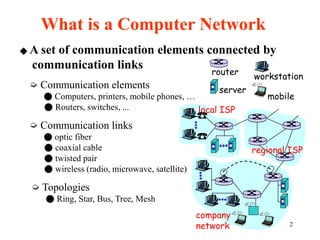
◆ A set of communication elements connected by
communication links
➭ Communication elements
● Computers, printers, mobile phones, …
● Routers, switches, ...
➭ Communication links
● optic fiber
● coaxial cable
● twisted pair
● wireless (radio, microwave, satellite)
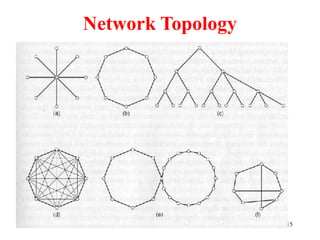
➭ Topologies
● Ring, Star, Bus, Tree, Mesh
What is a Computer Network
local ISP
company
network
regional ISP
router
workstation
server
mobile
3
◆ A software/hardware infrastructure
➭ Share resources
● data, files, computing power, video,…
➭ Information highway
● communication between geographically dispersed users
➭ Electronic Society
● Cyberspace
● Virtual global nation
What is a Computer Network
4
Introduction
 Computer Network
– an interconnected collection of autonomous computers
Internet: “network of networks”
– loosely hierarchical
– public Internet versus private intranet
WWW a distributed systems run on the top of Internet
 Difference between a network and the Internet??
5
1.1 Uses of Computer Networks
• Business Applications
• Home Applications
• Mobile Users
• Social Issues
6
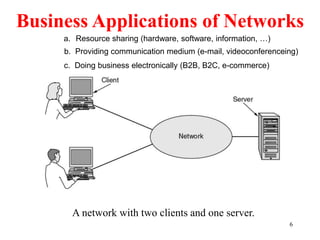
Business Applications of Networks
A network with two clients and one server.
a. Resource sharing (hardware, software, information, …)
c. Doing business electronically (B2B, B2C, e-commerce)
b. Providing communication medium (e-mail, videoconferenceing)
7
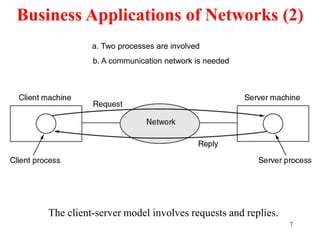
Business Applications of Networks (2)
The client-server model involves requests and replies.
a. Two processes are involved
b. A communication network is needed
8
Home Network Applications
• Access to remote information
• Person-to-person communication
• Interactive entertainment
• Electronic commerce
9
 Networks for People
– Access to remote information
• e.g.: financial, shopping, customized newspapers,
on-line digital library, WWW
– Person-to-person communication
• email, video conference, newsgroup, Skype,
WhatsApp
– Entertainment
• Social media, YouTube, e-gaming
10
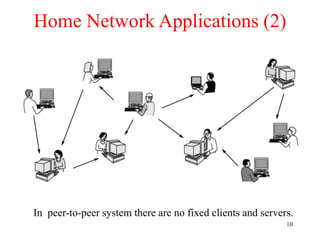
Home Network Applications (2)
In peer-to-peer system there are no fixed clients and servers.
11
Network Hardware
• Local Area Networks
• Wide Area Networks
• Metropolitan Area Networks
• Wireless Networks
• Home Networks
• Internetwork (The INTERNET)
12
Local Area Networks
 Characteristics
– small size
– transmission technology
• single cable
• 10Mbps ~ 10Gb/s
• 10Gb/s : 10,000,000.000 bps
– topology:
• bus
– Ethernet (IEEE 802.3): 10 or 100 Mbps (10Gb/s)
• ring
– IBM token ring (IEEE 802.5): 4 or 16 Mbps
13
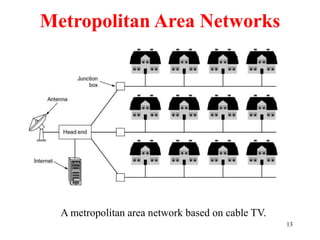
Metropolitan Area Networks
A metropolitan area network based on cable TV.
14
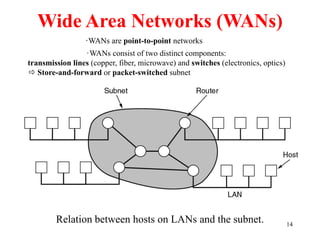
Wide Area Networks (WANs)
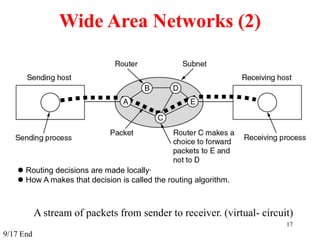
Relation between hosts on LANs and the subnet.
·WANs are point-to-point networks
·WANs consist of two distinct components:
transmission lines (copper, fiber, microwave) and switches (electronics, optics)
 Store-and-forward or packet-switched subnet
15
Network Topology
16
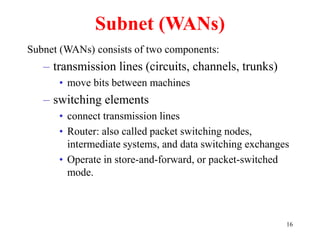
Subnet (WANs)
Subnet (WANs) consists of two components:
– transmission lines (circuits, channels, trunks)
• move bits between machines
– switching elements
• connect transmission lines
• Router: also called packet switching nodes,
intermediate systems, and data switching exchanges
• Operate in store-and-forward, or packet-switched
mode.
17
Wide Area Networks (2)
A stream of packets from sender to receiver. (virtual- circuit)
 Routing decisions are made locally·
 How A makes that decision is called the routing algorithm.
9/17 End
18
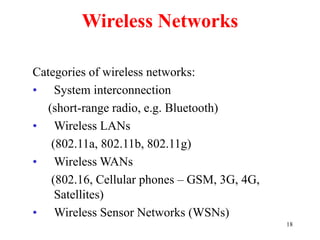
Wireless Networks
Categories of wireless networks:
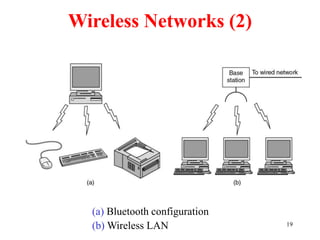
• System interconnection
(short-range radio, e.g. Bluetooth)
• Wireless LANs
(802.11a, 802.11b, 802.11g)
• Wireless WANs
(802.16, Cellular phones – GSM, 3G, 4G,
Satellites)
• Wireless Sensor Networks (WSNs)
19
Wireless Networks (2)
(a) Bluetooth configuration
(b) Wireless LAN
20
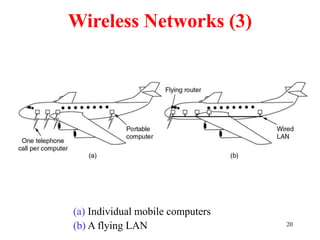
Wireless Networks (3)
(a) Individual mobile computers
(b) A flying LAN
21
Home Network Categories
 Computers (desktop PC/ Laptop/ Tablet PC,
Smartphones, shared peripherals,)
 Entertainment (SmartTV, camera, Smartphone)
 Telecomm (Telephone, cell phone, intercom, fax)
 Appliances (microwave, refrigerator, washing machines,
security systems, CCTV cameras)
22
Internetworks
• Internetworks connect networks with different hardware
and software
• A collection of interconnected networks is called
an internetwork or internet
• Internet is one specific internet
• Gateways are used to make the connection and to
provide the necessary translation (protocol conversion)
23
Network Software
Protocol Hierarchies
– a series of layers (levels)
– lower layer provides service to higher layers
– protocol:
• an agreement between the communication parties on how
communication is to proceed
– Peers:
• the corresponding layers on different machines.
– Network architecture: a set of layers and protocols
– Protocol stack:
• a list of protocols used by a certain system, one protocol per
layer
24
◆ Layering
➭ To make things simple: modularization
➭ Every different layer has a dedicated function
➭ Create layer boundary such that
● description of services can be small
● number of interactions across boundary are minimized
● potential for interface standardized
➭ Different level of abstraction in the handling of data (e.g.,
syntax, semantics)
➭ Provide appropriate services to upper layer
Network Software
25
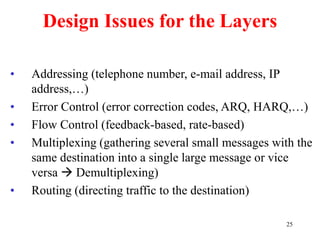
Design Issues for the Layers
• Addressing (telephone number, e-mail address, IP
address,…)
• Error Control (error correction codes, ARQ, HARQ,…)
• Flow Control (feedback-based, rate-based)
• Multiplexing (gathering several small messages with the
same destination into a single large message or vice
versa  Demultiplexing)
• Routing (directing traffic to the destination)
26
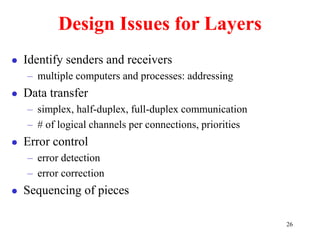
Design Issues for Layers
 Identify senders and receivers
– multiple computers and processes: addressing
 Data transfer
– simplex, half-duplex, full-duplex communication
– # of logical channels per connections, priorities
 Error control
– error detection
– error correction
 Sequencing of pieces
27
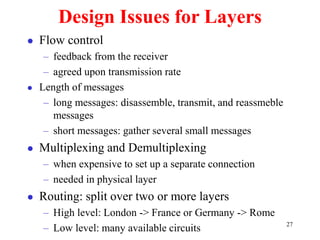
Design Issues for Layers
 Flow control
– feedback from the receiver
– agreed upon transmission rate
 Length of messages
– long messages: disassemble, transmit, and reassmeble
messages
– short messages: gather several small messages
 Multiplexing and Demultiplexing
– when expensive to set up a separate connection
– needed in physical layer
 Routing: split over two or more layers
– High level: London -> France or Germany -> Rome
– Low level: many available circuits
28
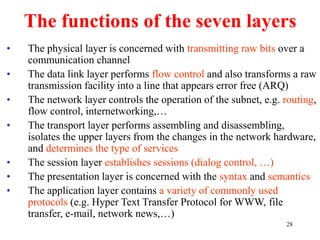
The functions of the seven layers
• The physical layer is concerned with transmitting raw bits over a
communication channel
• The data link layer performs flow control and also transforms a raw
transmission facility into a line that appears error free (ARQ)
• The network layer controls the operation of the subnet, e.g. routing,
flow control, internetworking,…
• The transport layer performs assembling and disassembling,
isolates the upper layers from the changes in the network hardware,
and determines the type of services
• The session layer establishes sessions (dialog control, …)
• The presentation layer is concerned with the syntax and semantics
• The application layer contains a variety of commonly used
protocols (e.g. Hyper Text Transfer Protocol for WWW, file
transfer, e-mail, network news,…)
29
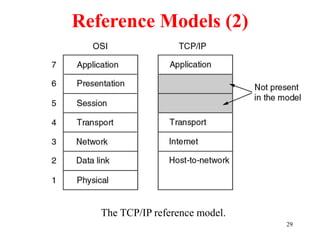
Reference Models (2)
The TCP/IP reference model.
30
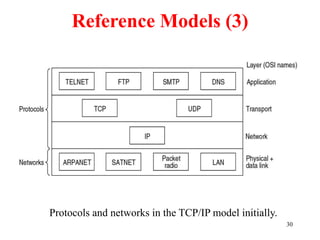
Reference Models (3)
Protocols and networks in the TCP/IP model initially.
31
 Original backbone of Internet
 Wide area network around which TCP/IP was developed
 Funding from Advanced Research Project Agency
 Initial speed 50 Kbps
ARPANET (1969-1989)
32
 Funded by National Science Foundation
 Motivation: Internet backbone to connect all scientists and engineers
 Introduced Internet hierarchy
– Wide area backbone spanning geographic U.S.
– Many mid-level (regional) networks that attach to backbone
– Campus networks at lowest level
 Initial speed 1.544 Mbps
NSFNET (1987-1992)
33
Internet Usage
Traditional applications (1970 – 1990)
• E-mail
• News
• Remote login
• File transfer
World Wide Web changed all that and brought millions of new,
nonacademic users.
Internet Service Providers (ISP) offer individual users at home
the ability to call up one of their machines and connect to
the Internet to access all kinds of services.
34
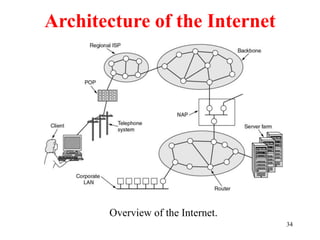
Architecture of the Internet
Overview of the Internet.

Lecture3 - Computer Networks by the Professor.ppt

  • 1.
  • 2.
    2 ◆ A setof communication elements connected by communication links ➭ Communication elements ● Computers, printers, mobile phones, … ● Routers, switches, ... ➭ Communication links ● optic fiber ● coaxial cable ● twisted pair ● wireless (radio, microwave, satellite) ➭ Topologies ● Ring, Star, Bus, Tree, Mesh What is a Computer Network local ISP company network regional ISP router workstation server mobile
  • 3.
    3 ◆ A software/hardwareinfrastructure ➭ Share resources ● data, files, computing power, video,… ➭ Information highway ● communication between geographically dispersed users ➭ Electronic Society ● Cyberspace ● Virtual global nation What is a Computer Network
  • 4.
    4 Introduction  Computer Network –an interconnected collection of autonomous computers Internet: “network of networks” – loosely hierarchical – public Internet versus private intranet WWW a distributed systems run on the top of Internet  Difference between a network and the Internet??
  • 5.
    5 1.1 Uses ofComputer Networks • Business Applications • Home Applications • Mobile Users • Social Issues
  • 6.
    6 Business Applications ofNetworks A network with two clients and one server. a. Resource sharing (hardware, software, information, …) c. Doing business electronically (B2B, B2C, e-commerce) b. Providing communication medium (e-mail, videoconferenceing)
  • 7.
    7 Business Applications ofNetworks (2) The client-server model involves requests and replies. a. Two processes are involved b. A communication network is needed
  • 8.
    8 Home Network Applications •Access to remote information • Person-to-person communication • Interactive entertainment • Electronic commerce
  • 9.
    9  Networks forPeople – Access to remote information • e.g.: financial, shopping, customized newspapers, on-line digital library, WWW – Person-to-person communication • email, video conference, newsgroup, Skype, WhatsApp – Entertainment • Social media, YouTube, e-gaming
  • 10.
    10 Home Network Applications(2) In peer-to-peer system there are no fixed clients and servers.
  • 11.
    11 Network Hardware • LocalArea Networks • Wide Area Networks • Metropolitan Area Networks • Wireless Networks • Home Networks • Internetwork (The INTERNET)
  • 12.
    12 Local Area Networks Characteristics – small size – transmission technology • single cable • 10Mbps ~ 10Gb/s • 10Gb/s : 10,000,000.000 bps – topology: • bus – Ethernet (IEEE 802.3): 10 or 100 Mbps (10Gb/s) • ring – IBM token ring (IEEE 802.5): 4 or 16 Mbps
  • 13.
    13 Metropolitan Area Networks Ametropolitan area network based on cable TV.
  • 14.
    14 Wide Area Networks(WANs) Relation between hosts on LANs and the subnet. ·WANs are point-to-point networks ·WANs consist of two distinct components: transmission lines (copper, fiber, microwave) and switches (electronics, optics)  Store-and-forward or packet-switched subnet
  • 15.
  • 16.
    16 Subnet (WANs) Subnet (WANs)consists of two components: – transmission lines (circuits, channels, trunks) • move bits between machines – switching elements • connect transmission lines • Router: also called packet switching nodes, intermediate systems, and data switching exchanges • Operate in store-and-forward, or packet-switched mode.
  • 17.
    17 Wide Area Networks(2) A stream of packets from sender to receiver. (virtual- circuit)  Routing decisions are made locally·  How A makes that decision is called the routing algorithm. 9/17 End
  • 18.
    18 Wireless Networks Categories ofwireless networks: • System interconnection (short-range radio, e.g. Bluetooth) • Wireless LANs (802.11a, 802.11b, 802.11g) • Wireless WANs (802.16, Cellular phones – GSM, 3G, 4G, Satellites) • Wireless Sensor Networks (WSNs)
  • 19.
    19 Wireless Networks (2) (a)Bluetooth configuration (b) Wireless LAN
  • 20.
    20 Wireless Networks (3) (a)Individual mobile computers (b) A flying LAN
  • 21.
    21 Home Network Categories Computers (desktop PC/ Laptop/ Tablet PC, Smartphones, shared peripherals,)  Entertainment (SmartTV, camera, Smartphone)  Telecomm (Telephone, cell phone, intercom, fax)  Appliances (microwave, refrigerator, washing machines, security systems, CCTV cameras)
  • 22.
    22 Internetworks • Internetworks connectnetworks with different hardware and software • A collection of interconnected networks is called an internetwork or internet • Internet is one specific internet • Gateways are used to make the connection and to provide the necessary translation (protocol conversion)
  • 23.
    23 Network Software Protocol Hierarchies –a series of layers (levels) – lower layer provides service to higher layers – protocol: • an agreement between the communication parties on how communication is to proceed – Peers: • the corresponding layers on different machines. – Network architecture: a set of layers and protocols – Protocol stack: • a list of protocols used by a certain system, one protocol per layer
  • 24.
    24 ◆ Layering ➭ Tomake things simple: modularization ➭ Every different layer has a dedicated function ➭ Create layer boundary such that ● description of services can be small ● number of interactions across boundary are minimized ● potential for interface standardized ➭ Different level of abstraction in the handling of data (e.g., syntax, semantics) ➭ Provide appropriate services to upper layer Network Software
  • 25.
    25 Design Issues forthe Layers • Addressing (telephone number, e-mail address, IP address,…) • Error Control (error correction codes, ARQ, HARQ,…) • Flow Control (feedback-based, rate-based) • Multiplexing (gathering several small messages with the same destination into a single large message or vice versa  Demultiplexing) • Routing (directing traffic to the destination)
  • 26.
    26 Design Issues forLayers  Identify senders and receivers – multiple computers and processes: addressing  Data transfer – simplex, half-duplex, full-duplex communication – # of logical channels per connections, priorities  Error control – error detection – error correction  Sequencing of pieces
  • 27.
    27 Design Issues forLayers  Flow control – feedback from the receiver – agreed upon transmission rate  Length of messages – long messages: disassemble, transmit, and reassmeble messages – short messages: gather several small messages  Multiplexing and Demultiplexing – when expensive to set up a separate connection – needed in physical layer  Routing: split over two or more layers – High level: London -> France or Germany -> Rome – Low level: many available circuits
  • 28.
    28 The functions ofthe seven layers • The physical layer is concerned with transmitting raw bits over a communication channel • The data link layer performs flow control and also transforms a raw transmission facility into a line that appears error free (ARQ) • The network layer controls the operation of the subnet, e.g. routing, flow control, internetworking,… • The transport layer performs assembling and disassembling, isolates the upper layers from the changes in the network hardware, and determines the type of services • The session layer establishes sessions (dialog control, …) • The presentation layer is concerned with the syntax and semantics • The application layer contains a variety of commonly used protocols (e.g. Hyper Text Transfer Protocol for WWW, file transfer, e-mail, network news,…)
  • 29.
    29 Reference Models (2) TheTCP/IP reference model.
  • 30.
    30 Reference Models (3) Protocolsand networks in the TCP/IP model initially.
  • 31.
    31  Original backboneof Internet  Wide area network around which TCP/IP was developed  Funding from Advanced Research Project Agency  Initial speed 50 Kbps ARPANET (1969-1989)
  • 32.
    32  Funded byNational Science Foundation  Motivation: Internet backbone to connect all scientists and engineers  Introduced Internet hierarchy – Wide area backbone spanning geographic U.S. – Many mid-level (regional) networks that attach to backbone – Campus networks at lowest level  Initial speed 1.544 Mbps NSFNET (1987-1992)
  • 33.
    33 Internet Usage Traditional applications(1970 – 1990) • E-mail • News • Remote login • File transfer World Wide Web changed all that and brought millions of new, nonacademic users. Internet Service Providers (ISP) offer individual users at home the ability to call up one of their machines and connect to the Internet to access all kinds of services.
  • 34.
    34 Architecture of theInternet Overview of the Internet.