Android Architecture
Components
LifeCycle , LiveData , Room and ViewModel
Agenda
● What is Architecture ?
● Common Problems
● Why to use Android Architecture Components ?
● LifeCycle
● ViewModel
● LiveData
● Room
What is Architecture ?
Software application architecture is the process of defining a structured solution that
meets all of the technical and operational requirements, while optimizing common
quality attributes such as performance, security, and manageability. It involves a
series of decisions based on a wide range of factors, and each of these decisions can
have considerable impact on the quality, performance, maintainability, and overall
success of the application
What is Architecture ?
Separation of Concerns
Common Developer Problems
● Multiple Entry Point
● Constantly Switching Flow and Tasks
● Screen Rotation
Architecture Patterns
● MVC (Model-View-Controller)
● MVP (Model-View-Presenter)
● MVVM (Model-View-ViewModel)
● VP (View-Presenter)
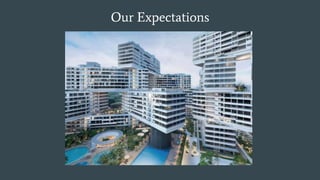
Our Expectations
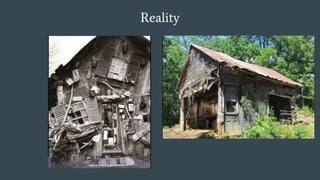
Reality
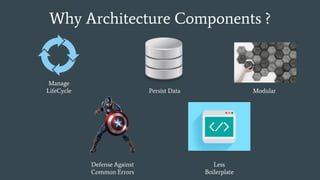
Why Architecture Components ?
Persist Data
Manage
LifeCycle Modular
Defense Against
Common Errors
Less
Boilerplate
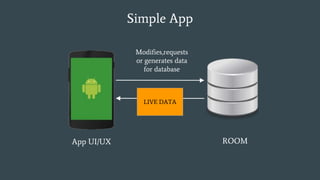
Simple App
App UI/UX ROOM
Modifies,requests
or generates data
for database
Response
Back
LIVE DATA
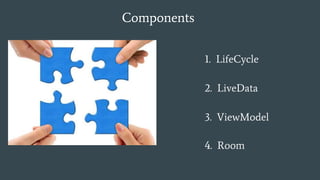
Components
4. Room
1. LifeCycle
2. LiveData
3. ViewModel
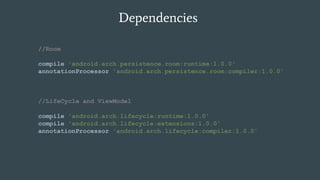
Dependencies
//Room
compile 'android.arch.persistence.room:runtime:1.0.0'
annotationProcessor 'android.arch.persistence.room:compiler:1.0.0'
//LifeCycle and ViewModel
compile 'android.arch.lifecycle:runtime:1.0.0'
compile 'android.arch.lifecycle:extensions:1.0.0'
annotationProcessor 'android.arch.lifecycle:compiler:1.0.0'
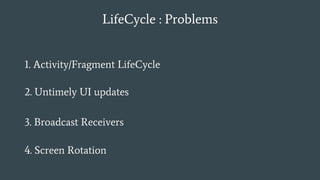
LifeCycle : Problems
2. Untimely UI updates
1. Activity/Fragment LifeCycle
4. Screen Rotation
3. Broadcast Receivers
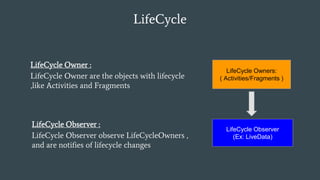
LifeCycle
LifeCycle Owner :
LifeCycle Owner are the objects with lifecycle
,like Activities and Fragments
LifeCycle Owners:
( Activities/Fragments )
LifeCycle Observer :
LifeCycle Observer observe LifeCycleOwners ,
and are notifies of lifecycle changes
LifeCycle Observer
(Ex: LiveData)
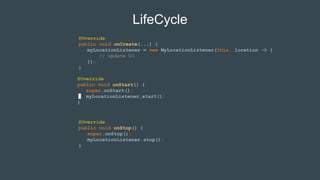
LifeCycle
@Override
public void onCreate(...) {
myLocationListener = new MyLocationListener(this, location -> {
// update UI
});
}
@Override
public void onStart() {
super.onStart();
myLocationListener.start();
}
@Override
public void onStop() {
super.onStop();
myLocationListener.stop();
}
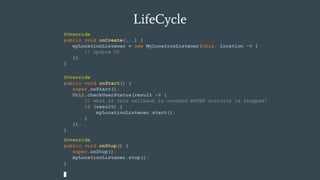
LifeCycle
@Override
public void onCreate(...) {
myLocationListener = new MyLocationListener(this, location -> {
// update UI
});
}
@Override
public void onStop() {
super.onStop();
myLocationListener.stop();
}
@Override
public void onStart() {
super.onStart();
Util.checkUserStatus(result -> {
// what if this callback is invoked AFTER activity is stopped?
if (result) {
myLocationListener.start();
}
});
}
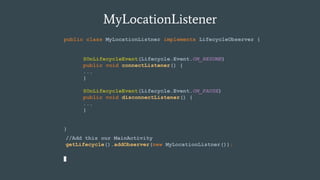
MyLocationListener
public class MyLocationListner implements LifecycleObserver {
}
//Add this our MainActivity
getLifecycle().addObserver(new MyLocationListner());
@OnLifecycleEvent(Lifecycle.Event.ON_RESUME)
public void connectListener() {
...
}
@OnLifecycleEvent(Lifecycle.Event.ON_PAUSE)
public void disconnectListener() {
...
}
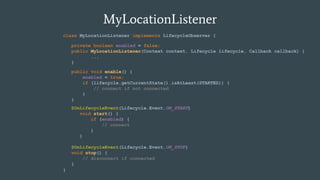
MyLocationListener
class MyLocationListener implements LifecycleObserver {
}
private boolean enabled = false;
public MyLocationListener(Context context, Lifecycle lifecycle, Callback callback) {
...
}
public void enable() {
enabled = true;
if (lifecycle.getCurrentState().isAtLeast(STARTED)) {
// connect if not connected
}
}
@OnLifecycleEvent(Lifecycle.Event.ON_STOP)
void stop() {
// disconnect if connected
}
@OnLifecycleEvent(Lifecycle.Event.ON_START)
void start() {
if (enabled) {
// connect
}
}
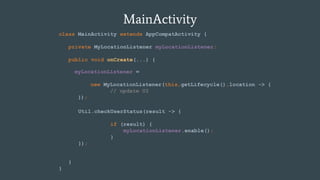
MainActivity
class MainActivity extends AppCompatActivity {
private MyLocationListener myLocationListener;
public void onCreate(...) {
}
}
myLocationListener =
new MyLocationListener(this,getLifecycle(),location -> {
// update UI
});
Util.checkUserStatus(result -> {
if (result) {
myLocationListener.enable();
}
});
LifeCycle : Use Cases
2. Stopping and starting video buffering
1. Location updates
3. Pausing and resuming animatable drawables
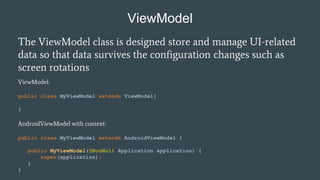
ViewModel
The ViewModel class is designed store and manage UI-related
data so that data survives the configuration changes such as
screen rotations
ViewModel:
public class MyViewModel extends ViewModel{
}
AndroidViewModel with context:
public class MyViewModel extends AndroidViewModel {
public MyViewModel(@NonNull Application application) {
super(application);
}
}
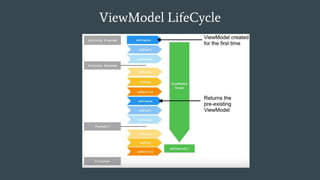
ViewModel LifeCycle
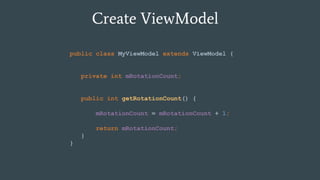
Create ViewModel
public class MyViewModel extends ViewModel {
private int mRotationCount;
public int getRotationCount() {
mRotationCount = mRotationCount + 1;
return mRotationCount;
}
}
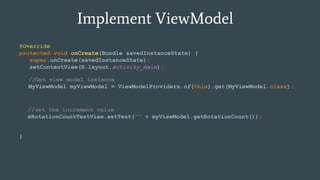
Implement ViewModel
@Override
protected void onCreate(Bundle savedInstanceState) {
super.onCreate(savedInstanceState);
setContentView(R.layout.activity_main);
}
//Get view model instance
MyViewModel myViewModel = ViewModelProviders.of(this).get(MyViewModel.class);
//set the increment value
mRotationCountTextView.setText("" + myViewModel.getRotationCount());
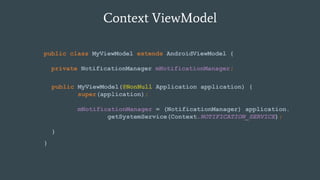
Context ViewModel
public class MyViewModel extends AndroidViewModel {
private NotificationManager mNotificationManager;
}
public MyViewModel(@NonNull Application application) {
super(application);
mNotificationManager = (NotificationManager) application.
getSystemService(Context.NOTIFICATION_SERVICE);
}
ViewModel : Use Cases
2. Shared between fragments
1. Retain State
3. Replacing loaders
LiveData
1. LiveData is observable data holder.
2. It notifies the observers when data changes so that
you can update the UI.
3. It is also Life Cycle Aware
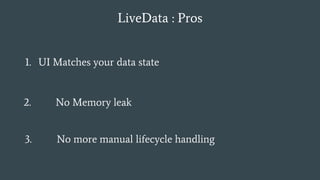
LiveData : Pros
1. UI Matches your data state
2. No Memory leak
3. No more manual lifecycle handling
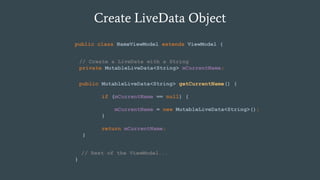
Create LiveData Object
public class NameViewModel extends ViewModel {
// Rest of the ViewModel...
}
// Create a LiveData with a String
private MutableLiveData<String> mCurrentName;
public MutableLiveData<String> getCurrentName() {
if (mCurrentName == null) {
mCurrentName = new MutableLiveData<String>();
}
return mCurrentName;
}
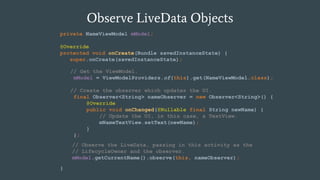
Observe LiveData Objects
private NameViewModel mModel;
@Override
protected void onCreate(Bundle savedInstanceState) {
super.onCreate(savedInstanceState);
}
// Get the ViewModel.
mModel = ViewModelProviders.of(this).get(NameViewModel.class);
// Create the observer which updates the UI.
final Observer<String> nameObserver = new Observer<String>() {
@Override
public void onChanged(@Nullable final String newName) {
// Update the UI, in this case, a TextView.
mNameTextView.setText(newName);
}
};
// Observe the LiveData, passing in this activity as the
// LifecycleOwner and the observer.
mModel.getCurrentName().observe(this, nameObserver);
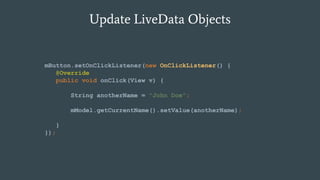
Update LiveData Objects
mButton.setOnClickListener(new OnClickListener() {
@Override
public void onClick(View v) {
String anotherName = "John Doe";
mModel.getCurrentName().setValue(anotherName);
}
});
Database ??
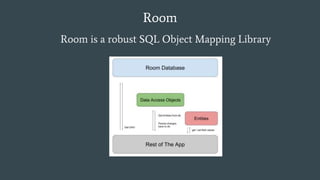
Room
Room is a robust SQL Object Mapping Library
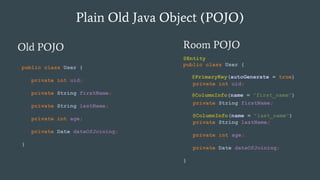
Plain Old Java Object (POJO)
Old POJO Room POJO
public class User {
private int uid;
private String firstName;
private String lastName;
private int age;
private Date dateOfJoining;
}
public class User {
private int uid;
private String firstName;
private String lastName;
private int age;
private Date dateOfJoining;
}
@PrimaryKey(autoGenerate = true)
@ColumnInfo(name = "first_name")
@Entity
@ColumnInfo(name = "last_name")
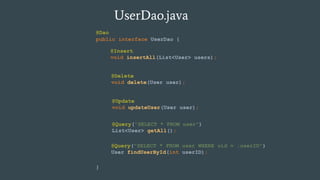
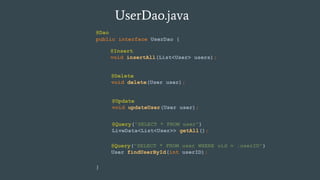
UserDao.java
public interface UserDao {
}
@Insert
void insertAll(List<User> users);
@Delete
void delete(User user);
@Update
void updateUser(User user);
@Query("SELECT * FROM user")
List<User> getAll();
@Dao
@Query("SELECT * FROM user WHERE uid = :userID")
User findUserById(int userID);
UserDao.java
public interface UserDao {
}
@Insert
void insertAll(List<User> users);
@Delete
void delete(User user);
@Update
void updateUser(User user);
@Query("SELECT * FROM user")
LiveData<List<User>> getAll();
@Dao
@Query("SELECT * FROM user WHERE uid = :userID")
User findUserById(int userID);
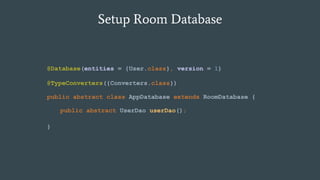
Setup Room Database
public abstract class AppDatabase extends RoomDatabase {
}
public abstract UserDao userDao();
@Database(entities = {User.class}, version = 1)
@TypeConverters({Converters.class})
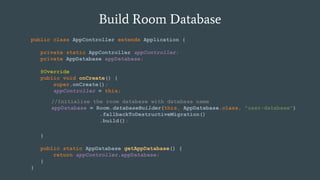
Build Room Database
public class AppController extends Application {
private static AppController appController;
private AppDatabase appDatabase;
@Override
public void onCreate() {
super.onCreate();
appController = this;
}
public static AppDatabase getAppDatabase() {
return appController.appDatabase;
}
}
//Initialize the room database with database name
appDatabase = Room.databaseBuilder(this, AppDatabase.class, "user-database")
.fallbackToDestructiveMigration()
.build();
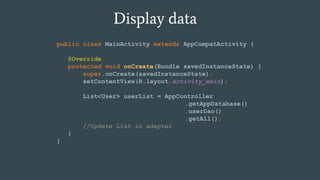
Display data
public class MainActivity extends AppCompatActivity {
@Override
protected void onCreate(Bundle savedInstanceState) {
super.onCreate(savedInstanceState);
setContentView(R.layout.activity_main);
List<User> userList = AppController
.getAppDatabase()
.userDao()
.getAll();
//Update List in adapter
}
}
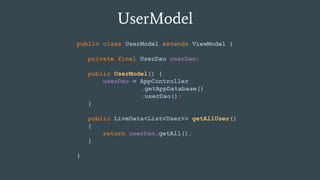
UserModel
public class UserModel extends ViewModel {
private final UserDao userDao;
public UserModel() {
userDao = AppController
.getAppDatabase()
.userDao();
}
public LiveData<List<User>> getAllUser()
{
return userDao.getAll();
}
}
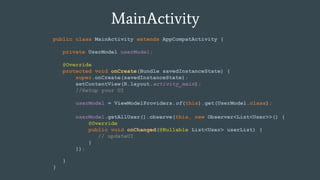
MainActivity
public class MainActivity extends AppCompatActivity {
private UserModel userModel;
@Override
protected void onCreate(Bundle savedInstanceState) {
super.onCreate(savedInstanceState);
setContentView(R.layout.activity_main);
//Setup your UI
}
}
userModel = ViewModelProviders.of(this).get(UserModel.class);
userModel.getAllUser().observe(this, new Observer<List<User>>() {
@Override
public void onChanged(@Nullable List<User> userList) {
// updateUI
}
});
Thank you
burhanrashid52
Burhanuddin Rashid
Resources :
● Android Architecture Components : http://bit.ly/2hGRxoc
● Exploring Architecture Components : http://bit.ly/2j1Pvvv
Multidots Inc.
https://www.multidots.com/

Android Architecture Components

  • 1.
    Android Architecture Components LifeCycle ,LiveData , Room and ViewModel
  • 2.
    Agenda ● What isArchitecture ? ● Common Problems ● Why to use Android Architecture Components ? ● LifeCycle ● ViewModel ● LiveData ● Room
  • 3.
    What is Architecture? Software application architecture is the process of defining a structured solution that meets all of the technical and operational requirements, while optimizing common quality attributes such as performance, security, and manageability. It involves a series of decisions based on a wide range of factors, and each of these decisions can have considerable impact on the quality, performance, maintainability, and overall success of the application
  • 4.
  • 5.
    What is Architecture? Separation of Concerns
  • 6.
    Common Developer Problems ●Multiple Entry Point ● Constantly Switching Flow and Tasks ● Screen Rotation
  • 7.
    Architecture Patterns ● MVC(Model-View-Controller) ● MVP (Model-View-Presenter) ● MVVM (Model-View-ViewModel) ● VP (View-Presenter)
  • 8.
  • 9.
  • 10.
    Why Architecture Components? Persist Data Manage LifeCycle Modular Defense Against Common Errors Less Boilerplate
  • 11.
    Simple App App UI/UXROOM Modifies,requests or generates data for database Response Back LIVE DATA
  • 12.
  • 13.
    Dependencies //Room compile 'android.arch.persistence.room:runtime:1.0.0' annotationProcessor 'android.arch.persistence.room:compiler:1.0.0' //LifeCycleand ViewModel compile 'android.arch.lifecycle:runtime:1.0.0' compile 'android.arch.lifecycle:extensions:1.0.0' annotationProcessor 'android.arch.lifecycle:compiler:1.0.0'
  • 14.
    LifeCycle : Problems 2.Untimely UI updates 1. Activity/Fragment LifeCycle 4. Screen Rotation 3. Broadcast Receivers
  • 15.
    LifeCycle LifeCycle Owner : LifeCycleOwner are the objects with lifecycle ,like Activities and Fragments LifeCycle Owners: ( Activities/Fragments ) LifeCycle Observer : LifeCycle Observer observe LifeCycleOwners , and are notifies of lifecycle changes LifeCycle Observer (Ex: LiveData)
  • 16.
    LifeCycle @Override public void onCreate(...){ myLocationListener = new MyLocationListener(this, location -> { // update UI }); } @Override public void onStart() { super.onStart(); myLocationListener.start(); } @Override public void onStop() { super.onStop(); myLocationListener.stop(); }
  • 17.
    LifeCycle @Override public void onCreate(...){ myLocationListener = new MyLocationListener(this, location -> { // update UI }); } @Override public void onStop() { super.onStop(); myLocationListener.stop(); } @Override public void onStart() { super.onStart(); Util.checkUserStatus(result -> { // what if this callback is invoked AFTER activity is stopped? if (result) { myLocationListener.start(); } }); }
  • 18.
    MyLocationListener public class MyLocationListnerimplements LifecycleObserver { } //Add this our MainActivity getLifecycle().addObserver(new MyLocationListner()); @OnLifecycleEvent(Lifecycle.Event.ON_RESUME) public void connectListener() { ... } @OnLifecycleEvent(Lifecycle.Event.ON_PAUSE) public void disconnectListener() { ... }
  • 19.
    MyLocationListener class MyLocationListener implementsLifecycleObserver { } private boolean enabled = false; public MyLocationListener(Context context, Lifecycle lifecycle, Callback callback) { ... } public void enable() { enabled = true; if (lifecycle.getCurrentState().isAtLeast(STARTED)) { // connect if not connected } } @OnLifecycleEvent(Lifecycle.Event.ON_STOP) void stop() { // disconnect if connected } @OnLifecycleEvent(Lifecycle.Event.ON_START) void start() { if (enabled) { // connect } }
  • 20.
    MainActivity class MainActivity extendsAppCompatActivity { private MyLocationListener myLocationListener; public void onCreate(...) { } } myLocationListener = new MyLocationListener(this,getLifecycle(),location -> { // update UI }); Util.checkUserStatus(result -> { if (result) { myLocationListener.enable(); } });
  • 21.
    LifeCycle : UseCases 2. Stopping and starting video buffering 1. Location updates 3. Pausing and resuming animatable drawables
  • 22.
    ViewModel The ViewModel classis designed store and manage UI-related data so that data survives the configuration changes such as screen rotations ViewModel: public class MyViewModel extends ViewModel{ } AndroidViewModel with context: public class MyViewModel extends AndroidViewModel { public MyViewModel(@NonNull Application application) { super(application); } }
  • 23.
  • 24.
    Create ViewModel public classMyViewModel extends ViewModel { private int mRotationCount; public int getRotationCount() { mRotationCount = mRotationCount + 1; return mRotationCount; } }
  • 25.
    Implement ViewModel @Override protected voidonCreate(Bundle savedInstanceState) { super.onCreate(savedInstanceState); setContentView(R.layout.activity_main); } //Get view model instance MyViewModel myViewModel = ViewModelProviders.of(this).get(MyViewModel.class); //set the increment value mRotationCountTextView.setText("" + myViewModel.getRotationCount());
  • 26.
    Context ViewModel public classMyViewModel extends AndroidViewModel { private NotificationManager mNotificationManager; } public MyViewModel(@NonNull Application application) { super(application); mNotificationManager = (NotificationManager) application. getSystemService(Context.NOTIFICATION_SERVICE); }
  • 27.
    ViewModel : UseCases 2. Shared between fragments 1. Retain State 3. Replacing loaders
  • 28.
    LiveData 1. LiveData isobservable data holder. 2. It notifies the observers when data changes so that you can update the UI. 3. It is also Life Cycle Aware
  • 29.
    LiveData : Pros 1.UI Matches your data state 2. No Memory leak 3. No more manual lifecycle handling
  • 30.
    Create LiveData Object publicclass NameViewModel extends ViewModel { // Rest of the ViewModel... } // Create a LiveData with a String private MutableLiveData<String> mCurrentName; public MutableLiveData<String> getCurrentName() { if (mCurrentName == null) { mCurrentName = new MutableLiveData<String>(); } return mCurrentName; }
  • 31.
    Observe LiveData Objects privateNameViewModel mModel; @Override protected void onCreate(Bundle savedInstanceState) { super.onCreate(savedInstanceState); } // Get the ViewModel. mModel = ViewModelProviders.of(this).get(NameViewModel.class); // Create the observer which updates the UI. final Observer<String> nameObserver = new Observer<String>() { @Override public void onChanged(@Nullable final String newName) { // Update the UI, in this case, a TextView. mNameTextView.setText(newName); } }; // Observe the LiveData, passing in this activity as the // LifecycleOwner and the observer. mModel.getCurrentName().observe(this, nameObserver);
  • 32.
    Update LiveData Objects mButton.setOnClickListener(newOnClickListener() { @Override public void onClick(View v) { String anotherName = "John Doe"; mModel.getCurrentName().setValue(anotherName); } });
  • 33.
  • 34.
    Room Room is arobust SQL Object Mapping Library
  • 35.
    Plain Old JavaObject (POJO) Old POJO Room POJO public class User { private int uid; private String firstName; private String lastName; private int age; private Date dateOfJoining; } public class User { private int uid; private String firstName; private String lastName; private int age; private Date dateOfJoining; } @PrimaryKey(autoGenerate = true) @ColumnInfo(name = "first_name") @Entity @ColumnInfo(name = "last_name")
  • 36.
    UserDao.java public interface UserDao{ } @Insert void insertAll(List<User> users); @Delete void delete(User user); @Update void updateUser(User user); @Query("SELECT * FROM user") List<User> getAll(); @Dao @Query("SELECT * FROM user WHERE uid = :userID") User findUserById(int userID);
  • 37.
    UserDao.java public interface UserDao{ } @Insert void insertAll(List<User> users); @Delete void delete(User user); @Update void updateUser(User user); @Query("SELECT * FROM user") LiveData<List<User>> getAll(); @Dao @Query("SELECT * FROM user WHERE uid = :userID") User findUserById(int userID);
  • 38.
    Setup Room Database publicabstract class AppDatabase extends RoomDatabase { } public abstract UserDao userDao(); @Database(entities = {User.class}, version = 1) @TypeConverters({Converters.class})
  • 39.
    Build Room Database publicclass AppController extends Application { private static AppController appController; private AppDatabase appDatabase; @Override public void onCreate() { super.onCreate(); appController = this; } public static AppDatabase getAppDatabase() { return appController.appDatabase; } } //Initialize the room database with database name appDatabase = Room.databaseBuilder(this, AppDatabase.class, "user-database") .fallbackToDestructiveMigration() .build();
  • 40.
    Display data public classMainActivity extends AppCompatActivity { @Override protected void onCreate(Bundle savedInstanceState) { super.onCreate(savedInstanceState); setContentView(R.layout.activity_main); List<User> userList = AppController .getAppDatabase() .userDao() .getAll(); //Update List in adapter } }
  • 41.
    UserModel public class UserModelextends ViewModel { private final UserDao userDao; public UserModel() { userDao = AppController .getAppDatabase() .userDao(); } public LiveData<List<User>> getAllUser() { return userDao.getAll(); } }
  • 42.
    MainActivity public class MainActivityextends AppCompatActivity { private UserModel userModel; @Override protected void onCreate(Bundle savedInstanceState) { super.onCreate(savedInstanceState); setContentView(R.layout.activity_main); //Setup your UI } } userModel = ViewModelProviders.of(this).get(UserModel.class); userModel.getAllUser().observe(this, new Observer<List<User>>() { @Override public void onChanged(@Nullable List<User> userList) { // updateUI } });
  • 43.
    Thank you burhanrashid52 Burhanuddin Rashid Resources: ● Android Architecture Components : http://bit.ly/2hGRxoc ● Exploring Architecture Components : http://bit.ly/2j1Pvvv Multidots Inc. https://www.multidots.com/

Editor's Notes

  • #2 -Greeting -What is architecture ?
  • #3 -Home Kitche Example
  • #4 -Which one to follow MVP,MVVP ? -Google Guidelines Architecture -No Force
  • #5 -Home Kitche Example
  • #6 -Home Kitche Example
  • #7 -Which one to follow MVP,MVVP ? -Google Guidelines Architecture -No Force
  • #8 -Which one to follow MVP,MVVP ? -Google Guidelines Architecture -No Force
  • #9 -What is our expectations ? -Client Requirements -Desgin
  • #10 Reality after uncertain changes in requirements and design changes
  • #11 1.Better Data Persistent than SQL 2.Less boiler plate (SQLite documentation and creating a lot of constant) 3.Life Cycle Register unregister onStart and OnStop (Untimely UI updates) 4. Common errors (SQL queries compile time errors) 5. Modular and Structures,testable and maintainable
  • #12 -In this simple demo app -Add,Delete and Update users -LiveData changes reflect to UI -LiveData life cycle aware
  • #13 Four Major components -Room (wrapper on SQL Life) -ViewModel (Save data on screen rotation) -LifeCycle (Life cycle awareness) -LiveData (live changes update using lifecycle owner and observer) -Add Dependencies
  • #14 -Following dependencies to add
  • #15 1.Handling events on onCreate,onResume,onPause,onStop,onDestroy 2.Receiving updates while screen is rotated on the devices is onPause or onDestroy 3.Register unregister onResume onPause adding and removing listener 4.On rotation data lost (Solution : sava bundle instance (not easy) )
  • #16 1.LifeCycleOwner represents must be implemented to ana activity/fra 2.LifeCycleObserver is a class which extends LiveData<T> class 3.LifeCycleObserver requires a LifeCyleOwner Activity/Fragments to updates live data and be lifecycle aware
  • #22 1.Handling events on onCreate,onResume,onPause,onStop,onDestroy 2.Receiving updates while screen is rotated on the devices is onPause or onDestroy 3.Register unregister onResume onPause adding and removing listener 4.On rotation data lost (Solution : sava bundle instance (not easy) )
  • #25 1.Better Data Persistent than SQL 2.Less boiler plate (SQLite documentation and creating a lot of constant) 3.Life Cycle Register unregister onStart and OnStop (Untimely UI updates) 4. Common errors (SQL queries compile time errors) 5. Modular and Structures,testable and maintainable
  • #26 1.Better Data Persistent than SQL 2.Less boiler plate (SQLite documentation and creating a lot of constant) 3.Life Cycle Register unregister onStart and OnStop (Untimely UI updates) 4. Common errors (SQL queries compile time errors) 5. Modular and Structures,testable and maintainable
  • #28 1.Handling events on onCreate,onResume,onPause,onStop,onDestroy 2.Receiving updates while screen is rotated on the devices is onPause or onDestroy 3.Register unregister onResume onPause adding and removing listener 4.On rotation data lost (Solution : sava bundle instance (not easy) )
  • #34 -How many types of database used ? -Similar to GreenDao and realm
  • #35 Basic Three components of Room to build database 1.Entity (Define Table Schema) 2.DAO (data access object define all queries for specific tables) 3.Room Database (Singleton database builder with all abstract DAO classes)
  • #36 Entity -Convert response into POJO -Entity notation to make it dao -Annotation used -Primary key auto generate -Custom table name -Many more annotations
  • #37 (2) Dao -Insert list on single item -insert replace annotation -update -delete -raw query -parameter and query name with : colon -compile time error -LiveData if any changes happens -More details in demo code
  • #38 (2) Dao -Insert list on single item -insert replace annotation -update -delete -raw query -parameter and query name with : colon -compile time error -LiveData if any changes happens -More details in demo code
  • #41 1.Better Data Persistent than SQL 2.Less boiler plate (SQLite documentation and creating a lot of constant) 3.Life Cycle Register unregister onStart and OnStop (Untimely UI updates) 4. Common errors (SQL queries compile time errors) 5. Modular and Structures,testable and maintainable
  • #42 1.Better Data Persistent than SQL 2.Less boiler plate (SQLite documentation and creating a lot of constant) 3.Life Cycle Register unregister onStart and OnStop (Untimely UI updates) 4. Common errors (SQL queries compile time errors) 5. Modular and Structures,testable and maintainable
  • #43 1.Better Data Persistent than SQL 2.Less boiler plate (SQLite documentation and creating a lot of constant) 3.Life Cycle Register unregister onStart and OnStop (Untimely UI updates) 4. Common errors (SQL queries compile time errors) 5. Modular and Structures,testable and maintainable