Soe Tun
http://geekswithblogs.net/stun
Twitter: @SoeLinn
Soe Tun
    American College of Cardiology (ACC)
    Email: soelinn@gmail.com
    Twitter: @SoeLinn
    Blog: http://geekswithblogs.net/stun/


DC .NET User Group
  Twitter: @dcdnug
  2400 N St. NW DC 20037
  http://dcdnug.org
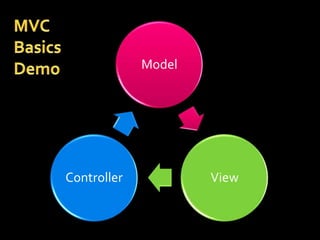
Model


Controller           View
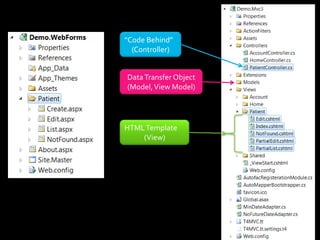
“Code Behind”
  (Controller)


Data Transfer Object
(Model, View Model)


HTML Template
    (View)
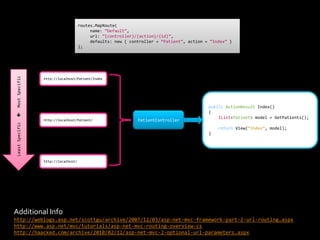
routes.MapRoute(
                                           name: “Default”,
                                           url: “{controller}/{action}/{id}”,
                                           defaults: new { controller = “Patient”, action = “Index” }
                                      );
 Most Specific


                  http://localhost/Patient/Index


                                                                                           public ActionResult Index()
                                                                                           {



                                                                                               IList<Patient> model = GetPatients();
                  http://localhost/Patient/                   PatientController
 Least Specific


                                                                                               return View(“Index”, model);
                                                                                           }


                  http://localhost/


Additional Info
http://weblogs.asp.net/scottgu/archive/2007/12/03/asp-net-mvc-framework-part-2-url-routing.aspx
http://www.asp.net/mvc/tutorials/asp-net-mvc-routing-overview-cs
http://haacked.com/archive/2010/02/12/asp-net-mvc-2-optional-url-parameters.aspx
Application Functionality
   User Interface
     Consistency
     Maintainability


   Data Binding
     Reliability
     Security
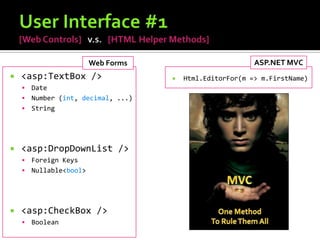
Web Forms                         ASP.NET MVC
   <asp:TextBox />                   Html.EditorFor(m => m.FirstName)
     Date
     Number (int, decimal, ...)
     String


   <asp:DropDownList />
     Foreign Keys
     Nullable<bool>


   <asp:CheckBox />
       Boolean
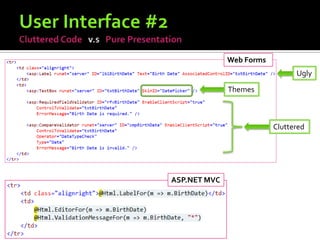
Web Forms
                                Ugly

              Themes


                          Cluttered


ASP.NET MVC
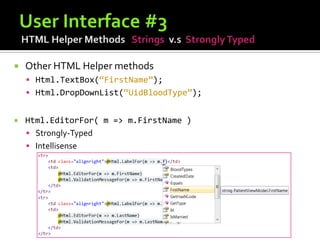
   Other HTML Helper methods
     Html.TextBox(“FirstName”);
     Html.DropDownList(“UidBloodType”);


   Html.EditorFor( m => m.FirstName )
     Strongly-Typed
     Intellisense
ASP.NET MVC “Themes/Skins”
    Matched on System.Type Name
      DateTime.ascx for DateTime


    Using UIHintAttribute
      [UIHint(“SelectionElement”)]
        public int UidBloodType { get; set; }


    Brad Wilson – ASP.NET MVC 2 Templates (series)
    http://bradwilson.typepad.com/blog/2009/10/aspnet-mvc-2-templates-part-1-introduction.html
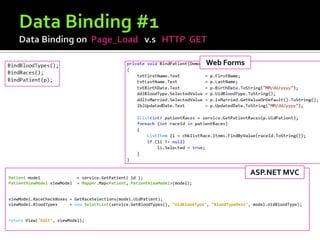
Page_Load and Postback
Web Forms


                                                                                                  ASP.NET MVC
Patient model                = service.GetPatient( id );
PatientViewModel viewModel   = Mapper.Map<Patient, PatientViewModel>(model);


viewModel.RaceCheckBoxes = GetRaceSelections(model.UidPatient);
viewModel.BloodTypes     = new SelectList(service.GetBloodTypes(), "UidBloodType", "BloodTypeDesc", model.UidBloodType);


return View("Edit", viewModel);
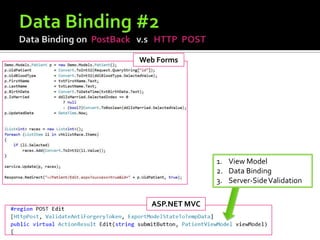
Web Forms


                1. View Model
                2. Data Binding
                3. Server-Side Validation

  ASP.NET MVC
T4 - Text Template Transformation Toolkit
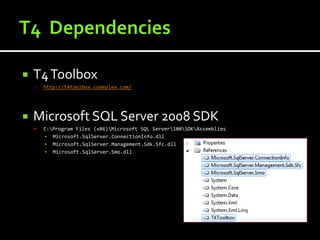
   T4 Toolbox
    o   http://t4toolbox.codeplex.com/


   Microsoft SQL Server 2008 SDK
       C:Program Files (x86)Microsoft SQL Server100SDKAssemblies
        ▪ Microsoft.SqlServer.ConnectionInfo.dll
        ▪ Microsoft.SqlServer.Management.Sdk.Sfc.dll
        ▪ Microsoft.SqlServer.Smo.dll
   Leave [Custom Tool] property empty for all
    files with .t4 extension.
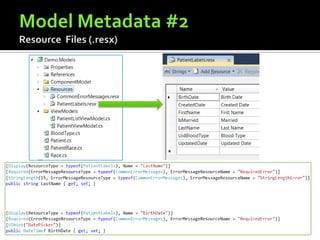
Model Metadata = Presentation + Validation
   Presentation
         [DisplayName]              and      [Display].NET 4.0
         [HiddenInput]


       Validation
         [StringLength]
         [RegularExpression]


Brad Wilson – ASP.NET MVC 2 Templates (series)
http://bradwilson.typepad.com/blog/2009/10/aspnet-mvc-2-templates-part-2-modelmetadata.html
http://bradwilson.typepad.com/blog/2009/10/aspnet-mvc-2-templates-part-4-custom-object-templates.html
   ASP.NET MVC 3
     Built-in support for Validation Summary with jQuery
     http://geekswithblogs.net/stun/archive/2011/01/28/aspnet-mvc-3-client-side-
     validation-summary-with-jquery-validation-unobtrusive-javascript.aspx
WebForms                        ASP.NET MVC


Web Controls               Html.EditorFor()


Themes / Skins             Use View Templates


Validation                 Attributes from Data Annotations


                            View Models
Data Binding               and
                            ViewData[“PropertyName”] = value;
Thank you! 


Soe Tun
http://geekswithblogs.net/stun
Twitter: @SoeLinn
Email: soelinn@gmail.com
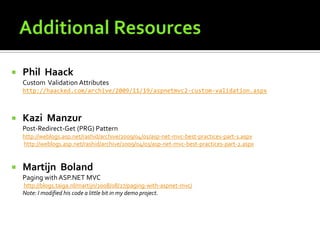
   Phil Haack
    Custom Validation Attributes
    http://haacked.com/archive/2009/11/19/aspnetmvc2-custom-validation.aspx


   Kazi Manzur
    Post-Redirect-Get (PRG) Pattern
    http://weblogs.asp.net/rashid/archive/2009/04/01/asp-net-mvc-best-practices-part-1.aspx
    http://weblogs.asp.net/rashid/archive/2009/04/03/asp-net-mvc-best-practices-part-2.aspx


   Martijn Boland
    Paging with ASP.NET MVC
    http://blogs.taiga.nl/martijn/2008/08/27/paging-with-aspnet-mvc/
    Note: I modified his code a little bit in my demo project.

Retrofit Web Forms with MVC & T4

  • 1.
  • 3.
    Soe Tun  American College of Cardiology (ACC)  Email: soelinn@gmail.com  Twitter: @SoeLinn  Blog: http://geekswithblogs.net/stun/ DC .NET User Group  Twitter: @dcdnug  2400 N St. NW DC 20037  http://dcdnug.org
  • 4.
  • 5.
    “Code Behind” (Controller) Data Transfer Object (Model, View Model) HTML Template (View)
  • 6.
    routes.MapRoute( name: “Default”, url: “{controller}/{action}/{id}”, defaults: new { controller = “Patient”, action = “Index” } ); Most Specific http://localhost/Patient/Index public ActionResult Index() {  IList<Patient> model = GetPatients(); http://localhost/Patient/ PatientController Least Specific return View(“Index”, model); } http://localhost/ Additional Info http://weblogs.asp.net/scottgu/archive/2007/12/03/asp-net-mvc-framework-part-2-url-routing.aspx http://www.asp.net/mvc/tutorials/asp-net-mvc-routing-overview-cs http://haacked.com/archive/2010/02/12/asp-net-mvc-2-optional-url-parameters.aspx
  • 7.
  • 8.
    User Interface  Consistency  Maintainability  Data Binding  Reliability  Security
  • 9.
    Web Forms ASP.NET MVC  <asp:TextBox />  Html.EditorFor(m => m.FirstName)  Date  Number (int, decimal, ...)  String  <asp:DropDownList />  Foreign Keys  Nullable<bool>  <asp:CheckBox />  Boolean
  • 10.
    Web Forms Ugly Themes Cluttered ASP.NET MVC
  • 11.
    Other HTML Helper methods  Html.TextBox(“FirstName”);  Html.DropDownList(“UidBloodType”);  Html.EditorFor( m => m.FirstName )  Strongly-Typed  Intellisense
  • 12.
  • 13.
    Matched on System.Type Name  DateTime.ascx for DateTime  Using UIHintAttribute  [UIHint(“SelectionElement”)] public int UidBloodType { get; set; } Brad Wilson – ASP.NET MVC 2 Templates (series) http://bradwilson.typepad.com/blog/2009/10/aspnet-mvc-2-templates-part-1-introduction.html
  • 14.
  • 15.
    Web Forms ASP.NET MVC Patient model = service.GetPatient( id ); PatientViewModel viewModel = Mapper.Map<Patient, PatientViewModel>(model); viewModel.RaceCheckBoxes = GetRaceSelections(model.UidPatient); viewModel.BloodTypes = new SelectList(service.GetBloodTypes(), "UidBloodType", "BloodTypeDesc", model.UidBloodType); return View("Edit", viewModel);
  • 16.
    Web Forms 1. View Model 2. Data Binding 3. Server-Side Validation ASP.NET MVC
  • 17.
    T4 - TextTemplate Transformation Toolkit
  • 18.
    T4 Toolbox o http://t4toolbox.codeplex.com/  Microsoft SQL Server 2008 SDK  C:Program Files (x86)Microsoft SQL Server100SDKAssemblies ▪ Microsoft.SqlServer.ConnectionInfo.dll ▪ Microsoft.SqlServer.Management.Sdk.Sfc.dll ▪ Microsoft.SqlServer.Smo.dll
  • 19.
    Leave [Custom Tool] property empty for all files with .t4 extension.
  • 20.
    Model Metadata =Presentation + Validation
  • 21.
    Presentation  [DisplayName] and [Display].NET 4.0  [HiddenInput]  Validation  [StringLength]  [RegularExpression] Brad Wilson – ASP.NET MVC 2 Templates (series) http://bradwilson.typepad.com/blog/2009/10/aspnet-mvc-2-templates-part-2-modelmetadata.html http://bradwilson.typepad.com/blog/2009/10/aspnet-mvc-2-templates-part-4-custom-object-templates.html
  • 23.
    ASP.NET MVC 3  Built-in support for Validation Summary with jQuery http://geekswithblogs.net/stun/archive/2011/01/28/aspnet-mvc-3-client-side- validation-summary-with-jquery-validation-unobtrusive-javascript.aspx
  • 24.
    WebForms ASP.NET MVC Web Controls  Html.EditorFor() Themes / Skins  Use View Templates Validation  Attributes from Data Annotations View Models Data Binding  and ViewData[“PropertyName”] = value;
  • 26.
    Thank you!  SoeTun http://geekswithblogs.net/stun Twitter: @SoeLinn Email: soelinn@gmail.com
  • 27.
    Phil Haack Custom Validation Attributes http://haacked.com/archive/2009/11/19/aspnetmvc2-custom-validation.aspx  Kazi Manzur Post-Redirect-Get (PRG) Pattern http://weblogs.asp.net/rashid/archive/2009/04/01/asp-net-mvc-best-practices-part-1.aspx http://weblogs.asp.net/rashid/archive/2009/04/03/asp-net-mvc-best-practices-part-2.aspx  Martijn Boland Paging with ASP.NET MVC http://blogs.taiga.nl/martijn/2008/08/27/paging-with-aspnet-mvc/ Note: I modified his code a little bit in my demo project.