Introduction to jQuery
www.collaborationtech.co.in
Bengaluru INDIA
Presentation By
Ramananda M.S Rao
Content
Content
Introduction
Getting Started
Selecting and Filtering
DOM
Handling Events
Content and Attributes
Arrays and Iterations
CSS
Ajax Features
Animations and Effects
Custom Events and PlugIns
JQuery Properties
Selector & Traversing
Dimensions
About Us
DD
www.collaborationtech.co.in
Introduction
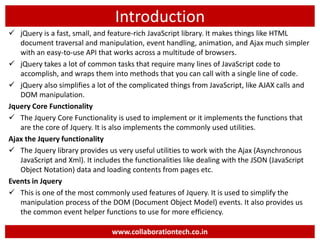
 jQuery is a fast, small, and feature-rich JavaScript library. It makes things like HTML
document traversal and manipulation, event handling, animation, and Ajax much simpler
with an easy-to-use API that works across a multitude of browsers.
 jQuery takes a lot of common tasks that require many lines of JavaScript code to
accomplish, and wraps them into methods that you can call with a single line of code.
 jQuery also simplifies a lot of the complicated things from JavaScript, like AJAX calls and
DOM manipulation.
Jquery Core Functionality
 The Jquery Core Functionality is used to implement or it implements the functions that
are the core of Jquery. It is also implements the commonly used utilities.
Ajax the Jquery functionality
 The Jquery library provides us very useful utilities to work with the Ajax (Asynchronous
JavaScript and Xml). It includes the functionalities like dealing with the JSON (JavaScript
Object Notation) data and loading contents from pages etc.
Events in Jquery
 This is one of the most commonly used features of Jquery. It is used to simplify the
manipulation process of the DOM (Document Object Model) events. It also provides us
the common event helper functions to use for more efficiency.
www.collaborationtech.co.in
Getting Started
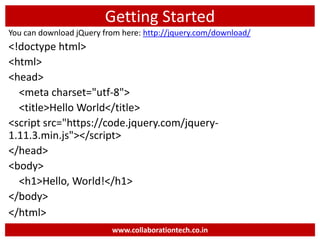
You can download jQuery from here: http://jquery.com/download/
<!doctype html>
<html>
<head>
<meta charset="utf-8">
<title>Hello World</title>
<script src="https://code.jquery.com/jquery-
1.11.3.min.js"></script>
</head>
<body>
<h1>Hello, World!</h1>
</body>
</html>
www.collaborationtech.co.in
Selectors
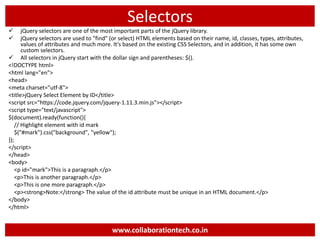
 jQuery selectors are one of the most important parts of the jQuery library.
 jQuery selectors are used to "find" (or select) HTML elements based on their name, id, classes, types, attributes,
values of attributes and much more. It's based on the existing CSS Selectors, and in addition, it has some own
custom selectors.
 All selectors in jQuery start with the dollar sign and parentheses: $().
<!DOCTYPE html>
<html lang="en">
<head>
<meta charset="utf-8">
<title>jQuery Select Element by ID</title>
<script src="https://code.jquery.com/jquery-1.11.3.min.js"></script>
<script type="text/javascript">
$(document).ready(function(){
// Highlight element with id mark
$("#mark").css("background", "yellow");
});
</script>
</head>
<body>
<p id="mark">This is a paragraph.</p>
<p>This is another paragraph.</p>
<p>This is one more paragraph.</p>
<p><strong>Note:</strong> The value of the id attribute must be unique in an HTML document.</p>
</body>
</html>
www.collaborationtech.co.in
Events
 Events are often triggered by the user's interaction with the web page, such as when a link or button is clicked, text is
entered into an input box or textarea, selection is made in a select box, key is pressed on the keyboard, the mouse
pointer is moved etc.
<!DOCTYPE html>
<html lang="en">
<head>
<meta charset="utf-8">
<title>Executing mouse Event in jQuery</title>
<script src="https://code.jquery.com/jquery-1.11.3.min.js"></script>
<style type="text/css">
p{ padding: 20px; font: 20px sans-serif; background: lightblue;
}
</style>
<script type="text/javascript">
$(document).ready(function(){
$("p").click(function(){
$(this).slideUp();
});
});
</script>
</head>
<body>
<p>Click on me and I'll disappear.</p>
</body>
</html>
www.collaborationtech.co.in
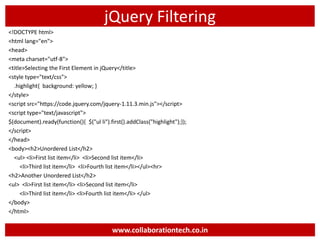
jQuery Filtering
<!DOCTYPE html>
<html lang="en">
<head>
<meta charset="utf-8">
<title>Selecting the First Element in jQuery</title>
<style type="text/css">
.highlight{ background: yellow; }
</style>
<script src="https://code.jquery.com/jquery-1.11.3.min.js"></script>
<script type="text/javascript">
$(document).ready(function(){ $("ul li").first().addClass("highlight");});
</script>
</head>
<body><h2>Unordered List</h2>
<ul> <li>First list item</li> <li>Second list item</li>
<li>Third list item</li> <li>Fourth list item</li></ul><hr>
<h2>Another Unordered List</h2>
<ul> <li>First list item</li> <li>Second list item</li>
<li>Third list item</li> <li>Fourth list item</li> </ul>
</body>
</html>
www.collaborationtech.co.in
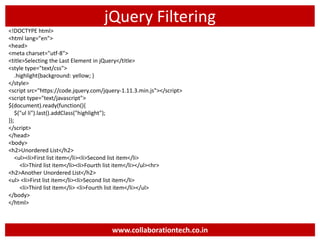
jQuery Filtering
<!DOCTYPE html>
<html lang="en">
<head>
<meta charset="utf-8">
<title>Selecting the Last Element in jQuery</title>
<style type="text/css">
.highlight{background: yellow; }
</style>
<script src="https://code.jquery.com/jquery-1.11.3.min.js"></script>
<script type="text/javascript">
$(document).ready(function(){
$("ul li").last().addClass("highlight");
});
</script>
</head>
<body>
<h2>Unordered List</h2>
<ul><li>First list item</li><li>Second list item</li>
<li>Third list item</li><li>Fourth list item</li></ul><hr>
<h2>Another Unordered List</h2>
<ul> <li>First list item</li><li>Second list item</li>
<li>Third list item</li> <li>Fourth list item</li></ul>
</body>
</html>
www.collaborationtech.co.in
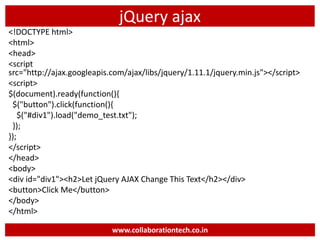
jQuery ajax
<!DOCTYPE html>
<html>
<head>
<script
src="http://ajax.googleapis.com/ajax/libs/jquery/1.11.1/jquery.min.js"></script>
<script>
$(document).ready(function(){
$("button").click(function(){
$("#div1").load("demo_test.txt");
});
});
</script>
</head>
<body>
<div id="div1"><h2>Let jQuery AJAX Change This Text</h2></div>
<button>Click Me</button>
</body>
</html>
www.collaborationtech.co.in
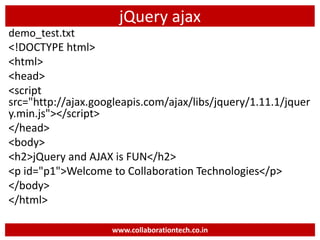
jQuery ajax
demo_test.txt
<!DOCTYPE html>
<html>
<head>
<script
src="http://ajax.googleapis.com/ajax/libs/jquery/1.11.1/jquer
y.min.js"></script>
</head>
<body>
<h2>jQuery and AJAX is FUN</h2>
<p id="p1">Welcome to Collaboration Technologies</p>
</body>
</html>
www.collaborationtech.co.in
Follow us on Social
Facebook: https://www.facebook.com/collaborationtechnologies/
Twitter : https://twitter.com/collaboration09
Google Plus : https://plus.google.com/100704494006819853579
LinkedIn : https://www.linkedin.com/in/ramananda-rao-a2012545
Instagram : https://instagram.com/collaborationtechnologies
YouTube :
https://www.youtube.com/channel/UCm9nK56LRbWSqcYWbzs8CUg
Skype : facebook:ramananda.rao.7
WhatsApp : +91 9886272445
www.collaborationtech.co.in
THANK YOU
About Us

Introduction to jQuery

  • 1.
    Introduction to jQuery www.collaborationtech.co.in BengaluruINDIA Presentation By Ramananda M.S Rao
  • 2.
    Content Content Introduction Getting Started Selecting andFiltering DOM Handling Events Content and Attributes Arrays and Iterations CSS Ajax Features Animations and Effects Custom Events and PlugIns JQuery Properties Selector & Traversing Dimensions About Us DD www.collaborationtech.co.in
  • 3.
    Introduction  jQuery isa fast, small, and feature-rich JavaScript library. It makes things like HTML document traversal and manipulation, event handling, animation, and Ajax much simpler with an easy-to-use API that works across a multitude of browsers.  jQuery takes a lot of common tasks that require many lines of JavaScript code to accomplish, and wraps them into methods that you can call with a single line of code.  jQuery also simplifies a lot of the complicated things from JavaScript, like AJAX calls and DOM manipulation. Jquery Core Functionality  The Jquery Core Functionality is used to implement or it implements the functions that are the core of Jquery. It is also implements the commonly used utilities. Ajax the Jquery functionality  The Jquery library provides us very useful utilities to work with the Ajax (Asynchronous JavaScript and Xml). It includes the functionalities like dealing with the JSON (JavaScript Object Notation) data and loading contents from pages etc. Events in Jquery  This is one of the most commonly used features of Jquery. It is used to simplify the manipulation process of the DOM (Document Object Model) events. It also provides us the common event helper functions to use for more efficiency. www.collaborationtech.co.in
  • 4.
    Getting Started You candownload jQuery from here: http://jquery.com/download/ <!doctype html> <html> <head> <meta charset="utf-8"> <title>Hello World</title> <script src="https://code.jquery.com/jquery- 1.11.3.min.js"></script> </head> <body> <h1>Hello, World!</h1> </body> </html> www.collaborationtech.co.in
  • 5.
    Selectors  jQuery selectorsare one of the most important parts of the jQuery library.  jQuery selectors are used to "find" (or select) HTML elements based on their name, id, classes, types, attributes, values of attributes and much more. It's based on the existing CSS Selectors, and in addition, it has some own custom selectors.  All selectors in jQuery start with the dollar sign and parentheses: $(). <!DOCTYPE html> <html lang="en"> <head> <meta charset="utf-8"> <title>jQuery Select Element by ID</title> <script src="https://code.jquery.com/jquery-1.11.3.min.js"></script> <script type="text/javascript"> $(document).ready(function(){ // Highlight element with id mark $("#mark").css("background", "yellow"); }); </script> </head> <body> <p id="mark">This is a paragraph.</p> <p>This is another paragraph.</p> <p>This is one more paragraph.</p> <p><strong>Note:</strong> The value of the id attribute must be unique in an HTML document.</p> </body> </html> www.collaborationtech.co.in
  • 6.
    Events  Events areoften triggered by the user's interaction with the web page, such as when a link or button is clicked, text is entered into an input box or textarea, selection is made in a select box, key is pressed on the keyboard, the mouse pointer is moved etc. <!DOCTYPE html> <html lang="en"> <head> <meta charset="utf-8"> <title>Executing mouse Event in jQuery</title> <script src="https://code.jquery.com/jquery-1.11.3.min.js"></script> <style type="text/css"> p{ padding: 20px; font: 20px sans-serif; background: lightblue; } </style> <script type="text/javascript"> $(document).ready(function(){ $("p").click(function(){ $(this).slideUp(); }); }); </script> </head> <body> <p>Click on me and I'll disappear.</p> <p>Click on me and I'll disappear.</p> <p>Click on me and I'll disappear.</p> </body> </html> www.collaborationtech.co.in
  • 7.
    jQuery Filtering <!DOCTYPE html> <htmllang="en"> <head> <meta charset="utf-8"> <title>Selecting the First Element in jQuery</title> <style type="text/css"> .highlight{ background: yellow; } </style> <script src="https://code.jquery.com/jquery-1.11.3.min.js"></script> <script type="text/javascript"> $(document).ready(function(){ $("ul li").first().addClass("highlight");}); </script> </head> <body><h2>Unordered List</h2> <ul> <li>First list item</li> <li>Second list item</li> <li>Third list item</li> <li>Fourth list item</li></ul><hr> <h2>Another Unordered List</h2> <ul> <li>First list item</li> <li>Second list item</li> <li>Third list item</li> <li>Fourth list item</li> </ul> </body> </html> www.collaborationtech.co.in
  • 8.
    jQuery Filtering <!DOCTYPE html> <htmllang="en"> <head> <meta charset="utf-8"> <title>Selecting the Last Element in jQuery</title> <style type="text/css"> .highlight{background: yellow; } </style> <script src="https://code.jquery.com/jquery-1.11.3.min.js"></script> <script type="text/javascript"> $(document).ready(function(){ $("ul li").last().addClass("highlight"); }); </script> </head> <body> <h2>Unordered List</h2> <ul><li>First list item</li><li>Second list item</li> <li>Third list item</li><li>Fourth list item</li></ul><hr> <h2>Another Unordered List</h2> <ul> <li>First list item</li><li>Second list item</li> <li>Third list item</li> <li>Fourth list item</li></ul> </body> </html> www.collaborationtech.co.in
  • 9.
  • 10.
    jQuery ajax demo_test.txt <!DOCTYPE html> <html> <head> <script src="http://ajax.googleapis.com/ajax/libs/jquery/1.11.1/jquer y.min.js"></script> </head> <body> <h2>jQueryand AJAX is FUN</h2> <p id="p1">Welcome to Collaboration Technologies</p> </body> </html> www.collaborationtech.co.in
  • 11.
    Follow us onSocial Facebook: https://www.facebook.com/collaborationtechnologies/ Twitter : https://twitter.com/collaboration09 Google Plus : https://plus.google.com/100704494006819853579 LinkedIn : https://www.linkedin.com/in/ramananda-rao-a2012545 Instagram : https://instagram.com/collaborationtechnologies YouTube : https://www.youtube.com/channel/UCm9nK56LRbWSqcYWbzs8CUg Skype : facebook:ramananda.rao.7 WhatsApp : +91 9886272445 www.collaborationtech.co.in THANK YOU
  • 12.