An Introduction to PowerShell for 
Security Assessments 
A Practical Approach 
Presented by James Tarala 
Principal Consultant © 2014 Enclave Security
2 
Problem Statement 
• During a security assessment, bringing tools to a system can 
be problematic 
• Potential issues include: 
– Network transfers 
– Anti-malware software 
– Whitelisting software 
– Business owner nerves 
An Introduction to PowerShell for Security Assessments © Enclave Security 2014
3 
“Living off the Land” 
• Ideally a penetration tester or auditor would be able to “live off 
the land” 
• In other words: Only use native operating system tools to 
perform a security assessment 
• Removes the need to download or transfer software 
• Lowers the likelihood of being blocked by AV or whitelisting 
software 
An Introduction to PowerShell for Security Assessments © Enclave Security 2014
4 
Potential Solution: PowerShell 
• Potential solution = Microsoft Windows PowerShell 
• Available for Microsoft Windows XP / Server 2003 and later 
Microsoft Windows operating systems 
• Security assessors will still need the rights & permissions to 
do their assessment 
• However some common pitfalls can be avoided using 
PowerShell 
An Introduction to PowerShell for Security Assessments © Enclave Security 2014
5 
What is PowerShell? 
• A scripting language targeted at system administrators 
• A command line mechanism for performing tasks normally 
reserved for GUIs 
• An object oriented approach to command line administration 
(rather than text based) 
• A gateway into all Microsoft Windows operating system 
objects (file system, registry, AD, WMI, etc) 
• A command line gateway into .NET programming 
An Introduction to PowerShell for Security Assessments © Enclave Security 2014
6 
PowerShell vs Unix Shells 
PowerShell 
• Object oriented 
• Consistent cmdlets naming conventions 
• Available for most Windows services 
• Requires code signing 
• Native command remoting 
• Consistent across all Windows systems 
Unix Shells 
• Text oriented 
• Inconsistent binary naming conventions 
• Unique binaries required per Unix service 
• Does not require code signing 
• SSH required for remote code 
• Multiple shells, inconsistent syntax 
between systems 
An Introduction to PowerShell for Security Assessments © Enclave Security 2014
7 
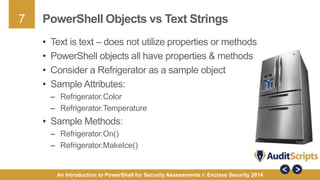
PowerShell Objects vs Text Strings 
• Text is text – does not utilize properties or methods 
• PowerShell objects all have properties & methods 
• Consider a Refrigerator as a sample object 
• Sample Attributes: 
– Refrigerator.Color 
– Refrigerator.Temperature 
• Sample Methods: 
– Refrigerator.On() 
– Refrigerator.MakeIce() 
An Introduction to PowerShell for Security Assessments © Enclave Security 2014
8 
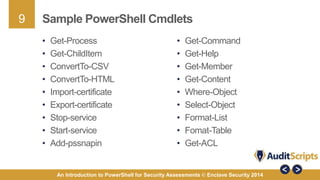
Cmdlets, Aliases, & Applications 
• PowerShell primarily utilizes cmdlets, aliases, & binary 
applications to function 
• Cmdlets: 
– Native command line tools with built in functions 
– Example: get-childitem, get-help 
• Aliases: 
– Shortcuts or pointers to cmdlets, applications, or scripts 
– Example: dir, ls 
• Applications: 
– Binaries files with defined functionality 
– Example: netsh 
An Introduction to PowerShell for Security Assessments © Enclave Security 2014
9 
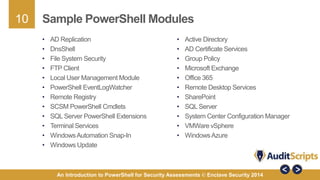
Sample PowerShell Cmdlets 
• Get-Command 
• Get-Help 
• Get-Member 
• Get-Content 
• Where-Object 
• Select-Object 
• Format-List 
• Fomat-Table 
• Get-ACL 
• Get-Process 
• Get-ChildItem 
• ConvertTo-CSV 
• ConvertTo-HTML 
• Import-certificate 
• Export-certificate 
• Stop-service 
• Start-service 
• Add-pssnapin 
An Introduction to PowerShell for Security Assessments © Enclave Security 2014
10 
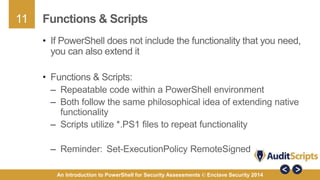
Sample PowerShell Modules 
• Active Directory 
• AD Certificate Services 
• Group Policy 
• Microsoft Exchange 
• Office 365 
• Remote Desktop Services 
• SharePoint 
• SQL Server 
• System Center Configuration Manager 
• VMWare vSphere 
• Windows Azure 
• AD Replication 
• DnsShell 
• File System Security 
• FTP Client 
• Local User Management Module 
• PowerShell EventLogWatcher 
• Remote Registry 
• SCSM PowerShell Cmdlets 
• SQL Server PowerShell Extensions 
• Terminal Services 
• Windows Automation Snap-In 
• Windows Update 
An Introduction to PowerShell for Security Assessments © Enclave Security 2014
11 
Functions & Scripts 
• If PowerShell does not include the functionality that you need, 
you can also extend it 
• Functions & Scripts: 
– Repeatable code within a PowerShell environment 
– Both follow the same philosophical idea of extending native 
functionality 
– Scripts utilize *.PS1 files to repeat functionality 
– Reminder: Set-ExecutionPolicy RemoteSigned 
An Introduction to PowerShell for Security Assessments © Enclave Security 2014
12 
Accessing .NET Objects 
• PowerShell can also even utilize .NET libraries 
• Anything .NET can do, PowerShell can also 
• There is a fuzzy line between PowerShell & VB.NET 
• Both of the following commands are the same: 
– [datetime]::now 
– Get-Date 
An Introduction to PowerShell for Security Assessments © Enclave Security 2014
13 
Case Study: Microsoft ADCS 
• Imagine you are responsible for assessing a Microsoft Active 
Directory Certificate Services (ADCS) server 
• What would you do to assess the system? 
• What steps could you follow to automate the process? 
• The following is a step by step approach you might consider 
taking to assess the system 
An Introduction to PowerShell for Security Assessments © Enclave Security 2014
14 
Step #1: Governance & Architecture 
• To start any security assessment it is worth considering 
operational & governance controls 
• Sample questions to consider: 
– Have required functionality requirements been defined? 
– Do policies, procedures, & standards exist for the system? 
– Has an architecture been defined for the PKI hierarchy that matches 
the business needs? 
– Do proper operational controls exist to protect private keys (such as 
utilizing an HSM)? 
– Is redundancy built into the PKI architecture? 
An Introduction to PowerShell for Security Assessments © Enclave Security 2014
15 
Step #2: Native Windows Cmdlets 
• The security of a service is dependent on the security of the 
underlying operating system 
• If the OS is not secure, services can never be secured 
• Therefore start an assessment with native Windows cmdlets 
& interrogate the host OS 
• For example: 
– Running services & software 
– Installed system patches 
– Local user accounts & groups 
– File system & registry permissions 
An Introduction to PowerShell for Security Assessments © Enclave Security 2014
16 
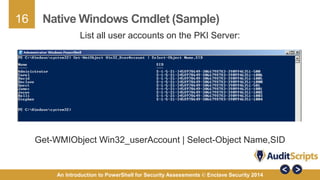
Native Windows Cmdlet (Sample) 
List all user accounts on the PKI Server: 
Get-WMIObject Win32_userAccount | Select-Object Name,SID 
An Introduction to PowerShell for Security Assessments © Enclave Security 2014
17 
Native Windows Cmdlet (Sample) 
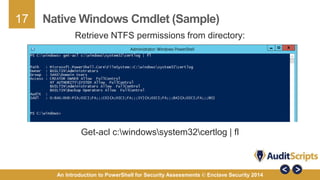
Retrieve NTFS permissions from directory: 
Get-acl c:windowssystem32certlog | fl 
An Introduction to PowerShell for Security Assessments © Enclave Security 2014
18 
Step #3: Registry Settings 
• Many service configuration settings are located in the 
Windows Registry 
• If you look in the registry you can quickly learn the 
configuration of the service without a GUI 
• PowerShell has the ability to query both entire registry hives 
and individual registry keys 
An Introduction to PowerShell for Security Assessments © Enclave Security 2014
19 
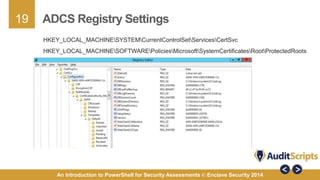
ADCS Registry Settings 
HKEY_LOCAL_MACHINESYSTEMCurrentControlSetServicesCertSvc 
HKEY_LOCAL_MACHINESOFTWAREPoliciesMicrosoftSystemCertificatesRootProtectedRoots 
An Introduction to PowerShell for Security Assessments © Enclave Security 2014
20 
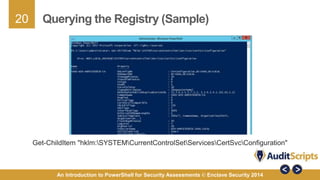
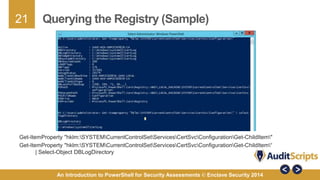
Querying the Registry (Sample) 
Get-ChildItem "hklm:SYSTEMCurrentControlSetServicesCertSvcConfiguration" 
An Introduction to PowerShell for Security Assessments © Enclave Security 2014
21 
Querying the Registry (Sample) 
Get-ItemProperty "hklm:SYSTEMCurrentControlSetServicesCertSvcConfigurationGet-ChildItem" 
Get-ItemProperty "hklm:SYSTEMCurrentControlSetServicesCertSvcConfigurationGet-ChildItem“ 
| Select-Object DBLogDirectory 
An Introduction to PowerShell for Security Assessments © Enclave Security 2014
22 
Step #4: Service Specific Cmdlets 
• Microsoft has committed that each of their product teams will make 
their services 100% configurable via PowerShell cmdlets 
• The beta test for this program was Exchange 2007 
• Most all services now have service specific cmdlets 
• These extend the standard functionality of PowerShell on that 
system 
• Sample cmdlets: 
– Import-Module ActiveDirectory 
– Get-Module -ListAvailable 
An Introduction to PowerShell for Security Assessments © Enclave Security 2014
23 
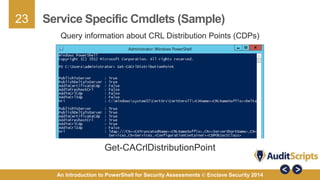
Service Specific Cmdlets (Sample) 
Query information about CRL Distribution Points (CDPs) 
Get-CACrlDistributionPoint 
An Introduction to PowerShell for Security Assessments © Enclave Security 2014
24 
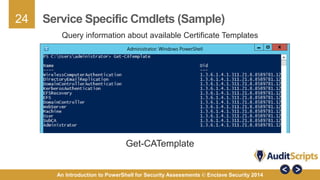
Service Specific Cmdlets (Sample) 
Query information about available Certificate Templates 
Get-CATemplate 
An Introduction to PowerShell for Security Assessments © Enclave Security 2014
25 
Step #5: Querying Config Files 
• During an assessment you may also need to query 
configuration files for specific services 
• Often times XML or CONFIG files are used to store 
configuration date instead of the registry 
• Third party application developers especially like to store 
configurations this way 
• To view the content of any file use: 
– Get-content 
An Introduction to PowerShell for Security Assessments © Enclave Security 2014
26 
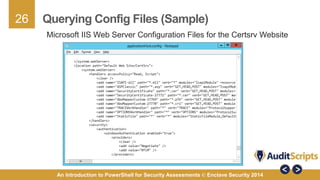
Querying Config Files (Sample) 
Microsoft IIS Web Server Configuration Files for the Certsrv Website 
An Introduction to PowerShell for Security Assessments © Enclave Security 2014
27 
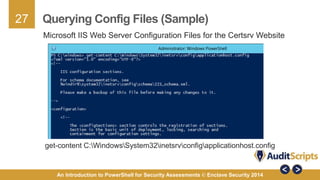
Querying Config Files (Sample) 
Microsoft IIS Web Server Configuration Files for the Certsrv Website 
get-content C:WindowsSystem32inetsrvconfigapplicationhost.config 
An Introduction to PowerShell for Security Assessments © Enclave Security 2014
28 
Step #6: Native Windows Binaries 
• Microsoft also makes available application binaries for 
managing specific services 
• Prior to PowerShell, binaries were the only method for 
querying information about a system from the command line 
• If a service specific cmdlets does not meet your needs, 
possibly a binary will 
• For example: 
– DNSCMD.EXE 
– CERTUTIL.EXE 
An Introduction to PowerShell for Security Assessments © Enclave Security 2014
29 
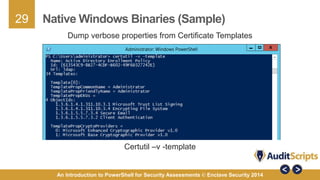
Native Windows Binaries (Sample) 
Dump verbose properties from Certificate Templates 
Certutil –v -template 
An Introduction to PowerShell for Security Assessments © Enclave Security 2014
30 
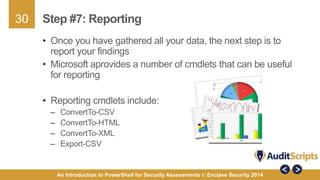
Step #7: Reporting 
• Once you have gathered all your data, the next step is to 
report your findings 
• Microsoft aprovides a number of cmdlets that can be useful 
for reporting 
• Reporting cmdlets include: 
– ConvertTo-CSV 
– ConvertTo-HTML 
– ConvertTo-XML 
– Export-CSV 
An Introduction to PowerShell for Security Assessments © Enclave Security 2014
31 
Next Steps 
• If you find yourself regularly assessing Microsoft Windows 
based systems – learn PowerShell 
1. Learn the foundations of PowerShell scripting 
2. Learn the basic built-in cmdlets Windows provides 
3. Learn about additional modules that can be added to a 
standard Windows environment 
4. Write scripts to automate common assessment tasks 
5. Experiment with output & reporting in PowerShell 
6. Share your scripts with the community 
An Introduction to PowerShell for Security Assessments © Enclave Security 2014
32 
Further Questions 
• James Tarala 
– Principal Consultant & Founder, Enclave Security 
– E-mail: james.tarala@enclavesecurity.com 
– Twitter: @isaudit 
– Website: http://www.auditscripts.com/ 
• Resources for further study: 
– AuditScripts.com Audit Resources 
– SANS SEC 505: Securing Windows & Resisting Malware 
– Windows PowerShell in Action by Bruce Payette 
– PowerShell and WMI by Richard Siddaway 
An Introduction to PowerShell for Security Assessments © Enclave Security 2014

An Introduction to PowerShell for Security Assessments

  • 1.
    An Introduction toPowerShell for Security Assessments A Practical Approach Presented by James Tarala Principal Consultant © 2014 Enclave Security
  • 2.
    2 Problem Statement • During a security assessment, bringing tools to a system can be problematic • Potential issues include: – Network transfers – Anti-malware software – Whitelisting software – Business owner nerves An Introduction to PowerShell for Security Assessments © Enclave Security 2014
  • 3.
    3 “Living offthe Land” • Ideally a penetration tester or auditor would be able to “live off the land” • In other words: Only use native operating system tools to perform a security assessment • Removes the need to download or transfer software • Lowers the likelihood of being blocked by AV or whitelisting software An Introduction to PowerShell for Security Assessments © Enclave Security 2014
  • 4.
    4 Potential Solution:PowerShell • Potential solution = Microsoft Windows PowerShell • Available for Microsoft Windows XP / Server 2003 and later Microsoft Windows operating systems • Security assessors will still need the rights & permissions to do their assessment • However some common pitfalls can be avoided using PowerShell An Introduction to PowerShell for Security Assessments © Enclave Security 2014
  • 5.
    5 What isPowerShell? • A scripting language targeted at system administrators • A command line mechanism for performing tasks normally reserved for GUIs • An object oriented approach to command line administration (rather than text based) • A gateway into all Microsoft Windows operating system objects (file system, registry, AD, WMI, etc) • A command line gateway into .NET programming An Introduction to PowerShell for Security Assessments © Enclave Security 2014
  • 6.
    6 PowerShell vsUnix Shells PowerShell • Object oriented • Consistent cmdlets naming conventions • Available for most Windows services • Requires code signing • Native command remoting • Consistent across all Windows systems Unix Shells • Text oriented • Inconsistent binary naming conventions • Unique binaries required per Unix service • Does not require code signing • SSH required for remote code • Multiple shells, inconsistent syntax between systems An Introduction to PowerShell for Security Assessments © Enclave Security 2014
  • 7.
    7 PowerShell Objectsvs Text Strings • Text is text – does not utilize properties or methods • PowerShell objects all have properties & methods • Consider a Refrigerator as a sample object • Sample Attributes: – Refrigerator.Color – Refrigerator.Temperature • Sample Methods: – Refrigerator.On() – Refrigerator.MakeIce() An Introduction to PowerShell for Security Assessments © Enclave Security 2014
  • 8.
    8 Cmdlets, Aliases,& Applications • PowerShell primarily utilizes cmdlets, aliases, & binary applications to function • Cmdlets: – Native command line tools with built in functions – Example: get-childitem, get-help • Aliases: – Shortcuts or pointers to cmdlets, applications, or scripts – Example: dir, ls • Applications: – Binaries files with defined functionality – Example: netsh An Introduction to PowerShell for Security Assessments © Enclave Security 2014
  • 9.
    9 Sample PowerShellCmdlets • Get-Command • Get-Help • Get-Member • Get-Content • Where-Object • Select-Object • Format-List • Fomat-Table • Get-ACL • Get-Process • Get-ChildItem • ConvertTo-CSV • ConvertTo-HTML • Import-certificate • Export-certificate • Stop-service • Start-service • Add-pssnapin An Introduction to PowerShell for Security Assessments © Enclave Security 2014
  • 10.
    10 Sample PowerShellModules • Active Directory • AD Certificate Services • Group Policy • Microsoft Exchange • Office 365 • Remote Desktop Services • SharePoint • SQL Server • System Center Configuration Manager • VMWare vSphere • Windows Azure • AD Replication • DnsShell • File System Security • FTP Client • Local User Management Module • PowerShell EventLogWatcher • Remote Registry • SCSM PowerShell Cmdlets • SQL Server PowerShell Extensions • Terminal Services • Windows Automation Snap-In • Windows Update An Introduction to PowerShell for Security Assessments © Enclave Security 2014
  • 11.
    11 Functions &Scripts • If PowerShell does not include the functionality that you need, you can also extend it • Functions & Scripts: – Repeatable code within a PowerShell environment – Both follow the same philosophical idea of extending native functionality – Scripts utilize *.PS1 files to repeat functionality – Reminder: Set-ExecutionPolicy RemoteSigned An Introduction to PowerShell for Security Assessments © Enclave Security 2014
  • 12.
    12 Accessing .NETObjects • PowerShell can also even utilize .NET libraries • Anything .NET can do, PowerShell can also • There is a fuzzy line between PowerShell & VB.NET • Both of the following commands are the same: – [datetime]::now – Get-Date An Introduction to PowerShell for Security Assessments © Enclave Security 2014
  • 13.
    13 Case Study:Microsoft ADCS • Imagine you are responsible for assessing a Microsoft Active Directory Certificate Services (ADCS) server • What would you do to assess the system? • What steps could you follow to automate the process? • The following is a step by step approach you might consider taking to assess the system An Introduction to PowerShell for Security Assessments © Enclave Security 2014
  • 14.
    14 Step #1:Governance & Architecture • To start any security assessment it is worth considering operational & governance controls • Sample questions to consider: – Have required functionality requirements been defined? – Do policies, procedures, & standards exist for the system? – Has an architecture been defined for the PKI hierarchy that matches the business needs? – Do proper operational controls exist to protect private keys (such as utilizing an HSM)? – Is redundancy built into the PKI architecture? An Introduction to PowerShell for Security Assessments © Enclave Security 2014
  • 15.
    15 Step #2:Native Windows Cmdlets • The security of a service is dependent on the security of the underlying operating system • If the OS is not secure, services can never be secured • Therefore start an assessment with native Windows cmdlets & interrogate the host OS • For example: – Running services & software – Installed system patches – Local user accounts & groups – File system & registry permissions An Introduction to PowerShell for Security Assessments © Enclave Security 2014
  • 16.
    16 Native WindowsCmdlet (Sample) List all user accounts on the PKI Server: Get-WMIObject Win32_userAccount | Select-Object Name,SID An Introduction to PowerShell for Security Assessments © Enclave Security 2014
  • 17.
    17 Native WindowsCmdlet (Sample) Retrieve NTFS permissions from directory: Get-acl c:windowssystem32certlog | fl An Introduction to PowerShell for Security Assessments © Enclave Security 2014
  • 18.
    18 Step #3:Registry Settings • Many service configuration settings are located in the Windows Registry • If you look in the registry you can quickly learn the configuration of the service without a GUI • PowerShell has the ability to query both entire registry hives and individual registry keys An Introduction to PowerShell for Security Assessments © Enclave Security 2014
  • 19.
    19 ADCS RegistrySettings HKEY_LOCAL_MACHINESYSTEMCurrentControlSetServicesCertSvc HKEY_LOCAL_MACHINESOFTWAREPoliciesMicrosoftSystemCertificatesRootProtectedRoots An Introduction to PowerShell for Security Assessments © Enclave Security 2014
  • 20.
    20 Querying theRegistry (Sample) Get-ChildItem "hklm:SYSTEMCurrentControlSetServicesCertSvcConfiguration" An Introduction to PowerShell for Security Assessments © Enclave Security 2014
  • 21.
    21 Querying theRegistry (Sample) Get-ItemProperty "hklm:SYSTEMCurrentControlSetServicesCertSvcConfigurationGet-ChildItem" Get-ItemProperty "hklm:SYSTEMCurrentControlSetServicesCertSvcConfigurationGet-ChildItem“ | Select-Object DBLogDirectory An Introduction to PowerShell for Security Assessments © Enclave Security 2014
  • 22.
    22 Step #4:Service Specific Cmdlets • Microsoft has committed that each of their product teams will make their services 100% configurable via PowerShell cmdlets • The beta test for this program was Exchange 2007 • Most all services now have service specific cmdlets • These extend the standard functionality of PowerShell on that system • Sample cmdlets: – Import-Module ActiveDirectory – Get-Module -ListAvailable An Introduction to PowerShell for Security Assessments © Enclave Security 2014
  • 23.
    23 Service SpecificCmdlets (Sample) Query information about CRL Distribution Points (CDPs) Get-CACrlDistributionPoint An Introduction to PowerShell for Security Assessments © Enclave Security 2014
  • 24.
    24 Service SpecificCmdlets (Sample) Query information about available Certificate Templates Get-CATemplate An Introduction to PowerShell for Security Assessments © Enclave Security 2014
  • 25.
    25 Step #5:Querying Config Files • During an assessment you may also need to query configuration files for specific services • Often times XML or CONFIG files are used to store configuration date instead of the registry • Third party application developers especially like to store configurations this way • To view the content of any file use: – Get-content An Introduction to PowerShell for Security Assessments © Enclave Security 2014
  • 26.
    26 Querying ConfigFiles (Sample) Microsoft IIS Web Server Configuration Files for the Certsrv Website An Introduction to PowerShell for Security Assessments © Enclave Security 2014
  • 27.
    27 Querying ConfigFiles (Sample) Microsoft IIS Web Server Configuration Files for the Certsrv Website get-content C:WindowsSystem32inetsrvconfigapplicationhost.config An Introduction to PowerShell for Security Assessments © Enclave Security 2014
  • 28.
    28 Step #6:Native Windows Binaries • Microsoft also makes available application binaries for managing specific services • Prior to PowerShell, binaries were the only method for querying information about a system from the command line • If a service specific cmdlets does not meet your needs, possibly a binary will • For example: – DNSCMD.EXE – CERTUTIL.EXE An Introduction to PowerShell for Security Assessments © Enclave Security 2014
  • 29.
    29 Native WindowsBinaries (Sample) Dump verbose properties from Certificate Templates Certutil –v -template An Introduction to PowerShell for Security Assessments © Enclave Security 2014
  • 30.
    30 Step #7:Reporting • Once you have gathered all your data, the next step is to report your findings • Microsoft aprovides a number of cmdlets that can be useful for reporting • Reporting cmdlets include: – ConvertTo-CSV – ConvertTo-HTML – ConvertTo-XML – Export-CSV An Introduction to PowerShell for Security Assessments © Enclave Security 2014
  • 31.
    31 Next Steps • If you find yourself regularly assessing Microsoft Windows based systems – learn PowerShell 1. Learn the foundations of PowerShell scripting 2. Learn the basic built-in cmdlets Windows provides 3. Learn about additional modules that can be added to a standard Windows environment 4. Write scripts to automate common assessment tasks 5. Experiment with output & reporting in PowerShell 6. Share your scripts with the community An Introduction to PowerShell for Security Assessments © Enclave Security 2014
  • 32.
    32 Further Questions • James Tarala – Principal Consultant & Founder, Enclave Security – E-mail: james.tarala@enclavesecurity.com – Twitter: @isaudit – Website: http://www.auditscripts.com/ • Resources for further study: – AuditScripts.com Audit Resources – SANS SEC 505: Securing Windows & Resisting Malware – Windows PowerShell in Action by Bruce Payette – PowerShell and WMI by Richard Siddaway An Introduction to PowerShell for Security Assessments © Enclave Security 2014

Editor's Notes

  • #2 An Introduction to PowerShell for Security Assessments With the increased need for automation in operating systems, every platform now provides a native environment for automating repetitive tasks via scripts. Since 2007, Microsoft has gone “all in” with their PowerShell scripting environment, providing access to every facet of the Microsoft Windows operating system and services via a scriptable interface. Not only can administrators completely administer and audit an operating system from this shell, but most all Microsoft services, such as Exchange, SQL Server, and SharePoint services as well. In this presentation James Tarala of Enclave Security will introduce students to using PowerShell scripts for assessing the security of thee Microsoft services. Auditors, system administrators, penetration testers, and others will all learn practical techniques for using PowerShell to assess and secure these vital Windows services.
  • #11 http://social.technet.microsoft.com/wiki/contents/articles/4308.popular-powershell-modules.aspx http://social.technet.microsoft.com/wiki/contents/articles/4309.powershell-enabled-technologies.aspx