


Dr. Mohieddin Moradi
mohieddinmoradi@gmail.com
Dream
Idea
Plan
Implementation
1
2
https://www.slideshare.net/mohieddin.moradi/presentations
− SDTV Overview
− HDTV Standards and Definitions
− Genlock and Synchronization
− The Color Bars Test Signal Specifications and Applications
− Up, Down & Cross Converting
− Sampling, Fourier Transform, Aliasing and Moire Pattern
− Interlacing and De-interlacing
− Video Scaling and Edge Enhancement
− Frame Rate Conversion
− Signal Quality in HDTV Production and Broadcast Services
− HD Cables and Connectors, Some Production Issues
Outline
3
4
Field, Frame, Progressive, Interlace
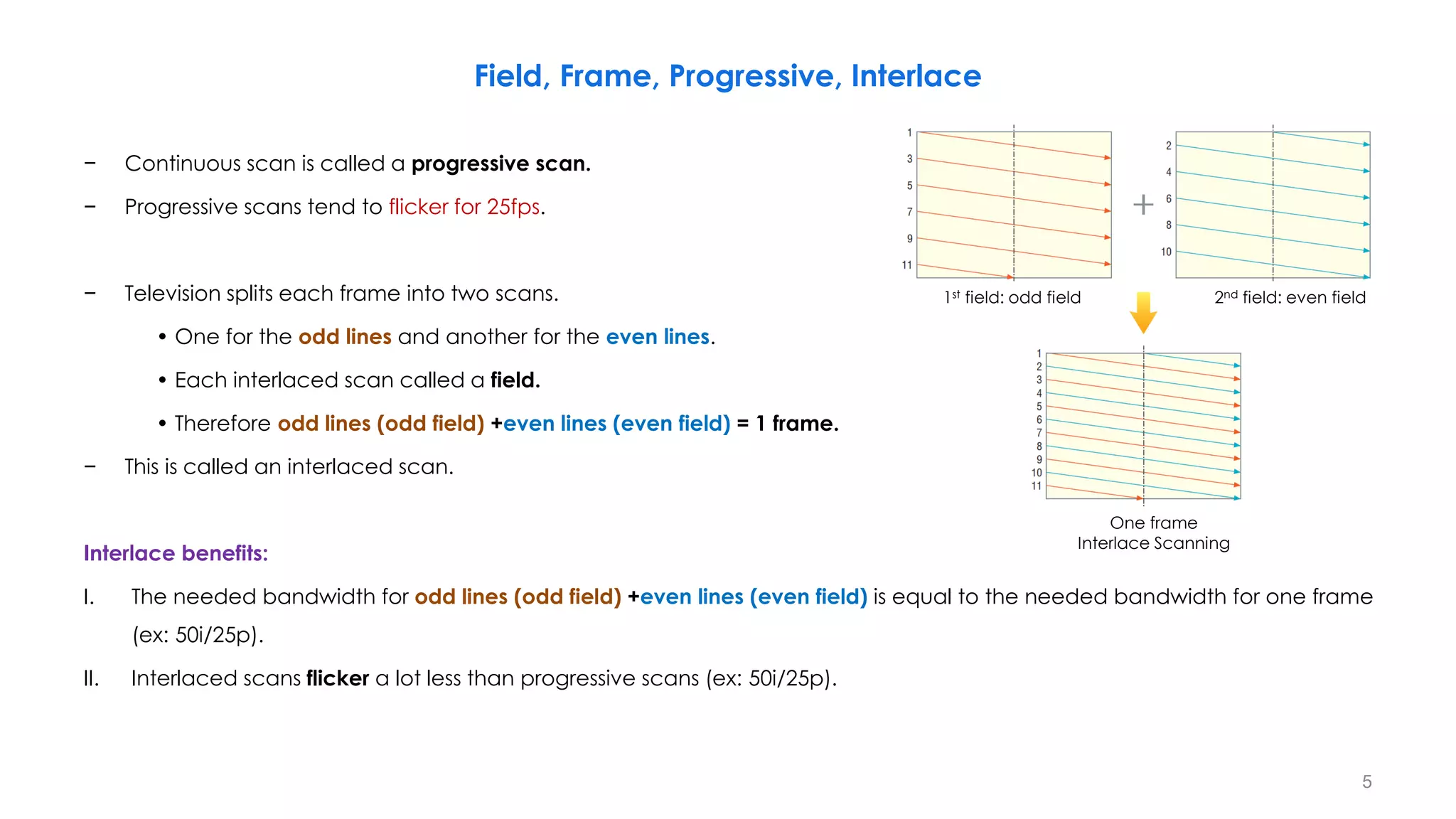
− Continuous scan is called a progressive scan.
− Progressive scans tend to flicker for 25fps.
− Television splits each frame into two scans.
• One for the odd lines and another for the even lines.
• Each interlaced scan called a field.
• Therefore odd lines (odd field) +even lines (even field) = 1 frame.
− This is called an interlaced scan.
Interlace benefits:
I. The needed bandwidth for odd lines (odd field) +even lines (even field) is equal to the needed bandwidth for one frame
(ex: 50i/25p).
II. Interlaced scans flicker a lot less than progressive scans (ex: 50i/25p).
5
1st field: odd field 2nd field: even field
One frame
Interlace Scanning
Standard Monochrome Signals
6
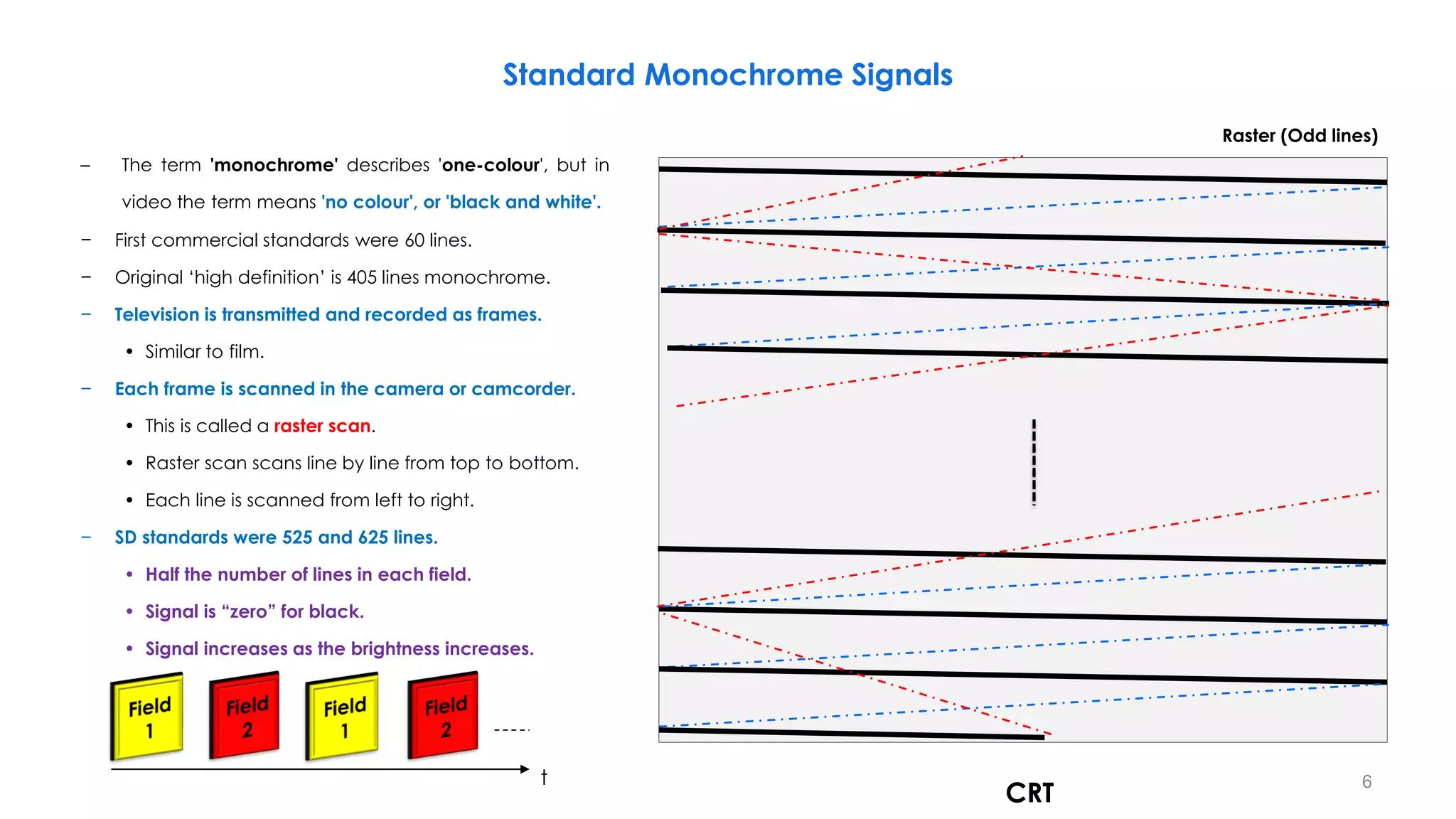
CRT
t
– The term 'monochrome' describes 'one-colour', but in
video the term means 'no colour', or 'black and white'.
− First commercial standards were 60 lines.
− Original ‘high definition’ is 405 lines monochrome.
− Television is transmitted and recorded as frames.
• Similar to film.
− Each frame is scanned in the camera or camcorder.
• This is called a raster scan.
• Raster scan scans line by line from top to bottom.
• Each line is scanned from left to right.
− SD standards were 525 and 625 lines.
• Half the number of lines in each field.
• Signal is “zero” for black.
• Signal increases as the brightness increases.
Raster (Odd lines)
Standard Monochrome Signals
7
t
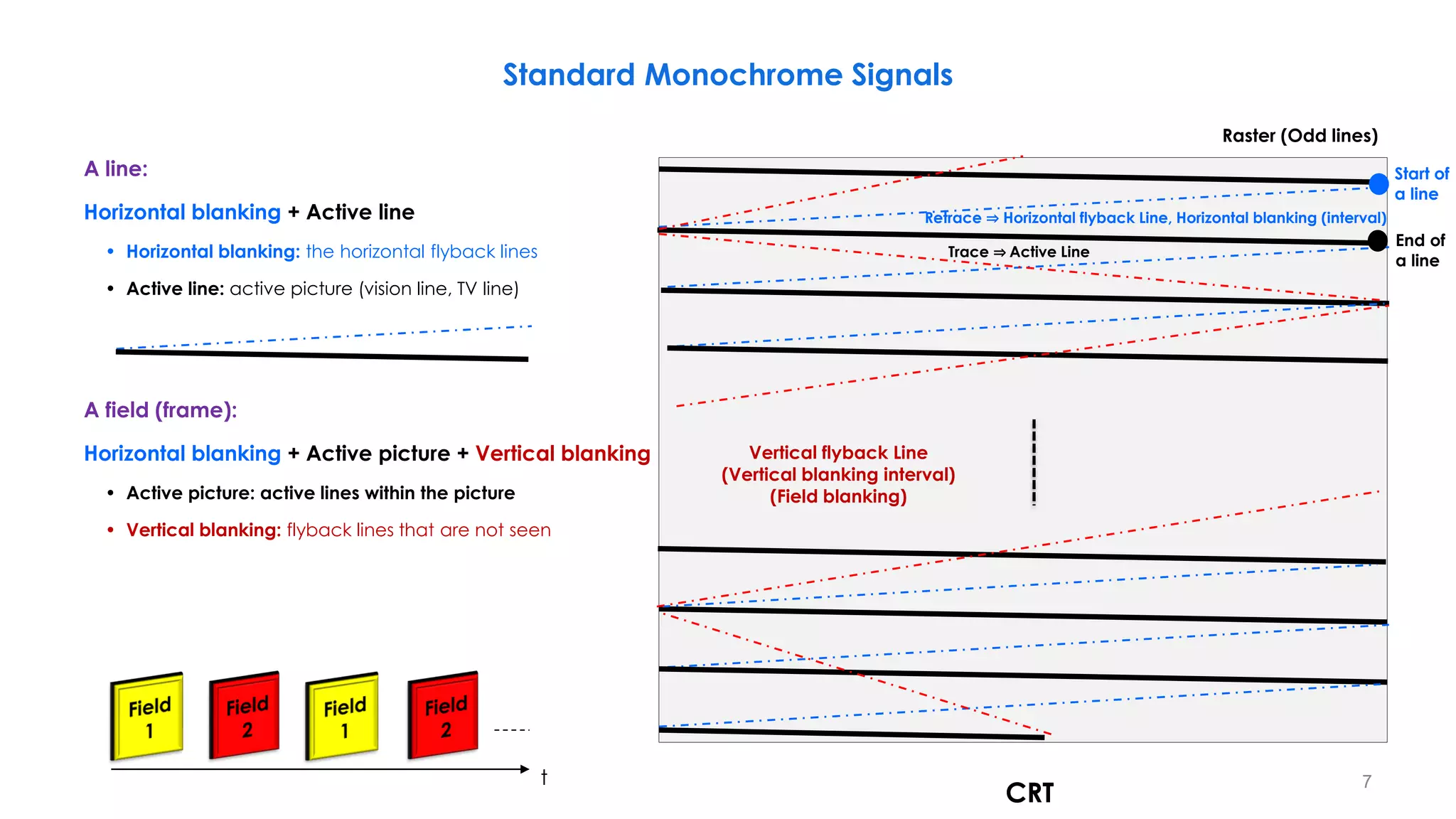
A line:
Horizontal blanking + Active line
• Horizontal blanking: the horizontal flyback lines
• Active line: active picture (vision line, TV line)
A field (frame):
Horizontal blanking + Active picture + Vertical blanking
• Active picture: active lines within the picture
• Vertical blanking: flyback lines that are not seen
CRT
Raster (Odd lines)
Trace ⇒ Active Line
Retrace ⇒ Horizontal flyback Line, Horizontal blanking (interval)
Start of
a line
End of
a line
Vertical flyback Line
(Vertical blanking interval)
(Field blanking)
Standard Monochrome Signals
8
624
625
21
1
22
23
2
313
335
334
314
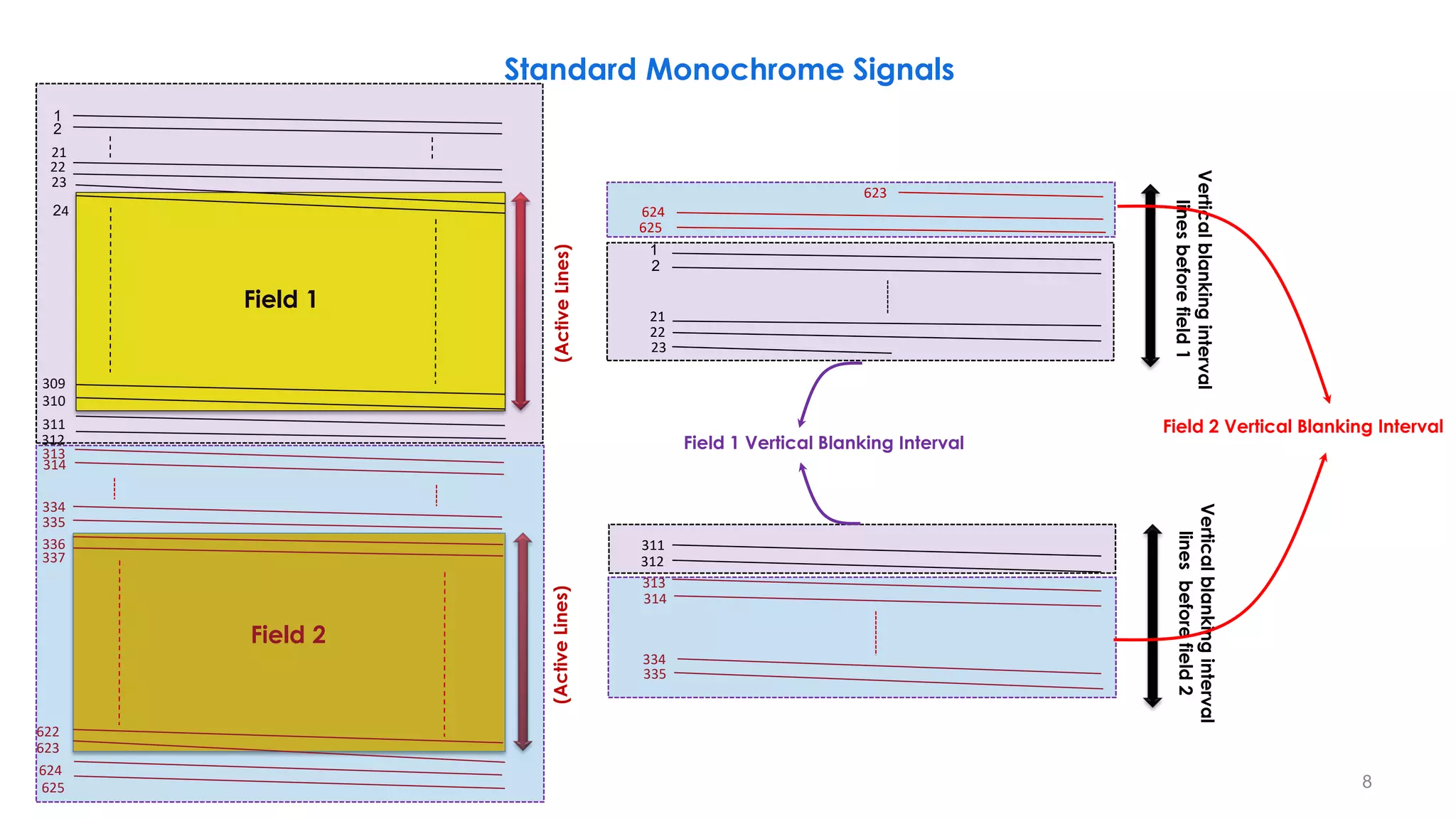
Vertical
blanking
interval
lines
before
field
1
Vertical
blanking
interval
lines
before
field
2
623
311
312
(Active
Lines)
(Active
Lines)
21
24
1
22
23
310
311
313
335
336
623
624
625
2
309
312
334
337
622
314
Field 2
Field 1
Field 2 Vertical Blanking Interval
Field 1 Vertical Blanking Interval
621
308 309 310 311 312 313 314 315 316 317 318 319 320 333 334 335 336 337 338
622 623 624 625 1 2 3 4 5 6 7 8 21 22 23 24 26
25
9
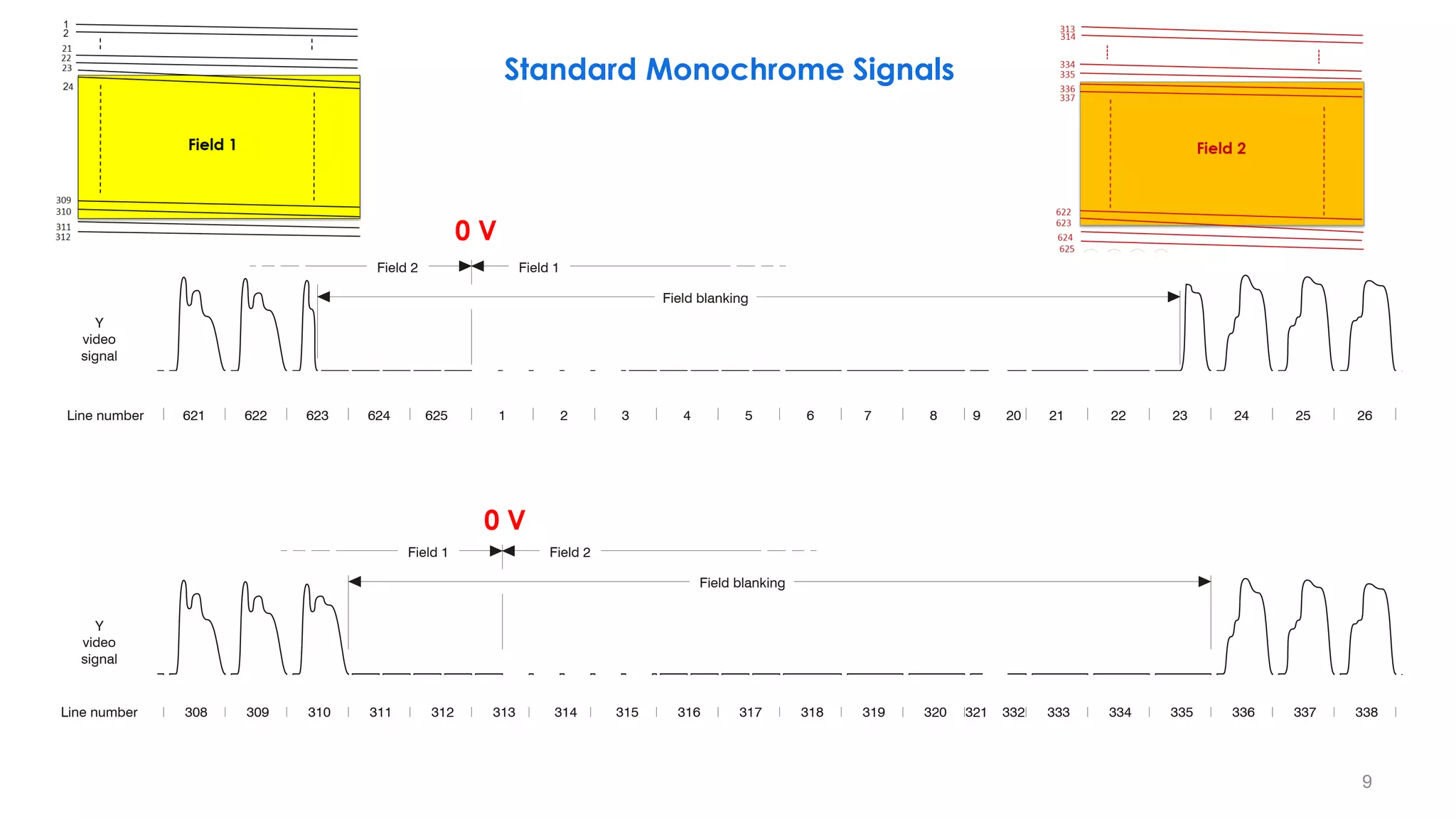
Field 2 Field 1
Field 1 Field 2
Field blanking
Field blanking
20
Y
video
signal
Line number
Y
video
signal
Line number 332
321
9
0 V
Standard Monochrome Signals
0 V
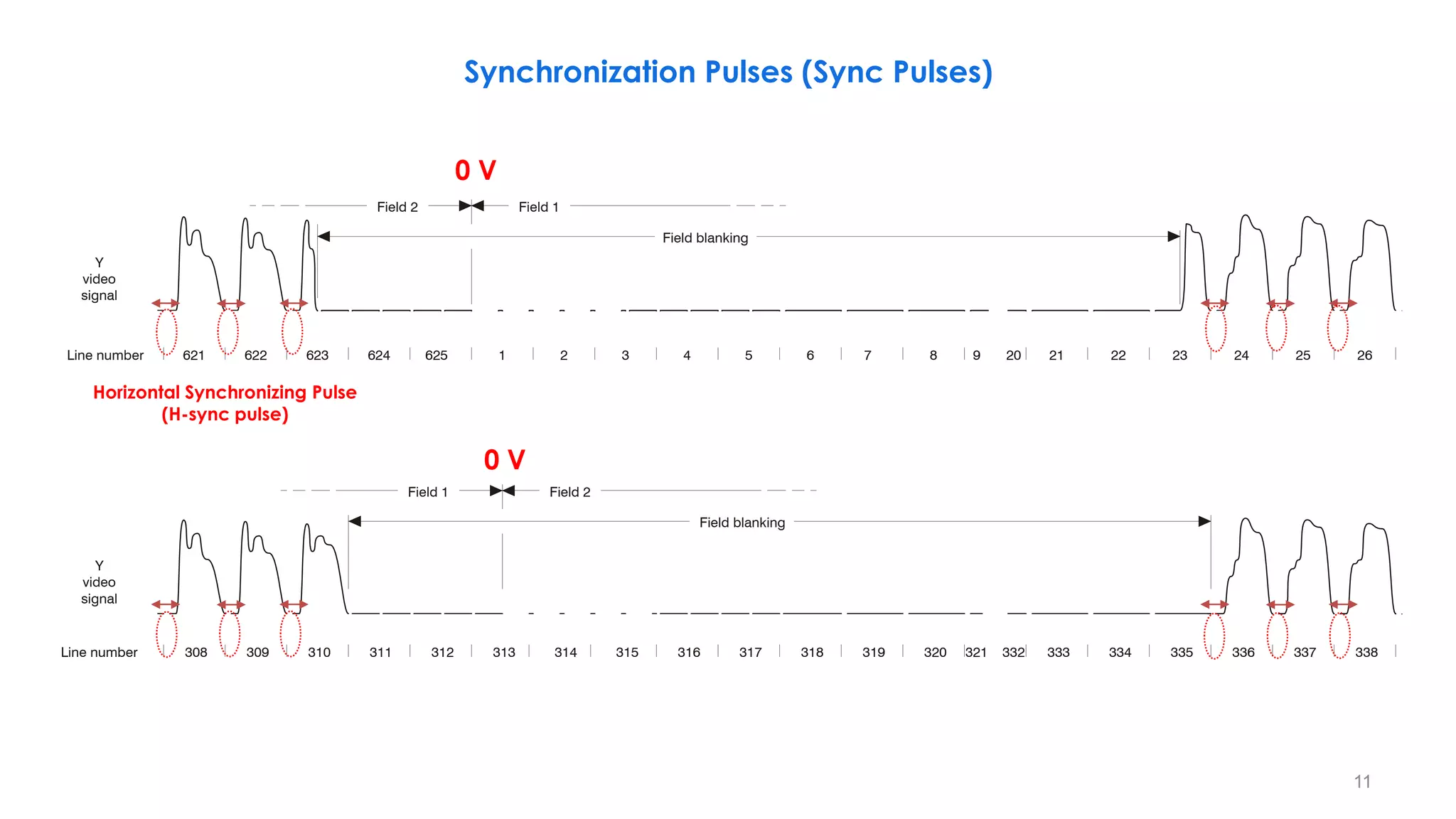
Synchronization Pulses (Sync Pulses)
10
V-sync pulse
V-sync pulse
H-sync pulse H-sync pulse
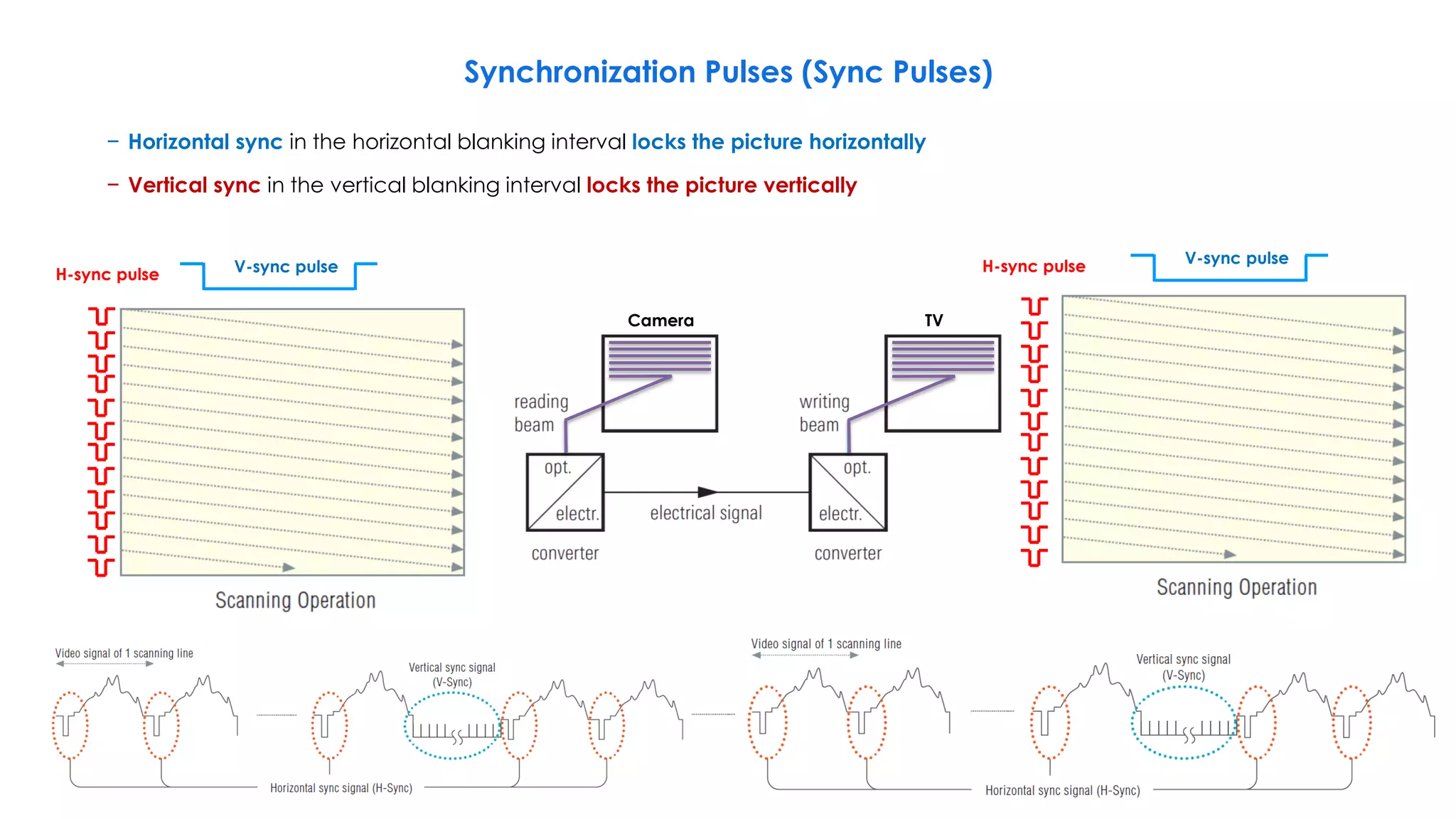
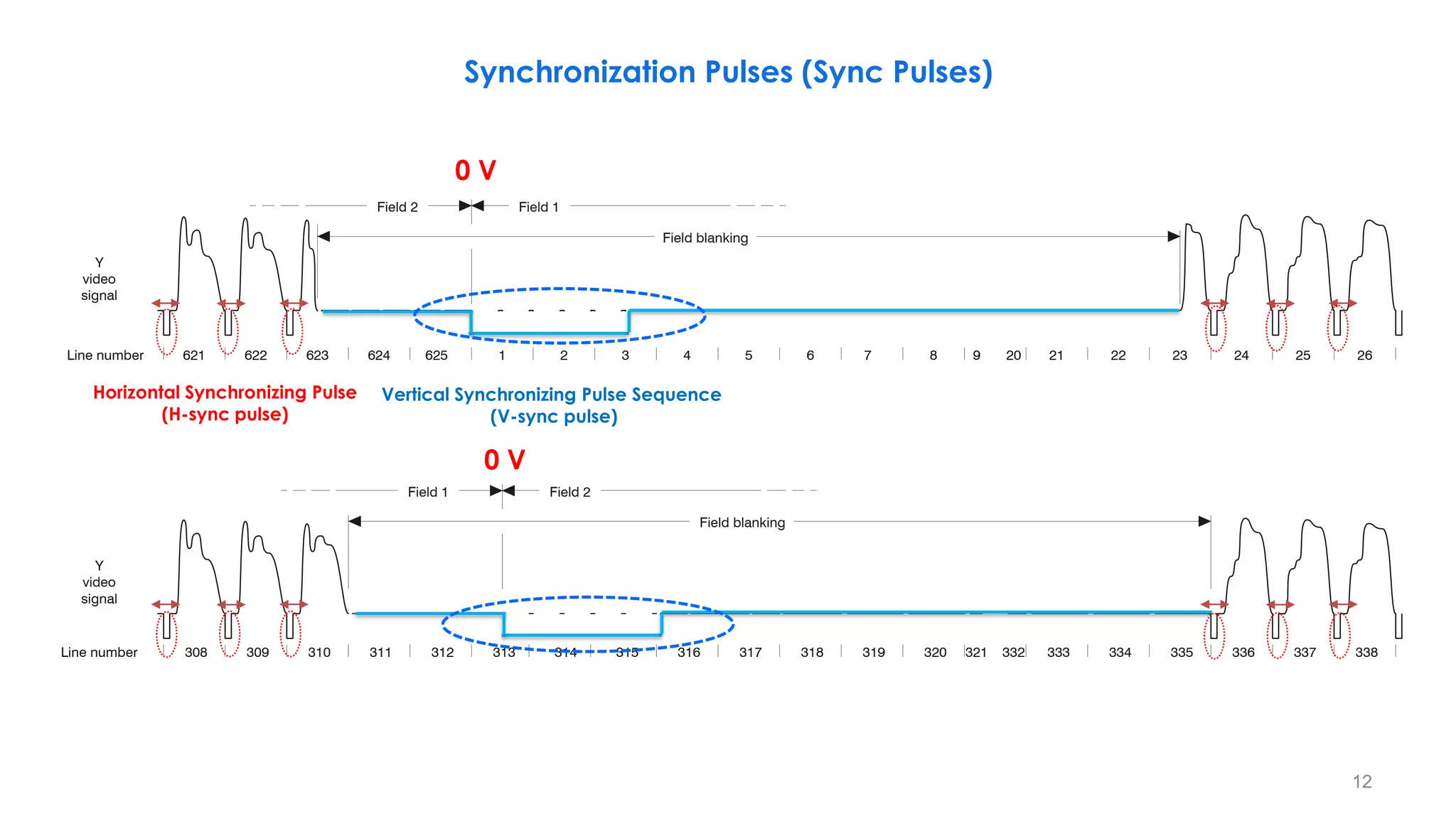
− Horizontal sync in the horizontal blanking interval locks the picture horizontally
− Vertical sync in the vertical blanking interval locks the picture vertically
Camera TV
621
308 309 310 311 312 313 314 315 316 317 318 319 320 333 334 335 336 337 338
622 623 624 625 1 2 3 4 5 6 7 8 21 22 23 24 26
25
9
Field 2 Field 1
Field 1 Field 2
Field blanking
Field blanking
20
Y
video
signal
Line number
Y
video
signal
Line number 332
321
11
0 V
0 V
Synchronization Pulses (Sync Pulses)
Horizontal Synchronizing Pulse
(H-sync pulse)
621
308 309 310 311 312 313 314 315 316 317 318 319 320 333 334 335 336 337 338
622 623 624 625 1 2 3 4 5 6 7 8 21 22 23 24 26
25
9
Field 2 Field 1
Field 1 Field 2
Field blanking
Field blanking
20
Y
video
signal
Line number
Y
video
signal
Line number 332
321
12
0 V
0 V
Synchronization Pulses (Sync Pulses)
Horizontal Synchronizing Pulse
(H-sync pulse)
Vertical Synchronizing Pulse Sequence
(V-sync pulse)
21
24
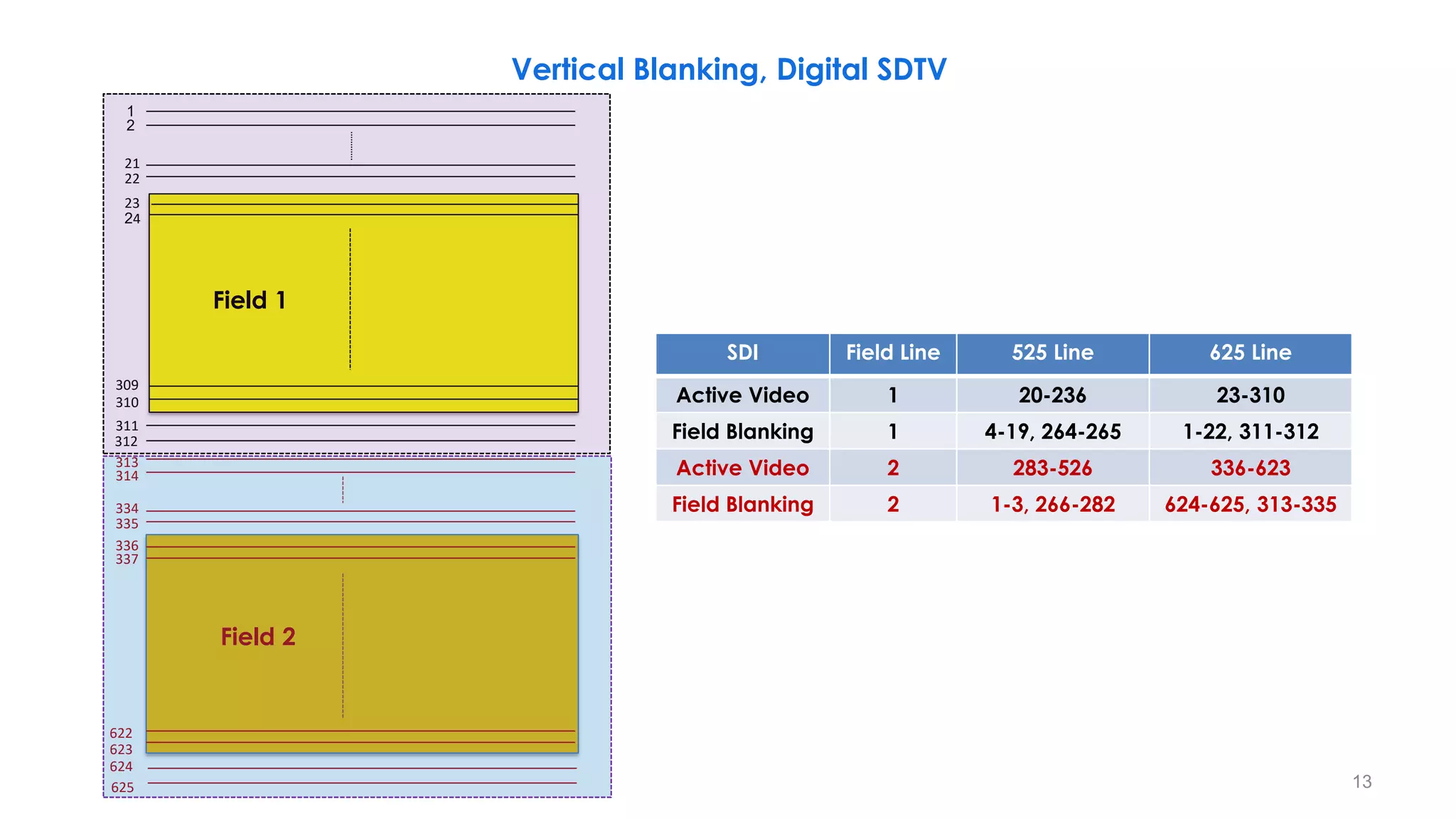
Vertical Blanking, Digital SDTV
1
22
23
310
311
313
335
336
623
624
625
2
309
312
334
337
622
314
Field 2
Field 1
13
SDI Field Line 525 Line 625 Line
Active Video 1 20-236 23-310
Field Blanking 1 4-19, 264-265 1-22, 311-312
Active Video 2 283-526 336-623
Field Blanking 2 1-3, 266-282 624-625, 313-335
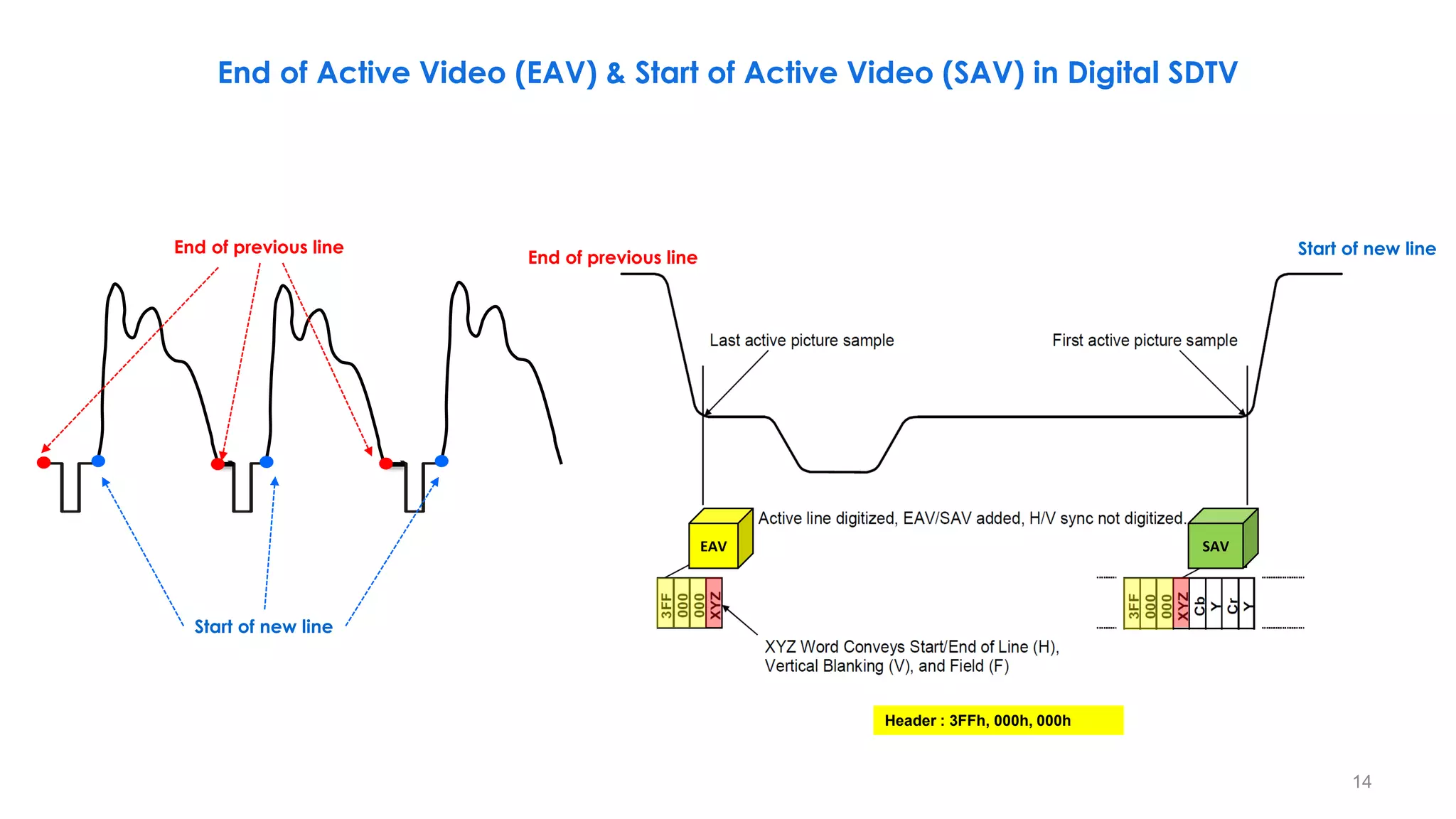
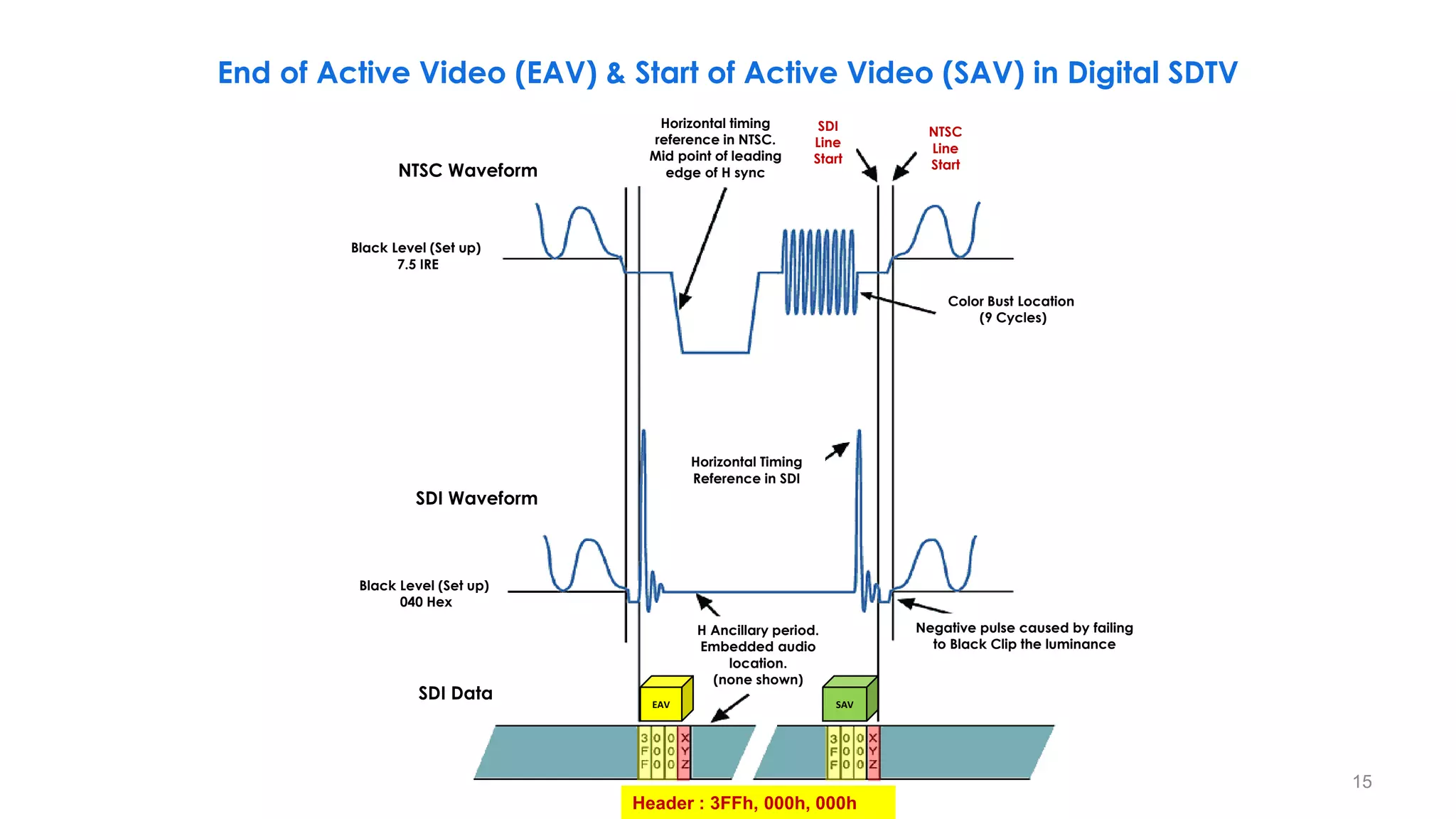
End of Active Video (EAV) & Start of Active Video (SAV) in Digital SDTV
14
Header : 3FFh, 000h, 000h
EAV SAV
Start of new line
End of previous line
621 622 623 624 625 1 2 3
Field 2 Field 1
r
Start of new line
End of previous line
15
Header : 3FFh, 000h, 000h
NTSC Waveform
Black Level (Set up)
7.5 IRE
Color Bust Location
(9 Cycles)
Horizontal timing
reference in NTSC.
Mid point of leading
edge of H sync
SDI
Line
Start
NTSC
Line
Start
SDI Waveform
Black Level (Set up)
040 Hex
SDI Data
Horizontal Timing
Reference in SDI
Negative pulse caused by failing
to Black Clip the luminance
H Ancillary period.
Embedded audio
location.
(none shown)
EAV SAV
End of Active Video (EAV) & Start of Active Video (SAV) in Digital SDTV
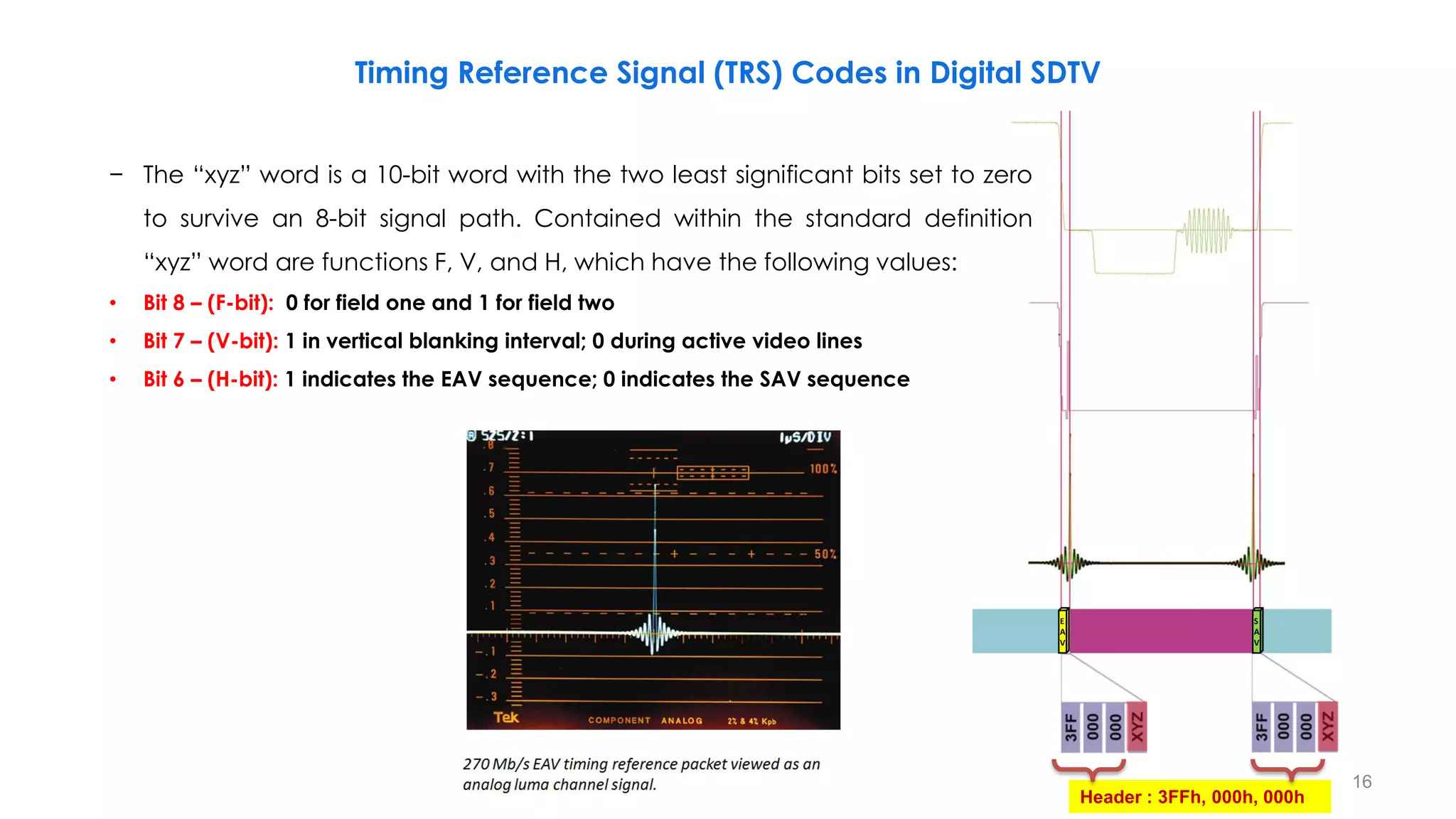
Timing Reference Signal (TRS) Codes in Digital SDTV
16
Header : 3FFh, 000h, 000h
E
A
V
S
A
V
− The “xyz” word is a 10-bit word with the two least significant bits set to zero
to survive an 8-bit signal path. Contained within the standard definition
“xyz” word are functions F, V, and H, which have the following values:
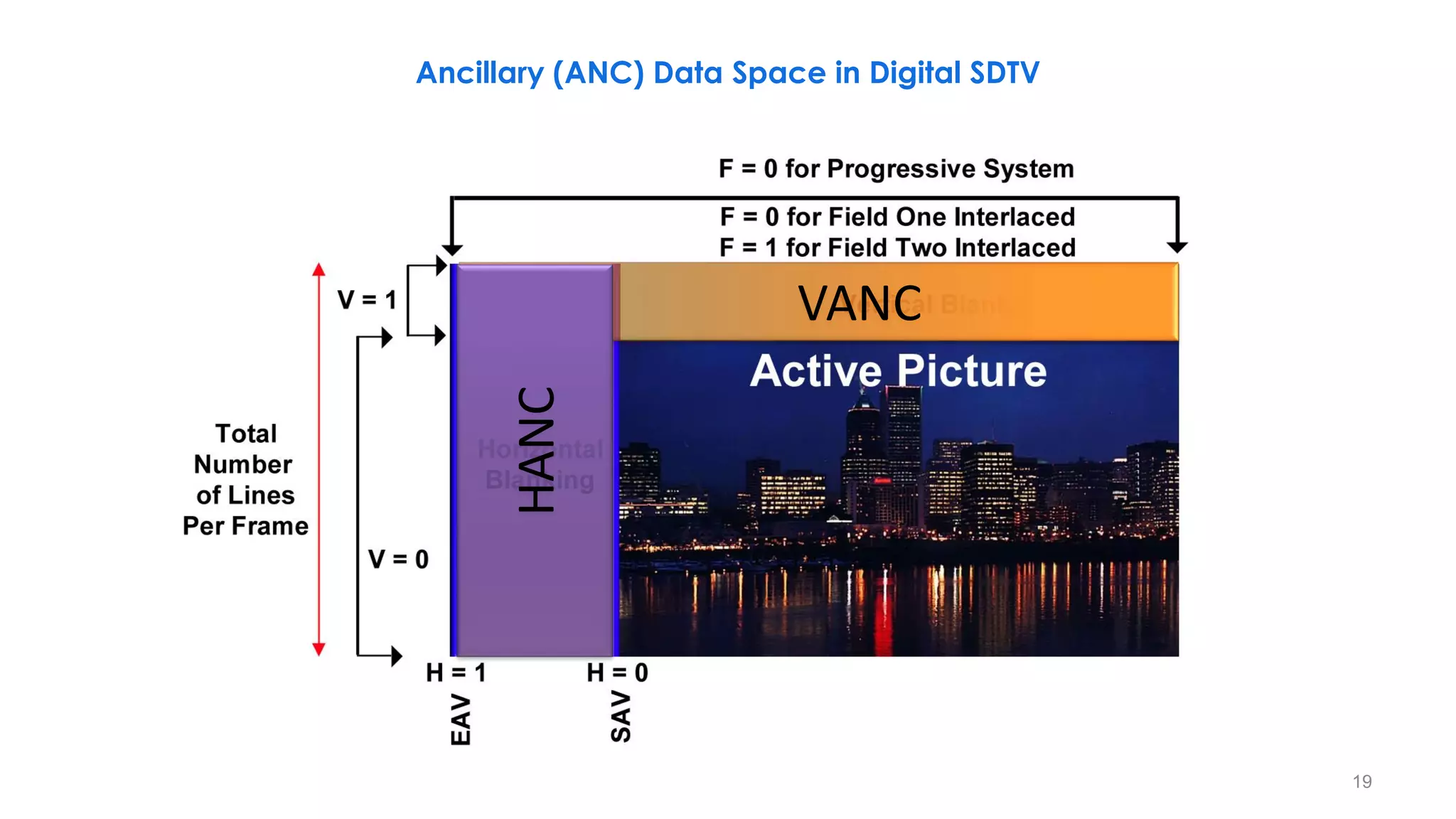
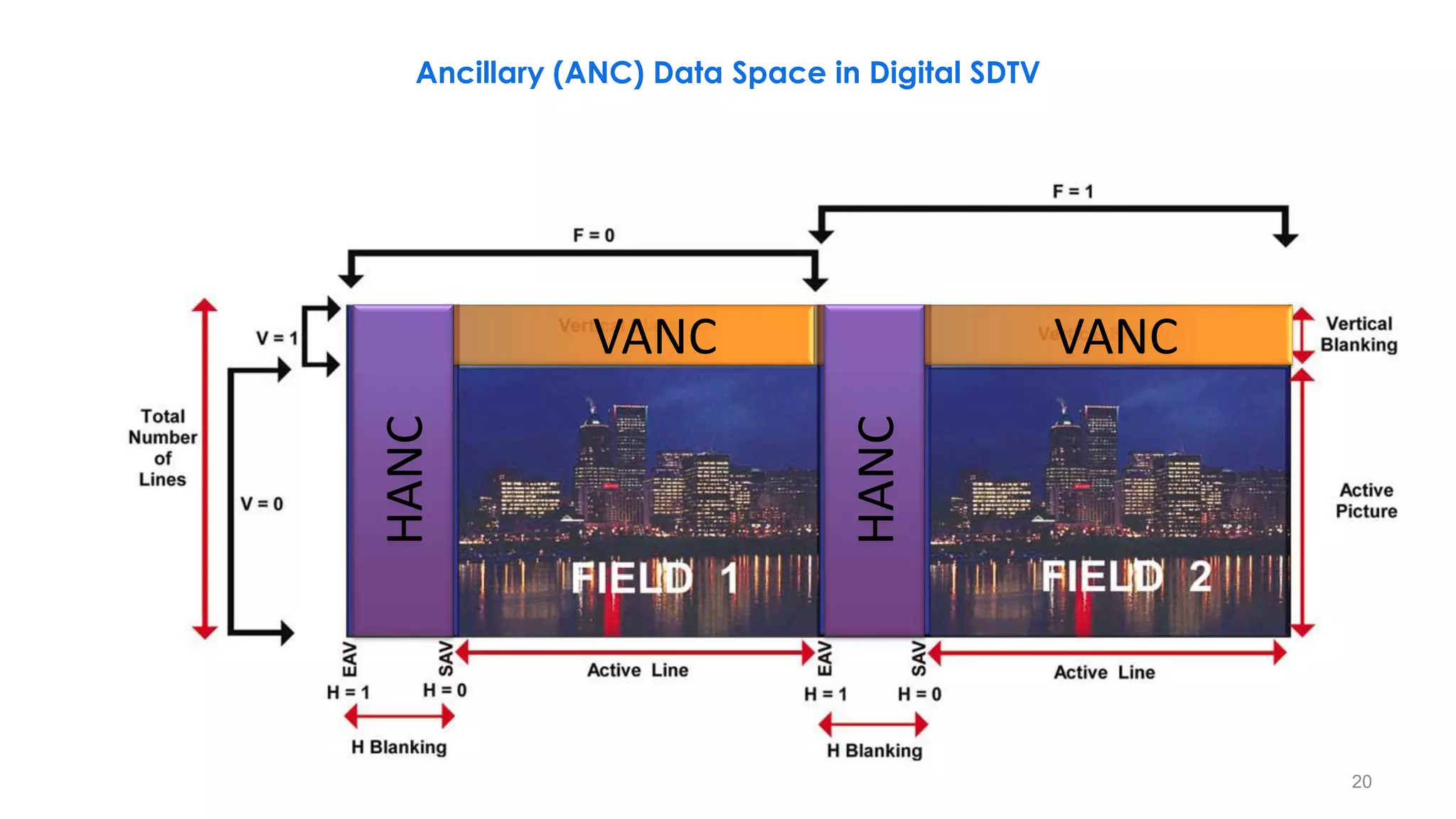
• Bit 8 – (F-bit): 0 for field one and 1 for field two
• Bit 7 – (V-bit): 1 in vertical blanking interval; 0 during active video lines
• Bit 6 – (H-bit): 1 indicates the EAV sequence; 0 indicates the SAV sequence
17
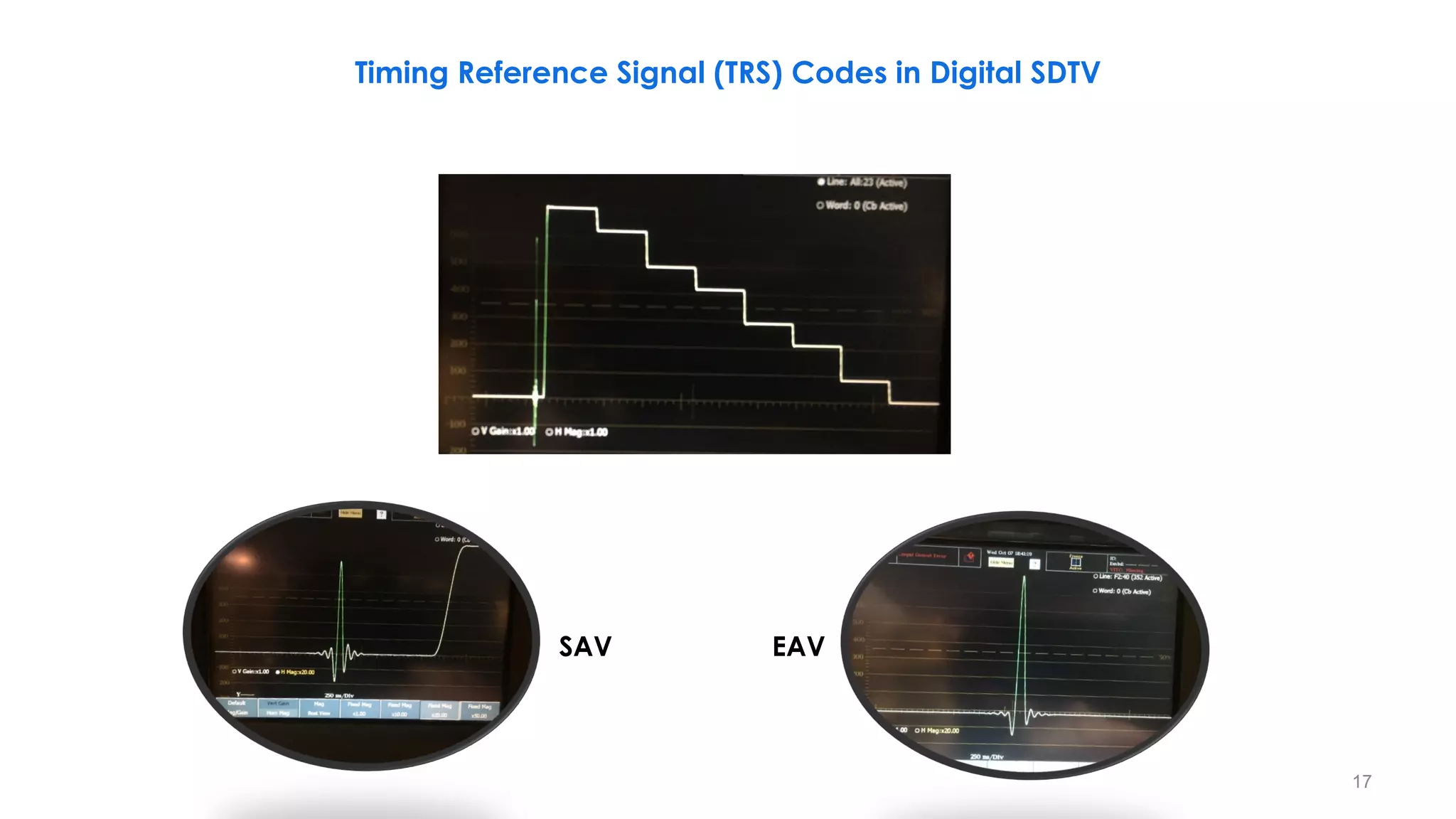
Timing Reference Signal (TRS) Codes in Digital SDTV
SAV EAV
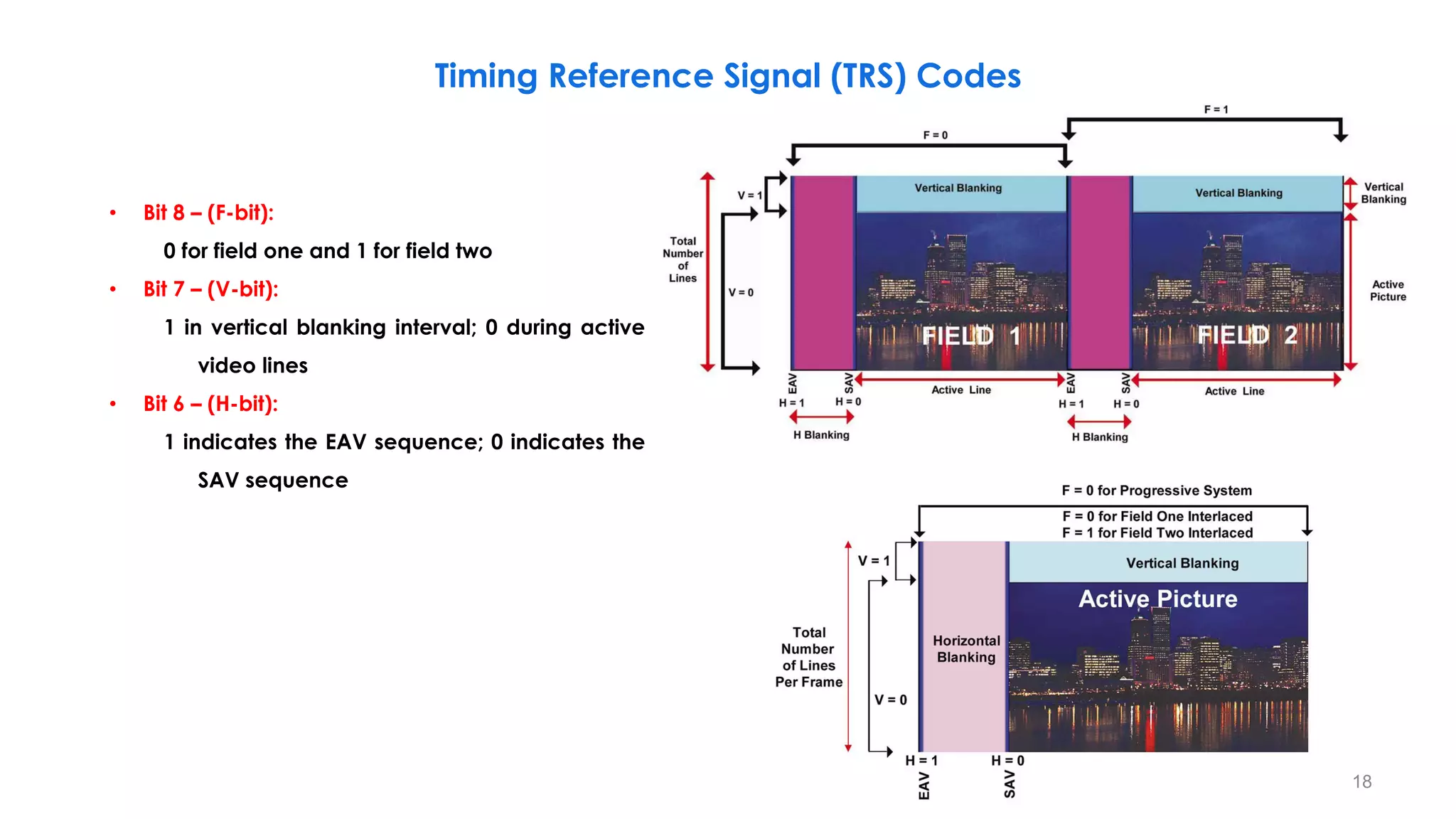
Timing Reference Signal (TRS) Codes
18
• Bit 8 – (F-bit):
0 for field one and 1 for field two
• Bit 7 – (V-bit):
1 in vertical blanking interval; 0 during active
video lines
• Bit 6 – (H-bit):
1 indicates the EAV sequence; 0 indicates the
SAV sequence
VANC
HANC
Ancillary (ANC) Data Space in Digital SDTV
19
VANC VANC
HANC
HANC
Ancillary (ANC) Data Space in Digital SDTV
20
21
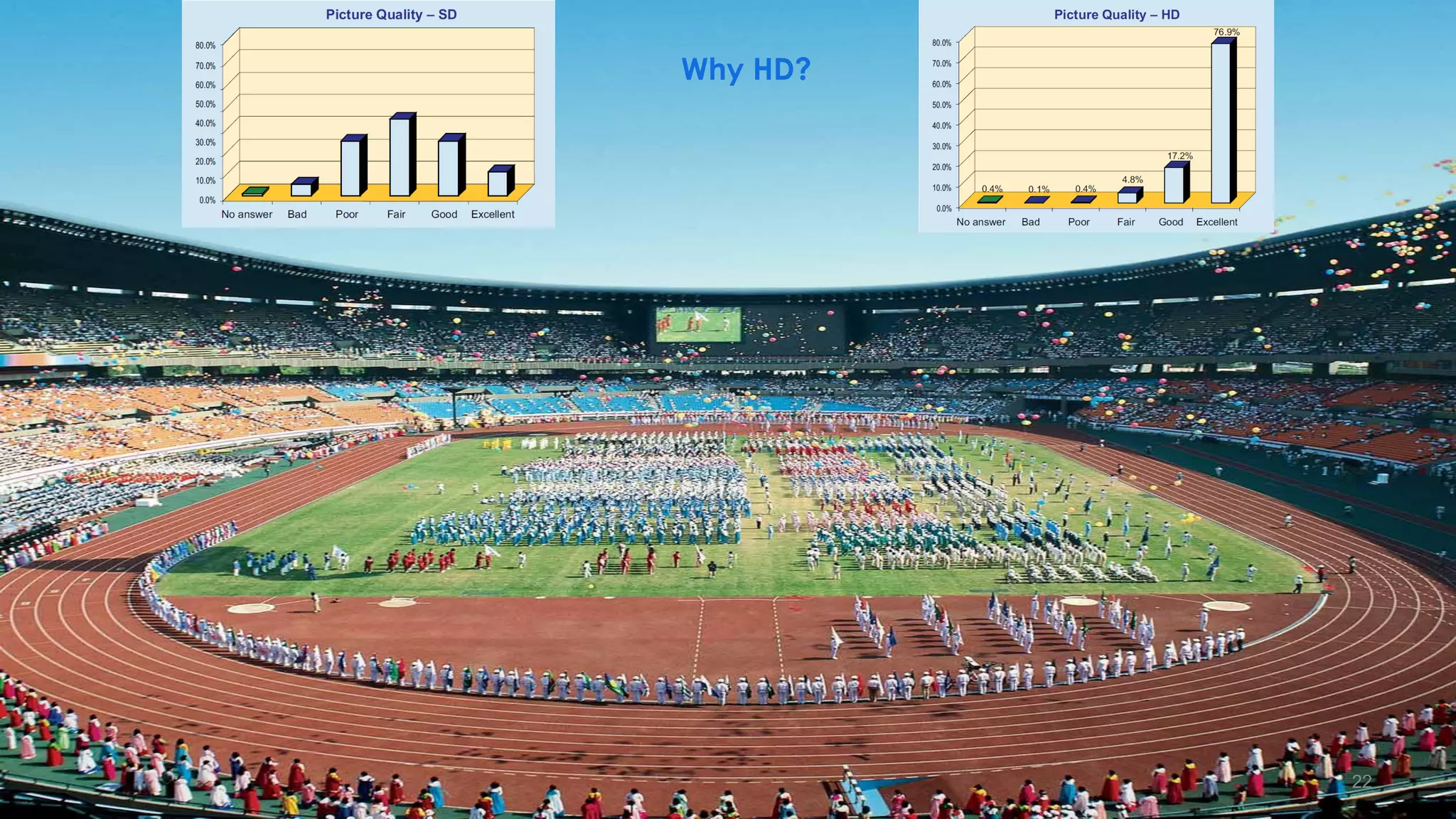
Why HD?
22
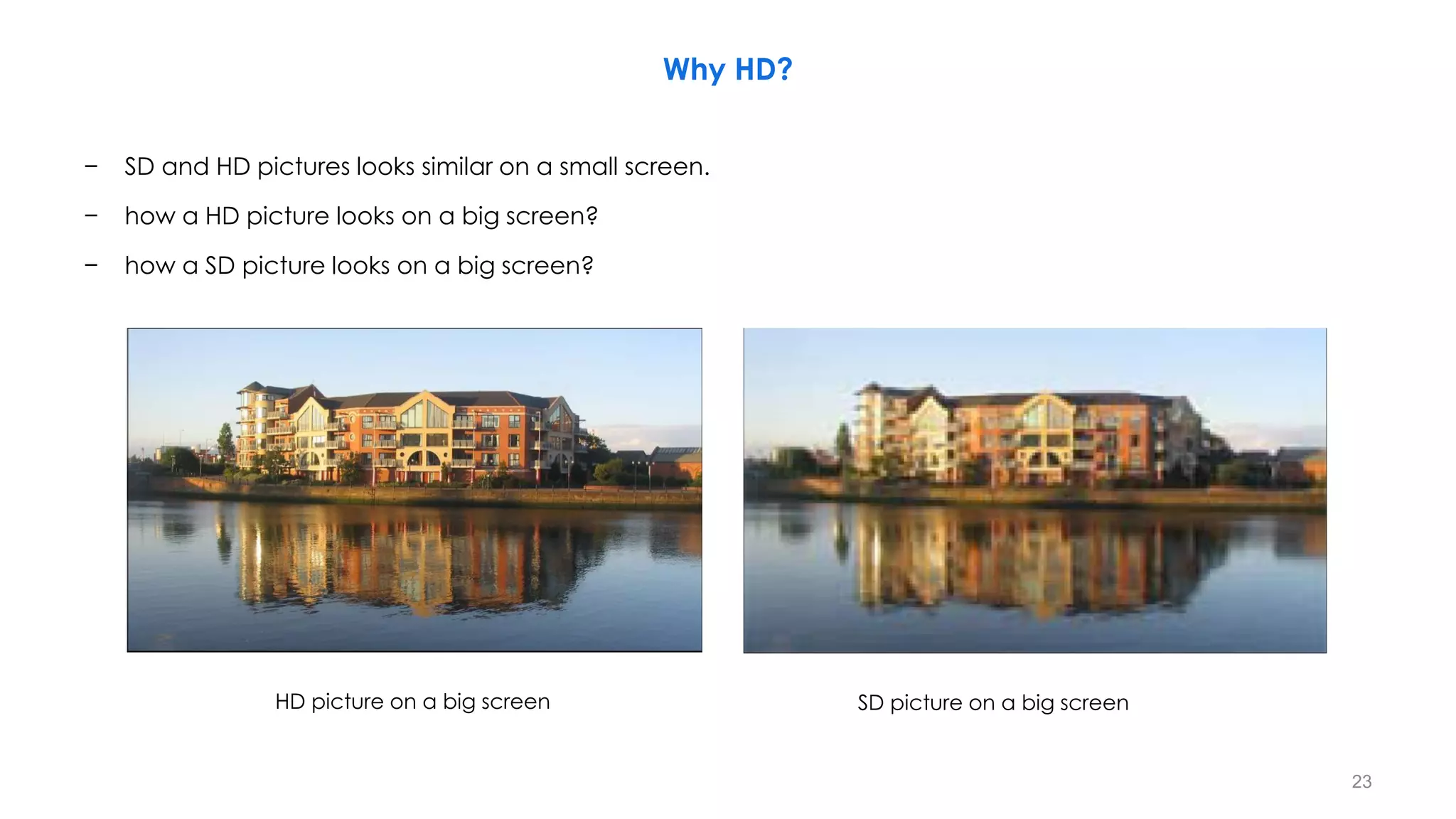
Why HD?
− SD and HD pictures looks similar on a small screen.
− how a HD picture looks on a big screen?
− how a SD picture looks on a big screen?
HD picture on a big screen SD picture on a big screen
23
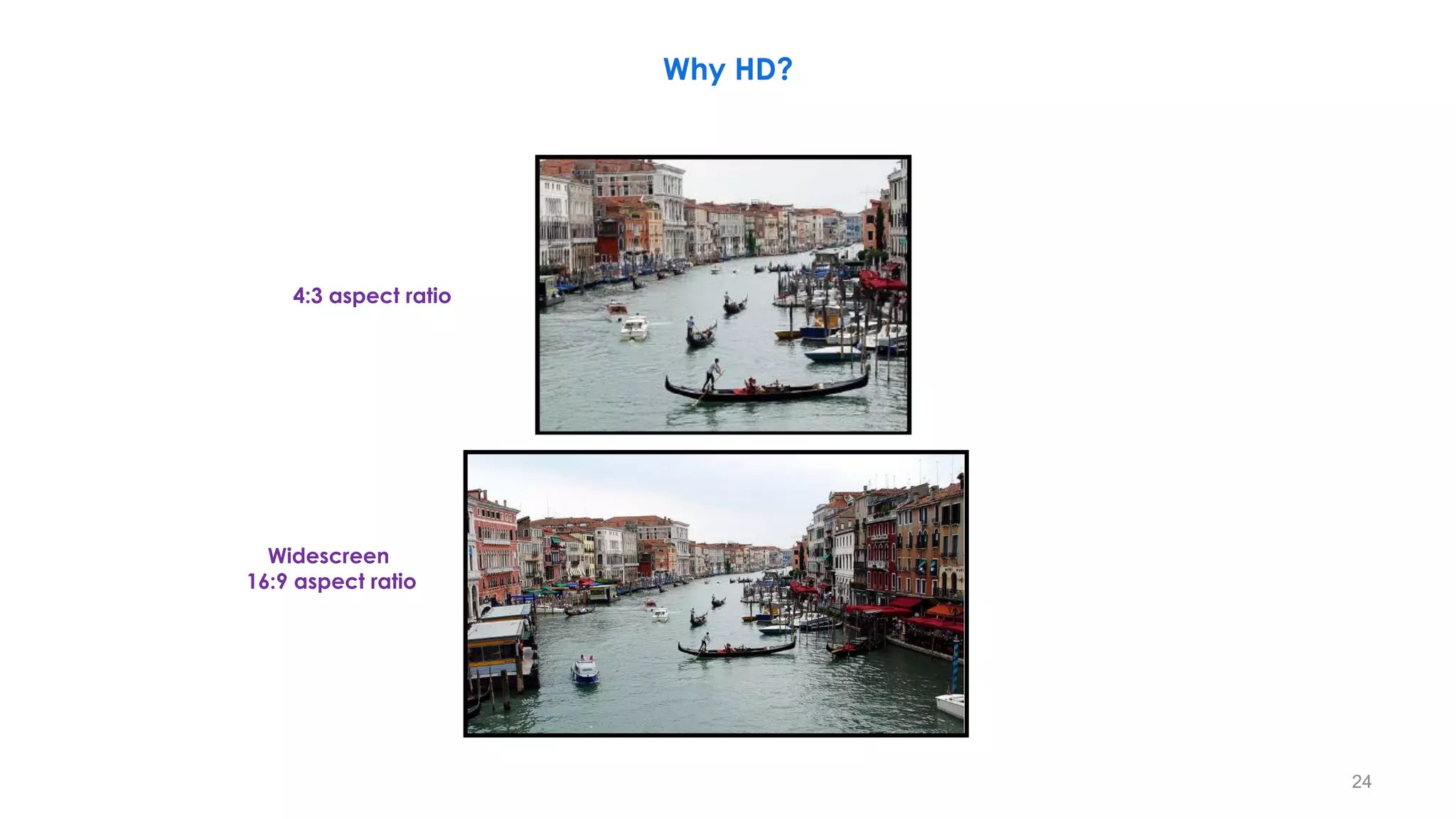
Widescreen
16:9 aspect ratio
4:3 aspect ratio
Why HD?
24
Benefits of HD
− Higher resolution (4 times of Standard Definition TV).
− Wider picture (Better on-screen look, Widescreen 16:9 aspect ratio).
− Better sound. (5.1-channel Dolby Digital surround sound).
− New revenue opportunities.
− Significant cost saving potential over film.
• (Designed to be comparable in quality to a 16mm Film).
− Additional data
− Easy to interface with computers.
− Wider color gamut.
− Copyright protection.
− HD content can be sharper.
− HD content can greater color depth.
− The image in many HD cameras starts as 12bit color (4096 levels of grey - per color channel).
• The Standard is 8 bit color on tape (256 levels of grey - per color channel).
− HD is grate inside the operating (surgery) area.
25
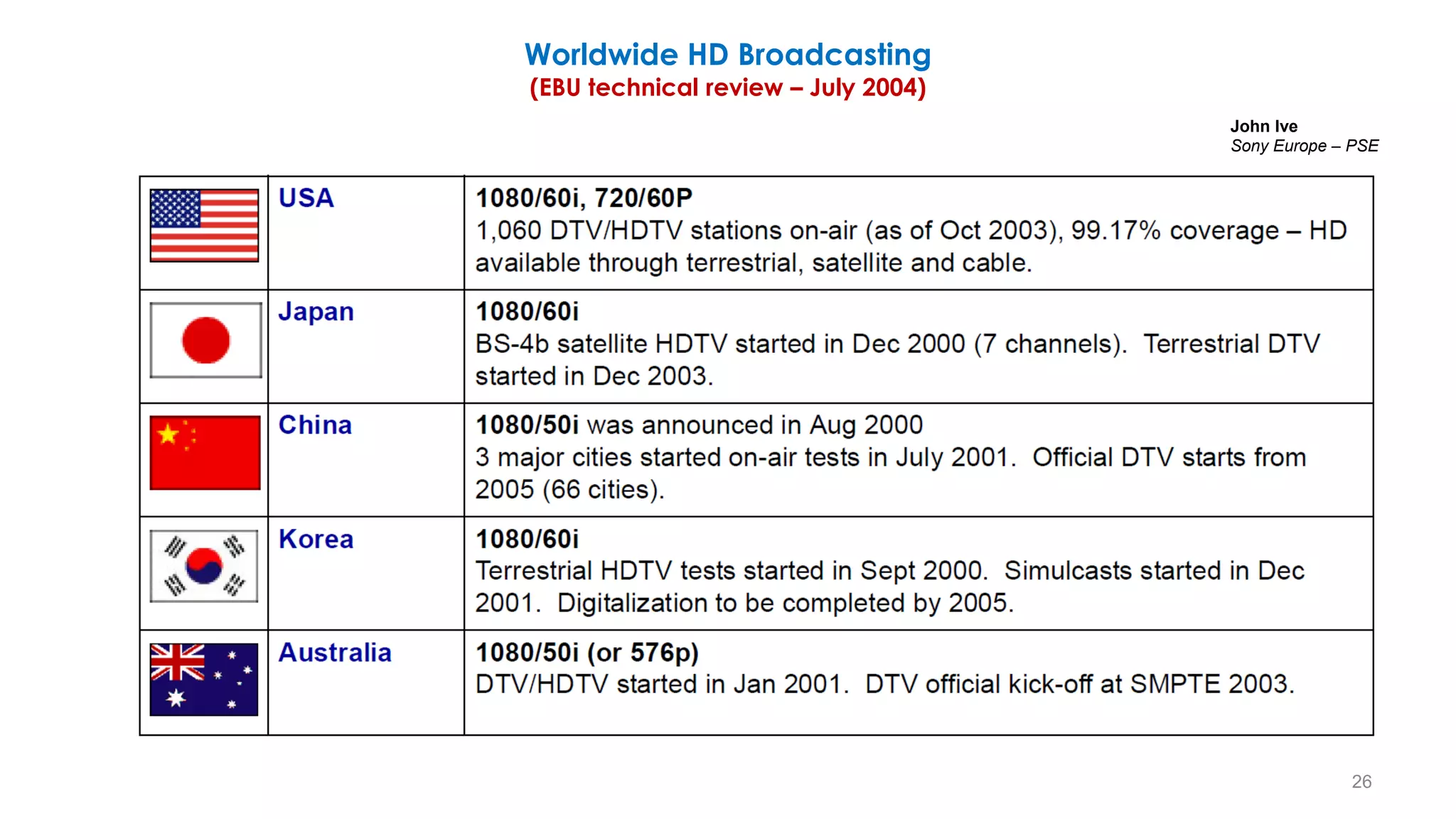
Worldwide HD Broadcasting
(EBU technical review – July 2004)
26
John Ive
Sony Europe – PSE
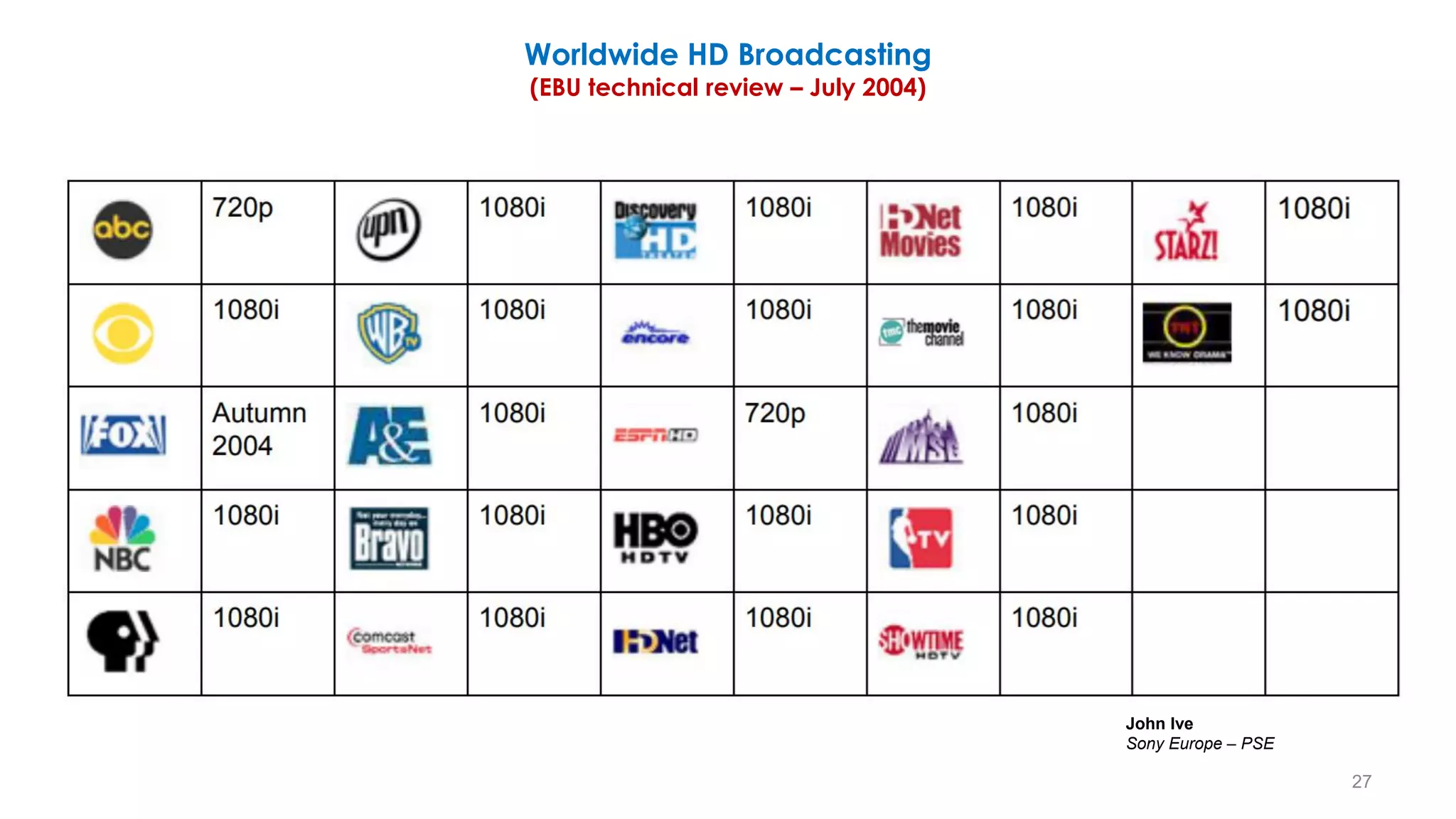
Worldwide HD Broadcasting
(EBU technical review – July 2004)
27
John Ive
Sony Europe – PSE
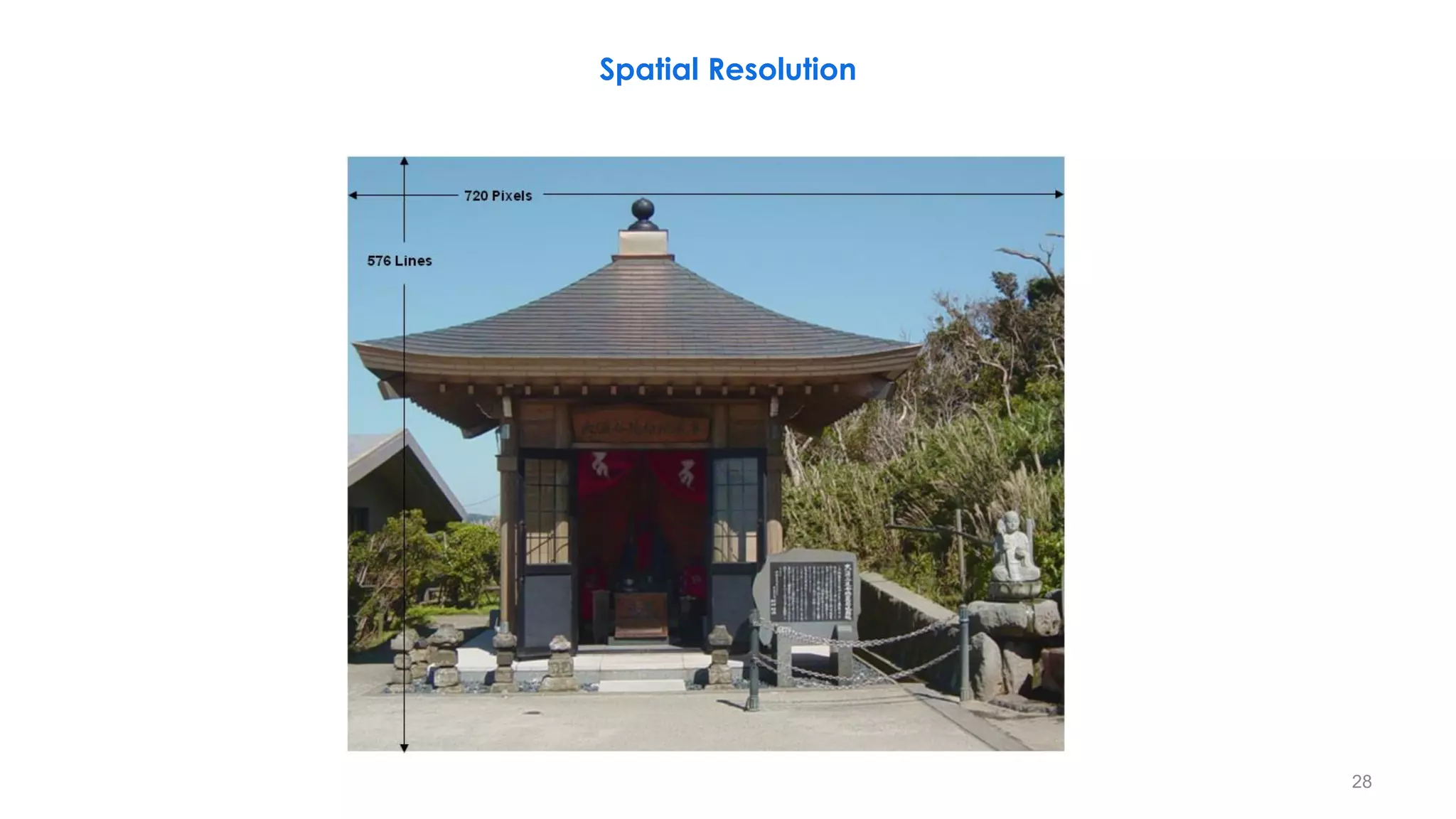
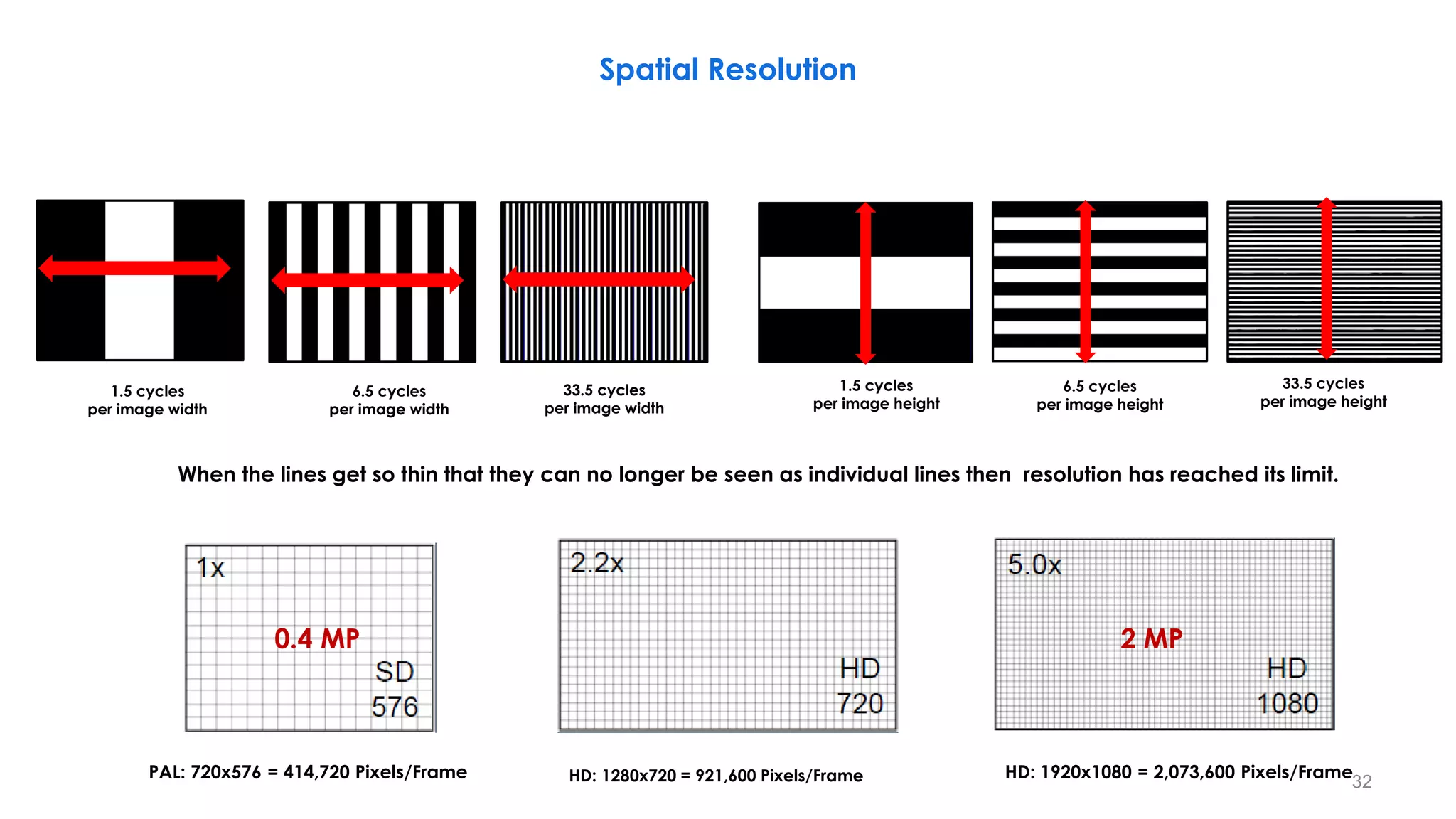
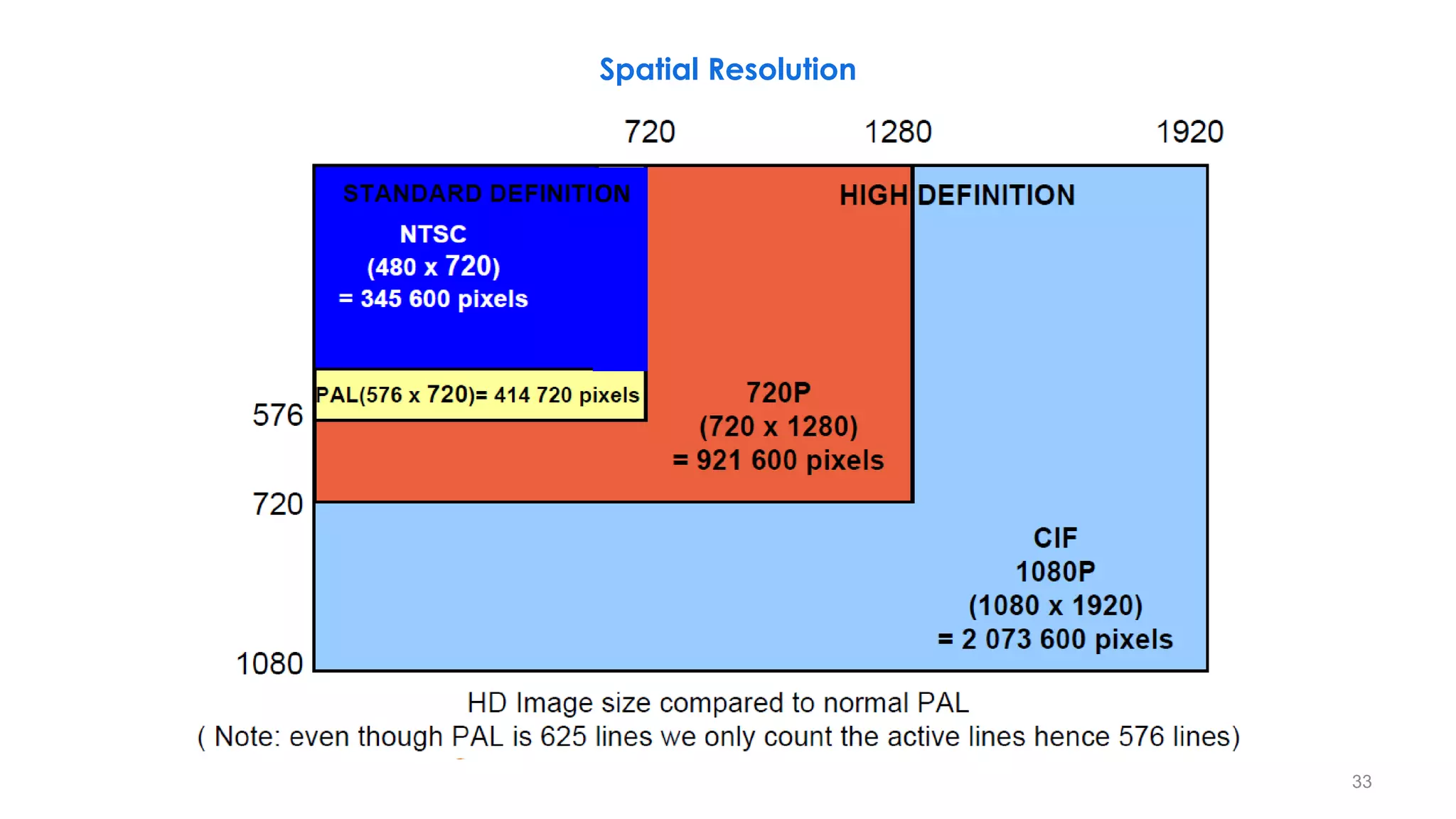
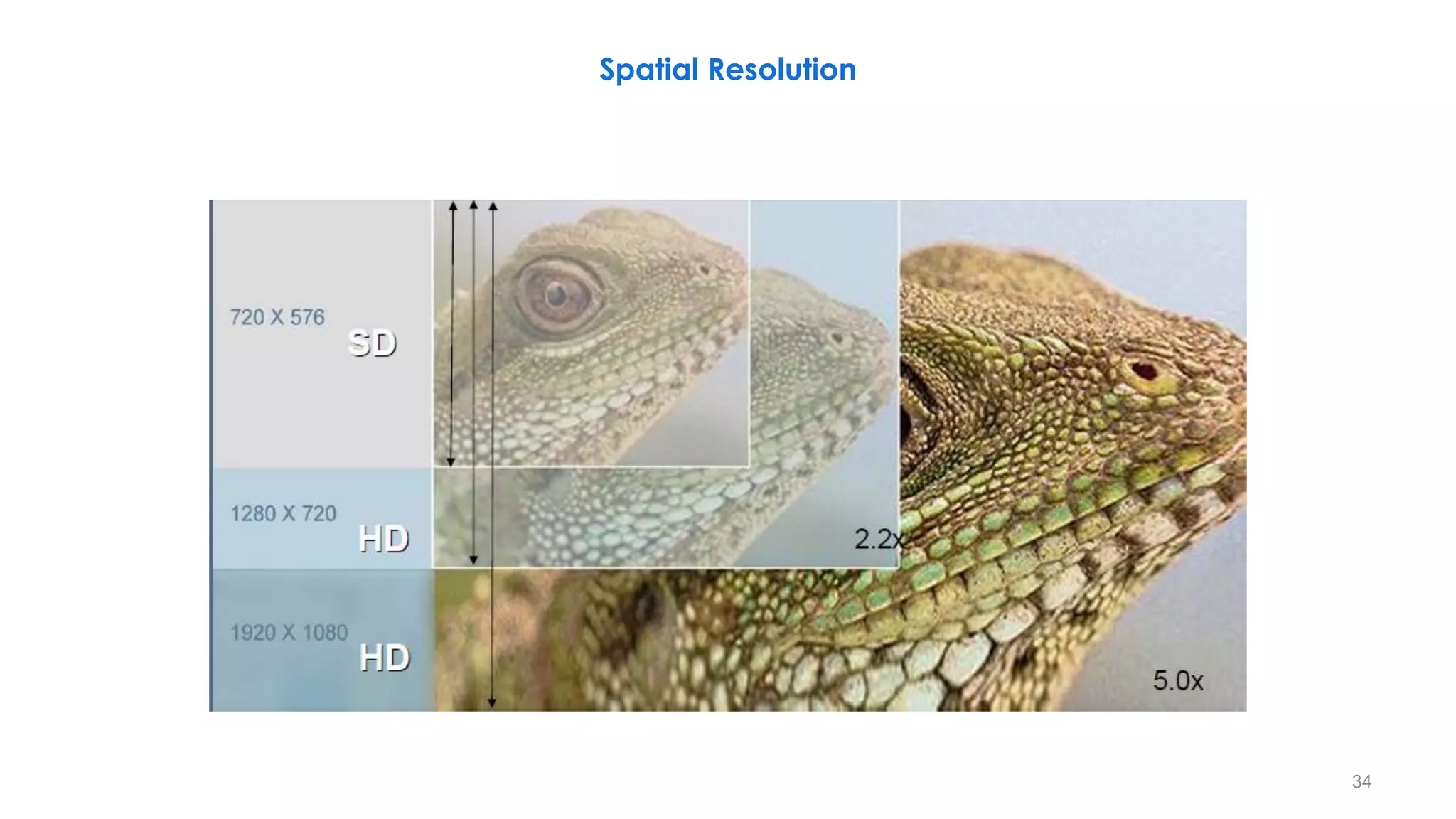
Spatial Resolution
28
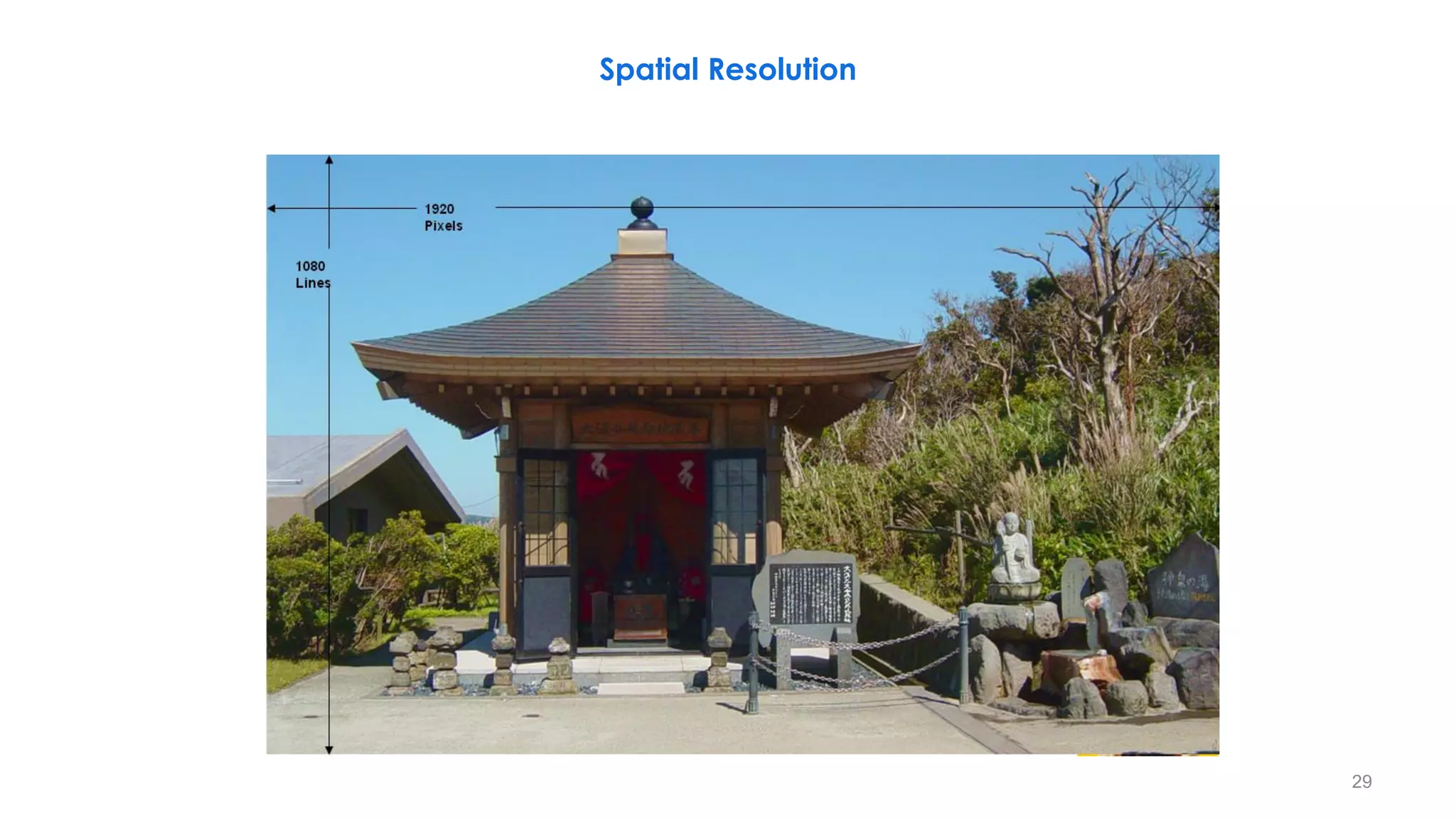
Spatial Resolution
29
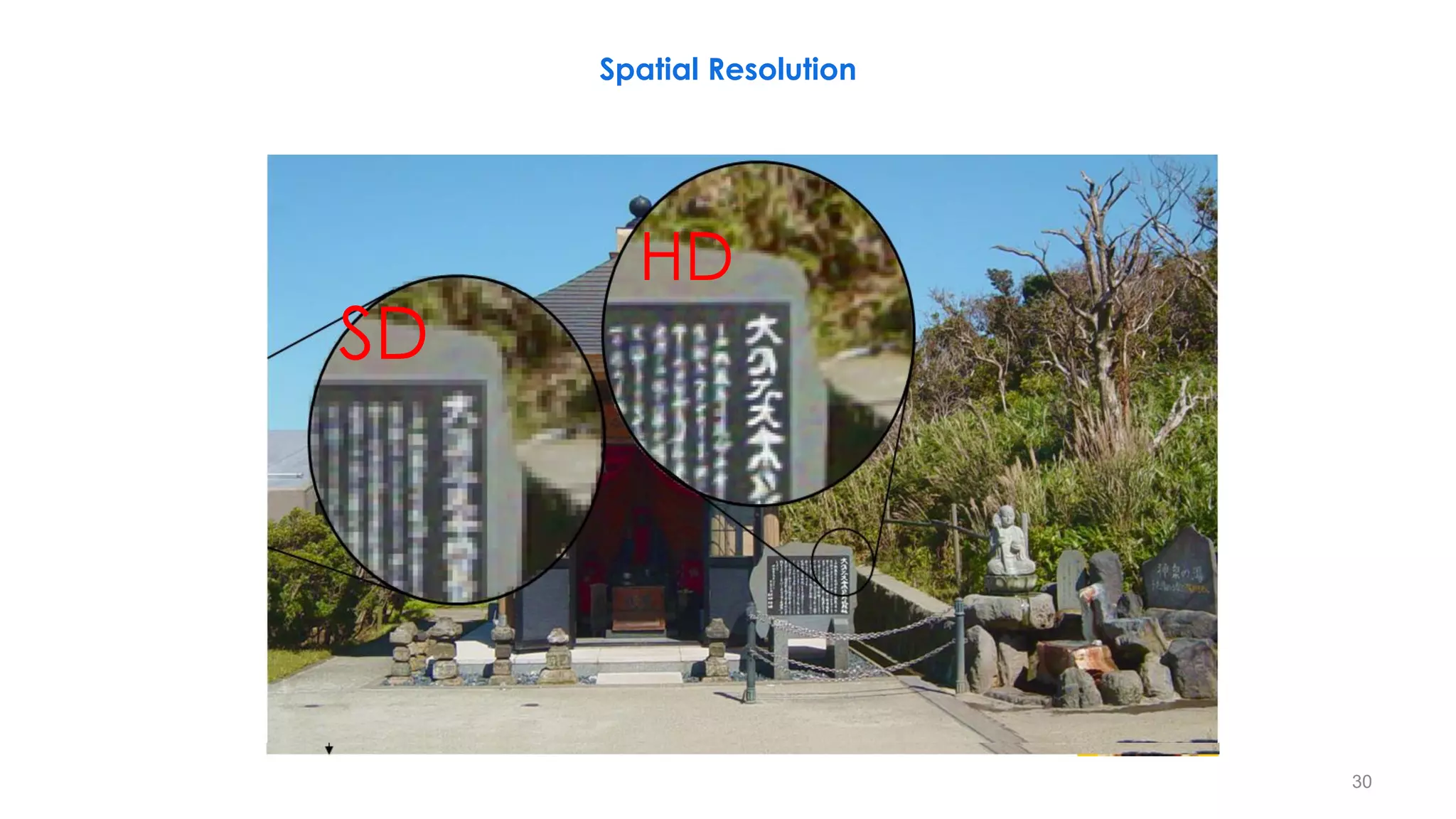
Spatial Resolution
30
SD
HD
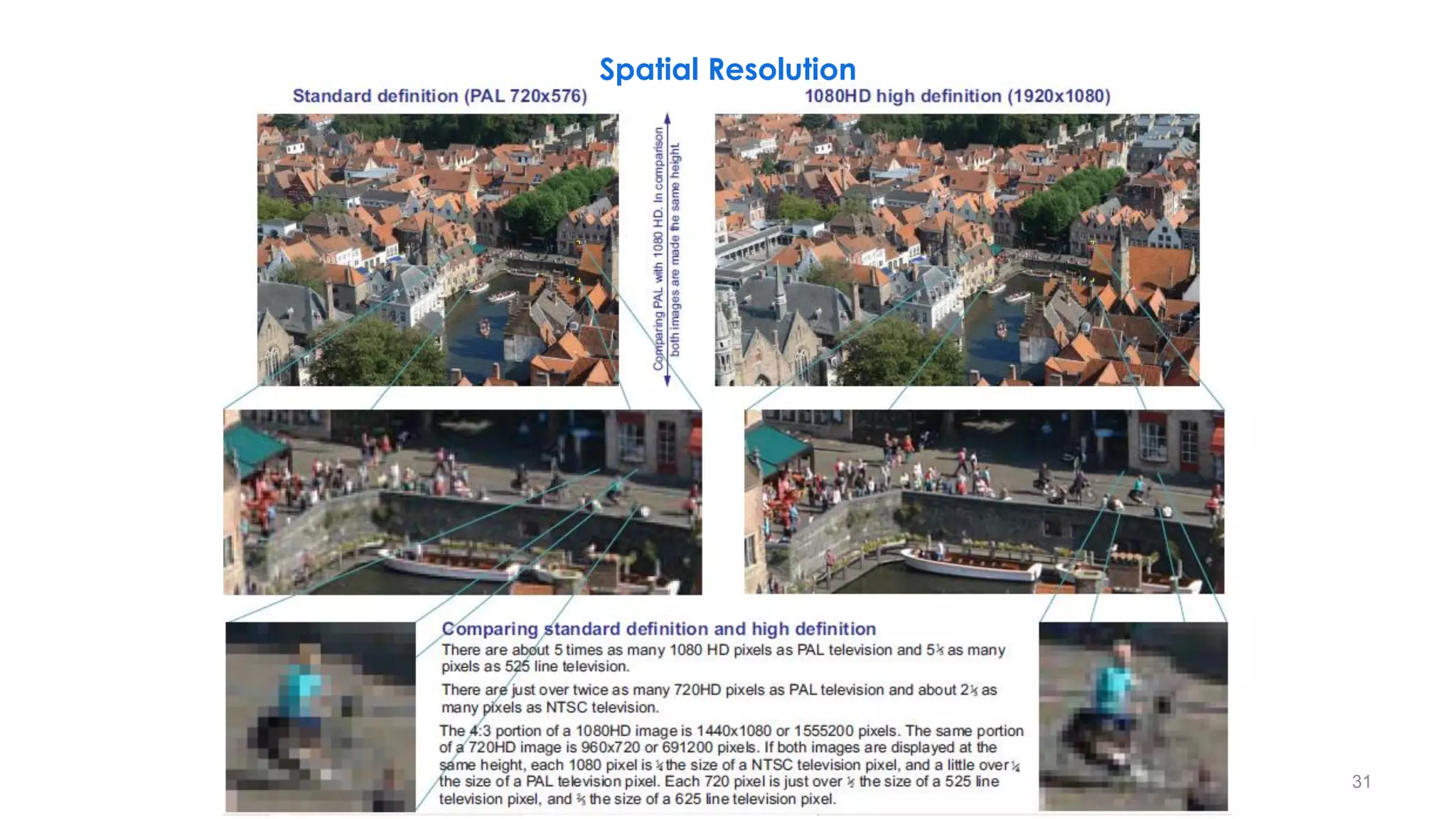
Spatial Resolution
31
PAL: 720x576 = 414,720 Pixels/Frame HD: 1920x1080 = 2,073,600 Pixels/Frame
Spatial Resolution
32
When the lines get so thin that they can no longer be seen as individual lines then resolution has reached its limit.
0.4 MP 2 MP
33.5 cycles
per image width
6.5 cycles
per image width
1.5 cycles
per image width
33.5 cycles
per image height
6.5 cycles
per image height
1.5 cycles
per image height
HD: 1280x720 = 921,600 Pixels/Frame
ON
Spatial Resolution
33
Spatial Resolution
34
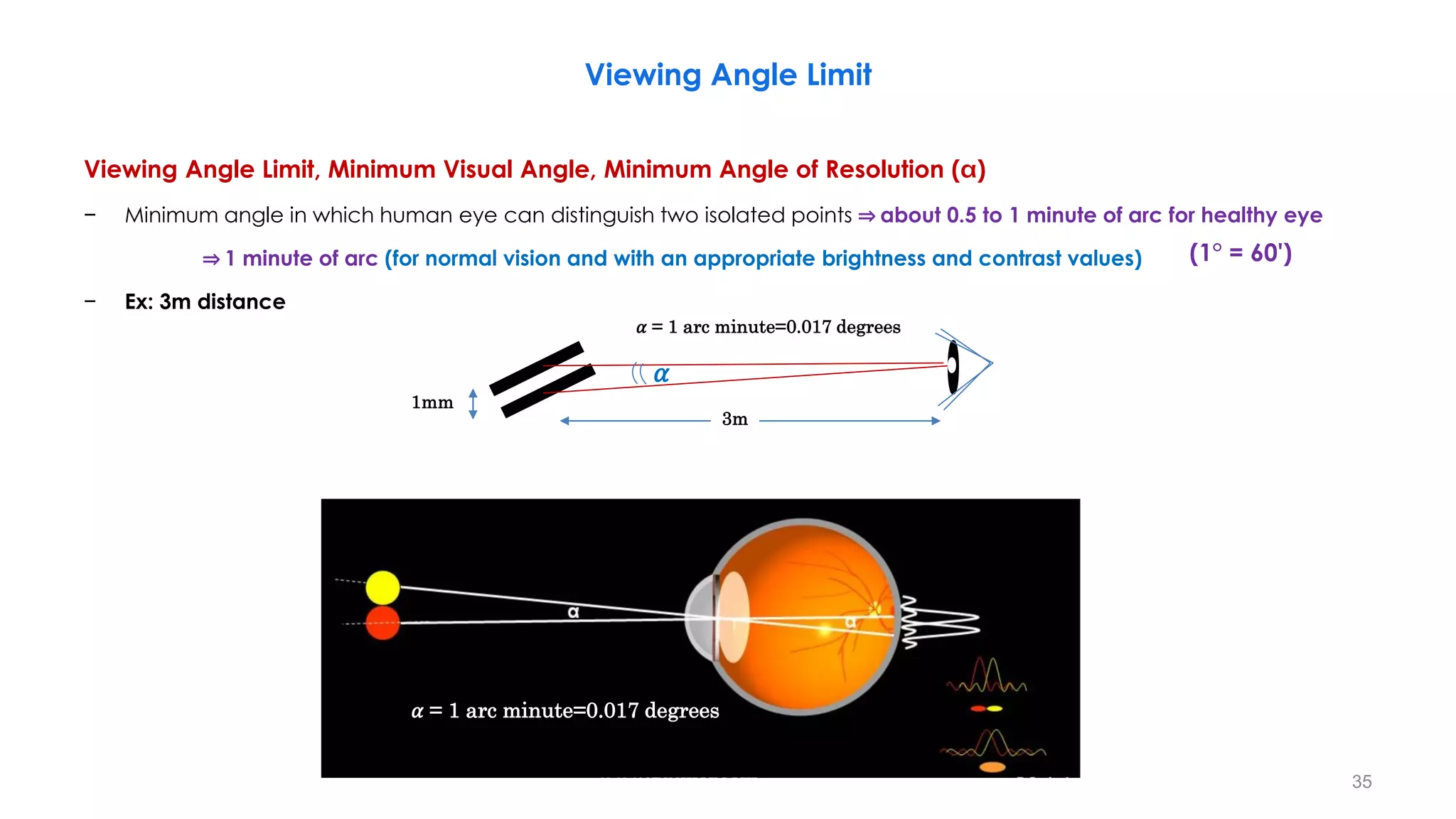
Viewing Angle Limit
Viewing Angle Limit, Minimum Visual Angle, Minimum Angle of Resolution ( )
− Minimum angle in which human eye can distinguish two isolated points ⇒ about 0.5 to 1 minute of arc for healthy eye
⇒ 1 minute of arc (for normal vision and with an appropriate brightness and contrast values)
− Ex: 3m distance
35
𝛼 = 1 arc minute=0.017 degrees
𝛼
1mm
3m
(1° = 60')
𝛼 = 1 arc minute=0.017 degrees
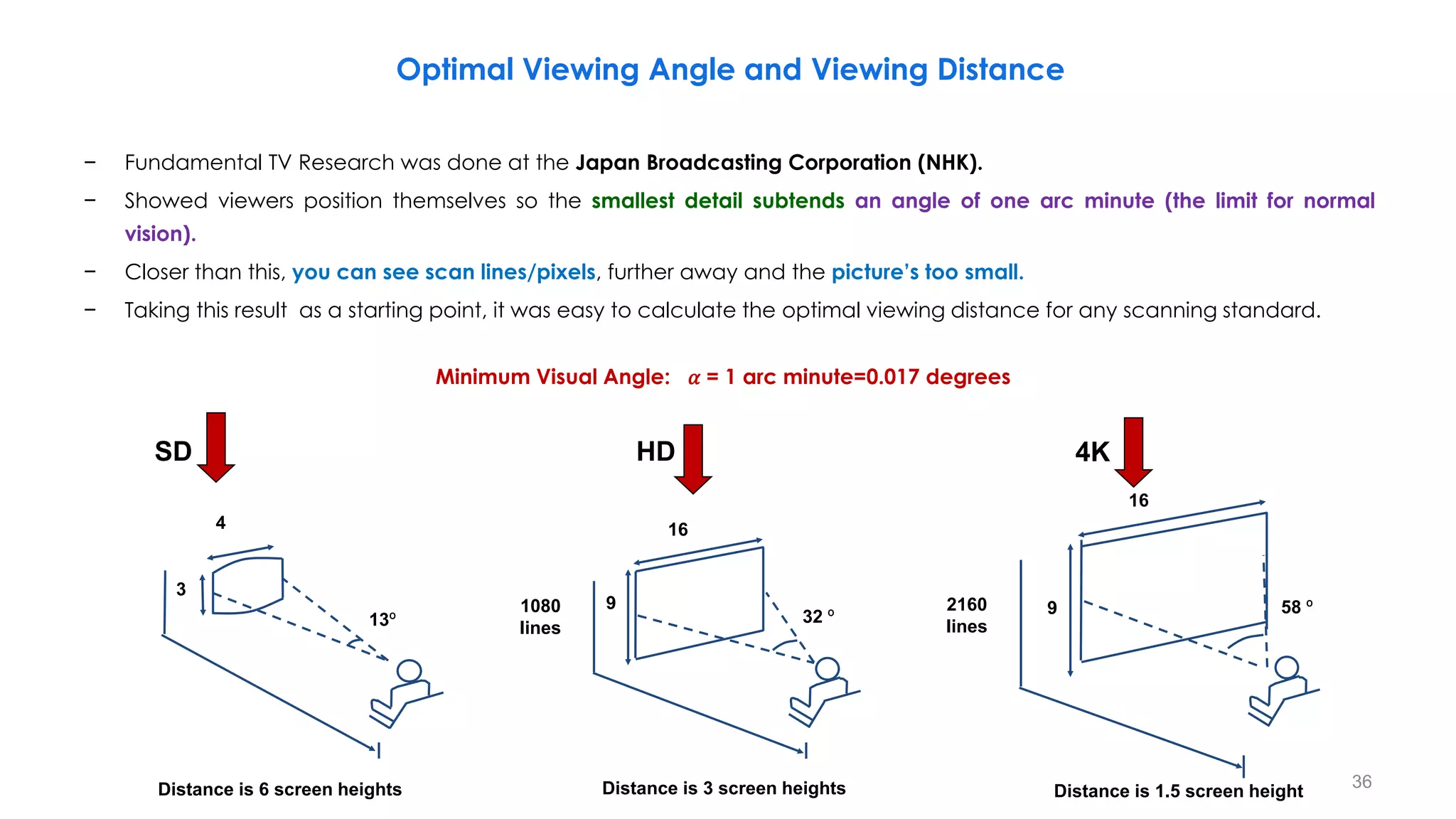
− Fundamental TV Research was done at the Japan Broadcasting Corporation (NHK).
− Showed viewers position themselves so the smallest detail subtends an angle of one arc minute (the limit for normal
vision).
− Closer than this, you can see scan lines/pixels, further away and the picture’s too small.
− Taking this result as a starting point, it was easy to calculate the optimal viewing distance for any scanning standard.
36
Distance is 3 screen heights
HD
16
9
1080
lines
32 º
SD
4
3
Distance is 6 screen heights
13º
4K
Distance is 1.5 screen height
2160
lines
16
9 58 º
Minimum Visual Angle: 𝛼 = 1 arc minute=0.017 degrees
Optimal Viewing Angle and Viewing Distance
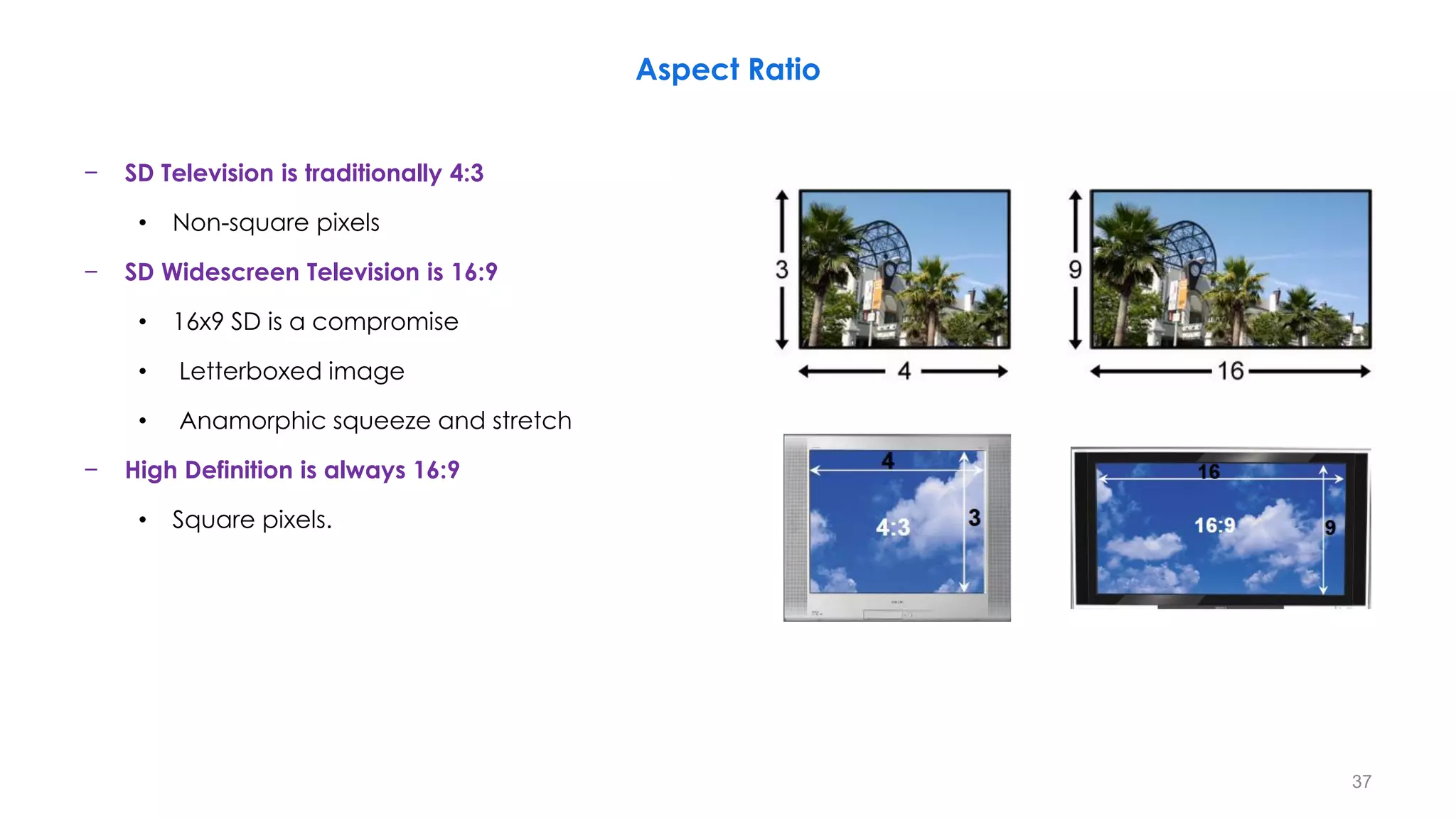
− SD Television is traditionally 4:3
• Non-square pixels
− SD Widescreen Television is 16:9
• 16x9 SD is a compromise
• Letterboxed image
• Anamorphic squeeze and stretch
− High Definition is always 16:9
• Square pixels.
Aspect Ratio
37
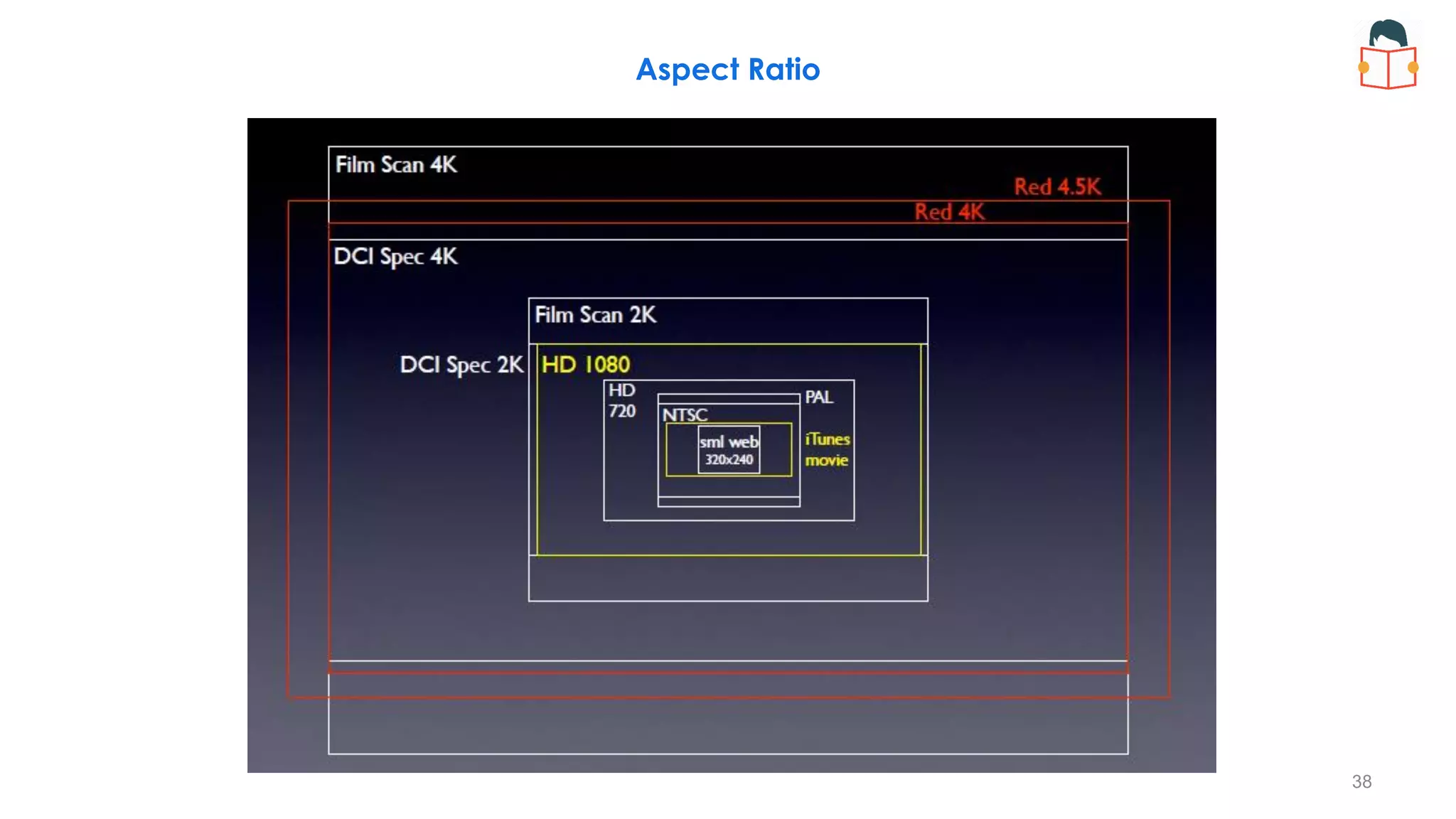
Aspect Ratio
38
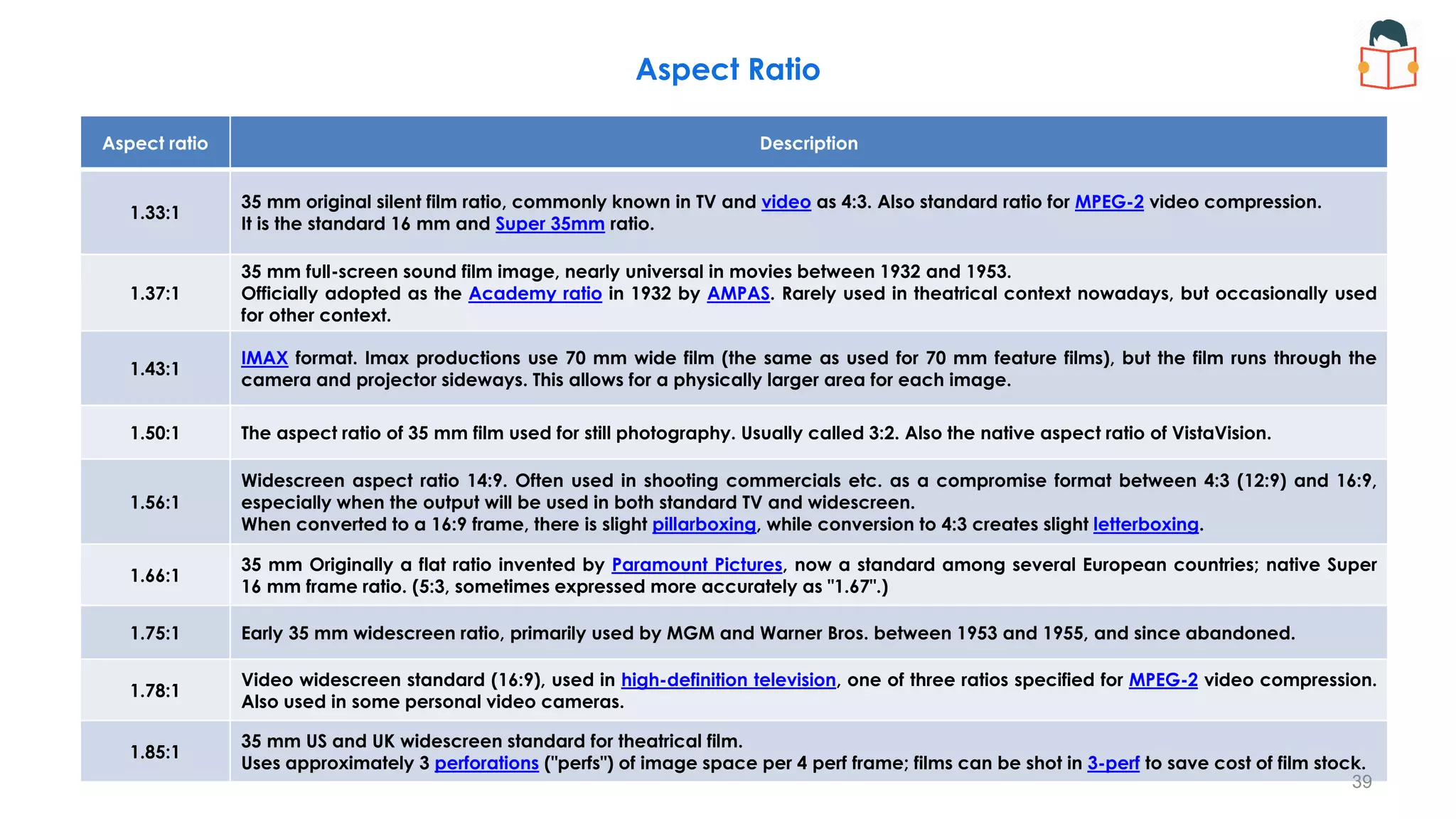
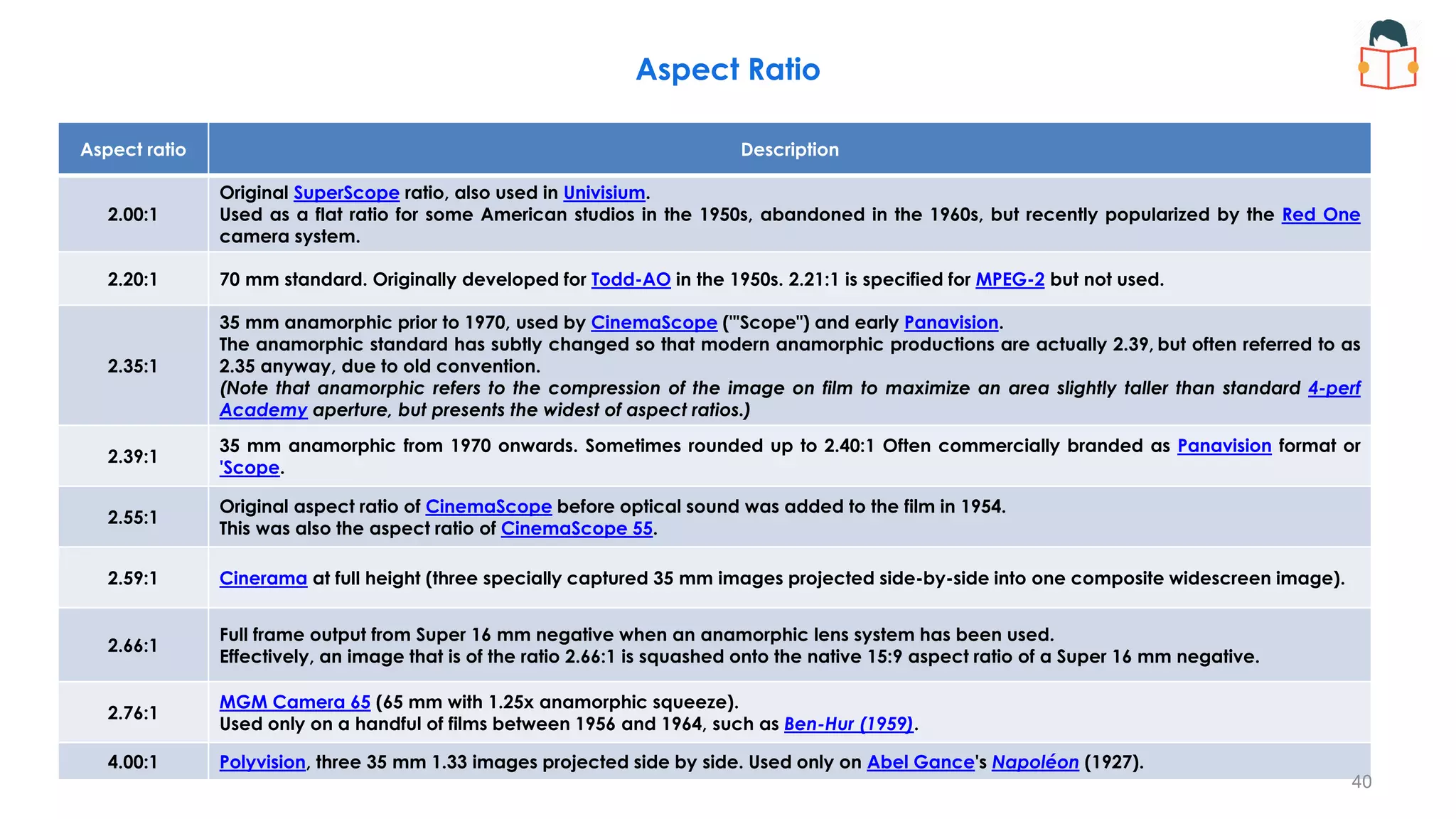
Aspect ratio Description
1.33:1
35 mm original silent film ratio, commonly known in TV and video as 4:3. Also standard ratio for MPEG-2 video compression.
It is the standard 16 mm and Super 35mm ratio.
1.37:1
35 mm full-screen sound film image, nearly universal in movies between 1932 and 1953.
Officially adopted as the Academy ratio in 1932 by AMPAS. Rarely used in theatrical context nowadays, but occasionally used
for other context.
1.43:1
IMAX format. Imax productions use 70 mm wide film (the same as used for 70 mm feature films), but the film runs through the
camera and projector sideways. This allows for a physically larger area for each image.
1.50:1 The aspect ratio of 35 mm film used for still photography. Usually called 3:2. Also the native aspect ratio of VistaVision.
1.56:1
Widescreen aspect ratio 14:9. Often used in shooting commercials etc. as a compromise format between 4:3 (12:9) and 16:9,
especially when the output will be used in both standard TV and widescreen.
When converted to a 16:9 frame, there is slight pillarboxing, while conversion to 4:3 creates slight letterboxing.
1.66:1
35 mm Originally a flat ratio invented by Paramount Pictures, now a standard among several European countries; native Super
16 mm frame ratio. (5:3, sometimes expressed more accurately as "1.67".)
1.75:1 Early 35 mm widescreen ratio, primarily used by MGM and Warner Bros. between 1953 and 1955, and since abandoned.
1.78:1
Video widescreen standard (16:9), used in high-definition television, one of three ratios specified for MPEG-2 video compression.
Also used in some personal video cameras.
1.85:1
35 mm US and UK widescreen standard for theatrical film.
Uses approximately 3 perforations ("perfs") of image space per 4 perf frame; films can be shot in 3-perf to save cost of film stock.
Aspect Ratio
39
Aspect ratio Description
2.00:1
Original SuperScope ratio, also used in Univisium.
Used as a flat ratio for some American studios in the 1950s, abandoned in the 1960s, but recently popularized by the Red One
camera system.
2.20:1 70 mm standard. Originally developed for Todd-AO in the 1950s. 2.21:1 is specified for MPEG-2 but not used.
2.35:1
35 mm anamorphic prior to 1970, used by CinemaScope ("'Scope") and early Panavision.
The anamorphic standard has subtly changed so that modern anamorphic productions are actually 2.39, but often referred to as
2.35 anyway, due to old convention.
(Note that anamorphic refers to the compression of the image on film to maximize an area slightly taller than standard 4-perf
Academy aperture, but presents the widest of aspect ratios.)
2.39:1
35 mm anamorphic from 1970 onwards. Sometimes rounded up to 2.40:1 Often commercially branded as Panavision format or
'Scope.
2.55:1
Original aspect ratio of CinemaScope before optical sound was added to the film in 1954.
This was also the aspect ratio of CinemaScope 55.
2.59:1 Cinerama at full height (three specially captured 35 mm images projected side-by-side into one composite widescreen image).
2.66:1
Full frame output from Super 16 mm negative when an anamorphic lens system has been used.
Effectively, an image that is of the ratio 2.66:1 is squashed onto the native 15:9 aspect ratio of a Super 16 mm negative.
2.76:1
MGM Camera 65 (65 mm with 1.25x anamorphic squeeze).
Used only on a handful of films between 1956 and 1964, such as Ben-Hur (1959).
4.00:1 Polyvision, three 35 mm 1.33 images projected side by side. Used only on Abel Gance's Napoléon (1927).
Aspect Ratio
40
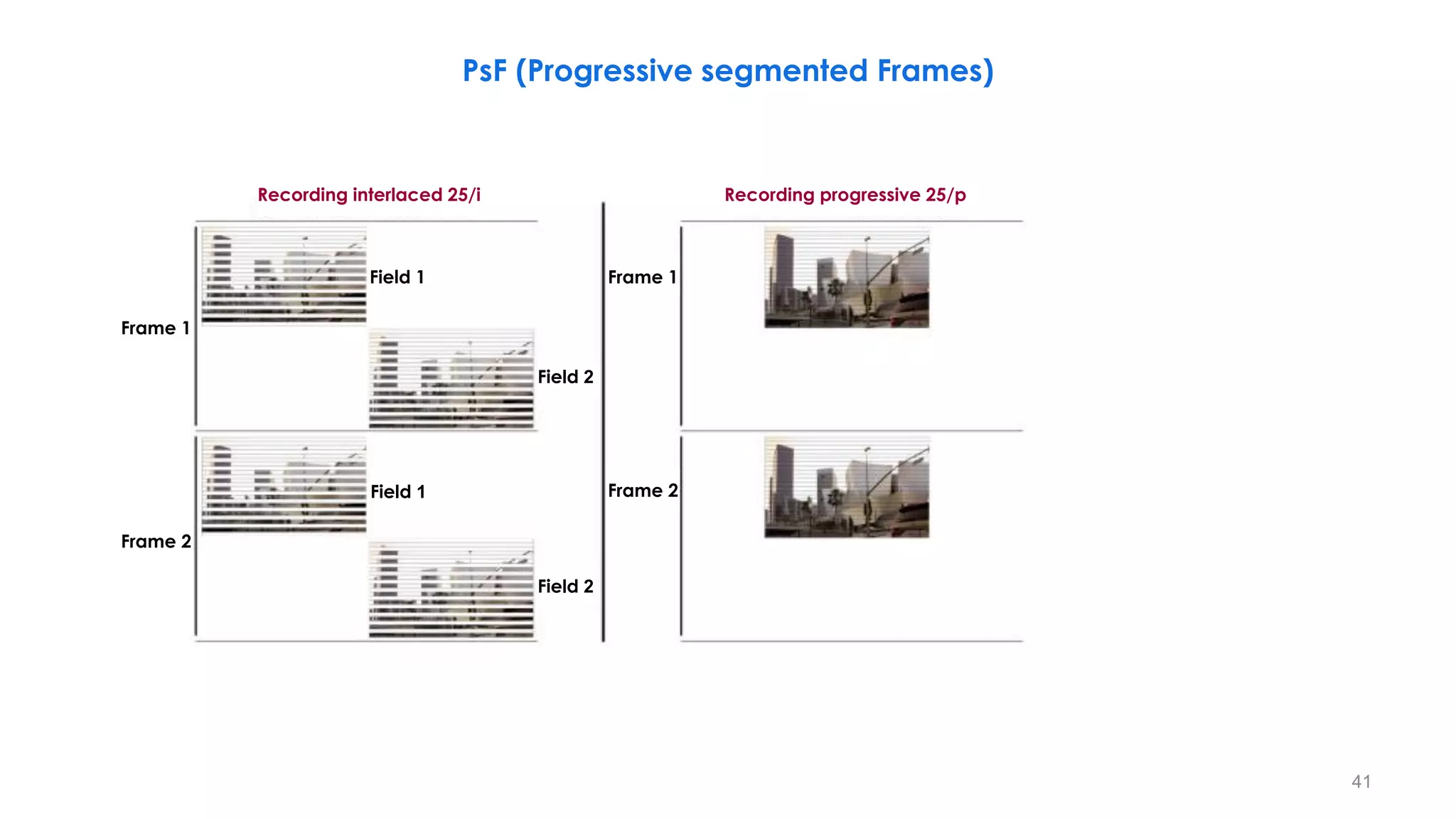
PsF (Progressive segmented Frames)
41
Field 1
Field 2
Field 1
Field 2
Frame 1
Frame 2
Recording interlaced 25/i Recording progressive 25/p
Frame 1
Frame 2
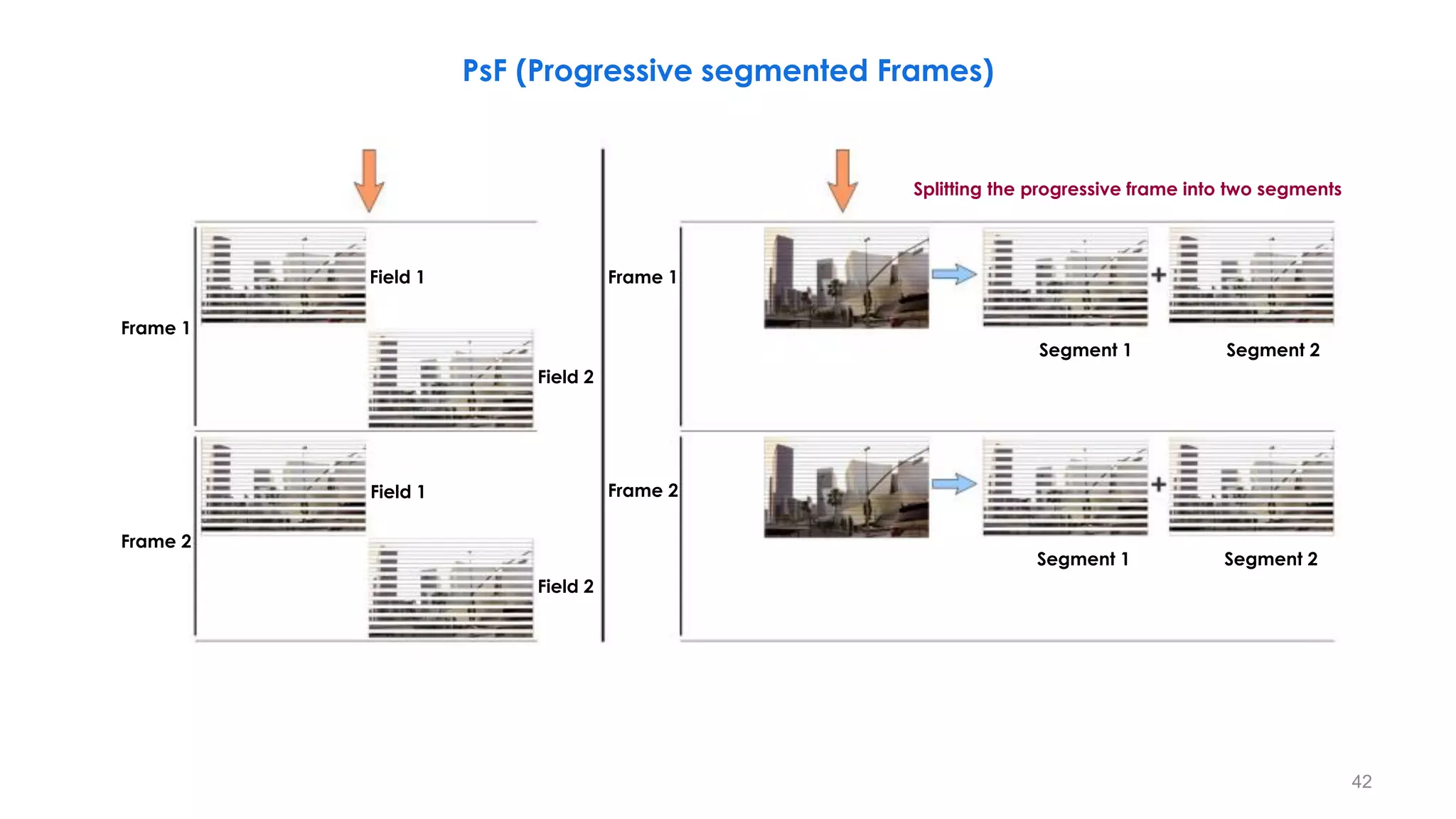
PsF (Progressive segmented Frames)
42
Field 1
Field 2
Field 1
Field 2
Frame 1
Frame 2
Frame 1
Frame 2
Segment 1 Segment 2
Segment 1 Segment 2
Splitting the progressive frame into two segments
PsF (Progressive segmented Frames)
43
Field 1
Field 2
Field 1
Field 2
Frame 1
Frame 2
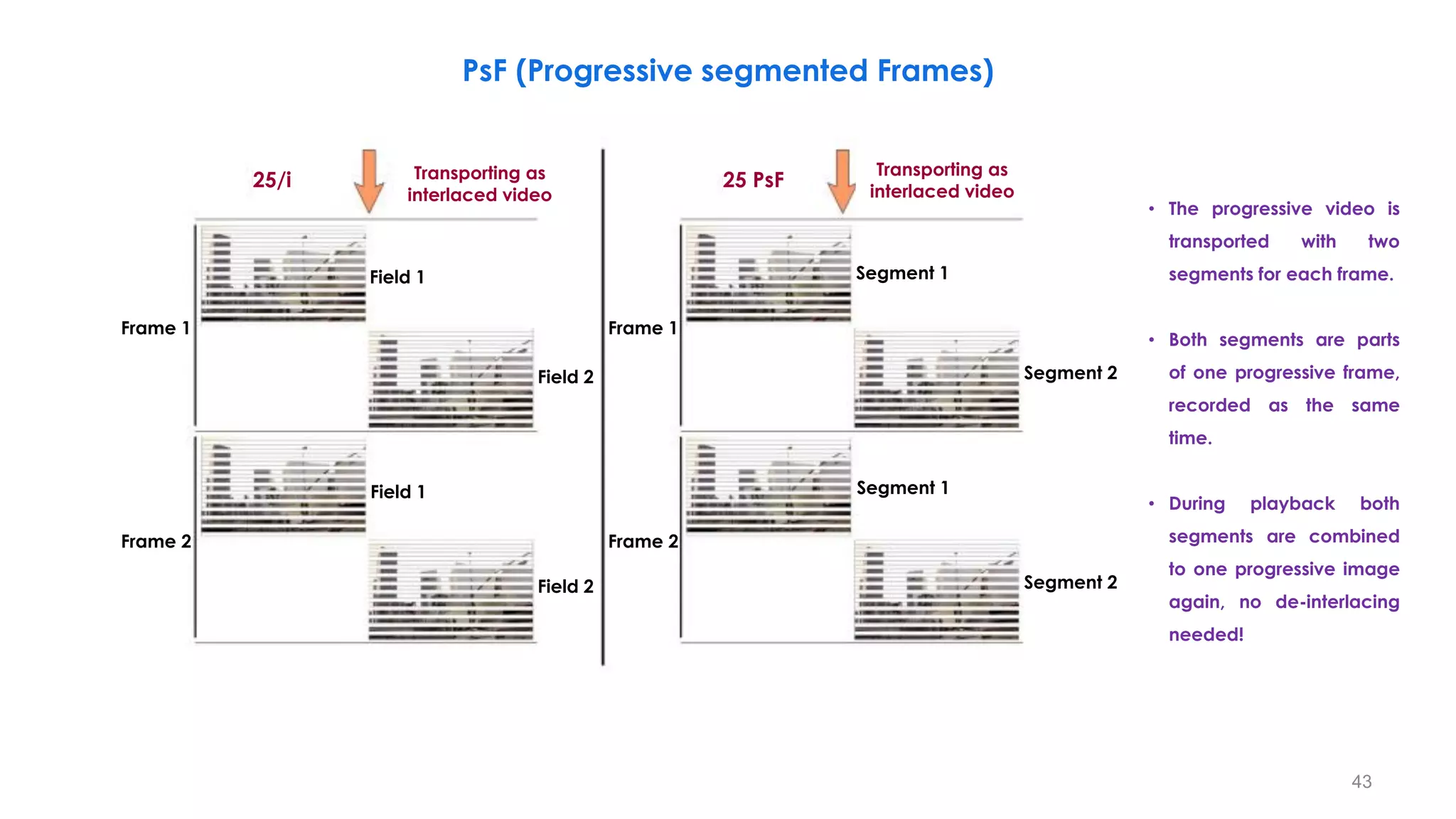
25/i Transporting as
interlaced video
Frame 1
Frame 2
Segment 1
Segment 1
25 PsF
Transporting as
interlaced video
Segment 2
Segment 2
• The progressive video is
transported with two
segments for each frame.
• Both segments are parts
of one progressive frame,
recorded as the same
time.
• During playback both
segments are combined
to one progressive image
again, no de-interlacing
needed!
PsF (Progressive segmented Frames)
44
Field 1
Field 2
Field 1
Field 2
Frame 1
Frame 2
Frame 1
Frame 2
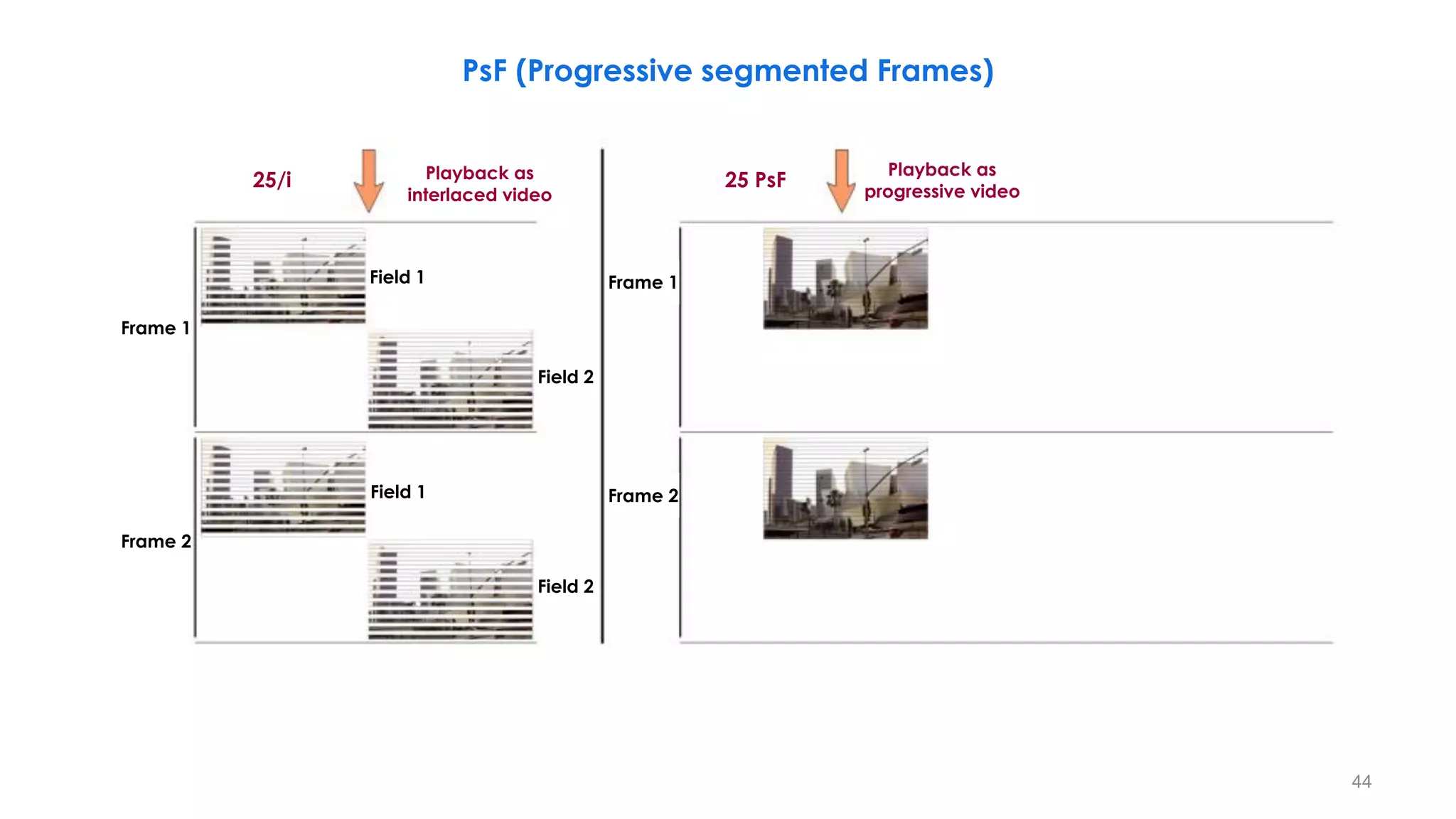
25/i 25 PsF
Playback as
interlaced video
Playback as
progressive video
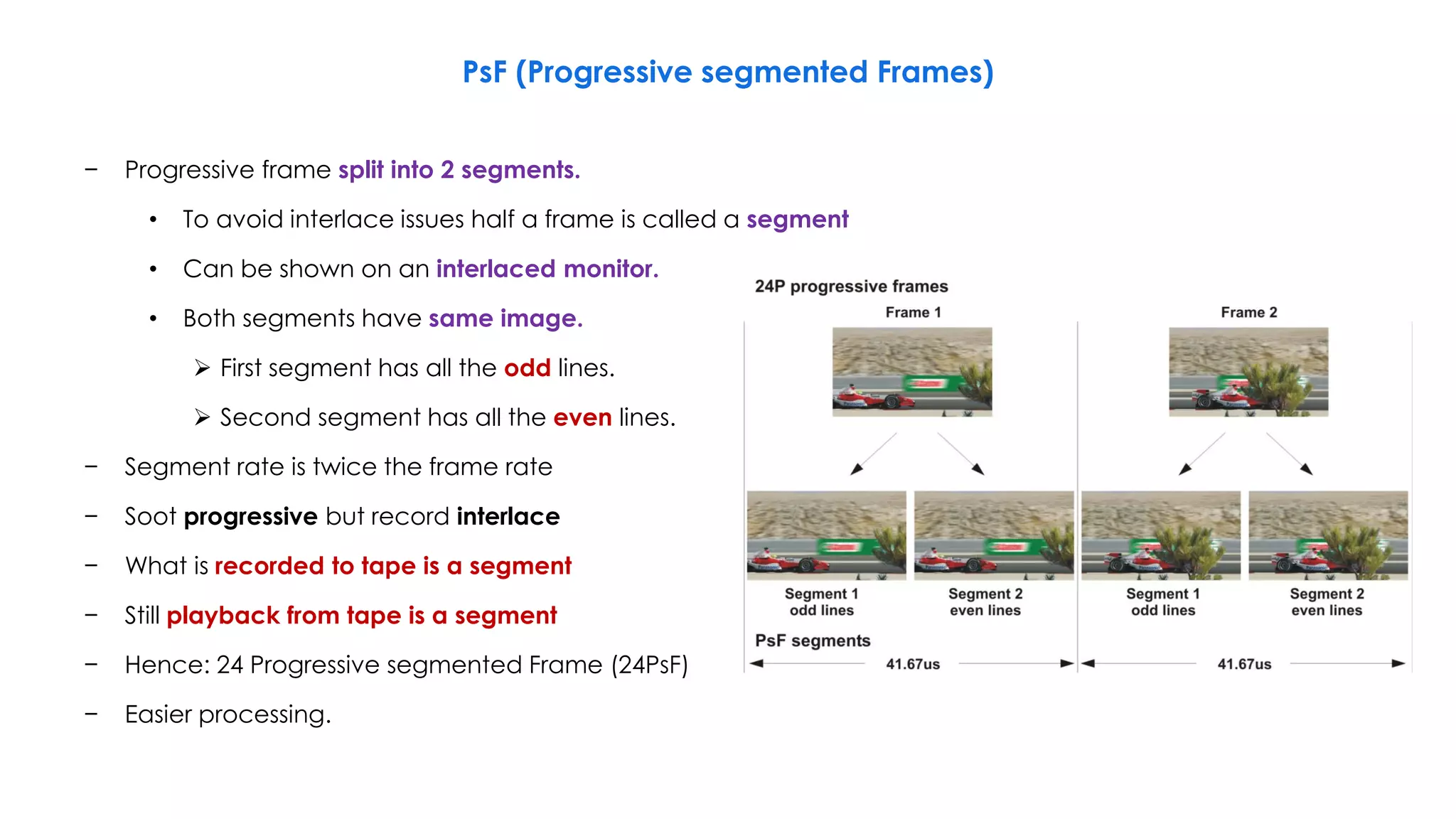
− Progressive frame split into 2 segments.
• To avoid interlace issues half a frame is called a segment
• Can be shown on an interlaced monitor.
• Both segments have same image.
 First segment has all the odd lines.
 Second segment has all the even lines.
− Segment rate is twice the frame rate
− Soot progressive but record interlace
− What is recorded to tape is a segment
− Still playback from tape is a segment
− Hence: 24 Progressive segmented Frame (24PsF)
− Easier processing.
PsF (Progressive segmented Frames)
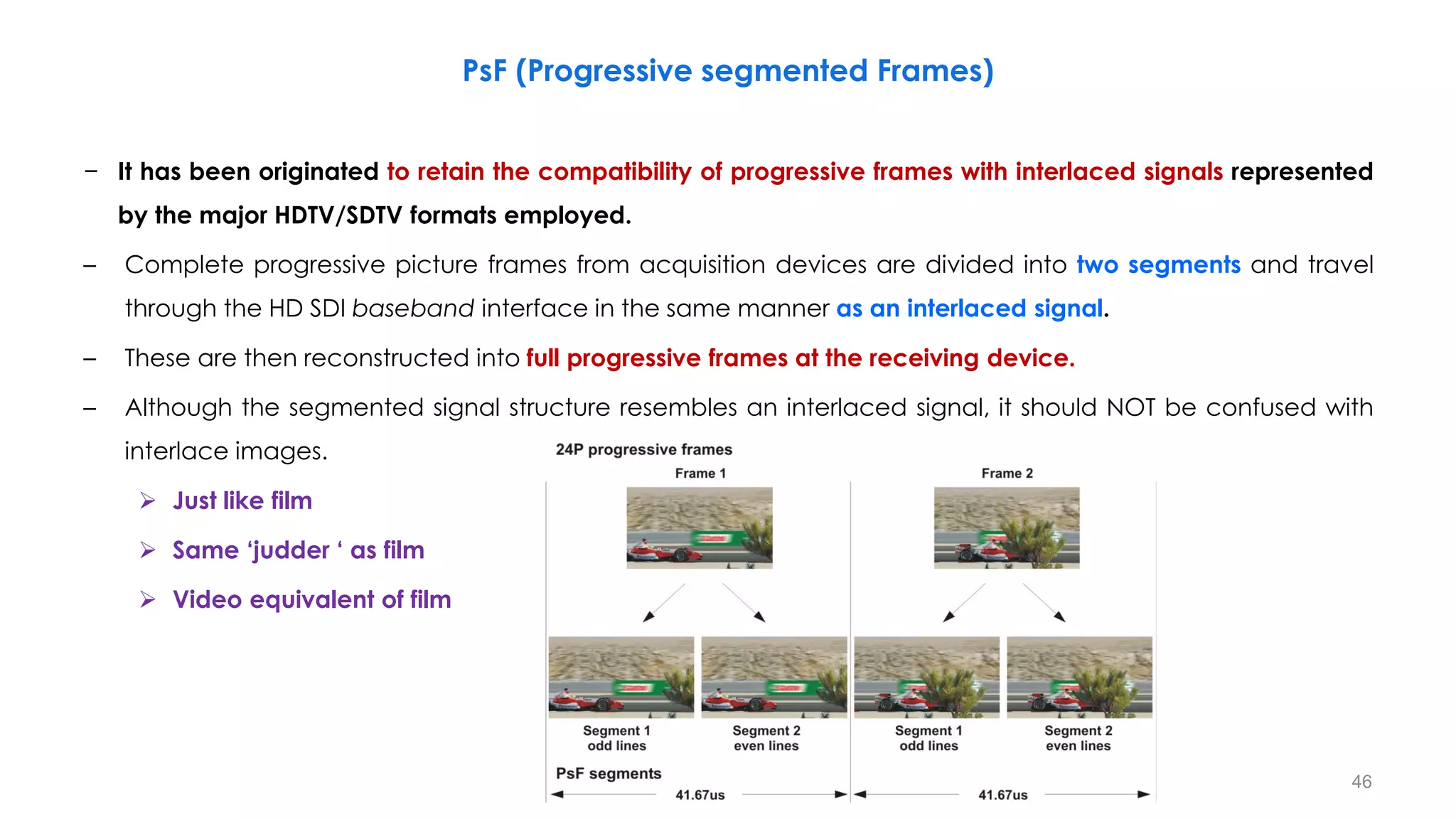
− It has been originated to retain the compatibility of progressive frames with interlaced signals represented
by the major HDTV/SDTV formats employed.
– Complete progressive picture frames from acquisition devices are divided into two segments and travel
through the HD SDI baseband interface in the same manner as an interlaced signal.
– These are then reconstructed into full progressive frames at the receiving device.
– Although the segmented signal structure resembles an interlaced signal, it should NOT be confused with
interlace images.
 Just like film
 Same ‘judder ‘ as film
 Video equivalent of film
PsF (Progressive segmented Frames)
46
47
PsF (Progressive segmented Frames)
BT. 2-01
0709-A
Progressive capture Digital interface
Progressive
Active line 1 mapped to total line 42
Active line 1080 mapped to total line 1121
Segmented frame
Active line 1, 3.... 1079 mapped to
total line 21, 22.... 560
Active line 2, 4.... 1080 mapped to
total line 584, 585.... 1123
Progressive picture/image
information
24/25/30P frames/s
1920 1080 CIF

Progressive Capture Digital Interface
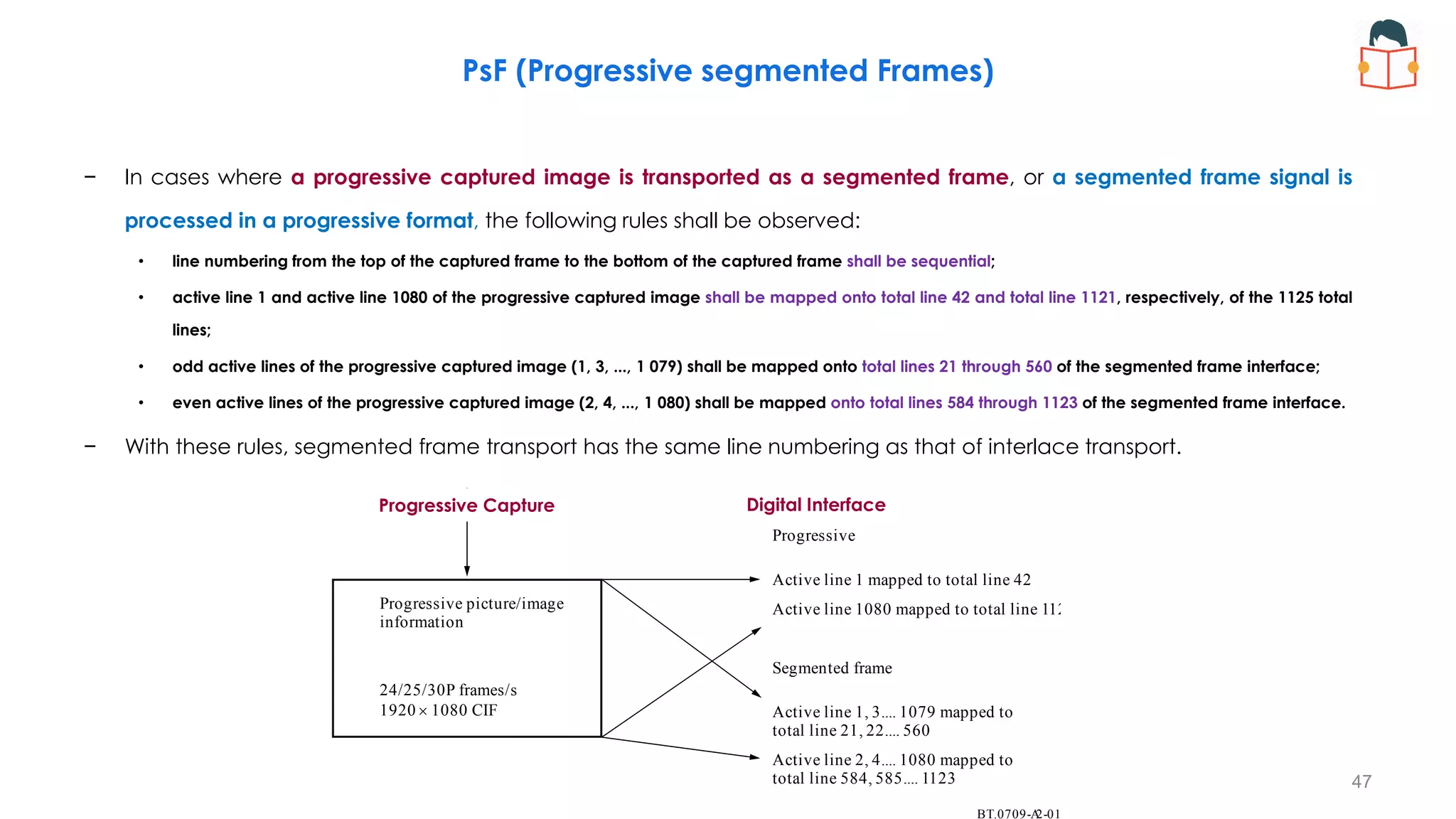
− In cases where a progressive captured image is transported as a segmented frame, or a segmented frame signal is
processed in a progressive format, the following rules shall be observed:
• line numbering from the top of the captured frame to the bottom of the captured frame shall be sequential;
• active line 1 and active line 1080 of the progressive captured image shall be mapped onto total line 42 and total line 1121, respectively, of the 1125 total
lines;
• odd active lines of the progressive captured image (1, 3, ..., 1 079) shall be mapped onto total lines 21 through 560 of the segmented frame interface;
• even active lines of the progressive captured image (2, 4, ..., 1 080) shall be mapped onto total lines 584 through 1123 of the segmented frame interface.
− With these rules, segmented frame transport has the same line numbering as that of interlace transport.
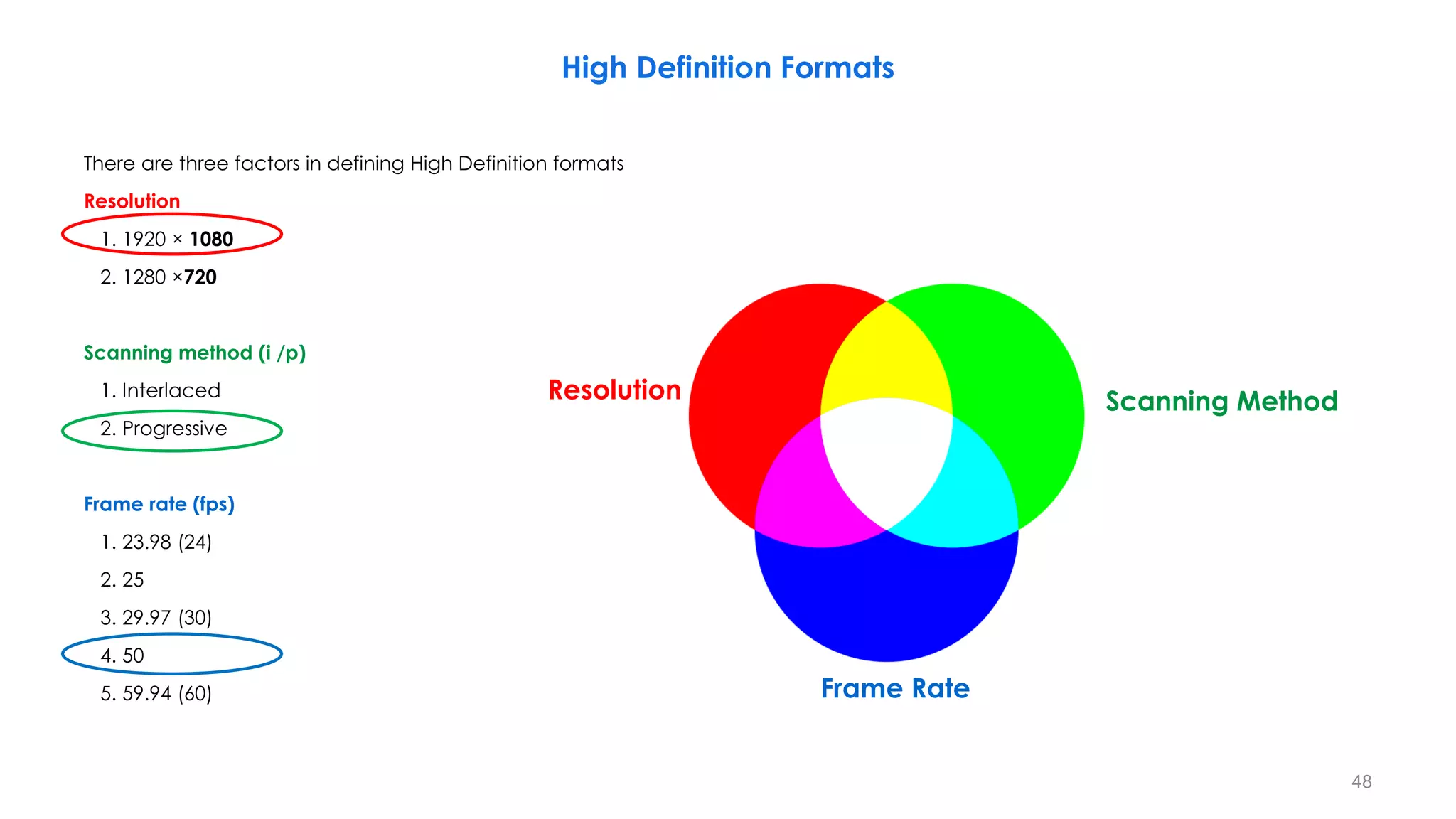
There are three factors in defining High Definition formats
Resolution
1. 1920 × 1080
2. 1280 ×720
Scanning method (i /p)
1. Interlaced
2. Progressive
Frame rate (fps)
1. 23.98 (24)
2. 25
3. 29.97 (30)
4. 50
5. 59.94 (60)
High Definition Formats
48
Resolution Scanning Method
Frame Rate
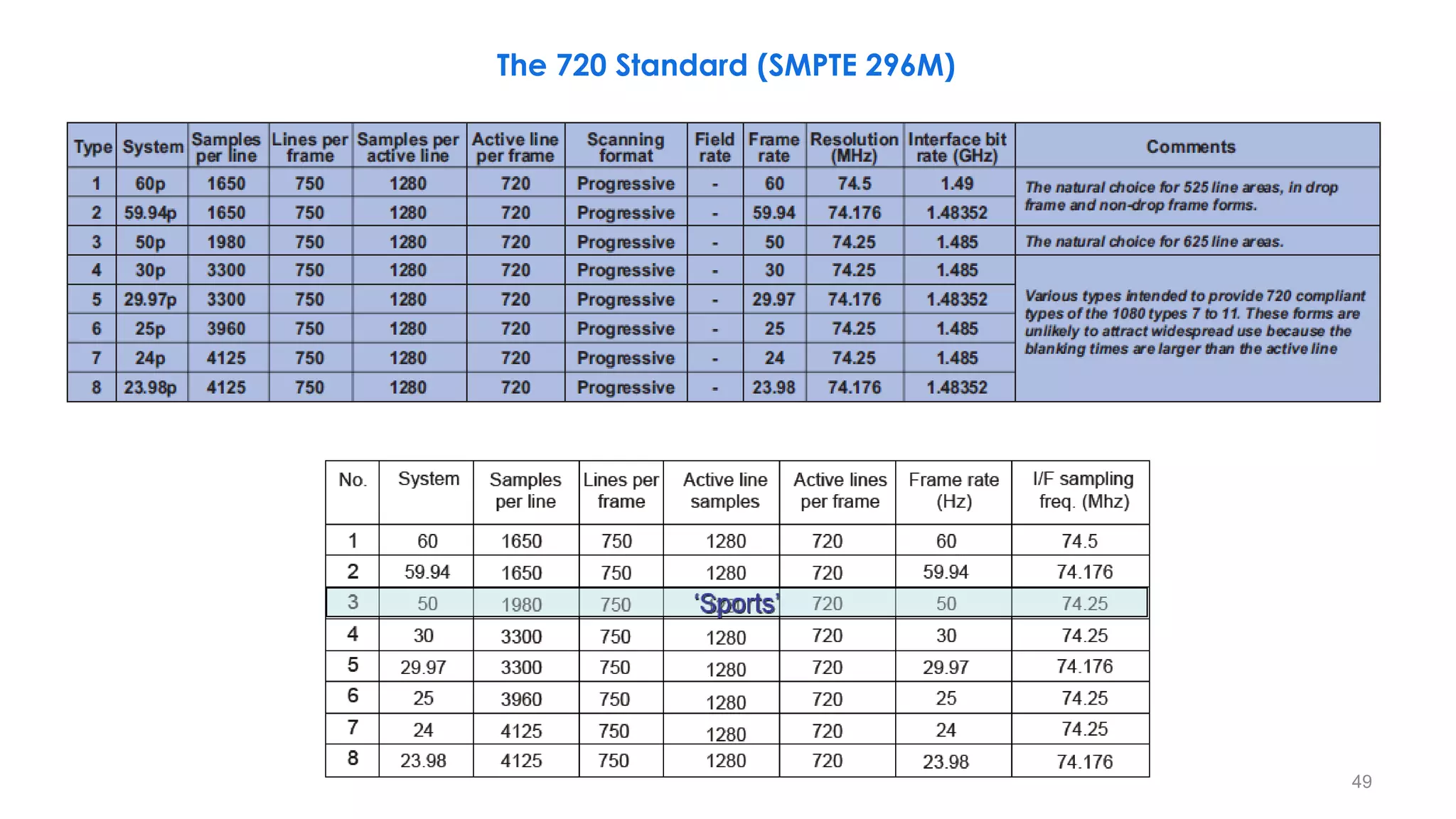
The 720 Standard (SMPTE 296M)
49
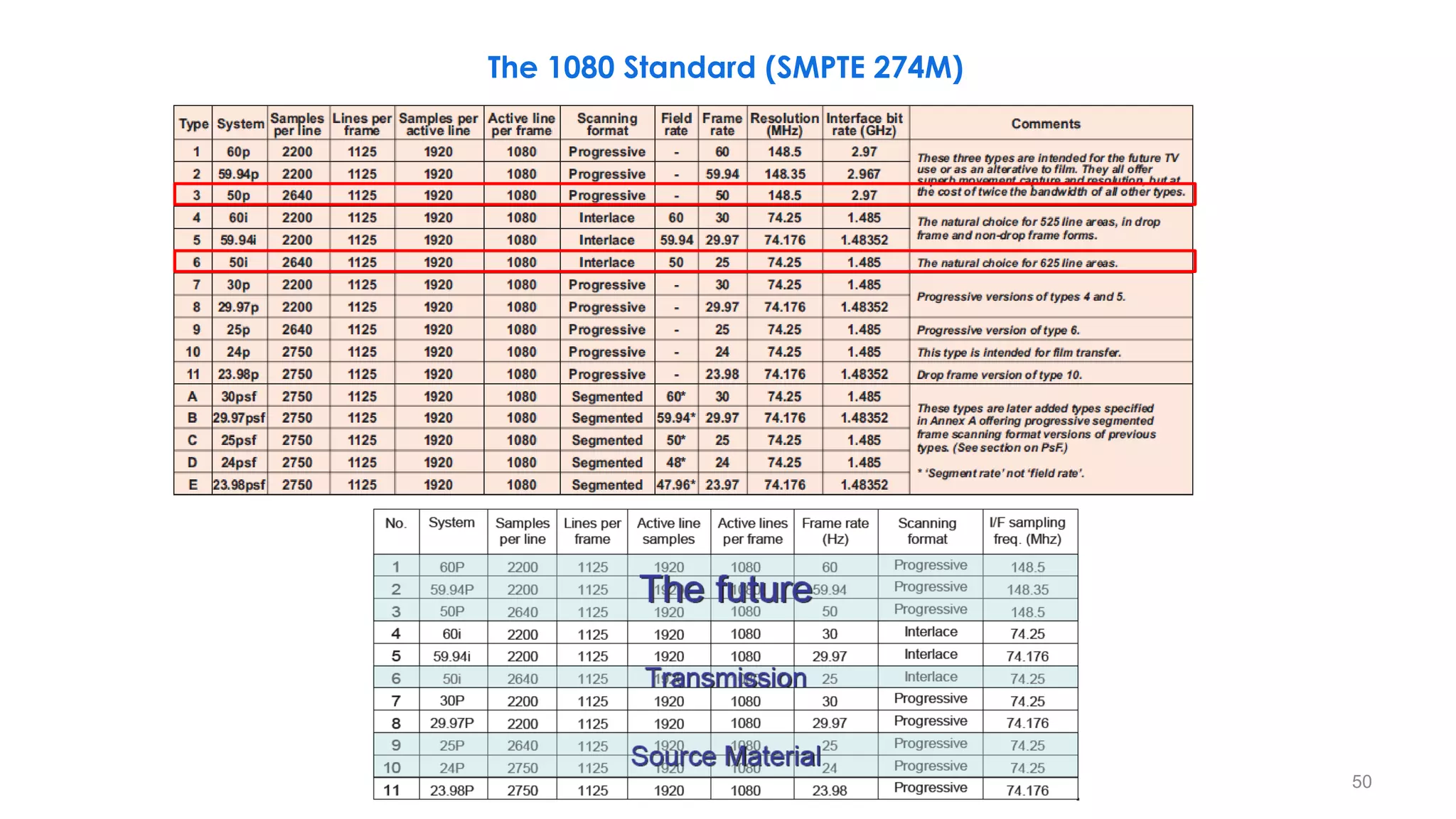
The 1080 Standard (SMPTE 274M)
50
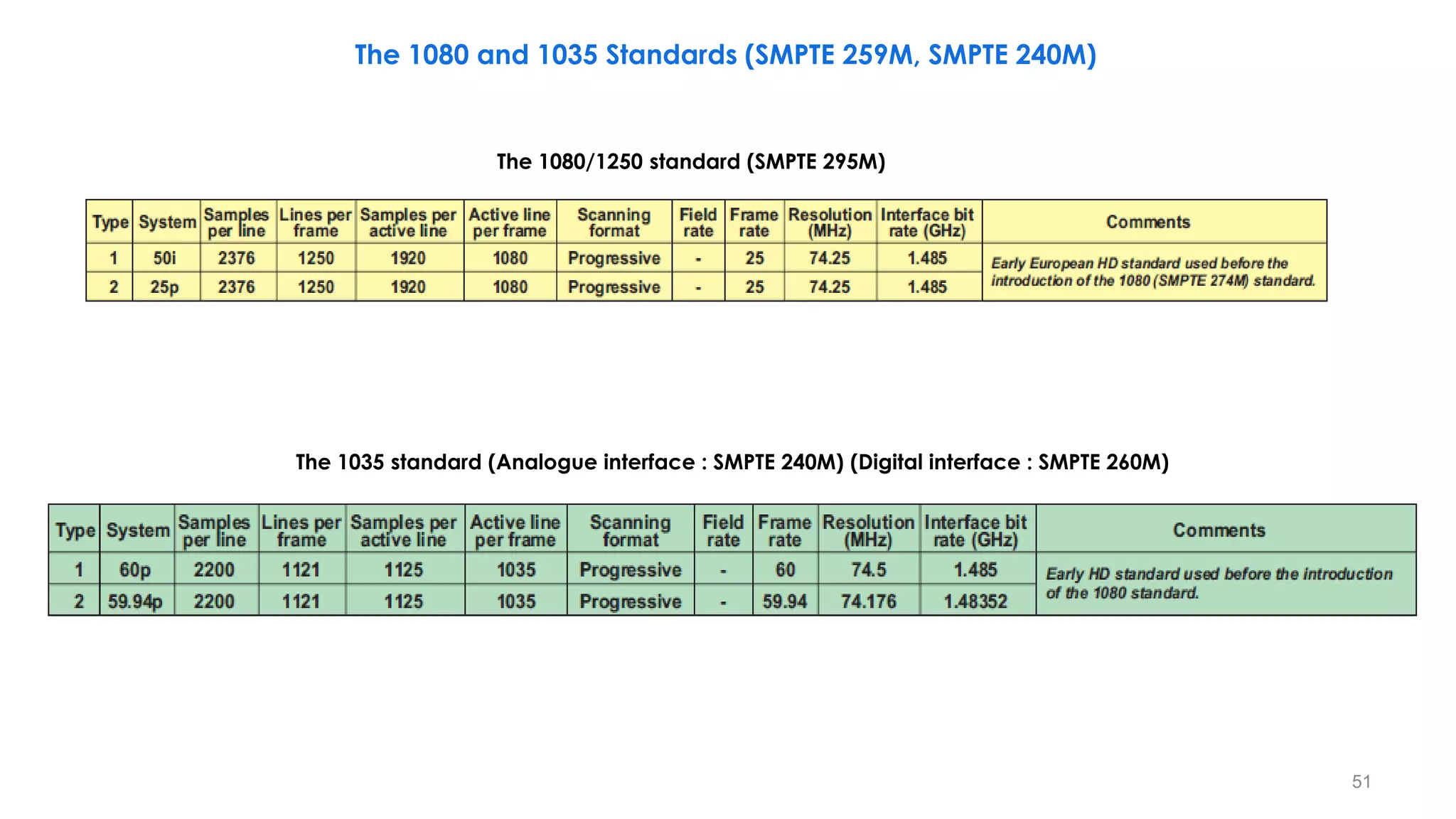
The 1080/1250 standard (SMPTE 295M)
The 1035 standard (Analogue interface : SMPTE 240M) (Digital interface : SMPTE 260M)
The 1080 and 1035 Standards (SMPTE 259M, SMPTE 240M)
51
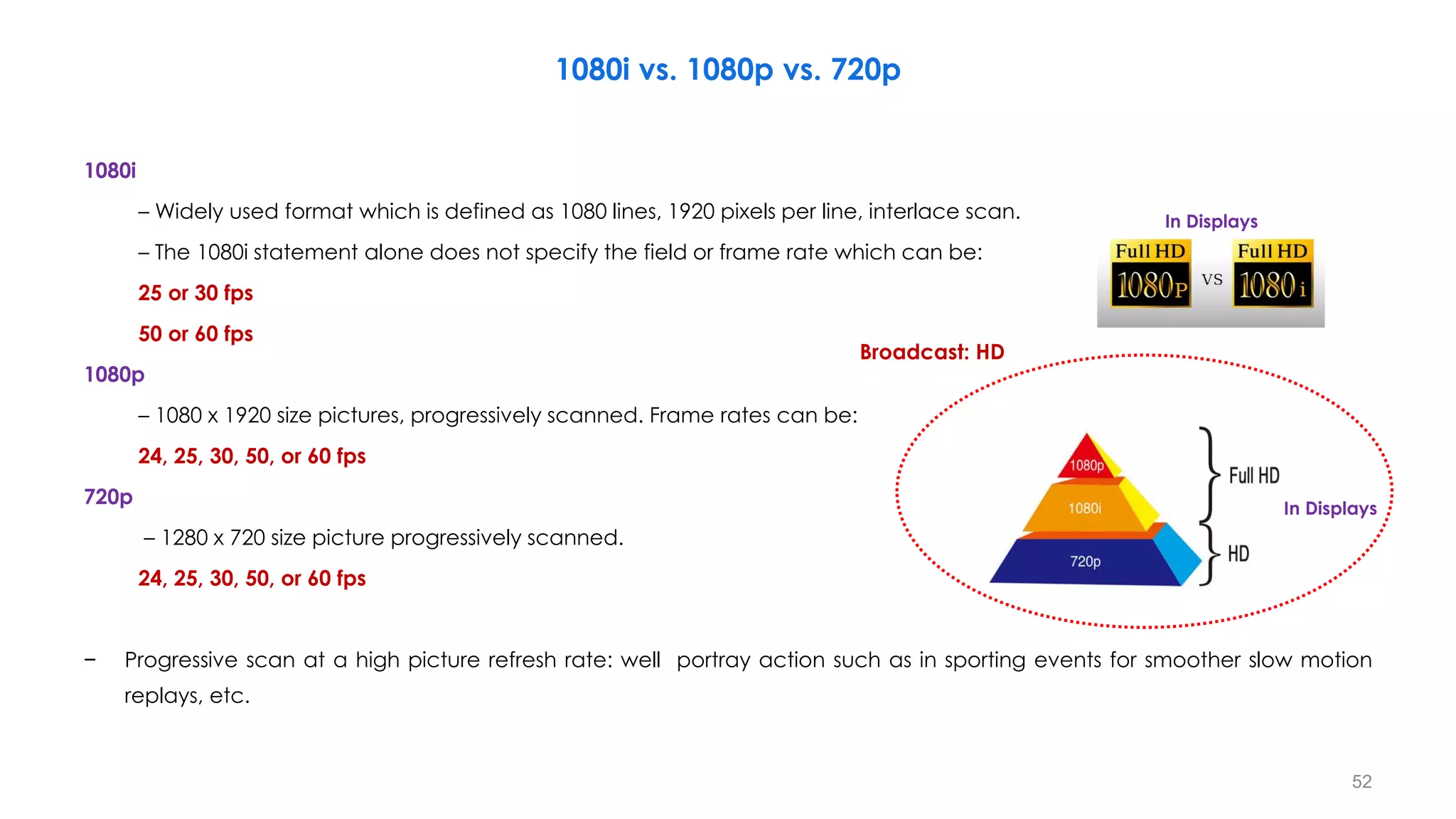
1080i vs. 1080p vs. 720p
1080i
– Widely used format which is defined as 1080 lines, 1920 pixels per line, interlace scan.
– The 1080i statement alone does not specify the field or frame rate which can be:
25 or 30 fps
50 or 60 fps
1080p
– 1080 x 1920 size pictures, progressively scanned. Frame rates can be:
24, 25, 30, 50, or 60 fps
720p
– 1280 x 720 size picture progressively scanned.
24, 25, 30, 50, or 60 fps
− Progressive scan at a high picture refresh rate: well portray action such as in sporting events for smoother slow motion
replays, etc.
In Displays
In Displays
52
Broadcast: HD
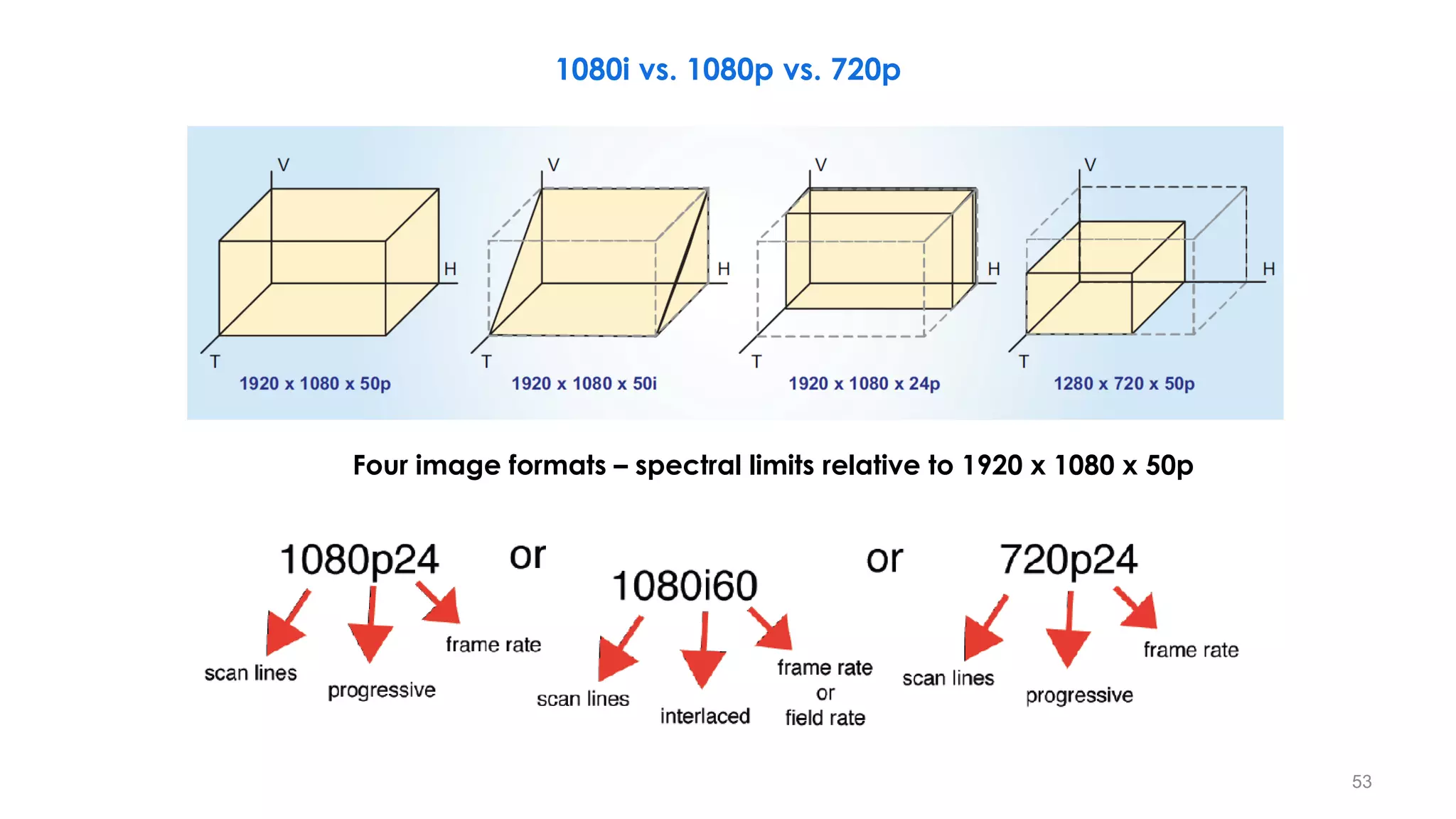
Four image formats – spectral limits relative to 1920 x 1080 x 50p
1080i vs. 1080p vs. 720p
53
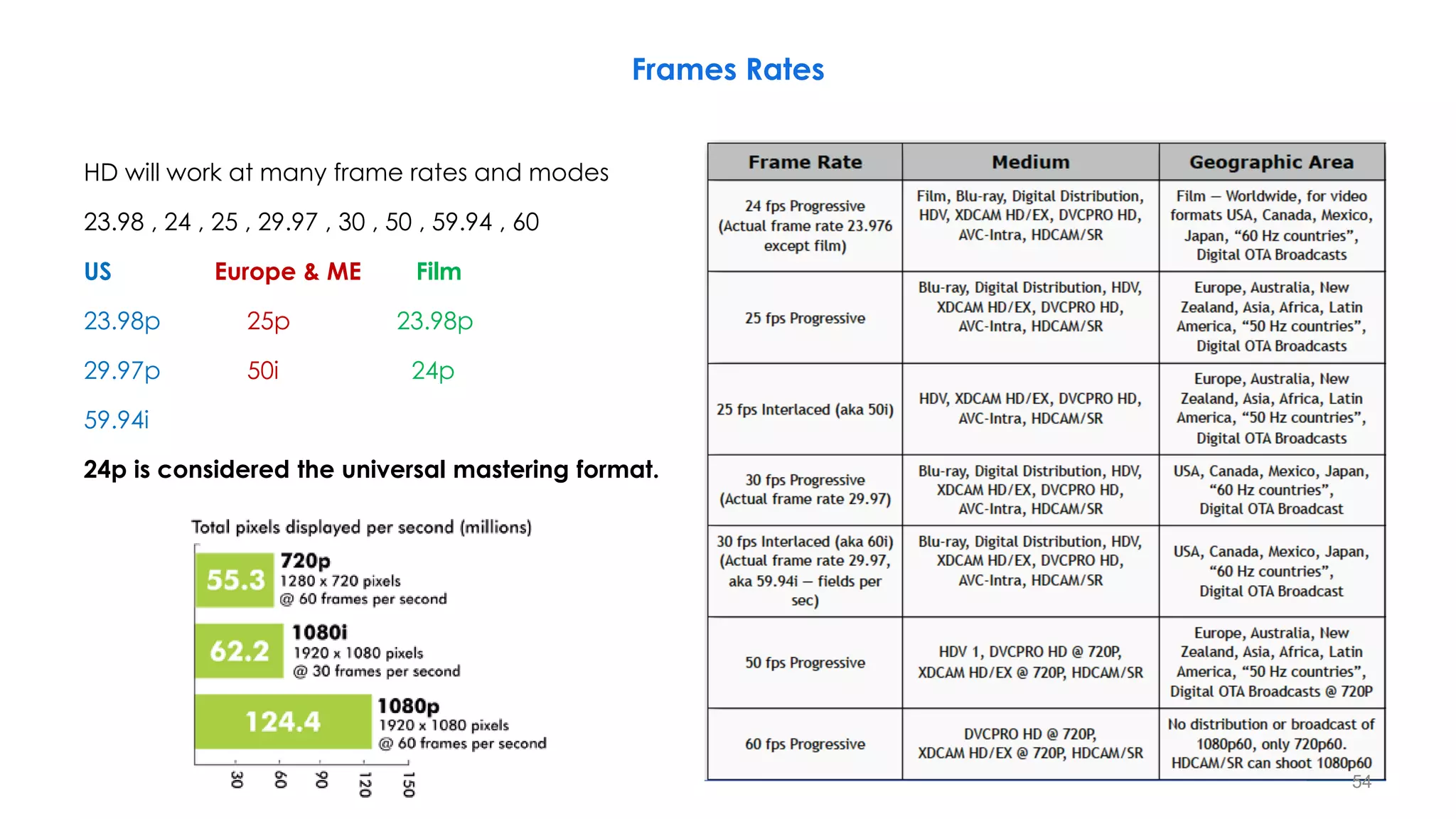
Frames Rates
HD will work at many frame rates and modes
23.98 , 24 , 25 , 29.97 , 30 , 50 , 59.94 , 60
US Europe & ME Film
23.98p 25p 23.98p
29.97p 50i 24p
59.94i
24p is considered the universal mastering format.
54
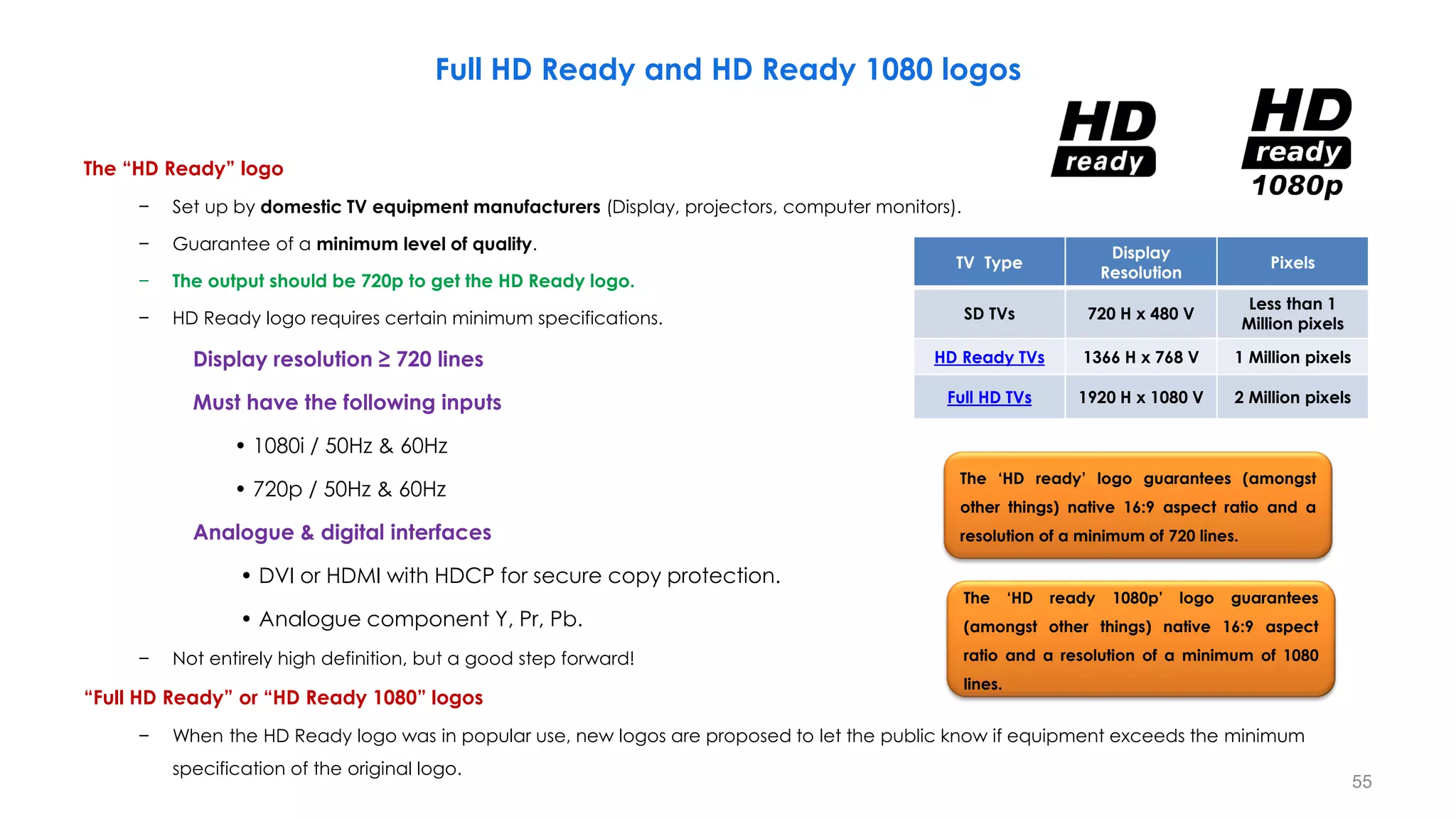
Full HD Ready and HD Ready 1080 logos
The “HD Ready” logo
− Set up by domestic TV equipment manufacturers (Display, projectors, computer monitors).
− Guarantee of a minimum level of quality.
− The output should be 720p to get the HD Ready logo.
− HD Ready logo requires certain minimum specifications.
Display resolution ≥ 720 lines
Must have the following inputs
• 1080i / 50Hz & 60Hz
• 720p / 50Hz & 60Hz
Analogue & digital interfaces
• DVI or HDMI with HDCP for secure copy protection.
• Analogue component Y, Pr, Pb.
− Not entirely high definition, but a good step forward!
“Full HD Ready” or “HD Ready 1080” logos
− When the HD Ready logo was in popular use, new logos are proposed to let the public know if equipment exceeds the minimum
specification of the original logo.
TV Type
Display
Resolution
Pixels
SD TVs 720 H x 480 V
Less than 1
Million pixels
HD Ready TVs 1366 H x 768 V 1 Million pixels
Full HD TVs 1920 H x 1080 V 2 Million pixels
55
The ‘HD ready’ logo guarantees (amongst
other things) native 16:9 aspect ratio and a
resolution of a minimum of 720 lines.
The ‘HD ready 1080p’ logo guarantees
(amongst other things) native 16:9 aspect
ratio and a resolution of a minimum of 1080
lines.
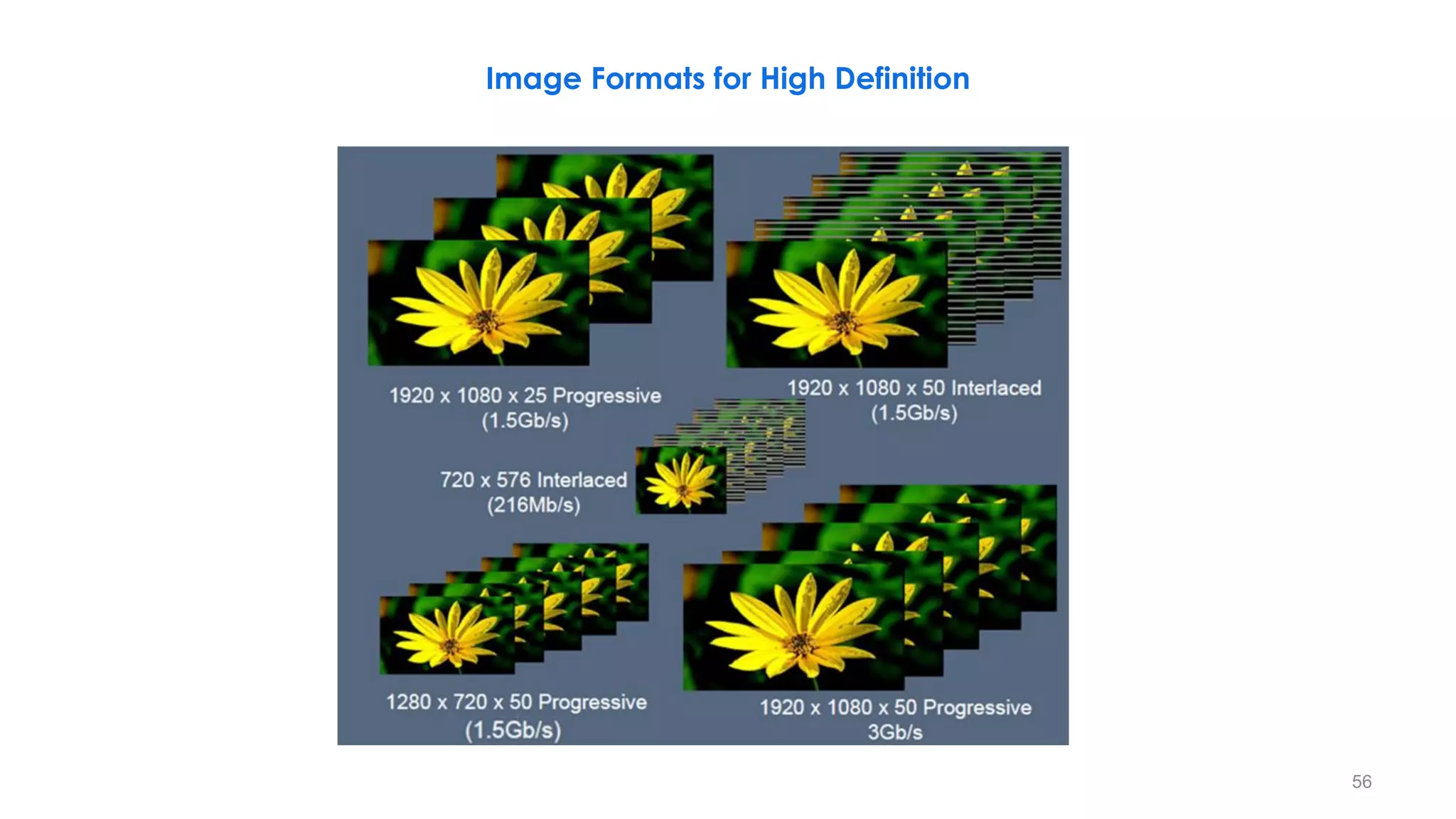
Image Formats for High Definition
56
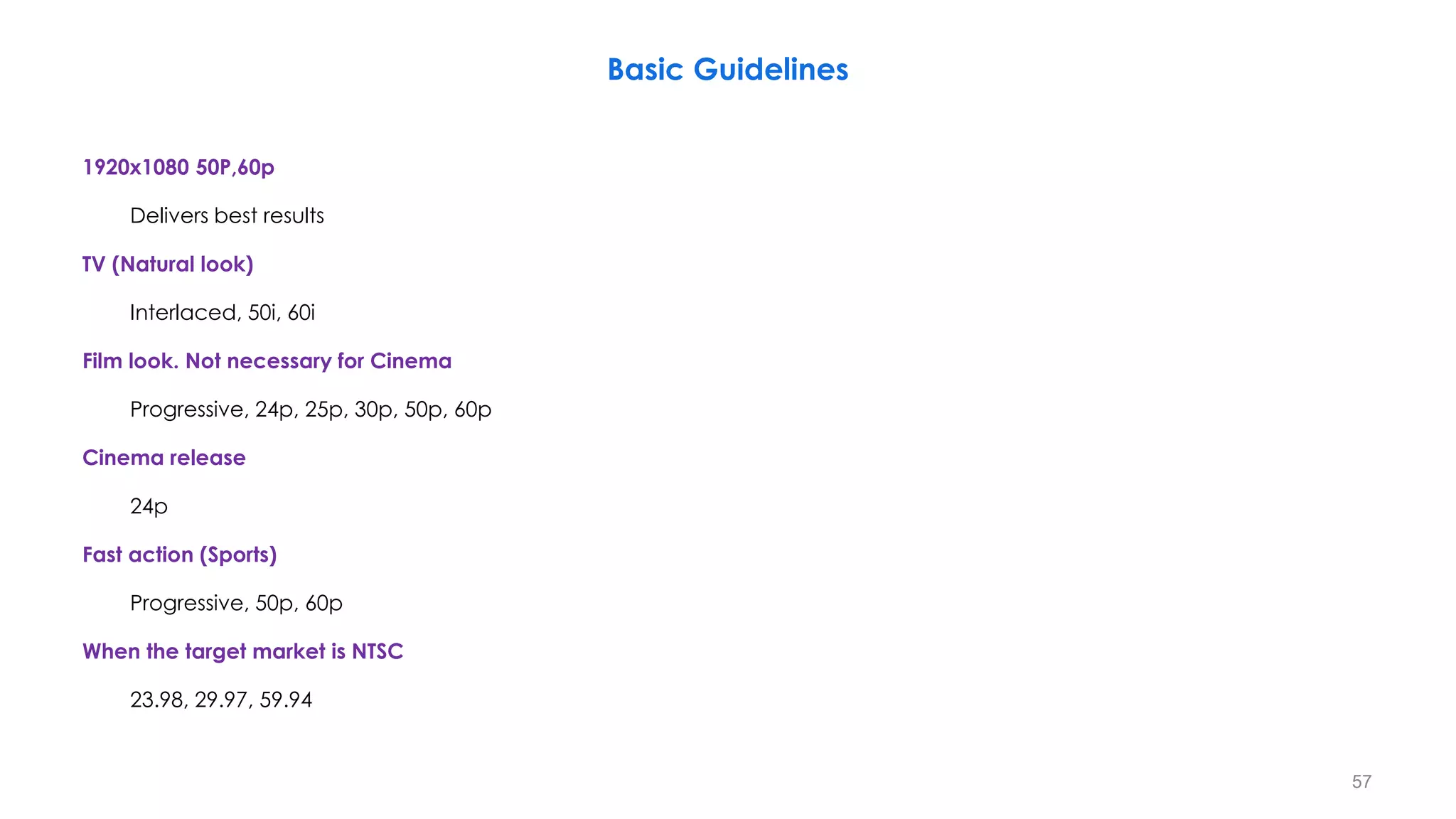
Basic Guidelines
1920x1080 50P,60p
Delivers best results
TV (Natural look)
Interlaced, 50i, 60i
Film look. Not necessary for Cinema
Progressive, 24p, 25p, 30p, 50p, 60p
Cinema release
24p
Fast action (Sports)
Progressive, 50p, 60p
When the target market is NTSC
23.98, 29.97, 59.94
57
40ms 40ms 40ms
58
20ms 20ms
20ms 20ms
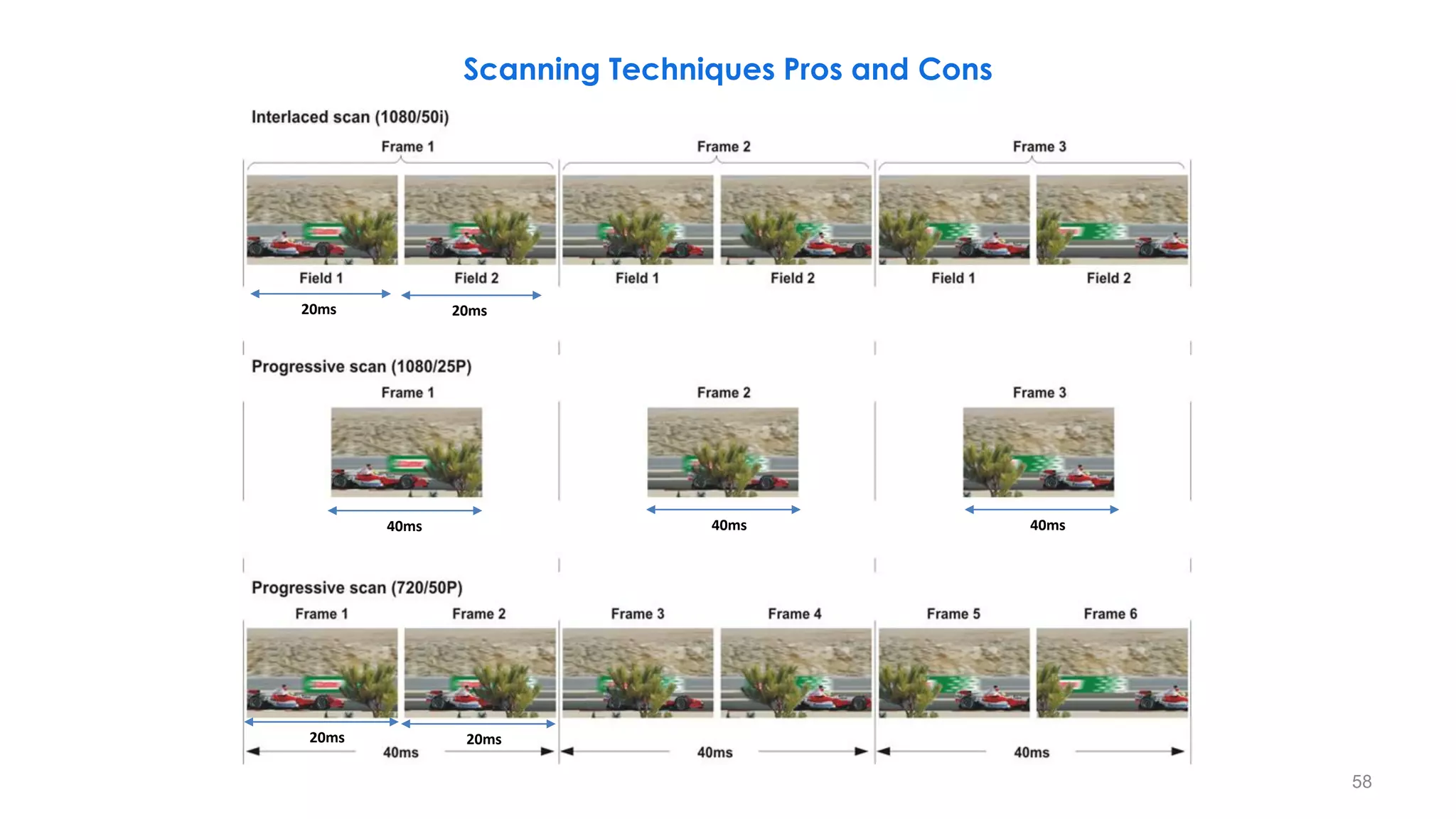
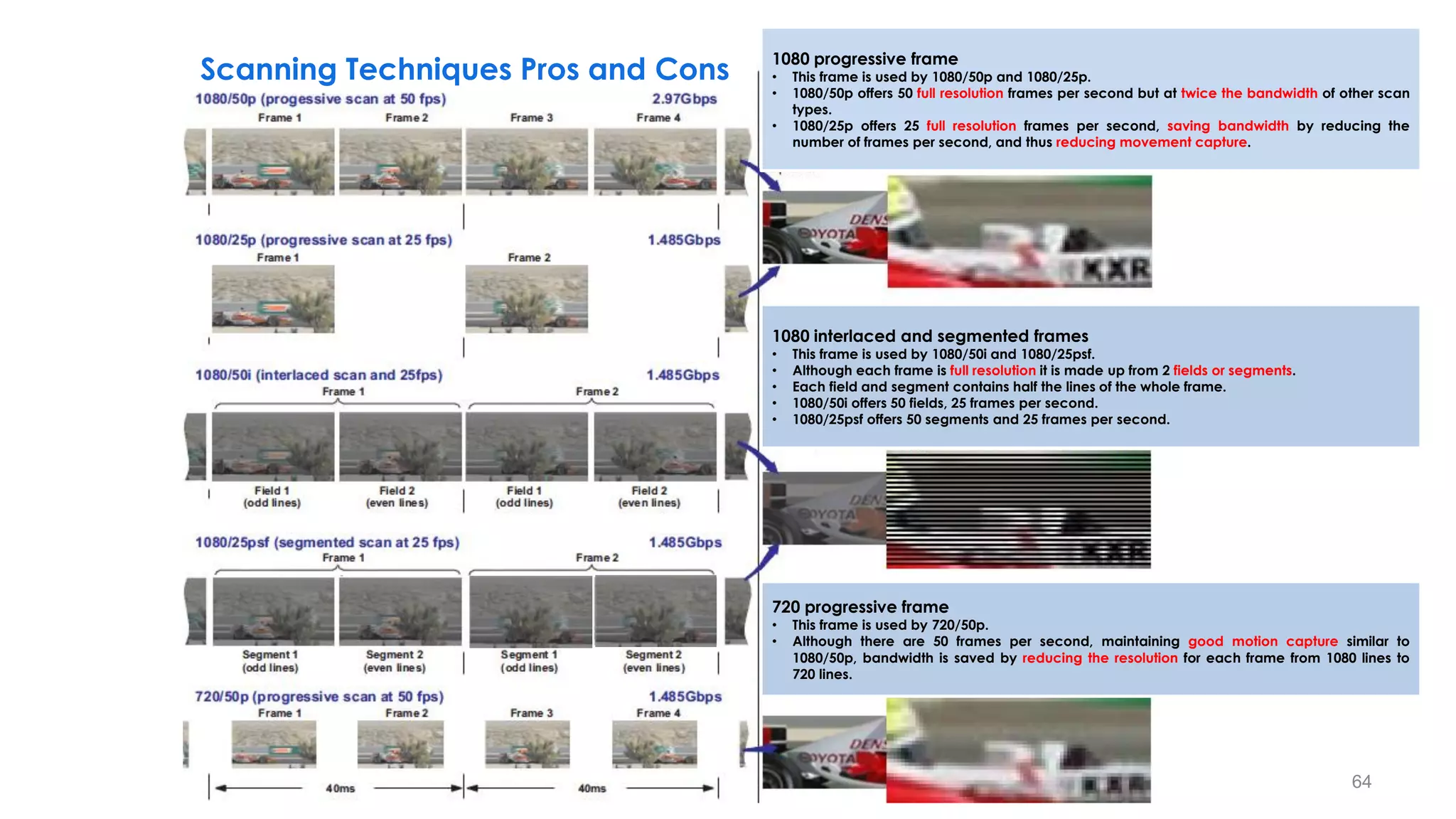
Scanning Techniques Pros and Cons
40ms 40ms 40ms
59
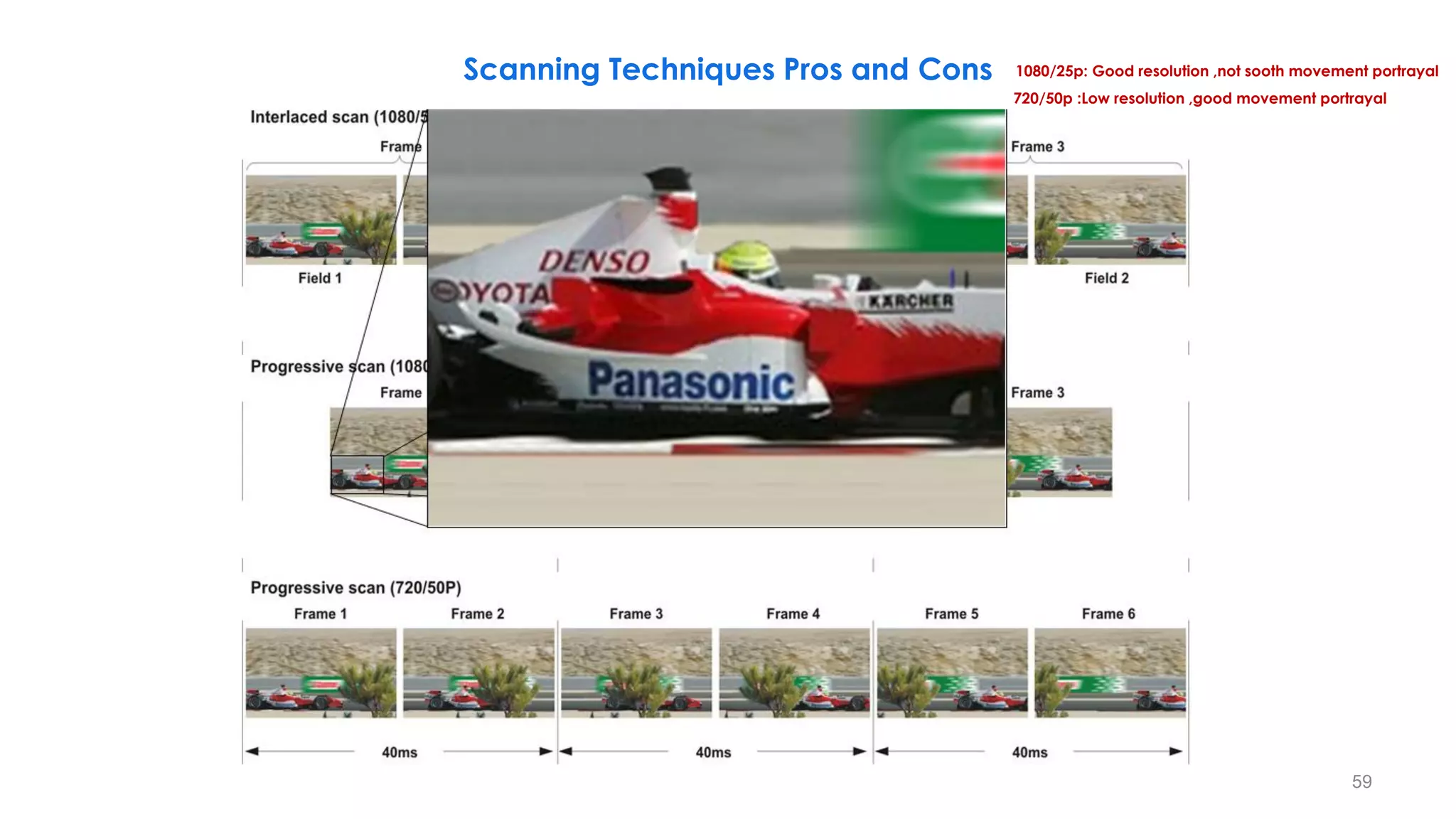
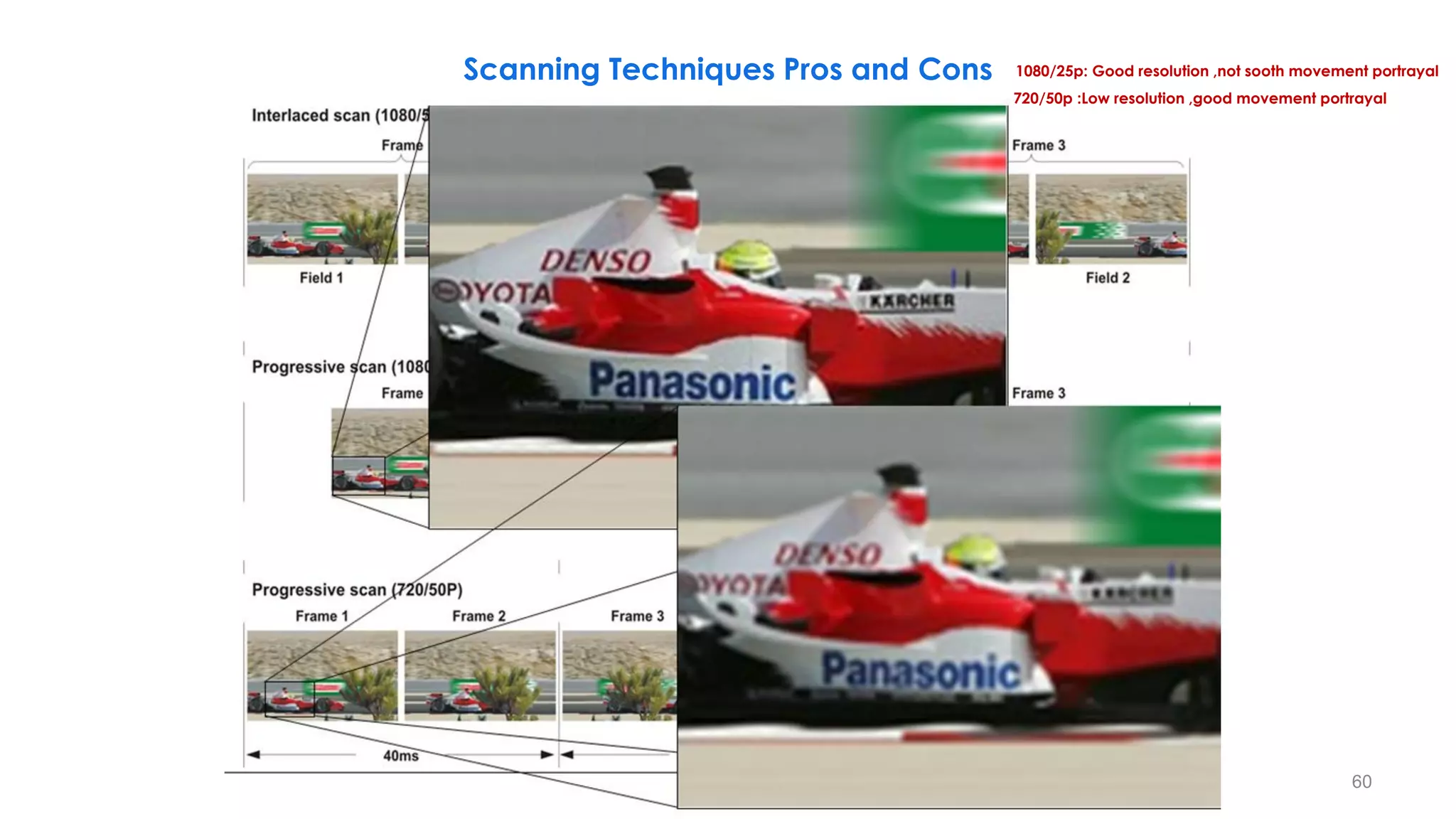
Scanning Techniques Pros and Cons 1080/25p: Good resolution ,not sooth movement portrayal
720/50p :Low resolution ,good movement portrayal
40ms 40ms 40ms
60
Scanning Techniques Pros and Cons 1080/25p: Good resolution ,not sooth movement portrayal
720/50p :Low resolution ,good movement portrayal
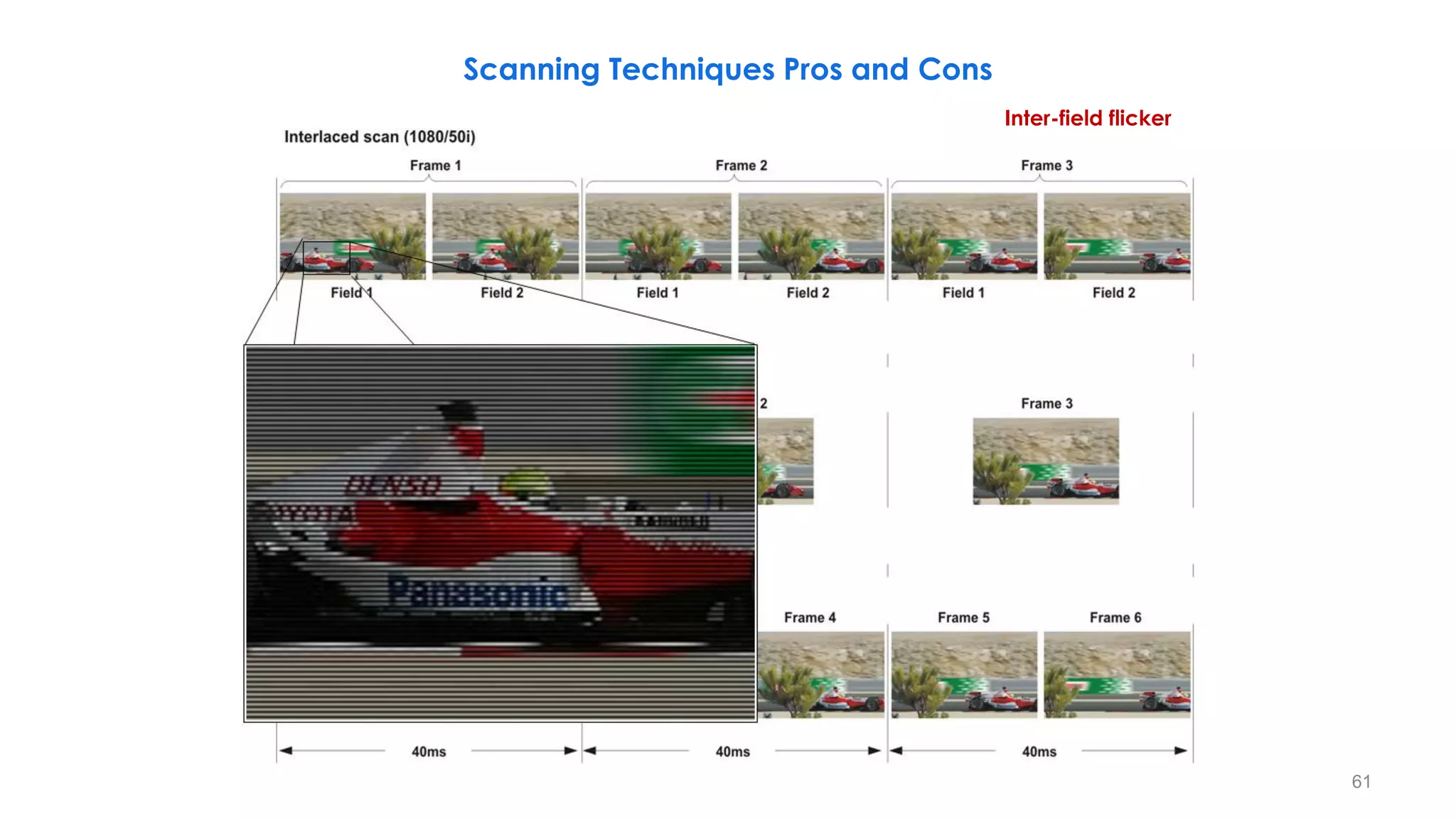
Inter-field flicker
61
Scanning Techniques Pros and Cons
62
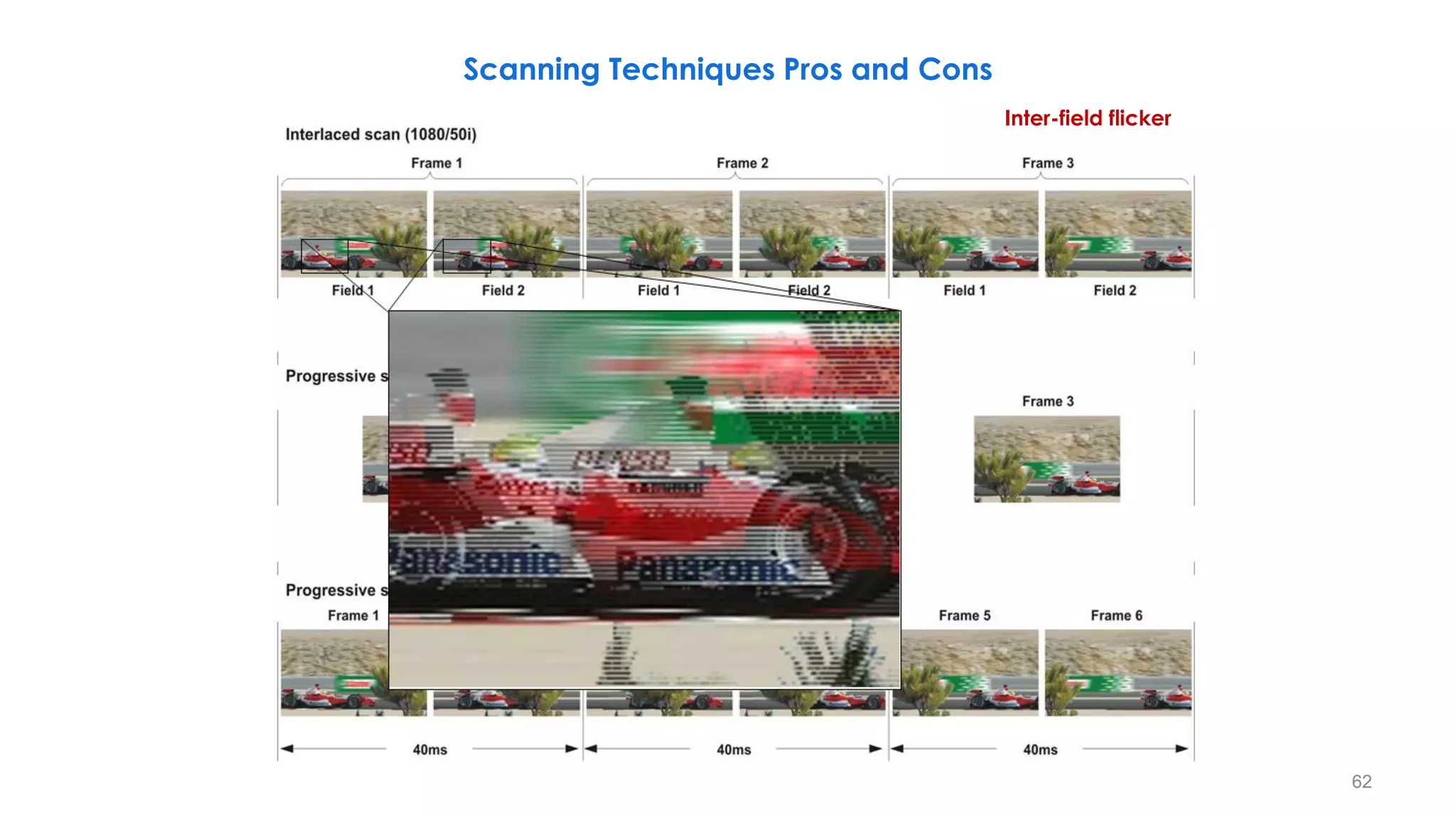
Scanning Techniques Pros and Cons
Inter-field flicker
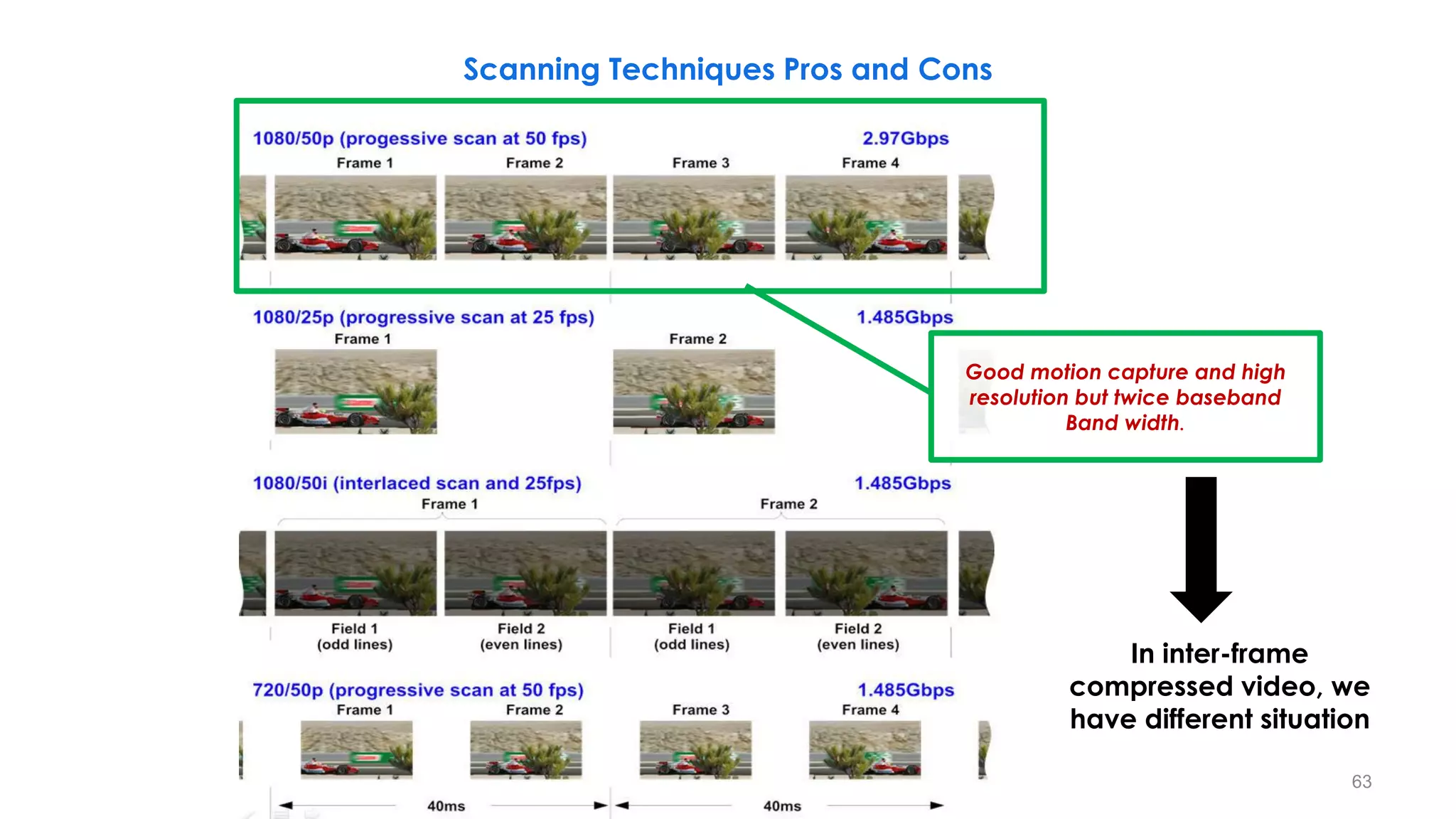
Good motion capture and high
resolution but twice baseband
Band width.
63
Scanning Techniques Pros and Cons
In inter-frame
compressed video, we
have different situation
40ms
1080 progressive frame
• This frame is used by 1080/50p and 1080/25p.
• 1080/50p offers 50 full resolution frames per second but at twice the bandwidth of other scan
types.
• 1080/25p offers 25 full resolution frames per second, saving bandwidth by reducing the
number of frames per second, and thus reducing movement capture.
1080 interlaced and segmented frames
• This frame is used by 1080/50i and 1080/25psf.
• Although each frame is full resolution it is made up from 2 fields or segments.
• Each field and segment contains half the lines of the whole frame.
• 1080/50i offers 50 fields, 25 frames per second.
• 1080/25psf offers 50 segments and 25 frames per second.
720 progressive frame
• This frame is used by 720/50p.
• Although there are 50 frames per second, maintaining good motion capture similar to
1080/50p, bandwidth is saved by reducing the resolution for each frame from 1080 lines to
720 lines.
64
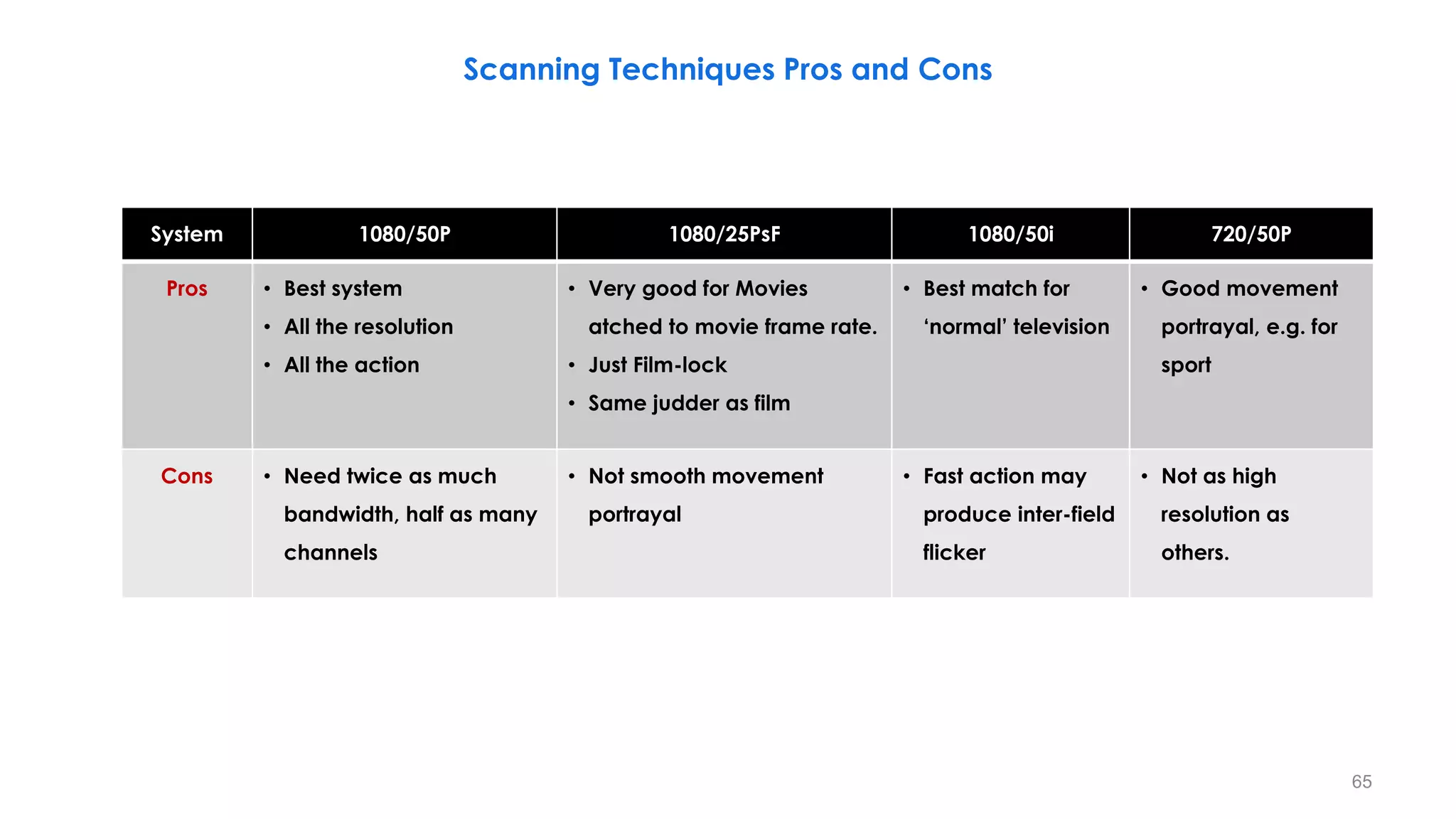
Scanning Techniques Pros and Cons
System 1080/50P 1080/25PsF 1080/50i 720/50P
Pros • Best system
• All the resolution
• All the action
• Very good for Movies
atched to movie frame rate.
• Just Film-lock
• Same judder as film
• Best match for
‘normal’ television
• Good movement
portrayal, e.g. for
sport
Cons • Need twice as much
bandwidth, half as many
channels
• Not smooth movement
portrayal
• Fast action may
produce inter-field
flicker
• Not as high
resolution as
others.
65
66
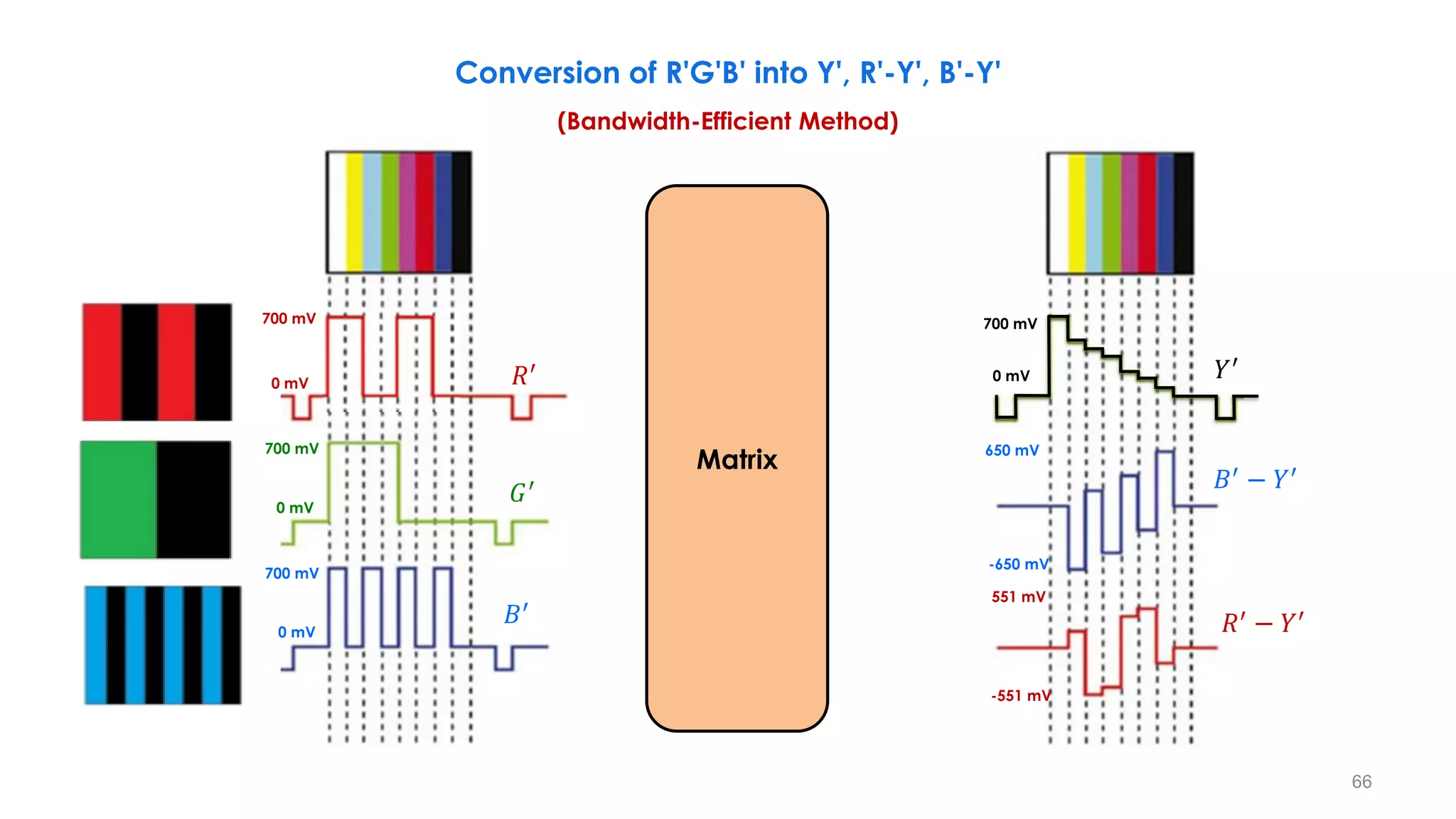
Conversion of R'G'B' into Y', R'-Y', B'-Y'
(Bandwidth-Efficient Method)
700 mV
0 mV
650 mV
-650 mV
551 mV
-551 mV
𝑅′
− 𝑌′
𝐵′
− 𝑌′
𝑌′
700 mV
0 mV
700 mV
0 mV
700 mV
0 mV
𝑅′
𝐺′
𝐵′
Matrix
67
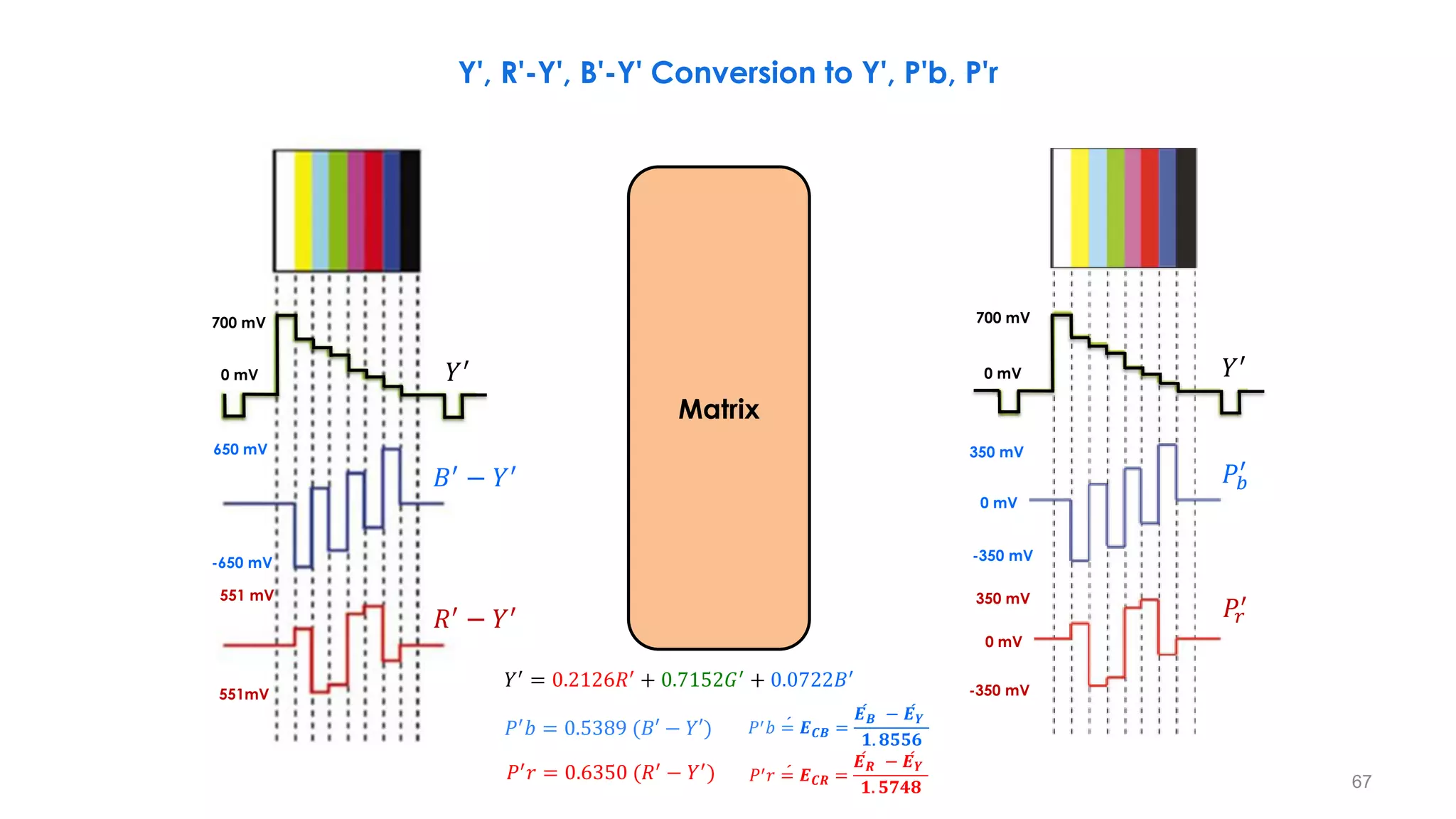
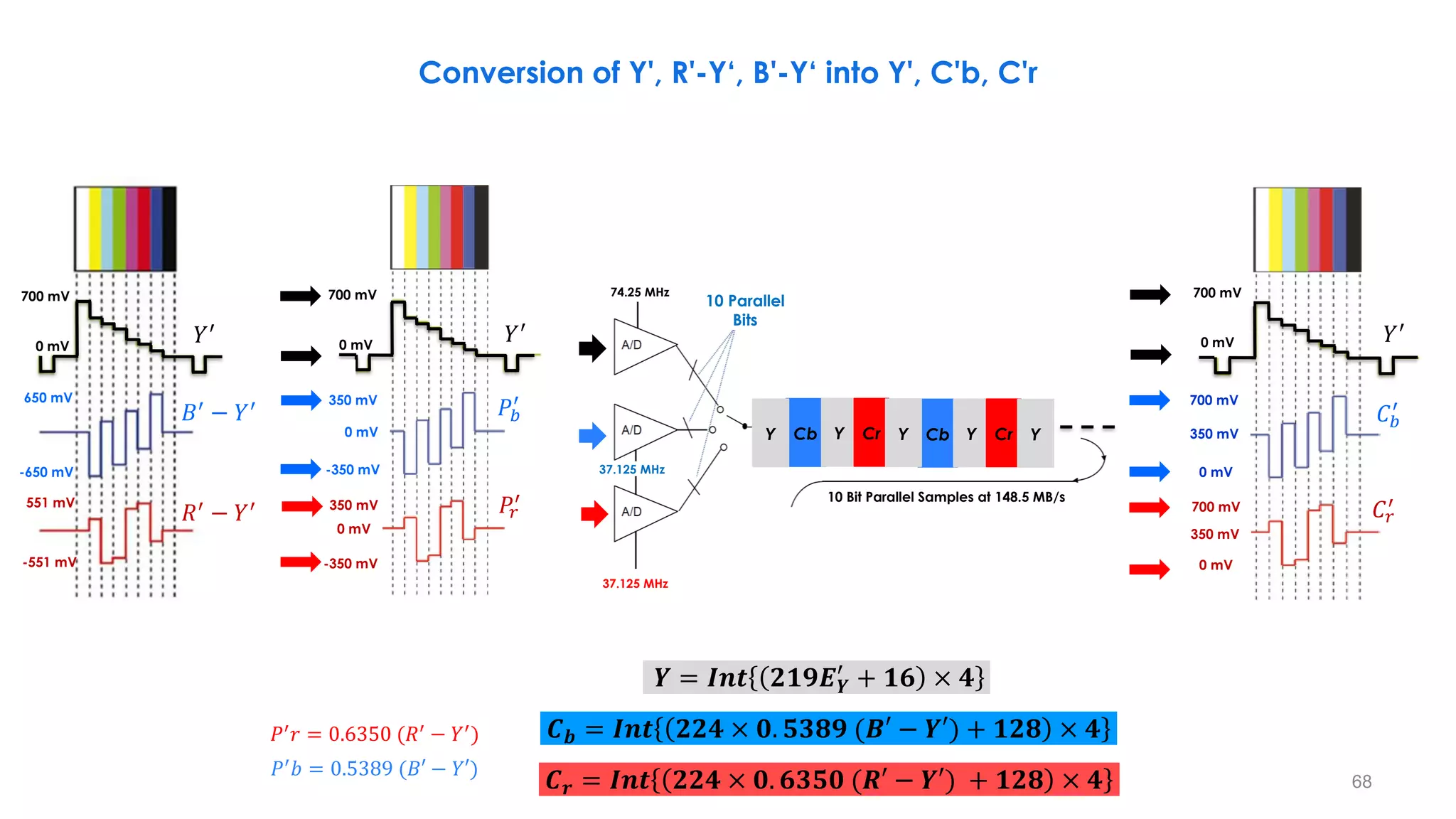
Y', R'-Y', B'-Y' Conversion to Y', P'b, P'r
700 mV
0 mV
650 mV
-650 mV
551 mV
551mV
𝑅′
− 𝑌′
𝐵′
− 𝑌′
𝑌′
700 mV
0 mV
350 mV
-350 mV
-350 mV
0 mV
350 mV
0 mV
𝑌′
𝑃𝑟
′
𝑃𝑏
′
Matrix
𝑃′
𝑏 = 0.5389 (𝐵′ − 𝑌′)
𝑃′𝑟 = 0.6350 (𝑅′ − 𝑌′)
𝑌′ = 0.2126𝑅′ + 0.7152𝐺′ + 0.0722𝐵′
ሖ
𝑃′𝑏 = 𝑬𝑪𝑩 =
ሖ
𝑬𝑩 − ሖ
𝑬𝒀
𝟏. 𝟖𝟓𝟓𝟔
ሖ
𝑃′𝑟 = 𝑬𝑪𝑹 =
ሖ
𝑬𝑹 − ሖ
𝑬𝒀
𝟏. 𝟓𝟕𝟒𝟖
68
Conversion of Y', R'-Y‘, B'-Y‘ into Y', C'b, C'r
700 mV
0 mV
650 mV
-650 mV
551 mV
-551 mV
𝑅′
− 𝑌′
𝐵′
− 𝑌′
𝑌′
700 mV
0 mV
350 mV
-350 mV
-350 mV
0 mV
350 mV
0 mV
𝑌′
𝑃𝑟
′
𝑃𝑏
′
700 mV
0 mV
700 mV
0 mV
350 mV
700 mV
0 mV
350 mV
𝑌′
𝐶𝑟
′
𝐶𝑏
′
𝒀 = 𝑰𝒏𝒕 𝟐𝟏𝟗𝑬𝒀
′
+ 𝟏𝟔 × 𝟒
𝑪𝒃 = 𝑰𝒏𝒕 𝟐𝟐𝟒 × 𝟎. 𝟓𝟑𝟖𝟗 (𝑩′ − 𝒀′) + 𝟏𝟐𝟖 × 𝟒
𝑪𝒓 = 𝑰𝒏𝒕 𝟐𝟐𝟒 × 𝟎. 𝟔𝟑𝟓𝟎 (𝑹′ − 𝒀′) + 𝟏𝟐𝟖 × 𝟒
𝑃′
𝑏 = 0.5389 (𝐵′ − 𝑌′)
𝑃′
𝑟 = 0.6350 (𝑅′
− 𝑌′
)
Cb Y Cr Y
Cb Y Cr Y
Y
10 Parallel
Bits
74.25 MHz
37.125 MHz
37.125 MHz
10 Bit Parallel Samples at 148.5 MB/s
69
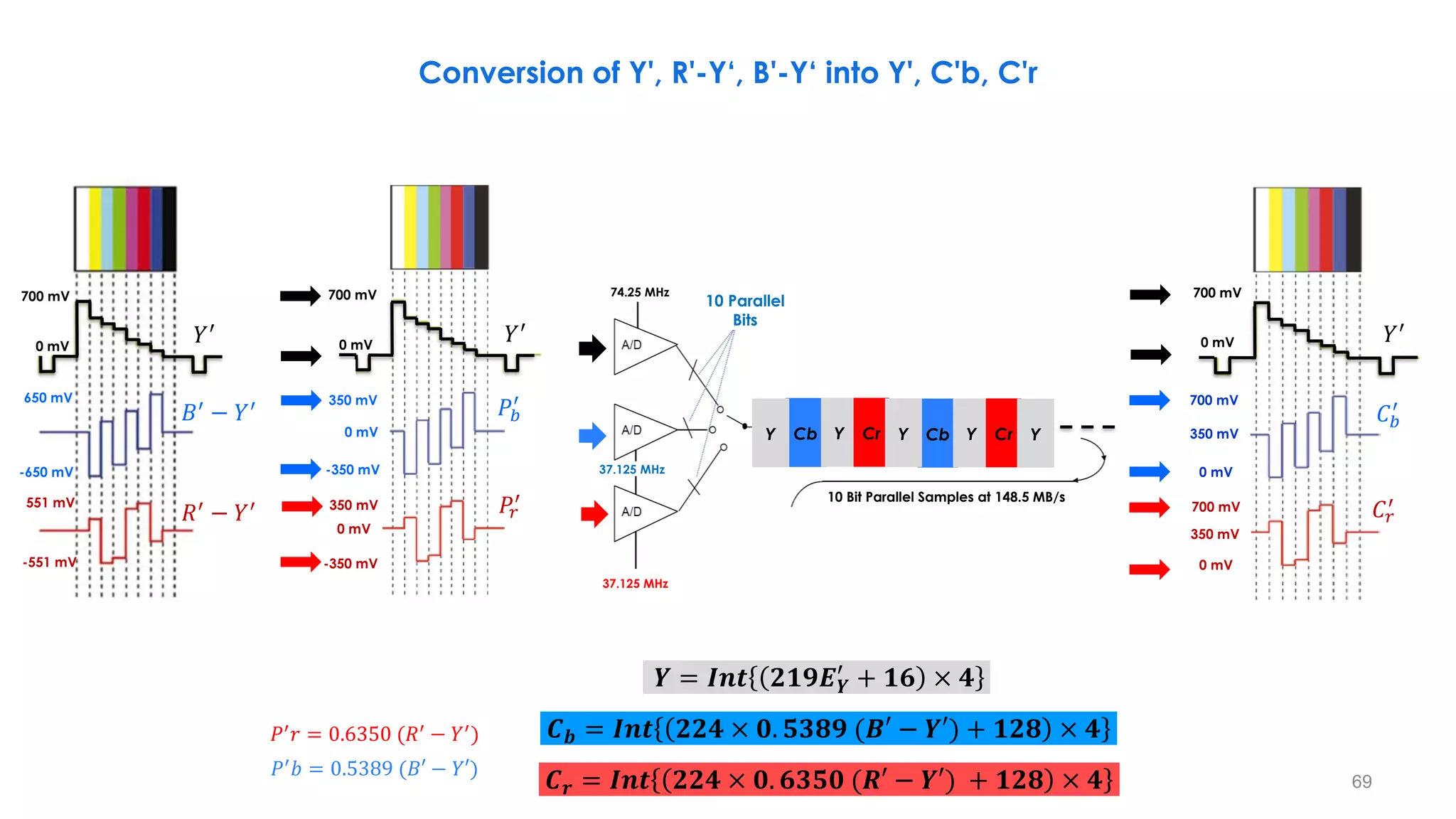
Conversion of Y', R'-Y‘, B'-Y‘ into Y', C'b, C'r
700 mV
0 mV
650 mV
-650 mV
551 mV
-551 mV
𝑅′
− 𝑌′
𝐵′
− 𝑌′
𝑌′
700 mV
0 mV
700 mV
0 mV
350 mV
700 mV
0 mV
350 mV
𝑌′
𝐶𝑟
′
𝐶𝑏
′
700 mV
0 mV
350 mV
-350 mV
-350 mV
0 mV
350 mV
0 mV
𝑌′
𝑃𝑟
′
𝑃𝑏
′
𝒀 = 𝑰𝒏𝒕 𝟐𝟏𝟗𝑬𝒀
′
+ 𝟏𝟔 × 𝟒
𝑪𝒃 = 𝑰𝒏𝒕 𝟐𝟐𝟒 × 𝟎. 𝟓𝟑𝟖𝟗 (𝑩′ − 𝒀′) + 𝟏𝟐𝟖 × 𝟒
𝑪𝒓 = 𝑰𝒏𝒕 𝟐𝟐𝟒 × 𝟎. 𝟔𝟑𝟓𝟎 (𝑹′ − 𝒀′) + 𝟏𝟐𝟖 × 𝟒
𝑃′
𝑏 = 0.5389 (𝐵′ − 𝑌′)
𝑃′
𝑟 = 0.6350 (𝑅′
− 𝑌′
)
Cb Y Cr Y
Cb Y Cr Y
Y
10 Parallel
Bits
74.25 MHz
37.125 MHz
37.125 MHz
10 Bit Parallel Samples at 148.5 MB/s
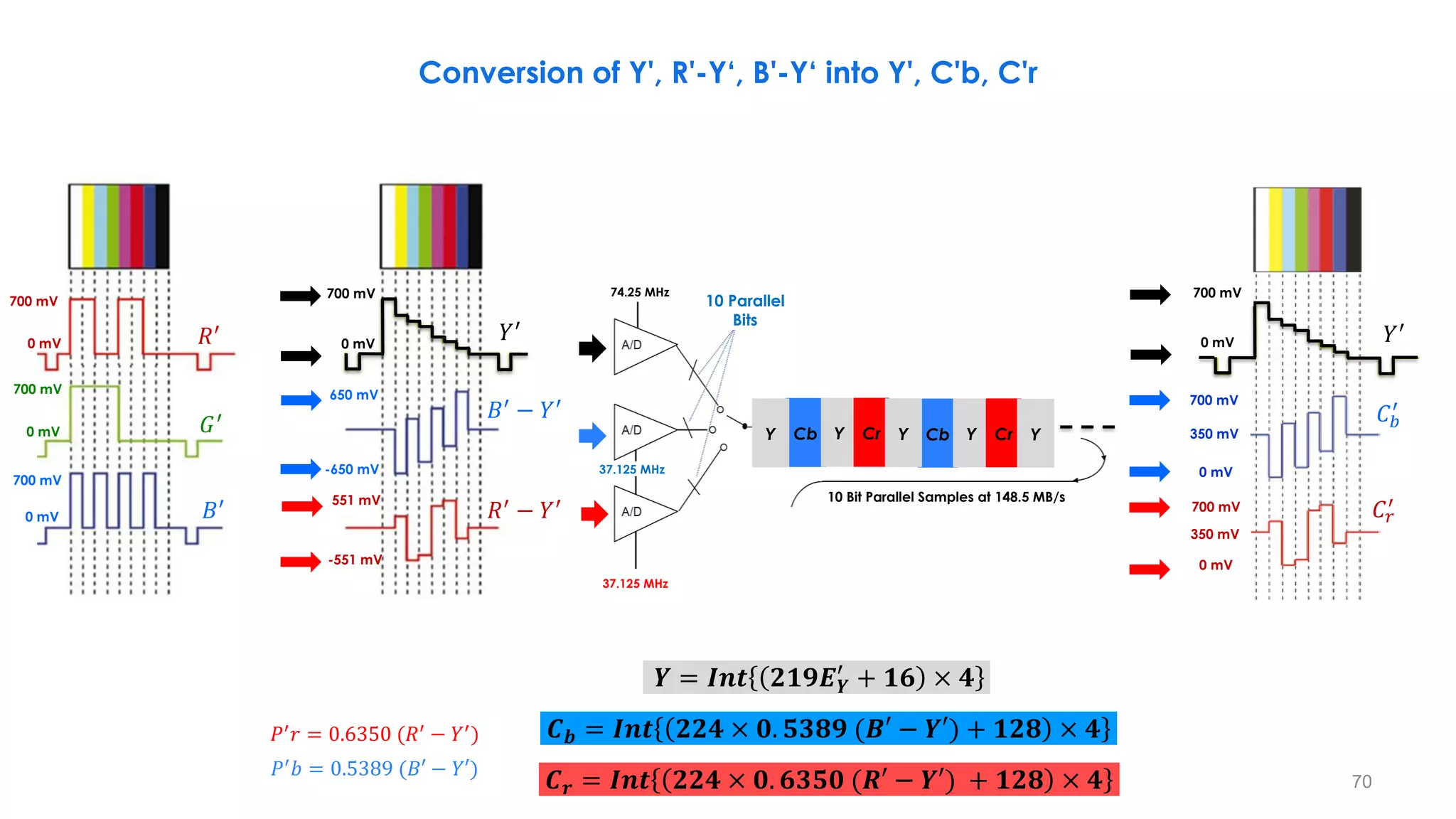
70
Conversion of Y', R'-Y‘, B'-Y‘ into Y', C'b, C'r
700 mV
0 mV
700 mV
0 mV
700 mV
0 mV
𝑅′
𝐺′
𝐵′
700 mV
0 mV
650 mV
-650 mV
551 mV
-551 mV
𝑅′
− 𝑌′
𝐵′
− 𝑌′
𝑌′
𝒀 = 𝑰𝒏𝒕 𝟐𝟏𝟗𝑬𝒀
′
+ 𝟏𝟔 × 𝟒
𝑪𝒃 = 𝑰𝒏𝒕 𝟐𝟐𝟒 × 𝟎. 𝟓𝟑𝟖𝟗 (𝑩′ − 𝒀′) + 𝟏𝟐𝟖 × 𝟒
𝑪𝒓 = 𝑰𝒏𝒕 𝟐𝟐𝟒 × 𝟎. 𝟔𝟑𝟓𝟎 (𝑹′ − 𝒀′) + 𝟏𝟐𝟖 × 𝟒
𝑃′
𝑏 = 0.5389 (𝐵′ − 𝑌′)
𝑃′
𝑟 = 0.6350 (𝑅′
− 𝑌′
)
Cb Y Cr Y
Cb Y Cr Y
Y
10 Parallel
Bits
74.25 MHz
37.125 MHz
37.125 MHz
10 Bit Parallel Samples at 148.5 MB/s
700 mV
0 mV
700 mV
0 mV
350 mV
700 mV
0 mV
350 mV
𝑌′
𝐶𝑟
′
𝐶𝑏
′
19
22
1
20
21
560
561
563
564
583
584
1123
1124
1125
2
559
562
582
585
1122
565
Field 2
Field 1
19
42
1
41
42
1121
1122
1124
2
1120
1123
Frame
1125
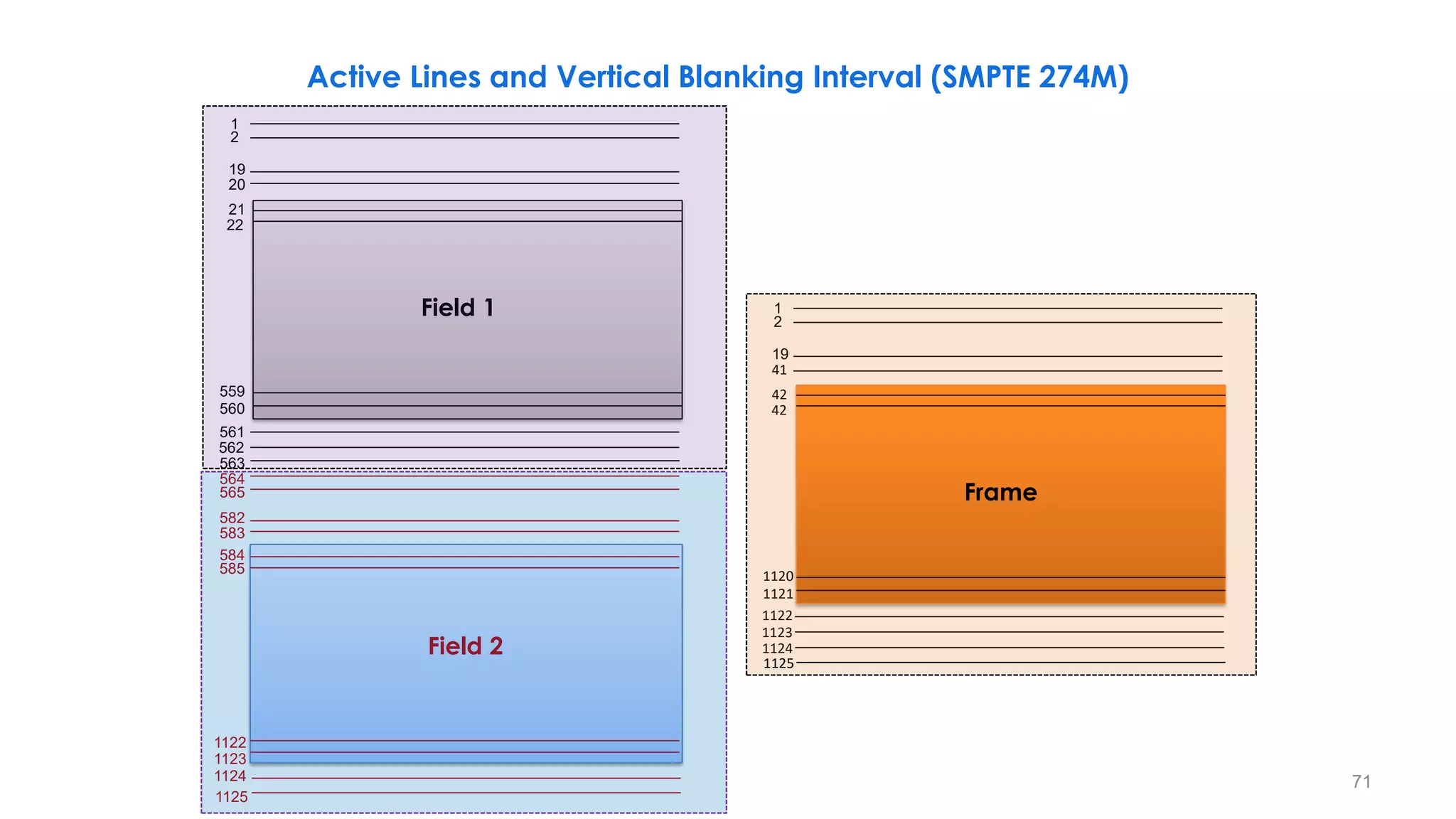
71
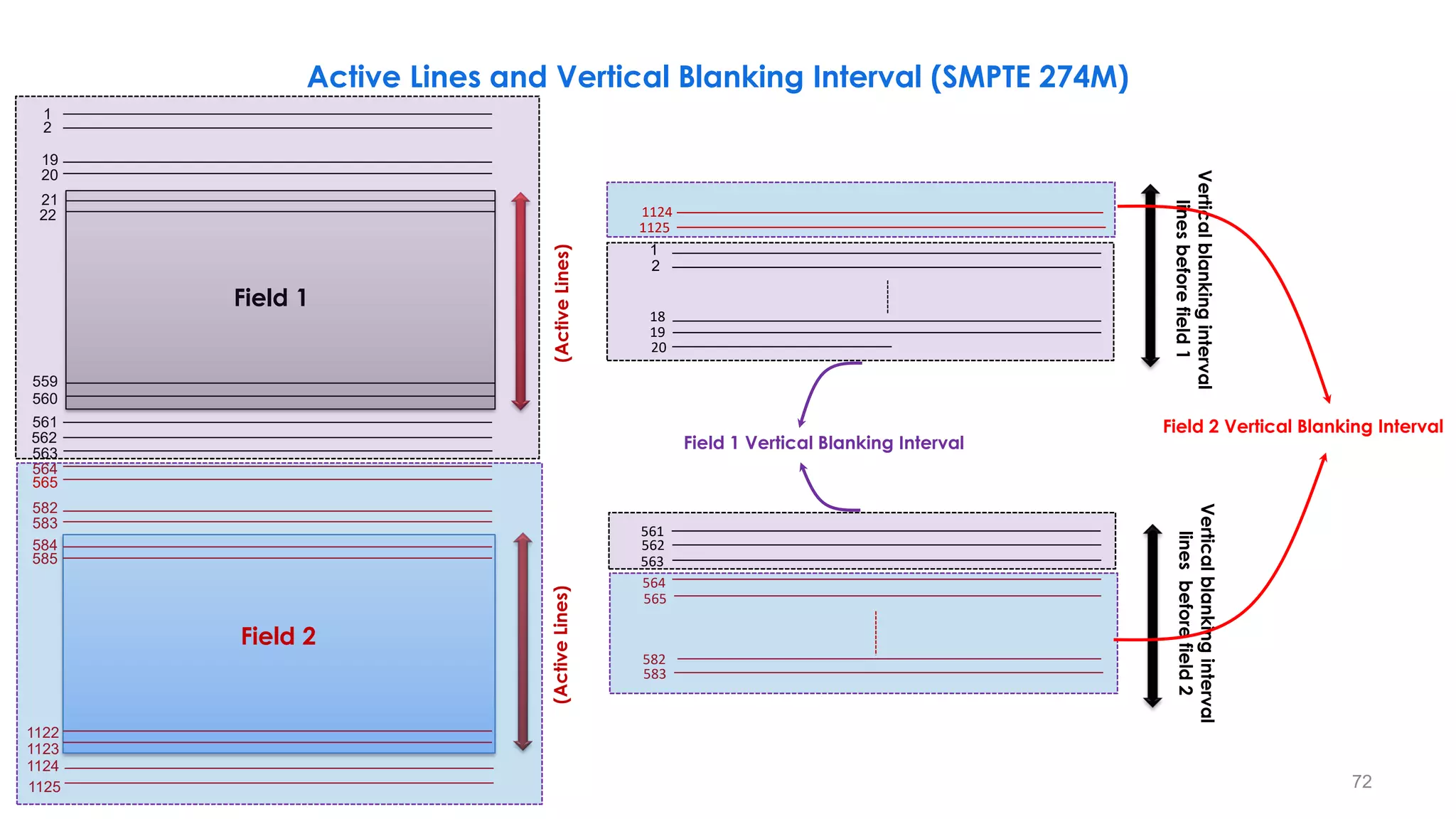
Active Lines and Vertical Blanking Interval (SMPTE 274M)
72
1124
1125
18
1
19
20
2
564
583
582
565
Vertical
blanking
interval
lines
before
field
1
Vertical
blanking
interval
lines
before
field
2
562
563
(Active
Lines)
(Active
Lines)
Field 2 Vertical Blanking Interval
Field 1 Vertical Blanking Interval
19
22
1
20
21
560
561
563
564
583
584
1123
1124
1125
2
559
562
582
585
1122
565
Field 2
Field 1
561
Active Lines and Vertical Blanking Interval (SMPTE 274M)
73
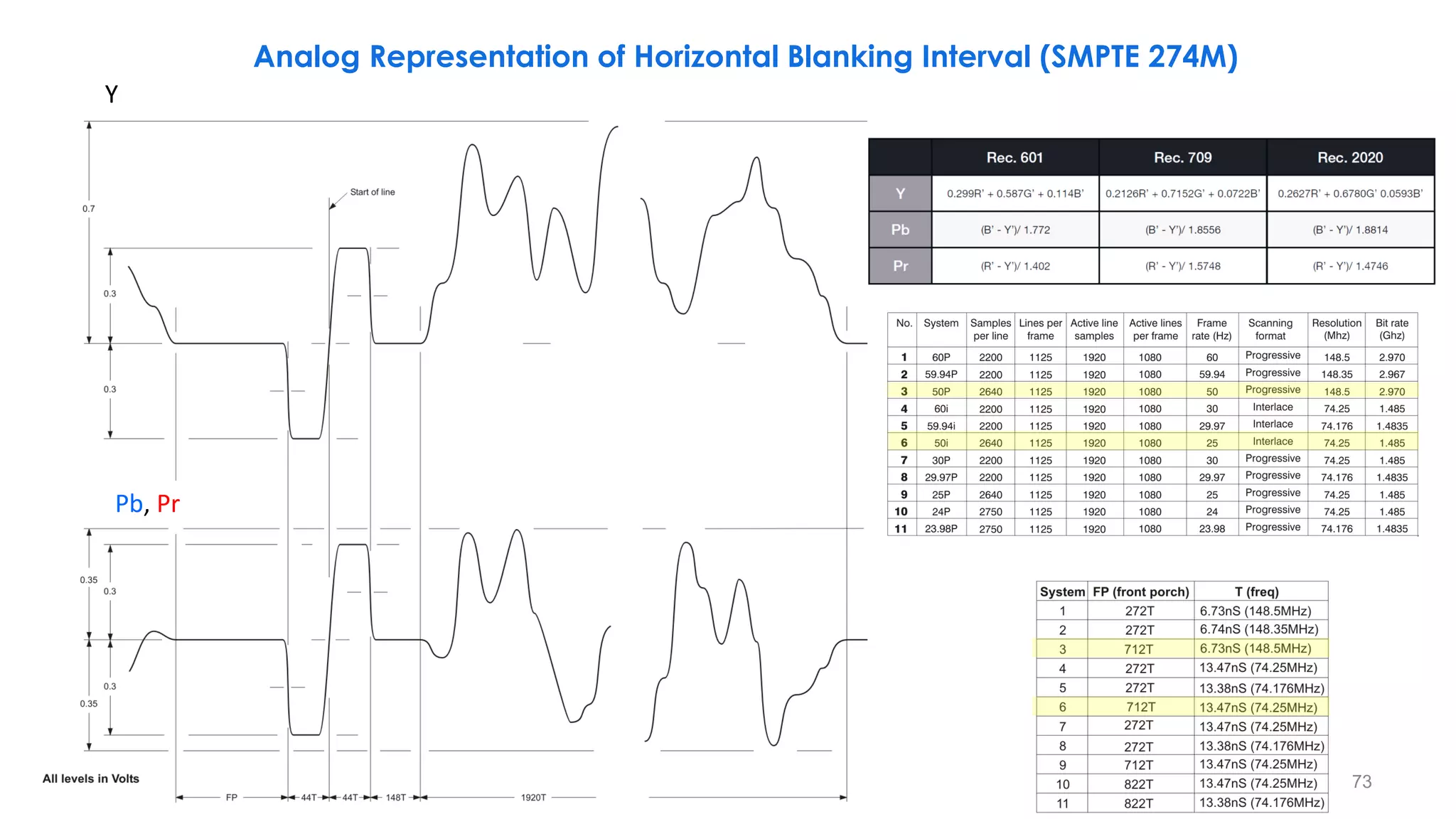
Analog Representation of Horizontal Blanking Interval (SMPTE 274M)
Pb, Pr
Y
74
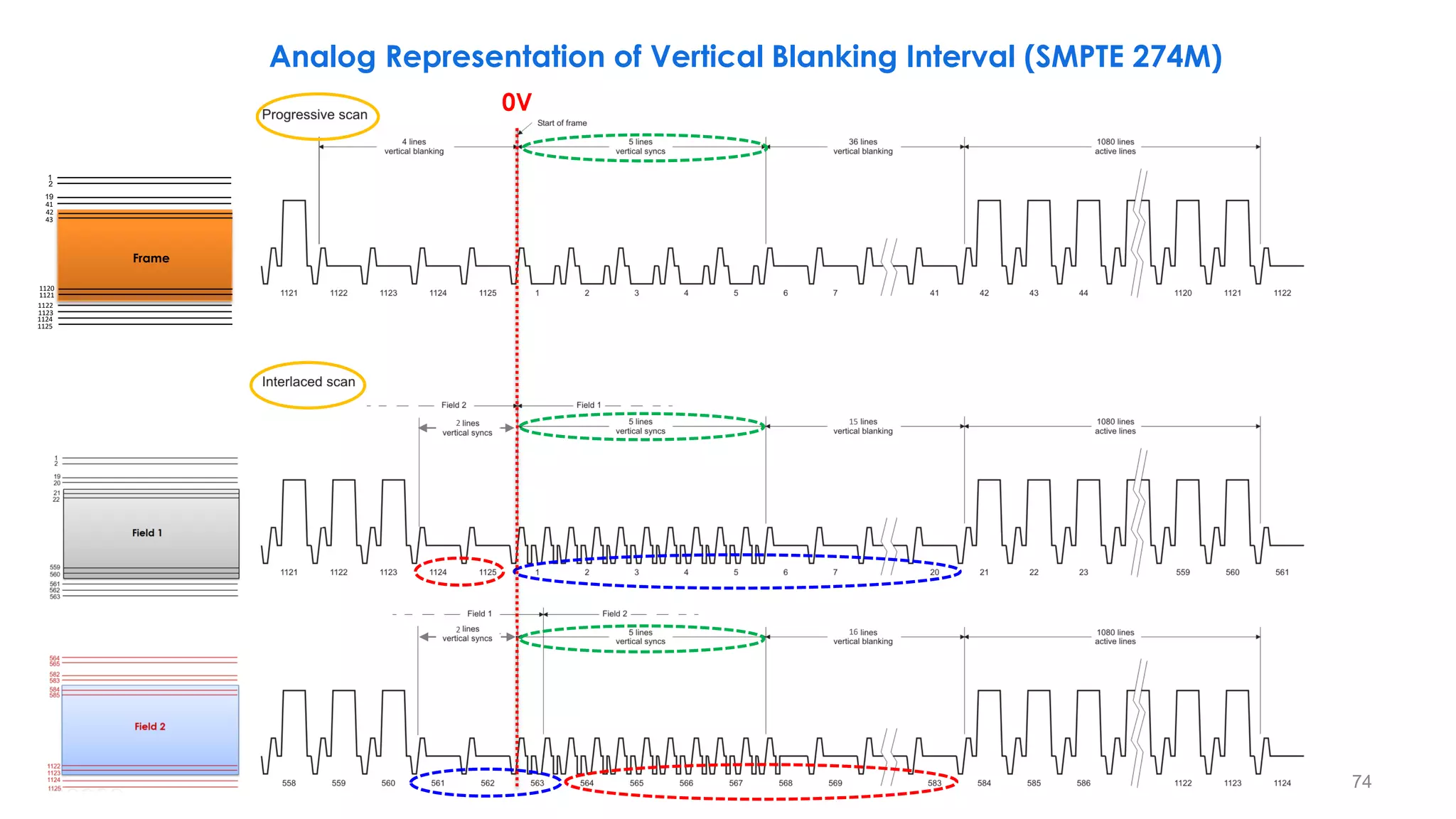
Analog Representation of Vertical Blanking Interval (SMPTE 274M)
15
16
0V
2
2
19
43
1
41
42
1121
1122
1124
2
1120
1123
Frame
1125
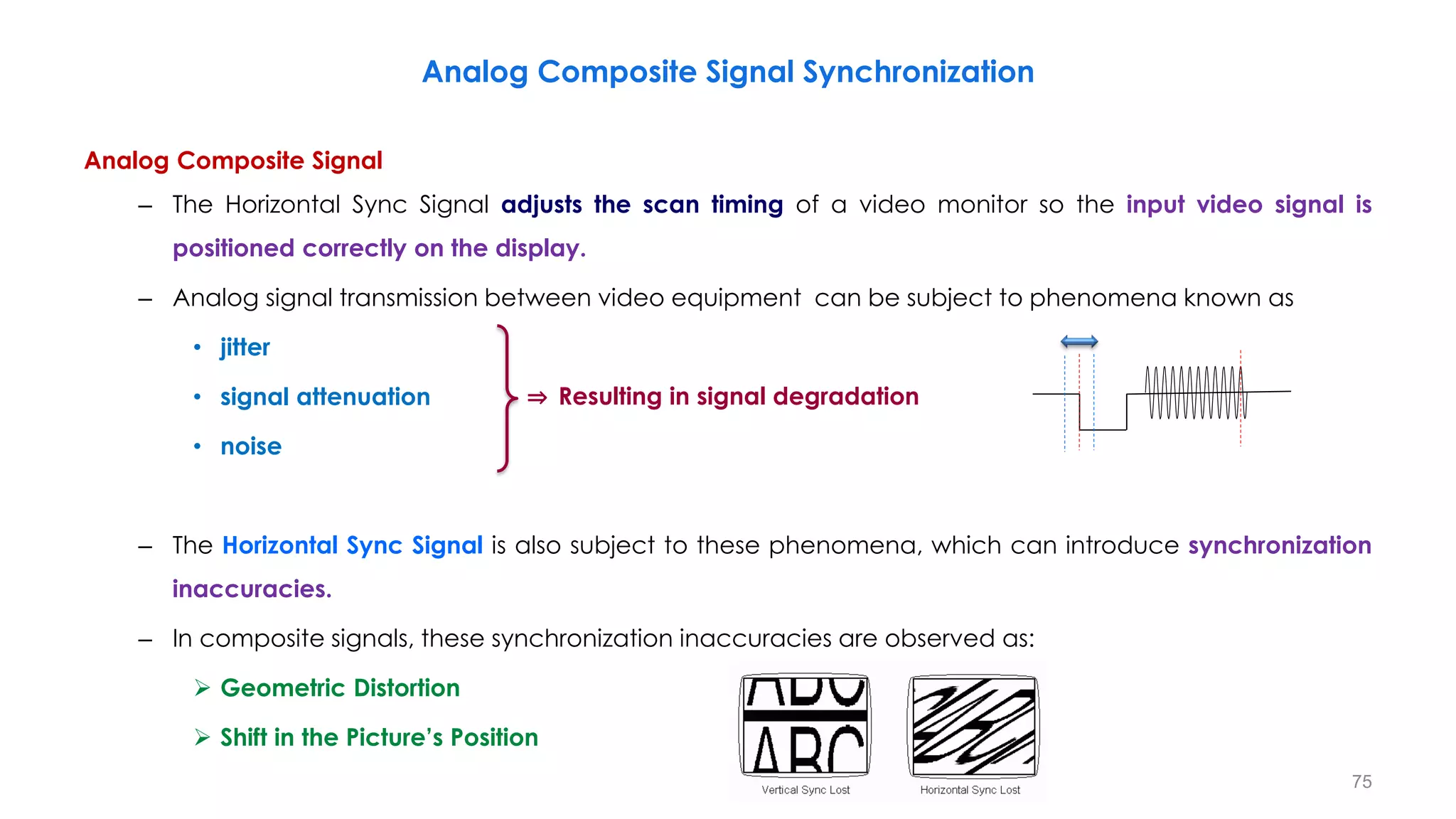
Analog Composite Signal
– The Horizontal Sync Signal adjusts the scan timing of a video monitor so the input video signal is
positioned correctly on the display.
– Analog signal transmission between video equipment can be subject to phenomena known as
• jitter
• signal attenuation
• noise
– The Horizontal Sync Signal is also subject to these phenomena, which can introduce synchronization
inaccuracies.
– In composite signals, these synchronization inaccuracies are observed as:
 Geometric Distortion
 Shift in the Picture’s Position
Analog Composite Signal Synchronization
75
⇒ Resulting in signal degradation
Analog Component Signal
– In analog component signals, mentioned distortions become even more critical.
– Component signals consist of three signals “Y, R-Y, B-Y” which need to be synchronized as one signal
for correct display.
– Colour registration, that is the overlaying of the colour signals, must be done accurately if colour
fringing is to be avoided.
– If a phase shift occurs between the three signals ⇒ the color of the picture will be distorted.
– With the conventional H-SYNC signal (Bi-level Sync System) used in SD video, it is difficult to avoid such
problems.
– To solve this, the Tri-level Sync System was developed; eliminating the affects of distortion to the sync
signal ⇒ accurate synchronization
76
Tri-level Sync Signal
− The Tri-level Sync Signal refers to the Horizontal Sync Signal (refer to “Synchronization Signal (Sync
Signal)”) used in HD signals.
77
Tri-level Sync Signal
The figures show an example of when the amplitude
of the sync signal attenuates.
– With the Bi-level Sync System, the timing of
the sync signal’s lock point can slip.
– The Tri-level Sync System uses a symmetrical
sync signal and locks the center of the signal.
⇒ This ensures that the same lock point is
always used, even when signal attenuation
occurs.
– This fact is important in establishing a sync
system accurate enough for HD video signals.
t
t
Tri-level Sync Signal
78
HD Video Signal
– Higher horizontal resolutions require much faster scanning speeds of the R, G, and B signals to display
an image.
– The faster the scanning speed, the more difficult it becomes to maintain accurate synchronization
(extremely sensitive).
– HD signals use component signals, making the use of the Tri-level Sync System essential.
– However, the Tri-level Sync Signal remains to play an important role since digital video devices still use
analog reference signals.
– In today’s digital interfaces, including those used for both SD and HD, the timings of the video signals
are digitally locked and automatically synchronized at the receiving device.
– This relieves the system and its operators from concerns about inaccurate synchronization.
Tri-level Sync Signal
79
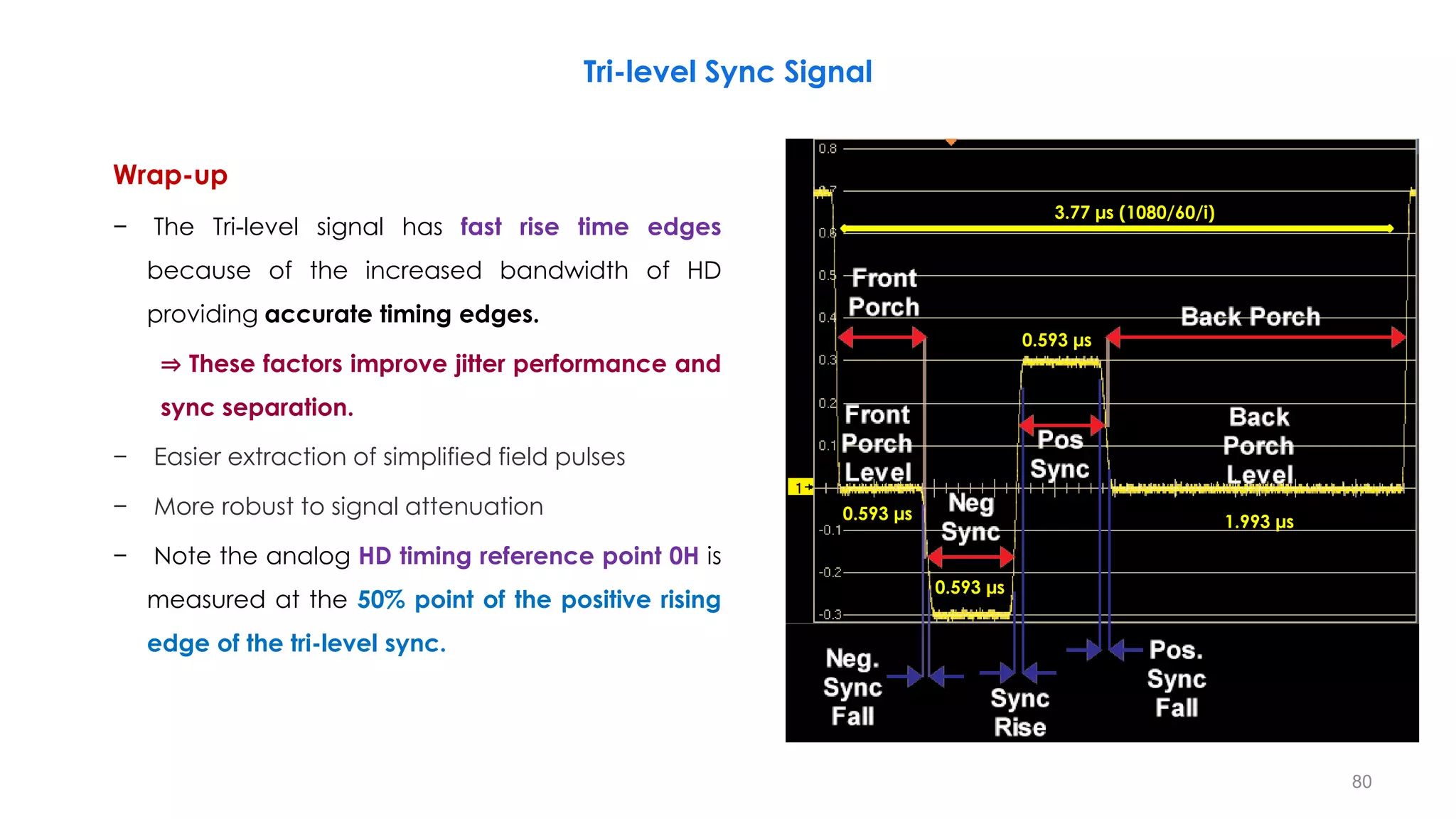
Wrap-up
− The Tri-level signal has fast rise time edges
because of the increased bandwidth of HD
providing accurate timing edges.
⇒ These factors improve jitter performance and
sync separation.
− Easier extraction of simplified field pulses
− More robust to signal attenuation
− Note the analog HD timing reference point 0H is
measured at the 50% point of the positive rising
edge of the tri-level sync.
80
Tri-level Sync Signal
0.593 µs
0.593 µs
0.593 µs
1.993 µs
3.77 µs (1080/60/i)
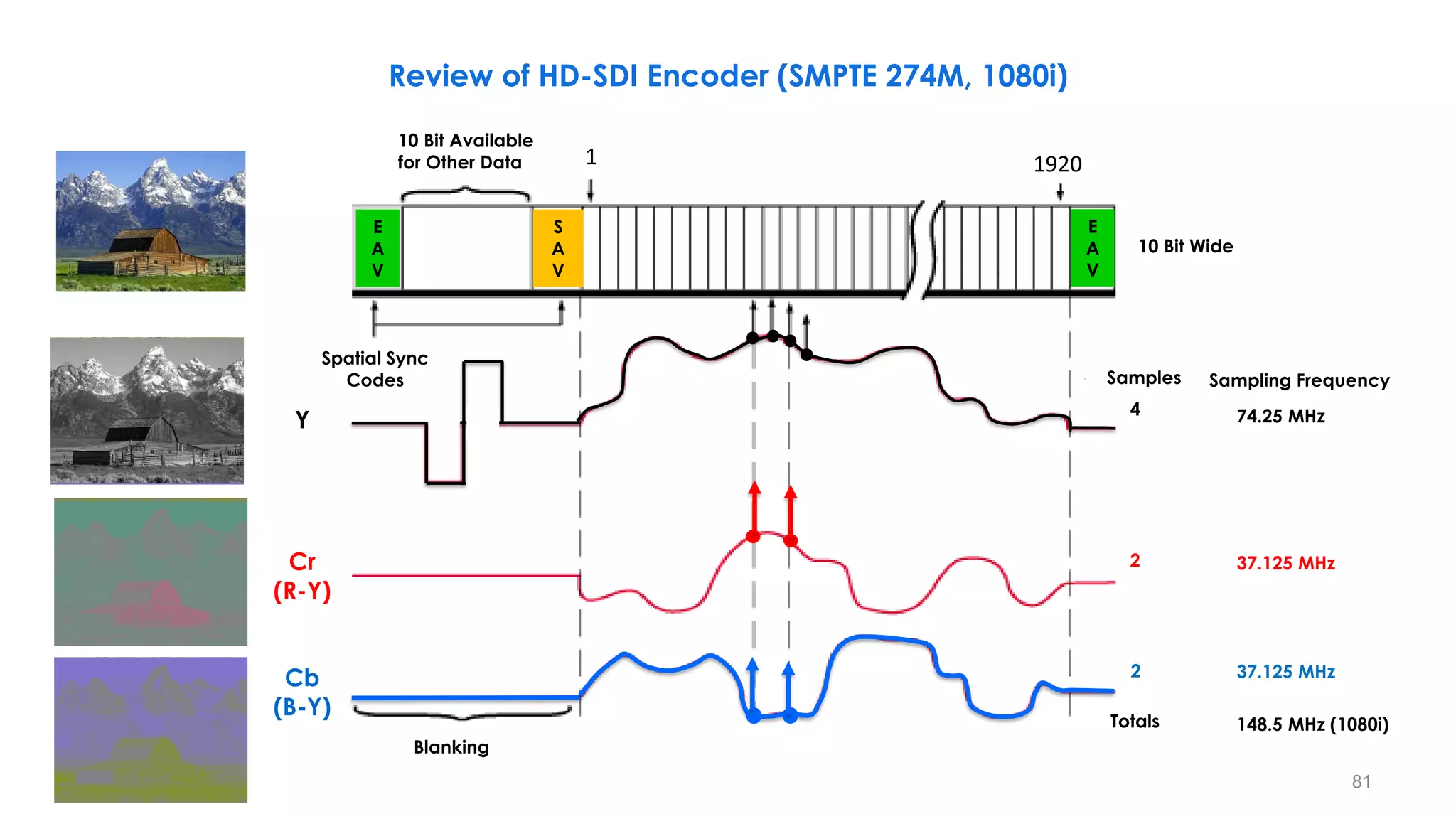
Sampling Frequency
74.25 MHz
37.125 MHz
37.125 MHz
148.5 MHz (1080i)
Samples
Totals
4
2
2
10 Bit Wide
10 Bit Available
for Other Data
Spatial Sync
Codes
Blanking
Y
Cr
(R-Y)
Cr
(R-Y)
Cb
(B-Y)
E
A
V
S
A
V
E
A
V
1 1920
81
Review of HD-SDI Encoder (SMPTE 274M, 1080i)
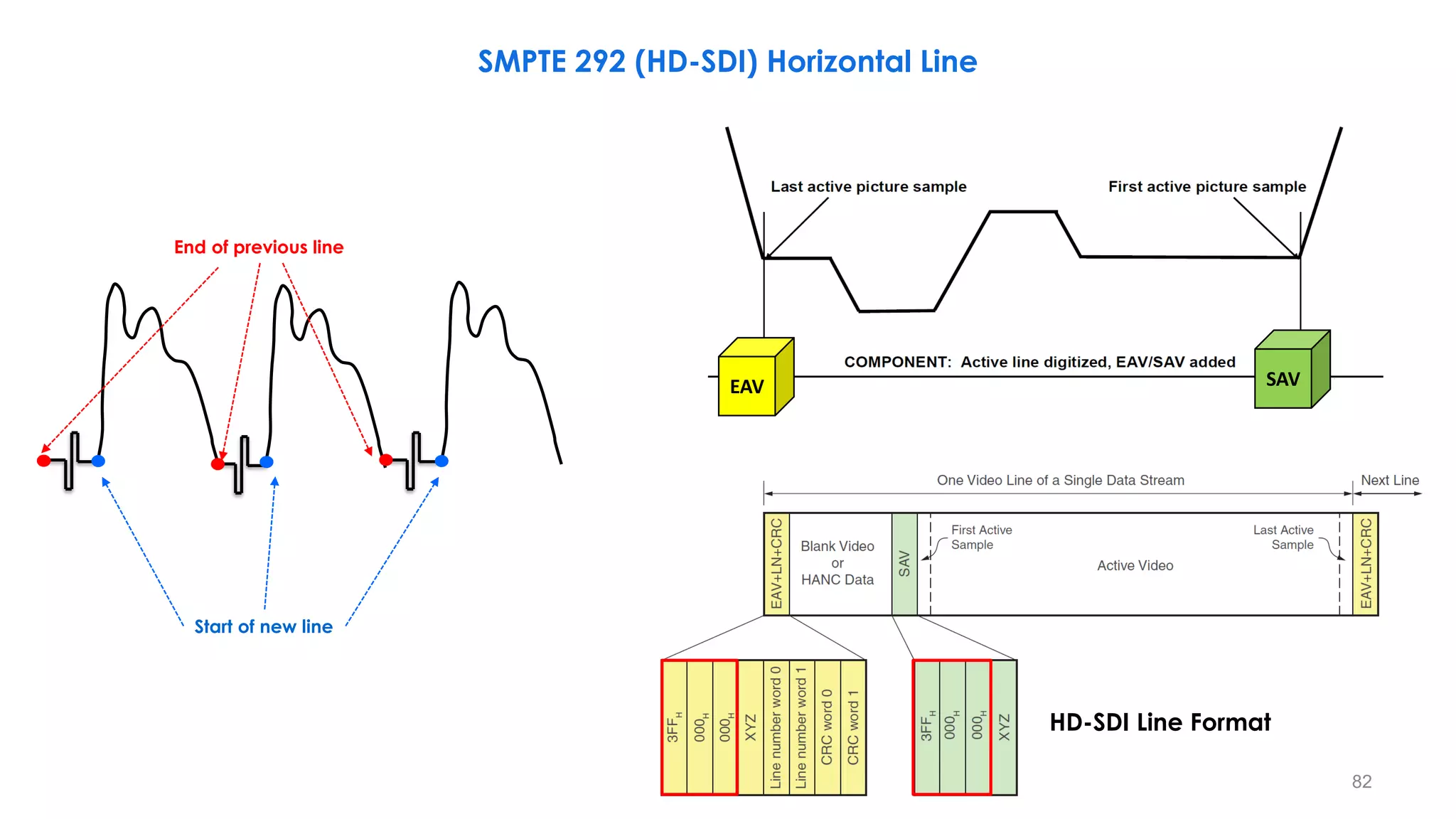
EAV SAV
HD-SDI Line Format
82
Start of new line
End of previous line
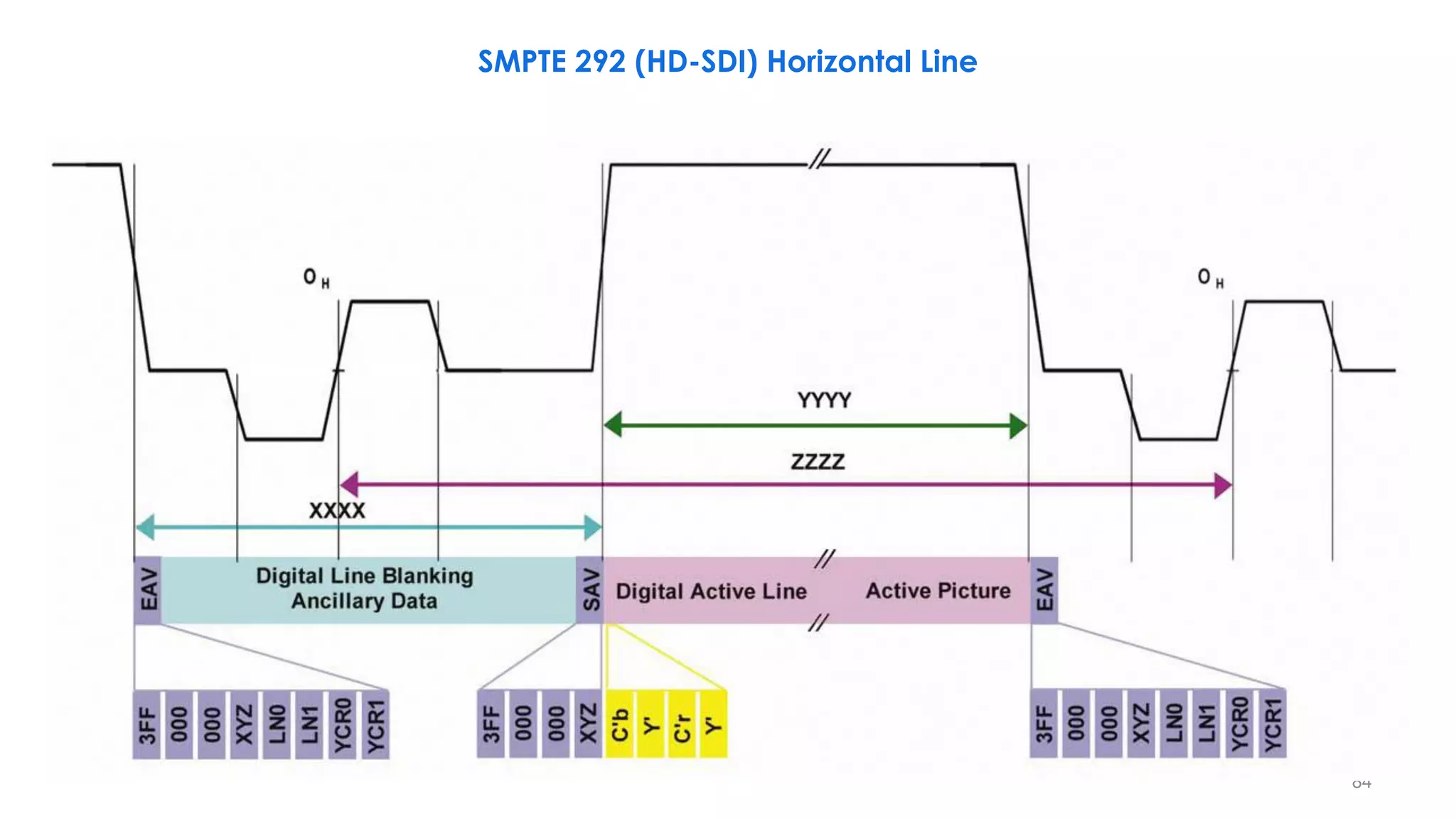
SMPTE 292 (HD-SDI) Horizontal Line
EAV SAV
HD-SDI Line Format
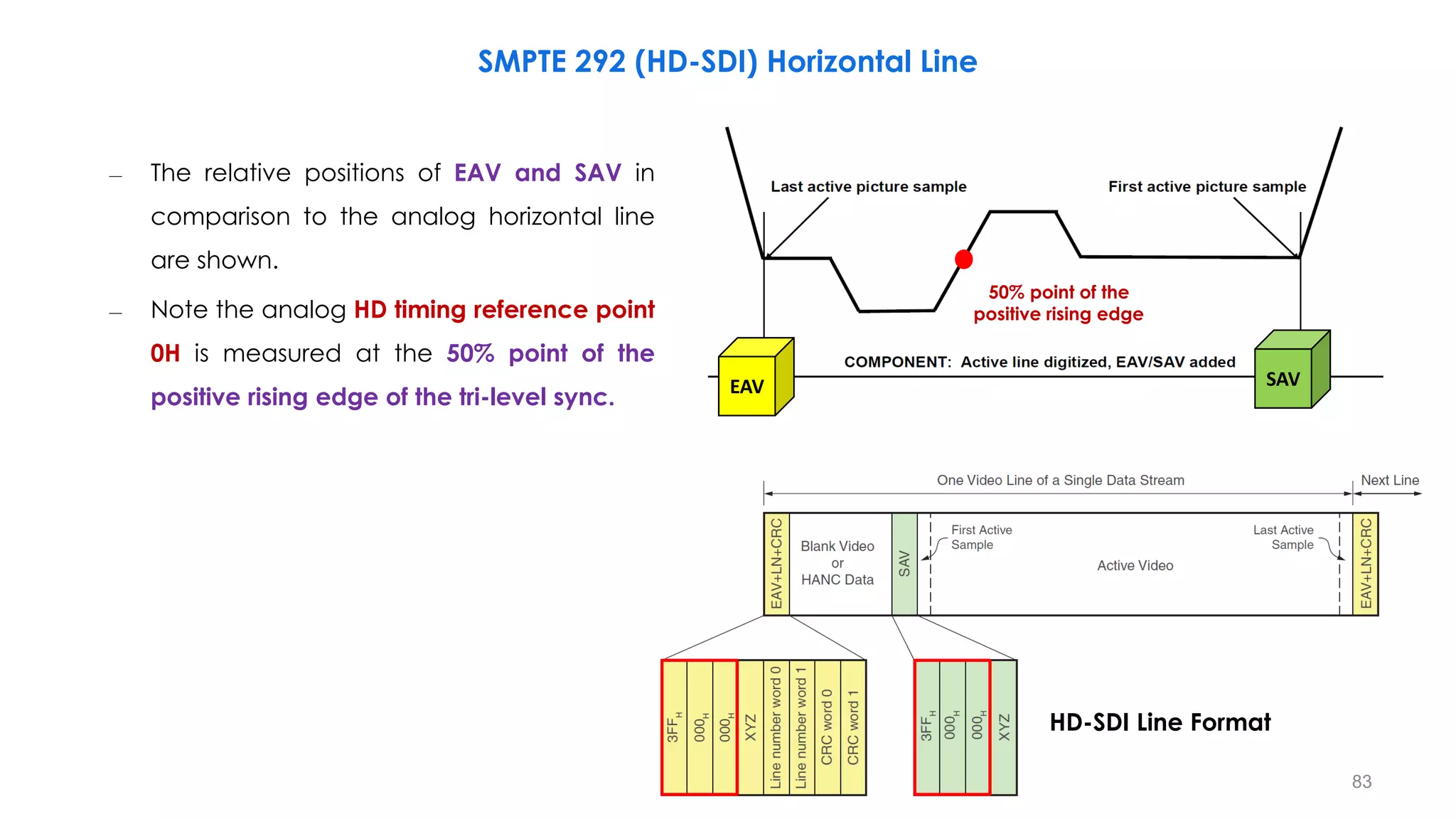
83
– The relative positions of EAV and SAV in
comparison to the analog horizontal line
are shown.
– Note the analog HD timing reference point
0H is measured at the 50% point of the
positive rising edge of the tri-level sync.
50% point of the
positive rising edge
SMPTE 292 (HD-SDI) Horizontal Line
84
SMPTE 292 (HD-SDI) Horizontal Line
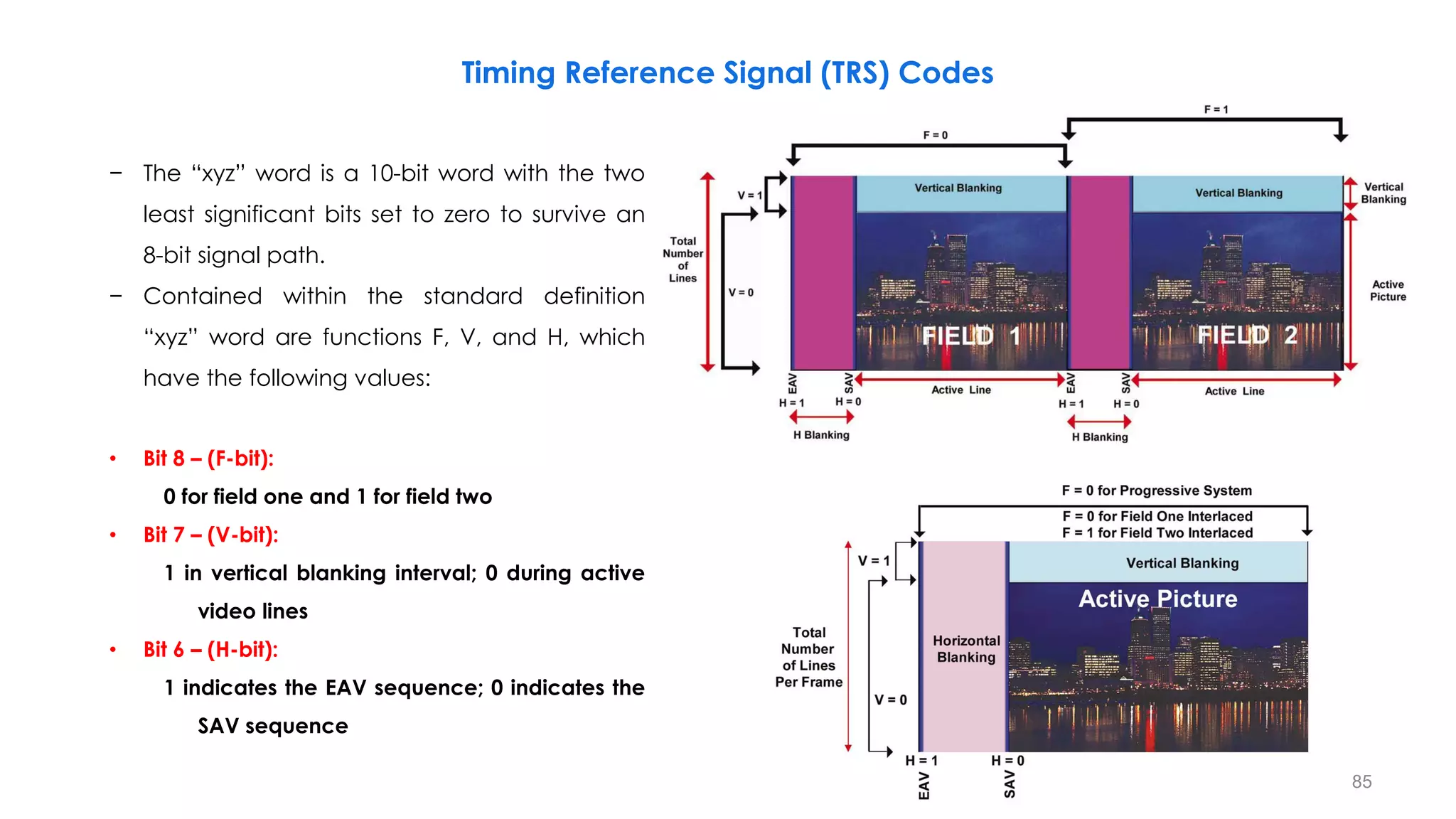
Timing Reference Signal (TRS) Codes
85
− The “xyz” word is a 10-bit word with the two
least significant bits set to zero to survive an
8-bit signal path.
− Contained within the standard definition
“xyz” word are functions F, V, and H, which
have the following values:
• Bit 8 – (F-bit):
0 for field one and 1 for field two
• Bit 7 – (V-bit):
1 in vertical blanking interval; 0 during active
video lines
• Bit 6 – (H-bit):
1 indicates the EAV sequence; 0 indicates the
SAV sequence
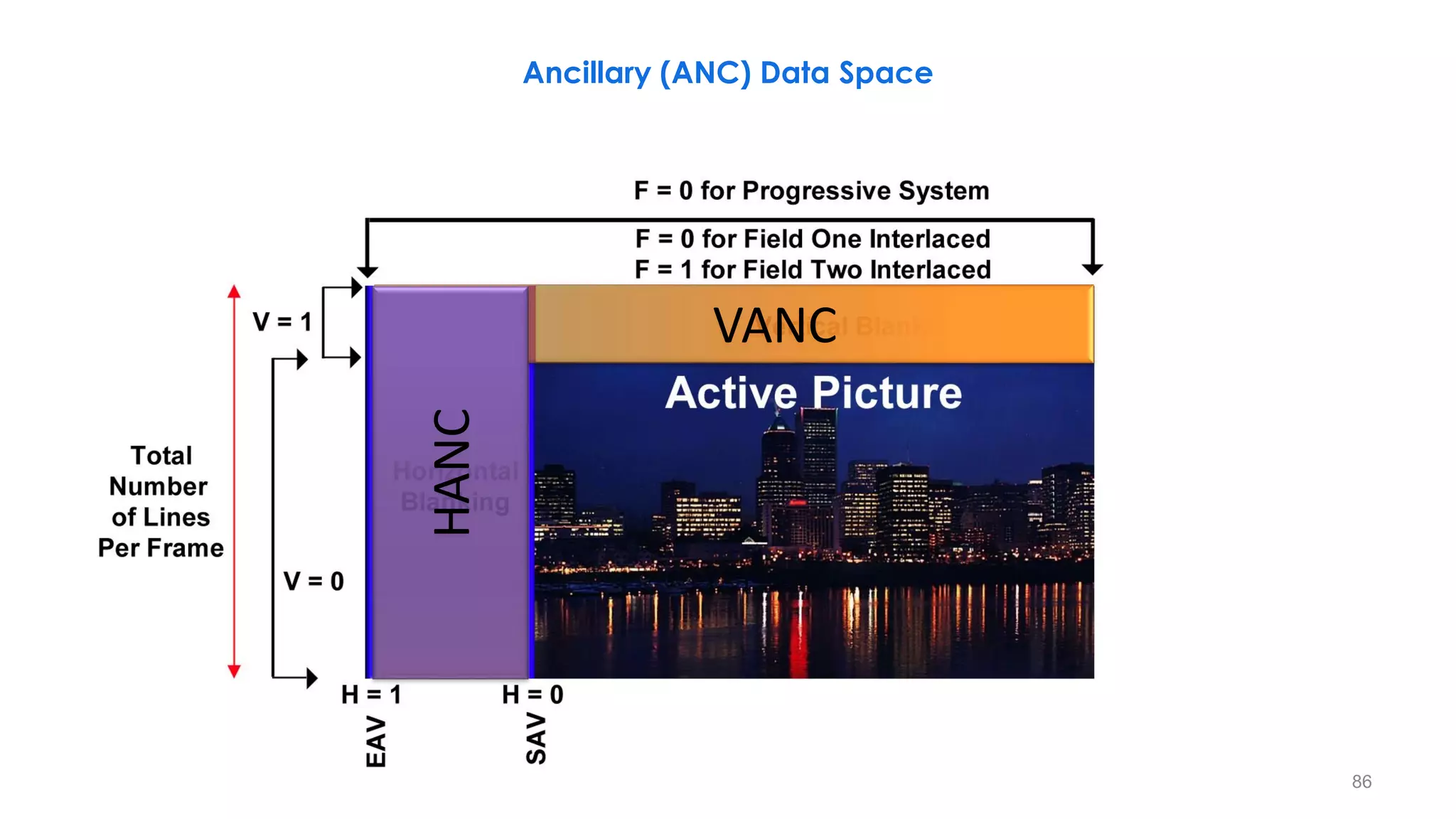
VANC
HANC
Ancillary (ANC) Data Space
86
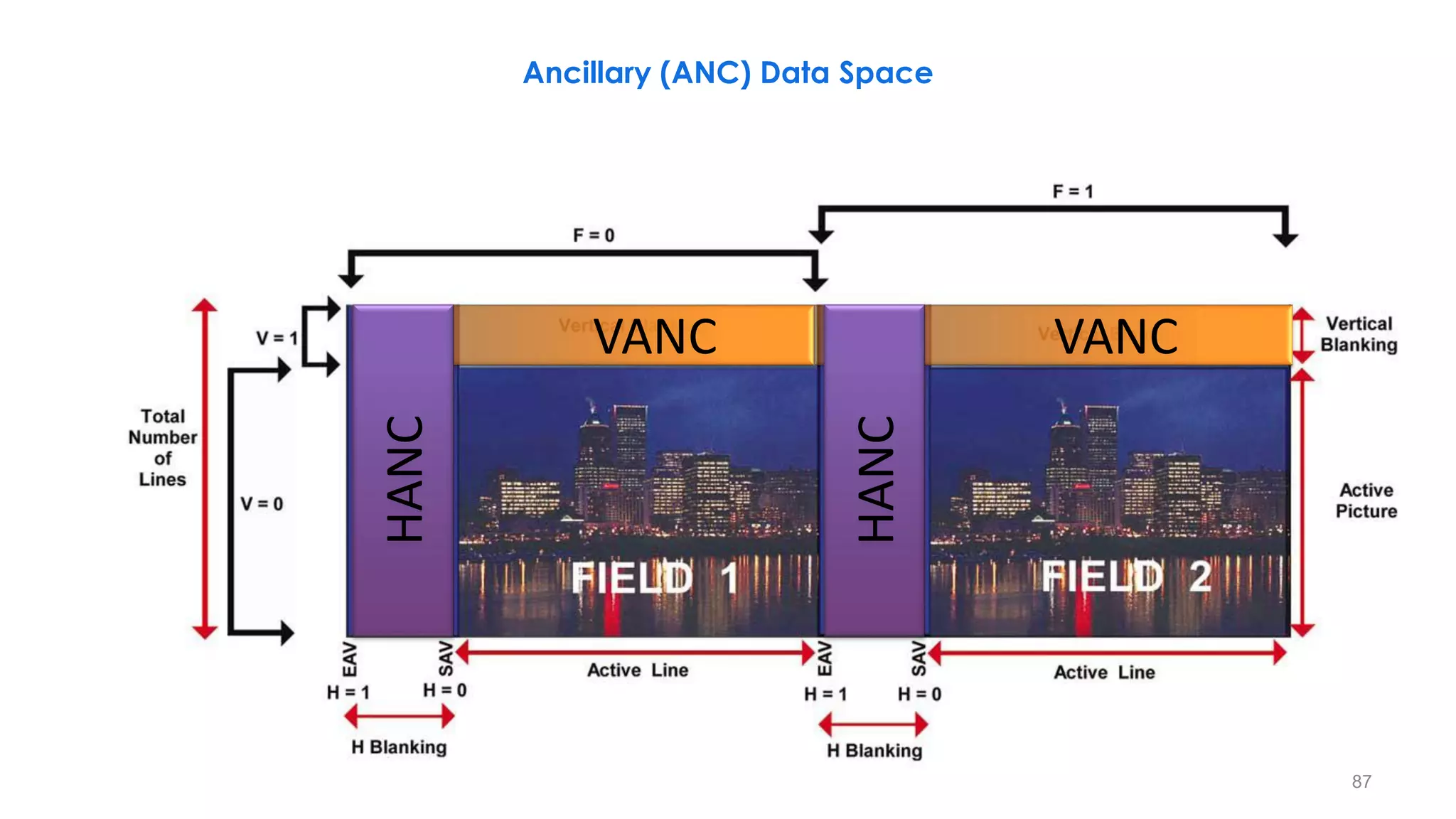
VANC VANC
HANC
HANC
Ancillary (ANC) Data Space
87
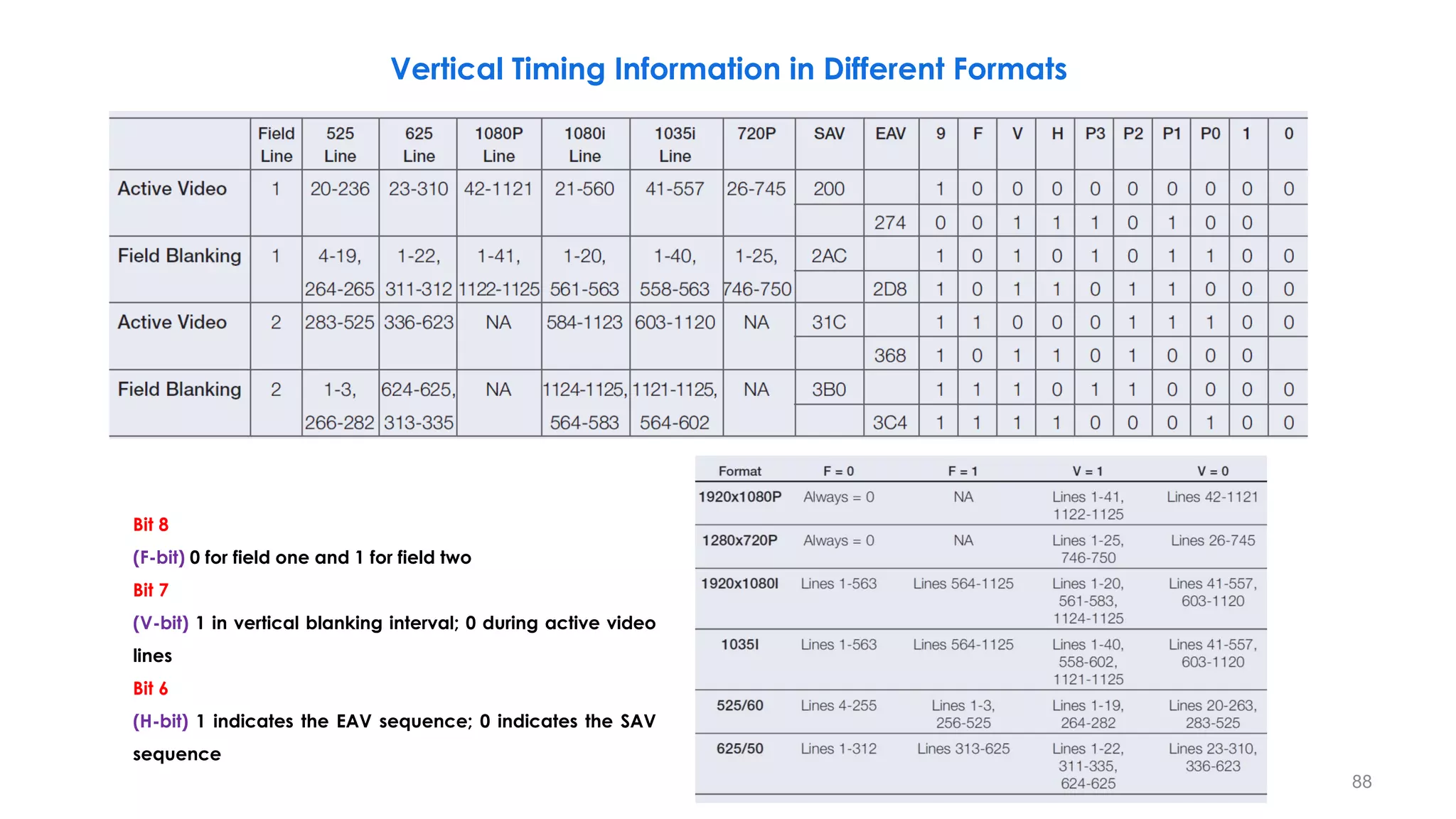
Vertical Timing Information in Different Formats
Bit 8
(F-bit) 0 for field one and 1 for field two
Bit 7
(V-bit) 1 in vertical blanking interval; 0 during active video
lines
Bit 6
(H-bit) 1 indicates the EAV sequence; 0 indicates the SAV
sequence
88
HD-SDI Data Stream Interleaving
Y
D1920
Y
D1921
Y
D1922
Y
D1923
Y
D2636
Y
D2637
Y
D2638
Y
D2639
Y
D1920
Y
D1921
Cb
D960
Cb
D961
Cb
D960
Cb
D1318
Cb
D1398
Cr
D60
Cr
D961
Cr
D960
Cr
D1318
Cr
D1398
Y
D0
Y
D1
Y
A0
Y
A0
Cb
D0
Cb
A0
Cr
A0
Cr
D0
Y
A706
Y
A707
Cb
A353
Cr
A353
Y
D1918
Y
D1919
Cb
D959
Cr
D959
CV CV
Cb
D959
Cr
D959
Cb
D0
Cb
D1
Cr
D0
Cr
D1
Y
D1918
Y
D1919
Y
D0
Y
D1
Y
D2
Y
D3
Y: 720 Cr, Cb: 360 Y: 1920 Cr, Cb: 960
Cb
D959
Cr
D959
Y
D1918
Y
D1919
89
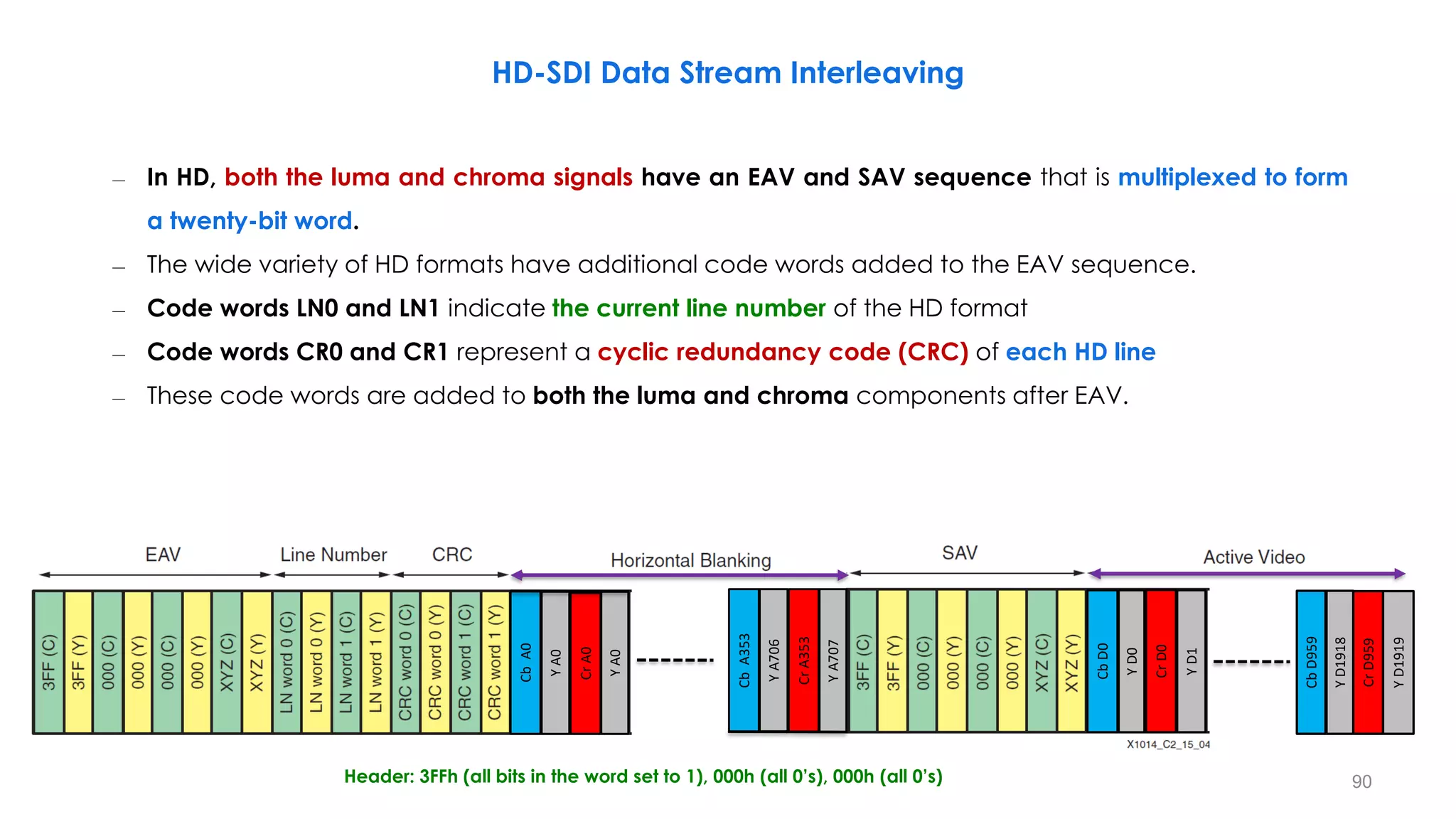
Header: 3FFh (all bits in the word set to 1), 000h (all 0’s), 000h (all 0’s)
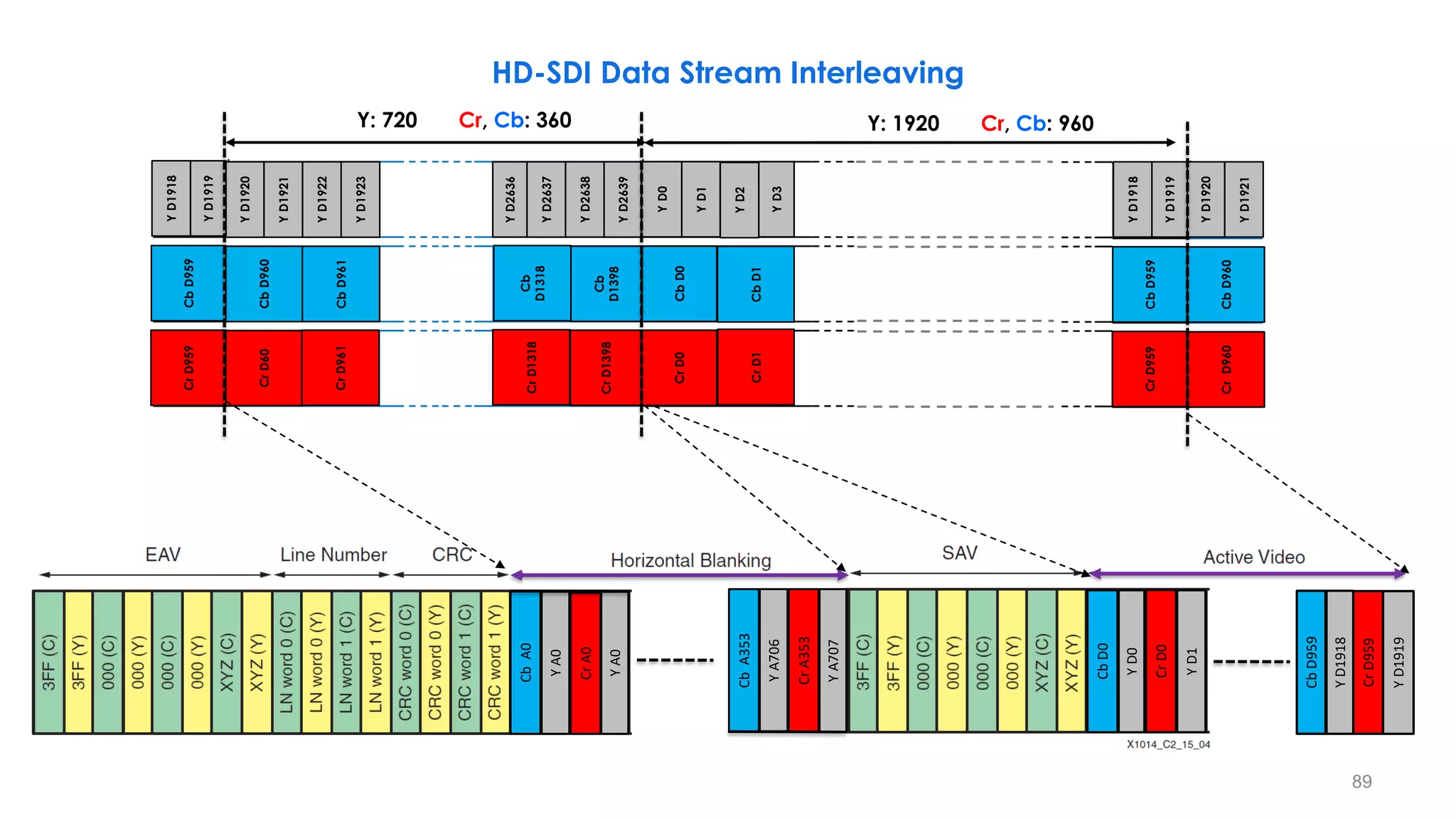
– In HD, both the luma and chroma signals have an EAV and SAV sequence that is multiplexed to form
a twenty-bit word.
– The wide variety of HD formats have additional code words added to the EAV sequence.
– Code words LN0 and LN1 indicate the current line number of the HD format
– Code words CR0 and CR1 represent a cyclic redundancy code (CRC) of each HD line
– These code words are added to both the luma and chroma components after EAV.
HD-SDI Data Stream Interleaving
90
Y
D0
Y
D1
Y
A0
Y
A0
Cb
D0
Cb
A0
Cr
A0
Cr
D0
Y
A706
Y
A707
Cb
A353
Cr
A353
Y
D1918
Y
D1919
Cb
D959
Cr
D959
CV CV
91
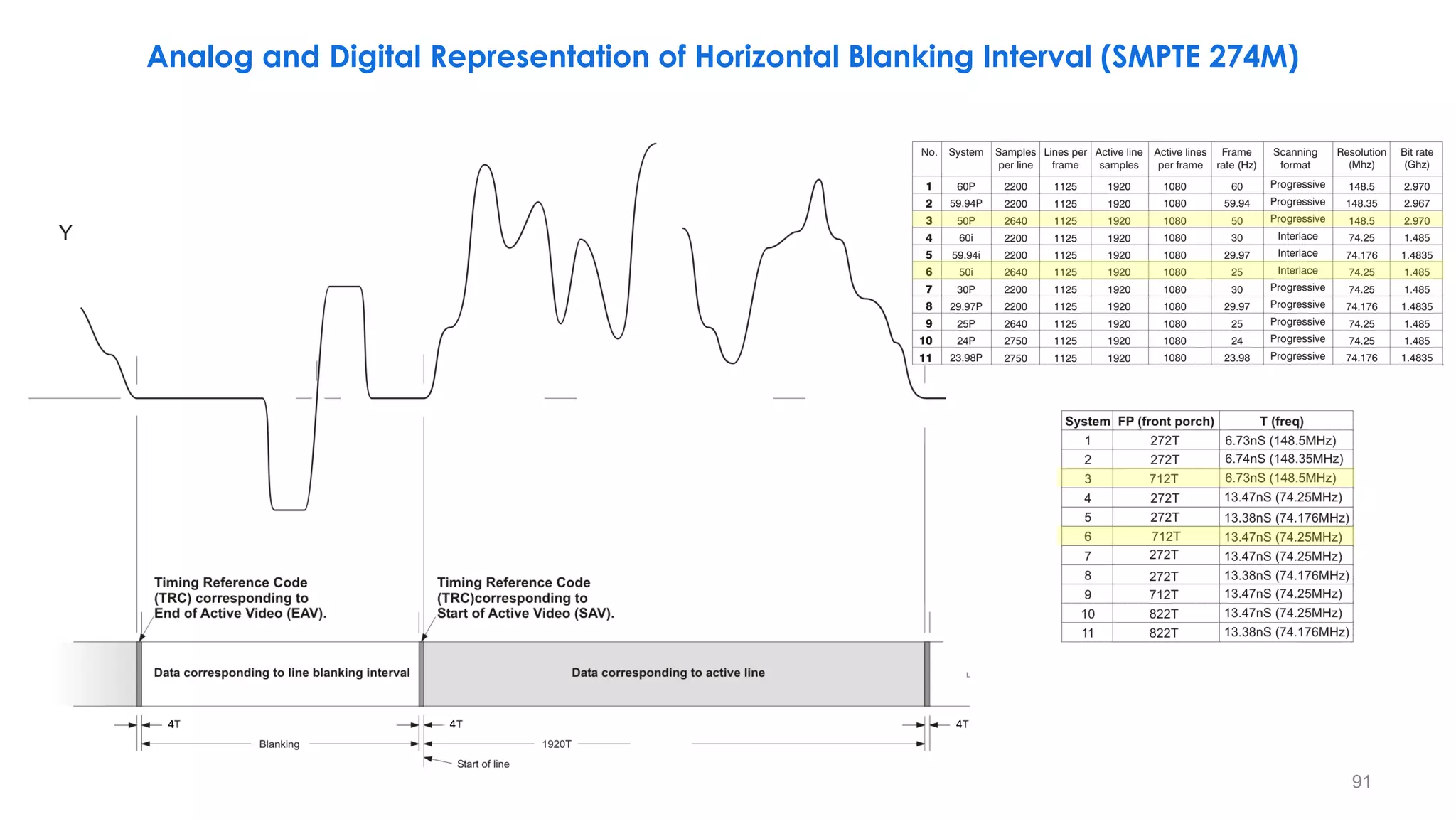
Analog and Digital Representation of Horizontal Blanking Interval (SMPTE 274M)
4 4 4
92
15
2
16
2
0V
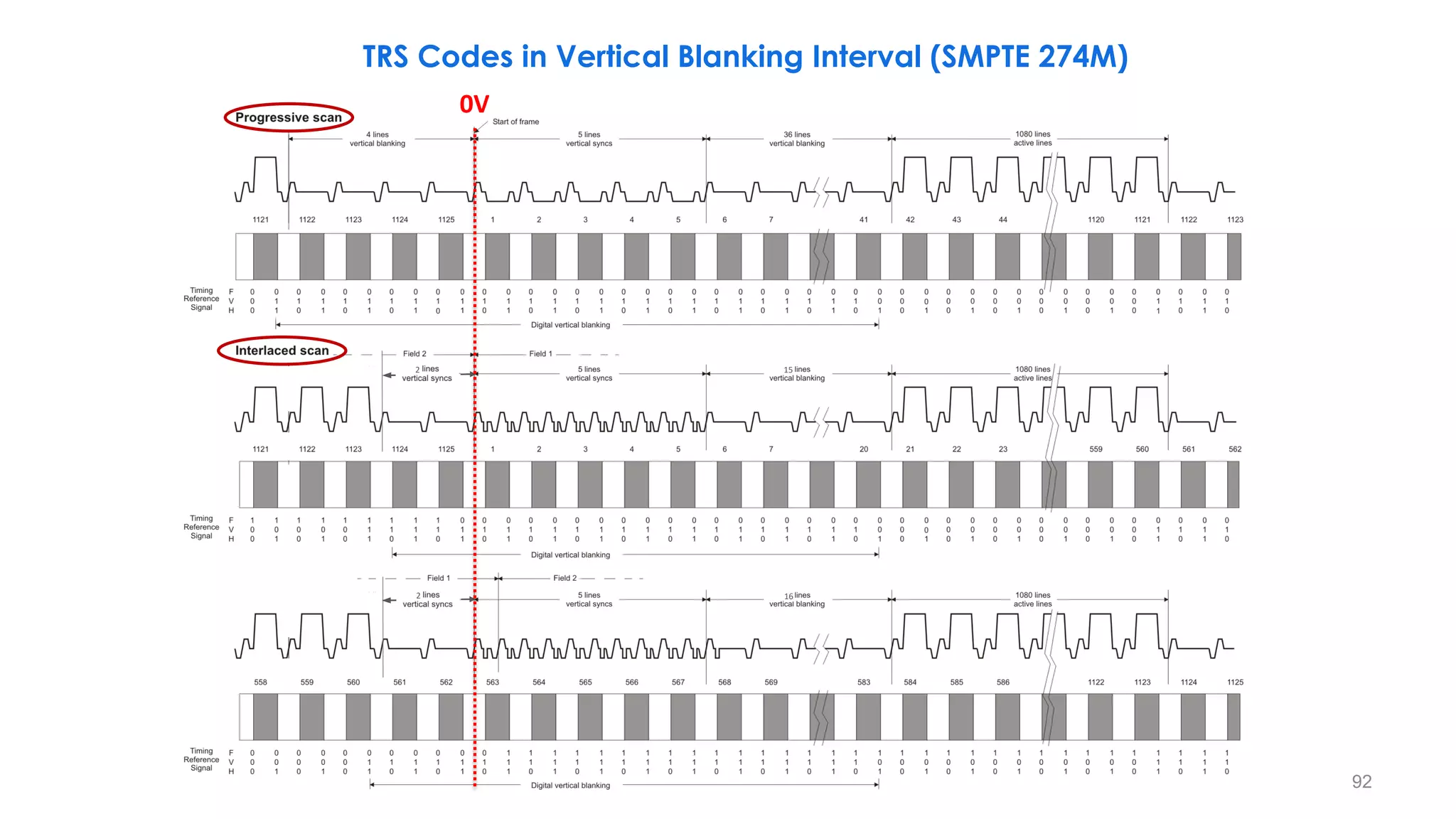
TRS Codes in Vertical Blanking Interval (SMPTE 274M)
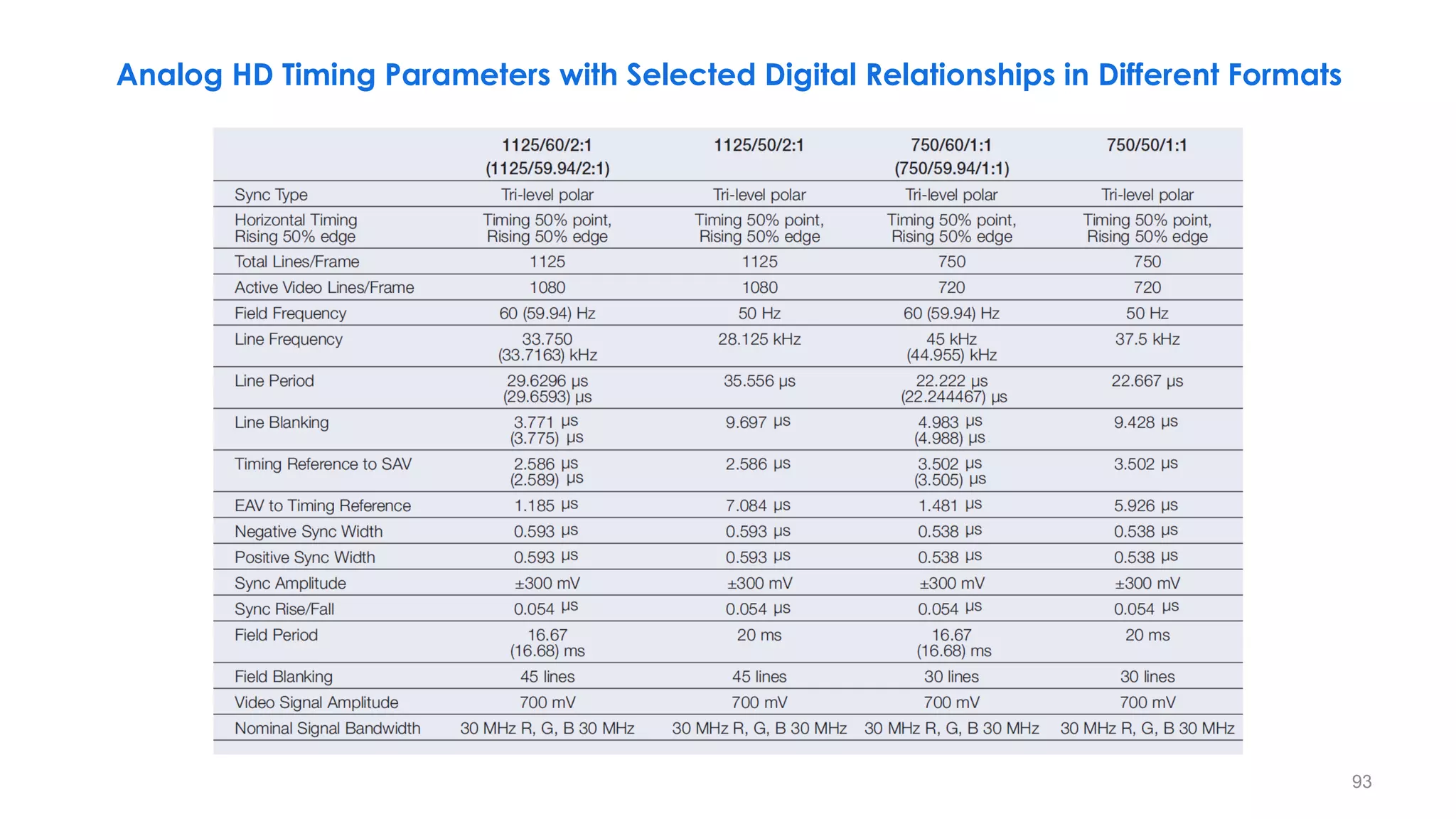
Analog HD Timing Parameters with Selected Digital Relationships in Different Formats
93
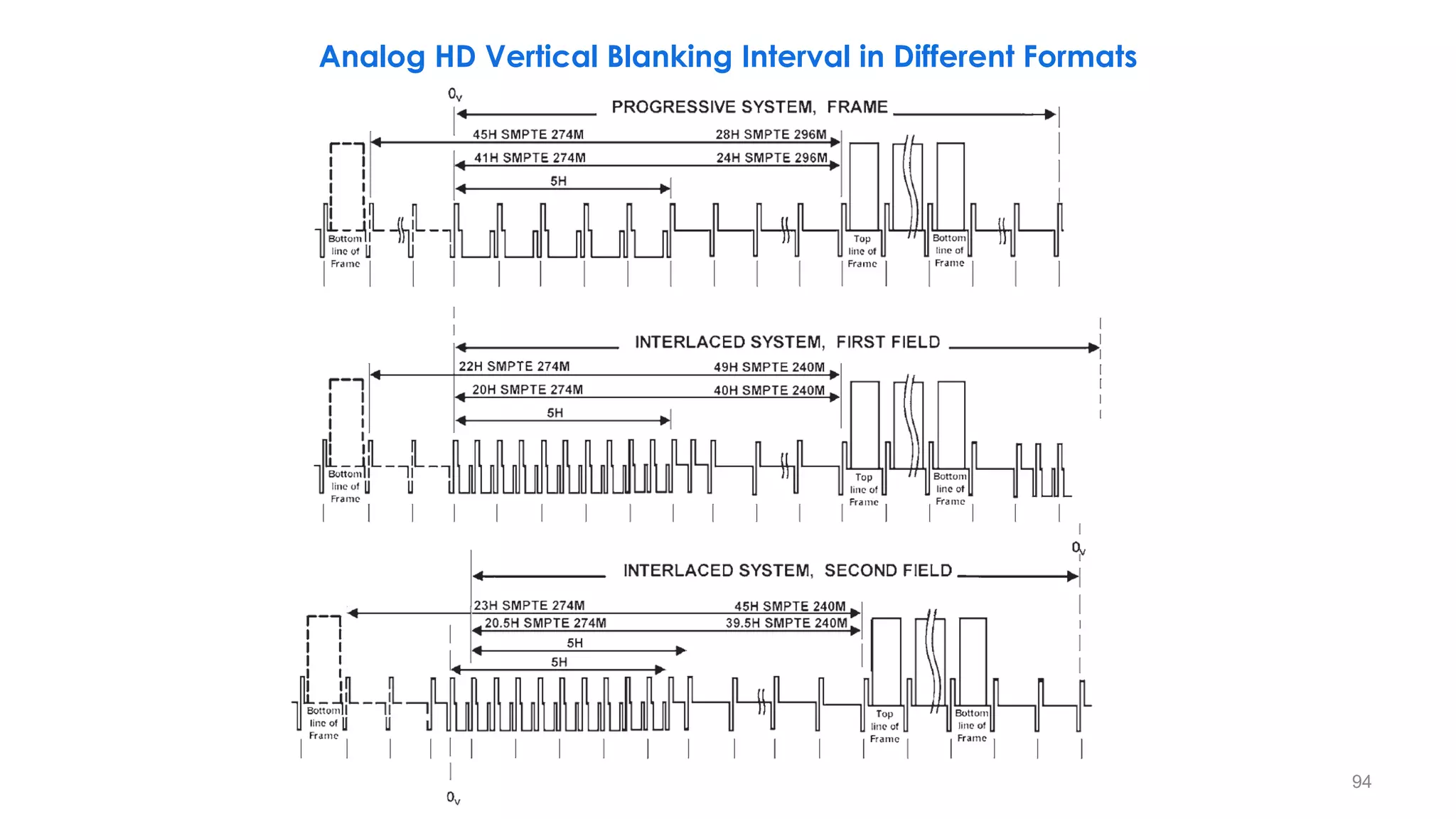
Analog HD Vertical Blanking Interval in Different Formats
94
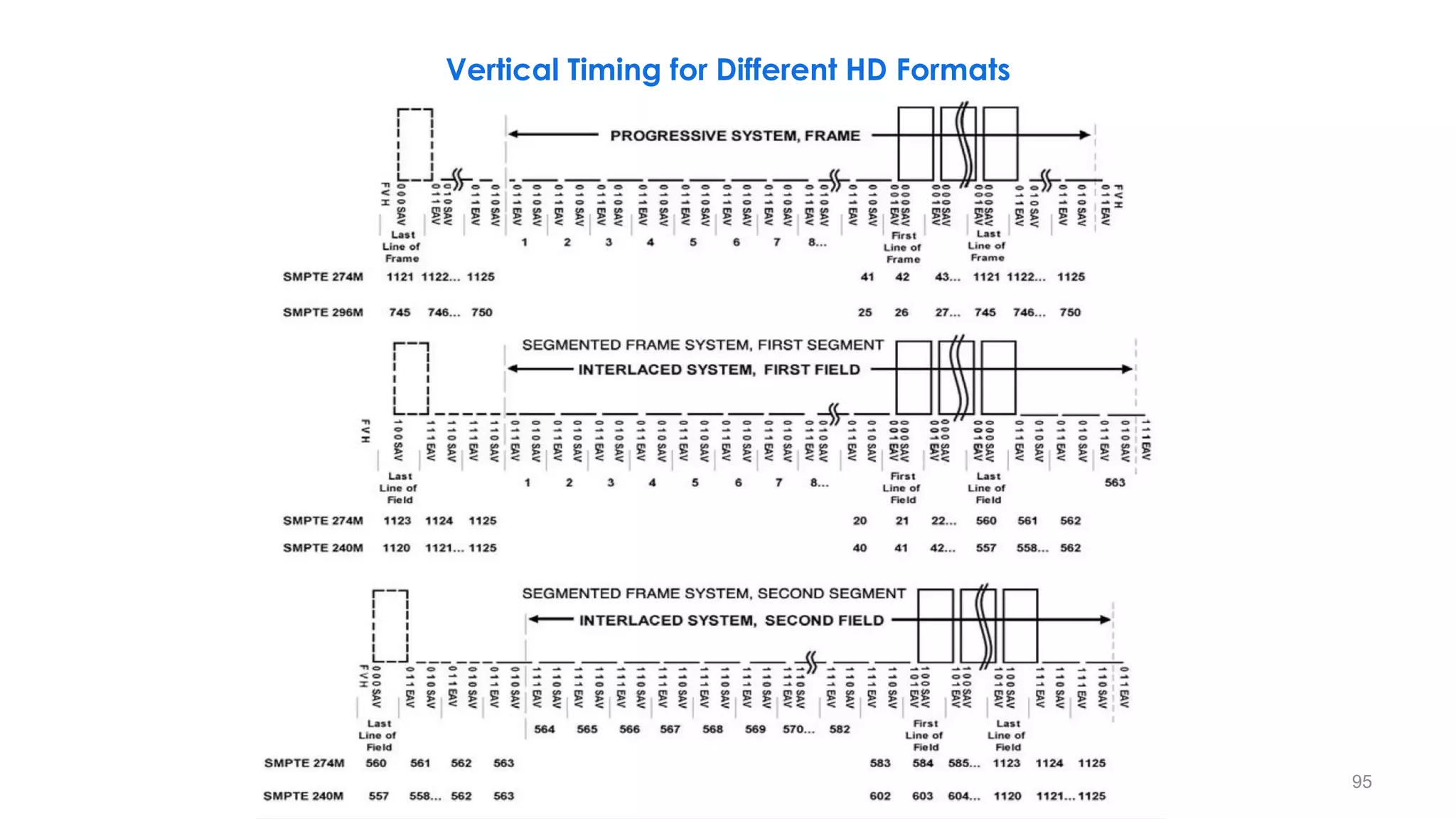
Vertical Timing for Different HD Formats
95
96
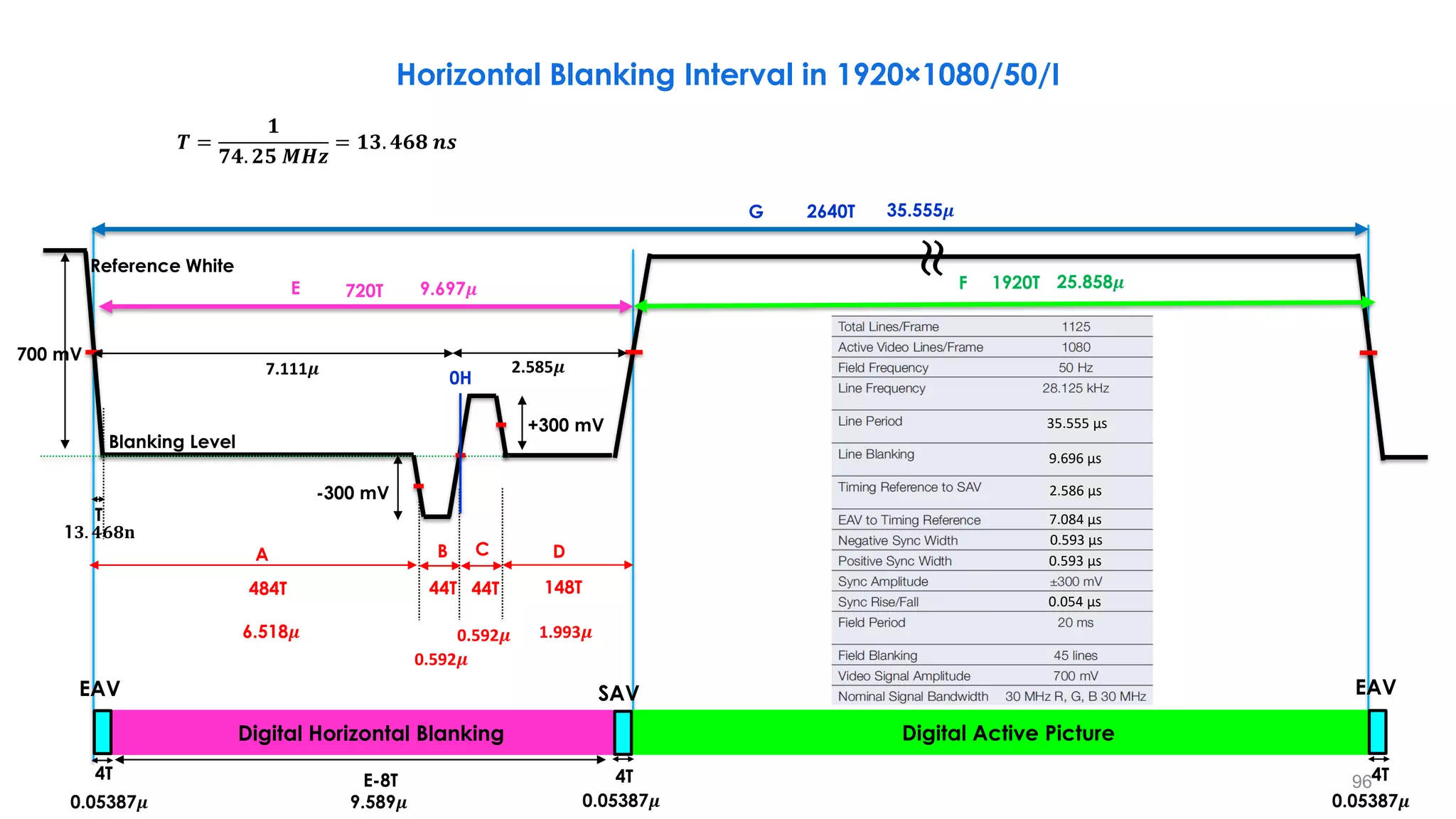
G
A D
E F
-300 mV
+300 mV
700 mV
Reference White
Blanking Level
484T
B C
0H
44T 44T 148T
Digital Horizontal Blanking Digital Active Picture
4T 4T 4T
E-8T
≈
6.518𝝁
9.697𝝁
35.555𝝁
25.858𝝁
720T
2640T
1920T
0.592𝝁
0.592𝝁 1.993𝝁
𝑻 =
𝟏
𝟕𝟒. 𝟐𝟓 𝑴𝑯𝒛
= 𝟏𝟑. 𝟒𝟔𝟖 𝒏𝒔
0.05387𝝁 9.589𝝁 0.05387𝝁
0.05387𝝁
Horizontal Blanking Interval in 1920×1080/50/I
EAV EAV
SAV
2.585𝝁
7.111𝝁
9.696 µs
2.586 µs
7.084 µs
0.593 µs
0.593 µs
0.054 µs
35.555 µs
T
1𝟑. 𝟒𝟔𝟖𝐧
97
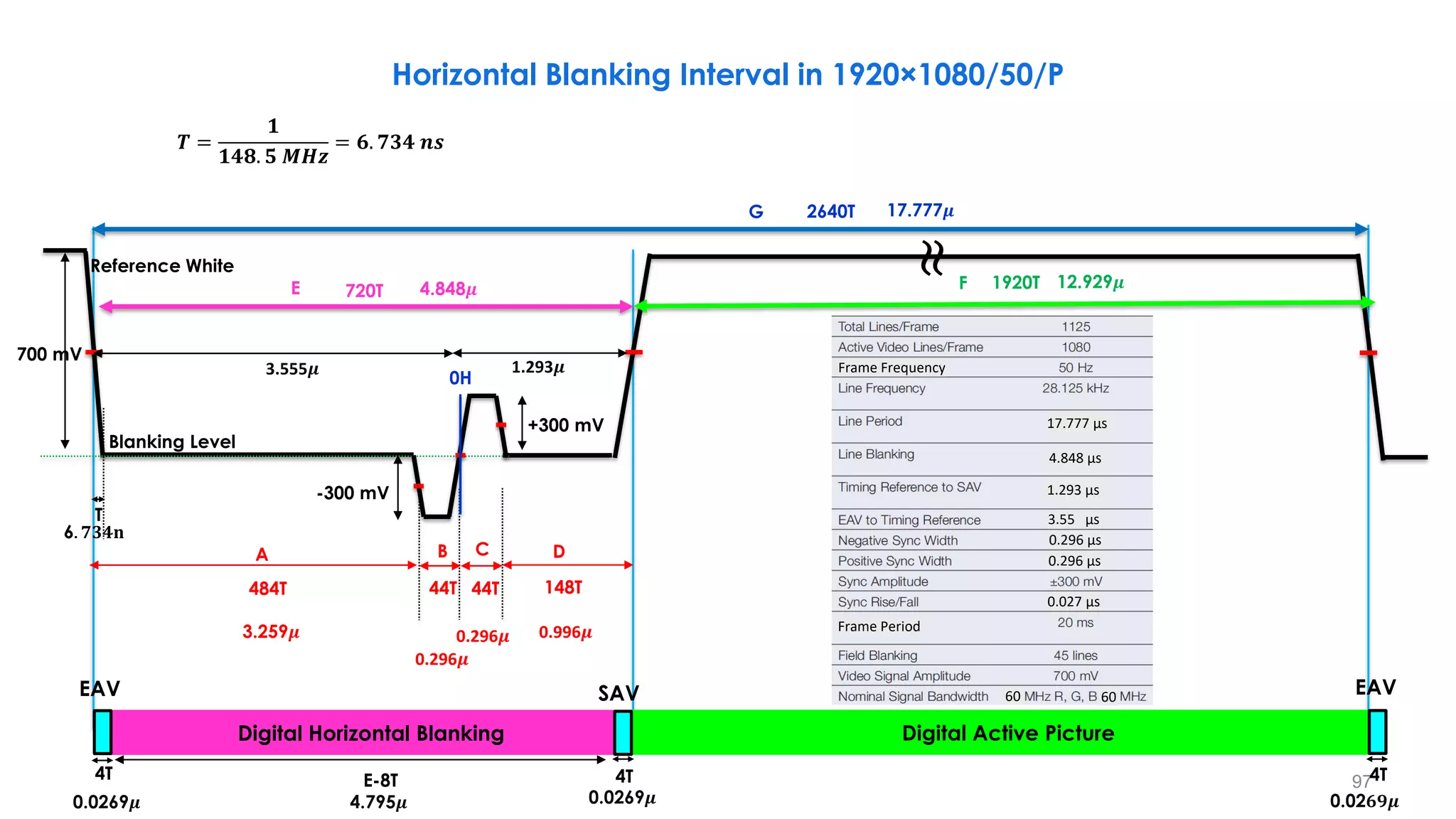
G
D
E F
700 mV
Reference White
484T
B C
0H
44T 44T 148T
Digital Horizontal Blanking Digital Active Picture
4T 4T
E-8T
3.259𝝁
4.848𝝁
17.777𝝁
12.929𝝁
720T
2640T
1920T
0.296𝝁
0.296𝝁 0.996𝝁
-300 mV
+300 mV
0.0269𝝁 4.795𝝁 0.0269𝝁
Horizontal Blanking Interval in 1920×1080/50/P
𝑻 =
𝟏
𝟏𝟒𝟖. 𝟓 𝑴𝑯𝒛
= 𝟔. 𝟕𝟑𝟒 𝒏𝒔
EAV SAV
1.293𝝁
3.555𝝁 Frame Frequency
17.777 µs
4.848 µs
1.293 µs
3.55 µs
0.296 µs
0.296 µs
Frame Period
60 60
0.027 µs
≈
4T
0.02𝟔𝟗𝝁
EAV
A
Blanking Level
T
6. 𝟕𝟑𝟒𝐧
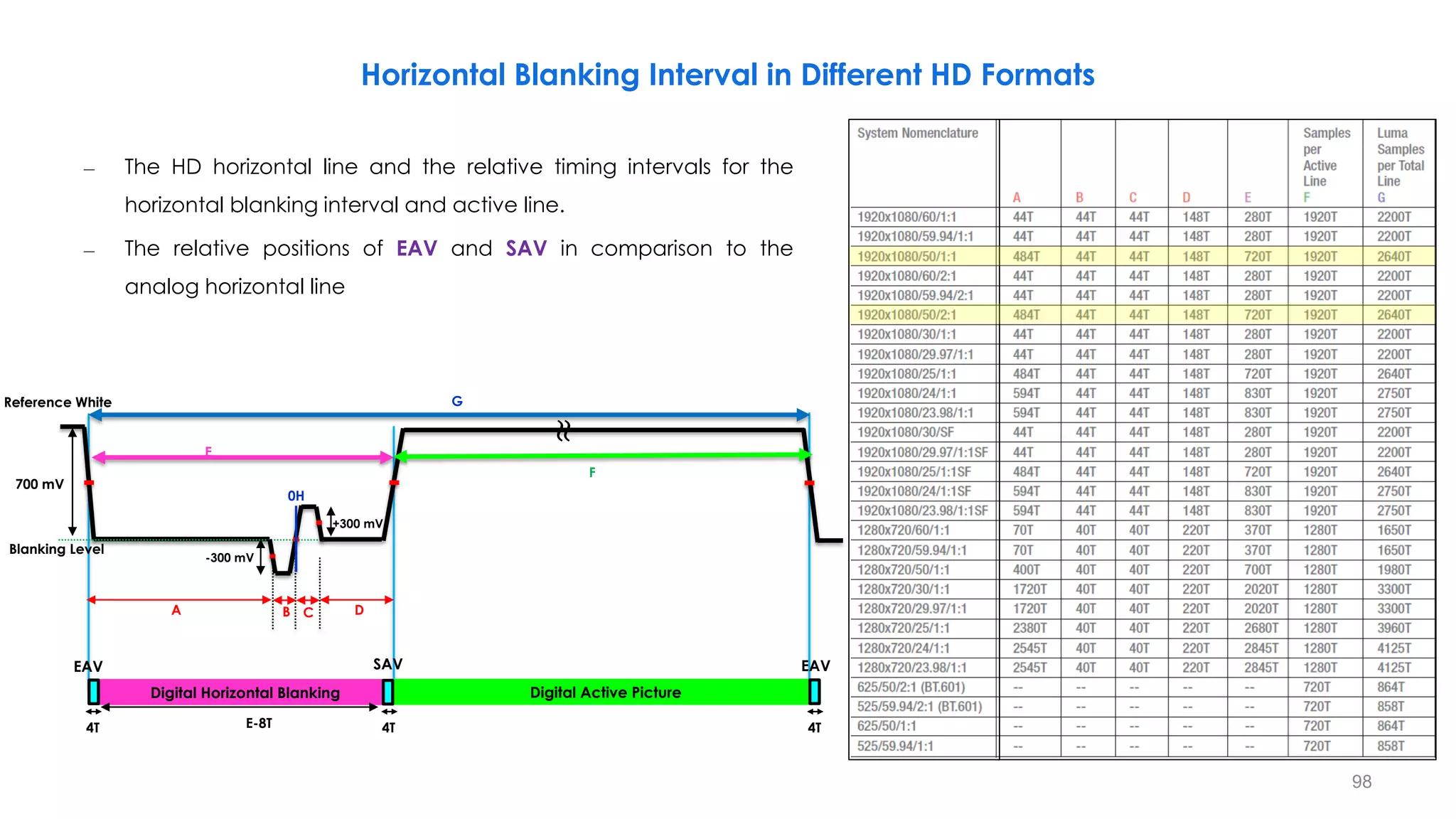
Horizontal Blanking Interval in Different HD Formats
– The HD horizontal line and the relative timing intervals for the
horizontal blanking interval and active line.
– The relative positions of EAV and SAV in comparison to the
analog horizontal line
98
G
A D
E
F
700 mV
Reference White
Blanking Level
B C
0H
Digital Horizontal Blanking Digital Active Picture
4T E-8T
-300 mV
+300 mV
EAV SAV
≈
EAV
4T 4T
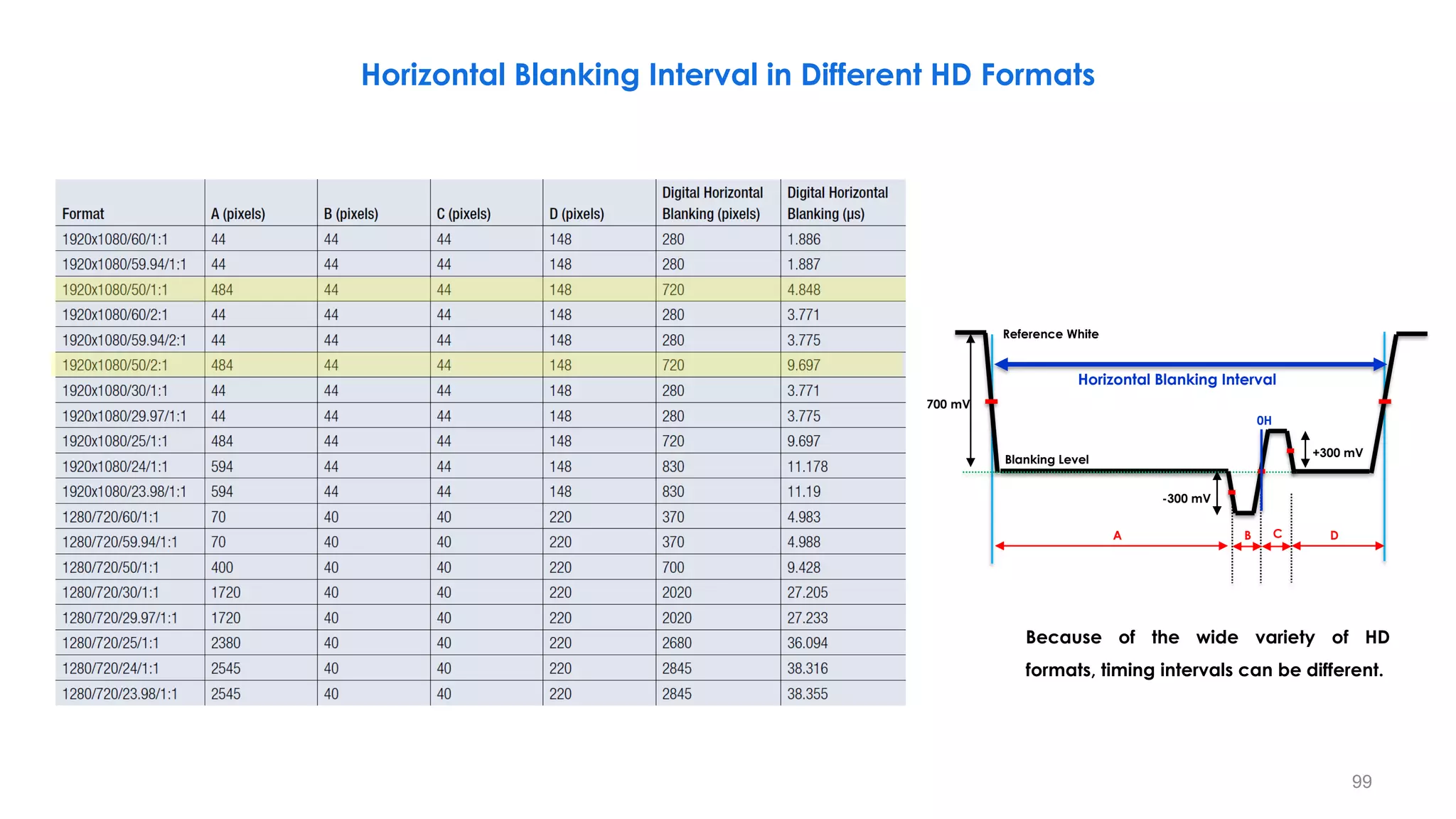
99
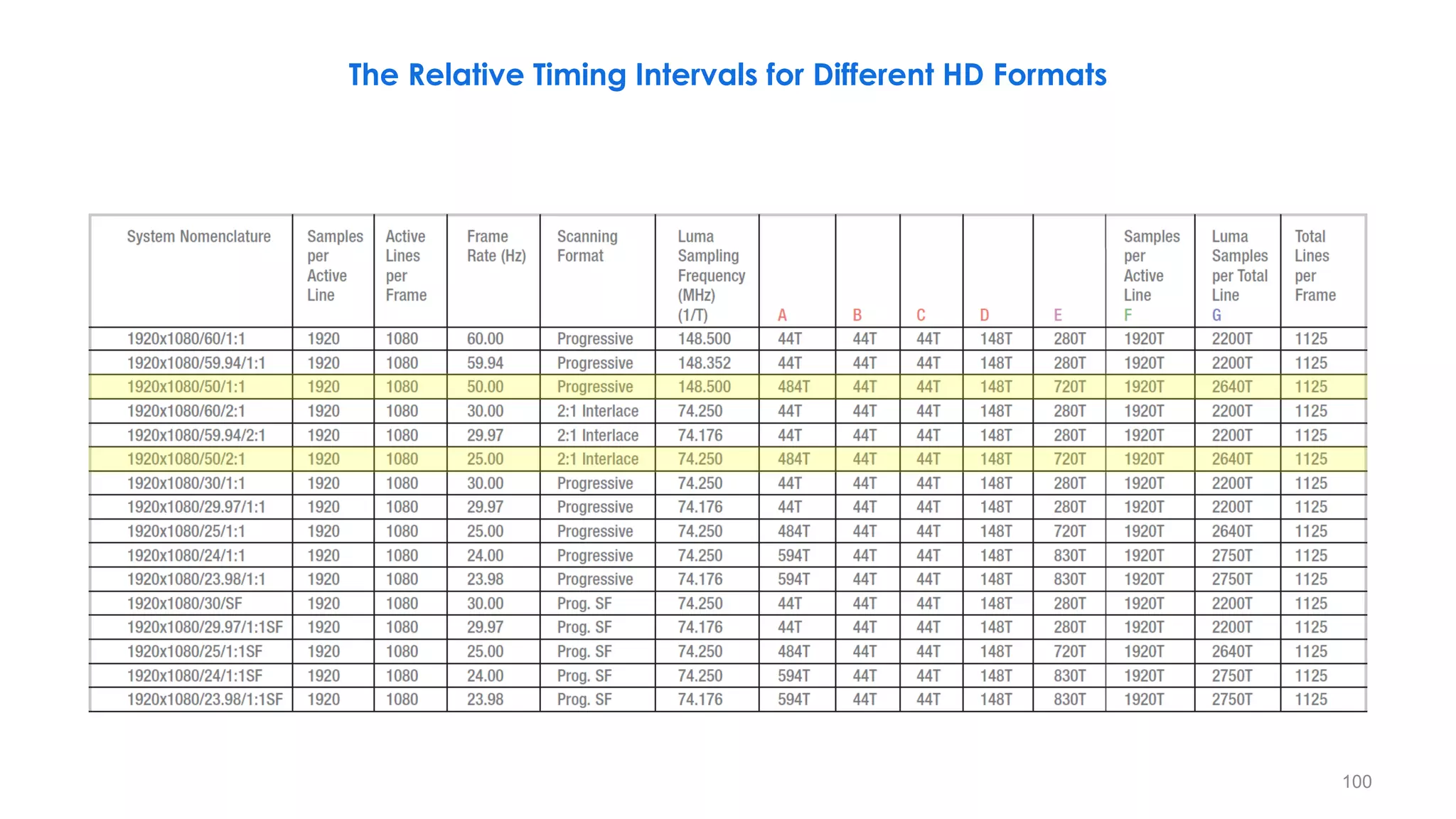
Because of the wide variety of HD
formats, timing intervals can be different.
Horizontal Blanking Interval in Different HD Formats
A D
-300 mV
+300 mV
700 mV
Reference White
Blanking Level
B C
0H
Horizontal Blanking Interval
100
The Relative Timing Intervals for Different HD Formats
101
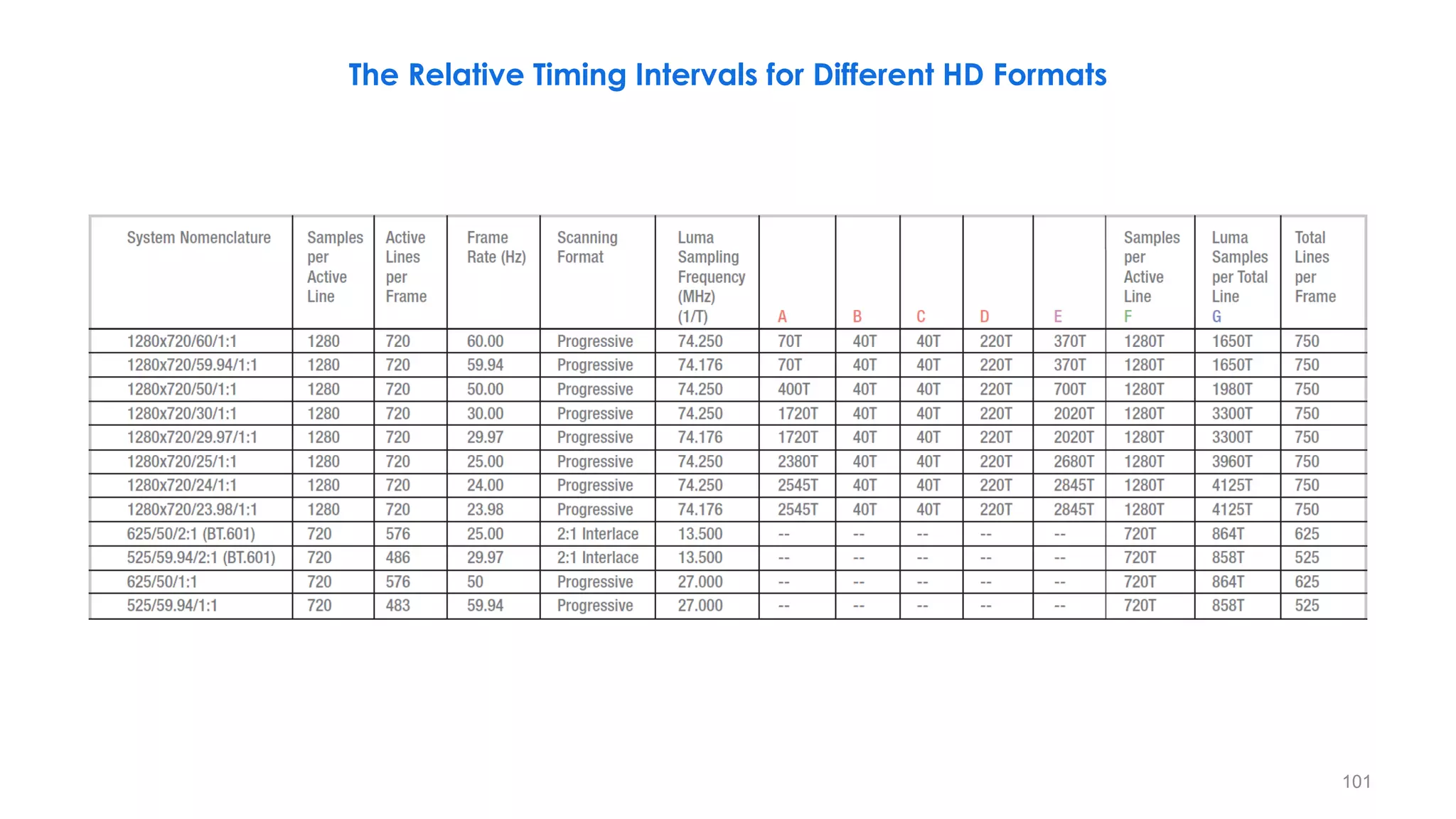
The Relative Timing Intervals for Different HD Formats
102
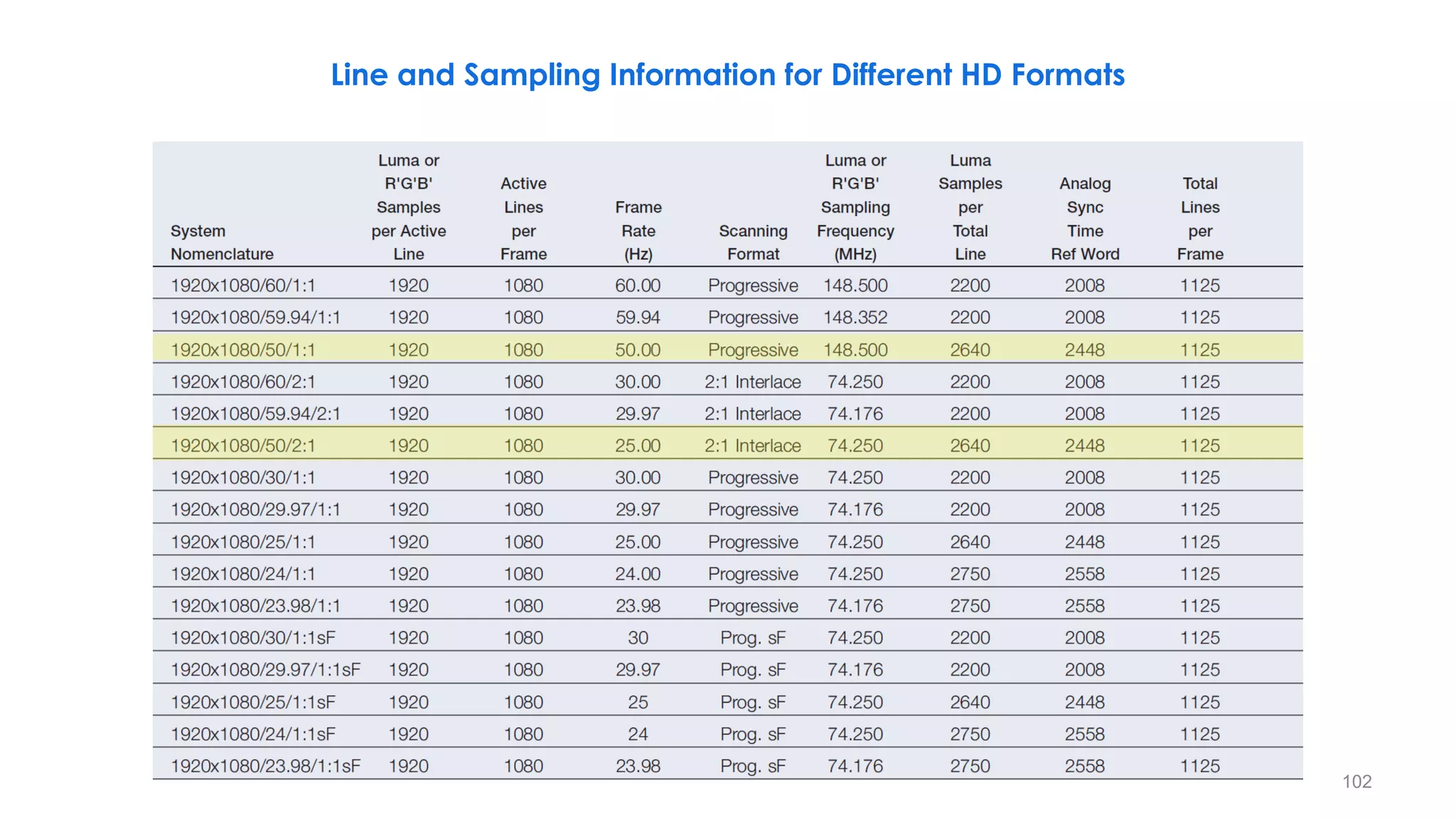
Line and Sampling Information for Different HD Formats
103
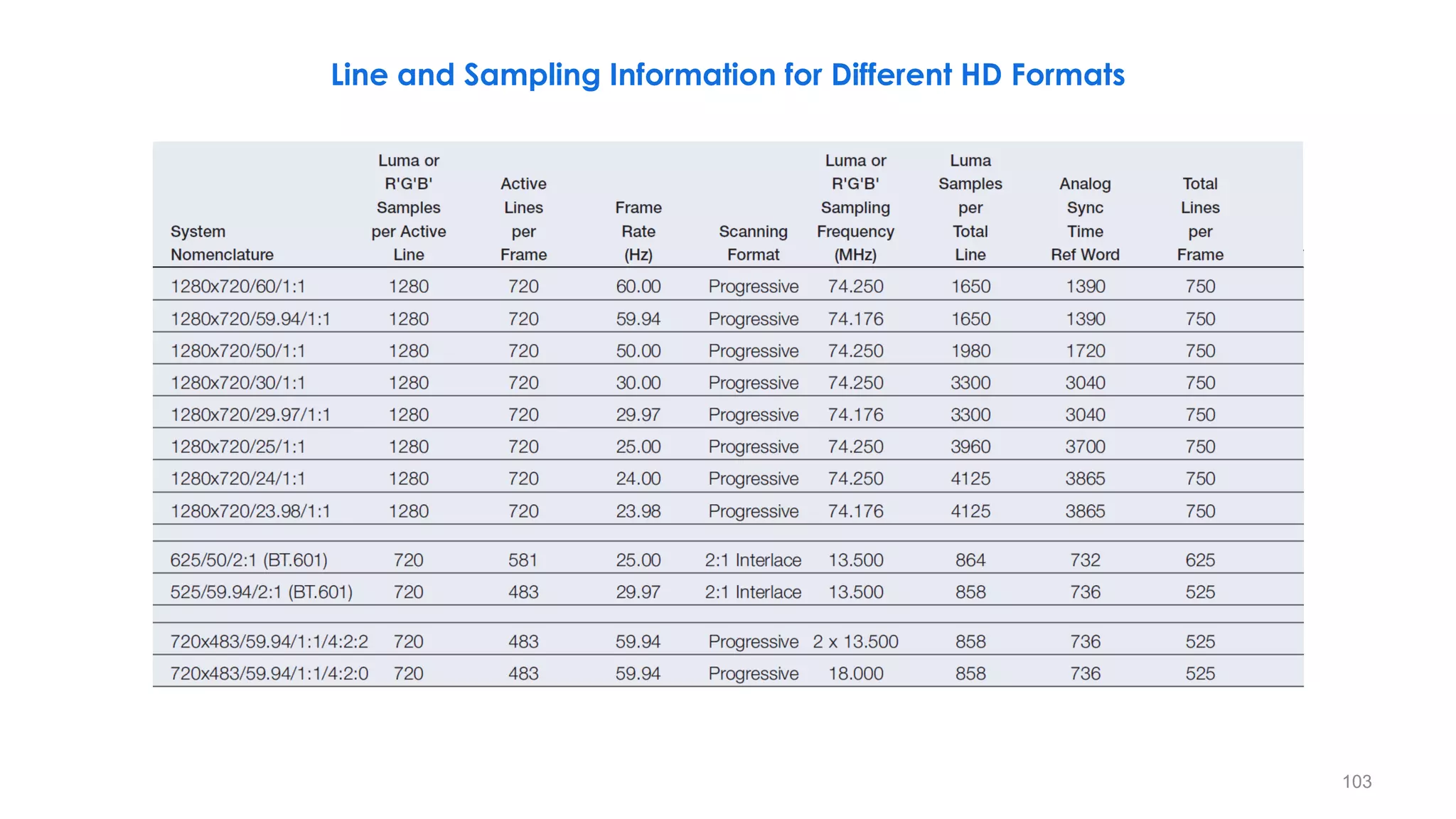
Line and Sampling Information for Different HD Formats
104
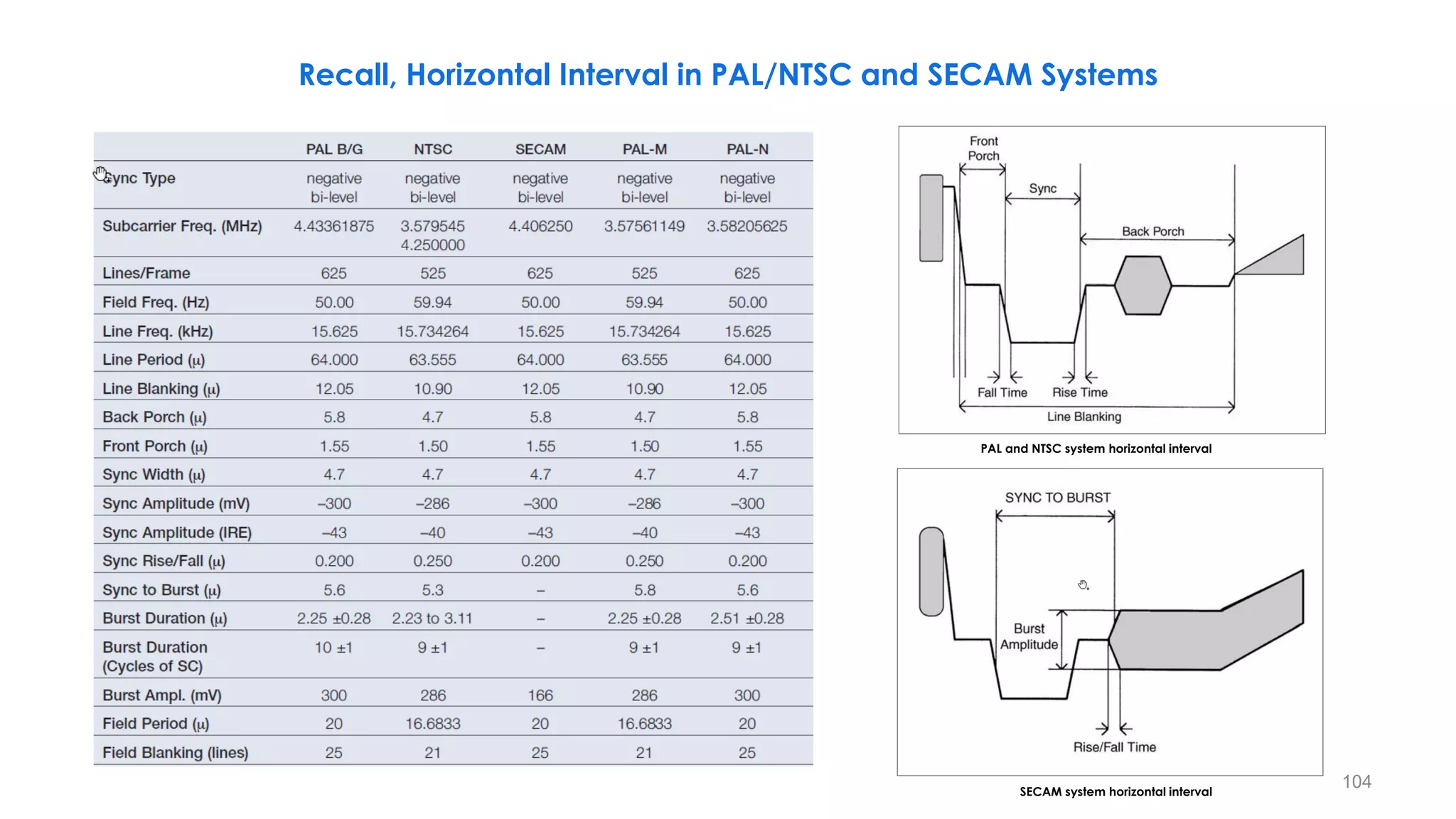
PAL and NTSC system horizontal interval
SECAM system horizontal interval
Recall, Horizontal Interval in PAL/NTSC and SECAM Systems
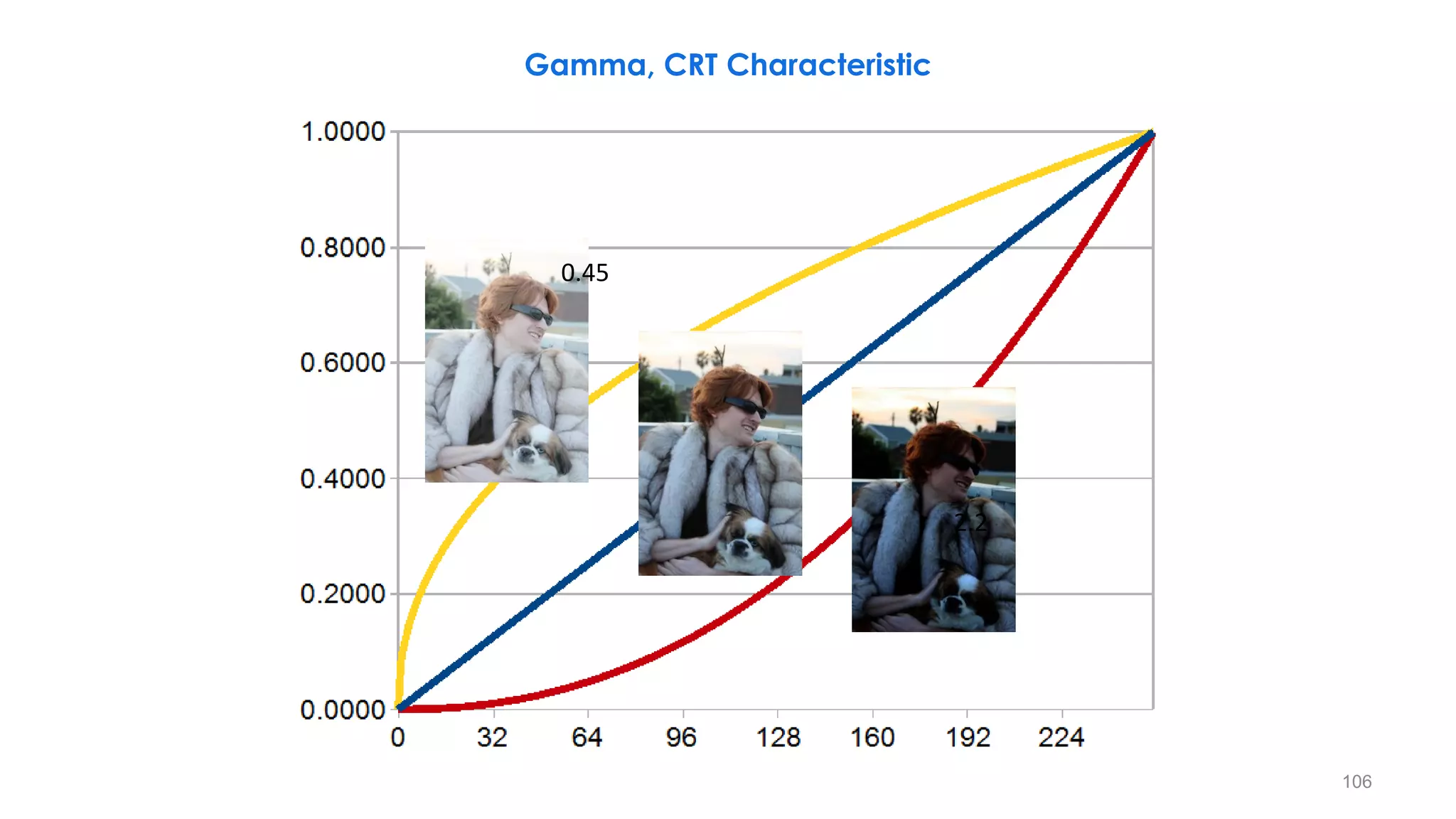
𝑠 = 𝑐. 𝑟𝛾
𝜸 < 𝟏
It maps a narrow range of
dark input values into a wide
range of output values and
vice versa.
Brighter Image
𝜸 > 𝟏
It maps a narrow range of
bright input values into a wide
range of output values and
vice versa.
Darker Image
105
r = [1 10 20 30 40 210 220 230 240 250 255]
s( =0.4) = [28 70 92 108 122 236 240 245 249 253 255]
s( = 2.5) = [0 0 0 1 2 157 176 197 219 243 255]
Gamma, CRT Characteristic
− Plots of the gamma
equation 𝑠 = 𝑐. 𝑟𝛾
for
various values of g (c =
1 in all cases).
− Each curve was scaled
independently so that
all curves would fit in
the same graph.
− Our interest here is on
the shapes of the
curves, not on their
relative values.
106
2.2
0.45
Gamma, CRT Characteristic
It
is
made
darker
It
is
made
brighter
107
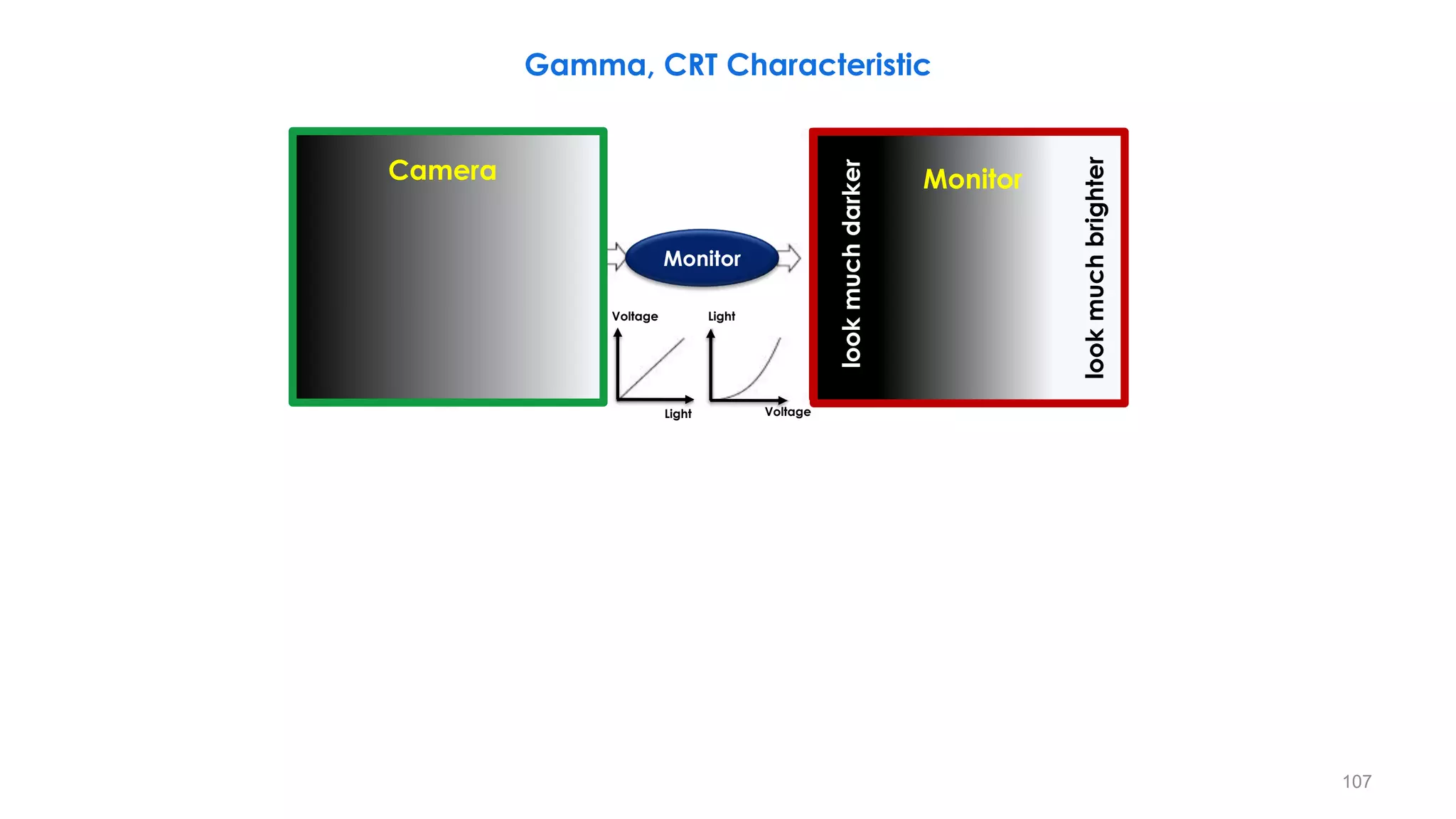
Camera
Light
Light
Voltage
Voltage
Monitor
Monitor
look
much
brighter
look
much
darker
Gamma, CRT Characteristic
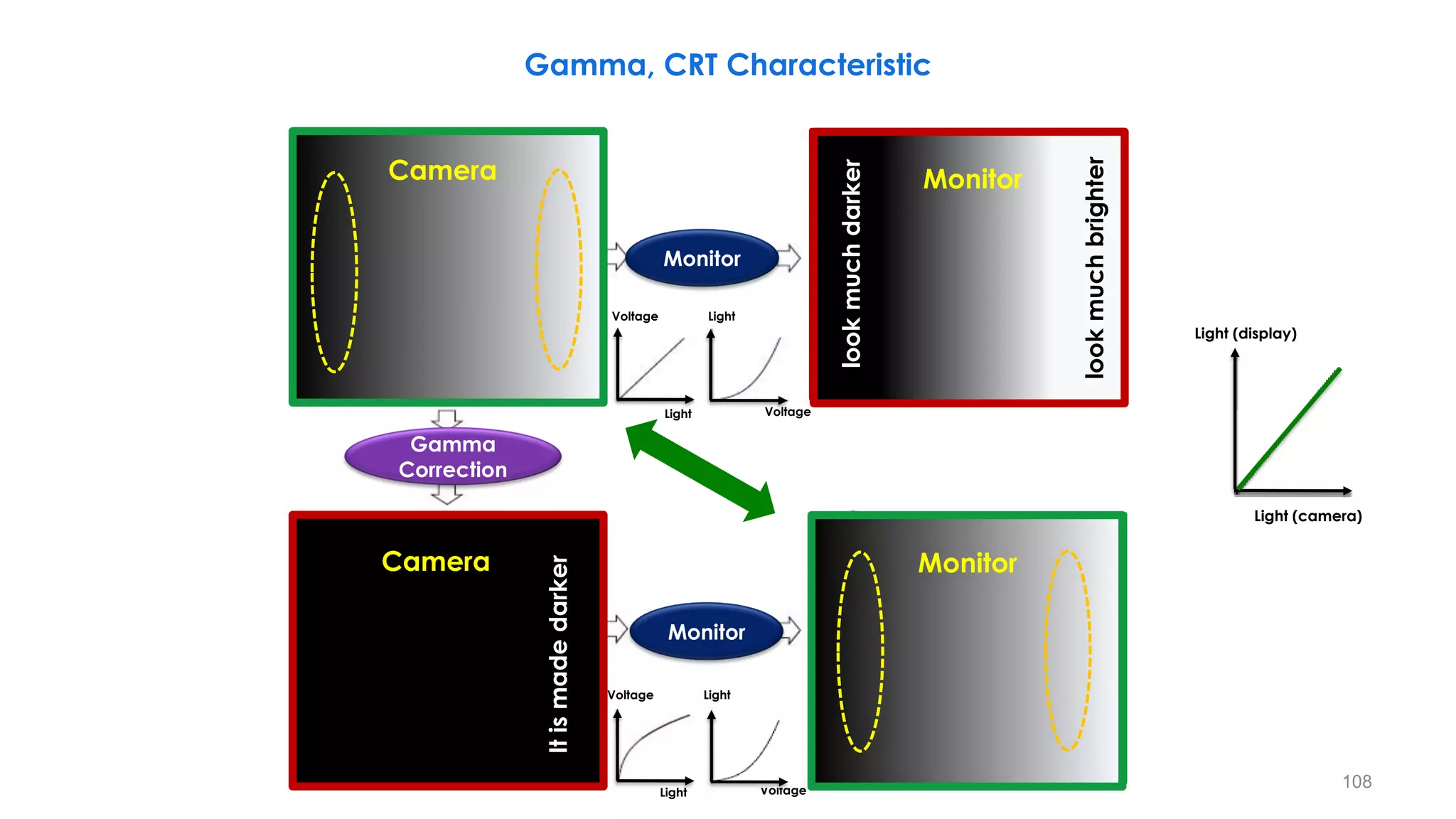
look
much
brighter
look
much
darker
It
is
made
darker
It
is
made
brighter
108
Camera Monitor
Camera Monitor
Light
Light
Voltage
Voltage
Light
Light
Voltage
Voltage
Monitor
Monitor
Gamma
Correction
Light (camera)
Light (display)
CRT
Control
Grid
Output
Light
Input voltage
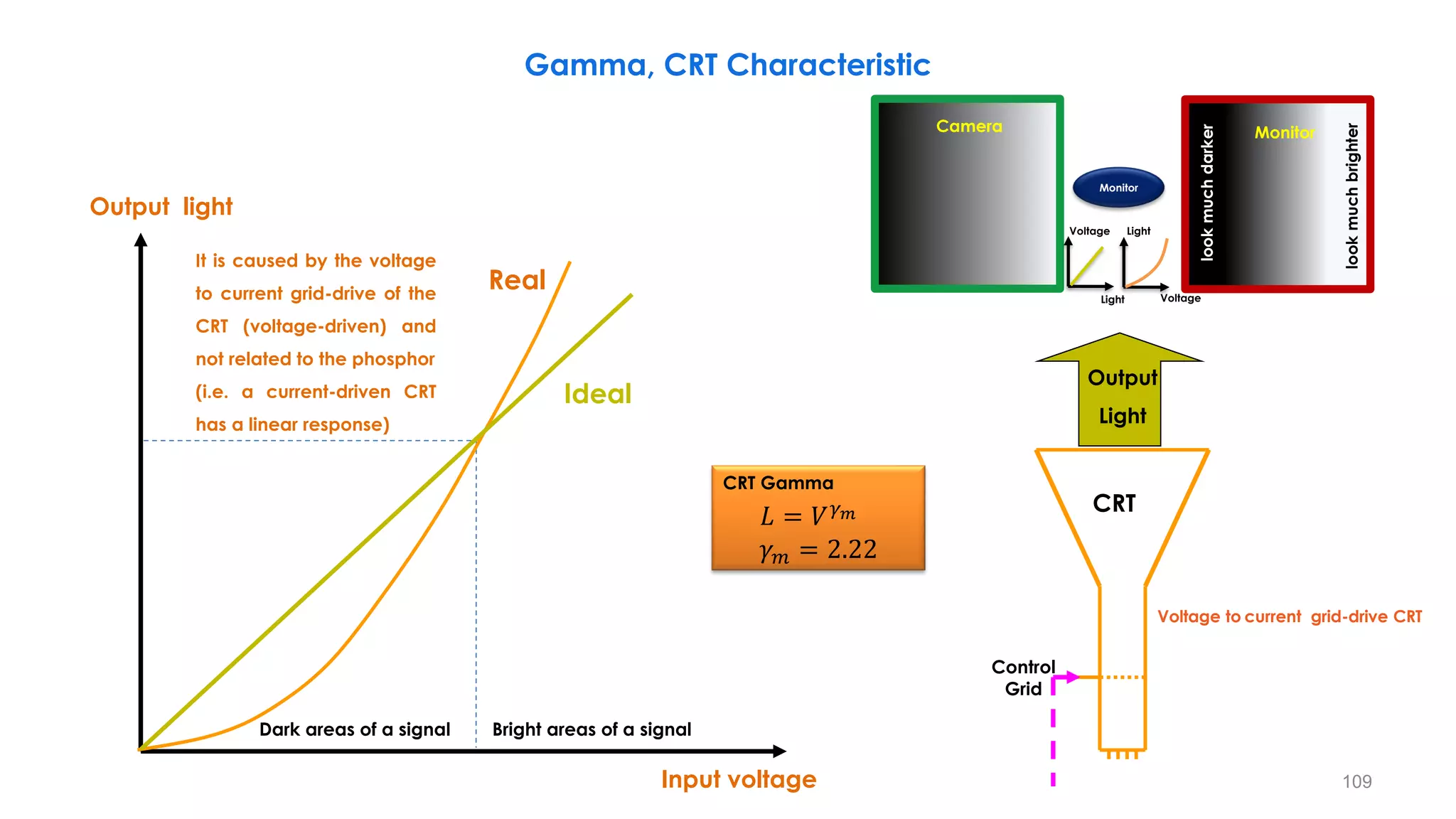
Output light
Ideal
Real
Dark areas of a signal Bright areas of a signal
Gamma, CRT Characteristic
It is caused by the voltage
to current grid-drive of the
CRT (voltage-driven) and
not related to the phosphor
(i.e. a current-driven CRT
has a linear response)
109
CRT Gamma
𝐿 = 𝑉𝛾𝑚
𝛾𝑚 = 2.22
Voltage to current grid-drive CRT
Camera
Light
Light
Voltage
Voltage
Monitor
Monitor
look
much
brighter
look
much
darker
CRT
Control
Grid
Light Input
Input voltage
Output light
Camera
Output
Light
Output voltage
Input light
Input light
Output light
Gamma, CRT Characteristic
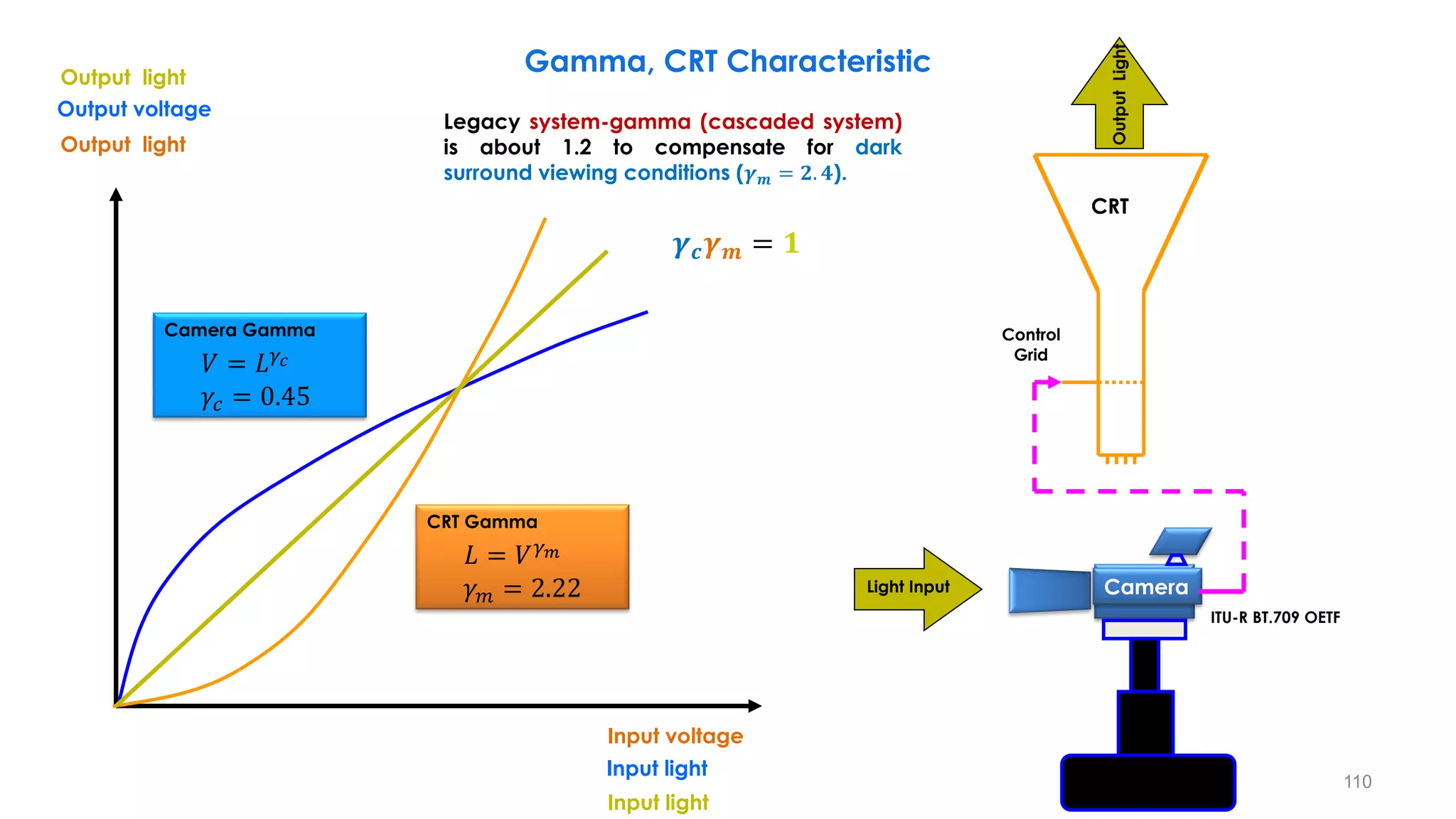
Legacy system-gamma (cascaded system)
is about 1.2 to compensate for dark
surround viewing conditions (𝜸𝒎 = 𝟐. 𝟒).
110
ITU-R BT.709 OETF
CRT Gamma
𝐿 = 𝑉𝛾𝑚
𝛾𝑚 = 2.22
Camera Gamma
𝑉 = 𝐿𝛾𝑐
𝛾𝑐 = 0.45
𝜸𝒄𝜸𝒎 = 𝟏
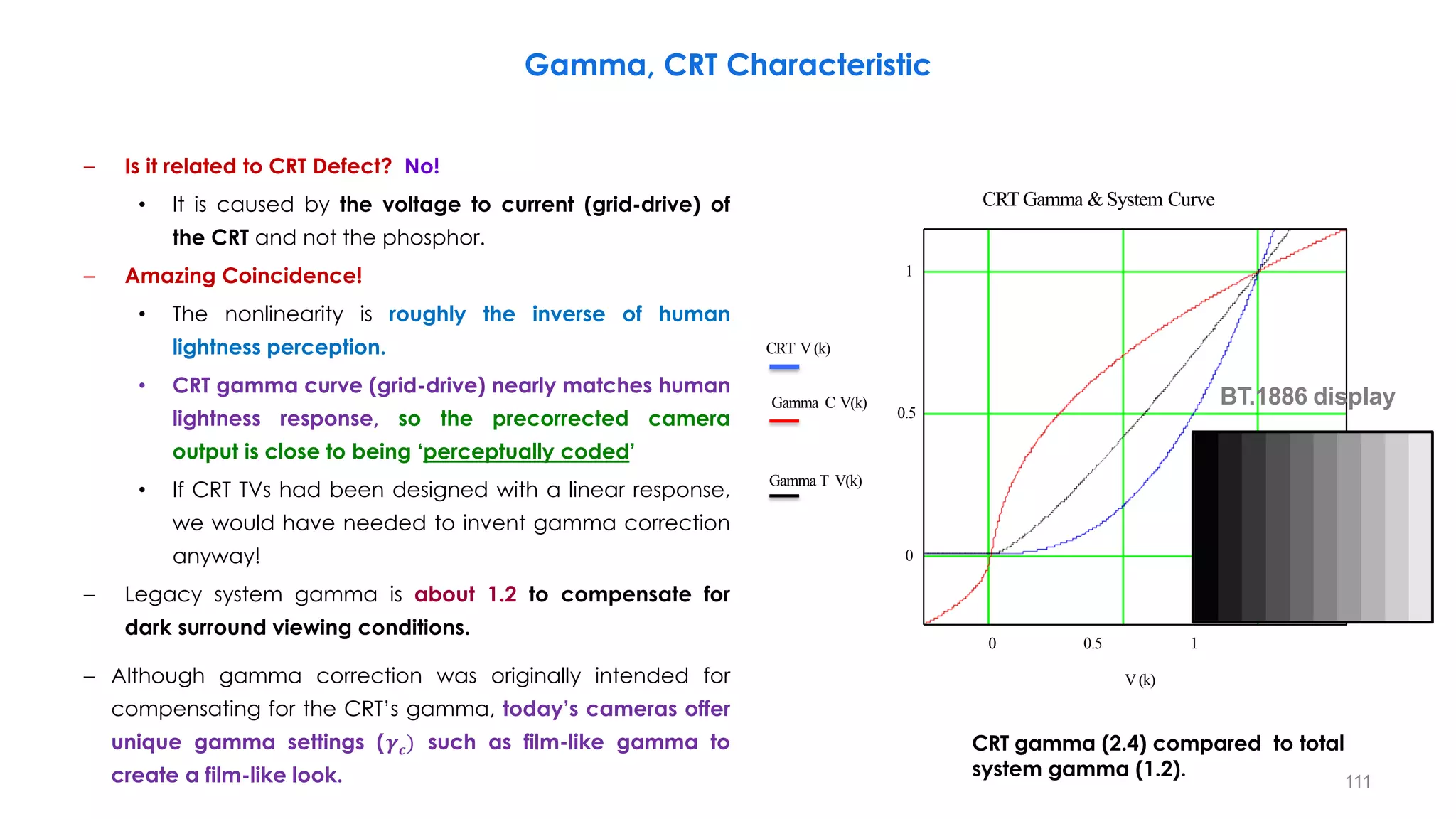
– Is it related to CRT Defect? No!
• It is caused by the voltage to current (grid-drive) of
the CRT and not the phosphor.
– Amazing Coincidence!
• The nonlinearity is roughly the inverse of human
lightness perception.
• CRT gamma curve (grid-drive) nearly matches human
lightness response, so the precorrected camera
output is close to being ‘perceptually coded’
• If CRT TVs had been designed with a linear response,
we would have needed to invent gamma correction
anyway!
– Legacy system gamma is about 1.2 to compensate for
dark surround viewing conditions.
– Although gamma correction was originally intended for
compensating for the CRT’s gamma, today’s cameras offer
unique gamma settings (𝜸𝒄) such as film-like gamma to
create a film-like look. 111
0 0.5 1
0
1
CRT Gamma & System Curve
CRT V(k)
Gamma C V(k)
0.5
Gamma T V(k)
V (k)
CRT gamma (2.4) compared to total
system gamma (1.2).
BT.1886 display
Gamma, CRT Characteristic
EOTF, OETF, OOTF
Optical
Electronic
OETF
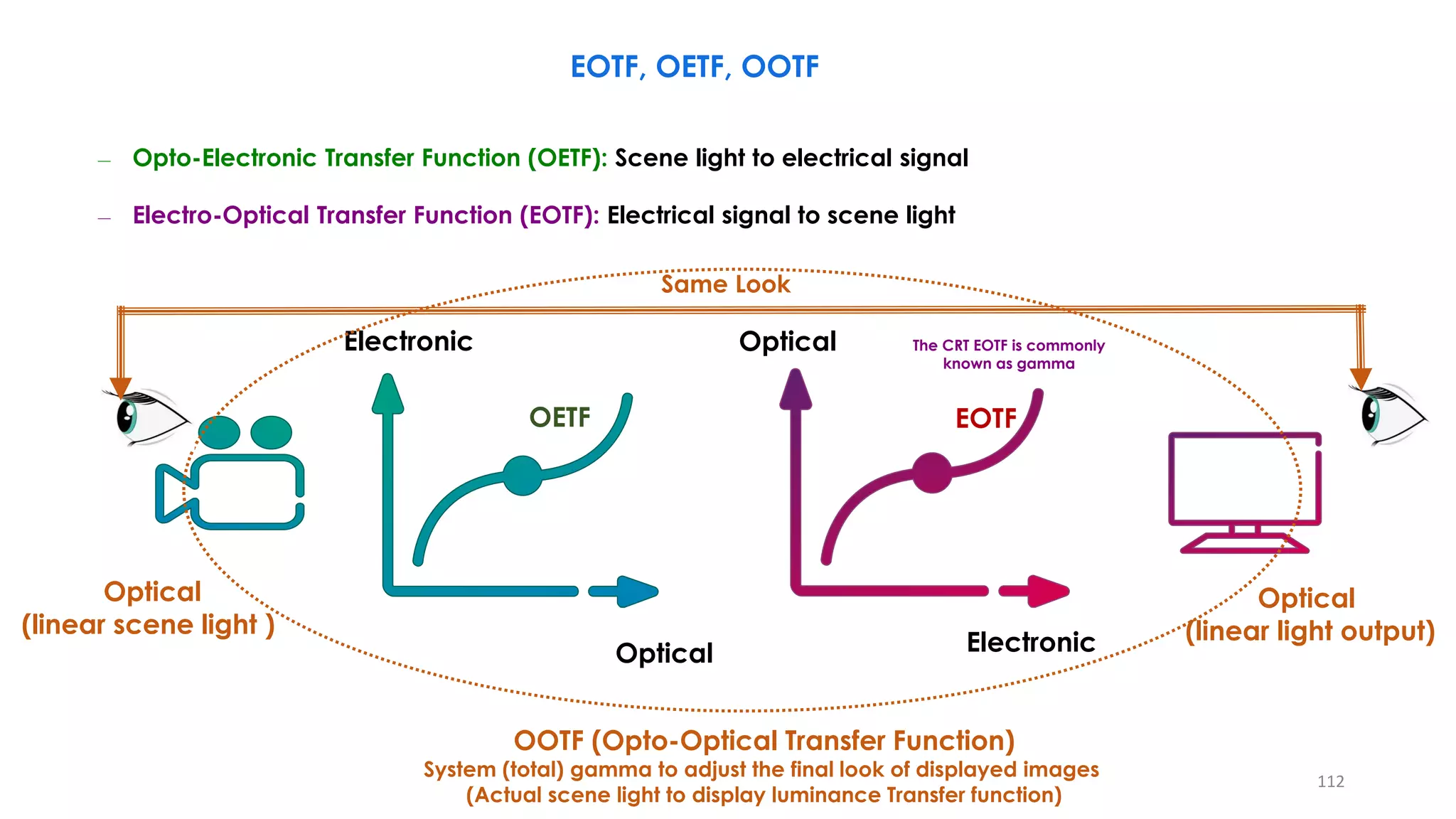
The CRT EOTF is commonly
known as gamma
Optical
Electronic
EOTF
OOTF (Opto-Optical Transfer Function)
System (total) gamma to adjust the final look of displayed images
(Actual scene light to display luminance Transfer function)
Optical
(linear scene light )
Optical
(linear light output)
112
Same Look
– Opto-Electronic Transfer Function (OETF): Scene light to electrical signal
– Electro-Optical Transfer Function (EOTF): Electrical signal to scene light
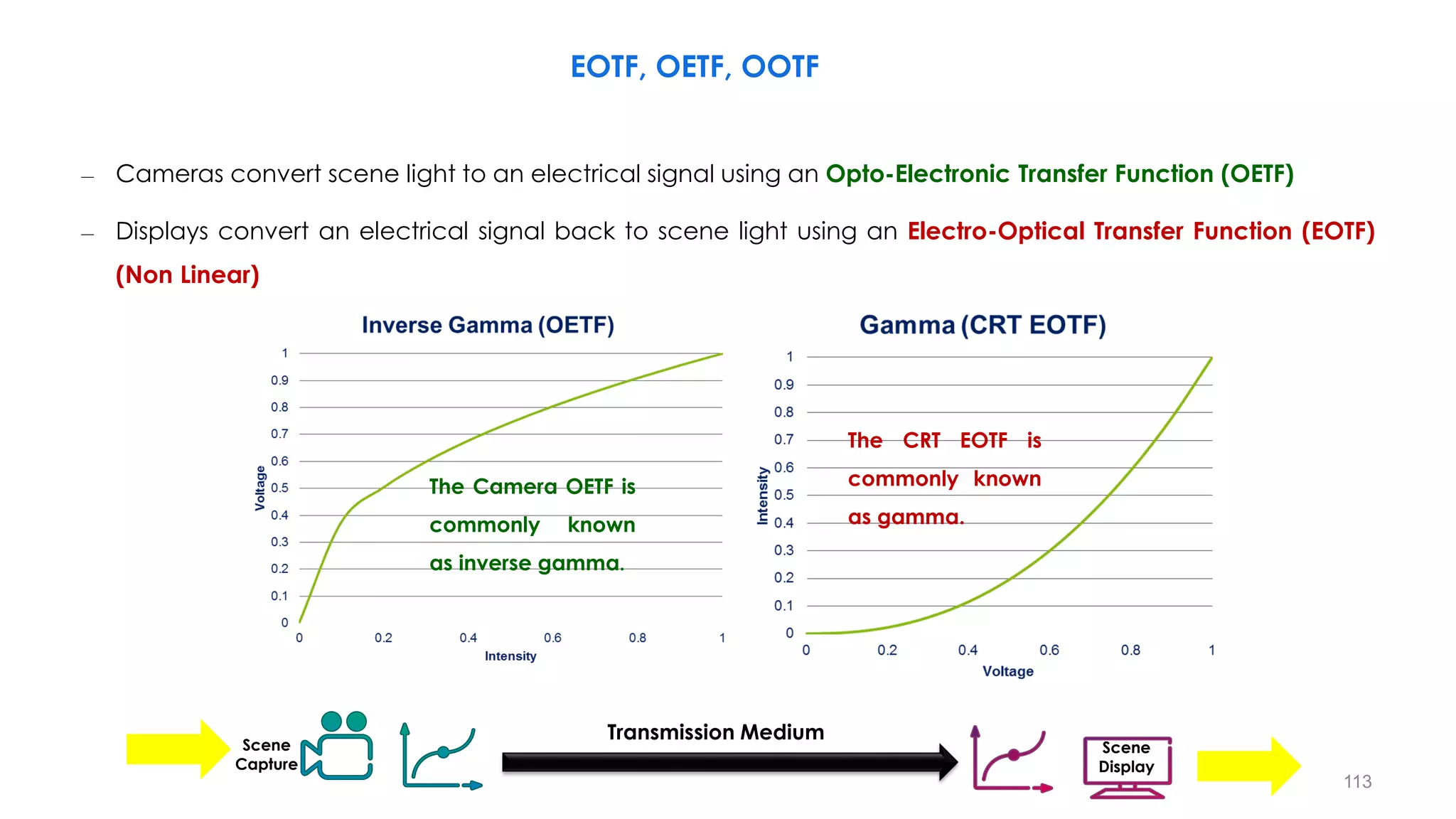
– Cameras convert scene light to an electrical signal using an Opto-Electronic Transfer Function (OETF)
– Displays convert an electrical signal back to scene light using an Electro-Optical Transfer Function (EOTF)
(Non Linear)
Transmission Medium
Scene
Capture
Scene
Display
113
The CRT EOTF is
commonly known
as gamma.
The Camera OETF is
commonly known
as inverse gamma.
EOTF, OETF, OOTF
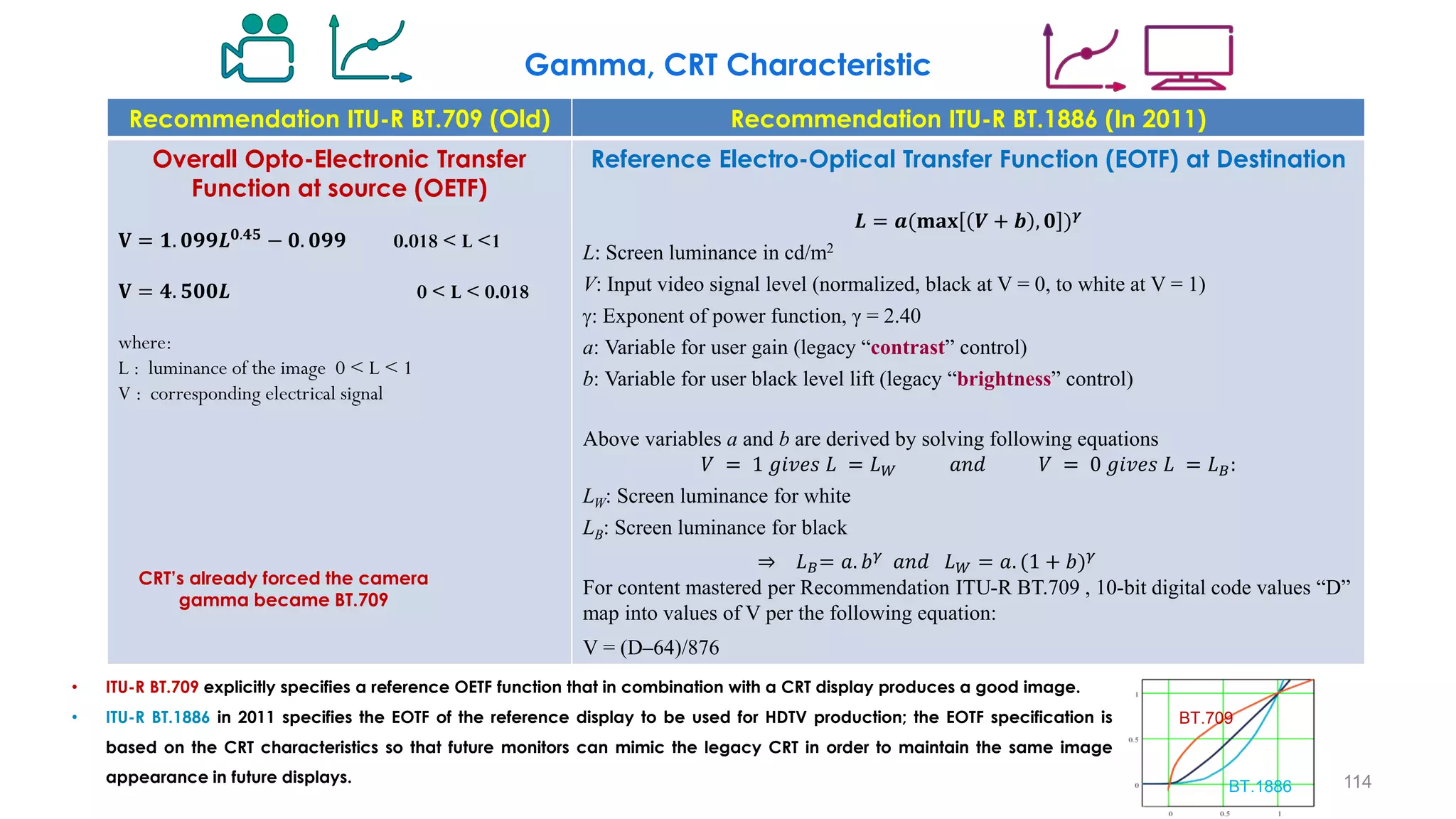
Recommendation ITU-R BT.709 (Old) Recommendation ITU-R BT.1886 (In 2011)
Overall Opto-Electronic Transfer
Function at source (OETF)
𝐕 = 𝟏. 𝟎𝟗𝟗𝑳𝟎.𝟒𝟓
− 𝟎. 𝟎𝟗𝟗 0.018 < L <1
𝐕 = 𝟒. 𝟓𝟎𝟎𝑳 0 < L < 0.018
where:
L : luminance of the image 0 < L < 1
V : corresponding electrical signal
Reference Electro-Optical Transfer Function (EOTF) at Destination
𝑳 = 𝒂(𝐦𝐚𝐱 𝑽 + 𝒃 , 𝟎 )𝜸
L: Screen luminance in cd/m2
V: Input video signal level (normalized, black at V = 0, to white at V = 1)
: Exponent of power function, γ = 2.40
a: Variable for user gain (legacy “contrast” control)
b: Variable for user black level lift (legacy “brightness” control)
Above variables a and b are derived by solving following equations
𝑉 = 1 𝑔𝑖𝑣𝑒𝑠 𝐿 = 𝐿𝑊 𝑎𝑛𝑑 𝑉 = 0 𝑔𝑖𝑣𝑒𝑠 𝐿 = 𝐿𝐵:
LW: Screen luminance for white
LB: Screen luminance for black
⇒ 𝐿𝐵= 𝑎. 𝑏𝛾 𝑎𝑛𝑑 𝐿𝑊 = 𝑎. (1 + 𝑏)𝛾
For content mastered per Recommendation ITU-R BT.709 , 10-bit digital code values “D”
map into values of V per the following equation:
V = (D–64)/876
BT.709
BT.1886
CRT’s already forced the camera
gamma became BT.709
• ITU-R BT.709 explicitly specifies a reference OETF function that in combination with a CRT display produces a good image.
• ITU-R BT.1886 in 2011 specifies the EOTF of the reference display to be used for HDTV production; the EOTF specification is
based on the CRT characteristics so that future monitors can mimic the legacy CRT in order to maintain the same image
appearance in future displays. 114
Gamma, CRT Characteristic
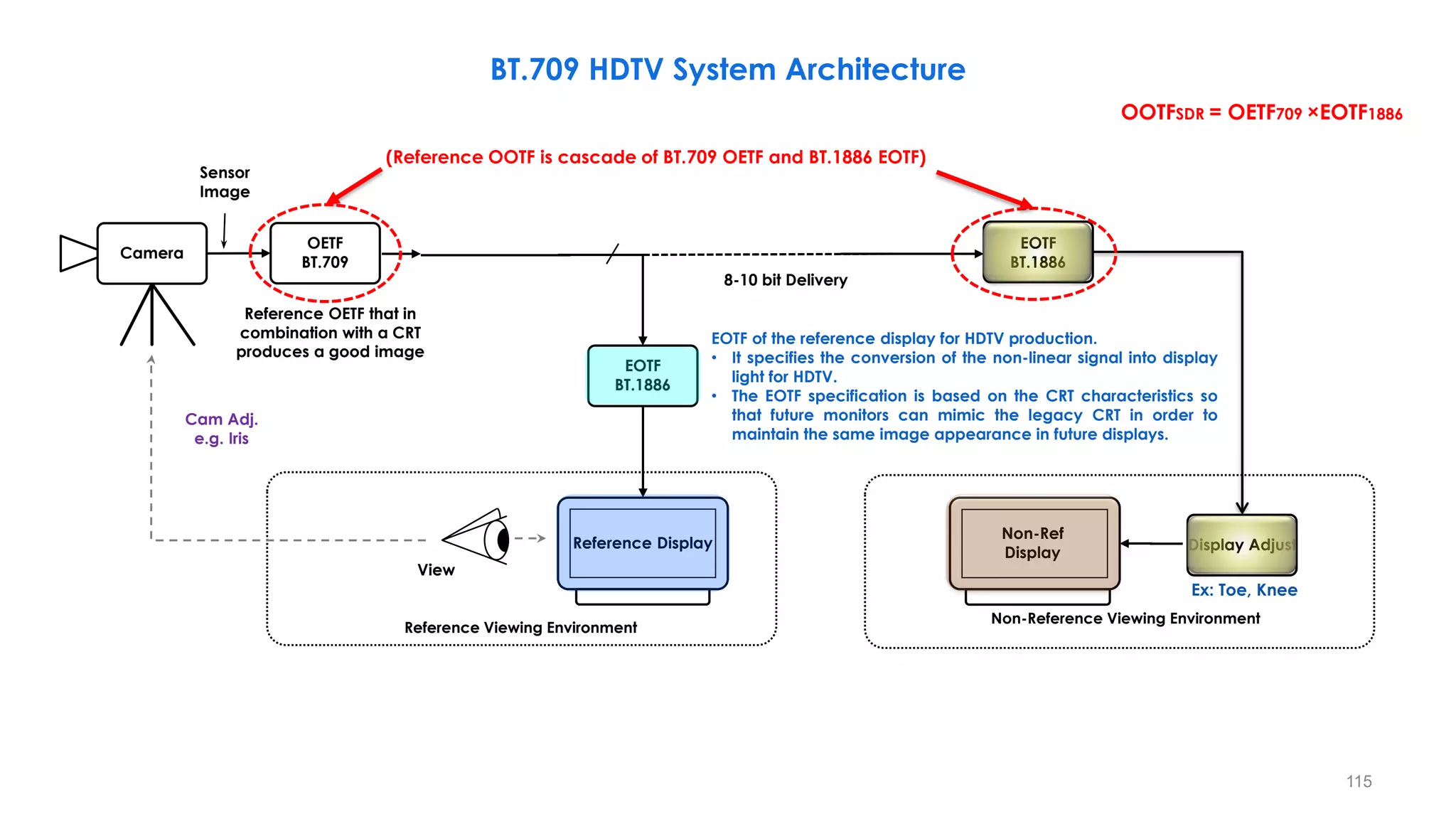
BT.709 HDTV System Architecture
EOTF
BT.1886
Reference Display
OETF
BT.709 Artistic Adjust
Camera
EOTF
BT.1886
View
Reference Viewing Environment
8-10 bit Delivery
Cam Adj.
e.g. Iris
Sensor
Image
Display Adjust
Non-Ref
Display
Non-Reference Viewing Environment
EOTF of the reference display for HDTV production.
• It specifies the conversion of the non-linear signal into display
light for HDTV.
• The EOTF specification is based on the CRT characteristics so
that future monitors can mimic the legacy CRT in order to
maintain the same image appearance in future displays.
Ex: Toe, Knee
115
(Reference OOTF is cascade of BT.709 OETF and BT.1886 EOTF)
OOTFSDR = OETF709 ×EOTF1886
Reference OETF that in
combination with a CRT
produces a good image
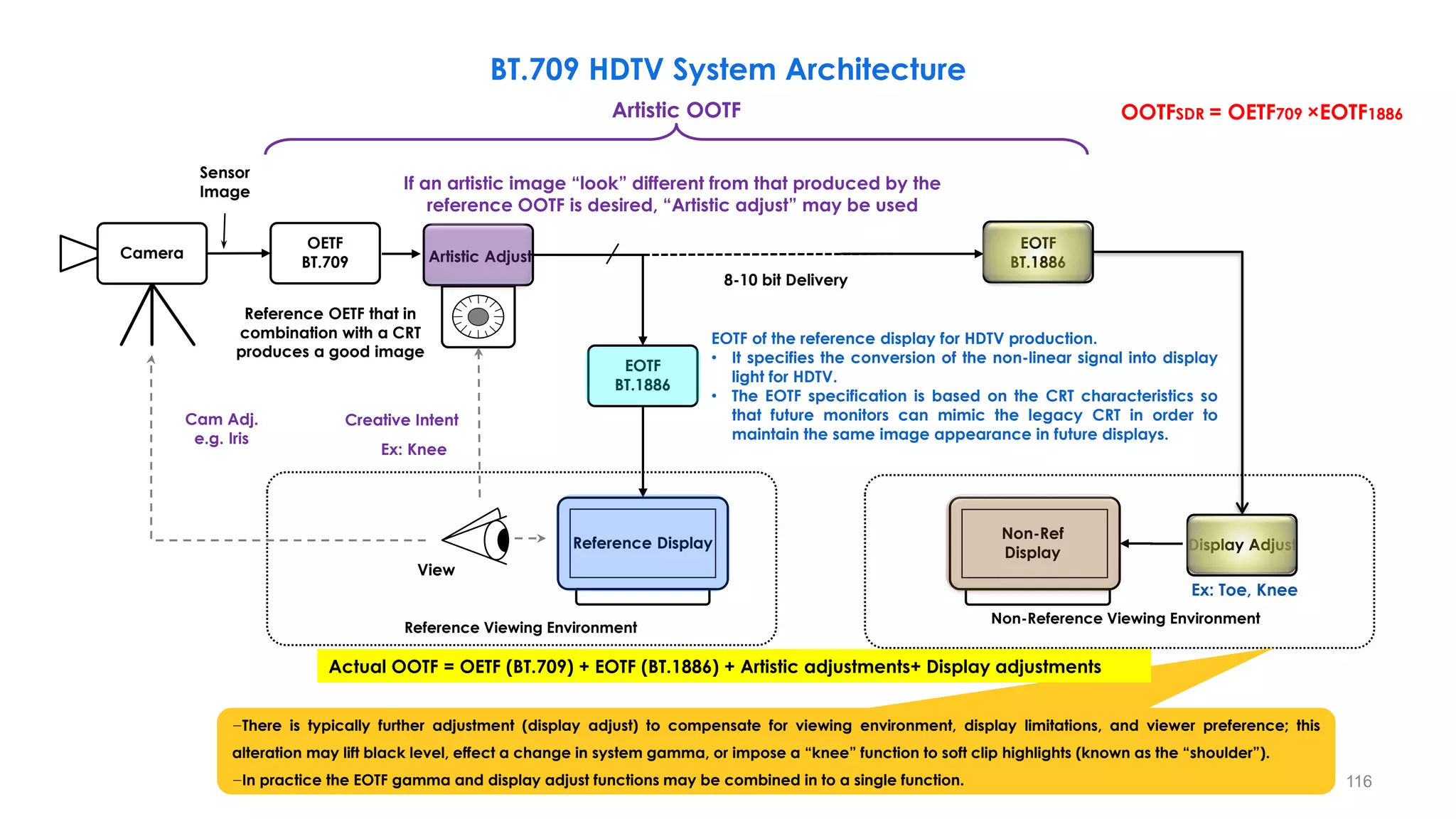
BT.709 HDTV System Architecture
EOTF
BT.1886
Reference Display
OETF
BT.709 Artistic Adjust
Camera
EOTF
BT.1886
Creative Intent
View
Reference Viewing Environment
8-10 bit Delivery
Cam Adj.
e.g. Iris
Sensor
Image
Display Adjust
Non-Ref
Display
Non-Reference Viewing Environment
Ex: Toe, Knee
Ex: Knee
Artistic OOTF
If an artistic image “look” different from that produced by the
reference OOTF is desired, “Artistic adjust” may be used
116
OOTFSDR = OETF709 ×EOTF1886
−There is typically further adjustment (display adjust) to compensate for viewing environment, display limitations, and viewer preference; this
alteration may lift black level, effect a change in system gamma, or impose a “knee” function to soft clip highlights (known as the “shoulder”).
−In practice the EOTF gamma and display adjust functions may be combined in to a single function.
Actual OOTF = OETF (BT.709) + EOTF (BT.1886) + Artistic adjustments+ Display adjustments
EOTF of the reference display for HDTV production.
• It specifies the conversion of the non-linear signal into display
light for HDTV.
• The EOTF specification is based on the CRT characteristics so
that future monitors can mimic the legacy CRT in order to
maintain the same image appearance in future displays.
Reference OETF that in
combination with a CRT
produces a good image
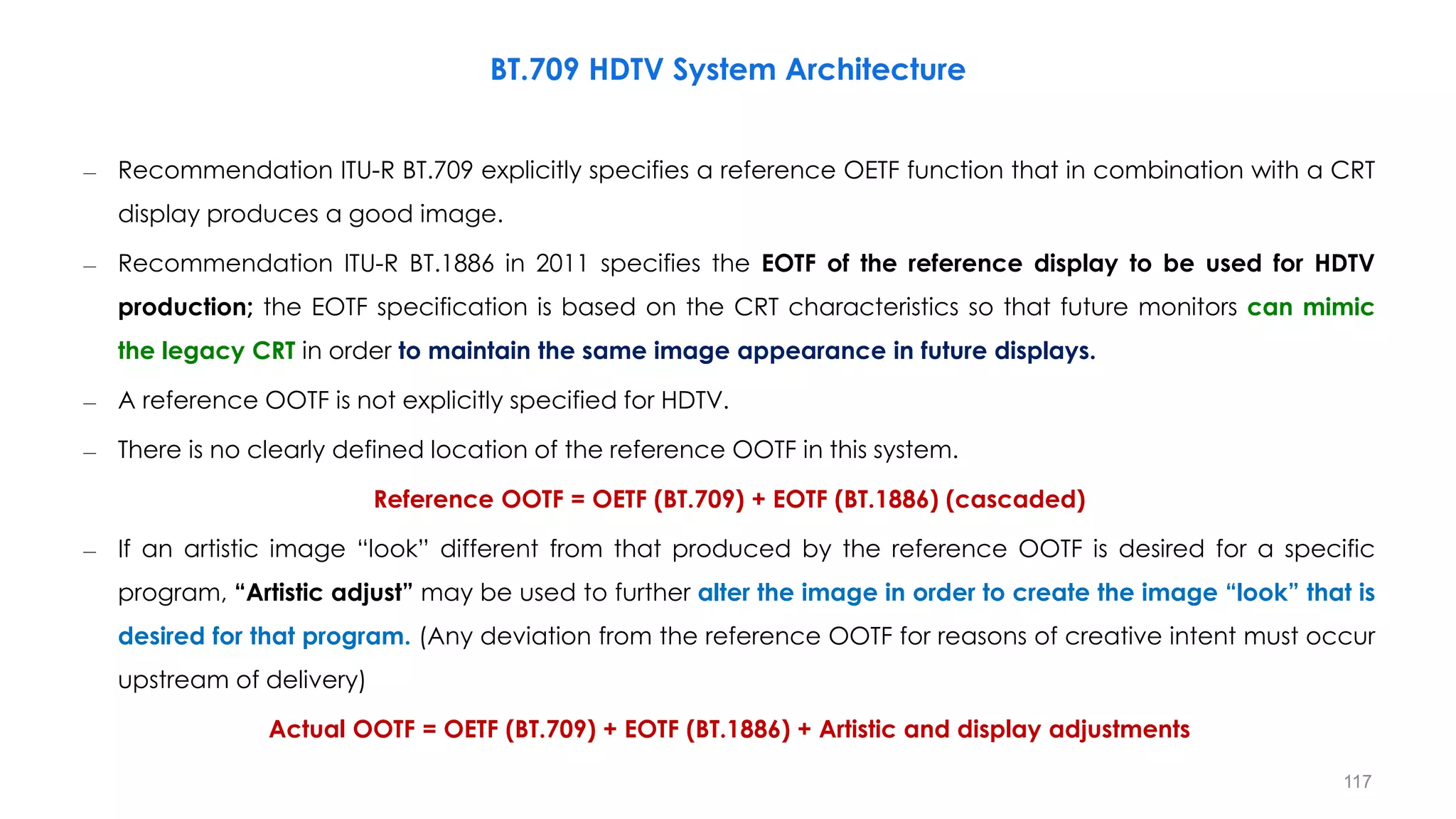
– Recommendation ITU-R BT.709 explicitly specifies a reference OETF function that in combination with a CRT
display produces a good image.
– Recommendation ITU-R BT.1886 in 2011 specifies the EOTF of the reference display to be used for HDTV
production; the EOTF specification is based on the CRT characteristics so that future monitors can mimic
the legacy CRT in order to maintain the same image appearance in future displays.
– A reference OOTF is not explicitly specified for HDTV.
– There is no clearly defined location of the reference OOTF in this system.
Reference OOTF = OETF (BT.709) + EOTF (BT.1886) (cascaded)
– If an artistic image “look” different from that produced by the reference OOTF is desired for a specific
program, “Artistic adjust” may be used to further alter the image in order to create the image “look” that is
desired for that program. (Any deviation from the reference OOTF for reasons of creative intent must occur
upstream of delivery)
Actual OOTF = OETF (BT.709) + EOTF (BT.1886) + Artistic and display adjustments
BT.709 HDTV System Architecture
117
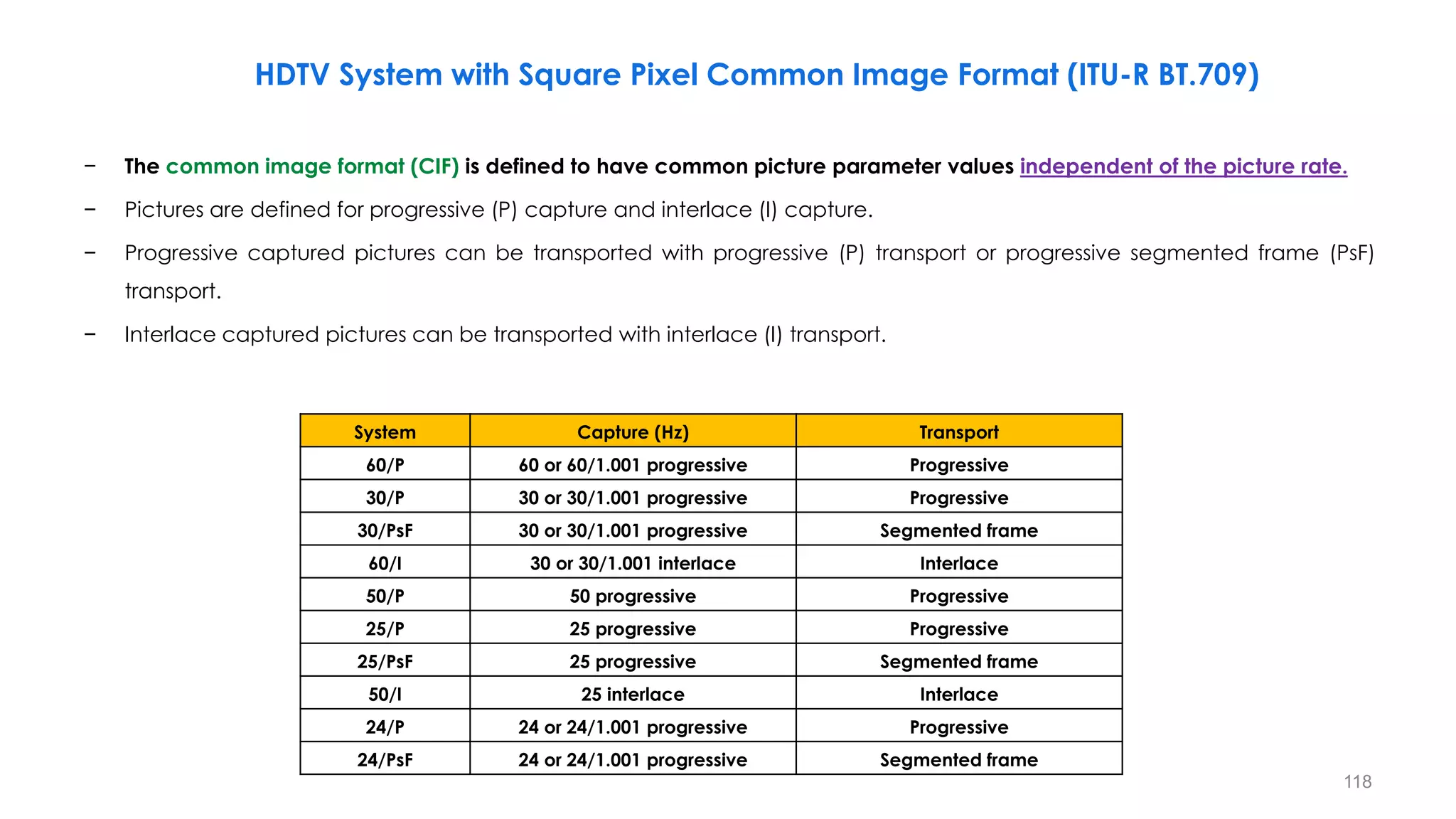
HDTV System with Square Pixel Common Image Format (ITU-R BT.709)
− The common image format (CIF) is defined to have common picture parameter values independent of the picture rate.
− Pictures are defined for progressive (P) capture and interlace (I) capture.
− Progressive captured pictures can be transported with progressive (P) transport or progressive segmented frame (PsF)
transport.
− Interlace captured pictures can be transported with interlace (I) transport.
118
𝛼 = 1 arc minute=0.017 degrees
System Capture (Hz) Transport
60/P 60 or 60/1.001 progressive Progressive
30/P 30 or 30/1.001 progressive Progressive
30/PsF 30 or 30/1.001 progressive Segmented frame
60/I 30 or 30/1.001 interlace Interlace
50/P 50 progressive Progressive
25/P 25 progressive Progressive
25/PsF 25 progressive Segmented frame
50/I 25 interlace Interlace
24/P 24 or 24/1.001 progressive Progressive
24/PsF 24 or 24/1.001 progressive Segmented frame
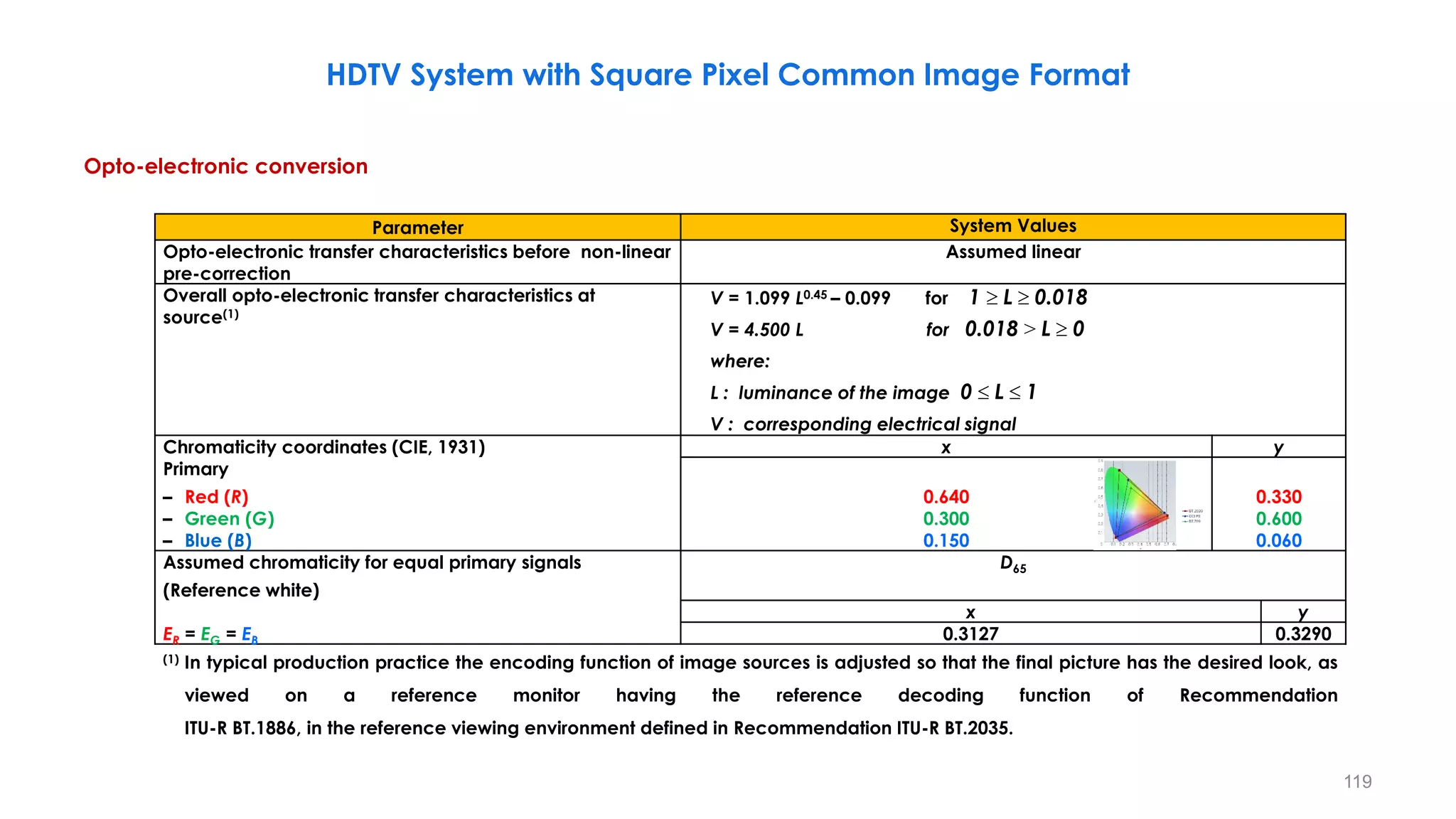
Opto-electronic conversion
119
𝛼 = 1 arc minute=0.017 degrees
Parameter System Values
Opto-electronic transfer characteristics before non-linear
pre-correction
Assumed linear
Overall opto-electronic transfer characteristics at
source(1)
V = 1.099 L0.45 – 0.099 for 1  L  0.018
V = 4.500 L for 0.018 > L  0
where:
L : luminance of the image 0  L  1
V : corresponding electrical signal
Chromaticity coordinates (CIE, 1931) x y
Primary
– Red (R)
– Green (G)
– Blue (B)
0.640
0.300
0.150
0.330
0.600
0.060
Assumed chromaticity for equal primary signals
(Reference white)
D65
x y
ER = EG = EB 0.3127 0.3290
(1) In typical production practice the encoding function of image sources is adjusted so that the final picture has the desired look, as
viewed on a reference monitor having the reference decoding function of Recommendation
ITU-R BT.1886, in the reference viewing environment defined in Recommendation ITU-R BT.2035.
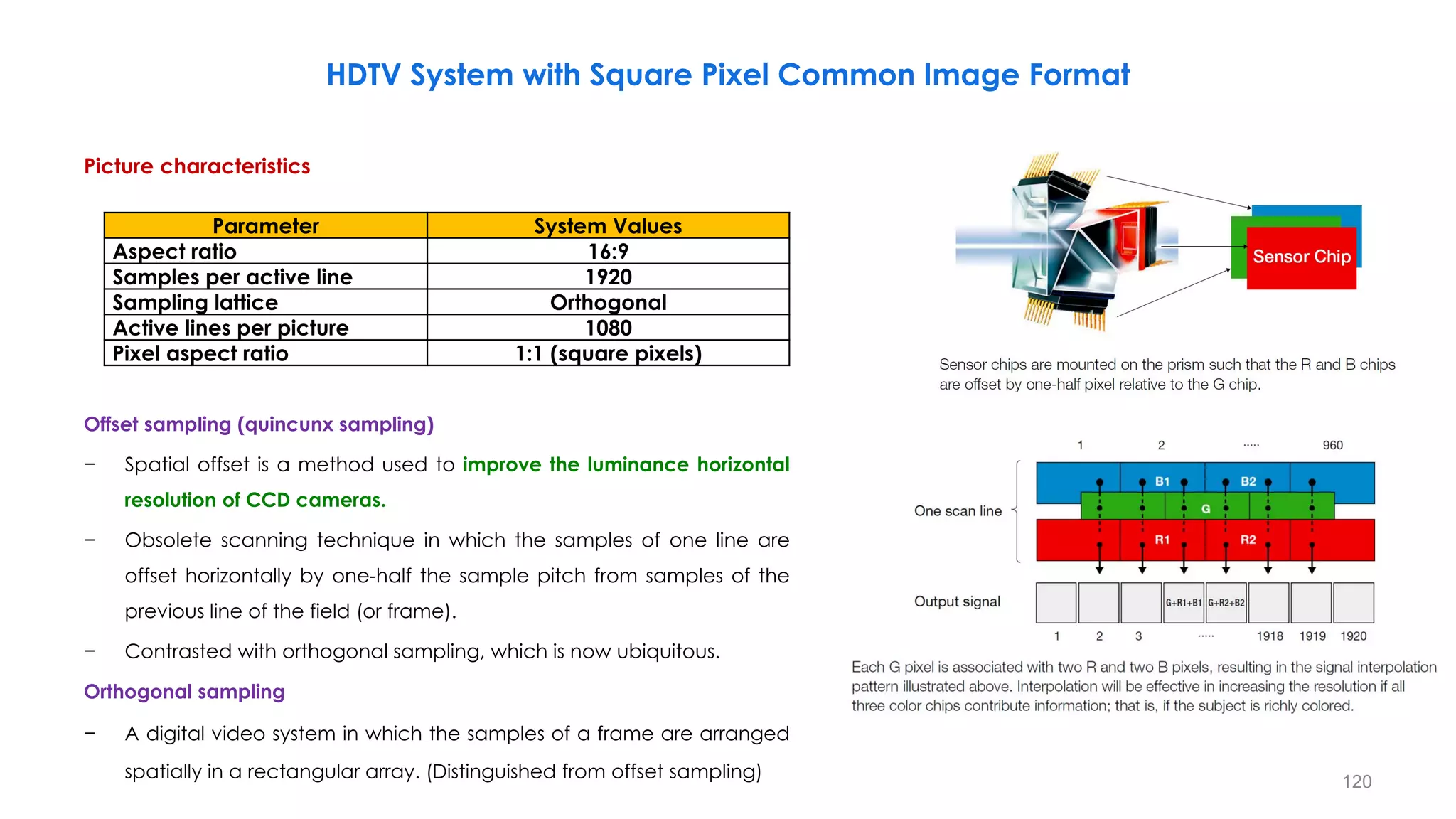
HDTV System with Square Pixel Common Image Format
Picture characteristics
Offset sampling (quincunx sampling)
− Spatial offset is a method used to improve the luminance horizontal
resolution of CCD cameras.
− Obsolete scanning technique in which the samples of one line are
offset horizontally by one-half the sample pitch from samples of the
previous line of the field (or frame).
− Contrasted with orthogonal sampling, which is now ubiquitous.
Orthogonal sampling
− A digital video system in which the samples of a frame are arranged
spatially in a rectangular array. (Distinguished from offset sampling) 120
Parameter System Values
Aspect ratio 16:9
Samples per active line 1920
Sampling lattice Orthogonal
Active lines per picture 1080
Pixel aspect ratio 1:1 (square pixels)
HDTV System with Square Pixel Common Image Format
121
Parameter System Values
Conceptual non-linear pre-correction of primary signals 𝜸 = 𝟎. 𝟒𝟓
Derivation of luminance signal ሖ
𝑬𝒀 = 𝟎. 𝟐𝟏𝟐𝟔 ሖ
𝑬𝑹 + 𝟎. 𝟕𝟏𝟓𝟐 ሖ
𝑬𝑮 + 𝟎. 𝟎𝟕𝟐𝟐 ሖ
𝑬𝑩
Derivation of colour-difference signal (analogue coding)
ሖ
𝑬𝑪𝑩 =
ሖ
𝑬𝑩 − ሖ
𝑬𝒀
𝟏. 𝟖𝟓𝟓𝟔
=
−𝟎. 𝟐𝟏𝟐𝟔 ሖ
𝑬𝑹 + 𝟎. 𝟕𝟏𝟓𝟐 ሖ
𝑬𝑮 + 𝟎. 𝟗𝟐𝟕𝟖 ሖ
𝑬𝑩
𝟏. 𝟖𝟓𝟓𝟔
ሖ
𝑬𝑪𝑹 =
ሖ
𝑬𝑹 − ሖ
𝑬𝒀
𝟏. 𝟓𝟕𝟒𝟖
=
𝟎. 𝟕𝟖𝟕𝟒 ሖ
𝑬𝑹 − 𝟎. 𝟕𝟏𝟓𝟐 ሖ
𝑬𝑮 − 𝟎. 𝟎𝟕𝟐𝟐 ሖ
𝑬𝑩
𝟏. 𝟓𝟕𝟒𝟖
Quantization of RGB, luminance and colour-difference signals(1), (2) ሖ
𝑫𝑹 = 𝑰𝑵𝑻[ 𝟐𝟏𝟗 ሖ
𝑬𝑹 + 𝟏𝟔 . 𝟐𝒏−𝟖]
ሖ
𝑫𝑮 = 𝑰𝑵𝑻[ 𝟐𝟏𝟗 ሖ
𝑬𝑮 + 𝟏𝟔 . 𝟐𝒏−𝟖]
ሖ
𝑫𝑩 = 𝑰𝑵𝑻[ 𝟐𝟏𝟗 ሖ
𝑬𝑩 + 𝟏𝟔 . 𝟐𝒏−𝟖]
ሖ
𝑫𝒀 = 𝑰𝑵𝑻[ 𝟐𝟏𝟗 ሖ
𝑬𝒀 + 𝟏𝟔 . 𝟐𝒏−𝟖]
ሖ
𝑫𝑪𝑩 = 𝑰𝑵𝑻[ 𝟐𝟐𝟒 ሖ
𝑬𝑪𝑩 + 𝟏𝟐𝟖 . 𝟐𝒏−𝟖]
ሖ
𝑫𝑪𝑹 = 𝑰𝑵𝑻[ 𝟐𝟐𝟒 ሖ
𝑬𝑪𝑹 + 𝟏𝟐𝟖 . 𝟐𝒏−𝟖]
Derivation of luminance and colour-difference signals via quantized RGB signals ሖ
𝑫𝒀 = 𝑰𝑵𝑻[𝟎. 𝟐𝟏𝟐𝟔 ሖ
𝑫𝑹 + 𝟎. 𝟕𝟏𝟓𝟐 ሖ
𝑫𝑮 + 𝟎. 𝟎𝟕𝟐𝟐 ሖ
𝑫𝑩]
ሖ
𝑫𝑪𝑩 = 𝑰𝑵𝑻[ −
𝟎.𝟐𝟏𝟐𝟔
𝟏.𝟖𝟓𝟓𝟔
ሖ
𝑫𝑹 −
𝟎.𝟕𝟏𝟓𝟐
𝟏.𝟖𝟓𝟓𝟔
ሖ
𝑫𝑮 +
𝟎.𝟗𝟐𝟕𝟖
𝟏.𝟖𝟓𝟓𝟔
ሖ
𝑫𝑩 .
𝟐𝟐𝟒
𝟐𝟏𝟗
+𝟐𝒏−𝟏]
ሖ
𝑫𝑪𝑹 = 𝑰𝑵𝑻[ −
𝟎.𝟕𝟖𝟕𝟒
𝟏.𝟓𝟕𝟒𝟖
ሖ
𝑫𝑹 −
𝟎.𝟕𝟏𝟓𝟐
𝟏.𝟓𝟕𝟒𝟖
ሖ
𝑫𝑮 −
𝟎.𝟎𝟕𝟐𝟐
𝟏.𝟓𝟕𝟒𝟖
ሖ
𝑫𝑩 .
𝟐𝟐𝟒
𝟐𝟏𝟗
+𝟐𝒏−𝟏]
(1)“n” denotes the number of the bit length of the quantized signal.
(2)The operator INT returns the value of 0 for fractional parts in the range of 0 to 0.4999... and +1 for fractional parts in the range of 0.5 to 0.9999..., i.e. it rounds up
fractions above 0.5.
Signal format
HDTV System with Square Pixel Common Image Format
𝑃′
𝑏 = 0.5389 (𝐵′ − 𝑌′) ሖ
= 𝑬𝑪𝑩=
ሖ
𝑬𝑩 − ሖ
𝑬𝒀
𝟏. 𝟖𝟓𝟓𝟔
𝑃′
𝑟 = 0.6350 𝑅′
− 𝑌′
= ሖ
𝑬𝑪𝑹 =
ሖ
𝑬𝑹 − ሖ
𝑬𝒀
𝟏.𝟓𝟕𝟒𝟖
122
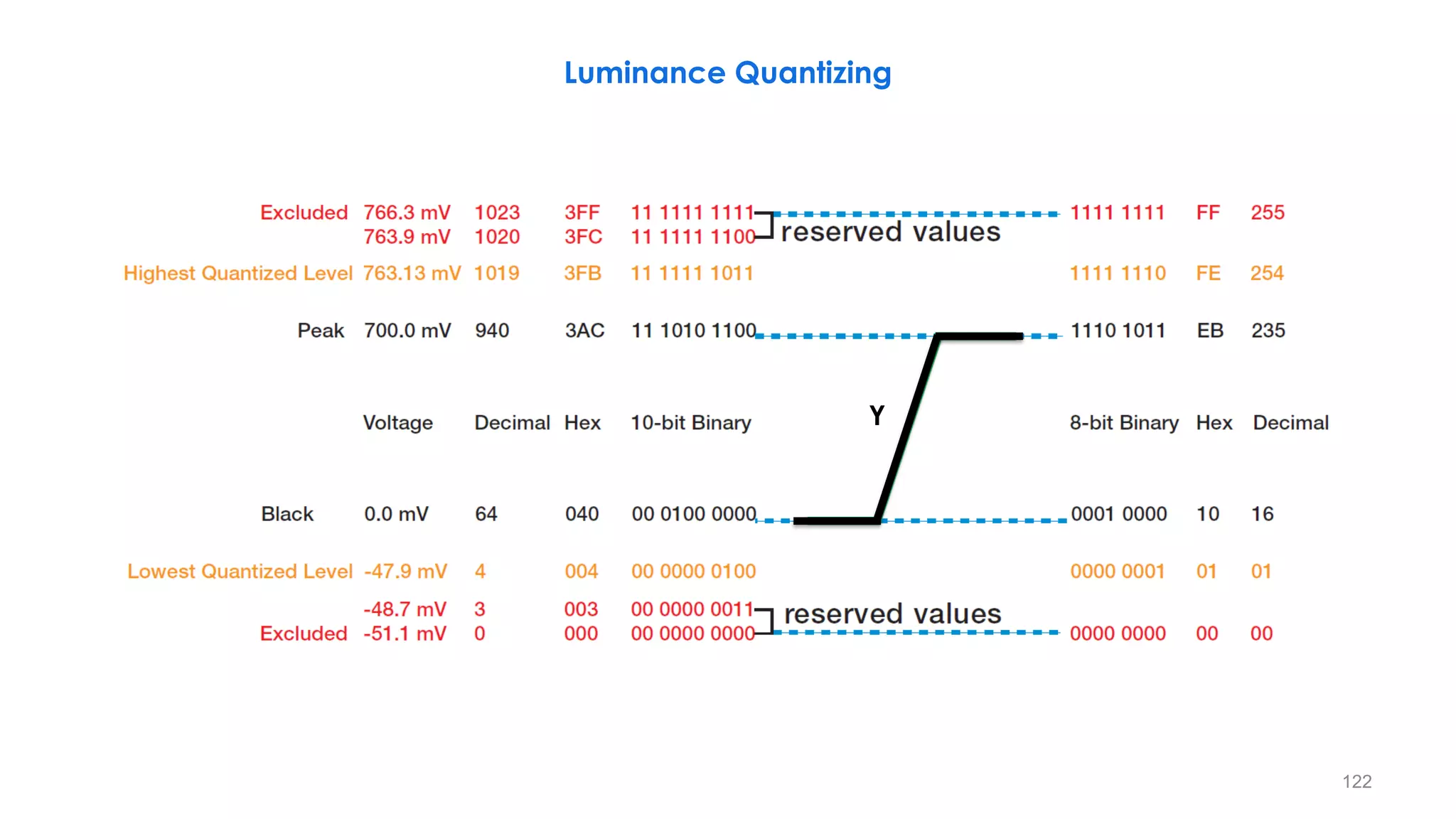
Luminance Quantizing
Y
123
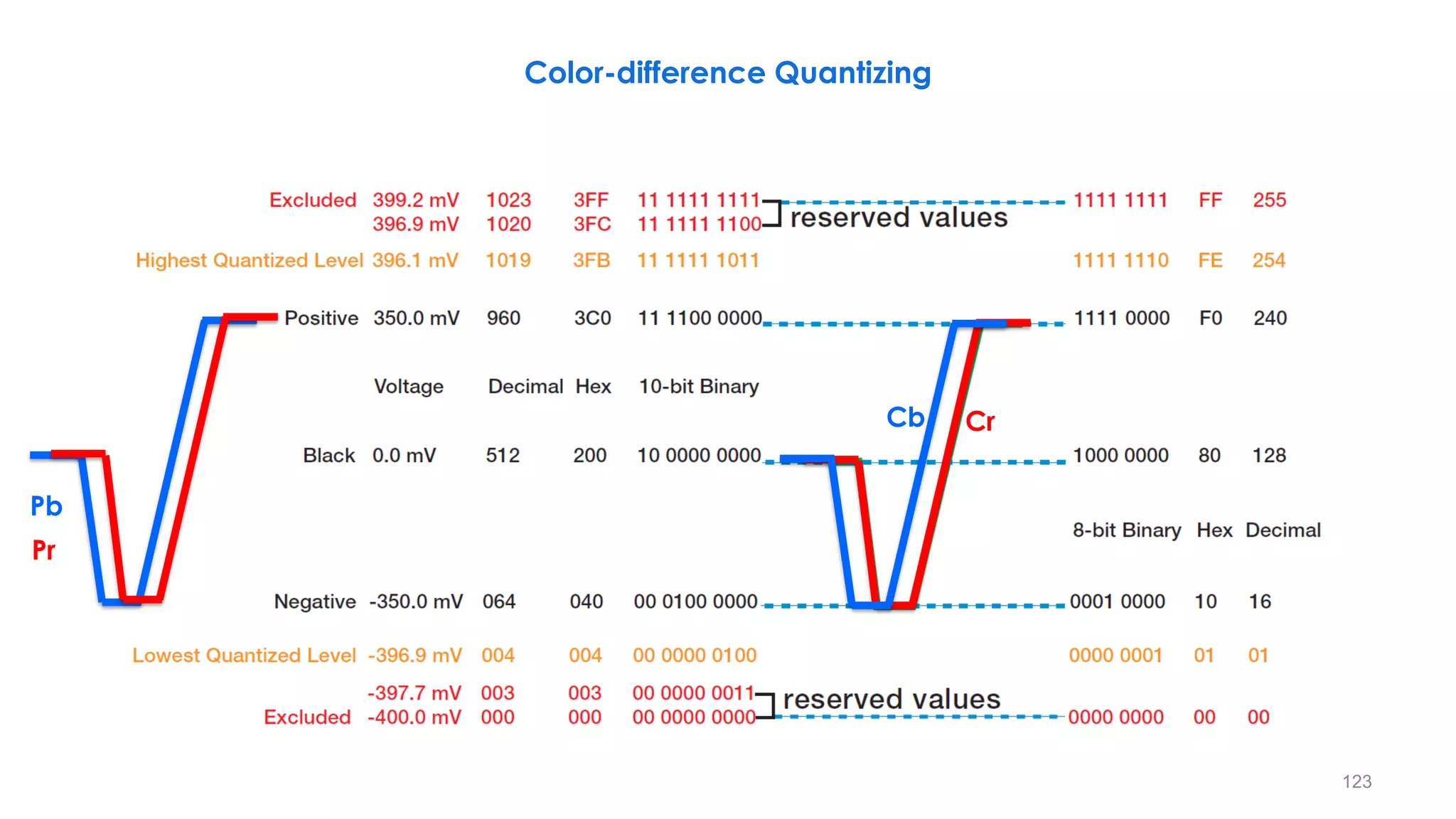
Color-difference Quantizing
Cb Cr
Pb
Pr
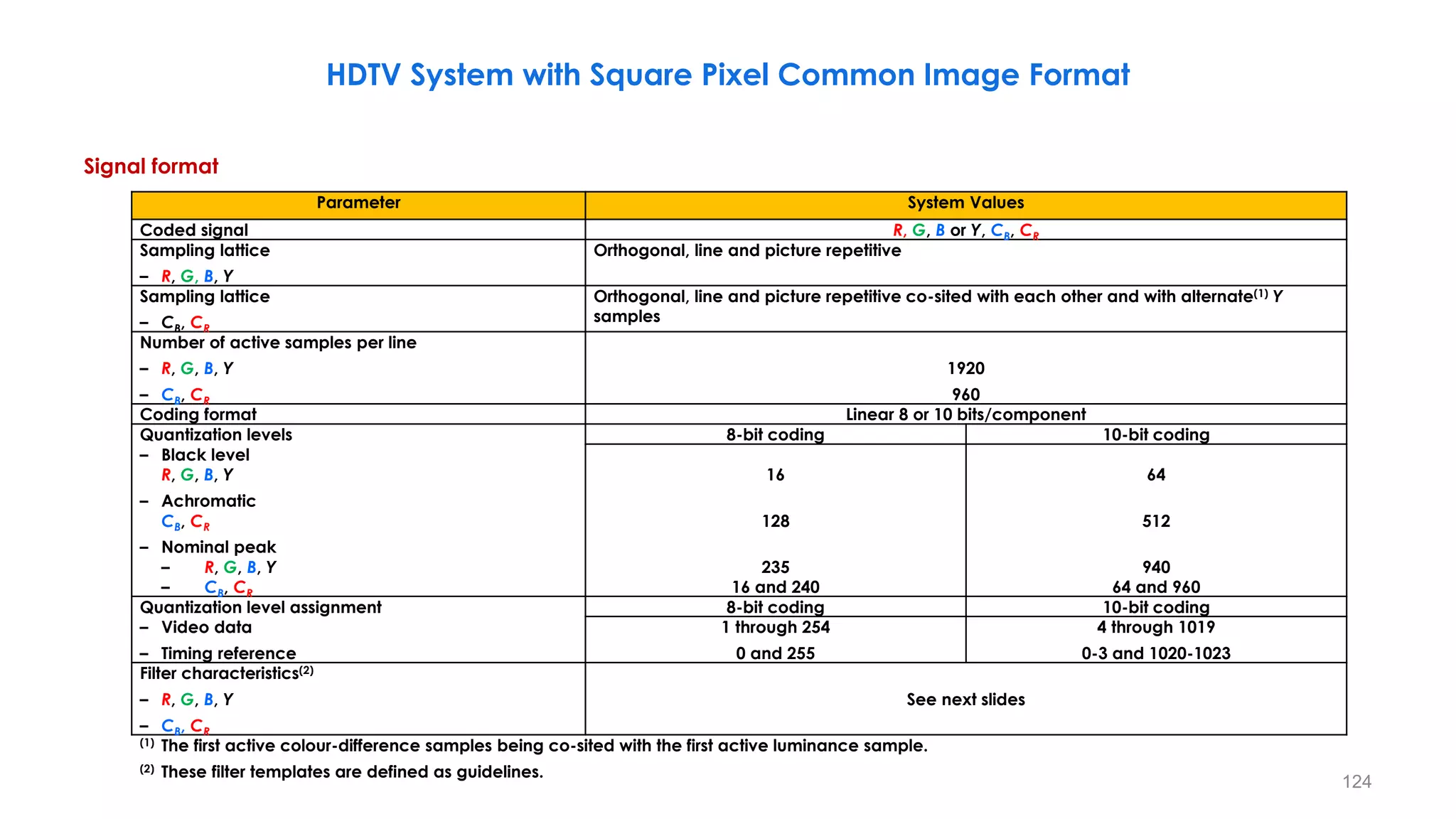
Signal format
124
𝛼 = 1 arc minute=0.017 degrees
Parameter System Values
Coded signal R, G, B or Y, CB, CR
Sampling lattice
– R, G, B, Y
Orthogonal, line and picture repetitive
Sampling lattice
– CB, CR
Orthogonal, line and picture repetitive co-sited with each other and with alternate(1) Y
samples
Number of active samples per line
– R, G, B, Y
– CB, CR
1920
960
Coding format Linear 8 or 10 bits/component
Quantization levels 8-bit coding 10-bit coding
– Black level
R, G, B, Y
– Achromatic
CB, CR
– Nominal peak
– R, G, B, Y
– CB, CR
16
128
235
16 and 240
64
512
940
64 and 960
Quantization level assignment 8-bit coding 10-bit coding
– Video data
– Timing reference
1 through 254
0 and 255
4 through 1019
0-3 and 1020-1023
Filter characteristics(2)
– R, G, B, Y
– CB, CR
See next slides
(1) The first active colour-difference samples being co-sited with the first active luminance sample.
(2) These filter templates are defined as guidelines.
HDTV System with Square Pixel Common Image Format
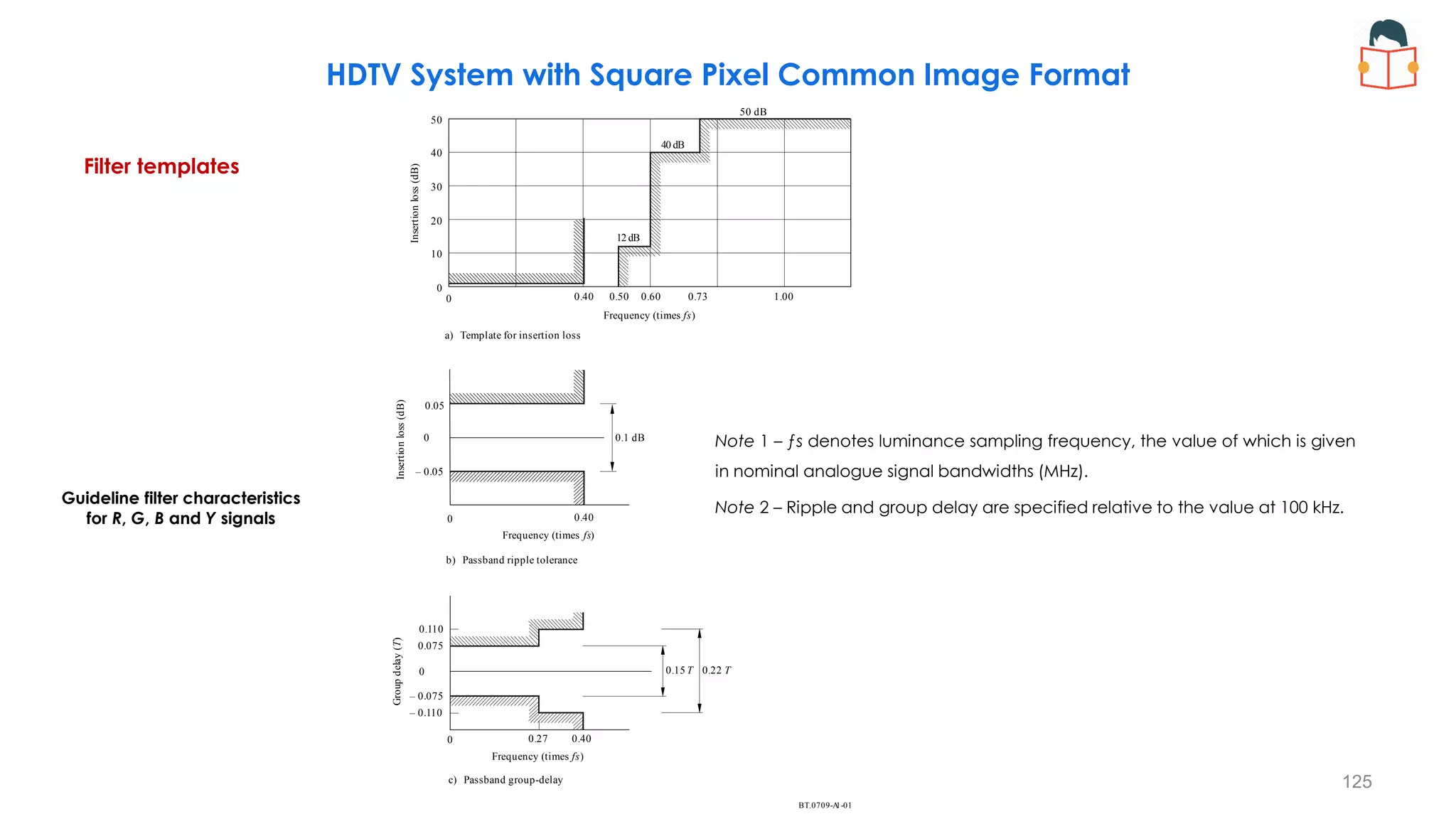
Filter templates
125
𝛼 = 1 arc minute=0.017 degrees
HDTV System with Square Pixel Common Image Format
Guideline filter characteristics
for R, G, B and Y signals
BT. 1-01
0709-A
Insertion
loss
(dB)
a) Template for insertion loss
Frequency (times )
fs
Insertion
loss
(dB)
0.1 dB
b) Passband ripple tolerance
c) Passband group-delay
0.05
– 0.05
0.15 T 0.22 T
Frequency (times )
fs
Group
delay
(
)
T
– 0.110
0.075
– 0.075
0.27 0.40
0.40
0.40 0.50 0.60 0.73 1.00
Frequency (times )
fs
0.110
50 dB
40 dB
12 dB
50
40
30
20
10
0
0
0
0
0
0
Note 1 – ƒs denotes luminance sampling frequency, the value of which is given
in nominal analogue signal bandwidths (MHz).
Note 2 – Ripple and group delay are specified relative to the value at 100 kHz.
126
𝛼 = 1 arc minute=0.017 degrees
HDTV System with Square Pixel Common Image Format
BT. A1-02
0709-
Insertion
loss
(dB)
a) Template for insertion loss
Frequency (times )
fs
Insertion
loss
(dB)
0.1 dB
b) Passband ripple tolerance
c) Passband group-delay
0.05
– 0.05
0.15 T 0.22 T
Frequency (times )
fs
Group
de
lay
(
)
T
– 0.110
0.075
– 0.075
0.14 0.20
0.20
0.20 0.25 0.30 0.37 0.50
Frequency (times )
fs
0.110
50 dB
40 dB
6 dB
50
40
30
20
10
0
0
0
0
0
0
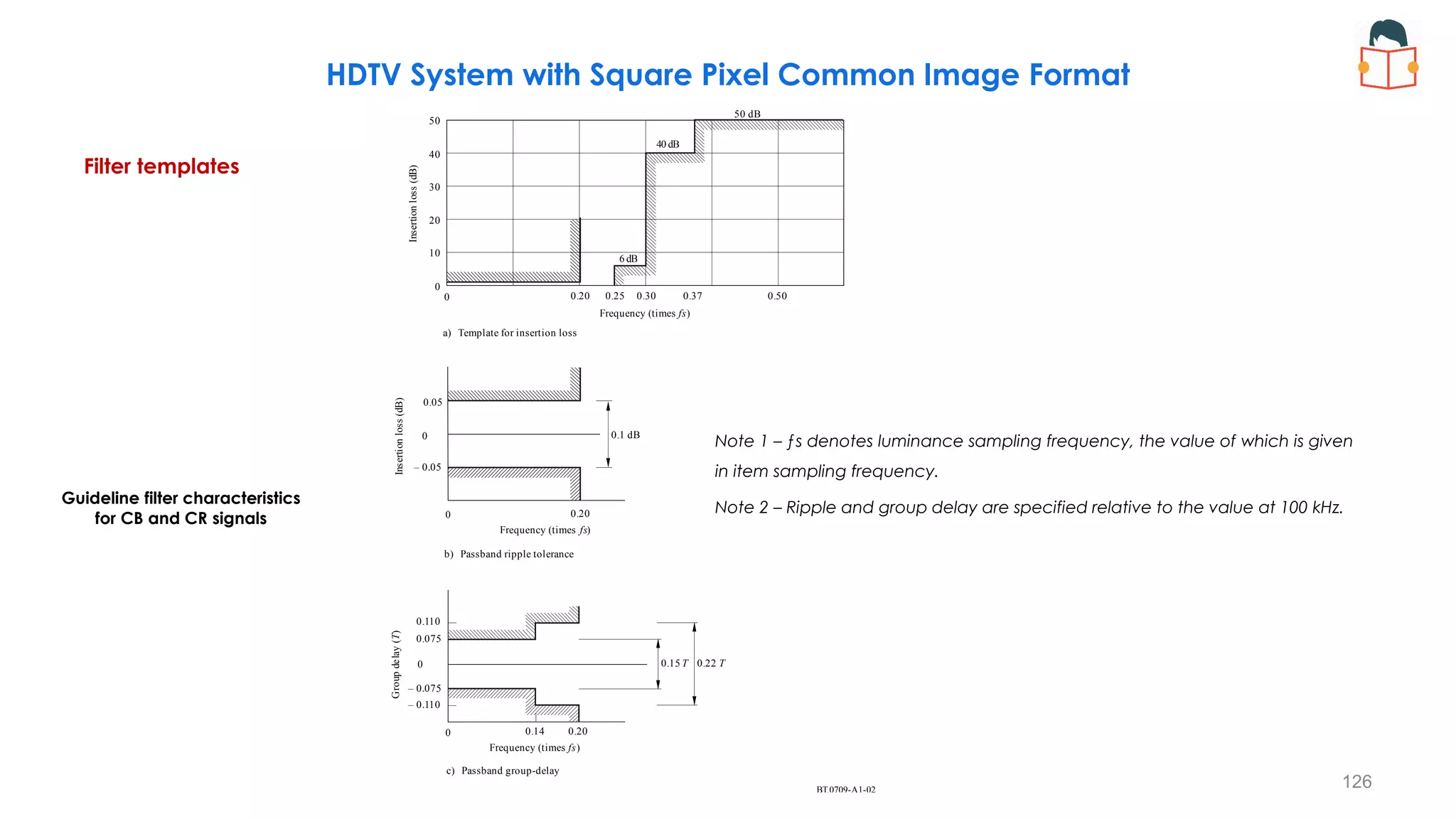
Filter templates
Guideline filter characteristics
for CB and CR signals
Note 1 – ƒs denotes luminance sampling frequency, the value of which is given
in item sampling frequency.
Note 2 – Ripple and group delay are specified relative to the value at 100 kHz.
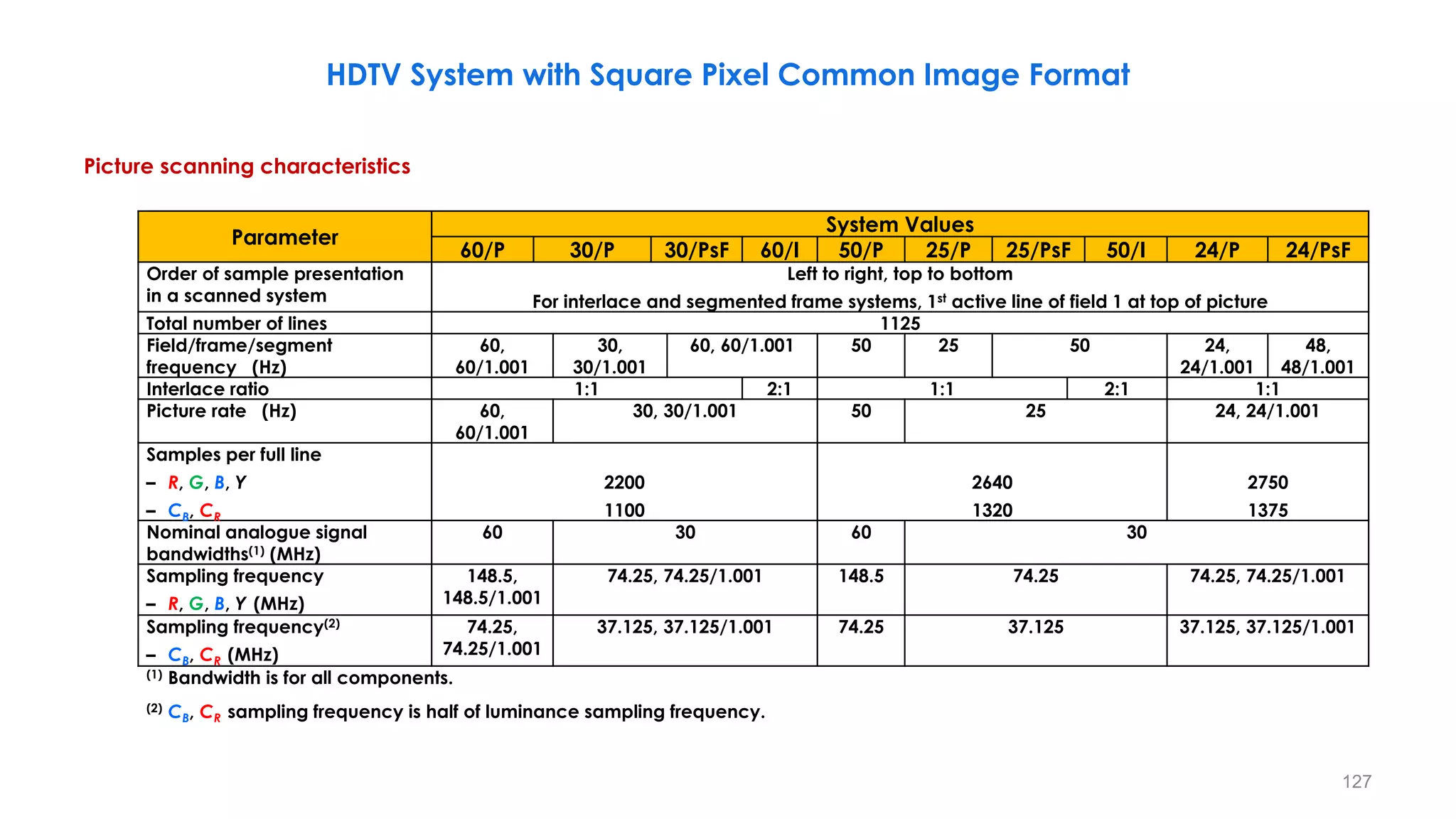
Picture scanning characteristics
127
𝛼 = 1 arc minute=0.017 degrees
Parameter
System Values
60/P 30/P 30/PsF 60/I 50/P 25/P 25/PsF 50/I 24/P 24/PsF
Order of sample presentation
in a scanned system
Left to right, top to bottom
For interlace and segmented frame systems, 1st active line of field 1 at top of picture
Total number of lines 1125
Field/frame/segment
frequency (Hz)
60,
60/1.001
30,
30/1.001
60, 60/1.001 50 25 50 24,
24/1.001
48,
48/1.001
Interlace ratio 1:1 2:1 1:1 2:1 1:1
Picture rate (Hz) 60,
60/1.001
30, 30/1.001 50 25 24, 24/1.001
Samples per full line
– R, G, B, Y
– CB, CR
2200
1100
2640
1320
2750
1375
Nominal analogue signal
bandwidths(1) (MHz)
60 30 60 30
Sampling frequency
– R, G, B, Y (MHz)
148.5,
148.5/1.001
74.25, 74.25/1.001 148.5 74.25 74.25, 74.25/1.001
Sampling frequency(2)
– CB, CR (MHz)
74.25,
74.25/1.001
37.125, 37.125/1.001 74.25 37.125 37.125, 37.125/1.001
(1) Bandwidth is for all components.
(2) CB, CR sampling frequency is half of luminance sampling frequency.
HDTV System with Square Pixel Common Image Format
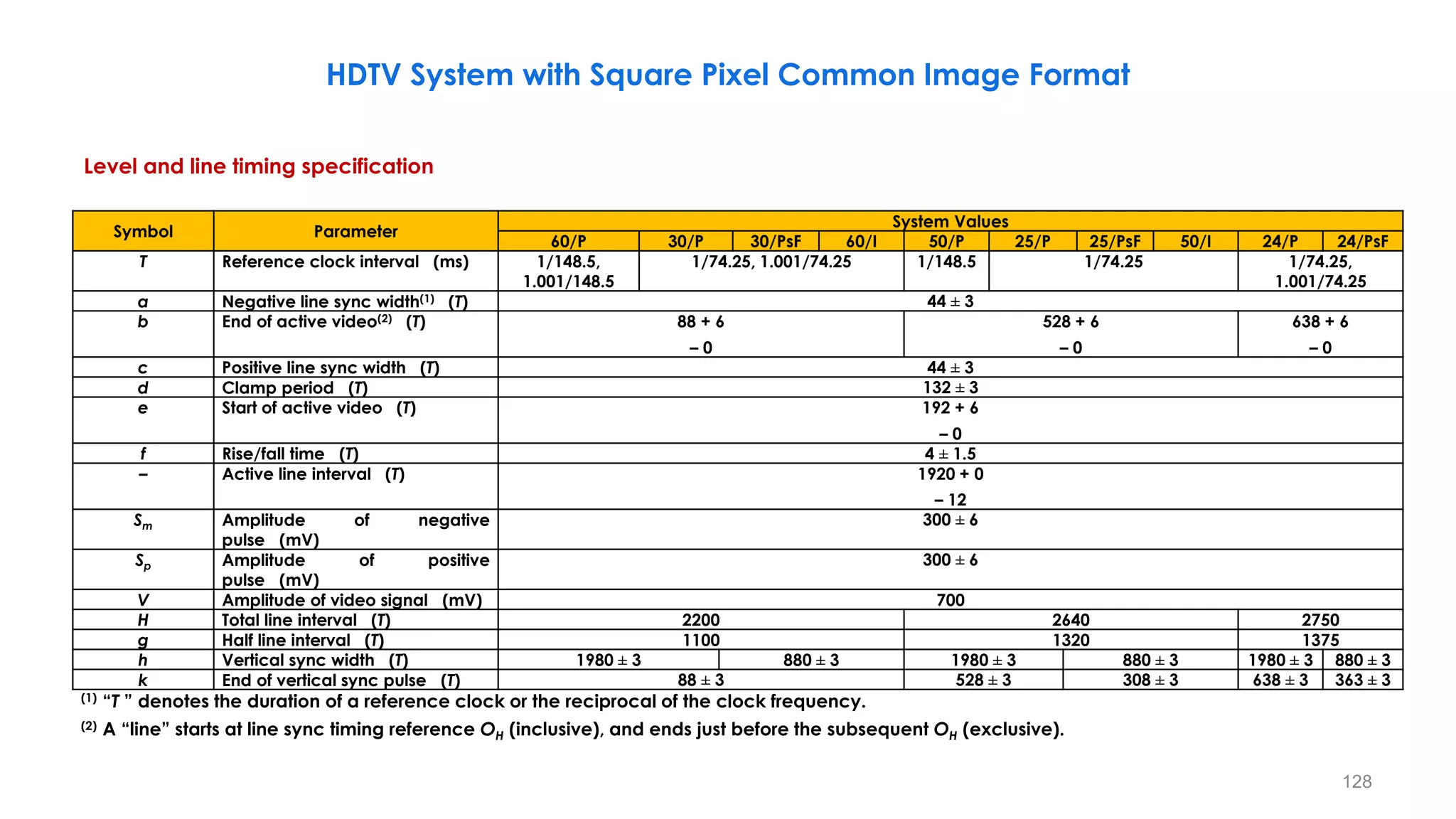
Level and line timing specification
128
𝛼 = 1 arc minute=0.017 degrees
Symbol Parameter
System Values
60/P 30/P 30/PsF 60/I 50/P 25/P 25/PsF 50/I 24/P 24/PsF
T Reference clock interval (ms) 1/148.5,
1.001/148.5
1/74.25, 1.001/74.25 1/148.5 1/74.25 1/74.25,
1.001/74.25
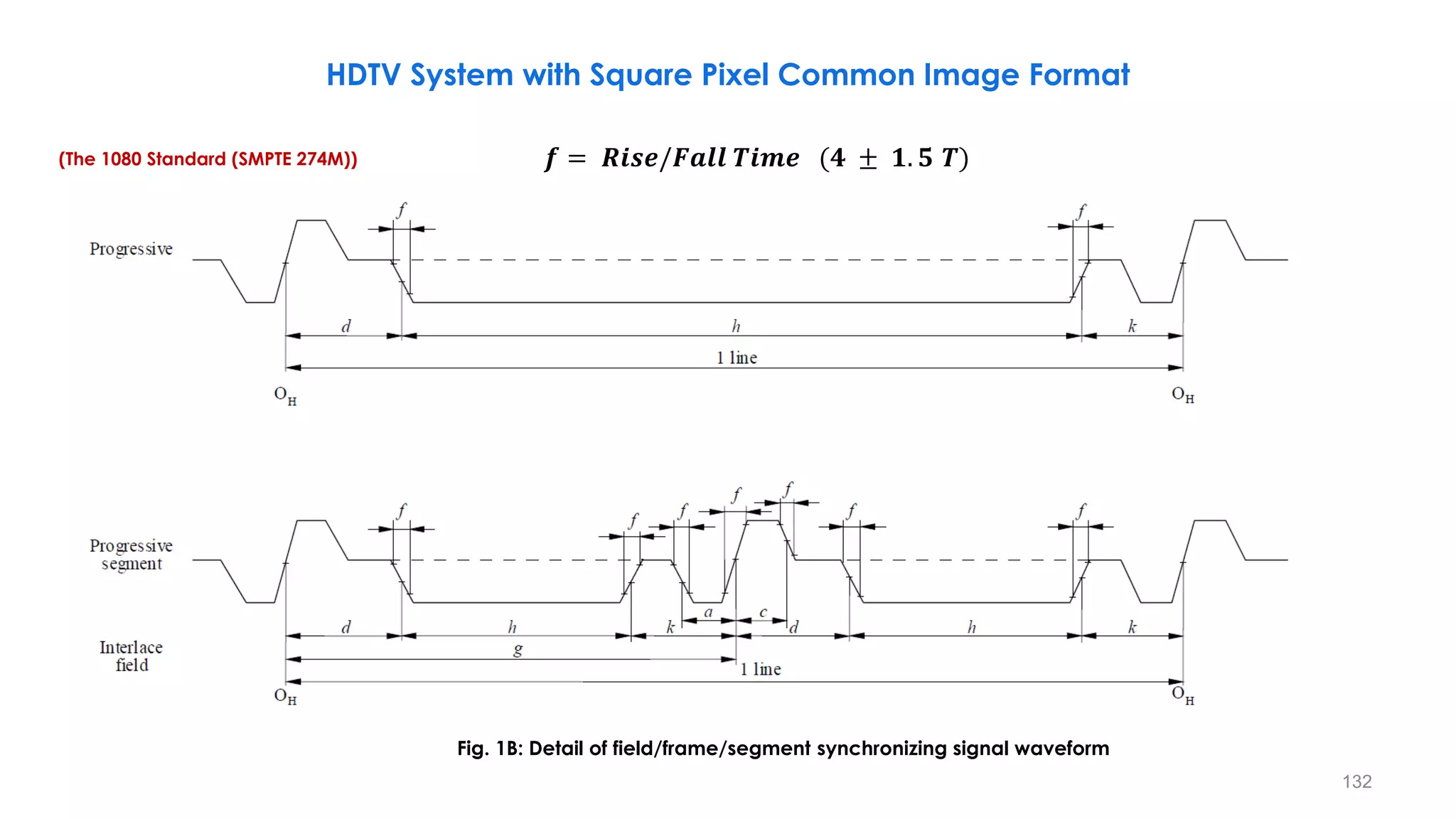
a Negative line sync width(1) (T) 44 ± 3
b End of active video(2) (T) 88 + 6
– 0
528 + 6
– 0
638 + 6
– 0
c Positive line sync width (T) 44 ± 3
d Clamp period (T) 132 ± 3
e Start of active video (T) 192 + 6
– 0
f Rise/fall time (T) 4 ± 1.5
– Active line interval (T) 1920 + 0
– 12
Sm Amplitude of negative
pulse (mV)
300 ± 6
Sp Amplitude of positive
pulse (mV)
300 ± 6
V Amplitude of video signal (mV) 700
H Total line interval (T) 2200 2640 2750
g Half line interval (T) 1100 1320 1375
h Vertical sync width (T) 1980 ± 3 880 ± 3 1980 ± 3 880 ± 3 1980 ± 3 880 ± 3
k End of vertical sync pulse (T) 88 ± 3 528 ± 3 308 ± 3 638 ± 3 363 ± 3
(1) “T ” denotes the duration of a reference clock or the reciprocal of the clock frequency.
(2) A “line” starts at line sync timing reference OH (inclusive), and ends just before the subsequent OH (exclusive).
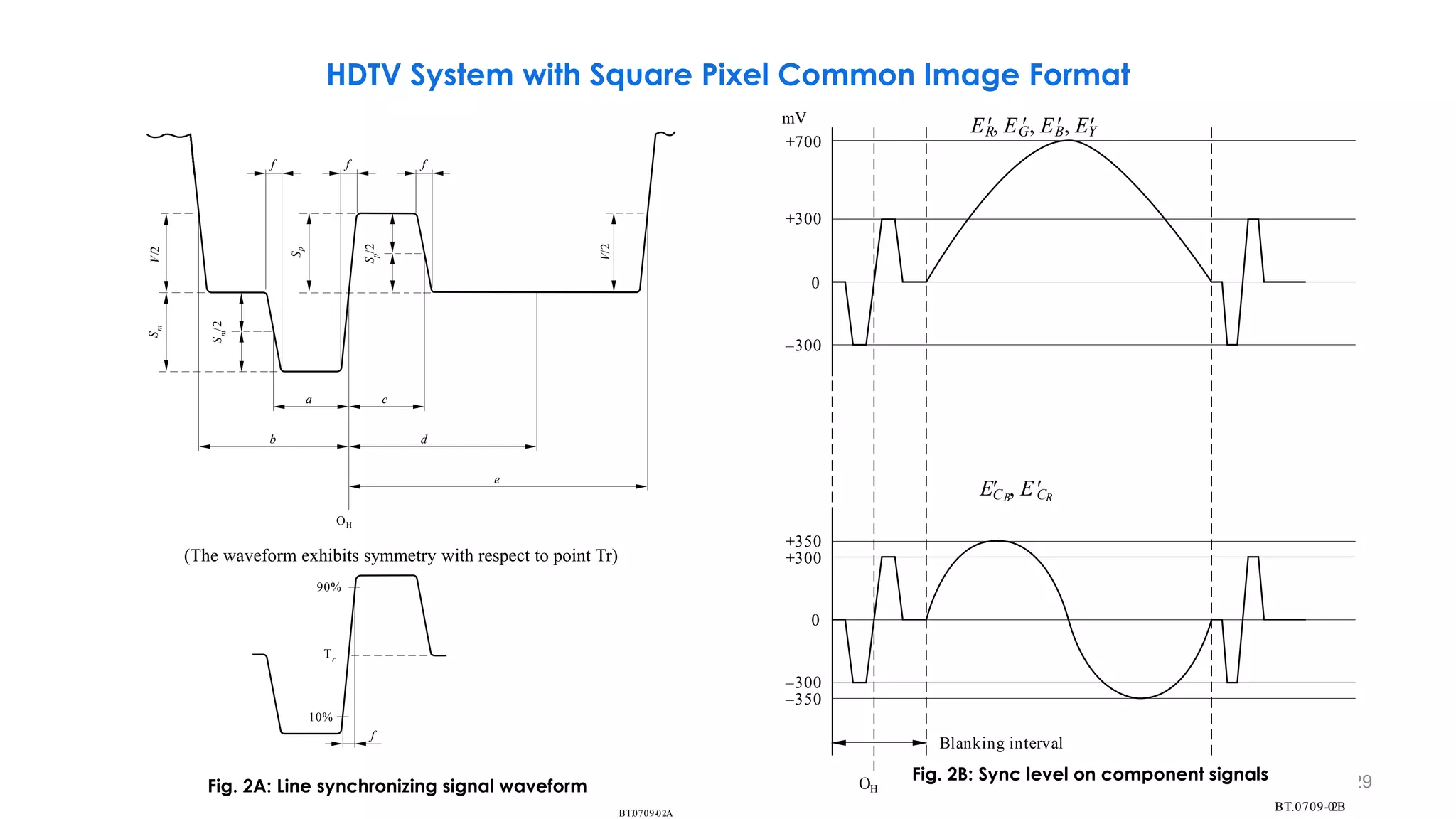
HDTV System with Square Pixel Common Image Format
129
BT. 02
0709- A
(The waveform exhibits symmetry with respect to point T )
r
f f f
V/2
S
m
S
m
/2
S
p
V/2
b
a c
d
e
OH
90%
10%
f
S
p
/2
Tr
BT. 2
0709-0 B
Blanking interval
+700
+300
0
–300
+350
+300
0
–300
–350
OH
mV
ECB
 , E
CR
ER
, EG
, EB
, EY

Fig. 2A: Line synchronizing signal waveform
Fig. 2B: Sync level on component signals
(The waveform exhibits symmetry with respect to point Tr)
HDTV System with Square Pixel Common Image Format
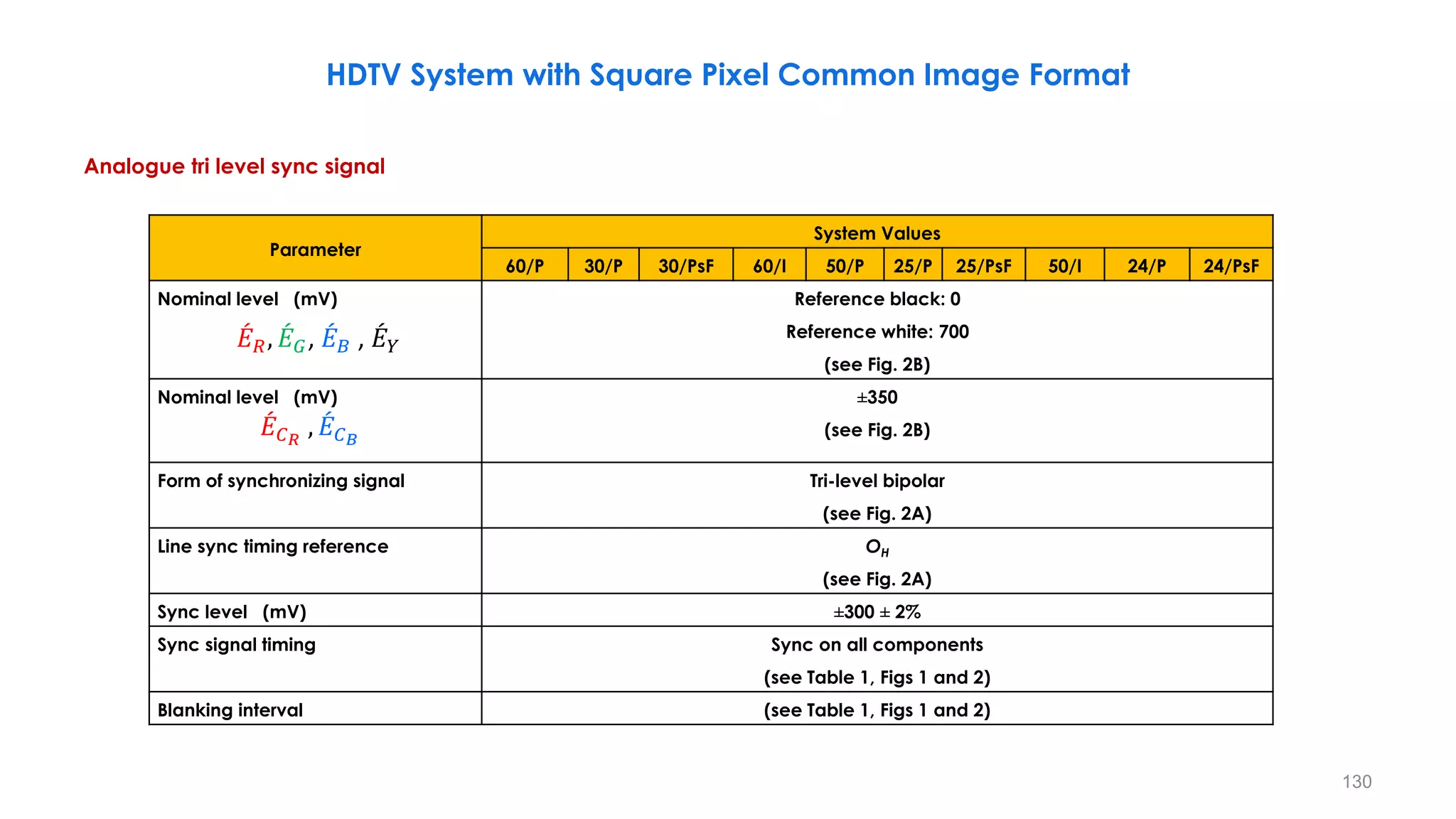
Analogue tri level sync signal
130
𝛼 = 1 arc minute=0.017 degrees
Parameter
System Values
60/P 30/P 30/PsF 60/I 50/P 25/P 25/PsF 50/I 24/P 24/PsF
Nominal level (mV) Reference black: 0
Reference white: 700
(see Fig. 2B)
Nominal level (mV) ±350
(see Fig. 2B)
Form of synchronizing signal Tri-level bipolar
(see Fig. 2A)
Line sync timing reference OH
(see Fig. 2A)
Sync level (mV) ±300 ± 2%
Sync signal timing Sync on all components
(see Table 1, Figs 1 and 2)
Blanking interval (see Table 1, Figs 1 and 2)
HDTV System with Square Pixel Common Image Format
ሖ
𝐸𝑅, ሖ
𝐸𝐺, ሖ
𝐸𝐵 , ሖ
𝐸𝑌
ሖ
𝐸𝐶𝑅
, ሖ
𝐸𝐶𝐵
131
HDTV System with Square Pixel Common Image Format
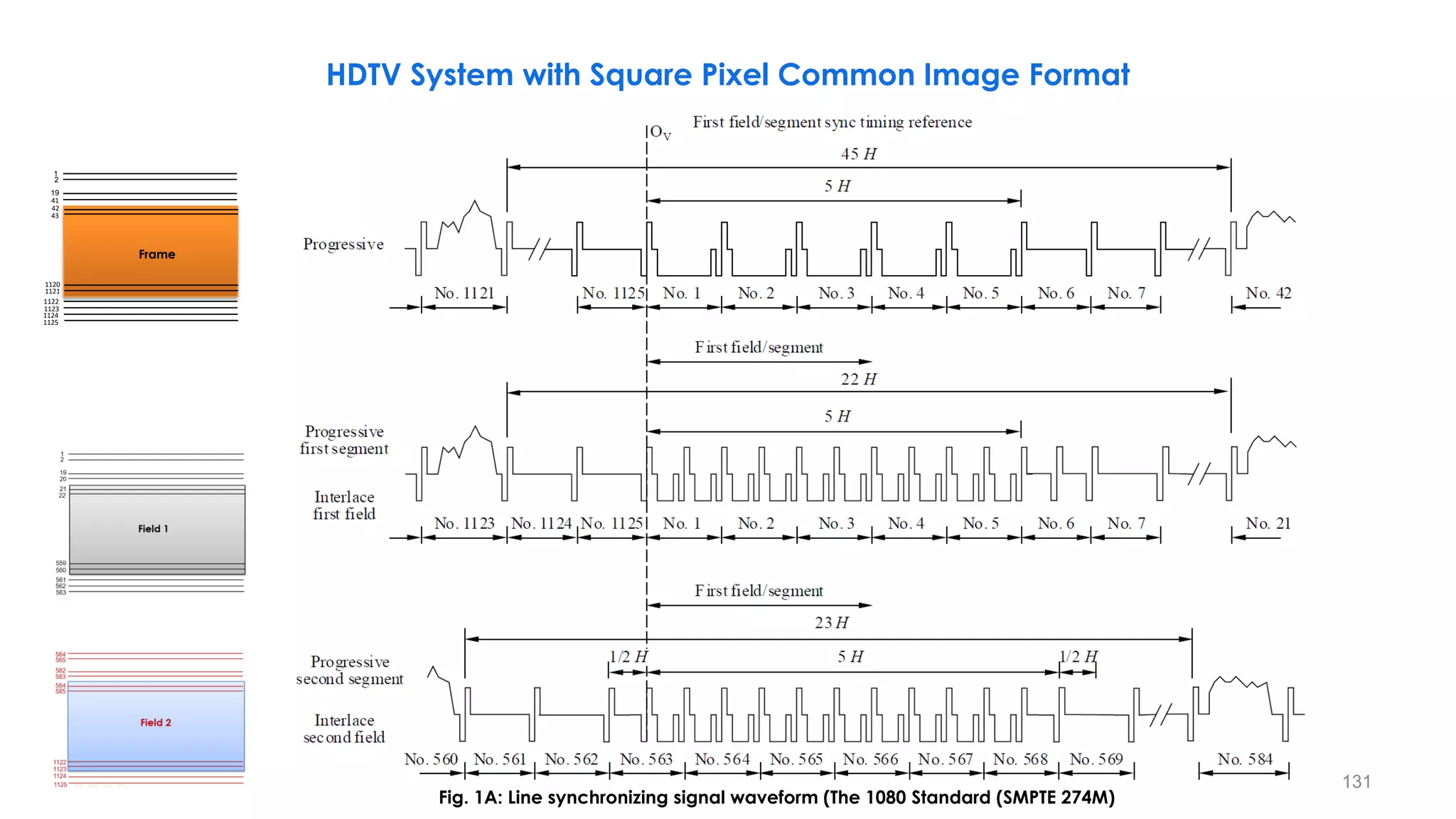
Fig. 1A: Line synchronizing signal waveform (The 1080 Standard (SMPTE 274M)
19
43
1
41
42
1121
1122
1124
2
1120
1123
Frame
1125
132
Fig. 1B: Detail of field/frame/segment synchronizing signal waveform
HDTV System with Square Pixel Common Image Format
(The 1080 Standard (SMPTE 274M)) 𝒇 = 𝑹𝒊𝒔𝒆/𝑭𝒂𝒍𝒍 𝑻𝒊𝒎𝒆 (𝟒 ± 𝟏. 𝟓 𝑻)
133
134
System Timing
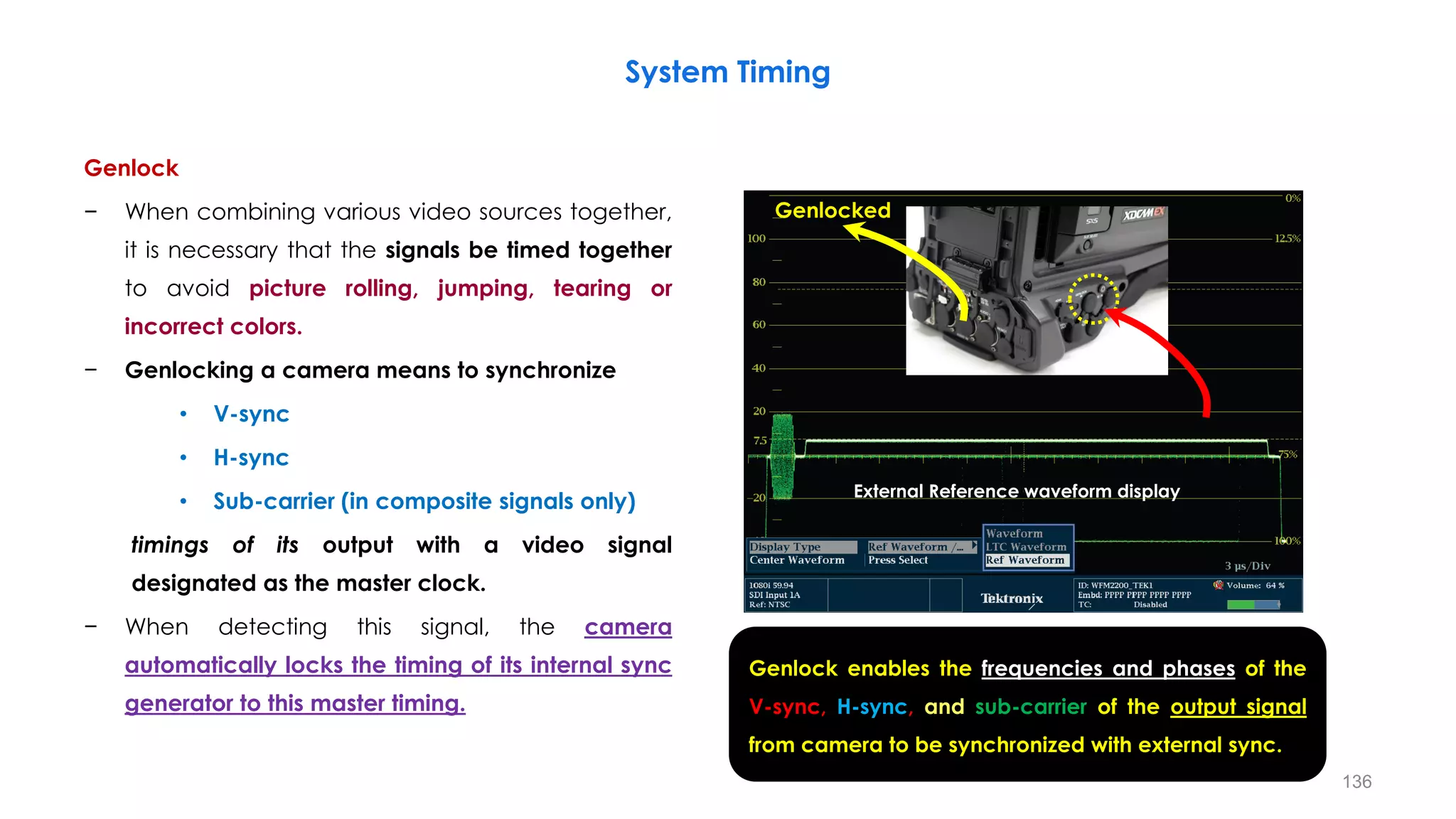
Genlock
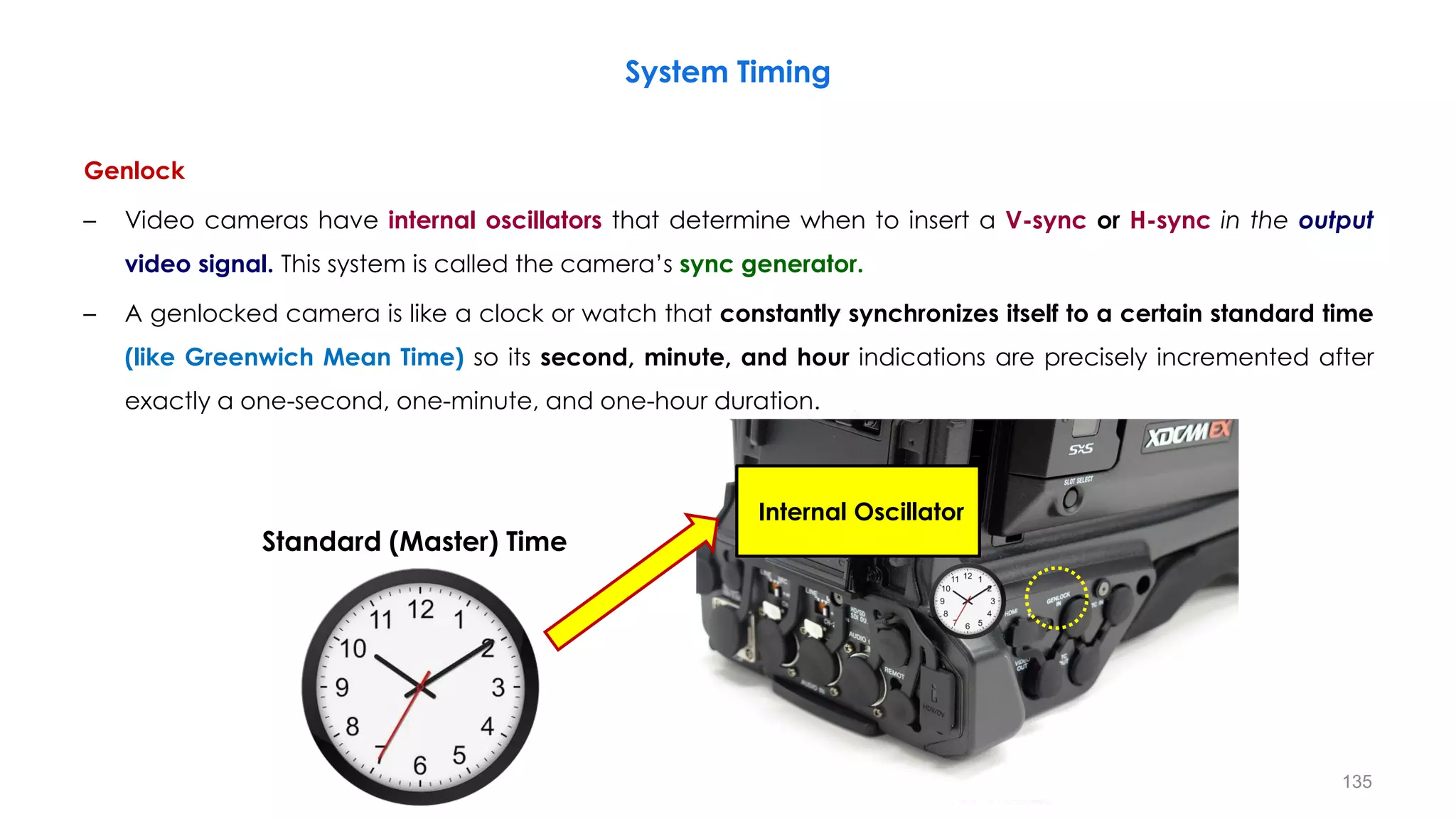
– Video cameras have internal oscillators that determine when to insert a V-sync or H-sync in the output
video signal. This system is called the camera’s sync generator.
– A genlocked camera is like a clock or watch that constantly synchronizes itself to a certain standard time
(like Greenwich Mean Time) so its second, minute, and hour indications are precisely incremented after
exactly a one-second, one-minute, and one-hour duration.
Internal Oscillator
135
System Timing
Standard (Master) Time
Genlock
− When combining various video sources together,
it is necessary that the signals be timed together
to avoid picture rolling, jumping, tearing or
incorrect colors.
− Genlocking a camera means to synchronize
• V-sync
• H-sync
• Sub-carrier (in composite signals only)
timings of its output with a video signal
designated as the master clock.
− When detecting this signal, the camera
automatically locks the timing of its internal sync
generator to this master timing.
136
System Timing
External Reference waveform display
Genlocked
Genlock enables the frequencies and phases of the
V-sync, H-sync, and sub-carrier of the output signal
from camera to be synchronized with external sync.
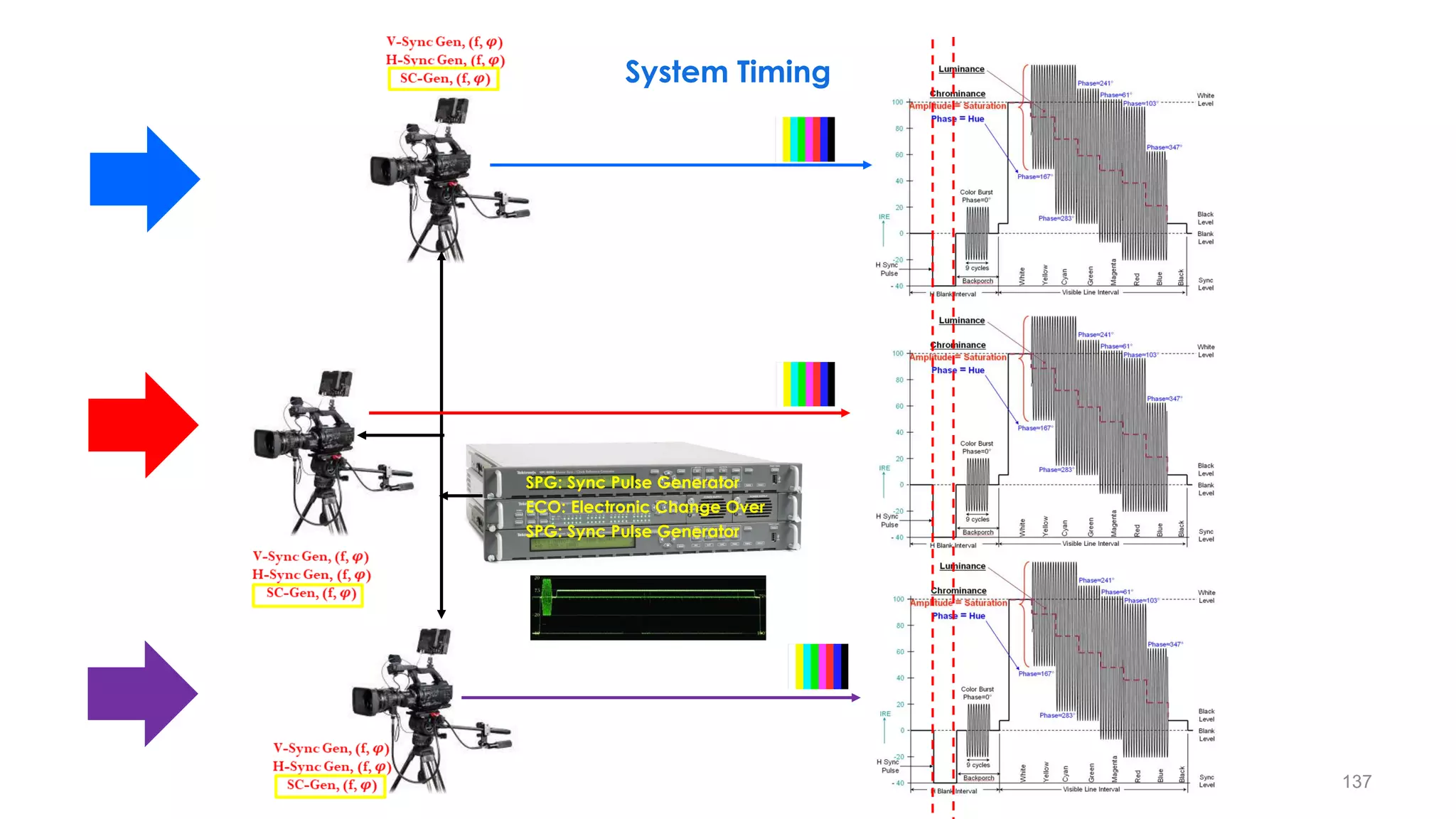
SPG: Sync Pulse Generator
ECO: Electronic Change Over
137
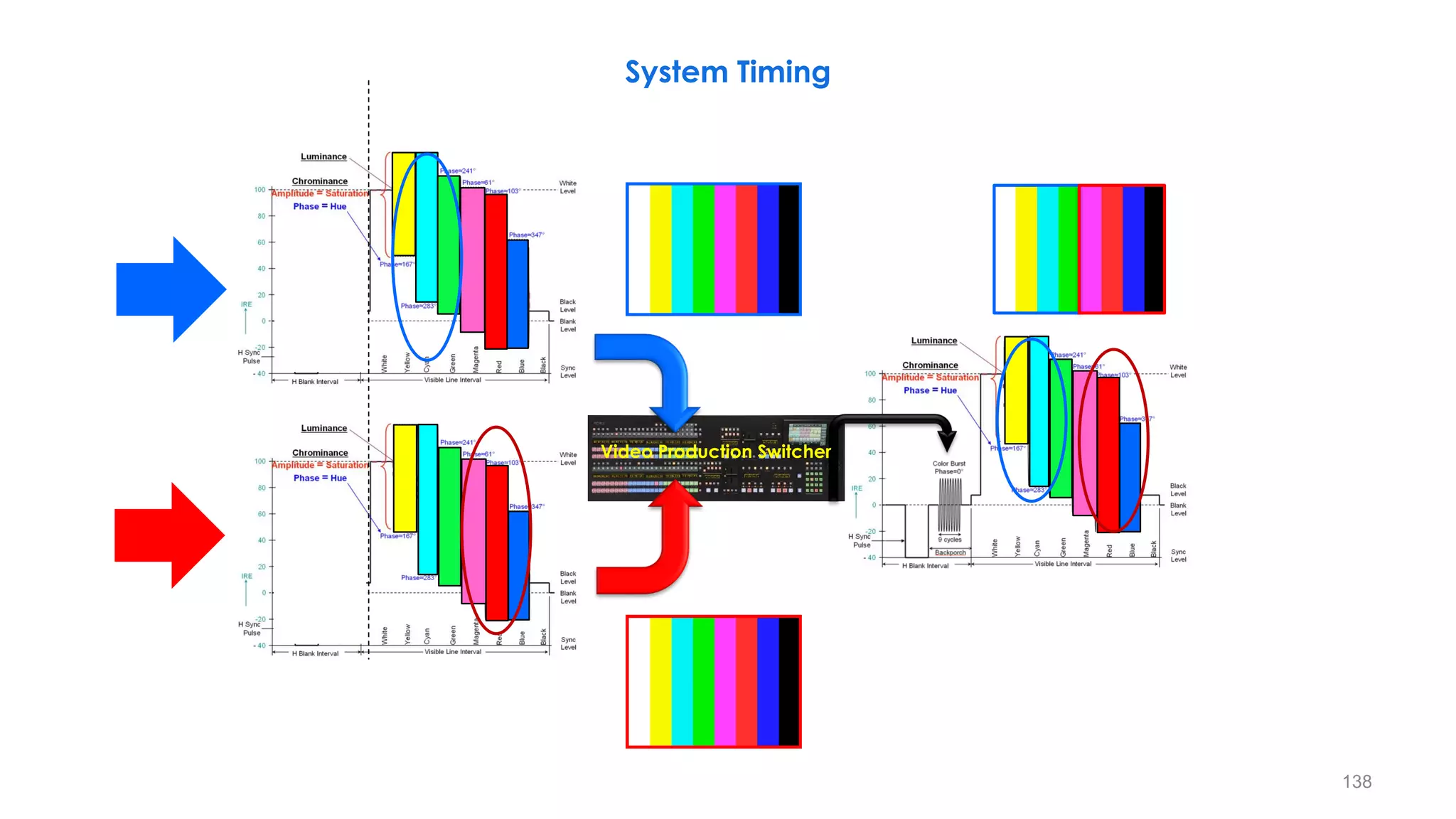
System Timing
138
Video Production Switcher
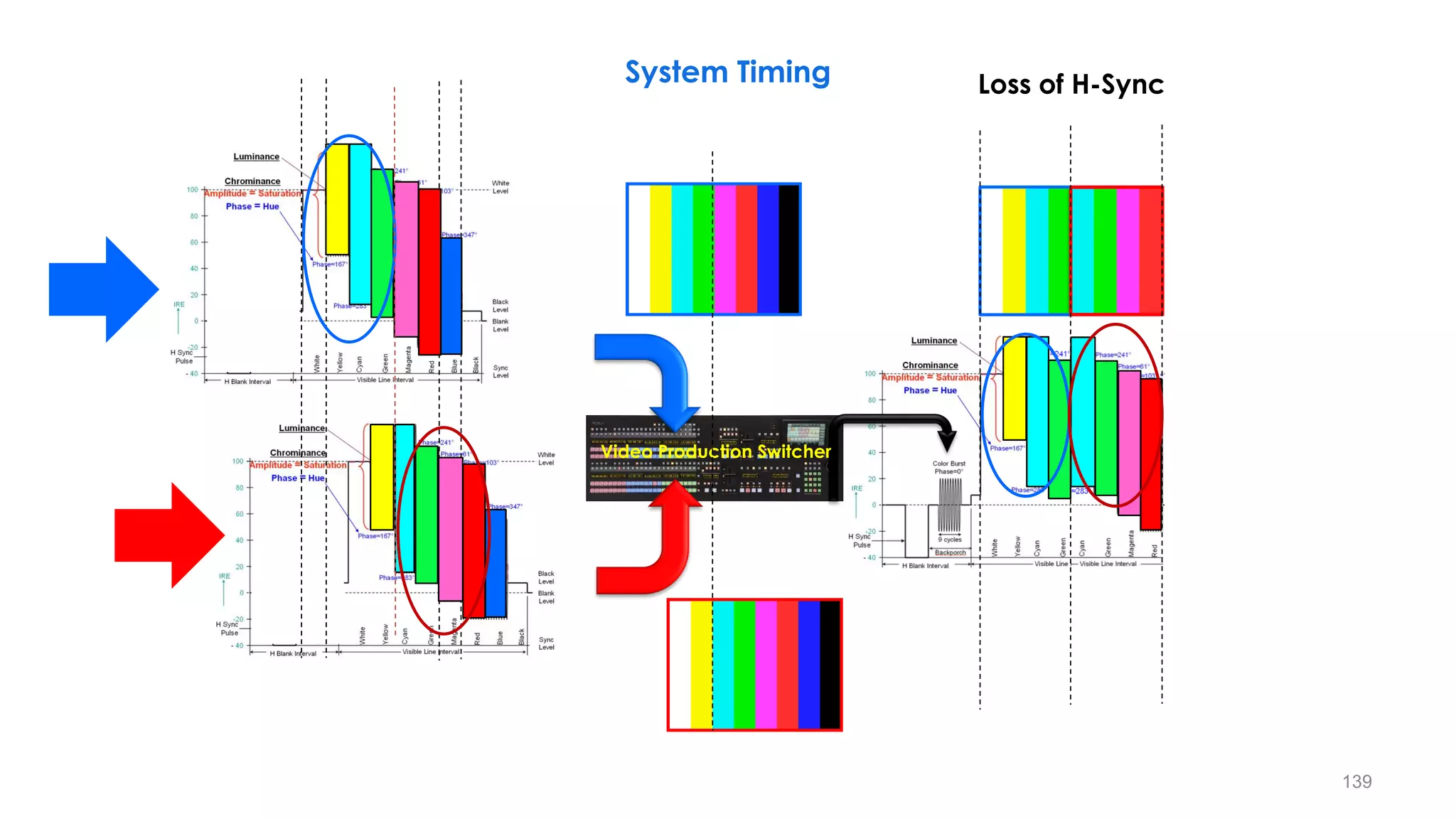
System Timing
139
Video Production Switcher
Loss of H-Sync
System Timing
140
Video Production Switcher
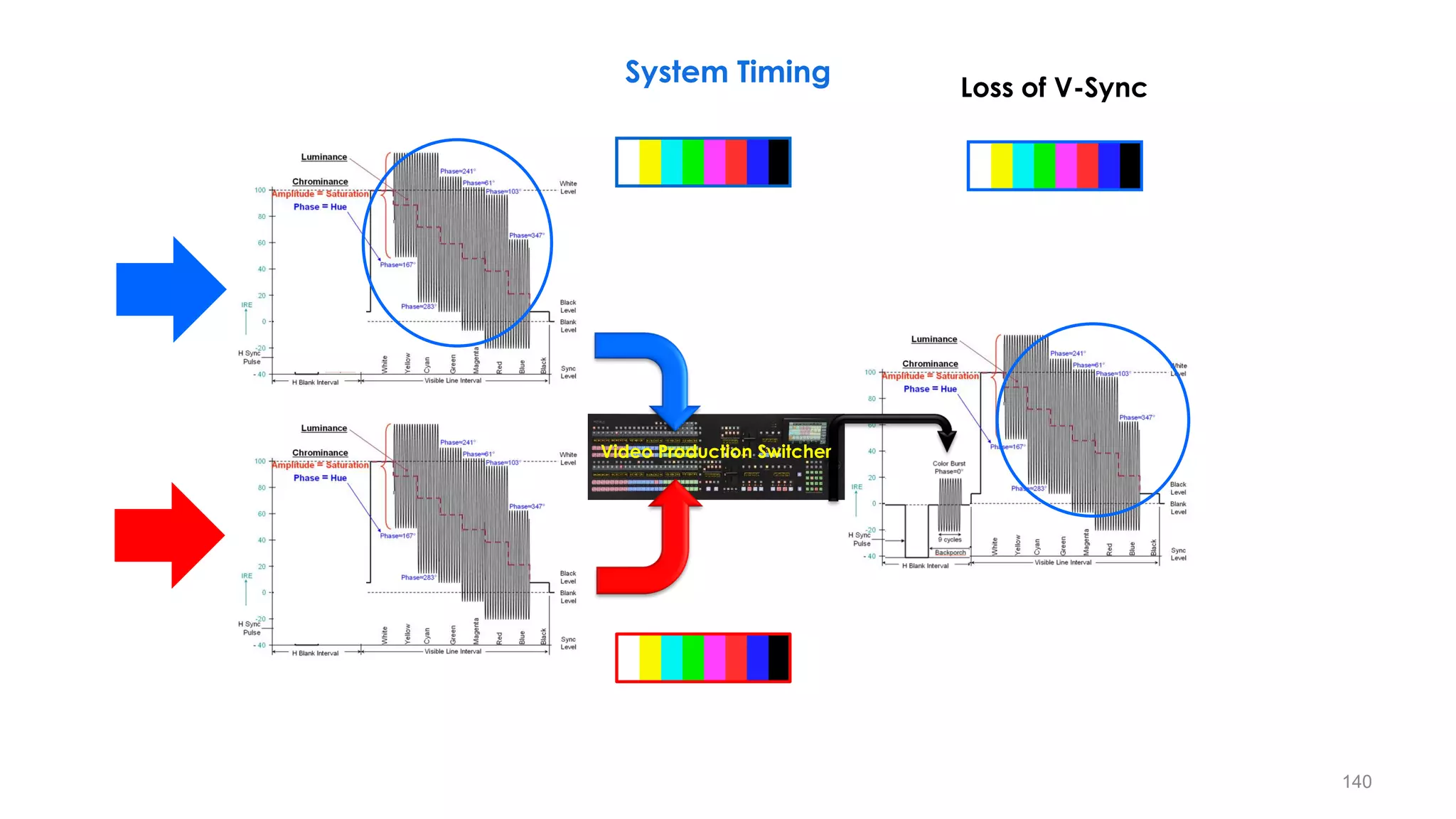
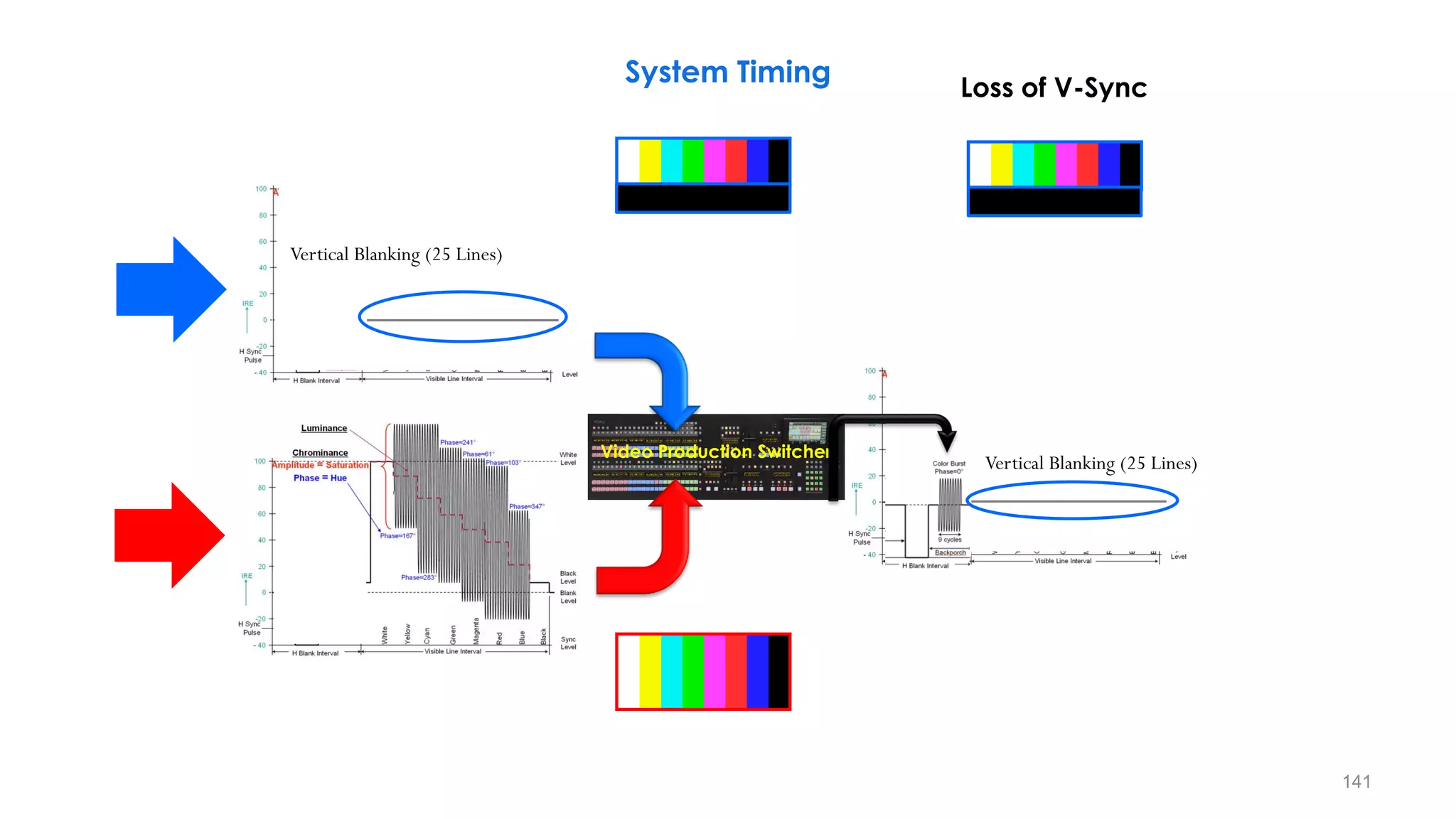
Loss of V-Sync
System Timing
141
Video Production Switcher
Vertical Blanking (25 Lines)
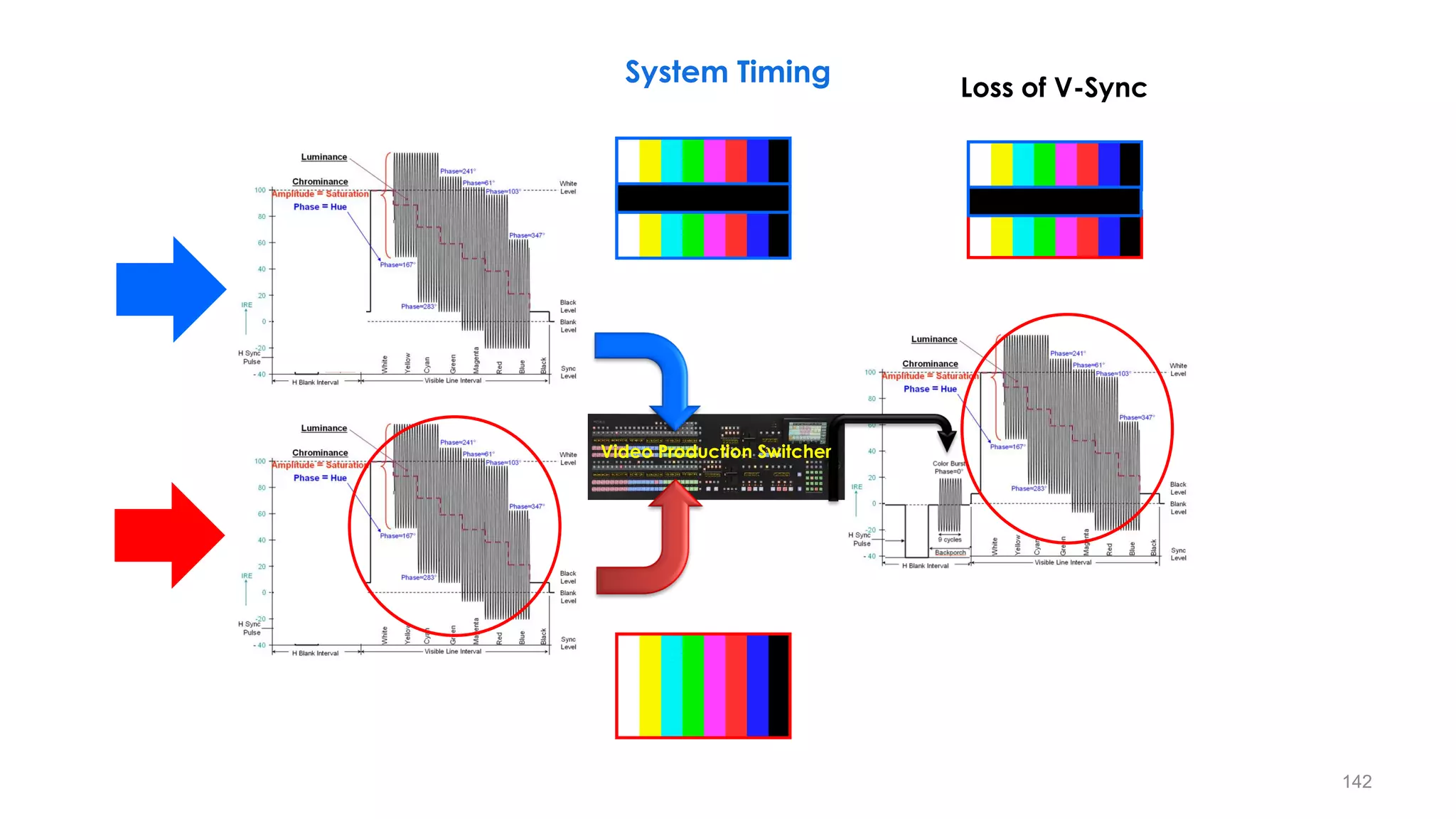
Loss of V-Sync
System Timing
142
Video Production Switcher
Loss of V-Sync
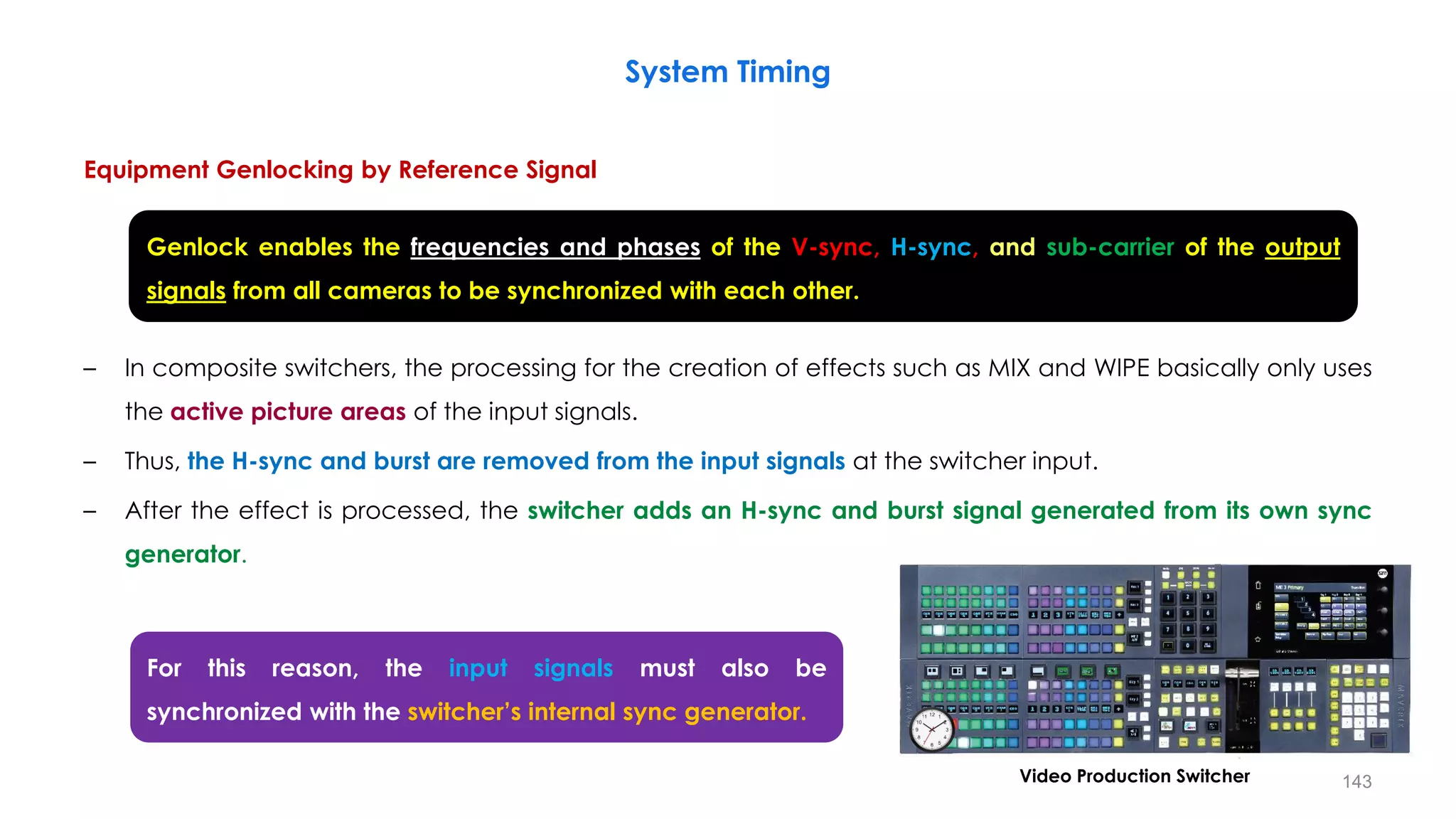
System Timing
Equipment Genlocking by Reference Signal
– In composite switchers, the processing for the creation of effects such as MIX and WIPE basically only uses
the active picture areas of the input signals.
– Thus, the H-sync and burst are removed from the input signals at the switcher input.
– After the effect is processed, the switcher adds an H-sync and burst signal generated from its own sync
generator.
System Timing
143
Genlock enables the frequencies and phases of the V-sync, H-sync, and sub-carrier of the output
signals from all cameras to be synchronized with each other.
For this reason, the input signals must also be
synchronized with the switcher’s internal sync generator.
Video Production Switcher
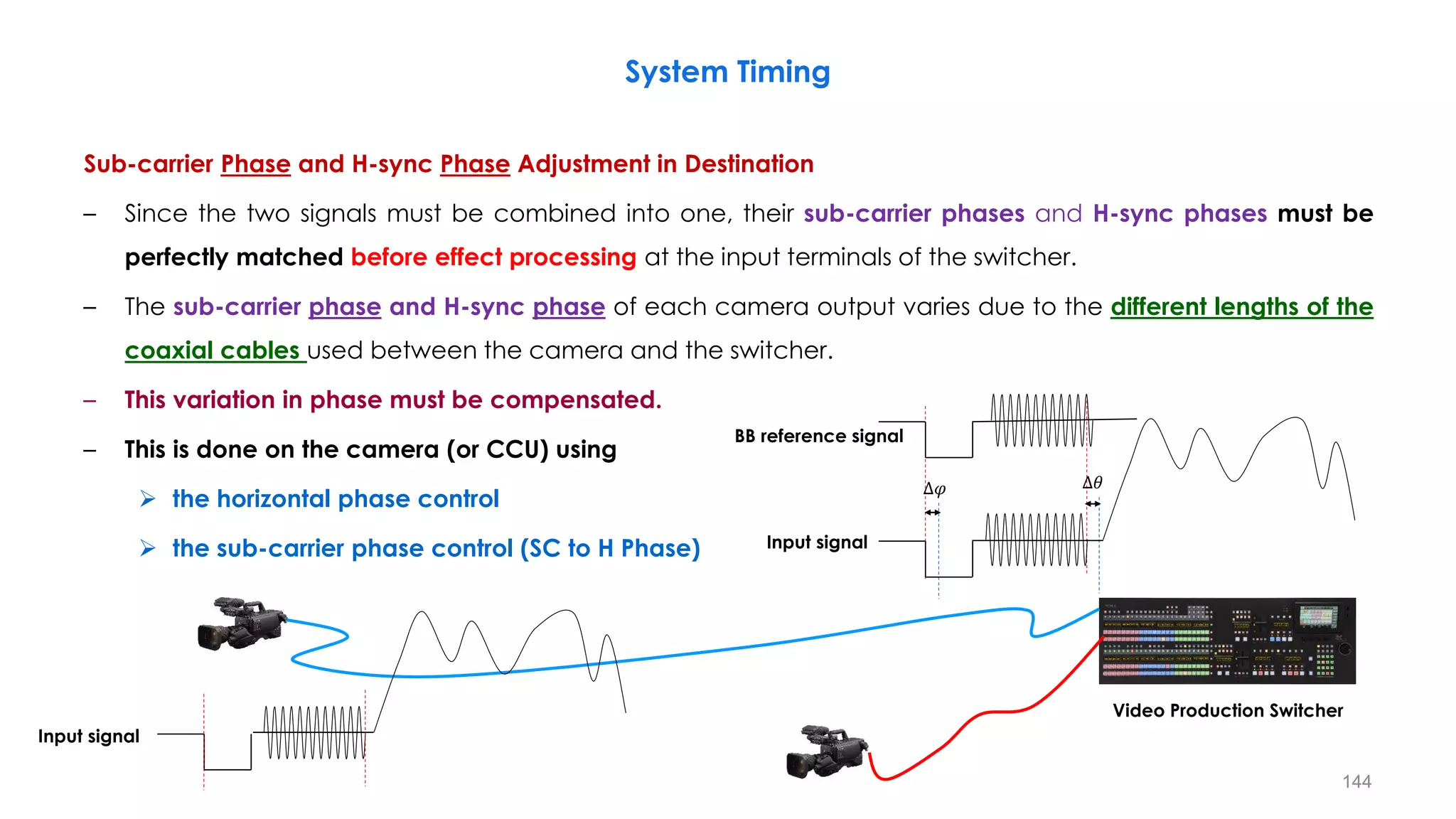
Sub-carrier Phase and H-sync Phase Adjustment in Destination
– Since the two signals must be combined into one, their sub-carrier phases and H-sync phases must be
perfectly matched before effect processing at the input terminals of the switcher.
– The sub-carrier phase and H-sync phase of each camera output varies due to the different lengths of the
coaxial cables used between the camera and the switcher.
– This variation in phase must be compensated.
– This is done on the camera (or CCU) using
 the horizontal phase control
 the sub-carrier phase control (SC to H Phase)
System Timing
144
Video Production Switcher
BB reference signal
Input signal
∆𝜑 ∆𝜃
Input signal
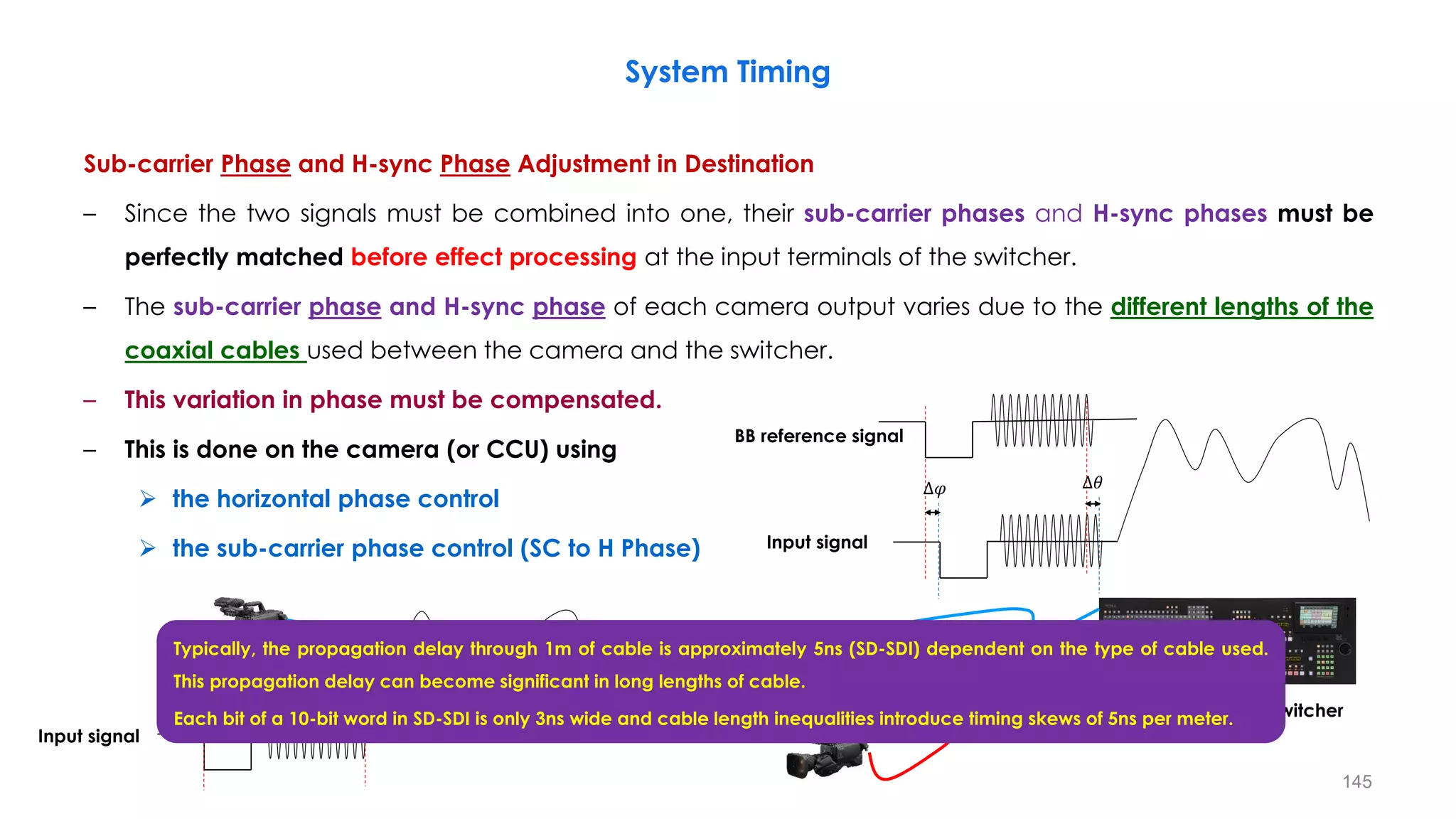
Sub-carrier Phase and H-sync Phase Adjustment in Destination
– Since the two signals must be combined into one, their sub-carrier phases and H-sync phases must be
perfectly matched before effect processing at the input terminals of the switcher.
– The sub-carrier phase and H-sync phase of each camera output varies due to the different lengths of the
coaxial cables used between the camera and the switcher.
– This variation in phase must be compensated.
– This is done on the camera (or CCU) using
 the horizontal phase control
 the sub-carrier phase control (SC to H Phase)
System Timing
145
Video Production Switcher
BB reference signal
Input signal
∆𝜑 ∆𝜃
Input signal
Typically, the propagation delay through 1m of cable is approximately 5ns (SD-SDI) dependent on the type of cable used.
This propagation delay can become significant in long lengths of cable.
Each bit of a 10-bit word in SD-SDI is only 3ns wide and cable length inequalities introduce timing skews of 5ns per meter.
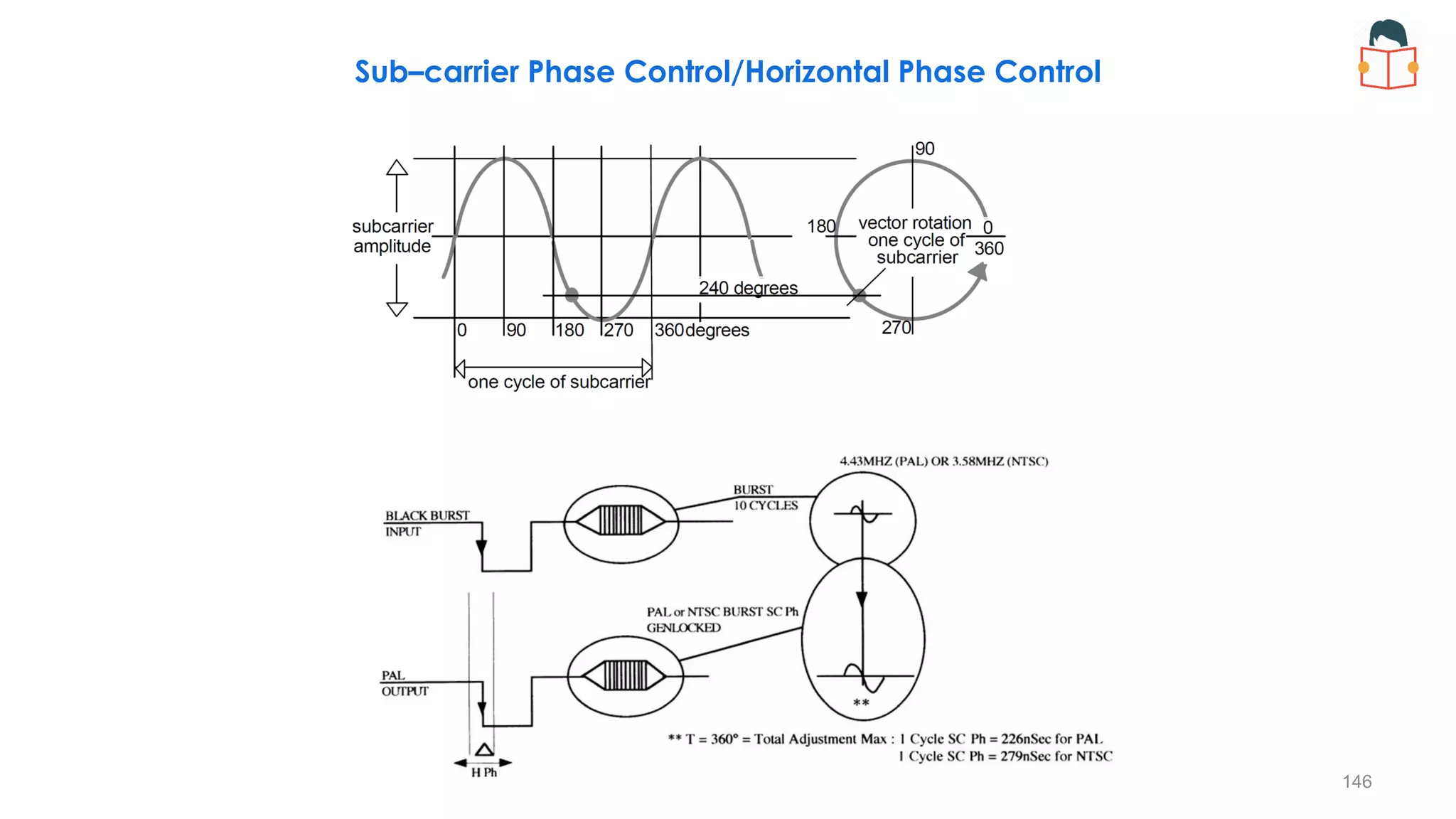
Sub–carrier Phase Control/Horizontal Phase Control
146
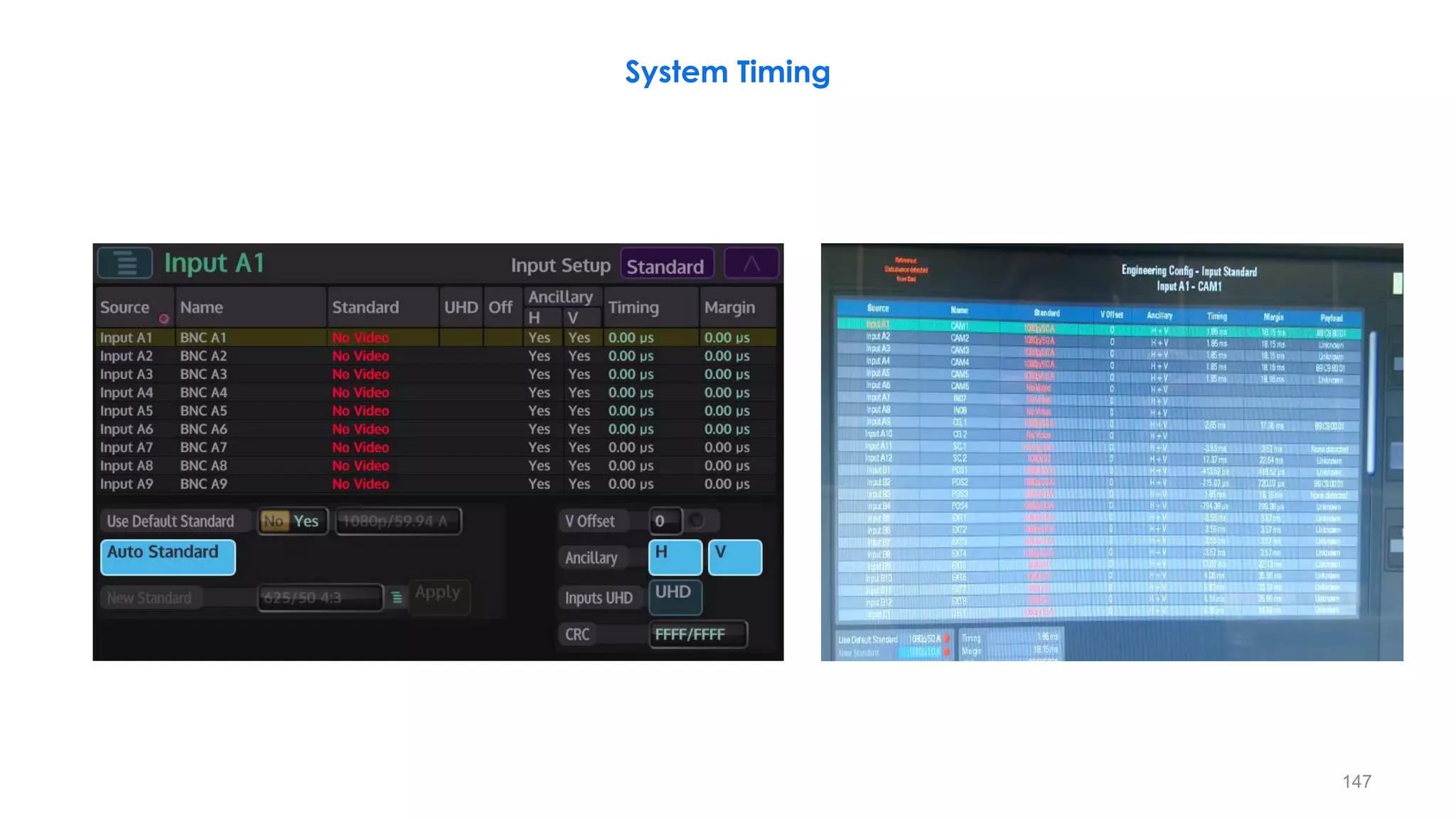
147
System Timing
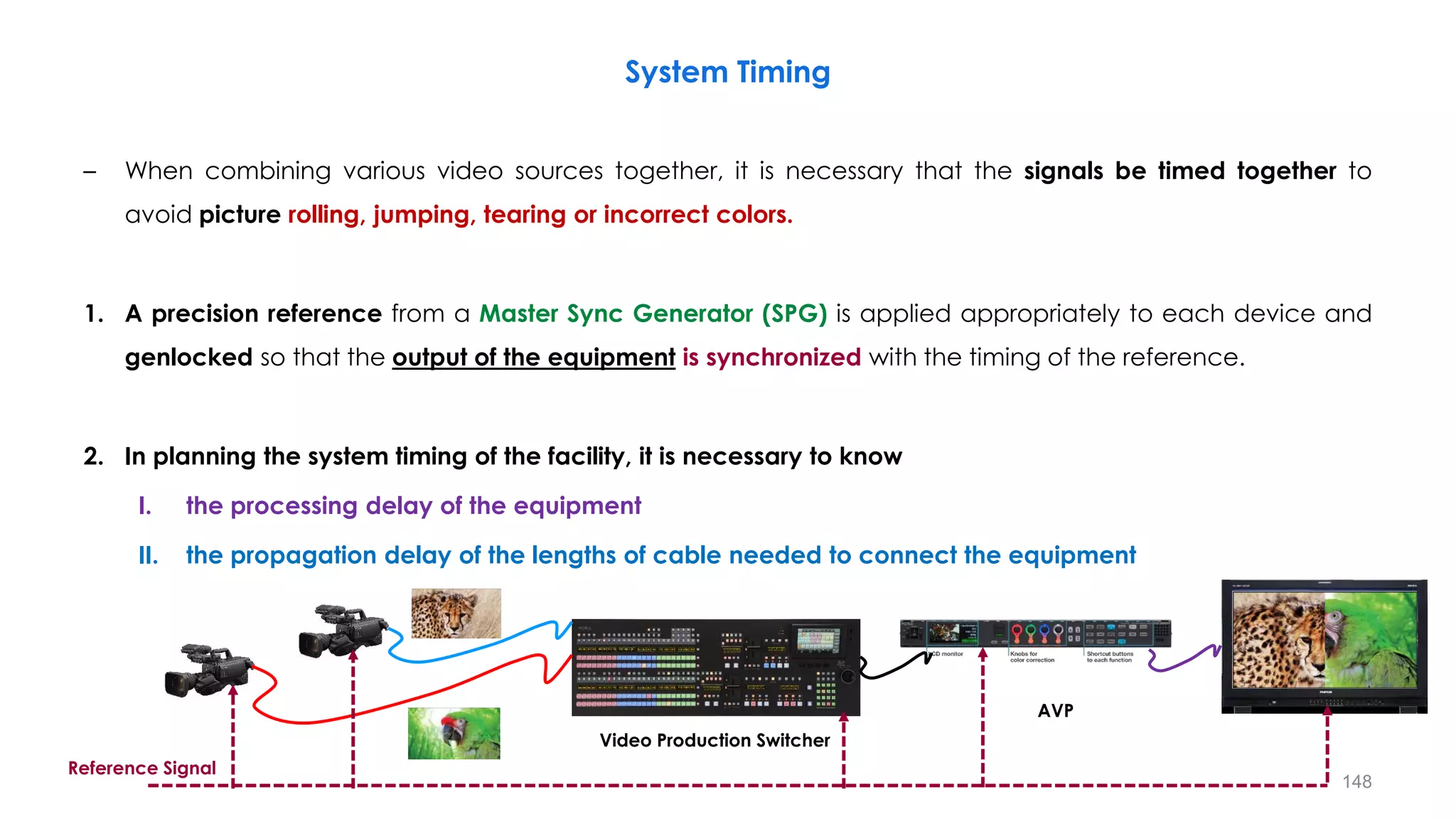
– When combining various video sources together, it is necessary that the signals be timed together to
avoid picture rolling, jumping, tearing or incorrect colors.
1. A precision reference from a Master Sync Generator (SPG) is applied appropriately to each device and
genlocked so that the output of the equipment is synchronized with the timing of the reference.
2. In planning the system timing of the facility, it is necessary to know
I. the processing delay of the equipment
II. the propagation delay of the lengths of cable needed to connect the equipment
System Timing
148
Video Production Switcher
AVP
Reference Signal
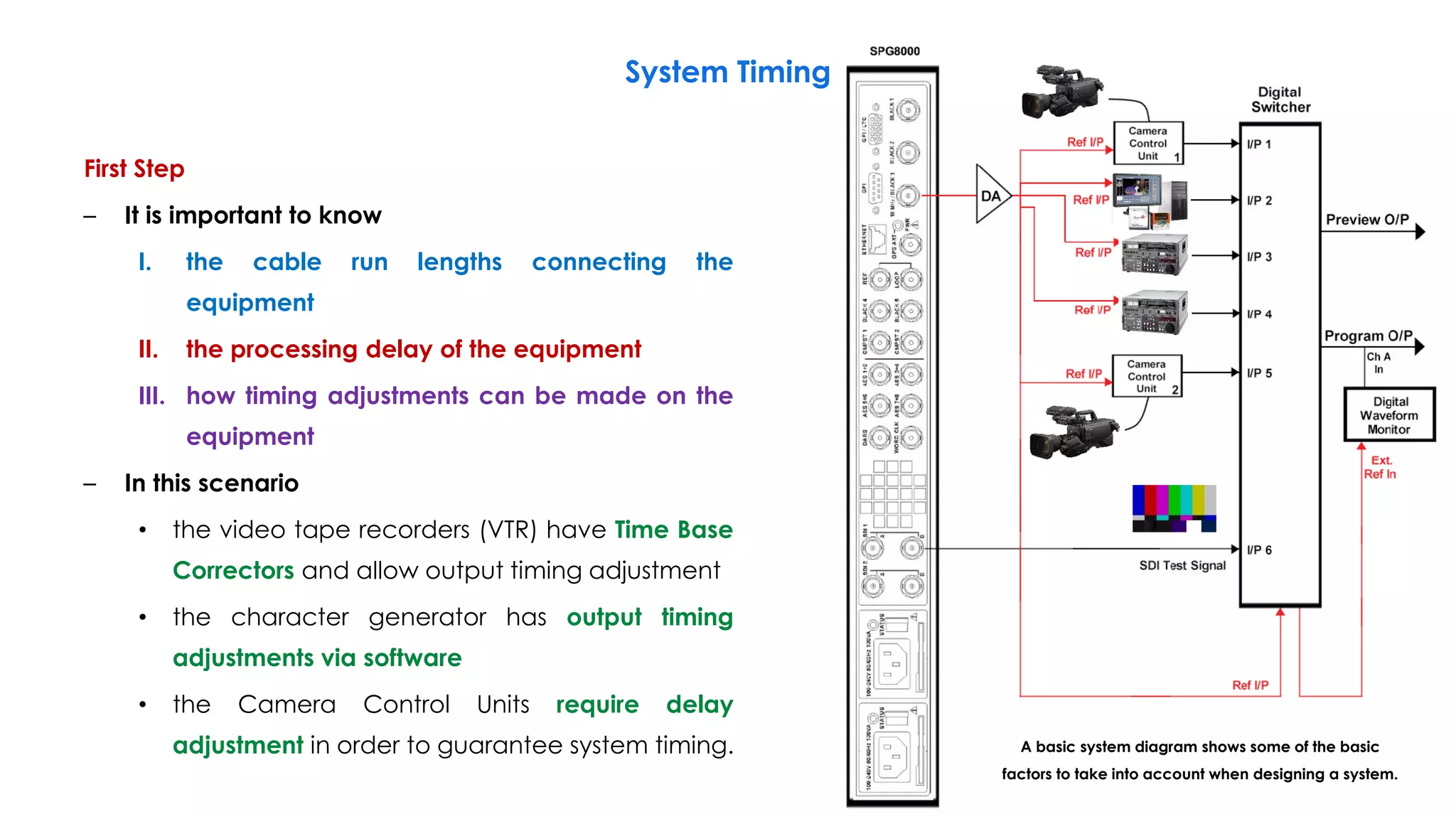
First Step
– It is important to know
I. the cable run lengths connecting the
equipment
II. the processing delay of the equipment
III. how timing adjustments can be made on the
equipment
– In this scenario
• the video tape recorders (VTR) have Time Base
Correctors and allow output timing adjustment
• the character generator has output timing
adjustments via software
• the Camera Control Units require delay
adjustment in order to guarantee system timing.
System Timing
149
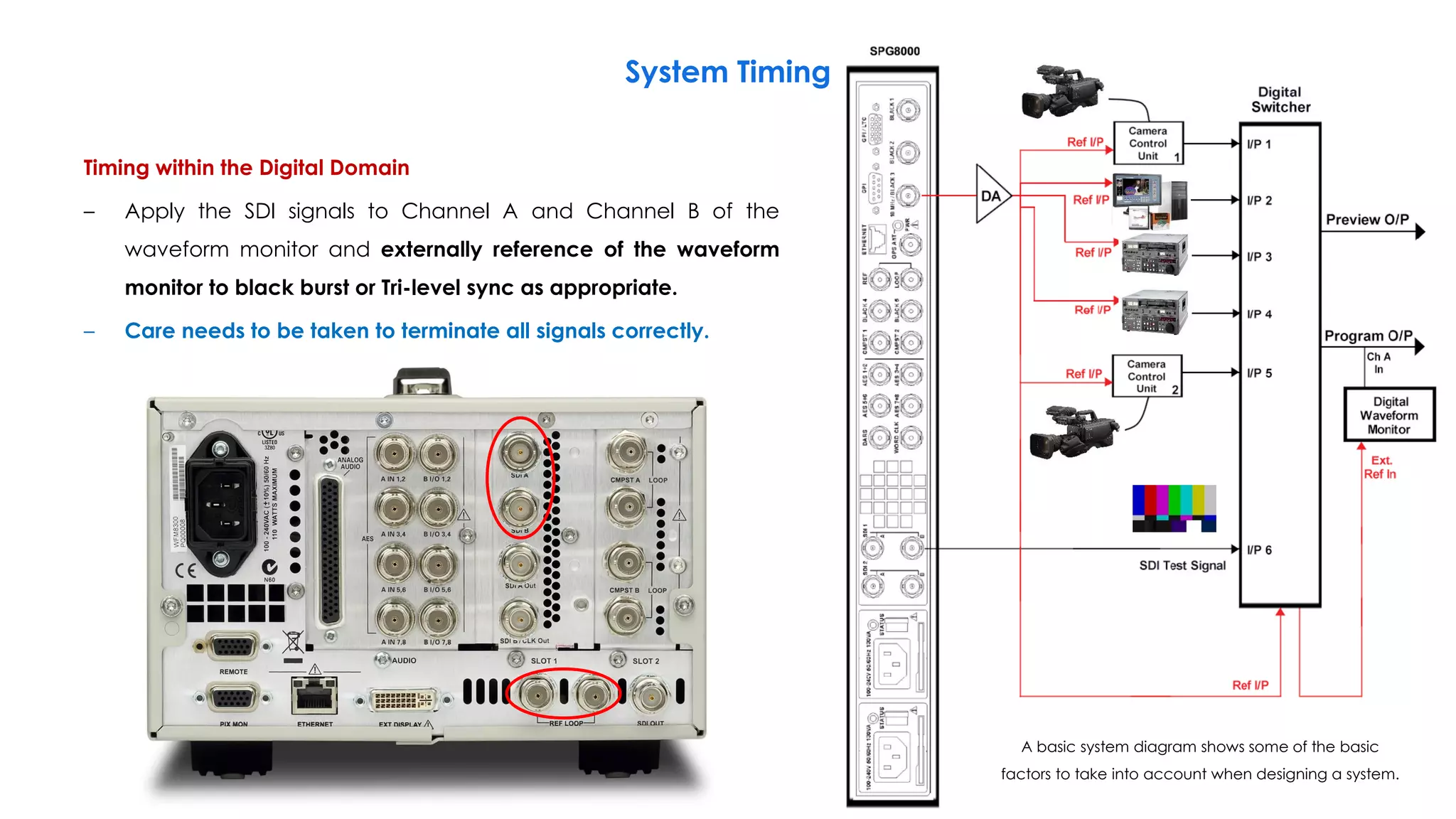
A basic system diagram shows some of the basic
factors to take into account when designing a system.
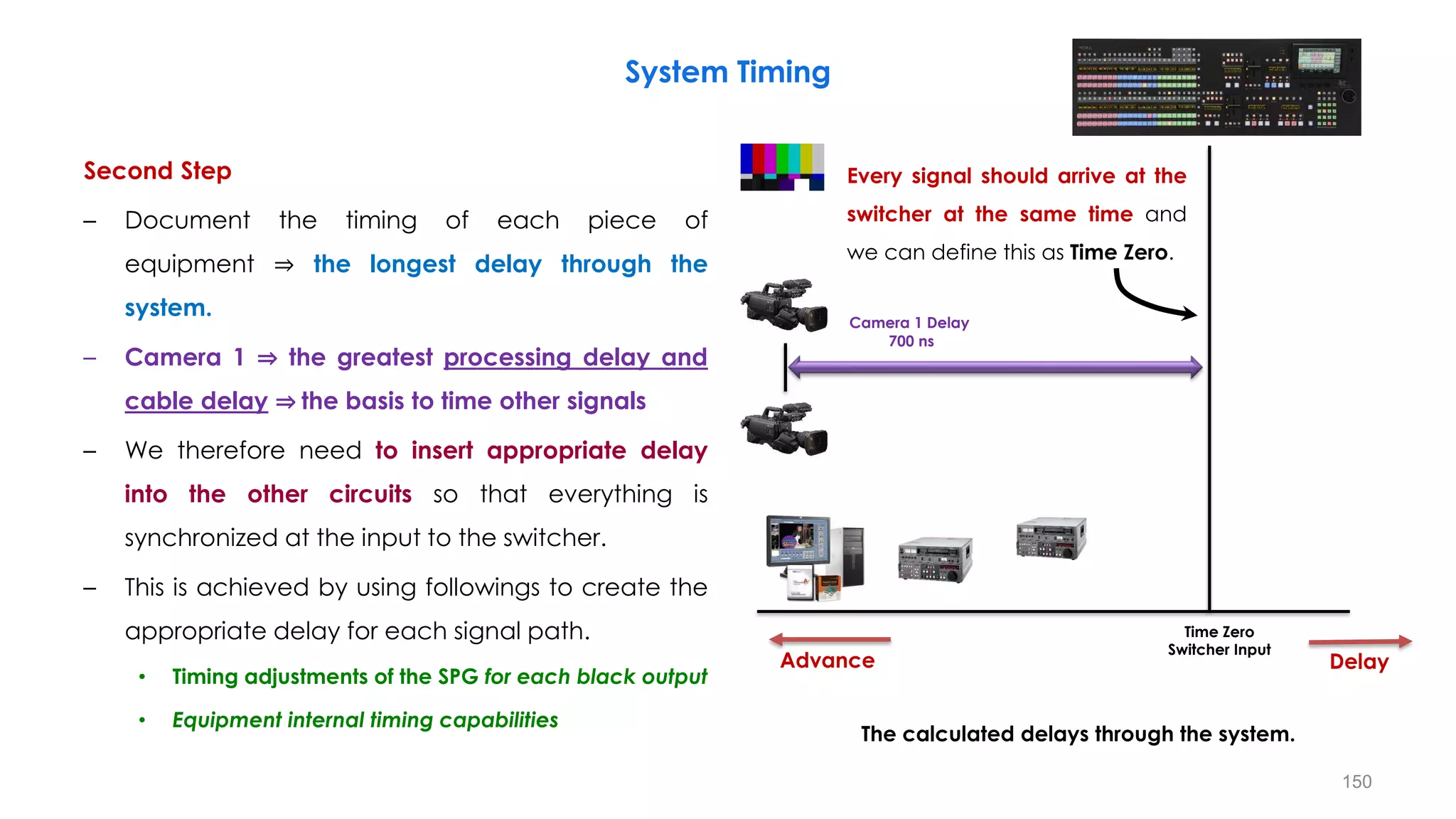
Second Step
– Document the timing of each piece of
equipment ⇒ the longest delay through the
system.
– Camera 1 ⇒ the greatest processing delay and
cable delay ⇒ the basis to time other signals
– We therefore need to insert appropriate delay
into the other circuits so that everything is
synchronized at the input to the switcher.
– This is achieved by using followings to create the
appropriate delay for each signal path.
• Timing adjustments of the SPG for each black output
• Equipment internal timing capabilities
System Timing
150
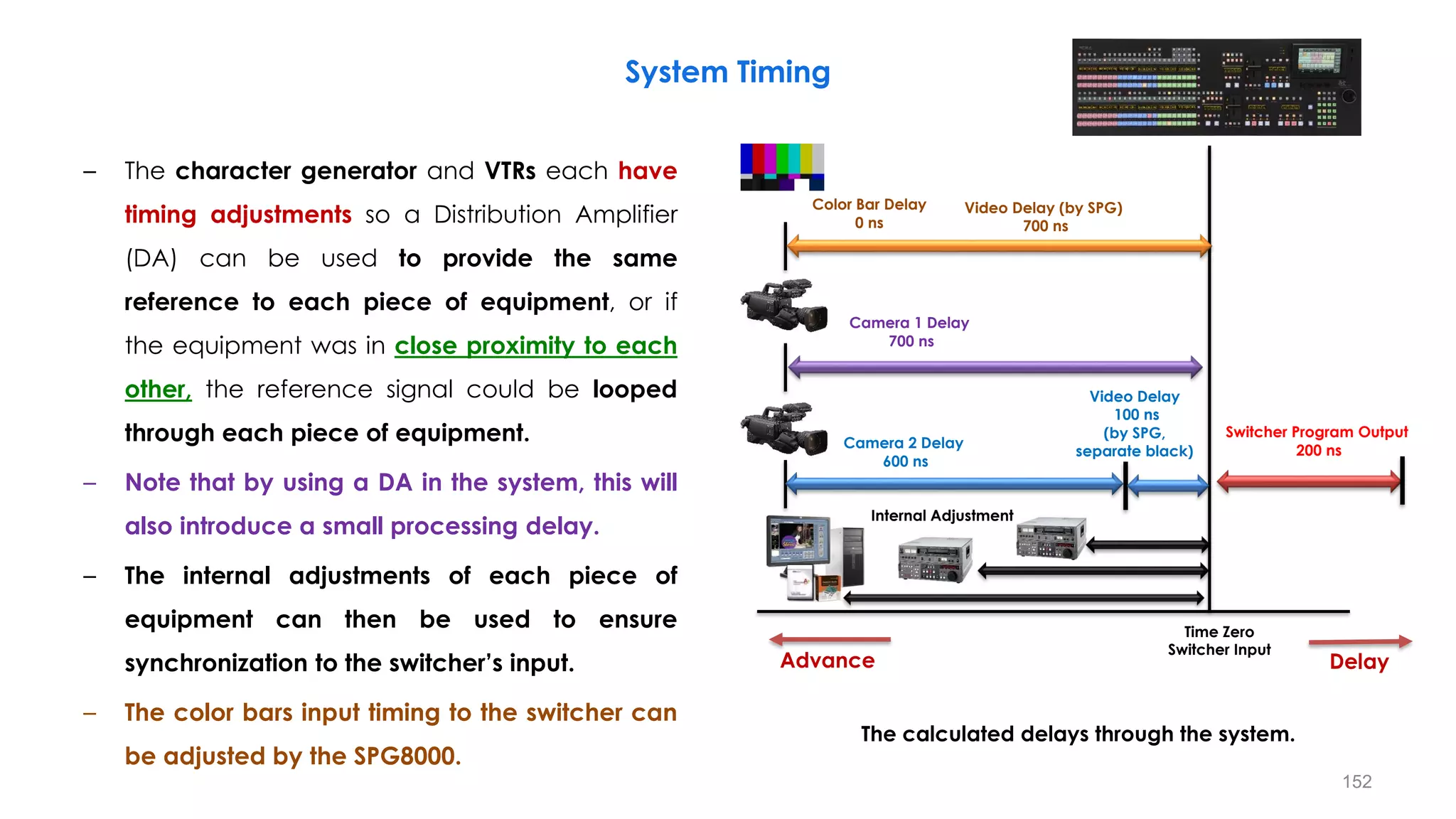
The calculated delays through the system.
Delay
Advance
Time Zero
Switcher Input
Camera 1 Delay
700 ns
Every signal should arrive at the
switcher at the same time and
we can define this as Time Zero.
System Timing
151
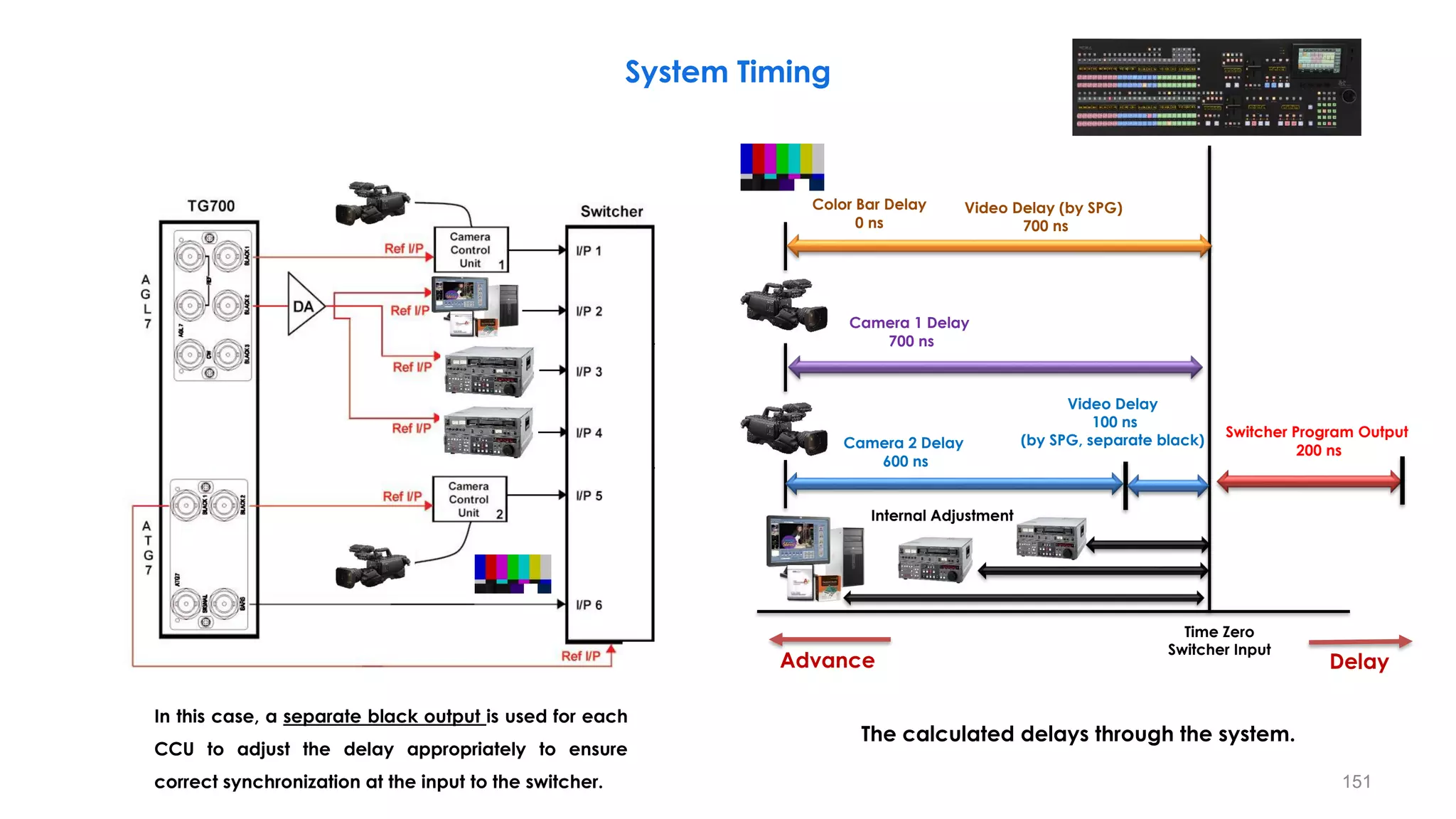
The calculated delays through the system.
Delay
Advance
Time Zero
Switcher Input
Camera 2 Delay
600 ns
Video Delay
100 ns
(by SPG, separate black)
Color Bar Delay
0 ns
Video Delay (by SPG)
700 ns
Switcher Program Output
200 ns
Camera 1 Delay
700 ns
Internal Adjustment
In this case, a separate black output is used for each
CCU to adjust the delay appropriately to ensure
correct synchronization at the input to the switcher.
– The character generator and VTRs each have
timing adjustments so a Distribution Amplifier
(DA) can be used to provide the same
reference to each piece of equipment, or if
the equipment was in close proximity to each
other, the reference signal could be looped
through each piece of equipment.
– Note that by using a DA in the system, this will
also introduce a small processing delay.
– The internal adjustments of each piece of
equipment can then be used to ensure
synchronization to the switcher’s input.
– The color bars input timing to the switcher can
be adjusted by the SPG8000.
System Timing
152
The calculated delays through the system.
Delay
Advance
Time Zero
Switcher Input
Camera 2 Delay
600 ns
Video Delay
100 ns
(by SPG,
separate black)
Color Bar Delay
0 ns
Video Delay (by SPG)
700 ns
Switcher Program Output
200 ns
Camera 1 Delay
700 ns
Internal Adjustment
153
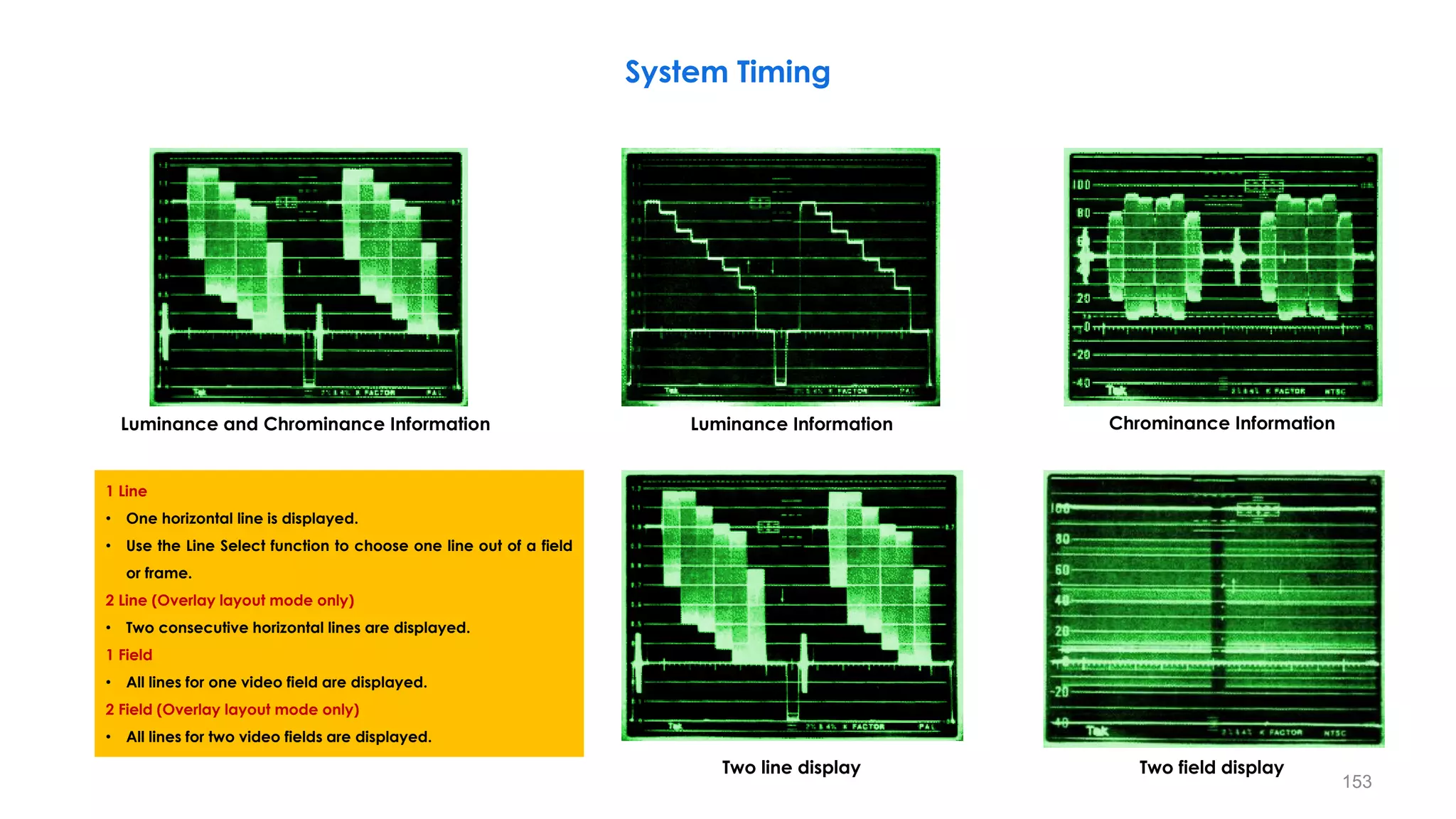
Luminance and Chrominance Information Luminance Information Chrominance Information
Two line display Two field display
System Timing
1 Line
• One horizontal line is displayed.
• Use the Line Select function to choose one line out of a field
or frame.
2 Line (Overlay layout mode only)
• Two consecutive horizontal lines are displayed.
1 Field
• All lines for one video field are displayed.
2 Field (Overlay layout mode only)
• All lines for two video fields are displayed.
154
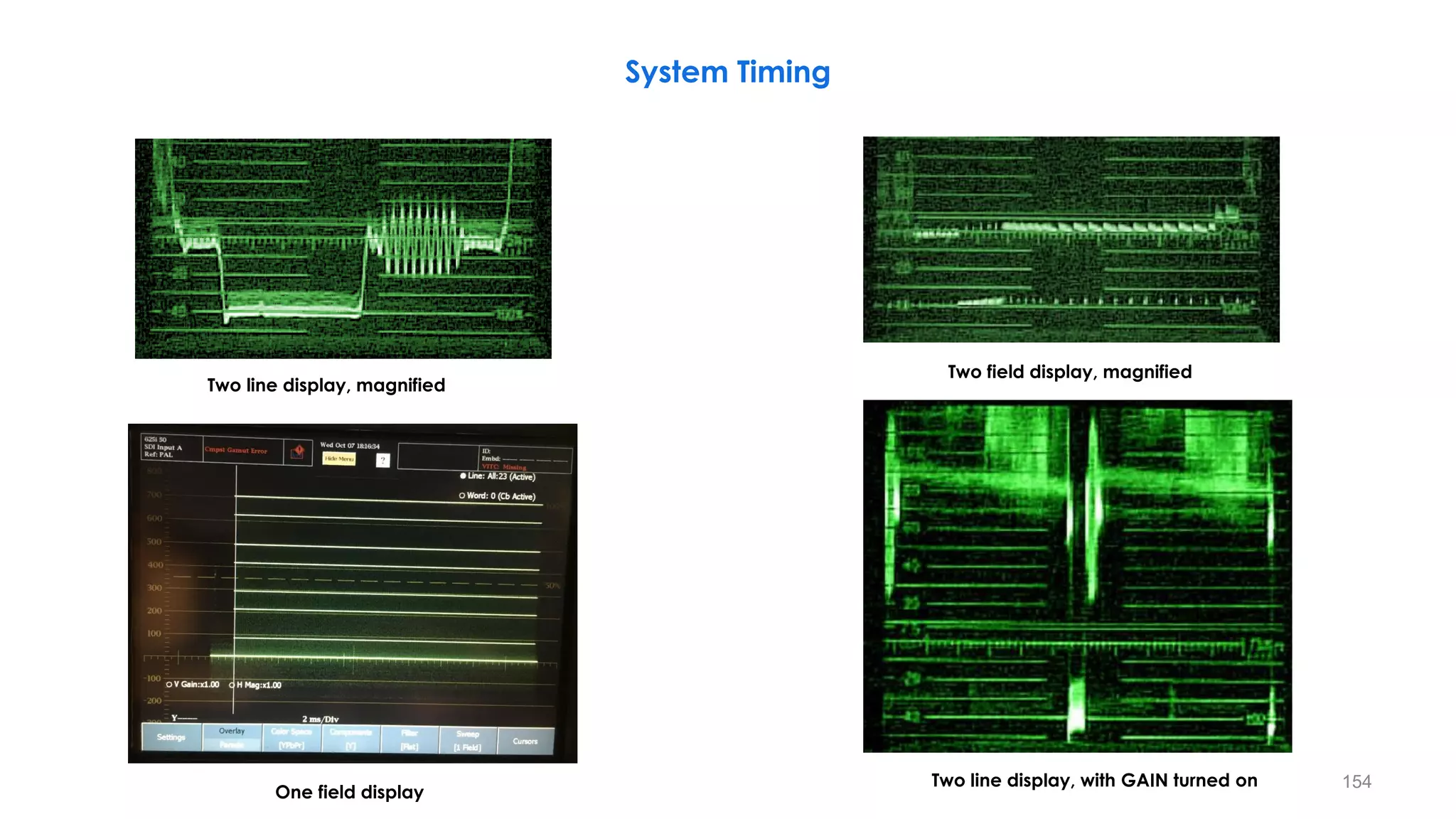
Two line display, magnified
Two field display, magnified
System Timing
Two line display, with GAIN turned on
One field display
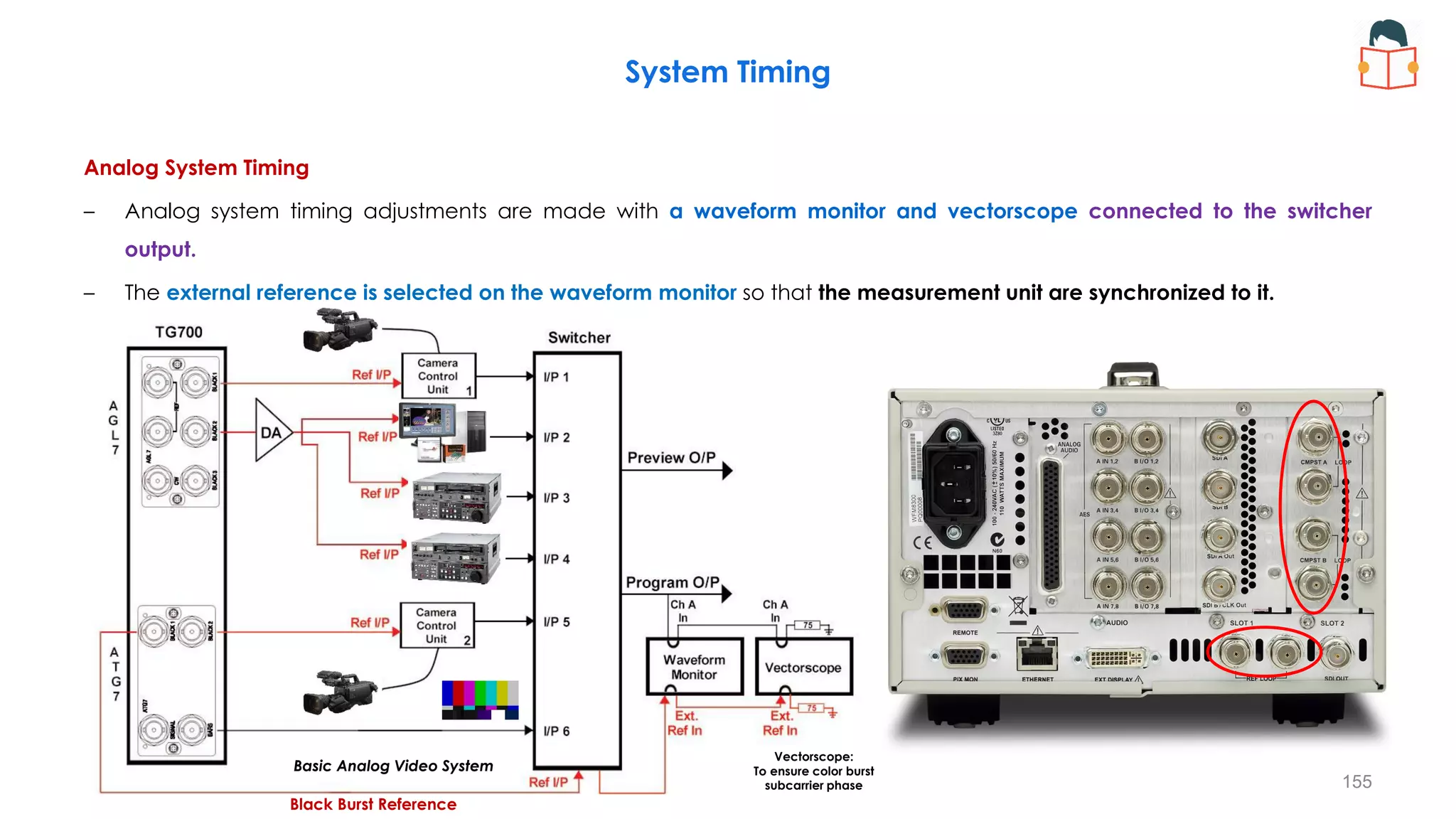
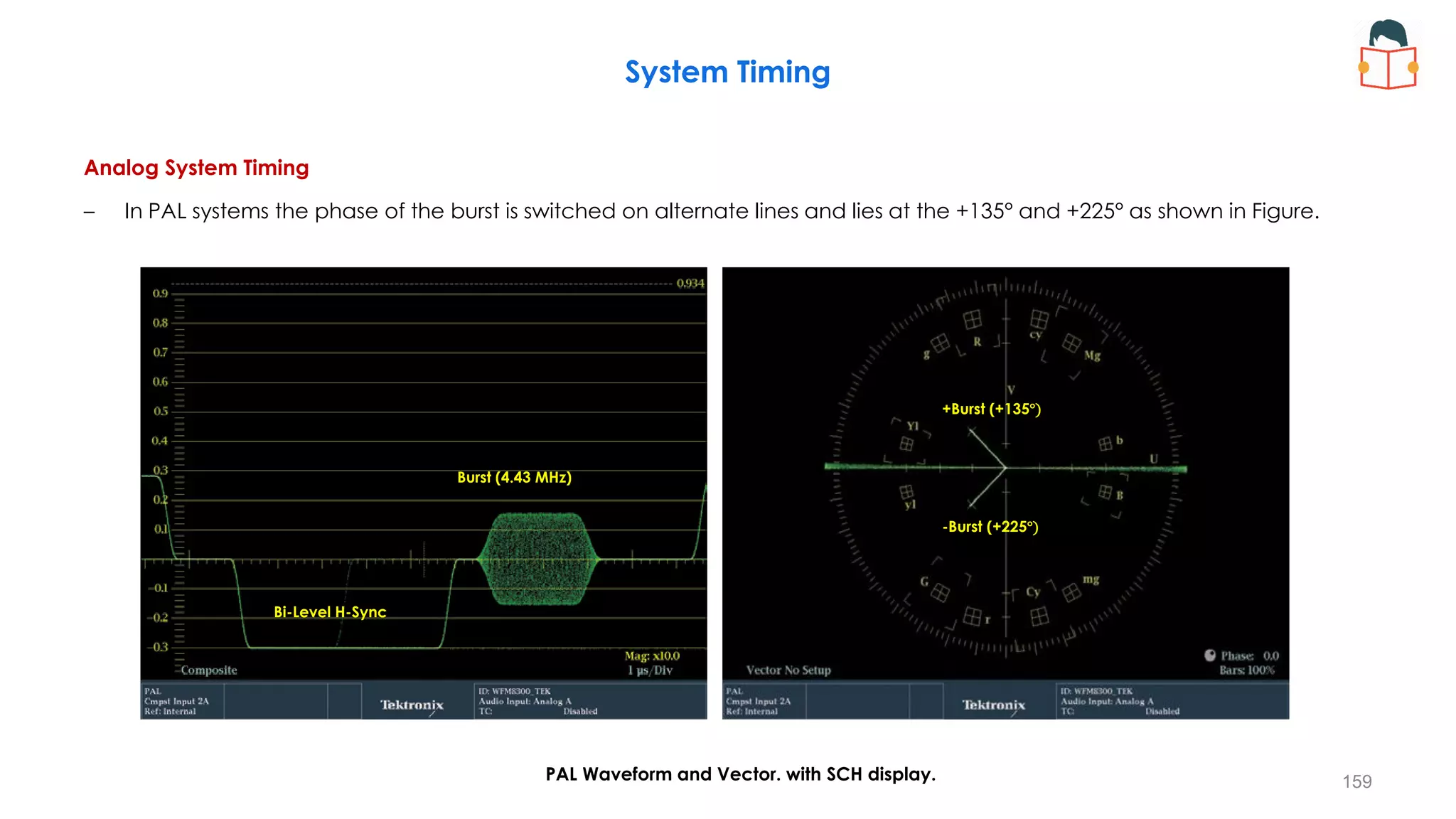
Analog System Timing
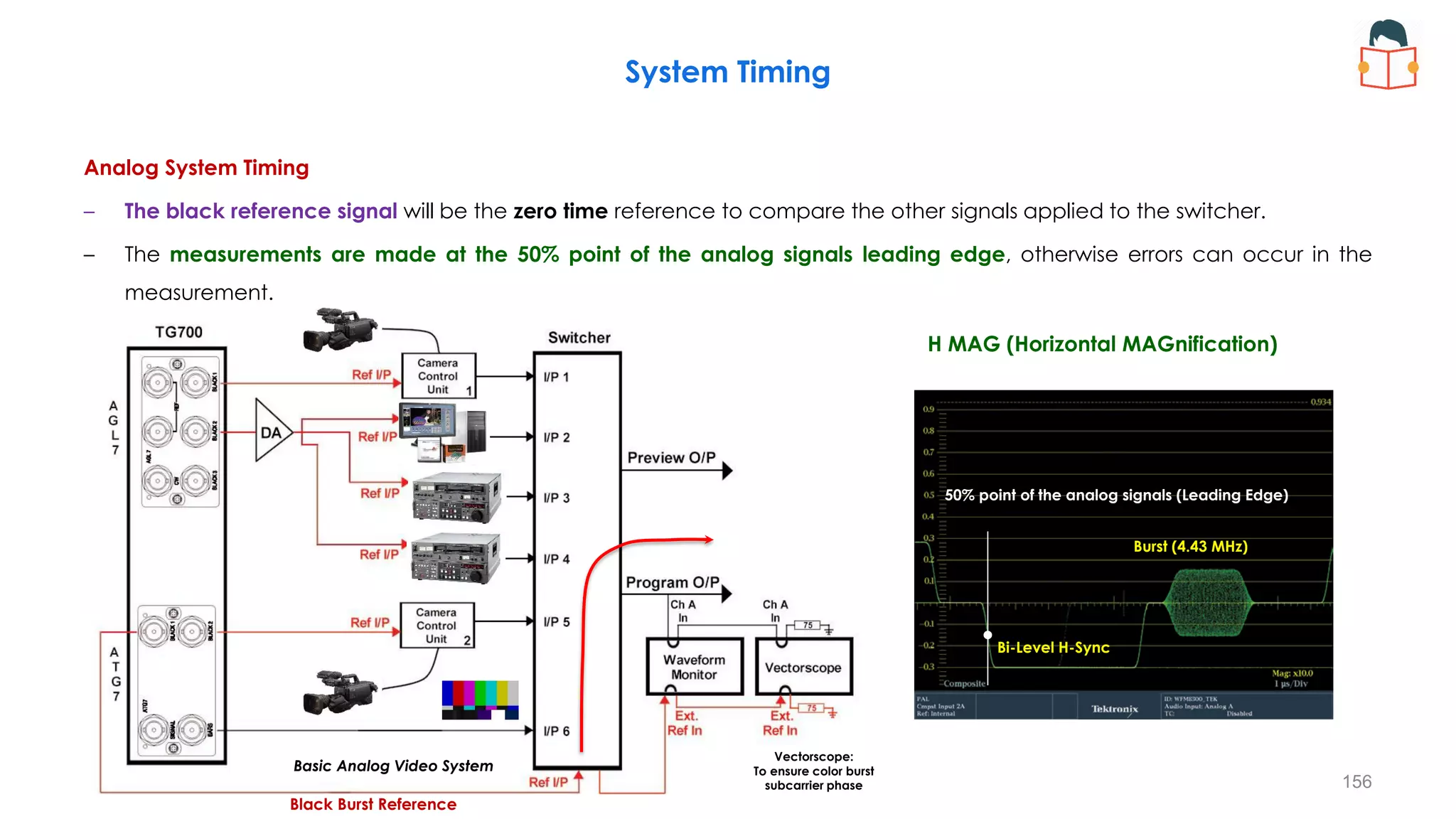
– Analog system timing adjustments are made with a waveform monitor and vectorscope connected to the switcher
output.
– The external reference is selected on the waveform monitor so that the measurement unit are synchronized to it.
System Timing
155
Basic Analog Video System
Vectorscope:
To ensure color burst
subcarrier phase
Black Burst Reference
Basic Analog Video System
Vectorscope:
To ensure color burst
subcarrier phase
Black Burst Reference
Analog System Timing
– The black reference signal will be the zero time reference to compare the other signals applied to the switcher.
– The measurements are made at the 50% point of the analog signals leading edge, otherwise errors can occur in the
measurement.
System Timing
156
Bi-Level H-Sync
Burst (4.43 MHz)
50% point of the analog signals (Leading Edge)
H MAG (Horizontal MAGnification)
Analog System Timing
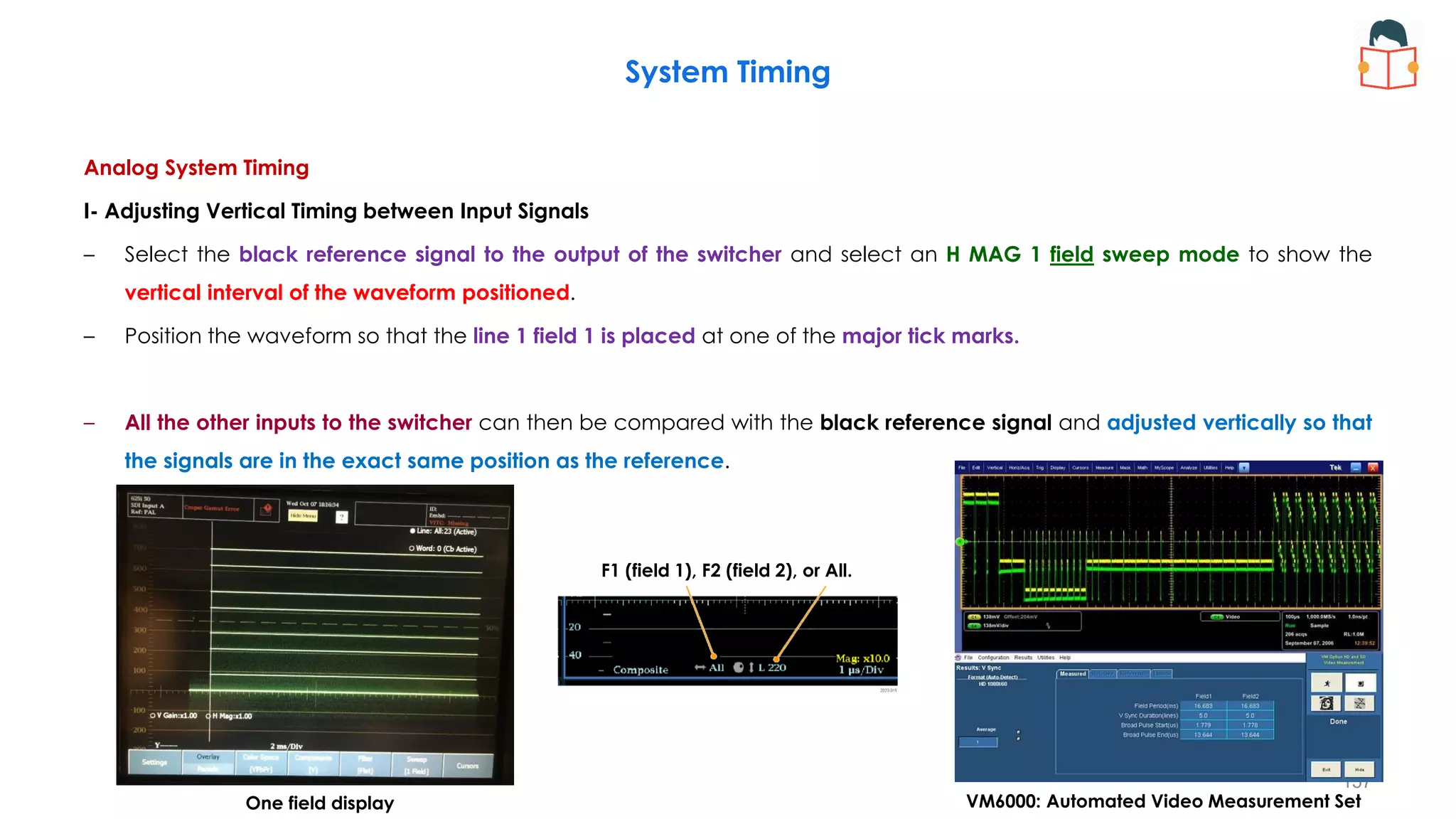
I- Adjusting Vertical Timing between Input Signals
– Select the black reference signal to the output of the switcher and select an H MAG 1 field sweep mode to show the
vertical interval of the waveform positioned.
– Position the waveform so that the line 1 field 1 is placed at one of the major tick marks.
– All the other inputs to the switcher can then be compared with the black reference signal and adjusted vertically so that
the signals are in the exact same position as the reference.
System Timing
157
F1 (field 1), F2 (field 2), or All.
One field display VM6000: Automated Video Measurement Set
Analog System Timing
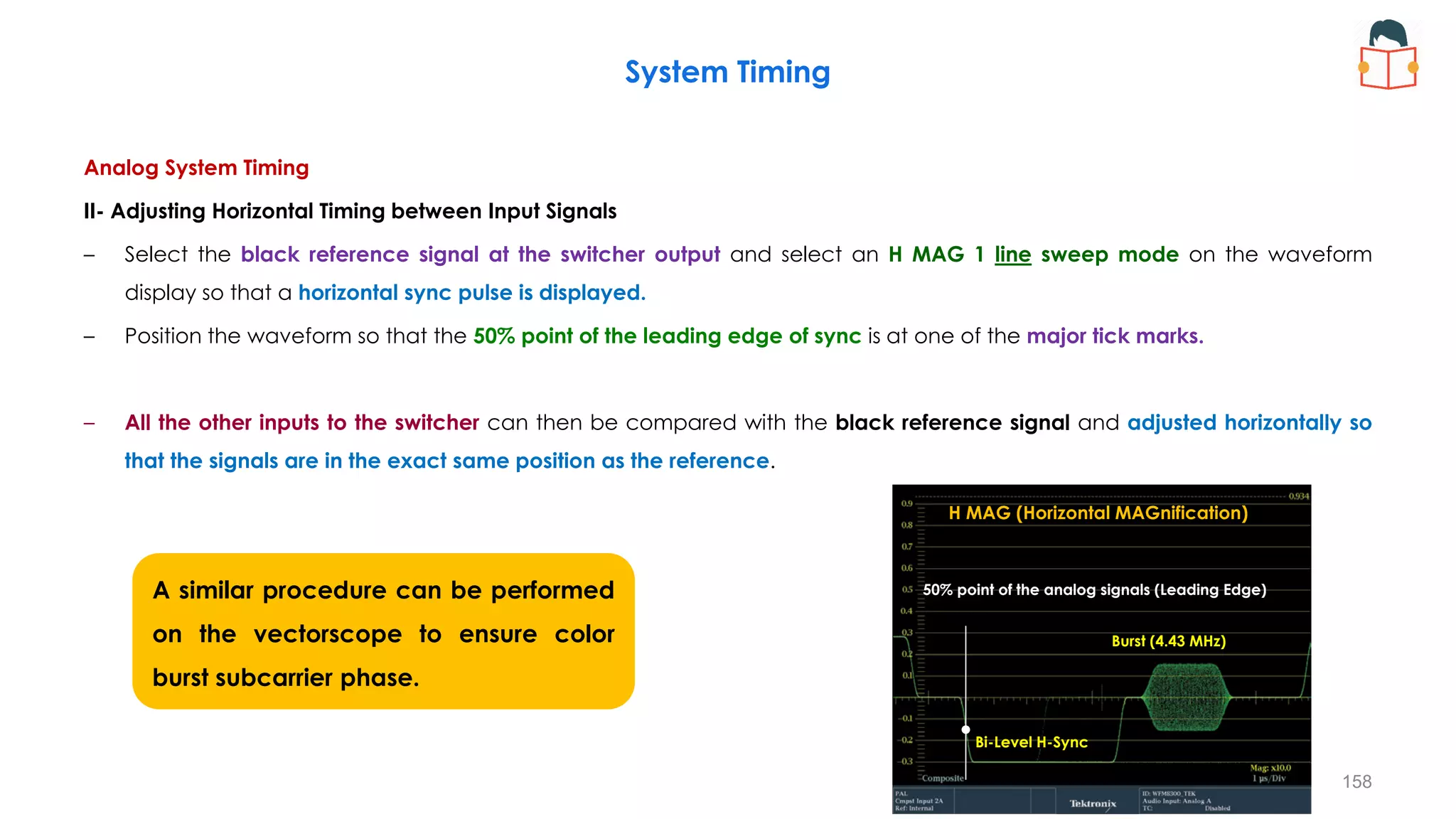
II- Adjusting Horizontal Timing between Input Signals
– Select the black reference signal at the switcher output and select an H MAG 1 line sweep mode on the waveform
display so that a horizontal sync pulse is displayed.
– Position the waveform so that the 50% point of the leading edge of sync is at one of the major tick marks.
– All the other inputs to the switcher can then be compared with the black reference signal and adjusted horizontally so
that the signals are in the exact same position as the reference.
System Timing
158
A similar procedure can be performed
on the vectorscope to ensure color
burst subcarrier phase.
50% point of the analog signals (Leading Edge)
Bi-Level H-Sync
Burst (4.43 MHz)
50% point of the analog signals (Leading Edge)
H MAG (Horizontal MAGnification)
Analog System Timing
– In PAL systems the phase of the burst is switched on alternate lines and lies at the +135° and +225° as shown in Figure.
System Timing
159
Bi-Level H-Sync
Burst (4.43 MHz)
+Burst (+135°)
-Burst (+225°)
PAL Waveform and Vector. with SCH display.
160
PAL Vectorscope MAG display (The PAL burst can be magnified) PAL Vectorscope with V axis switched (to simplify the display )
Analog System Timing
– The PAL burst can be magnified so that it lies along the 135° axis to the outer edge of the compass rose, the V axis
switched can be selected on the vectorscope to simplify the display.
– If the vectorscope has the capability to measure S/CH phase this should also be measured between the reference signal
and the other inputs of the switcher.
System Timing
Component Video
I. This requires timing of the horizontal and vertical signals.
II. This system requires appropriate inter-channel timing of three video signals (Y’, P’b, P’r) or (R’, G’, B’) per
distribution path.
– A digital switcher usually has partial automatic timing of the inputs, provided that the signal is within a
specified timing range (30-150ms, depending on the equipment).
– It can self-compensate for the timing error.
– However, care still has to be taken when ensuring vertical timing because of the large processing delays
of some of the digital equipment.
System Timing
161
Analog black burst is still the predominant reference signal, although
a SDI Black signal can be used on some digital equipment.
System Timing
162
A basic system diagram shows some of the basic
factors to take into account when designing a system.
Timing within the Digital Domain
– Apply the SDI signals to Channel A and Channel B of the
waveform monitor and externally reference of the waveform
monitor to black burst or Tri-level sync as appropriate.
– Care needs to be taken to terminate all signals correctly.
Showing EAV and SAV on Waveform Monitor
– In the configuration menu of the waveform monitor, select pass EAV and SAV mode.
– This will allow the 3FF, 000, 000, XYZ values to be displayed on the waveform monitor.
– The luma (Y’) channel is selected on the waveform monitor and is positioned to show the HD EAV pulse.
– This pulse contains the sequence 3FFh, 000h, 000h, XYZ, LN0, LN1, YCR0, YCR1.
System Timing
163
Select pass EAV and SAV mode
XYZ pulse of Y channel with EAV/SAV
pass through selected on WFM.
The transition from 3FF to 000
and 000 to XYZ produces
ringing on the display when
passed through the appropriate
SD or HD filter.
Showing EAV and SAV on Waveform Monitor
– In the configuration menu of the waveform monitor, select pass EAV and SAV mode.
– This will allow the 3FF, 000, 000, XYZ values to be displayed on the waveform monitor.
– The HD SAV pulse is simpler than the HD EAV pulse, containing only the code words 3FFh, 000h, 000h, XYZ.
– In HD formats, luma and chroma contain EAV and SAV sequences.
System Timing
164
XYZ pulse of Y channel with EAV/SAV
pass through selected on WFM.
Select pass EAV and SAV mode
The transition from 3FF to 000
and 000 to XYZ produces
ringing on the display when
passed through the appropriate
SD or HD filter.
System Timing
165
XYZ pulse of Y channel with EAV/SAV
pass through selected on WFM.
Showing EAV and SAV on Waveform Monitor
– Data mode has been selected on the waveform monitor.
– The luma and chroma signals are displayed on the left side and
the data structure of the SDI signal is shown on the right.
– In this case, a 1080i 59.94 Hz signal has been applied to the
instrument and positioned so the hexadecimal values of the EAV
signal are displayed.
System Timing
166
XYZ pulse of Y channel with EAV/SAV
pass through selected on WFM.
Showing EAV and SAV on Waveform Monitor
– The waveform monitor is set up to show the simpler SAV data
from the same signal.
– The “XYZ” word is 200h.
– This is broken down into F=0, V=0 & H=0, indicating Field 1, Active
Video, and SAV.
System Timing
167
XYZ pulse of Y channel with EAV/SAV
pass through selected on WFM.
Showing EAV and SAV on Waveform Monitor
– The waveform monitor is set up to show the simpler SAV data
from the same signal.
– In this example, bit 8, 7, and 6 indicate the xyz word is in field one
of an interlaced format, in a line of active video, and in an EAV
sequence.
“xyz” word
binary display.
–Bit 9 – (Fixed bit) always fixed at 1
–Bit 8 – (F-bit) always 0 in a progressive scan system; 0 for field one and 1 for field two
of an interlaced system
–Bit 7 – (V-bit) 1 in vertical blanking interval; 0 during active video lines
–Bit 6 – (H-bit) 1 indicates the EAV sequence; 0 indicates the SAV sequence
–Bits 5, 4, 3, 2 – (Protection bits) provide a limited error correction of the data in the F,
V, and H bits
–Bits 1, 0 – (Fixed bits) set to zero to have identical word value in 10 or 8 bit systems
xyz =1001110100
Timing within the Digital Domain
– In the configuration menu of the waveform monitor, select pass EAV and SAV mode.
– The SAV or EAV pulse can be used as a timing reference when positioned on a major tick mark of the waveform
display.
– Using this timing reference point, comparison can then be made to the other SDI signals to ensure the position of the
pulse remains in the same location.
System Timing
168
XYZ pulse of Y channel with EAV/SAV
pass through selected on WFM.
Select pass EAV and SAV mode
Timing within the Digital Domain
– Within the digital domain, there are no vertical pulses and digital systems are expected to calculate their video position
based on the values of F, V and H. ⇒ In order to measure vertical timing we need to define a reference point.
– For simplicity, the first line of active video can be used as the reference, since the vertical blanking lines are normally
blank.
System Timing
169
15
2
16
2
0V
Timing within the Digital Domain
– A user should set Line Select and sweep for a 2-line mode.
– Then, select Field 1 and line select as follows to display the
last line in the vertical interval and the first line of active
signal.
– This setting should be on last line in vertical blanking:
• Line 20 for 1080 Interlaced HDTV
• Line 41 for 1080 progressive formats
• Line 25 for 720 progressive
• Line 19 for 525 interlace
• Line 22 for 625 interlace
– If not displayed properly, adjust the vertical timing of the
source until correctly displayed.
– Next, select channel B and make sure the last vertical and
first active lines are displayed.
System Timing
170
(Active
Lines)
(Active
Lines)
19
22
1
20
21
560
561
563
564
583
584
1123
1124
1125
2
559
562
582
585
1122
565
Field 2
Field 1
19
43
1
41
42
1121
1122
1124
2
1120
1123
Frame
1125
21
24
1
22
23
310
311
313
335
336
623
624
625
2
309
312
334
337
622
314
Field 2
Field 1
Timing within the Digital Domain
– Vertical Timing
• Adjust vertical timing if needed to align both vertical positions to the start of active
video.
• Lastly, switch back to channel A and set MAG to ON, noting the amplitude of the
SAV pulses.
 If the amplitudes of both pulses are identical then they are in the same field.
 Different amplitudes indicate the two signals are in opposite fields and timing
adjustments should be made to match fields between the sources.
− Horizontal Timing
• Switching to channel A and setting the waveform monitor to sweep one line, we
can start to measure digital horizontal timing.
• Using the horizontal position knob to set the SAV pulse to a major graticule tick
mark, or use cursor mode and set a cursor on the SAV pulse.
• Comparison of timing to the other digital channel B input is achieved by selecting
the channel and adjusting the fine timing controls to match the timing position of
channel A.
System Timing
171
Select pass EAV and SAV mode
–Bit 9 – (Fixed bit) always fixed at 1
–Bit 8 – (F-bit) always 0 in a progressive scan system; 0 for field
one and 1 for field two of an interlaced system
–Bit 7 – (V-bit) 1 in vertical blanking interval; 0 during active
video lines
–Bit 6 – (H-bit) 1 indicates the EAV sequence; 0 indicates the
SAV sequence
–Bits 5, 4, 3, 2 – (Protection bits) provide a limited error
correction of the data in the F, V, and H bits
–Bits 1, 0 – (Fixed bits) set to zero to have identical word value in
10 or 8 bit systems
Timing Display
– The Timing display provides a simple graphical rectangle window, which shows the relative timing between the external reference
and input signal.
– An external reference signal of black burst or tri-level sync can be used. The rectangle display represents
one frame for SDI inputs or a color frame for composite inputs
– Measurement readouts, in lines and microseconds (μs) of the difference between the two signals are provided.
– Field timing errors, advanced or delayed, are shown as vertical displacement of the circle, while line timing errors (H timing) of less
than a line are shown as horizontal displacement of the circle.
System Timing
172
Crosshair:
Zero Offset
Circle:
Timing of the Input Signal
Timing Display: Relative to.
The “Relative to” box indicates the chosen zero point reference for the timing display.
Sets the definition for the zero timing offset to one of the following.
– Analog (DAC):
• Means the timing offset of SD and HD SDI inputs are compensated for the delay of a nominal D to A converter.
• So after accounting for the DAC, the delay will be shown as zero when the two signals are timed down at the top panel of
the instrument.
– Serial (0H):
• Means the timing offset of the serial stream is considered to be zero when the “0H” sample of the scrambled serial stream is
coincident with the appropriate sync edge of the analog reference connected to the instrument.
• This setting is also allowed for composite inputs where this selection for zero timing means the reference sync points of the
two signals will be coincident at the top panel of the instrument.
– Saved Offset:
• Means that the timing will be shown as zero offset when the input signal matches the timing of the signal that was present
when the offset was saved using the Save Offset menu entry.
System Timing
173
Analog (DAC) Serial(0H) Saved Offset
Relative to: Relative to: Relative to:
Timing Display: Timing Measurement Using Analog (DAC)
– SDI video output and waveform monitor with analog input
– The default is the Analog (DAC), this means that a Digital to
Analog Converter (DAC) is used to convert the digital signal into
analog so that it can be directly compared to the analog
reference signal and the delay of the DAC needs to be
accounted for in the measurement.
• For SD-SDI DAC a delay of 4.6 µS is assumed
• For HD-SDI DAC a delay of 1.3 µS is assumed
• For 3Gb-SDI DAC a delay of 0.0 uS is assumed
– The "0.0us" delay for 3Gb-SDI means the Analog (DAC) and
Serial (0H) modes are equivalent for 3Gb/s signals.
– In this case the user should select the Analog (DAC) from the
timing measurement menu.
System Timing
174
Analog (DAC)
Waveform Monitor
Device
Under Test
(DUT)
DAC
DAC
Reference (Black Burst/Tri-Level Sync
SDI Test Signal
SPG
Timing Display: Timing Measurement using Serial (0H)
– SDI video output and waveform monitor with digital input
– The synchronization information can be obtained directly from
the SDI and compared to the analog reference input by
extracting the horizontal and vertical timing information within
the digital domain.
– In this case the user should select the Serial(0H) from the timing
measurement menu the “Relative to” display will then show
Serial(0H) within the display.
System Timing
175
Serial(0H)
Waveform Monitor
Device
Under Test
(DUT)
Reference (Black Burst/Tri-Level Sync
SDI Test Signal
SPG
System Timing
176
Timing Display showing timing offset.
Crosshair:
Zero Offset
Circle:
Timing of the Input Signal
Timing Display: Timing Measurement using Saved offset mode
– In the Saved offset mode, you can save the timing from one of the input signals and then display the timing relative to this
“saved” offset.
– This is especially useful in timing the inputs to a router.
• Select one of the inputs to the router as the master relative reference and apply this signal to the input of the
waveform monitor or rasterizer, along with the external reference signal being used by the router.
• Timing configuration menu → Saved Offset menu → Select button (save the offset between the input signal and the
external reference)
• In the timing configuration menu, select the “Relative to:” and change the selection from Rear Panel to Saved Offset.
System Timing
177
Timing Display: Timing Measurement using Saved offset mode
– By routing each of the other router inputs to the waveform monitor or
rasterizer the measurement will show the relative offset between the
master relative reference and the other video inputs.
– Simply adjust the horizontal and vertical timing controls of each input
signal until the circle and the crosshair are overlaid and the circle turns
green.
System Timing
178
Saved Offset
System Timing
179
Timing Display showing “Relative To:” menu selection.
System Timing
180
181
• Normally, format islands are created to allow signals to remain in a
single format while being processed in a specific production area.
• Care should be taken in choosing suitable ADC and DAC to ensure the
minimum number of format conversions to guarantee quality throughout
the signal path.
• The Master references are sent to appropriate areas such as studios or
edits suites where they are genlocked by a slave SPG used within that
area.
• The slave references are then used to time equipment within that area.
Timing Across a Multi-Format Hybrid Facility
System Timing
Studio 1 (Digital)
Studio 2 (Analog)
Timing Across a Multi-Format Hybrid Facility
– In some cases, Frame Synchronizers (FSY) will be used within the facility for synchronizing external sources such as satellite
feeds. A reference is applied to allow timing of these external sources within the facility.
– However care should be taken as these devices can introduce several fields of processing delay within the video path.
– The audio associated with these video signals has simpler processing and takes significantly less time to process than the
video. ⇒ Audio delay has to be added in order to compensate for this video processing delay.
– Various types of digital equipment may suffer from large video processing delays and an audio delay may need to be
inserted to avoid lip-sync problems.
System Timing
182
Output Video
Output Audio (Delayed)
System Timing
SDI/Embedded Audio Synchronizer/Proc Amp (SFS-3901, HAARIS)
− The SFS-3901 is optimally designed to handle the ingest and timing of SDI video with embedded audio into
a digital facility.
⇒ Cleanly handles hot switch on input for video and embedded audio
⇒ SDI frame sync with up to 30 frames incremental delay
⇒ Demultiplex/Remultiplex up to 2 groups embedded audio
⇒ 3 color space video proc amp (Composite/YprPb/GBR)
⇒ Selectable 16 / 20 / 24 bit audio processing
⇒ Audio re-sampling for 32-108kHz AES inputs
⇒ Re-sampling bypass for data over AES operation
⇒ Incremental 1.3 seconds audio delay
⇒ Audio channel shuffler with mute, phase invert and summing
⇒ C,U &V bit transparency
183
System Timing
Simultaneous Synchronized Generation of Different Video Formats
– The SPG offers automatic selection of three frame resets to support
simultaneous synchronized generation of different video formats.
– This is very useful for post-production facilities that need to support
multiple formats e.g. 525 / 625 / HD standards.
– It offers three frame resets to output simultaneous different video
formats and synchronization of multiple frame rates.
– For example 525/59.94, 625/50 and 1080p/24 can be generated and
synchronized simultaneously.
– Frame reset automatically changes to a common frequency multiple to
provide appropriate frame lock. The SPG selects the best frame reset
frequency for a specific video format combination.
– Frame Reset 2 runs at 6.250Hz and supports the integer signal system
and is used for PAL, 625, HD / LTC formats with 50Hz or 25Hz frame rates.
184
Redundant Synchronization
– Two master reference SPGs (Master and Back up) are used with an automatic changeover unit (ECO).
– The master SPG is setup to meet the timing requirements of the facility.
– Once the instrument is configured the settings of the master can be cloned to the back up SPG (Backup/Restore function
and USB device).
System Timing
185
A Global Positioning System (GPS)
– It allows the SGP to be genlocked to a GPS timing reference signal and provide time of day information and
synchronized Time Code signals.
– Linear Time Code outputs can be used to provide timing reference signal to various pieces of equipment throughout the
facility.
– The time of day information is obtained from the GPS and can be used to synchronize the timecode outputs.
– Additional the SPG can function as a NTP (Network Time Protocol) server and provide time of day information to PC and
other devices.
System Timing
186
(Continuous Wave)
A pulse per second (PPS or 1PPS) is an
electrical signal that has a width of less
than one second and a sharply rising
or abruptly falling edge that accurately
repeats once per second.
187
System Timing
https://www.youtube.com/watch?v=JbvTCA-WuOM&t=1s
188
System Timing
The HCO-1822 is a 2x1 HD/SD/ASI change-over which
supports 16 channels of embedded audio and metadata.
The HCO-1822 generates audio/video
fingerprints for each of the different inputs.
In combination with other cards streaming
fingerprints for the same signals, an optional
module in iControl can measure and report lip
sync errors through the entire chain of a
broadcast facility.
Video Electronic Change Over (ECO)
189
System Timing
https://www.youtube.com/watch?v=voBjXS1OdKs&t=149s
190
System Timing
https://www.youtube.com/watch?v=ui9cjoGYrJU
Component Colour Timing by Bowtie
– Component working requires timing to what is called monochrome timing, and is based on an accuracy of 0.1μS (SD).
– Using a special Bowtie test signal in component format, you make precise and accurate measurements of inter-channel
amplitude and timing (available in the Lightning display).
System Timing
191
Component Colour Timing by Bowtie
− Markers generated on a few lines of the luma channel serve
as an electronic graticule for measuring relative timing errors.
− The taller center marker indicates zero error, and the other
markers are spaced at 20 ns intervals when the 500 kHz and
502 kHz packet frequencies are used.
− Other frequencies could be used to vary the sensitivity of the
measurement display.
− Higher packet frequencies may be chosen for testing HD
component systems.
System Timing
192
Pr: 502 kHz sine-
wave packet
Pb: 502 kHz sine-
wave packet
Pr: 502 kHz sine-
wave packet
Pb: 502 kHz sine-
wave packet
SDTV
Y:
500
kHz
Timing markers at +/-5nSec
and at every 20nSec.
Y: 500 kHz sine-
wave packet
Component Colour Timing by Bowtie
System Timing
193
If the signals are
timed and of the
same amplitude, the
Bowtie waveform
results.
Y-Pr
Y-Pb
• The left bowtie shows the amplitude and timing relationship between
the 1st and 2nd components in the test signal.
• The right bowtie shows the amplitude and timing relationship
between the 1st and 3rd components in the test signal.
Y: 500 kHz sine-
wave packet
Pr: 502 kHz sine-
wave packet
Pb: 502 kHz sine-
wave packet
• By substraction Y-Cb or Y-Cr , a 2 KHz beat frequency is produced.
• A null at the point where the two components are exactly in phase.
194
Y, Pr
Pb delayed 55ns Pr advanced 50ns
System Timing
Y-Pr
Y-Pb Y-Pr
Y-Pb
Pr gain error vs Y
• The delay difference between the components can be read off at the amplitude minimum.
• The null, regardless of where it’s located, is zero amplitude only if the amplitudes of the two sine-wave
packets are equal.
No Pr gain error vs Y
195
• Each subtraction produces a null at the point where the two
components are exactly in phase (ideally at the center).
• The sharpness of the nulls indicates that all three channels have
the same gain.
• An inter-channel amplitude problem widens the signal at the
center null position in the bowtie.
• An incomplete null combined with an offset from center indicates
both amplitude and timing problems between the channels being
compared.
System Timing
• A relative amplitude error makes the null
broader ⇒ difficult timing evaluation
• If you need a good timing measurement,
first adjust the amplitudes of the
equipment under test.
Y-Pr
Y-Pb
• The centering of the nulls indicates correct interchannel timing.
• If the delays of both components are the same, the zero crossing
lies exactly in the middle of the active line (exactly on the zero
measurement marker).
• An interchannel timing error will move the position of the null
(shifts this center null position).
Component Colour Timing by Bow Tie
– The bowtie test signal and display offers two benefits;
• it provides better timing resolution than the waveform and Lightning methods
• the display is readable at some distance from the waveform monitor screen
– Note that the bowtie test signal is an invalid signal, legal only in color-difference format.
– It becomes illegal when translated to RGB or composite formats and could create troublesome side effects in equipment
that processes internally in RGB.
System Timing
196
Audio Video Delay Measurement
Audio Video Delay (AVD) Display (AVD Option on Tektronix, both numeric and graphical formats)
197
The output of the TG700
may be sent around the
facility as an embedded
audio data within the SDI
video signal.
In some case a de-embedder
can be use to extract the SDI
Video and AES audio signal which
can then be routed on separate
paths through the system.
Alternatively the system
can re-embed the audio
and video together in the
SDI signal and the
measurement can be
made using the
embedded audio input
configuration.
The AES audio signal can also be applied to the Dolby
encoder and the Dolby stream can be sent directly to the
instrument, or can be decoded by a separate Dolby E
decoder and applied as an AES signal to the WFM/WVR.
Audio Video Delay Measurement
Audio Video Delay (AVD) Display (AVD Option on Tektronix, both numeric and graphical formats)
− AVD measures the duration that a video system advances or delays the audio signal relative to its correct temporal
position in the test signal of the lissajous channel pairs.
− AVD measurements require an appropriate AVD sequence signal source (such as from a Tektronix TG700 signal generator).
− AVD supports digital and composite inputs, and the following audio inputs: embedded, AES, and analog.
198
− Audio/Video Delay Display
⇒ AV Delay bar: Shows the timing relative to audio.
⇒ Measured AV Delay: Shows the timing difference measurement.
⇒ Manual Offset: Shows the manual offset value.
⇒ Adjusted AV Delay: Shows the adjusted timing difference.
− Audio/Video Display Pop-Up Menu
⇒ AV Delay Enable: Choose from On or Off.
⇒ Clear Offset: Press the SEL button to clear the offset.
⇒ Save Offset: Press the SEL button to save the offset.
Audio Video Delay Measurement
Audio Video Delay (AVD) Display (AVD Option on Tektronix, both numeric and graphical formats)
199
AV Timing Mode (TG700).
• Turns the output mode for an audio/video timing measurement on or off.
• The specified audio and video signals are synchronously on for 0.5 second
and off for 4.5 seconds.
• The following settings are recommended for the audio and video signals
when you use this mode:
⇒ Audio signal (CH1 and CH2 of Group 1): 10000 Hz, -20 dBFS
⇒ Video signal: 100% Flat Field
200
Audio Video Delay Measurement
Audio Video Delay (AVD) Display (AVD Option on Tektronix, both numeric and graphical formats)
201
Audio Video Delay Measurement
202
Audio Video Delay Measurement
Sx SERIES – AV DELAY and Rx SERIES – AV DELAY (PHABRIX)
203
HDTV Version of EBU Tech 3305
Audio Video Delay Measurement
Sx SERIES – AV DELAY and Rx SERIES – AV DELAY (PHABRIX)
204
HDTV Version of EBU Tech 3305
205
Vertical Interval Switching Point for Synchronous Video Switching (RP168)
Note: The precise value of 59.94 is 60/1.001; this also applies to values such as 29.97, 23.98, and 74.18.
621
308 309 310 311 312 313 314 315 316 317 318 319 320 333 334 335 336 337 338
622 623 624 625 1 2 3 4 5 6 7 8 21 22 23 24 26
25
9
Field 2 Field 1
Field 1 Field 2
Field blanking
Field blanking
20
Y
video
signal
Line number
Y
video
signal
Line number 332
321
0 V
0 V
35 𝜇𝑠
25 𝜇𝑠
35 𝜇𝑠
25 𝜇𝑠
Switching Window
Switching Window
Horizontal reference point ≜ The 50% amplitude point of the leading edge of horizontal sync.
206
Vertical Interval Switching Point for Synchronous Video Switching (RP168) SD-SDI (SMPTE 259)
HD-SDI (SMPTE 292 (1.5 Gb/s)
Dual Link 1.5 Gb/s (SMPTE 372)
3G-SDI (SMPTE 424)
The switching area is defined in word-clock cycles from the start of active video.
(Tclk=3.367ns)
(Tclk=1.684ns)
(Tclk=37ns)
207
Vertical Interval Switching Point for Synchronous Video Switching (RP168)
The switching area is defined in word-clock cycles from the start of active video.
− Progressive digital video systems have one switching line and switching area per frame.
− Interlaced digital video systems (including PsF) have two switching lines and switching areas per frame,
one for each field.
In current practice, both video and audio signals are switched with reference to Field 1 of an interlaced
reference to allow ancillary signal sequences spanning two fields to be switched error-free.
208
Vertical Interval Switching Point for Synchronous Video Switching (RP168)
⇒ Existing devices may have been designed to switch on either field for Interlaced digital video systems.
⇒ New digital interlaced video devices should switch using the recommended Field 1 line.
− Under current conditions, for a system with both interlaced video at a specific frame rate and progressive
video at double that frame rate, devices handling the progressive video should be referenced to a signal
derived from an interlaced format at the interlaced frame rate.
− Having established this referencing relationship, progressive video devices should switch using the
recommended line during Field 1 of the reference signal.
209
Vertical Interval Switching Point for Synchronous Video Switching (RP168)
Video Production Switcher
Reference Signal (1080i50)
(1080p50)
(1080p50)
(1080i50)
(1080i50)
(1080i50)
Signal alignment for 1125-, 750- and 625-line systems
− The first line of each of the vertical reference sync timing signals that correspond to systems with different numbers of
scan lines but which have the same frame rate shall all be coincident with each other.
210
Vertical Interval Switching Point for Synchronous Video Switching (RP168)
In 50-Hz frame rate systems, the
horizontal reference points of
line 1 of 1125-line, line 1 of 750-
line, and line 1 of 625-line
signals shall be coincident.
Signal alignment for 1125-, 750- and 525-line systems
− The first line of each of the vertical reference sync timing signals that correspond to HD systems with different numbers of
scan lines but which have the same frame rate shall all be coincident with each other.
211
Vertical Interval Switching Point for Synchronous Video Switching (RP168)
In 59.94-Hz frame rate systems,
the horizontal reference points
of line 1 of 1125-line, line 1 of
750-line, and line 4 of 525-line
signals shall be coincident.
Switching point relationship between 1125-, 750-, 525- and 625-line television signals
− In systems designs, an analog SDTV reference signal may be used as the reference for HDTV devices, such as routers.
− Tables provide guidance on the timing relationship between the SDTV reference and the HDTV signals in order that the
defined switching area may be achieved.
212
Vertical Interval Switching Point for Synchronous Video Switching (RP168)
Switching point relationship in 50Hz frame/field rate systems
For example, when using these
reference signals, the switching
positions of 1125/50/I, 750/50/P,
and 625/50/I can be seen in
table.
Switching point relationship between 1125-, 750-, 525- and 625-line television signals
− In systems designs, an analog SDTV reference signal may be used as the reference for HDTV devices, such as routers.
− Tables provide guidance on the timing relationship between the SDTV reference and the HDTV signals in order that the
defined switching area may be achieved.
213
Vertical Interval Switching Point for Synchronous Video Switching (RP168)
Switching point relationship in 59.94 Hz frame/field rate systems
Timing relationship between 1125/50/I and 625/50/I
− The timing relationship of any line 𝒎 and clock interval 𝒏 of 1125/50/I and line 𝑴 of 625/50/I in figure is calculated as
follows (samples per full line:
(𝒎 − 𝟏) × 𝟐𝟔𝟒𝟎 + (𝟏𝟗𝟐 + 𝒏)
𝟏𝟏𝟐𝟓 × 𝟐𝟓 × 𝟐𝟔𝟒𝟎
=
(𝑴 − 𝟏) × 𝟏𝟕𝟐𝟖
𝟔𝟐𝟓 × 𝟐𝟓 × 𝟏𝟕𝟐𝟖
− Therefore,
𝑴 = 𝟏 +
(𝒎 − 𝟏) × 𝟐𝟔𝟒𝟎 + (𝟏𝟗𝟐 + 𝒏)
𝟒𝟕𝟓𝟐
− Each switching point of 1125/50/I is located at the following position in 625/50/I:
• 𝒂) 𝒎 = 𝟕, 𝒏 = 𝟔𝟐𝟓, 𝑴 = 𝟒. 𝟓𝟎𝟓𝟑
• 𝒃) 𝒎 = 𝟕, 𝒏 = 𝟏𝟎𝟕𝟎, 𝑴 = 𝟒. 𝟓𝟗𝟗𝟎
• 𝒄) 𝒎 = 𝟓𝟔𝟗, 𝒏 = 𝟔𝟐𝟓, 𝑴 = 𝟑𝟏𝟔. 𝟕𝟐𝟕𝟓
• 𝒅) 𝒎 = 𝟓𝟔𝟗, 𝒏 = 𝟏𝟎𝟕𝟎, 𝑴 = 𝟑𝟏𝟔. 𝟖𝟐𝟏𝟏
214
Vertical Interval Switching Point for Synchronous Video Switching (RP168)
Timing relationship between 1125/50/P and 625/50/I
− The timing relationship of any line 𝒎 and clock interval 𝒏 of 1125/50/P and line 𝑴 of 625/50/I in figure is calculated as
follows (samples per full line:
(𝒎 − 𝟏) × 𝟐𝟔𝟒𝟎 + (𝟏𝟗𝟐 + 𝒏)
𝟏𝟏𝟐𝟓 × 𝟓𝟎 × 𝟐𝟔𝟒𝟎
=
(𝑴 − 𝟏) × 𝟏𝟕𝟐𝟖 × 𝟐
𝟔𝟐𝟓 × 𝟓𝟎 × 𝟏𝟕𝟐𝟖
− Therefore,
𝑴 = 𝟏 +
(𝒎 − 𝟏) × 𝟐𝟔𝟒𝟎 + (𝟏𝟗𝟐 + 𝒏)
𝟗𝟓𝟎𝟒
− Each switching point of 1125/50/P is located at the following position in 625/50/I:
• 𝒂) 𝒎 = 𝟕, 𝒏 = 𝟔𝟐𝟓, 𝑴 = 𝟐. 𝟕𝟓𝟐𝟔
• 𝒃) 𝒎 = 𝟕, 𝒏 = 𝟏𝟎𝟕𝟎, 𝑴 = 𝟐. 𝟕𝟗𝟗𝟒
• 𝒄) 𝒎 = 𝟏𝟏𝟐𝟓 + 𝟕, 𝒏 = 𝟔𝟐𝟓, 𝑴 = 𝟑𝟏𝟓. 𝟐𝟓𝟐𝟔
• 𝒅) 𝒎 = 𝟏𝟏𝟐𝟓 + 𝟕, 𝒏 = 𝟏𝟎𝟕𝟎, 𝑴 = 𝟑𝟏𝟓. 𝟐𝟗𝟗𝟒
215
Vertical Interval Switching Point for Synchronous Video Switching (RP168)
1125 tri-level analog sync, 525/59.94/I and 625/50/I as external reference signals
− Both tri-level analog sync, 525/59.94/I or 625/50/I analog sync can be used as external reference signals.
 625/50/I analog sync
− The 625/50/I analog sync can be used as the reference signal for 1125/50/I, 50/P, 25/PsF, 25/P, 750/50/P, 25/P, 625/50/P,
and 625/50/I.
− It could cover 1125/60/I, 60/P, 30/PsF, 30/P, 24/PsF, and 24/P with some limitation.
 525/59.94/I analog sync
− On the other hand, the 525/59.94/I analog sync, although it does not cover all the frame rates, can be used as a
reference signal for 1125/59.94/I, 59.94/P, 29.97/PsF, 29.97/P, 750/59.94/P, 29.97/P, 525/59.94/P, and 525/59.94/I.
− It also covers 1125/23.98/PsF and 23.98/P with some limitation.
216
Vertical Interval Switching Point for Synchronous Video Switching (RP168)
Tri-level analog sync is used because it covers all frame rates.
1125 tri-level analog sync, 525/59.94/I and 625/50/I as external reference signals
Notes:
− 1. 1125/50/P tri-level sync cannot synchronize 1080/50/I, 25/PsF, 25/P, 24/P or 24/PsF signals and 1125/59.94/P tri-level sync cannot synchronize
1080/59.94/I, 29.97/PsF, 29.97/P, 23.98/PsF or 23.98/P signals.
− 2. A 525/59.94/I or 625/50/I analog sync carrying vertical interval time code (VITC) conforms to SMPTE 318M-A.
− 3. A 525/59.94/I analog sync carrying the 10-field reference coding conforms to SMPTE 318M-B.
− 4. The VITC frame count of a 625/50/I analog sync that conforms to SMPTE 318M-A will provide for alignment of 24-Hz video signals at 1s intervals, and 30-Hz
and 60-Hz video signals at 0.2s intervals.
217
Vertical Interval Switching Point for Synchronous Video Switching (RP168)
Coverage of various external reference signals
V and H sync phase relationship between 1125 tri-level sync and 625/50/I analog sync
218
Vertical Interval Switching Point for Synchronous Video Switching (RP168)
V and H sync phase relationship between 1125 tri-level sync and 525/59.94/I analog sync
219
Vertical Interval Switching Point for Synchronous Video Switching (RP168)
Phase relationship between 1125/50/I and 625/50/I, video and sync signals
− When 1125/50/I and 625/50/I equipment is used in the same studio, the following four options are applied to the phase
relationship between 1125/50/I and 625/50/I, video and sync signals.
− Appropriate option of operation will be determined by the studio system architecture.
1) Same phase in 1125/50/I and 625/50/I, video and sync signals.
220
Vertical Interval Switching Point for Synchronous Video Switching (RP168)
625 and 1125 video
and sync signals are
in phase.
The horizontal reference
point of line 1 of 1125/50/I
and line 1 of 625/50/I, video
and sync are in phase.
1 2 3
1 2 3
625
624
625
624
1
1125/50/I
625/50/I
1125/50/I
625/50/I
Reference Signal
(1080i50)
(625i50) (1080i50)
(1080i50)
Reference Signal
(625i50)
Phase relationship between 1125/50/I and 625/50/I, video and sync signals
− When 1125/50/I and 625/50/I equipment is used in the same studio, the following four options are applied to the phase
relationship between 1125/50/I and 625/50/I, video and sync signals.
− Appropriate option of operation will be determined by the studio system architecture.
2) 625-line video signal delayed by 1 frame from the 1125-line video signal.
221
Vertical Interval Switching Point for Synchronous Video Switching (RP168)
1125-line and 625-line, video and
sync have the same waveform
as shown in figure, but 625-line
video is delayed by 1 frame from
the 1125-line video.
625 video signal delays
by 1 frame from 1125
video signal.
1 2 3
1 2 3
625
624
625
624
1
1125/50/I
625/50/I
1125/50/I
625/50/I
Reference Signal
(1080i50)
(625i50) (1080i50)
(1080i50)
Reference Signal
(625i50)
Phase relationship between 1125/50/I and 625/50/I, video and sync signals
− When 1125/50/I and 625/50/I equipment is used in the same studio, the following four options are applied to the phase
relationship between 1125/50/I and 625/50/I, video and sync signals.
− Appropriate option of operation will be determined by the studio system architecture.
3) The 1125-line video signal synchronized with external reference signal and 625-line video signal delayed by 90 lines from
1125 video signal.
222
Vertical Interval Switching Point for Synchronous Video Switching (RP168)
625 video signal delayed by 90
lines from 1125 video signal
1 2 3
625
624
1
574 575 625
573
1125/50/I
625/50/I
1125/50/I
625/50/I
1125 video signal
synchronized with
external reference signal.
Reference Signal
(1080i50)
(625i50) (1080i50)
(1080i50)
Reference Signal
(625i50)
Phase relationship between 1125/50/I and 625/50/I, video and sync signals
− When 1125/50/I and 625/50/I equipment is used in the same studio, the following four options are applied to the phase
relationship between 1125/50/I and 625/50/I, video and sync signals.
− Appropriate option of operation will be determined by the studio system architecture.
4) The 625-line video signal synchronized with external reference signal and 1125-line video signal advanced by 90 lines from
the 625 video signal.
223
Vertical Interval Switching Point for Synchronous Video Switching (RP168)
625 video signal
synchronized with
external reference signal.
1 2 3
625
624
625
624 1 2 3
1125/50/I
625/50/I
1125/50/I
625/50/I
Reference Signal
(1080i50)
(625i50) (1080i50)
(1080i50)
Reference Signal
(625i50)
1125 video signal
advanced by 90 lines
from 625 video signal.
Tolerance of video output phase in the 1125/50/I signal
− The video output phase should synchronize with the external reference sync.
− The tolerance of video output phase shall be as follows.
𝑨𝒏𝒂𝒍𝒐𝒈 𝒗𝒊𝒅𝒆𝒐 𝒑𝒉𝒂𝒔𝒆: ± 𝟎. 𝟏𝝁𝒔
𝑫𝒊𝒈𝒊𝒕𝒂𝒍 𝒗𝒊𝒅𝒆𝒐 𝒑𝒉𝒂𝒔𝒆 ∶ ± 𝟏. 𝟖𝝁𝒔
− NOTE: ±1.8 μs in digital video phase is about 1/10 of half line period for 1125/50/I signal.
⇒ This term (Tolerance of video output phase) is not applied to routers and other similar equipment in which the
external reference sync is used only to time the switching.
224
Vertical Interval Switching Point for Synchronous Video Switching (RP168)
Block diagram for video output phase measurement (HD-SDI video output and WFM with HD-SDI input)
Tolerance of video output phase in the 1125/59.94/I signal
− The video output phase should synchronize with the external reference sync.
− The tolerance of video output phase shall be as follows.
𝑨𝒏𝒂𝒍𝒐𝒈 𝒗𝒊𝒅𝒆𝒐 𝒑𝒉𝒂𝒔𝒆: ± 𝟎. 𝟏𝝁𝒔
𝑫𝒊𝒈𝒊𝒕𝒂𝒍 𝒗𝒊𝒅𝒆𝒐 𝒑𝒉𝒂𝒔𝒆 ∶ ± 𝟏. 𝟓𝝁𝒔
− NOTE: ±1.5 μs in digital video phase is about 1/10 of half line period for 1125/59.94/I signal.
⇒ This term (Tolerance of video output phase) is not applied to routers and other similar equipment in which the
external reference sync is used only to time the switching.
225
Vertical Interval Switching Point for Synchronous Video Switching (RP168)
Block diagram for video output phase measurement (HD-SDI video output and WFM with HD-SDI input)
Standard Vertical Interval Routing Switcher
– All routing switchers rely on a video reference signal to determine where requested source-to-destination switches will
occur in the vertical interval.
– When the reference indicates a switch-point in a standard vertical interval routing switcher, the switch occurs irrespective
of which line the source is on.
226
Vertical Interval vs. Clean/Quiet Switch Routing Switchers
Reference Signal
15
2
True Switching Point
Wrong Switching Point
Switching Point
15
2
Standard Vertical Interval Routing Switcher
– If the source is out of time with respect to the other source signals and the reference signal ⇒ switching in the active picture
⇒ rolling of the video signal
⇒ bit errors
⇒ disturbance of downstream equipment that is unable to process an incomplete frame of digital video.
– In a standard router, the output will jump by whatever the timing difference was between the two sources.
– All digital routing switchers will do this.
227
Vertical Interval vs. Clean/Quiet Switch Routing Switchers
Reference Signal
15
Switching Point
15
2
15
2
Switching Point
Standard Vertical Interval Routing Switcher
– The SDI signal should only be thought of as a digital data stream rather than in terms of video pictures.
– In practice the data from the switch point to the next TRS (EAV,SAV) word can be assumed to be corrupted and should
be ignored.
228
Vertical Interval vs. Clean/Quiet Switch Routing Switchers
A to B Switching: If this were fed to a SDI-to-RGB convertor
to drive a picture monitor, the analogue waveform would
have two line sync pulses very close together.
B to A Switching: If this were fed to a SDI-to-RGB convertor to
drive a picture monitor, the analogue waveform would
have two line sync pulses very far together.
Why downstream equipment responds differently, depending on the direction of the switch, is normally related to phase locked loop re-lock times.
Clean/Quiet Switch Routing Switcher
– For a master control switcher, timing of all input sources of a clean or clean/quiet switch is very important.
– It is offering a continuous, error-free digital video signal output with “pop”-free audio when switching between sources.
– A Clean/Quiet Switch routers determine the switch-point the same way as standard vertical interval routing switchers,
with the exception that two of the outputs on these routers feature built-in line buffers.
⇒ These buffers accommodate a single line of delay (one-line buffer) between the sources.
⇒ The built-in line buffers serve to synchronize the various sources and provide clean switching between signals.
⇒ The sources going into the router can be mistimed with respect to each other by up to one line.
⇒ When the switch is made, the output of the router will always provide a constant, frame-aligned output.
229
Vertical Interval vs. Clean/Quiet Switch Routing Switchers
Why we need to use a buffering scheme if the sources are pre-aligned to be within one line of each other?
– Even in the most carefully planned installations, with strict attention being paid to matching cable lengths and timing, the
clock and signal boundaries of the digital sources must be precisely aligned.
– The use of buffering not only ensures that cable lengths, slight timing shifts in source equipment and variations in source
material are accommodated, but also ensures that the clock and signal boundaries are precisely aligned.
– This alignment is not possible in a standard vertical interval routing switcher where switching between two sources causes
a loss or excess of pixel data.
230
Vertical Interval vs. Clean/Quiet Switch Routing Switchers
If the clock and signal boundaries are not precisely aligned, switching
between two sources causes a loss or excess of pixel data.
Why we need to use a buffering scheme if the sources are pre-aligned to be within one line of each other?
– This incorrect pixel data (loss or excess of pixel data) will produce an illegal signal to the downstream system, which can
cause a total picture interrupt to some downstream equipment with compression processing (i.e., encoders, servers).
⇒ This picture interrupt is not unnoticed and often results in a complete reset of the downstream equipment as lock to the
source signal must be re-attained after a switch between sources.
⇒ Furthermore, the buffering element allows Clean/Quiet Switch to offer unique routing features such as video and/or
embedded audio transitions with selectable transition speed; ability to simulcast HD-SDI and SD-SDI sources from a single
routing switcher, each with dedicated clean/quiet outputs; and constant output signals with consistent frame structures.
231
Vertical Interval vs. Clean/Quiet Switch Routing Switchers
Reference Signal
232
Vertical Interval vs. Clean/Quiet Switch Routing Switchers
Post 2X1 switch to
seamlessly transfer
from the current input
to the new input at
the reference point.
Pre-select Matrix
Two Alignment Buffers
A and B outputs signals are de-serialized, placed into the two buffers for alignment and
presented to the secondary 2X1 switch for seamless transfer at the proper reference point.
A
B
233
Vertical Interval vs. Clean/Quiet Switch Routing Switchers
1
2
A
B
234
Vertical Interval vs. Clean/Quiet Switch Routing Switchers
A
B
1
2
235
Vertical Interval vs. Clean/Quiet Switch Routing Switchers
Input signals must be
synchronized and timed
within one line of each other
for clean switching to occur.
A
B
1
2
236
Vertical Interval vs. Clean/Quiet Switch Routing Switchers
The buffering of the signals ensures that
the switch between the two input signals
is perfectly timed to be on a frame
boundary, thereby removing video
bounce, glitches, and the audio pops
and clicks associated with vertical
interval routing switchers.
A
B
1
2
237
Vertical Interval vs. Clean/Quiet Switch Routing Switchers
– The unit auto-senses the input signal type during the auto-timing function and automatically selects a buffer suitable to the
input signal type.
– The auto-timing function collects timing information about each input.
– After the timing information is collected, the unit places the output signal one-half a line after the average time of the inputs.
– During the auto-time function, the auto-timing manager switches to each input and then waits until that input is locked.
– The manager then records the timing information for that input.
– Once it has monitored the timing for all inputs, the auto-timing manager selects the buffer center.
– If a center that lies within the one-line buffer limits cannot be found, then those inputs that are farthest from the center are
removed from the calculation.
– The process of gathering input timing information is repeated without the excluded source, and the buffer center is
determined.
– The timing buffer center value is stored in non-volatile memory so that it can be restored on power-up.
LEATCH C&Q SW
238
Quiet Switching of Digital Audio
– Clean/Quiet Switch offers quiet switching of embedded audio content, providing “pop-free” audio when switching
between sources.
– The audio from two sources is aligned to a common clock signal within an “elastic” buffer to ensure that the switch
between the two digital audio sources occurs in proper phase alignment and on an audio frame boundary.
During the de-serialization process, the audio content is de-embedded
and buffered in the same fashion as the video was buffered.
239
Quiet Switching of Digital Audio
– The audio signals do not enjoy the luxury provided to video signals — the vertical interval.
– Glitches do occur in a video router, but they are hidden from the viewer beacause of vertical interval.
– With an audio switch, there is no audio vertical interval, which means there is no place to hide the transition error from the
listener.
– For absolute quiet digital audio switching, cross-fade processing is required.
– This is especially true in live changes of source material, as when local feeds are cut into network program breaks or for
local news feeds.
240
Quiet Switching of Digital Audio
− There are no input timing or auto-timing
requirements for the embedded audio portion
of the video signals, as the embedding process
takes care of synchronization of the audio
signal to the video reference.
− Unlike the clean video input signal alignment
requirements, all digital audio sources must
simply be synchronous to the house reference
signal
⇒ This ensures that over time there is not a
slip in the timing alignment that will cause
an inconsistent number of samples within
the digital audio block information.
Advanced Hybrid Processing (AHP)

An Introduction to HDTV Principles-Part 1

  • 1.
  • 2.
  • 3.
    − SDTV Overview −HDTV Standards and Definitions − Genlock and Synchronization − The Color Bars Test Signal Specifications and Applications − Up, Down & Cross Converting − Sampling, Fourier Transform, Aliasing and Moire Pattern − Interlacing and De-interlacing − Video Scaling and Edge Enhancement − Frame Rate Conversion − Signal Quality in HDTV Production and Broadcast Services − HD Cables and Connectors, Some Production Issues Outline 3
  • 4.
  • 5.
    Field, Frame, Progressive,Interlace − Continuous scan is called a progressive scan. − Progressive scans tend to flicker for 25fps. − Television splits each frame into two scans. • One for the odd lines and another for the even lines. • Each interlaced scan called a field. • Therefore odd lines (odd field) +even lines (even field) = 1 frame. − This is called an interlaced scan. Interlace benefits: I. The needed bandwidth for odd lines (odd field) +even lines (even field) is equal to the needed bandwidth for one frame (ex: 50i/25p). II. Interlaced scans flicker a lot less than progressive scans (ex: 50i/25p). 5 1st field: odd field 2nd field: even field One frame Interlace Scanning
  • 6.
    Standard Monochrome Signals 6 CRT t –The term 'monochrome' describes 'one-colour', but in video the term means 'no colour', or 'black and white'. − First commercial standards were 60 lines. − Original ‘high definition’ is 405 lines monochrome. − Television is transmitted and recorded as frames. • Similar to film. − Each frame is scanned in the camera or camcorder. • This is called a raster scan. • Raster scan scans line by line from top to bottom. • Each line is scanned from left to right. − SD standards were 525 and 625 lines. • Half the number of lines in each field. • Signal is “zero” for black. • Signal increases as the brightness increases. Raster (Odd lines)
  • 7.
    Standard Monochrome Signals 7 t Aline: Horizontal blanking + Active line • Horizontal blanking: the horizontal flyback lines • Active line: active picture (vision line, TV line) A field (frame): Horizontal blanking + Active picture + Vertical blanking • Active picture: active lines within the picture • Vertical blanking: flyback lines that are not seen CRT Raster (Odd lines) Trace ⇒ Active Line Retrace ⇒ Horizontal flyback Line, Horizontal blanking (interval) Start of a line End of a line Vertical flyback Line (Vertical blanking interval) (Field blanking)
  • 8.
  • 9.
    621 308 309 310311 312 313 314 315 316 317 318 319 320 333 334 335 336 337 338 622 623 624 625 1 2 3 4 5 6 7 8 21 22 23 24 26 25 9 Field 2 Field 1 Field 1 Field 2 Field blanking Field blanking 20 Y video signal Line number Y video signal Line number 332 321 9 0 V Standard Monochrome Signals 0 V
  • 10.
    Synchronization Pulses (SyncPulses) 10 V-sync pulse V-sync pulse H-sync pulse H-sync pulse − Horizontal sync in the horizontal blanking interval locks the picture horizontally − Vertical sync in the vertical blanking interval locks the picture vertically Camera TV
  • 11.
    621 308 309 310311 312 313 314 315 316 317 318 319 320 333 334 335 336 337 338 622 623 624 625 1 2 3 4 5 6 7 8 21 22 23 24 26 25 9 Field 2 Field 1 Field 1 Field 2 Field blanking Field blanking 20 Y video signal Line number Y video signal Line number 332 321 11 0 V 0 V Synchronization Pulses (Sync Pulses) Horizontal Synchronizing Pulse (H-sync pulse)
  • 12.
    621 308 309 310311 312 313 314 315 316 317 318 319 320 333 334 335 336 337 338 622 623 624 625 1 2 3 4 5 6 7 8 21 22 23 24 26 25 9 Field 2 Field 1 Field 1 Field 2 Field blanking Field blanking 20 Y video signal Line number Y video signal Line number 332 321 12 0 V 0 V Synchronization Pulses (Sync Pulses) Horizontal Synchronizing Pulse (H-sync pulse) Vertical Synchronizing Pulse Sequence (V-sync pulse)
  • 13.
    21 24 Vertical Blanking, DigitalSDTV 1 22 23 310 311 313 335 336 623 624 625 2 309 312 334 337 622 314 Field 2 Field 1 13 SDI Field Line 525 Line 625 Line Active Video 1 20-236 23-310 Field Blanking 1 4-19, 264-265 1-22, 311-312 Active Video 2 283-526 336-623 Field Blanking 2 1-3, 266-282 624-625, 313-335
  • 14.
    End of ActiveVideo (EAV) & Start of Active Video (SAV) in Digital SDTV 14 Header : 3FFh, 000h, 000h EAV SAV Start of new line End of previous line 621 622 623 624 625 1 2 3 Field 2 Field 1 r Start of new line End of previous line
  • 15.
    15 Header : 3FFh,000h, 000h NTSC Waveform Black Level (Set up) 7.5 IRE Color Bust Location (9 Cycles) Horizontal timing reference in NTSC. Mid point of leading edge of H sync SDI Line Start NTSC Line Start SDI Waveform Black Level (Set up) 040 Hex SDI Data Horizontal Timing Reference in SDI Negative pulse caused by failing to Black Clip the luminance H Ancillary period. Embedded audio location. (none shown) EAV SAV End of Active Video (EAV) & Start of Active Video (SAV) in Digital SDTV
  • 16.
    Timing Reference Signal(TRS) Codes in Digital SDTV 16 Header : 3FFh, 000h, 000h E A V S A V − The “xyz” word is a 10-bit word with the two least significant bits set to zero to survive an 8-bit signal path. Contained within the standard definition “xyz” word are functions F, V, and H, which have the following values: • Bit 8 – (F-bit): 0 for field one and 1 for field two • Bit 7 – (V-bit): 1 in vertical blanking interval; 0 during active video lines • Bit 6 – (H-bit): 1 indicates the EAV sequence; 0 indicates the SAV sequence
  • 17.
    17 Timing Reference Signal(TRS) Codes in Digital SDTV SAV EAV
  • 18.
    Timing Reference Signal(TRS) Codes 18 • Bit 8 – (F-bit): 0 for field one and 1 for field two • Bit 7 – (V-bit): 1 in vertical blanking interval; 0 during active video lines • Bit 6 – (H-bit): 1 indicates the EAV sequence; 0 indicates the SAV sequence
  • 19.
    VANC HANC Ancillary (ANC) DataSpace in Digital SDTV 19
  • 20.
    VANC VANC HANC HANC Ancillary (ANC)Data Space in Digital SDTV 20
  • 21.
  • 22.
  • 23.
    Why HD? − SDand HD pictures looks similar on a small screen. − how a HD picture looks on a big screen? − how a SD picture looks on a big screen? HD picture on a big screen SD picture on a big screen 23
  • 24.
    Widescreen 16:9 aspect ratio 4:3aspect ratio Why HD? 24
  • 25.
    Benefits of HD −Higher resolution (4 times of Standard Definition TV). − Wider picture (Better on-screen look, Widescreen 16:9 aspect ratio). − Better sound. (5.1-channel Dolby Digital surround sound). − New revenue opportunities. − Significant cost saving potential over film. • (Designed to be comparable in quality to a 16mm Film). − Additional data − Easy to interface with computers. − Wider color gamut. − Copyright protection. − HD content can be sharper. − HD content can greater color depth. − The image in many HD cameras starts as 12bit color (4096 levels of grey - per color channel). • The Standard is 8 bit color on tape (256 levels of grey - per color channel). − HD is grate inside the operating (surgery) area. 25
  • 26.
    Worldwide HD Broadcasting (EBUtechnical review – July 2004) 26 John Ive Sony Europe – PSE
  • 27.
    Worldwide HD Broadcasting (EBUtechnical review – July 2004) 27 John Ive Sony Europe – PSE
  • 28.
  • 29.
  • 30.
  • 31.
  • 32.
    PAL: 720x576 =414,720 Pixels/Frame HD: 1920x1080 = 2,073,600 Pixels/Frame Spatial Resolution 32 When the lines get so thin that they can no longer be seen as individual lines then resolution has reached its limit. 0.4 MP 2 MP 33.5 cycles per image width 6.5 cycles per image width 1.5 cycles per image width 33.5 cycles per image height 6.5 cycles per image height 1.5 cycles per image height HD: 1280x720 = 921,600 Pixels/Frame
  • 33.
  • 34.
  • 35.
    Viewing Angle Limit ViewingAngle Limit, Minimum Visual Angle, Minimum Angle of Resolution ( ) − Minimum angle in which human eye can distinguish two isolated points ⇒ about 0.5 to 1 minute of arc for healthy eye ⇒ 1 minute of arc (for normal vision and with an appropriate brightness and contrast values) − Ex: 3m distance 35 𝛼 = 1 arc minute=0.017 degrees 𝛼 1mm 3m (1° = 60') 𝛼 = 1 arc minute=0.017 degrees
  • 36.
    − Fundamental TVResearch was done at the Japan Broadcasting Corporation (NHK). − Showed viewers position themselves so the smallest detail subtends an angle of one arc minute (the limit for normal vision). − Closer than this, you can see scan lines/pixels, further away and the picture’s too small. − Taking this result as a starting point, it was easy to calculate the optimal viewing distance for any scanning standard. 36 Distance is 3 screen heights HD 16 9 1080 lines 32 º SD 4 3 Distance is 6 screen heights 13º 4K Distance is 1.5 screen height 2160 lines 16 9 58 º Minimum Visual Angle: 𝛼 = 1 arc minute=0.017 degrees Optimal Viewing Angle and Viewing Distance
  • 37.
    − SD Televisionis traditionally 4:3 • Non-square pixels − SD Widescreen Television is 16:9 • 16x9 SD is a compromise • Letterboxed image • Anamorphic squeeze and stretch − High Definition is always 16:9 • Square pixels. Aspect Ratio 37
  • 38.
  • 39.
    Aspect ratio Description 1.33:1 35mm original silent film ratio, commonly known in TV and video as 4:3. Also standard ratio for MPEG-2 video compression. It is the standard 16 mm and Super 35mm ratio. 1.37:1 35 mm full-screen sound film image, nearly universal in movies between 1932 and 1953. Officially adopted as the Academy ratio in 1932 by AMPAS. Rarely used in theatrical context nowadays, but occasionally used for other context. 1.43:1 IMAX format. Imax productions use 70 mm wide film (the same as used for 70 mm feature films), but the film runs through the camera and projector sideways. This allows for a physically larger area for each image. 1.50:1 The aspect ratio of 35 mm film used for still photography. Usually called 3:2. Also the native aspect ratio of VistaVision. 1.56:1 Widescreen aspect ratio 14:9. Often used in shooting commercials etc. as a compromise format between 4:3 (12:9) and 16:9, especially when the output will be used in both standard TV and widescreen. When converted to a 16:9 frame, there is slight pillarboxing, while conversion to 4:3 creates slight letterboxing. 1.66:1 35 mm Originally a flat ratio invented by Paramount Pictures, now a standard among several European countries; native Super 16 mm frame ratio. (5:3, sometimes expressed more accurately as "1.67".) 1.75:1 Early 35 mm widescreen ratio, primarily used by MGM and Warner Bros. between 1953 and 1955, and since abandoned. 1.78:1 Video widescreen standard (16:9), used in high-definition television, one of three ratios specified for MPEG-2 video compression. Also used in some personal video cameras. 1.85:1 35 mm US and UK widescreen standard for theatrical film. Uses approximately 3 perforations ("perfs") of image space per 4 perf frame; films can be shot in 3-perf to save cost of film stock. Aspect Ratio 39
  • 40.
    Aspect ratio Description 2.00:1 OriginalSuperScope ratio, also used in Univisium. Used as a flat ratio for some American studios in the 1950s, abandoned in the 1960s, but recently popularized by the Red One camera system. 2.20:1 70 mm standard. Originally developed for Todd-AO in the 1950s. 2.21:1 is specified for MPEG-2 but not used. 2.35:1 35 mm anamorphic prior to 1970, used by CinemaScope ("'Scope") and early Panavision. The anamorphic standard has subtly changed so that modern anamorphic productions are actually 2.39, but often referred to as 2.35 anyway, due to old convention. (Note that anamorphic refers to the compression of the image on film to maximize an area slightly taller than standard 4-perf Academy aperture, but presents the widest of aspect ratios.) 2.39:1 35 mm anamorphic from 1970 onwards. Sometimes rounded up to 2.40:1 Often commercially branded as Panavision format or 'Scope. 2.55:1 Original aspect ratio of CinemaScope before optical sound was added to the film in 1954. This was also the aspect ratio of CinemaScope 55. 2.59:1 Cinerama at full height (three specially captured 35 mm images projected side-by-side into one composite widescreen image). 2.66:1 Full frame output from Super 16 mm negative when an anamorphic lens system has been used. Effectively, an image that is of the ratio 2.66:1 is squashed onto the native 15:9 aspect ratio of a Super 16 mm negative. 2.76:1 MGM Camera 65 (65 mm with 1.25x anamorphic squeeze). Used only on a handful of films between 1956 and 1964, such as Ben-Hur (1959). 4.00:1 Polyvision, three 35 mm 1.33 images projected side by side. Used only on Abel Gance's Napoléon (1927). Aspect Ratio 40
  • 41.
    PsF (Progressive segmentedFrames) 41 Field 1 Field 2 Field 1 Field 2 Frame 1 Frame 2 Recording interlaced 25/i Recording progressive 25/p Frame 1 Frame 2
  • 42.
    PsF (Progressive segmentedFrames) 42 Field 1 Field 2 Field 1 Field 2 Frame 1 Frame 2 Frame 1 Frame 2 Segment 1 Segment 2 Segment 1 Segment 2 Splitting the progressive frame into two segments
  • 43.
    PsF (Progressive segmentedFrames) 43 Field 1 Field 2 Field 1 Field 2 Frame 1 Frame 2 25/i Transporting as interlaced video Frame 1 Frame 2 Segment 1 Segment 1 25 PsF Transporting as interlaced video Segment 2 Segment 2 • The progressive video is transported with two segments for each frame. • Both segments are parts of one progressive frame, recorded as the same time. • During playback both segments are combined to one progressive image again, no de-interlacing needed!
  • 44.
    PsF (Progressive segmentedFrames) 44 Field 1 Field 2 Field 1 Field 2 Frame 1 Frame 2 Frame 1 Frame 2 25/i 25 PsF Playback as interlaced video Playback as progressive video
  • 45.
    − Progressive framesplit into 2 segments. • To avoid interlace issues half a frame is called a segment • Can be shown on an interlaced monitor. • Both segments have same image.  First segment has all the odd lines.  Second segment has all the even lines. − Segment rate is twice the frame rate − Soot progressive but record interlace − What is recorded to tape is a segment − Still playback from tape is a segment − Hence: 24 Progressive segmented Frame (24PsF) − Easier processing. PsF (Progressive segmented Frames)
  • 46.
    − It hasbeen originated to retain the compatibility of progressive frames with interlaced signals represented by the major HDTV/SDTV formats employed. – Complete progressive picture frames from acquisition devices are divided into two segments and travel through the HD SDI baseband interface in the same manner as an interlaced signal. – These are then reconstructed into full progressive frames at the receiving device. – Although the segmented signal structure resembles an interlaced signal, it should NOT be confused with interlace images.  Just like film  Same ‘judder ‘ as film  Video equivalent of film PsF (Progressive segmented Frames) 46
  • 47.
    47 PsF (Progressive segmentedFrames) BT. 2-01 0709-A Progressive capture Digital interface Progressive Active line 1 mapped to total line 42 Active line 1080 mapped to total line 1121 Segmented frame Active line 1, 3.... 1079 mapped to total line 21, 22.... 560 Active line 2, 4.... 1080 mapped to total line 584, 585.... 1123 Progressive picture/image information 24/25/30P frames/s 1920 1080 CIF  Progressive Capture Digital Interface − In cases where a progressive captured image is transported as a segmented frame, or a segmented frame signal is processed in a progressive format, the following rules shall be observed: • line numbering from the top of the captured frame to the bottom of the captured frame shall be sequential; • active line 1 and active line 1080 of the progressive captured image shall be mapped onto total line 42 and total line 1121, respectively, of the 1125 total lines; • odd active lines of the progressive captured image (1, 3, ..., 1 079) shall be mapped onto total lines 21 through 560 of the segmented frame interface; • even active lines of the progressive captured image (2, 4, ..., 1 080) shall be mapped onto total lines 584 through 1123 of the segmented frame interface. − With these rules, segmented frame transport has the same line numbering as that of interlace transport.
  • 48.
    There are threefactors in defining High Definition formats Resolution 1. 1920 × 1080 2. 1280 ×720 Scanning method (i /p) 1. Interlaced 2. Progressive Frame rate (fps) 1. 23.98 (24) 2. 25 3. 29.97 (30) 4. 50 5. 59.94 (60) High Definition Formats 48 Resolution Scanning Method Frame Rate
  • 49.
    The 720 Standard(SMPTE 296M) 49
  • 50.
    The 1080 Standard(SMPTE 274M) 50
  • 51.
    The 1080/1250 standard(SMPTE 295M) The 1035 standard (Analogue interface : SMPTE 240M) (Digital interface : SMPTE 260M) The 1080 and 1035 Standards (SMPTE 259M, SMPTE 240M) 51
  • 52.
    1080i vs. 1080pvs. 720p 1080i – Widely used format which is defined as 1080 lines, 1920 pixels per line, interlace scan. – The 1080i statement alone does not specify the field or frame rate which can be: 25 or 30 fps 50 or 60 fps 1080p – 1080 x 1920 size pictures, progressively scanned. Frame rates can be: 24, 25, 30, 50, or 60 fps 720p – 1280 x 720 size picture progressively scanned. 24, 25, 30, 50, or 60 fps − Progressive scan at a high picture refresh rate: well portray action such as in sporting events for smoother slow motion replays, etc. In Displays In Displays 52 Broadcast: HD
  • 53.
    Four image formats– spectral limits relative to 1920 x 1080 x 50p 1080i vs. 1080p vs. 720p 53
  • 54.
    Frames Rates HD willwork at many frame rates and modes 23.98 , 24 , 25 , 29.97 , 30 , 50 , 59.94 , 60 US Europe & ME Film 23.98p 25p 23.98p 29.97p 50i 24p 59.94i 24p is considered the universal mastering format. 54
  • 55.
    Full HD Readyand HD Ready 1080 logos The “HD Ready” logo − Set up by domestic TV equipment manufacturers (Display, projectors, computer monitors). − Guarantee of a minimum level of quality. − The output should be 720p to get the HD Ready logo. − HD Ready logo requires certain minimum specifications. Display resolution ≥ 720 lines Must have the following inputs • 1080i / 50Hz & 60Hz • 720p / 50Hz & 60Hz Analogue & digital interfaces • DVI or HDMI with HDCP for secure copy protection. • Analogue component Y, Pr, Pb. − Not entirely high definition, but a good step forward! “Full HD Ready” or “HD Ready 1080” logos − When the HD Ready logo was in popular use, new logos are proposed to let the public know if equipment exceeds the minimum specification of the original logo. TV Type Display Resolution Pixels SD TVs 720 H x 480 V Less than 1 Million pixels HD Ready TVs 1366 H x 768 V 1 Million pixels Full HD TVs 1920 H x 1080 V 2 Million pixels 55 The ‘HD ready’ logo guarantees (amongst other things) native 16:9 aspect ratio and a resolution of a minimum of 720 lines. The ‘HD ready 1080p’ logo guarantees (amongst other things) native 16:9 aspect ratio and a resolution of a minimum of 1080 lines.
  • 56.
    Image Formats forHigh Definition 56
  • 57.
    Basic Guidelines 1920x1080 50P,60p Deliversbest results TV (Natural look) Interlaced, 50i, 60i Film look. Not necessary for Cinema Progressive, 24p, 25p, 30p, 50p, 60p Cinema release 24p Fast action (Sports) Progressive, 50p, 60p When the target market is NTSC 23.98, 29.97, 59.94 57
  • 58.
    40ms 40ms 40ms 58 20ms20ms 20ms 20ms Scanning Techniques Pros and Cons
  • 59.
    40ms 40ms 40ms 59 ScanningTechniques Pros and Cons 1080/25p: Good resolution ,not sooth movement portrayal 720/50p :Low resolution ,good movement portrayal
  • 60.
    40ms 40ms 40ms 60 ScanningTechniques Pros and Cons 1080/25p: Good resolution ,not sooth movement portrayal 720/50p :Low resolution ,good movement portrayal
  • 61.
  • 62.
    62 Scanning Techniques Prosand Cons Inter-field flicker
  • 63.
    Good motion captureand high resolution but twice baseband Band width. 63 Scanning Techniques Pros and Cons In inter-frame compressed video, we have different situation
  • 64.
    40ms 1080 progressive frame •This frame is used by 1080/50p and 1080/25p. • 1080/50p offers 50 full resolution frames per second but at twice the bandwidth of other scan types. • 1080/25p offers 25 full resolution frames per second, saving bandwidth by reducing the number of frames per second, and thus reducing movement capture. 1080 interlaced and segmented frames • This frame is used by 1080/50i and 1080/25psf. • Although each frame is full resolution it is made up from 2 fields or segments. • Each field and segment contains half the lines of the whole frame. • 1080/50i offers 50 fields, 25 frames per second. • 1080/25psf offers 50 segments and 25 frames per second. 720 progressive frame • This frame is used by 720/50p. • Although there are 50 frames per second, maintaining good motion capture similar to 1080/50p, bandwidth is saved by reducing the resolution for each frame from 1080 lines to 720 lines. 64 Scanning Techniques Pros and Cons
  • 65.
    Scanning Techniques Prosand Cons System 1080/50P 1080/25PsF 1080/50i 720/50P Pros • Best system • All the resolution • All the action • Very good for Movies atched to movie frame rate. • Just Film-lock • Same judder as film • Best match for ‘normal’ television • Good movement portrayal, e.g. for sport Cons • Need twice as much bandwidth, half as many channels • Not smooth movement portrayal • Fast action may produce inter-field flicker • Not as high resolution as others. 65
  • 66.
    66 Conversion of R'G'B'into Y', R'-Y', B'-Y' (Bandwidth-Efficient Method) 700 mV 0 mV 650 mV -650 mV 551 mV -551 mV 𝑅′ − 𝑌′ 𝐵′ − 𝑌′ 𝑌′ 700 mV 0 mV 700 mV 0 mV 700 mV 0 mV 𝑅′ 𝐺′ 𝐵′ Matrix
  • 67.
    67 Y', R'-Y', B'-Y'Conversion to Y', P'b, P'r 700 mV 0 mV 650 mV -650 mV 551 mV 551mV 𝑅′ − 𝑌′ 𝐵′ − 𝑌′ 𝑌′ 700 mV 0 mV 350 mV -350 mV -350 mV 0 mV 350 mV 0 mV 𝑌′ 𝑃𝑟 ′ 𝑃𝑏 ′ Matrix 𝑃′ 𝑏 = 0.5389 (𝐵′ − 𝑌′) 𝑃′𝑟 = 0.6350 (𝑅′ − 𝑌′) 𝑌′ = 0.2126𝑅′ + 0.7152𝐺′ + 0.0722𝐵′ ሖ 𝑃′𝑏 = 𝑬𝑪𝑩 = ሖ 𝑬𝑩 − ሖ 𝑬𝒀 𝟏. 𝟖𝟓𝟓𝟔 ሖ 𝑃′𝑟 = 𝑬𝑪𝑹 = ሖ 𝑬𝑹 − ሖ 𝑬𝒀 𝟏. 𝟓𝟕𝟒𝟖
  • 68.
    68 Conversion of Y',R'-Y‘, B'-Y‘ into Y', C'b, C'r 700 mV 0 mV 650 mV -650 mV 551 mV -551 mV 𝑅′ − 𝑌′ 𝐵′ − 𝑌′ 𝑌′ 700 mV 0 mV 350 mV -350 mV -350 mV 0 mV 350 mV 0 mV 𝑌′ 𝑃𝑟 ′ 𝑃𝑏 ′ 700 mV 0 mV 700 mV 0 mV 350 mV 700 mV 0 mV 350 mV 𝑌′ 𝐶𝑟 ′ 𝐶𝑏 ′ 𝒀 = 𝑰𝒏𝒕 𝟐𝟏𝟗𝑬𝒀 ′ + 𝟏𝟔 × 𝟒 𝑪𝒃 = 𝑰𝒏𝒕 𝟐𝟐𝟒 × 𝟎. 𝟓𝟑𝟖𝟗 (𝑩′ − 𝒀′) + 𝟏𝟐𝟖 × 𝟒 𝑪𝒓 = 𝑰𝒏𝒕 𝟐𝟐𝟒 × 𝟎. 𝟔𝟑𝟓𝟎 (𝑹′ − 𝒀′) + 𝟏𝟐𝟖 × 𝟒 𝑃′ 𝑏 = 0.5389 (𝐵′ − 𝑌′) 𝑃′ 𝑟 = 0.6350 (𝑅′ − 𝑌′ ) Cb Y Cr Y Cb Y Cr Y Y 10 Parallel Bits 74.25 MHz 37.125 MHz 37.125 MHz 10 Bit Parallel Samples at 148.5 MB/s
  • 69.
    69 Conversion of Y',R'-Y‘, B'-Y‘ into Y', C'b, C'r 700 mV 0 mV 650 mV -650 mV 551 mV -551 mV 𝑅′ − 𝑌′ 𝐵′ − 𝑌′ 𝑌′ 700 mV 0 mV 700 mV 0 mV 350 mV 700 mV 0 mV 350 mV 𝑌′ 𝐶𝑟 ′ 𝐶𝑏 ′ 700 mV 0 mV 350 mV -350 mV -350 mV 0 mV 350 mV 0 mV 𝑌′ 𝑃𝑟 ′ 𝑃𝑏 ′ 𝒀 = 𝑰𝒏𝒕 𝟐𝟏𝟗𝑬𝒀 ′ + 𝟏𝟔 × 𝟒 𝑪𝒃 = 𝑰𝒏𝒕 𝟐𝟐𝟒 × 𝟎. 𝟓𝟑𝟖𝟗 (𝑩′ − 𝒀′) + 𝟏𝟐𝟖 × 𝟒 𝑪𝒓 = 𝑰𝒏𝒕 𝟐𝟐𝟒 × 𝟎. 𝟔𝟑𝟓𝟎 (𝑹′ − 𝒀′) + 𝟏𝟐𝟖 × 𝟒 𝑃′ 𝑏 = 0.5389 (𝐵′ − 𝑌′) 𝑃′ 𝑟 = 0.6350 (𝑅′ − 𝑌′ ) Cb Y Cr Y Cb Y Cr Y Y 10 Parallel Bits 74.25 MHz 37.125 MHz 37.125 MHz 10 Bit Parallel Samples at 148.5 MB/s
  • 70.
    70 Conversion of Y',R'-Y‘, B'-Y‘ into Y', C'b, C'r 700 mV 0 mV 700 mV 0 mV 700 mV 0 mV 𝑅′ 𝐺′ 𝐵′ 700 mV 0 mV 650 mV -650 mV 551 mV -551 mV 𝑅′ − 𝑌′ 𝐵′ − 𝑌′ 𝑌′ 𝒀 = 𝑰𝒏𝒕 𝟐𝟏𝟗𝑬𝒀 ′ + 𝟏𝟔 × 𝟒 𝑪𝒃 = 𝑰𝒏𝒕 𝟐𝟐𝟒 × 𝟎. 𝟓𝟑𝟖𝟗 (𝑩′ − 𝒀′) + 𝟏𝟐𝟖 × 𝟒 𝑪𝒓 = 𝑰𝒏𝒕 𝟐𝟐𝟒 × 𝟎. 𝟔𝟑𝟓𝟎 (𝑹′ − 𝒀′) + 𝟏𝟐𝟖 × 𝟒 𝑃′ 𝑏 = 0.5389 (𝐵′ − 𝑌′) 𝑃′ 𝑟 = 0.6350 (𝑅′ − 𝑌′ ) Cb Y Cr Y Cb Y Cr Y Y 10 Parallel Bits 74.25 MHz 37.125 MHz 37.125 MHz 10 Bit Parallel Samples at 148.5 MB/s 700 mV 0 mV 700 mV 0 mV 350 mV 700 mV 0 mV 350 mV 𝑌′ 𝐶𝑟 ′ 𝐶𝑏 ′
  • 71.
  • 72.
    72 1124 1125 18 1 19 20 2 564 583 582 565 Vertical blanking interval lines before field 1 Vertical blanking interval lines before field 2 562 563 (Active Lines) (Active Lines) Field 2 VerticalBlanking Interval Field 1 Vertical Blanking Interval 19 22 1 20 21 560 561 563 564 583 584 1123 1124 1125 2 559 562 582 585 1122 565 Field 2 Field 1 561 Active Lines and Vertical Blanking Interval (SMPTE 274M)
  • 73.
    73 Analog Representation ofHorizontal Blanking Interval (SMPTE 274M) Pb, Pr Y
  • 74.
    74 Analog Representation ofVertical Blanking Interval (SMPTE 274M) 15 16 0V 2 2 19 43 1 41 42 1121 1122 1124 2 1120 1123 Frame 1125
  • 75.
    Analog Composite Signal –The Horizontal Sync Signal adjusts the scan timing of a video monitor so the input video signal is positioned correctly on the display. – Analog signal transmission between video equipment can be subject to phenomena known as • jitter • signal attenuation • noise – The Horizontal Sync Signal is also subject to these phenomena, which can introduce synchronization inaccuracies. – In composite signals, these synchronization inaccuracies are observed as:  Geometric Distortion  Shift in the Picture’s Position Analog Composite Signal Synchronization 75 ⇒ Resulting in signal degradation
  • 76.
    Analog Component Signal –In analog component signals, mentioned distortions become even more critical. – Component signals consist of three signals “Y, R-Y, B-Y” which need to be synchronized as one signal for correct display. – Colour registration, that is the overlaying of the colour signals, must be done accurately if colour fringing is to be avoided. – If a phase shift occurs between the three signals ⇒ the color of the picture will be distorted. – With the conventional H-SYNC signal (Bi-level Sync System) used in SD video, it is difficult to avoid such problems. – To solve this, the Tri-level Sync System was developed; eliminating the affects of distortion to the sync signal ⇒ accurate synchronization 76 Tri-level Sync Signal
  • 77.
    Tri-level Sync Signal −The Tri-level Sync Signal refers to the Horizontal Sync Signal (refer to “Synchronization Signal (Sync Signal)”) used in HD signals. 77 Tri-level Sync Signal
  • 78.
    The figures showan example of when the amplitude of the sync signal attenuates. – With the Bi-level Sync System, the timing of the sync signal’s lock point can slip. – The Tri-level Sync System uses a symmetrical sync signal and locks the center of the signal. ⇒ This ensures that the same lock point is always used, even when signal attenuation occurs. – This fact is important in establishing a sync system accurate enough for HD video signals. t t Tri-level Sync Signal 78
  • 79.
    HD Video Signal –Higher horizontal resolutions require much faster scanning speeds of the R, G, and B signals to display an image. – The faster the scanning speed, the more difficult it becomes to maintain accurate synchronization (extremely sensitive). – HD signals use component signals, making the use of the Tri-level Sync System essential. – However, the Tri-level Sync Signal remains to play an important role since digital video devices still use analog reference signals. – In today’s digital interfaces, including those used for both SD and HD, the timings of the video signals are digitally locked and automatically synchronized at the receiving device. – This relieves the system and its operators from concerns about inaccurate synchronization. Tri-level Sync Signal 79
  • 80.
    Wrap-up − The Tri-levelsignal has fast rise time edges because of the increased bandwidth of HD providing accurate timing edges. ⇒ These factors improve jitter performance and sync separation. − Easier extraction of simplified field pulses − More robust to signal attenuation − Note the analog HD timing reference point 0H is measured at the 50% point of the positive rising edge of the tri-level sync. 80 Tri-level Sync Signal 0.593 µs 0.593 µs 0.593 µs 1.993 µs 3.77 µs (1080/60/i)
  • 81.
    Sampling Frequency 74.25 MHz 37.125MHz 37.125 MHz 148.5 MHz (1080i) Samples Totals 4 2 2 10 Bit Wide 10 Bit Available for Other Data Spatial Sync Codes Blanking Y Cr (R-Y) Cr (R-Y) Cb (B-Y) E A V S A V E A V 1 1920 81 Review of HD-SDI Encoder (SMPTE 274M, 1080i)
  • 82.
    EAV SAV HD-SDI LineFormat 82 Start of new line End of previous line SMPTE 292 (HD-SDI) Horizontal Line
  • 83.
    EAV SAV HD-SDI LineFormat 83 – The relative positions of EAV and SAV in comparison to the analog horizontal line are shown. – Note the analog HD timing reference point 0H is measured at the 50% point of the positive rising edge of the tri-level sync. 50% point of the positive rising edge SMPTE 292 (HD-SDI) Horizontal Line
  • 84.
    84 SMPTE 292 (HD-SDI)Horizontal Line
  • 85.
    Timing Reference Signal(TRS) Codes 85 − The “xyz” word is a 10-bit word with the two least significant bits set to zero to survive an 8-bit signal path. − Contained within the standard definition “xyz” word are functions F, V, and H, which have the following values: • Bit 8 – (F-bit): 0 for field one and 1 for field two • Bit 7 – (V-bit): 1 in vertical blanking interval; 0 during active video lines • Bit 6 – (H-bit): 1 indicates the EAV sequence; 0 indicates the SAV sequence
  • 86.
  • 87.
  • 88.
    Vertical Timing Informationin Different Formats Bit 8 (F-bit) 0 for field one and 1 for field two Bit 7 (V-bit) 1 in vertical blanking interval; 0 during active video lines Bit 6 (H-bit) 1 indicates the EAV sequence; 0 indicates the SAV sequence 88
  • 89.
    HD-SDI Data StreamInterleaving Y D1920 Y D1921 Y D1922 Y D1923 Y D2636 Y D2637 Y D2638 Y D2639 Y D1920 Y D1921 Cb D960 Cb D961 Cb D960 Cb D1318 Cb D1398 Cr D60 Cr D961 Cr D960 Cr D1318 Cr D1398 Y D0 Y D1 Y A0 Y A0 Cb D0 Cb A0 Cr A0 Cr D0 Y A706 Y A707 Cb A353 Cr A353 Y D1918 Y D1919 Cb D959 Cr D959 CV CV Cb D959 Cr D959 Cb D0 Cb D1 Cr D0 Cr D1 Y D1918 Y D1919 Y D0 Y D1 Y D2 Y D3 Y: 720 Cr, Cb: 360 Y: 1920 Cr, Cb: 960 Cb D959 Cr D959 Y D1918 Y D1919 89
  • 90.
    Header: 3FFh (allbits in the word set to 1), 000h (all 0’s), 000h (all 0’s) – In HD, both the luma and chroma signals have an EAV and SAV sequence that is multiplexed to form a twenty-bit word. – The wide variety of HD formats have additional code words added to the EAV sequence. – Code words LN0 and LN1 indicate the current line number of the HD format – Code words CR0 and CR1 represent a cyclic redundancy code (CRC) of each HD line – These code words are added to both the luma and chroma components after EAV. HD-SDI Data Stream Interleaving 90 Y D0 Y D1 Y A0 Y A0 Cb D0 Cb A0 Cr A0 Cr D0 Y A706 Y A707 Cb A353 Cr A353 Y D1918 Y D1919 Cb D959 Cr D959 CV CV
  • 91.
    91 Analog and DigitalRepresentation of Horizontal Blanking Interval (SMPTE 274M) 4 4 4
  • 92.
    92 15 2 16 2 0V TRS Codes inVertical Blanking Interval (SMPTE 274M)
  • 93.
    Analog HD TimingParameters with Selected Digital Relationships in Different Formats 93
  • 94.
    Analog HD VerticalBlanking Interval in Different Formats 94
  • 95.
    Vertical Timing forDifferent HD Formats 95
  • 96.
    96 G A D E F -300mV +300 mV 700 mV Reference White Blanking Level 484T B C 0H 44T 44T 148T Digital Horizontal Blanking Digital Active Picture 4T 4T 4T E-8T ≈ 6.518𝝁 9.697𝝁 35.555𝝁 25.858𝝁 720T 2640T 1920T 0.592𝝁 0.592𝝁 1.993𝝁 𝑻 = 𝟏 𝟕𝟒. 𝟐𝟓 𝑴𝑯𝒛 = 𝟏𝟑. 𝟒𝟔𝟖 𝒏𝒔 0.05387𝝁 9.589𝝁 0.05387𝝁 0.05387𝝁 Horizontal Blanking Interval in 1920×1080/50/I EAV EAV SAV 2.585𝝁 7.111𝝁 9.696 µs 2.586 µs 7.084 µs 0.593 µs 0.593 µs 0.054 µs 35.555 µs T 1𝟑. 𝟒𝟔𝟖𝐧
  • 97.
    97 G D E F 700 mV ReferenceWhite 484T B C 0H 44T 44T 148T Digital Horizontal Blanking Digital Active Picture 4T 4T E-8T 3.259𝝁 4.848𝝁 17.777𝝁 12.929𝝁 720T 2640T 1920T 0.296𝝁 0.296𝝁 0.996𝝁 -300 mV +300 mV 0.0269𝝁 4.795𝝁 0.0269𝝁 Horizontal Blanking Interval in 1920×1080/50/P 𝑻 = 𝟏 𝟏𝟒𝟖. 𝟓 𝑴𝑯𝒛 = 𝟔. 𝟕𝟑𝟒 𝒏𝒔 EAV SAV 1.293𝝁 3.555𝝁 Frame Frequency 17.777 µs 4.848 µs 1.293 µs 3.55 µs 0.296 µs 0.296 µs Frame Period 60 60 0.027 µs ≈ 4T 0.02𝟔𝟗𝝁 EAV A Blanking Level T 6. 𝟕𝟑𝟒𝐧
  • 98.
    Horizontal Blanking Intervalin Different HD Formats – The HD horizontal line and the relative timing intervals for the horizontal blanking interval and active line. – The relative positions of EAV and SAV in comparison to the analog horizontal line 98 G A D E F 700 mV Reference White Blanking Level B C 0H Digital Horizontal Blanking Digital Active Picture 4T E-8T -300 mV +300 mV EAV SAV ≈ EAV 4T 4T
  • 99.
    99 Because of thewide variety of HD formats, timing intervals can be different. Horizontal Blanking Interval in Different HD Formats A D -300 mV +300 mV 700 mV Reference White Blanking Level B C 0H Horizontal Blanking Interval
  • 100.
    100 The Relative TimingIntervals for Different HD Formats
  • 101.
    101 The Relative TimingIntervals for Different HD Formats
  • 102.
    102 Line and SamplingInformation for Different HD Formats
  • 103.
    103 Line and SamplingInformation for Different HD Formats
  • 104.
    104 PAL and NTSCsystem horizontal interval SECAM system horizontal interval Recall, Horizontal Interval in PAL/NTSC and SECAM Systems
  • 105.
    𝑠 = 𝑐.𝑟𝛾 𝜸 < 𝟏 It maps a narrow range of dark input values into a wide range of output values and vice versa. Brighter Image 𝜸 > 𝟏 It maps a narrow range of bright input values into a wide range of output values and vice versa. Darker Image 105 r = [1 10 20 30 40 210 220 230 240 250 255] s( =0.4) = [28 70 92 108 122 236 240 245 249 253 255] s( = 2.5) = [0 0 0 1 2 157 176 197 219 243 255] Gamma, CRT Characteristic − Plots of the gamma equation 𝑠 = 𝑐. 𝑟𝛾 for various values of g (c = 1 in all cases). − Each curve was scaled independently so that all curves would fit in the same graph. − Our interest here is on the shapes of the curves, not on their relative values.
  • 106.
  • 107.
  • 108.
    Gamma, CRT Characteristic look much brighter look much darker It is made darker It is made brighter 108 CameraMonitor Camera Monitor Light Light Voltage Voltage Light Light Voltage Voltage Monitor Monitor Gamma Correction Light (camera) Light (display)
  • 109.
    CRT Control Grid Output Light Input voltage Output light Ideal Real Darkareas of a signal Bright areas of a signal Gamma, CRT Characteristic It is caused by the voltage to current grid-drive of the CRT (voltage-driven) and not related to the phosphor (i.e. a current-driven CRT has a linear response) 109 CRT Gamma 𝐿 = 𝑉𝛾𝑚 𝛾𝑚 = 2.22 Voltage to current grid-drive CRT Camera Light Light Voltage Voltage Monitor Monitor look much brighter look much darker
  • 110.
    CRT Control Grid Light Input Input voltage Outputlight Camera Output Light Output voltage Input light Input light Output light Gamma, CRT Characteristic Legacy system-gamma (cascaded system) is about 1.2 to compensate for dark surround viewing conditions (𝜸𝒎 = 𝟐. 𝟒). 110 ITU-R BT.709 OETF CRT Gamma 𝐿 = 𝑉𝛾𝑚 𝛾𝑚 = 2.22 Camera Gamma 𝑉 = 𝐿𝛾𝑐 𝛾𝑐 = 0.45 𝜸𝒄𝜸𝒎 = 𝟏
  • 111.
    – Is itrelated to CRT Defect? No! • It is caused by the voltage to current (grid-drive) of the CRT and not the phosphor. – Amazing Coincidence! • The nonlinearity is roughly the inverse of human lightness perception. • CRT gamma curve (grid-drive) nearly matches human lightness response, so the precorrected camera output is close to being ‘perceptually coded’ • If CRT TVs had been designed with a linear response, we would have needed to invent gamma correction anyway! – Legacy system gamma is about 1.2 to compensate for dark surround viewing conditions. – Although gamma correction was originally intended for compensating for the CRT’s gamma, today’s cameras offer unique gamma settings (𝜸𝒄) such as film-like gamma to create a film-like look. 111 0 0.5 1 0 1 CRT Gamma & System Curve CRT V(k) Gamma C V(k) 0.5 Gamma T V(k) V (k) CRT gamma (2.4) compared to total system gamma (1.2). BT.1886 display Gamma, CRT Characteristic
  • 112.
    EOTF, OETF, OOTF Optical Electronic OETF TheCRT EOTF is commonly known as gamma Optical Electronic EOTF OOTF (Opto-Optical Transfer Function) System (total) gamma to adjust the final look of displayed images (Actual scene light to display luminance Transfer function) Optical (linear scene light ) Optical (linear light output) 112 Same Look – Opto-Electronic Transfer Function (OETF): Scene light to electrical signal – Electro-Optical Transfer Function (EOTF): Electrical signal to scene light
  • 113.
    – Cameras convertscene light to an electrical signal using an Opto-Electronic Transfer Function (OETF) – Displays convert an electrical signal back to scene light using an Electro-Optical Transfer Function (EOTF) (Non Linear) Transmission Medium Scene Capture Scene Display 113 The CRT EOTF is commonly known as gamma. The Camera OETF is commonly known as inverse gamma. EOTF, OETF, OOTF
  • 114.
    Recommendation ITU-R BT.709(Old) Recommendation ITU-R BT.1886 (In 2011) Overall Opto-Electronic Transfer Function at source (OETF) 𝐕 = 𝟏. 𝟎𝟗𝟗𝑳𝟎.𝟒𝟓 − 𝟎. 𝟎𝟗𝟗 0.018 < L <1 𝐕 = 𝟒. 𝟓𝟎𝟎𝑳 0 < L < 0.018 where: L : luminance of the image 0 < L < 1 V : corresponding electrical signal Reference Electro-Optical Transfer Function (EOTF) at Destination 𝑳 = 𝒂(𝐦𝐚𝐱 𝑽 + 𝒃 , 𝟎 )𝜸 L: Screen luminance in cd/m2 V: Input video signal level (normalized, black at V = 0, to white at V = 1) : Exponent of power function, γ = 2.40 a: Variable for user gain (legacy “contrast” control) b: Variable for user black level lift (legacy “brightness” control) Above variables a and b are derived by solving following equations 𝑉 = 1 𝑔𝑖𝑣𝑒𝑠 𝐿 = 𝐿𝑊 𝑎𝑛𝑑 𝑉 = 0 𝑔𝑖𝑣𝑒𝑠 𝐿 = 𝐿𝐵: LW: Screen luminance for white LB: Screen luminance for black ⇒ 𝐿𝐵= 𝑎. 𝑏𝛾 𝑎𝑛𝑑 𝐿𝑊 = 𝑎. (1 + 𝑏)𝛾 For content mastered per Recommendation ITU-R BT.709 , 10-bit digital code values “D” map into values of V per the following equation: V = (D–64)/876 BT.709 BT.1886 CRT’s already forced the camera gamma became BT.709 • ITU-R BT.709 explicitly specifies a reference OETF function that in combination with a CRT display produces a good image. • ITU-R BT.1886 in 2011 specifies the EOTF of the reference display to be used for HDTV production; the EOTF specification is based on the CRT characteristics so that future monitors can mimic the legacy CRT in order to maintain the same image appearance in future displays. 114 Gamma, CRT Characteristic
  • 115.
    BT.709 HDTV SystemArchitecture EOTF BT.1886 Reference Display OETF BT.709 Artistic Adjust Camera EOTF BT.1886 View Reference Viewing Environment 8-10 bit Delivery Cam Adj. e.g. Iris Sensor Image Display Adjust Non-Ref Display Non-Reference Viewing Environment EOTF of the reference display for HDTV production. • It specifies the conversion of the non-linear signal into display light for HDTV. • The EOTF specification is based on the CRT characteristics so that future monitors can mimic the legacy CRT in order to maintain the same image appearance in future displays. Ex: Toe, Knee 115 (Reference OOTF is cascade of BT.709 OETF and BT.1886 EOTF) OOTFSDR = OETF709 ×EOTF1886 Reference OETF that in combination with a CRT produces a good image
  • 116.
    BT.709 HDTV SystemArchitecture EOTF BT.1886 Reference Display OETF BT.709 Artistic Adjust Camera EOTF BT.1886 Creative Intent View Reference Viewing Environment 8-10 bit Delivery Cam Adj. e.g. Iris Sensor Image Display Adjust Non-Ref Display Non-Reference Viewing Environment Ex: Toe, Knee Ex: Knee Artistic OOTF If an artistic image “look” different from that produced by the reference OOTF is desired, “Artistic adjust” may be used 116 OOTFSDR = OETF709 ×EOTF1886 −There is typically further adjustment (display adjust) to compensate for viewing environment, display limitations, and viewer preference; this alteration may lift black level, effect a change in system gamma, or impose a “knee” function to soft clip highlights (known as the “shoulder”). −In practice the EOTF gamma and display adjust functions may be combined in to a single function. Actual OOTF = OETF (BT.709) + EOTF (BT.1886) + Artistic adjustments+ Display adjustments EOTF of the reference display for HDTV production. • It specifies the conversion of the non-linear signal into display light for HDTV. • The EOTF specification is based on the CRT characteristics so that future monitors can mimic the legacy CRT in order to maintain the same image appearance in future displays. Reference OETF that in combination with a CRT produces a good image
  • 117.
    – Recommendation ITU-RBT.709 explicitly specifies a reference OETF function that in combination with a CRT display produces a good image. – Recommendation ITU-R BT.1886 in 2011 specifies the EOTF of the reference display to be used for HDTV production; the EOTF specification is based on the CRT characteristics so that future monitors can mimic the legacy CRT in order to maintain the same image appearance in future displays. – A reference OOTF is not explicitly specified for HDTV. – There is no clearly defined location of the reference OOTF in this system. Reference OOTF = OETF (BT.709) + EOTF (BT.1886) (cascaded) – If an artistic image “look” different from that produced by the reference OOTF is desired for a specific program, “Artistic adjust” may be used to further alter the image in order to create the image “look” that is desired for that program. (Any deviation from the reference OOTF for reasons of creative intent must occur upstream of delivery) Actual OOTF = OETF (BT.709) + EOTF (BT.1886) + Artistic and display adjustments BT.709 HDTV System Architecture 117
  • 118.
    HDTV System withSquare Pixel Common Image Format (ITU-R BT.709) − The common image format (CIF) is defined to have common picture parameter values independent of the picture rate. − Pictures are defined for progressive (P) capture and interlace (I) capture. − Progressive captured pictures can be transported with progressive (P) transport or progressive segmented frame (PsF) transport. − Interlace captured pictures can be transported with interlace (I) transport. 118 𝛼 = 1 arc minute=0.017 degrees System Capture (Hz) Transport 60/P 60 or 60/1.001 progressive Progressive 30/P 30 or 30/1.001 progressive Progressive 30/PsF 30 or 30/1.001 progressive Segmented frame 60/I 30 or 30/1.001 interlace Interlace 50/P 50 progressive Progressive 25/P 25 progressive Progressive 25/PsF 25 progressive Segmented frame 50/I 25 interlace Interlace 24/P 24 or 24/1.001 progressive Progressive 24/PsF 24 or 24/1.001 progressive Segmented frame
  • 119.
    Opto-electronic conversion 119 𝛼 =1 arc minute=0.017 degrees Parameter System Values Opto-electronic transfer characteristics before non-linear pre-correction Assumed linear Overall opto-electronic transfer characteristics at source(1) V = 1.099 L0.45 – 0.099 for 1  L  0.018 V = 4.500 L for 0.018 > L  0 where: L : luminance of the image 0  L  1 V : corresponding electrical signal Chromaticity coordinates (CIE, 1931) x y Primary – Red (R) – Green (G) – Blue (B) 0.640 0.300 0.150 0.330 0.600 0.060 Assumed chromaticity for equal primary signals (Reference white) D65 x y ER = EG = EB 0.3127 0.3290 (1) In typical production practice the encoding function of image sources is adjusted so that the final picture has the desired look, as viewed on a reference monitor having the reference decoding function of Recommendation ITU-R BT.1886, in the reference viewing environment defined in Recommendation ITU-R BT.2035. HDTV System with Square Pixel Common Image Format
  • 120.
    Picture characteristics Offset sampling(quincunx sampling) − Spatial offset is a method used to improve the luminance horizontal resolution of CCD cameras. − Obsolete scanning technique in which the samples of one line are offset horizontally by one-half the sample pitch from samples of the previous line of the field (or frame). − Contrasted with orthogonal sampling, which is now ubiquitous. Orthogonal sampling − A digital video system in which the samples of a frame are arranged spatially in a rectangular array. (Distinguished from offset sampling) 120 Parameter System Values Aspect ratio 16:9 Samples per active line 1920 Sampling lattice Orthogonal Active lines per picture 1080 Pixel aspect ratio 1:1 (square pixels) HDTV System with Square Pixel Common Image Format
  • 121.
    121 Parameter System Values Conceptualnon-linear pre-correction of primary signals 𝜸 = 𝟎. 𝟒𝟓 Derivation of luminance signal ሖ 𝑬𝒀 = 𝟎. 𝟐𝟏𝟐𝟔 ሖ 𝑬𝑹 + 𝟎. 𝟕𝟏𝟓𝟐 ሖ 𝑬𝑮 + 𝟎. 𝟎𝟕𝟐𝟐 ሖ 𝑬𝑩 Derivation of colour-difference signal (analogue coding) ሖ 𝑬𝑪𝑩 = ሖ 𝑬𝑩 − ሖ 𝑬𝒀 𝟏. 𝟖𝟓𝟓𝟔 = −𝟎. 𝟐𝟏𝟐𝟔 ሖ 𝑬𝑹 + 𝟎. 𝟕𝟏𝟓𝟐 ሖ 𝑬𝑮 + 𝟎. 𝟗𝟐𝟕𝟖 ሖ 𝑬𝑩 𝟏. 𝟖𝟓𝟓𝟔 ሖ 𝑬𝑪𝑹 = ሖ 𝑬𝑹 − ሖ 𝑬𝒀 𝟏. 𝟓𝟕𝟒𝟖 = 𝟎. 𝟕𝟖𝟕𝟒 ሖ 𝑬𝑹 − 𝟎. 𝟕𝟏𝟓𝟐 ሖ 𝑬𝑮 − 𝟎. 𝟎𝟕𝟐𝟐 ሖ 𝑬𝑩 𝟏. 𝟓𝟕𝟒𝟖 Quantization of RGB, luminance and colour-difference signals(1), (2) ሖ 𝑫𝑹 = 𝑰𝑵𝑻[ 𝟐𝟏𝟗 ሖ 𝑬𝑹 + 𝟏𝟔 . 𝟐𝒏−𝟖] ሖ 𝑫𝑮 = 𝑰𝑵𝑻[ 𝟐𝟏𝟗 ሖ 𝑬𝑮 + 𝟏𝟔 . 𝟐𝒏−𝟖] ሖ 𝑫𝑩 = 𝑰𝑵𝑻[ 𝟐𝟏𝟗 ሖ 𝑬𝑩 + 𝟏𝟔 . 𝟐𝒏−𝟖] ሖ 𝑫𝒀 = 𝑰𝑵𝑻[ 𝟐𝟏𝟗 ሖ 𝑬𝒀 + 𝟏𝟔 . 𝟐𝒏−𝟖] ሖ 𝑫𝑪𝑩 = 𝑰𝑵𝑻[ 𝟐𝟐𝟒 ሖ 𝑬𝑪𝑩 + 𝟏𝟐𝟖 . 𝟐𝒏−𝟖] ሖ 𝑫𝑪𝑹 = 𝑰𝑵𝑻[ 𝟐𝟐𝟒 ሖ 𝑬𝑪𝑹 + 𝟏𝟐𝟖 . 𝟐𝒏−𝟖] Derivation of luminance and colour-difference signals via quantized RGB signals ሖ 𝑫𝒀 = 𝑰𝑵𝑻[𝟎. 𝟐𝟏𝟐𝟔 ሖ 𝑫𝑹 + 𝟎. 𝟕𝟏𝟓𝟐 ሖ 𝑫𝑮 + 𝟎. 𝟎𝟕𝟐𝟐 ሖ 𝑫𝑩] ሖ 𝑫𝑪𝑩 = 𝑰𝑵𝑻[ − 𝟎.𝟐𝟏𝟐𝟔 𝟏.𝟖𝟓𝟓𝟔 ሖ 𝑫𝑹 − 𝟎.𝟕𝟏𝟓𝟐 𝟏.𝟖𝟓𝟓𝟔 ሖ 𝑫𝑮 + 𝟎.𝟗𝟐𝟕𝟖 𝟏.𝟖𝟓𝟓𝟔 ሖ 𝑫𝑩 . 𝟐𝟐𝟒 𝟐𝟏𝟗 +𝟐𝒏−𝟏] ሖ 𝑫𝑪𝑹 = 𝑰𝑵𝑻[ − 𝟎.𝟕𝟖𝟕𝟒 𝟏.𝟓𝟕𝟒𝟖 ሖ 𝑫𝑹 − 𝟎.𝟕𝟏𝟓𝟐 𝟏.𝟓𝟕𝟒𝟖 ሖ 𝑫𝑮 − 𝟎.𝟎𝟕𝟐𝟐 𝟏.𝟓𝟕𝟒𝟖 ሖ 𝑫𝑩 . 𝟐𝟐𝟒 𝟐𝟏𝟗 +𝟐𝒏−𝟏] (1)“n” denotes the number of the bit length of the quantized signal. (2)The operator INT returns the value of 0 for fractional parts in the range of 0 to 0.4999... and +1 for fractional parts in the range of 0.5 to 0.9999..., i.e. it rounds up fractions above 0.5. Signal format HDTV System with Square Pixel Common Image Format 𝑃′ 𝑏 = 0.5389 (𝐵′ − 𝑌′) ሖ = 𝑬𝑪𝑩= ሖ 𝑬𝑩 − ሖ 𝑬𝒀 𝟏. 𝟖𝟓𝟓𝟔 𝑃′ 𝑟 = 0.6350 𝑅′ − 𝑌′ = ሖ 𝑬𝑪𝑹 = ሖ 𝑬𝑹 − ሖ 𝑬𝒀 𝟏.𝟓𝟕𝟒𝟖
  • 122.
  • 123.
  • 124.
    Signal format 124 𝛼 =1 arc minute=0.017 degrees Parameter System Values Coded signal R, G, B or Y, CB, CR Sampling lattice – R, G, B, Y Orthogonal, line and picture repetitive Sampling lattice – CB, CR Orthogonal, line and picture repetitive co-sited with each other and with alternate(1) Y samples Number of active samples per line – R, G, B, Y – CB, CR 1920 960 Coding format Linear 8 or 10 bits/component Quantization levels 8-bit coding 10-bit coding – Black level R, G, B, Y – Achromatic CB, CR – Nominal peak – R, G, B, Y – CB, CR 16 128 235 16 and 240 64 512 940 64 and 960 Quantization level assignment 8-bit coding 10-bit coding – Video data – Timing reference 1 through 254 0 and 255 4 through 1019 0-3 and 1020-1023 Filter characteristics(2) – R, G, B, Y – CB, CR See next slides (1) The first active colour-difference samples being co-sited with the first active luminance sample. (2) These filter templates are defined as guidelines. HDTV System with Square Pixel Common Image Format
  • 125.
    Filter templates 125 𝛼 =1 arc minute=0.017 degrees HDTV System with Square Pixel Common Image Format Guideline filter characteristics for R, G, B and Y signals BT. 1-01 0709-A Insertion loss (dB) a) Template for insertion loss Frequency (times ) fs Insertion loss (dB) 0.1 dB b) Passband ripple tolerance c) Passband group-delay 0.05 – 0.05 0.15 T 0.22 T Frequency (times ) fs Group delay ( ) T – 0.110 0.075 – 0.075 0.27 0.40 0.40 0.40 0.50 0.60 0.73 1.00 Frequency (times ) fs 0.110 50 dB 40 dB 12 dB 50 40 30 20 10 0 0 0 0 0 0 Note 1 – ƒs denotes luminance sampling frequency, the value of which is given in nominal analogue signal bandwidths (MHz). Note 2 – Ripple and group delay are specified relative to the value at 100 kHz.
  • 126.
    126 𝛼 = 1arc minute=0.017 degrees HDTV System with Square Pixel Common Image Format BT. A1-02 0709- Insertion loss (dB) a) Template for insertion loss Frequency (times ) fs Insertion loss (dB) 0.1 dB b) Passband ripple tolerance c) Passband group-delay 0.05 – 0.05 0.15 T 0.22 T Frequency (times ) fs Group de lay ( ) T – 0.110 0.075 – 0.075 0.14 0.20 0.20 0.20 0.25 0.30 0.37 0.50 Frequency (times ) fs 0.110 50 dB 40 dB 6 dB 50 40 30 20 10 0 0 0 0 0 0 Filter templates Guideline filter characteristics for CB and CR signals Note 1 – ƒs denotes luminance sampling frequency, the value of which is given in item sampling frequency. Note 2 – Ripple and group delay are specified relative to the value at 100 kHz.
  • 127.
    Picture scanning characteristics 127 𝛼= 1 arc minute=0.017 degrees Parameter System Values 60/P 30/P 30/PsF 60/I 50/P 25/P 25/PsF 50/I 24/P 24/PsF Order of sample presentation in a scanned system Left to right, top to bottom For interlace and segmented frame systems, 1st active line of field 1 at top of picture Total number of lines 1125 Field/frame/segment frequency (Hz) 60, 60/1.001 30, 30/1.001 60, 60/1.001 50 25 50 24, 24/1.001 48, 48/1.001 Interlace ratio 1:1 2:1 1:1 2:1 1:1 Picture rate (Hz) 60, 60/1.001 30, 30/1.001 50 25 24, 24/1.001 Samples per full line – R, G, B, Y – CB, CR 2200 1100 2640 1320 2750 1375 Nominal analogue signal bandwidths(1) (MHz) 60 30 60 30 Sampling frequency – R, G, B, Y (MHz) 148.5, 148.5/1.001 74.25, 74.25/1.001 148.5 74.25 74.25, 74.25/1.001 Sampling frequency(2) – CB, CR (MHz) 74.25, 74.25/1.001 37.125, 37.125/1.001 74.25 37.125 37.125, 37.125/1.001 (1) Bandwidth is for all components. (2) CB, CR sampling frequency is half of luminance sampling frequency. HDTV System with Square Pixel Common Image Format
  • 128.
    Level and linetiming specification 128 𝛼 = 1 arc minute=0.017 degrees Symbol Parameter System Values 60/P 30/P 30/PsF 60/I 50/P 25/P 25/PsF 50/I 24/P 24/PsF T Reference clock interval (ms) 1/148.5, 1.001/148.5 1/74.25, 1.001/74.25 1/148.5 1/74.25 1/74.25, 1.001/74.25 a Negative line sync width(1) (T) 44 ± 3 b End of active video(2) (T) 88 + 6 – 0 528 + 6 – 0 638 + 6 – 0 c Positive line sync width (T) 44 ± 3 d Clamp period (T) 132 ± 3 e Start of active video (T) 192 + 6 – 0 f Rise/fall time (T) 4 ± 1.5 – Active line interval (T) 1920 + 0 – 12 Sm Amplitude of negative pulse (mV) 300 ± 6 Sp Amplitude of positive pulse (mV) 300 ± 6 V Amplitude of video signal (mV) 700 H Total line interval (T) 2200 2640 2750 g Half line interval (T) 1100 1320 1375 h Vertical sync width (T) 1980 ± 3 880 ± 3 1980 ± 3 880 ± 3 1980 ± 3 880 ± 3 k End of vertical sync pulse (T) 88 ± 3 528 ± 3 308 ± 3 638 ± 3 363 ± 3 (1) “T ” denotes the duration of a reference clock or the reciprocal of the clock frequency. (2) A “line” starts at line sync timing reference OH (inclusive), and ends just before the subsequent OH (exclusive). HDTV System with Square Pixel Common Image Format
  • 129.
    129 BT. 02 0709- A (Thewaveform exhibits symmetry with respect to point T ) r f f f V/2 S m S m /2 S p V/2 b a c d e OH 90% 10% f S p /2 Tr BT. 2 0709-0 B Blanking interval +700 +300 0 –300 +350 +300 0 –300 –350 OH mV ECB  , E CR ER , EG , EB , EY  Fig. 2A: Line synchronizing signal waveform Fig. 2B: Sync level on component signals (The waveform exhibits symmetry with respect to point Tr) HDTV System with Square Pixel Common Image Format
  • 130.
    Analogue tri levelsync signal 130 𝛼 = 1 arc minute=0.017 degrees Parameter System Values 60/P 30/P 30/PsF 60/I 50/P 25/P 25/PsF 50/I 24/P 24/PsF Nominal level (mV) Reference black: 0 Reference white: 700 (see Fig. 2B) Nominal level (mV) ±350 (see Fig. 2B) Form of synchronizing signal Tri-level bipolar (see Fig. 2A) Line sync timing reference OH (see Fig. 2A) Sync level (mV) ±300 ± 2% Sync signal timing Sync on all components (see Table 1, Figs 1 and 2) Blanking interval (see Table 1, Figs 1 and 2) HDTV System with Square Pixel Common Image Format ሖ 𝐸𝑅, ሖ 𝐸𝐺, ሖ 𝐸𝐵 , ሖ 𝐸𝑌 ሖ 𝐸𝐶𝑅 , ሖ 𝐸𝐶𝐵
  • 131.
    131 HDTV System withSquare Pixel Common Image Format Fig. 1A: Line synchronizing signal waveform (The 1080 Standard (SMPTE 274M) 19 43 1 41 42 1121 1122 1124 2 1120 1123 Frame 1125
  • 132.
    132 Fig. 1B: Detailof field/frame/segment synchronizing signal waveform HDTV System with Square Pixel Common Image Format (The 1080 Standard (SMPTE 274M)) 𝒇 = 𝑹𝒊𝒔𝒆/𝑭𝒂𝒍𝒍 𝑻𝒊𝒎𝒆 (𝟒 ± 𝟏. 𝟓 𝑻)
  • 133.
  • 134.
  • 135.
    Genlock – Video camerashave internal oscillators that determine when to insert a V-sync or H-sync in the output video signal. This system is called the camera’s sync generator. – A genlocked camera is like a clock or watch that constantly synchronizes itself to a certain standard time (like Greenwich Mean Time) so its second, minute, and hour indications are precisely incremented after exactly a one-second, one-minute, and one-hour duration. Internal Oscillator 135 System Timing Standard (Master) Time
  • 136.
    Genlock − When combiningvarious video sources together, it is necessary that the signals be timed together to avoid picture rolling, jumping, tearing or incorrect colors. − Genlocking a camera means to synchronize • V-sync • H-sync • Sub-carrier (in composite signals only) timings of its output with a video signal designated as the master clock. − When detecting this signal, the camera automatically locks the timing of its internal sync generator to this master timing. 136 System Timing External Reference waveform display Genlocked Genlock enables the frequencies and phases of the V-sync, H-sync, and sub-carrier of the output signal from camera to be synchronized with external sync.
  • 137.
    SPG: Sync PulseGenerator SPG: Sync Pulse Generator ECO: Electronic Change Over 137 System Timing
  • 138.
  • 139.
    139 Video Production Switcher Lossof H-Sync System Timing
  • 140.
    140 Video Production Switcher Lossof V-Sync System Timing
  • 141.
    141 Video Production Switcher VerticalBlanking (25 Lines) Vertical Blanking (25 Lines) Loss of V-Sync System Timing
  • 142.
    142 Video Production Switcher Lossof V-Sync System Timing
  • 143.
    Equipment Genlocking byReference Signal – In composite switchers, the processing for the creation of effects such as MIX and WIPE basically only uses the active picture areas of the input signals. – Thus, the H-sync and burst are removed from the input signals at the switcher input. – After the effect is processed, the switcher adds an H-sync and burst signal generated from its own sync generator. System Timing 143 Genlock enables the frequencies and phases of the V-sync, H-sync, and sub-carrier of the output signals from all cameras to be synchronized with each other. For this reason, the input signals must also be synchronized with the switcher’s internal sync generator. Video Production Switcher
  • 144.
    Sub-carrier Phase andH-sync Phase Adjustment in Destination – Since the two signals must be combined into one, their sub-carrier phases and H-sync phases must be perfectly matched before effect processing at the input terminals of the switcher. – The sub-carrier phase and H-sync phase of each camera output varies due to the different lengths of the coaxial cables used between the camera and the switcher. – This variation in phase must be compensated. – This is done on the camera (or CCU) using  the horizontal phase control  the sub-carrier phase control (SC to H Phase) System Timing 144 Video Production Switcher BB reference signal Input signal ∆𝜑 ∆𝜃 Input signal
  • 145.
    Sub-carrier Phase andH-sync Phase Adjustment in Destination – Since the two signals must be combined into one, their sub-carrier phases and H-sync phases must be perfectly matched before effect processing at the input terminals of the switcher. – The sub-carrier phase and H-sync phase of each camera output varies due to the different lengths of the coaxial cables used between the camera and the switcher. – This variation in phase must be compensated. – This is done on the camera (or CCU) using  the horizontal phase control  the sub-carrier phase control (SC to H Phase) System Timing 145 Video Production Switcher BB reference signal Input signal ∆𝜑 ∆𝜃 Input signal Typically, the propagation delay through 1m of cable is approximately 5ns (SD-SDI) dependent on the type of cable used. This propagation delay can become significant in long lengths of cable. Each bit of a 10-bit word in SD-SDI is only 3ns wide and cable length inequalities introduce timing skews of 5ns per meter.
  • 146.
  • 147.
  • 148.
    – When combiningvarious video sources together, it is necessary that the signals be timed together to avoid picture rolling, jumping, tearing or incorrect colors. 1. A precision reference from a Master Sync Generator (SPG) is applied appropriately to each device and genlocked so that the output of the equipment is synchronized with the timing of the reference. 2. In planning the system timing of the facility, it is necessary to know I. the processing delay of the equipment II. the propagation delay of the lengths of cable needed to connect the equipment System Timing 148 Video Production Switcher AVP Reference Signal
  • 149.
    First Step – Itis important to know I. the cable run lengths connecting the equipment II. the processing delay of the equipment III. how timing adjustments can be made on the equipment – In this scenario • the video tape recorders (VTR) have Time Base Correctors and allow output timing adjustment • the character generator has output timing adjustments via software • the Camera Control Units require delay adjustment in order to guarantee system timing. System Timing 149 A basic system diagram shows some of the basic factors to take into account when designing a system.
  • 150.
    Second Step – Documentthe timing of each piece of equipment ⇒ the longest delay through the system. – Camera 1 ⇒ the greatest processing delay and cable delay ⇒ the basis to time other signals – We therefore need to insert appropriate delay into the other circuits so that everything is synchronized at the input to the switcher. – This is achieved by using followings to create the appropriate delay for each signal path. • Timing adjustments of the SPG for each black output • Equipment internal timing capabilities System Timing 150 The calculated delays through the system. Delay Advance Time Zero Switcher Input Camera 1 Delay 700 ns Every signal should arrive at the switcher at the same time and we can define this as Time Zero.
  • 151.
    System Timing 151 The calculateddelays through the system. Delay Advance Time Zero Switcher Input Camera 2 Delay 600 ns Video Delay 100 ns (by SPG, separate black) Color Bar Delay 0 ns Video Delay (by SPG) 700 ns Switcher Program Output 200 ns Camera 1 Delay 700 ns Internal Adjustment In this case, a separate black output is used for each CCU to adjust the delay appropriately to ensure correct synchronization at the input to the switcher.
  • 152.
    – The charactergenerator and VTRs each have timing adjustments so a Distribution Amplifier (DA) can be used to provide the same reference to each piece of equipment, or if the equipment was in close proximity to each other, the reference signal could be looped through each piece of equipment. – Note that by using a DA in the system, this will also introduce a small processing delay. – The internal adjustments of each piece of equipment can then be used to ensure synchronization to the switcher’s input. – The color bars input timing to the switcher can be adjusted by the SPG8000. System Timing 152 The calculated delays through the system. Delay Advance Time Zero Switcher Input Camera 2 Delay 600 ns Video Delay 100 ns (by SPG, separate black) Color Bar Delay 0 ns Video Delay (by SPG) 700 ns Switcher Program Output 200 ns Camera 1 Delay 700 ns Internal Adjustment
  • 153.
    153 Luminance and ChrominanceInformation Luminance Information Chrominance Information Two line display Two field display System Timing 1 Line • One horizontal line is displayed. • Use the Line Select function to choose one line out of a field or frame. 2 Line (Overlay layout mode only) • Two consecutive horizontal lines are displayed. 1 Field • All lines for one video field are displayed. 2 Field (Overlay layout mode only) • All lines for two video fields are displayed.
  • 154.
    154 Two line display,magnified Two field display, magnified System Timing Two line display, with GAIN turned on One field display
  • 155.
    Analog System Timing –Analog system timing adjustments are made with a waveform monitor and vectorscope connected to the switcher output. – The external reference is selected on the waveform monitor so that the measurement unit are synchronized to it. System Timing 155 Basic Analog Video System Vectorscope: To ensure color burst subcarrier phase Black Burst Reference
  • 156.
    Basic Analog VideoSystem Vectorscope: To ensure color burst subcarrier phase Black Burst Reference Analog System Timing – The black reference signal will be the zero time reference to compare the other signals applied to the switcher. – The measurements are made at the 50% point of the analog signals leading edge, otherwise errors can occur in the measurement. System Timing 156 Bi-Level H-Sync Burst (4.43 MHz) 50% point of the analog signals (Leading Edge) H MAG (Horizontal MAGnification)
  • 157.
    Analog System Timing I-Adjusting Vertical Timing between Input Signals – Select the black reference signal to the output of the switcher and select an H MAG 1 field sweep mode to show the vertical interval of the waveform positioned. – Position the waveform so that the line 1 field 1 is placed at one of the major tick marks. – All the other inputs to the switcher can then be compared with the black reference signal and adjusted vertically so that the signals are in the exact same position as the reference. System Timing 157 F1 (field 1), F2 (field 2), or All. One field display VM6000: Automated Video Measurement Set
  • 158.
    Analog System Timing II-Adjusting Horizontal Timing between Input Signals – Select the black reference signal at the switcher output and select an H MAG 1 line sweep mode on the waveform display so that a horizontal sync pulse is displayed. – Position the waveform so that the 50% point of the leading edge of sync is at one of the major tick marks. – All the other inputs to the switcher can then be compared with the black reference signal and adjusted horizontally so that the signals are in the exact same position as the reference. System Timing 158 A similar procedure can be performed on the vectorscope to ensure color burst subcarrier phase. 50% point of the analog signals (Leading Edge) Bi-Level H-Sync Burst (4.43 MHz) 50% point of the analog signals (Leading Edge) H MAG (Horizontal MAGnification)
  • 159.
    Analog System Timing –In PAL systems the phase of the burst is switched on alternate lines and lies at the +135° and +225° as shown in Figure. System Timing 159 Bi-Level H-Sync Burst (4.43 MHz) +Burst (+135°) -Burst (+225°) PAL Waveform and Vector. with SCH display.
  • 160.
    160 PAL Vectorscope MAGdisplay (The PAL burst can be magnified) PAL Vectorscope with V axis switched (to simplify the display ) Analog System Timing – The PAL burst can be magnified so that it lies along the 135° axis to the outer edge of the compass rose, the V axis switched can be selected on the vectorscope to simplify the display. – If the vectorscope has the capability to measure S/CH phase this should also be measured between the reference signal and the other inputs of the switcher. System Timing
  • 161.
    Component Video I. Thisrequires timing of the horizontal and vertical signals. II. This system requires appropriate inter-channel timing of three video signals (Y’, P’b, P’r) or (R’, G’, B’) per distribution path. – A digital switcher usually has partial automatic timing of the inputs, provided that the signal is within a specified timing range (30-150ms, depending on the equipment). – It can self-compensate for the timing error. – However, care still has to be taken when ensuring vertical timing because of the large processing delays of some of the digital equipment. System Timing 161 Analog black burst is still the predominant reference signal, although a SDI Black signal can be used on some digital equipment.
  • 162.
    System Timing 162 A basicsystem diagram shows some of the basic factors to take into account when designing a system. Timing within the Digital Domain – Apply the SDI signals to Channel A and Channel B of the waveform monitor and externally reference of the waveform monitor to black burst or Tri-level sync as appropriate. – Care needs to be taken to terminate all signals correctly.
  • 163.
    Showing EAV andSAV on Waveform Monitor – In the configuration menu of the waveform monitor, select pass EAV and SAV mode. – This will allow the 3FF, 000, 000, XYZ values to be displayed on the waveform monitor. – The luma (Y’) channel is selected on the waveform monitor and is positioned to show the HD EAV pulse. – This pulse contains the sequence 3FFh, 000h, 000h, XYZ, LN0, LN1, YCR0, YCR1. System Timing 163 Select pass EAV and SAV mode XYZ pulse of Y channel with EAV/SAV pass through selected on WFM. The transition from 3FF to 000 and 000 to XYZ produces ringing on the display when passed through the appropriate SD or HD filter.
  • 164.
    Showing EAV andSAV on Waveform Monitor – In the configuration menu of the waveform monitor, select pass EAV and SAV mode. – This will allow the 3FF, 000, 000, XYZ values to be displayed on the waveform monitor. – The HD SAV pulse is simpler than the HD EAV pulse, containing only the code words 3FFh, 000h, 000h, XYZ. – In HD formats, luma and chroma contain EAV and SAV sequences. System Timing 164 XYZ pulse of Y channel with EAV/SAV pass through selected on WFM. Select pass EAV and SAV mode The transition from 3FF to 000 and 000 to XYZ produces ringing on the display when passed through the appropriate SD or HD filter.
  • 165.
    System Timing 165 XYZ pulseof Y channel with EAV/SAV pass through selected on WFM. Showing EAV and SAV on Waveform Monitor – Data mode has been selected on the waveform monitor. – The luma and chroma signals are displayed on the left side and the data structure of the SDI signal is shown on the right. – In this case, a 1080i 59.94 Hz signal has been applied to the instrument and positioned so the hexadecimal values of the EAV signal are displayed.
  • 166.
    System Timing 166 XYZ pulseof Y channel with EAV/SAV pass through selected on WFM. Showing EAV and SAV on Waveform Monitor – The waveform monitor is set up to show the simpler SAV data from the same signal. – The “XYZ” word is 200h. – This is broken down into F=0, V=0 & H=0, indicating Field 1, Active Video, and SAV.
  • 167.
    System Timing 167 XYZ pulseof Y channel with EAV/SAV pass through selected on WFM. Showing EAV and SAV on Waveform Monitor – The waveform monitor is set up to show the simpler SAV data from the same signal. – In this example, bit 8, 7, and 6 indicate the xyz word is in field one of an interlaced format, in a line of active video, and in an EAV sequence. “xyz” word binary display. –Bit 9 – (Fixed bit) always fixed at 1 –Bit 8 – (F-bit) always 0 in a progressive scan system; 0 for field one and 1 for field two of an interlaced system –Bit 7 – (V-bit) 1 in vertical blanking interval; 0 during active video lines –Bit 6 – (H-bit) 1 indicates the EAV sequence; 0 indicates the SAV sequence –Bits 5, 4, 3, 2 – (Protection bits) provide a limited error correction of the data in the F, V, and H bits –Bits 1, 0 – (Fixed bits) set to zero to have identical word value in 10 or 8 bit systems xyz =1001110100
  • 168.
    Timing within theDigital Domain – In the configuration menu of the waveform monitor, select pass EAV and SAV mode. – The SAV or EAV pulse can be used as a timing reference when positioned on a major tick mark of the waveform display. – Using this timing reference point, comparison can then be made to the other SDI signals to ensure the position of the pulse remains in the same location. System Timing 168 XYZ pulse of Y channel with EAV/SAV pass through selected on WFM. Select pass EAV and SAV mode
  • 169.
    Timing within theDigital Domain – Within the digital domain, there are no vertical pulses and digital systems are expected to calculate their video position based on the values of F, V and H. ⇒ In order to measure vertical timing we need to define a reference point. – For simplicity, the first line of active video can be used as the reference, since the vertical blanking lines are normally blank. System Timing 169 15 2 16 2 0V
  • 170.
    Timing within theDigital Domain – A user should set Line Select and sweep for a 2-line mode. – Then, select Field 1 and line select as follows to display the last line in the vertical interval and the first line of active signal. – This setting should be on last line in vertical blanking: • Line 20 for 1080 Interlaced HDTV • Line 41 for 1080 progressive formats • Line 25 for 720 progressive • Line 19 for 525 interlace • Line 22 for 625 interlace – If not displayed properly, adjust the vertical timing of the source until correctly displayed. – Next, select channel B and make sure the last vertical and first active lines are displayed. System Timing 170 (Active Lines) (Active Lines) 19 22 1 20 21 560 561 563 564 583 584 1123 1124 1125 2 559 562 582 585 1122 565 Field 2 Field 1 19 43 1 41 42 1121 1122 1124 2 1120 1123 Frame 1125 21 24 1 22 23 310 311 313 335 336 623 624 625 2 309 312 334 337 622 314 Field 2 Field 1
  • 171.
    Timing within theDigital Domain – Vertical Timing • Adjust vertical timing if needed to align both vertical positions to the start of active video. • Lastly, switch back to channel A and set MAG to ON, noting the amplitude of the SAV pulses.  If the amplitudes of both pulses are identical then they are in the same field.  Different amplitudes indicate the two signals are in opposite fields and timing adjustments should be made to match fields between the sources. − Horizontal Timing • Switching to channel A and setting the waveform monitor to sweep one line, we can start to measure digital horizontal timing. • Using the horizontal position knob to set the SAV pulse to a major graticule tick mark, or use cursor mode and set a cursor on the SAV pulse. • Comparison of timing to the other digital channel B input is achieved by selecting the channel and adjusting the fine timing controls to match the timing position of channel A. System Timing 171 Select pass EAV and SAV mode –Bit 9 – (Fixed bit) always fixed at 1 –Bit 8 – (F-bit) always 0 in a progressive scan system; 0 for field one and 1 for field two of an interlaced system –Bit 7 – (V-bit) 1 in vertical blanking interval; 0 during active video lines –Bit 6 – (H-bit) 1 indicates the EAV sequence; 0 indicates the SAV sequence –Bits 5, 4, 3, 2 – (Protection bits) provide a limited error correction of the data in the F, V, and H bits –Bits 1, 0 – (Fixed bits) set to zero to have identical word value in 10 or 8 bit systems
  • 172.
    Timing Display – TheTiming display provides a simple graphical rectangle window, which shows the relative timing between the external reference and input signal. – An external reference signal of black burst or tri-level sync can be used. The rectangle display represents one frame for SDI inputs or a color frame for composite inputs – Measurement readouts, in lines and microseconds (μs) of the difference between the two signals are provided. – Field timing errors, advanced or delayed, are shown as vertical displacement of the circle, while line timing errors (H timing) of less than a line are shown as horizontal displacement of the circle. System Timing 172 Crosshair: Zero Offset Circle: Timing of the Input Signal
  • 173.
    Timing Display: Relativeto. The “Relative to” box indicates the chosen zero point reference for the timing display. Sets the definition for the zero timing offset to one of the following. – Analog (DAC): • Means the timing offset of SD and HD SDI inputs are compensated for the delay of a nominal D to A converter. • So after accounting for the DAC, the delay will be shown as zero when the two signals are timed down at the top panel of the instrument. – Serial (0H): • Means the timing offset of the serial stream is considered to be zero when the “0H” sample of the scrambled serial stream is coincident with the appropriate sync edge of the analog reference connected to the instrument. • This setting is also allowed for composite inputs where this selection for zero timing means the reference sync points of the two signals will be coincident at the top panel of the instrument. – Saved Offset: • Means that the timing will be shown as zero offset when the input signal matches the timing of the signal that was present when the offset was saved using the Save Offset menu entry. System Timing 173 Analog (DAC) Serial(0H) Saved Offset Relative to: Relative to: Relative to:
  • 174.
    Timing Display: TimingMeasurement Using Analog (DAC) – SDI video output and waveform monitor with analog input – The default is the Analog (DAC), this means that a Digital to Analog Converter (DAC) is used to convert the digital signal into analog so that it can be directly compared to the analog reference signal and the delay of the DAC needs to be accounted for in the measurement. • For SD-SDI DAC a delay of 4.6 µS is assumed • For HD-SDI DAC a delay of 1.3 µS is assumed • For 3Gb-SDI DAC a delay of 0.0 uS is assumed – The "0.0us" delay for 3Gb-SDI means the Analog (DAC) and Serial (0H) modes are equivalent for 3Gb/s signals. – In this case the user should select the Analog (DAC) from the timing measurement menu. System Timing 174 Analog (DAC) Waveform Monitor Device Under Test (DUT) DAC DAC Reference (Black Burst/Tri-Level Sync SDI Test Signal SPG
  • 175.
    Timing Display: TimingMeasurement using Serial (0H) – SDI video output and waveform monitor with digital input – The synchronization information can be obtained directly from the SDI and compared to the analog reference input by extracting the horizontal and vertical timing information within the digital domain. – In this case the user should select the Serial(0H) from the timing measurement menu the “Relative to” display will then show Serial(0H) within the display. System Timing 175 Serial(0H) Waveform Monitor Device Under Test (DUT) Reference (Black Burst/Tri-Level Sync SDI Test Signal SPG
  • 176.
    System Timing 176 Timing Displayshowing timing offset. Crosshair: Zero Offset Circle: Timing of the Input Signal
  • 177.
    Timing Display: TimingMeasurement using Saved offset mode – In the Saved offset mode, you can save the timing from one of the input signals and then display the timing relative to this “saved” offset. – This is especially useful in timing the inputs to a router. • Select one of the inputs to the router as the master relative reference and apply this signal to the input of the waveform monitor or rasterizer, along with the external reference signal being used by the router. • Timing configuration menu → Saved Offset menu → Select button (save the offset between the input signal and the external reference) • In the timing configuration menu, select the “Relative to:” and change the selection from Rear Panel to Saved Offset. System Timing 177
  • 178.
    Timing Display: TimingMeasurement using Saved offset mode – By routing each of the other router inputs to the waveform monitor or rasterizer the measurement will show the relative offset between the master relative reference and the other video inputs. – Simply adjust the horizontal and vertical timing controls of each input signal until the circle and the crosshair are overlaid and the circle turns green. System Timing 178 Saved Offset
  • 179.
    System Timing 179 Timing Displayshowing “Relative To:” menu selection.
  • 180.
  • 181.
    181 • Normally, formatislands are created to allow signals to remain in a single format while being processed in a specific production area. • Care should be taken in choosing suitable ADC and DAC to ensure the minimum number of format conversions to guarantee quality throughout the signal path. • The Master references are sent to appropriate areas such as studios or edits suites where they are genlocked by a slave SPG used within that area. • The slave references are then used to time equipment within that area. Timing Across a Multi-Format Hybrid Facility System Timing Studio 1 (Digital) Studio 2 (Analog)
  • 182.
    Timing Across aMulti-Format Hybrid Facility – In some cases, Frame Synchronizers (FSY) will be used within the facility for synchronizing external sources such as satellite feeds. A reference is applied to allow timing of these external sources within the facility. – However care should be taken as these devices can introduce several fields of processing delay within the video path. – The audio associated with these video signals has simpler processing and takes significantly less time to process than the video. ⇒ Audio delay has to be added in order to compensate for this video processing delay. – Various types of digital equipment may suffer from large video processing delays and an audio delay may need to be inserted to avoid lip-sync problems. System Timing 182 Output Video Output Audio (Delayed)
  • 183.
    System Timing SDI/Embedded AudioSynchronizer/Proc Amp (SFS-3901, HAARIS) − The SFS-3901 is optimally designed to handle the ingest and timing of SDI video with embedded audio into a digital facility. ⇒ Cleanly handles hot switch on input for video and embedded audio ⇒ SDI frame sync with up to 30 frames incremental delay ⇒ Demultiplex/Remultiplex up to 2 groups embedded audio ⇒ 3 color space video proc amp (Composite/YprPb/GBR) ⇒ Selectable 16 / 20 / 24 bit audio processing ⇒ Audio re-sampling for 32-108kHz AES inputs ⇒ Re-sampling bypass for data over AES operation ⇒ Incremental 1.3 seconds audio delay ⇒ Audio channel shuffler with mute, phase invert and summing ⇒ C,U &V bit transparency 183
  • 184.
    System Timing Simultaneous SynchronizedGeneration of Different Video Formats – The SPG offers automatic selection of three frame resets to support simultaneous synchronized generation of different video formats. – This is very useful for post-production facilities that need to support multiple formats e.g. 525 / 625 / HD standards. – It offers three frame resets to output simultaneous different video formats and synchronization of multiple frame rates. – For example 525/59.94, 625/50 and 1080p/24 can be generated and synchronized simultaneously. – Frame reset automatically changes to a common frequency multiple to provide appropriate frame lock. The SPG selects the best frame reset frequency for a specific video format combination. – Frame Reset 2 runs at 6.250Hz and supports the integer signal system and is used for PAL, 625, HD / LTC formats with 50Hz or 25Hz frame rates. 184
  • 185.
    Redundant Synchronization – Twomaster reference SPGs (Master and Back up) are used with an automatic changeover unit (ECO). – The master SPG is setup to meet the timing requirements of the facility. – Once the instrument is configured the settings of the master can be cloned to the back up SPG (Backup/Restore function and USB device). System Timing 185
  • 186.
    A Global PositioningSystem (GPS) – It allows the SGP to be genlocked to a GPS timing reference signal and provide time of day information and synchronized Time Code signals. – Linear Time Code outputs can be used to provide timing reference signal to various pieces of equipment throughout the facility. – The time of day information is obtained from the GPS and can be used to synchronize the timecode outputs. – Additional the SPG can function as a NTP (Network Time Protocol) server and provide time of day information to PC and other devices. System Timing 186 (Continuous Wave) A pulse per second (PPS or 1PPS) is an electrical signal that has a width of less than one second and a sharply rising or abruptly falling edge that accurately repeats once per second.
  • 187.
  • 188.
    188 System Timing The HCO-1822is a 2x1 HD/SD/ASI change-over which supports 16 channels of embedded audio and metadata. The HCO-1822 generates audio/video fingerprints for each of the different inputs. In combination with other cards streaming fingerprints for the same signals, an optional module in iControl can measure and report lip sync errors through the entire chain of a broadcast facility. Video Electronic Change Over (ECO)
  • 189.
  • 190.
  • 191.
    Component Colour Timingby Bowtie – Component working requires timing to what is called monochrome timing, and is based on an accuracy of 0.1μS (SD). – Using a special Bowtie test signal in component format, you make precise and accurate measurements of inter-channel amplitude and timing (available in the Lightning display). System Timing 191
  • 192.
    Component Colour Timingby Bowtie − Markers generated on a few lines of the luma channel serve as an electronic graticule for measuring relative timing errors. − The taller center marker indicates zero error, and the other markers are spaced at 20 ns intervals when the 500 kHz and 502 kHz packet frequencies are used. − Other frequencies could be used to vary the sensitivity of the measurement display. − Higher packet frequencies may be chosen for testing HD component systems. System Timing 192 Pr: 502 kHz sine- wave packet Pb: 502 kHz sine- wave packet Pr: 502 kHz sine- wave packet Pb: 502 kHz sine- wave packet SDTV Y: 500 kHz Timing markers at +/-5nSec and at every 20nSec. Y: 500 kHz sine- wave packet
  • 193.
    Component Colour Timingby Bowtie System Timing 193 If the signals are timed and of the same amplitude, the Bowtie waveform results. Y-Pr Y-Pb • The left bowtie shows the amplitude and timing relationship between the 1st and 2nd components in the test signal. • The right bowtie shows the amplitude and timing relationship between the 1st and 3rd components in the test signal. Y: 500 kHz sine- wave packet Pr: 502 kHz sine- wave packet Pb: 502 kHz sine- wave packet • By substraction Y-Cb or Y-Cr , a 2 KHz beat frequency is produced. • A null at the point where the two components are exactly in phase.
  • 194.
    194 Y, Pr Pb delayed55ns Pr advanced 50ns System Timing Y-Pr Y-Pb Y-Pr Y-Pb Pr gain error vs Y • The delay difference between the components can be read off at the amplitude minimum. • The null, regardless of where it’s located, is zero amplitude only if the amplitudes of the two sine-wave packets are equal. No Pr gain error vs Y
  • 195.
    195 • Each subtractionproduces a null at the point where the two components are exactly in phase (ideally at the center). • The sharpness of the nulls indicates that all three channels have the same gain. • An inter-channel amplitude problem widens the signal at the center null position in the bowtie. • An incomplete null combined with an offset from center indicates both amplitude and timing problems between the channels being compared. System Timing • A relative amplitude error makes the null broader ⇒ difficult timing evaluation • If you need a good timing measurement, first adjust the amplitudes of the equipment under test. Y-Pr Y-Pb • The centering of the nulls indicates correct interchannel timing. • If the delays of both components are the same, the zero crossing lies exactly in the middle of the active line (exactly on the zero measurement marker). • An interchannel timing error will move the position of the null (shifts this center null position).
  • 196.
    Component Colour Timingby Bow Tie – The bowtie test signal and display offers two benefits; • it provides better timing resolution than the waveform and Lightning methods • the display is readable at some distance from the waveform monitor screen – Note that the bowtie test signal is an invalid signal, legal only in color-difference format. – It becomes illegal when translated to RGB or composite formats and could create troublesome side effects in equipment that processes internally in RGB. System Timing 196
  • 197.
    Audio Video DelayMeasurement Audio Video Delay (AVD) Display (AVD Option on Tektronix, both numeric and graphical formats) 197 The output of the TG700 may be sent around the facility as an embedded audio data within the SDI video signal. In some case a de-embedder can be use to extract the SDI Video and AES audio signal which can then be routed on separate paths through the system. Alternatively the system can re-embed the audio and video together in the SDI signal and the measurement can be made using the embedded audio input configuration. The AES audio signal can also be applied to the Dolby encoder and the Dolby stream can be sent directly to the instrument, or can be decoded by a separate Dolby E decoder and applied as an AES signal to the WFM/WVR.
  • 198.
    Audio Video DelayMeasurement Audio Video Delay (AVD) Display (AVD Option on Tektronix, both numeric and graphical formats) − AVD measures the duration that a video system advances or delays the audio signal relative to its correct temporal position in the test signal of the lissajous channel pairs. − AVD measurements require an appropriate AVD sequence signal source (such as from a Tektronix TG700 signal generator). − AVD supports digital and composite inputs, and the following audio inputs: embedded, AES, and analog. 198 − Audio/Video Delay Display ⇒ AV Delay bar: Shows the timing relative to audio. ⇒ Measured AV Delay: Shows the timing difference measurement. ⇒ Manual Offset: Shows the manual offset value. ⇒ Adjusted AV Delay: Shows the adjusted timing difference. − Audio/Video Display Pop-Up Menu ⇒ AV Delay Enable: Choose from On or Off. ⇒ Clear Offset: Press the SEL button to clear the offset. ⇒ Save Offset: Press the SEL button to save the offset.
  • 199.
    Audio Video DelayMeasurement Audio Video Delay (AVD) Display (AVD Option on Tektronix, both numeric and graphical formats) 199
  • 200.
    AV Timing Mode(TG700). • Turns the output mode for an audio/video timing measurement on or off. • The specified audio and video signals are synchronously on for 0.5 second and off for 4.5 seconds. • The following settings are recommended for the audio and video signals when you use this mode: ⇒ Audio signal (CH1 and CH2 of Group 1): 10000 Hz, -20 dBFS ⇒ Video signal: 100% Flat Field 200 Audio Video Delay Measurement Audio Video Delay (AVD) Display (AVD Option on Tektronix, both numeric and graphical formats)
  • 201.
  • 202.
  • 203.
    Audio Video DelayMeasurement Sx SERIES – AV DELAY and Rx SERIES – AV DELAY (PHABRIX) 203 HDTV Version of EBU Tech 3305
  • 204.
    Audio Video DelayMeasurement Sx SERIES – AV DELAY and Rx SERIES – AV DELAY (PHABRIX) 204 HDTV Version of EBU Tech 3305
  • 205.
    205 Vertical Interval SwitchingPoint for Synchronous Video Switching (RP168) Note: The precise value of 59.94 is 60/1.001; this also applies to values such as 29.97, 23.98, and 74.18. 621 308 309 310 311 312 313 314 315 316 317 318 319 320 333 334 335 336 337 338 622 623 624 625 1 2 3 4 5 6 7 8 21 22 23 24 26 25 9 Field 2 Field 1 Field 1 Field 2 Field blanking Field blanking 20 Y video signal Line number Y video signal Line number 332 321 0 V 0 V 35 𝜇𝑠 25 𝜇𝑠 35 𝜇𝑠 25 𝜇𝑠 Switching Window Switching Window Horizontal reference point ≜ The 50% amplitude point of the leading edge of horizontal sync.
  • 206.
    206 Vertical Interval SwitchingPoint for Synchronous Video Switching (RP168) SD-SDI (SMPTE 259) HD-SDI (SMPTE 292 (1.5 Gb/s) Dual Link 1.5 Gb/s (SMPTE 372) 3G-SDI (SMPTE 424) The switching area is defined in word-clock cycles from the start of active video. (Tclk=3.367ns) (Tclk=1.684ns) (Tclk=37ns)
  • 207.
    207 Vertical Interval SwitchingPoint for Synchronous Video Switching (RP168) The switching area is defined in word-clock cycles from the start of active video.
  • 208.
    − Progressive digitalvideo systems have one switching line and switching area per frame. − Interlaced digital video systems (including PsF) have two switching lines and switching areas per frame, one for each field. In current practice, both video and audio signals are switched with reference to Field 1 of an interlaced reference to allow ancillary signal sequences spanning two fields to be switched error-free. 208 Vertical Interval Switching Point for Synchronous Video Switching (RP168) ⇒ Existing devices may have been designed to switch on either field for Interlaced digital video systems. ⇒ New digital interlaced video devices should switch using the recommended Field 1 line.
  • 209.
    − Under currentconditions, for a system with both interlaced video at a specific frame rate and progressive video at double that frame rate, devices handling the progressive video should be referenced to a signal derived from an interlaced format at the interlaced frame rate. − Having established this referencing relationship, progressive video devices should switch using the recommended line during Field 1 of the reference signal. 209 Vertical Interval Switching Point for Synchronous Video Switching (RP168) Video Production Switcher Reference Signal (1080i50) (1080p50) (1080p50) (1080i50) (1080i50) (1080i50)
  • 210.
    Signal alignment for1125-, 750- and 625-line systems − The first line of each of the vertical reference sync timing signals that correspond to systems with different numbers of scan lines but which have the same frame rate shall all be coincident with each other. 210 Vertical Interval Switching Point for Synchronous Video Switching (RP168) In 50-Hz frame rate systems, the horizontal reference points of line 1 of 1125-line, line 1 of 750- line, and line 1 of 625-line signals shall be coincident.
  • 211.
    Signal alignment for1125-, 750- and 525-line systems − The first line of each of the vertical reference sync timing signals that correspond to HD systems with different numbers of scan lines but which have the same frame rate shall all be coincident with each other. 211 Vertical Interval Switching Point for Synchronous Video Switching (RP168) In 59.94-Hz frame rate systems, the horizontal reference points of line 1 of 1125-line, line 1 of 750-line, and line 4 of 525-line signals shall be coincident.
  • 212.
    Switching point relationshipbetween 1125-, 750-, 525- and 625-line television signals − In systems designs, an analog SDTV reference signal may be used as the reference for HDTV devices, such as routers. − Tables provide guidance on the timing relationship between the SDTV reference and the HDTV signals in order that the defined switching area may be achieved. 212 Vertical Interval Switching Point for Synchronous Video Switching (RP168) Switching point relationship in 50Hz frame/field rate systems For example, when using these reference signals, the switching positions of 1125/50/I, 750/50/P, and 625/50/I can be seen in table.
  • 213.
    Switching point relationshipbetween 1125-, 750-, 525- and 625-line television signals − In systems designs, an analog SDTV reference signal may be used as the reference for HDTV devices, such as routers. − Tables provide guidance on the timing relationship between the SDTV reference and the HDTV signals in order that the defined switching area may be achieved. 213 Vertical Interval Switching Point for Synchronous Video Switching (RP168) Switching point relationship in 59.94 Hz frame/field rate systems
  • 214.
    Timing relationship between1125/50/I and 625/50/I − The timing relationship of any line 𝒎 and clock interval 𝒏 of 1125/50/I and line 𝑴 of 625/50/I in figure is calculated as follows (samples per full line: (𝒎 − 𝟏) × 𝟐𝟔𝟒𝟎 + (𝟏𝟗𝟐 + 𝒏) 𝟏𝟏𝟐𝟓 × 𝟐𝟓 × 𝟐𝟔𝟒𝟎 = (𝑴 − 𝟏) × 𝟏𝟕𝟐𝟖 𝟔𝟐𝟓 × 𝟐𝟓 × 𝟏𝟕𝟐𝟖 − Therefore, 𝑴 = 𝟏 + (𝒎 − 𝟏) × 𝟐𝟔𝟒𝟎 + (𝟏𝟗𝟐 + 𝒏) 𝟒𝟕𝟓𝟐 − Each switching point of 1125/50/I is located at the following position in 625/50/I: • 𝒂) 𝒎 = 𝟕, 𝒏 = 𝟔𝟐𝟓, 𝑴 = 𝟒. 𝟓𝟎𝟓𝟑 • 𝒃) 𝒎 = 𝟕, 𝒏 = 𝟏𝟎𝟕𝟎, 𝑴 = 𝟒. 𝟓𝟗𝟗𝟎 • 𝒄) 𝒎 = 𝟓𝟔𝟗, 𝒏 = 𝟔𝟐𝟓, 𝑴 = 𝟑𝟏𝟔. 𝟕𝟐𝟕𝟓 • 𝒅) 𝒎 = 𝟓𝟔𝟗, 𝒏 = 𝟏𝟎𝟕𝟎, 𝑴 = 𝟑𝟏𝟔. 𝟖𝟐𝟏𝟏 214 Vertical Interval Switching Point for Synchronous Video Switching (RP168)
  • 215.
    Timing relationship between1125/50/P and 625/50/I − The timing relationship of any line 𝒎 and clock interval 𝒏 of 1125/50/P and line 𝑴 of 625/50/I in figure is calculated as follows (samples per full line: (𝒎 − 𝟏) × 𝟐𝟔𝟒𝟎 + (𝟏𝟗𝟐 + 𝒏) 𝟏𝟏𝟐𝟓 × 𝟓𝟎 × 𝟐𝟔𝟒𝟎 = (𝑴 − 𝟏) × 𝟏𝟕𝟐𝟖 × 𝟐 𝟔𝟐𝟓 × 𝟓𝟎 × 𝟏𝟕𝟐𝟖 − Therefore, 𝑴 = 𝟏 + (𝒎 − 𝟏) × 𝟐𝟔𝟒𝟎 + (𝟏𝟗𝟐 + 𝒏) 𝟗𝟓𝟎𝟒 − Each switching point of 1125/50/P is located at the following position in 625/50/I: • 𝒂) 𝒎 = 𝟕, 𝒏 = 𝟔𝟐𝟓, 𝑴 = 𝟐. 𝟕𝟓𝟐𝟔 • 𝒃) 𝒎 = 𝟕, 𝒏 = 𝟏𝟎𝟕𝟎, 𝑴 = 𝟐. 𝟕𝟗𝟗𝟒 • 𝒄) 𝒎 = 𝟏𝟏𝟐𝟓 + 𝟕, 𝒏 = 𝟔𝟐𝟓, 𝑴 = 𝟑𝟏𝟓. 𝟐𝟓𝟐𝟔 • 𝒅) 𝒎 = 𝟏𝟏𝟐𝟓 + 𝟕, 𝒏 = 𝟏𝟎𝟕𝟎, 𝑴 = 𝟑𝟏𝟓. 𝟐𝟗𝟗𝟒 215 Vertical Interval Switching Point for Synchronous Video Switching (RP168)
  • 216.
    1125 tri-level analogsync, 525/59.94/I and 625/50/I as external reference signals − Both tri-level analog sync, 525/59.94/I or 625/50/I analog sync can be used as external reference signals.  625/50/I analog sync − The 625/50/I analog sync can be used as the reference signal for 1125/50/I, 50/P, 25/PsF, 25/P, 750/50/P, 25/P, 625/50/P, and 625/50/I. − It could cover 1125/60/I, 60/P, 30/PsF, 30/P, 24/PsF, and 24/P with some limitation.  525/59.94/I analog sync − On the other hand, the 525/59.94/I analog sync, although it does not cover all the frame rates, can be used as a reference signal for 1125/59.94/I, 59.94/P, 29.97/PsF, 29.97/P, 750/59.94/P, 29.97/P, 525/59.94/P, and 525/59.94/I. − It also covers 1125/23.98/PsF and 23.98/P with some limitation. 216 Vertical Interval Switching Point for Synchronous Video Switching (RP168) Tri-level analog sync is used because it covers all frame rates.
  • 217.
    1125 tri-level analogsync, 525/59.94/I and 625/50/I as external reference signals Notes: − 1. 1125/50/P tri-level sync cannot synchronize 1080/50/I, 25/PsF, 25/P, 24/P or 24/PsF signals and 1125/59.94/P tri-level sync cannot synchronize 1080/59.94/I, 29.97/PsF, 29.97/P, 23.98/PsF or 23.98/P signals. − 2. A 525/59.94/I or 625/50/I analog sync carrying vertical interval time code (VITC) conforms to SMPTE 318M-A. − 3. A 525/59.94/I analog sync carrying the 10-field reference coding conforms to SMPTE 318M-B. − 4. The VITC frame count of a 625/50/I analog sync that conforms to SMPTE 318M-A will provide for alignment of 24-Hz video signals at 1s intervals, and 30-Hz and 60-Hz video signals at 0.2s intervals. 217 Vertical Interval Switching Point for Synchronous Video Switching (RP168) Coverage of various external reference signals
  • 218.
    V and Hsync phase relationship between 1125 tri-level sync and 625/50/I analog sync 218 Vertical Interval Switching Point for Synchronous Video Switching (RP168)
  • 219.
    V and Hsync phase relationship between 1125 tri-level sync and 525/59.94/I analog sync 219 Vertical Interval Switching Point for Synchronous Video Switching (RP168)
  • 220.
    Phase relationship between1125/50/I and 625/50/I, video and sync signals − When 1125/50/I and 625/50/I equipment is used in the same studio, the following four options are applied to the phase relationship between 1125/50/I and 625/50/I, video and sync signals. − Appropriate option of operation will be determined by the studio system architecture. 1) Same phase in 1125/50/I and 625/50/I, video and sync signals. 220 Vertical Interval Switching Point for Synchronous Video Switching (RP168) 625 and 1125 video and sync signals are in phase. The horizontal reference point of line 1 of 1125/50/I and line 1 of 625/50/I, video and sync are in phase. 1 2 3 1 2 3 625 624 625 624 1 1125/50/I 625/50/I 1125/50/I 625/50/I Reference Signal (1080i50) (625i50) (1080i50) (1080i50) Reference Signal (625i50)
  • 221.
    Phase relationship between1125/50/I and 625/50/I, video and sync signals − When 1125/50/I and 625/50/I equipment is used in the same studio, the following four options are applied to the phase relationship between 1125/50/I and 625/50/I, video and sync signals. − Appropriate option of operation will be determined by the studio system architecture. 2) 625-line video signal delayed by 1 frame from the 1125-line video signal. 221 Vertical Interval Switching Point for Synchronous Video Switching (RP168) 1125-line and 625-line, video and sync have the same waveform as shown in figure, but 625-line video is delayed by 1 frame from the 1125-line video. 625 video signal delays by 1 frame from 1125 video signal. 1 2 3 1 2 3 625 624 625 624 1 1125/50/I 625/50/I 1125/50/I 625/50/I Reference Signal (1080i50) (625i50) (1080i50) (1080i50) Reference Signal (625i50)
  • 222.
    Phase relationship between1125/50/I and 625/50/I, video and sync signals − When 1125/50/I and 625/50/I equipment is used in the same studio, the following four options are applied to the phase relationship between 1125/50/I and 625/50/I, video and sync signals. − Appropriate option of operation will be determined by the studio system architecture. 3) The 1125-line video signal synchronized with external reference signal and 625-line video signal delayed by 90 lines from 1125 video signal. 222 Vertical Interval Switching Point for Synchronous Video Switching (RP168) 625 video signal delayed by 90 lines from 1125 video signal 1 2 3 625 624 1 574 575 625 573 1125/50/I 625/50/I 1125/50/I 625/50/I 1125 video signal synchronized with external reference signal. Reference Signal (1080i50) (625i50) (1080i50) (1080i50) Reference Signal (625i50)
  • 223.
    Phase relationship between1125/50/I and 625/50/I, video and sync signals − When 1125/50/I and 625/50/I equipment is used in the same studio, the following four options are applied to the phase relationship between 1125/50/I and 625/50/I, video and sync signals. − Appropriate option of operation will be determined by the studio system architecture. 4) The 625-line video signal synchronized with external reference signal and 1125-line video signal advanced by 90 lines from the 625 video signal. 223 Vertical Interval Switching Point for Synchronous Video Switching (RP168) 625 video signal synchronized with external reference signal. 1 2 3 625 624 625 624 1 2 3 1125/50/I 625/50/I 1125/50/I 625/50/I Reference Signal (1080i50) (625i50) (1080i50) (1080i50) Reference Signal (625i50) 1125 video signal advanced by 90 lines from 625 video signal.
  • 224.
    Tolerance of videooutput phase in the 1125/50/I signal − The video output phase should synchronize with the external reference sync. − The tolerance of video output phase shall be as follows. 𝑨𝒏𝒂𝒍𝒐𝒈 𝒗𝒊𝒅𝒆𝒐 𝒑𝒉𝒂𝒔𝒆: ± 𝟎. 𝟏𝝁𝒔 𝑫𝒊𝒈𝒊𝒕𝒂𝒍 𝒗𝒊𝒅𝒆𝒐 𝒑𝒉𝒂𝒔𝒆 ∶ ± 𝟏. 𝟖𝝁𝒔 − NOTE: ±1.8 μs in digital video phase is about 1/10 of half line period for 1125/50/I signal. ⇒ This term (Tolerance of video output phase) is not applied to routers and other similar equipment in which the external reference sync is used only to time the switching. 224 Vertical Interval Switching Point for Synchronous Video Switching (RP168) Block diagram for video output phase measurement (HD-SDI video output and WFM with HD-SDI input)
  • 225.
    Tolerance of videooutput phase in the 1125/59.94/I signal − The video output phase should synchronize with the external reference sync. − The tolerance of video output phase shall be as follows. 𝑨𝒏𝒂𝒍𝒐𝒈 𝒗𝒊𝒅𝒆𝒐 𝒑𝒉𝒂𝒔𝒆: ± 𝟎. 𝟏𝝁𝒔 𝑫𝒊𝒈𝒊𝒕𝒂𝒍 𝒗𝒊𝒅𝒆𝒐 𝒑𝒉𝒂𝒔𝒆 ∶ ± 𝟏. 𝟓𝝁𝒔 − NOTE: ±1.5 μs in digital video phase is about 1/10 of half line period for 1125/59.94/I signal. ⇒ This term (Tolerance of video output phase) is not applied to routers and other similar equipment in which the external reference sync is used only to time the switching. 225 Vertical Interval Switching Point for Synchronous Video Switching (RP168) Block diagram for video output phase measurement (HD-SDI video output and WFM with HD-SDI input)
  • 226.
    Standard Vertical IntervalRouting Switcher – All routing switchers rely on a video reference signal to determine where requested source-to-destination switches will occur in the vertical interval. – When the reference indicates a switch-point in a standard vertical interval routing switcher, the switch occurs irrespective of which line the source is on. 226 Vertical Interval vs. Clean/Quiet Switch Routing Switchers Reference Signal 15 2 True Switching Point Wrong Switching Point Switching Point 15 2
  • 227.
    Standard Vertical IntervalRouting Switcher – If the source is out of time with respect to the other source signals and the reference signal ⇒ switching in the active picture ⇒ rolling of the video signal ⇒ bit errors ⇒ disturbance of downstream equipment that is unable to process an incomplete frame of digital video. – In a standard router, the output will jump by whatever the timing difference was between the two sources. – All digital routing switchers will do this. 227 Vertical Interval vs. Clean/Quiet Switch Routing Switchers Reference Signal 15 Switching Point 15 2 15 2 Switching Point
  • 228.
    Standard Vertical IntervalRouting Switcher – The SDI signal should only be thought of as a digital data stream rather than in terms of video pictures. – In practice the data from the switch point to the next TRS (EAV,SAV) word can be assumed to be corrupted and should be ignored. 228 Vertical Interval vs. Clean/Quiet Switch Routing Switchers A to B Switching: If this were fed to a SDI-to-RGB convertor to drive a picture monitor, the analogue waveform would have two line sync pulses very close together. B to A Switching: If this were fed to a SDI-to-RGB convertor to drive a picture monitor, the analogue waveform would have two line sync pulses very far together. Why downstream equipment responds differently, depending on the direction of the switch, is normally related to phase locked loop re-lock times.
  • 229.
    Clean/Quiet Switch RoutingSwitcher – For a master control switcher, timing of all input sources of a clean or clean/quiet switch is very important. – It is offering a continuous, error-free digital video signal output with “pop”-free audio when switching between sources. – A Clean/Quiet Switch routers determine the switch-point the same way as standard vertical interval routing switchers, with the exception that two of the outputs on these routers feature built-in line buffers. ⇒ These buffers accommodate a single line of delay (one-line buffer) between the sources. ⇒ The built-in line buffers serve to synchronize the various sources and provide clean switching between signals. ⇒ The sources going into the router can be mistimed with respect to each other by up to one line. ⇒ When the switch is made, the output of the router will always provide a constant, frame-aligned output. 229 Vertical Interval vs. Clean/Quiet Switch Routing Switchers
  • 230.
    Why we needto use a buffering scheme if the sources are pre-aligned to be within one line of each other? – Even in the most carefully planned installations, with strict attention being paid to matching cable lengths and timing, the clock and signal boundaries of the digital sources must be precisely aligned. – The use of buffering not only ensures that cable lengths, slight timing shifts in source equipment and variations in source material are accommodated, but also ensures that the clock and signal boundaries are precisely aligned. – This alignment is not possible in a standard vertical interval routing switcher where switching between two sources causes a loss or excess of pixel data. 230 Vertical Interval vs. Clean/Quiet Switch Routing Switchers If the clock and signal boundaries are not precisely aligned, switching between two sources causes a loss or excess of pixel data.
  • 231.
    Why we needto use a buffering scheme if the sources are pre-aligned to be within one line of each other? – This incorrect pixel data (loss or excess of pixel data) will produce an illegal signal to the downstream system, which can cause a total picture interrupt to some downstream equipment with compression processing (i.e., encoders, servers). ⇒ This picture interrupt is not unnoticed and often results in a complete reset of the downstream equipment as lock to the source signal must be re-attained after a switch between sources. ⇒ Furthermore, the buffering element allows Clean/Quiet Switch to offer unique routing features such as video and/or embedded audio transitions with selectable transition speed; ability to simulcast HD-SDI and SD-SDI sources from a single routing switcher, each with dedicated clean/quiet outputs; and constant output signals with consistent frame structures. 231 Vertical Interval vs. Clean/Quiet Switch Routing Switchers Reference Signal
  • 232.
    232 Vertical Interval vs.Clean/Quiet Switch Routing Switchers Post 2X1 switch to seamlessly transfer from the current input to the new input at the reference point. Pre-select Matrix Two Alignment Buffers A and B outputs signals are de-serialized, placed into the two buffers for alignment and presented to the secondary 2X1 switch for seamless transfer at the proper reference point. A B
  • 233.
    233 Vertical Interval vs.Clean/Quiet Switch Routing Switchers 1 2 A B
  • 234.
    234 Vertical Interval vs.Clean/Quiet Switch Routing Switchers A B 1 2
  • 235.
    235 Vertical Interval vs.Clean/Quiet Switch Routing Switchers Input signals must be synchronized and timed within one line of each other for clean switching to occur. A B 1 2
  • 236.
    236 Vertical Interval vs.Clean/Quiet Switch Routing Switchers The buffering of the signals ensures that the switch between the two input signals is perfectly timed to be on a frame boundary, thereby removing video bounce, glitches, and the audio pops and clicks associated with vertical interval routing switchers. A B 1 2
  • 237.
    237 Vertical Interval vs.Clean/Quiet Switch Routing Switchers – The unit auto-senses the input signal type during the auto-timing function and automatically selects a buffer suitable to the input signal type. – The auto-timing function collects timing information about each input. – After the timing information is collected, the unit places the output signal one-half a line after the average time of the inputs. – During the auto-time function, the auto-timing manager switches to each input and then waits until that input is locked. – The manager then records the timing information for that input. – Once it has monitored the timing for all inputs, the auto-timing manager selects the buffer center. – If a center that lies within the one-line buffer limits cannot be found, then those inputs that are farthest from the center are removed from the calculation. – The process of gathering input timing information is repeated without the excluded source, and the buffer center is determined. – The timing buffer center value is stored in non-volatile memory so that it can be restored on power-up. LEATCH C&Q SW
  • 238.
    238 Quiet Switching ofDigital Audio – Clean/Quiet Switch offers quiet switching of embedded audio content, providing “pop-free” audio when switching between sources. – The audio from two sources is aligned to a common clock signal within an “elastic” buffer to ensure that the switch between the two digital audio sources occurs in proper phase alignment and on an audio frame boundary. During the de-serialization process, the audio content is de-embedded and buffered in the same fashion as the video was buffered.
  • 239.
    239 Quiet Switching ofDigital Audio – The audio signals do not enjoy the luxury provided to video signals — the vertical interval. – Glitches do occur in a video router, but they are hidden from the viewer beacause of vertical interval. – With an audio switch, there is no audio vertical interval, which means there is no place to hide the transition error from the listener. – For absolute quiet digital audio switching, cross-fade processing is required. – This is especially true in live changes of source material, as when local feeds are cut into network program breaks or for local news feeds.
  • 240.
    240 Quiet Switching ofDigital Audio − There are no input timing or auto-timing requirements for the embedded audio portion of the video signals, as the embedding process takes care of synchronization of the audio signal to the video reference. − Unlike the clean video input signal alignment requirements, all digital audio sources must simply be synchronous to the house reference signal ⇒ This ensures that over time there is not a slip in the timing alignment that will cause an inconsistent number of samples within the digital audio block information. Advanced Hybrid Processing (AHP)