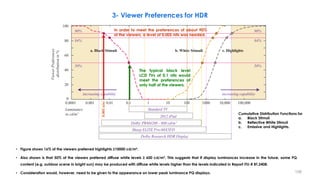
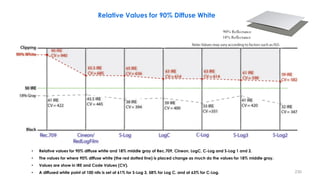
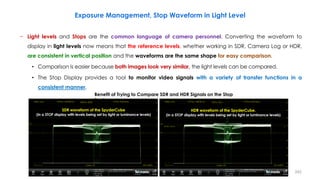
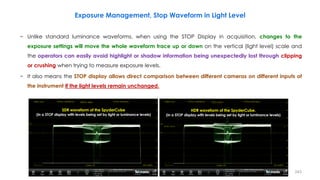
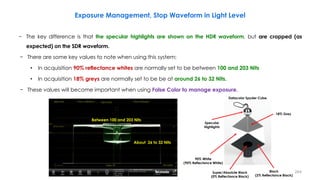
Dr. Mohieddin Moradi
mohieddinmoradi@gmail.com
Dream
Idea
Plan
Implementation
1
https://www.slideshare.net/mohieddin.moradi/presentations
2
− Elements of High-Quality Image Production
− CRT Gamma Characteristic
− Light Level Definitions & HVS Light Perception
− Dynamic Range Management in Camera
− An Introduction to HDR Technology
− Luminance and Contrast Masking and HVS Frequency Response
− SMPTE ST-2084: “Perceptual Quantizer”(PQ), PQ HDR-TV
− ARIB STB-B67 and ITU-R BT.2100, HLG HDR-TV
− Scene-Referred vs. Display-Referred and OOTF (Opto-Optical Transfer Function)
− Signal Range Selection for HLG and PQ (Narrow and Full Ranges)
− Conversion Between PQ and HLG
− HDR Static and Dynamic Metadata
− ST 2094, Dynamic Metadata for Color Volume Transforms (DMCVT)
Outline
3
− Different HDR Technologies
− Nominal Signal Levels for PQ and HLG Production
− Exposure and False Color Management in HDR
− Colour Bars For Use in the Production of HLG and PQ HDR Systems
− Wide Color Gamut (WCG) and Color Space Conversion
− Scene Light vs Display Light Conversions
− Direct Mapping in HDR/SDR Conversions
− Tone Mapping, Inverse Tone Mapping, Clipping and Color Volume Mapping
− HDR & SDR Mastering Approaches
− Color Representation for Chroma Sub-sampling
− UHD Phases and HDR Broadcasting, Encoding and Transmission HDR
− Different Log HDR-TV Standards
− Sony S-Log3 HDR Standard
− SR: Scene-referred and Super Reality (Scene Referred Live HDR Production) (SR Live Workflow )
Outline
4
5
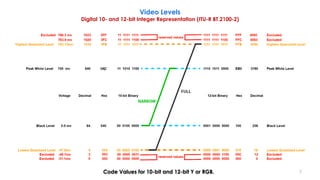
Video Levels
Digital 10- and 12-bit Integer Representation (ITU-R BT.2100-2)
Round( x ) = Sign( x ) * Floor( | x | + 0.5 )
Floor( x ) the largest integer less than or equal to x
Resulting values that exceed the
video data range should be
clipped to the video data range
Narrow Range
𝑫 = 𝑹𝒐𝒖𝒏𝒅 [(𝟐𝟏𝟗𝑬′
+ 𝟏𝟔) × 𝟐𝒏−𝟖
)]
𝑫 = 𝑹𝒐𝒖𝒏𝒅 [(𝟐𝟐𝟒𝑬′
+ 𝟏𝟐𝟖) × 𝟐𝒏−𝟖
)]
Full Range
𝑫 = 𝑹𝒐𝒖𝒏𝒅 [(𝟐𝒏
− 𝟏)𝑬′
]
𝑫 = 𝑹𝒐𝒖𝒏𝒅 [ 𝟐𝒏
− 𝟏 𝑬′
+ 𝟐𝒏−𝟏
)]
Coding 10-bit 12-bit 10-bit 12-bit
Black
(R' = G' = B' = Y' = I = 0)
DR', DG', DB', DY', DI
64 256 0 0
Nominal Peak
(R' = G' = B' = Y' = I = 1)
DR', DG', DB', DY', DI
940 3760 1023 4095
Nominal Peak
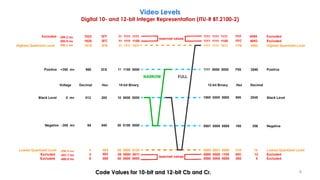
(C'B = C'R = -0.5)
DC'B, DC'R, DCT, DCP
64 256 0 0
Achromatic
(C'B = C'R = 0)
DC'B, DC'R, DCT, DCP
512 2048 512 2048
Nominal Peak
(C'B = C'R = +0.5)
DC'B, DC'R, DCT, DCP
960 3840 1023 4095
Video Data Range 4~1019 16~4079 0~1023 0~4095
6
Code Values for 10-bit and 12-bit Y or RGB.
Video Levels
Digital 10- and 12-bit Integer Representation (ITU-R BT.2100-2)
7
Code Values for 10-bit and 12-bit Cb and Cr.
Video Levels
Digital 10- and 12-bit Integer Representation (ITU-R BT.2100-2)
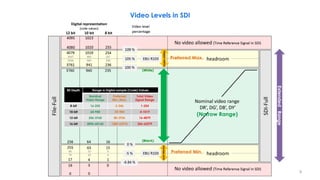
399.2 mv
396.9 mv
396.1 mv
-396.9 mv
-397.7 mv
-400.0 mv
8
Preferred Min.
Preferred Max.
(Narrow Range)
(White)
(Black)
(super-whites)
(sub-blacks)
Video Levels in SDI
Bit Depth Range in Digital sample (Code) Values
Nominal
Video Range
Preferred
Min./Max.
Total Video
Signal Range
8-bit 16-235 5-246 1-254
10-bit 64-940 20-984 4-1019
12-bit 256-3760 80-3936 16-4079
16-bit 4096-60160 1280-62976 256-65279
Extended
Range
9
Video Levels in SDI
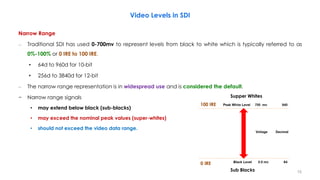
Narrow Range
– Traditional SDI has used 0-700mv to represent levels from black to white which is typically referred to as
0%-100% or 0 IRE to 100 IRE.
• 64d to 960d for 10-bit
• 256d to 3840d for 12-bit
– The narrow range representation is in widespread use and is considered the default.
− Narrow range signals
• may extend below black (sub-blacks)
• may exceed the nominal peak values (super-whites)
• should not exceed the video data range.
0 IRE
100 IRE
Supper Whites
Sub Blacks 10
Video Levels in SDI
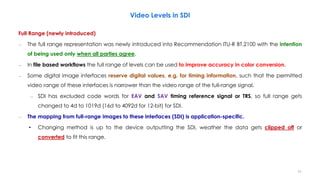
Full Range (newly introduced)
– The full range representation was newly introduced into Recommendation ITU-R BT.2100 with the intention
of being used only when all parties agree.
– In file based workflows the full range of levels can be used to improve accuracy in color conversion.
– Some digital image interfaces reserve digital values, e.g. for timing information, such that the permitted
video range of these interfaces is narrower than the video range of the full-range signal.
– SDI has excluded code words for EAV and SAV timing reference signal or TRS, so full range gets
changed to 4d to 1019d (16d to 4092d for 12-bit) for SDI.
– The mapping from full-range images to these interfaces (SDI) is application-specific.
• Changing method is up to the device outputting the SDI, weather the data gets clipped off or
converted to fit this range.
11
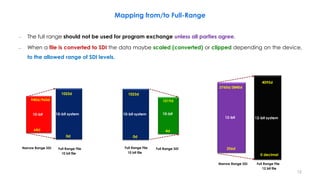
Mapping from/to Full-Range
Full Range SDI
4d
10-bit
1019d
12 bit file
0 decimal
12-bit system
4095d
Narrow Range SDI
256d
12-bit
3760d/3840d
Narrow Range SDI
64d
10-bit
940d/960d
10 bit file
0d
10-bit system
1023d
– The full range should not be used for program exchange unless all parties agree.
– When a file is converted to SDI the data maybe scaled (converted) or clipped depending on the device,
to the allowed range of SDI levels.
10 bit file
0d
10-bit system
1023d
Full Range File Full Range File
Full Range File
12
Signal Range Selection for HLG and PQ
• Overshoots that extend above the nominal
peak luminance into the “super-white” region
(where the signal E′ > 1)
• Under-shoots that extend below black into
the “sub-black” region
(where the signal E′ < 0)
Common video
processing techniques
(image re-sizing, filtering,
compression
(quantization),…)
Input Video
E′: Non linear color value, encoded in HLG or PQ
space in the range [0,1].
Preferred Min.
Preferred Max.
(Narrow Range)
(White)
(Black)
(super-whites)
(sub-blacks)
In order to maintain image fidelity, it
is important that the over-shoots and
under-shoots are not clipped.
E′
E′
Output Video
13
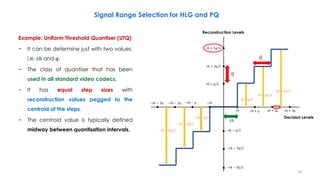
Example: Uniform Threshold Quantiser (UTQ)
− It can be determine just with two values,
i.e. 𝒕𝒉 and 𝒒.
− The class of quantiser that has been
used in all standard video codecs.
− It has equal step sizes with
reconstruction values pegged to the
centroid of the steps.
− The centroid value is typically defined
midway between quantisation intervals.
𝑞
𝑞
𝑡ℎ 𝑡ℎ + 𝑞 𝑡ℎ + 2𝑞 𝑡ℎ + 3𝑞
−𝑡ℎ
−𝑡ℎ − 𝑞
−𝑡ℎ − 2𝑞
−𝑡ℎ − 3𝑞
−𝑡ℎ − 𝑞/2
𝑡ℎ + 𝑞/2
−𝑡ℎ − 3𝑞/2
−𝑡ℎ − 5𝑞/2
𝑡ℎ + 3𝑞/2
𝑡ℎ + 5𝑞/2
𝒕𝒉
𝑡ℎ + 𝑞/2
𝑡ℎ + 3𝑞/2
𝑡ℎ + 5𝑞/2
−𝑡ℎ − 𝑞/2
−𝑡ℎ − 3𝑞/2
−𝑡ℎ − 5𝑞/2
Decision Levels
Reconstruction Levels
Signal Range Selection for HLG and PQ
14
− The use of narrow range signals is
strongly preferred for HLG:
• to preserve the signal fidelity
• to reduce the risk of mistaking full
range for narrow range signals (and
vice versa) in production
− Because the range of HLG is limited to
1000 nits, it is regular for content to
contain pixel values near the extremes of
the range.
Signal Range Selection for HLG and PQ
Therefore, over-shoots and under-shoots
are likely to be clipped if full-range
signals were used for HLG Signal.
Common video processing
techniques
(image re-sizing, filtering,
compression (quantization),…)
Input Video
E′
E′
Output Video
E′
E′: Non linear color value, encoded in HLG or PQ space in the range [0,1].
15
− The use of narrow range signals is
strongly preferred for HLG:
• to preserve the signal fidelity
• to reduce the risk of mistaking full
range for narrow range signals (and
vice versa) in production
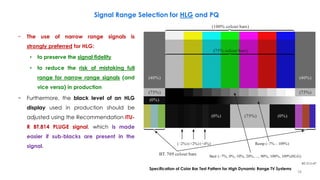
− Furthermore, the black level of an HLG
display used in production should be
adjusted using the Recommendation ITU-
R BT.814 PLUGE signal, which is made
easier if sub-blacks are present in the
signal.
Signal Range Selection for HLG and PQ
BT.2111-07
(40%)
(75%)
(0%)
(75%)
(0%)
(0%)
(75%)
(40%)
(75% colour bars)
(100% colour bars)
(–2%) (+2%) (+4%)
BT. 709 colour bars
Ramp (–7% - 109%)
Stair (–7%, 0%, 10%, 20%, ..., 90%, 100%, 109%HLG)
Specification of Color Bar Test Pattern for High Dynamic Range TV Systems
16
Signal Range Selection for HLG and PQ
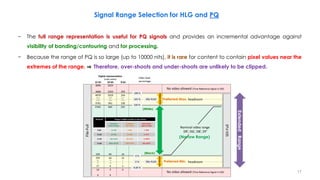
− The full range representation is useful for PQ signals and provides an incremental advantage against
visibility of banding/contouring and for processing.
− Because the range of PQ is so large (up to 10000 nits), it is rare for content to contain pixel values near the
extremes of the range. ⇒ Therefore, over-shoots and under-shoots are unlikely to be clipped.
Preferred Min.
Preferred Max.
(Narrow Range)
(White)
(Black)
(super-whites)
(sub-blacks)
Bit Depth Range in Digital sample (Code) Values
Nominal
Video Range
Preferred
Min./Max.
Total Video
Signal Range
8-bit 16-235 5-246 1-254
10-bit 64-940 20-984 4-1019
12-bit 256-3760 80-3936 16-4079
16-bit 4096-60160 1280-62976 256-65279
Extended
Range
17
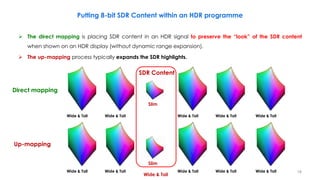
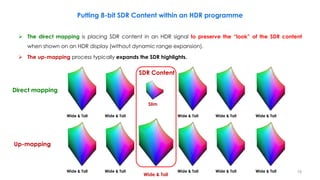
Putting 8-bit SDR Content within an HDR programme
 The direct mapping is placing SDR content in an HDR signal to preserve the “look” of the SDR content
when shown on an HDR display (without dynamic range expansion).
 The up-mapping process typically expands the SDR highlights.
Slim
Wide & Tall Wide & Tall Wide & Tall
Wide & Tall Wide & Tall
Slim
Wide & Tall Wide & Tall Wide & Tall
Wide & Tall Wide & Tall
SDR Content
Up-mapping
Direct mapping
Wide & Tall
18
Putting 8-bit SDR Content within an HDR programme
 The direct mapping is placing SDR content in an HDR signal to preserve the “look” of the SDR content
when shown on an HDR display (without dynamic range expansion).
 The up-mapping process typically expands the SDR highlights.
Slim
Wide & Tall Wide & Tall Wide & Tall
Wide & Tall Wide & Tall
Wide & Tall Wide & Tall Wide & Tall
Wide & Tall Wide & Tall
SDR Content
Up-mapping
Direct mapping
Wide & Tall
19
Putting 8-bit SDR Content within an HDR programme
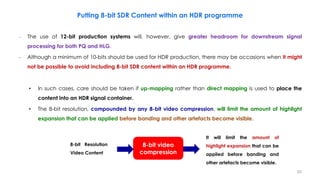
– The use of 12-bit production systems will, however, give greater headroom for downstream signal
processing for both PQ and HLG.
– Although a minimum of 10-bits should be used for HDR production, there may be occasions when it might
not be possible to avoid including 8-bit SDR content within an HDR programme.
• In such cases, care should be taken if up-mapping rather than direct mapping is used to place the
content into an HDR signal container.
• The 8-bit resolution, compounded by any 8-bit video compression, will limit the amount of highlight
expansion that can be applied before banding and other artefacts become visible.
8-bit video
compression
8-bit Resolution
Video Content
It will limit the amount of
highlight expansion that can be
applied before banding and
other artefacts become visible.
20
21
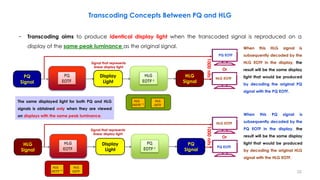
Transcoding Concepts Between PQ and HLG
Signal that represents
linear display light
HLG EOTF
PQ EOTF
Or
The same displayed light for both PQ and HLG
signals is obtained only when they are viewed
on displays with the same peak luminance.
Display
Light
PQ
Signal
HLG
Signal
HLG
OOTF−1
HLG
OETF
When this HLG signal is
subsequently decoded by the
HLG EOTF in the display, the
result will be the same display
light that would be produced
by decoding the original PQ
signal with the PQ EOTF.
− Transcoding aims to produce identical display light when the transcoded signal is reproduced on a
display of the same peak luminance as the original signal.
Signal that represents
linear display light
PQ EOTF
HLG EOTF
Or
Display
Light
PQ
Signal
HLG
Signal
HLG
OETF−1
HLG
OOTF
When this PQ signal is
subsequently decoded by the
PQ EOTF in the display, the
result will be the same display
light that would be produced
by decoding the original HLG
signal with the HLG EOTF.
1000
nits
1000
nits
22
– However, the difference in the way that PQ and HLG signals are rendered on displays of different peak
luminance complicates the conversion between PQ and HLG signals.
 For example if PQ signals, representing different peak luminances, are simply transcoded to HLG
⇒ The signal level for diffuse white will vary (it is not 75% resultant HLG signal).
 For example if HLG content is simply transcoded to PQ signal
⇒ The brightness of diffuse white will vary depending on the assumed peak luminance of the HLG
display.
Transcoding Concepts Between PQ and HLG
To avoid such brightness
changes, it is needed to
convert, rather than simply
transcode, the signals.
Reflectance Object or Reference
(Luminance Factor, %)
Nominal Luminance Value
(PQ & HLG)
[Display Peak Luminance, 1000 nit]
Nominal
Signal Level
(%) PQ
Nominal
Signal Level
(%) HLG
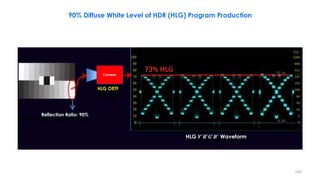
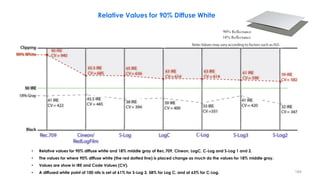
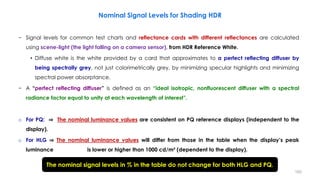
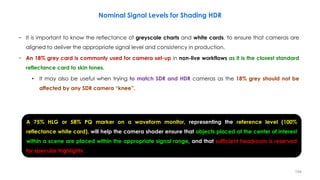
Grey Card (18% Reflectance) 26 nit 38 38
Greyscale Chart Max (83% Reflectance) 162 nit 56 71
Greyscale Chart Max (90% Reflectance) 179 nit 57 73
Reference Level:
HDR Reference White (100% Reflectance)
also Diffuse White and Graphics White
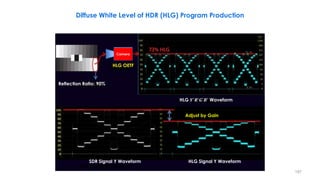
203 nit 58 75
23
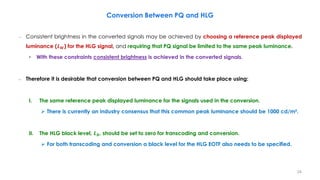
– Consistent brightness in the converted signals may be achieved by choosing a reference peak displayed
luminance (𝑳𝑾) for the HLG signal, and requiring that PQ signal be limited to the same peak luminance.
• With these constraints consistent brightness is achieved in the converted signals.
– Therefore it is desirable that conversion between PQ and HLG should take place using:
I. The same reference peak displayed luminance for the signals used in the conversion.
 There is currently an industry consensus that this common peak luminance should be 1000 cd/m².
II. The HLG black level, 𝑳𝑩, should be set to zero for transcoding and conversion.
 For both transcoding and conversion a black level for the HLG EOTF also needs to be specified.
Conversion Between PQ and HLG
24
Conversion Using a Reference Condition at 1000 nits
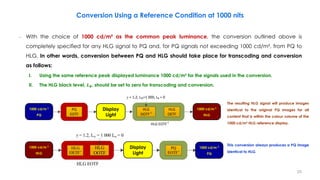
– With the choice of 1000 cd/m² as the common peak luminance, the conversion outlined above is
completely specified for any HLG signal to PQ and, for PQ signals not exceeding 1000 cd/m², from PQ to
HLG. In other words, conversion between PQ and HLG should take place for transcoding and conversion
as follows:
I. Using the same reference peak displayed luminance 1000 cd/m² for the signals used in the conversion.
II. The HLG black level, 𝑳𝑩, should be set to zero for transcoding and conversion.
1 000 cd/m2
PQ
1 000 cd/m2
HLG
Display Light
PQ
EOTF
HLG
OETF
HLG
OOTF-1
g = 1.2, LW=1 000, LB = 0
HLG EOTF-1
Display
Light
Display
Light
1000 cd/m 𝟐
PQ
1000 cd/m 𝟐
HLG
1000 cd/m 𝟐
PQ
1000 cd/m 𝟐
HLG
The resulting HLG signal will produce images
identical to the original PQ images for all
content that is within the colour volume of the
1000 cd/m² HLG reference display.
This conversion always produces a PQ image
identical to HLG.
25
Handling PQ Signals with Greater Peak Luminance than 1000 nits
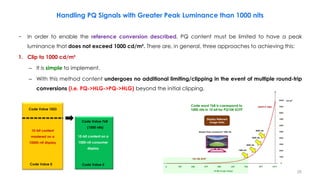
− In order to enable the reference conversion described, PQ content must be limited to have a peak
luminance that does not exceed 1000 cd/m². There are, in general, three approaches to achieving this:
1. Clip to 1000 cd/m²
– It is simple to implement.
– With this method content undergoes no additional limiting/clipping in the event of multiple round-trip
conversions (i.e. PQ->HLG->PQ->HLG) beyond the initial clipping.
10-bit content
mastered on a
10000-nit display
10-bit content on a
1000-nit consumer
display
Code Value 1023
Code Value 0
Code Value 768
(1000 nits)
Code Value 0
Code word 768 is correspond to
1000 nits in 10 bit for PQ10K EOTF
26
Handling PQ Signals with Greater Peak Luminance than 1000 nits
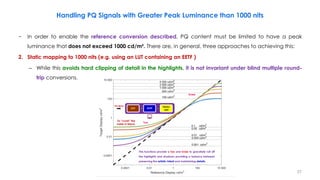
− In order to enable the reference conversion described, PQ content must be limited to have a peak
luminance that does not exceed 1000 cd/m². There are, in general, three approaches to achieving this:
2. Static mapping to 1000 nits (e.g. using an LUT containing an EETF )
– While this avoids hard clipping of detail in the highlights, it is not invariant under blind multiple round-
trip conversions.
This functions provide a toe and knee to gracefully roll off
the highlights and shadows providing a balance between
preserving the artistic intent and maintaining details.
Toe
Knee
EETF EOTF
Display
Light
PQ signal
To “crush” the
noise in black,
27
Handling PQ Signals with Greater Peak Luminance than 1000 nits
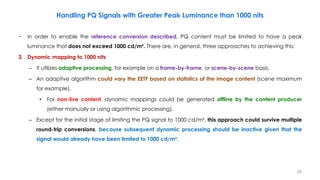
− In order to enable the reference conversion described, PQ content must be limited to have a peak
luminance that does not exceed 1000 cd/m². There are, in general, three approaches to achieving this:
3. Dynamic mapping to 1000 nits
– It utilizes adaptive processing, for example on a frame-by-frame, or scene-by-scene basis.
– An adaptive algorithm could vary the EETF based on statistics of the image content (scene maximum
for example).
• For non-live content, dynamic mappings could be generated offline by the content producer
(either manually or using algorithmic processing).
– Except for the initial stage of limiting the PQ signal to 1000 cd/m², this approach could survive multiple
round-trip conversions, because subsequent dynamic processing should be inactive given that the
signal would already have been limited to 1000 cd/m².
28
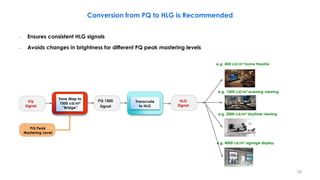
Conversion from PQ to HLG is Recommended
PQ
Signal
Transcode
to HLG
HLG
Signal
PQ 1000
Signal
Tone Map to
1000 cd/m²
“Bridge”
e.g. 400 cd/m² home theatre
e.g. 1000 cd/m² evening viewing
PQ Peak
Mastering Level
e.g. 2000 cd/m² daytime viewing
e.g. 4000 cd/m² signage display
– Ensures consistent HLG signals
– Avoids changes in brightness for different PQ peak mastering levels
29
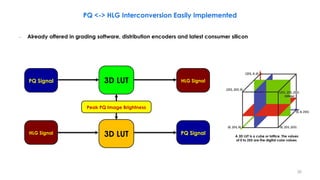
PQ <-> HLG Interconversion Easily Implemented
– Already offered in grading software, distribution encoders and latest consumer silicon
PQ Signal
HLG Signal PQ Signal
HLG Signal
3D LUT
3D LUT
Peak PQ Image Brightness
A 3D LUT is a cube or lattice. The values
of 0 to 255 are the digital color values.
30
Possible Colour Differences when Converting from PQ to HLG
– In principle, the conversion of PQ images to HLG could give rise to hue shifts or desaturation on bright
highly saturated areas of the picture, although such effects are believed to be rare in practice.
– Mathematically, this arises because the OOTF applied in the display for HLG is a function of overall
luminance rather than identical functions of R, G, and B.
– Consider the equations for luminance in both the display and scene domains along with the EOTF for HLG:
𝒀𝑫 = 𝟎. 𝟐𝟔𝟐𝟕𝑹𝑫 + 𝟎. 𝟔𝟕𝟖𝟎𝑮𝑫 + 𝟎. 𝟎𝟓𝟗𝟑𝑩𝑫
𝒀𝒔 = 𝟎. 𝟐𝟔𝟐𝟕𝑹𝒔 + 𝟎. 𝟔𝟕𝟖𝟎𝑮𝒔 + 𝟎. 𝟎𝟓𝟗𝟑𝑩𝒔
𝑹𝑫 = 𝛂𝒀𝑺
𝜸−𝟏
𝑹𝑺
𝑮𝑫 = 𝛂𝒀𝑺
𝜸−𝟏
𝑮𝑺
𝑩𝑫 = 𝛂𝒀𝑺
𝜸−𝟏
𝑩𝑺
𝑭𝑫: luminance of a displayed linear component {𝑅𝐷, 𝐺𝐷, or 𝐵𝐷}, in cd/m²
𝑬: signal for each colour component {𝑅𝑆, 𝐺𝑆, 𝐵𝑆} proportional to scene linear light and scaled by camera exposure, normalized to the range [0:1].
𝜶 : user adjustment for the luminance of the display, commonly known in the past as a “contrast control”.
• It represents 𝑳𝑾, the nominal peak luminance of a display for achromatic pixels in cd/m².
𝜸 : is an exponent, which varies depending on 𝐿𝑊, and which is equal to 1.2 at the nominal display peak luminance of 1000 cd/m²
𝑭𝑫 = 𝑶𝑶𝑻𝑭 𝑬 = 𝛂𝒀𝑺
𝜸−𝟏
𝑬
PQ
Signal
HLG
Signal
Converter
Hue shifts or desaturation on bright highly
saturated areas of the picture
31
Possible Colour Differences when Converting from PQ to HLG
– The value ‘𝑥’ is the signal value required such that when 𝑹 = 𝑮 = 𝑩 = 𝒙 the resulting white is 1000 cd/m².
• For a 1000 cd/m² PQ display, this occurs when 𝒙 ≈ 𝟎. 𝟕𝟔
• For a 1000 cd/m² HLG display, this occurs when 𝒙 = 𝟏
– For a 1000 cd/m² PQ display, the maximum luminance of each of these colours is calculated using 𝒀𝑫.
– For a 1000 cd/m² HLG display, the EOTF can be simplified by normalizing scene colours within [0,1]. Thus:
– This determines 𝑹𝑫, 𝑮𝑫, and 𝑩𝑫, and the resulting luminance is calculated using 𝒀𝑫.
Colour BT.2100 PQ Y cd/m² BT.2100 HLG Y cd/m²
{x,x,x} // Peak white 1000 1000
{x,0,0} // Peak red 262.7 201.1
{0,x,0} // Peak green 678.0 627.3
{0,0,x} // Peak blue 59.3 33.7
𝑹𝑫 = 𝟏𝟎𝟎𝟎𝒀𝑺
𝜸−𝟏
𝑹𝒔
𝑮𝑫 = 𝟏𝟎𝟎𝟎𝒀𝑺
𝜸−𝟏
𝑮𝒔 𝑩𝑫 = 𝟏𝟎𝟎𝟎𝒀𝑺
𝜸−𝟏
𝑩𝒔
The peak values that can be displayed for pure white, and for the red, green and
blue primaries, for a 1000 cd/m² PQ monitor, and for a 1000 cd/m² HLG monitor. 32
Possible Colour Differences when Converting from PQ to HLG
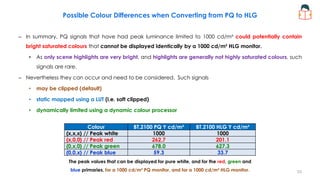
– In summary, PQ signals that have had peak luminance limited to 1000 cd/m² could potentially contain
bright saturated colours that cannot be displayed identically by a 1000 cd/m² HLG monitor.
• As only scene highlights are very bright, and highlights are generally not highly saturated colours, such
signals are rare.
– Nevertheless they can occur and need to be considered. Such signals
• may be clipped (default)
• static mapped using a LUT (i.e. soft clipped)
• dynamically limited using a dynamic colour processor
Colour BT.2100 PQ Y cd/m² BT.2100 HLG Y cd/m²
{x,x,x} // Peak white 1000 1000
{x,0,0} // Peak red 262.7 201.1
{0,x,0} // Peak green 678.0 627.3
{0,0,x} // Peak blue 59.3 33.7
The peak values that can be displayed for pure white, and for the red, green and
blue primaries, for a 1000 cd/m² PQ monitor, and for a 1000 cd/m² HLG monitor. 33
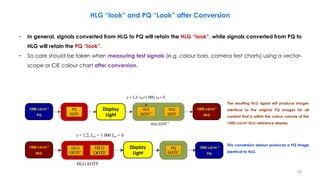
HLG “look” and PQ “Look” after Conversion
− In general, signals converted from HLG to PQ will retain the HLG “look”, while signals converted from PQ to
HLG will retain the PQ “look”.
− So care should be taken when measuring test signals (e.g. colour bars, camera test charts) using a vector-
scope or CIE colour chart after conversion.
1 000 cd/m2
PQ
1 000 cd/m2
HLG
Display Light
PQ
EOTF
HLG
OETF
HLG
OOTF-1
g = 1.2, LW=1 000, LB = 0
HLG EOTF-1
Display
Light
Display
Light
1000 cd/m 𝟐
PQ
1000 cd/m 𝟐
HLG
1000 cd/m 𝟐
PQ
1000 cd/m 𝟐
HLG
The resulting HLG signal will produce images
identical to the original PQ images for all
content that is within the colour volume of the
1000 cd/m² HLG reference display.
This conversion always produces a PQ image
identical to HLG.
34
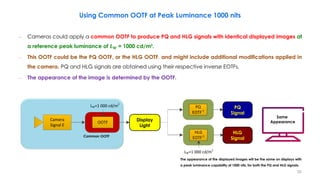
Using Common OOTF at Peak Luminance 1000 nits
PQ Signal
Display Light
PQ
EOTF-1
OOTF
LW=1 000 cd/m2
Camera
Signal E
HLG Signal
HLG
EOTF-1
LW=1 000 cd/m2
Common OOTF
Same
Appearance
– Cameras could apply a common OOTF to produce PQ and HLG signals with identical displayed images at
a reference peak luminance of 𝑳𝐖 = 1000 cd/m².
– This OOTF could be the PQ OOTF, or the HLG OOTF, and might include additional modifications applied in
the camera. PQ and HLG signals are obtained using their respective inverse EOTFs.
– The appearance of the image is determined by the OOTF.
Display
Light
PQ
Signal
HLG
Signal
The appearance of the displayed images will be the same on displays with
a peak luminance capability of 1000 nits, for both the PQ and HLG signals.
35
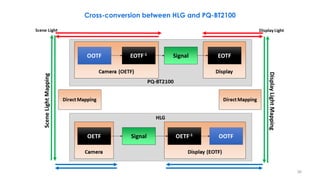
Cross-conversion between HLG and PQ-BT2100
36
37
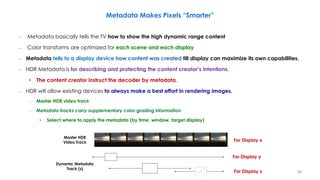
Metadata Makes Pixels “Smarter”
Master HDR
Video Track
Dynamic Metadata
Track (s)
For Display y
For Display z
For Display x
– Metadata basically tells the TV how to show the high dynamic range content
– Color transforms are optimized for each scene and each display
– Metadata tells to a display device how content was created till display can maximize its own capabilities.
– HDR Metadata is for describing and protecting the content creator’s intentions.
• The content creator instruct the decoder by metadata.
– HDR will allow existing devices to always make a best effort in rendering images.
– Master HDR video track
– Metadata tracks carry supplementary color grading information
• Select where to apply the metadata (by time, window, target display)
38
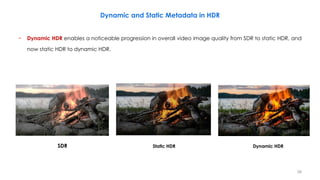
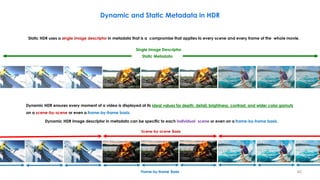
− Dynamic HDR enables a noticeable progression in overall video image quality from SDR to static HDR, and
now static HDR to dynamic HDR.
SDR Static HDR Dynamic HDR
Dynamic and Static Metadata in HDR
39
Static HDR uses a single image descriptor in metadata that is a compromise that applies to every scene and every frame of the whole movie.
Dynamic and Static Metadata in HDR
Static Metadata
Dynamic HDR ensures every moment of a video is displayed at its ideal values for depth, detail, brightness, contrast, and wider color gamuts
on a scene-by-scene or even a frame-by-frame basis.
Dynamic HDR image descriptor in metadata can be specific to each individual scene or even on a frame-by-frame basis.
Frame-by-frame Basis
Scene-by-scene Basis
Single Image Descriptor
40
Static Metadata
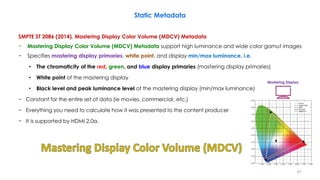
SMPTE ST 2086 (2014), Mastering Display Color Volume (MDCV) Metadata
− Mastering Display Color Volume (MDCV) Metadata support high luminance and wide color gamut images
− Specifies mastering display primaries, white point, and display min/max luminance, i.e.
• The chromaticity of the red, green, and blue display primaries (mastering display primaries)
• White point of the mastering display
• Black level and peak luminance level of the mastering display (min/max luminance)
− Constant for the entire set of data (ie movies, commercial, etc.)
− Everything you need to calculate how it was presented to the content producer
− It is supported by HDMI 2.0a.
Mastering Display
41
Static Metadata
MaxFALL and MaxCLL (Content Light Levels) Metadata
– The Blu-ray Disc Association (BDA) and Digital Entertainment Content Ecosystem (DECE) groups have
defined two additional metadata items
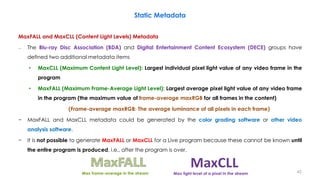
• MaxCLL (Maximum Content Light Level): Largest individual pixel light value of any video frame in the
program
• MaxFALL (Maximum Frame-Average Light Level): Largest average pixel light value of any video frame
in the program (the maximum value of frame-average maxRGB for all frames in the content)
(Frame-average maxRGB: The average luminance of all pixels in each frame)
− MaxFALL and MaxCLL metadata could be generated by the color grading software or other video
analysis software.
− It is not possible to generate MaxFALL or MaxCLL for a Live program because these cannot be known until
the entire program is produced, i.e., after the program is over.
Max frame-average in the stream Max light level of a pixel in the stream 42
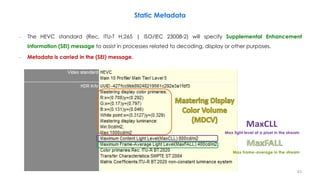
– The HEVC standard (Rec. ITU-T H.265 | ISO/IEC 23008-2) will specify Supplemental Enhancement
Information (SEI) message to assist in processes related to decoding, display or other purposes.
– Metadata is carried in the (SEI) message.
Static Metadata
Max frame-average in the stream
Max light level of a pixel in the stream
43
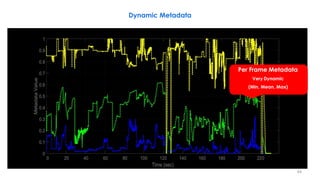
Dynamic Metadata
Per Frame Metadata
Very Dynamic
(Min, Mean, Max)
44
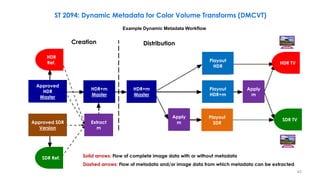
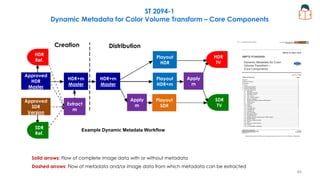
Example Dynamic Metadata Workflow
HDR
Ref. HDR TV
SDR TV
SDR Ref.
Approved
HDR
Master
Approved SDR
Version
HDR+m
Master
HDR+m
Master
Extract
m
Apply
m
Playout
HDR
Playout
SDR
Playout
HDR+m
Apply
m
Creation Distribution
ST 2094: Dynamic Metadata for Color Volume Transforms (DMCVT)
Solid arrows: Flow of complete image data with or without metadata
Dashed arrows: Flow of metadata and/or image data from which metadata can be extracted
45
− The SMPTE ST 2094 suite of documents define metadata for use in color volume transforms of content.
− It specifies dynamic, content‐dependent metadata used in the color volume transformation of source
content mastered with high dynamic range and/or wide color gamut imagery for presentation on a
display having a smaller color volume.
− Frame-by-frame or scene-by-scene color remapping information (CRI)
− It enables color transformation to be variable along the content timeline.
− Used to describe the content, such as minimum, mean, maximum brightness
− Reduces or eliminates the need to analyze the content at a display
• Better quality, Less latency, Less processing power
− Allows temporal stability when desired
− It is supported in HDMI 2.1.
ST 2094: Dynamic Metadata for Color Volume Transforms (DMCVT)
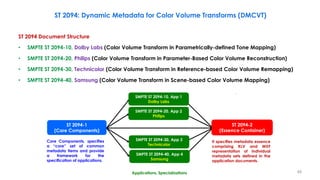
46
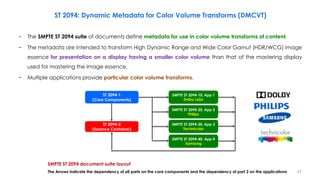
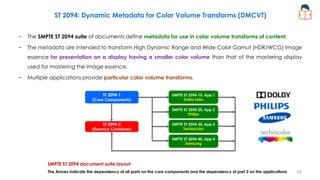
ST 2094-1
(Core Components)
ST 2094-2
(Essence Container)
SMPTE ST 2094-10, App 1
Dolby Labs
SMPTE ST 2094-20, App 2
Philips
SMPTE ST 2094-30, App 3
Technicolor
SMPTE ST 2094-40, App 4
Samsung
ST 2094: Dynamic Metadata for Color Volume Transforms (DMCVT)
SMPTE ST 2094 document suite layout
The Arrows indicate the dependency of all parts on the core components and the dependency of part 2 on the applications
− The SMPTE ST 2094 suite of documents define metadata for use in color volume transforms of content.
− The metadata are intended to transform High Dynamic Range and Wide Color Gamut (HDR/WCG) image
essence for presentation on a display having a smaller color volume than that of the mastering display
used for mastering the image essence.
− Multiple applications provide particular color volume transforms.
47
ST 2094: Dynamic Metadata for Color Volume Transforms (DMCVT)
ST 2094 Document Structure
• SMPTE ST 2094-10, Dolby Labs (Color Volume Transform in Parametrically-defined Tone Mapping)
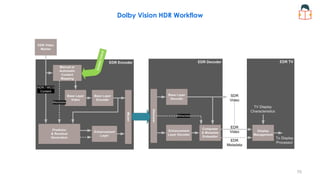
• SMPTE ST 2094-20, Philips (Color Volume Transform in Parameter-Based Color Volume Reconstruction)
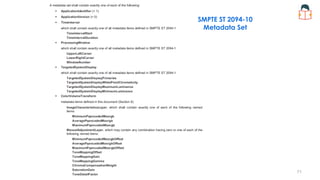
• SMPTE ST 2094-30, Technicolor (Color Volume Transform in Reference-based Color Volume Remapping)
• SMPTE ST 2094-40, Samsung (Color Volume Transform in Scene-based Color Volume Mapping)
It specifies metadata essence
comprising KLV and MXF
representation of individual
metadata sets defined in the
application documents.
Applications, Specializations
ST 2094-1
(Core Components)
ST 2094-2
(Essence Container)
Core Components, specifies
a “core” set of common
metadata items and provide
a framework for the
specification of applications.
SMPTE ST 2094-10, App 1
Dolby Labs
SMPTE ST 2094-20, App 2
Philips
SMPTE ST 2094-30, App 3
Technicolor
SMPTE ST 2094-40, App 4
Samsung
48
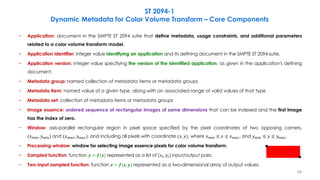
− Application: document in the SMPTE ST 2094 suite that define metadata, usage constraints, and additional parameters
related to a color volume transform model.
− Application identifier: integer value identifying an application and its defining document in the SMPTE ST 2094 suite.
− Application version: integer value specifying the version of the identified application, as given in the application's defining
document.
− Metadata group: named collection of metadata items or metadata groups
− Metadata item: named value of a given type, along with an associated range of valid values of that type
− Metadata set: collection of metadata items or metadata groups
− Image essence: ordered sequence of rectangular images of same dimensions that can be indexed and the first image
has the index of zero.
− Window: axis-parallel rectangular region in pixel space specified by the pixel coordinates of two opposing corners,
(𝑥𝑚𝑖𝑛, 𝑦𝑚𝑖𝑛) and (𝑥𝑚𝑎𝑥, 𝑦𝑚𝑎𝑥), and including all pixels with coordinate (𝑥, 𝑦), where 𝑥𝑚𝑖𝑛 ≤ 𝑥 ≤ 𝑥𝑚𝑎𝑥, and 𝑦𝑚𝑖𝑛 ≤ 𝑦 ≤ 𝑦𝑚𝑎𝑥.
− Processing window: window for selecting image essence pixels for color volume transform.
− Sampled function: function 𝒚 = 𝒇(𝒙) represented as a list of 𝑥𝑖, 𝑦𝑖 input/output pairs.
− Two-input sampled function: function 𝒛 = 𝒇(𝒙, 𝒚) represented as a two-dimensional array of output values.
ST 2094-1
Dynamic Metadata for Color Volume Transform – Core Components
49
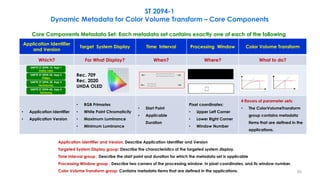
Application Identifier
and Version
Target System Display Time Interval Processing Window Color Volume Transform
Which? For What Display? When? Where? What to do?
Rec. 709
Rec. 2020
UHDA OLED
• Application Identifier
• Application Version
• RGB Primaries
• White Point Chromaticity
• Maximum Luminance
• Minimum Luminance
• Start Point
• Applicable
Duration
Pixel coordinates:
• Upper Left Corner
• Lower Right Corner
• Window Number
4 flavors of parameter sets:
• The ColorVolumeTransform
group contains metadata
items that are defined in the
applications.
Application Identifier and Version: Describe Application Identifier and Version
Targeted System Display group: Describe the characteristics of the targeted system display.
Time Interval group : Describe the start point and duration for which the metadata set is applicable
Processing Window group : Describe two corners of the processing window, in pixel coordinates, and its window number.
Color Volume Transform group: Contains metadata items that are defined in the applications.
ST 2094-1
Dynamic Metadata for Color Volume Transform – Core Components
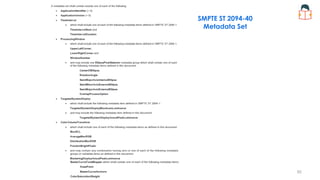
Core Components Metadata Set: Each metadata set contains exactly one of each of the following
SMPTE ST 2094-10, App 1
Dolby Labs
SMPTE ST 2094-20, App 2
Philips
SMPTE ST 2094-30, App 3
Technicolor
SMPTE ST 2094-40, App 4
Samsung
50
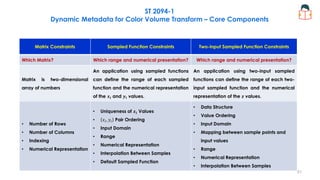
Matrix Constraints Sampled Function Constraints Two-input Sampled Function Constraints
Which Matrix? Which range and numerical presentation? Which range and numerical presentation?
Matrix is two-dimensional
array of numbers
An application using sampled functions
can define the range of each sampled
function and the numerical representation
of the 𝒙𝒊 and 𝒚𝒊 values.
An application using two-input sampled
functions can define the range of each two-
input sampled function and the numerical
representation of the 𝒛 values.
• Number of Rows
• Number of Columns
• Indexing
• Numerical Representation
• Uniqueness of 𝒙𝒊 Values
• 𝑥𝑖, 𝑦𝑖 Pair Ordering
• Input Domain
• Range
• Numerical Representation
• Interpolation Between Samples
• Default Sampled Function
• Data Structure
• Value Ordering
• Input Domain
• Mapping between sample points and
input values
• Range
• Numerical Representation
• Interpolation Between Samples
ST 2094-1
Dynamic Metadata for Color Volume Transform – Core Components
51
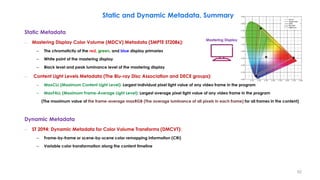
Static and Dynamic Metadata, Summary
Static Metadata
– Mastering Display Color Volume (MDCV) Metadata (SMPTE ST2086):
– The chromaticity of the red, green, and blue display primaries
– White point of the mastering display
– Black level and peak luminance level of the mastering display
– Content Light Levels Metadata (The Blu-ray Disc Association and DECE groups):
– MaxCLL (Maximum Content Light Level): Largest individual pixel light value of any video frame in the program
– MaxFALL (Maximum Frame-Average Light Level): Largest average pixel light value of any video frame in the program
(The maximum value of the frame-average maxRGB (The average luminance of all pixels in each frame) for all frames in the content)
Dynamic Metadata
– ST 2094: Dynamic Metadata for Color Volume Transforms (DMCVT):
– Frame-by-frame or scene-by-scene color remapping information (CRI)
– Variable color transformation along the content timeline
Mastering Display
52
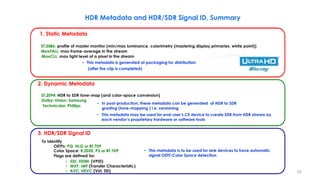
HDR Metadata and HDR/SDR Signal ID, Summary
2. Dynamic Metadata
ST.2094: HDR to SDR tone-map (and color-space conversion)
Dolby-Vision, Samsung
Technicolor, Phillips
3. HDR/SDR Signal ID
To Identify
OETFs: PQ, HLG or BT.709
Color Space: R.2020, P3 or BT.709
Flags are defined for:
• SDI, HDMI (VPID)
• MXF, IMF (Transfer Characteristic)
• AVC, HEVC (VUI, SEI)
• In post-production, these metadata can be generated at HDR to SDR
grading (tone-mapping ) i.e. versioning
• This metadata may be used for end-user’s CE device to create SDR from HDR stream by
each vendor’s proprietary hardware or software tools
• This metadata is to be used for sink devices to have automatic
signal OETF/Color Space detection
1. Static Metadata
ST.2086: profile of master monitor (min/max luminance, colorimetry (mastering display primaries, white point))
MaxFALL: max frame-average in the stream
MaxCLL: max light level of a pixel in the stream
• This metadata is generated at packaging for distribution
(after the clip is completed)
53
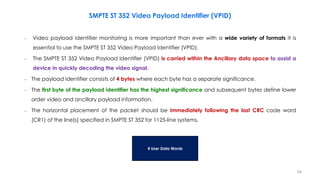
– Video payload identifier monitoring is more important than ever with a wide variety of formats it is
essential to use the SMPTE ST 352 Video Payload Identifier (VPID).
– The SMPTE ST 352 Video Payload Identifier (VPID) is carried within the Ancillary data space to assist a
device in quickly decoding the video signal.
– The payload identifier consists of 4 bytes where each byte has a separate significance.
– The first byte of the payload identifier has the highest significance and subsequent bytes define lower
order video and ancillary payload information.
– The horizontal placement of the packet should be immediately following the last CRC code word
(CR1) of the line(s) specified in SMPTE ST 352 for 1125-line systems.
SMPTE ST 352 Video Payload Identifier (VPID)
4 User Data Words
54
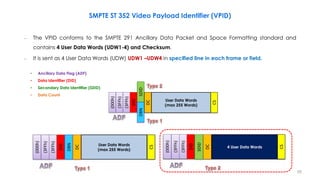
– The VPID conforms to the SMPTE 291 Ancillary Data Packet and Space Formatting standard and
contains 4 User Data Words (UDW1-4) and Checksum.
– It is sent as 4 User Data Words (UDW) UDW1 –UDW4 in specified line in each frame or field.
SMPTE ST 352 Video Payload Identifier (VPID)
(000h)
(3FFh)
(3FFh)
DID
SDID
CS
DC
DBN
User Data Words
(max 255 Words)
(000h)
(3FFh)
(3FFh)
DID
DBN
DC
CS
(000h)
(3FFh)
(3FFh)
DID
SDID
DC
CS
User Data Words
(max 255 Words)
User Data Words
(max 255 Words)
User Data Words
(max 255 Words)
4 User Data Words
• Ancillary Data Flag (ADF)
• Data Identifier (DID)
• Secondary Data Identifier (SDID)
• Data Count
55
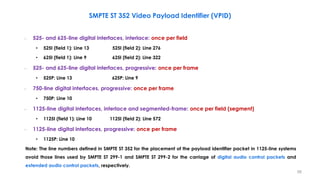
– 525- and 625-line digital interfaces, interlace: once per field
• 525I (field 1): Line 13 525I (field 2): Line 276
• 625I (field 1): Line 9 625I (field 2): Line 322
– 525- and 625-line digital interfaces, progressive: once per frame
• 525P: Line 13 625P: Line 9
– 750-line digital interfaces, progressive: once per frame
• 750P: Line 10
– 1125-line digital interfaces, interlace and segmented-frame: once per field (segment)
• 1125I (field 1): Line 10 1125I (field 2): Line 572
– 1125-line digital interfaces, progressive: once per frame
• 1125P: Line 10
Note: The line numbers defined in SMPTE ST 352 for the placement of the payload identifier packet in 1125-line systems
avoid those lines used by SMPTE ST 299-1 and SMPTE ST 299-2 for the carriage of digital audio control packets and
extended audio control packets, respectively.
SMPTE ST 352 Video Payload Identifier (VPID)
56
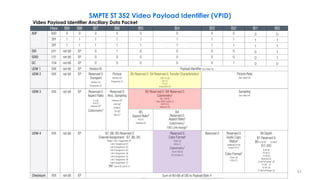
Video Payload Identifier Ancillary Data Packet
SMPTE ST 352 Video Payload Identifier (VPID)
57
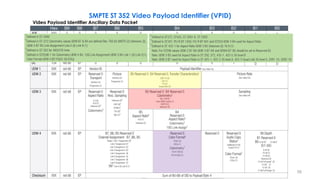
Video Payload Identifier Ancillary Data Packet
SMPTE ST 352 Video Payload Identifier (VPID)
58
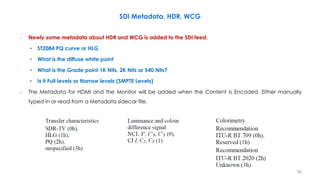
SDI Metadata, HDR, WCG
– Newly some metadata about HDR and WCG is added to the SDI feed.
• ST2084 PQ curve or HLG
• What is the diffuse white point
• What is the Grade point 1K Nits, 2K Nits or 540 Nits?
• Is it Full levels or Narrow levels (SMPTE Levels)
– The Metadata for HDMI and the Monitor will be added when the Content is Encoded. Either manually
typed in or read from a Metadata sidecar file.
59
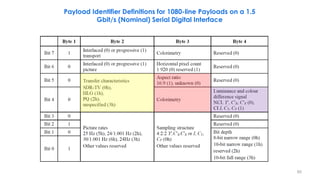
Payload Identifier Definitions for 1080-line Payloads on a 1.5
Gbit/s (Nominal) Serial Digital Interface
60
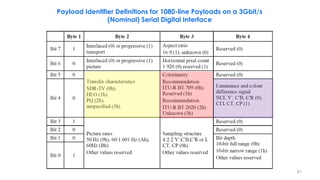
Payload Identifier Definitions for 1080-line Payloads on a 3Gbit/s
(Nominal) Serial Digital Interface
61
62
ST 2094-1
(Core Components)
ST 2094-2
(Essence Container)
SMPTE ST 2094-10, App 1
Dolby Labs
SMPTE ST 2094-20, App 2
Philips
SMPTE ST 2094-30, App 3
Technicolor
SMPTE ST 2094-40, App 4
Samsung
ST 2094: Dynamic Metadata for Color Volume Transforms (DMCVT)
SMPTE ST 2094 document suite layout
The Arrows indicate the dependency of all parts on the core components and the dependency of part 2 on the applications
− The SMPTE ST 2094 suite of documents define metadata for use in color volume transforms of content.
− The metadata are intended to transform High Dynamic Range and Wide Color Gamut (HDR/WCG) image
essence for presentation on a display having a smaller color volume than that of the mastering display
used for mastering the image essence.
− Multiple applications provide particular color volume transforms.
63
Solid arrows: Flow of complete image data with or without metadata
Dashed arrows: Flow of metadata and/or image data from which metadata can be extracted
ST 2094-1
Dynamic Metadata for Color Volume Transform – Core Components
Example Dynamic Metadata Workflow
HDR
Ref.
HDR
TV
SDR
TV
SDR
Ref.
Approved
HDR
Master
Approved
SDR
Version
HDR+m
Master
HDR+m
Master
Extract
m
Apply
m
Playout
HDR
Playout
SDR
Playout
HDR+m
Apply
m
Creation Distribution
64
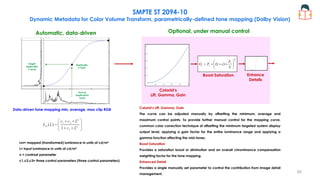
SMPTE ST 2094-10
Dynamic Metadata for Color Volume Transform, parametrically-defined tone mapping (Dolby Vision)
Automatic, data-driven Optional, under manual control
Data-driven tone mapping min, average, max clip RGB
Colorist’s
Lift, Gamma, Gain
Boost Saturation Enhance
Details
Target
Applicatio
n Level
Source
Application
Level
Applicatio
n Point
Lm= mapped (transformed) luminance in units of cd/m²
L= input luminance in units of cd/m²
n = contrast parameter
c1,c2,c3= three control parameters (three control parameters)
Colorist’s Lift, Gamma, Gain
The curve can be adjusted manually by offsetting the minimum, average and
maximum control points. To provide further manual control for the mapping curve,
common color correction technique of offsetting the minimum targeted system display
output level, applying a gain factor for the entire luminance range and applying a
gamma function affecting the mid-tones.
Boost Saturation
Provides a saturation boost or diminution and an overall chrominance compensation
weighting factor for the tone mapping.
Enhanced Detail
Provides a single manually set parameter to control the contribution from image detail
management.
65
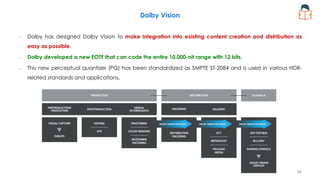
Dolby Vision
– Dolby has designed Dolby Vision to make integration into existing content creation and distribution as
easy as possible.
– Dolby developed a new EOTF that can code the entire 10,000-nit range with 12 bits.
– This new perceptual quantizer (PQ) has been standardized as SMPTE ST-2084 and is used in various HDR-
related standards and applications.
66
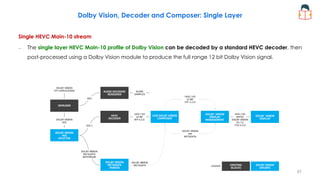
Dolby Vision, Decoder and Composer: Single Layer
Single HEVC Main-10 stream
– The single layer HEVC Main-10 profile of Dolby Vision can be decoded by a standard HEVC decoder, then
post-processed using a Dolby Vision module to produce the full range 12 bit Dolby Vision signal.
67
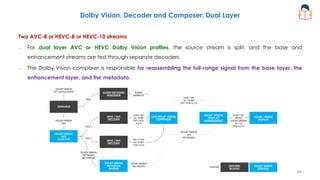
Dolby Vision, Decoder and Composer: Dual Layer
Two AVC-8 or HEVC-8 or HEVC-10 streams
– For dual layer AVC or HEVC Dolby Vision profiles, the source stream is split, and the base and
enhancement streams are fed through separate decoders.
– The Dolby Vision composer is responsible for reassembling the full-range signal from the base layer, the
enhancement layer, and the metadata.
68
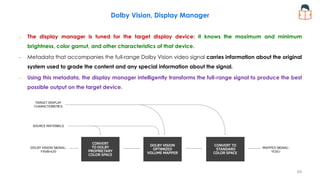
Dolby Vision, Display Manager
– The display manager is tuned for the target display device: it knows the maximum and minimum
brightness, color gamut, and other characteristics of that device.
– Metadata that accompanies the full-range Dolby Vision video signal carries information about the original
system used to grade the content and any special information about the signal.
– Using this metadata, the display manager intelligently transforms the full-range signal to produce the best
possible output on the target device.
69
Dolby Vision HDR Workflow
70
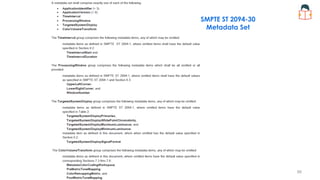
SMPTE ST 2094-10
Metadata Set
71
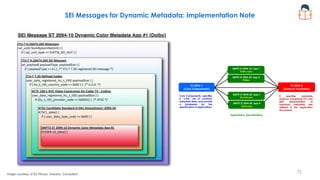
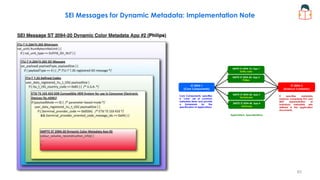
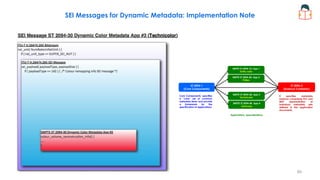
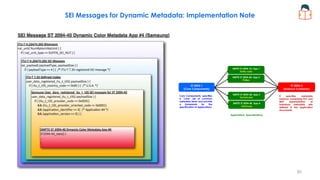
SEI Messages for Dynamic Metadata: Implementation Note
Image courtesy of Ed Reuss, Industry Consultant
It specifies metadata
essence comprising KLV and
MXF representation of
individual metadata sets
defined in the application
documents.
Applications, Specializations
ST 2094-1
(Core Components)
ST 2094-2
(Essence Container)
Core Components, specifies
a “core” set of common
metadata items and provide
a framework for the
specification of applications.
SMPTE ST 2094-10, App 1
Dolby Labs
SMPTE ST 2094-20, App 2
Philips
SMPTE ST 2094-30, App 3
Technicolor
SMPTE ST 2094-40, App 4
Samsung
72
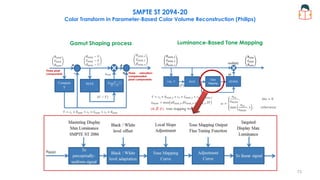
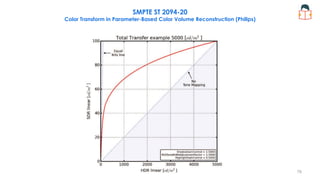
SMPTE ST 2094-20
Color Transform in Parameter-Based Color Volume Reconstruction (Philips)
Luminance-Based Tone Mapping
Gamut Shaping process
Three pixel
components Three saturation-
compensated
pixel components
c1,2,3 : the luminance coefficients according to
the mastering display primaries and white point.
Fccsat (SaturationGainFunction): It maps a luminance
based input value to a saturation scaling factor.
(𝛼, 𝛽, 𝛾): tone mapping weights
73
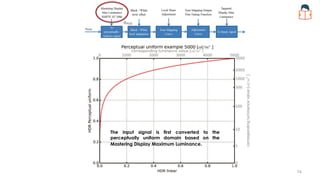
The input signal is first converted to the
perceptually uniform domain based on the
Mastering Display Maximum Luminance.
74
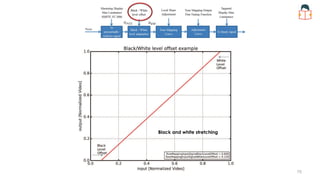
Black and white stretching
75
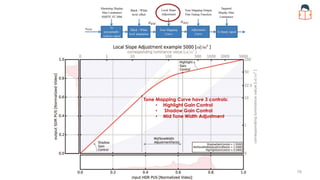
Tone Mapping Curve have 3 controls:
• Highlight Gain Control
• Shadow Gain Control
• Mid Tone Width Adjustment
76
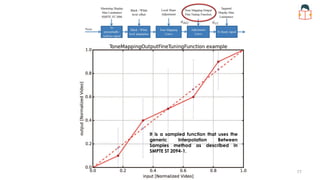
It is a sampled function that uses the
generic Interpolation Between
Samples method as described in
SMPTE ST 2094-1.
77
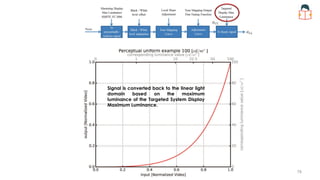
Signal is converted back to the linear light
domain based on the maximum
luminance of the Targeted System Display
Maximum Luminance.
78
SMPTE ST 2094-20
Color Transform in Parameter-Based Color Volume Reconstruction (Philips)
79
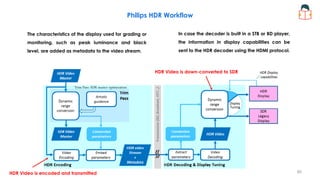
Trim Pass: SDR master optimization
HDR Video is encoded and transmitted
HDR Video is down-converted to SDR
The characteristics of the display used for grading or
monitoring, such as peak luminance and black
level, are added as metadata to the video stream.
In case the decoder is built in a STB or BD player,
the information in display capabilities can be
sent to the HDR decoder using the HDMI protocol.
Philips HDR Workflow
80
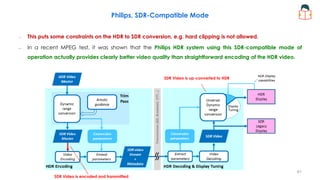
Philips, SDR-Compatible Mode
SDR Video is up-converted to HDR
SDR Video is encoded and transmitted
– This puts some constraints on the HDR to SDR conversion, e.g. hard clipping is not allowed.
– In a recent MPEG test, it was shown that the Philips HDR system using this SDR-compatible mode of
operation actually provides clearly better video quality than straightforward encoding of the HDR video.
81
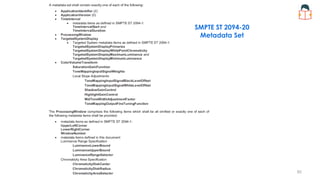
SMPTE ST 2094-20
Metadata Set
82
SEI Messages for Dynamic Metadata: Implementation Note
It specifies metadata
essence comprising KLV and
MXF representation of
individual metadata sets
defined in the application
documents.
Applications, Specializations
ST 2094-1
(Core Components)
ST 2094-2
(Essence Container)
Core Components, specifies
a “core” set of common
metadata items and provide
a framework for the
specification of applications.
SMPTE ST 2094-10, App 1
Dolby Labs
SMPTE ST 2094-20, App 2
Philips
SMPTE ST 2094-30, App 3
Technicolor
SMPTE ST 2094-40, App 4
Samsung
83
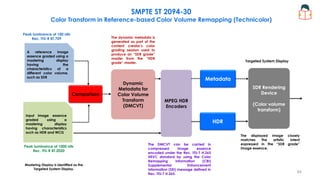
SMPTE ST 2094-30
Color Transform in Reference-based Color Volume Remapping (Technicolor)
MPEG HDR
Encoders
SDR Rendering
Device
(Color volume
transform)
Comparison
A reference image
essence graded using a
mastering display
having the
characteristics of a
different color volume,
such as SDR
Input image essence
graded using a
mastering display
having characteristics
such as HDR and WCG
Mastering Display is identified as the
Targeted System Display.
Dynamic
Metadata for
Color Volume
Transform
(DMCVT)
Metadata
HDR
Peak luminance of 1000 nits
Rec. ITU-R BT.2020
Peak luminance of 100 nits
Rec. ITU-R BT.709 The dynamic metadata is
generated as part of the
content creator’s color
grading session used to
produce an “SDR grade”
master from the “HDR
grade” master.
The displayed image closely
matches the artistic intent
expressed in the “SDR grade”
image essence.
The DMCVT can be carried in
compressed image essence
encoded under the Rec. ITU-T H.265
HEVC standard by using the Color
Remapping Information (CRI)
Supplemental Enhancement
Information (SEI) message defined in
Rec. ITU-T H.265.
Targeted System Display
84
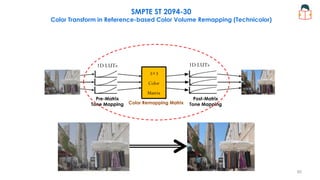
1D LUTs 1D LUTs
3×3
Color
Matrix
Pre-Matrix
Tone Mapping
Post-Matrix
Tone Mapping
Color Remapping Matrix
SMPTE ST 2094-30
Color Transform in Reference-based Color Volume Remapping (Technicolor)
85
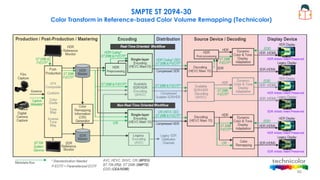
SMPTE ST 2094-30
Color Transform in Reference-based Color Volume Remapping (Technicolor)
86
87
SMPTE ST 2094-30
Metadata Set
88
SEI Messages for Dynamic Metadata: Implementation Note
It specifies metadata
essence comprising KLV and
MXF representation of
individual metadata sets
defined in the application
documents.
Applications, Specializations
ST 2094-1
(Core Components)
ST 2094-2
(Essence Container)
Core Components, specifies
a “core” set of common
metadata items and provide
a framework for the
specification of applications.
SMPTE ST 2094-10, App 1
Dolby Labs
SMPTE ST 2094-20, App 2
Philips
SMPTE ST 2094-30, App 3
Technicolor
SMPTE ST 2094-40, App 4
Samsung
89
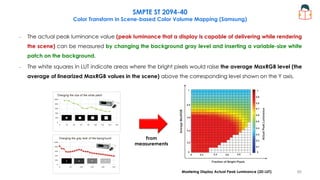
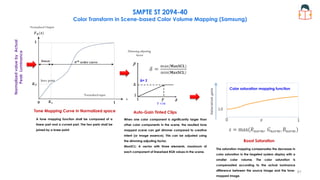
SMPTE ST 2094-40
Color Transform in Scene-based Color Volume Mapping (Samsung)
From
measurements
Mastering Display Actual Peak Luminance (2D LUT)
– The actual peak luminance value (peak luminance that a display is capable of delivering while rendering
the scene) can be measured by changing the background gray level and inserting a variable-size white
patch on the background.
– The white squares in LUT indicate areas where the bright pixels would raise the average MaxRGB level (the
average of linearized MaxRGB values in the scene) above the corresponding level shown on the Y axis.
90
Tone Mapping Curve in Normalized space
knee point
Normalized input
Normalized
value
by
Actual
Peak
Luminance
Auto-Gain Tinted Clips
Boost Saturation
Dimming adjusting
factor
When one color component is significantly larger than
other color components in the scene, the resulted tone
mapped scene can get dimmer compared to creative
intent (or image essence). This can be adjusted using
the dimming adjusting factor.
MaxSCL: A vector with three elements, maximum of
each component of linearized RGB values in the scene.
The saturation mapping compensates the decrease in
color saturation in the targeted system display with a
smaller color volume. The color saturation is
compensated according to the actual luminance
difference between the source image and the tone-
mapped image.
Color saturation mapping function
Normalized Output
Δ= 2
T =16
A tone mapping function shall be composed of a
linear part and a curved part. The two parts shall be
joined by a knee point.
SMPTE ST 2094-40
Color Transform in Scene-based Color Volume Mapping (Samsung)
91
SMPTE ST 2094-40
Metadata Set
92
SEI Messages for Dynamic Metadata: Implementation Note
It specifies metadata
essence comprising KLV and
MXF representation of
individual metadata sets
defined in the application
documents.
Applications, Specializations
ST 2094-1
(Core Components)
ST 2094-2
(Essence Container)
Core Components, specifies
a “core” set of common
metadata items and provide
a framework for the
specification of applications.
SMPTE ST 2094-10, App 1
Dolby Labs
SMPTE ST 2094-20, App 2
Philips
SMPTE ST 2094-30, App 3
Technicolor
SMPTE ST 2094-40, App 4
Samsung
93
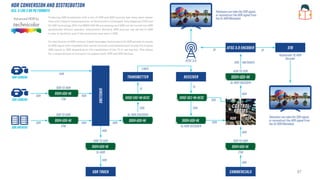
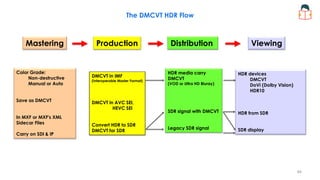
The DMCVT HDR Flow
Mastering Production Distribution Viewing
Color Grade:
Non-destructive
Manual or Auto
Save as DMCVT
In MXF or MXF's XML
Sidecar Files
Carry on SDI & IP
DMCVT in IMF
(Interoperable Master Format)
DMCVT in AVC SEI,
HEVC SEI
Convert HDR to SDR
DMCVT for SDR
HDR media carry
DMCVT
(VOD or Ultra HD Bluray)
SDR signal with DMCVT
Legacy SDR signal
HDR devices
DMCVT
DoVi (Dolby Vision)
HDR10
HDR from SDR
SDR display
94
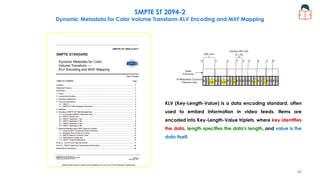
SMPTE ST 2094-2
Dynamic Metadata for Color Volume Transform-KLV Encoding and MXF Mapping
KLV (Key-Length-Value) is a data encoding standard, often
used to embed information in video feeds. Items are
encoded into Key-Length-Value triplets, where key identifies
the data, length specifies the data's length, and value is the
data itself.
95
96
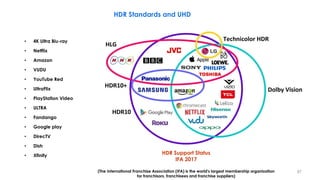
HDR Standards and UHD
• 4K Ultra Blu-ray
• Netflix
• Amazon
• VUDU
• YouTube Red
• UltraFlix
• PlayStation Video
• ULTRA
• Fandango
• Google play
• DirecTV
• Dish
• Xfinity
HDR Support Status
IFA 2017
(The International Franchise Association (IFA) is the world's largest membership organization
for franchisors, franchisees and franchise suppliers)
97
− UHD Alliance is a multi-industry alliance that formed to promote UHD standards development and UHD
branding and certification.
− The UHD Alliance has defined an ULTRA HD PREMIUM certification and logo for devices, content and
services that meet the following minimum UHD specs.
• Minimum resolution of 3840 × 2160
• 10-bit color depth
• Minimum of 90% of DCI P3 color space
• Minimum dynamic range
UHD Alliance and ULTRA HD Premium
98
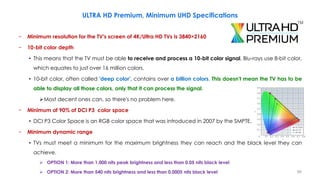
− Minimum resolution for the TV's screen of 4K/Ultra HD TVs is 3840×2160
− 10-bit color depth
• This means that the TV must be able to receive and process a 10-bit color signal, Blu-rays use 8-bit color,
which equates to just over 16 million colors.
• 10-bit color, often called 'deep color', contains over a billion colors. This doesn't mean the TV has to be
able to display all those colors, only that it can process the signal.
Most decent ones can, so there's no problem here.
− Minimum of 90% of DCI P3 color space
• DCI P3 Color Space is an RGB color space that was introduced in 2007 by the SMPTE.
− Minimum dynamic range
• TVs must meet a minimum for the maximum brightness they can reach and the black level they can
achieve.
 OPTION 1: More than 1,000 nits peak brightness and less than 0.05 nits black level
 OPTION 2: More than 540 nits brightness and less than 0.0005 nits black level
ULTRA HD Premium, Minimum UHD Specifications
99
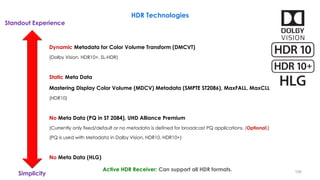
HDR Technologies
Dynamic Metadata for Color Volume Transform (DMCVT)
(Dolby Vision, HDR10+, SL-HDR)
Static Meta Data
Mastering Display Color Volume (MDCV) Metadata (SMPTE ST2086), MaxFALL, MaxCLL
(HDR10)
No Meta Data (PQ in ST 2084), UHD Alliance Premium
(Currently only fixed/default or no metadata is defined for broadcast PQ applications, (Optional))
(PQ is used with Metadata in Dolby Vision, HDR10, HDR10+)
No Meta Data (HLG)
Standout Experience
Simplicity
Active HDR Receiver: Can support all HDR formats. 100
HDR Technologies
Hybrid Log-Gamma (BBC and NHK)
– The lower half of the signal values use a gamma curve and the upper half of the signal values use a
logarithmic curve. Seamless ‘gamma’ power-law processing in blacks similar to BT.709 below 100 nits.
– HLG was designed to provide HDR while maintaining a degree of compatibility with SDR/BT.2020 displays.
– Very similar to SDR curve (compatible with SDR displays).
– Can be displayed unprocessed on an SDR screen.
• Does not require mastering metadata
• EOTF adjusts system gamma to correct for viewing environment
– The HLG standard is royalty-free.
– 0.005 nits to 1000 nits peak luminance, 10-bit color depth.
– Samsung and LG and some other manufactures will add HLG on their receiver from 2017.
– Minimum Signal Interface: HDMI 2.0b
101
Dolby Vision (DV, DoVi) (Dolby Lab)
– Dolby Vision allows for a color depth of 12-bits (SMPTE ST-2084 Perceptual Quantizer (PQ12))
– Mastered over a range of 0.0001 – 10,000 nits
• Mastered to 4,000-nit in practice
– It has dynamic metadata that allows for fine-tuning how the HDR looks not for the entire movie, but all the
way down to per-scene or even a per-frame basis.
– Metadata will be generated offline after hole program.
– Display includes a chip that identifies its output capabilities (light output, colour space, etc.), which it
passes as metadata back to the source.
– It can encode mastering display colorimetry information using static metadata (SMPTE ST 2086) and
provides dynamic metadata (SMPTE ST 2094) for each scene.
– Dolby Labs (Parametric Tone Mapping), SMPTE ST 2094-10
– Wide Color Gamut (WCG) color space (ITU-R Rec. 2020 and 2100)
HDR Technologies
102
Dolby Vision (DV, DoVi) (Dolby Lab)
– Enhancement layer metadata tells the Dolby Vision decoder how to do SDR to HDR conversion.
• Adds ~15% to the size of the bit stream
– Are used by Netflix, Amazon (video streaming)
– Some Ultra HD (UHD) TVs that support Dolby Vision include LG, TCL, and Vizio.
– Dolby Vision can be paired with Dolby's Atmos audio format.
– Dolby Vision can support HDR10 HDR video.
HDR Technologies
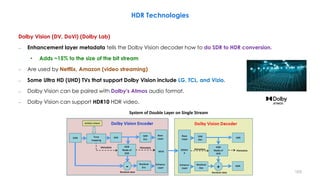
System of Double Layer on Single Stream
103
HDR Technologies
HDR10 (Announced by CTA: Consumer Technology Association)
– HDR10 is an open standard supported by a wide variety of companies which includes Ultra HD (UHD) TV
manufacturers such as LG, Samsung, Sharp, Sony, Vizio and UHD Alliance.
– Common in North of America (for VOD, Over the Top (OTT), Non Live Content))
– Based on ST 2084 (PQ), Bit depth: 10-bits, Mastered over a range of 0.05 – 1000 nits (20,000:1)
– HDR10 has static metadata [reference display ST 2086 metadata+ MaxFALL+ MaxCLL]
• In live program, because of non accessibility to MaxCLL & MaxFALL, they will set in default values.
• The TV gets one set of instructions at the beginning of the show or movie.
• If a movie, say, has a wide variety of scenes, this single piece of metadata might not allow for the best image.
– It is adopted by the Blu-ray Disc Association (BDA) for 4K Ultra HD.
– Wide Color Gamut (WCG) color space (ITU-R Rec. 2020 and 2100)
– HDR10 can not support Dolby Vision HDR video.
– Minimum Signal Interface: HDMI 2.0a
104
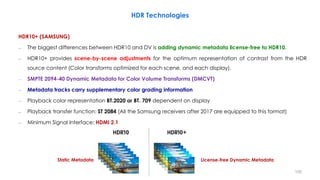
License-free Dynamic Metadata
Static Metadata
HDR Technologies
HDR10+ (SAMSUNG)
– The biggest differences between HDR10 and DV is adding dynamic metadata license-free to HDR10.
– HDR10+ provides scene-by-scene adjustments for the optimum representation of contrast from the HDR
source content (Color transforms optimized for each scene, and each display).
– SMPTE 2094-40 Dynamic Metadata for Color Volume Transforms (DMCVT)
– Metadata tracks carry supplementary color grading information
– Playback color representation BT.2020 or BT. 709 dependent on display
– Playback transfer function: ST 2084 (All the Samsung receivers after 2017 are equipped to this format)
– Minimum Signal Interface: HDMI 2.1
105
HDR Vivid (MARCH 10, 2021, by China Ultra HD Video Alliance (CUVA))
– It offers 40 times higher brightness than traditional standard dynamic range.
– Developed to a large extent by Hauwei, the new standard builds on the foundations used by HDR video
formats in the rest of the world, namely the PQ and HLG formats.
– For content producers, HDR Vivid means they will need software tools that support the new format, but the
way of working will not be different from other HDR formats.
– The whole chain will need to adapt: “Perhaps not camera manufacturers, because metadata (static or
dynamic) is simply not used in this part of the production chain, but grading and editing tools, encoders,
decoders, playback equipment including set-top boxes, dongles, smartphones, tablets, TV sets, all that.
– While the format may not reach viewers on European shores, it may impact technology vendors who want
to sell products in China.
HDR Technologies
106
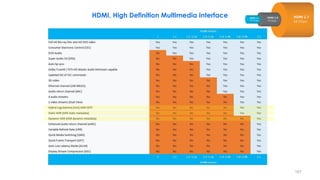
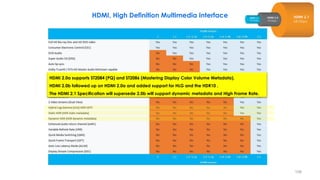
HDMI, High Definition Multimedia Interface
107
HDMI 2.0a supports ST2084 (PQ) and ST2086 (Mastering Display Color Volume Metadata).
HDMI 2.0b followed up on HDMI 2.0a and added support for HLG and the HDR10 .
The HDMI 2.1 Specification will supersede 2.0b will support dynamic metadata and High Frame Rate.
HDMI, High Definition Multimedia Interface
108
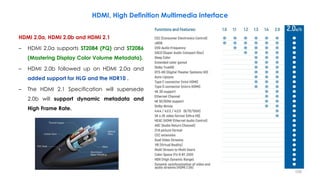
HDMI 2.0a, HDMI 2.0b and HDMI 2.1
– HDMI 2.0a supports ST2084 (PQ) and ST2086
(Mastering Display Color Volume Metadata).
– HDMI 2.0b followed up on HDMI 2.0a and
added support for HLG and the HDR10 .
– The HDMI 2.1 Specification will supersede
2.0b will support dynamic metadata and
High Frame Rate.
HDMI, High Definition Multimedia Interface
109
1) Higher video resolutions support a range of high resolutions and faster refresh rates including 8K60Hz and
4K120Hz for immersive viewing and smooth fast-action detail.
1) Resolutions up to 10K are also supported for commercial AV, and industrial and specialty usages.
2) Dynamic HDR support ensures every moment of a video is displayed at its ideal values for depth, detail,
brightness, contrast and wider color gamut—on a scene-by-scene or even a frame-by-frame basis.
3) The Ultra High Speed HDMI Cable supports the 48G bandwidth for uncompressed HDMI 2.1 feature
support.
 Very low EMI emission
 Backwards compatible with earlier versions and can be used with existing HDMI devices.
4) eARC (Enhanced Audio Return Channel) simplifies connectivity, provides greater ease of use, and
supports the most advanced audio formats and highest audio quality.
 It ensures full compatibility between audio devices and upcoming HDMI 2.1 products.
HDMI 2.1 Specifications (2017)
110
5) Enhanced gaming and media features ensure an added level of smooth and seamless motion and
transitions for gaming, movies and video.
⇒ Variable Refresh Rate (VRR) reduces or eliminates lag, stutter and frame tearing for more fluid and
better detailed gameplay.
⇒ Auto Low Latency Mode (ALLM) allows the ideal latency setting to automatically be set allowing for
smooth, lag-free and uninterrupted viewing and interactivity.
⇒ Quick Media Switching (QMS) for movies and video eliminates the delay that can result in blank
screens before content is displayed.
⇒ Quick Frame Transport (QFT) reduces latency for smoother no-lag gaming, and real-time interactive
virtual reality.
HDMI 2.1 Specifications (2017)
111
HDR Technologies
112
HDR Technologies
113
HDR Technologies
114
HDR Technologies
115
HDR Technologies
116
HDR Technologies
117
HDR Technologies
118
HDR Technologies
119
HDR Technologies
120
HDR Technologies
121
HDR Technologies
122
HDR Technologies
123
HDR Technologies
124
125
ETSI TS 103 433 (2020-03)
– High-Performance Single Layer High Dynamic Range (HDR) System for use in Consumer Electronics devices
– This Technical Specification (TS) has been produced by
• Joint Technical Committee (JTC) Broadcast of the European Broadcasting Union (EBU)
• European Committee for Electrotechnical Standardization (Comité européen de normalisation en
électronique et en électrotechnique, CENELEC))
• European Telecommunications Standards Institute (ETSI)
– ETSI is an independent, not-for-profit, standardization organization in the field of information and
communications.
– ETSI supports the development and testing of global technical standards for ICT-enabled systems,
applications and services.
126
ETSI TS 103 433 (2020-03)
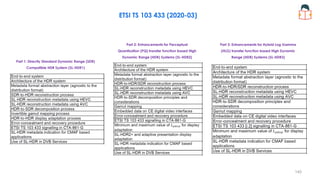
 Part 1: Directly Standard Dynamic Range (SDR) Compatible HDR System (SL-HDR1)
• ETSI TS 103 433-1 V1.3.1 (2020-03)
 Part 2: Enhancements for Perceptual Quantization (PQ) transfer function based High Dynamic Range (HDR)
Systems (SL-HDR2)
• ETSI TS 103 433-2 V1.2.1 (2020-03)
 Part 3: Enhancements for Hybrid Log Gamma (HLG) transfer function based High Dynamic Range (HDR)
Systems (SL-HDR3)
• ETSI TS 103 433-3 V1.1.1 (2020-03)
127
ETSI TS 103 433 (2020-03)
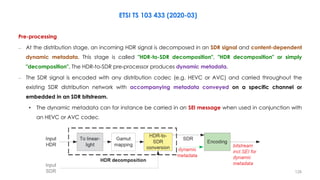
Pre-processing
– At the distribution stage, an incoming HDR signal is decomposed in an SDR signal and content-dependent
dynamic metadata. This stage is called "HDR-to-SDR decomposition", "HDR decomposition" or simply
"decomposition". The HDR-to-SDR pre-processor produces dynamic metadata.
– The SDR signal is encoded with any distribution codec (e.g. HEVC or AVC) and carried throughout the
existing SDR distribution network with accompanying metadata conveyed on a specific channel or
embedded in an SDR bitstream.
• The dynamic metadata can for instance be carried in an SEI message when used in conjunction with
an HEVC or AVC codec.
128
ETSI TS 103 433 (2020-03)
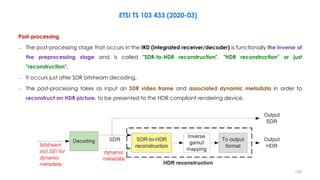
Post-processing
– The post-processing stage that occurs in the IRD (integrated receiver/decoder) is functionally the inverse of
the preprocessing stage and is called "SDR-to-HDR reconstruction", "HDR reconstruction" or just
"reconstruction".
– It occurs just after SDR bitstream decoding.
– The post-processing takes as input an SDR video frame and associated dynamic metadata in order to
reconstruct an HDR picture, to be presented to the HDR compliant rendering device.
129
ETSI TS 103 433 (2020-03)
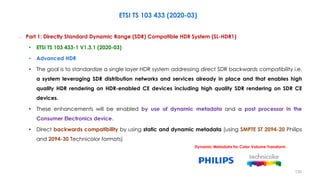
– Part 1: Directly Standard Dynamic Range (SDR) Compatible HDR System (SL-HDR1)
• ETSI TS 103 433-1 V1.3.1 (2020-03)
• Advanced HDR
• The goal is to standardize a single layer HDR system addressing direct SDR backwards compatibility i.e.
a system leveraging SDR distribution networks and services already in place and that enables high
quality HDR rendering on HDR-enabled CE devices including high quality SDR rendering on SDR CE
devices.
• These enhancements will be enabled by use of dynamic metadata and a post processor in the
Consumer Electronics device.
• Direct backwards compatibility by using static and dynamic metadata (using SMPTE ST 2094-20 Philips
and 2094-30 Technicolor formats)
Dynamic Metadata for Color Volume Transform
130
High-Performance Single Layer High Dynamic Range
(HDR) System for use in Consumer Electronics devices;
Part 1: Directly Standard Dynamic Range (SDR)
Compatible HDR System (SL-HDR1)
– Jointly developed by Technicolor, Philips, STMicro, CableLabs
– Workflow to grade both HDR and SDR
– HDR rendering on HDR devices and SDR rendering on SDR devices using a single layer video stream
– The HDR reconstruction metadata can be added to HEVC or AVC via Supplemental Enhancement
Information (SEI) message
– Direct backwards compatibility by using static and dynamic metadata (using SMPTE ST 2094-20 Philips and
2094-30 Technicolor formats)
– Metadata can reconstruct an HDR video from an SDR stream
– The HDR content source can be either PQ or HLG.
ETSI TS 103 433 (2020-03), Part 1
Dynamic Metadata for Color Volume Transform
131
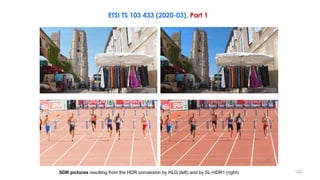
SDR pictures resulting from the HDR conversion by HLG (left) and by SL-HDR1 (right)
ETSI TS 103 433 (2020-03), Part 1
132
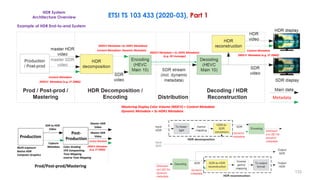
HDR System
Architecture Overview ETSI TS 103 433 (2020-03), Part 1
(MDCV Metadata + SL-HDR1 Metadata)
(e.g. SEI message)
Mastering Display Color Volume (MDCV) = Content Metadata
Dynamic Metadata = SL-HDR1 Metadata
Example of HDR End-to-end System
Content Metadata+ Dynamic Metadata
(MDCV Metadata +SL-HDR1 Metadata)
Content Metadata
(MDCV Metadata (e.g. ST 2086))
Content Metadata
(MDCV Metadata (e.g. ST 2086))
Metadata
Content Metadata
Master SDR
Video
Master HDR
Video
SDR to HDR
Video
Capture
Metadata
Post-
Production
Production
Multi-exposure
Native HDR
Computer Graphics
Color Grading
VFX Compositing
Tone Mapping
Inverse Tone Mapping
(MDCV Metadata
(e.g. ST 2086))
Prod/Post-prod/Mastering
133
ETSI TS 103 433 (2020-03)
– Part 2: Enhancements for Perceptual Quantization (PQ) transfer function based High Dynamic Range (HDR)
Systems (SL-HDR2)
• ETSI TS 103 433-2 V1.2.1 (2020-03)
• The goal is to specify enhancements for single layer Perceptual Quantization (PQ) transfer function
based HDR systems, enabled by signal processing blocks that are similar/the same to those in SL-HDR1.
• Similar to SL-HDR1, these enhancements will be enabled by use of dynamic metadata and a post
processor in the Consumer Electronics device.
• Direct backwards compatibility by using static and dynamic metadata (using SMPTE ST 2094-20 Philips
and 2094-30 Technicolor formats)
Dynamic Metadata for Color Volume Transform
134
ETSI TS 103 433 (2020-03)
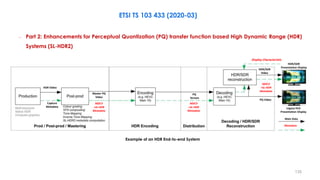
– Part 2: Enhancements for Perceptual Quantization (PQ) transfer function based High Dynamic Range (HDR)
Systems (SL-HDR2)
Example of an HDR End-to-end System
Display Characteristic
MDCV
+SL-HDR
Metadata
MDCV
+SL-HDR
Metadata
MDCV
+SL-HDR
Metadata
Metadata
HDR Video
Capture
Metadata
Master PQ
Video
PQ
Stream
Main Data
HDR/SDR
Video
HDR/SDR
Presentation Display
Legacy HLG
Presentation Display
PQ Video
135
ETSI TS 103 433 (2020-03)
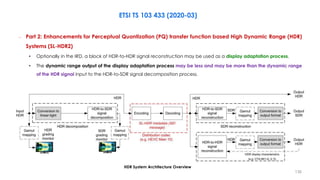
– Part 2: Enhancements for Perceptual Quantization (PQ) transfer function based High Dynamic Range (HDR)
Systems (SL-HDR2)
• Optionally in the IRD, a block of HDR-to-HDR signal reconstruction may be used as a display adaptation process.
• The dynamic range output of the display adaptation process may be less and may be more than the dynamic range
of the HDR signal input to the HDR-to-SDR signal decomposition process.
HDR System Architecture Overview
136
ETSI TS 103 433 (2020-03)
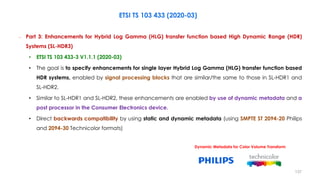
– Part 3: Enhancements for Hybrid Log Gamma (HLG) transfer function based High Dynamic Range (HDR)
Systems (SL-HDR3)
• ETSI TS 103 433-3 V1.1.1 (2020-03)
• The goal is to specify enhancements for single layer Hybrid Log Gamma (HLG) transfer function based
HDR systems, enabled by signal processing blocks that are similar/the same to those in SL-HDR1 and
SL-HDR2.
• Similar to SL-HDR1 and SL-HDR2, these enhancements are enabled by use of dynamic metadata and a
post processor in the Consumer Electronics device.
• Direct backwards compatibility by using static and dynamic metadata (using SMPTE ST 2094-20 Philips
and 2094-30 Technicolor formats)
Dynamic Metadata for Color Volume Transform
137
ETSI TS 103 433 (2020-03)
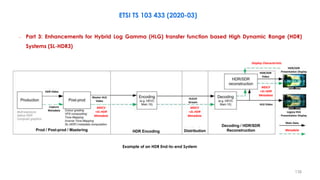
– Part 3: Enhancements for Hybrid Log Gamma (HLG) transfer function based High Dynamic Range (HDR)
Systems (SL-HDR3)
Example of an HDR End-to-end System
MDCV
+SL-HDR
Metadata
Metadata
MDCV
+SL-HDR
Metadata
Display Characteristic
HLG10
Stream
HLG Video
Main Data
HDR/SDR
Video
HDR/SDR
Presentation Display
Legacy HLG
Presentation Display
MDCV
+SL-HDR
Metadata
HDR Video
Capture
Metadata
Master HLG
Video
3
138
ETSI TS 103 433 (2020-03)
HDR System Architecture Overview
– Part 3: Enhancements for Hybrid Log Gamma (HLG) transfer function based High Dynamic Range (HDR)
Systems (SL-HDR3)
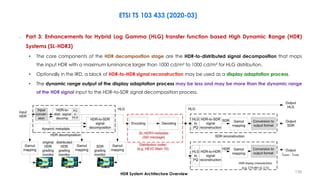
• The core components of the HDR decomposition stage are the HDR-to-distributed signal decomposition that maps
the input HDR with a maximum luminance larger than 1000 cd/m² to 1000 cd/m² for HLG distribution.
• Optionally in the IRD, a block of HDR-to-HDR signal reconstruction may be used as a display adaptation process.
• The dynamic range output of the display adaptation process may be less and may be more than the dynamic range
of the HDR signal input to the HDR-to-SDR signal decomposition process.
139
ETSI TS 103 433 (2020-03)
Part 1: Directly Standard Dynamic Range (SDR)
Compatible HDR System (SL-HDR1)
Part 2: Enhancements for Perceptual
Quantization (PQ) transfer function based High
Dynamic Range (HDR) Systems (SL-HDR2)
Part 3: Enhancements for Hybrid Log Gamma
(HLG) transfer function based High Dynamic
Range (HDR) Systems (SL-HDR3)
140
141
HLG and PQ HDR Systems Range
Ex: 10-bit HLG (~17.6 stop), Scene-referred
Adaption Adaption
ITU-R BT.2100 - Perceptual Quantizer (PQ) Fixed output range
ITU-R BT.2100 –Hybrid Log-Gamma (HLG) Variable output range, depending on peak luminance of display
0.005 𝑛𝑖𝑡 1000 𝑛𝑖𝑡
Ex: Simultaneous HVS (~12.3 stop) 1000 𝑛𝑖𝑡
0.2 𝑛𝑖𝑡
Ex: 10-bit PQ (~21 stop), Display-referred
0.005 𝑛𝑖𝑡 10000 𝑛𝑖𝑡
Adaption Adaption
Adaption Adaption
142
HLG and PQ HDR Systems Range
Ex: 10-bit HLG (~17.6 stop), Scene-referred
Adaption Adaption
ITU-R BT.2100 - Perceptual Quantizer (PQ) Fixed output range
ITU-R BT.2100 –Hybrid Log-Gamma (HLG) Variable output range, depending on peak luminance of display
0.005 𝑛𝑖𝑡 1000 𝑛𝑖𝑡
Ex: Simultaneous HVS (~12.3 stop) 1000 𝑛𝑖𝑡
0.2 𝑛𝑖𝑡
Ex: 12-bit PQ (~28 stop), Display-referred
0.00005 𝑛𝑖𝑡 10000 𝑛𝑖𝑡
Adaption
Adaption Adaption
143
How “Bright” is White?
− Reference for video (SDR): 80 – 120 Nits
− Reference for Cinema (DCI spec.): 48 Nits (14 foot-lamberts)
− Brightest consumer devices today: ~ 1500 Nits
− Some commercial devices today: 4000 – 5000 Nits
− 10,000 nits is easy to get a look at & measure
• Specular highlights are much brighter than this in the real world
144
How “Dark” is Black?
− Reference for video (SDR): ~0.1 Nit (cd/m²)
− Reference for Cinema (DCI Spec): 0.01 – 0.03 Nit
− Best consumer devices today: ~ 0.005 Nit
− “True Black” is an elusive target
• 0.0001 Nit is very dark
 Takes a minute or two to see this level after turning off lights
 Still very dim looking even after full visual adaptation
• 0.00001– 0.000001 is the human visual system limit (cone threshold~0.003)
 With long enough adaptation time, you can see handfuls of photons!!
145
1- Black Level Determination for HDR
– In order to determine the system black
level, the state of light adaptation is
central (sometimes called dark
adaptation when adapting toward dark).
– The left branch of the curve corresponds
to the cones, while the right branch of
the curve corresponds to rod vision.
– While threshold values of less than 0.00001
cd/m² can be obtained, they can take
significant durations of dark adaptation
(about 20 min), which are not likely in
entertainment media.
25 nits initial to 0.001 nits changing
(Darkest Value in Vertical-axis)
Black level detectability as a function of duration for different
initial adaptation levels (pre-adaption luminance).
Initial adaptation level or
pre-adaption luminance
The visual detectability of black level can be close to 0.001
cd/m² for the 25 cd/m² initial level, close to SDR average
luminance levels (i.e. average picture level (APL)).
146
1- Black Level Determination for HDR
– The curves show that as the initial
adaptation level is lowered (lower
curves), the ability to see lower
luminance levels improves.
– While the plotted time scale does not
allow for determination of adaptation
ranges on the order of video scene cuts
(3-5 s), the leftmost data points are
enough to show that visual detectability
of black level can be close to 0.001
cd/m² for the 25 cd/m² initial level, close
to SDR average luminance levels (i.e.
average picture level (APL)).
25 nits initial to 0.001 nits changing
(Darkest Value in Vertical-axis)
Black level detectability as a function of duration for different
initial adaptation levels (pre-adaption luminance).
Initial adaptation level or
pre-adaption luminance
The visual detectability of black level can be close to 0.001
cd/m² for the 25 cd/m² initial level, close to SDR average
luminance levels (i.e. average picture level (APL)).
147
1- Black Level Determination for HDR
– Thus one would easily conclude that the
black level of video should allow levels as
low as 0.001 cd/m².
– However, system design by the use of
data as in previous Fig. leans toward the
most demanding cases, where the entire
image may be dark.
Initial Level
25 cd/m²
0.001 cd/m²
148
25 nits initial to 0.001 nits changing
(Darkest Value in Vertical-axis)
Black level detectability as a function of duration for different
initial adaptation levels (pre-adaption luminance).
Initial adaptation level or
pre-adaption luminance
The visual detectability of black level can be close to 0.001
cd/m² for the 25 cd/m² initial level, close to SDR average
luminance levels (i.e. average picture level (APL)).
148
2- Black Level Determination for HDR
The surround serves as a surrogate for an actual
image with average image luminance level.
– Other approaches consider that images generally do not consist of all dark regions; there is a mixture of
different luminance levels.
Reference: 'Absolute Black’
Target: Non-zero Luminance
– The general approach is to treat the image as a
surround around a possible black area.
– Using rectangular patches with a white surround,
Mantiuk et al studied black level threshold as a
function of the size of the black region.
– The area outside of the patch was termed the
surround.
– The surround serves as a surrogate for an actual
image with average image luminance level.
149
2- Black Level Determination for HDR
– Mantiuk et al. have reported an experiment to determine the highest luminance level that cannot be
discriminated from ‘absolute black’ as the surrounding luminance is varied.
– They asked viewers to choose the side that was
brighter, or choose randomly if they looked the
same.
– Different values of non-zero luminance and of
surrounding luminance were tested.
– Two viewing distances were used, 1.4m and
4.7m, so that the size of the square patch
corresponded to 6.1 and 1.8 visual degrees.
– They converted these results of just detectable
differences from absolute black so they could be
plotted as a function of ambient light rather than
the luminance of surrounding pixels.
The surround serves as a surrogate for an actual
image with average image luminance level.
Reference: 'Absolute Black’
Target: Non-zero Luminance
150
2- Black Level Determination for HDR
Detectability of black level differences for a rectangular patch of either 6.1
or 1.8 visual degrees, both as a function of surround luminance level
-2.4
L=0.1 nit
∆L=0.0039 nit
– The results show the lowest black level that can
be discriminated from zero luminance is about
−2.4 log10 cd/m² (0.0039 cd/m²), at least for
the darkest surround that they studied, which
was 0.1 cd/m².
– Lower thresholds would be expected from
darker surrounds, such as might occur in home
theatre, or some evening viewing situations.
Surround: L=0.1 nit
∆L=0.0039 nit
151
2- Black Level Determination for HDR
Detectability of black level differences for a rectangular patch of either 6.1
or 1.8 visual degrees, both as a function of surround luminance level
-2.4
L=0.1 nit
∆L=0.0039 nit
– As the surround luminance decreases, the
detectable black level decreases.
• That is, the expected surround luminance that
results from practical imagery can determine
the necessary black level to achieve a pure
black perception, as well as finding the level
where dark detail is no longer distinguishable.
– The thresholds for the larger black region are
lower than for the smaller.
• Thus in designing a system black level, the
expected size of the black region is a key
factor.
• Note that the largest region studied in this
work was 6 degrees, whereas the image size
for HDTV viewed at 3H is approx. 35 degrees
(UHDTV @ 1.5 H is ~70 degrees).
152
– Also shown in next figure is the black level of a black diffuse surface with reflectance of 3%, such as black
velvet, and the performance of three displays:
• A CRT with minimum light emission of 1cd/m² and 3% reflectance
• A conventional CCFL (cold cathode fluorescent lamp) backlight LCD with minimum light emission of
0.8cd/m² and 1% reflectance
• A modern LED-backlight LCD with spatially uniform back-light dimming with minimum light emission of
0.00163cd/m² and 1% reflectance.1.3/2.4
– The problem is not the minimum light emissions which are very low, but the reflectance of ambient light
from the screen.
– It appears unlikely that very low reflectance coatings will be possible, but this is unlikely to matter, as a
reflectance of about 1% is likely to acceptable to almost all viewers as there are not many objects in the
real-world that would have lower reflectivity and thus appear darker than a display.
2- Black Level Determination for HDR
153
It can be seen that as the ambient illumination is increased, the lowest
level of black that can be distinguished from absolute black increases.
The CRT appears grey compared to the diffuse black (velvet) for ambient
light below 300lux (about 2.5 on the horizontal axis of figure), a level of
brightness found in an office or a very well lit room in a home.
For the CCFL-LCD, threshold is 100lux (2.0 in the figure ure), typical of
a room in a home. This is because the display effective black level
is higher than the luminance of a diffuse black surface, due to a
combination of reflectance and the minimum light emissions of the
displays.
The experimental results
indicate that the eye can
appreciate even deeper black
than a diffuse black surface,
and that of the considered
display technologies, only the
LED-LCD display can satisfy the
demands of the human visual
system, and only at levels
below about 1.6lux (0.2 in the
figure ure, where the LED-LCD
curve crosses the HVS Larger
Patch curve), an indoor
illumination level that could be
considered near pitch black.
2- Black Level Determination for HDR
The results of patch size are shown with
the experimental results labelled as ‘HVS
Small Patch’ and ‘HVS Larger Patch’.
Comparison of the black levels of displays and human detection capability
(black level of a black diffuse surface with reflectance of 3%, such as black velvet)
154
– How dark or black a region of a display can appear depends on two factors:
• the minimum emission from the display
• the amount of ambient light that is reflected
– The effective display black level, 𝑳𝒃𝒍𝒂𝒄𝒌, can be calculated, as in the equation below
• The display minimum light emission, 𝐿𝑚𝑖𝑛, known as dark current in the days of CRT, and meaning the lowest level of
luminance that comes out of the display
• The display screen reflectivity, 𝑅𝑑𝑖𝑠𝑝𝑙𝑎𝑦
• The ambient light level, 𝐸𝑎𝑚𝑏𝑖𝑒𝑛𝑡.
– The impact therefore of higher levels of ambient light is to raise the minimum black level, and
consequently to reduce the dynamic range of the image, as the maximum intensity is mostly unchanged
with ambient light.
𝐿𝑏𝑙𝑎𝑐𝑘 = 𝐿𝑚𝑖𝑛 +
𝑅𝑑𝑖𝑠𝑝𝑙𝑎𝑦 × 𝐸𝑎𝑚𝑏𝑖𝑒𝑛𝑡
𝜋
Black level: How Dark Should Displays Be?
Ultra High Definition Video Formats and Standardisation, Mike Nilsson
155
3- Viewer Preferences for HDR
– Another approach for determining system black level is to not base it on psychophysical detection tasks
with abstract geometric stimuli, but rather use preferences while viewing more natural imagery.
– A more recent study using an experimental HDR display with very low black level capability found levels
near its minimum capability, which was 0.004 cd/m².
• In order to meet the preferences of 90% of the viewers, a level of 0.005 cd/m² was needed.
• The typical current black level LCD TVs of 0.1 cd/m² would meet the preferences of only half of the
viewers.
156
3- Viewer Preferences for HDR
Reference: High Dynamic Range Video From Acquisition to Display and Applications
157
90%
Dolby PRM4200 - 600 cd/m2
Sharp ELITE Pro-60X5FD
Dolby Research HDR Display
Standard TV
2012 iPad
50%
0
20
40
60
80
100
Viewer
Preferences
distribution
in
%
b. White Stimuli c. Highlights
a. Black Stimuli
Luminance
in cd/m2
1
0.1
0.1
0.01
0.01
0.001
0.0001 10,000
10,000 10,000
100,000
1000
1000
100
100
10
84%
90%
50%
84%
increasing capability increasing capability
3- Viewer Preferences for HDR
Cumulative Distribution Functions for
a. Black Stimuli
b. Reflective White Stimuli
c. Emissive and Highlights.
The typical black level
LCD TVs of 0.1 nits would
meet the preferences of
only half of the viewers.
• Figure shows 16% of the viewers preferred highlights ≥10000 cd/m².
• Also shown is that 50% of the viewers preferred diffuse white levels ≥ 600 cd/m². This suggests that if display luminances increase in the future, some PQ
content (e.g. outdoor scene in bright sun) may be produced with diffuse white levels higher than the levels indicated in Report ITU-R BT.2408.
• Consideration would, however, need to be given to the appearance on lower peak luminance PQ displays.
The typical black level
LCD TVs of 0.1 nits would
meet the preferences of
only half of the viewers.
In order to meet the preferences of about 90%
of the viewers, a level of 0.005 nits was needed.
0.005
nits
158
3- Viewer Preferences for HDR
– The experiment was based on a two-alternative forced choice paradigm using static images shown
sequentially for average shot durations (2-5 s) and trial durations of around 20 s to include response times,
for an experiment lasting a total of 40 minutes per participant.
– The stimuli were drawn from three classes of images, containing shadow detail, reflective white stimuli,
and highlight stimuli.
– A dual modulation display was used using an LCD panel backlit by a digital cinema projector, allowing a
luminance range between 0.004 and 20000 cd/m².
– Separate experimental sessions were conducted for the black level scenes vs. the white and highlight
level scenes; the results of all the experiments are plotted on the same figure but this should not be
interpreted as indication that both extremes can be perceived simultaneously.
– Values in the range of 0.001 to 0.005 cd/m² could be deduced from the studies described here, and
regarding preferences there may be upward biases due to the smaller field of view than occurs with
UHDTV.
159
Image Quantisation
Original Extreme Banding
Recall: Banding, Contouring or Ringing
160
0.03
0.02
0.01
0
0.04
0.05
0.06
0.07
0.08
0.1
0.09
0.01 0.1 100 1000 10000
Weber
Fraction
1 10
Display Luminance cd/m²
De Vries-Rose Law
∆𝑳
𝑳
∝
𝟏
𝑳
Recall: Quantization Effects (Banding): The Schreiber Threshold
∆𝑳
𝑳
Schreiber
Weber–Fechner Law
∆𝑳
𝑳
≈ 𝟎. 𝟎𝟐
161
0.01 0.1 100 1000 10000
Weber
Fraction
1 10
Display Luminance cd/m²
Schreiber
Gamma 8bit
Quantization Effects (Banding): Gamma Curve
∆𝑳
𝑳
0.03
0.02
0.01
0
0.04
0.05
0.06
0.07
0.08
0.1
0.09
162
0.01 0.1 100 1000 10000
Weber
Fraction
1 10
Display Luminance cd/m²
Schreiber
Gamma 8bit
Gamma 10 bit
Quantization Effects (Banding): Gamma Curve
∆𝑳
𝑳
0.03
0.02
0.01
0
0.04
0.05
0.06
0.07
0.08
0.1
0.09
163
0.01 0.1 100 1000 10000
Weber
Fraction
1 10
Display Luminance cd/m²
Schreiber
PQ
Gamma 10 bit
Quantization Effects (Banding): Gamma 10 bit, PQ
∆𝑳
𝑳
0.03
0.02
0.01
0
0.04
0.05
0.06
0.07
0.08
0.1
0.09
164
0.01 0.1 100 1000 10000
Weber
Fraction
1 10
Display Luminance cd/m²
Schreiber
PQ
Gamma 10 bit
HLG 1000
Quantization Effects (Banding): Gamma 10 bit, PQ, HLG
∆𝑳
𝑳
0.03
0.02
0.01
0
0.04
0.05
0.06
0.07
0.08
0.1
0.09
165
0.01 0.1 100 1000 10000
Weber
Fraction
1 10
Display Luminance cd/m²
Stretching the Blacks in HLG
∆𝑳
𝑳
0.03
0.02
0.01
0
0.04
0.05
0.06
0.07
0.08
0.1
0.09 Schreiber
Gamma 10bit
HLG1000
166
Schreiber
Gamma 10bit
HLG1000
HLG2000
HLG3000
HLG4000
HLG 10000
Weber
Fraction
∆𝑳
𝑳
Stretching the Blacks in HLG
0.03
0.02
0.01
0
0.04
0.05
0.06
0.07
0.08
0.1
0.09
0.01 0.1 100 1000 10000
1 10
Display Luminance cd/m²
167
Schreiber
Gamma10bit
PQ
Weber
Fraction
∆𝑳
𝑳
Stretching the Blacks in PQ
0.03
0.02
0.01
0
0.04
0.05
0.06
0.07
0.08
0.1
0.09
0.01 0.1 100 1000 10000
1 10
Display Luminance cd/m²
168
Schreiber
Gamma10bit
PQ
3xPQ
2xPQ
4xPQ
10xPQ
Weber
Fraction
∆𝑳
𝑳
Stretching the Blacks in PQ
0.03
0.02
0.01
0
0.04
0.05
0.06
0.07
0.08
0.1
0.09
0.01 0.1 100 1000 10000
1 10
Display Luminance cd/m²
169
How Does Workflow Change for HDR & WCG?
– In Production, how do you verify scene lighting, camera dynamic range
(15 to 16 stops), specular highlights, etc.?
– How do you determine the average light (18% grey) level in HDR capture
(APL too high for display)?
– In Post, how do you verify that the SDR colour grade does not have a
significantly different ‘look’ than the HDR?
– How do you verify that the HDR delivery coding (PQ, HLG, Dolby Vision) is
correct for the target devices?
170
Challenges for HDR Program Production
− The guidelines for HDR program production are defined in ITU-R BT.2408, 2019.
− Key challenges encountered in HDR program production
• Basic white level of HDR program production
• How much brightness is adequate in HDR program production?
• Are there any guidelines for production?
• Mapping modes for HDR/SDR contents
• Scene-referred Conversion or Display-referred Conversion?
ARIB TR-B43
Operational Guidelines for High Dynamic
Range Video Programme Production
ITU-R BT.2408.
171
Diffuse White (Reference White) and Highlights in HDR
172
– The system white is often referred to as reference white.
– In video, the system white is neither the maximum white level of the signal nor that of the display.
– When calibration cards are used to set the reference white, it is a diffuse white (also called matte) that is
placed on the card, and measured.
– The ideal diffuse white has a Lambertian reflection.
Black
100 % ReflectanceWhite
18% Reflectance
“Luminance factor (%)” is the ratio of the
luminance of the surface element in the
given direction to the luminance of a
perfect reflecting or transmitting diffuser
identically illuminated.
Diffuse White (Reference White) in HDR Video
173
− Diffuse White (Reference White) is the reflectance of an illuminated white object (white on calibration
card).
− The reference level, HDR Reference White, is defined as the nominal signal level of a 100% reflectance
white card.
− That is the signal level that would result from a 100% Lambertian reflector placed at the center of interest
within a scene under controlled lighting, commonly referred to as diffuse white.
Diffuse White (Reference White) in HDR Video
90% Reflectance
18% Reflectance
(the closest standard reflectance card to skin tones)
Black
100 % ReflectanceWhite
18% Reflectance
174
− The luminances that are higher than reference white (diffuse white) are referred to as highlights.
• In traditional video (SDR), the highlights were generally set to be no higher than 1.25x the diffuse white.
– HDR has the ability for more accurate rendering of highlights.
– The highlights can be categorized as two major scene components:
• Specular Reflections
• Emissive Objects (Self-luminous)
– They are best considered relative to the maximum diffuse white luminance in the typical image.
Highlights in HDR Video
175
− Specular Reflections
• Specular regions luminance can be over 1000 times higher than the diffuse surface in nit.
− Emissive Objects (Self-luminous)
• Emissive objects and their resulting luminance levels can have magnitudes much higher than the
diffuse range in a scene or image (Sun, has a luminance s~1.6 billion nits)
• A more unique aspect of the emissive is that they can also be of very saturated color (sunsets,
magma, neon, lasers, etc.).
Highlights in HDR Video
176
System White and Highlight Level Determination
– Most scenes can be broken down into two key ranges:
• Object’s Diffuse Reflectances
• Highlights
– Some scenes would defy such categorization, e.g. fireworks at night.
Object’s Diffuse Reflectances
– The object’s reflectance is important to convey its shape due to shading and other features, and the
visual system has strong ability to discount the illuminant to be able to estimate the reflectance.
Highlights
– The human ability to perceive both types of highlights (Specular Reflections and Emissives (Self-luminous))
is much less accurate and less computationally sophisticated as the ability perceive reflectances.
177
System White and Highlight Level Determination
– In traditional imaging, the range allocated to these highlights was fairly low and the majority of the image
range was allocated to the diffuse reflective regions of objects.
• In hardcopy print the highlights would be 1.1x higher luminance than the diffuse white maximum.
• In traditional video, the highlights were generally set to be no higher than 1.25x the diffuse white.
• Of the various display applications, cinema allocated the highest range to the highlights, up to 2.7x
the diffuse white.
– The most common emissive object, the disk of the sun, has a luminance so high (~1.6 billion cd/m²), it is
damaging to the eye to look at more than briefly, and exceeding even the speculars.
– A more unique aspect of the emissives is that they can also be of very saturated colour (sunsets, magma,
neon, lasers, etc.).
178
System White and Highlight Level Determination
– Actual measurements show the specular regions
can be over 1000x higher than the underlying
diffuse surface, which is presented in the figure ure.
– This means the physical dynamic range of the
specular reflections vastly exceed the range
occupied by diffuse reflection.
– If a visual system did not have specialized
processing as previously described, and saw in
proportion to luminance, most objects would look
very dark and the visible range would be
dominated by the specular reflections.
– Likewise, emissive objects and their resulting
luminance levels can have magnitudes much
higher than the diffuse range in a scene or image.
Measurements showing that the specular regions can be over 1 000x
higher in comparison to the underlying diffuse surface. After Wolff (1994)
179
Traditional Imaging’s Under-representation of Highlight Ranges
– What happens to the luminances of highlights with traditional imaging’s under-representation of highlight
ranges?
• Approach(c) shows a distortion that is seldom selected, that is, to renormalize the entire range.
• Approach (d) preserves diffuse luminances, and the highlight is simply truncated (hard-clipping).
 Details within the highlight region are replaced with constant values, giving rise to flat regions in
the image, looking quite artificial.
Example scanlines of common distortions from a specular highlight from a glossy object, (b).
It exceeds the maximum luminance of the display (or the signal), indicated as the dashed line titled ‘Target Max.’. 180
– What happens to the luminances of highlights with traditional imaging’s under-representation of highlight
ranges?
• Approach (e), have been referred to as soft-clipping, or a knee. Here the shape and internal details
of the highlight are somewhat preserved, without flattened regions.
• HDR allows for a result closer to scanline (b).
• The more accurate presentation of specular highlights, (assuming the entire video pathway is also
HDR), is one of the key distinctions of HDR.
Example scanlines of common distortions from a specular highlight from a glossy object, (b).
It exceeds the maximum luminance of the display (or the signal), indicated as the dashed line titled ‘Target Max.’.
Traditional Imaging’s Under-representation of Highlight Ranges
181
90% Diffuse White Level of HDR (HLG) Program Production
HLG Input Normalized to the Range [0:1]
Video
Signal
in
the
Range
[0:1]
SDR Input [0:1]
73% HLG
100% SDR
0.73
0.239
0
0
0 1
0.2 0.4
0.2
1
0.8
0.6
0.4
1
0.8
0.6
Greyscale Chart Max (90% Reflectance)
182
Camera
HLG OETF
HLG 𝒀′
𝑹′
𝑮′
𝑩′
Waveform
Reflection Ratio: 90%
90% Diffuse White Level of HDR (HLG) Program Production
183
Relative Values for 90% Diffuse White
• Relative values for 90% diffuse white and 18% middle gray of Rec.709, Cineon, LogC, C-Log and S-Log 1 and 2.
• The values for where 90% diffuse white (the red dotted line) is placed change as much do the values for 18% middle gray.
• Values are show in IRE and Code Values (CV).
• A diffused white point of 100 nits is set at 61% for S-Log 3, 58% for Log C, and at 63% for C-Log.
90% Reflectance
18% Reflectance
184
HDR Aligned at 100% Diffused White = 100 Nits
HDR OETFs Aligned
@
100% Diffused White = 100 Nits
Relative
Code
Value
Nits
10−1
100
101
102
103
104
1
0.9
0.8
0.7
0.6
0.5
0.4
0.3
0.2
0.1
0
PQ,10K
HLG
S-Log3
100 nit (100% Diffused White)
709
185
In Rec709 100% diffused white
(700mV) is reference to 100 Nits.
Initially 100 Nits was used as the
reference white, but this has
changed to around 203 Nits.
Graphics White
− Graphics White is defined as the equivalent in the graphics domain of a 100% reflectance white card: the
signal level of a flat, white element without any specular highlights within a graphic element.
• It therefore has the same signal level as HDR Reference White, and graphics should be inserted
based on this level.
203 nits
HDR
186
How to Display 203 nits Graphics and Subtitles in HDR?
− Same luminance signal looks different depending on the luminance of the background image in HDR.
− Careful assessment of image quality is needed during the production of graphics.
100 nits 203 nits
SDR HDR
Graphics White
187
Depending on the background image,
graphics would look gray in comparison.
HDR Image HDR Image
How to Display 203 nits Graphics and Subtitles in HDR?
Graphics White
188
How to Display 203 nits Graphics and Subtitles in HDR?
− Addition of frame or outline for the graphics helps express the original quality of graphics.
Graphics White
189
Mapping of SDR Graphics
− SDR graphics should be directly mapped into the HDR signal at the “Graphics White” signal level specified
(75% HLG or 58% PQ) to avoid them appearing too bright, and thus making the underlying video appear
dull in comparison.
• Where the desire is to maintain the colour branding of the SDR graphics, a display-light mapping
should be used.
• Where the desire is to match signage within the captured scene (in-vision signage; e.g. a score board
at a sporting event), a scene-light mapping is usually preferred.
Direct Mapping
SDR Graphics HDR Graphics
To avoid Graphics appearing too bright, and thus making the underlying video appear dull in comparison.
Display-light Mapping
SDR Graphics HDR Graphics
To maintain the colour branding of the SDR graphics
Scene-light Mapping
SDR Graphics HDR Graphics
To match signage within the captured scene (in-vision signage; e.g. a score board at a sporting event) 190
Graphics and Text in SDR
− Maximum luminance is 100 nits because of
the BT.709 standard
− In case of SDR signals, reference White is 100 nits
because of the maximum luminance display.
⇒ Therefore, Graphics are generated to fit this level of
reference White.
Reference White
Black
1. According to ITU-R BT.2408, adequate Reference
White is about 203 nits (75% HLG or 58% PQ).
2. Almost all HDR displays are able to show 203 nits or
more.
⇒ Therefore, high quality Graphics can be produced to
be displayed at 203 nits or beyond with good tonal
express.
100 nits
0 nits
Graphics and Text in HDR
Reference White
Black
100 nits
0 nits 0 nits
203 nits
1000 nits
≈
To be able
display various
levels of white !
1
2
SDR SDR
HDR
Reference White
Nominal Signal Levels for Shading HDR
191
Reflectance Object or Reference
(Luminance Factor, %)
Nominal Luminance Value
(PQ & HLG)
[Display Peak Luminance, 1000 nit]
Nominal Signal
Level (%)
PQ
Nominal Signal
Level (%)
HLG
Grey Card (18% Reflectance) 26 nit 38 38
Greyscale Chart Max (83% Reflectance) 162 nit 56 71
Greyscale Chart Max (90% Reflectance) 179 nit 57 73
Reference Level:
HDR Reference White (100% Reflectance) also Diffuse White
and Graphics White
203 nit 58 75
Nominal signal levels for shading [Display Peak Luminance, 1000 nit]
Nominal Signal Levels for Shading HDR
− The values are nominal recommendations for test charts and graphics for PQ and HLG production on a
1000 cd/m² (nominal peak luminance) display, under controlled studio lighting.
• The test chart should be illuminated by forward lights and the camera should shoot the chart from a
non-specular direction.
− Signal levels in these operational practices are specified in terms of %PQ and %HLG.
• These percentages represent signal values that lie between the minimum and maximum non-linear
values normalized to the range 0 to 1.
192
− Signal levels for common test charts and reflectance cards with different reflectances are calculated
using scene-light (the light falling on a camera sensor), from HDR Reference White.
• Diffuse white is the white provided by a card that approximates to a perfect reflecting diffuser by
being spectrally grey, not just colorimetrically grey, by minimizing specular highlights and minimizing
spectral power absorptance.
− A “perfect reflecting diffuser” is defined as an “ideal isotropic, nonfluorescent diffuser with a spectral
radiance factor equal to unity at each wavelength of interest”.
o For PQ: ⇒ The nominal luminance values are consistent on PQ reference displays (independent to the
display).
o For HLG ⇒ The nominal luminance values will differ from those in the table when the display’s peak
luminance - is lower or higher than 1000 cd/m² (dependent to the display).
The nominal signal levels in % in the table do not change for both HLG and PQ.
Nominal Signal Levels for Shading HDR
193
− It is important to know the reflectance of greyscale charts and white cards, to ensure that cameras are
aligned to deliver the appropriate signal level and consistency in production.
− An 18% grey card is commonly used for camera set-up in non-live workflows as it is the closest standard
reflectance card to skin tones.
• It may also be useful when trying to match SDR and HDR cameras as the 18% grey should not be
affected by any SDR camera “knee”.
Nominal Signal Levels for Shading HDR
194
A 75% HLG or 58% PQ marker on a waveform monitor, representing the reference level (100%
reflectance white card), will help the camera shader ensure that objects placed at the center of interest
within a scene are placed within the appropriate signal range, and that sufficient headroom is reserved
for specular highlights.
− To adjust the luminance of the overall image. Basically, it changes the slope or lift of the luminance level.
− A value less than 0 dB reduces the brightness and a value greater than 0 dB increases the brightness.
• +12,00 dB: extremely increased brightness
• +0.00 dB: unchanged
• -12,00 dB: extremely decreased brightness
Gain [dB] Parameter Role in HDR Conversion
An increased gain can
lead to clipping of the
lights for high luminance
values at the input.
− If the image appears too dark, e.g. after an SDR-to-HDR up-
conversion, a luminance gain can be used to adjust the
image and achieve better matching to the luminance of
native HDR material.
− This processing can be undone in case of “round-tripping”
if the inverse value is used for the reverse conversion.
• For example, if the value +3.0 dB was selected during the first
conversion from SDR to HDR, the value -3.0 dB must be
selected during reconversion back from HDR to SDR.
195
− The brightness adjustment affects the color impression such as the saturation.
− Due to these changes, the chrominance is generally treated accordingly. If the saturation impression still
does not match the expectations, the "Saturation" parameter offers the possibility to adjust it.
• 2.0: extremely increased saturation
• 1.0: saturation unchanged
• 0.0: extremely reduced saturation
Saturation Parameter Role in HDR Conversion
An increase in saturation
can lead to color
clipping for already
highly saturated colors
at the input.
− This processing can be undone in case of “round-tripping”
if the inverse value is used for the reverse conversion.
• For example, if the value 1.2 was selected during the
first conversion from SDR to HDR, the value 1/1.2 ≈ 0.83
must be selected during reconversion back from HDR
to SDR.
196
Diffuse White Level of HDR (HLG) Program Production
Camera
HLG OETF
Adjust by Gain
HLG Signal Y Waveform
SDR Signal Y Waveform
HLG 𝒀′𝑹′𝑮′𝑩′ Waveform
Reflection Ratio: 90%
197
DaVinci Resolve Studio for HDR Grading and Encoding
198
Adjusting the Brightness Range:
− The divergence of the PQ EOTF from a linear scale is pretty hefty, especially in the high values.
• Internally, the mathematical engine operates on the linear digital values, with a slight weighting
towards optimization for Gamma 2.4.
− What we want to do is make the program respond more uniformly to the brightness levels (output
values) of HDR, rather than to the digital values behind them (input values).
− We’re going to do this by setting up a bezier curve that compresses the lights and expands the darks.
− Bezier curve for expanding the darks and compressing the whites of ST.2084, for grading with natural
movement between exposure values in HDR
DaVinci Resolve Studio for HDR Grading and Encoding
A Bézier (pronounced "bez-E-A") curve is a line or
"path" used to create vector graphics. It consists
of two or more control points, which define the
size and shape of the line.
199
Bezier curve for expanding the darks and
compressing the whites of ST.2084, for grading with
natural movement between exposure values in HDR
DaVinci Resolve Studio for HDR Grading and Encoding
200
− For best effect, we need to add the curve to a node after the rest of the corrections, either as a serial
node after other correctors on individual clips, on the timeline as a whole (timeline corrections are
processed in serial, after clip corrections), or exported as a LUT and attached to the overall output.
Where to attach the HDR bezier curve for best HDR grading experience - serial to each clip, or serial to all clips by attaching it to the timeline.
DaVinci Resolve Studio for HDR Grading and Encoding
201
Animated GIF of brightness adjustments with and without the HDR Bezier Curve
Without the curves, the upper range of brightnesses
race through the HDR brights. This is, as you can
imagine, very unnatural and difficult to control.
On the other hand, the curve forces the bright ranges to
move more slowly, still increasing, but at a pace that’s
more comparable to a linear adjustment of
brightnesses, rather than a linear adjustment of digital
values: exactly what we want.
DaVinci Resolve Studio for HDR Grading and Encoding
202
Signal Levels for Line-up in Production
− There is a practical benefit to the use of common levels for both PQ and HLG and table reflects guidance
to use common levels.
− However, as PQ and HLG have different capabilities, and as HLG levels are influenced by a desire to
maintain a degree of compatibility with SDR displays and PQ levels are not, as experience is developed in
the use of both PQ and HLG, this guidance to use common levels may need to be adjusted.
− The luminance levels for indoor scenes were found to be typically about two thirds of the values
indicated in the table, however those for outdoor scenes were found to be brighter.
• As producers of PQ content gain more experience, it is possible that levels in PQ indoor content may increase.
INDOOR OUTDOOR
cd/m² % (IRE) cd/m² % (IRE)
18% Gray Card 17 34 57 45
Caucasian 26 38 85 49
Diffuse White 140 54 425 66
Reference Level Guidelines for PQ (BT.2100),Dolby Laboratories, Aug. 9,2016
Reflectance Object or
Reference
(Luminance Factor, %)
Nominal Luminance
Value
[Display Peak
Luminance, 1000 nit]
Nominal Signal
Level (%)
PQ
Grey Card (18% Reflectance) 26 nit 38
Diffuse White (100% Reflectance) 203 nit 58
203
Normal White Levels or Diffuse White Point for HDR PQ
– Camera operator or colorist/editor must know what reference monitor will used for grading the content.
• For example, if a 1000 nit reference monitor is used for grading, with a diffused white point of 100 nits, diffused
white level is set at 51% for SMPTE ST 2084 (1K).
• For example, if a 2000 nit reference monitor is used for grading, with a diffused white point of 100 nits, diffuse
white level is set at 68 % for SMPTE ST 2084 (2K).
– With HDR PQ, there is no agreed upon diffuse white point level.
• Many are using 100-200 nits as the diffuse white point level, i.e. the old 90% reflectance point (100 IRE).
Light Reflectance Value Scale (LRV)
Signal Levels for Line-up in Production
204
Initially 100 Nits was used as the
reference white, but this has
changed to around 203 Nits.
Fitzpatrick Skin Tone Scale
− The Fitzpatrick Skin Tone Scale is used to classify skin types, which will vary by region.
− It was originally developed as a way to estimate the response of different types of skin to ultraviolet light.
− It may be used to provide a convenient classification method for the range of skin tones seen in television
production.
205
Fitzpatrick Skin Tone Scale
Finding Your Fitzpatrick Skin Type
− The Fitzpatrick Skin Type can determine your skin type
according to the reaction of your skin to Ultra Violet
Radiation (UVR).
− For the best color description of true skin tone, be sure to
check an area that receives the least amount of average
exposure, such as your buttocks.
− The Fitzpatrick Skin Type is only one resource for determining
the best care, products & treatment regime for your skin.
206
Fitzpatrick Skin Tone Scale
Fitzpatrick skin type 1
–skin color (before sun exposure): ivory
–eye color: light blue, light gray, or light green
–natural hair color: red or light blonde
–sun reaction: skin always freckles, always burns and peels, and never tans
Fitzpatrick skin type 2
–skin color (before sun exposure): fair or pale
–eye color: blue, gray, or green
–natural hair color: blonde
–sun reaction: skin usually freckles, burns and peels often, and rarely tans
Fitzpatrick skin type 3
–skin color (before sun exposure): fair to beige, with golden undertones
–eye color: hazel or light brown
–natural hair color: dark blonde or light brown
–sun reaction: skin might freckle, burns on occasion, and sometimes tans
207
Fitzpatrick Skin Tone Scale
Fitzpatrick skin type 4
•skin color (before sun exposure): olive or light brown
•eye color: dark brown
•natural hair color: dark brown
•sun reaction: doesn’t really freckle, burns rarely, and tans often
Fitzpatrick skin type 5
•skin color (before sun exposure): dark brown
•eye color: dark brown to black
•natural hair color: dark brown to black
•sun reaction: rarely freckles, almost never burns, and always tans
Fitzpatrick skin type 6
•skin color (before sun exposure): deeply pigmented dark brown to darkest brown
•eye color: brownish black
•natural hair color: black
•sun reaction: never freckles, never burns, and always tans darkly
208
Signal Levels for Line-up in Production (Cont.)
− When test charts are either not available or impractical, other objects such as skin tones or grass are
often used to set signal levels.
− Approximate signal levels are given in the table.
Preliminary signal levels for common objects in PQ and HLG production
4 Experimental data for Type 1, Type 5 and Type 6 skin types is limited. So there is less certainty on the signal ranges for these skin types.
Reflectance Object
Nominal Luminance, cd/m²
(for a PQ reference display, or a 1 000 cd/m² HLG display)
Signal Level
%PQ %HLG
Skin Tones (Fitzpatrick Scale)
Type 1-2 Light Skin Tone 65-110 45-55 55-65
Type 3-4 Medium Skin Tone 40-85 40-50 45-60
Type 5-6 Dark Skin Tone4 10-40 30-40 25-45
Grass 30-65 40-45 40-55
209
PLUGE for HDTV, UHDTV and HDR-TV systems
ITU-R BT.814 PLUGE (Picture Line Up Generating Equipment) Signal
Sample number (horizontal) HDTV 4K UHDTV 8K UHDTV
Sa 0 0 0
Sb 312 624 1 248
Sc 599 1 199 2 399
Sd 888 1 776 3 552
Se 1 031 2 063 4 127
Sf 1 320 2 640 5 280
Sg 1 607 3 215 6 431
Sh 1 919 3 839 7 679
Line number as per Rec. ITU-R BT.709 HDTV (interlaced) HDTV (progressive)
La 21, 584 42
Lb 183, 746 366
Lc 194, 756 387
Ld 254, 817 509
Le 255, 818 510
Lf 326, 889 653
Lg 327, 890 654
Lh 388, 950 776
Li 398, 961 797
Lj 560, 1 123 1 121
Sample number (vertical)
as per Rec. ITU-R BT.2020
4K UHDTV 8K UHDTV
La 0 0
Lb 648 1 296
Lc 690 1 380
Ld 935 1 871
Le 936 1 872
Lf 1 223 2 447
Lg 1 224 2 448
Lh 1 469 2 939
Li 1 511 3 023
Lj 2 159 4 319
Sample numbers (horizontal) for corresponding image formats
Line numbers for HDTV image formats
Sample numbers (vertical) for UHDTV image formats
BT.0814-02
Sa Sb Sc Sd Se Sf Sg Sh
Lj
Sample No.
Black level
Vertical
active
samples
Horizontal active samples
Lh
Lc
La
Line
No.
Lb
Ld
Lf
Higher level
Slightly lighter level
Slightly darker level
Slightly
lighter level
Slightly
darker level
Le
Lg
Sample and line numbers are inclusive,
e.g. the box is the first sample
Higher level Sd Higher level
and is the last sample.
Se Higher level
Lh
Lc
Lf
Le
Li
Lb
Ld
Lg
Li
Sample and line numbers are inclusive, e.g. the Higher level box Sd is the
first Higher level sample and Se is the last Higher level sample.
210
One stripe is approximately 2% above black level
the other is approximately 2% below black level.
PLUGE for HDTV, UHDTV and HDR-TV systems
ITU-R BT.814 PLUGE (Picture Line Up Generating Equipment) Signal
BT.0814-02
Sa Sb Sc Sd Se Sf Sg Sh
Lj
Sample No.
Black level
Vertical
active
samples
Horizontal active samples
Lh
Lc
La
Line
No.
Lb
Ld
Lf
Higher level
Slightly lighter level
Slightly darker level
Slightly
lighter level
Slightly
darker level
Le
Lg
Sample and line numbers are inclusive,
e.g. the box is the first sample
Higher level Sd Higher level
and is the last sample.
Se Higher level
Lh
Lc
Lf
Le
Li
Lb
Ld
Lg
Li
Sample and line numbers are inclusive, e.g. the Higher level box Sd is the
first Higher level sample and Se is the last Higher level sample.
BT.0814-03
Higher level
Slightl
y lighter level
Slightly lighter level
Black level
Slightl
y darker level
Slightl
y darker level
Sa Sb Sc Sd Se Sf Sg
Analogue waveform of the signal for adjusting black level
The display black level is adjusted using the black
level lift control (legacy “brightness” control) such
that the negative stripes on the test pattern
disappear, whilst the positive stripes remain visible.
211
One stripe is approximately 2% above black level
the other is approximately 2% below black level.
PLUGE for HDTV, UHDTV and HDR-TV systems
ITU-R BT.814 PLUGE (Picture Line Up Generating Equipment) Signal
BT.0814-02
Sa Sb Sc Sd Se Sf Sg Sh
Lj
Sample No.
Black level
Vertical
active
samples
Horizontal active samples
Lh
Lc
La
Line
No.
Lb
Ld
Lf
Higher level
Slightly lighter level
Slightly darker level
Slightly
lighter level
Slightly
darker level
Le
Lg
Sample and line numbers are inclusive,
e.g. the box is the first sample
Higher level Sd Higher level
and is the last sample.
Se Higher level
Lh
Lc
Lf
Le
Li
Lb
Ld
Lg
Li
Sample and line numbers are inclusive, e.g. the Higher level box Sd is the
first Higher level sample and Se is the last Higher level sample.
Parameter values, for
SDR
8-bit digital
value
10-bit digital
value
12-bit digital
value
Higher level 235 940 3760
Black level 16 64 256
Slightly lighter level 20 80 320
Slightly darker level 12 48 192
Code Values for HDTV and UHDTV (SDR)
212
One stripe is approximately 2% above black level
the other is approximately 2% below black level.
PLUGE for HDTV, UHDTV and HDR-TV systems
ITU-R BT.814 PLUGE (Picture Line Up Generating Equipment) Signal
Narrow Range Code Values for HDTV and UHDTV (HDR)
Parameter values, for HDR 10-bit digital value 12-bit digital value
Higher level1, 2 399 1596
Black level 64 256
Slightly lighter level 80 320
Slightly darker level 48 192
Note 1 – This level corresponds to 38.2% PQ and HLG and results in the same luminance
for both PQ and HLG signals (approximately 27 cd/m²) when displayed on a PQ
display or on an HLG display with peak luminance of 1000 cd/m².
Note 2 – Luminance value 𝑳𝑯 of the Higher level for an HLG display of peak luminance
𝑳𝑾 is derived using the HLG EOTF in Table 5 of Recommendation ITU-R BT.2100 in
conjunction with the system gamma obtained in accordance with Note 5e of
Recommendation ITU-R BT.2100, and may be calculated as follows:
))
1000
/
(
log
0.42
(1.2
0.048748 10
w
w
H
L
L
L




BT.0814-02
Sa Sb Sc Sd Se Sf Sg Sh
Lj
Sample No.
Black level
Vertical
active
samples
Horizontal active samples
Lh
Lc
La
Line
No.
Lb
Ld
Lf
Higher level
Slightly lighter level
Slightly darker level
Slightly
lighter level
Slightly
darker level
Le
Lg
Sample and line numbers are inclusive,
e.g. the box is the first sample
Higher level Sd Higher level
and is the last sample.
Se Higher level
Lh
Lc
Lf
Le
Li
Lb
Ld
Lg
Li
Sample and line numbers are inclusive, e.g. the Higher level box Sd is the
first Higher level sample and Se is the last Higher level sample.
213
One stripe is approximately 2% above black level
the other is approximately 2% below black level.
To set the luminance level of the display
− The central Higher level patch is used to set the luminance level of the display by means of the user gain
control (legacy “contrast” control).
BT.0814-02
Sa Sb Sc Sd Se Sf Sg Sh
Lj
Sample No.
Black level
Vertical
active
samples
Horizontal active samples
Lh
Lc
La
Line
No.
Lb
Ld
Lf
Higher level
Slightly lighter level
Slightly darker level
Slightly
lighter level
Slightly
darker level
Le
Lg
Sample and line numbers are inclusive,
e.g. the box is the first sample
Higher level Sd Higher level
and is the last sample.
Se Higher level
Lh
Lc
Lf
Le
Li
Lb
Ld
Lg
Li
Sample and line numbers are inclusive, e.g. the Higher level box Sd is the
first Higher level sample and Se is the last Higher level sample.
− In the case of HDR, the code value of the
central Higher level patch is identical for
both PQ and HLG.
• This differs from that of the peak
white luminance level of PLUGE
signals for SDR.
ITU-R BT.814 PLUGE (Picture Line Up Generating Equipment) Signal
214
One stripe is approximately 2% above black level
the other is approximately 2% below black level.
To set the brightness of the black level of the display
− Two types of signal can be used to set the brightness of the black level of the display by means of the user
black level lift control (legacy “brightness” control).
BT.0814-02
Sa Sb Sc Sd Se Sf Sg Sh
Lj
Sample No.
Black level
Vertical
active
samples
Horizontal active samples
Lh
Lc
La
Line
No.
Lb
Ld
Lf
Higher level
Slightly lighter level
Slightly darker level
Slightly
lighter level
Slightly
darker level
Le
Lg
Sample and line numbers are inclusive,
e.g. the box is the first sample
Higher level Sd Higher level
and is the last sample.
Se Higher level
Lh
Lc
Lf
Le
Li
Lb
Ld
Lg
Li
Sample and line numbers are inclusive, e.g. the Higher level box Sd is the
first Higher level sample and Se is the last Higher level sample.
Type 1:
• The signal on the left hand side of the
picture consists of narrow horizontal stripes
(a width of 10 scanning lines for HDTV, 20
samples (vertical) for 4K UHDTV, and 40
samples (vertical) for 8K UHDTV).
 The stripes extend from approximately
2% above the black level of the
waveform to approximately 2% below
the black level.
ITU-R BT.814 PLUGE (Picture Line Up Generating Equipment) Signal
215
One stripe is approximately 2% above black level
the other is approximately 2% below black level.
BT.0814-02
Sa Sb Sc Sd Se Sf Sg Sh
Lj
Sample No.
Black level
Vertical
active
samples
Horizontal active samples
Lh
Lc
La
Line
No.
Lb
Ld
Lf
Higher level
Slightly lighter level
Slightly darker level
Slightly
lighter level
Slightly
darker level
Le
Lg
Sample and line numbers are inclusive,
e.g. the box is the first sample
Higher level Sd Higher level
and is the last sample.
Se Higher level
Lh
Lc
Lf
Le
Li
Lb
Ld
Lg
Li
Sample and line numbers are inclusive, e.g. the Higher level box Sd is the
first Higher level sample and Se is the last Higher level sample.
Type 2:
• The signal on the right-hand side of the
picture consists of two coarse stripes (a
width of 144 lines for HDTV, 288 samples
(vertical) for 4K UHDTV, and 576 samples
(vertical) for 8K UHDTV).
 One stripe is approximately 2% above
black level the other is approximately
2% below black level.
ITU-R BT.814 PLUGE (Picture Line Up Generating Equipment) Signal
216
To set the brightness of the black level of the display
− Two types of signal can be used to set the brightness of the black level of the display by means of the user
black level lift control (legacy “brightness” control).
One stripe is approximately 2% above black level
the other is approximately 2% below black level.
Procedure for Use of PLUGE Test Signals (SDR)
− The adjustments described below are very dependent on the viewing conditions and it is preferable to
conform to the conditions for viewing distance and ambient illumination contained in Recommendations ITU
R BT.500 and ITU-R BT.2035:
217BT.0814-02
Sa Sb Sc Sd Se Sf Sg Sh
Lj
Sample No.
Black level
Vertical
active
samples
Horizontal active samples
Lh
Lc
La
Line
No.
Lb
Ld
Lf
Higher level
Slightly lighter level
Slightly darker level
Slightly
lighter level
Slightly
darker level
Le
Lg
Sample and line numbers are inclusive,
e.g. the box is the first sample
Higher level Sd Higher level
and is the last sample.
Se Higher level
Lh
Lc
Lf
Le
Li
Lb
Ld
Lg
Li
Sample and line numbers are inclusive, e.g. the Higher level box Sd is the
first Higher level sample and Se is the last Higher level sample.
• The user gain control (legacy
“contrast” control) is adjusted such
that the centre of the white area
(100% video level) reaches the
desired luminance of the display;
• The user black level lift control
(legacy “brightness” control) is
adjusted such that the blackest stripe
just disappears, whilst the brighter
stripe remains visible.
One stripe is approximately 2% above black level
the other is approximately 2% below black level.
− The adjustments described below must be conducted in the following order and are very dependent on the
viewing conditions. It is preferable to conform to the conditions for the reference viewing environment
contained in Recommendation ITU-R BT.2100:
1. In the case of HLG only, the display’s system gamma control is adjusted in accordance with the target
nominal peak luminance of the display, appropriate for the viewing environment.
• For displays with nominal peak luminance (LW) greater than 1000 cd/m², or where the effective
nominal peak luminance is reduced through the use of a contrast control, the system gamma value
should be adjusted according to the formula below, and may be rounded to three significant digits:
Procedure for Use of PLUGE Test Signals (HDR)
γ = 1.2 + 0.42 log10(
LW
1000
)
218
HLG Display Gamma
Nominal Peak Luminance
(cd/m²)
Display Gamma
400 1.03
600 1.11
800 1.16
1000 1.20
1500 1.27
2000 1.33
2. For HLG only, the user black level lift control (legacy “brightness” control) is first set to zero and the user gain
control (legacy “contrast” control) is then adjusted such that the center of the Higher level area has the nominal
luminance value corresponding to code value specified in the table (⇒ contrast control adjustment);
• In the case of PQ, a user gain control is not required.
 This is because the display luminance is determined by the PQ EOTF, although the maximum
displayable peak luminance will depend on the design capability of the display (the “maximum
rated luminance”).
Procedure for Use of PLUGE Test Signals (HDR)
219
Parameter values, for HDR 10-bit digital value 12-bit digital value
Higher level 399 1596
3. In the case of HLG only, a further adjustment to the system gamma can be made to compensate for non-
reference viewing environments.
• The HLG display gamma may need to be reduced in brighter viewing environments, to compensate
for the differences in the adaptation state of the eye.
• The following equation can be used to determine how the display gamma may be adjusted in non-
reference viewing environments:
𝜸𝒃𝒓𝒊𝒈𝒉𝒕 :system gamma for display surrounds greater than 5 cd/m²
𝜸𝒓𝒆𝒇 : system gamma for reference environment
𝑳𝒂𝒎𝒃 : ambient luminance level in cd/m².
Procedure for Use of PLUGE Test Signals (HDR)
𝜸𝒃𝒓𝒊𝒈𝒉𝒕 = 𝛄𝒓𝒆𝒇 − 𝟎. 𝟎𝟕𝟔 𝐥𝐨𝐠𝟏𝟎
𝑳𝒂𝒎𝒃
𝟓
220
Typical Environment
Typical
Illumination ∗
(Lux)
Typical
Luminance (cd/m²)
Typical Gamma
Adjustment
Office Based Production,
Sunny Day
130 25 −0.05
Office Based Production,
Cloudy Day
75 15 −0.04
Edit Suite 50 10 −0.02
Grading Suite 25 5 0.00
Production Gallery/Dark
Grading Suite
3 0.5 +0.08
Typical production environments with different surround conditions
* Measured perpendicular to the screen.
4. For both PQ and HLG, the user black level lift control (legacy “brightness” control) is adjusted such that the
blackest stripe just disappears, whilst the brighter stripe remains visible (⇒ display black level adjustment).
Procedure for Use of PLUGE Test Signals (HDR)
221BT.0814-02
Sa Sb Sc Sd Se Sf Sg Sh
Lj
Sample No.
Black level
Vertical
active
samples
Horizontal active samples
Lh
Lc
La
Line
No.
Lb
Ld
Lf
Higher level
Slightly lighter level
Slightly darker level
Slightly
lighter level
Slightly
darker level
Le
Lg
Sample and line numbers are inclusive,
e.g. the box is the first sample
Higher level Sd Higher level
and is the last sample.
Se Higher level
Lh
Lc
Lf
Le
Li
Lb
Ld
Lg
Li
Sample and line numbers are inclusive, e.g. the Higher level box Sd is the
first Higher level sample and Se is the last Higher level sample.
One stripe is approximately 2% above black level
the other is approximately 2% below black level.
4. …
− In a non-reference viewing environment, a black level lift control for a PQ display may be applied with
respect to the PQ EOTF.
• To enable the PQ PLUGE adjustment, the signal 𝐸′
that is applied in the PQ EOTF may be replaced by
the signal 𝐦𝐚𝐱(𝟎, 𝒂𝑬′
+ 𝒃):
𝑬′ : denotes a non-linear PQ colour value {R', G', B'}
𝑭𝑫 : is the luminance of an adjusted displayed linear component {𝑹𝑫, 𝑮𝑫, 𝑩𝑫} in cd/m²
𝒃 : is the variable for user black level lift control
𝒂 : is an attenuation factor that maintains a constant value of luminance, 𝐹𝐷 = 𝐿𝑚 for 𝐸′ = 𝐸𝑚
′ , as 𝑏 is adjusted:
𝑳𝒎 : is the maximum rated luminance of the display
Procedure for Use of PLUGE Test Signals (HDR)
𝐹𝐷 = 𝐸𝑂𝑇𝐹 𝑚𝑎𝑥(0, 𝑎𝐸′ + 𝑏)
𝑎 = 1 −
𝑏
𝐸𝑂𝑇𝐹−1 𝐿𝑚
• Without a compensating attenuation, an increase in b will cause an increase in FD for all values of E'.
• Such an overall lift in luminance can cause pixels that were within the PQ monitor’s luminance range to exceed that luminance range.
• If Lm is the maximum rated luminance for the display, application of the attenuation factor ‘a’, for E' = E'm, will cause FD to maintain a
constant value of Lm as ‘b’ is adjusted. 222
Display
Light
Display Adjustment
OOTF
Adjust
PQ
EOTF
Decoding
𝐸′
223
Camera Dynamic Range
• Sony (S Log 1,2,3)
◦ F55
◦ F5
◦ HDC4300L
◦ FS7K
◦ FS700 (S-Log2) [13.3 Stops]
• Canon (C Log)
◦ C700 [15 Stops]
◦ C500
◦ C300 Series
• Red
◦ Weapon 8K [16.5 Stops]
◦ Epic 8K
◦ Scarlett 5K
◦ Raven 4.5K
• ARRI (Log C)
◦ Alexa 65 [>14 Stops]
◦ Alexa SXT
◦ Alexa mini
◦ Amira
• Panasonic (V-Log)
◦ VariCam LT
◦ VariCam 35 [14+ Stops]
◦ VariCam Pure
• Black Magic
◦ Ursa [15 Stops]
◦ Ursa mini
◦ Cinema Camera
224
Camera Shooting RAW and Log
Shooting RAW :
− Camera photosite sensor data before any processing
• No white balance, ISO (camera's sensitivity) or colour adjustments
• Raw is not a video (not viewable directly on a monitor) but it’s a collection of data that needs to be converted to video
format later (12 to 16 bit depth).
o In single sensor camera, the de-Bayering process combines brightness + colour → RGB
− Example: Sony AXS-R5 16-bit linear RAW 2K/4K recording options
• It preserves the greatest latitude for colour correction and other post processes.
• Sony’s 16-bit recording captures more tonal values than the human eye can differentiate.
• Sony RAW retains 16 times as many Red, Green and Blue gradations as 12-bit RAW and 64 times as many tones per
channel as 10-bit recording.
ISO Sensitivity is a standard set by the International Organization for Standardization (ISO) that represents sensitivity to light as a numerical value.
ISO can help you capture images in darker environments, or be more flexible about your aperture and shutter speed settings.
De-Bayer
R
G
B
225
Camera Shooting RAW and Log
Example:
− Canon’s sensors output red and blue channels, and also two
different green channels.
− These are multiplexed into a 4K RAW image which can then
be processed into video.
− RAW data is not really viewable, so it is not considered to be
“video.”
− Also note that Canon’s process applies ISO at White Balance
early in the process, unlike most other cameras. (Diagram
courtesy of Canon).
226
Camera Shooting RAW and Log
Shooting Log:
− Maximizes captured sensor data using a logarithmic gamma curve
• Includes processing information
• Video formats specific to camera manufacturers
• Looks washed out on a monitor
 Use a Look Up Table (LUT) to transform for viewing
S-Log1 up to a 1000% dynamic range compared to the traditional REC709.
S-Log2 up to a 1500% dynamic range compared to the traditional REC709.
S-Log3 up to a 1500% dynamic range compared to the traditional REC709.
S-Log3 has more detail in the shadows, while extending the dynamic range
between mid-tones and highlights.
A log curve is used by camera
manufacturers to store wide dynamic
range effectively with 12-16 bits or
resolution as a Camera RAW file.
Spyder Cube (SpyderCUBE)
− Use a suitable grey scale camera chart or Spyder
Cube.
− This cube has
• a hole that produce super black
• a reflective black base (2% Reflectance
black)
• segments for 18% grey and 90% reflective
white
• the ball bearing on the top as reflective
specular highlights.
– Camera operators can use the graticule lines at
2%, 18% or 90% Reflectance to properly setup
camera exposure with a camera test chart of 2%
black, 18% gray and 90% white. 227
Super/Absolute Black
(0% Reflectance Black)
Black
(2% Reflectance Black)
Datacolor Spyder Cube.
90% White
(90% Reflectance White)
Specular
Highlights
18% Grey
63
mm
228
Spyder Cube (SpyderCUBE)
https://www.youtube.com/watch?v=fT7BNJstjHk
HDR Mapping into Camera F-stop (0 Stop= 18% Reflectance)
229
𝑳𝒆𝒗𝒆𝒍 𝒊𝒏 𝑺𝒕𝒐𝒑 = 𝒍𝒐𝒈𝟐
𝑳
𝑳𝑹𝒆𝒇
Relative Values for 90% Diffuse White
• Relative values for 90% diffuse white and 18% middle gray of Rec.709, Cineon, LogC, C-Log and S-Log 1 and 2.
• The values for where 90% diffuse white (the red dotted line) is placed change as much do the values for 18% middle gray.
• Values are show in IRE and Code Values (CV).
• A diffused white point of 100 nits is set at 61% for S-Log 3, 58% for Log C, and at 63% for C-Log.
90% Reflectance
18% Reflectance
230
− UTCalc is a desktop app for generating, analysing and previewing 1D and 3D Lookup Tables (LUTs) for video
cameras that shoot log gammas.
− It started out as a simple spreadsheet for generating S-Log2 exposure shift LUTs for Sony's F5 and F55 cameras.
• What began as a hobby gradually became more of an obsession which has developed into a flexible
tool for creating and then shooting with 'looks'.
− LUTCalc allows you to set all levels as you wish, but also offers simple presets to help consistency in various
applications.
LUTCalc (by Ben Turley)
231
https://cameramanben.github.io/LUTCalc/#header-wrap
Setup levels to :
• 0 Stops for 18% grey
• 2.3 Stops for 90% Reflectance White
Gamma
0% Black
10-bit Code- Value
%
18% Grey
(20 nits illumination)
10-bit Code-Value
%
90% Reflectance White
10-bit Code-Value
%
S-Log 90 3 394 37.7 636 65
S-Log2 90 3 347 32.3 582 59
S-Log3 95 3.5 420 40.6 598 61
Log C Arri 134 3.5 400 38.4 569 58
C-Log Canon 128 7.3 351 32.8 614 63
V-Log Panasonic 128 7.3 433 42 602 61
Red Log 95 4 468 46 671 69
BMD Film 95 4 400 38 743 78
ACES (proxy) ND ND 426 41.3 524 55
BT.709 64 0 423 41.0 940 100
Super/Absolute Black
(0% Reflectance Black)
Black
(2% Reflectance Black)
Datacolor Spyder Cube.
90% White
(90% Reflectance White)
Specular
Highlights
18% Grey
232
LUTCalc (by Ben Turley)
Gamma
0% Black
10-bit Code-Value
%
18% Grey
(20 nits illumination)
10-bit Code-Value
%
90% Reflectance White
10-bit Code-Value
%
S-Log 90 3 394 37.7 636 65
S-Log2 90 3 347 32.3 582 59
S-Log3 95 3.5 420 40.6 598 61
Log C Arri 134 3.5 400 38.4 569 58
C-Log Canon 128 7.3 351 32.8 614 63
V-Log Panasonic 128 7.3 433 42 602 61
Red Log 95 4 468 46 671 69
BMD Film 95 4 400 38 743 78
ACES (proxy) ND ND 426 41.3 524 55
BT.709 64 0 423 41.0 940 100
Camera Log Curve Reference Levels, Camera Log – Code Values, Nits, %
Setup levels to :
• 0 Stops for 18% grey
• 2.3 Stops for 90% Reflectance White
233
In SDR
• 90% reflectance white is 100%
• 18% Gray is 43%
LUTCalc (by Ben Turley)
Initially 100 Nits was used as the reference white, but this has changed to around 203 Nits.
Gamma
0% Black
10-bit Code-Value
%
18% Grey
(20 nits illumination)
10-bit Code-Value
%
90% Reflectance White
10-bit Code-Value
%
PQ 0 27 45
HL 0 22 50
Setup levels to :
• 0 Stops (20 nits) for 18% grey
• 2.3 Stops (100 nits) for 90% Reflectance White
Stop
Stop
2.3
2.3
𝒍𝒐𝒈𝟐
𝟏𝟎𝟎𝟎 𝒏𝒊𝒕
𝟐𝟎 𝒏𝒊𝒕
= 𝟓. 𝟔𝟒
𝒍𝒐𝒈𝟐
𝟐𝟎 𝒏𝒊𝒕
𝟐𝟎 𝒏𝒊𝒕
= 𝟎
𝒍𝒐𝒈𝟐
𝟏𝟎𝟎 𝒏𝒊𝒕
𝟐𝟎 𝒏𝒊𝒕
= 𝟐. 𝟑
𝒍𝒐𝒈𝟐
𝟐. 𝟐 𝒏𝒊𝒕
𝟐𝟎 𝒏𝒊𝒕
= −𝟑. 𝟏𝟖
20
nits
20
nits
234
About LUTCalc (by Ben Turley)
Super/Absolute Black
(0% Reflectance Black)
Black
(2% Reflectance Black)
Datacolor Spyder Cube.
90% White
(90% Reflectance White)
Specular
Highlights
18% Grey
235
LUTCalc (by Ben Turley)
https://cameramanben.github.io/LUTCalc/LUTCalc/index.html
Exposure Management
− In its simplest form, exposure management in acquisition is about controlling the amount of light entering
the camera and reaching the sensor.
− It is important to ensure that any captured image is neither overexposed, to avoid picture information
being clipped in the highlights, nor underexposed causing the blacks or shadows to be crushed with the
subsequent loss of information.
236
− Getting this wrong in acquisition will make it very difficult
or impossible to fix the image in Post.
− There are two common tools used to assist
cinematographers or camera operators in exposure
management:
• Waveform
• False Color displays
Exposure Management
To objectively measure exposure (luminance levels) a waveform is used.
− Traditionally the brightness level is represented by the IRE level that is better represented as a percentage
scale where 100% is white and 0% is black.
237
− As the exposure level is adjusted the trace or
display height will vary with the blacks being
(ideally) anchored on the 0% line of the trace.
− With an SDR (ITU-R BT. Rec 709) gamma applied,
as more light is allowed into the camera, the
height of the display will increase until the
brightest areas of the image hit the 100% point.
• Clipping will occur at levels above 100% to
109% depending on delivery specifications
that define levels for maximum limits.
As the exposure level is adjusted the trace or display
height will vary with the blacks being (ideally)
anchored on the 0% line of the trace.
Specular
Highlights
18% Grey
90% Reflectance
White
Super
Black Black
− SDR Displays can be driven to the 100 to 200 Nit range in terms of maximum brightness.
− The cameras utilize Log gamma curves (e.g. S-Log2, S-Log 3, C-Log, Log C) designed to help capture as
much data as possible in the luminance spectrum i.e. shadows and highlights.
Problem of Trying to Compare SDR and HDR Signals on the IRE Scales
− The consequence of using Log gamma curves is that when applied to the same scene, the SDR and
Camera Log waveforms will look different as the equivalent SDR white point is repositioned at about 60%
of the IRE scale on a Camera Log scale, allowing the camera levels to be shown above this (next fiagure).
• This makes it difficult to compare the content and to assess if the content being captured is
acceptable for both those environments.
Exposure Management
238
In HDR, initially 100 Nits was used as the reference white, but this has changed to around 203 Nits.
− On the SDR waveform, highlights are clipped and the 90% reflectance white is
shown at that level on the percentage IRE scale.
− On the HDR capture the white levels are adjusted to be at about 60% on the
screen.
HDR waveform of the SpyderCube
SDR waveform of the SpyderCube
Problem of Trying to Compare SDR and HDR Signals on the IRE Scales
Exposure Management
239
This makes it difficult to compare the content and to assess if the
content being captured is acceptable for both those environments.
Super/Absolute Black
(0% Reflectance Black)
Black
(2% Reflectance Black)
Datacolor Spyder Cube.
90% White
(90% Reflectance White)
Specular
Highlights
18% Grey
Stop Display Application
− One of the challenges in creating HDR content is the need to understand the new reference white/grey
levels required for each transfer function used in HDR content acquisition, which requires the camera
operator to adjust the cameras exposure accordingly for the specific OETF.
− However, operators may need to use a variety different cameras and need to match the exposure of
each or work on multiple projects with different transfer functions.
− Also, a project using different types of cameras may require operators to match exposures among
cameras with different transfer functions.
− In either case, the operators have to pay special attention to the various reference levels for each
camera OETF used in the project.
− The Tektronix patented Stop Display application allows operators to adjust camera exposure in a
consistent manner without worrying about the transfer function (OETF) of a camera.
240
Stop Display Application
− The Stop Display reverses the OETF to convert the video signal from the camera to linear scene light with
internal integrated look up table, and then represents the light level as log2 (stops) waveform with over 16
stops of range in one display.
241
− The vertical axis on the Stop
Display is either "Stops" referring to
scene light or "Nits" referring to
display light.
− The reference levels in the
graticule are consistent regardless
of which transfer function is
selected.
− The selection of scene reference or
display reference is available in the
application menu.
Stop Display
Video Signal
Scene Light Display Light
EOTF
OETF
Code Value
Code
Value
Display
Light
(Nits)
Scene Light (Stops)
− Light levels and Stops are the common language of camera personnel. Converting the waveform to
display in light levels now means that the reference levels, whether working in SDR, Camera Log or HDR,
are consistent in vertical position and the waveforms are the same shape for easy comparison.
• Comparison is easier because both images look very similar, the light levels can be compared.
• The Stop Display provides a tool to monitor video signals with a variety of transfer functions in a
consistent manner.
Exposure Management, Stop Waveform in Light Level
242
SDR waveform of the SpyderCube
(in a STOP display with levels being set by light or luminance levels)
Benefit of Trying to Compare SDR and HDR Signals on the Stop
Scales
HDR waveform of the SpyderCube.
(in a STOP display with levels being set by light or luminance levels)
− Unlike standard luminance waveforms, when using the STOP Display in acquisition, changes to the
exposure settings will move the whole waveform trace up or down on the vertical (light level) scale and
the operators can easily avoid highlight or shadow information being unexpectedly lost through clipping
or crushing when trying to measure exposure levels.
− It also means the STOP display allows direct comparison between different cameras on different inputs of
the instrument if the light levels remain unchanged.
Exposure Management, Stop Waveform in Light Level
243
SDR waveform of the SpyderCube
(in a STOP display with levels being set by light or luminance levels)
HDR waveform of the SpyderCube.
(in a STOP display with levels being set by light or luminance levels)
− The key difference is that the specular highlights are shown on the HDR waveform, but are cropped (as
expected) on the SDR waveform.
− There are some key values to note when using this system;
• In acquisition 90% reflectance whites are normally set to be between 100 and 203 Nits
• In acquisition 18% greys are normally set to be be at around 26 to 32 Nits.
− These values will become important when using False Color to manage exposure.
Exposure Management, Stop Waveform in Light Level
244
Between 100 and 203 Nits
About 26 to 32 Nits
Super/Absolute Black
(0% Reflectance Black)
Black
(2% Reflectance Black)
Datacolor Spyder Cube.
90% White
(90% Reflectance White)
Specular
Highlights
18% Grey
Benefits of Using the Stop Display
1. To adjust the camera exposure in a consistent manner regardless of camera's transfer function.
2. The Stop Display makes balancing/matching cameras easier when using multiple cameras in a project.
• The operator can simply set the average exposure to the same relative light level by matching the
traces on the stop scale while monitoring the full dynamic range of each camera's OETF.
3. The logarithmic processing of the Stop Display means that when the camera's exposure is changed, the
trace height (dynamic range) is not affected.
• Only a vertical shift is observed, which corresponds to the number of stops the camera's exposure is
changed.
• This makes the camera balancing operation more predictable since the vertical trace shift amount is
consistent regardless of the transfer function selected.
245
Benefits of Using the Stop Display
4. The Stop Display increases the effective gain in dark regions of the image, allowing precise black
balance without vertical magnification.
5. For live field sports you can easily optimize camera gain/exposure by monitoring at any point in
production chain.
• Simply set the ball field grass to 0-stop (18% gray) on the Stop Display regardless of shadows, cloudy
or direct sunlight for all camera types, HDR or SDR signal formats.
6. When on location shooting episodic dramas, scene and subject lighting is very important since it is
typically done with multiple light sources.
• Cinematographer can use the Stop Waveform display as a "real-time multipoint relative reflectance
light meter" to quickly create the scene or subject lighting that a director of photographer (DP) wants
in familiar units of stops.
246
247
HDR Camera Monitoring – LUT for Converting to F-Stop View
HDR Live Scene - up to 16 stops
(white clipped 8-bit BMP file format) ~10 stops)
Standard mV View
Depends on
Camera Format
Stop waveform Independent
of Camera Format
(SLog3 to Stop LUT)
S-Log3 to BT.709 LUT
Raw S-Log3
The only common reference for
distinguishing HDR from SDR is Light
mV Waveform SLog3 F-stop Waveform (Stop/Nit scale)
Initially 100 Nits was used as the
reference white, but this has
changed to around 203 Nits.
Converted S-Log3 to
BT.709 LUT
248
10-bit Code Values
S-Log3 to
Linear Light
LUT
Linear Light to
𝐥𝐨𝐠𝟐 F-Stop LUT
10-bit
16-bit
10-bit
SLog3 to F-stop LUT
Stop values (0 = 20 nits, 18% reflection)
HDR Camera Monitoring – LUT for Converting to F-Stop View
249
AJA LUT-box Mini-Converter, In-Line Color Transform
250
AJA LUT-box Mini-Converter, In-Line Color Transform
− LUT-box supports 10-bit and 12-bit 1D LUTs, and
3D LUTs at 17x17x17 or 16x16x16 (17 or 16 point
3D LUTs) with 12-bit processing for accurate
color representation.
− Multiple LUT formats are supported.
− 3D LUT file types:
• .3dl
• .cube
• .lut
• .txt
− 1D LUT file types:
• .cube
• .lut
• .txt
− OBM-X series has Built-in Camera Log to Linear conversion LUTs from various camera manufacturers including Log-C, C-Log /
S-Log2, S-Log3 / J-Log1 and more.
− The LUT-converted content can then be output to downstream devices/monitors via the SDI loop out.
Example: Postium OBM-X Series Overview
251

HDR and WCG Principles-Part 3

  • 1.
  • 2.
  • 3.
    − Elements ofHigh-Quality Image Production − CRT Gamma Characteristic − Light Level Definitions & HVS Light Perception − Dynamic Range Management in Camera − An Introduction to HDR Technology − Luminance and Contrast Masking and HVS Frequency Response − SMPTE ST-2084: “Perceptual Quantizer”(PQ), PQ HDR-TV − ARIB STB-B67 and ITU-R BT.2100, HLG HDR-TV − Scene-Referred vs. Display-Referred and OOTF (Opto-Optical Transfer Function) − Signal Range Selection for HLG and PQ (Narrow and Full Ranges) − Conversion Between PQ and HLG − HDR Static and Dynamic Metadata − ST 2094, Dynamic Metadata for Color Volume Transforms (DMCVT) Outline 3
  • 4.
    − Different HDRTechnologies − Nominal Signal Levels for PQ and HLG Production − Exposure and False Color Management in HDR − Colour Bars For Use in the Production of HLG and PQ HDR Systems − Wide Color Gamut (WCG) and Color Space Conversion − Scene Light vs Display Light Conversions − Direct Mapping in HDR/SDR Conversions − Tone Mapping, Inverse Tone Mapping, Clipping and Color Volume Mapping − HDR & SDR Mastering Approaches − Color Representation for Chroma Sub-sampling − UHD Phases and HDR Broadcasting, Encoding and Transmission HDR − Different Log HDR-TV Standards − Sony S-Log3 HDR Standard − SR: Scene-referred and Super Reality (Scene Referred Live HDR Production) (SR Live Workflow ) Outline 4
  • 5.
  • 6.
    Video Levels Digital 10-and 12-bit Integer Representation (ITU-R BT.2100-2) Round( x ) = Sign( x ) * Floor( | x | + 0.5 ) Floor( x ) the largest integer less than or equal to x Resulting values that exceed the video data range should be clipped to the video data range Narrow Range 𝑫 = 𝑹𝒐𝒖𝒏𝒅 [(𝟐𝟏𝟗𝑬′ + 𝟏𝟔) × 𝟐𝒏−𝟖 )] 𝑫 = 𝑹𝒐𝒖𝒏𝒅 [(𝟐𝟐𝟒𝑬′ + 𝟏𝟐𝟖) × 𝟐𝒏−𝟖 )] Full Range 𝑫 = 𝑹𝒐𝒖𝒏𝒅 [(𝟐𝒏 − 𝟏)𝑬′ ] 𝑫 = 𝑹𝒐𝒖𝒏𝒅 [ 𝟐𝒏 − 𝟏 𝑬′ + 𝟐𝒏−𝟏 )] Coding 10-bit 12-bit 10-bit 12-bit Black (R' = G' = B' = Y' = I = 0) DR', DG', DB', DY', DI 64 256 0 0 Nominal Peak (R' = G' = B' = Y' = I = 1) DR', DG', DB', DY', DI 940 3760 1023 4095 Nominal Peak (C'B = C'R = -0.5) DC'B, DC'R, DCT, DCP 64 256 0 0 Achromatic (C'B = C'R = 0) DC'B, DC'R, DCT, DCP 512 2048 512 2048 Nominal Peak (C'B = C'R = +0.5) DC'B, DC'R, DCT, DCP 960 3840 1023 4095 Video Data Range 4~1019 16~4079 0~1023 0~4095 6
  • 7.
    Code Values for10-bit and 12-bit Y or RGB. Video Levels Digital 10- and 12-bit Integer Representation (ITU-R BT.2100-2) 7
  • 8.
    Code Values for10-bit and 12-bit Cb and Cr. Video Levels Digital 10- and 12-bit Integer Representation (ITU-R BT.2100-2) 399.2 mv 396.9 mv 396.1 mv -396.9 mv -397.7 mv -400.0 mv 8
  • 9.
    Preferred Min. Preferred Max. (NarrowRange) (White) (Black) (super-whites) (sub-blacks) Video Levels in SDI Bit Depth Range in Digital sample (Code) Values Nominal Video Range Preferred Min./Max. Total Video Signal Range 8-bit 16-235 5-246 1-254 10-bit 64-940 20-984 4-1019 12-bit 256-3760 80-3936 16-4079 16-bit 4096-60160 1280-62976 256-65279 Extended Range 9
  • 10.
    Video Levels inSDI Narrow Range – Traditional SDI has used 0-700mv to represent levels from black to white which is typically referred to as 0%-100% or 0 IRE to 100 IRE. • 64d to 960d for 10-bit • 256d to 3840d for 12-bit – The narrow range representation is in widespread use and is considered the default. − Narrow range signals • may extend below black (sub-blacks) • may exceed the nominal peak values (super-whites) • should not exceed the video data range. 0 IRE 100 IRE Supper Whites Sub Blacks 10
  • 11.
    Video Levels inSDI Full Range (newly introduced) – The full range representation was newly introduced into Recommendation ITU-R BT.2100 with the intention of being used only when all parties agree. – In file based workflows the full range of levels can be used to improve accuracy in color conversion. – Some digital image interfaces reserve digital values, e.g. for timing information, such that the permitted video range of these interfaces is narrower than the video range of the full-range signal. – SDI has excluded code words for EAV and SAV timing reference signal or TRS, so full range gets changed to 4d to 1019d (16d to 4092d for 12-bit) for SDI. – The mapping from full-range images to these interfaces (SDI) is application-specific. • Changing method is up to the device outputting the SDI, weather the data gets clipped off or converted to fit this range. 11
  • 12.
    Mapping from/to Full-Range FullRange SDI 4d 10-bit 1019d 12 bit file 0 decimal 12-bit system 4095d Narrow Range SDI 256d 12-bit 3760d/3840d Narrow Range SDI 64d 10-bit 940d/960d 10 bit file 0d 10-bit system 1023d – The full range should not be used for program exchange unless all parties agree. – When a file is converted to SDI the data maybe scaled (converted) or clipped depending on the device, to the allowed range of SDI levels. 10 bit file 0d 10-bit system 1023d Full Range File Full Range File Full Range File 12
  • 13.
    Signal Range Selectionfor HLG and PQ • Overshoots that extend above the nominal peak luminance into the “super-white” region (where the signal E′ > 1) • Under-shoots that extend below black into the “sub-black” region (where the signal E′ < 0) Common video processing techniques (image re-sizing, filtering, compression (quantization),…) Input Video E′: Non linear color value, encoded in HLG or PQ space in the range [0,1]. Preferred Min. Preferred Max. (Narrow Range) (White) (Black) (super-whites) (sub-blacks) In order to maintain image fidelity, it is important that the over-shoots and under-shoots are not clipped. E′ E′ Output Video 13
  • 14.
    Example: Uniform ThresholdQuantiser (UTQ) − It can be determine just with two values, i.e. 𝒕𝒉 and 𝒒. − The class of quantiser that has been used in all standard video codecs. − It has equal step sizes with reconstruction values pegged to the centroid of the steps. − The centroid value is typically defined midway between quantisation intervals. 𝑞 𝑞 𝑡ℎ 𝑡ℎ + 𝑞 𝑡ℎ + 2𝑞 𝑡ℎ + 3𝑞 −𝑡ℎ −𝑡ℎ − 𝑞 −𝑡ℎ − 2𝑞 −𝑡ℎ − 3𝑞 −𝑡ℎ − 𝑞/2 𝑡ℎ + 𝑞/2 −𝑡ℎ − 3𝑞/2 −𝑡ℎ − 5𝑞/2 𝑡ℎ + 3𝑞/2 𝑡ℎ + 5𝑞/2 𝒕𝒉 𝑡ℎ + 𝑞/2 𝑡ℎ + 3𝑞/2 𝑡ℎ + 5𝑞/2 −𝑡ℎ − 𝑞/2 −𝑡ℎ − 3𝑞/2 −𝑡ℎ − 5𝑞/2 Decision Levels Reconstruction Levels Signal Range Selection for HLG and PQ 14
  • 15.
    − The useof narrow range signals is strongly preferred for HLG: • to preserve the signal fidelity • to reduce the risk of mistaking full range for narrow range signals (and vice versa) in production − Because the range of HLG is limited to 1000 nits, it is regular for content to contain pixel values near the extremes of the range. Signal Range Selection for HLG and PQ Therefore, over-shoots and under-shoots are likely to be clipped if full-range signals were used for HLG Signal. Common video processing techniques (image re-sizing, filtering, compression (quantization),…) Input Video E′ E′ Output Video E′ E′: Non linear color value, encoded in HLG or PQ space in the range [0,1]. 15
  • 16.
    − The useof narrow range signals is strongly preferred for HLG: • to preserve the signal fidelity • to reduce the risk of mistaking full range for narrow range signals (and vice versa) in production − Furthermore, the black level of an HLG display used in production should be adjusted using the Recommendation ITU- R BT.814 PLUGE signal, which is made easier if sub-blacks are present in the signal. Signal Range Selection for HLG and PQ BT.2111-07 (40%) (75%) (0%) (75%) (0%) (0%) (75%) (40%) (75% colour bars) (100% colour bars) (–2%) (+2%) (+4%) BT. 709 colour bars Ramp (–7% - 109%) Stair (–7%, 0%, 10%, 20%, ..., 90%, 100%, 109%HLG) Specification of Color Bar Test Pattern for High Dynamic Range TV Systems 16
  • 17.
    Signal Range Selectionfor HLG and PQ − The full range representation is useful for PQ signals and provides an incremental advantage against visibility of banding/contouring and for processing. − Because the range of PQ is so large (up to 10000 nits), it is rare for content to contain pixel values near the extremes of the range. ⇒ Therefore, over-shoots and under-shoots are unlikely to be clipped. Preferred Min. Preferred Max. (Narrow Range) (White) (Black) (super-whites) (sub-blacks) Bit Depth Range in Digital sample (Code) Values Nominal Video Range Preferred Min./Max. Total Video Signal Range 8-bit 16-235 5-246 1-254 10-bit 64-940 20-984 4-1019 12-bit 256-3760 80-3936 16-4079 16-bit 4096-60160 1280-62976 256-65279 Extended Range 17
  • 18.
    Putting 8-bit SDRContent within an HDR programme  The direct mapping is placing SDR content in an HDR signal to preserve the “look” of the SDR content when shown on an HDR display (without dynamic range expansion).  The up-mapping process typically expands the SDR highlights. Slim Wide & Tall Wide & Tall Wide & Tall Wide & Tall Wide & Tall Slim Wide & Tall Wide & Tall Wide & Tall Wide & Tall Wide & Tall SDR Content Up-mapping Direct mapping Wide & Tall 18
  • 19.
    Putting 8-bit SDRContent within an HDR programme  The direct mapping is placing SDR content in an HDR signal to preserve the “look” of the SDR content when shown on an HDR display (without dynamic range expansion).  The up-mapping process typically expands the SDR highlights. Slim Wide & Tall Wide & Tall Wide & Tall Wide & Tall Wide & Tall Wide & Tall Wide & Tall Wide & Tall Wide & Tall Wide & Tall SDR Content Up-mapping Direct mapping Wide & Tall 19
  • 20.
    Putting 8-bit SDRContent within an HDR programme – The use of 12-bit production systems will, however, give greater headroom for downstream signal processing for both PQ and HLG. – Although a minimum of 10-bits should be used for HDR production, there may be occasions when it might not be possible to avoid including 8-bit SDR content within an HDR programme. • In such cases, care should be taken if up-mapping rather than direct mapping is used to place the content into an HDR signal container. • The 8-bit resolution, compounded by any 8-bit video compression, will limit the amount of highlight expansion that can be applied before banding and other artefacts become visible. 8-bit video compression 8-bit Resolution Video Content It will limit the amount of highlight expansion that can be applied before banding and other artefacts become visible. 20
  • 21.
  • 22.
    Transcoding Concepts BetweenPQ and HLG Signal that represents linear display light HLG EOTF PQ EOTF Or The same displayed light for both PQ and HLG signals is obtained only when they are viewed on displays with the same peak luminance. Display Light PQ Signal HLG Signal HLG OOTF−1 HLG OETF When this HLG signal is subsequently decoded by the HLG EOTF in the display, the result will be the same display light that would be produced by decoding the original PQ signal with the PQ EOTF. − Transcoding aims to produce identical display light when the transcoded signal is reproduced on a display of the same peak luminance as the original signal. Signal that represents linear display light PQ EOTF HLG EOTF Or Display Light PQ Signal HLG Signal HLG OETF−1 HLG OOTF When this PQ signal is subsequently decoded by the PQ EOTF in the display, the result will be the same display light that would be produced by decoding the original HLG signal with the HLG EOTF. 1000 nits 1000 nits 22
  • 23.
    – However, thedifference in the way that PQ and HLG signals are rendered on displays of different peak luminance complicates the conversion between PQ and HLG signals.  For example if PQ signals, representing different peak luminances, are simply transcoded to HLG ⇒ The signal level for diffuse white will vary (it is not 75% resultant HLG signal).  For example if HLG content is simply transcoded to PQ signal ⇒ The brightness of diffuse white will vary depending on the assumed peak luminance of the HLG display. Transcoding Concepts Between PQ and HLG To avoid such brightness changes, it is needed to convert, rather than simply transcode, the signals. Reflectance Object or Reference (Luminance Factor, %) Nominal Luminance Value (PQ & HLG) [Display Peak Luminance, 1000 nit] Nominal Signal Level (%) PQ Nominal Signal Level (%) HLG Grey Card (18% Reflectance) 26 nit 38 38 Greyscale Chart Max (83% Reflectance) 162 nit 56 71 Greyscale Chart Max (90% Reflectance) 179 nit 57 73 Reference Level: HDR Reference White (100% Reflectance) also Diffuse White and Graphics White 203 nit 58 75 23
  • 24.
    – Consistent brightnessin the converted signals may be achieved by choosing a reference peak displayed luminance (𝑳𝑾) for the HLG signal, and requiring that PQ signal be limited to the same peak luminance. • With these constraints consistent brightness is achieved in the converted signals. – Therefore it is desirable that conversion between PQ and HLG should take place using: I. The same reference peak displayed luminance for the signals used in the conversion.  There is currently an industry consensus that this common peak luminance should be 1000 cd/m². II. The HLG black level, 𝑳𝑩, should be set to zero for transcoding and conversion.  For both transcoding and conversion a black level for the HLG EOTF also needs to be specified. Conversion Between PQ and HLG 24
  • 25.
    Conversion Using aReference Condition at 1000 nits – With the choice of 1000 cd/m² as the common peak luminance, the conversion outlined above is completely specified for any HLG signal to PQ and, for PQ signals not exceeding 1000 cd/m², from PQ to HLG. In other words, conversion between PQ and HLG should take place for transcoding and conversion as follows: I. Using the same reference peak displayed luminance 1000 cd/m² for the signals used in the conversion. II. The HLG black level, 𝑳𝑩, should be set to zero for transcoding and conversion. 1 000 cd/m2 PQ 1 000 cd/m2 HLG Display Light PQ EOTF HLG OETF HLG OOTF-1 g = 1.2, LW=1 000, LB = 0 HLG EOTF-1 Display Light Display Light 1000 cd/m 𝟐 PQ 1000 cd/m 𝟐 HLG 1000 cd/m 𝟐 PQ 1000 cd/m 𝟐 HLG The resulting HLG signal will produce images identical to the original PQ images for all content that is within the colour volume of the 1000 cd/m² HLG reference display. This conversion always produces a PQ image identical to HLG. 25
  • 26.
    Handling PQ Signalswith Greater Peak Luminance than 1000 nits − In order to enable the reference conversion described, PQ content must be limited to have a peak luminance that does not exceed 1000 cd/m². There are, in general, three approaches to achieving this: 1. Clip to 1000 cd/m² – It is simple to implement. – With this method content undergoes no additional limiting/clipping in the event of multiple round-trip conversions (i.e. PQ->HLG->PQ->HLG) beyond the initial clipping. 10-bit content mastered on a 10000-nit display 10-bit content on a 1000-nit consumer display Code Value 1023 Code Value 0 Code Value 768 (1000 nits) Code Value 0 Code word 768 is correspond to 1000 nits in 10 bit for PQ10K EOTF 26
  • 27.
    Handling PQ Signalswith Greater Peak Luminance than 1000 nits − In order to enable the reference conversion described, PQ content must be limited to have a peak luminance that does not exceed 1000 cd/m². There are, in general, three approaches to achieving this: 2. Static mapping to 1000 nits (e.g. using an LUT containing an EETF ) – While this avoids hard clipping of detail in the highlights, it is not invariant under blind multiple round- trip conversions. This functions provide a toe and knee to gracefully roll off the highlights and shadows providing a balance between preserving the artistic intent and maintaining details. Toe Knee EETF EOTF Display Light PQ signal To “crush” the noise in black, 27
  • 28.
    Handling PQ Signalswith Greater Peak Luminance than 1000 nits − In order to enable the reference conversion described, PQ content must be limited to have a peak luminance that does not exceed 1000 cd/m². There are, in general, three approaches to achieving this: 3. Dynamic mapping to 1000 nits – It utilizes adaptive processing, for example on a frame-by-frame, or scene-by-scene basis. – An adaptive algorithm could vary the EETF based on statistics of the image content (scene maximum for example). • For non-live content, dynamic mappings could be generated offline by the content producer (either manually or using algorithmic processing). – Except for the initial stage of limiting the PQ signal to 1000 cd/m², this approach could survive multiple round-trip conversions, because subsequent dynamic processing should be inactive given that the signal would already have been limited to 1000 cd/m². 28
  • 29.
    Conversion from PQto HLG is Recommended PQ Signal Transcode to HLG HLG Signal PQ 1000 Signal Tone Map to 1000 cd/m² “Bridge” e.g. 400 cd/m² home theatre e.g. 1000 cd/m² evening viewing PQ Peak Mastering Level e.g. 2000 cd/m² daytime viewing e.g. 4000 cd/m² signage display – Ensures consistent HLG signals – Avoids changes in brightness for different PQ peak mastering levels 29
  • 30.
    PQ <-> HLGInterconversion Easily Implemented – Already offered in grading software, distribution encoders and latest consumer silicon PQ Signal HLG Signal PQ Signal HLG Signal 3D LUT 3D LUT Peak PQ Image Brightness A 3D LUT is a cube or lattice. The values of 0 to 255 are the digital color values. 30
  • 31.
    Possible Colour Differenceswhen Converting from PQ to HLG – In principle, the conversion of PQ images to HLG could give rise to hue shifts or desaturation on bright highly saturated areas of the picture, although such effects are believed to be rare in practice. – Mathematically, this arises because the OOTF applied in the display for HLG is a function of overall luminance rather than identical functions of R, G, and B. – Consider the equations for luminance in both the display and scene domains along with the EOTF for HLG: 𝒀𝑫 = 𝟎. 𝟐𝟔𝟐𝟕𝑹𝑫 + 𝟎. 𝟔𝟕𝟖𝟎𝑮𝑫 + 𝟎. 𝟎𝟓𝟗𝟑𝑩𝑫 𝒀𝒔 = 𝟎. 𝟐𝟔𝟐𝟕𝑹𝒔 + 𝟎. 𝟔𝟕𝟖𝟎𝑮𝒔 + 𝟎. 𝟎𝟓𝟗𝟑𝑩𝒔 𝑹𝑫 = 𝛂𝒀𝑺 𝜸−𝟏 𝑹𝑺 𝑮𝑫 = 𝛂𝒀𝑺 𝜸−𝟏 𝑮𝑺 𝑩𝑫 = 𝛂𝒀𝑺 𝜸−𝟏 𝑩𝑺 𝑭𝑫: luminance of a displayed linear component {𝑅𝐷, 𝐺𝐷, or 𝐵𝐷}, in cd/m² 𝑬: signal for each colour component {𝑅𝑆, 𝐺𝑆, 𝐵𝑆} proportional to scene linear light and scaled by camera exposure, normalized to the range [0:1]. 𝜶 : user adjustment for the luminance of the display, commonly known in the past as a “contrast control”. • It represents 𝑳𝑾, the nominal peak luminance of a display for achromatic pixels in cd/m². 𝜸 : is an exponent, which varies depending on 𝐿𝑊, and which is equal to 1.2 at the nominal display peak luminance of 1000 cd/m² 𝑭𝑫 = 𝑶𝑶𝑻𝑭 𝑬 = 𝛂𝒀𝑺 𝜸−𝟏 𝑬 PQ Signal HLG Signal Converter Hue shifts or desaturation on bright highly saturated areas of the picture 31
  • 32.
    Possible Colour Differenceswhen Converting from PQ to HLG – The value ‘𝑥’ is the signal value required such that when 𝑹 = 𝑮 = 𝑩 = 𝒙 the resulting white is 1000 cd/m². • For a 1000 cd/m² PQ display, this occurs when 𝒙 ≈ 𝟎. 𝟕𝟔 • For a 1000 cd/m² HLG display, this occurs when 𝒙 = 𝟏 – For a 1000 cd/m² PQ display, the maximum luminance of each of these colours is calculated using 𝒀𝑫. – For a 1000 cd/m² HLG display, the EOTF can be simplified by normalizing scene colours within [0,1]. Thus: – This determines 𝑹𝑫, 𝑮𝑫, and 𝑩𝑫, and the resulting luminance is calculated using 𝒀𝑫. Colour BT.2100 PQ Y cd/m² BT.2100 HLG Y cd/m² {x,x,x} // Peak white 1000 1000 {x,0,0} // Peak red 262.7 201.1 {0,x,0} // Peak green 678.0 627.3 {0,0,x} // Peak blue 59.3 33.7 𝑹𝑫 = 𝟏𝟎𝟎𝟎𝒀𝑺 𝜸−𝟏 𝑹𝒔 𝑮𝑫 = 𝟏𝟎𝟎𝟎𝒀𝑺 𝜸−𝟏 𝑮𝒔 𝑩𝑫 = 𝟏𝟎𝟎𝟎𝒀𝑺 𝜸−𝟏 𝑩𝒔 The peak values that can be displayed for pure white, and for the red, green and blue primaries, for a 1000 cd/m² PQ monitor, and for a 1000 cd/m² HLG monitor. 32
  • 33.
    Possible Colour Differenceswhen Converting from PQ to HLG – In summary, PQ signals that have had peak luminance limited to 1000 cd/m² could potentially contain bright saturated colours that cannot be displayed identically by a 1000 cd/m² HLG monitor. • As only scene highlights are very bright, and highlights are generally not highly saturated colours, such signals are rare. – Nevertheless they can occur and need to be considered. Such signals • may be clipped (default) • static mapped using a LUT (i.e. soft clipped) • dynamically limited using a dynamic colour processor Colour BT.2100 PQ Y cd/m² BT.2100 HLG Y cd/m² {x,x,x} // Peak white 1000 1000 {x,0,0} // Peak red 262.7 201.1 {0,x,0} // Peak green 678.0 627.3 {0,0,x} // Peak blue 59.3 33.7 The peak values that can be displayed for pure white, and for the red, green and blue primaries, for a 1000 cd/m² PQ monitor, and for a 1000 cd/m² HLG monitor. 33
  • 34.
    HLG “look” andPQ “Look” after Conversion − In general, signals converted from HLG to PQ will retain the HLG “look”, while signals converted from PQ to HLG will retain the PQ “look”. − So care should be taken when measuring test signals (e.g. colour bars, camera test charts) using a vector- scope or CIE colour chart after conversion. 1 000 cd/m2 PQ 1 000 cd/m2 HLG Display Light PQ EOTF HLG OETF HLG OOTF-1 g = 1.2, LW=1 000, LB = 0 HLG EOTF-1 Display Light Display Light 1000 cd/m 𝟐 PQ 1000 cd/m 𝟐 HLG 1000 cd/m 𝟐 PQ 1000 cd/m 𝟐 HLG The resulting HLG signal will produce images identical to the original PQ images for all content that is within the colour volume of the 1000 cd/m² HLG reference display. This conversion always produces a PQ image identical to HLG. 34
  • 35.
    Using Common OOTFat Peak Luminance 1000 nits PQ Signal Display Light PQ EOTF-1 OOTF LW=1 000 cd/m2 Camera Signal E HLG Signal HLG EOTF-1 LW=1 000 cd/m2 Common OOTF Same Appearance – Cameras could apply a common OOTF to produce PQ and HLG signals with identical displayed images at a reference peak luminance of 𝑳𝐖 = 1000 cd/m². – This OOTF could be the PQ OOTF, or the HLG OOTF, and might include additional modifications applied in the camera. PQ and HLG signals are obtained using their respective inverse EOTFs. – The appearance of the image is determined by the OOTF. Display Light PQ Signal HLG Signal The appearance of the displayed images will be the same on displays with a peak luminance capability of 1000 nits, for both the PQ and HLG signals. 35
  • 36.
  • 37.
  • 38.
    Metadata Makes Pixels“Smarter” Master HDR Video Track Dynamic Metadata Track (s) For Display y For Display z For Display x – Metadata basically tells the TV how to show the high dynamic range content – Color transforms are optimized for each scene and each display – Metadata tells to a display device how content was created till display can maximize its own capabilities. – HDR Metadata is for describing and protecting the content creator’s intentions. • The content creator instruct the decoder by metadata. – HDR will allow existing devices to always make a best effort in rendering images. – Master HDR video track – Metadata tracks carry supplementary color grading information • Select where to apply the metadata (by time, window, target display) 38
  • 39.
    − Dynamic HDRenables a noticeable progression in overall video image quality from SDR to static HDR, and now static HDR to dynamic HDR. SDR Static HDR Dynamic HDR Dynamic and Static Metadata in HDR 39
  • 40.
    Static HDR usesa single image descriptor in metadata that is a compromise that applies to every scene and every frame of the whole movie. Dynamic and Static Metadata in HDR Static Metadata Dynamic HDR ensures every moment of a video is displayed at its ideal values for depth, detail, brightness, contrast, and wider color gamuts on a scene-by-scene or even a frame-by-frame basis. Dynamic HDR image descriptor in metadata can be specific to each individual scene or even on a frame-by-frame basis. Frame-by-frame Basis Scene-by-scene Basis Single Image Descriptor 40
  • 41.
    Static Metadata SMPTE ST2086 (2014), Mastering Display Color Volume (MDCV) Metadata − Mastering Display Color Volume (MDCV) Metadata support high luminance and wide color gamut images − Specifies mastering display primaries, white point, and display min/max luminance, i.e. • The chromaticity of the red, green, and blue display primaries (mastering display primaries) • White point of the mastering display • Black level and peak luminance level of the mastering display (min/max luminance) − Constant for the entire set of data (ie movies, commercial, etc.) − Everything you need to calculate how it was presented to the content producer − It is supported by HDMI 2.0a. Mastering Display 41
  • 42.
    Static Metadata MaxFALL andMaxCLL (Content Light Levels) Metadata – The Blu-ray Disc Association (BDA) and Digital Entertainment Content Ecosystem (DECE) groups have defined two additional metadata items • MaxCLL (Maximum Content Light Level): Largest individual pixel light value of any video frame in the program • MaxFALL (Maximum Frame-Average Light Level): Largest average pixel light value of any video frame in the program (the maximum value of frame-average maxRGB for all frames in the content) (Frame-average maxRGB: The average luminance of all pixels in each frame) − MaxFALL and MaxCLL metadata could be generated by the color grading software or other video analysis software. − It is not possible to generate MaxFALL or MaxCLL for a Live program because these cannot be known until the entire program is produced, i.e., after the program is over. Max frame-average in the stream Max light level of a pixel in the stream 42
  • 43.
    – The HEVCstandard (Rec. ITU-T H.265 | ISO/IEC 23008-2) will specify Supplemental Enhancement Information (SEI) message to assist in processes related to decoding, display or other purposes. – Metadata is carried in the (SEI) message. Static Metadata Max frame-average in the stream Max light level of a pixel in the stream 43
  • 44.
    Dynamic Metadata Per FrameMetadata Very Dynamic (Min, Mean, Max) 44
  • 45.
    Example Dynamic MetadataWorkflow HDR Ref. HDR TV SDR TV SDR Ref. Approved HDR Master Approved SDR Version HDR+m Master HDR+m Master Extract m Apply m Playout HDR Playout SDR Playout HDR+m Apply m Creation Distribution ST 2094: Dynamic Metadata for Color Volume Transforms (DMCVT) Solid arrows: Flow of complete image data with or without metadata Dashed arrows: Flow of metadata and/or image data from which metadata can be extracted 45
  • 46.
    − The SMPTEST 2094 suite of documents define metadata for use in color volume transforms of content. − It specifies dynamic, content‐dependent metadata used in the color volume transformation of source content mastered with high dynamic range and/or wide color gamut imagery for presentation on a display having a smaller color volume. − Frame-by-frame or scene-by-scene color remapping information (CRI) − It enables color transformation to be variable along the content timeline. − Used to describe the content, such as minimum, mean, maximum brightness − Reduces or eliminates the need to analyze the content at a display • Better quality, Less latency, Less processing power − Allows temporal stability when desired − It is supported in HDMI 2.1. ST 2094: Dynamic Metadata for Color Volume Transforms (DMCVT) 46
  • 47.
    ST 2094-1 (Core Components) ST2094-2 (Essence Container) SMPTE ST 2094-10, App 1 Dolby Labs SMPTE ST 2094-20, App 2 Philips SMPTE ST 2094-30, App 3 Technicolor SMPTE ST 2094-40, App 4 Samsung ST 2094: Dynamic Metadata for Color Volume Transforms (DMCVT) SMPTE ST 2094 document suite layout The Arrows indicate the dependency of all parts on the core components and the dependency of part 2 on the applications − The SMPTE ST 2094 suite of documents define metadata for use in color volume transforms of content. − The metadata are intended to transform High Dynamic Range and Wide Color Gamut (HDR/WCG) image essence for presentation on a display having a smaller color volume than that of the mastering display used for mastering the image essence. − Multiple applications provide particular color volume transforms. 47
  • 48.
    ST 2094: DynamicMetadata for Color Volume Transforms (DMCVT) ST 2094 Document Structure • SMPTE ST 2094-10, Dolby Labs (Color Volume Transform in Parametrically-defined Tone Mapping) • SMPTE ST 2094-20, Philips (Color Volume Transform in Parameter-Based Color Volume Reconstruction) • SMPTE ST 2094-30, Technicolor (Color Volume Transform in Reference-based Color Volume Remapping) • SMPTE ST 2094-40, Samsung (Color Volume Transform in Scene-based Color Volume Mapping) It specifies metadata essence comprising KLV and MXF representation of individual metadata sets defined in the application documents. Applications, Specializations ST 2094-1 (Core Components) ST 2094-2 (Essence Container) Core Components, specifies a “core” set of common metadata items and provide a framework for the specification of applications. SMPTE ST 2094-10, App 1 Dolby Labs SMPTE ST 2094-20, App 2 Philips SMPTE ST 2094-30, App 3 Technicolor SMPTE ST 2094-40, App 4 Samsung 48
  • 49.
    − Application: documentin the SMPTE ST 2094 suite that define metadata, usage constraints, and additional parameters related to a color volume transform model. − Application identifier: integer value identifying an application and its defining document in the SMPTE ST 2094 suite. − Application version: integer value specifying the version of the identified application, as given in the application's defining document. − Metadata group: named collection of metadata items or metadata groups − Metadata item: named value of a given type, along with an associated range of valid values of that type − Metadata set: collection of metadata items or metadata groups − Image essence: ordered sequence of rectangular images of same dimensions that can be indexed and the first image has the index of zero. − Window: axis-parallel rectangular region in pixel space specified by the pixel coordinates of two opposing corners, (𝑥𝑚𝑖𝑛, 𝑦𝑚𝑖𝑛) and (𝑥𝑚𝑎𝑥, 𝑦𝑚𝑎𝑥), and including all pixels with coordinate (𝑥, 𝑦), where 𝑥𝑚𝑖𝑛 ≤ 𝑥 ≤ 𝑥𝑚𝑎𝑥, and 𝑦𝑚𝑖𝑛 ≤ 𝑦 ≤ 𝑦𝑚𝑎𝑥. − Processing window: window for selecting image essence pixels for color volume transform. − Sampled function: function 𝒚 = 𝒇(𝒙) represented as a list of 𝑥𝑖, 𝑦𝑖 input/output pairs. − Two-input sampled function: function 𝒛 = 𝒇(𝒙, 𝒚) represented as a two-dimensional array of output values. ST 2094-1 Dynamic Metadata for Color Volume Transform – Core Components 49
  • 50.
    Application Identifier and Version TargetSystem Display Time Interval Processing Window Color Volume Transform Which? For What Display? When? Where? What to do? Rec. 709 Rec. 2020 UHDA OLED • Application Identifier • Application Version • RGB Primaries • White Point Chromaticity • Maximum Luminance • Minimum Luminance • Start Point • Applicable Duration Pixel coordinates: • Upper Left Corner • Lower Right Corner • Window Number 4 flavors of parameter sets: • The ColorVolumeTransform group contains metadata items that are defined in the applications. Application Identifier and Version: Describe Application Identifier and Version Targeted System Display group: Describe the characteristics of the targeted system display. Time Interval group : Describe the start point and duration for which the metadata set is applicable Processing Window group : Describe two corners of the processing window, in pixel coordinates, and its window number. Color Volume Transform group: Contains metadata items that are defined in the applications. ST 2094-1 Dynamic Metadata for Color Volume Transform – Core Components Core Components Metadata Set: Each metadata set contains exactly one of each of the following SMPTE ST 2094-10, App 1 Dolby Labs SMPTE ST 2094-20, App 2 Philips SMPTE ST 2094-30, App 3 Technicolor SMPTE ST 2094-40, App 4 Samsung 50
  • 51.
    Matrix Constraints SampledFunction Constraints Two-input Sampled Function Constraints Which Matrix? Which range and numerical presentation? Which range and numerical presentation? Matrix is two-dimensional array of numbers An application using sampled functions can define the range of each sampled function and the numerical representation of the 𝒙𝒊 and 𝒚𝒊 values. An application using two-input sampled functions can define the range of each two- input sampled function and the numerical representation of the 𝒛 values. • Number of Rows • Number of Columns • Indexing • Numerical Representation • Uniqueness of 𝒙𝒊 Values • 𝑥𝑖, 𝑦𝑖 Pair Ordering • Input Domain • Range • Numerical Representation • Interpolation Between Samples • Default Sampled Function • Data Structure • Value Ordering • Input Domain • Mapping between sample points and input values • Range • Numerical Representation • Interpolation Between Samples ST 2094-1 Dynamic Metadata for Color Volume Transform – Core Components 51
  • 52.
    Static and DynamicMetadata, Summary Static Metadata – Mastering Display Color Volume (MDCV) Metadata (SMPTE ST2086): – The chromaticity of the red, green, and blue display primaries – White point of the mastering display – Black level and peak luminance level of the mastering display – Content Light Levels Metadata (The Blu-ray Disc Association and DECE groups): – MaxCLL (Maximum Content Light Level): Largest individual pixel light value of any video frame in the program – MaxFALL (Maximum Frame-Average Light Level): Largest average pixel light value of any video frame in the program (The maximum value of the frame-average maxRGB (The average luminance of all pixels in each frame) for all frames in the content) Dynamic Metadata – ST 2094: Dynamic Metadata for Color Volume Transforms (DMCVT): – Frame-by-frame or scene-by-scene color remapping information (CRI) – Variable color transformation along the content timeline Mastering Display 52
  • 53.
    HDR Metadata andHDR/SDR Signal ID, Summary 2. Dynamic Metadata ST.2094: HDR to SDR tone-map (and color-space conversion) Dolby-Vision, Samsung Technicolor, Phillips 3. HDR/SDR Signal ID To Identify OETFs: PQ, HLG or BT.709 Color Space: R.2020, P3 or BT.709 Flags are defined for: • SDI, HDMI (VPID) • MXF, IMF (Transfer Characteristic) • AVC, HEVC (VUI, SEI) • In post-production, these metadata can be generated at HDR to SDR grading (tone-mapping ) i.e. versioning • This metadata may be used for end-user’s CE device to create SDR from HDR stream by each vendor’s proprietary hardware or software tools • This metadata is to be used for sink devices to have automatic signal OETF/Color Space detection 1. Static Metadata ST.2086: profile of master monitor (min/max luminance, colorimetry (mastering display primaries, white point)) MaxFALL: max frame-average in the stream MaxCLL: max light level of a pixel in the stream • This metadata is generated at packaging for distribution (after the clip is completed) 53
  • 54.
    – Video payloadidentifier monitoring is more important than ever with a wide variety of formats it is essential to use the SMPTE ST 352 Video Payload Identifier (VPID). – The SMPTE ST 352 Video Payload Identifier (VPID) is carried within the Ancillary data space to assist a device in quickly decoding the video signal. – The payload identifier consists of 4 bytes where each byte has a separate significance. – The first byte of the payload identifier has the highest significance and subsequent bytes define lower order video and ancillary payload information. – The horizontal placement of the packet should be immediately following the last CRC code word (CR1) of the line(s) specified in SMPTE ST 352 for 1125-line systems. SMPTE ST 352 Video Payload Identifier (VPID) 4 User Data Words 54
  • 55.
    – The VPIDconforms to the SMPTE 291 Ancillary Data Packet and Space Formatting standard and contains 4 User Data Words (UDW1-4) and Checksum. – It is sent as 4 User Data Words (UDW) UDW1 –UDW4 in specified line in each frame or field. SMPTE ST 352 Video Payload Identifier (VPID) (000h) (3FFh) (3FFh) DID SDID CS DC DBN User Data Words (max 255 Words) (000h) (3FFh) (3FFh) DID DBN DC CS (000h) (3FFh) (3FFh) DID SDID DC CS User Data Words (max 255 Words) User Data Words (max 255 Words) User Data Words (max 255 Words) 4 User Data Words • Ancillary Data Flag (ADF) • Data Identifier (DID) • Secondary Data Identifier (SDID) • Data Count 55
  • 56.
    – 525- and625-line digital interfaces, interlace: once per field • 525I (field 1): Line 13 525I (field 2): Line 276 • 625I (field 1): Line 9 625I (field 2): Line 322 – 525- and 625-line digital interfaces, progressive: once per frame • 525P: Line 13 625P: Line 9 – 750-line digital interfaces, progressive: once per frame • 750P: Line 10 – 1125-line digital interfaces, interlace and segmented-frame: once per field (segment) • 1125I (field 1): Line 10 1125I (field 2): Line 572 – 1125-line digital interfaces, progressive: once per frame • 1125P: Line 10 Note: The line numbers defined in SMPTE ST 352 for the placement of the payload identifier packet in 1125-line systems avoid those lines used by SMPTE ST 299-1 and SMPTE ST 299-2 for the carriage of digital audio control packets and extended audio control packets, respectively. SMPTE ST 352 Video Payload Identifier (VPID) 56
  • 57.
    Video Payload IdentifierAncillary Data Packet SMPTE ST 352 Video Payload Identifier (VPID) 57
  • 58.
    Video Payload IdentifierAncillary Data Packet SMPTE ST 352 Video Payload Identifier (VPID) 58
  • 59.
    SDI Metadata, HDR,WCG – Newly some metadata about HDR and WCG is added to the SDI feed. • ST2084 PQ curve or HLG • What is the diffuse white point • What is the Grade point 1K Nits, 2K Nits or 540 Nits? • Is it Full levels or Narrow levels (SMPTE Levels) – The Metadata for HDMI and the Monitor will be added when the Content is Encoded. Either manually typed in or read from a Metadata sidecar file. 59
  • 60.
    Payload Identifier Definitionsfor 1080-line Payloads on a 1.5 Gbit/s (Nominal) Serial Digital Interface 60
  • 61.
    Payload Identifier Definitionsfor 1080-line Payloads on a 3Gbit/s (Nominal) Serial Digital Interface 61
  • 62.
  • 63.
    ST 2094-1 (Core Components) ST2094-2 (Essence Container) SMPTE ST 2094-10, App 1 Dolby Labs SMPTE ST 2094-20, App 2 Philips SMPTE ST 2094-30, App 3 Technicolor SMPTE ST 2094-40, App 4 Samsung ST 2094: Dynamic Metadata for Color Volume Transforms (DMCVT) SMPTE ST 2094 document suite layout The Arrows indicate the dependency of all parts on the core components and the dependency of part 2 on the applications − The SMPTE ST 2094 suite of documents define metadata for use in color volume transforms of content. − The metadata are intended to transform High Dynamic Range and Wide Color Gamut (HDR/WCG) image essence for presentation on a display having a smaller color volume than that of the mastering display used for mastering the image essence. − Multiple applications provide particular color volume transforms. 63
  • 64.
    Solid arrows: Flowof complete image data with or without metadata Dashed arrows: Flow of metadata and/or image data from which metadata can be extracted ST 2094-1 Dynamic Metadata for Color Volume Transform – Core Components Example Dynamic Metadata Workflow HDR Ref. HDR TV SDR TV SDR Ref. Approved HDR Master Approved SDR Version HDR+m Master HDR+m Master Extract m Apply m Playout HDR Playout SDR Playout HDR+m Apply m Creation Distribution 64
  • 65.
    SMPTE ST 2094-10 DynamicMetadata for Color Volume Transform, parametrically-defined tone mapping (Dolby Vision) Automatic, data-driven Optional, under manual control Data-driven tone mapping min, average, max clip RGB Colorist’s Lift, Gamma, Gain Boost Saturation Enhance Details Target Applicatio n Level Source Application Level Applicatio n Point Lm= mapped (transformed) luminance in units of cd/m² L= input luminance in units of cd/m² n = contrast parameter c1,c2,c3= three control parameters (three control parameters) Colorist’s Lift, Gamma, Gain The curve can be adjusted manually by offsetting the minimum, average and maximum control points. To provide further manual control for the mapping curve, common color correction technique of offsetting the minimum targeted system display output level, applying a gain factor for the entire luminance range and applying a gamma function affecting the mid-tones. Boost Saturation Provides a saturation boost or diminution and an overall chrominance compensation weighting factor for the tone mapping. Enhanced Detail Provides a single manually set parameter to control the contribution from image detail management. 65
  • 66.
    Dolby Vision – Dolbyhas designed Dolby Vision to make integration into existing content creation and distribution as easy as possible. – Dolby developed a new EOTF that can code the entire 10,000-nit range with 12 bits. – This new perceptual quantizer (PQ) has been standardized as SMPTE ST-2084 and is used in various HDR- related standards and applications. 66
  • 67.
    Dolby Vision, Decoderand Composer: Single Layer Single HEVC Main-10 stream – The single layer HEVC Main-10 profile of Dolby Vision can be decoded by a standard HEVC decoder, then post-processed using a Dolby Vision module to produce the full range 12 bit Dolby Vision signal. 67
  • 68.
    Dolby Vision, Decoderand Composer: Dual Layer Two AVC-8 or HEVC-8 or HEVC-10 streams – For dual layer AVC or HEVC Dolby Vision profiles, the source stream is split, and the base and enhancement streams are fed through separate decoders. – The Dolby Vision composer is responsible for reassembling the full-range signal from the base layer, the enhancement layer, and the metadata. 68
  • 69.
    Dolby Vision, DisplayManager – The display manager is tuned for the target display device: it knows the maximum and minimum brightness, color gamut, and other characteristics of that device. – Metadata that accompanies the full-range Dolby Vision video signal carries information about the original system used to grade the content and any special information about the signal. – Using this metadata, the display manager intelligently transforms the full-range signal to produce the best possible output on the target device. 69
  • 70.
    Dolby Vision HDRWorkflow 70
  • 71.
  • 72.
    SEI Messages forDynamic Metadata: Implementation Note Image courtesy of Ed Reuss, Industry Consultant It specifies metadata essence comprising KLV and MXF representation of individual metadata sets defined in the application documents. Applications, Specializations ST 2094-1 (Core Components) ST 2094-2 (Essence Container) Core Components, specifies a “core” set of common metadata items and provide a framework for the specification of applications. SMPTE ST 2094-10, App 1 Dolby Labs SMPTE ST 2094-20, App 2 Philips SMPTE ST 2094-30, App 3 Technicolor SMPTE ST 2094-40, App 4 Samsung 72
  • 73.
    SMPTE ST 2094-20 ColorTransform in Parameter-Based Color Volume Reconstruction (Philips) Luminance-Based Tone Mapping Gamut Shaping process Three pixel components Three saturation- compensated pixel components c1,2,3 : the luminance coefficients according to the mastering display primaries and white point. Fccsat (SaturationGainFunction): It maps a luminance based input value to a saturation scaling factor. (𝛼, 𝛽, 𝛾): tone mapping weights 73
  • 74.
    The input signalis first converted to the perceptually uniform domain based on the Mastering Display Maximum Luminance. 74
  • 75.
    Black and whitestretching 75
  • 76.
    Tone Mapping Curvehave 3 controls: • Highlight Gain Control • Shadow Gain Control • Mid Tone Width Adjustment 76
  • 77.
    It is asampled function that uses the generic Interpolation Between Samples method as described in SMPTE ST 2094-1. 77
  • 78.
    Signal is convertedback to the linear light domain based on the maximum luminance of the Targeted System Display Maximum Luminance. 78
  • 79.
    SMPTE ST 2094-20 ColorTransform in Parameter-Based Color Volume Reconstruction (Philips) 79
  • 80.
    Trim Pass: SDRmaster optimization HDR Video is encoded and transmitted HDR Video is down-converted to SDR The characteristics of the display used for grading or monitoring, such as peak luminance and black level, are added as metadata to the video stream. In case the decoder is built in a STB or BD player, the information in display capabilities can be sent to the HDR decoder using the HDMI protocol. Philips HDR Workflow 80
  • 81.
    Philips, SDR-Compatible Mode SDRVideo is up-converted to HDR SDR Video is encoded and transmitted – This puts some constraints on the HDR to SDR conversion, e.g. hard clipping is not allowed. – In a recent MPEG test, it was shown that the Philips HDR system using this SDR-compatible mode of operation actually provides clearly better video quality than straightforward encoding of the HDR video. 81
  • 82.
  • 83.
    SEI Messages forDynamic Metadata: Implementation Note It specifies metadata essence comprising KLV and MXF representation of individual metadata sets defined in the application documents. Applications, Specializations ST 2094-1 (Core Components) ST 2094-2 (Essence Container) Core Components, specifies a “core” set of common metadata items and provide a framework for the specification of applications. SMPTE ST 2094-10, App 1 Dolby Labs SMPTE ST 2094-20, App 2 Philips SMPTE ST 2094-30, App 3 Technicolor SMPTE ST 2094-40, App 4 Samsung 83
  • 84.
    SMPTE ST 2094-30 ColorTransform in Reference-based Color Volume Remapping (Technicolor) MPEG HDR Encoders SDR Rendering Device (Color volume transform) Comparison A reference image essence graded using a mastering display having the characteristics of a different color volume, such as SDR Input image essence graded using a mastering display having characteristics such as HDR and WCG Mastering Display is identified as the Targeted System Display. Dynamic Metadata for Color Volume Transform (DMCVT) Metadata HDR Peak luminance of 1000 nits Rec. ITU-R BT.2020 Peak luminance of 100 nits Rec. ITU-R BT.709 The dynamic metadata is generated as part of the content creator’s color grading session used to produce an “SDR grade” master from the “HDR grade” master. The displayed image closely matches the artistic intent expressed in the “SDR grade” image essence. The DMCVT can be carried in compressed image essence encoded under the Rec. ITU-T H.265 HEVC standard by using the Color Remapping Information (CRI) Supplemental Enhancement Information (SEI) message defined in Rec. ITU-T H.265. Targeted System Display 84
  • 85.
    1D LUTs 1DLUTs 3×3 Color Matrix Pre-Matrix Tone Mapping Post-Matrix Tone Mapping Color Remapping Matrix SMPTE ST 2094-30 Color Transform in Reference-based Color Volume Remapping (Technicolor) 85
  • 86.
    SMPTE ST 2094-30 ColorTransform in Reference-based Color Volume Remapping (Technicolor) 86
  • 87.
  • 88.
  • 89.
    SEI Messages forDynamic Metadata: Implementation Note It specifies metadata essence comprising KLV and MXF representation of individual metadata sets defined in the application documents. Applications, Specializations ST 2094-1 (Core Components) ST 2094-2 (Essence Container) Core Components, specifies a “core” set of common metadata items and provide a framework for the specification of applications. SMPTE ST 2094-10, App 1 Dolby Labs SMPTE ST 2094-20, App 2 Philips SMPTE ST 2094-30, App 3 Technicolor SMPTE ST 2094-40, App 4 Samsung 89
  • 90.
    SMPTE ST 2094-40 ColorTransform in Scene-based Color Volume Mapping (Samsung) From measurements Mastering Display Actual Peak Luminance (2D LUT) – The actual peak luminance value (peak luminance that a display is capable of delivering while rendering the scene) can be measured by changing the background gray level and inserting a variable-size white patch on the background. – The white squares in LUT indicate areas where the bright pixels would raise the average MaxRGB level (the average of linearized MaxRGB values in the scene) above the corresponding level shown on the Y axis. 90
  • 91.
    Tone Mapping Curvein Normalized space knee point Normalized input Normalized value by Actual Peak Luminance Auto-Gain Tinted Clips Boost Saturation Dimming adjusting factor When one color component is significantly larger than other color components in the scene, the resulted tone mapped scene can get dimmer compared to creative intent (or image essence). This can be adjusted using the dimming adjusting factor. MaxSCL: A vector with three elements, maximum of each component of linearized RGB values in the scene. The saturation mapping compensates the decrease in color saturation in the targeted system display with a smaller color volume. The color saturation is compensated according to the actual luminance difference between the source image and the tone- mapped image. Color saturation mapping function Normalized Output Δ= 2 T =16 A tone mapping function shall be composed of a linear part and a curved part. The two parts shall be joined by a knee point. SMPTE ST 2094-40 Color Transform in Scene-based Color Volume Mapping (Samsung) 91
  • 92.
  • 93.
    SEI Messages forDynamic Metadata: Implementation Note It specifies metadata essence comprising KLV and MXF representation of individual metadata sets defined in the application documents. Applications, Specializations ST 2094-1 (Core Components) ST 2094-2 (Essence Container) Core Components, specifies a “core” set of common metadata items and provide a framework for the specification of applications. SMPTE ST 2094-10, App 1 Dolby Labs SMPTE ST 2094-20, App 2 Philips SMPTE ST 2094-30, App 3 Technicolor SMPTE ST 2094-40, App 4 Samsung 93
  • 94.
    The DMCVT HDRFlow Mastering Production Distribution Viewing Color Grade: Non-destructive Manual or Auto Save as DMCVT In MXF or MXF's XML Sidecar Files Carry on SDI & IP DMCVT in IMF (Interoperable Master Format) DMCVT in AVC SEI, HEVC SEI Convert HDR to SDR DMCVT for SDR HDR media carry DMCVT (VOD or Ultra HD Bluray) SDR signal with DMCVT Legacy SDR signal HDR devices DMCVT DoVi (Dolby Vision) HDR10 HDR from SDR SDR display 94
  • 95.
    SMPTE ST 2094-2 DynamicMetadata for Color Volume Transform-KLV Encoding and MXF Mapping KLV (Key-Length-Value) is a data encoding standard, often used to embed information in video feeds. Items are encoded into Key-Length-Value triplets, where key identifies the data, length specifies the data's length, and value is the data itself. 95
  • 96.
  • 97.
    HDR Standards andUHD • 4K Ultra Blu-ray • Netflix • Amazon • VUDU • YouTube Red • UltraFlix • PlayStation Video • ULTRA • Fandango • Google play • DirecTV • Dish • Xfinity HDR Support Status IFA 2017 (The International Franchise Association (IFA) is the world's largest membership organization for franchisors, franchisees and franchise suppliers) 97
  • 98.
    − UHD Allianceis a multi-industry alliance that formed to promote UHD standards development and UHD branding and certification. − The UHD Alliance has defined an ULTRA HD PREMIUM certification and logo for devices, content and services that meet the following minimum UHD specs. • Minimum resolution of 3840 × 2160 • 10-bit color depth • Minimum of 90% of DCI P3 color space • Minimum dynamic range UHD Alliance and ULTRA HD Premium 98
  • 99.
    − Minimum resolutionfor the TV's screen of 4K/Ultra HD TVs is 3840×2160 − 10-bit color depth • This means that the TV must be able to receive and process a 10-bit color signal, Blu-rays use 8-bit color, which equates to just over 16 million colors. • 10-bit color, often called 'deep color', contains over a billion colors. This doesn't mean the TV has to be able to display all those colors, only that it can process the signal. Most decent ones can, so there's no problem here. − Minimum of 90% of DCI P3 color space • DCI P3 Color Space is an RGB color space that was introduced in 2007 by the SMPTE. − Minimum dynamic range • TVs must meet a minimum for the maximum brightness they can reach and the black level they can achieve.  OPTION 1: More than 1,000 nits peak brightness and less than 0.05 nits black level  OPTION 2: More than 540 nits brightness and less than 0.0005 nits black level ULTRA HD Premium, Minimum UHD Specifications 99
  • 100.
    HDR Technologies Dynamic Metadatafor Color Volume Transform (DMCVT) (Dolby Vision, HDR10+, SL-HDR) Static Meta Data Mastering Display Color Volume (MDCV) Metadata (SMPTE ST2086), MaxFALL, MaxCLL (HDR10) No Meta Data (PQ in ST 2084), UHD Alliance Premium (Currently only fixed/default or no metadata is defined for broadcast PQ applications, (Optional)) (PQ is used with Metadata in Dolby Vision, HDR10, HDR10+) No Meta Data (HLG) Standout Experience Simplicity Active HDR Receiver: Can support all HDR formats. 100
  • 101.
    HDR Technologies Hybrid Log-Gamma(BBC and NHK) – The lower half of the signal values use a gamma curve and the upper half of the signal values use a logarithmic curve. Seamless ‘gamma’ power-law processing in blacks similar to BT.709 below 100 nits. – HLG was designed to provide HDR while maintaining a degree of compatibility with SDR/BT.2020 displays. – Very similar to SDR curve (compatible with SDR displays). – Can be displayed unprocessed on an SDR screen. • Does not require mastering metadata • EOTF adjusts system gamma to correct for viewing environment – The HLG standard is royalty-free. – 0.005 nits to 1000 nits peak luminance, 10-bit color depth. – Samsung and LG and some other manufactures will add HLG on their receiver from 2017. – Minimum Signal Interface: HDMI 2.0b 101
  • 102.
    Dolby Vision (DV,DoVi) (Dolby Lab) – Dolby Vision allows for a color depth of 12-bits (SMPTE ST-2084 Perceptual Quantizer (PQ12)) – Mastered over a range of 0.0001 – 10,000 nits • Mastered to 4,000-nit in practice – It has dynamic metadata that allows for fine-tuning how the HDR looks not for the entire movie, but all the way down to per-scene or even a per-frame basis. – Metadata will be generated offline after hole program. – Display includes a chip that identifies its output capabilities (light output, colour space, etc.), which it passes as metadata back to the source. – It can encode mastering display colorimetry information using static metadata (SMPTE ST 2086) and provides dynamic metadata (SMPTE ST 2094) for each scene. – Dolby Labs (Parametric Tone Mapping), SMPTE ST 2094-10 – Wide Color Gamut (WCG) color space (ITU-R Rec. 2020 and 2100) HDR Technologies 102
  • 103.
    Dolby Vision (DV,DoVi) (Dolby Lab) – Enhancement layer metadata tells the Dolby Vision decoder how to do SDR to HDR conversion. • Adds ~15% to the size of the bit stream – Are used by Netflix, Amazon (video streaming) – Some Ultra HD (UHD) TVs that support Dolby Vision include LG, TCL, and Vizio. – Dolby Vision can be paired with Dolby's Atmos audio format. – Dolby Vision can support HDR10 HDR video. HDR Technologies System of Double Layer on Single Stream 103
  • 104.
    HDR Technologies HDR10 (Announcedby CTA: Consumer Technology Association) – HDR10 is an open standard supported by a wide variety of companies which includes Ultra HD (UHD) TV manufacturers such as LG, Samsung, Sharp, Sony, Vizio and UHD Alliance. – Common in North of America (for VOD, Over the Top (OTT), Non Live Content)) – Based on ST 2084 (PQ), Bit depth: 10-bits, Mastered over a range of 0.05 – 1000 nits (20,000:1) – HDR10 has static metadata [reference display ST 2086 metadata+ MaxFALL+ MaxCLL] • In live program, because of non accessibility to MaxCLL & MaxFALL, they will set in default values. • The TV gets one set of instructions at the beginning of the show or movie. • If a movie, say, has a wide variety of scenes, this single piece of metadata might not allow for the best image. – It is adopted by the Blu-ray Disc Association (BDA) for 4K Ultra HD. – Wide Color Gamut (WCG) color space (ITU-R Rec. 2020 and 2100) – HDR10 can not support Dolby Vision HDR video. – Minimum Signal Interface: HDMI 2.0a 104
  • 105.
    License-free Dynamic Metadata StaticMetadata HDR Technologies HDR10+ (SAMSUNG) – The biggest differences between HDR10 and DV is adding dynamic metadata license-free to HDR10. – HDR10+ provides scene-by-scene adjustments for the optimum representation of contrast from the HDR source content (Color transforms optimized for each scene, and each display). – SMPTE 2094-40 Dynamic Metadata for Color Volume Transforms (DMCVT) – Metadata tracks carry supplementary color grading information – Playback color representation BT.2020 or BT. 709 dependent on display – Playback transfer function: ST 2084 (All the Samsung receivers after 2017 are equipped to this format) – Minimum Signal Interface: HDMI 2.1 105
  • 106.
    HDR Vivid (MARCH10, 2021, by China Ultra HD Video Alliance (CUVA)) – It offers 40 times higher brightness than traditional standard dynamic range. – Developed to a large extent by Hauwei, the new standard builds on the foundations used by HDR video formats in the rest of the world, namely the PQ and HLG formats. – For content producers, HDR Vivid means they will need software tools that support the new format, but the way of working will not be different from other HDR formats. – The whole chain will need to adapt: “Perhaps not camera manufacturers, because metadata (static or dynamic) is simply not used in this part of the production chain, but grading and editing tools, encoders, decoders, playback equipment including set-top boxes, dongles, smartphones, tablets, TV sets, all that. – While the format may not reach viewers on European shores, it may impact technology vendors who want to sell products in China. HDR Technologies 106
  • 107.
    HDMI, High DefinitionMultimedia Interface 107
  • 108.
    HDMI 2.0a supportsST2084 (PQ) and ST2086 (Mastering Display Color Volume Metadata). HDMI 2.0b followed up on HDMI 2.0a and added support for HLG and the HDR10 . The HDMI 2.1 Specification will supersede 2.0b will support dynamic metadata and High Frame Rate. HDMI, High Definition Multimedia Interface 108
  • 109.
    HDMI 2.0a, HDMI2.0b and HDMI 2.1 – HDMI 2.0a supports ST2084 (PQ) and ST2086 (Mastering Display Color Volume Metadata). – HDMI 2.0b followed up on HDMI 2.0a and added support for HLG and the HDR10 . – The HDMI 2.1 Specification will supersede 2.0b will support dynamic metadata and High Frame Rate. HDMI, High Definition Multimedia Interface 109
  • 110.
    1) Higher videoresolutions support a range of high resolutions and faster refresh rates including 8K60Hz and 4K120Hz for immersive viewing and smooth fast-action detail. 1) Resolutions up to 10K are also supported for commercial AV, and industrial and specialty usages. 2) Dynamic HDR support ensures every moment of a video is displayed at its ideal values for depth, detail, brightness, contrast and wider color gamut—on a scene-by-scene or even a frame-by-frame basis. 3) The Ultra High Speed HDMI Cable supports the 48G bandwidth for uncompressed HDMI 2.1 feature support.  Very low EMI emission  Backwards compatible with earlier versions and can be used with existing HDMI devices. 4) eARC (Enhanced Audio Return Channel) simplifies connectivity, provides greater ease of use, and supports the most advanced audio formats and highest audio quality.  It ensures full compatibility between audio devices and upcoming HDMI 2.1 products. HDMI 2.1 Specifications (2017) 110
  • 111.
    5) Enhanced gamingand media features ensure an added level of smooth and seamless motion and transitions for gaming, movies and video. ⇒ Variable Refresh Rate (VRR) reduces or eliminates lag, stutter and frame tearing for more fluid and better detailed gameplay. ⇒ Auto Low Latency Mode (ALLM) allows the ideal latency setting to automatically be set allowing for smooth, lag-free and uninterrupted viewing and interactivity. ⇒ Quick Media Switching (QMS) for movies and video eliminates the delay that can result in blank screens before content is displayed. ⇒ Quick Frame Transport (QFT) reduces latency for smoother no-lag gaming, and real-time interactive virtual reality. HDMI 2.1 Specifications (2017) 111
  • 112.
  • 113.
  • 114.
  • 115.
  • 116.
  • 117.
  • 118.
  • 119.
  • 120.
  • 121.
  • 122.
  • 123.
  • 124.
  • 125.
  • 126.
    ETSI TS 103433 (2020-03) – High-Performance Single Layer High Dynamic Range (HDR) System for use in Consumer Electronics devices – This Technical Specification (TS) has been produced by • Joint Technical Committee (JTC) Broadcast of the European Broadcasting Union (EBU) • European Committee for Electrotechnical Standardization (Comité européen de normalisation en électronique et en électrotechnique, CENELEC)) • European Telecommunications Standards Institute (ETSI) – ETSI is an independent, not-for-profit, standardization organization in the field of information and communications. – ETSI supports the development and testing of global technical standards for ICT-enabled systems, applications and services. 126
  • 127.
    ETSI TS 103433 (2020-03)  Part 1: Directly Standard Dynamic Range (SDR) Compatible HDR System (SL-HDR1) • ETSI TS 103 433-1 V1.3.1 (2020-03)  Part 2: Enhancements for Perceptual Quantization (PQ) transfer function based High Dynamic Range (HDR) Systems (SL-HDR2) • ETSI TS 103 433-2 V1.2.1 (2020-03)  Part 3: Enhancements for Hybrid Log Gamma (HLG) transfer function based High Dynamic Range (HDR) Systems (SL-HDR3) • ETSI TS 103 433-3 V1.1.1 (2020-03) 127
  • 128.
    ETSI TS 103433 (2020-03) Pre-processing – At the distribution stage, an incoming HDR signal is decomposed in an SDR signal and content-dependent dynamic metadata. This stage is called "HDR-to-SDR decomposition", "HDR decomposition" or simply "decomposition". The HDR-to-SDR pre-processor produces dynamic metadata. – The SDR signal is encoded with any distribution codec (e.g. HEVC or AVC) and carried throughout the existing SDR distribution network with accompanying metadata conveyed on a specific channel or embedded in an SDR bitstream. • The dynamic metadata can for instance be carried in an SEI message when used in conjunction with an HEVC or AVC codec. 128
  • 129.
    ETSI TS 103433 (2020-03) Post-processing – The post-processing stage that occurs in the IRD (integrated receiver/decoder) is functionally the inverse of the preprocessing stage and is called "SDR-to-HDR reconstruction", "HDR reconstruction" or just "reconstruction". – It occurs just after SDR bitstream decoding. – The post-processing takes as input an SDR video frame and associated dynamic metadata in order to reconstruct an HDR picture, to be presented to the HDR compliant rendering device. 129
  • 130.
    ETSI TS 103433 (2020-03) – Part 1: Directly Standard Dynamic Range (SDR) Compatible HDR System (SL-HDR1) • ETSI TS 103 433-1 V1.3.1 (2020-03) • Advanced HDR • The goal is to standardize a single layer HDR system addressing direct SDR backwards compatibility i.e. a system leveraging SDR distribution networks and services already in place and that enables high quality HDR rendering on HDR-enabled CE devices including high quality SDR rendering on SDR CE devices. • These enhancements will be enabled by use of dynamic metadata and a post processor in the Consumer Electronics device. • Direct backwards compatibility by using static and dynamic metadata (using SMPTE ST 2094-20 Philips and 2094-30 Technicolor formats) Dynamic Metadata for Color Volume Transform 130
  • 131.
    High-Performance Single LayerHigh Dynamic Range (HDR) System for use in Consumer Electronics devices; Part 1: Directly Standard Dynamic Range (SDR) Compatible HDR System (SL-HDR1) – Jointly developed by Technicolor, Philips, STMicro, CableLabs – Workflow to grade both HDR and SDR – HDR rendering on HDR devices and SDR rendering on SDR devices using a single layer video stream – The HDR reconstruction metadata can be added to HEVC or AVC via Supplemental Enhancement Information (SEI) message – Direct backwards compatibility by using static and dynamic metadata (using SMPTE ST 2094-20 Philips and 2094-30 Technicolor formats) – Metadata can reconstruct an HDR video from an SDR stream – The HDR content source can be either PQ or HLG. ETSI TS 103 433 (2020-03), Part 1 Dynamic Metadata for Color Volume Transform 131
  • 132.
    SDR pictures resultingfrom the HDR conversion by HLG (left) and by SL-HDR1 (right) ETSI TS 103 433 (2020-03), Part 1 132
  • 133.
    HDR System Architecture OverviewETSI TS 103 433 (2020-03), Part 1 (MDCV Metadata + SL-HDR1 Metadata) (e.g. SEI message) Mastering Display Color Volume (MDCV) = Content Metadata Dynamic Metadata = SL-HDR1 Metadata Example of HDR End-to-end System Content Metadata+ Dynamic Metadata (MDCV Metadata +SL-HDR1 Metadata) Content Metadata (MDCV Metadata (e.g. ST 2086)) Content Metadata (MDCV Metadata (e.g. ST 2086)) Metadata Content Metadata Master SDR Video Master HDR Video SDR to HDR Video Capture Metadata Post- Production Production Multi-exposure Native HDR Computer Graphics Color Grading VFX Compositing Tone Mapping Inverse Tone Mapping (MDCV Metadata (e.g. ST 2086)) Prod/Post-prod/Mastering 133
  • 134.
    ETSI TS 103433 (2020-03) – Part 2: Enhancements for Perceptual Quantization (PQ) transfer function based High Dynamic Range (HDR) Systems (SL-HDR2) • ETSI TS 103 433-2 V1.2.1 (2020-03) • The goal is to specify enhancements for single layer Perceptual Quantization (PQ) transfer function based HDR systems, enabled by signal processing blocks that are similar/the same to those in SL-HDR1. • Similar to SL-HDR1, these enhancements will be enabled by use of dynamic metadata and a post processor in the Consumer Electronics device. • Direct backwards compatibility by using static and dynamic metadata (using SMPTE ST 2094-20 Philips and 2094-30 Technicolor formats) Dynamic Metadata for Color Volume Transform 134
  • 135.
    ETSI TS 103433 (2020-03) – Part 2: Enhancements for Perceptual Quantization (PQ) transfer function based High Dynamic Range (HDR) Systems (SL-HDR2) Example of an HDR End-to-end System Display Characteristic MDCV +SL-HDR Metadata MDCV +SL-HDR Metadata MDCV +SL-HDR Metadata Metadata HDR Video Capture Metadata Master PQ Video PQ Stream Main Data HDR/SDR Video HDR/SDR Presentation Display Legacy HLG Presentation Display PQ Video 135
  • 136.
    ETSI TS 103433 (2020-03) – Part 2: Enhancements for Perceptual Quantization (PQ) transfer function based High Dynamic Range (HDR) Systems (SL-HDR2) • Optionally in the IRD, a block of HDR-to-HDR signal reconstruction may be used as a display adaptation process. • The dynamic range output of the display adaptation process may be less and may be more than the dynamic range of the HDR signal input to the HDR-to-SDR signal decomposition process. HDR System Architecture Overview 136
  • 137.
    ETSI TS 103433 (2020-03) – Part 3: Enhancements for Hybrid Log Gamma (HLG) transfer function based High Dynamic Range (HDR) Systems (SL-HDR3) • ETSI TS 103 433-3 V1.1.1 (2020-03) • The goal is to specify enhancements for single layer Hybrid Log Gamma (HLG) transfer function based HDR systems, enabled by signal processing blocks that are similar/the same to those in SL-HDR1 and SL-HDR2. • Similar to SL-HDR1 and SL-HDR2, these enhancements are enabled by use of dynamic metadata and a post processor in the Consumer Electronics device. • Direct backwards compatibility by using static and dynamic metadata (using SMPTE ST 2094-20 Philips and 2094-30 Technicolor formats) Dynamic Metadata for Color Volume Transform 137
  • 138.
    ETSI TS 103433 (2020-03) – Part 3: Enhancements for Hybrid Log Gamma (HLG) transfer function based High Dynamic Range (HDR) Systems (SL-HDR3) Example of an HDR End-to-end System MDCV +SL-HDR Metadata Metadata MDCV +SL-HDR Metadata Display Characteristic HLG10 Stream HLG Video Main Data HDR/SDR Video HDR/SDR Presentation Display Legacy HLG Presentation Display MDCV +SL-HDR Metadata HDR Video Capture Metadata Master HLG Video 3 138
  • 139.
    ETSI TS 103433 (2020-03) HDR System Architecture Overview – Part 3: Enhancements for Hybrid Log Gamma (HLG) transfer function based High Dynamic Range (HDR) Systems (SL-HDR3) • The core components of the HDR decomposition stage are the HDR-to-distributed signal decomposition that maps the input HDR with a maximum luminance larger than 1000 cd/m² to 1000 cd/m² for HLG distribution. • Optionally in the IRD, a block of HDR-to-HDR signal reconstruction may be used as a display adaptation process. • The dynamic range output of the display adaptation process may be less and may be more than the dynamic range of the HDR signal input to the HDR-to-SDR signal decomposition process. 139
  • 140.
    ETSI TS 103433 (2020-03) Part 1: Directly Standard Dynamic Range (SDR) Compatible HDR System (SL-HDR1) Part 2: Enhancements for Perceptual Quantization (PQ) transfer function based High Dynamic Range (HDR) Systems (SL-HDR2) Part 3: Enhancements for Hybrid Log Gamma (HLG) transfer function based High Dynamic Range (HDR) Systems (SL-HDR3) 140
  • 141.
  • 142.
    HLG and PQHDR Systems Range Ex: 10-bit HLG (~17.6 stop), Scene-referred Adaption Adaption ITU-R BT.2100 - Perceptual Quantizer (PQ) Fixed output range ITU-R BT.2100 –Hybrid Log-Gamma (HLG) Variable output range, depending on peak luminance of display 0.005 𝑛𝑖𝑡 1000 𝑛𝑖𝑡 Ex: Simultaneous HVS (~12.3 stop) 1000 𝑛𝑖𝑡 0.2 𝑛𝑖𝑡 Ex: 10-bit PQ (~21 stop), Display-referred 0.005 𝑛𝑖𝑡 10000 𝑛𝑖𝑡 Adaption Adaption Adaption Adaption 142
  • 143.
    HLG and PQHDR Systems Range Ex: 10-bit HLG (~17.6 stop), Scene-referred Adaption Adaption ITU-R BT.2100 - Perceptual Quantizer (PQ) Fixed output range ITU-R BT.2100 –Hybrid Log-Gamma (HLG) Variable output range, depending on peak luminance of display 0.005 𝑛𝑖𝑡 1000 𝑛𝑖𝑡 Ex: Simultaneous HVS (~12.3 stop) 1000 𝑛𝑖𝑡 0.2 𝑛𝑖𝑡 Ex: 12-bit PQ (~28 stop), Display-referred 0.00005 𝑛𝑖𝑡 10000 𝑛𝑖𝑡 Adaption Adaption Adaption 143
  • 144.
    How “Bright” isWhite? − Reference for video (SDR): 80 – 120 Nits − Reference for Cinema (DCI spec.): 48 Nits (14 foot-lamberts) − Brightest consumer devices today: ~ 1500 Nits − Some commercial devices today: 4000 – 5000 Nits − 10,000 nits is easy to get a look at & measure • Specular highlights are much brighter than this in the real world 144
  • 145.
    How “Dark” isBlack? − Reference for video (SDR): ~0.1 Nit (cd/m²) − Reference for Cinema (DCI Spec): 0.01 – 0.03 Nit − Best consumer devices today: ~ 0.005 Nit − “True Black” is an elusive target • 0.0001 Nit is very dark  Takes a minute or two to see this level after turning off lights  Still very dim looking even after full visual adaptation • 0.00001– 0.000001 is the human visual system limit (cone threshold~0.003)  With long enough adaptation time, you can see handfuls of photons!! 145
  • 146.
    1- Black LevelDetermination for HDR – In order to determine the system black level, the state of light adaptation is central (sometimes called dark adaptation when adapting toward dark). – The left branch of the curve corresponds to the cones, while the right branch of the curve corresponds to rod vision. – While threshold values of less than 0.00001 cd/m² can be obtained, they can take significant durations of dark adaptation (about 20 min), which are not likely in entertainment media. 25 nits initial to 0.001 nits changing (Darkest Value in Vertical-axis) Black level detectability as a function of duration for different initial adaptation levels (pre-adaption luminance). Initial adaptation level or pre-adaption luminance The visual detectability of black level can be close to 0.001 cd/m² for the 25 cd/m² initial level, close to SDR average luminance levels (i.e. average picture level (APL)). 146
  • 147.
    1- Black LevelDetermination for HDR – The curves show that as the initial adaptation level is lowered (lower curves), the ability to see lower luminance levels improves. – While the plotted time scale does not allow for determination of adaptation ranges on the order of video scene cuts (3-5 s), the leftmost data points are enough to show that visual detectability of black level can be close to 0.001 cd/m² for the 25 cd/m² initial level, close to SDR average luminance levels (i.e. average picture level (APL)). 25 nits initial to 0.001 nits changing (Darkest Value in Vertical-axis) Black level detectability as a function of duration for different initial adaptation levels (pre-adaption luminance). Initial adaptation level or pre-adaption luminance The visual detectability of black level can be close to 0.001 cd/m² for the 25 cd/m² initial level, close to SDR average luminance levels (i.e. average picture level (APL)). 147
  • 148.
    1- Black LevelDetermination for HDR – Thus one would easily conclude that the black level of video should allow levels as low as 0.001 cd/m². – However, system design by the use of data as in previous Fig. leans toward the most demanding cases, where the entire image may be dark. Initial Level 25 cd/m² 0.001 cd/m² 148 25 nits initial to 0.001 nits changing (Darkest Value in Vertical-axis) Black level detectability as a function of duration for different initial adaptation levels (pre-adaption luminance). Initial adaptation level or pre-adaption luminance The visual detectability of black level can be close to 0.001 cd/m² for the 25 cd/m² initial level, close to SDR average luminance levels (i.e. average picture level (APL)). 148
  • 149.
    2- Black LevelDetermination for HDR The surround serves as a surrogate for an actual image with average image luminance level. – Other approaches consider that images generally do not consist of all dark regions; there is a mixture of different luminance levels. Reference: 'Absolute Black’ Target: Non-zero Luminance – The general approach is to treat the image as a surround around a possible black area. – Using rectangular patches with a white surround, Mantiuk et al studied black level threshold as a function of the size of the black region. – The area outside of the patch was termed the surround. – The surround serves as a surrogate for an actual image with average image luminance level. 149
  • 150.
    2- Black LevelDetermination for HDR – Mantiuk et al. have reported an experiment to determine the highest luminance level that cannot be discriminated from ‘absolute black’ as the surrounding luminance is varied. – They asked viewers to choose the side that was brighter, or choose randomly if they looked the same. – Different values of non-zero luminance and of surrounding luminance were tested. – Two viewing distances were used, 1.4m and 4.7m, so that the size of the square patch corresponded to 6.1 and 1.8 visual degrees. – They converted these results of just detectable differences from absolute black so they could be plotted as a function of ambient light rather than the luminance of surrounding pixels. The surround serves as a surrogate for an actual image with average image luminance level. Reference: 'Absolute Black’ Target: Non-zero Luminance 150
  • 151.
    2- Black LevelDetermination for HDR Detectability of black level differences for a rectangular patch of either 6.1 or 1.8 visual degrees, both as a function of surround luminance level -2.4 L=0.1 nit ∆L=0.0039 nit – The results show the lowest black level that can be discriminated from zero luminance is about −2.4 log10 cd/m² (0.0039 cd/m²), at least for the darkest surround that they studied, which was 0.1 cd/m². – Lower thresholds would be expected from darker surrounds, such as might occur in home theatre, or some evening viewing situations. Surround: L=0.1 nit ∆L=0.0039 nit 151
  • 152.
    2- Black LevelDetermination for HDR Detectability of black level differences for a rectangular patch of either 6.1 or 1.8 visual degrees, both as a function of surround luminance level -2.4 L=0.1 nit ∆L=0.0039 nit – As the surround luminance decreases, the detectable black level decreases. • That is, the expected surround luminance that results from practical imagery can determine the necessary black level to achieve a pure black perception, as well as finding the level where dark detail is no longer distinguishable. – The thresholds for the larger black region are lower than for the smaller. • Thus in designing a system black level, the expected size of the black region is a key factor. • Note that the largest region studied in this work was 6 degrees, whereas the image size for HDTV viewed at 3H is approx. 35 degrees (UHDTV @ 1.5 H is ~70 degrees). 152
  • 153.
    – Also shownin next figure is the black level of a black diffuse surface with reflectance of 3%, such as black velvet, and the performance of three displays: • A CRT with minimum light emission of 1cd/m² and 3% reflectance • A conventional CCFL (cold cathode fluorescent lamp) backlight LCD with minimum light emission of 0.8cd/m² and 1% reflectance • A modern LED-backlight LCD with spatially uniform back-light dimming with minimum light emission of 0.00163cd/m² and 1% reflectance.1.3/2.4 – The problem is not the minimum light emissions which are very low, but the reflectance of ambient light from the screen. – It appears unlikely that very low reflectance coatings will be possible, but this is unlikely to matter, as a reflectance of about 1% is likely to acceptable to almost all viewers as there are not many objects in the real-world that would have lower reflectivity and thus appear darker than a display. 2- Black Level Determination for HDR 153
  • 154.
    It can beseen that as the ambient illumination is increased, the lowest level of black that can be distinguished from absolute black increases. The CRT appears grey compared to the diffuse black (velvet) for ambient light below 300lux (about 2.5 on the horizontal axis of figure), a level of brightness found in an office or a very well lit room in a home. For the CCFL-LCD, threshold is 100lux (2.0 in the figure ure), typical of a room in a home. This is because the display effective black level is higher than the luminance of a diffuse black surface, due to a combination of reflectance and the minimum light emissions of the displays. The experimental results indicate that the eye can appreciate even deeper black than a diffuse black surface, and that of the considered display technologies, only the LED-LCD display can satisfy the demands of the human visual system, and only at levels below about 1.6lux (0.2 in the figure ure, where the LED-LCD curve crosses the HVS Larger Patch curve), an indoor illumination level that could be considered near pitch black. 2- Black Level Determination for HDR The results of patch size are shown with the experimental results labelled as ‘HVS Small Patch’ and ‘HVS Larger Patch’. Comparison of the black levels of displays and human detection capability (black level of a black diffuse surface with reflectance of 3%, such as black velvet) 154
  • 155.
    – How darkor black a region of a display can appear depends on two factors: • the minimum emission from the display • the amount of ambient light that is reflected – The effective display black level, 𝑳𝒃𝒍𝒂𝒄𝒌, can be calculated, as in the equation below • The display minimum light emission, 𝐿𝑚𝑖𝑛, known as dark current in the days of CRT, and meaning the lowest level of luminance that comes out of the display • The display screen reflectivity, 𝑅𝑑𝑖𝑠𝑝𝑙𝑎𝑦 • The ambient light level, 𝐸𝑎𝑚𝑏𝑖𝑒𝑛𝑡. – The impact therefore of higher levels of ambient light is to raise the minimum black level, and consequently to reduce the dynamic range of the image, as the maximum intensity is mostly unchanged with ambient light. 𝐿𝑏𝑙𝑎𝑐𝑘 = 𝐿𝑚𝑖𝑛 + 𝑅𝑑𝑖𝑠𝑝𝑙𝑎𝑦 × 𝐸𝑎𝑚𝑏𝑖𝑒𝑛𝑡 𝜋 Black level: How Dark Should Displays Be? Ultra High Definition Video Formats and Standardisation, Mike Nilsson 155
  • 156.
    3- Viewer Preferencesfor HDR – Another approach for determining system black level is to not base it on psychophysical detection tasks with abstract geometric stimuli, but rather use preferences while viewing more natural imagery. – A more recent study using an experimental HDR display with very low black level capability found levels near its minimum capability, which was 0.004 cd/m². • In order to meet the preferences of 90% of the viewers, a level of 0.005 cd/m² was needed. • The typical current black level LCD TVs of 0.1 cd/m² would meet the preferences of only half of the viewers. 156
  • 157.
    3- Viewer Preferencesfor HDR Reference: High Dynamic Range Video From Acquisition to Display and Applications 157
  • 158.
    90% Dolby PRM4200 -600 cd/m2 Sharp ELITE Pro-60X5FD Dolby Research HDR Display Standard TV 2012 iPad 50% 0 20 40 60 80 100 Viewer Preferences distribution in % b. White Stimuli c. Highlights a. Black Stimuli Luminance in cd/m2 1 0.1 0.1 0.01 0.01 0.001 0.0001 10,000 10,000 10,000 100,000 1000 1000 100 100 10 84% 90% 50% 84% increasing capability increasing capability 3- Viewer Preferences for HDR Cumulative Distribution Functions for a. Black Stimuli b. Reflective White Stimuli c. Emissive and Highlights. The typical black level LCD TVs of 0.1 nits would meet the preferences of only half of the viewers. • Figure shows 16% of the viewers preferred highlights ≥10000 cd/m². • Also shown is that 50% of the viewers preferred diffuse white levels ≥ 600 cd/m². This suggests that if display luminances increase in the future, some PQ content (e.g. outdoor scene in bright sun) may be produced with diffuse white levels higher than the levels indicated in Report ITU-R BT.2408. • Consideration would, however, need to be given to the appearance on lower peak luminance PQ displays. The typical black level LCD TVs of 0.1 nits would meet the preferences of only half of the viewers. In order to meet the preferences of about 90% of the viewers, a level of 0.005 nits was needed. 0.005 nits 158
  • 159.
    3- Viewer Preferencesfor HDR – The experiment was based on a two-alternative forced choice paradigm using static images shown sequentially for average shot durations (2-5 s) and trial durations of around 20 s to include response times, for an experiment lasting a total of 40 minutes per participant. – The stimuli were drawn from three classes of images, containing shadow detail, reflective white stimuli, and highlight stimuli. – A dual modulation display was used using an LCD panel backlit by a digital cinema projector, allowing a luminance range between 0.004 and 20000 cd/m². – Separate experimental sessions were conducted for the black level scenes vs. the white and highlight level scenes; the results of all the experiments are plotted on the same figure but this should not be interpreted as indication that both extremes can be perceived simultaneously. – Values in the range of 0.001 to 0.005 cd/m² could be deduced from the studies described here, and regarding preferences there may be upward biases due to the smaller field of view than occurs with UHDTV. 159
  • 160.
    Image Quantisation Original ExtremeBanding Recall: Banding, Contouring or Ringing 160
  • 161.
    0.03 0.02 0.01 0 0.04 0.05 0.06 0.07 0.08 0.1 0.09 0.01 0.1 1001000 10000 Weber Fraction 1 10 Display Luminance cd/m² De Vries-Rose Law ∆𝑳 𝑳 ∝ 𝟏 𝑳 Recall: Quantization Effects (Banding): The Schreiber Threshold ∆𝑳 𝑳 Schreiber Weber–Fechner Law ∆𝑳 𝑳 ≈ 𝟎. 𝟎𝟐 161
  • 162.
    0.01 0.1 1001000 10000 Weber Fraction 1 10 Display Luminance cd/m² Schreiber Gamma 8bit Quantization Effects (Banding): Gamma Curve ∆𝑳 𝑳 0.03 0.02 0.01 0 0.04 0.05 0.06 0.07 0.08 0.1 0.09 162
  • 163.
    0.01 0.1 1001000 10000 Weber Fraction 1 10 Display Luminance cd/m² Schreiber Gamma 8bit Gamma 10 bit Quantization Effects (Banding): Gamma Curve ∆𝑳 𝑳 0.03 0.02 0.01 0 0.04 0.05 0.06 0.07 0.08 0.1 0.09 163
  • 164.
    0.01 0.1 1001000 10000 Weber Fraction 1 10 Display Luminance cd/m² Schreiber PQ Gamma 10 bit Quantization Effects (Banding): Gamma 10 bit, PQ ∆𝑳 𝑳 0.03 0.02 0.01 0 0.04 0.05 0.06 0.07 0.08 0.1 0.09 164
  • 165.
    0.01 0.1 1001000 10000 Weber Fraction 1 10 Display Luminance cd/m² Schreiber PQ Gamma 10 bit HLG 1000 Quantization Effects (Banding): Gamma 10 bit, PQ, HLG ∆𝑳 𝑳 0.03 0.02 0.01 0 0.04 0.05 0.06 0.07 0.08 0.1 0.09 165
  • 166.
    0.01 0.1 1001000 10000 Weber Fraction 1 10 Display Luminance cd/m² Stretching the Blacks in HLG ∆𝑳 𝑳 0.03 0.02 0.01 0 0.04 0.05 0.06 0.07 0.08 0.1 0.09 Schreiber Gamma 10bit HLG1000 166
  • 167.
    Schreiber Gamma 10bit HLG1000 HLG2000 HLG3000 HLG4000 HLG 10000 Weber Fraction ∆𝑳 𝑳 Stretchingthe Blacks in HLG 0.03 0.02 0.01 0 0.04 0.05 0.06 0.07 0.08 0.1 0.09 0.01 0.1 100 1000 10000 1 10 Display Luminance cd/m² 167
  • 168.
    Schreiber Gamma10bit PQ Weber Fraction ∆𝑳 𝑳 Stretching the Blacksin PQ 0.03 0.02 0.01 0 0.04 0.05 0.06 0.07 0.08 0.1 0.09 0.01 0.1 100 1000 10000 1 10 Display Luminance cd/m² 168
  • 169.
    Schreiber Gamma10bit PQ 3xPQ 2xPQ 4xPQ 10xPQ Weber Fraction ∆𝑳 𝑳 Stretching the Blacksin PQ 0.03 0.02 0.01 0 0.04 0.05 0.06 0.07 0.08 0.1 0.09 0.01 0.1 100 1000 10000 1 10 Display Luminance cd/m² 169
  • 170.
    How Does WorkflowChange for HDR & WCG? – In Production, how do you verify scene lighting, camera dynamic range (15 to 16 stops), specular highlights, etc.? – How do you determine the average light (18% grey) level in HDR capture (APL too high for display)? – In Post, how do you verify that the SDR colour grade does not have a significantly different ‘look’ than the HDR? – How do you verify that the HDR delivery coding (PQ, HLG, Dolby Vision) is correct for the target devices? 170
  • 171.
    Challenges for HDRProgram Production − The guidelines for HDR program production are defined in ITU-R BT.2408, 2019. − Key challenges encountered in HDR program production • Basic white level of HDR program production • How much brightness is adequate in HDR program production? • Are there any guidelines for production? • Mapping modes for HDR/SDR contents • Scene-referred Conversion or Display-referred Conversion? ARIB TR-B43 Operational Guidelines for High Dynamic Range Video Programme Production ITU-R BT.2408. 171
  • 172.
    Diffuse White (ReferenceWhite) and Highlights in HDR 172
  • 173.
    – The systemwhite is often referred to as reference white. – In video, the system white is neither the maximum white level of the signal nor that of the display. – When calibration cards are used to set the reference white, it is a diffuse white (also called matte) that is placed on the card, and measured. – The ideal diffuse white has a Lambertian reflection. Black 100 % ReflectanceWhite 18% Reflectance “Luminance factor (%)” is the ratio of the luminance of the surface element in the given direction to the luminance of a perfect reflecting or transmitting diffuser identically illuminated. Diffuse White (Reference White) in HDR Video 173
  • 174.
    − Diffuse White(Reference White) is the reflectance of an illuminated white object (white on calibration card). − The reference level, HDR Reference White, is defined as the nominal signal level of a 100% reflectance white card. − That is the signal level that would result from a 100% Lambertian reflector placed at the center of interest within a scene under controlled lighting, commonly referred to as diffuse white. Diffuse White (Reference White) in HDR Video 90% Reflectance 18% Reflectance (the closest standard reflectance card to skin tones) Black 100 % ReflectanceWhite 18% Reflectance 174
  • 175.
    − The luminancesthat are higher than reference white (diffuse white) are referred to as highlights. • In traditional video (SDR), the highlights were generally set to be no higher than 1.25x the diffuse white. – HDR has the ability for more accurate rendering of highlights. – The highlights can be categorized as two major scene components: • Specular Reflections • Emissive Objects (Self-luminous) – They are best considered relative to the maximum diffuse white luminance in the typical image. Highlights in HDR Video 175
  • 176.
    − Specular Reflections •Specular regions luminance can be over 1000 times higher than the diffuse surface in nit. − Emissive Objects (Self-luminous) • Emissive objects and their resulting luminance levels can have magnitudes much higher than the diffuse range in a scene or image (Sun, has a luminance s~1.6 billion nits) • A more unique aspect of the emissive is that they can also be of very saturated color (sunsets, magma, neon, lasers, etc.). Highlights in HDR Video 176
  • 177.
    System White andHighlight Level Determination – Most scenes can be broken down into two key ranges: • Object’s Diffuse Reflectances • Highlights – Some scenes would defy such categorization, e.g. fireworks at night. Object’s Diffuse Reflectances – The object’s reflectance is important to convey its shape due to shading and other features, and the visual system has strong ability to discount the illuminant to be able to estimate the reflectance. Highlights – The human ability to perceive both types of highlights (Specular Reflections and Emissives (Self-luminous)) is much less accurate and less computationally sophisticated as the ability perceive reflectances. 177
  • 178.
    System White andHighlight Level Determination – In traditional imaging, the range allocated to these highlights was fairly low and the majority of the image range was allocated to the diffuse reflective regions of objects. • In hardcopy print the highlights would be 1.1x higher luminance than the diffuse white maximum. • In traditional video, the highlights were generally set to be no higher than 1.25x the diffuse white. • Of the various display applications, cinema allocated the highest range to the highlights, up to 2.7x the diffuse white. – The most common emissive object, the disk of the sun, has a luminance so high (~1.6 billion cd/m²), it is damaging to the eye to look at more than briefly, and exceeding even the speculars. – A more unique aspect of the emissives is that they can also be of very saturated colour (sunsets, magma, neon, lasers, etc.). 178
  • 179.
    System White andHighlight Level Determination – Actual measurements show the specular regions can be over 1000x higher than the underlying diffuse surface, which is presented in the figure ure. – This means the physical dynamic range of the specular reflections vastly exceed the range occupied by diffuse reflection. – If a visual system did not have specialized processing as previously described, and saw in proportion to luminance, most objects would look very dark and the visible range would be dominated by the specular reflections. – Likewise, emissive objects and their resulting luminance levels can have magnitudes much higher than the diffuse range in a scene or image. Measurements showing that the specular regions can be over 1 000x higher in comparison to the underlying diffuse surface. After Wolff (1994) 179
  • 180.
    Traditional Imaging’s Under-representationof Highlight Ranges – What happens to the luminances of highlights with traditional imaging’s under-representation of highlight ranges? • Approach(c) shows a distortion that is seldom selected, that is, to renormalize the entire range. • Approach (d) preserves diffuse luminances, and the highlight is simply truncated (hard-clipping).  Details within the highlight region are replaced with constant values, giving rise to flat regions in the image, looking quite artificial. Example scanlines of common distortions from a specular highlight from a glossy object, (b). It exceeds the maximum luminance of the display (or the signal), indicated as the dashed line titled ‘Target Max.’. 180
  • 181.
    – What happensto the luminances of highlights with traditional imaging’s under-representation of highlight ranges? • Approach (e), have been referred to as soft-clipping, or a knee. Here the shape and internal details of the highlight are somewhat preserved, without flattened regions. • HDR allows for a result closer to scanline (b). • The more accurate presentation of specular highlights, (assuming the entire video pathway is also HDR), is one of the key distinctions of HDR. Example scanlines of common distortions from a specular highlight from a glossy object, (b). It exceeds the maximum luminance of the display (or the signal), indicated as the dashed line titled ‘Target Max.’. Traditional Imaging’s Under-representation of Highlight Ranges 181
  • 182.
    90% Diffuse WhiteLevel of HDR (HLG) Program Production HLG Input Normalized to the Range [0:1] Video Signal in the Range [0:1] SDR Input [0:1] 73% HLG 100% SDR 0.73 0.239 0 0 0 1 0.2 0.4 0.2 1 0.8 0.6 0.4 1 0.8 0.6 Greyscale Chart Max (90% Reflectance) 182
  • 183.
    Camera HLG OETF HLG 𝒀′ 𝑹′ 𝑮′ 𝑩′ Waveform ReflectionRatio: 90% 90% Diffuse White Level of HDR (HLG) Program Production 183
  • 184.
    Relative Values for90% Diffuse White • Relative values for 90% diffuse white and 18% middle gray of Rec.709, Cineon, LogC, C-Log and S-Log 1 and 2. • The values for where 90% diffuse white (the red dotted line) is placed change as much do the values for 18% middle gray. • Values are show in IRE and Code Values (CV). • A diffused white point of 100 nits is set at 61% for S-Log 3, 58% for Log C, and at 63% for C-Log. 90% Reflectance 18% Reflectance 184
  • 185.
    HDR Aligned at100% Diffused White = 100 Nits HDR OETFs Aligned @ 100% Diffused White = 100 Nits Relative Code Value Nits 10−1 100 101 102 103 104 1 0.9 0.8 0.7 0.6 0.5 0.4 0.3 0.2 0.1 0 PQ,10K HLG S-Log3 100 nit (100% Diffused White) 709 185 In Rec709 100% diffused white (700mV) is reference to 100 Nits. Initially 100 Nits was used as the reference white, but this has changed to around 203 Nits.
  • 186.
    Graphics White − GraphicsWhite is defined as the equivalent in the graphics domain of a 100% reflectance white card: the signal level of a flat, white element without any specular highlights within a graphic element. • It therefore has the same signal level as HDR Reference White, and graphics should be inserted based on this level. 203 nits HDR 186
  • 187.
    How to Display203 nits Graphics and Subtitles in HDR? − Same luminance signal looks different depending on the luminance of the background image in HDR. − Careful assessment of image quality is needed during the production of graphics. 100 nits 203 nits SDR HDR Graphics White 187
  • 188.
    Depending on thebackground image, graphics would look gray in comparison. HDR Image HDR Image How to Display 203 nits Graphics and Subtitles in HDR? Graphics White 188
  • 189.
    How to Display203 nits Graphics and Subtitles in HDR? − Addition of frame or outline for the graphics helps express the original quality of graphics. Graphics White 189
  • 190.
    Mapping of SDRGraphics − SDR graphics should be directly mapped into the HDR signal at the “Graphics White” signal level specified (75% HLG or 58% PQ) to avoid them appearing too bright, and thus making the underlying video appear dull in comparison. • Where the desire is to maintain the colour branding of the SDR graphics, a display-light mapping should be used. • Where the desire is to match signage within the captured scene (in-vision signage; e.g. a score board at a sporting event), a scene-light mapping is usually preferred. Direct Mapping SDR Graphics HDR Graphics To avoid Graphics appearing too bright, and thus making the underlying video appear dull in comparison. Display-light Mapping SDR Graphics HDR Graphics To maintain the colour branding of the SDR graphics Scene-light Mapping SDR Graphics HDR Graphics To match signage within the captured scene (in-vision signage; e.g. a score board at a sporting event) 190
  • 191.
    Graphics and Textin SDR − Maximum luminance is 100 nits because of the BT.709 standard − In case of SDR signals, reference White is 100 nits because of the maximum luminance display. ⇒ Therefore, Graphics are generated to fit this level of reference White. Reference White Black 1. According to ITU-R BT.2408, adequate Reference White is about 203 nits (75% HLG or 58% PQ). 2. Almost all HDR displays are able to show 203 nits or more. ⇒ Therefore, high quality Graphics can be produced to be displayed at 203 nits or beyond with good tonal express. 100 nits 0 nits Graphics and Text in HDR Reference White Black 100 nits 0 nits 0 nits 203 nits 1000 nits ≈ To be able display various levels of white ! 1 2 SDR SDR HDR Reference White Nominal Signal Levels for Shading HDR 191
  • 192.
    Reflectance Object orReference (Luminance Factor, %) Nominal Luminance Value (PQ & HLG) [Display Peak Luminance, 1000 nit] Nominal Signal Level (%) PQ Nominal Signal Level (%) HLG Grey Card (18% Reflectance) 26 nit 38 38 Greyscale Chart Max (83% Reflectance) 162 nit 56 71 Greyscale Chart Max (90% Reflectance) 179 nit 57 73 Reference Level: HDR Reference White (100% Reflectance) also Diffuse White and Graphics White 203 nit 58 75 Nominal signal levels for shading [Display Peak Luminance, 1000 nit] Nominal Signal Levels for Shading HDR − The values are nominal recommendations for test charts and graphics for PQ and HLG production on a 1000 cd/m² (nominal peak luminance) display, under controlled studio lighting. • The test chart should be illuminated by forward lights and the camera should shoot the chart from a non-specular direction. − Signal levels in these operational practices are specified in terms of %PQ and %HLG. • These percentages represent signal values that lie between the minimum and maximum non-linear values normalized to the range 0 to 1. 192
  • 193.
    − Signal levelsfor common test charts and reflectance cards with different reflectances are calculated using scene-light (the light falling on a camera sensor), from HDR Reference White. • Diffuse white is the white provided by a card that approximates to a perfect reflecting diffuser by being spectrally grey, not just colorimetrically grey, by minimizing specular highlights and minimizing spectral power absorptance. − A “perfect reflecting diffuser” is defined as an “ideal isotropic, nonfluorescent diffuser with a spectral radiance factor equal to unity at each wavelength of interest”. o For PQ: ⇒ The nominal luminance values are consistent on PQ reference displays (independent to the display). o For HLG ⇒ The nominal luminance values will differ from those in the table when the display’s peak luminance - is lower or higher than 1000 cd/m² (dependent to the display). The nominal signal levels in % in the table do not change for both HLG and PQ. Nominal Signal Levels for Shading HDR 193
  • 194.
    − It isimportant to know the reflectance of greyscale charts and white cards, to ensure that cameras are aligned to deliver the appropriate signal level and consistency in production. − An 18% grey card is commonly used for camera set-up in non-live workflows as it is the closest standard reflectance card to skin tones. • It may also be useful when trying to match SDR and HDR cameras as the 18% grey should not be affected by any SDR camera “knee”. Nominal Signal Levels for Shading HDR 194 A 75% HLG or 58% PQ marker on a waveform monitor, representing the reference level (100% reflectance white card), will help the camera shader ensure that objects placed at the center of interest within a scene are placed within the appropriate signal range, and that sufficient headroom is reserved for specular highlights.
  • 195.
    − To adjustthe luminance of the overall image. Basically, it changes the slope or lift of the luminance level. − A value less than 0 dB reduces the brightness and a value greater than 0 dB increases the brightness. • +12,00 dB: extremely increased brightness • +0.00 dB: unchanged • -12,00 dB: extremely decreased brightness Gain [dB] Parameter Role in HDR Conversion An increased gain can lead to clipping of the lights for high luminance values at the input. − If the image appears too dark, e.g. after an SDR-to-HDR up- conversion, a luminance gain can be used to adjust the image and achieve better matching to the luminance of native HDR material. − This processing can be undone in case of “round-tripping” if the inverse value is used for the reverse conversion. • For example, if the value +3.0 dB was selected during the first conversion from SDR to HDR, the value -3.0 dB must be selected during reconversion back from HDR to SDR. 195
  • 196.
    − The brightnessadjustment affects the color impression such as the saturation. − Due to these changes, the chrominance is generally treated accordingly. If the saturation impression still does not match the expectations, the "Saturation" parameter offers the possibility to adjust it. • 2.0: extremely increased saturation • 1.0: saturation unchanged • 0.0: extremely reduced saturation Saturation Parameter Role in HDR Conversion An increase in saturation can lead to color clipping for already highly saturated colors at the input. − This processing can be undone in case of “round-tripping” if the inverse value is used for the reverse conversion. • For example, if the value 1.2 was selected during the first conversion from SDR to HDR, the value 1/1.2 ≈ 0.83 must be selected during reconversion back from HDR to SDR. 196
  • 197.
    Diffuse White Levelof HDR (HLG) Program Production Camera HLG OETF Adjust by Gain HLG Signal Y Waveform SDR Signal Y Waveform HLG 𝒀′𝑹′𝑮′𝑩′ Waveform Reflection Ratio: 90% 197
  • 198.
    DaVinci Resolve Studiofor HDR Grading and Encoding 198
  • 199.
    Adjusting the BrightnessRange: − The divergence of the PQ EOTF from a linear scale is pretty hefty, especially in the high values. • Internally, the mathematical engine operates on the linear digital values, with a slight weighting towards optimization for Gamma 2.4. − What we want to do is make the program respond more uniformly to the brightness levels (output values) of HDR, rather than to the digital values behind them (input values). − We’re going to do this by setting up a bezier curve that compresses the lights and expands the darks. − Bezier curve for expanding the darks and compressing the whites of ST.2084, for grading with natural movement between exposure values in HDR DaVinci Resolve Studio for HDR Grading and Encoding A Bézier (pronounced "bez-E-A") curve is a line or "path" used to create vector graphics. It consists of two or more control points, which define the size and shape of the line. 199
  • 200.
    Bezier curve forexpanding the darks and compressing the whites of ST.2084, for grading with natural movement between exposure values in HDR DaVinci Resolve Studio for HDR Grading and Encoding 200
  • 201.
    − For besteffect, we need to add the curve to a node after the rest of the corrections, either as a serial node after other correctors on individual clips, on the timeline as a whole (timeline corrections are processed in serial, after clip corrections), or exported as a LUT and attached to the overall output. Where to attach the HDR bezier curve for best HDR grading experience - serial to each clip, or serial to all clips by attaching it to the timeline. DaVinci Resolve Studio for HDR Grading and Encoding 201
  • 202.
    Animated GIF ofbrightness adjustments with and without the HDR Bezier Curve Without the curves, the upper range of brightnesses race through the HDR brights. This is, as you can imagine, very unnatural and difficult to control. On the other hand, the curve forces the bright ranges to move more slowly, still increasing, but at a pace that’s more comparable to a linear adjustment of brightnesses, rather than a linear adjustment of digital values: exactly what we want. DaVinci Resolve Studio for HDR Grading and Encoding 202
  • 203.
    Signal Levels forLine-up in Production − There is a practical benefit to the use of common levels for both PQ and HLG and table reflects guidance to use common levels. − However, as PQ and HLG have different capabilities, and as HLG levels are influenced by a desire to maintain a degree of compatibility with SDR displays and PQ levels are not, as experience is developed in the use of both PQ and HLG, this guidance to use common levels may need to be adjusted. − The luminance levels for indoor scenes were found to be typically about two thirds of the values indicated in the table, however those for outdoor scenes were found to be brighter. • As producers of PQ content gain more experience, it is possible that levels in PQ indoor content may increase. INDOOR OUTDOOR cd/m² % (IRE) cd/m² % (IRE) 18% Gray Card 17 34 57 45 Caucasian 26 38 85 49 Diffuse White 140 54 425 66 Reference Level Guidelines for PQ (BT.2100),Dolby Laboratories, Aug. 9,2016 Reflectance Object or Reference (Luminance Factor, %) Nominal Luminance Value [Display Peak Luminance, 1000 nit] Nominal Signal Level (%) PQ Grey Card (18% Reflectance) 26 nit 38 Diffuse White (100% Reflectance) 203 nit 58 203
  • 204.
    Normal White Levelsor Diffuse White Point for HDR PQ – Camera operator or colorist/editor must know what reference monitor will used for grading the content. • For example, if a 1000 nit reference monitor is used for grading, with a diffused white point of 100 nits, diffused white level is set at 51% for SMPTE ST 2084 (1K). • For example, if a 2000 nit reference monitor is used for grading, with a diffused white point of 100 nits, diffuse white level is set at 68 % for SMPTE ST 2084 (2K). – With HDR PQ, there is no agreed upon diffuse white point level. • Many are using 100-200 nits as the diffuse white point level, i.e. the old 90% reflectance point (100 IRE). Light Reflectance Value Scale (LRV) Signal Levels for Line-up in Production 204 Initially 100 Nits was used as the reference white, but this has changed to around 203 Nits.
  • 205.
    Fitzpatrick Skin ToneScale − The Fitzpatrick Skin Tone Scale is used to classify skin types, which will vary by region. − It was originally developed as a way to estimate the response of different types of skin to ultraviolet light. − It may be used to provide a convenient classification method for the range of skin tones seen in television production. 205
  • 206.
    Fitzpatrick Skin ToneScale Finding Your Fitzpatrick Skin Type − The Fitzpatrick Skin Type can determine your skin type according to the reaction of your skin to Ultra Violet Radiation (UVR). − For the best color description of true skin tone, be sure to check an area that receives the least amount of average exposure, such as your buttocks. − The Fitzpatrick Skin Type is only one resource for determining the best care, products & treatment regime for your skin. 206
  • 207.
    Fitzpatrick Skin ToneScale Fitzpatrick skin type 1 –skin color (before sun exposure): ivory –eye color: light blue, light gray, or light green –natural hair color: red or light blonde –sun reaction: skin always freckles, always burns and peels, and never tans Fitzpatrick skin type 2 –skin color (before sun exposure): fair or pale –eye color: blue, gray, or green –natural hair color: blonde –sun reaction: skin usually freckles, burns and peels often, and rarely tans Fitzpatrick skin type 3 –skin color (before sun exposure): fair to beige, with golden undertones –eye color: hazel or light brown –natural hair color: dark blonde or light brown –sun reaction: skin might freckle, burns on occasion, and sometimes tans 207
  • 208.
    Fitzpatrick Skin ToneScale Fitzpatrick skin type 4 •skin color (before sun exposure): olive or light brown •eye color: dark brown •natural hair color: dark brown •sun reaction: doesn’t really freckle, burns rarely, and tans often Fitzpatrick skin type 5 •skin color (before sun exposure): dark brown •eye color: dark brown to black •natural hair color: dark brown to black •sun reaction: rarely freckles, almost never burns, and always tans Fitzpatrick skin type 6 •skin color (before sun exposure): deeply pigmented dark brown to darkest brown •eye color: brownish black •natural hair color: black •sun reaction: never freckles, never burns, and always tans darkly 208
  • 209.
    Signal Levels forLine-up in Production (Cont.) − When test charts are either not available or impractical, other objects such as skin tones or grass are often used to set signal levels. − Approximate signal levels are given in the table. Preliminary signal levels for common objects in PQ and HLG production 4 Experimental data for Type 1, Type 5 and Type 6 skin types is limited. So there is less certainty on the signal ranges for these skin types. Reflectance Object Nominal Luminance, cd/m² (for a PQ reference display, or a 1 000 cd/m² HLG display) Signal Level %PQ %HLG Skin Tones (Fitzpatrick Scale) Type 1-2 Light Skin Tone 65-110 45-55 55-65 Type 3-4 Medium Skin Tone 40-85 40-50 45-60 Type 5-6 Dark Skin Tone4 10-40 30-40 25-45 Grass 30-65 40-45 40-55 209
  • 210.
    PLUGE for HDTV,UHDTV and HDR-TV systems ITU-R BT.814 PLUGE (Picture Line Up Generating Equipment) Signal Sample number (horizontal) HDTV 4K UHDTV 8K UHDTV Sa 0 0 0 Sb 312 624 1 248 Sc 599 1 199 2 399 Sd 888 1 776 3 552 Se 1 031 2 063 4 127 Sf 1 320 2 640 5 280 Sg 1 607 3 215 6 431 Sh 1 919 3 839 7 679 Line number as per Rec. ITU-R BT.709 HDTV (interlaced) HDTV (progressive) La 21, 584 42 Lb 183, 746 366 Lc 194, 756 387 Ld 254, 817 509 Le 255, 818 510 Lf 326, 889 653 Lg 327, 890 654 Lh 388, 950 776 Li 398, 961 797 Lj 560, 1 123 1 121 Sample number (vertical) as per Rec. ITU-R BT.2020 4K UHDTV 8K UHDTV La 0 0 Lb 648 1 296 Lc 690 1 380 Ld 935 1 871 Le 936 1 872 Lf 1 223 2 447 Lg 1 224 2 448 Lh 1 469 2 939 Li 1 511 3 023 Lj 2 159 4 319 Sample numbers (horizontal) for corresponding image formats Line numbers for HDTV image formats Sample numbers (vertical) for UHDTV image formats BT.0814-02 Sa Sb Sc Sd Se Sf Sg Sh Lj Sample No. Black level Vertical active samples Horizontal active samples Lh Lc La Line No. Lb Ld Lf Higher level Slightly lighter level Slightly darker level Slightly lighter level Slightly darker level Le Lg Sample and line numbers are inclusive, e.g. the box is the first sample Higher level Sd Higher level and is the last sample. Se Higher level Lh Lc Lf Le Li Lb Ld Lg Li Sample and line numbers are inclusive, e.g. the Higher level box Sd is the first Higher level sample and Se is the last Higher level sample. 210 One stripe is approximately 2% above black level the other is approximately 2% below black level.
  • 211.
    PLUGE for HDTV,UHDTV and HDR-TV systems ITU-R BT.814 PLUGE (Picture Line Up Generating Equipment) Signal BT.0814-02 Sa Sb Sc Sd Se Sf Sg Sh Lj Sample No. Black level Vertical active samples Horizontal active samples Lh Lc La Line No. Lb Ld Lf Higher level Slightly lighter level Slightly darker level Slightly lighter level Slightly darker level Le Lg Sample and line numbers are inclusive, e.g. the box is the first sample Higher level Sd Higher level and is the last sample. Se Higher level Lh Lc Lf Le Li Lb Ld Lg Li Sample and line numbers are inclusive, e.g. the Higher level box Sd is the first Higher level sample and Se is the last Higher level sample. BT.0814-03 Higher level Slightl y lighter level Slightly lighter level Black level Slightl y darker level Slightl y darker level Sa Sb Sc Sd Se Sf Sg Analogue waveform of the signal for adjusting black level The display black level is adjusted using the black level lift control (legacy “brightness” control) such that the negative stripes on the test pattern disappear, whilst the positive stripes remain visible. 211 One stripe is approximately 2% above black level the other is approximately 2% below black level.
  • 212.
    PLUGE for HDTV,UHDTV and HDR-TV systems ITU-R BT.814 PLUGE (Picture Line Up Generating Equipment) Signal BT.0814-02 Sa Sb Sc Sd Se Sf Sg Sh Lj Sample No. Black level Vertical active samples Horizontal active samples Lh Lc La Line No. Lb Ld Lf Higher level Slightly lighter level Slightly darker level Slightly lighter level Slightly darker level Le Lg Sample and line numbers are inclusive, e.g. the box is the first sample Higher level Sd Higher level and is the last sample. Se Higher level Lh Lc Lf Le Li Lb Ld Lg Li Sample and line numbers are inclusive, e.g. the Higher level box Sd is the first Higher level sample and Se is the last Higher level sample. Parameter values, for SDR 8-bit digital value 10-bit digital value 12-bit digital value Higher level 235 940 3760 Black level 16 64 256 Slightly lighter level 20 80 320 Slightly darker level 12 48 192 Code Values for HDTV and UHDTV (SDR) 212 One stripe is approximately 2% above black level the other is approximately 2% below black level.
  • 213.
    PLUGE for HDTV,UHDTV and HDR-TV systems ITU-R BT.814 PLUGE (Picture Line Up Generating Equipment) Signal Narrow Range Code Values for HDTV and UHDTV (HDR) Parameter values, for HDR 10-bit digital value 12-bit digital value Higher level1, 2 399 1596 Black level 64 256 Slightly lighter level 80 320 Slightly darker level 48 192 Note 1 – This level corresponds to 38.2% PQ and HLG and results in the same luminance for both PQ and HLG signals (approximately 27 cd/m²) when displayed on a PQ display or on an HLG display with peak luminance of 1000 cd/m². Note 2 – Luminance value 𝑳𝑯 of the Higher level for an HLG display of peak luminance 𝑳𝑾 is derived using the HLG EOTF in Table 5 of Recommendation ITU-R BT.2100 in conjunction with the system gamma obtained in accordance with Note 5e of Recommendation ITU-R BT.2100, and may be calculated as follows: )) 1000 / ( log 0.42 (1.2 0.048748 10 w w H L L L     BT.0814-02 Sa Sb Sc Sd Se Sf Sg Sh Lj Sample No. Black level Vertical active samples Horizontal active samples Lh Lc La Line No. Lb Ld Lf Higher level Slightly lighter level Slightly darker level Slightly lighter level Slightly darker level Le Lg Sample and line numbers are inclusive, e.g. the box is the first sample Higher level Sd Higher level and is the last sample. Se Higher level Lh Lc Lf Le Li Lb Ld Lg Li Sample and line numbers are inclusive, e.g. the Higher level box Sd is the first Higher level sample and Se is the last Higher level sample. 213 One stripe is approximately 2% above black level the other is approximately 2% below black level.
  • 214.
    To set theluminance level of the display − The central Higher level patch is used to set the luminance level of the display by means of the user gain control (legacy “contrast” control). BT.0814-02 Sa Sb Sc Sd Se Sf Sg Sh Lj Sample No. Black level Vertical active samples Horizontal active samples Lh Lc La Line No. Lb Ld Lf Higher level Slightly lighter level Slightly darker level Slightly lighter level Slightly darker level Le Lg Sample and line numbers are inclusive, e.g. the box is the first sample Higher level Sd Higher level and is the last sample. Se Higher level Lh Lc Lf Le Li Lb Ld Lg Li Sample and line numbers are inclusive, e.g. the Higher level box Sd is the first Higher level sample and Se is the last Higher level sample. − In the case of HDR, the code value of the central Higher level patch is identical for both PQ and HLG. • This differs from that of the peak white luminance level of PLUGE signals for SDR. ITU-R BT.814 PLUGE (Picture Line Up Generating Equipment) Signal 214 One stripe is approximately 2% above black level the other is approximately 2% below black level.
  • 215.
    To set thebrightness of the black level of the display − Two types of signal can be used to set the brightness of the black level of the display by means of the user black level lift control (legacy “brightness” control). BT.0814-02 Sa Sb Sc Sd Se Sf Sg Sh Lj Sample No. Black level Vertical active samples Horizontal active samples Lh Lc La Line No. Lb Ld Lf Higher level Slightly lighter level Slightly darker level Slightly lighter level Slightly darker level Le Lg Sample and line numbers are inclusive, e.g. the box is the first sample Higher level Sd Higher level and is the last sample. Se Higher level Lh Lc Lf Le Li Lb Ld Lg Li Sample and line numbers are inclusive, e.g. the Higher level box Sd is the first Higher level sample and Se is the last Higher level sample. Type 1: • The signal on the left hand side of the picture consists of narrow horizontal stripes (a width of 10 scanning lines for HDTV, 20 samples (vertical) for 4K UHDTV, and 40 samples (vertical) for 8K UHDTV).  The stripes extend from approximately 2% above the black level of the waveform to approximately 2% below the black level. ITU-R BT.814 PLUGE (Picture Line Up Generating Equipment) Signal 215 One stripe is approximately 2% above black level the other is approximately 2% below black level.
  • 216.
    BT.0814-02 Sa Sb ScSd Se Sf Sg Sh Lj Sample No. Black level Vertical active samples Horizontal active samples Lh Lc La Line No. Lb Ld Lf Higher level Slightly lighter level Slightly darker level Slightly lighter level Slightly darker level Le Lg Sample and line numbers are inclusive, e.g. the box is the first sample Higher level Sd Higher level and is the last sample. Se Higher level Lh Lc Lf Le Li Lb Ld Lg Li Sample and line numbers are inclusive, e.g. the Higher level box Sd is the first Higher level sample and Se is the last Higher level sample. Type 2: • The signal on the right-hand side of the picture consists of two coarse stripes (a width of 144 lines for HDTV, 288 samples (vertical) for 4K UHDTV, and 576 samples (vertical) for 8K UHDTV).  One stripe is approximately 2% above black level the other is approximately 2% below black level. ITU-R BT.814 PLUGE (Picture Line Up Generating Equipment) Signal 216 To set the brightness of the black level of the display − Two types of signal can be used to set the brightness of the black level of the display by means of the user black level lift control (legacy “brightness” control). One stripe is approximately 2% above black level the other is approximately 2% below black level.
  • 217.
    Procedure for Useof PLUGE Test Signals (SDR) − The adjustments described below are very dependent on the viewing conditions and it is preferable to conform to the conditions for viewing distance and ambient illumination contained in Recommendations ITU R BT.500 and ITU-R BT.2035: 217BT.0814-02 Sa Sb Sc Sd Se Sf Sg Sh Lj Sample No. Black level Vertical active samples Horizontal active samples Lh Lc La Line No. Lb Ld Lf Higher level Slightly lighter level Slightly darker level Slightly lighter level Slightly darker level Le Lg Sample and line numbers are inclusive, e.g. the box is the first sample Higher level Sd Higher level and is the last sample. Se Higher level Lh Lc Lf Le Li Lb Ld Lg Li Sample and line numbers are inclusive, e.g. the Higher level box Sd is the first Higher level sample and Se is the last Higher level sample. • The user gain control (legacy “contrast” control) is adjusted such that the centre of the white area (100% video level) reaches the desired luminance of the display; • The user black level lift control (legacy “brightness” control) is adjusted such that the blackest stripe just disappears, whilst the brighter stripe remains visible. One stripe is approximately 2% above black level the other is approximately 2% below black level.
  • 218.
    − The adjustmentsdescribed below must be conducted in the following order and are very dependent on the viewing conditions. It is preferable to conform to the conditions for the reference viewing environment contained in Recommendation ITU-R BT.2100: 1. In the case of HLG only, the display’s system gamma control is adjusted in accordance with the target nominal peak luminance of the display, appropriate for the viewing environment. • For displays with nominal peak luminance (LW) greater than 1000 cd/m², or where the effective nominal peak luminance is reduced through the use of a contrast control, the system gamma value should be adjusted according to the formula below, and may be rounded to three significant digits: Procedure for Use of PLUGE Test Signals (HDR) γ = 1.2 + 0.42 log10( LW 1000 ) 218 HLG Display Gamma Nominal Peak Luminance (cd/m²) Display Gamma 400 1.03 600 1.11 800 1.16 1000 1.20 1500 1.27 2000 1.33
  • 219.
    2. For HLGonly, the user black level lift control (legacy “brightness” control) is first set to zero and the user gain control (legacy “contrast” control) is then adjusted such that the center of the Higher level area has the nominal luminance value corresponding to code value specified in the table (⇒ contrast control adjustment); • In the case of PQ, a user gain control is not required.  This is because the display luminance is determined by the PQ EOTF, although the maximum displayable peak luminance will depend on the design capability of the display (the “maximum rated luminance”). Procedure for Use of PLUGE Test Signals (HDR) 219 Parameter values, for HDR 10-bit digital value 12-bit digital value Higher level 399 1596
  • 220.
    3. In thecase of HLG only, a further adjustment to the system gamma can be made to compensate for non- reference viewing environments. • The HLG display gamma may need to be reduced in brighter viewing environments, to compensate for the differences in the adaptation state of the eye. • The following equation can be used to determine how the display gamma may be adjusted in non- reference viewing environments: 𝜸𝒃𝒓𝒊𝒈𝒉𝒕 :system gamma for display surrounds greater than 5 cd/m² 𝜸𝒓𝒆𝒇 : system gamma for reference environment 𝑳𝒂𝒎𝒃 : ambient luminance level in cd/m². Procedure for Use of PLUGE Test Signals (HDR) 𝜸𝒃𝒓𝒊𝒈𝒉𝒕 = 𝛄𝒓𝒆𝒇 − 𝟎. 𝟎𝟕𝟔 𝐥𝐨𝐠𝟏𝟎 𝑳𝒂𝒎𝒃 𝟓 220 Typical Environment Typical Illumination ∗ (Lux) Typical Luminance (cd/m²) Typical Gamma Adjustment Office Based Production, Sunny Day 130 25 −0.05 Office Based Production, Cloudy Day 75 15 −0.04 Edit Suite 50 10 −0.02 Grading Suite 25 5 0.00 Production Gallery/Dark Grading Suite 3 0.5 +0.08 Typical production environments with different surround conditions * Measured perpendicular to the screen.
  • 221.
    4. For bothPQ and HLG, the user black level lift control (legacy “brightness” control) is adjusted such that the blackest stripe just disappears, whilst the brighter stripe remains visible (⇒ display black level adjustment). Procedure for Use of PLUGE Test Signals (HDR) 221BT.0814-02 Sa Sb Sc Sd Se Sf Sg Sh Lj Sample No. Black level Vertical active samples Horizontal active samples Lh Lc La Line No. Lb Ld Lf Higher level Slightly lighter level Slightly darker level Slightly lighter level Slightly darker level Le Lg Sample and line numbers are inclusive, e.g. the box is the first sample Higher level Sd Higher level and is the last sample. Se Higher level Lh Lc Lf Le Li Lb Ld Lg Li Sample and line numbers are inclusive, e.g. the Higher level box Sd is the first Higher level sample and Se is the last Higher level sample. One stripe is approximately 2% above black level the other is approximately 2% below black level.
  • 222.
    4. … − Ina non-reference viewing environment, a black level lift control for a PQ display may be applied with respect to the PQ EOTF. • To enable the PQ PLUGE adjustment, the signal 𝐸′ that is applied in the PQ EOTF may be replaced by the signal 𝐦𝐚𝐱(𝟎, 𝒂𝑬′ + 𝒃): 𝑬′ : denotes a non-linear PQ colour value {R', G', B'} 𝑭𝑫 : is the luminance of an adjusted displayed linear component {𝑹𝑫, 𝑮𝑫, 𝑩𝑫} in cd/m² 𝒃 : is the variable for user black level lift control 𝒂 : is an attenuation factor that maintains a constant value of luminance, 𝐹𝐷 = 𝐿𝑚 for 𝐸′ = 𝐸𝑚 ′ , as 𝑏 is adjusted: 𝑳𝒎 : is the maximum rated luminance of the display Procedure for Use of PLUGE Test Signals (HDR) 𝐹𝐷 = 𝐸𝑂𝑇𝐹 𝑚𝑎𝑥(0, 𝑎𝐸′ + 𝑏) 𝑎 = 1 − 𝑏 𝐸𝑂𝑇𝐹−1 𝐿𝑚 • Without a compensating attenuation, an increase in b will cause an increase in FD for all values of E'. • Such an overall lift in luminance can cause pixels that were within the PQ monitor’s luminance range to exceed that luminance range. • If Lm is the maximum rated luminance for the display, application of the attenuation factor ‘a’, for E' = E'm, will cause FD to maintain a constant value of Lm as ‘b’ is adjusted. 222 Display Light Display Adjustment OOTF Adjust PQ EOTF Decoding 𝐸′
  • 223.
    223 Camera Dynamic Range •Sony (S Log 1,2,3) ◦ F55 ◦ F5 ◦ HDC4300L ◦ FS7K ◦ FS700 (S-Log2) [13.3 Stops] • Canon (C Log) ◦ C700 [15 Stops] ◦ C500 ◦ C300 Series • Red ◦ Weapon 8K [16.5 Stops] ◦ Epic 8K ◦ Scarlett 5K ◦ Raven 4.5K • ARRI (Log C) ◦ Alexa 65 [>14 Stops] ◦ Alexa SXT ◦ Alexa mini ◦ Amira • Panasonic (V-Log) ◦ VariCam LT ◦ VariCam 35 [14+ Stops] ◦ VariCam Pure • Black Magic ◦ Ursa [15 Stops] ◦ Ursa mini ◦ Cinema Camera
  • 224.
    224 Camera Shooting RAWand Log Shooting RAW : − Camera photosite sensor data before any processing • No white balance, ISO (camera's sensitivity) or colour adjustments • Raw is not a video (not viewable directly on a monitor) but it’s a collection of data that needs to be converted to video format later (12 to 16 bit depth). o In single sensor camera, the de-Bayering process combines brightness + colour → RGB − Example: Sony AXS-R5 16-bit linear RAW 2K/4K recording options • It preserves the greatest latitude for colour correction and other post processes. • Sony’s 16-bit recording captures more tonal values than the human eye can differentiate. • Sony RAW retains 16 times as many Red, Green and Blue gradations as 12-bit RAW and 64 times as many tones per channel as 10-bit recording. ISO Sensitivity is a standard set by the International Organization for Standardization (ISO) that represents sensitivity to light as a numerical value. ISO can help you capture images in darker environments, or be more flexible about your aperture and shutter speed settings. De-Bayer R G B
  • 225.
    225 Camera Shooting RAWand Log Example: − Canon’s sensors output red and blue channels, and also two different green channels. − These are multiplexed into a 4K RAW image which can then be processed into video. − RAW data is not really viewable, so it is not considered to be “video.” − Also note that Canon’s process applies ISO at White Balance early in the process, unlike most other cameras. (Diagram courtesy of Canon).
  • 226.
    226 Camera Shooting RAWand Log Shooting Log: − Maximizes captured sensor data using a logarithmic gamma curve • Includes processing information • Video formats specific to camera manufacturers • Looks washed out on a monitor  Use a Look Up Table (LUT) to transform for viewing S-Log1 up to a 1000% dynamic range compared to the traditional REC709. S-Log2 up to a 1500% dynamic range compared to the traditional REC709. S-Log3 up to a 1500% dynamic range compared to the traditional REC709. S-Log3 has more detail in the shadows, while extending the dynamic range between mid-tones and highlights. A log curve is used by camera manufacturers to store wide dynamic range effectively with 12-16 bits or resolution as a Camera RAW file.
  • 227.
    Spyder Cube (SpyderCUBE) −Use a suitable grey scale camera chart or Spyder Cube. − This cube has • a hole that produce super black • a reflective black base (2% Reflectance black) • segments for 18% grey and 90% reflective white • the ball bearing on the top as reflective specular highlights. – Camera operators can use the graticule lines at 2%, 18% or 90% Reflectance to properly setup camera exposure with a camera test chart of 2% black, 18% gray and 90% white. 227 Super/Absolute Black (0% Reflectance Black) Black (2% Reflectance Black) Datacolor Spyder Cube. 90% White (90% Reflectance White) Specular Highlights 18% Grey 63 mm
  • 228.
  • 229.
    HDR Mapping intoCamera F-stop (0 Stop= 18% Reflectance) 229 𝑳𝒆𝒗𝒆𝒍 𝒊𝒏 𝑺𝒕𝒐𝒑 = 𝒍𝒐𝒈𝟐 𝑳 𝑳𝑹𝒆𝒇
  • 230.
    Relative Values for90% Diffuse White • Relative values for 90% diffuse white and 18% middle gray of Rec.709, Cineon, LogC, C-Log and S-Log 1 and 2. • The values for where 90% diffuse white (the red dotted line) is placed change as much do the values for 18% middle gray. • Values are show in IRE and Code Values (CV). • A diffused white point of 100 nits is set at 61% for S-Log 3, 58% for Log C, and at 63% for C-Log. 90% Reflectance 18% Reflectance 230
  • 231.
    − UTCalc isa desktop app for generating, analysing and previewing 1D and 3D Lookup Tables (LUTs) for video cameras that shoot log gammas. − It started out as a simple spreadsheet for generating S-Log2 exposure shift LUTs for Sony's F5 and F55 cameras. • What began as a hobby gradually became more of an obsession which has developed into a flexible tool for creating and then shooting with 'looks'. − LUTCalc allows you to set all levels as you wish, but also offers simple presets to help consistency in various applications. LUTCalc (by Ben Turley) 231 https://cameramanben.github.io/LUTCalc/#header-wrap Setup levels to : • 0 Stops for 18% grey • 2.3 Stops for 90% Reflectance White Gamma 0% Black 10-bit Code- Value % 18% Grey (20 nits illumination) 10-bit Code-Value % 90% Reflectance White 10-bit Code-Value % S-Log 90 3 394 37.7 636 65 S-Log2 90 3 347 32.3 582 59 S-Log3 95 3.5 420 40.6 598 61 Log C Arri 134 3.5 400 38.4 569 58 C-Log Canon 128 7.3 351 32.8 614 63 V-Log Panasonic 128 7.3 433 42 602 61 Red Log 95 4 468 46 671 69 BMD Film 95 4 400 38 743 78 ACES (proxy) ND ND 426 41.3 524 55 BT.709 64 0 423 41.0 940 100 Super/Absolute Black (0% Reflectance Black) Black (2% Reflectance Black) Datacolor Spyder Cube. 90% White (90% Reflectance White) Specular Highlights 18% Grey
  • 232.
    232 LUTCalc (by BenTurley) Gamma 0% Black 10-bit Code-Value % 18% Grey (20 nits illumination) 10-bit Code-Value % 90% Reflectance White 10-bit Code-Value % S-Log 90 3 394 37.7 636 65 S-Log2 90 3 347 32.3 582 59 S-Log3 95 3.5 420 40.6 598 61 Log C Arri 134 3.5 400 38.4 569 58 C-Log Canon 128 7.3 351 32.8 614 63 V-Log Panasonic 128 7.3 433 42 602 61 Red Log 95 4 468 46 671 69 BMD Film 95 4 400 38 743 78 ACES (proxy) ND ND 426 41.3 524 55 BT.709 64 0 423 41.0 940 100 Camera Log Curve Reference Levels, Camera Log – Code Values, Nits, % Setup levels to : • 0 Stops for 18% grey • 2.3 Stops for 90% Reflectance White
  • 233.
    233 In SDR • 90%reflectance white is 100% • 18% Gray is 43% LUTCalc (by Ben Turley) Initially 100 Nits was used as the reference white, but this has changed to around 203 Nits. Gamma 0% Black 10-bit Code-Value % 18% Grey (20 nits illumination) 10-bit Code-Value % 90% Reflectance White 10-bit Code-Value % PQ 0 27 45 HL 0 22 50 Setup levels to : • 0 Stops (20 nits) for 18% grey • 2.3 Stops (100 nits) for 90% Reflectance White Stop Stop 2.3 2.3 𝒍𝒐𝒈𝟐 𝟏𝟎𝟎𝟎 𝒏𝒊𝒕 𝟐𝟎 𝒏𝒊𝒕 = 𝟓. 𝟔𝟒 𝒍𝒐𝒈𝟐 𝟐𝟎 𝒏𝒊𝒕 𝟐𝟎 𝒏𝒊𝒕 = 𝟎 𝒍𝒐𝒈𝟐 𝟏𝟎𝟎 𝒏𝒊𝒕 𝟐𝟎 𝒏𝒊𝒕 = 𝟐. 𝟑 𝒍𝒐𝒈𝟐 𝟐. 𝟐 𝒏𝒊𝒕 𝟐𝟎 𝒏𝒊𝒕 = −𝟑. 𝟏𝟖 20 nits 20 nits
  • 234.
    234 About LUTCalc (byBen Turley) Super/Absolute Black (0% Reflectance Black) Black (2% Reflectance Black) Datacolor Spyder Cube. 90% White (90% Reflectance White) Specular Highlights 18% Grey
  • 235.
    235 LUTCalc (by BenTurley) https://cameramanben.github.io/LUTCalc/LUTCalc/index.html
  • 236.
    Exposure Management − Inits simplest form, exposure management in acquisition is about controlling the amount of light entering the camera and reaching the sensor. − It is important to ensure that any captured image is neither overexposed, to avoid picture information being clipped in the highlights, nor underexposed causing the blacks or shadows to be crushed with the subsequent loss of information. 236 − Getting this wrong in acquisition will make it very difficult or impossible to fix the image in Post. − There are two common tools used to assist cinematographers or camera operators in exposure management: • Waveform • False Color displays
  • 237.
    Exposure Management To objectivelymeasure exposure (luminance levels) a waveform is used. − Traditionally the brightness level is represented by the IRE level that is better represented as a percentage scale where 100% is white and 0% is black. 237 − As the exposure level is adjusted the trace or display height will vary with the blacks being (ideally) anchored on the 0% line of the trace. − With an SDR (ITU-R BT. Rec 709) gamma applied, as more light is allowed into the camera, the height of the display will increase until the brightest areas of the image hit the 100% point. • Clipping will occur at levels above 100% to 109% depending on delivery specifications that define levels for maximum limits. As the exposure level is adjusted the trace or display height will vary with the blacks being (ideally) anchored on the 0% line of the trace. Specular Highlights 18% Grey 90% Reflectance White Super Black Black
  • 238.
    − SDR Displayscan be driven to the 100 to 200 Nit range in terms of maximum brightness. − The cameras utilize Log gamma curves (e.g. S-Log2, S-Log 3, C-Log, Log C) designed to help capture as much data as possible in the luminance spectrum i.e. shadows and highlights. Problem of Trying to Compare SDR and HDR Signals on the IRE Scales − The consequence of using Log gamma curves is that when applied to the same scene, the SDR and Camera Log waveforms will look different as the equivalent SDR white point is repositioned at about 60% of the IRE scale on a Camera Log scale, allowing the camera levels to be shown above this (next fiagure). • This makes it difficult to compare the content and to assess if the content being captured is acceptable for both those environments. Exposure Management 238 In HDR, initially 100 Nits was used as the reference white, but this has changed to around 203 Nits.
  • 239.
    − On theSDR waveform, highlights are clipped and the 90% reflectance white is shown at that level on the percentage IRE scale. − On the HDR capture the white levels are adjusted to be at about 60% on the screen. HDR waveform of the SpyderCube SDR waveform of the SpyderCube Problem of Trying to Compare SDR and HDR Signals on the IRE Scales Exposure Management 239 This makes it difficult to compare the content and to assess if the content being captured is acceptable for both those environments. Super/Absolute Black (0% Reflectance Black) Black (2% Reflectance Black) Datacolor Spyder Cube. 90% White (90% Reflectance White) Specular Highlights 18% Grey
  • 240.
    Stop Display Application −One of the challenges in creating HDR content is the need to understand the new reference white/grey levels required for each transfer function used in HDR content acquisition, which requires the camera operator to adjust the cameras exposure accordingly for the specific OETF. − However, operators may need to use a variety different cameras and need to match the exposure of each or work on multiple projects with different transfer functions. − Also, a project using different types of cameras may require operators to match exposures among cameras with different transfer functions. − In either case, the operators have to pay special attention to the various reference levels for each camera OETF used in the project. − The Tektronix patented Stop Display application allows operators to adjust camera exposure in a consistent manner without worrying about the transfer function (OETF) of a camera. 240
  • 241.
    Stop Display Application −The Stop Display reverses the OETF to convert the video signal from the camera to linear scene light with internal integrated look up table, and then represents the light level as log2 (stops) waveform with over 16 stops of range in one display. 241 − The vertical axis on the Stop Display is either "Stops" referring to scene light or "Nits" referring to display light. − The reference levels in the graticule are consistent regardless of which transfer function is selected. − The selection of scene reference or display reference is available in the application menu. Stop Display Video Signal Scene Light Display Light EOTF OETF Code Value Code Value Display Light (Nits) Scene Light (Stops)
  • 242.
    − Light levelsand Stops are the common language of camera personnel. Converting the waveform to display in light levels now means that the reference levels, whether working in SDR, Camera Log or HDR, are consistent in vertical position and the waveforms are the same shape for easy comparison. • Comparison is easier because both images look very similar, the light levels can be compared. • The Stop Display provides a tool to monitor video signals with a variety of transfer functions in a consistent manner. Exposure Management, Stop Waveform in Light Level 242 SDR waveform of the SpyderCube (in a STOP display with levels being set by light or luminance levels) Benefit of Trying to Compare SDR and HDR Signals on the Stop Scales HDR waveform of the SpyderCube. (in a STOP display with levels being set by light or luminance levels)
  • 243.
    − Unlike standardluminance waveforms, when using the STOP Display in acquisition, changes to the exposure settings will move the whole waveform trace up or down on the vertical (light level) scale and the operators can easily avoid highlight or shadow information being unexpectedly lost through clipping or crushing when trying to measure exposure levels. − It also means the STOP display allows direct comparison between different cameras on different inputs of the instrument if the light levels remain unchanged. Exposure Management, Stop Waveform in Light Level 243 SDR waveform of the SpyderCube (in a STOP display with levels being set by light or luminance levels) HDR waveform of the SpyderCube. (in a STOP display with levels being set by light or luminance levels)
  • 244.
    − The keydifference is that the specular highlights are shown on the HDR waveform, but are cropped (as expected) on the SDR waveform. − There are some key values to note when using this system; • In acquisition 90% reflectance whites are normally set to be between 100 and 203 Nits • In acquisition 18% greys are normally set to be be at around 26 to 32 Nits. − These values will become important when using False Color to manage exposure. Exposure Management, Stop Waveform in Light Level 244 Between 100 and 203 Nits About 26 to 32 Nits Super/Absolute Black (0% Reflectance Black) Black (2% Reflectance Black) Datacolor Spyder Cube. 90% White (90% Reflectance White) Specular Highlights 18% Grey
  • 245.
    Benefits of Usingthe Stop Display 1. To adjust the camera exposure in a consistent manner regardless of camera's transfer function. 2. The Stop Display makes balancing/matching cameras easier when using multiple cameras in a project. • The operator can simply set the average exposure to the same relative light level by matching the traces on the stop scale while monitoring the full dynamic range of each camera's OETF. 3. The logarithmic processing of the Stop Display means that when the camera's exposure is changed, the trace height (dynamic range) is not affected. • Only a vertical shift is observed, which corresponds to the number of stops the camera's exposure is changed. • This makes the camera balancing operation more predictable since the vertical trace shift amount is consistent regardless of the transfer function selected. 245
  • 246.
    Benefits of Usingthe Stop Display 4. The Stop Display increases the effective gain in dark regions of the image, allowing precise black balance without vertical magnification. 5. For live field sports you can easily optimize camera gain/exposure by monitoring at any point in production chain. • Simply set the ball field grass to 0-stop (18% gray) on the Stop Display regardless of shadows, cloudy or direct sunlight for all camera types, HDR or SDR signal formats. 6. When on location shooting episodic dramas, scene and subject lighting is very important since it is typically done with multiple light sources. • Cinematographer can use the Stop Waveform display as a "real-time multipoint relative reflectance light meter" to quickly create the scene or subject lighting that a director of photographer (DP) wants in familiar units of stops. 246
  • 247.
    247 HDR Camera Monitoring– LUT for Converting to F-Stop View HDR Live Scene - up to 16 stops (white clipped 8-bit BMP file format) ~10 stops) Standard mV View Depends on Camera Format Stop waveform Independent of Camera Format (SLog3 to Stop LUT) S-Log3 to BT.709 LUT Raw S-Log3 The only common reference for distinguishing HDR from SDR is Light mV Waveform SLog3 F-stop Waveform (Stop/Nit scale) Initially 100 Nits was used as the reference white, but this has changed to around 203 Nits. Converted S-Log3 to BT.709 LUT
  • 248.
    248 10-bit Code Values S-Log3to Linear Light LUT Linear Light to 𝐥𝐨𝐠𝟐 F-Stop LUT 10-bit 16-bit 10-bit SLog3 to F-stop LUT Stop values (0 = 20 nits, 18% reflection) HDR Camera Monitoring – LUT for Converting to F-Stop View
  • 249.
    249 AJA LUT-box Mini-Converter,In-Line Color Transform
  • 250.
    250 AJA LUT-box Mini-Converter,In-Line Color Transform − LUT-box supports 10-bit and 12-bit 1D LUTs, and 3D LUTs at 17x17x17 or 16x16x16 (17 or 16 point 3D LUTs) with 12-bit processing for accurate color representation. − Multiple LUT formats are supported. − 3D LUT file types: • .3dl • .cube • .lut • .txt − 1D LUT file types: • .cube • .lut • .txt
  • 251.
    − OBM-X serieshas Built-in Camera Log to Linear conversion LUTs from various camera manufacturers including Log-C, C-Log / S-Log2, S-Log3 / J-Log1 and more. − The LUT-converted content can then be output to downstream devices/monitors via the SDI loop out. Example: Postium OBM-X Series Overview 251