





AMAZON SERVICES – EC2
Eng. Ismail Anjrini
EC2
• Presents a true virtual computing environment
• Allowing you to use web service interfaces to launch instances with a variety of
operating systems
• Manage your network’s access permissions
• Run your image using as many or few systems as you desire
EC2
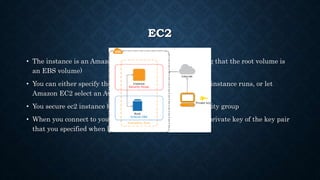
• The instance is an Amazon EBS-backed instance (meaning that the root volume is
an EBS volume)
• You can either specify the Availability Zone in which your instance runs, or let
Amazon EC2 select an Availability Zone for you
• You secure ec2 instance by specifying a key pair and security group
• When you connect to your instance, you must specify the private key of the key pair
that you specified when launching your instance
AMAZON MACHINE IMAGES (AMI)
• Provides the information required to launch an instance
• You must specify a source AMI when you launch an instance
• You can launch multiple instances from a single AMI when you need multiple
instances with the same configuration
• You can use different AMIs to launch instances when you need instances with
different configurations
AMI TYPES
• You can select an AMI to use based on the following characteristics:
• Region
• Operating system
• Architecture (32-bit or 64-bit)
• Launch Permissions
• Storage for the Root Device
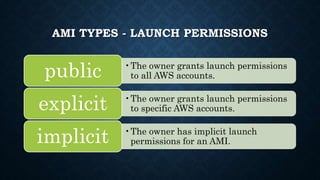
AMI TYPES - LAUNCH PERMISSIONS
•The owner grants launch permissions
to all AWS accounts.public
•The owner grants launch permissions
to specific AWS accounts.explicit
•The owner has implicit launch
permissions for an AMI.implicit
AMI TYPES - STORAGE FOR THE ROOT
DEVICE
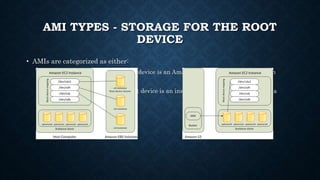
• AMIs are categorized as either:
• backed by Amazon EBS: The root device is an Amazon EBS volume created from an
Amazon EBS snapshot
• backed by instance store: The root device is an instance store volume created from a
template stored in Amazon S3
AMI TYPES - STORAGE FOR THE ROOT
DEVICE
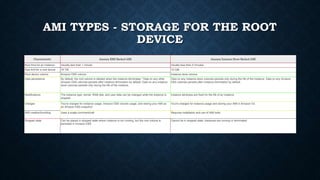
Characteristic Amazon EBS-Backed AMI Amazon Instance Store-Backed AMI
Boot time for an instance Usually less than 1 minute Usually less than 5 minutes
Size limit for a root device 16 TiB 10 GiB
Root device volume Amazon EBS volume Instance store volume
Data persistence By default, the root volume is deleted when the instance terminates.* Data on any other
Amazon EBS volumes persists after instance termination by default. Data on any instance
store volumes persists only during the life of the instance.
Data on any instance store volumes persists only during the life of the instance. Data on any Amazon
EBS volumes persists after instance termination by default.
Modifications The instance type, kernel, RAM disk, and user data can be changed while the instance is
stopped.
Instance attributes are fixed for the life of an instance.
Charges You're charged for instance usage, Amazon EBS volume usage, and storing your AMI as
an Amazon EBS snapshot.
You're charged for instance usage and storing your AMI in Amazon S3.
AMI creation/bundling Uses a single command/call Requires installation and use of AMI tools
Stopped state Can be placed in stopped state where instance is not running, but the root volume is
persisted in Amazon EBS
Cannot be in stopped state; instances are running or terminated
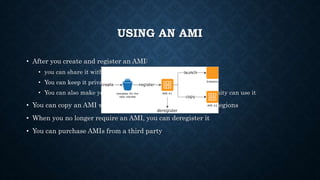
USING AN AMI
• After you create and register an AMI:
• you can share it with a specified list of AWS accounts
• You can keep it private so that only you can use it
• You can also make your custom AMI public so that the community can use it
• You can copy an AMI within the same region or to different regions
• When you no longer require an AMI, you can deregister it
• You can purchase AMIs from a third party
EC2 - FEATURES
• Bare Metal Instances
• GPU Compute Instances
• GPU Graphics Instances
• High I/O Instances
• Dense Storage Instances
• Flexible Storage Options
• Paying for What You Use
EC2 - FEATURES
• Multiple Locations
• Elastic IP Addresses
• Amazon EC2 Auto Scaling
• High Performance Computing (HPC) Clusters
• Enhanced Networking
• Available on AWS PrivateLink
• Amazon Time Sync Service
BARE METAL INSTANCES
• Provide your applications with direct access to the processor and memory of the
underlying server
• Ideal for workloads that require access to hardware feature sets
• For applications that need to run in non-virtualized environments for licensing or
support requirements
• Bare Metal instances are built on the Nitro system
• Instance type: I3
• Request form
• https://pages.awscloud.com/amazon-ec2-bare-metal-instances-preview.html
GPU COMPUTE INSTANCES
• Instance type: P3
• Ideally suited for machine learning
• High-performance computing
• Computational fluid dynamics
• Computational finance
• Seismic analysis
• Molecular modeling
• Genomics, and rendering workloads
GPU GRAPHICS INSTANCES
• Instance type: G3
• Are ideally suited for 3D visualizations
• Graphics-intensive remote workstation
• 3D rendering
• Application streaming
• Video encoding, and other server-side graphics workloads
HIGH I/O INSTANCES
• Are an Amazon EC2 instance type that can provide customers with random I/O rates
over 3 million IOPS
• High I/O I3 instances are backed by Non-Volatile Memory Express (NVMe) based SSDs
• Are ideally suited for customers running:
• very high performance NoSQL databases
• Transactional systems
• Elastic Search workloads
• High I/O instances also offers sequential disk throughput up to 16 GB/s, which is ideal
for analytics workloads
FLEXIBLE STORAGE OPTIONS
• Elastic Block Store
• Elastic File System
PAYING FOR WHAT YOU USE
• You will be charged at the end of each month for your EC2 resources actually
consumed
• Partial instance hours consumed are billed as full hours
MULTIPLE LOCATIONS
• The Amazon EC2 Service Level Agreement commitment is 99.95% availability for
each Amazon EC2 Region
• Daily: 43.2s
• Weekly: 5m 2.4s
• Monthly: 21m 54.9s
• Yearly: 4h 22m 58.5s
• Amazon EC2 provides the ability to place instances in multiple locations
• Regions
• Availability Zones
ELASTIC IP ADDRESSES
• Are static IP addresses designed for dynamic cloud computing
• Is associated with your account not a particular instance
• You control that address until you choose to explicitly release it
• Elastic IP addresses allow you to mask instance or Availability Zone failures by
programmatically remapping your public IP addresses to any instance in your
account
• Elastic IP address is for use in a specific region only
AMAZON EC2 AUTO SCALING
• EC2 Auto Scaling allows you to automatically scale your Amazon EC2 capacity up or
down according to conditions you define
• EC2 Auto Scaling is enabled by Amazon CloudWatch and available at no additional
charge beyond Amazon CloudWatch fees
• Automatically scale in and out
• Choose when and how to scale
• Fleet management
• Support for multiple instance types
• Included with Amazon EC2
AMAZON TIME SYNC SERVICE
• There is no additional charge for using this service
• Provides a highly accurate and reliable time reference that is natively accessible from
Amazon EC2 instances
• Utilizes a fleet of redundant satellite-connected and atomic reference clocks in AWS
regions to deliver current time readings of the Coordinated Universal Time (UTC) global
standard
• The Amazon Time Sync Service automatically smooths out (smears) leap seconds that
are periodically added to UTC
• EC2 instances running in Amazon Virtual Private Cloud (VPC) can access this service at
a universally reachable IP address

Amazon services ec2

  • 1.
    AMAZON SERVICES –EC2 Eng. Ismail Anjrini
  • 2.
    EC2 • Presents atrue virtual computing environment • Allowing you to use web service interfaces to launch instances with a variety of operating systems • Manage your network’s access permissions • Run your image using as many or few systems as you desire
  • 3.
    EC2 • The instanceis an Amazon EBS-backed instance (meaning that the root volume is an EBS volume) • You can either specify the Availability Zone in which your instance runs, or let Amazon EC2 select an Availability Zone for you • You secure ec2 instance by specifying a key pair and security group • When you connect to your instance, you must specify the private key of the key pair that you specified when launching your instance
  • 4.
    AMAZON MACHINE IMAGES(AMI) • Provides the information required to launch an instance • You must specify a source AMI when you launch an instance • You can launch multiple instances from a single AMI when you need multiple instances with the same configuration • You can use different AMIs to launch instances when you need instances with different configurations
  • 5.
    AMI TYPES • Youcan select an AMI to use based on the following characteristics: • Region • Operating system • Architecture (32-bit or 64-bit) • Launch Permissions • Storage for the Root Device
  • 6.
    AMI TYPES -LAUNCH PERMISSIONS •The owner grants launch permissions to all AWS accounts.public •The owner grants launch permissions to specific AWS accounts.explicit •The owner has implicit launch permissions for an AMI.implicit
  • 7.
    AMI TYPES -STORAGE FOR THE ROOT DEVICE • AMIs are categorized as either: • backed by Amazon EBS: The root device is an Amazon EBS volume created from an Amazon EBS snapshot • backed by instance store: The root device is an instance store volume created from a template stored in Amazon S3
  • 8.
    AMI TYPES -STORAGE FOR THE ROOT DEVICE Characteristic Amazon EBS-Backed AMI Amazon Instance Store-Backed AMI Boot time for an instance Usually less than 1 minute Usually less than 5 minutes Size limit for a root device 16 TiB 10 GiB Root device volume Amazon EBS volume Instance store volume Data persistence By default, the root volume is deleted when the instance terminates.* Data on any other Amazon EBS volumes persists after instance termination by default. Data on any instance store volumes persists only during the life of the instance. Data on any instance store volumes persists only during the life of the instance. Data on any Amazon EBS volumes persists after instance termination by default. Modifications The instance type, kernel, RAM disk, and user data can be changed while the instance is stopped. Instance attributes are fixed for the life of an instance. Charges You're charged for instance usage, Amazon EBS volume usage, and storing your AMI as an Amazon EBS snapshot. You're charged for instance usage and storing your AMI in Amazon S3. AMI creation/bundling Uses a single command/call Requires installation and use of AMI tools Stopped state Can be placed in stopped state where instance is not running, but the root volume is persisted in Amazon EBS Cannot be in stopped state; instances are running or terminated
  • 9.
    USING AN AMI •After you create and register an AMI: • you can share it with a specified list of AWS accounts • You can keep it private so that only you can use it • You can also make your custom AMI public so that the community can use it • You can copy an AMI within the same region or to different regions • When you no longer require an AMI, you can deregister it • You can purchase AMIs from a third party
  • 10.
    EC2 - FEATURES •Bare Metal Instances • GPU Compute Instances • GPU Graphics Instances • High I/O Instances • Dense Storage Instances • Flexible Storage Options • Paying for What You Use
  • 11.
    EC2 - FEATURES •Multiple Locations • Elastic IP Addresses • Amazon EC2 Auto Scaling • High Performance Computing (HPC) Clusters • Enhanced Networking • Available on AWS PrivateLink • Amazon Time Sync Service
  • 12.
    BARE METAL INSTANCES •Provide your applications with direct access to the processor and memory of the underlying server • Ideal for workloads that require access to hardware feature sets • For applications that need to run in non-virtualized environments for licensing or support requirements • Bare Metal instances are built on the Nitro system • Instance type: I3 • Request form • https://pages.awscloud.com/amazon-ec2-bare-metal-instances-preview.html
  • 13.
    GPU COMPUTE INSTANCES •Instance type: P3 • Ideally suited for machine learning • High-performance computing • Computational fluid dynamics • Computational finance • Seismic analysis • Molecular modeling • Genomics, and rendering workloads
  • 14.
    GPU GRAPHICS INSTANCES •Instance type: G3 • Are ideally suited for 3D visualizations • Graphics-intensive remote workstation • 3D rendering • Application streaming • Video encoding, and other server-side graphics workloads
  • 15.
    HIGH I/O INSTANCES •Are an Amazon EC2 instance type that can provide customers with random I/O rates over 3 million IOPS • High I/O I3 instances are backed by Non-Volatile Memory Express (NVMe) based SSDs • Are ideally suited for customers running: • very high performance NoSQL databases • Transactional systems • Elastic Search workloads • High I/O instances also offers sequential disk throughput up to 16 GB/s, which is ideal for analytics workloads
  • 16.
    FLEXIBLE STORAGE OPTIONS •Elastic Block Store • Elastic File System
  • 17.
    PAYING FOR WHATYOU USE • You will be charged at the end of each month for your EC2 resources actually consumed • Partial instance hours consumed are billed as full hours
  • 18.
    MULTIPLE LOCATIONS • TheAmazon EC2 Service Level Agreement commitment is 99.95% availability for each Amazon EC2 Region • Daily: 43.2s • Weekly: 5m 2.4s • Monthly: 21m 54.9s • Yearly: 4h 22m 58.5s • Amazon EC2 provides the ability to place instances in multiple locations • Regions • Availability Zones
  • 19.
    ELASTIC IP ADDRESSES •Are static IP addresses designed for dynamic cloud computing • Is associated with your account not a particular instance • You control that address until you choose to explicitly release it • Elastic IP addresses allow you to mask instance or Availability Zone failures by programmatically remapping your public IP addresses to any instance in your account • Elastic IP address is for use in a specific region only
  • 20.
    AMAZON EC2 AUTOSCALING • EC2 Auto Scaling allows you to automatically scale your Amazon EC2 capacity up or down according to conditions you define • EC2 Auto Scaling is enabled by Amazon CloudWatch and available at no additional charge beyond Amazon CloudWatch fees • Automatically scale in and out • Choose when and how to scale • Fleet management • Support for multiple instance types • Included with Amazon EC2
  • 21.
    AMAZON TIME SYNCSERVICE • There is no additional charge for using this service • Provides a highly accurate and reliable time reference that is natively accessible from Amazon EC2 instances • Utilizes a fleet of redundant satellite-connected and atomic reference clocks in AWS regions to deliver current time readings of the Coordinated Universal Time (UTC) global standard • The Amazon Time Sync Service automatically smooths out (smears) leap seconds that are periodically added to UTC • EC2 instances running in Amazon Virtual Private Cloud (VPC) can access this service at a universally reachable IP address