Experience Day, Medellín
Compute Services
Agenda
• Amazon Elastic Compute Cloud (EC2)
• Amazon Elastic Load Balancing (ELB)
• Amazon EC2 Container Service (ECS)
• AWS Elastic Beanstalk
• AWS Lambda
Amazon Elastic Compute Cloud (EC2)
• Virtual machine instance running on a hypervisor
• Support numerous distributions of Linux as well as
Microsoft Windows Server (2003 R2 - 2012 R2)
• Complete control of your host operating system with root
and administrator accounts
• Reduce time to procure new server instances to minutes
• Dynamically auto scale compute capacity based on load
Amazon Elastic Compute Cloud (EC2)
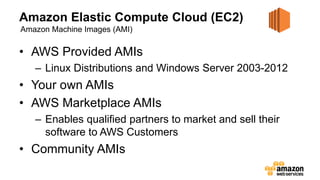
• AWS Provided AMIs
– Linux Distributions and Windows Server 2003-2012
• Your own AMIs
• AWS Marketplace AMIs
– Enables qualified partners to market and sell their
software to AWS Customers
• Community AMIs
Amazon Machine Images (AMI)
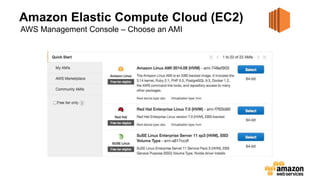
Amazon Elastic Compute Cloud (EC2)
AWS Management Console – Choose an AMI
Amazon Elastic Compute Cloud (EC2)
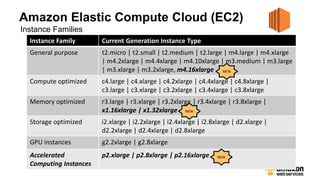
Instance Families
Instance Family Current Generation Instance Type
General purpose t2.micro | t2.small | t2.medium | t2.large | m4.large | m4.xlarge
| m4.2xlarge | m4.4xlarge | m4.10xlarge | m3.medium | m3.large
| m3.xlarge | m3.2xlarge, m4.16xlarge
Compute optimized c4.large | c4.xlarge | c4.2xlarge | c4.4xlarge | c4.8xlarge |
c3.large | c3.xlarge | c3.2xlarge | c3.4xlarge | c3.8xlarge
Memory optimized r3.large | r3.xlarge | r3.2xlarge | r3.4xlarge | r3.8xlarge |
x1.16xlarge | x1.32xlarge
Storage optimized i2.xlarge | i2.2xlarge | i2.4xlarge | i2.8xlarge | d2.xlarge |
d2.2xlarge | d2.4xlarge | d2.8xlarge
GPU instances g2.2xlarge | g2.8xlarge
Accelerated
Computing Instances
p2.xlarge | p2.8xlarge | p2.16xlarge
NEW
NEW
NEW
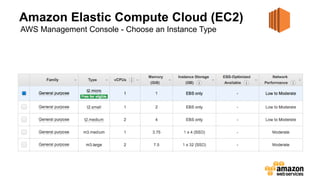
Amazon Elastic Compute Cloud (EC2)
AWS Management Console - Choose an Instance Type
Amazon Elastic Compute Cloud (EC2)
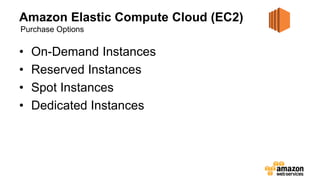
• On-Demand Instances
• Reserved Instances
• Spot Instances
• Dedicated Instances
Purchase Options
Amazon Elastic Compute Cloud (EC2)
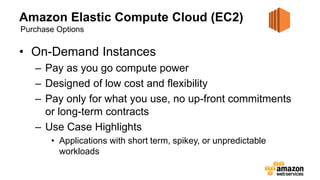
• On-Demand Instances
– Pay as you go compute power
– Designed of low cost and flexibility
– Pay only for what you use, no up-front commitments
or long-term contracts
– Use Case Highlights
• Applications with short term, spikey, or unpredictable
workloads
Purchase Options
Amazon Elastic Compute Cloud (EC2)
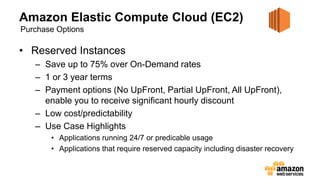
• Reserved Instances
– Save up to 75% over On-Demand rates
– 1 or 3 year terms
– Payment options (No UpFront, Partial UpFront, All UpFront),
enable you to receive significant hourly discount
– Low cost/predictability
– Use Case Highlights
• Applications running 24/7 or predicable usage
• Applications that require reserved capacity including disaster recovery
Purchase Options
Amazon Elastic Compute Cloud (EC2)
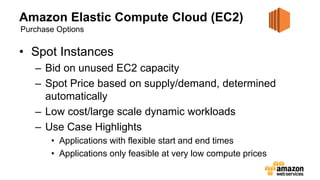
• Spot Instances
– Bid on unused EC2 capacity
– Spot Price based on supply/demand, determined
automatically
– Low cost/large scale dynamic workloads
– Use Case Highlights
• Applications with flexible start and end times
• Applications only feasible at very low compute prices
Purchase Options
Amazon Elastic Compute Cloud (EC2)
• Dedicated Instances
– Single customer tenancy on the compute hardware
– Dedicated per-region fee for one or more running
instances
– Use Case Highlights
• Applications with unique compliance requirements like HIPAA
Purchase Options
Amazon Elastic Compute Cloud (EC2)
• Persistent block storage volumes for use with
Amazon EC2 instances
• Attach and format using a standard OS file
system (e.g. ext4 or NTFS)
• Single volumes sizes from 1GB to 16TB
• Automatically replicated within its Availability
Zone to protect from component failure
Amazon Elastic Block Storage (EBS)
Amazon Elastic Compute Cloud (EC2)
• Scale your Amazon EC2 capacity automatically
• Setup scaling policies to add or remove EC2
instances based on Amazon CloudWatch
metrics
• Launch Configurations are used to preconfigure
what EC2 instance type and Amazon Machine
Image (AMI) the auto scaling group will utilize
Auto Scaling Groups
Amazon Elastic Load Balancing (ELB)
• Automatically distributes incoming application traffic
across multiple instances and multiple Availability
Zones
• Achieve higher levels of fault tolerance by detecting
unhealthy instances and rerouting traffic across the
remaining healthy instances
• Supports round robin for TCP, least connection for
HTTP/HTTPS, and sticky session or session affinity
Amazon EC2 Container Service (ECS)
• Container management service that supports
Docker containers and allows you to easily run
applications on a managed cluster of Amazon
EC2 instances
• Amazon ECS eliminates the need for you to
install, operate, and scale your own cluster
• Supports running applications, services, and
batch services
AWS Elastic Beanstalk
• Service for deploying and managing web
applications and services developed in Java, .NET,
PHP, Node.js, Python, Ruby, and Docker
• Upload your code with Eclipse or Visual Studio and
Elastic Beanstalk automatically handles the
deployment from capacity planning, load balancing,
auto-scaling to application health monitoring
• Retain full control over your AWS resources
AWS Lambda
• Compute service that runs stateless Node.js,
Java, and Python code in response to an event
• Starts code within milliseconds of an event such
as an image upload, in-app activity, website
click, or output from a connected device
• Allows running code without managing
infrastructure like EC2 instances and auto
scaling groups
Thank You

EC2 Computo en la Nube

  • 1.
  • 2.
    Agenda • Amazon ElasticCompute Cloud (EC2) • Amazon Elastic Load Balancing (ELB) • Amazon EC2 Container Service (ECS) • AWS Elastic Beanstalk • AWS Lambda
  • 3.
    Amazon Elastic ComputeCloud (EC2) • Virtual machine instance running on a hypervisor • Support numerous distributions of Linux as well as Microsoft Windows Server (2003 R2 - 2012 R2) • Complete control of your host operating system with root and administrator accounts • Reduce time to procure new server instances to minutes • Dynamically auto scale compute capacity based on load
  • 4.
    Amazon Elastic ComputeCloud (EC2) • AWS Provided AMIs – Linux Distributions and Windows Server 2003-2012 • Your own AMIs • AWS Marketplace AMIs – Enables qualified partners to market and sell their software to AWS Customers • Community AMIs Amazon Machine Images (AMI)
  • 5.
    Amazon Elastic ComputeCloud (EC2) AWS Management Console – Choose an AMI
  • 6.
    Amazon Elastic ComputeCloud (EC2) Instance Families Instance Family Current Generation Instance Type General purpose t2.micro | t2.small | t2.medium | t2.large | m4.large | m4.xlarge | m4.2xlarge | m4.4xlarge | m4.10xlarge | m3.medium | m3.large | m3.xlarge | m3.2xlarge, m4.16xlarge Compute optimized c4.large | c4.xlarge | c4.2xlarge | c4.4xlarge | c4.8xlarge | c3.large | c3.xlarge | c3.2xlarge | c3.4xlarge | c3.8xlarge Memory optimized r3.large | r3.xlarge | r3.2xlarge | r3.4xlarge | r3.8xlarge | x1.16xlarge | x1.32xlarge Storage optimized i2.xlarge | i2.2xlarge | i2.4xlarge | i2.8xlarge | d2.xlarge | d2.2xlarge | d2.4xlarge | d2.8xlarge GPU instances g2.2xlarge | g2.8xlarge Accelerated Computing Instances p2.xlarge | p2.8xlarge | p2.16xlarge NEW NEW NEW
  • 7.
    Amazon Elastic ComputeCloud (EC2) AWS Management Console - Choose an Instance Type
  • 8.
    Amazon Elastic ComputeCloud (EC2) • On-Demand Instances • Reserved Instances • Spot Instances • Dedicated Instances Purchase Options
  • 9.
    Amazon Elastic ComputeCloud (EC2) • On-Demand Instances – Pay as you go compute power – Designed of low cost and flexibility – Pay only for what you use, no up-front commitments or long-term contracts – Use Case Highlights • Applications with short term, spikey, or unpredictable workloads Purchase Options
  • 10.
    Amazon Elastic ComputeCloud (EC2) • Reserved Instances – Save up to 75% over On-Demand rates – 1 or 3 year terms – Payment options (No UpFront, Partial UpFront, All UpFront), enable you to receive significant hourly discount – Low cost/predictability – Use Case Highlights • Applications running 24/7 or predicable usage • Applications that require reserved capacity including disaster recovery Purchase Options
  • 11.
    Amazon Elastic ComputeCloud (EC2) • Spot Instances – Bid on unused EC2 capacity – Spot Price based on supply/demand, determined automatically – Low cost/large scale dynamic workloads – Use Case Highlights • Applications with flexible start and end times • Applications only feasible at very low compute prices Purchase Options
  • 12.
    Amazon Elastic ComputeCloud (EC2) • Dedicated Instances – Single customer tenancy on the compute hardware – Dedicated per-region fee for one or more running instances – Use Case Highlights • Applications with unique compliance requirements like HIPAA Purchase Options
  • 13.
    Amazon Elastic ComputeCloud (EC2) • Persistent block storage volumes for use with Amazon EC2 instances • Attach and format using a standard OS file system (e.g. ext4 or NTFS) • Single volumes sizes from 1GB to 16TB • Automatically replicated within its Availability Zone to protect from component failure Amazon Elastic Block Storage (EBS)
  • 14.
    Amazon Elastic ComputeCloud (EC2) • Scale your Amazon EC2 capacity automatically • Setup scaling policies to add or remove EC2 instances based on Amazon CloudWatch metrics • Launch Configurations are used to preconfigure what EC2 instance type and Amazon Machine Image (AMI) the auto scaling group will utilize Auto Scaling Groups
  • 15.
    Amazon Elastic LoadBalancing (ELB) • Automatically distributes incoming application traffic across multiple instances and multiple Availability Zones • Achieve higher levels of fault tolerance by detecting unhealthy instances and rerouting traffic across the remaining healthy instances • Supports round robin for TCP, least connection for HTTP/HTTPS, and sticky session or session affinity
  • 16.
    Amazon EC2 ContainerService (ECS) • Container management service that supports Docker containers and allows you to easily run applications on a managed cluster of Amazon EC2 instances • Amazon ECS eliminates the need for you to install, operate, and scale your own cluster • Supports running applications, services, and batch services
  • 17.
    AWS Elastic Beanstalk •Service for deploying and managing web applications and services developed in Java, .NET, PHP, Node.js, Python, Ruby, and Docker • Upload your code with Eclipse or Visual Studio and Elastic Beanstalk automatically handles the deployment from capacity planning, load balancing, auto-scaling to application health monitoring • Retain full control over your AWS resources
  • 18.
    AWS Lambda • Computeservice that runs stateless Node.js, Java, and Python code in response to an event • Starts code within milliseconds of an event such as an image upload, in-app activity, website click, or output from a connected device • Allows running code without managing infrastructure like EC2 instances and auto scaling groups
  • 19.

Editor's Notes

  • #7 5 Instance Families http://docs.aws.amazon.com/AWSEC2/latest/UserGuide/instance-types.html
  • #17 Linux only