Advanced Topics on the
Mirth Connect Interface Engine
July 6, 2016
You have been automatically muted. Please use the
Q&A panel to submit questions during the presentation
PRESENTER
Nate Bessa
Technical Consultant
• Based in Boston, MA
• Specializing in custom programming
projects, HIE connectivity, data migrations,
and HL7 interface development
• 2+ years experience with Mirth Connect
• 5+ years in healthcare IT
Nate.Bessa@galenhealthcare.com
POLL #1
I. Performance tweaks
II. Security improvements
III. Programming suggestions
IV. Maintenance strategies
V. Q & A
TOPICS
PERFORMANCE TWEAKS
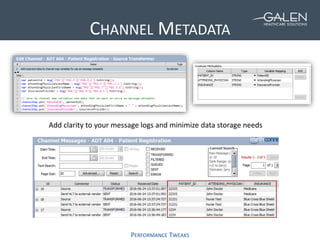
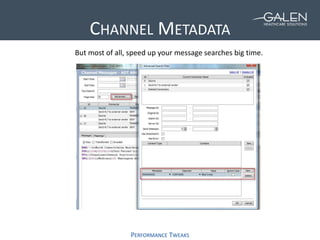
CHANNEL METADATA
PERFORMANCE TWEAKS
Add clarity to your message logs and minimize data storage needs
CHANNEL METADATA
PERFORMANCE TWEAKS
But most of all, speed up your message searches big time.
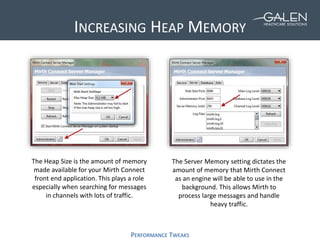
INCREASING HEAP MEMORY
PERFORMANCE TWEAKS
The Heap Size is the amount of memory
made available for your Mirth Connect
front end application. This plays a role
especially when searching for messages
in channels with lots of traffic.
The Server Memory setting dictates the
amount of memory that Mirth Connect
as an engine will be able to use in the
background. This allows Mirth to
process large messages and handle
heavy traffic.
SECURITY IMPROVEMENTS
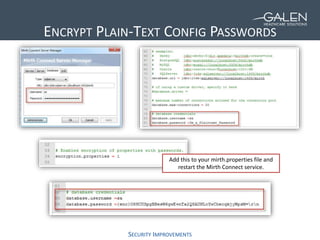
ENCRYPT PLAIN-TEXT CONFIG PASSWORDS
Add this to your mirth.properties file and
restart the Mirth Connect service.
SECURITY IMPROVEMENTS
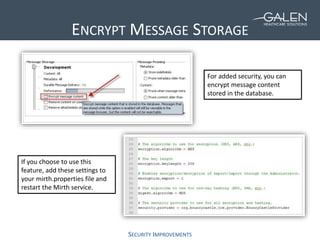
ENCRYPT MESSAGE STORAGE
If you choose to use this
feature, add these settings to
your mirth.properties file and
restart the Mirth service.
For added security, you can
encrypt message content
stored in the database.
SECURITY IMPROVEMENTS
IMPORTING A SELF-SIGNED SSL CERTIFICATE
3
2
1
PROGRAMMING SUGGESTIONS
POLL #2
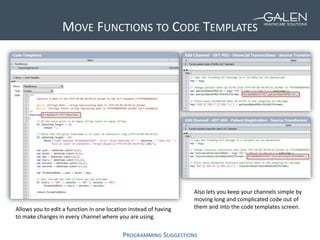
MOVE FUNCTIONS TO CODE TEMPLATES
PROGRAMMING SUGGESTIONS
Allows you to edit a function in one location instead of having
to make changes in every channel where you are using.
Also lets you keep your channels simple by
moving long and complicated code out of
them and into the code templates screen.
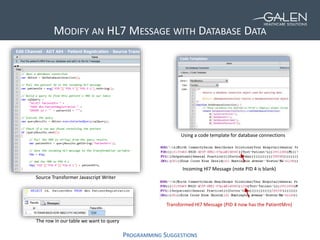
MODIFY AN HL7 MESSAGE WITH DATABASE DATA
PROGRAMMING SUGGESTIONS
Incoming Hl7 Message (note PID 4 is blank)
Transformed Hl7 Message (PID 4 now has the PatientMrn)
Source Transformer Javascript Writer
The row in our table we want to query
Using a code template for database connections
COMMON CHANNEL SETTINGS
PROGRAMMING SUGGESTIONS
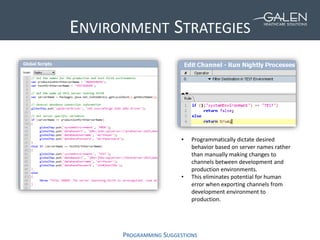
ENVIRONMENT STRATEGIES
PROGRAMMING SUGGESTIONS
• Programmatically dictate desired
behavior based on server names rather
than manually making changes to
channels between development and
production environments.
• This eliminates potential for human
error when exporting channels from
development environment to
production.
ROUTING A MESSAGE TO OTHER CHANNELS
PROGRAMMING SUGGESTIONS
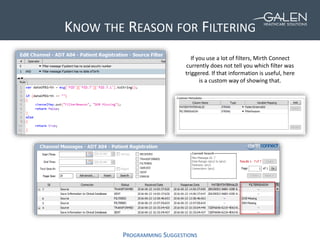
KNOW THE REASON FOR FILTERING
PROGRAMMING SUGGESTIONS
If you use a lot of filters, Mirth Connect
currently does not tell you which filter was
triggered. If that information is useful, here
is a custom way of showing that.
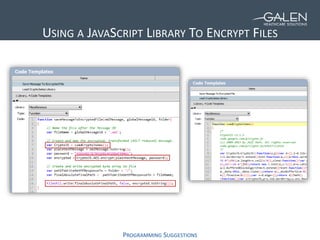
USING A JAVASCRIPT LIBRARY TO ENCRYPT FILES
PROGRAMMING SUGGESTIONS
MAINTENANCE STRATEGIES
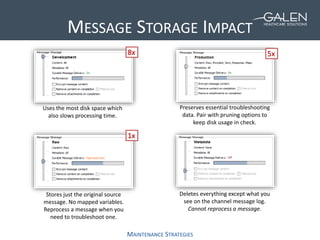
MESSAGE STORAGE IMPACT
MAINTENANCE STRATEGIES
Uses the most disk space which
also slows processing time.
Preserves essential troubleshooting
data. Pair with pruning options to
keep disk usage in check.
Stores just the original source
message. No mapped variables.
Reprocess a message when you
need to troubleshoot one.
Deletes everything except what you
see on the channel message log.
Cannot reprocess a message.
1x
5x8x
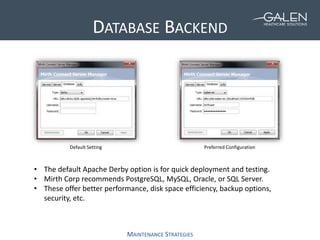
DATABASE BACKEND
MAINTENANCE STRATEGIES
Default Setting Preferred Configuration
• The default Apache Derby option is for quick deployment and testing.
• Mirth Corp recommends PostgreSQL, MySQL, Oracle, or SQL Server.
• These offer better performance, disk space efficiency, backup options,
security, etc.
PRETTYPRINTXML
MAINTENANCE STRATEGIES
SourceXmlUnformatted SourceXmlPrettyPrintFormat
POLL #3
WRAPPING UP
ADDITIONAL RESOURCES
“Best Practices and Vulnerabilities
in Mirth Connect” white paper
Google “Mirth Connect Security
White Paper Galen”
“Mirth Connect - Introduction” webcast
Search “Mirth Connect Galen” on Youtube
“10 Tips and Tricks To Make Mirth
Connect Work For You” blog post
Google “Mirth Connect Tips and Tricks Galen”
Confidential © 2015 Galen Healthcare Solutions
SOLVING FOR TODAY. PREPARING FOR TOMORROW.
Thank you for joining us today.
To access the slides from today’s presentation, please visit:
http://wiki.galenhealthcare.com/Category:Webcasts
For additional assistance or to request information about our many products and
services, including help with Mirth Connect, please contact us through our website:
www.galenhealthcare.com

Advanced Topics on the Mirth Connect Interface Engine

  • 1.
    Advanced Topics onthe Mirth Connect Interface Engine July 6, 2016
  • 2.
    You have beenautomatically muted. Please use the Q&A panel to submit questions during the presentation
  • 3.
    PRESENTER Nate Bessa Technical Consultant •Based in Boston, MA • Specializing in custom programming projects, HIE connectivity, data migrations, and HL7 interface development • 2+ years experience with Mirth Connect • 5+ years in healthcare IT Nate.Bessa@galenhealthcare.com
  • 4.
  • 5.
    I. Performance tweaks II.Security improvements III. Programming suggestions IV. Maintenance strategies V. Q & A TOPICS
  • 6.
  • 7.
    CHANNEL METADATA PERFORMANCE TWEAKS Addclarity to your message logs and minimize data storage needs
  • 8.
    CHANNEL METADATA PERFORMANCE TWEAKS Butmost of all, speed up your message searches big time.
  • 9.
    INCREASING HEAP MEMORY PERFORMANCETWEAKS The Heap Size is the amount of memory made available for your Mirth Connect front end application. This plays a role especially when searching for messages in channels with lots of traffic. The Server Memory setting dictates the amount of memory that Mirth Connect as an engine will be able to use in the background. This allows Mirth to process large messages and handle heavy traffic.
  • 10.
  • 11.
    SECURITY IMPROVEMENTS ENCRYPT PLAIN-TEXTCONFIG PASSWORDS Add this to your mirth.properties file and restart the Mirth Connect service.
  • 12.
    SECURITY IMPROVEMENTS ENCRYPT MESSAGESTORAGE If you choose to use this feature, add these settings to your mirth.properties file and restart the Mirth service. For added security, you can encrypt message content stored in the database.
  • 13.
    SECURITY IMPROVEMENTS IMPORTING ASELF-SIGNED SSL CERTIFICATE 3 2 1
  • 14.
  • 15.
  • 16.
    MOVE FUNCTIONS TOCODE TEMPLATES PROGRAMMING SUGGESTIONS Allows you to edit a function in one location instead of having to make changes in every channel where you are using. Also lets you keep your channels simple by moving long and complicated code out of them and into the code templates screen.
  • 17.
    MODIFY AN HL7MESSAGE WITH DATABASE DATA PROGRAMMING SUGGESTIONS Incoming Hl7 Message (note PID 4 is blank) Transformed Hl7 Message (PID 4 now has the PatientMrn) Source Transformer Javascript Writer The row in our table we want to query Using a code template for database connections
  • 18.
  • 19.
    ENVIRONMENT STRATEGIES PROGRAMMING SUGGESTIONS •Programmatically dictate desired behavior based on server names rather than manually making changes to channels between development and production environments. • This eliminates potential for human error when exporting channels from development environment to production.
  • 20.
    ROUTING A MESSAGETO OTHER CHANNELS PROGRAMMING SUGGESTIONS
  • 21.
    KNOW THE REASONFOR FILTERING PROGRAMMING SUGGESTIONS If you use a lot of filters, Mirth Connect currently does not tell you which filter was triggered. If that information is useful, here is a custom way of showing that.
  • 22.
    USING A JAVASCRIPTLIBRARY TO ENCRYPT FILES PROGRAMMING SUGGESTIONS
  • 23.
  • 24.
    MESSAGE STORAGE IMPACT MAINTENANCESTRATEGIES Uses the most disk space which also slows processing time. Preserves essential troubleshooting data. Pair with pruning options to keep disk usage in check. Stores just the original source message. No mapped variables. Reprocess a message when you need to troubleshoot one. Deletes everything except what you see on the channel message log. Cannot reprocess a message. 1x 5x8x
  • 25.
    DATABASE BACKEND MAINTENANCE STRATEGIES DefaultSetting Preferred Configuration • The default Apache Derby option is for quick deployment and testing. • Mirth Corp recommends PostgreSQL, MySQL, Oracle, or SQL Server. • These offer better performance, disk space efficiency, backup options, security, etc.
  • 26.
  • 27.
  • 28.
  • 29.
    ADDITIONAL RESOURCES “Best Practicesand Vulnerabilities in Mirth Connect” white paper Google “Mirth Connect Security White Paper Galen” “Mirth Connect - Introduction” webcast Search “Mirth Connect Galen” on Youtube “10 Tips and Tricks To Make Mirth Connect Work For You” blog post Google “Mirth Connect Tips and Tricks Galen”
  • 30.
    Confidential © 2015Galen Healthcare Solutions SOLVING FOR TODAY. PREPARING FOR TOMORROW. Thank you for joining us today. To access the slides from today’s presentation, please visit: http://wiki.galenhealthcare.com/Category:Webcasts For additional assistance or to request information about our many products and services, including help with Mirth Connect, please contact us through our website: www.galenhealthcare.com

Editor's Notes

  • #2 Good afternoon TITLE 2nd webcast on mirth connect, last one was about Today’s webcast is more technical and a result of what we’ve learned over the past two years working
  • #5 Which interface engine does you organization currently use?
  • #6 Performance tweaks = tricks you can use to speed up Mirth and minimize disk space waste Security improvements = encrypting messages stored on your server, protecting access to Mirth itself, and a little bit on importing certificates for SSL Programming suggestions = snippets of Javascript code that can improve your processes such as channel deployment between different development and production environments, abstracting to a central location common channel settings, using Javascript libraries in Mirth, and more Maintenance strategies = database back ends, making XML variables and logs easier to read in Mirth, and a little bit more on disk space usage
  • #8 An essential element to configure in Mirth. Add information to the channel messages screen. Channel summary screen shows the Custom Metadata settings. Add clarity to message logs but all minimize storage needs.
  • #10 What are recommended settings?
  • #14 If you want to send data securely via an HTTP POST, you can do so by sending data to an HTTPS address. In the event that this address has a self-signed SSL certificate, you’ll want to import it into the Java Truststore on your computer. This Truststore is a file located in the /lib/security/ folder of the Java Program Files folder on the server where Mirth is installed. To edit your Truststore, there is a free application called Portecle that you can download from SourceForge.net. This is actually a Java Virtual Application, so you don’t need to install anything. Just unzip the folder that it comes in, and run the portecle.jar file as Administrator to give the application the permissions it needs to change the Truststore. On this slide you can see some screenshots showing how to import the certificate you need. Note that the little red X on the lock icon will still appear next to your HTTP Sender URL even after you have successfully imported the certificate, which can be misleading, because your data will be encrypted outgoing. Mirth Corp recommends you install their SSL Manager extension to have better certificate management on your machine. This, however, requires a paid support license with Mirth.
  • #16 Before we dive into some more technical aspects of Mirth, I wanted to get an idea of how much experience do you have with the Mirth Connect Interface Engine?
  • #18 WALK THROUGH CODE
  • #25 Development: Content: all -- raw, transformed, encoded, sent, response, response transformed, processed response, maps
  • #28 Is your organization currently evaluating migrating to a different interface engine?
  • #29 QUESTIONS AND ANSWERS – Any other questions I didn’t answer today I will try to follow up with individually