More Related Content

PDF
CapMinds WhitePaper Document () Topic Integrating Healthcare Systems with Mir... 
PPTX
HIMSS Digital Healthcare Week 2013- The journey from HL7v2 to HL7 FHIR 
PPTX
Advanced Topics on the Mirth Connect Interface Engine 
PPT
Interoperability between heterogeneous healthcare information systems by John... 
PPTX
HL7 Integration using Mulesoft | MuleSoft Mysore Meetp #32 
PPTX

DOCX
Mirth connect Online Training 
DOCX
Hl7 interface development Similar to Basico Mirth Training Introduction and System Migration

PDF

PDF
Hl7 Standards (September 15, 2016) 
PDF
Slides from Perth MuleSoft Meetup March 2025 
PPT
Interoperability Between Healthcare Applications 
PPTX

PPTX

PPTX
Interoperability, the rise of HL7 and FHIR 
PDF
The Open eHealth Integration Platform 
PPTX
Rolling out FHIR - architecture and implementation considerations by Lloyd Mc... 
PPTX
Mirth Connect - Informations.pptx 
PPTX

PPTX

PPT
Ist16-02 HL7 from v2 (syntax) to v3 (semantics) 
PPTX
Security in FHIR with OAuth by Grahame Grieve 
PPTX

PPTX
Fhir foundation (grahame) 
PPTX
Terminology, value-sets, codesystems by Lloyd McKenzie 
PPT
Connecting Clinical Applications with WebSphere Message Broker 
PPTX
HL7 Survival Guide - Chapter 6 – Interfacing Artifacts: HL7 Conformance Prof... 
PPTX
Brendan Keeler - Who Trusts FHIR? Paradigms of Exchange in an API World More from PablaAndreaCeballosN

PPT
EAI en el ámbito de Sanidad Biztalk HL7 1 
PPT
Acelerador BizTalk en el ambito de la sanidad 
PPT
HL7 Guia para el aprendizaje Basico e Implementacion 
PPT
introduccionopenehrparaduoc-111125201852-phpapp01.ppt 
PPTX
Conoce tus herramientas para ciencia de datos V2.pptx 
PPTX
Ciencia de Datos para Principiantes Volumen 1 
PPTX
Matematicas para entender mis Datos 03092025 Recently uploaded

PDF
Mitr Sarthi: A Smart ERP for Modern Manufacturers 
PDF
Problem Solving_20241203_220045_0000.pdf 
PDF
our environment ppt made by many people name rarang yadav 
PPTX
Project System Presentation details process presentation 
PPTX
Introduction to Software Development and Modern Practices 
PPTX
Feasibility Analysis in System Development Using Data Flow Diagrams 
PDF
CatoCoin (CATO) – Smart Contract Security Audit Report by EtherAuthority 
PPTX
Best Way to Convert PST File to MBOX Format 
PDF
Building Strong IT Systems Using the Site Reliability Engineering 
PPTX
Build Smarter with Google: A Workshop on MediaPipe, Firebase, Gemini and Anti... 
PPTX
How Swiggy Assure Scaled B2B Procurement for the HORECA Supply Chain 
PDF
DSD-INT 2025 Large scale unsaturated zone modelling - Sequential Steady State... 
PPTX
UAE-Based Insurer Transforms Operations with InsureEdge 
PDF
Salesforce Agentforce Service Agent.pdf 
PPTX
ManageIQ - Sprint 278 Review - Slide Deck 
PDF
Driving Finance Growth with Business Central ERP ![Lect 1 Number systems and base conversions. [Autosaved].pptx](https://cdn.slidesharecdn.com/ss_thumbnails/lect1numbersystemsandbaseconversions-260111134109-67c2d865-thumbnail.jpg?width=640&height=640&fit=bounds)
PPTX
Lect 1 Number systems and base conversions. [Autosaved].pptx 
PPTX
Aviation Fleet Management Software for Airlines & Operators 
PPTX
EMR Software for Pulmonology Clinics Why EasyClinic Supports Accuracy, Contin... 
PDF
Prasenjit Bhaumik Plano - Specializing In Web Applications Basico Mirth Training Introduction and System Migration
- 1.
- 2.
Copyright © 2007WebReach, Inc.
Agenda
1. Introduction to HL7
2. Introduction to Mirth
3. Advanced Mirth Topics
4. IH Interface Overview
5. Web Services in Mirth
6. Maintenance and Deployment
7. Mirth Architecture Overview
8. Mirth Roadmap
9. WebReach Go-Live Support
10. Wrap-up, Q & A
- 3.
- 4.
Copyright © 2007WebReach, Inc.
What is HL7?
• Health Level 7
• ANSI standard for health care information
exchange
• Used in hospitals, clinics, labs, and
pharmacies
• HL7 v2.x uses non-standard encoding of
segments and data fields (i.e. |, *, ^)
• HL7 v3 uses XML to encode data
- 5.
Copyright © 2007WebReach, Inc.
What is HL7?
• HL7 messages are composed of:
• Segments: Discrete data elements, each with
its own semantic purpose
• Example: PID segment contains all relevant patient
demographics
• Example: MSH segment contains message header
information
• Usually delimited by carriage return “r”
• Some segments are optional and some can repeat
• PID|1||0000001249||POI-KGH-IN^BABY^GIRL||20060301|F|^||123 MAIN
STREET^^KELOWNA^BC^||250-763-7879|||||AC000155/07|
• Composites: Individual elements in a segment.
• Example: PId.5 contains a patient’s name
• Usually delimited by “|”
• PID|1||0000001249||POI-KGH-IN^BABY^GIRL||20060301|F|^||123
MAIN STREET^^KELOWNA^BC^||250-763-7879|||||AC000155/07|
- 6.
Copyright © 2007WebReach, Inc.
What is HL7?
• Composites can either be a primitive data type or
made up of other composites
• Example: PID.5 is an XPN (Extended Person Name)
composite with fields for “Given Name”, “Middle
Name”, “Family Name”, etc.
- 7.
Copyright © 2007WebReach, Inc.
HL7 Versions
• Standard HL7 versions include 2.1, 2.2,
2.3, 2.3.1, 2.4, 2.5, 3.0
• Version 2.3.1+ introduces several changes
to data-types
• Versioning differences introduce problems
in integration tasks
• HL7 2.x and 3.0 are completely different
standards and generally not compatible
- 8.
Copyright © 2007WebReach, Inc.
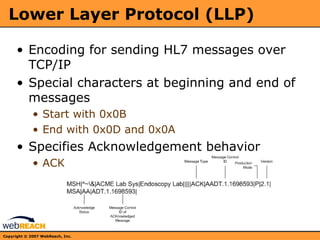
Lower Layer Protocol (LLP)
• Encoding for sending HL7 messages over
TCP/IP
• Special characters at beginning and end of
messages
• Start with 0x0B
• End with 0x0D and 0x0A
• Specifies Acknowledgement behavior
• ACK
- 9.
Copyright © 2007WebReach, Inc.
Common Use Cases
• ADT messages received over LLP; patient
demographics are extracted and stored to a
database
• ORU messages generated from
transcription reports; read from database
and sent to lab over LLP
• SCH messages generated from scheduling
events, sent to database to update
calendaring system
- 10.
Copyright © 2007WebReach, Inc.
Sample Use Case
ADT A01
HIS
Lab
Billing
ACK
Hospital or Clinic
FTP
JDBC
Event-driven messages
LLP
- 11.
Copyright © 2007WebReach, Inc.
Extending HL7
• HL7 standard provides two mechanisms to
extend the API
• Z-Messages
• Allows for custom segment ordering, however the
MSH segment is always required
• Z-Segments
• Allows for custom composite and data type ordering
• Extensions are usually not recommended,
as they introduce compatibility issues
between systems.
• Z-Segments are less harmful to
interoperability than Z-messages
- 12.
Copyright © 2007WebReach, Inc.
Future of HL7
• Version 3 is a dramatic departure from 2.x
standard
• Many systems are recently becoming 2.x
compatible
• IHE efforts for standard set of
interoperability use cases
• Example: IHE-PDQ for patient demographics
query
• New standards based on HL7 v2
• DICOM, CDA
- 13.
- 14.
Copyright © 2007WebReach, Inc.
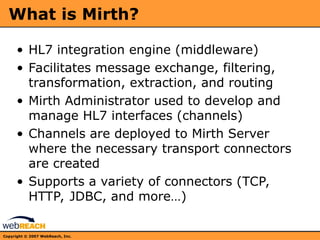
What is Mirth?
• HL7 integration engine (middleware)
• Facilitates message exchange, filtering,
transformation, extraction, and routing
• Mirth Administrator used to develop and
manage HL7 interfaces (channels)
• Channels are deployed to Mirth Server
where the necessary transport connectors
are created
• Supports a variety of connectors (TCP,
HTTP, JDBC, and more…)
- 15.
Copyright © 2007WebReach, Inc.
Channels
• Channels define HL7 interfaces to exchange
data between one and many systems
• Source connector connects to a data source
and either listens or polls for data
• Filter accepts or rejects message based on
rules
• Transformer manipulates and extracts data
from message
• Destination connectors route transformed
messages to destination systems
• Exercise: Creating a new channel
- 16.
Copyright © 2007WebReach, Inc.
Deploying Channels
• Channels must be deployed to the server
before they can be used
• Only enabled channels are deployed to the
server
• The default status (configurable on the
Channel Summary) of a channel is started
• Redeploying will stop currently running
channels then deploy the enabled channels
• Exercise: Deploying channels
- 17.
Copyright © 2007WebReach, Inc.
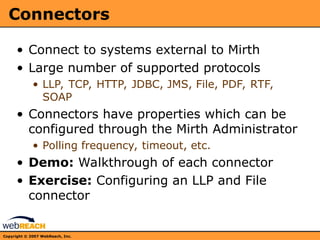
Connectors
• Connect to systems external to Mirth
• Large number of supported protocols
• LLP, TCP, HTTP, JDBC, JMS, File, PDF, RTF,
SOAP
• Connectors have properties which can be
configured through the Mirth Administrator
• Polling frequency, timeout, etc.
• Demo: Walkthrough of each connector
• Exercise: Configuring an LLP and File
connector
- 18.
Copyright © 2007WebReach, Inc.
Filters
• Filters are composed of a series of rules
which are evaluated as Boolean
expressions
• Rules are written in JavaScript using E4X
• Pseudo-Code Examples
• if (PID.name == “Bob”) return true;
• if (MSH.sendingFacility != “Hospital A”) return
false;
• Exercise: Creating a filter
- 19.
Copyright © 2007WebReach, Inc.
Transformers
• Transformers are composed of a series of
transformation steps which are executed in
order
• Three types of steps
• Mapper – Extract field data from message to
variable
• JavaScript – Execute arbitrary block of
JavaScript with access to message content and
meta-data
• Message Builder – Construct new message from
incoming data
• Exercise: Creating a transformer script
- 20.
Copyright © 2007WebReach, Inc.
Message Generation
• New HL7 messages can be created based
on a template
• Fields are populated using data extracted
and manipulated from data source
• Segments are referenced using E4X
• Exercise: Generating message from
template
- 21.
Copyright © 2007WebReach, Inc.
Message Viewing
• All messages are stored to a local database
• Messages can be viewed using the Message
Browser in Mirth Administrator
• Both original raw data and transformed
data for all destinations are stored
• Messages can be reprocessed through
channels
• Exercise: Viewing, filtering, and
reprocessing messages
- 22.
- 23.
Copyright © 2007WebReach, Inc.
Common Routing Patterns
• Router
• Single incoming HL7 data stream is filtered,
transformed, and routed to multiple
destinations
• Broadcast
• Single incoming HL7 data stream is routed to
multiple destinations which each have a unique
filter and transformer
• Application Integration
• Single HL7 data stream routed to an application
and response is sent back
- 24.
Copyright © 2007WebReach, Inc.
Internal Routing
• Two ways to route messages internally:
• Channel Reader/Writer
• Channel reader allows a channel to only listen for
new messages from other channels
• Channel writer provides a way to pass messages
between channels
• VM Router
• Accessible from any JavaScript context
• Can route any data to any channel
• Example:
router.routeMessage(channelName, 'message');
- 25.
Copyright © 2007WebReach, Inc.
Preprocessing
• Block of JavaScript that is executed before
the incoming message is passed to the
encoder
• Often used to adjust line-endings
(Windows, Unix, and Mac) or fix invalid
fields (ex. phone number)
• Exercise: Using a preprocessing script
- 26.
Copyright © 2007WebReach, Inc.
Using JavaScript with E4X
• Creating new variables
• var field
• Extracting data fields
• field = msg[‘PID’][‘PID.4’]
• Iterating through list of segments
• Using “for” loops with XML
• Creating new segments
• Populating XML elements
• Exercise: Using JavaScript with E4X
- 27.
Copyright © 2007WebReach, Inc.
Database Integration
• Using simple SQL statements
• INSERT (with on update statement)
• DELETE
• UPDATE
• Using JavaScript with database connections
• Connect to database, retrieve ResultSet and
form new string
• Exercise: Using JavaScript with database
connections
- 28.
Copyright © 2007WebReach, Inc.
Alerting
• Alerts can be configured to send
emails/SMS when an exception is
encountered during message processing
• Error condition detection based on Regular
expression
• Channel based alert rules
• Configurable message generation
• Exercise: Creating an alert
- 29.
Copyright © 2007WebReach, Inc.
System Events
• Mirth system events are logged to an
internal database and can be viewed using
the System Event Browser
• User login and logout events stored for
auditing
• Errors in channel configuration are
displayed in event log (on deploy)
• Exercise: Viewing system event log
- 30.
Copyright © 2007WebReach, Inc.
User Management
• Mirth allows for an unlimited number of
user accounts
• Default admin/admin should be changed
ASAP
• User log-in events can be audited via the
event browser
• Exercise: Adding, editing, deleting user
- 31.
Copyright © 2007WebReach, Inc.
Shell Client
• Alternate command-line interface into Mirth
• Interactive mode
• Scripted mode
• Ability to import/export channels, modify
users, check channel stats and status
• Remote access via HTTPS
• Exercise: Launch shell, walkthrough
commands, import channels
- 32.
- 33.
Copyright © 2007WebReach, Inc.
IH Interface Overview
• ORU Transcription reports received over
LLP
• Messages dispatched to file system based
on CLINIC fields in ZRT segment
• Preprocessing of exponential value
characters
• Demo
• Discussion: Desired Modifications and
future plans
- 34.
- 35.
Copyright © 2007WebReach, Inc.
Web Services in Mirth
• Mirth provides the ability to consume and
send message payloads via SOAP
• Automatic WSDL processing and mapping
• Can receive raw HL7 or XML
• .NET Compatible
• Demo video: Ron Sweeny, PACS Midwest,
Mirth, SOAP and .NET in 4 minutes
• Exercise: Build SOAP listener, explore
WSDL, invoke from .NET client
- 36.
- 37.
Copyright © 2007WebReach, Inc.
Maintenance and Deployment
• Internal DerbyDB should not be used in production
environments
• Oracle and PostgreSQL officially supported
• MS SQL support in 1-3 weeks
• Database pruner runs each hour
• Performs message cleanup
• Re-indexing coming in 1.4.1
• Logs auto-rotate, can be configured via
log4j.properties
• Windows Service deployment recommended
• Logs stored in “wrapper.log”
• Back-up procedure demo
• Channels
• Messages
• Complete database dump (internal and PostgreSQL)
- 38.
Copyright © 2007WebReach, Inc.
Maintenance and Deployment
• External database performance dictates message
retention
• DerbyDB: Performance decrease ~100,000 messages.
Not recommended for loads > 1,000,000
• PostgreSQL: Performance decrease ~1,000,000
messages.
• Production deployment steps:
1. Install Mirth Service
2. Configure external database (example)
3. Configure user accounts
4. Import channel configurations
5. Configure IP and hostname settings
6. Deploy
- 39.
Copyright © 2007WebReach, Inc.
Maintenance and Deployment
• Production Examples
• NHSC (Mirth Enterprise)
• In production ~4 months
• Running PostgreSQL
• One support case (out of disk space on root drive, db
logged to incorrect file system)
• Resolved in < 30 minutes remotely
• “Hands-off” Maintenance strategy
• VocalEZ (Embedded Mirth)
• In production ~9 months
• Running combination of PostgreSQL and Derby
• Migrated from 1.0->1.1->1.2->1.3.2->1.4 (in testing)
• Three database migrations on production system
• Database is pruned every 30 days
• Regular channel updates and deployments
• Weekly database backups
- 40.
- 41.
Copyright © 2007WebReach, Inc.
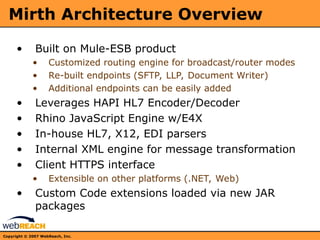
Mirth Architecture Overview
• Built on Mule-ESB product
• Customized routing engine for broadcast/router modes
• Re-built endpoints (SFTP, LLP, Document Writer)
• Additional endpoints can be easily added
• Leverages HAPI HL7 Encoder/Decoder
• Rhino JavaScript Engine w/E4X
• In-house HL7, X12, EDI parsers
• Internal XML engine for message transformation
• Client HTTPS interface
• Extensible on other platforms (.NET, Web)
• Custom Code extensions loaded via new JAR
packages
- 42.
- 43.
Copyright © 2007WebReach, Inc.
Mirth Roadmap
• Short Term
• 1.4.1 release scheduled for 2-3 weeks (minor bug fixes,
no new features or core changes)
• 1.5 release approx. 2-3 months (IHE, CDA support,
possible Tcl/Tk support). User roles and security
updates
• Long Term
• 2.0 - Major platform shift
• JBI compliant ESB (RedHat, Sun, ServiceMix)
• Partner agreements
• Clustering, Redundancy, JavaEE support
• AS2 support
• Same UI, backwards compatible
• 6-12 months
• 1.x branch developed along-side 2.0 (Apache style)
- 44.
- 45.
Copyright © 2007WebReach, Inc.
WebReach Go-Live Support
• Discuss:
• Expected Dates
• Needs and expectations
• Engineer availability
• Remote access information
• Test system information









![Copyright © 2007 WebReach, Inc.
Using JavaScript with E4X
• Creating new variables
• var field
• Extracting data fields
• field = msg[‘PID’][‘PID.4’]
• Iterating through list of segments
• Using “for” loops with XML
• Creating new segments
• Populating XML elements
• Exercise: Using JavaScript with E4X](https://image.slidesharecdn.com/mirthtraining-250903143214-b1af5e37/85/Basico-Mirth-Training-Introduction-and-System-Migration-26-320.jpg)