9-10 novembre 2015
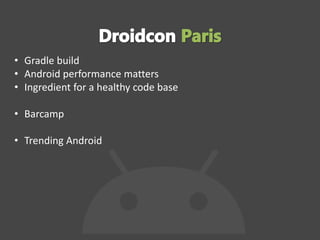
• Gradle build
• Android performance matters
• Ingredient for a healthy code base
• Barcamp
• Trending Android
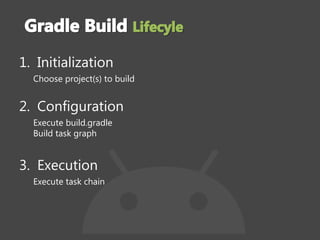
1. Initialization
Choose project(s) to build
2. Configuration
Execute build.gradle
Build task graph
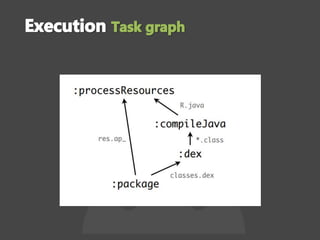
3. Execution
Execute task chain
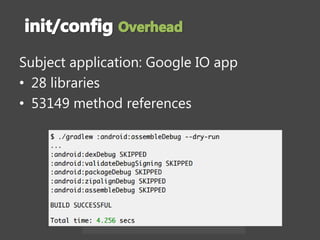
Subject application: Google IO app
• 28 libraries
• 53149 method references
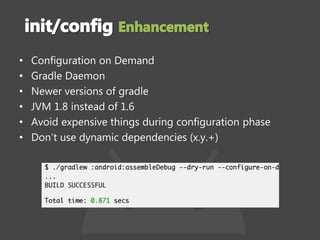
• Configuration on Demand
• Gradle Daemon
• Newer versions of gradle
• JVM 1.8 instead of 1.6
• Avoid expensive things during configuration phase
• Don’t use dynamic dependencies (x.y.+)
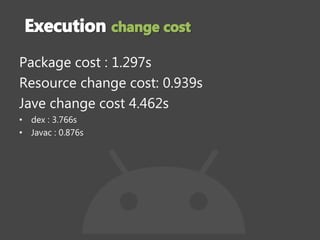
Package cost : 1.297s
Resource change cost: 0.939s
Jave change cost 4.462s
• dex : 3.766s
• Javac : 0.876s
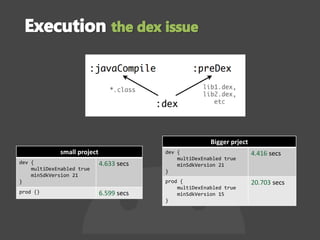
small project
dev {
multiDexEnabled true
minSdkVersion 21
}
4.633 secs
prod {} 6.599 secs
Bigger prject
dev {
multiDexEnabled true
minSdkVersion 21
}
4.416 secs
prod {
multiDexEnabled true
minSdkVersion 15
}
20.703 secs
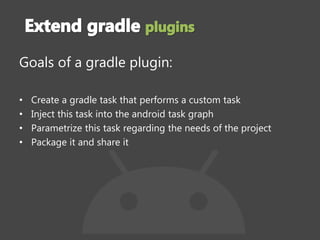
Goals of a gradle plugin:
• Create a gradle task that performs a custom task
• Inject this task into the android task graph
• Parametrize this task regarding the needs of the project
• Package it and share it
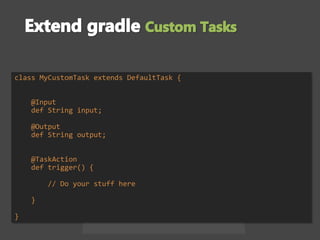
class MyCustomTask extends DefaultTask {
@Input
def String input;
@Output
def String output;
@TaskAction
def trigger() {
// Do your stuff here
}
}
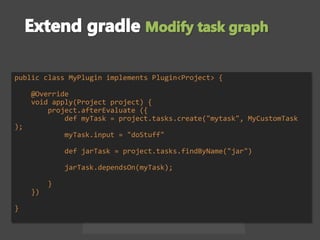
public class MyPlugin implements Plugin<Project> {
@Override
void apply(Project project) {
project.afterEvaluate ({
def myTask = project.tasks.create("mytask", MyCustomTask
);
myTask.input = "doStuff"
def jarTask = project.tasks.findByName("jar")
jarTask.dependsOn(myTask);
}
})
}
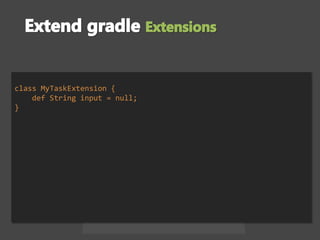
class MyTaskExtension {
def String input = null;
}
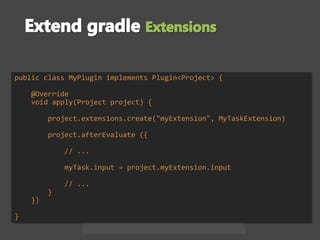
public class MyPlugin implements Plugin<Project> {
@Override
void apply(Project project) {
project.extensions.create("myExtension", MyTaskExtension)
project.afterEvaluate ({
// ...
myTask.input = project.myExtension.input
// ...
}
})
}
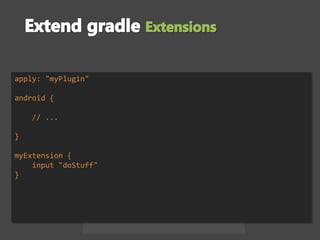
apply: "myPlugin"
android {
// ...
}
myExtension {
input "doStuff"
}
• Static analysis tools
– checkstyle
– …
• Google Play Store publishing
• Groovy library for git
• Dex count
• Sqlite Analyzer Plugin
• ...
• Gradle performance: https://speakerdeck.com/madisp/squeezing-
the-last-drop-of-performance-out-of-your-gradle-builds-droidcon-
paris-2015
• Build your gradle plugin https://bit.ly/gradle-plugin-next-level
• Improve android builds: https://speakerdeck.com/florianmski/level-
up-your-android-build
• Networking is the main battery consumer
– Less radio time means less data
– Batching to minimize radio transmission
– Prefetching by predicting what the user will do
• GC events eats your app framerate
– Reduce images size
– Use primitives instead of objects
– Keep an eye on your memory with management tools
(AllocationTracker, TraceView)
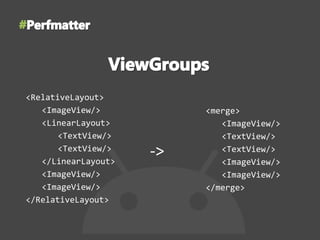
<RelativeLayout>
<ImageView/>
<LinearLayout>
<TextView/>
<TextView/>
</LinearLayout>
<ImageView/>
<ImageView/>
</RelativeLayout>
<merge>
<ImageView/>
<TextView/>
<TextView/>
<ImageView/>
<ImageView/>
</merge>
->
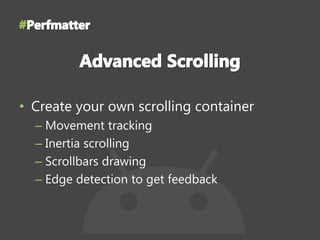
• Create your own scrolling container
– Movement tracking
– Inertia scrolling
– Scrollbars drawing
– Edge detection to get feedback
Performance Matter - Ran Nachmany, Google
https://youtu.be/04igNM9IpwE?list=PLn7H9CUCuXAv_kAdS0rxL1_jdxXp
FVb0r
ViewGroups - François Blavoet, Deezer
https://youtu.be/MSTG0JPOrYk?list=PLn7H9CUCuXAv_kAdS0rxL1_jdxX
pFVb0r
Advanced Scrolling - Cyril Mottier, Captain Train
https://youtu.be/N3J4ZFiR_3Q?list=PLn7H9CUCuXAv_kAdS0rxL1_jdxX
pFVb0r
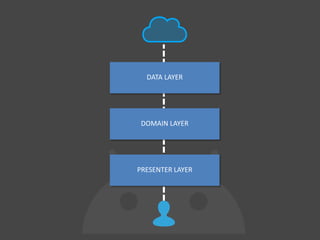
DATA LAYER
DOMAIN LAYER
PRESENTER LAYER
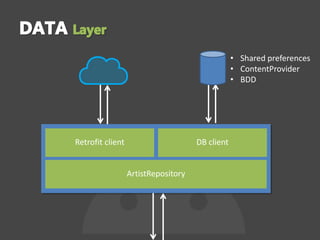
Retrofit client DB client
ArtistRepository
• Shared preferences
• ContentProvider
• BDD
• Orchestrates the flow of data with use “cases”
• Offers its services to presentation layer
• Pure Java module
• No Android UI dependencies
• No dependency to external source (db,content
provider, shared preferences…)
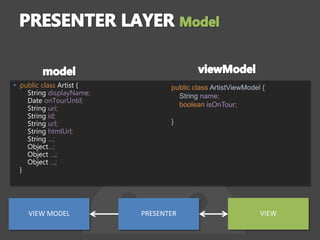
▸ public class Artist {
String displayName;
Date onTourUntil;
String uri;
String id;
String url;
String htmlUrl;
String …;
Object…;
Object …;
Object …;
}
public class ArtistViewModel {
String name;
boolean isOnTour;
}
VIEW MODEL PRESENTER VIEW
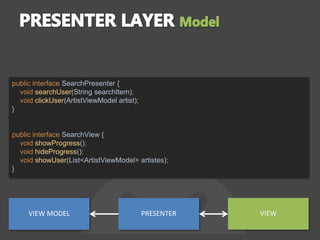
public interface SearchPresenter {
void searchUser(String searchItem);
void clickUser(ArtistViewModel artist);
}
public interface SearchView {
void showProgress();
void hideProgress();
void showUser(List<ArtistViewModel> artistes);
}
VIEW MODEL PRESENTER VIEW
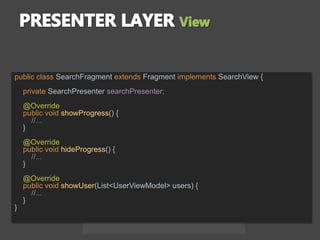
public class SearchFragment extends Fragment implements SearchView {
private SearchPresenter searchPresenter;
@Override
public void showProgress() {
//...
}
@Override
public void hideProgress() {
//...
}
@Override
public void showUser(List<UserViewModel> users) {
//...
}
}
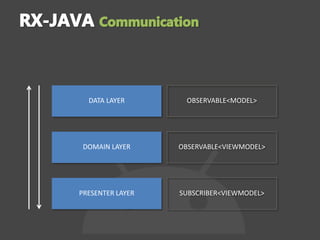
DATA LAYER
DOMAIN LAYER
PRESENTER LAYER
OBSERVABLE<MODEL>
OBSERVABLE<VIEWMODEL>
SUBSCRIBER<VIEWMODEL>
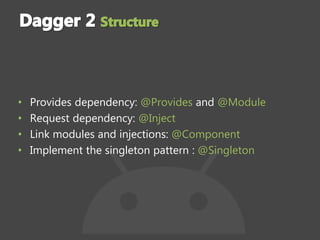
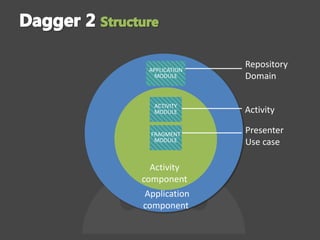
• Provides dependency: @Provides and @Module
• Request dependency: @Inject
• Link modules and injections: @Component
• Implement the singleton pattern : @Singleton
APPLICATION
MODULE
ACTIVITY
MODULE
FRAGMENT
MODULE
Repository
Domain
Activity
Activity
component
Application
component
Presenter
Use case
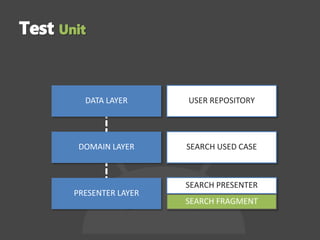
DATA LAYER
DOMAIN LAYER
PRESENTER LAYER
USER REPOSITORY
SEARCH USED CASE
SEARCH PRESENTER
SEARCH FRAGMENT
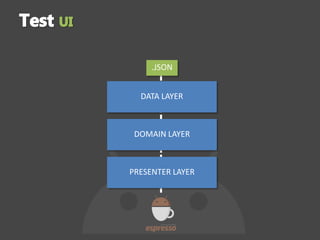
DATA LAYER
DOMAIN LAYER
PRESENTER LAYER
.JSON
• Choose an architecture and stick with it
• Test while your code
• Retrofit
• Dagger 2
• Rx-java
• Espresso
• Junit
• Clean Architecture : https://www.youtube.com/watch?v=-
oZswd1j5H0
• Slide https://speakerdeck.com/romainpiel/ingredients-for-a-healthy-
codebase
• Presentation Dagger 2 :
https://www.youtube.com/watch?v=IkTST564lA4
• slide Dagger 2 https://speakerdeck.com/jeremiemartinez/dagger-2-
back-to-basics
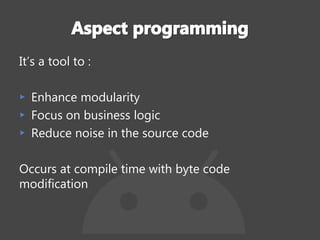
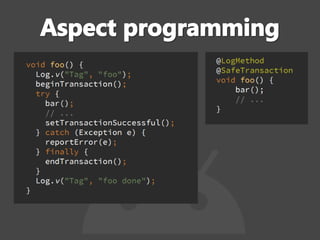
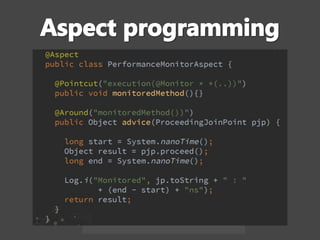
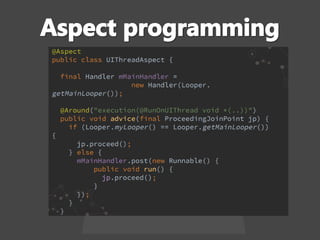
It’s a tool to :
▸ Enhance modularity
▸ Focus on business logic
▸ Reduce noise in the source code
Occurs at compile time with byte code
modification
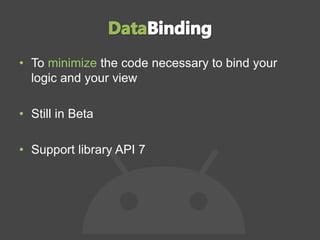
• To minimize the code necessary to bind your
logic and your view
• Still in Beta
• Support library API 7
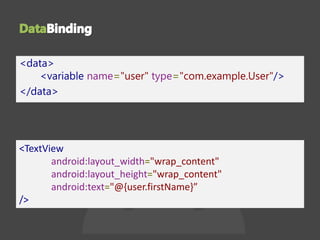
<data>
<variable name="user" type="com.example.User"/>
</data>
<TextView
android:layout_width="wrap_content"
android:layout_height="wrap_content"
android:text="@{user.firstName}”
/>
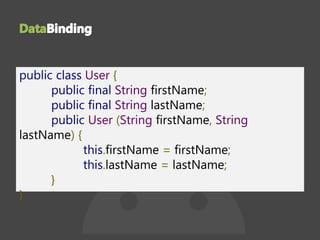
public class User {
public final String firstName;
public final String lastName;
public User (String firstName, String
lastName) {
this.firstName = firstName;
this.lastName = lastName;
}
}
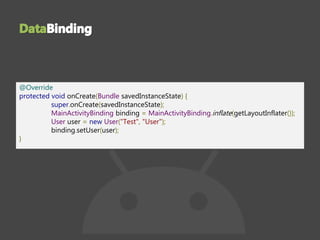
@Override
protected void onCreate(Bundle savedInstanceState) {
super.onCreate(savedInstanceState);
MainActivityBinding binding = MainActivityBinding.inflate(getLayoutInflater());
User user = new User("Test", "User");
binding.setUser(user);
}
Le Data Binding sur Android - Guillaume Bernard, Koridev
https://youtu.be/fG_93vUfm5s?list=PLn7H9CUCuXAv_kAdS0rxL1_jdxXpFV
b0r
Data Binding -- Write Apps Faster (Android Dev Summit
2015)
https://youtu.be/NBbeQMOcnZ0
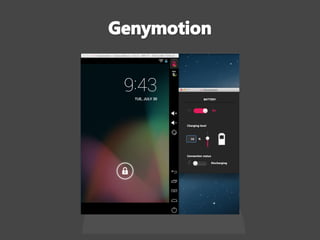
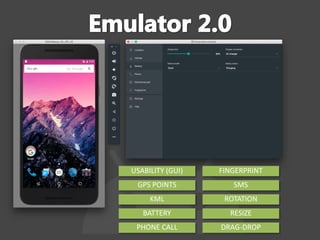
• Android Emulator
• Gives control on hardware features :
– Control the battery level
– GPS Location
– Network and call management $
• Jack & Jill
• Kotlin
• Eddystone
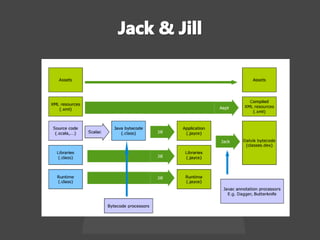
Java Android Compiler Kit
Jack Intermediate Library Linker
Goal is to improve incremental build
More efficient to compile compared to javac
+ dex, but still experimental
The swift of Android ?
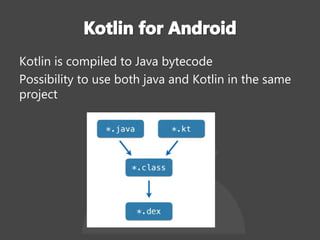
Kotlin is compiled to Java bytecode
Possibility to use both java and Kotlin in the same
project
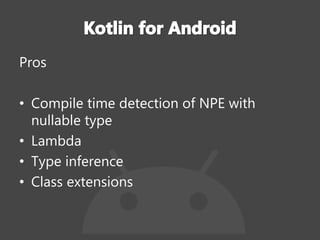
Pros
• Compile time detection of NPE with
nullable type
• Lambda
• Type inference
• Class extensions
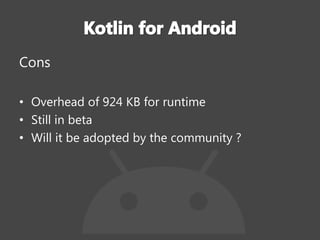
Cons
• Overhead of 924 KB for runtime
• Still in beta
• Will it be adopted by the community ?
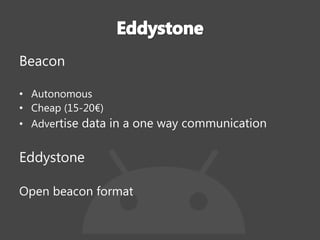
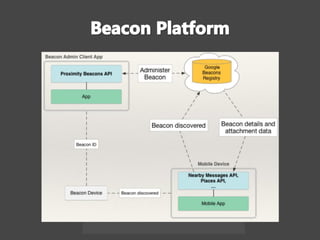
Beacon
• Autonomous
• Cheap (15-20€)
• Advertise data in a one way communication
Eddystone
Open beacon format
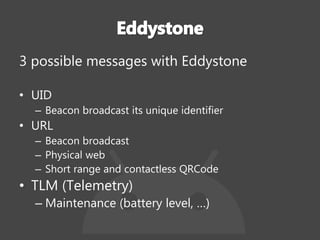
3 possible messages with Eddystone
• UID
– Beacon broadcast its unique identifier
• URL
– Beacon broadcast
– Physical web
– Short range and contactless QRCode
• TLM (Telemetry)
– Maintenance (battery level, …)
Evolution inside the android build system
https://drive.google.com/file/d/0B1CCib0JzAOJRXZSY0c1ckZTU0E
Kotlin for Android
https://www.youtube.com/watch?v=50lASllvG3Q
Eddystone
https://www.youtube.com/watch?v=HR3X5h9xdno
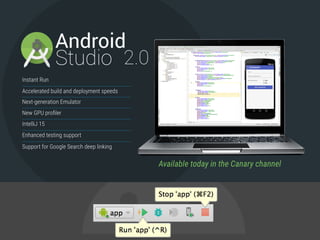
ANDROID STUDIO 2.0
USABILITY (GUI)
GPS POINTS
KML
BATTERY
PHONE CALL
SMS
ROTATION
RESIZE
DRAG-DROP
FINGERPRINT

Droidcon Paris 2015

  • 1.
  • 2.
    • Gradle build •Android performance matters • Ingredient for a healthy code base • Barcamp • Trending Android
  • 4.
    1. Initialization Choose project(s)to build 2. Configuration Execute build.gradle Build task graph 3. Execution Execute task chain
  • 5.
    Subject application: GoogleIO app • 28 libraries • 53149 method references
  • 6.
    • Configuration onDemand • Gradle Daemon • Newer versions of gradle • JVM 1.8 instead of 1.6 • Avoid expensive things during configuration phase • Don’t use dynamic dependencies (x.y.+)
  • 8.
    Package cost :1.297s Resource change cost: 0.939s Jave change cost 4.462s • dex : 3.766s • Javac : 0.876s
  • 9.
    small project dev { multiDexEnabledtrue minSdkVersion 21 } 4.633 secs prod {} 6.599 secs Bigger prject dev { multiDexEnabled true minSdkVersion 21 } 4.416 secs prod { multiDexEnabled true minSdkVersion 15 } 20.703 secs
  • 10.
    Goals of agradle plugin: • Create a gradle task that performs a custom task • Inject this task into the android task graph • Parametrize this task regarding the needs of the project • Package it and share it
  • 11.
    class MyCustomTask extendsDefaultTask { @Input def String input; @Output def String output; @TaskAction def trigger() { // Do your stuff here } }
  • 12.
    public class MyPluginimplements Plugin<Project> { @Override void apply(Project project) { project.afterEvaluate ({ def myTask = project.tasks.create("mytask", MyCustomTask ); myTask.input = "doStuff" def jarTask = project.tasks.findByName("jar") jarTask.dependsOn(myTask); } }) }
  • 13.
    class MyTaskExtension { defString input = null; }
  • 14.
    public class MyPluginimplements Plugin<Project> { @Override void apply(Project project) { project.extensions.create("myExtension", MyTaskExtension) project.afterEvaluate ({ // ... myTask.input = project.myExtension.input // ... } }) }
  • 15.
    apply: "myPlugin" android { //... } myExtension { input "doStuff" }
  • 18.
    • Static analysistools – checkstyle – … • Google Play Store publishing • Groovy library for git • Dex count • Sqlite Analyzer Plugin • ...
  • 19.
    • Gradle performance:https://speakerdeck.com/madisp/squeezing- the-last-drop-of-performance-out-of-your-gradle-builds-droidcon- paris-2015 • Build your gradle plugin https://bit.ly/gradle-plugin-next-level • Improve android builds: https://speakerdeck.com/florianmski/level- up-your-android-build
  • 21.
    • Networking isthe main battery consumer – Less radio time means less data – Batching to minimize radio transmission – Prefetching by predicting what the user will do
  • 22.
    • GC eventseats your app framerate – Reduce images size – Use primitives instead of objects – Keep an eye on your memory with management tools (AllocationTracker, TraceView)
  • 23.
  • 24.
    • Create yourown scrolling container – Movement tracking – Inertia scrolling – Scrollbars drawing – Edge detection to get feedback
  • 25.
    Performance Matter -Ran Nachmany, Google https://youtu.be/04igNM9IpwE?list=PLn7H9CUCuXAv_kAdS0rxL1_jdxXp FVb0r ViewGroups - François Blavoet, Deezer https://youtu.be/MSTG0JPOrYk?list=PLn7H9CUCuXAv_kAdS0rxL1_jdxX pFVb0r Advanced Scrolling - Cyril Mottier, Captain Train https://youtu.be/N3J4ZFiR_3Q?list=PLn7H9CUCuXAv_kAdS0rxL1_jdxX pFVb0r
  • 28.
  • 29.
    Retrofit client DBclient ArtistRepository • Shared preferences • ContentProvider • BDD
  • 30.
    • Orchestrates theflow of data with use “cases” • Offers its services to presentation layer • Pure Java module • No Android UI dependencies • No dependency to external source (db,content provider, shared preferences…)
  • 31.
    ▸ public classArtist { String displayName; Date onTourUntil; String uri; String id; String url; String htmlUrl; String …; Object…; Object …; Object …; } public class ArtistViewModel { String name; boolean isOnTour; } VIEW MODEL PRESENTER VIEW
  • 32.
    public interface SearchPresenter{ void searchUser(String searchItem); void clickUser(ArtistViewModel artist); } public interface SearchView { void showProgress(); void hideProgress(); void showUser(List<ArtistViewModel> artistes); } VIEW MODEL PRESENTER VIEW
  • 33.
    public class SearchFragmentextends Fragment implements SearchView { private SearchPresenter searchPresenter; @Override public void showProgress() { //... } @Override public void hideProgress() { //... } @Override public void showUser(List<UserViewModel> users) { //... } }
  • 34.
    DATA LAYER DOMAIN LAYER PRESENTERLAYER OBSERVABLE<MODEL> OBSERVABLE<VIEWMODEL> SUBSCRIBER<VIEWMODEL>
  • 35.
    • Provides dependency:@Provides and @Module • Request dependency: @Inject • Link modules and injections: @Component • Implement the singleton pattern : @Singleton
  • 36.
  • 37.
    DATA LAYER DOMAIN LAYER PRESENTERLAYER USER REPOSITORY SEARCH USED CASE SEARCH PRESENTER SEARCH FRAGMENT
  • 38.
  • 39.
    • Choose anarchitecture and stick with it • Test while your code • Retrofit • Dagger 2 • Rx-java • Espresso • Junit
  • 40.
    • Clean Architecture: https://www.youtube.com/watch?v=- oZswd1j5H0 • Slide https://speakerdeck.com/romainpiel/ingredients-for-a-healthy- codebase • Presentation Dagger 2 : https://www.youtube.com/watch?v=IkTST564lA4 • slide Dagger 2 https://speakerdeck.com/jeremiemartinez/dagger-2- back-to-basics
  • 41.
    It’s a toolto : ▸ Enhance modularity ▸ Focus on business logic ▸ Reduce noise in the source code Occurs at compile time with byte code modification
  • 45.
    • To minimizethe code necessary to bind your logic and your view • Still in Beta • Support library API 7
  • 46.
  • 47.
    public class User{ public final String firstName; public final String lastName; public User (String firstName, String lastName) { this.firstName = firstName; this.lastName = lastName; } }
  • 48.
    @Override protected void onCreate(BundlesavedInstanceState) { super.onCreate(savedInstanceState); MainActivityBinding binding = MainActivityBinding.inflate(getLayoutInflater()); User user = new User("Test", "User"); binding.setUser(user); }
  • 49.
    Le Data Bindingsur Android - Guillaume Bernard, Koridev https://youtu.be/fG_93vUfm5s?list=PLn7H9CUCuXAv_kAdS0rxL1_jdxXpFV b0r Data Binding -- Write Apps Faster (Android Dev Summit 2015) https://youtu.be/NBbeQMOcnZ0
  • 50.
    • Android Emulator •Gives control on hardware features : – Control the battery level – GPS Location – Network and call management $
  • 52.
    • Jack &Jill • Kotlin • Eddystone
  • 53.
    Java Android CompilerKit Jack Intermediate Library Linker Goal is to improve incremental build More efficient to compile compared to javac + dex, but still experimental
  • 55.
    The swift ofAndroid ?
  • 56.
    Kotlin is compiledto Java bytecode Possibility to use both java and Kotlin in the same project
  • 57.
    Pros • Compile timedetection of NPE with nullable type • Lambda • Type inference • Class extensions
  • 58.
    Cons • Overhead of924 KB for runtime • Still in beta • Will it be adopted by the community ?
  • 59.
    Beacon • Autonomous • Cheap(15-20€) • Advertise data in a one way communication Eddystone Open beacon format
  • 60.
    3 possible messageswith Eddystone • UID – Beacon broadcast its unique identifier • URL – Beacon broadcast – Physical web – Short range and contactless QRCode • TLM (Telemetry) – Maintenance (battery level, …)
  • 62.
    Evolution inside theandroid build system https://drive.google.com/file/d/0B1CCib0JzAOJRXZSY0c1ckZTU0E Kotlin for Android https://www.youtube.com/watch?v=50lASllvG3Q Eddystone https://www.youtube.com/watch?v=HR3X5h9xdno
  • 64.
  • 65.
    USABILITY (GUI) GPS POINTS KML BATTERY PHONECALL SMS ROTATION RESIZE DRAG-DROP FINGERPRINT