PHONEGAP
IN THE CLASSROOM
Developing social book apps with PhoneGap & Wordpress

               http://www.slideshare.net/haigarmen/

                    harmen@ecuad.ca      @haigarmen
BUT FIRST,


A BIT ABOUT ME


Professor of Design
Emily Carr University of Art + Design


Founder & Creative Director
Lift Studios - Interaction Design Agency

Studied
Architecture,
Jazz Performance
& Composition
Concepts covered in this workshop will include

• publications for mobile platforms
• a book as a social framework
• using open source tools to publish
• Native App vs. Web Technology
• Book with an API
• Workshop I: Introducing PhoneGap
• using open source tools to publish
• balancing reading with social
• Workshop II: prototyping with jQueryMobile
• Hybrid native/web apps
• Workshop III: JSON-API tunnel
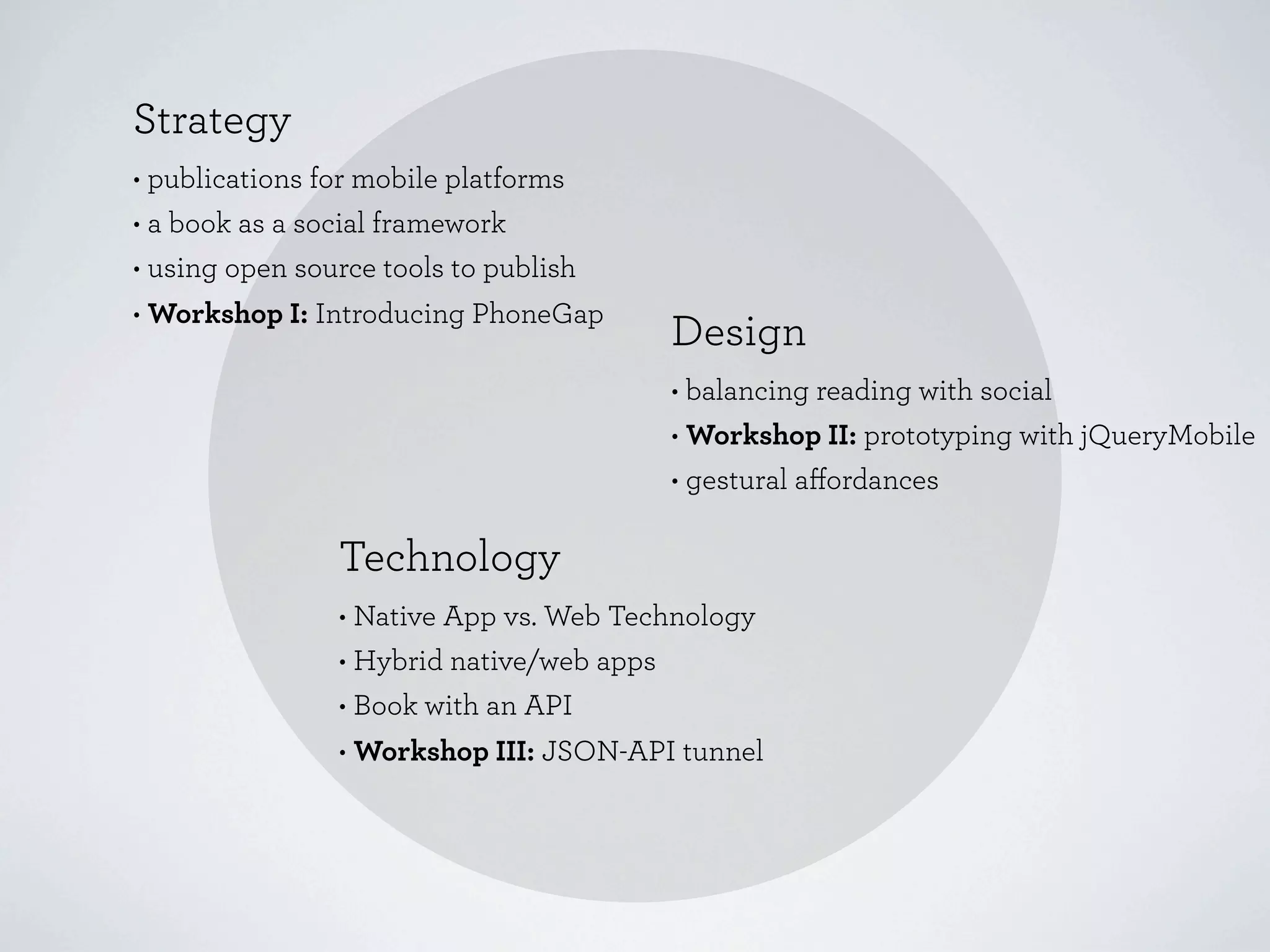
Strategy
• publications for mobile platforms
• a book as a social framework
• using open source tools to publish
• Workshop I: Introducing PhoneGap
                                        Design
                                        • balancing reading with social
                                        • Workshop II: prototyping with jQueryMobile
                                        • gestural affordances

                Technology
                • Native App vs. Web Technology
                • Hybrid native/web apps
                • Book with an API
                • Workshop III: JSON-API tunnel
This is a workshop but it is by way of
an interesting story...
A Social Book
by Alexandra Samuel

A research project
at Emily Carr University of Art + Design
A Social Book
by Alexandra Samuel

A research project
at Emily Carr University of Art + Design

Can reading a book be a
participatory and social experience?
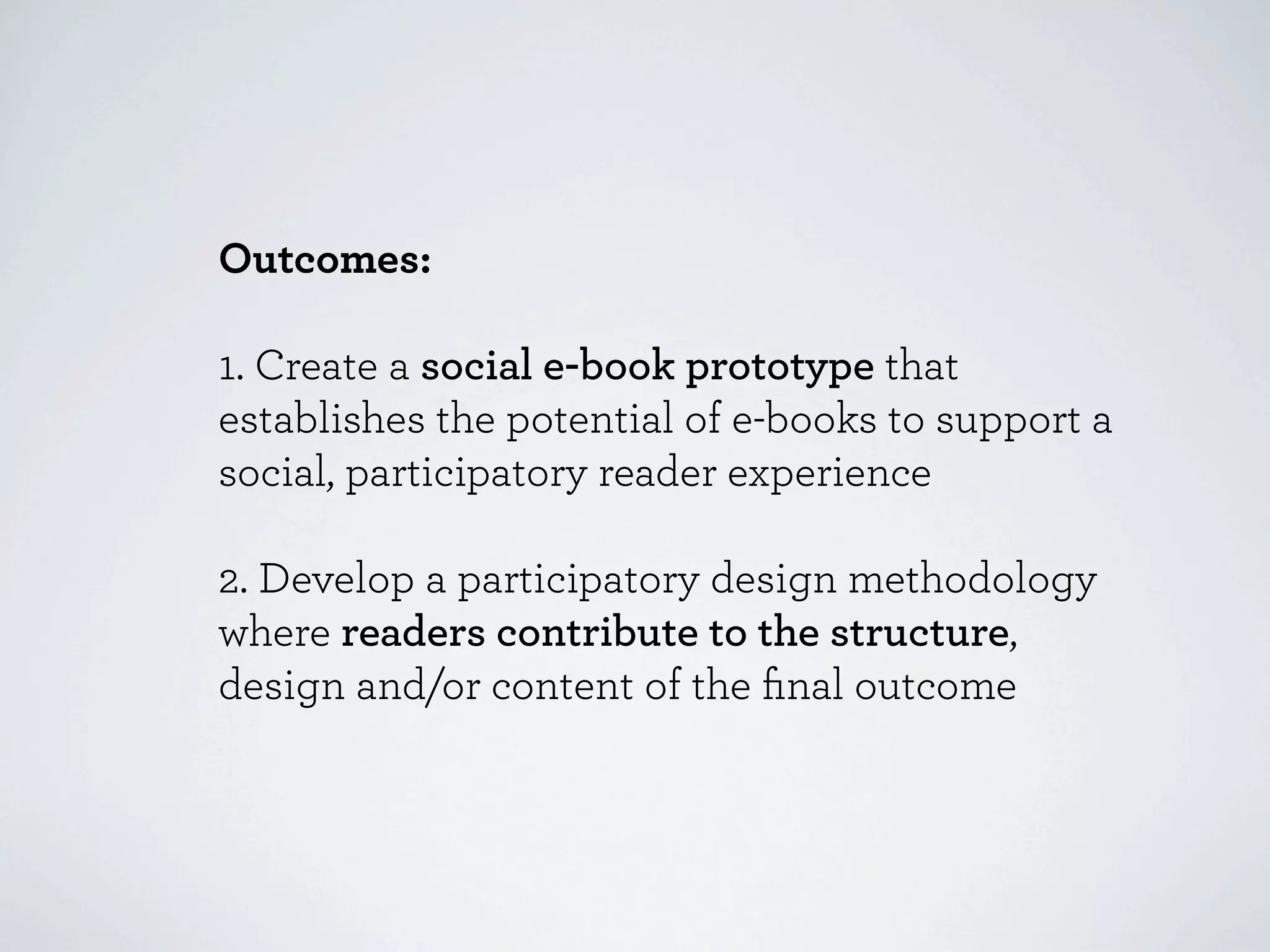
Outcomes:

1. Create a social e-book prototype that
establishes the potential of e-books to support a
social, participatory reader experience

2. Develop a participatory design methodology
where readers contribute to the structure,
design and/or content of the final outcome
What are the issues when adding social
functionality into an ebook format?
What are the issues when adding social
functionality into an ebook format?

Can we integrate a social component into a
book without getting in the way of the
original content?
What are the issues when adding social
functionality into an ebook format?

Can we integrate a social component into a
book without getting in the way of the original
content?

How do we make a book ultimately dynamic?
What are the issues when adding social
functionality into an ebook format?

Can we integrate a social component into a
book without getting in the way of the original
content?

How do we make a book ultimately dynamic?

What tools should we use to manage the
content, comments and membership
registration?
The problem with most Social books:

1. Social usually means sharing quotes on
Facebook & Twitter

2. Reader comments are private and
marginalized

3. Comments are separated from the original
text and usually read out of context
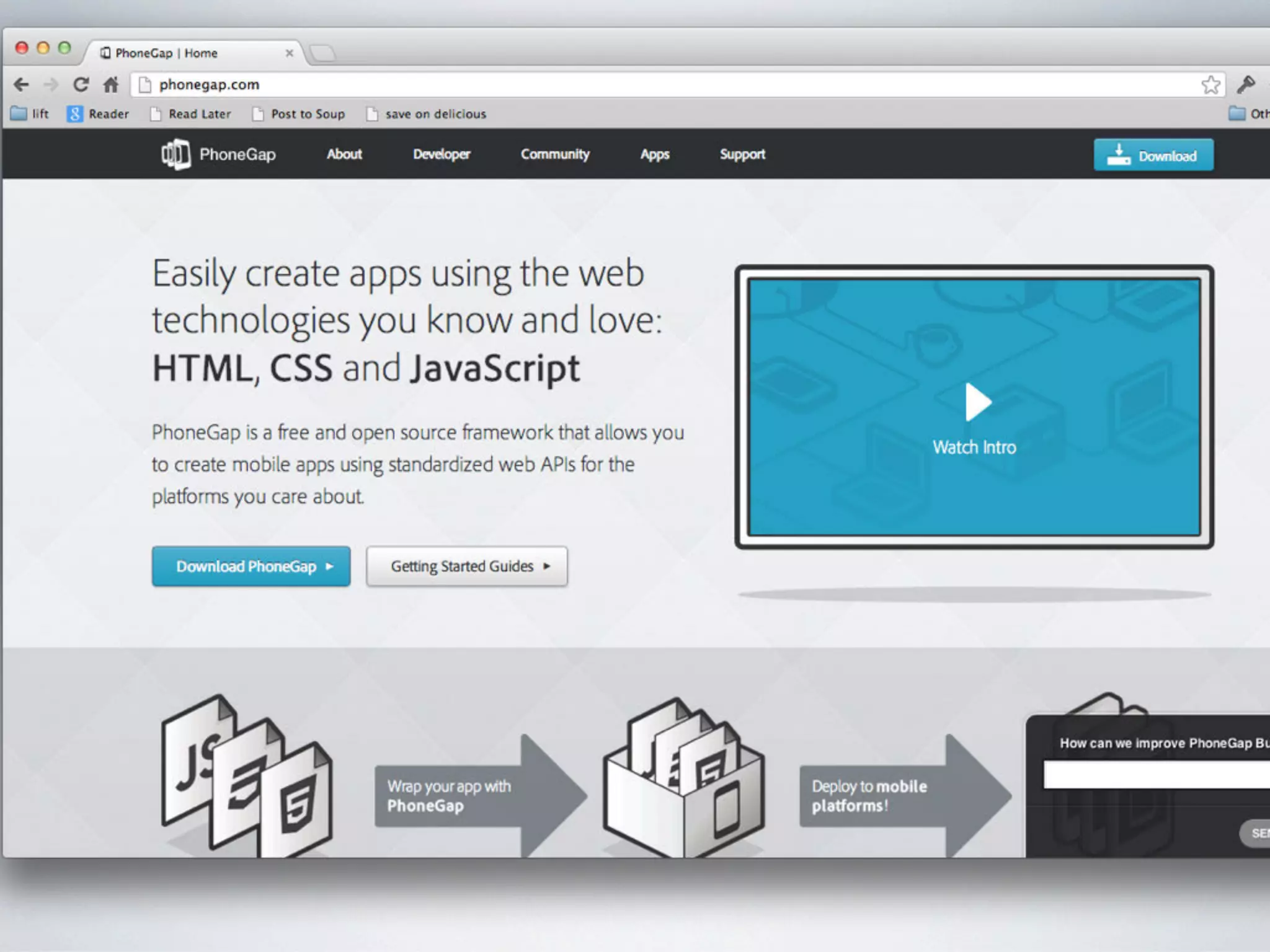
Introducing PhoneGap

The only free open source framework for
creating apps easily for 7 mobile platforms
using standard HTML, CSS and Javascript

http://docs.phonegap.com/en/2.1.0/guide_getting-started_index.md.html
The PhoneGap team has
two core tenants of belief:


  The web solved cross platform.

  All technology deprecates with time.


 http://phonegap.com/2012/05/09/phonegap-beliefs-goals-and-philosophy/
Two high level goals of PhoneGap:

  The web as a first class development
  platform.

  The ultimate purpose of PhoneGap is
  to cease to exist.
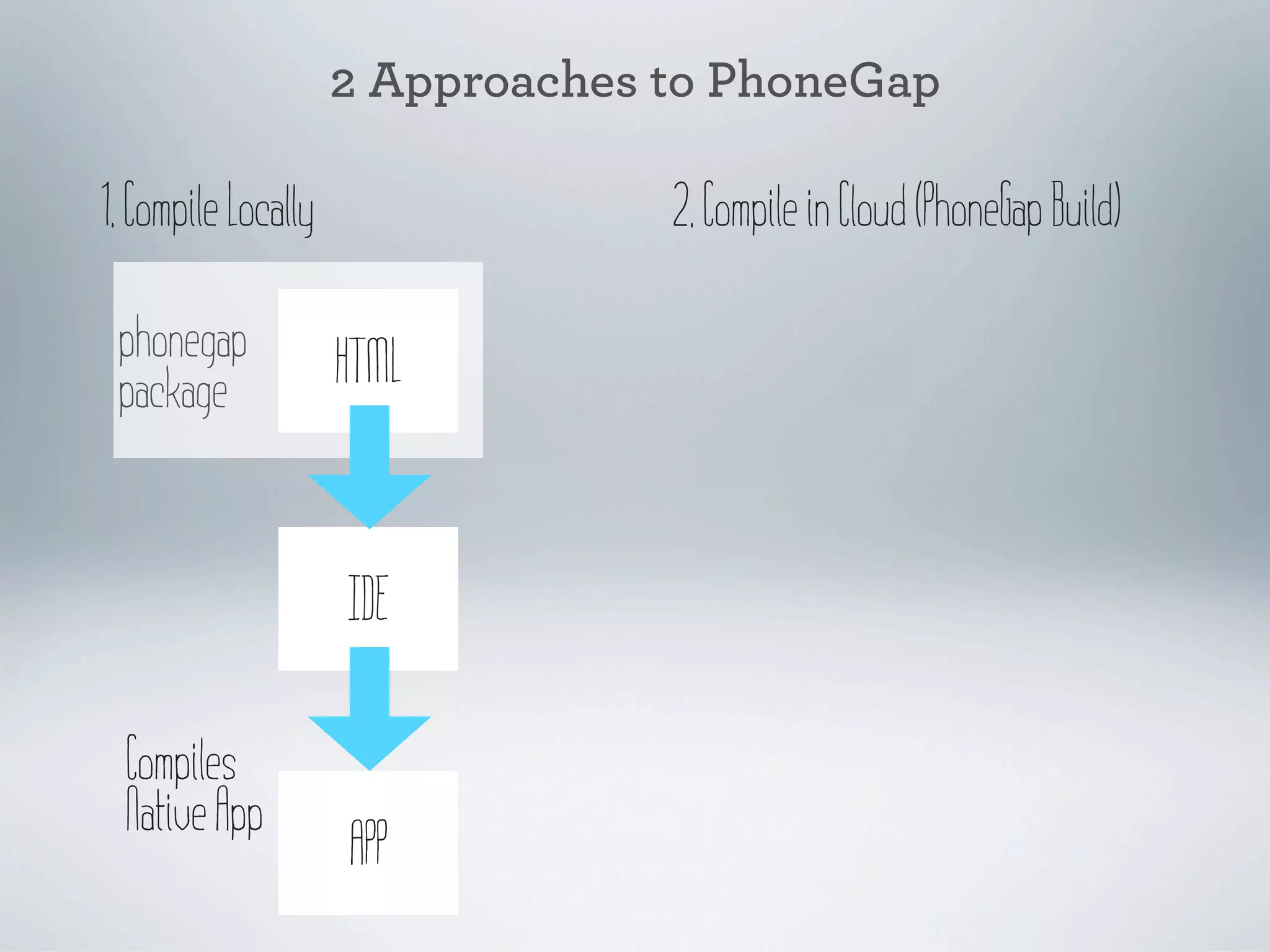
2 Approaches to PhoneGap

1. Compile Locally                2. Compile in Cloud (PhoneGap Build)
2 Approaches to PhoneGap

1. Compile Locally                2. Compile in Cloud (PhoneGap Build)

 phonegap            HTML
 package


                     IDE

  Compiles
  Native App
                     APP
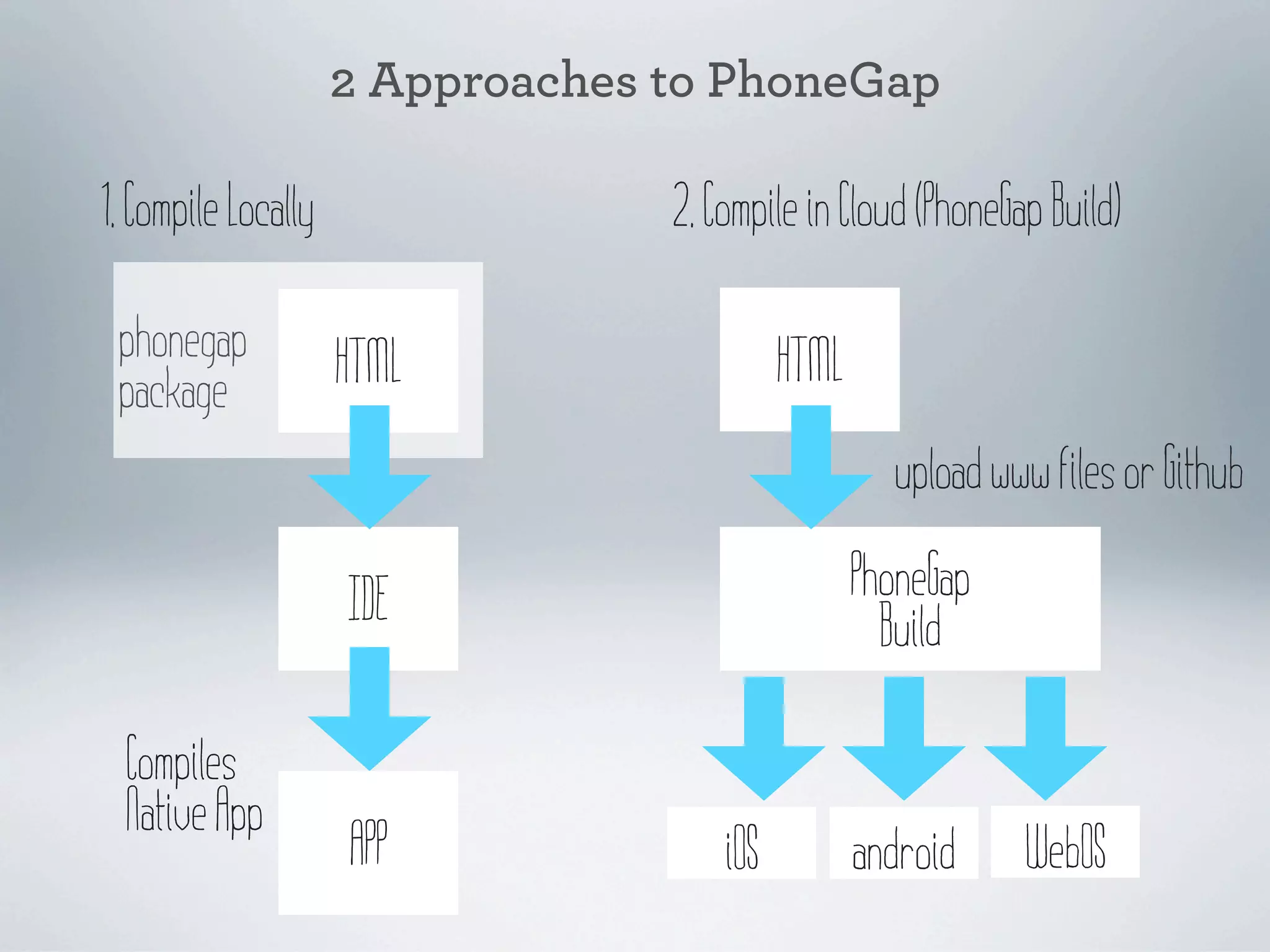
2 Approaches to PhoneGap

1. Compile Locally                2. Compile in Cloud (PhoneGap Build)

 phonegap            HTML                   HTML
 package
                                                     upload www files or Github

                     IDE                           PhoneGap
                                                     Build

  Compiles
  Native App
                     APP              iOS          android    WebOS
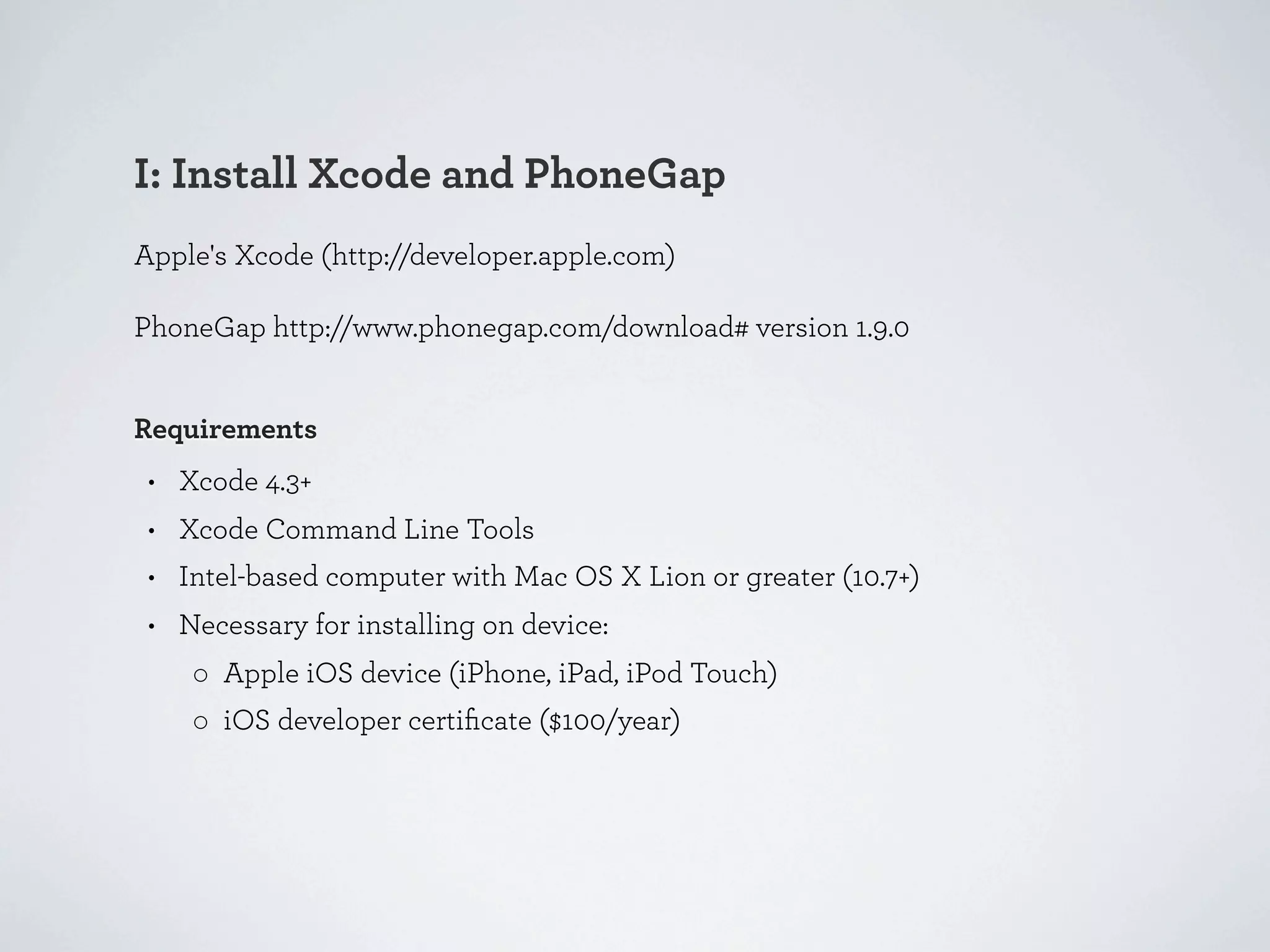
I: Install Xcode and PhoneGap
Apple's Xcode (http://developer.apple.com)

PhoneGap http://www.phonegap.com/download# version 1.9.0


Requirements
 • Xcode 4.3+
 • Xcode Command Line Tools
 • Intel-based computer with Mac OS X Lion or greater (10.7+)
 • Necessary for installing on device:
    ◦ Apple iOS device (iPhone, iPad, iPod Touch)
    ◦ iOS developer certificate ($100/year)
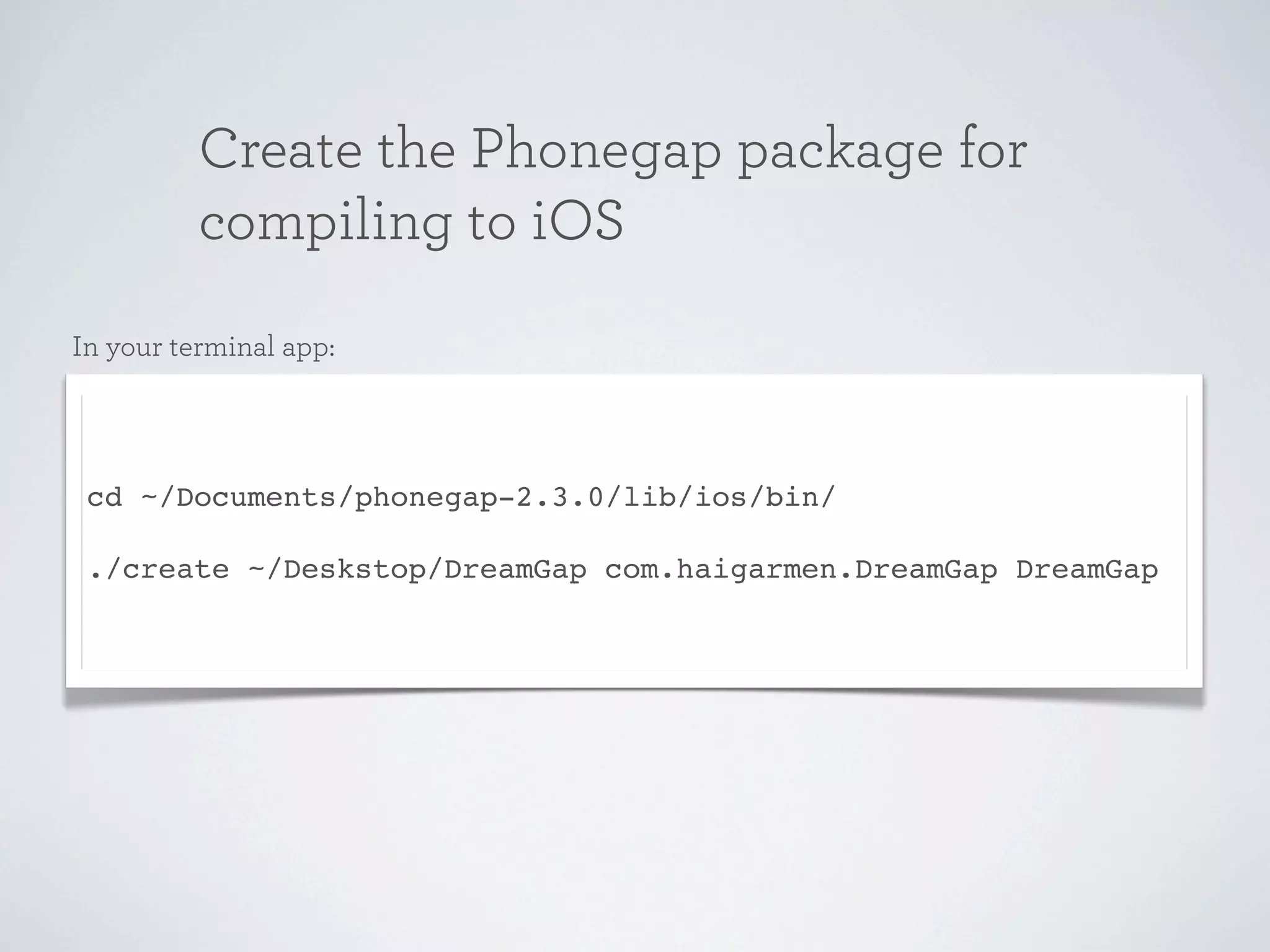
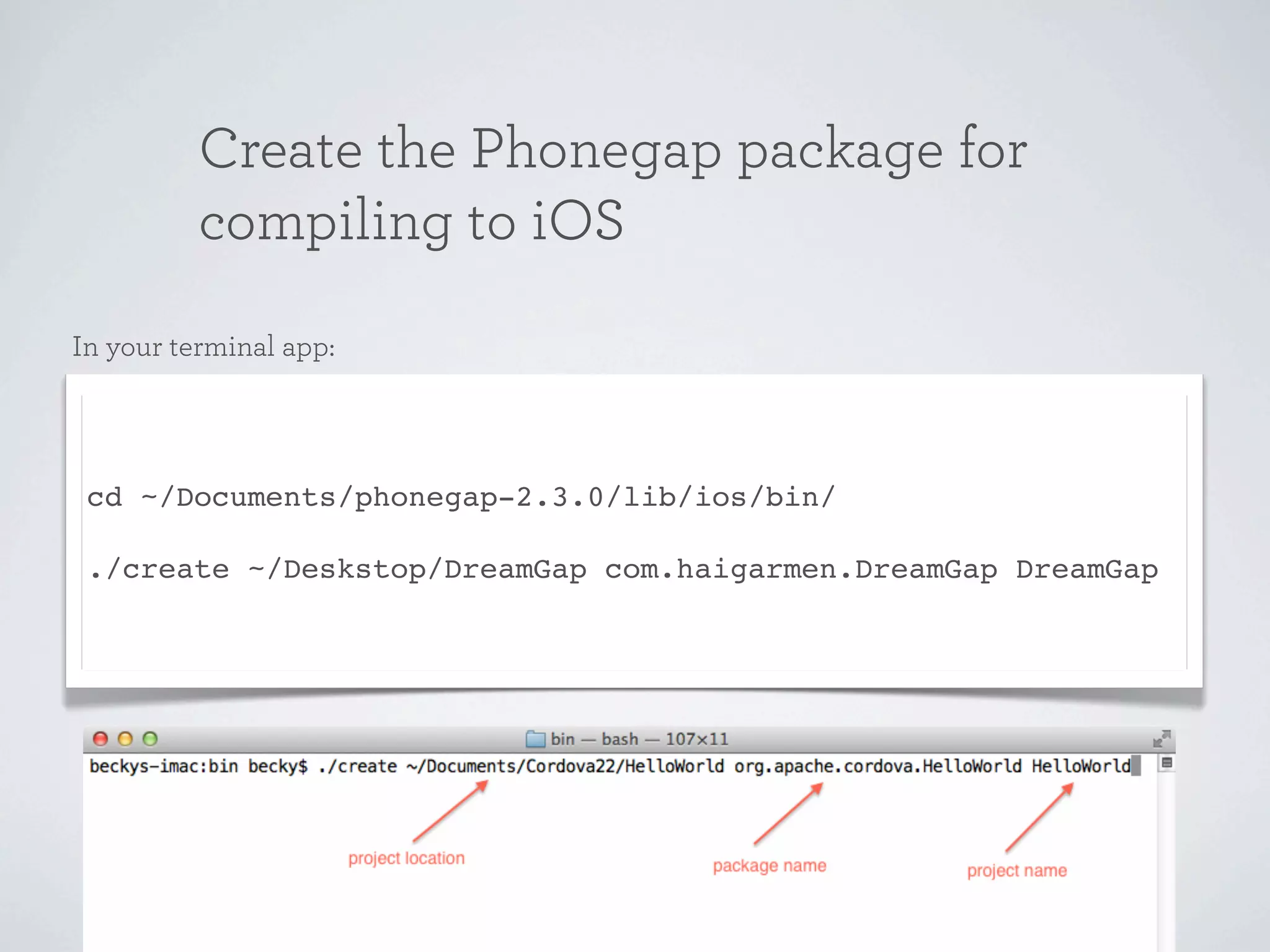
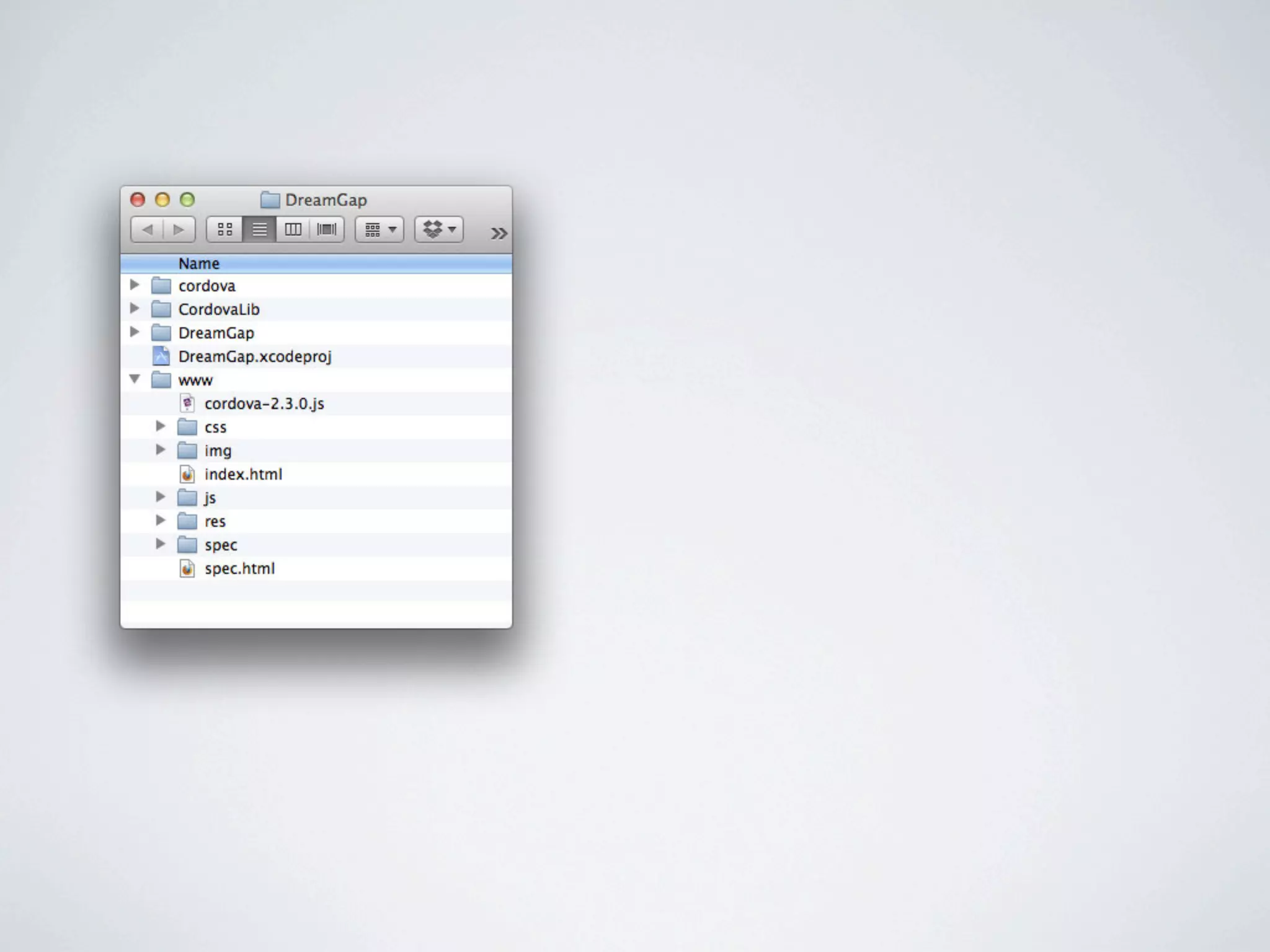
Create the Phonegap package for
          compiling to iOS
In your terminal app:


 cd ~/Documents/phonegap-2.3.0/lib/ios/bin/

 ./create ~/Deskstop/DreamGap com.haigarmen.DreamGap DreamGap
Create the Phonegap package for
          compiling to iOS
In your terminal app:


 cd ~/Documents/phonegap-2.3.0/lib/ios/bin/

 ./create ~/Deskstop/DreamGap com.haigarmen.DreamGap DreamGap
II. Prototyping with jQuery Mobile

A unified user interface system that works
seamlessly across all popular mobile device
platforms, built on the rock-solid jQuery and
jQuery UI foundation.

http://jquerymobile.com/test/docs/about/getting-started.html
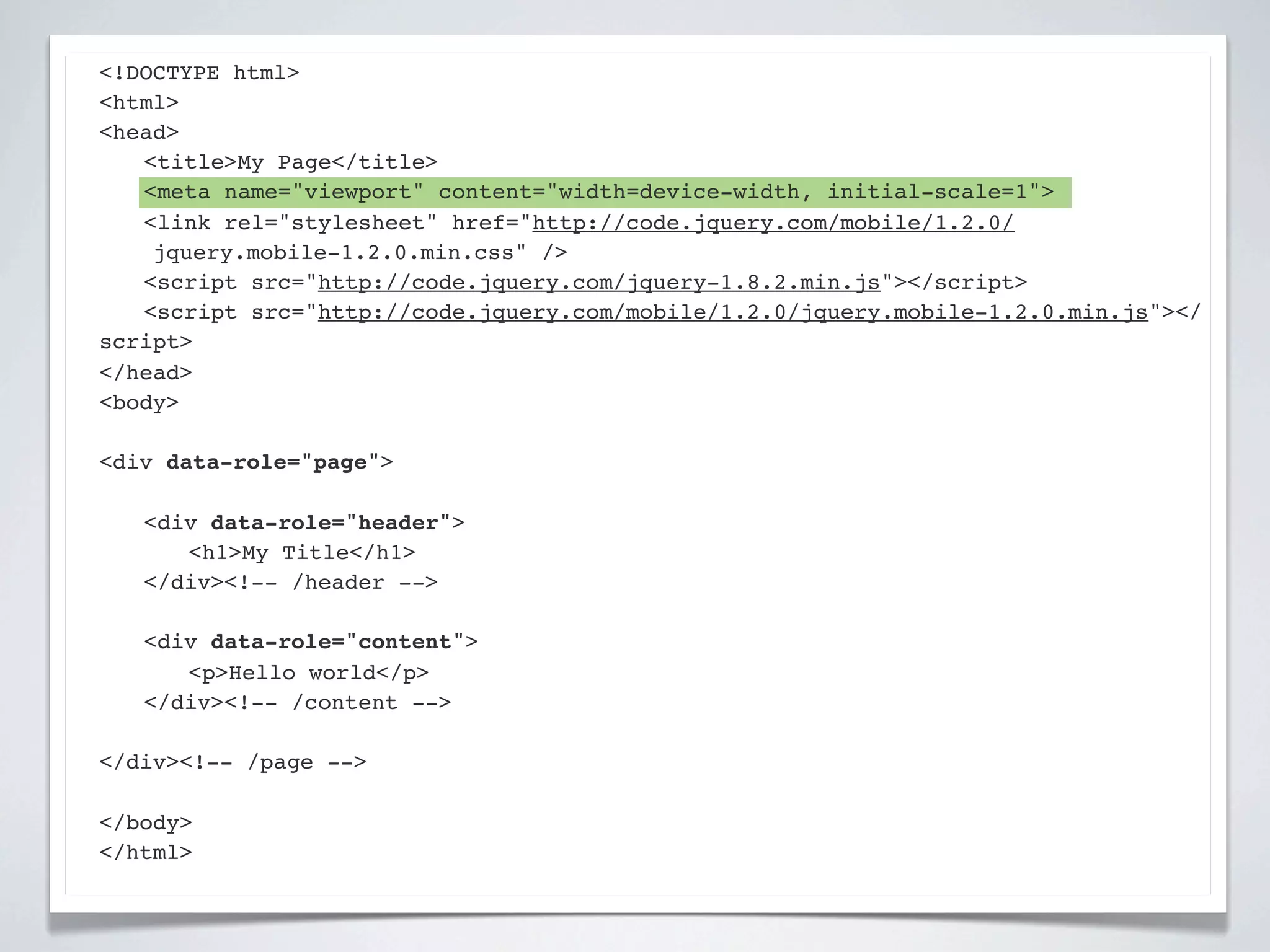
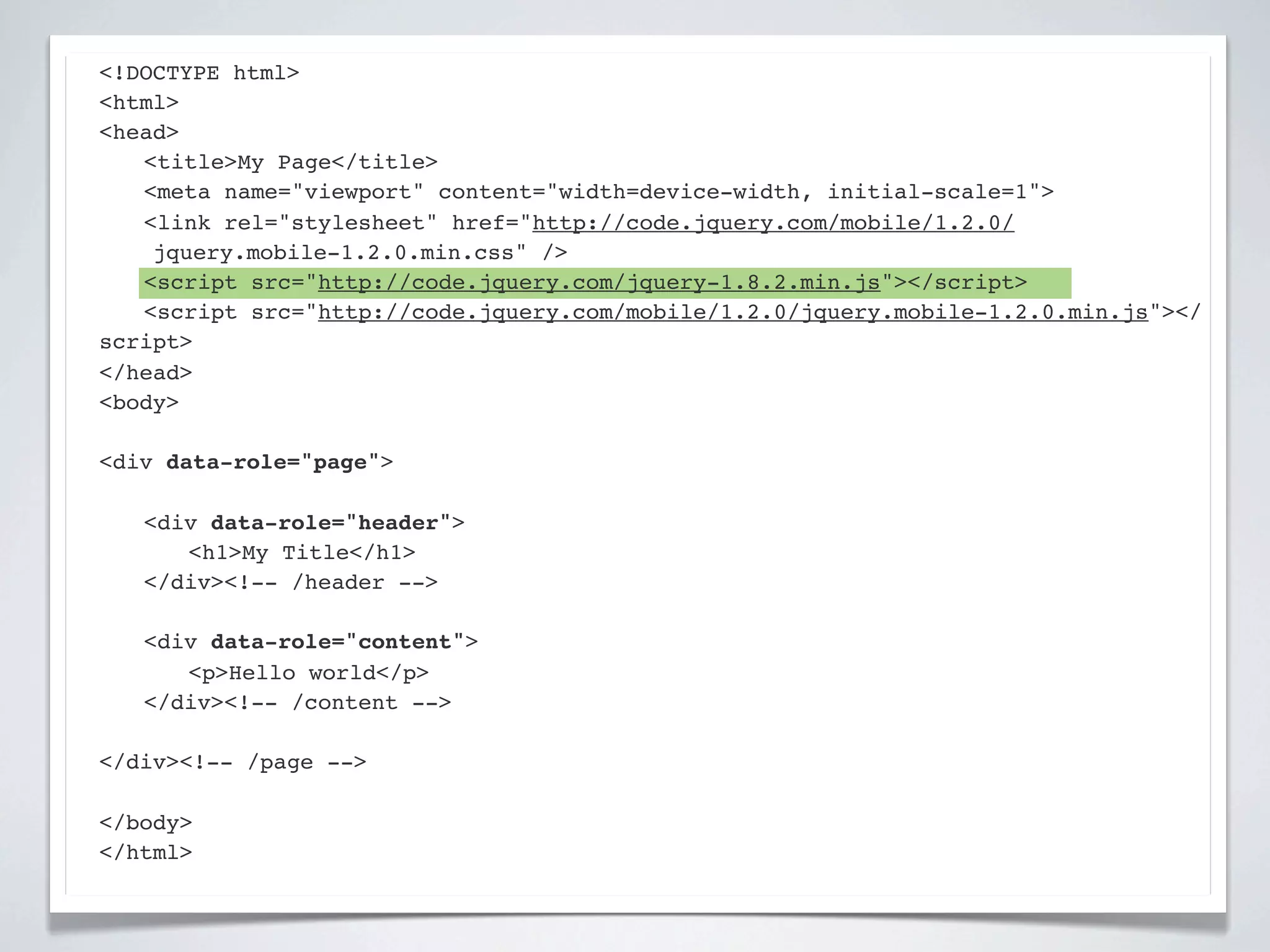
<!DOCTYPE html>
<html>
<head>
! <title>My Page</title>
! <meta name="viewport" content="width=device-width, initial-scale=1">
! <link rel="stylesheet" href="http://code.jquery.com/mobile/1.2.0/
    jquery.mobile-1.2.0.min.css" />
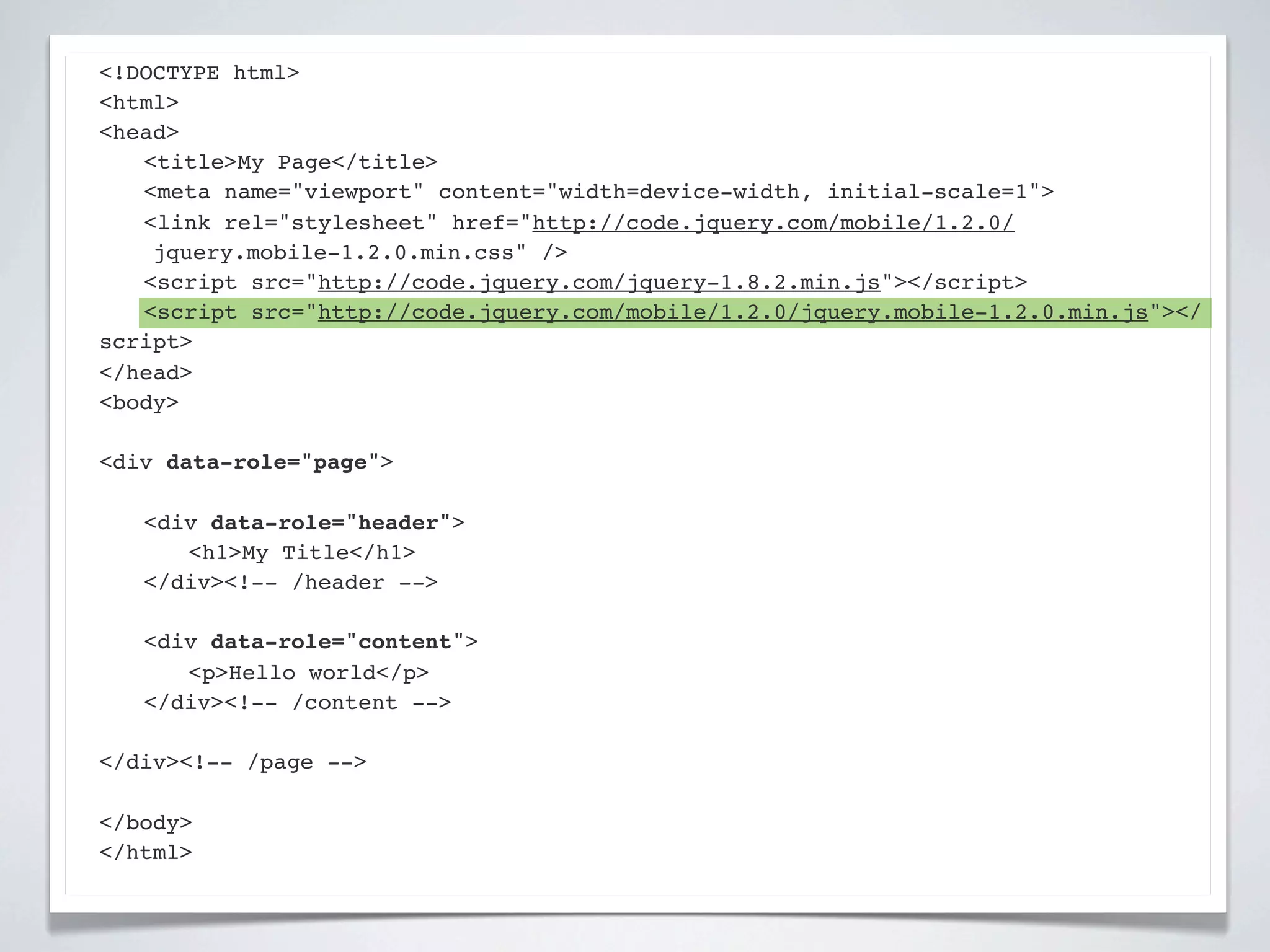
! <script src="http://code.jquery.com/jquery-1.8.2.min.js"></script>
! <script src="http://code.jquery.com/mobile/1.2.0/jquery.mobile-1.2.0.min.js"></
script>
</head>
<body>

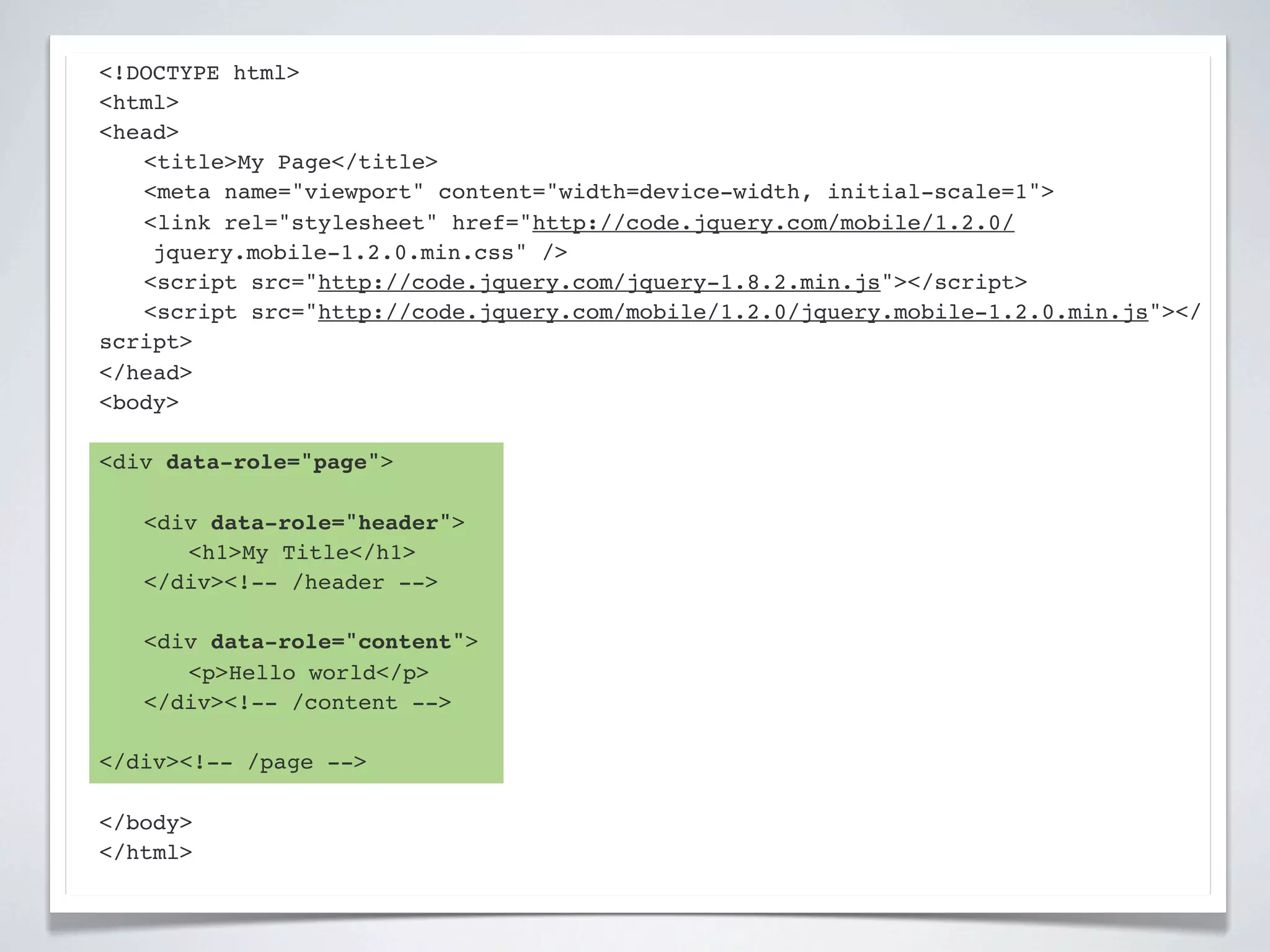
<div data-role="page">

!   <div data-role="header">
!   ! <h1>My Title</h1>
!   </div><!-- /header -->

!   <div data-role="content">!
!   ! <p>Hello world</p>! !
!   </div><!-- /content -->

</div><!-- /page -->

</body>
</html>
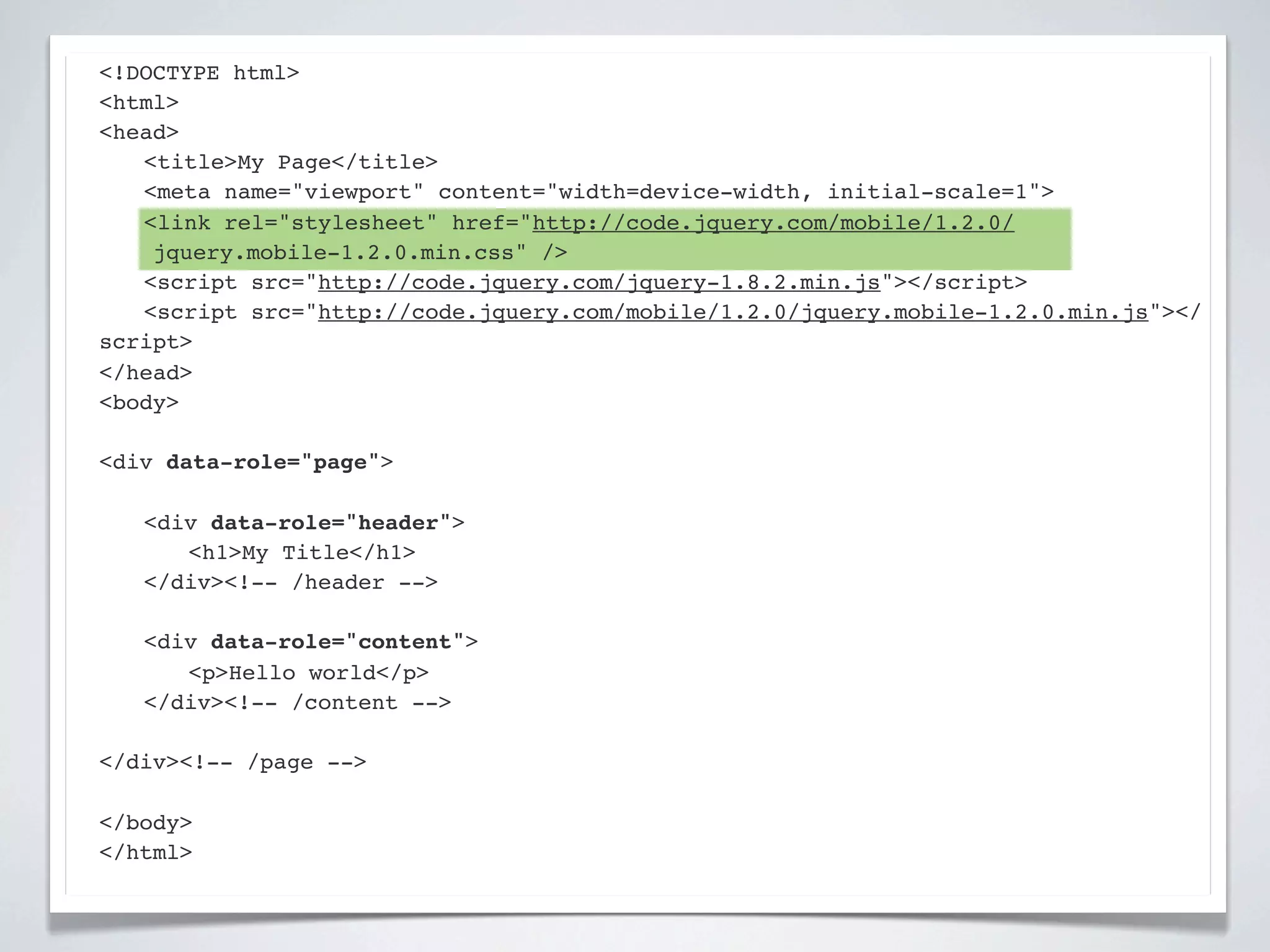
<!DOCTYPE html>
<html>
<head>
! <title>My Page</title>
! <meta name="viewport" content="width=device-width, initial-scale=1">
! <link rel="stylesheet" href="http://code.jquery.com/mobile/1.2.0/
    jquery.mobile-1.2.0.min.css" />
! <script src="http://code.jquery.com/jquery-1.8.2.min.js"></script>
! <script src="http://code.jquery.com/mobile/1.2.0/jquery.mobile-1.2.0.min.js"></
script>
</head>
<body>

<div data-role="page">

!   <div data-role="header">
!   ! <h1>My Title</h1>
!   </div><!-- /header -->

!   <div data-role="content">!
!   ! <p>Hello world</p>! !
!   </div><!-- /content -->

</div><!-- /page -->

</body>
</html>
<!DOCTYPE html>
<html>
<head>
! <title>My Page</title>
! <meta name="viewport" content="width=device-width, initial-scale=1">
! <link rel="stylesheet" href="http://code.jquery.com/mobile/1.2.0/
    jquery.mobile-1.2.0.min.css" />
! <script src="http://code.jquery.com/jquery-1.8.2.min.js"></script>
! <script src="http://code.jquery.com/mobile/1.2.0/jquery.mobile-1.2.0.min.js"></
script>
</head>
<body>

<div data-role="page">

!   <div data-role="header">
!   ! <h1>My Title</h1>
!   </div><!-- /header -->

!   <div data-role="content">!
!   ! <p>Hello world</p>! !
!   </div><!-- /content -->

</div><!-- /page -->

</body>
</html>
<!DOCTYPE html>
<html>
<head>
! <title>My Page</title>
! <meta name="viewport" content="width=device-width, initial-scale=1">
! <link rel="stylesheet" href="http://code.jquery.com/mobile/1.2.0/
    jquery.mobile-1.2.0.min.css" />
! <script src="http://code.jquery.com/jquery-1.8.2.min.js"></script>
! <script src="http://code.jquery.com/mobile/1.2.0/jquery.mobile-1.2.0.min.js"></
script>
</head>
<body>

<div data-role="page">

!   <div data-role="header">
!   ! <h1>My Title</h1>
!   </div><!-- /header -->

!   <div data-role="content">!
!   ! <p>Hello world</p>! !
!   </div><!-- /content -->

</div><!-- /page -->

</body>
</html>
<!DOCTYPE html>
<html>
<head>
! <title>My Page</title>
! <meta name="viewport" content="width=device-width, initial-scale=1">
! <link rel="stylesheet" href="http://code.jquery.com/mobile/1.2.0/
    jquery.mobile-1.2.0.min.css" />
! <script src="http://code.jquery.com/jquery-1.8.2.min.js"></script>
! <script src="http://code.jquery.com/mobile/1.2.0/jquery.mobile-1.2.0.min.js"></
script>
</head>
<body>

<div data-role="page">

!   <div data-role="header">
!   ! <h1>My Title</h1>
!   </div><!-- /header -->

!   <div data-role="content">!
!   ! <p>Hello world</p>! !
!   </div><!-- /content -->

</div><!-- /page -->

</body>
</html>
! <title>My Page</title>
! <meta name="viewport" content="width=device-width, initial-scale=1">
! <link rel="stylesheet" href="http://code.jquery.com/mobile/1.2.0/
jquery.mobile-1.2.0.min.css" />
! <script src="http://code.jquery.com/jquery-1.8.2.min.js"></script>
! <script src="http://code.jquery.com/mobile/1.2.0/jquery.mobile-1.2.0.min.js"></
script>
</head>
<body>

<div data-role="page">

!   <div data-role="header">
!   ! <h1>My Title</h1>
!   </div><!-- /header -->

!   <div data-role="content">!
!   ! <p>Hello world</p>

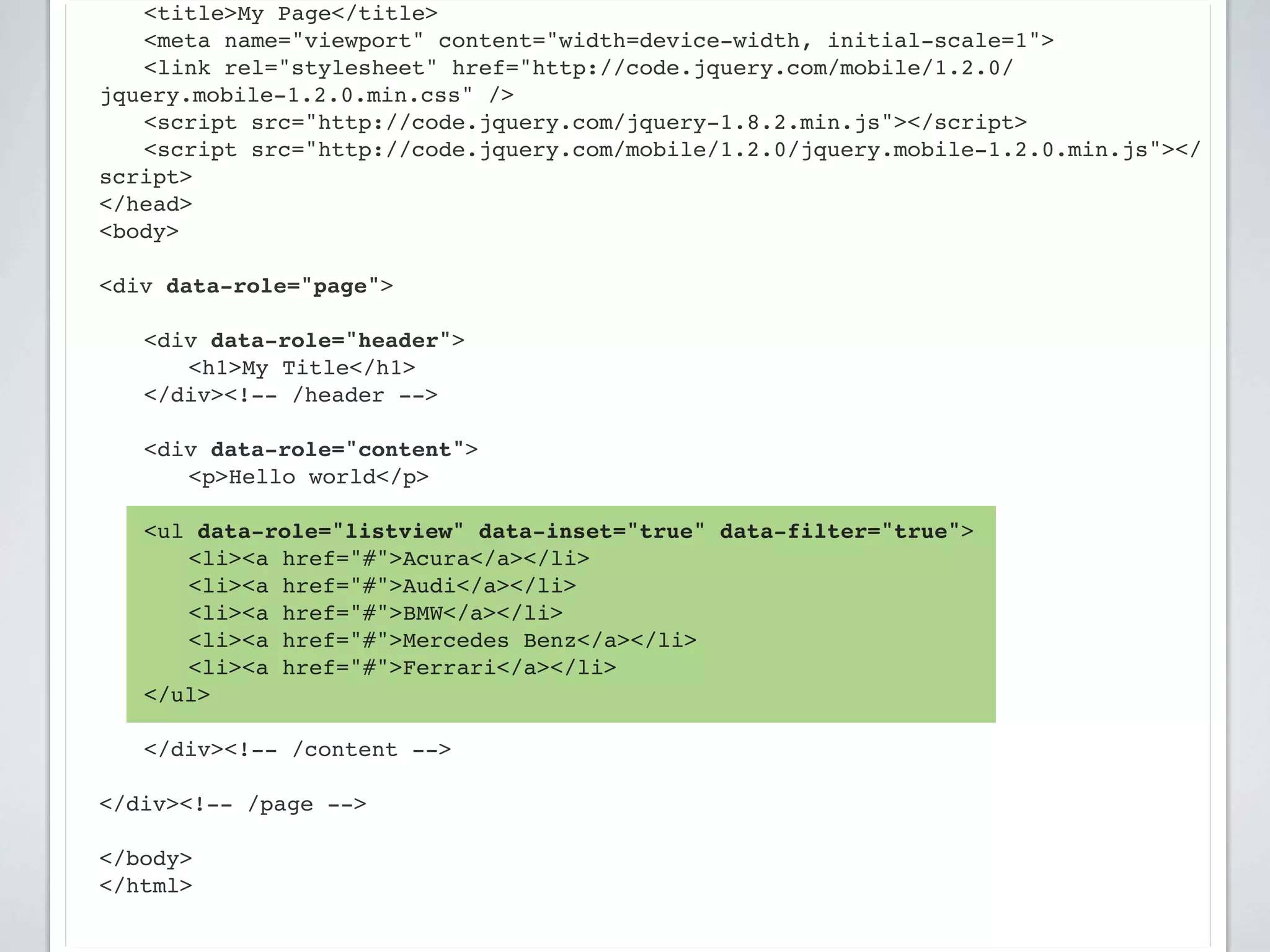
    <ul data-role="listview" data-inset="true" data-filter="true">
    ! <li><a href="#">Acura</a></li>
    ! <li><a href="#">Audi</a></li>
    ! <li><a href="#">BMW</a></li>
    ! <li><a href="#">Mercedes Benz</a></li>
    ! <li><a href="#">Ferrari</a></li>
    </ul>
!   !
!   </div><!-- /content -->

</div><!-- /page -->

</body>
</html>
! <script src="http://code.jquery.com/jquery-1.8.2.min.js"></script>
! <script src="http://code.jquery.com/mobile/1.2.0/jquery.mobile-1.2.0.min.js"></
script>
</head>
<body>

<div data-role="page">

!   <div data-role="header">
!   ! <h1>My Title</h1>
!   </div><!-- /header -->

!   <div data-role="content">!
!   ! <p>Hello world</p>

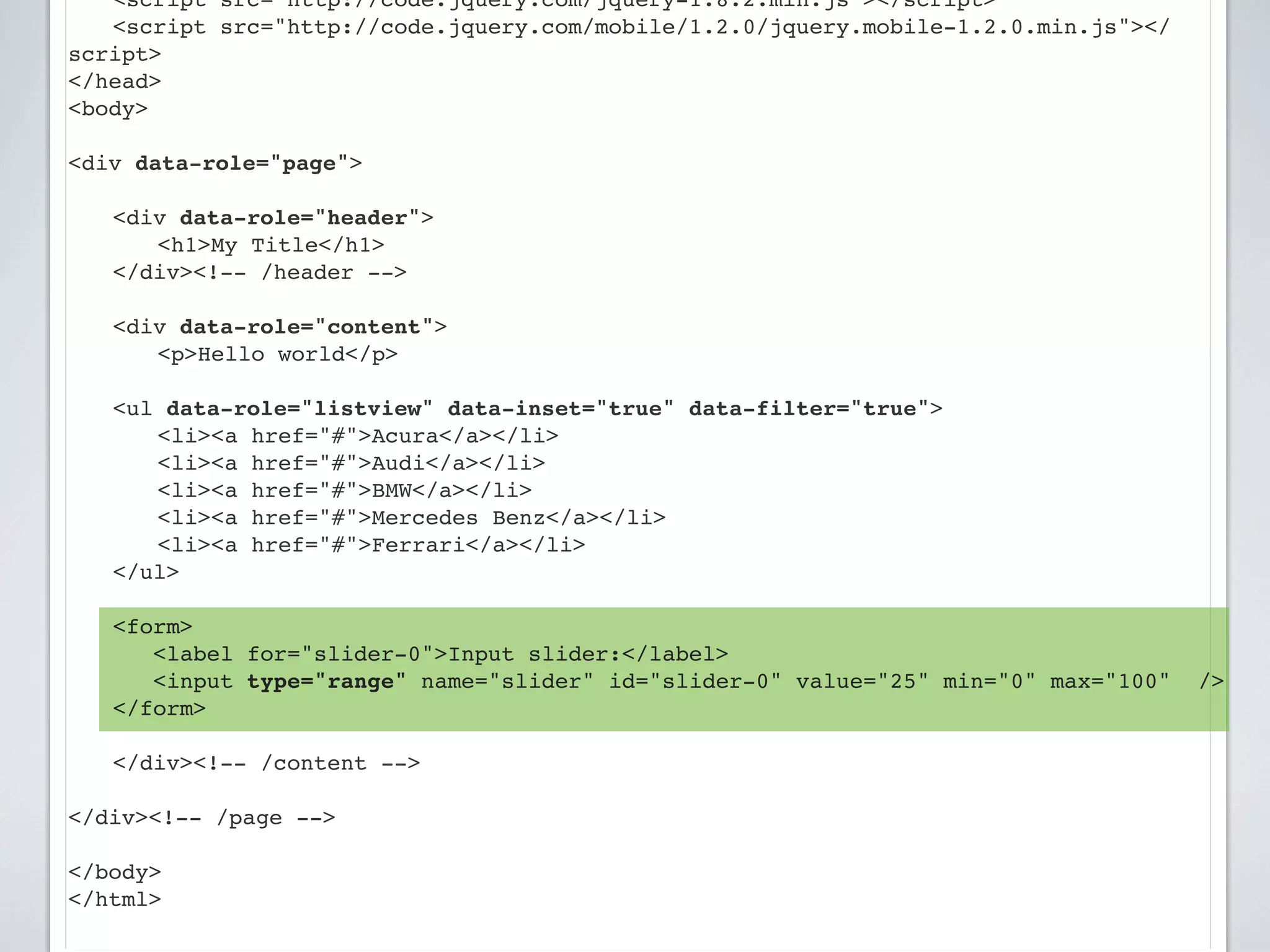
    <ul data-role="listview" data-inset="true" data-filter="true">
    ! <li><a href="#">Acura</a></li>
    ! <li><a href="#">Audi</a></li>
    ! <li><a href="#">BMW</a></li>
    ! <li><a href="#">Mercedes Benz</a></li>
    ! <li><a href="#">Ferrari</a></li>
    </ul>

!   <form>
       <label for="slider-0">Input slider:</label>
       <input type="range" name="slider" id="slider-0" value="25" min="0" max="100"   />
    </form>
!
!   </div><!-- /content -->

</div><!-- /page -->

</body>
</html>
jQuery Mobile Multiple Screens

Page Anatomy
http://jquerymobile.com/test/docs/pages/page-anatomy.html

Multi Page Example
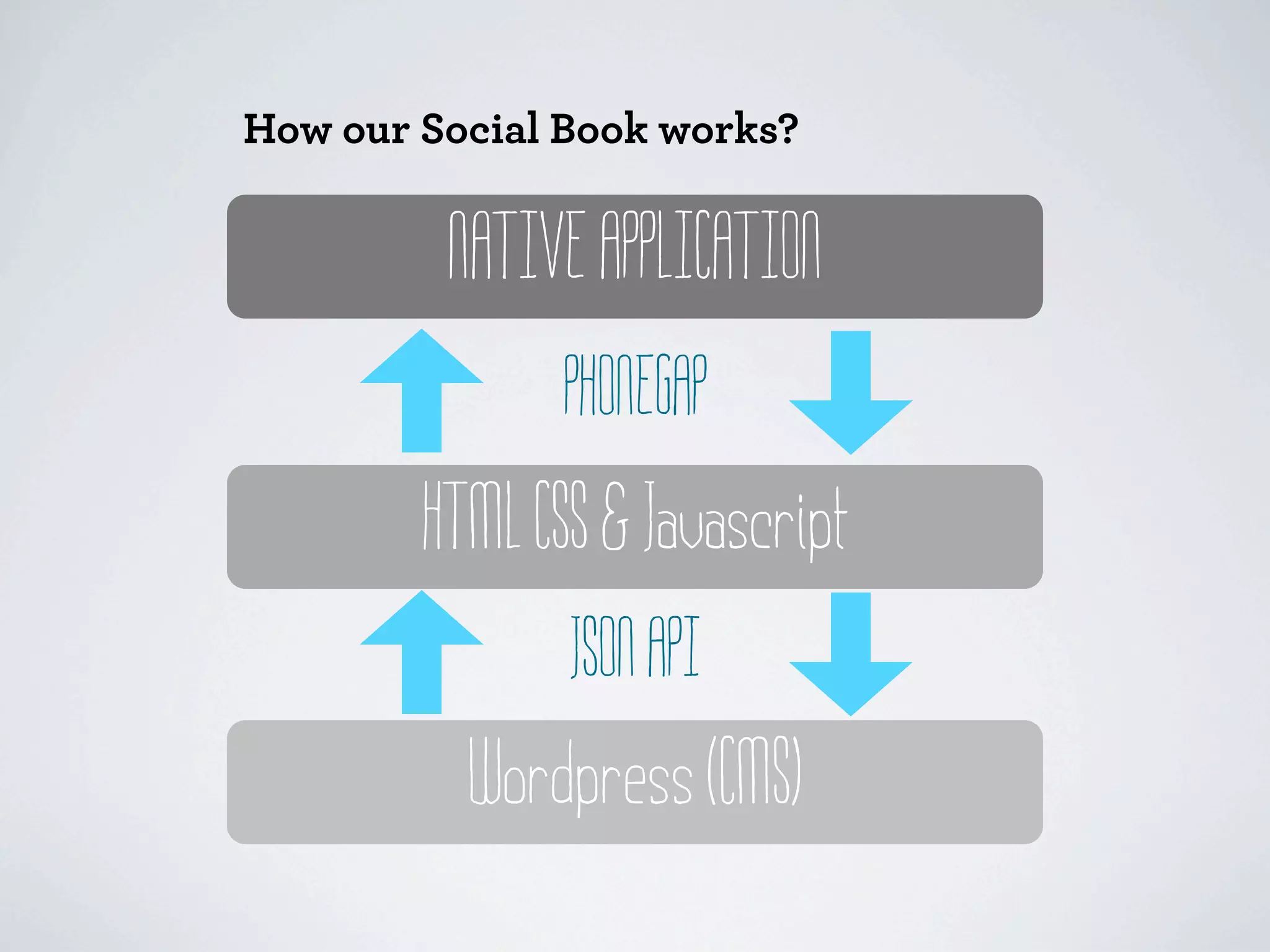
How our Social Book works?


         NATIVE APPLICATION
              PHONEGAP
        HTML CSS & Javascript
               JSON API
          Wordpress (CMS)
III. Introducing JSON API

Wordpress JSON API plugin

Javascript for API call
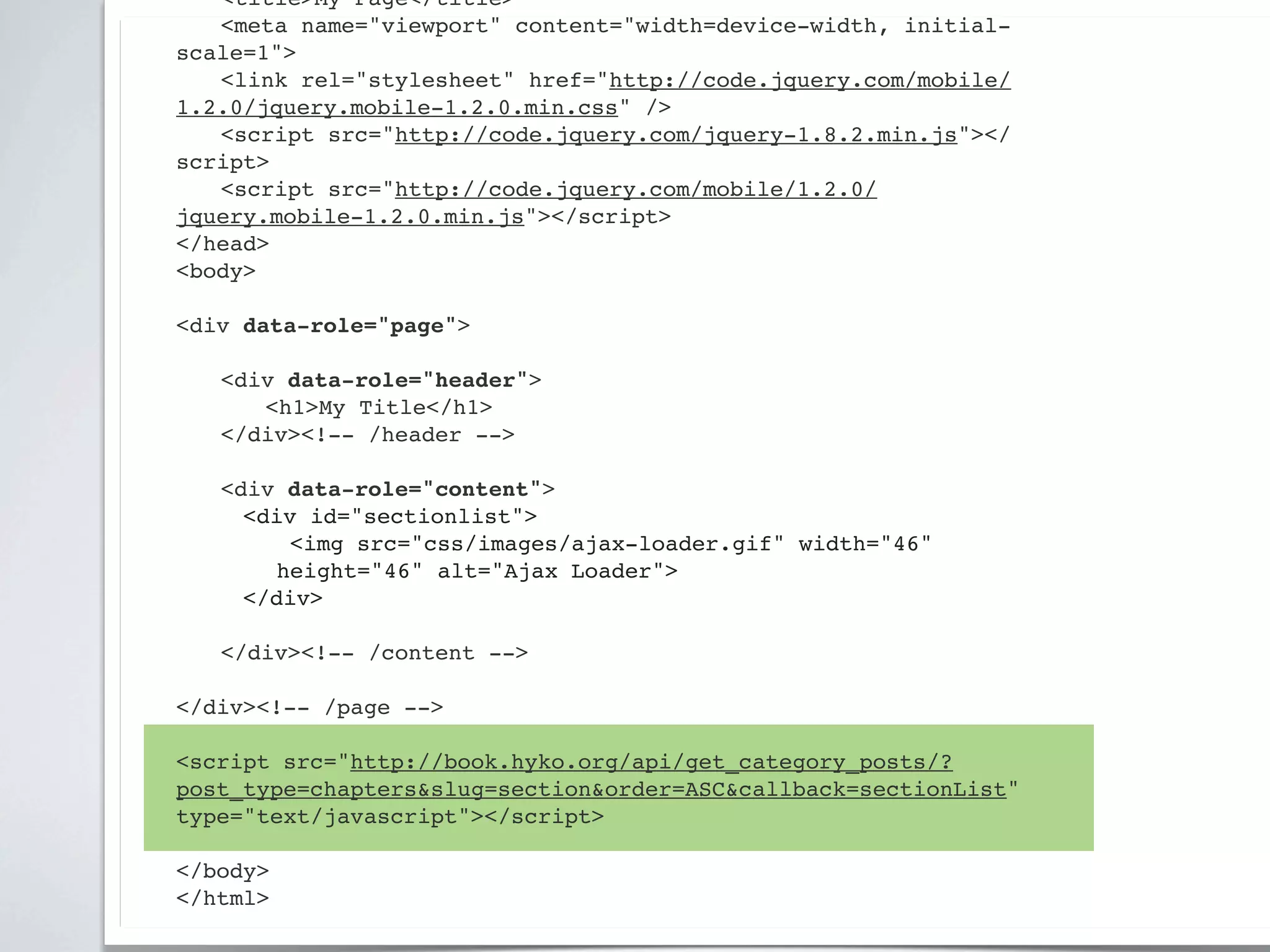
<!DOCTYPE html>
<html>
<head>
! <title>My Page</title>
! <meta name="viewport" content="width=device-width, initial-
scale=1">
! <link rel="stylesheet" href="http://code.jquery.com/mobile/
1.2.0/jquery.mobile-1.2.0.min.css" />
! <script src="http://code.jquery.com/jquery-1.8.2.min.js"></
script>
! <script src="http://code.jquery.com/mobile/1.2.0/
jquery.mobile-1.2.0.min.js"></script>
</head>
<body>

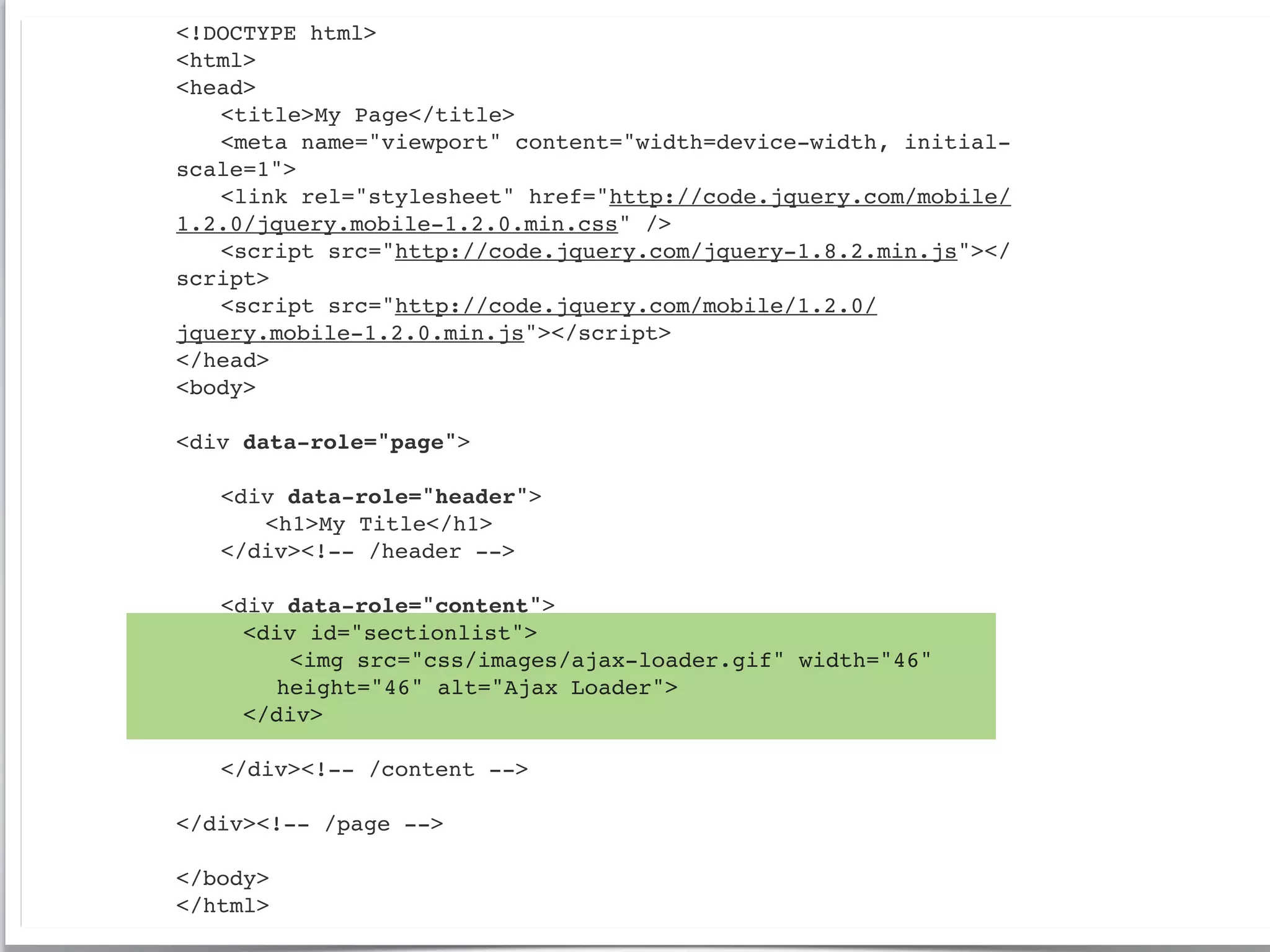
<div data-role="page">

!   <div data-role="header">
!   ! <h1>My Title</h1>
!   </div><!-- /header -->

!   <div data-role="content">!
      <div id="sectionlist">
         <img src="css/images/ajax-loader.gif" width="46"
        height="46" alt="Ajax Loader">
      </div>
!
!   </div><!-- /content -->

</div><!-- /page -->

</body>
</html>
! <title>My Page</title>
! <meta name="viewport" content="width=device-width, initial-
scale=1">
! <link rel="stylesheet" href="http://code.jquery.com/mobile/
1.2.0/jquery.mobile-1.2.0.min.css" />
! <script src="http://code.jquery.com/jquery-1.8.2.min.js"></
script>
! <script src="http://code.jquery.com/mobile/1.2.0/
jquery.mobile-1.2.0.min.js"></script>
</head>
<body>

<div data-role="page">

!   <div data-role="header">
!   ! <h1>My Title</h1>
!   </div><!-- /header -->

!   <div data-role="content">!
      <div id="sectionlist">
         <img src="css/images/ajax-loader.gif" width="46"
        height="46" alt="Ajax Loader">
      </div>
!
!   </div><!-- /content -->

</div><!-- /page -->

<script src="http://book.hyko.org/api/get_category_posts/?
post_type=chapters&slug=section&order=ASC&callback=sectionList"
type="text/javascript"></script>

</body>
</html>
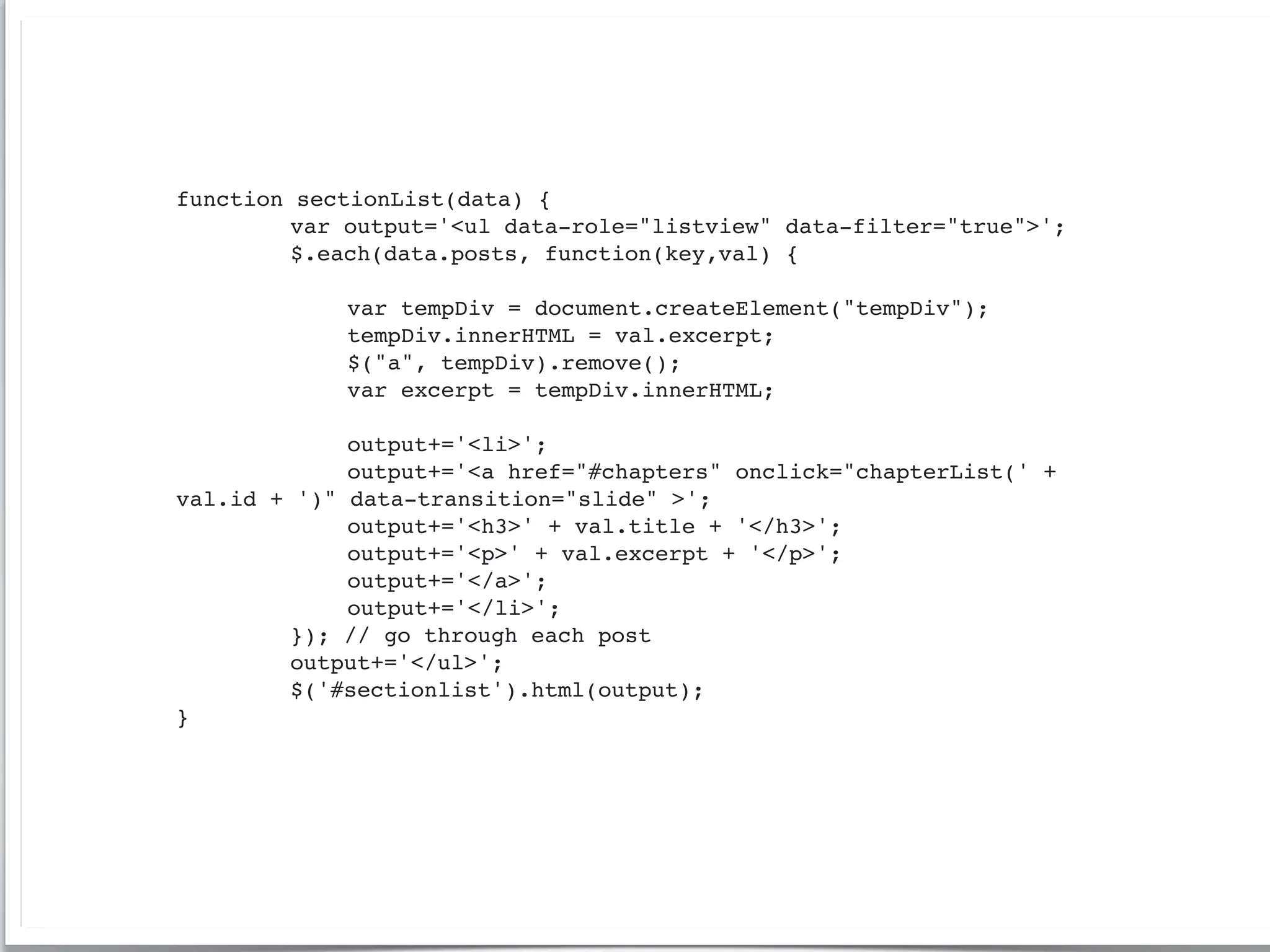
function   sectionList(data) {
!   !      var output='<ul data-role="listview" data-filter="true">';
!   !      $.each(data.posts, function(key,val) {
!   !      !
!   !      !   var tempDiv = document.createElement("tempDiv");
!   !      !   tempDiv.innerHTML = val.excerpt;
!   !      !   $("a", tempDiv).remove();
!   !      !   var excerpt = tempDiv.innerHTML;
!   !      !
!   !      !   output+='<li>';
!   !      !   output+='<a href="#chapters" onclick="chapterList(' +
val.id +   ')" data-transition="slide" >';
!   !      !   output+='<h3>' + val.title + '</h3>';
!   !      !   output+='<p>' + val.excerpt + '</p>';
!   !      !   output+='</a>';
!   !      !   output+='</li>';
!   !      }); // go through each post
!   !      output+='</ul>';
!   !      $('#sectionlist').html(output);
}
http://www.slideshare.net/haigarmen/


  Thank you


harmen@ecuad.ca        @haigarmen

Adobe phonegap-workshop-2013

  • 1.
    PHONEGAP IN THE CLASSROOM Developingsocial book apps with PhoneGap & Wordpress http://www.slideshare.net/haigarmen/ harmen@ecuad.ca @haigarmen
  • 2.
    BUT FIRST, A BITABOUT ME Professor of Design Emily Carr University of Art + Design Founder & Creative Director Lift Studios - Interaction Design Agency Studied Architecture, Jazz Performance & Composition
  • 3.
    Concepts covered inthis workshop will include • publications for mobile platforms • a book as a social framework • using open source tools to publish • Native App vs. Web Technology • Book with an API • Workshop I: Introducing PhoneGap • using open source tools to publish • balancing reading with social • Workshop II: prototyping with jQueryMobile • Hybrid native/web apps • Workshop III: JSON-API tunnel
  • 4.
    Strategy • publications formobile platforms • a book as a social framework • using open source tools to publish • Workshop I: Introducing PhoneGap Design • balancing reading with social • Workshop II: prototyping with jQueryMobile • gestural affordances Technology • Native App vs. Web Technology • Hybrid native/web apps • Book with an API • Workshop III: JSON-API tunnel
  • 5.
    This is aworkshop but it is by way of an interesting story...
  • 6.
    A Social Book byAlexandra Samuel A research project at Emily Carr University of Art + Design
  • 7.
    A Social Book byAlexandra Samuel A research project at Emily Carr University of Art + Design Can reading a book be a participatory and social experience?
  • 8.
    Outcomes: 1. Create asocial e-book prototype that establishes the potential of e-books to support a social, participatory reader experience 2. Develop a participatory design methodology where readers contribute to the structure, design and/or content of the final outcome
  • 9.
    What are theissues when adding social functionality into an ebook format?
  • 10.
    What are theissues when adding social functionality into an ebook format? Can we integrate a social component into a book without getting in the way of the original content?
  • 11.
    What are theissues when adding social functionality into an ebook format? Can we integrate a social component into a book without getting in the way of the original content? How do we make a book ultimately dynamic?
  • 12.
    What are theissues when adding social functionality into an ebook format? Can we integrate a social component into a book without getting in the way of the original content? How do we make a book ultimately dynamic? What tools should we use to manage the content, comments and membership registration?
  • 13.
    The problem withmost Social books: 1. Social usually means sharing quotes on Facebook & Twitter 2. Reader comments are private and marginalized 3. Comments are separated from the original text and usually read out of context
  • 18.
    Introducing PhoneGap The onlyfree open source framework for creating apps easily for 7 mobile platforms using standard HTML, CSS and Javascript http://docs.phonegap.com/en/2.1.0/guide_getting-started_index.md.html
  • 19.
    The PhoneGap teamhas two core tenants of belief: The web solved cross platform. All technology deprecates with time. http://phonegap.com/2012/05/09/phonegap-beliefs-goals-and-philosophy/
  • 20.
    Two high levelgoals of PhoneGap: The web as a first class development platform. The ultimate purpose of PhoneGap is to cease to exist.
  • 22.
    2 Approaches toPhoneGap 1. Compile Locally 2. Compile in Cloud (PhoneGap Build)
  • 23.
    2 Approaches toPhoneGap 1. Compile Locally 2. Compile in Cloud (PhoneGap Build) phonegap HTML package IDE Compiles Native App APP
  • 24.
    2 Approaches toPhoneGap 1. Compile Locally 2. Compile in Cloud (PhoneGap Build) phonegap HTML HTML package upload www files or Github IDE PhoneGap Build Compiles Native App APP iOS android WebOS
  • 25.
    I: Install Xcodeand PhoneGap Apple's Xcode (http://developer.apple.com) PhoneGap http://www.phonegap.com/download# version 1.9.0 Requirements • Xcode 4.3+ • Xcode Command Line Tools • Intel-based computer with Mac OS X Lion or greater (10.7+) • Necessary for installing on device: ◦ Apple iOS device (iPhone, iPad, iPod Touch) ◦ iOS developer certificate ($100/year)
  • 26.
    Create the Phonegappackage for compiling to iOS In your terminal app: cd ~/Documents/phonegap-2.3.0/lib/ios/bin/ ./create ~/Deskstop/DreamGap com.haigarmen.DreamGap DreamGap
  • 27.
    Create the Phonegappackage for compiling to iOS In your terminal app: cd ~/Documents/phonegap-2.3.0/lib/ios/bin/ ./create ~/Deskstop/DreamGap com.haigarmen.DreamGap DreamGap
  • 31.
    II. Prototyping withjQuery Mobile A unified user interface system that works seamlessly across all popular mobile device platforms, built on the rock-solid jQuery and jQuery UI foundation. http://jquerymobile.com/test/docs/about/getting-started.html
  • 32.
    <!DOCTYPE html> <html> <head> ! <title>MyPage</title> ! <meta name="viewport" content="width=device-width, initial-scale=1"> ! <link rel="stylesheet" href="http://code.jquery.com/mobile/1.2.0/ jquery.mobile-1.2.0.min.css" /> ! <script src="http://code.jquery.com/jquery-1.8.2.min.js"></script> ! <script src="http://code.jquery.com/mobile/1.2.0/jquery.mobile-1.2.0.min.js"></ script> </head> <body> <div data-role="page"> ! <div data-role="header"> ! ! <h1>My Title</h1> ! </div><!-- /header --> ! <div data-role="content">! ! ! <p>Hello world</p>! ! ! </div><!-- /content --> </div><!-- /page --> </body> </html>
  • 33.
    <!DOCTYPE html> <html> <head> ! <title>MyPage</title> ! <meta name="viewport" content="width=device-width, initial-scale=1"> ! <link rel="stylesheet" href="http://code.jquery.com/mobile/1.2.0/ jquery.mobile-1.2.0.min.css" /> ! <script src="http://code.jquery.com/jquery-1.8.2.min.js"></script> ! <script src="http://code.jquery.com/mobile/1.2.0/jquery.mobile-1.2.0.min.js"></ script> </head> <body> <div data-role="page"> ! <div data-role="header"> ! ! <h1>My Title</h1> ! </div><!-- /header --> ! <div data-role="content">! ! ! <p>Hello world</p>! ! ! </div><!-- /content --> </div><!-- /page --> </body> </html>
  • 34.
    <!DOCTYPE html> <html> <head> ! <title>MyPage</title> ! <meta name="viewport" content="width=device-width, initial-scale=1"> ! <link rel="stylesheet" href="http://code.jquery.com/mobile/1.2.0/ jquery.mobile-1.2.0.min.css" /> ! <script src="http://code.jquery.com/jquery-1.8.2.min.js"></script> ! <script src="http://code.jquery.com/mobile/1.2.0/jquery.mobile-1.2.0.min.js"></ script> </head> <body> <div data-role="page"> ! <div data-role="header"> ! ! <h1>My Title</h1> ! </div><!-- /header --> ! <div data-role="content">! ! ! <p>Hello world</p>! ! ! </div><!-- /content --> </div><!-- /page --> </body> </html>
  • 35.
    <!DOCTYPE html> <html> <head> ! <title>MyPage</title> ! <meta name="viewport" content="width=device-width, initial-scale=1"> ! <link rel="stylesheet" href="http://code.jquery.com/mobile/1.2.0/ jquery.mobile-1.2.0.min.css" /> ! <script src="http://code.jquery.com/jquery-1.8.2.min.js"></script> ! <script src="http://code.jquery.com/mobile/1.2.0/jquery.mobile-1.2.0.min.js"></ script> </head> <body> <div data-role="page"> ! <div data-role="header"> ! ! <h1>My Title</h1> ! </div><!-- /header --> ! <div data-role="content">! ! ! <p>Hello world</p>! ! ! </div><!-- /content --> </div><!-- /page --> </body> </html>
  • 36.
    <!DOCTYPE html> <html> <head> ! <title>MyPage</title> ! <meta name="viewport" content="width=device-width, initial-scale=1"> ! <link rel="stylesheet" href="http://code.jquery.com/mobile/1.2.0/ jquery.mobile-1.2.0.min.css" /> ! <script src="http://code.jquery.com/jquery-1.8.2.min.js"></script> ! <script src="http://code.jquery.com/mobile/1.2.0/jquery.mobile-1.2.0.min.js"></ script> </head> <body> <div data-role="page"> ! <div data-role="header"> ! ! <h1>My Title</h1> ! </div><!-- /header --> ! <div data-role="content">! ! ! <p>Hello world</p>! ! ! </div><!-- /content --> </div><!-- /page --> </body> </html>
  • 37.
    ! <title>My Page</title> !<meta name="viewport" content="width=device-width, initial-scale=1"> ! <link rel="stylesheet" href="http://code.jquery.com/mobile/1.2.0/ jquery.mobile-1.2.0.min.css" /> ! <script src="http://code.jquery.com/jquery-1.8.2.min.js"></script> ! <script src="http://code.jquery.com/mobile/1.2.0/jquery.mobile-1.2.0.min.js"></ script> </head> <body> <div data-role="page"> ! <div data-role="header"> ! ! <h1>My Title</h1> ! </div><!-- /header --> ! <div data-role="content">! ! ! <p>Hello world</p> <ul data-role="listview" data-inset="true" data-filter="true"> ! <li><a href="#">Acura</a></li> ! <li><a href="#">Audi</a></li> ! <li><a href="#">BMW</a></li> ! <li><a href="#">Mercedes Benz</a></li> ! <li><a href="#">Ferrari</a></li> </ul> ! ! ! </div><!-- /content --> </div><!-- /page --> </body> </html>
  • 38.
    ! <script src="http://code.jquery.com/jquery-1.8.2.min.js"></script> !<script src="http://code.jquery.com/mobile/1.2.0/jquery.mobile-1.2.0.min.js"></ script> </head> <body> <div data-role="page"> ! <div data-role="header"> ! ! <h1>My Title</h1> ! </div><!-- /header --> ! <div data-role="content">! ! ! <p>Hello world</p> <ul data-role="listview" data-inset="true" data-filter="true"> ! <li><a href="#">Acura</a></li> ! <li><a href="#">Audi</a></li> ! <li><a href="#">BMW</a></li> ! <li><a href="#">Mercedes Benz</a></li> ! <li><a href="#">Ferrari</a></li> </ul> ! <form> <label for="slider-0">Input slider:</label> <input type="range" name="slider" id="slider-0" value="25" min="0" max="100" /> </form> ! ! </div><!-- /content --> </div><!-- /page --> </body> </html>
  • 39.
    jQuery Mobile MultipleScreens Page Anatomy http://jquerymobile.com/test/docs/pages/page-anatomy.html Multi Page Example
  • 40.
    How our SocialBook works? NATIVE APPLICATION PHONEGAP HTML CSS & Javascript JSON API Wordpress (CMS)
  • 41.
    III. Introducing JSONAPI Wordpress JSON API plugin Javascript for API call
  • 42.
    <!DOCTYPE html> <html> <head> ! <title>MyPage</title> ! <meta name="viewport" content="width=device-width, initial- scale=1"> ! <link rel="stylesheet" href="http://code.jquery.com/mobile/ 1.2.0/jquery.mobile-1.2.0.min.css" /> ! <script src="http://code.jquery.com/jquery-1.8.2.min.js"></ script> ! <script src="http://code.jquery.com/mobile/1.2.0/ jquery.mobile-1.2.0.min.js"></script> </head> <body> <div data-role="page"> ! <div data-role="header"> ! ! <h1>My Title</h1> ! </div><!-- /header --> ! <div data-role="content">! <div id="sectionlist"> <img src="css/images/ajax-loader.gif" width="46" height="46" alt="Ajax Loader"> </div> ! ! </div><!-- /content --> </div><!-- /page --> </body> </html>
  • 43.
    ! <title>My Page</title> !<meta name="viewport" content="width=device-width, initial- scale=1"> ! <link rel="stylesheet" href="http://code.jquery.com/mobile/ 1.2.0/jquery.mobile-1.2.0.min.css" /> ! <script src="http://code.jquery.com/jquery-1.8.2.min.js"></ script> ! <script src="http://code.jquery.com/mobile/1.2.0/ jquery.mobile-1.2.0.min.js"></script> </head> <body> <div data-role="page"> ! <div data-role="header"> ! ! <h1>My Title</h1> ! </div><!-- /header --> ! <div data-role="content">! <div id="sectionlist"> <img src="css/images/ajax-loader.gif" width="46" height="46" alt="Ajax Loader"> </div> ! ! </div><!-- /content --> </div><!-- /page --> <script src="http://book.hyko.org/api/get_category_posts/? post_type=chapters&slug=section&order=ASC&callback=sectionList" type="text/javascript"></script> </body> </html>
  • 44.
    function sectionList(data) { ! ! var output='<ul data-role="listview" data-filter="true">'; ! ! $.each(data.posts, function(key,val) { ! ! ! ! ! ! var tempDiv = document.createElement("tempDiv"); ! ! ! tempDiv.innerHTML = val.excerpt; ! ! ! $("a", tempDiv).remove(); ! ! ! var excerpt = tempDiv.innerHTML; ! ! ! ! ! ! output+='<li>'; ! ! ! output+='<a href="#chapters" onclick="chapterList(' + val.id + ')" data-transition="slide" >'; ! ! ! output+='<h3>' + val.title + '</h3>'; ! ! ! output+='<p>' + val.excerpt + '</p>'; ! ! ! output+='</a>'; ! ! ! output+='</li>'; ! ! }); // go through each post ! ! output+='</ul>'; ! ! $('#sectionlist').html(output); }
  • 45.
    http://www.slideshare.net/haigarmen/ Thankyou harmen@ecuad.ca @haigarmen