ADO OBJECT
ADO OBJECT
 ADO is a Microsoft technology
 ADO stands for ActiveX Data Objects
 ADO is a Microsoft Active-X component
 ADO is automatically installed with Microsoft IIS
 ADO is a programming interface to access data in a
database
LIST OF ADO OBJECTS
 ADO Command Object
 ADO Connection Object
 ADO Recordset Object
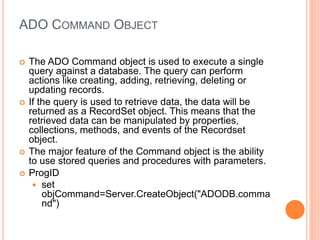
ADO COMMAND OBJECT
 The ADO Command object is used to execute a single
query against a database. The query can perform
actions like creating, adding, retrieving, deleting or
updating records.
 If the query is used to retrieve data, the data will be
returned as a RecordSet object. This means that the
retrieved data can be manipulated by properties,
collections, methods, and events of the Recordset
object.
 The major feature of the Command object is the ability
to use stored queries and procedures with parameters.
 ProgID
 set
objCommand=Server.CreateObject("ADODB.comma
nd")
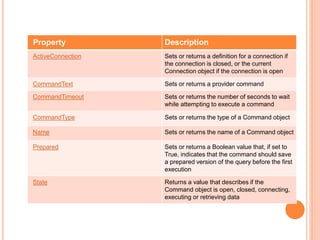
Property Description
ActiveConnection Sets or returns a definition for a connection if
the connection is closed, or the current
Connection object if the connection is open
CommandText Sets or returns a provider command
CommandTimeout Sets or returns the number of seconds to wait
while attempting to execute a command
CommandType Sets or returns the type of a Command object
Name Sets or returns the name of a Command object
Prepared Sets or returns a Boolean value that, if set to
True, indicates that the command should save
a prepared version of the query before the first
execution
State Returns a value that describes if the
Command object is open, closed, connecting,
executing or retrieving data
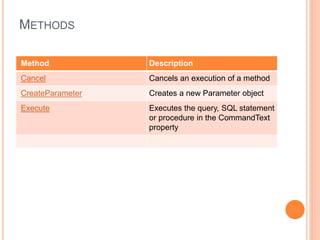
METHODS
Method Description
Cancel Cancels an execution of a method
CreateParameter Creates a new Parameter object
Execute Executes the query, SQL statement
or procedure in the CommandText
property
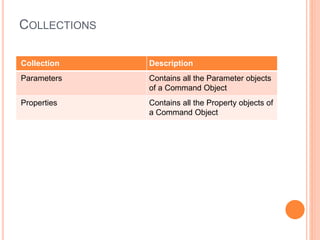
COLLECTIONS
Collection Description
Parameters Contains all the Parameter objects
of a Command Object
Properties Contains all the Property objects of
a Command Object
ADO CONNECTION OBJECT
 The ADO Connection Object is used to create an
open connection to a data source. Through this
connection, you can access and manipulate a
database.
 If you want to access a database multiple times,
you should establish a connection using the
Connection object. You can also make a connection
to a database by passing a connection string via a
Command or Recordset object. However, this type
of connection is only good for one specific, single
query.
 ProgID
 set objConnection=Server.CreateObject("ADODB.connection")
PROPERTIES
Property Description
Attributes Sets or returns the attributes of a Connection
object
CommandTimeout Sets or returns the number of seconds to wait
while attempting to execute a command
ConnectionString Sets or returns the details used to create a
connection to a data source
ConnectionTimeout Sets or returns the number of seconds to wait for
a connection to open
CursorLocation Sets or returns the location of the cursor service
DefaultDatabase Sets or returns the default database name
IsolationLevel Sets or returns the isolation level
Mode Sets or returns the provider access permission
Provider Sets or returns the provider name
State Returns a value describing if the connection is
open or closed
Version Returns the ADO version number
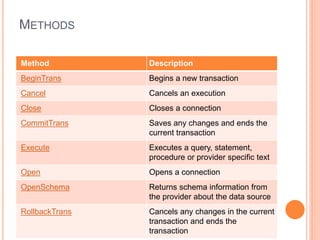
METHODS
Method Description
BeginTrans Begins a new transaction
Cancel Cancels an execution
Close Closes a connection
CommitTrans Saves any changes and ends the
current transaction
Execute Executes a query, statement,
procedure or provider specific text
Open Opens a connection
OpenSchema Returns schema information from
the provider about the data source
RollbackTrans Cancels any changes in the current
transaction and ends the
transaction
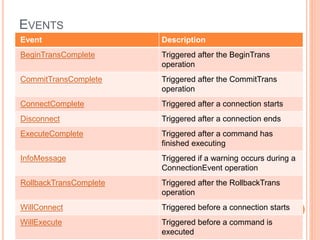
EVENTS
Event Description
BeginTransComplete Triggered after the BeginTrans
operation
CommitTransComplete Triggered after the CommitTrans
operation
ConnectComplete Triggered after a connection starts
Disconnect Triggered after a connection ends
ExecuteComplete Triggered after a command has
finished executing
InfoMessage Triggered if a warning occurs during a
ConnectionEvent operation
RollbackTransComplete Triggered after the RollbackTrans
operation
WillConnect Triggered before a connection starts
WillExecute Triggered before a command is
executed
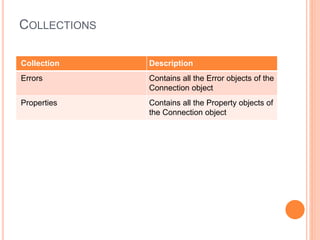
COLLECTIONS
Collection Description
Errors Contains all the Error objects of the
Connection object
Properties Contains all the Property objects of
the Connection object
ADO RECORDSET OBJECT
 The ADO Recordset object is used to hold a set of records
from a database table. A Recordset object consist of
records and columns (fields).
 In ADO, this object is the most important and the one used
most often to manipulate data from a database.
 ProgID
 set
objRecordset=Server.CreateObject("ADODB.recordset")
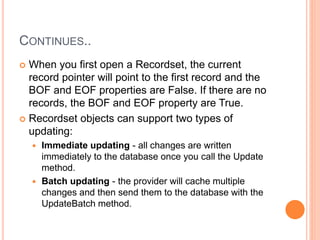
CONTINUES..
 When you first open a Recordset, the current
record pointer will point to the first record and the
BOF and EOF properties are False. If there are no
records, the BOF and EOF property are True.
 Recordset objects can support two types of
updating:
 Immediate updating - all changes are written
immediately to the database once you call the Update
method.
 Batch updating - the provider will cache multiple
changes and then send them to the database with the
UpdateBatch method.
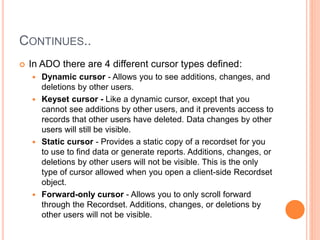
CONTINUES..
 In ADO there are 4 different cursor types defined:
 Dynamic cursor - Allows you to see additions, changes, and
deletions by other users.
 Keyset cursor - Like a dynamic cursor, except that you
cannot see additions by other users, and it prevents access to
records that other users have deleted. Data changes by other
users will still be visible.
 Static cursor - Provides a static copy of a recordset for you
to use to find data or generate reports. Additions, changes, or
deletions by other users will not be visible. This is the only
type of cursor allowed when you open a client-side Recordset
object.
 Forward-only cursor - Allows you to only scroll forward
through the Recordset. Additions, changes, or deletions by
other users will not be visible.
PROPERTIES
Property Description
AbsolutePage Sets or returns a value that specifies the
page number in the Recordset object
AbsolutePosition Sets or returns a value that specifies the
ordinal position of the current record in the
Recordset object
ActiveCommand Returns the Command object associated with
the Recordset
ActiveConnection Sets or returns a definition for a connection if
the connection is closed, or the current
Connection object if the connection is open
BOF Returns true if the current record position is
before the first record, otherwise false
Bookmark Sets or returns a bookmark. The bookmark
saves the position of the current record
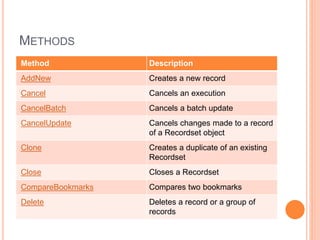
METHODS
Method Description
AddNew Creates a new record
Cancel Cancels an execution
CancelBatch Cancels a batch update
CancelUpdate Cancels changes made to a record
of a Recordset object
Clone Creates a duplicate of an existing
Recordset
Close Closes a Recordset
CompareBookmarks Compares two bookmarks
Delete Deletes a record or a group of
records
EVENTS
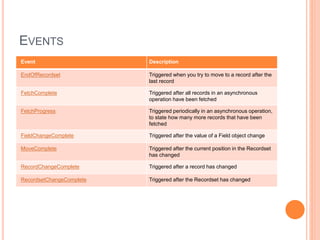
Event Description
EndOfRecordset Triggered when you try to move to a record after the
last record
FetchComplete Triggered after all records in an asynchronous
operation have been fetched
FetchProgress Triggered periodically in an asynchronous operation,
to state how many more records that have been
fetched
FieldChangeComplete Triggered after the value of a Field object change
MoveComplete Triggered after the current position in the Recordset
has changed
RecordChangeComplete Triggered after a record has changed
RecordsetChangeComplete Triggered after the Recordset has changed
COLLECTIONS
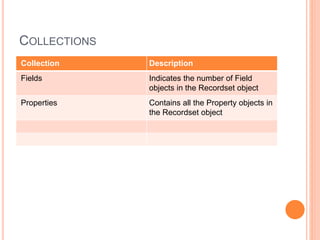
Collection Description
Fields Indicates the number of Field
objects in the Recordset object
Properties Contains all the Property objects in
the Recordset object

Ado object

  • 1.
  • 2.
    ADO OBJECT  ADOis a Microsoft technology  ADO stands for ActiveX Data Objects  ADO is a Microsoft Active-X component  ADO is automatically installed with Microsoft IIS  ADO is a programming interface to access data in a database
  • 3.
    LIST OF ADOOBJECTS  ADO Command Object  ADO Connection Object  ADO Recordset Object
  • 4.
    ADO COMMAND OBJECT The ADO Command object is used to execute a single query against a database. The query can perform actions like creating, adding, retrieving, deleting or updating records.  If the query is used to retrieve data, the data will be returned as a RecordSet object. This means that the retrieved data can be manipulated by properties, collections, methods, and events of the Recordset object.  The major feature of the Command object is the ability to use stored queries and procedures with parameters.  ProgID  set objCommand=Server.CreateObject("ADODB.comma nd")
  • 5.
    Property Description ActiveConnection Setsor returns a definition for a connection if the connection is closed, or the current Connection object if the connection is open CommandText Sets or returns a provider command CommandTimeout Sets or returns the number of seconds to wait while attempting to execute a command CommandType Sets or returns the type of a Command object Name Sets or returns the name of a Command object Prepared Sets or returns a Boolean value that, if set to True, indicates that the command should save a prepared version of the query before the first execution State Returns a value that describes if the Command object is open, closed, connecting, executing or retrieving data
  • 6.
    METHODS Method Description Cancel Cancelsan execution of a method CreateParameter Creates a new Parameter object Execute Executes the query, SQL statement or procedure in the CommandText property
  • 7.
    COLLECTIONS Collection Description Parameters Containsall the Parameter objects of a Command Object Properties Contains all the Property objects of a Command Object
  • 8.
    ADO CONNECTION OBJECT The ADO Connection Object is used to create an open connection to a data source. Through this connection, you can access and manipulate a database.  If you want to access a database multiple times, you should establish a connection using the Connection object. You can also make a connection to a database by passing a connection string via a Command or Recordset object. However, this type of connection is only good for one specific, single query.  ProgID  set objConnection=Server.CreateObject("ADODB.connection")
  • 9.
    PROPERTIES Property Description Attributes Setsor returns the attributes of a Connection object CommandTimeout Sets or returns the number of seconds to wait while attempting to execute a command ConnectionString Sets or returns the details used to create a connection to a data source ConnectionTimeout Sets or returns the number of seconds to wait for a connection to open CursorLocation Sets or returns the location of the cursor service DefaultDatabase Sets or returns the default database name IsolationLevel Sets or returns the isolation level Mode Sets or returns the provider access permission Provider Sets or returns the provider name State Returns a value describing if the connection is open or closed Version Returns the ADO version number
  • 10.
    METHODS Method Description BeginTrans Beginsa new transaction Cancel Cancels an execution Close Closes a connection CommitTrans Saves any changes and ends the current transaction Execute Executes a query, statement, procedure or provider specific text Open Opens a connection OpenSchema Returns schema information from the provider about the data source RollbackTrans Cancels any changes in the current transaction and ends the transaction
  • 11.
    EVENTS Event Description BeginTransComplete Triggeredafter the BeginTrans operation CommitTransComplete Triggered after the CommitTrans operation ConnectComplete Triggered after a connection starts Disconnect Triggered after a connection ends ExecuteComplete Triggered after a command has finished executing InfoMessage Triggered if a warning occurs during a ConnectionEvent operation RollbackTransComplete Triggered after the RollbackTrans operation WillConnect Triggered before a connection starts WillExecute Triggered before a command is executed
  • 12.
    COLLECTIONS Collection Description Errors Containsall the Error objects of the Connection object Properties Contains all the Property objects of the Connection object
  • 13.
    ADO RECORDSET OBJECT The ADO Recordset object is used to hold a set of records from a database table. A Recordset object consist of records and columns (fields).  In ADO, this object is the most important and the one used most often to manipulate data from a database.  ProgID  set objRecordset=Server.CreateObject("ADODB.recordset")
  • 14.
    CONTINUES..  When youfirst open a Recordset, the current record pointer will point to the first record and the BOF and EOF properties are False. If there are no records, the BOF and EOF property are True.  Recordset objects can support two types of updating:  Immediate updating - all changes are written immediately to the database once you call the Update method.  Batch updating - the provider will cache multiple changes and then send them to the database with the UpdateBatch method.
  • 15.
    CONTINUES..  In ADOthere are 4 different cursor types defined:  Dynamic cursor - Allows you to see additions, changes, and deletions by other users.  Keyset cursor - Like a dynamic cursor, except that you cannot see additions by other users, and it prevents access to records that other users have deleted. Data changes by other users will still be visible.  Static cursor - Provides a static copy of a recordset for you to use to find data or generate reports. Additions, changes, or deletions by other users will not be visible. This is the only type of cursor allowed when you open a client-side Recordset object.  Forward-only cursor - Allows you to only scroll forward through the Recordset. Additions, changes, or deletions by other users will not be visible.
  • 16.
    PROPERTIES Property Description AbsolutePage Setsor returns a value that specifies the page number in the Recordset object AbsolutePosition Sets or returns a value that specifies the ordinal position of the current record in the Recordset object ActiveCommand Returns the Command object associated with the Recordset ActiveConnection Sets or returns a definition for a connection if the connection is closed, or the current Connection object if the connection is open BOF Returns true if the current record position is before the first record, otherwise false Bookmark Sets or returns a bookmark. The bookmark saves the position of the current record
  • 17.
    METHODS Method Description AddNew Createsa new record Cancel Cancels an execution CancelBatch Cancels a batch update CancelUpdate Cancels changes made to a record of a Recordset object Clone Creates a duplicate of an existing Recordset Close Closes a Recordset CompareBookmarks Compares two bookmarks Delete Deletes a record or a group of records
  • 18.
    EVENTS Event Description EndOfRecordset Triggeredwhen you try to move to a record after the last record FetchComplete Triggered after all records in an asynchronous operation have been fetched FetchProgress Triggered periodically in an asynchronous operation, to state how many more records that have been fetched FieldChangeComplete Triggered after the value of a Field object change MoveComplete Triggered after the current position in the Recordset has changed RecordChangeComplete Triggered after a record has changed RecordsetChangeComplete Triggered after the Recordset has changed
  • 19.
    COLLECTIONS Collection Description Fields Indicatesthe number of Field objects in the Recordset object Properties Contains all the Property objects in the Recordset object