JDBC
JDBCIs an API spec. whose implementation comes in the form of jdbc drivers.JDBC API :java.sql.*javax.sql.*
JDBC DriverIs a bridge s/w between java application and database s/w.Is a java class that implements java.sql.Driver interface.Why we use JDBC Driver?
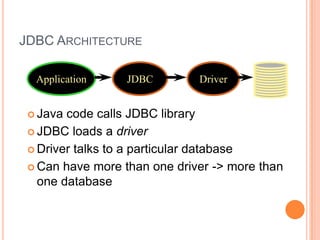
JDBC ArchitectureApplicationJDBCDriverJava code calls JDBC libraryJDBC loads a driverDriver talks to a particular databaseCan have more than one driver -> more than one database
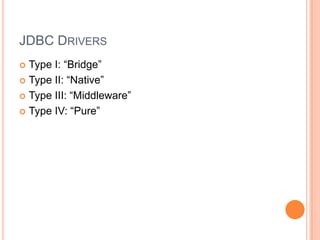
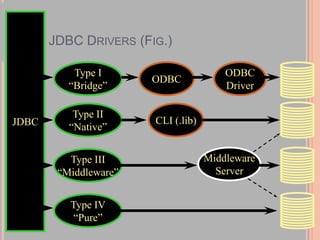
JDBC DriversType I: “Bridge”Type II: “Native”Type III: “Middleware”Type IV: “Pure”
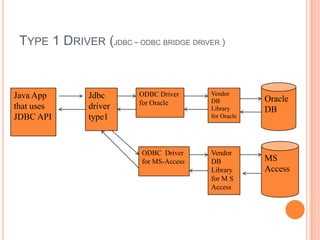
Type 1 Driver (jdbc - odbc bridge driver )OracleDBJava App that uses JDBC APIJdbc driver type1ODBC Driver for OracleVendor DB Library for OracleMS AccessODBC  Driver for MS-AccessVendor DB Library for M S Access
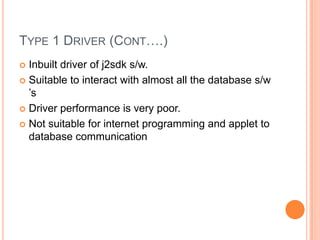
Type 1 Driver (Cont….)Inbuilt driver of j2sdk s/w.Suitable to interact with almost all the database s/w ’sDriver performance is very poor.Not suitable for internet programming and applet to database communication
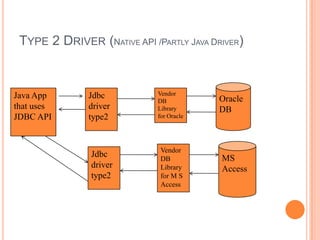
Type 2 Driver (Native API /Partly Java Driver)OracleDBJava App that uses JDBC APIJdbc driver type2Vendor DB Library for OracleMS AccessVendor DB Library for M S AccessJdbc driver type2
Type 2 Driver (cont…)Specific to each database s/w.Significantly better performance than Type 1.Odbc drivers presence is not mandatory.Not suitable for large scale applications.Not suitable for internet / applet programsEvery db requires a separate driver.
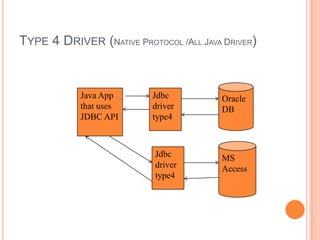
Type 4 Driver (Native Protocol /All Java Driver)OracleDBJava App that uses JDBC APIJdbc driver type4MS AccessJdbc driver type4
Type 4 Driver (Native Protocol / All Java Driver)Completely developed in java.Can interact with db without having the support of odbc driver / vendor db library.Platform independent.Performance is good.Applet and internet programming is possible
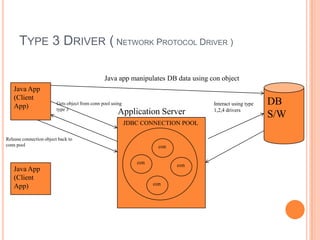
Type 3 Driver ( Network Protocol Driver )Java app manipulates DB data using con objectJava App(Client App)DB S/WInteract using type 1,2,4 driversGets object from conn pool using type 3Application ServerJDBC CONNECTION POOLRelease connection object back to conn poolconconconJava App(Client App)con
Type 3 DriverIs not a driverIts protocolContains rules required to establish communication between java application and connection pool
JDBC Drivers (Fig.)JDBCType I“Bridge”ODBCODBCDriverType II“Native”CLI (.lib)MiddlewareServerType III“Middleware”Type IV“Pure”
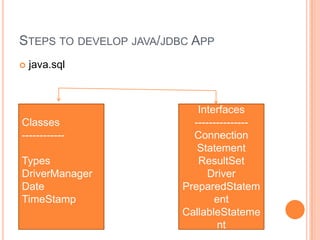
Steps to develop java/jdbc Appjava.sqlClasses------------TypesDriverManagerDateTimeStampInterfaces ---------------ConnectionStatementResultSetDriverPreparedStatementCallableStatement
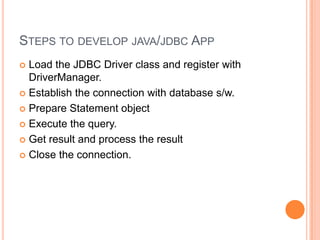
Steps to develop java/jdbc AppLoad the JDBC Driver class and register with DriverManager.Establish the connection with database s/w.Prepare Statement objectExecute the query.Get result and process the resultClose the connection.
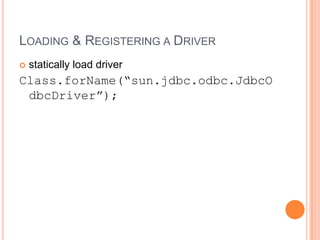
Loading & Registering a Driverstatically load driverClass.forName(“sun.jdbc.odbc.JdbcOdbcDriver”);
DriverManagerAll JDBC Drivers will be registered and managed by DriverManager.When a driver class is first loaded, it registers itself with the DriverManagerTherefore, to register a driver, just load it!
ConnectionA Connection represents a session with a specific database.Establishing connection with db s/w is nothing but creating communication channelCan have multiple connections to a databaseOnce task with connection is completed, close the connection.
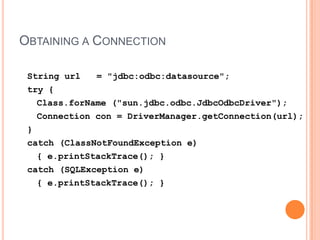
Obtaining a ConnectionString url   = "jdbc:odbc:datasource";try {Class.forName ("sun.jdbc.odbc.JdbcOdbcDriver");	Connection con = DriverManager.getConnection(url);}catch (ClassNotFoundException e) 	{ e.printStackTrace(); }catch (SQLException e)	{ e.printStackTrace(); }
StatementActs as a courier service to send queries to the db s/w.A Statement object is used for executing a static SQL statement and obtaining the results produced by it.
Statement MethodsResultSetexecuteQuery(String) Execute a SQL statement that returns a single ResultSet. intexecuteUpdate(String) Execute a SQL INSERT, UPDATE or DELETE statement. Returns the number of rows changed.boolean execute(String) Execute a SQL statement that may return multiple results. What is the difference between execute(-) and executeQuery(-)?
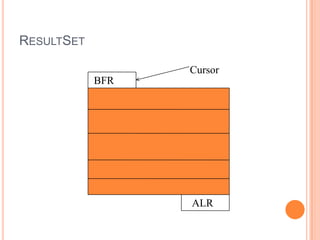
ResultSetA ResultSet object is a java object which can store bunch of selected rows given by select query execution.Only one ResultSet per Statement can be open at once.The table rows are retrieved in sequence.A ResultSet maintains a cursor pointing to its current row of data. The 'next' method moves the cursor to the next row.
ResultSetCursorBFR ALR
ResultSet Methodsboolean next() activates the next rowthe first call to next() activates the first rowreturns false if there are no more rows void close() disposes of the ResultSetallows you to re-use the Statement that created it
ResultSet MethodsTypegetType(intcolumnIndex)returns the given field as the given typefields indexed starting at 1 (not 0)TypegetType(String columnName)same, but uses name of fieldless efficient
ResultSet MethodsString getString(int columnIndex) boolean getBoolean(int columnIndex) byte getByte(int columnIndex) short getShort(int columnIndex) int getInt(int columnIndex) long getLong(int columnIndex) float getFloat(int columnIndex) double getDouble(int columnIndex) Date getDate(int columnIndex) Time getTime(int columnIndex) Timestamp getTimestamp(int columnIndex)
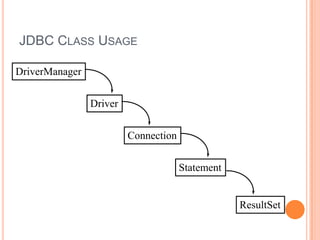
JDBC Object ClassesDriverManagerLoads, chooses driversDriverconnects to actual databaseConnectiona series of SQL statements to and from the DBStatementa single SQL statementResultSetthe records returned from a Statement
JDBC Class UsageDriverManagerDriverConnectionStatementResultSet
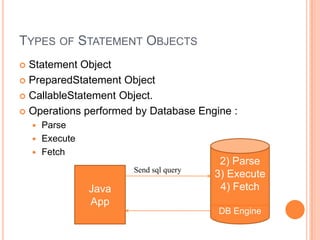
Types of Statement ObjectsStatement ObjectPreparedStatement ObjectCallableStatement Object.Operations performed by Database Engine :ParseExecuteFetch2) Parse3) Execute4) FetchDB EngineSend sql queryJava App
Limitations of Statement ObjectDB s/w parses the same query multiple no. of times  and executes, fetches the o/p .Framing query for simple Statement object using variable is quite unnecessary.Network traffic to the DB s/w is heavy since same query goes multiple no. of times to the DB s/w.To overcome these problems use precompiled queries.
PreparedStament ObjectA query that goes and resides on the DB s/w without values by becoming parsed query is a precompiled query.Precompiled queries will be parsed only once, but capable of executing multiple times with same or different values.PreparedStatement object represents this precompiled query.When to use Statement object and PreparedStatement object ?
Steps to work with PreparedStatementPrepare the query having positional parameters.String query=“insert into item values(?,?,?,?)”;Positional parameter indicates value to that query will be set afterwards.Create PreparedStatement object.PreparedStatementps=con.prepareStatement(query);Set the values for positional paremeters using setType(-,-) methods.ps.setInt(-,-), ps.setString(-,-)This method makes query as a precompiled query
Steps to work with PreparedStatementExecute the queryint result = ps.executeUpdate();For more executions repeat step 3 & 4.Close PreparedStatement objectps.close()
CallableStatementDB s/w can maintain the business logic in the form of PL/SQL procedures and functions.To call PL/SQL procedures and functions from the java app , use CallableStatement.Procedure is a subprogram that performs specific action.A function is a subprogram that computes a value. Functions and procedures are structured alike, except that functions have a RETURN clause
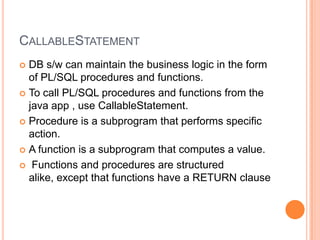
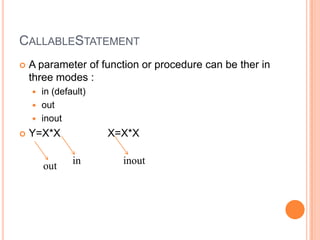
CallableStatementA parameter of function or procedure can be ther in three modes :in (default)out inoutY=X*X                X=X*Xininoutout
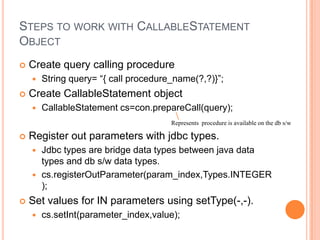
Steps to work with CallableStatement ObjectCreate query calling procedureString query= “{ call procedure_name(?,?)}”;Create CallableStatement objectCallableStatementcs=con.prepareCall(query);Register out parameters with jdbc types.Jdbc types are bridge data types between java data types and db s/w data types.cs.registerOutParameter(param_index,Types.INTEGER);Set values for IN parameters using setType(-,-).cs.setInt(parameter_index,value);Represents  procedure is available on the db s/w
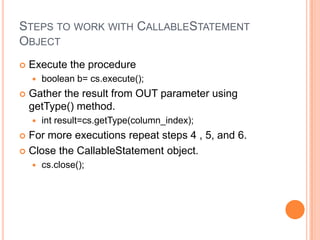
Steps to work with CallableStatement ObjectExecute the procedureboolean b= cs.execute();Gather the result from OUT parameter using getType() method.int result=cs.getType(column_index);For more executions repeat steps 4 , 5, and 6.Close the CallableStatement object.cs.close();
Mapping Java Types to SQL TypesSQL type 	Java TypeCHAR, VARCHAR, LONGVARCHAR	StringNUMERIC, DECIMAL	java.math.BigDecimalBIT	booleanTINYINT	byteSMALLINT	shortINTEGER	intBIGINT	longREAL	floatFLOAT, DOUBLE	doubleBINARY, VARBINARY, LONGVARBINARY	byte[]DATE	java.sql.DateTIME	java.sql.TimeTIMESTAMP	java.sql.Timestamp
Database TimeJava defines three classes to helpjava.sql.Dateyear, month, dayjava.sql.Timehours, minutes, secondsjava.sql.Timestampyear, month, day, hours, minutes, seconds, nanosecondsusually use this one
Metadata with JDBCUsed to get information about tables, views, column names, column types, stored procedures, result sets, and databases.You can use database metadata toDiscover database schema information.Discover database users, tables, views, and stored proceduresUnderstand and analyze the result sets returned by SQL queriesDetermine the signature of a specific stored procedure in the database.Identify the primary/foreign keys for a given table
Metadata in JDBCDatabaseMetaData : Gives limitations & capabilities of underlying DB s/w.Object of a class that implements java.sql.DatabaseMetaData interface.DatabaseMetaDatadbmd=conn.getMetaData();Invoke various methos on dbmd object to gather the details about the DB s/w pointed by Connection object.ResultsetMetaData : Gives details about table that is represented by Resultset object.Object of a class that implements java.sql.ResultsetMetaData interface.ResultsetMetaDatarsmd=resltSetOb.getMetaData();
Metadata in JDBCParameterMetaData : Gives details about place holders kept in queries.Object of a class that implements java.sql.ParameterMetaData interface.PreparedStatementpst=con.prepareStatement( “insert into items values(?,?,?,?)”);ParameterMetaData d=pst.getParameterMetaData();If any method invoked in DatabaseMetaData returns 0 or null , it means the driver is not capable of gathering certain information regarding DB s/wMost of the drivers doesn’t support ParameterMetaData
JDBC 2.0Scrollable result setBatch updatesAdvanced data typesBlobs, objects, structured typesRowsetsPersistent JavaBeansJNDIConnection PoolingDistributed transactions via JTS
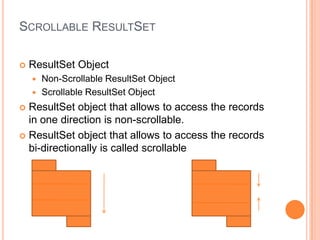
Scrollable ResultSetResultSet ObjectNon-Scrollable ResultSet ObjectScrollable ResultSet ObjectResultSet object that allows to access the records in one direction is non-scrollable.ResultSet object that allows to access the records bi-directionally is called scrollable
Scrollable ResultSetJDBC 2.0 introduces scrollable results sets whose values can be read and updated if reading and updating is supported by the underlying database. With scrollable result sets, any row can be selected at random, and the result set can be traversed forwards and backwards.One advantage to the new result set is you can update a set of matching rows without having to issue an additional executeUpdate call.
Scrollable ResultSetBoth Statements and PreparedStatements have an additional constructor that accepts a scroll type and an update type parameterThe scroll type value can be one of the following values: ResultSet.TYPE_FORWARD_ONLYDefault behavior in JDBC 1.0, application can only call next() on the result set. ResultSet.SCROLL_SENSITIVEResultSet is fully navigable and updates are reflected in the result set as they occur. ResultSet.SCROLL_INSENSITIVEResult set is fully navigable, but updates are only visible after the result set is closed. You need to create a new result set to see the results.
Scrollable ResultSetThe update type parameter can be one of the following two values: ResultSet.CONCUR_READ_ONLYThe result set is read only. ResultSet.CONCUR_UPDATABLEThe result set can be updated. You can verify that your database supports these types by calling :con.getMetaData().supportsResultSetConcurrency() method
Navigating the ResultSetThe fully scrollable result set returns a cursor which can be moved using simple commands.By default the result set cursor points to the row before the first row of the result set. A call to next() retrieves the first result set rowbeforeFirst(): Default position. Puts cursor before the first row of the result set. first(): Puts cursor on the first row of the result set. last(): Puts cursor before the last row of the result set. afterLast() Puts cursor beyond last row of the result set. Calls to previous moves backwards through the ResultSet. absolute(pos): Puts cursor at the row number position where absolute(1) is the first row and absolute(-1) is the last row. relative(pos): Puts cursor at a row relative to its current position where relative(1) moves row cursor one row forward.
Updatable ResultSet ObjectIf modifications done in the ResultSet object is reflecting in the DB table, then ResultSet object is called as Updatable ResultSet object.We can perform insert, update, delete operations on the table without SQL statements.You can update a value in a result set by calling the ResultSet.update<type> method on the row where the cursor is positionedThe update applies only to the result set until the call to rs.updateRow(), which updates the underlying databaseClosing the result set before calling updateRow will lose any edits applied to the result set
Updatable ResultSet ObjectInserting a new row uses the same update<type> methodsrs.moveToInsertRow is called before and rs.insertRow() is called after the fields have been initializedYou can delete the current row with a call to rs.deleteRow()Is not suitable for bulk delete and bulk update operations.Only ScrollableResultSet can become UpdatableResultSet.
Batch ProcessingIs a process of combining related queries into single unit, sending them to DB s/w as batch and getting their result as a batch.Instead of sending multiple queries to DB s/w for multiple times, send queries as a batch.Reduces network round trips between java application and DB s/w.Helps the programmer to work with Transactions.
Batch ProcessingThe calls to stmt.addBatch(-) append statements to the original Statement.The call to executeBatch() submits the entire statement with all the appends to the database.The return result of the addBatch method is an array of row counts affected for each statement executed in the batch job.If a problem occurred, a java.sql.BatchUpdateException is thrown.Once select query is executed , it generates ResultSet object. Since ResultSet object cannot be stored in integer array, batch processing cannot include select queries.
Transaction ManagementIs all about combining set of related operations into a single unit and executing them by applying do everything or nothing principleTransactions are not explicitly opened and closedInstead, the connection has a state called AutoCommit modeif AutoCommit is true, then every statement is automatically committeddefault case: true
setAutoCommitConnection.setAutoCommit(boolean)if AutoCommit is false, then every statement is added to an ongoing transactionyou must explicitly commit or rollback the transaction using Connection.commit() and Connection.rollback()
RowSetsWe can send only those java objects over the network which are serializable.ResultSet object is not a serializable object, so we cannot send that object over network.To overcome this problem jdbc has given support for RowSet  object which are extension to ResultSet object and can be sent over network.All JDBC drivers doesn’t support RowSets.
Performance Tuning For JDBC API
Why Optimize?On average, a web request performs 4 database queries.Experience has shown that database calls are typical performance bottleneck.Bad JDBC can overwhelm the database.
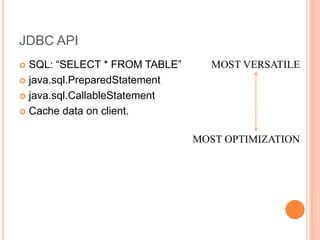
JDBC APISQL: “SELECT * FROM TABLE”java.sql.PreparedStatementjava.sql.CallableStatementCache data on client.MOST VERSATILEMOST OPTIMIZATION
JDBC APISQL STATEMENTSMost flexibleLeast reliableMust be recompiled in database for each usePREPARED STATEMENTRepresents a precompiled SQL statementCan be used to efficiently execute statement multiple timesSomewhat flexible –can create new ones as needed
JDBC APICALLABLE STATEMENTUsed to execute SQL stored procedures. Same syntax as PreparedStatement.Least flexible.Most optimized DB call.PreparedStatement gives better performance when compared to Statement because it is pre-parsed and pre-compiled by the database once for the first time and then onwards it reuses the parsed and compiled statement.CallableStatement gives better performance when compared to PreparedStatement and Statement when there is a requirement for single request to process multiple complex statements
JDBC APICACHEKeep data within client to reduce the number of round-trips to the database.Every database schema generally has read-only and read-mostly tables. These tables are called as lookup tables.Read-only tables contain static data that never changes in its life time. Read-mostly tables contain semi dynamic data that changes oftenIf an application reads data from these tables for every client request, then it is redundant, unnecessary and expensive. The solution for this problem is to cache the read-only table data by reading the data from that table once and caching the read-mostly table data by reading and refreshing with time limit
Basic Design TechniquesUse Database Connection PoolDon’t useDriverManager.getConnection() often. JDBC connections can take 0.5 to 2 seconds to create.Create Pool of Connections and reuse them.Use multi-threading with Connection Pooling to address network latencyThreads can issue queries over separate database connections.OPTIMIZATION WITH RESULTSET OBJECTSet up proper direction for processing the rowsUse proper get methodsClose ResultSet when finished
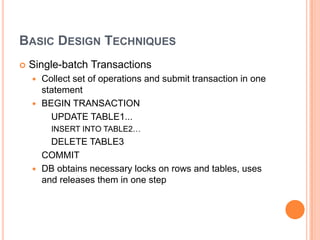
Basic Design TechniquesSingle-batch TransactionsCollect set of operations and submit transaction in one statementBEGIN TRANSACTION    	UPDATE TABLE1... 	INSERT INTO TABLE2…		DELETE TABLE3	COMMITDB obtains necessary locks on rows and tables, uses and releases them in one step
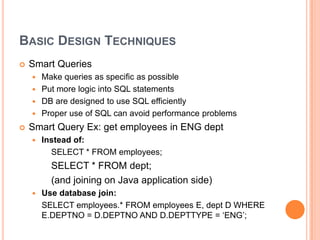
Basic Design TechniquesSmart QueriesMake queries as specific as possiblePut more logic into SQL statementsDB are designed to use SQL efficientlyProper use of SQL can avoid performance problemsSmart Query Ex: get employees in ENG deptInstead of: 		SELECT * FROM employees;	     	SELECT * FROM dept;		(and joining on Java application side)Use database join:	SELECT employees.* FROM employees E, dept D WHERE E.DEPTNO = D.DEPTNO AND D.DEPTTYPE = ‘ENG’;
Basic Design TechniquesSmart Query GuidelinesUse DB for filteringUse Java for business logicDB does filtering very wellDB business logic is poor
Connection PoolingThere are two types of jdbc connection objects :Direct Connection ObjectPooled Connection ObjectThe JDBC Connection object that is created by the programmer manually is called direct connection object.The JDBC Connection object that is collected from JDBC Connection pool is called pooled connection object.JDBC Connection pool is a factory that contains set of readily available JDBC connection objects.
Connection PoolingUsing connection pools helps to both alleviate connection management overhead and decrease development tasks for data access.Each time an application attempts to access a backend store (such as a database), it requires resources to create, maintain, and release a connection to that datastore.To mitigate the strain this process can place on overall application resources, the Application Server enables administrators to establish a pool of backend connections that applications can share on an application server
Advantages of Connection PoolingConnection pooling can improve the response time of any application that requires connections, especially Web-based applications.With connection pooling, most user requests do not incur the overhead of creating a new connection because the data source can locate and use an existing connection from the pool of connectionsRe usability, we can reuse the existing connection already existingIt also simplifies the design in terms of managing the connections; we can delegate the connection creation, max number of connections for an application, max idle time for a connection etc. using the some kind of a connection pool manager
C3P0 Connection Poolingc3p0 is an easy-to-use library for making traditional JDBC drivers "enterprise-ready" by augmenting them with functionality defined by the jdbc3 spec and the optional extensions to jdbc2c3p0 provides several useful services:Classes which adapt traditional DriverManager-based JDBC drivers to the new javax.sql.DataSource scheme for acquiring database Connections.Transparent pooling of Connection and PreparedStatements behind DataSources which can "wrap" around traditional drivers or arbitrary unpooledDataSources.
Working with C3P0 Connection PoolPut the file lib/c3p0-0.9.1.2.jar somewhere in your CLASSPATHThere are three ways of acquiring c3p0 pool-backed DataSources:directly instantiate and configure a ComboPooledDataSource beanuse the DataSources factory class"build your own" pool-backed DataSource by directly instantiating PoolBackedDataSource and setting its ConectionPoolDataSource
Instantiating and Configuring a ComboPooledDataSourcethe most straightforward way to create a c3p0 pooling DataSource is to instantiate an instance of com.mchange.v2.c3p0.ComboPooledDataSourceThis is a JavaBean-style class with a public, no-arg constructorBefore you use the DataSource, you'll have to be sure to set at least the property jdbcUrlYou may also want to set user and password, and if you have not externally preloaded the old-style JDBC driver you'll use you should set the driverClass.
Using the DataSources factory classuse the static factory class com.mchange.v2.c3p0.DataSourcesCan be used to build unpooledDataSources from traditional JDBC driversCan be used to build pooled DataSources from unpooledDataSourcesIf you use the DataSources factory class, and you want to programmatically override default configuration parameters, you can supply a map of override properties
Java Naming And Directory Interface (JNDI)Java application uses JNDI API to interact with Naming Registry s/w.Every JDBC Connection pool will be represented by Data Source object.To make this data source object publically visible, we register data source object in a special place called naming registry having nick name (jndi name).In order to access a JDBC Connection object of a Connection pool, we need to access the data source object pointing to that connection pool.
Java Naming And Directory Interface (JNDI)Java application needs to perform look up or search operation on naming registry to get the data source object.Use getConnection () method on the data source object to get the connection object from the connection pool.
An open source DataBase Management System Community Editions freeEnterprise Editions free license but a subscription and maintenance feeSuitable situations range from small enterprise to global, enterprise-wide systems Multiple platforms
MySQL ToolsThe core system includes only a command-line tool‘mysqladmin’GUI tools available separately from MySQL are ‘MySQL Administrator’ (a DBA tool) and ‘MySQL Query Browser’
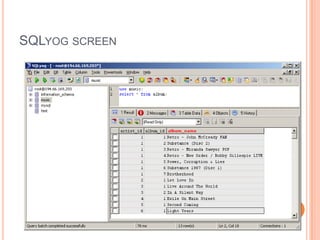
SQLyog is a GUI front-end for MySQL (there are others) - Community and Enterprise EditionsAllows Data Definition and Data ManipulationAfter loading it and before using it you need to ‘Connect’ to the right MySQL instanceA tutorial, with a range of activities to get familiar with it, is available at http://www.databasejournal.com/features/mysql/article.php/1558731
SQLyog screen
ReferencesFor further information seewww.mysql.comwww.webyog.com/en/ includes forums and FAQs

Database Access With JDBC

  • 1.
  • 2.
    JDBCIs an APIspec. whose implementation comes in the form of jdbc drivers.JDBC API :java.sql.*javax.sql.*
  • 3.
    JDBC DriverIs abridge s/w between java application and database s/w.Is a java class that implements java.sql.Driver interface.Why we use JDBC Driver?
  • 4.
    JDBC ArchitectureApplicationJDBCDriverJava codecalls JDBC libraryJDBC loads a driverDriver talks to a particular databaseCan have more than one driver -> more than one database
  • 5.
    JDBC DriversType I:“Bridge”Type II: “Native”Type III: “Middleware”Type IV: “Pure”
  • 6.
    Type 1 Driver(jdbc - odbc bridge driver )OracleDBJava App that uses JDBC APIJdbc driver type1ODBC Driver for OracleVendor DB Library for OracleMS AccessODBC Driver for MS-AccessVendor DB Library for M S Access
  • 7.
    Type 1 Driver(Cont….)Inbuilt driver of j2sdk s/w.Suitable to interact with almost all the database s/w ’sDriver performance is very poor.Not suitable for internet programming and applet to database communication
  • 8.
    Type 2 Driver(Native API /Partly Java Driver)OracleDBJava App that uses JDBC APIJdbc driver type2Vendor DB Library for OracleMS AccessVendor DB Library for M S AccessJdbc driver type2
  • 9.
    Type 2 Driver(cont…)Specific to each database s/w.Significantly better performance than Type 1.Odbc drivers presence is not mandatory.Not suitable for large scale applications.Not suitable for internet / applet programsEvery db requires a separate driver.
  • 10.
    Type 4 Driver(Native Protocol /All Java Driver)OracleDBJava App that uses JDBC APIJdbc driver type4MS AccessJdbc driver type4
  • 11.
    Type 4 Driver(Native Protocol / All Java Driver)Completely developed in java.Can interact with db without having the support of odbc driver / vendor db library.Platform independent.Performance is good.Applet and internet programming is possible
  • 12.
    Type 3 Driver( Network Protocol Driver )Java app manipulates DB data using con objectJava App(Client App)DB S/WInteract using type 1,2,4 driversGets object from conn pool using type 3Application ServerJDBC CONNECTION POOLRelease connection object back to conn poolconconconJava App(Client App)con
  • 13.
    Type 3 DriverIsnot a driverIts protocolContains rules required to establish communication between java application and connection pool
  • 14.
    JDBC Drivers (Fig.)JDBCTypeI“Bridge”ODBCODBCDriverType II“Native”CLI (.lib)MiddlewareServerType III“Middleware”Type IV“Pure”
  • 15.
    Steps to developjava/jdbc Appjava.sqlClasses------------TypesDriverManagerDateTimeStampInterfaces ---------------ConnectionStatementResultSetDriverPreparedStatementCallableStatement
  • 16.
    Steps to developjava/jdbc AppLoad the JDBC Driver class and register with DriverManager.Establish the connection with database s/w.Prepare Statement objectExecute the query.Get result and process the resultClose the connection.
  • 17.
    Loading & Registeringa Driverstatically load driverClass.forName(“sun.jdbc.odbc.JdbcOdbcDriver”);
  • 18.
    DriverManagerAll JDBC Driverswill be registered and managed by DriverManager.When a driver class is first loaded, it registers itself with the DriverManagerTherefore, to register a driver, just load it!
  • 19.
    ConnectionA Connection representsa session with a specific database.Establishing connection with db s/w is nothing but creating communication channelCan have multiple connections to a databaseOnce task with connection is completed, close the connection.
  • 20.
    Obtaining a ConnectionStringurl = "jdbc:odbc:datasource";try {Class.forName ("sun.jdbc.odbc.JdbcOdbcDriver"); Connection con = DriverManager.getConnection(url);}catch (ClassNotFoundException e) { e.printStackTrace(); }catch (SQLException e) { e.printStackTrace(); }
  • 21.
    StatementActs as acourier service to send queries to the db s/w.A Statement object is used for executing a static SQL statement and obtaining the results produced by it.
  • 22.
    Statement MethodsResultSetexecuteQuery(String) Executea SQL statement that returns a single ResultSet. intexecuteUpdate(String) Execute a SQL INSERT, UPDATE or DELETE statement. Returns the number of rows changed.boolean execute(String) Execute a SQL statement that may return multiple results. What is the difference between execute(-) and executeQuery(-)?
  • 23.
    ResultSetA ResultSet objectis a java object which can store bunch of selected rows given by select query execution.Only one ResultSet per Statement can be open at once.The table rows are retrieved in sequence.A ResultSet maintains a cursor pointing to its current row of data. The 'next' method moves the cursor to the next row.
  • 24.
  • 25.
    ResultSet Methodsboolean next()activates the next rowthe first call to next() activates the first rowreturns false if there are no more rows void close() disposes of the ResultSetallows you to re-use the Statement that created it
  • 26.
    ResultSet MethodsTypegetType(intcolumnIndex)returns thegiven field as the given typefields indexed starting at 1 (not 0)TypegetType(String columnName)same, but uses name of fieldless efficient
  • 27.
    ResultSet MethodsString getString(intcolumnIndex) boolean getBoolean(int columnIndex) byte getByte(int columnIndex) short getShort(int columnIndex) int getInt(int columnIndex) long getLong(int columnIndex) float getFloat(int columnIndex) double getDouble(int columnIndex) Date getDate(int columnIndex) Time getTime(int columnIndex) Timestamp getTimestamp(int columnIndex)
  • 28.
    JDBC Object ClassesDriverManagerLoads,chooses driversDriverconnects to actual databaseConnectiona series of SQL statements to and from the DBStatementa single SQL statementResultSetthe records returned from a Statement
  • 29.
  • 30.
    Types of StatementObjectsStatement ObjectPreparedStatement ObjectCallableStatement Object.Operations performed by Database Engine :ParseExecuteFetch2) Parse3) Execute4) FetchDB EngineSend sql queryJava App
  • 31.
    Limitations of StatementObjectDB s/w parses the same query multiple no. of times and executes, fetches the o/p .Framing query for simple Statement object using variable is quite unnecessary.Network traffic to the DB s/w is heavy since same query goes multiple no. of times to the DB s/w.To overcome these problems use precompiled queries.
  • 32.
    PreparedStament ObjectA querythat goes and resides on the DB s/w without values by becoming parsed query is a precompiled query.Precompiled queries will be parsed only once, but capable of executing multiple times with same or different values.PreparedStatement object represents this precompiled query.When to use Statement object and PreparedStatement object ?
  • 33.
    Steps to workwith PreparedStatementPrepare the query having positional parameters.String query=“insert into item values(?,?,?,?)”;Positional parameter indicates value to that query will be set afterwards.Create PreparedStatement object.PreparedStatementps=con.prepareStatement(query);Set the values for positional paremeters using setType(-,-) methods.ps.setInt(-,-), ps.setString(-,-)This method makes query as a precompiled query
  • 34.
    Steps to workwith PreparedStatementExecute the queryint result = ps.executeUpdate();For more executions repeat step 3 & 4.Close PreparedStatement objectps.close()
  • 35.
    CallableStatementDB s/w canmaintain the business logic in the form of PL/SQL procedures and functions.To call PL/SQL procedures and functions from the java app , use CallableStatement.Procedure is a subprogram that performs specific action.A function is a subprogram that computes a value. Functions and procedures are structured alike, except that functions have a RETURN clause
  • 36.
    CallableStatementA parameter offunction or procedure can be ther in three modes :in (default)out inoutY=X*X X=X*Xininoutout
  • 37.
    Steps to workwith CallableStatement ObjectCreate query calling procedureString query= “{ call procedure_name(?,?)}”;Create CallableStatement objectCallableStatementcs=con.prepareCall(query);Register out parameters with jdbc types.Jdbc types are bridge data types between java data types and db s/w data types.cs.registerOutParameter(param_index,Types.INTEGER);Set values for IN parameters using setType(-,-).cs.setInt(parameter_index,value);Represents procedure is available on the db s/w
  • 38.
    Steps to workwith CallableStatement ObjectExecute the procedureboolean b= cs.execute();Gather the result from OUT parameter using getType() method.int result=cs.getType(column_index);For more executions repeat steps 4 , 5, and 6.Close the CallableStatement object.cs.close();
  • 39.
    Mapping Java Typesto SQL TypesSQL type Java TypeCHAR, VARCHAR, LONGVARCHAR StringNUMERIC, DECIMAL java.math.BigDecimalBIT booleanTINYINT byteSMALLINT shortINTEGER intBIGINT longREAL floatFLOAT, DOUBLE doubleBINARY, VARBINARY, LONGVARBINARY byte[]DATE java.sql.DateTIME java.sql.TimeTIMESTAMP java.sql.Timestamp
  • 40.
    Database TimeJava definesthree classes to helpjava.sql.Dateyear, month, dayjava.sql.Timehours, minutes, secondsjava.sql.Timestampyear, month, day, hours, minutes, seconds, nanosecondsusually use this one
  • 41.
    Metadata with JDBCUsedto get information about tables, views, column names, column types, stored procedures, result sets, and databases.You can use database metadata toDiscover database schema information.Discover database users, tables, views, and stored proceduresUnderstand and analyze the result sets returned by SQL queriesDetermine the signature of a specific stored procedure in the database.Identify the primary/foreign keys for a given table
  • 42.
    Metadata in JDBCDatabaseMetaData: Gives limitations & capabilities of underlying DB s/w.Object of a class that implements java.sql.DatabaseMetaData interface.DatabaseMetaDatadbmd=conn.getMetaData();Invoke various methos on dbmd object to gather the details about the DB s/w pointed by Connection object.ResultsetMetaData : Gives details about table that is represented by Resultset object.Object of a class that implements java.sql.ResultsetMetaData interface.ResultsetMetaDatarsmd=resltSetOb.getMetaData();
  • 43.
    Metadata in JDBCParameterMetaData: Gives details about place holders kept in queries.Object of a class that implements java.sql.ParameterMetaData interface.PreparedStatementpst=con.prepareStatement( “insert into items values(?,?,?,?)”);ParameterMetaData d=pst.getParameterMetaData();If any method invoked in DatabaseMetaData returns 0 or null , it means the driver is not capable of gathering certain information regarding DB s/wMost of the drivers doesn’t support ParameterMetaData
  • 44.
    JDBC 2.0Scrollable resultsetBatch updatesAdvanced data typesBlobs, objects, structured typesRowsetsPersistent JavaBeansJNDIConnection PoolingDistributed transactions via JTS
  • 45.
    Scrollable ResultSetResultSet ObjectNon-ScrollableResultSet ObjectScrollable ResultSet ObjectResultSet object that allows to access the records in one direction is non-scrollable.ResultSet object that allows to access the records bi-directionally is called scrollable
  • 46.
    Scrollable ResultSetJDBC 2.0introduces scrollable results sets whose values can be read and updated if reading and updating is supported by the underlying database. With scrollable result sets, any row can be selected at random, and the result set can be traversed forwards and backwards.One advantage to the new result set is you can update a set of matching rows without having to issue an additional executeUpdate call.
  • 47.
    Scrollable ResultSetBoth Statementsand PreparedStatements have an additional constructor that accepts a scroll type and an update type parameterThe scroll type value can be one of the following values: ResultSet.TYPE_FORWARD_ONLYDefault behavior in JDBC 1.0, application can only call next() on the result set. ResultSet.SCROLL_SENSITIVEResultSet is fully navigable and updates are reflected in the result set as they occur. ResultSet.SCROLL_INSENSITIVEResult set is fully navigable, but updates are only visible after the result set is closed. You need to create a new result set to see the results.
  • 48.
    Scrollable ResultSetThe updatetype parameter can be one of the following two values: ResultSet.CONCUR_READ_ONLYThe result set is read only. ResultSet.CONCUR_UPDATABLEThe result set can be updated. You can verify that your database supports these types by calling :con.getMetaData().supportsResultSetConcurrency() method
  • 49.
    Navigating the ResultSetThefully scrollable result set returns a cursor which can be moved using simple commands.By default the result set cursor points to the row before the first row of the result set. A call to next() retrieves the first result set rowbeforeFirst(): Default position. Puts cursor before the first row of the result set. first(): Puts cursor on the first row of the result set. last(): Puts cursor before the last row of the result set. afterLast() Puts cursor beyond last row of the result set. Calls to previous moves backwards through the ResultSet. absolute(pos): Puts cursor at the row number position where absolute(1) is the first row and absolute(-1) is the last row. relative(pos): Puts cursor at a row relative to its current position where relative(1) moves row cursor one row forward.
  • 50.
    Updatable ResultSet ObjectIfmodifications done in the ResultSet object is reflecting in the DB table, then ResultSet object is called as Updatable ResultSet object.We can perform insert, update, delete operations on the table without SQL statements.You can update a value in a result set by calling the ResultSet.update<type> method on the row where the cursor is positionedThe update applies only to the result set until the call to rs.updateRow(), which updates the underlying databaseClosing the result set before calling updateRow will lose any edits applied to the result set
  • 51.
    Updatable ResultSet ObjectInsertinga new row uses the same update<type> methodsrs.moveToInsertRow is called before and rs.insertRow() is called after the fields have been initializedYou can delete the current row with a call to rs.deleteRow()Is not suitable for bulk delete and bulk update operations.Only ScrollableResultSet can become UpdatableResultSet.
  • 52.
    Batch ProcessingIs aprocess of combining related queries into single unit, sending them to DB s/w as batch and getting their result as a batch.Instead of sending multiple queries to DB s/w for multiple times, send queries as a batch.Reduces network round trips between java application and DB s/w.Helps the programmer to work with Transactions.
  • 53.
    Batch ProcessingThe callsto stmt.addBatch(-) append statements to the original Statement.The call to executeBatch() submits the entire statement with all the appends to the database.The return result of the addBatch method is an array of row counts affected for each statement executed in the batch job.If a problem occurred, a java.sql.BatchUpdateException is thrown.Once select query is executed , it generates ResultSet object. Since ResultSet object cannot be stored in integer array, batch processing cannot include select queries.
  • 54.
    Transaction ManagementIs allabout combining set of related operations into a single unit and executing them by applying do everything or nothing principleTransactions are not explicitly opened and closedInstead, the connection has a state called AutoCommit modeif AutoCommit is true, then every statement is automatically committeddefault case: true
  • 55.
    setAutoCommitConnection.setAutoCommit(boolean)if AutoCommit isfalse, then every statement is added to an ongoing transactionyou must explicitly commit or rollback the transaction using Connection.commit() and Connection.rollback()
  • 56.
    RowSetsWe can sendonly those java objects over the network which are serializable.ResultSet object is not a serializable object, so we cannot send that object over network.To overcome this problem jdbc has given support for RowSet object which are extension to ResultSet object and can be sent over network.All JDBC drivers doesn’t support RowSets.
  • 57.
  • 58.
    Why Optimize?On average,a web request performs 4 database queries.Experience has shown that database calls are typical performance bottleneck.Bad JDBC can overwhelm the database.
  • 59.
    JDBC APISQL: “SELECT* FROM TABLE”java.sql.PreparedStatementjava.sql.CallableStatementCache data on client.MOST VERSATILEMOST OPTIMIZATION
  • 60.
    JDBC APISQL STATEMENTSMostflexibleLeast reliableMust be recompiled in database for each usePREPARED STATEMENTRepresents a precompiled SQL statementCan be used to efficiently execute statement multiple timesSomewhat flexible –can create new ones as needed
  • 61.
    JDBC APICALLABLE STATEMENTUsedto execute SQL stored procedures. Same syntax as PreparedStatement.Least flexible.Most optimized DB call.PreparedStatement gives better performance when compared to Statement because it is pre-parsed and pre-compiled by the database once for the first time and then onwards it reuses the parsed and compiled statement.CallableStatement gives better performance when compared to PreparedStatement and Statement when there is a requirement for single request to process multiple complex statements
  • 62.
    JDBC APICACHEKeep datawithin client to reduce the number of round-trips to the database.Every database schema generally has read-only and read-mostly tables. These tables are called as lookup tables.Read-only tables contain static data that never changes in its life time. Read-mostly tables contain semi dynamic data that changes oftenIf an application reads data from these tables for every client request, then it is redundant, unnecessary and expensive. The solution for this problem is to cache the read-only table data by reading the data from that table once and caching the read-mostly table data by reading and refreshing with time limit
  • 63.
    Basic Design TechniquesUseDatabase Connection PoolDon’t useDriverManager.getConnection() often. JDBC connections can take 0.5 to 2 seconds to create.Create Pool of Connections and reuse them.Use multi-threading with Connection Pooling to address network latencyThreads can issue queries over separate database connections.OPTIMIZATION WITH RESULTSET OBJECTSet up proper direction for processing the rowsUse proper get methodsClose ResultSet when finished
  • 64.
    Basic Design TechniquesSingle-batchTransactionsCollect set of operations and submit transaction in one statementBEGIN TRANSACTION UPDATE TABLE1... INSERT INTO TABLE2… DELETE TABLE3 COMMITDB obtains necessary locks on rows and tables, uses and releases them in one step
  • 65.
    Basic Design TechniquesSmartQueriesMake queries as specific as possiblePut more logic into SQL statementsDB are designed to use SQL efficientlyProper use of SQL can avoid performance problemsSmart Query Ex: get employees in ENG deptInstead of: SELECT * FROM employees; SELECT * FROM dept; (and joining on Java application side)Use database join: SELECT employees.* FROM employees E, dept D WHERE E.DEPTNO = D.DEPTNO AND D.DEPTTYPE = ‘ENG’;
  • 66.
    Basic Design TechniquesSmartQuery GuidelinesUse DB for filteringUse Java for business logicDB does filtering very wellDB business logic is poor
  • 67.
    Connection PoolingThere aretwo types of jdbc connection objects :Direct Connection ObjectPooled Connection ObjectThe JDBC Connection object that is created by the programmer manually is called direct connection object.The JDBC Connection object that is collected from JDBC Connection pool is called pooled connection object.JDBC Connection pool is a factory that contains set of readily available JDBC connection objects.
  • 68.
    Connection PoolingUsing connectionpools helps to both alleviate connection management overhead and decrease development tasks for data access.Each time an application attempts to access a backend store (such as a database), it requires resources to create, maintain, and release a connection to that datastore.To mitigate the strain this process can place on overall application resources, the Application Server enables administrators to establish a pool of backend connections that applications can share on an application server
  • 69.
    Advantages of ConnectionPoolingConnection pooling can improve the response time of any application that requires connections, especially Web-based applications.With connection pooling, most user requests do not incur the overhead of creating a new connection because the data source can locate and use an existing connection from the pool of connectionsRe usability, we can reuse the existing connection already existingIt also simplifies the design in terms of managing the connections; we can delegate the connection creation, max number of connections for an application, max idle time for a connection etc. using the some kind of a connection pool manager
  • 70.
    C3P0 Connection Poolingc3p0is an easy-to-use library for making traditional JDBC drivers "enterprise-ready" by augmenting them with functionality defined by the jdbc3 spec and the optional extensions to jdbc2c3p0 provides several useful services:Classes which adapt traditional DriverManager-based JDBC drivers to the new javax.sql.DataSource scheme for acquiring database Connections.Transparent pooling of Connection and PreparedStatements behind DataSources which can "wrap" around traditional drivers or arbitrary unpooledDataSources.
  • 71.
    Working with C3P0Connection PoolPut the file lib/c3p0-0.9.1.2.jar somewhere in your CLASSPATHThere are three ways of acquiring c3p0 pool-backed DataSources:directly instantiate and configure a ComboPooledDataSource beanuse the DataSources factory class"build your own" pool-backed DataSource by directly instantiating PoolBackedDataSource and setting its ConectionPoolDataSource
  • 72.
    Instantiating and Configuringa ComboPooledDataSourcethe most straightforward way to create a c3p0 pooling DataSource is to instantiate an instance of com.mchange.v2.c3p0.ComboPooledDataSourceThis is a JavaBean-style class with a public, no-arg constructorBefore you use the DataSource, you'll have to be sure to set at least the property jdbcUrlYou may also want to set user and password, and if you have not externally preloaded the old-style JDBC driver you'll use you should set the driverClass.
  • 73.
    Using the DataSourcesfactory classuse the static factory class com.mchange.v2.c3p0.DataSourcesCan be used to build unpooledDataSources from traditional JDBC driversCan be used to build pooled DataSources from unpooledDataSourcesIf you use the DataSources factory class, and you want to programmatically override default configuration parameters, you can supply a map of override properties
  • 74.
    Java Naming AndDirectory Interface (JNDI)Java application uses JNDI API to interact with Naming Registry s/w.Every JDBC Connection pool will be represented by Data Source object.To make this data source object publically visible, we register data source object in a special place called naming registry having nick name (jndi name).In order to access a JDBC Connection object of a Connection pool, we need to access the data source object pointing to that connection pool.
  • 75.
    Java Naming AndDirectory Interface (JNDI)Java application needs to perform look up or search operation on naming registry to get the data source object.Use getConnection () method on the data source object to get the connection object from the connection pool.
  • 77.
    An open sourceDataBase Management System Community Editions freeEnterprise Editions free license but a subscription and maintenance feeSuitable situations range from small enterprise to global, enterprise-wide systems Multiple platforms
  • 78.
    MySQL ToolsThe coresystem includes only a command-line tool‘mysqladmin’GUI tools available separately from MySQL are ‘MySQL Administrator’ (a DBA tool) and ‘MySQL Query Browser’
  • 79.
    SQLyog is aGUI front-end for MySQL (there are others) - Community and Enterprise EditionsAllows Data Definition and Data ManipulationAfter loading it and before using it you need to ‘Connect’ to the right MySQL instanceA tutorial, with a range of activities to get familiar with it, is available at http://www.databasejournal.com/features/mysql/article.php/1558731
  • 80.
  • 81.
    ReferencesFor further informationseewww.mysql.comwww.webyog.com/en/ includes forums and FAQs