Developing an IPv6 Addressing Plan
Guidelines, Rules, Best Practice
Ron Broersma
DREN Chief Engineer
SPAWAR Network Security Manager
ron@spawar.navy.mil
Introduction
•  IPv6 deployment includes:
–  obtaining a block of IPv6 addresses (a “prefix”) for your
organization and its networks.
–  establishing a plan for how those addresses will be assigned
to your networks and subnets.
•  Observation: Many plans have serious flaws
–  usually takes about 3 times to get it right
–  many plans include the same basic mistakes
•  Goal of this presentation:
–  not intended to be a comprehensive tutorial
–  review the common mistakes, and the reasons behind them
–  save everyone time and effort, by avoiding those mistakes
•  less re-numbering
–  take full advantage of the vast address space now available
to us
16-Nov-2011 2
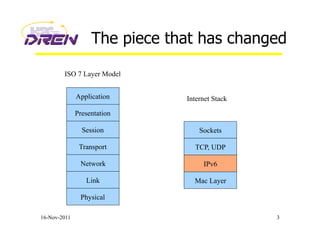
The piece that has changed
16-Nov-2011 3
ISO 7 Layer Model
Application
Presentation
Session
Transport
Network
Link
Physical
Sockets
TCP, UDP
IP
Mac Layer
Internet Stack
IPv6
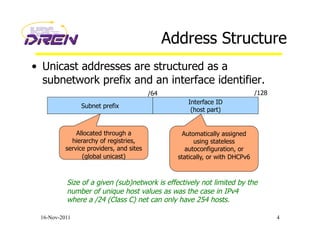
Address Structure
•  Unicast addresses are structured as a
subnetwork prefix and an interface identifier.
16-Nov-2011 4
Subnet prefix
Interface ID
(host part)
Allocated through a
hierarchy of registries,
service providers, and sites
(global unicast)
Automatically assigned
using stateless
autoconfiguration, or
statically, or with DHCPv6
Size of a given (sub)network is effectively not limited by the
number of unique host values as was the case in IPv4
where a /24 (Class C) net can only have 254 hosts.
/64 /128
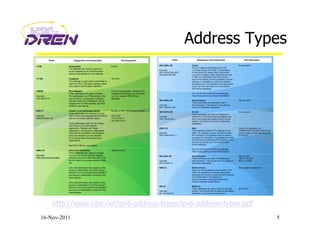
Address Types
16-Nov-2011 5
http://www.ripe.net/ipv6-address-types/ipv6-address-types.pdf
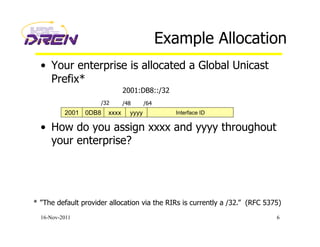
Example Allocation
•  Your enterprise is allocated a Global Unicast
Prefix*
•  How do you assign xxxx and yyyy throughout
your enterprise?
16-Nov-2011 6
2001 0DB8 xxxx yyyy Interface ID
/32 /48 /64
2001:DB8::/32
* ”The default provider allocation via the RIRs is currently a /32.” (RFC 5375)
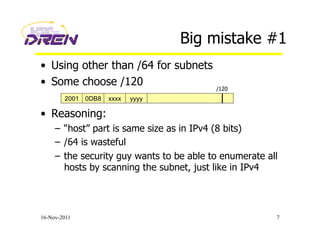
Big mistake #1
•  Using other than /64 for subnets
•  Some choose /120
•  Reasoning:
–  “host” part is same size as in IPv4 (8 bits)
–  /64 is wasteful
–  the security guy wants to be able to enumerate all
hosts by scanning the subnet, just like in IPv4
16-Nov-2011 7
2001 0DB8 xxxx yyyy
/120
IPv4 practice gets in the way
•  Being conservative with addresses
–  operating on the notion that addresses are very
scarce
•  Making the subnet mask long, to avoid waste.
Examples:
–  /30 for point-to-point links
–  if you only have 10 hosts on a subnet, then allocate
a /28
–  squeezing as many subnets as possible out of a /24
16-Nov-2011 8
Making the paradigm shift
•  You may be un-qualified to develop a final
IPv6 addressing plan if you think:
–  /64 for subnets is wasteful
–  /64 for point-to-point links is wasteful
–  /48 for small sites is wasteful
16-Nov-2011 9
Subnets are /64
•  If you choose other than /64, the following
things will not work:
–  Neighbor Discovery
–  Secure Neighbor Discovery
–  Stateless Address Autoconfiguration (SLAAC)
–  Microsoft DHCPv6
–  Multicast with Embedded-RP
–  Mobile-IPv6
–  and many other things in the future
•  Using other than /64 for subnets goes against:
–  RFC 4291 “IPv6 Addressing Architecture”
–  RFC 5375 “IPv6 Addressing Considerations”
16-Nov-2011 10
Subnets are /64
16-Nov-2011 11
“For all unicast addresses, except those that start with the binary value 000,
Interface IDs are required to be 64 bits long.” (RFC 4291)
“Using /64 subnets is strongly recommended, also for links connecting
only routers. A deployment compliant with the current IPv6 specifications
cannot use other prefix lengths.” (RFC 5375)
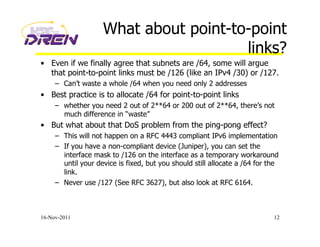
What about point-to-point
links?
•  Even if we finally agree that subnets are /64, some will argue
that point-to-point links must be /126 (like an IPv4 /30) or /127.
–  Can’t waste a whole /64 when you need only 2 addresses
•  Best practice is to allocate /64 for point-to-point links
–  whether you need 2 out of 2**64 or 200 out of 2**64, there’s not
much difference in “waste”
•  But what about that DoS problem from the ping-pong effect?
–  This will not happen on a RFC 4443 compliant IPv6 implementation
–  If you have a non-compliant device (Juniper), you can set the
interface mask to /126 on the interface as a temporary workaround
until your device is fixed, but you should still allocate a /64 for the
link.
–  Never use /127 (See RFC 3627), but also look at RFC 6164.
16-Nov-2011 12
Mistake #2
•  Thinking you have to get the addressing plan
right the first time
–  Unless you have operational experience with IPv6
deployments and transition, you WILL get it
wrong.
–  Usually takes about 3 times to get it right.
•  Thinking you can’t afford to re-address
–  Since the first plan is probably a throw-away, you
will have to re-address when you come up with a
revised plan.
16-Nov-2011 13
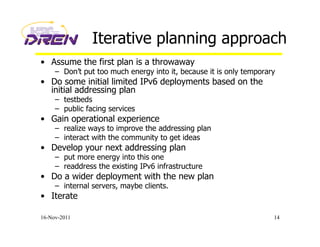
Iterative planning approach
•  Assume the first plan is a throwaway
–  Don’t put too much energy into it, because it is only temporary
•  Do some initial limited IPv6 deployments based on the
initial addressing plan
–  testbeds
–  public facing services
•  Gain operational experience
–  realize ways to improve the addressing plan
–  interact with the community to get ideas
•  Develop your next addressing plan
–  put more energy into this one
–  readdress the existing IPv6 infrastructure
•  Do a wider deployment with the new plan
–  internal servers, maybe clients.
•  Iterate
16-Nov-2011 14
Mistake #3
•  Trying to be too creative about how much
address space to allocate to a “site”
–  Thinking you need to allocate large amounts of
space to large sites, and much smaller amounts to
small sites
•  Assuming that large allocations to small sites
is wasteful
–  Go back and review the slide on being stuck in the
IPv4 conservation paradigm.
16-Nov-2011 15
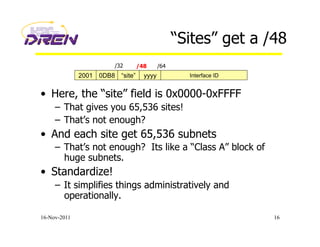
“Sites” get a /48
•  Here, the “site” field is 0x0000-0xFFFF
–  That gives you 65,536 sites!
–  That’s not enough?
•  And each site get 65,536 subnets
–  That’s not enough? Its like a “Class A” block of
huge subnets.
•  Standardize!
–  It simplifies things administratively and
operationally.
16-Nov-2011 16
2001 0DB8 “site” yyyy Interface ID
/32 /48 /64
Mistake #4
•  Justify “upwards”, rather than pre-allocate
“downwards”.
–  Requiring sites to develop documentation and
justification for their address space requirements
–  Allocating to those groups or sites based on that
justification
16-Nov-2011 17
Pre-allocation
•  You can easily pre-allocate to the site level
–  see slide on “sites get a /48”
•  Within sites, addressing can align with
existing subnet structure
–  later, you may want to re-address your IPv4
networks (but don’t worry about that just yet).
16-Nov-2011 18
Mistake #5
•  Host-centric allocation rather than subnet-
centric
–  Thinking that address allocation has anything to
do with the number of hosts
16-Nov-2011 19
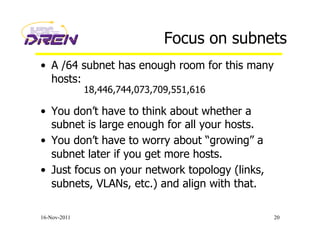
Focus on subnets
•  A /64 subnet has enough room for this many
hosts:
•  You don’t have to think about whether a
subnet is large enough for all your hosts.
•  You don’t have to worry about “growing” a
subnet later if you get more hosts.
•  Just focus on your network topology (links,
subnets, VLANs, etc.) and align with that.
16-Nov-2011 20
18,446,744,073,709,551,616
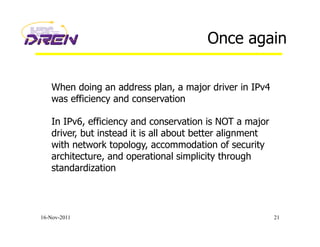
Once again
16-Nov-2011 21
When doing an address plan, a major driver in IPv4
was efficiency and conservation
In IPv6, efficiency and conservation is NOT a major
driver, but instead it is all about better alignment
with network topology, accommodation of security
architecture, and operational simplicity through
standardization
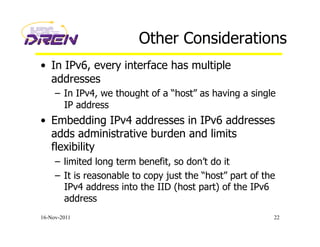
Other Considerations
•  In IPv6, every interface has multiple
addresses
–  In IPv4, we thought of a “host” as having a single
IP address
•  Embedding IPv4 addresses in IPv6 addresses
adds administrative burden and limits
flexibility
–  limited long term benefit, so don’t do it
–  It is reasonable to copy just the “host” part of the
IPv4 address into the IID (host part) of the IPv6
address
16-Nov-2011 22
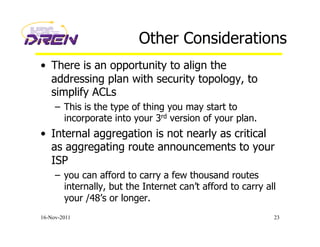
Other Considerations
•  There is an opportunity to align the
addressing plan with security topology, to
simplify ACLs
–  This is the type of thing you may start to
incorporate into your 3rd version of your plan.
•  Internal aggregation is not nearly as critical
as aggregating route announcements to your
ISP
–  you can afford to carry a few thousand routes
internally, but the Internet can’t afford to carry all
your /48’s or longer.
16-Nov-2011 23
Other Considerations
•  Most of the context here has been for large
enterprises that aggregate into a very few
connections to one or two ISPs, and use
“provider-independent” (PI) space.
•  If you have a lot of small outlier sites that are
single-homed directly to an ISP, have them
get their address space from that ISP, known
as “provider-aggregatable” (PA) space.
16-Nov-2011 24
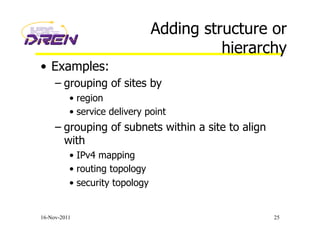
Adding structure or
hierarchy
•  Examples:
– grouping of sites by
•  region
•  service delivery point
– grouping of subnets within a site to align
with
•  IPv4 mapping
•  routing topology
•  security topology
16-Nov-2011 25
Adding structure or
hierarchy
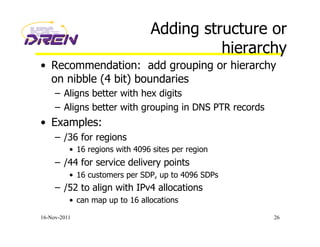
•  Recommendation: add grouping or hierarchy
on nibble (4 bit) boundaries
–  Aligns better with hex digits
–  Aligns better with grouping in DNS PTR records
•  Examples:
–  /36 for regions
•  16 regions with 4096 sites per region
–  /44 for service delivery points
•  16 customers per SDP, up to 4096 SDPs
–  /52 to align with IPv4 allocations
•  can map up to 16 allocations
16-Nov-2011 26
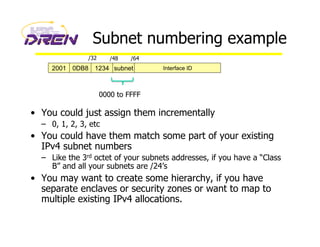
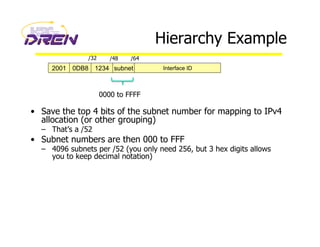
Subnet numbering example
•  You could just assign them incrementally
–  0, 1, 2, 3, etc
•  You could have them match some part of your existing
IPv4 subnet numbers
–  Like the 3rd octet of your subnets addresses, if you have a “Class
B” and all your subnets are /24’s
•  You may want to create some hierarchy, if you have
separate enclaves or security zones or want to map to
multiple existing IPv4 allocations.
2001 0DB8 1234 subnet Interface ID
/32 /48 /64
0000 to FFFF
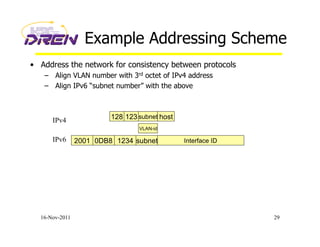
Hierarchy Example
•  Save the top 4 bits of the subnet number for mapping to IPv4
allocation (or other grouping)
–  That’s a /52
•  Subnet numbers are then 000 to FFF
–  4096 subnets per /52 (you only need 256, but 3 hex digits allows
you to keep decimal notation)
2001 0DB8 1234 subnet Interface ID
/32 /48 /64
0000 to FFFF
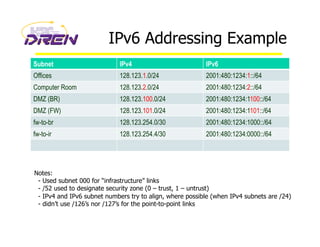
Example Addressing Scheme
•  Address the network for consistency between protocols
–  Align VLAN number with 3rd octet of IPv4 address
–  Align IPv6 “subnet number” with the above
16-Nov-2011 29
2001 0DB8 1234 subnet Interface ID
128 123 subnet host
IPv6
IPv4
VLAN-id
IPv6 Addressing Example
Subnet IPv4 IPv6
Offices 128.123.1.0/24 2001:480:1234:1::/64
Computer Room 128.123.2.0/24 2001:480:1234:2::/64
DMZ (BR) 128.123.100.0/24 2001:480:1234:1100::/64
DMZ (FW) 128.123.101.0/24 2001:480:1234:1101::/64
fw-to-br 128.123.254.0/30 2001:480:1234:1000::/64
fw-to-ir 128.123.254.4/30 2001:480:1234:0000::/64
Notes:
- Used subnet 000 for “infrastructure” links
- /52 used to designate security zone (0 – trust, 1 – untrust)
- IPv4 and IPv6 subnet numbers try to align, where possible (when IPv4 subnets are /24)
- didn’t use /126’s nor /127’s for the point-to-point links
Privacy Addresses (RFC 4941)
•  Incompatible with many Enterprise environments
–  Need address stability for many reasons
• Logging, Forensics, DNS stability, ACLs, etc.
•  Enabled by default in Windows
–  Breaks plug-n-play because we have to visit every Windows
machine to disable this feature.
•  Just added in Mac OS X “Lion”.
•  Ubuntu thinking about making it default.
[Privacy addresses] are horrible and I hope nobody really uses them, but they're better than NAT.
… Owen DeLong, Hurricane Electric
16-Nov-2011 31
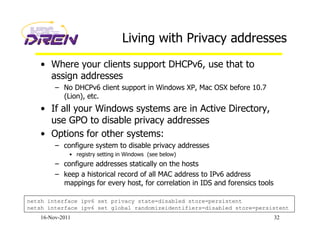
Living with Privacy addresses
•  Where your clients support DHCPv6, use that to
assign addresses
–  No DHCPv6 client support in Windows XP, Mac OSX before 10.7
(Lion), etc.
•  If all your Windows systems are in Active Directory,
use GPO to disable privacy addresses
•  Options for other systems:
–  configure system to disable privacy addresses
•  registry setting in Windows (see below)
–  configure addresses statically on the hosts
–  keep a historical record of all MAC address to IPv6 address
mappings for every host, for correlation in IDS and forensics tools
16-Nov-2011 32
netsh interface ipv6 set privacy state=disabled store=persistent
netsh interface ipv6 set global randomizeidentifiers=disabled store=persistent
Additional Guides
•  Preparing an IPv6 Addressing Plan
•  IPv6 Address Design, a few practical
principles
16-Nov-2011 33
http://www.ripe.net/lir-services/training/material/IPv6-for-LIRs-Training-Course/IPv6_addr_plan4.pdf
http://www.txv6tf.org/wp-content/uploads/2011/09/Doyle-TXv6TF_09142011.pdf
End of Addressing discussion
Other topics
What’s missing:
IPv6 Operational Experience
•  Lots of planning is underway
–  transition planning
–  address planning
•  Much of this planning is done by individuals who
have never touched an IPv6 packet
•  Too much energy is being wasted on plans that are
flawed, because they are not based on operational
experience
•  It is more important to turn on IPv6 now and start
moving some IPv6 traffic, than it is to have a
complete plan
16-Nov-2011 36
Getting IPv6 experience
•  Run IPv6 at home
–  Get a tunnel from Hurricane Electric
•  Get the IPv6 Certification from HE
•  Managers:
–  make sure your network engineers are doing the
above, or something similar
•  Run IPv6 in a testbed environment
•  IPv6-enable just your public-facing services to
start with
•  Then you can start comprehensive planning
16-Nov-2011 37
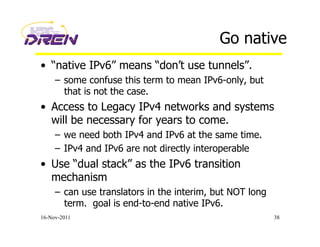
Go native
•  “native IPv6” means “don’t use tunnels”.
–  some confuse this term to mean IPv6-only, but
that is not the case.
•  Access to Legacy IPv4 networks and systems
will be necessary for years to come.
–  we need both IPv4 and IPv6 at the same time.
–  IPv4 and IPv6 are not directly interoperable
•  Use “dual stack” as the IPv6 transition
mechanism
–  can use translators in the interim, but NOT long
term. goal is end-to-end native IPv6.
16-Nov-2011 38
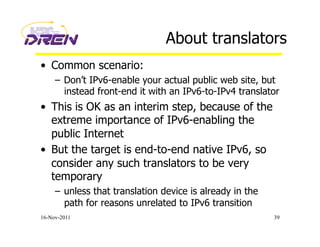
About translators
•  Common scenario:
–  Don’t IPv6-enable your actual public web site, but
instead front-end it with an IPv6-to-IPv4 translator
•  This is OK as an interim step, because of the
extreme importance of IPv6-enabling the
public Internet
•  But the target is end-to-end native IPv6, so
consider any such translators to be very
temporary
–  unless that translation device is already in the
path for reasons unrelated to IPv6 transition
16-Nov-2011 39
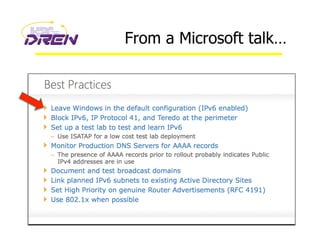
From a Microsoft talk…
16-Nov-2011 40
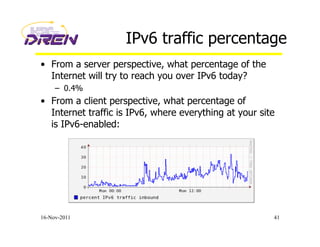
IPv6 traffic percentage
•  From a server perspective, what percentage of the
Internet will try to reach you over IPv6 today?
–  0.4%
•  From a client perspective, what percentage of
Internet traffic is IPv6, where everything at your site
is IPv6-enabled:
16-Nov-2011 41
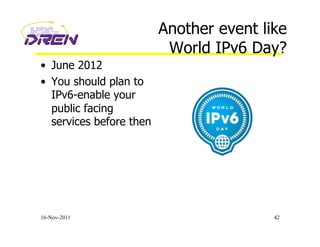
Another event like
World IPv6 Day?
•  June 2012
•  You should plan to
IPv6-enable your
public facing
services before then
16-Nov-2011 42
Final Comments
16-Nov-2011 43
END
Any Questions?
Contact me at:
ron@spawar.navy.mil
16-Nov-2011 44

Addressing plans

  • 1.
    Developing an IPv6Addressing Plan Guidelines, Rules, Best Practice Ron Broersma DREN Chief Engineer SPAWAR Network Security Manager ron@spawar.navy.mil
  • 2.
    Introduction •  IPv6 deploymentincludes: –  obtaining a block of IPv6 addresses (a “prefix”) for your organization and its networks. –  establishing a plan for how those addresses will be assigned to your networks and subnets. •  Observation: Many plans have serious flaws –  usually takes about 3 times to get it right –  many plans include the same basic mistakes •  Goal of this presentation: –  not intended to be a comprehensive tutorial –  review the common mistakes, and the reasons behind them –  save everyone time and effort, by avoiding those mistakes •  less re-numbering –  take full advantage of the vast address space now available to us 16-Nov-2011 2
  • 3.
    The piece thathas changed 16-Nov-2011 3 ISO 7 Layer Model Application Presentation Session Transport Network Link Physical Sockets TCP, UDP IP Mac Layer Internet Stack IPv6
  • 4.
    Address Structure •  Unicastaddresses are structured as a subnetwork prefix and an interface identifier. 16-Nov-2011 4 Subnet prefix Interface ID (host part) Allocated through a hierarchy of registries, service providers, and sites (global unicast) Automatically assigned using stateless autoconfiguration, or statically, or with DHCPv6 Size of a given (sub)network is effectively not limited by the number of unique host values as was the case in IPv4 where a /24 (Class C) net can only have 254 hosts. /64 /128
  • 5.
  • 6.
    Example Allocation •  Yourenterprise is allocated a Global Unicast Prefix* •  How do you assign xxxx and yyyy throughout your enterprise? 16-Nov-2011 6 2001 0DB8 xxxx yyyy Interface ID /32 /48 /64 2001:DB8::/32 * ”The default provider allocation via the RIRs is currently a /32.” (RFC 5375)
  • 7.
    Big mistake #1 • Using other than /64 for subnets •  Some choose /120 •  Reasoning: –  “host” part is same size as in IPv4 (8 bits) –  /64 is wasteful –  the security guy wants to be able to enumerate all hosts by scanning the subnet, just like in IPv4 16-Nov-2011 7 2001 0DB8 xxxx yyyy /120
  • 8.
    IPv4 practice getsin the way •  Being conservative with addresses –  operating on the notion that addresses are very scarce •  Making the subnet mask long, to avoid waste. Examples: –  /30 for point-to-point links –  if you only have 10 hosts on a subnet, then allocate a /28 –  squeezing as many subnets as possible out of a /24 16-Nov-2011 8
  • 9.
    Making the paradigmshift •  You may be un-qualified to develop a final IPv6 addressing plan if you think: –  /64 for subnets is wasteful –  /64 for point-to-point links is wasteful –  /48 for small sites is wasteful 16-Nov-2011 9
  • 10.
    Subnets are /64 • If you choose other than /64, the following things will not work: –  Neighbor Discovery –  Secure Neighbor Discovery –  Stateless Address Autoconfiguration (SLAAC) –  Microsoft DHCPv6 –  Multicast with Embedded-RP –  Mobile-IPv6 –  and many other things in the future •  Using other than /64 for subnets goes against: –  RFC 4291 “IPv6 Addressing Architecture” –  RFC 5375 “IPv6 Addressing Considerations” 16-Nov-2011 10
  • 11.
    Subnets are /64 16-Nov-201111 “For all unicast addresses, except those that start with the binary value 000, Interface IDs are required to be 64 bits long.” (RFC 4291) “Using /64 subnets is strongly recommended, also for links connecting only routers. A deployment compliant with the current IPv6 specifications cannot use other prefix lengths.” (RFC 5375)
  • 12.
    What about point-to-point links? • Even if we finally agree that subnets are /64, some will argue that point-to-point links must be /126 (like an IPv4 /30) or /127. –  Can’t waste a whole /64 when you need only 2 addresses •  Best practice is to allocate /64 for point-to-point links –  whether you need 2 out of 2**64 or 200 out of 2**64, there’s not much difference in “waste” •  But what about that DoS problem from the ping-pong effect? –  This will not happen on a RFC 4443 compliant IPv6 implementation –  If you have a non-compliant device (Juniper), you can set the interface mask to /126 on the interface as a temporary workaround until your device is fixed, but you should still allocate a /64 for the link. –  Never use /127 (See RFC 3627), but also look at RFC 6164. 16-Nov-2011 12
  • 13.
    Mistake #2 •  Thinkingyou have to get the addressing plan right the first time –  Unless you have operational experience with IPv6 deployments and transition, you WILL get it wrong. –  Usually takes about 3 times to get it right. •  Thinking you can’t afford to re-address –  Since the first plan is probably a throw-away, you will have to re-address when you come up with a revised plan. 16-Nov-2011 13
  • 14.
    Iterative planning approach • Assume the first plan is a throwaway –  Don’t put too much energy into it, because it is only temporary •  Do some initial limited IPv6 deployments based on the initial addressing plan –  testbeds –  public facing services •  Gain operational experience –  realize ways to improve the addressing plan –  interact with the community to get ideas •  Develop your next addressing plan –  put more energy into this one –  readdress the existing IPv6 infrastructure •  Do a wider deployment with the new plan –  internal servers, maybe clients. •  Iterate 16-Nov-2011 14
  • 15.
    Mistake #3 •  Tryingto be too creative about how much address space to allocate to a “site” –  Thinking you need to allocate large amounts of space to large sites, and much smaller amounts to small sites •  Assuming that large allocations to small sites is wasteful –  Go back and review the slide on being stuck in the IPv4 conservation paradigm. 16-Nov-2011 15
  • 16.
    “Sites” get a/48 •  Here, the “site” field is 0x0000-0xFFFF –  That gives you 65,536 sites! –  That’s not enough? •  And each site get 65,536 subnets –  That’s not enough? Its like a “Class A” block of huge subnets. •  Standardize! –  It simplifies things administratively and operationally. 16-Nov-2011 16 2001 0DB8 “site” yyyy Interface ID /32 /48 /64
  • 17.
    Mistake #4 •  Justify“upwards”, rather than pre-allocate “downwards”. –  Requiring sites to develop documentation and justification for their address space requirements –  Allocating to those groups or sites based on that justification 16-Nov-2011 17
  • 18.
    Pre-allocation •  You caneasily pre-allocate to the site level –  see slide on “sites get a /48” •  Within sites, addressing can align with existing subnet structure –  later, you may want to re-address your IPv4 networks (but don’t worry about that just yet). 16-Nov-2011 18
  • 19.
    Mistake #5 •  Host-centricallocation rather than subnet- centric –  Thinking that address allocation has anything to do with the number of hosts 16-Nov-2011 19
  • 20.
    Focus on subnets • A /64 subnet has enough room for this many hosts: •  You don’t have to think about whether a subnet is large enough for all your hosts. •  You don’t have to worry about “growing” a subnet later if you get more hosts. •  Just focus on your network topology (links, subnets, VLANs, etc.) and align with that. 16-Nov-2011 20 18,446,744,073,709,551,616
  • 21.
    Once again 16-Nov-2011 21 Whendoing an address plan, a major driver in IPv4 was efficiency and conservation In IPv6, efficiency and conservation is NOT a major driver, but instead it is all about better alignment with network topology, accommodation of security architecture, and operational simplicity through standardization
  • 22.
    Other Considerations •  InIPv6, every interface has multiple addresses –  In IPv4, we thought of a “host” as having a single IP address •  Embedding IPv4 addresses in IPv6 addresses adds administrative burden and limits flexibility –  limited long term benefit, so don’t do it –  It is reasonable to copy just the “host” part of the IPv4 address into the IID (host part) of the IPv6 address 16-Nov-2011 22
  • 23.
    Other Considerations •  Thereis an opportunity to align the addressing plan with security topology, to simplify ACLs –  This is the type of thing you may start to incorporate into your 3rd version of your plan. •  Internal aggregation is not nearly as critical as aggregating route announcements to your ISP –  you can afford to carry a few thousand routes internally, but the Internet can’t afford to carry all your /48’s or longer. 16-Nov-2011 23
  • 24.
    Other Considerations •  Mostof the context here has been for large enterprises that aggregate into a very few connections to one or two ISPs, and use “provider-independent” (PI) space. •  If you have a lot of small outlier sites that are single-homed directly to an ISP, have them get their address space from that ISP, known as “provider-aggregatable” (PA) space. 16-Nov-2011 24
  • 25.
    Adding structure or hierarchy • Examples: – grouping of sites by •  region •  service delivery point – grouping of subnets within a site to align with •  IPv4 mapping •  routing topology •  security topology 16-Nov-2011 25
  • 26.
    Adding structure or hierarchy • Recommendation: add grouping or hierarchy on nibble (4 bit) boundaries –  Aligns better with hex digits –  Aligns better with grouping in DNS PTR records •  Examples: –  /36 for regions •  16 regions with 4096 sites per region –  /44 for service delivery points •  16 customers per SDP, up to 4096 SDPs –  /52 to align with IPv4 allocations •  can map up to 16 allocations 16-Nov-2011 26
  • 27.
    Subnet numbering example • You could just assign them incrementally –  0, 1, 2, 3, etc •  You could have them match some part of your existing IPv4 subnet numbers –  Like the 3rd octet of your subnets addresses, if you have a “Class B” and all your subnets are /24’s •  You may want to create some hierarchy, if you have separate enclaves or security zones or want to map to multiple existing IPv4 allocations. 2001 0DB8 1234 subnet Interface ID /32 /48 /64 0000 to FFFF
  • 28.
    Hierarchy Example •  Savethe top 4 bits of the subnet number for mapping to IPv4 allocation (or other grouping) –  That’s a /52 •  Subnet numbers are then 000 to FFF –  4096 subnets per /52 (you only need 256, but 3 hex digits allows you to keep decimal notation) 2001 0DB8 1234 subnet Interface ID /32 /48 /64 0000 to FFFF
  • 29.
    Example Addressing Scheme • Address the network for consistency between protocols –  Align VLAN number with 3rd octet of IPv4 address –  Align IPv6 “subnet number” with the above 16-Nov-2011 29 2001 0DB8 1234 subnet Interface ID 128 123 subnet host IPv6 IPv4 VLAN-id
  • 30.
    IPv6 Addressing Example SubnetIPv4 IPv6 Offices 128.123.1.0/24 2001:480:1234:1::/64 Computer Room 128.123.2.0/24 2001:480:1234:2::/64 DMZ (BR) 128.123.100.0/24 2001:480:1234:1100::/64 DMZ (FW) 128.123.101.0/24 2001:480:1234:1101::/64 fw-to-br 128.123.254.0/30 2001:480:1234:1000::/64 fw-to-ir 128.123.254.4/30 2001:480:1234:0000::/64 Notes: - Used subnet 000 for “infrastructure” links - /52 used to designate security zone (0 – trust, 1 – untrust) - IPv4 and IPv6 subnet numbers try to align, where possible (when IPv4 subnets are /24) - didn’t use /126’s nor /127’s for the point-to-point links
  • 31.
    Privacy Addresses (RFC4941) •  Incompatible with many Enterprise environments –  Need address stability for many reasons • Logging, Forensics, DNS stability, ACLs, etc. •  Enabled by default in Windows –  Breaks plug-n-play because we have to visit every Windows machine to disable this feature. •  Just added in Mac OS X “Lion”. •  Ubuntu thinking about making it default. [Privacy addresses] are horrible and I hope nobody really uses them, but they're better than NAT. … Owen DeLong, Hurricane Electric 16-Nov-2011 31
  • 32.
    Living with Privacyaddresses •  Where your clients support DHCPv6, use that to assign addresses –  No DHCPv6 client support in Windows XP, Mac OSX before 10.7 (Lion), etc. •  If all your Windows systems are in Active Directory, use GPO to disable privacy addresses •  Options for other systems: –  configure system to disable privacy addresses •  registry setting in Windows (see below) –  configure addresses statically on the hosts –  keep a historical record of all MAC address to IPv6 address mappings for every host, for correlation in IDS and forensics tools 16-Nov-2011 32 netsh interface ipv6 set privacy state=disabled store=persistent netsh interface ipv6 set global randomizeidentifiers=disabled store=persistent
  • 33.
    Additional Guides •  Preparingan IPv6 Addressing Plan •  IPv6 Address Design, a few practical principles 16-Nov-2011 33 http://www.ripe.net/lir-services/training/material/IPv6-for-LIRs-Training-Course/IPv6_addr_plan4.pdf http://www.txv6tf.org/wp-content/uploads/2011/09/Doyle-TXv6TF_09142011.pdf
  • 34.
  • 35.
  • 36.
    What’s missing: IPv6 OperationalExperience •  Lots of planning is underway –  transition planning –  address planning •  Much of this planning is done by individuals who have never touched an IPv6 packet •  Too much energy is being wasted on plans that are flawed, because they are not based on operational experience •  It is more important to turn on IPv6 now and start moving some IPv6 traffic, than it is to have a complete plan 16-Nov-2011 36
  • 37.
    Getting IPv6 experience • Run IPv6 at home –  Get a tunnel from Hurricane Electric •  Get the IPv6 Certification from HE •  Managers: –  make sure your network engineers are doing the above, or something similar •  Run IPv6 in a testbed environment •  IPv6-enable just your public-facing services to start with •  Then you can start comprehensive planning 16-Nov-2011 37
  • 38.
    Go native •  “nativeIPv6” means “don’t use tunnels”. –  some confuse this term to mean IPv6-only, but that is not the case. •  Access to Legacy IPv4 networks and systems will be necessary for years to come. –  we need both IPv4 and IPv6 at the same time. –  IPv4 and IPv6 are not directly interoperable •  Use “dual stack” as the IPv6 transition mechanism –  can use translators in the interim, but NOT long term. goal is end-to-end native IPv6. 16-Nov-2011 38
  • 39.
    About translators •  Commonscenario: –  Don’t IPv6-enable your actual public web site, but instead front-end it with an IPv6-to-IPv4 translator •  This is OK as an interim step, because of the extreme importance of IPv6-enabling the public Internet •  But the target is end-to-end native IPv6, so consider any such translators to be very temporary –  unless that translation device is already in the path for reasons unrelated to IPv6 transition 16-Nov-2011 39
  • 40.
    From a Microsofttalk… 16-Nov-2011 40
  • 41.
    IPv6 traffic percentage • From a server perspective, what percentage of the Internet will try to reach you over IPv6 today? –  0.4% •  From a client perspective, what percentage of Internet traffic is IPv6, where everything at your site is IPv6-enabled: 16-Nov-2011 41
  • 42.
    Another event like WorldIPv6 Day? •  June 2012 •  You should plan to IPv6-enable your public facing services before then 16-Nov-2011 42
  • 43.
  • 44.
    END Any Questions? Contact meat: ron@spawar.navy.mil 16-Nov-2011 44