ADAPTIVE CRUISE CONTROL SYSTEM
WITH MODEL PREDICTIVE CONTROL
1
DEPARTMENT OF PRODUCTION TECHNOLOGY
ANNA UNIVERSITY, MADRAS INSTITUTE OF TECHNOLOGY
CHROMPET, CHENNAI- 600 044
ARUNKUMAR V (2024608034)
HARIHARAN V (2024608037)
M.E MECHATRONICS
1 2 / 0 6 / 2 0 2 4 2
Conventional Cruise control
• Cruise Control is an advanced vehicle control system designed to maintain a
constant speed without the need for manual throttle adjustments by the driver.
• Key Features:
• Constant Speed: Maintains a set speed as determined by the driver.
• Driver Convenience: Reduces the need for constant foot pressure on the accelerator,
especially during long drives.
• Fuel Efficiency: Helps maintain optimal engine performance, often improving fuel
economy.
3
History of cruise control:
1945
First Concept –
Invented by Ralph
Teetor, a blind
inventor frustrated
by his driver’s speed
inconsistency.
1958
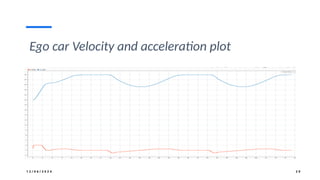
First Production Car
– Chrysler Imperial
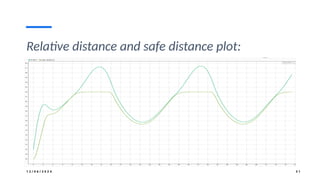
became the first car
equipped with
Teetor’s "Speedostat"
system, maintaining
steady speed using a
mechanical throttle.
1970s
Adoption &
Popularity – Cruise
control gained
popularity due to
rising fuel costs,
offering better fuel
efficiency during
highway driving.
1990s
Introduction of
Adaptive Cruise
Control (ACC) – This
system began to
automatically adjust
speed based on
traffic conditions,
using radar and
sensors.
Present Day
Cruise control is now
a standard feature in
most vehicles,
evolving with
Advanced Driver
Assistance Systems
(ADAS) for enhanced
safety and comfort.
Conventional Cruise Control
1 2 / 0 6 / 2 0 2 4 5
Conventional Cruise Control:
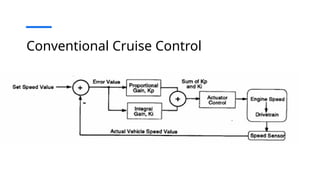
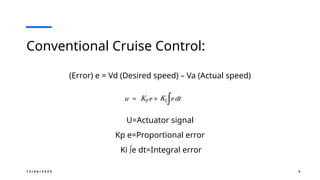
(Error) e = Vd (Desired speed) – Va (Actual speed)
U=Actuator signal
Kp e=Proportional error
Ki ∫e dt=Integral error
6
Conventional Cruise Control
• Overview:
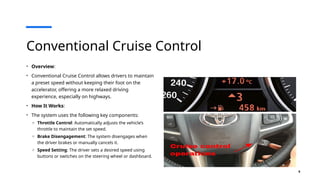
• Conventional Cruise Control allows drivers to maintain
a preset speed without keeping their foot on the
accelerator, offering a more relaxed driving
experience, especially on highways.
• How It Works:
• The system uses the following key components:
o Throttle Control: Automatically adjusts the vehicle’s
throttle to maintain the set speed.
o Brake Disengagement: The system disengages when
the driver brakes or manually cancels it.
o Speed Setting: The driver sets a desired speed using
buttons or switches on the steering wheel or dashboard.
7
Conventional Cruise Control
• Benefits:
• Reduces driver fatigue on long trips.
• Improves fuel efficiency by maintaining a consistent speed.
• Simple and affordable system widely available in vehicles since the 1960s.
• Limitations:
• Does not adjust speed based on traffic or road conditions.
• Not suitable for urban or stop-and-go driving.
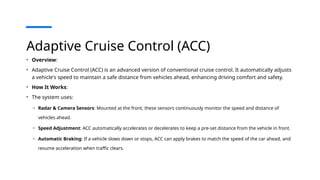
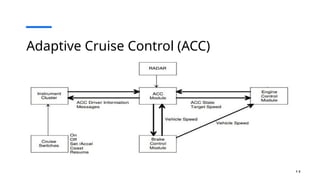
Adaptive Cruise Control (ACC)
• Overview:
• Adaptive Cruise Control (ACC) is an advanced version of conventional cruise control. It automatically adjusts
a vehicle's speed to maintain a safe distance from vehicles ahead, enhancing driving comfort and safety.
• How It Works:
• The system uses:
o Radar & Camera Sensors: Mounted at the front, these sensors continuously monitor the speed and distance of
vehicles ahead.
o Speed Adjustment: ACC automatically accelerates or decelerates to keep a pre-set distance from the vehicle in front.
o Automatic Braking: If a vehicle slows down or stops, ACC can apply brakes to match the speed of the car ahead, and
resume acceleration when traffic clears.
Adaptive Cruise Control (ACC)
1. The speed gauge button – turns the cruise control on or off. When turned
on it lights a green cruise control gauge on your BMW digital cluster.
2. The set button – allows you to set the constant speed when you reach the
desired limit.
3. The speed limit assistant button – won’t allow you to exceed the desired
speed for a specific zone unless you initiate an extensive throttle input.
4. The rocker switch – allows you to increase or decrease a set speed by 1
and 5 mph increments. If you’re equipped with BMW speed limit assist,
the system will recognize that the speed limit has changed and will
propose the new speed. To accept it, press the set button.
5. The cancel button – temporarily deactivates the BMW dynamic cruise
control just as hitting the brakes.
6. The resume button – allows you to return to cruising at the set speed.
Adaptive Cruise Control (ACC)
• Benefits:
• Improves safety by maintaining a safe following distance.
• Reduces driver stress in heavy traffic or on long highway trips.
• Helps prevent rear-end collisions through automatic deceleration.
• Limitations:
• Not fully autonomous; driver intervention may still be required.
• May be less effective in heavy traffic, sharp curves, or poor weather conditions.
1 2
Adaptive Cruise Control (ACC)
1 3
Adaptive Cruise Control (ACC)
1 2 / 0 6 / 2 0 2 4 1 4
Modes of Adaptive cruise control system:
• Speed control: The ego car travels at a driver-set speed.
• Spacing control: The ego car maintains a safe distance from the lead car.
1 2 / 0 6 / 2 0 2 4 1 5
Differences Between Conventional Cruise
Control (CCC) and Adaptive Cruise Control
(ACC)
Feature Conventional Cruise Control (CCC) Adaptive Cruise Control (ACC)
Speed Maintenance Maintains a constant speed set by the driver. Adjusts speed dynamically based on traffic.
Traffic Adaptability Cannot adapt to changing traffic conditions. Automatically adjusts to maintain safe following distances.
Sensors No sensors required; relies only on throttle control. Uses radar, lidar, and cameras for sensing.
Driver Intervention Requires driver intervention for deceleration or stopping.
Minimal intervention required; ACC can decelerate and stop
as needed.
Safety and Comfort Suitable only for low-traffic situations.
Enhanced safety in varied traffic conditions, including stop-
and-go.
Control Scope Controls only throttle for speed adjustment.
Controls both throttle and brakes to regulate speed and
distance.
1 6
Simulink model of Adaptive cruise control
system with model predictive controller:
Lead car block ACC block with MPC
controller
Ego car
block
1 7
Lead car block Inputs for Lead car
block:
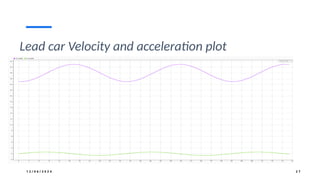
1.Acceleration: Sine wave
(Amplitude:0.6 &
Frequency: 0.2 Rad/sec)
2.Initial position: 50
3.Initial velocity:25
Output from Lead car
block:
1.Actual velocity
2.Actual position
1 8
Lead car block
Transfer
function of
Lead car
1 9
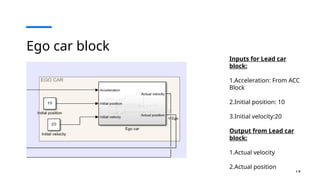
Ego car block
Inputs for Lead car
block:
1.Acceleration: From ACC
Block
2.Initial position: 10
3.Initial velocity:20
Output from Lead car
block:
1.Actual velocity
2.Actual position
2 0
Ego car block
Transfer
function of Ego
car
1 2 / 0 6 / 2 0 2 4 2 1
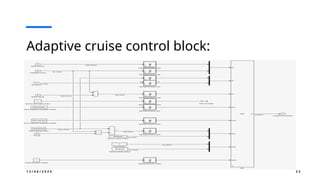
Adaptive cruise control block: Inputs for ACC block:
1.Set velocity
2.Time gap
3.Logitudinal velocity
4.Relative velocity
5.Relative distance
Output from Lead car
block:
1.Longitudinal
acceleration
1 2 / 0 6 / 2 0 2 4 2 2
Adaptive cruise control block:
1 2 / 0 6 / 2 0 2 4 2 3
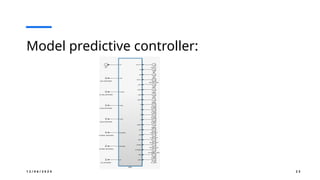
Model predictive controller:
1 2 / 0 6 / 2 0 2 4 2 4
Model predictive controller:
• Model Predictive Control (MPC) is an advanced control strategy that optimizes future control
actions by using a model of the system to predict and minimize a cost function over a
defined prediction horizon.
• Key Features:
• Uses system models for prediction and optimization.
• Solves an optimization problem at each time step.
• Handles constraints like limits on inputs and outputs.
• Applications:
• Widely used in robotics, automotive systems, chemical processes, and industrial automation.
1 2 / 0 6 / 2 0 2 4 2 5
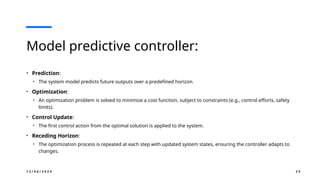
Model predictive controller:
• Prediction:
• The system model predicts future outputs over a predefined horizon.
• Optimization:
• An optimization problem is solved to minimize a cost function, subject to constraints (e.g., control efforts, safety
limits).
• Control Update:
• The first control action from the optimal solution is applied to the system.
• Receding Horizon:
• The optimization process is repeated at each step with updated system states, ensuring the controller adapts to
changes.
1 2 / 0 6 / 2 0 2 4 2 6
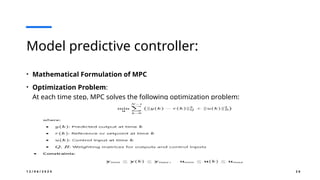
Model predictive controller:
• Mathematical Formulation of MPC
• Optimization Problem:
At each time step, MPC solves the following optimization problem:
1 2 / 0 6 / 2 0 2 4 2 7
Lead car Velocity and acceleration plot
1 2 / 0 6 / 2 0 2 4 2 8
Ego car Acceleration and Safe distance plot
1 2 / 0 6 / 2 0 2 4 2 9
Ego car Velocity and acceleration plot
1 2 / 0 6 / 2 0 2 4 3 0
Lead car & Ego car acceleration plot:
1 2 / 0 6 / 2 0 2 4 3 1
Relative distance and safe distance plot:
1 2 / 0 6 / 2 0 2 4 3 2
Relative distance, safe distance and acceleration:
STEP BY STEP PROCEDURE
FOR CREATING SIMULINK
MODEL FOR ADAPTIVE
CRUIRSE CONTROL
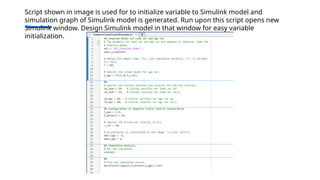
Script shown in image is used for to initialize variable to Simulink model and
simulation graph of Simulink model is generated. Run upon this script opens new
Simulink window. Design Simulink model in that window for easy variable
initialization.
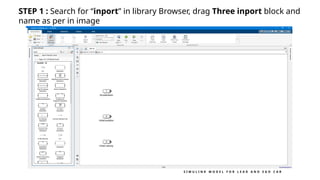
STEP 1 : Search for “inport” in library Browser, drag Three inport block and
name as per in image
S I M U L I N K M O D E L F O R L E A D A N D E G O C A R
STEP 2 : Search for “Integrator” in library Browser, drag Two Integrator
block.
S I M U L I N K M O D E L F O R L E A D A N D E G O C A R
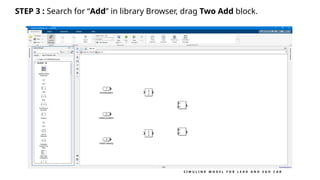
STEP 3 : Search for “Add” in library Browser, drag Two Add block.
S I M U L I N K M O D E L F O R L E A D A N D E G O C A R
STEP 4 : Search for “Transfer Fcn” in library Browser, drag It and Double
left click on it to configure the Tranfer Fcn block. Here the Num, Den
coefficient is [1] and [0.5 1 ]
S I M U L I N K M O D E L F O R L E A D A N D E G O C A R
STEP 5 : Search for “Outport” in library Browser, drag Two Outport block
and name as per in image
S I M U L I N K M O D E L F O R L E A D A N D E G O C A R
STEP 6 : Make a connection as per in image below.
S I M U L I N K M O D E L F O R L E A D A N D E G O C A R
STEP 7 : After finishing upon step 6. the Subsystem block will look like
this
STEP 8 : Make copy of lead car block for ego car model.(both car TF is
same)
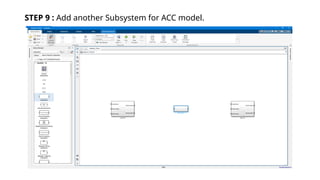
STEP 9 : Add another Subsystem for ACC model.
STEP 10 : Search for “inport” in library Browser, drag Five inport block
and name as per in image
STEP 11 : Add constant Block for value initialization
STEP 12 : Drag “Add” and “Product” block for library bowser.
STEP 13 : Add MATLAB Function
STEP 14 : Double left click of “MATLAB function” Block, Type this script
for data type convention. (This step apply’s to all MATLAB function
block)
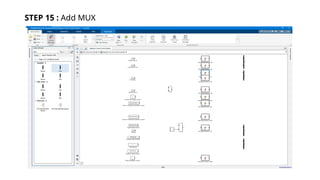
STEP 15 : Add MUX
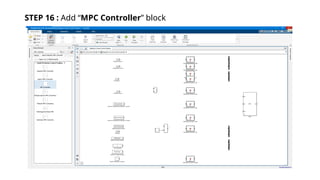
STEP 16 : Add “MPC Controller” block
STEP 17 : Double left click on MPC Controller block. Block parameter
window will open. Configure it according to image below.
STEP 18 : After Configuring MPC block you would see changes in
number of input increase.
STEP 19 : Add “Outport” block to get output from MPC block.
STEP 20 : Make connection as per in image below.
STEP 21 : Add “Sum” Block for negative feed back
STEP 22 : Add “Constant” block for defining value and make connection
as in image.
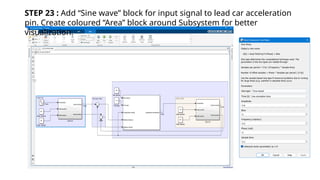
STEP 23 : Add “Sine wave” block for input signal to lead car acceleration
pin. Create coloured “Area” block around Subsystem for better
visualization.
1 2 / 0 6 / 2 0 2 4 5 8
Thankyou!

Adaptive cruise control using model predictive controller and matlab simulation results

  • 1.
    ADAPTIVE CRUISE CONTROLSYSTEM WITH MODEL PREDICTIVE CONTROL 1 DEPARTMENT OF PRODUCTION TECHNOLOGY ANNA UNIVERSITY, MADRAS INSTITUTE OF TECHNOLOGY CHROMPET, CHENNAI- 600 044 ARUNKUMAR V (2024608034) HARIHARAN V (2024608037) M.E MECHATRONICS
  • 2.
    1 2 /0 6 / 2 0 2 4 2 Conventional Cruise control • Cruise Control is an advanced vehicle control system designed to maintain a constant speed without the need for manual throttle adjustments by the driver. • Key Features: • Constant Speed: Maintains a set speed as determined by the driver. • Driver Convenience: Reduces the need for constant foot pressure on the accelerator, especially during long drives. • Fuel Efficiency: Helps maintain optimal engine performance, often improving fuel economy.
  • 3.
    3 History of cruisecontrol: 1945 First Concept – Invented by Ralph Teetor, a blind inventor frustrated by his driver’s speed inconsistency. 1958 First Production Car – Chrysler Imperial became the first car equipped with Teetor’s "Speedostat" system, maintaining steady speed using a mechanical throttle. 1970s Adoption & Popularity – Cruise control gained popularity due to rising fuel costs, offering better fuel efficiency during highway driving. 1990s Introduction of Adaptive Cruise Control (ACC) – This system began to automatically adjust speed based on traffic conditions, using radar and sensors. Present Day Cruise control is now a standard feature in most vehicles, evolving with Advanced Driver Assistance Systems (ADAS) for enhanced safety and comfort.
  • 4.
  • 5.
    1 2 /0 6 / 2 0 2 4 5 Conventional Cruise Control: (Error) e = Vd (Desired speed) – Va (Actual speed) U=Actuator signal Kp e=Proportional error Ki ∫e dt=Integral error
  • 6.
    6 Conventional Cruise Control •Overview: • Conventional Cruise Control allows drivers to maintain a preset speed without keeping their foot on the accelerator, offering a more relaxed driving experience, especially on highways. • How It Works: • The system uses the following key components: o Throttle Control: Automatically adjusts the vehicle’s throttle to maintain the set speed. o Brake Disengagement: The system disengages when the driver brakes or manually cancels it. o Speed Setting: The driver sets a desired speed using buttons or switches on the steering wheel or dashboard.
  • 7.
    7 Conventional Cruise Control •Benefits: • Reduces driver fatigue on long trips. • Improves fuel efficiency by maintaining a consistent speed. • Simple and affordable system widely available in vehicles since the 1960s. • Limitations: • Does not adjust speed based on traffic or road conditions. • Not suitable for urban or stop-and-go driving.
  • 8.
    Adaptive Cruise Control(ACC) • Overview: • Adaptive Cruise Control (ACC) is an advanced version of conventional cruise control. It automatically adjusts a vehicle's speed to maintain a safe distance from vehicles ahead, enhancing driving comfort and safety. • How It Works: • The system uses: o Radar & Camera Sensors: Mounted at the front, these sensors continuously monitor the speed and distance of vehicles ahead. o Speed Adjustment: ACC automatically accelerates or decelerates to keep a pre-set distance from the vehicle in front. o Automatic Braking: If a vehicle slows down or stops, ACC can apply brakes to match the speed of the car ahead, and resume acceleration when traffic clears.
  • 9.
  • 10.
    Adaptive Cruise Control(ACC) 1. The speed gauge button – turns the cruise control on or off. When turned on it lights a green cruise control gauge on your BMW digital cluster. 2. The set button – allows you to set the constant speed when you reach the desired limit. 3. The speed limit assistant button – won’t allow you to exceed the desired speed for a specific zone unless you initiate an extensive throttle input. 4. The rocker switch – allows you to increase or decrease a set speed by 1 and 5 mph increments. If you’re equipped with BMW speed limit assist, the system will recognize that the speed limit has changed and will propose the new speed. To accept it, press the set button. 5. The cancel button – temporarily deactivates the BMW dynamic cruise control just as hitting the brakes. 6. The resume button – allows you to return to cruising at the set speed.
  • 11.
    Adaptive Cruise Control(ACC) • Benefits: • Improves safety by maintaining a safe following distance. • Reduces driver stress in heavy traffic or on long highway trips. • Helps prevent rear-end collisions through automatic deceleration. • Limitations: • Not fully autonomous; driver intervention may still be required. • May be less effective in heavy traffic, sharp curves, or poor weather conditions.
  • 12.
    1 2 Adaptive CruiseControl (ACC)
  • 13.
    1 3 Adaptive CruiseControl (ACC)
  • 14.
    1 2 /0 6 / 2 0 2 4 1 4 Modes of Adaptive cruise control system: • Speed control: The ego car travels at a driver-set speed. • Spacing control: The ego car maintains a safe distance from the lead car.
  • 15.
    1 2 /0 6 / 2 0 2 4 1 5 Differences Between Conventional Cruise Control (CCC) and Adaptive Cruise Control (ACC) Feature Conventional Cruise Control (CCC) Adaptive Cruise Control (ACC) Speed Maintenance Maintains a constant speed set by the driver. Adjusts speed dynamically based on traffic. Traffic Adaptability Cannot adapt to changing traffic conditions. Automatically adjusts to maintain safe following distances. Sensors No sensors required; relies only on throttle control. Uses radar, lidar, and cameras for sensing. Driver Intervention Requires driver intervention for deceleration or stopping. Minimal intervention required; ACC can decelerate and stop as needed. Safety and Comfort Suitable only for low-traffic situations. Enhanced safety in varied traffic conditions, including stop- and-go. Control Scope Controls only throttle for speed adjustment. Controls both throttle and brakes to regulate speed and distance.
  • 16.
    1 6 Simulink modelof Adaptive cruise control system with model predictive controller: Lead car block ACC block with MPC controller Ego car block
  • 17.
    1 7 Lead carblock Inputs for Lead car block: 1.Acceleration: Sine wave (Amplitude:0.6 & Frequency: 0.2 Rad/sec) 2.Initial position: 50 3.Initial velocity:25 Output from Lead car block: 1.Actual velocity 2.Actual position
  • 18.
    1 8 Lead carblock Transfer function of Lead car
  • 19.
    1 9 Ego carblock Inputs for Lead car block: 1.Acceleration: From ACC Block 2.Initial position: 10 3.Initial velocity:20 Output from Lead car block: 1.Actual velocity 2.Actual position
  • 20.
    2 0 Ego carblock Transfer function of Ego car
  • 21.
    1 2 /0 6 / 2 0 2 4 2 1 Adaptive cruise control block: Inputs for ACC block: 1.Set velocity 2.Time gap 3.Logitudinal velocity 4.Relative velocity 5.Relative distance Output from Lead car block: 1.Longitudinal acceleration
  • 22.
    1 2 /0 6 / 2 0 2 4 2 2 Adaptive cruise control block:
  • 23.
    1 2 /0 6 / 2 0 2 4 2 3 Model predictive controller:
  • 24.
    1 2 /0 6 / 2 0 2 4 2 4 Model predictive controller: • Model Predictive Control (MPC) is an advanced control strategy that optimizes future control actions by using a model of the system to predict and minimize a cost function over a defined prediction horizon. • Key Features: • Uses system models for prediction and optimization. • Solves an optimization problem at each time step. • Handles constraints like limits on inputs and outputs. • Applications: • Widely used in robotics, automotive systems, chemical processes, and industrial automation.
  • 25.
    1 2 /0 6 / 2 0 2 4 2 5 Model predictive controller: • Prediction: • The system model predicts future outputs over a predefined horizon. • Optimization: • An optimization problem is solved to minimize a cost function, subject to constraints (e.g., control efforts, safety limits). • Control Update: • The first control action from the optimal solution is applied to the system. • Receding Horizon: • The optimization process is repeated at each step with updated system states, ensuring the controller adapts to changes.
  • 26.
    1 2 /0 6 / 2 0 2 4 2 6 Model predictive controller: • Mathematical Formulation of MPC • Optimization Problem: At each time step, MPC solves the following optimization problem:
  • 27.
    1 2 /0 6 / 2 0 2 4 2 7 Lead car Velocity and acceleration plot
  • 28.
    1 2 /0 6 / 2 0 2 4 2 8 Ego car Acceleration and Safe distance plot
  • 29.
    1 2 /0 6 / 2 0 2 4 2 9 Ego car Velocity and acceleration plot
  • 30.
    1 2 /0 6 / 2 0 2 4 3 0 Lead car & Ego car acceleration plot:
  • 31.
    1 2 /0 6 / 2 0 2 4 3 1 Relative distance and safe distance plot:
  • 32.
    1 2 /0 6 / 2 0 2 4 3 2 Relative distance, safe distance and acceleration:
  • 33.
    STEP BY STEPPROCEDURE FOR CREATING SIMULINK MODEL FOR ADAPTIVE CRUIRSE CONTROL
  • 34.
    Script shown inimage is used for to initialize variable to Simulink model and simulation graph of Simulink model is generated. Run upon this script opens new Simulink window. Design Simulink model in that window for easy variable initialization.
  • 35.
    STEP 1 :Search for “inport” in library Browser, drag Three inport block and name as per in image S I M U L I N K M O D E L F O R L E A D A N D E G O C A R
  • 36.
    STEP 2 :Search for “Integrator” in library Browser, drag Two Integrator block. S I M U L I N K M O D E L F O R L E A D A N D E G O C A R
  • 37.
    STEP 3 :Search for “Add” in library Browser, drag Two Add block. S I M U L I N K M O D E L F O R L E A D A N D E G O C A R
  • 38.
    STEP 4 :Search for “Transfer Fcn” in library Browser, drag It and Double left click on it to configure the Tranfer Fcn block. Here the Num, Den coefficient is [1] and [0.5 1 ] S I M U L I N K M O D E L F O R L E A D A N D E G O C A R
  • 39.
    STEP 5 :Search for “Outport” in library Browser, drag Two Outport block and name as per in image S I M U L I N K M O D E L F O R L E A D A N D E G O C A R
  • 40.
    STEP 6 :Make a connection as per in image below. S I M U L I N K M O D E L F O R L E A D A N D E G O C A R
  • 41.
    STEP 7 :After finishing upon step 6. the Subsystem block will look like this
  • 42.
    STEP 8 :Make copy of lead car block for ego car model.(both car TF is same)
  • 43.
    STEP 9 :Add another Subsystem for ACC model.
  • 44.
    STEP 10 :Search for “inport” in library Browser, drag Five inport block and name as per in image
  • 45.
    STEP 11 :Add constant Block for value initialization
  • 46.
    STEP 12 :Drag “Add” and “Product” block for library bowser.
  • 47.
    STEP 13 :Add MATLAB Function
  • 48.
    STEP 14 :Double left click of “MATLAB function” Block, Type this script for data type convention. (This step apply’s to all MATLAB function block)
  • 49.
    STEP 15 :Add MUX
  • 50.
    STEP 16 :Add “MPC Controller” block
  • 51.
    STEP 17 :Double left click on MPC Controller block. Block parameter window will open. Configure it according to image below.
  • 52.
    STEP 18 :After Configuring MPC block you would see changes in number of input increase.
  • 53.
    STEP 19 :Add “Outport” block to get output from MPC block.
  • 54.
    STEP 20 :Make connection as per in image below.
  • 55.
    STEP 21 :Add “Sum” Block for negative feed back
  • 56.
    STEP 22 :Add “Constant” block for defining value and make connection as in image.
  • 57.
    STEP 23 :Add “Sine wave” block for input signal to lead car acceleration pin. Create coloured “Area” block around Subsystem for better visualization.
  • 58.
    1 2 /0 6 / 2 0 2 4 5 8 Thankyou!