
Adaptive Computing Using
PlateSpin Orchestrate          ®


Gryphon McArthur
Software Engineer Consultant
gmcarthur@novell.com
Abstract

    Adaptive Computing:
      Goes beyond just intelligently utilizing available resources; it
      encompasses quality of service (QoS) targets, fault tolerance
      (high availability), monitoring, and iterative analysis of the
      resulting dataset to determine what corrective measures
      (adaptations) should occur at any given moment. As
      virtualization becomes widespread in the data center, the
      need for automating the placement and configuration of
      workloads (virtual machines) using an adaptive computing
      model becomes vitally important. This session demonstrates
      how to use events, introduced in PlateSpin Orchestrate
                                                  ®


      2.0.2, to create rules that trigger workload provisioning,
      migration, and other virtual machine life-cycle operations.


2   © Novell, Inc. All rights reserved.
Overview

      Overview of PlateSpin Orchestrate   ®


      Adaptive Computing and IWM

      A Real-world Scenario
            Steps to implement the solution

      Advanced Workload Management
            Thermal load balancing

      Conclusion


3   © Novell, Inc. All rights reserved.
Overview of PlateSpin Orchestrate          ®


       Orchestration Server

       VMHost systems running the Orchestration Agent

       Graphical clients for:

                      Virtual machine management

                      Development of policies, jobs, etc.

4   © Novell, Inc. All rights reserved.
Adaptive Computing

    Definition of Adaptive Computing:
         “Adaptive computing focuses on the methodology and
            implementation of systems that adjust to different situations.
            An adaptive system may change its own behavior to the
            goals, tasks, interests, and other features of individual
            users and the environment. Adaptivity is important for
            ubiquitous and pervasive computing.”


              Helsinki Institute for Information Technology


5   © Novell, Inc. All rights reserved.
Intelligent Workload Management


    Intelligent Workload
    Management enables IT
    organizations to manage and
    optimize computing resources in
    a policy-driven, secure and
    compliant manner across
    physical, virtual and cloud
    environments to deliver business      Intelligent
    services for end customers.           WORKLOAD
                                          Management


6   © Novell, Inc. All rights reserved.
Scenario/Goal

    Automatically migrate VM's off of a VM host once the
    host's load exceeds 75% capacity for more than 5 minutes.


              Constantly monitor/evaluate VM host loads


              Migrate workloads to other hosts when load is too high


              Allow workloads to return once load returns to normal


7   © Novell, Inc. All rights reserved.
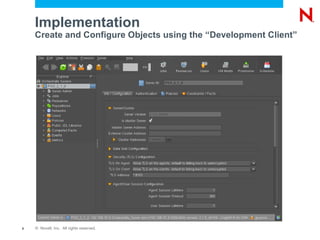
Implementation
    Create and Configure Objects using the “Development Client”


8   © Novell, Inc. All rights reserved.
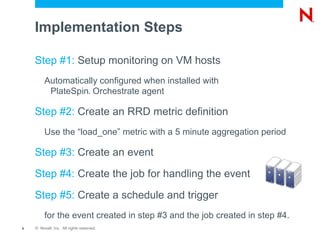
Implementation Steps

    Step #1: Setup monitoring on VM hosts
         Automatically configured when installed with
          PlateSpin Orchestrate agent
                                  ®


    Step #2: Create an RRD metric definition
         Use the “load_one” metric with a 5 minute aggregation period

    Step #3: Create an event

    Step #4: Create the job for handling the event

    Step #5: Create a schedule and trigger
         for the event created in step #3 and the job created in step #4.
9   © Novell, Inc. All rights reserved.
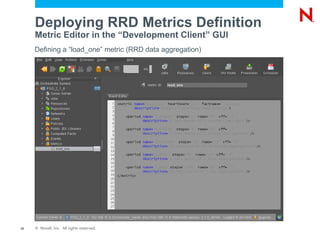
Deploying RRD Metrics Definition
     Metric Editor in the “Development Client” GUI
     Defining a “load_one” metric (RRD data aggregation)


10   © Novell, Inc. All rights reserved.
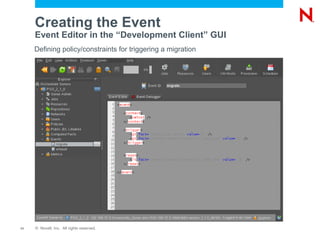
Creating the Event
     Event Editor in the “Development Client” GUI
     Defining policy/constraints for triggering a migration


11   © Novell, Inc. All rights reserved.
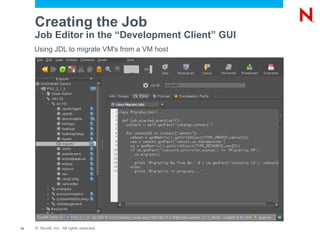
Creating the Job
     Job Editor in the “Development Client” GUI
     Using JDL to migrate VM's from a VM host


12   © Novell, Inc. All rights reserved.
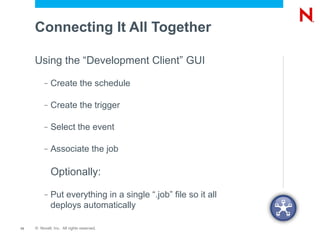
Connecting It All Together

     Using the “Development Client” GUI
          –   Create the schedule

          –   Create the trigger

          –   Select the event

          –   Associate the job

              Optionally:
          –   Put everything in a single “.job” file so it all
              deploys automatically

13   © Novell, Inc. All rights reserved.
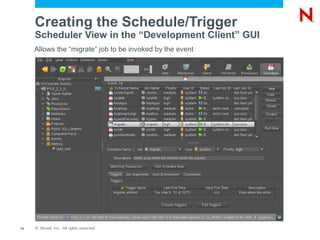
Creating the Schedule/Trigger
     Scheduler View in the “Development Client” GUI
     Allows the “migrate” job to be invoked by the event


14   © Novell, Inc. All rights reserved.
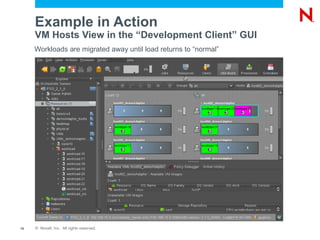
Example in Action
     VM Hosts View in the “Development Client” GUI
     Workloads are migrated away until load returns to “normal”


15   © Novell, Inc. All rights reserved.
Advanced Workload Management

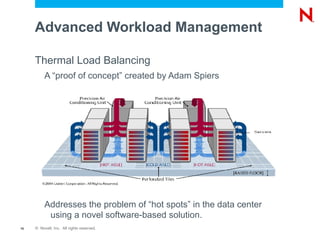
     Thermal Load Balancing
          A “proof of concept” created by Adam Spiers


          Addresses the problem of “hot spots” in the data center
           using a novel software-based solution.
16   © Novell, Inc. All rights reserved.
The Problem: Data Center Cooling

         •   Cooling is expensive
              –   In a typical data center, more power is spent on cooling than
                  on servers. Estimates range from 44%1 to as high as 63%.2
         •   Cooling is unavoidable
              –   10% of racks have ambient temperatures of 75°F or higher at
                  the air intake at the top of the rack. High temperatures are
                  causes of decreased hardware reliability. Intermittent ghosts
                  and outright hardware failures are three times more prevalent
                  in the top third of racks than the bottom two-thirds.3
         •   Air conditioning units are critical to service availability
                                                                                                                                                                    4
              –    Servers can redline within 90 seconds of an AC unit failure.
     1
       See, Simon. Is there a pathway to a Green Grid? Sun, 2008 http://www.ibergrid.eu/2008/presentations/Dia%2013/4.pdf
     2
       http://h20331.www2.hp.com/ERC/cache/438048-0-0-225-121.html
     3
       Sullivan, Robert F., Ph.D. Reducing Bypass Airflow Is Essential for Eliminating Hotspots. Upsite Technologies http://www.42u.com/data-center-hot-spots.htm
     4
       Sharma, Ratnesh et al. Balance of Power: Dynamic Thermal Management for Internet Data Centers. HP Labs, 2003
       http://www.hpl.hp.com/techreports/2003/HPL-2003-5.pdf

17       © Novell, Inc. All rights reserved.
The Problem: Data Center Cooling
         (Continued)

         •   Many data centers cool incorrectly
              –   Cooling over-capacity is very common, and is not a predictor of
                  successful cooling. In one study, nineteen rooms studied ran on
                  average 2.7 times more cooling equipment than required to cool
                  the computer heat load. Two rooms ran 16 times more cooling
                  than required, yet one had 20% hot racks/cabinets and the
                  other had 7% hot racks/cabinets.1

         •   There are over 80 energy efficiency incentive or
             rebate programs offered by local utilities or state
             energy efficiency programs in the US alone.2

     1
         Sullivan, Robert F., Ph.D. Reducing Bypass Airflow Is Essential for Eliminating Hotspots. Upsite Technologies http://www.42u.com/data-center-hot-spots.htm
     2
         The green data center. IBM, May 2007 http://www-900.ibm.com/cn/systems/migratetoibm/pdf/Energy-file03_OIW03002USEN.pdf

18       © Novell, Inc. All rights reserved.
A Novel (Novell ) Solution:                                ®


         Dynamic Thermal Load Balancing
         •   Virtualization and live migration allows dynamic
             relocation of workloads with no impact on service
              –   Policy-based migration of VMs from hot spots to cool spots
         •   Energy consumption can be reduced by more
             than 14% by intelligent workload placement.1
         •   Risk of service outage due to computer room air
             conditioning unit failures can be mitigated by
             migrating workloads away from the failed unit.1
         •   Automatic VM live migration based on thermal
             policies can be implemented easily using
             PlateSpin Orchestrate from Novell.
                                      ®


     1
         Sharma, Ratnesh et al. Balance of Power: Dynamic Thermal Management for Internet Data Centers. HP Labs, 2003
         http://www.hpl.hp.com/techreports/2003/HPL-2003-5.pdf

19       © Novell, Inc. All rights reserved.
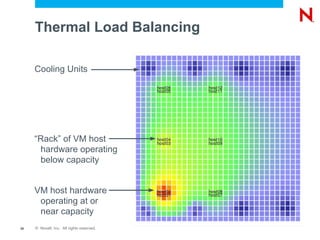
Thermal Load Balancing

     Cooling Units


     “Rack” of VM host
      hardware operating
      below capacity


     VM host hardware
      operating at or
      near capacity
20   © Novell, Inc. All rights reserved.
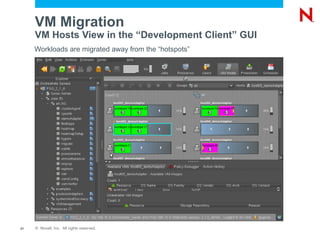
VM Migration
     VM Hosts View in the “Development Client” GUI
     Workloads are migrated away from the “hotspots”


21   © Novell, Inc. All rights reserved.
Conclusion

     PlateSpin Orchestrate provides the policy based data
                               ®


      center automation capabilities needed to implement
      real-world adaptive computing scenarios


        Orchestrate provides a set of tools and extensible
        framework for implementing your own unique solutions


        This is just one component of Intelligent
        Workload Management


22   © Novell, Inc. All rights reserved.
Questions and Answers
Unpublished Work of Novell, Inc. All Rights Reserved.
This work is an unpublished work and contains confidential, proprietary, and trade secret information of Novell, Inc.
Access to this work is restricted to Novell employees who have a need to know to perform tasks within the scope
of their assignments. No part of this work may be practiced, performed, copied, distributed, revised, modified,
translated, abridged, condensed, expanded, collected, or adapted without the prior written consent of Novell, Inc.
Any use or exploitation of this work without authorization could subject the perpetrator to criminal and civil liability.


General Disclaimer
This document is not to be construed as a promise by any participating company to develop, deliver, or market a
product. It is not a commitment to deliver any material, code, or functionality, and should not be relied upon in
making purchasing decisions. Novell, Inc. makes no representations or warranties with respect to the contents
of this document, and specifically disclaims any express or implied warranties of merchantability or fitness for any
particular purpose. The development, release, and timing of features or functionality described for Novell products
remains at the sole discretion of Novell. Further, Novell, Inc. reserves the right to revise this document and to
make changes to its content, at any time, without obligation to notify any person or entity of such revisions or
changes. All Novell marks referenced in this presentation are trademarks or registered trademarks of Novell, Inc.
in the United States and other countries. All third-party trademarks are the property of their respective owners.

Adaptive Computing Using PlateSpin Orchestrate

  • 1.
    Adaptive Computing Using PlateSpinOrchestrate ® Gryphon McArthur Software Engineer Consultant gmcarthur@novell.com
  • 2.
    Abstract Adaptive Computing: Goes beyond just intelligently utilizing available resources; it encompasses quality of service (QoS) targets, fault tolerance (high availability), monitoring, and iterative analysis of the resulting dataset to determine what corrective measures (adaptations) should occur at any given moment. As virtualization becomes widespread in the data center, the need for automating the placement and configuration of workloads (virtual machines) using an adaptive computing model becomes vitally important. This session demonstrates how to use events, introduced in PlateSpin Orchestrate ® 2.0.2, to create rules that trigger workload provisioning, migration, and other virtual machine life-cycle operations. 2 © Novell, Inc. All rights reserved.
  • 3.
    Overview Overview of PlateSpin Orchestrate ® Adaptive Computing and IWM A Real-world Scenario Steps to implement the solution Advanced Workload Management Thermal load balancing Conclusion 3 © Novell, Inc. All rights reserved.
  • 4.
    Overview of PlateSpinOrchestrate ® Orchestration Server VMHost systems running the Orchestration Agent Graphical clients for: Virtual machine management Development of policies, jobs, etc. 4 © Novell, Inc. All rights reserved.
  • 5.
    Adaptive Computing Definition of Adaptive Computing: “Adaptive computing focuses on the methodology and implementation of systems that adjust to different situations. An adaptive system may change its own behavior to the goals, tasks, interests, and other features of individual users and the environment. Adaptivity is important for ubiquitous and pervasive computing.” Helsinki Institute for Information Technology 5 © Novell, Inc. All rights reserved.
  • 6.
    Intelligent Workload Management Intelligent Workload Management enables IT organizations to manage and optimize computing resources in a policy-driven, secure and compliant manner across physical, virtual and cloud environments to deliver business Intelligent services for end customers. WORKLOAD Management 6 © Novell, Inc. All rights reserved.
  • 7.
    Scenario/Goal Automatically migrate VM's off of a VM host once the host's load exceeds 75% capacity for more than 5 minutes. Constantly monitor/evaluate VM host loads Migrate workloads to other hosts when load is too high Allow workloads to return once load returns to normal 7 © Novell, Inc. All rights reserved.
  • 8.
    Implementation Create and Configure Objects using the “Development Client” 8 © Novell, Inc. All rights reserved.
  • 9.
    Implementation Steps Step #1: Setup monitoring on VM hosts Automatically configured when installed with PlateSpin Orchestrate agent ® Step #2: Create an RRD metric definition Use the “load_one” metric with a 5 minute aggregation period Step #3: Create an event Step #4: Create the job for handling the event Step #5: Create a schedule and trigger for the event created in step #3 and the job created in step #4. 9 © Novell, Inc. All rights reserved.
  • 10.
    Deploying RRD MetricsDefinition Metric Editor in the “Development Client” GUI Defining a “load_one” metric (RRD data aggregation) 10 © Novell, Inc. All rights reserved.
  • 11.
    Creating the Event Event Editor in the “Development Client” GUI Defining policy/constraints for triggering a migration 11 © Novell, Inc. All rights reserved.
  • 12.
    Creating the Job Job Editor in the “Development Client” GUI Using JDL to migrate VM's from a VM host 12 © Novell, Inc. All rights reserved.
  • 13.
    Connecting It AllTogether Using the “Development Client” GUI – Create the schedule – Create the trigger – Select the event – Associate the job Optionally: – Put everything in a single “.job” file so it all deploys automatically 13 © Novell, Inc. All rights reserved.
  • 14.
    Creating the Schedule/Trigger Scheduler View in the “Development Client” GUI Allows the “migrate” job to be invoked by the event 14 © Novell, Inc. All rights reserved.
  • 15.
    Example in Action VM Hosts View in the “Development Client” GUI Workloads are migrated away until load returns to “normal” 15 © Novell, Inc. All rights reserved.
  • 16.
    Advanced Workload Management Thermal Load Balancing A “proof of concept” created by Adam Spiers Addresses the problem of “hot spots” in the data center using a novel software-based solution. 16 © Novell, Inc. All rights reserved.
  • 17.
    The Problem: DataCenter Cooling • Cooling is expensive – In a typical data center, more power is spent on cooling than on servers. Estimates range from 44%1 to as high as 63%.2 • Cooling is unavoidable – 10% of racks have ambient temperatures of 75°F or higher at the air intake at the top of the rack. High temperatures are causes of decreased hardware reliability. Intermittent ghosts and outright hardware failures are three times more prevalent in the top third of racks than the bottom two-thirds.3 • Air conditioning units are critical to service availability 4 – Servers can redline within 90 seconds of an AC unit failure. 1 See, Simon. Is there a pathway to a Green Grid? Sun, 2008 http://www.ibergrid.eu/2008/presentations/Dia%2013/4.pdf 2 http://h20331.www2.hp.com/ERC/cache/438048-0-0-225-121.html 3 Sullivan, Robert F., Ph.D. Reducing Bypass Airflow Is Essential for Eliminating Hotspots. Upsite Technologies http://www.42u.com/data-center-hot-spots.htm 4 Sharma, Ratnesh et al. Balance of Power: Dynamic Thermal Management for Internet Data Centers. HP Labs, 2003 http://www.hpl.hp.com/techreports/2003/HPL-2003-5.pdf 17 © Novell, Inc. All rights reserved.
  • 18.
    The Problem: DataCenter Cooling (Continued) • Many data centers cool incorrectly – Cooling over-capacity is very common, and is not a predictor of successful cooling. In one study, nineteen rooms studied ran on average 2.7 times more cooling equipment than required to cool the computer heat load. Two rooms ran 16 times more cooling than required, yet one had 20% hot racks/cabinets and the other had 7% hot racks/cabinets.1 • There are over 80 energy efficiency incentive or rebate programs offered by local utilities or state energy efficiency programs in the US alone.2 1 Sullivan, Robert F., Ph.D. Reducing Bypass Airflow Is Essential for Eliminating Hotspots. Upsite Technologies http://www.42u.com/data-center-hot-spots.htm 2 The green data center. IBM, May 2007 http://www-900.ibm.com/cn/systems/migratetoibm/pdf/Energy-file03_OIW03002USEN.pdf 18 © Novell, Inc. All rights reserved.
  • 19.
    A Novel (Novell) Solution: ® Dynamic Thermal Load Balancing • Virtualization and live migration allows dynamic relocation of workloads with no impact on service – Policy-based migration of VMs from hot spots to cool spots • Energy consumption can be reduced by more than 14% by intelligent workload placement.1 • Risk of service outage due to computer room air conditioning unit failures can be mitigated by migrating workloads away from the failed unit.1 • Automatic VM live migration based on thermal policies can be implemented easily using PlateSpin Orchestrate from Novell. ® 1 Sharma, Ratnesh et al. Balance of Power: Dynamic Thermal Management for Internet Data Centers. HP Labs, 2003 http://www.hpl.hp.com/techreports/2003/HPL-2003-5.pdf 19 © Novell, Inc. All rights reserved.
  • 20.
    Thermal Load Balancing Cooling Units “Rack” of VM host hardware operating below capacity VM host hardware operating at or near capacity 20 © Novell, Inc. All rights reserved.
  • 21.
    VM Migration VM Hosts View in the “Development Client” GUI Workloads are migrated away from the “hotspots” 21 © Novell, Inc. All rights reserved.
  • 22.
    Conclusion PlateSpin Orchestrate provides the policy based data ® center automation capabilities needed to implement real-world adaptive computing scenarios Orchestrate provides a set of tools and extensible framework for implementing your own unique solutions This is just one component of Intelligent Workload Management 22 © Novell, Inc. All rights reserved.
  • 23.
  • 25.
    Unpublished Work ofNovell, Inc. All Rights Reserved. This work is an unpublished work and contains confidential, proprietary, and trade secret information of Novell, Inc. Access to this work is restricted to Novell employees who have a need to know to perform tasks within the scope of their assignments. No part of this work may be practiced, performed, copied, distributed, revised, modified, translated, abridged, condensed, expanded, collected, or adapted without the prior written consent of Novell, Inc. Any use or exploitation of this work without authorization could subject the perpetrator to criminal and civil liability. General Disclaimer This document is not to be construed as a promise by any participating company to develop, deliver, or market a product. It is not a commitment to deliver any material, code, or functionality, and should not be relied upon in making purchasing decisions. Novell, Inc. makes no representations or warranties with respect to the contents of this document, and specifically disclaims any express or implied warranties of merchantability or fitness for any particular purpose. The development, release, and timing of features or functionality described for Novell products remains at the sole discretion of Novell. Further, Novell, Inc. reserves the right to revise this document and to make changes to its content, at any time, without obligation to notify any person or entity of such revisions or changes. All Novell marks referenced in this presentation are trademarks or registered trademarks of Novell, Inc. in the United States and other countries. All third-party trademarks are the property of their respective owners.