ACTIVE DIRECTORY DOMAIN AND
TRUST
Submitted by:
Chinmoy Jena
ACTIVE DIRECTORY DOMAIN AND TRUST
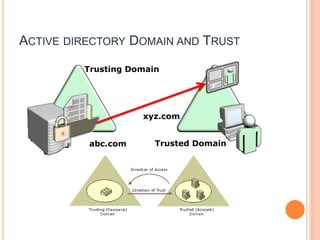
 A domain trust is a useful way to allow users from a trusted domain to access
services in a trusting domain.
All domain trust relationships have only two domains in the relationship:
the trusting domain and the trusted domain.
A domain trust relationship is characterized by whether it is:
 One-way
 Two-way
 Transitive
 Nontransitive
 Automatic
 Manual
ACTIVE DIRECTORY DOMAIN AND TRUST
Trusted Domain
Trusting Domain
abc.com
xyz.com
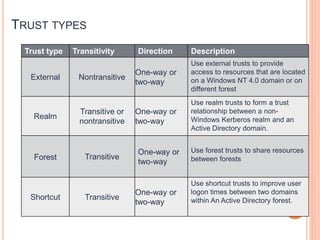
TRUST TYPES
Trust type Transitivity Direction Description
External Nontransitive
One-way or
two-way
Use external trusts to provide
access to resources that are located
on a Windows NT 4.0 domain or on
different forest
Realm
Transitive or
nontransitive
One-way or
two-way
Use realm trusts to form a trust
relationship between a non-
Windows Kerberos realm and an
Active Directory domain.
Forest Transitive
One-way or
two-way
Use forest trusts to share resources
between forests
Shortcut Transitive
One-way or
two-way
Use shortcut trusts to improve user
logon times between two domains
within An Active Directory forest.
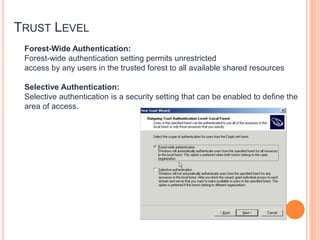
TRUST LEVEL
Forest-Wide Authentication:
Forest-wide authentication setting permits unrestricted
access by any users in the trusted forest to all available shared resources
Selective Authentication:
Selective authentication is a security setting that can be enabled to define the
area of access.
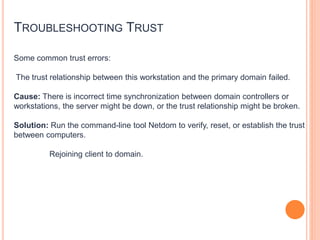
TROUBLESHOOTING TRUST
Some common trust errors:
The trust relationship between this workstation and the primary domain failed.
Cause: There is incorrect time synchronization between domain controllers or
workstations, the server might be down, or the trust relationship might be broken.
Solution: Run the command-line tool Netdom to verify, reset, or establish the trust
between computers.
Rejoining client to domain.
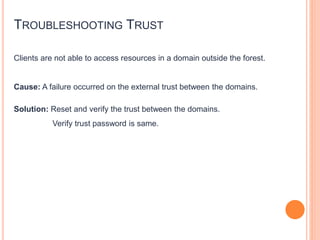
TROUBLESHOOTING TRUST
Clients are not able to access resources in a domain outside the forest.
Cause: A failure occurred on the external trust between the domains.
Solution: Reset and verify the trust between the domains.
Verify trust password is same.
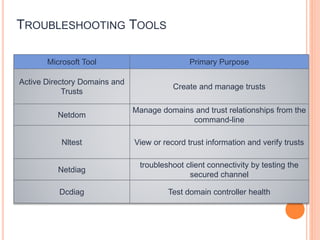
TROUBLESHOOTING TOOLS
Microsoft Tool Primary Purpose
Active Directory Domains and
Trusts
Create and manage trusts
Netdom
Manage domains and trust relationships from the
command-line
Nltest View or record trust information and verify trusts
Netdiag
troubleshoot client connectivity by testing the
secured channel
Dcdiag Test domain controller health

Active directory domain and trust

  • 1.
    ACTIVE DIRECTORY DOMAINAND TRUST Submitted by: Chinmoy Jena
  • 2.
    ACTIVE DIRECTORY DOMAINAND TRUST  A domain trust is a useful way to allow users from a trusted domain to access services in a trusting domain. All domain trust relationships have only two domains in the relationship: the trusting domain and the trusted domain. A domain trust relationship is characterized by whether it is:  One-way  Two-way  Transitive  Nontransitive  Automatic  Manual
  • 3.
    ACTIVE DIRECTORY DOMAINAND TRUST Trusted Domain Trusting Domain abc.com xyz.com
  • 4.
    TRUST TYPES Trust typeTransitivity Direction Description External Nontransitive One-way or two-way Use external trusts to provide access to resources that are located on a Windows NT 4.0 domain or on different forest Realm Transitive or nontransitive One-way or two-way Use realm trusts to form a trust relationship between a non- Windows Kerberos realm and an Active Directory domain. Forest Transitive One-way or two-way Use forest trusts to share resources between forests Shortcut Transitive One-way or two-way Use shortcut trusts to improve user logon times between two domains within An Active Directory forest.
  • 5.
    TRUST LEVEL Forest-Wide Authentication: Forest-wideauthentication setting permits unrestricted access by any users in the trusted forest to all available shared resources Selective Authentication: Selective authentication is a security setting that can be enabled to define the area of access.
  • 6.
    TROUBLESHOOTING TRUST Some commontrust errors: The trust relationship between this workstation and the primary domain failed. Cause: There is incorrect time synchronization between domain controllers or workstations, the server might be down, or the trust relationship might be broken. Solution: Run the command-line tool Netdom to verify, reset, or establish the trust between computers. Rejoining client to domain.
  • 7.
    TROUBLESHOOTING TRUST Clients arenot able to access resources in a domain outside the forest. Cause: A failure occurred on the external trust between the domains. Solution: Reset and verify the trust between the domains. Verify trust password is same.
  • 8.
    TROUBLESHOOTING TOOLS Microsoft ToolPrimary Purpose Active Directory Domains and Trusts Create and manage trusts Netdom Manage domains and trust relationships from the command-line Nltest View or record trust information and verify trusts Netdiag troubleshoot client connectivity by testing the secured channel Dcdiag Test domain controller health