Active Directory 101
Contents
● What is Active directory
● Groups & Group Policy
● Organizational Unit (OU)
● Trusts in Active Directory
● Active Directory Attacker’s Perspective
Active Directory
● Microsoft technology
● Centralized way to store objects
● Objects includes Users, Computers, Groups and Group Policies
● Objects stored in Hierarchical Structure
● DNS, LDAP, Kerberos
● Allows to create Groups, Group policies, OUs
● Provides security, simplifies the admin burden
Why Active Directory?
Security: It ensures that no one else except allowed people can access the
resource.
Centralization: It stores all the resource in one place.
Delegation: It allows the delegation of the admin permission to other sites.
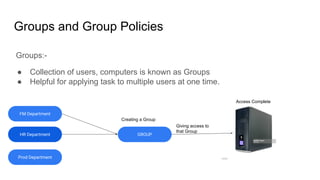
Groups and Group Policies
Groups:-
● Collection of users, computers is known as Groups
● Helpful for applying task to multiple users at one time.
HR Department
Prod Department
GROUP
FM Department
Creating a Group
Giving access to
that Group
Access Complete
Groups and Group Policies
Group Policies:-
● Centralised settings
● Settings can be of anything.
● Applied on Organizational Unit (OU)
● Provides security
● GUID in Policies folder
● Replicate in every 90 mins.
Organizational Units
● Organizational Units or OUs are containers which holds Groups, Computers,
Users.
● Helps in GPO
● Helps in Administrative Delegation
domainA
SubDivision:DomainA
Organizational
Unit
Create OU
Full Control
Trusts
The main objective of Trusts is provides access to across the different entities
domainA.com domainB.com
sub.child.domainA.com
child.domainA.com
sub.child.domainB.com
child.domainB.com
Want to Access Resource
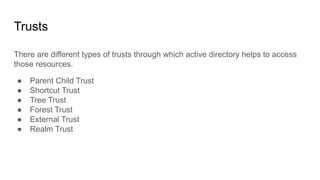
Trusts
There are different types of trusts through which active directory helps to access
those resources.
● Parent Child Trust
● Shortcut Trust
● Tree Trust
● Forest Trust
● External Trust
● Realm Trust
Trusts Direction
One Way Trust Direction
Trusting Domain [domainA.com] Trusted Domain [domainB.com]
Direction Of Trust
Direction Of Access
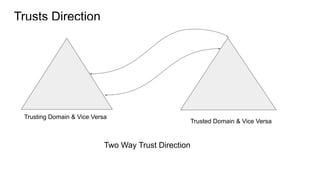
Trusts Direction
Two Way Trust Direction
Trusting Domain & Vice Versa
Trusted Domain & Vice Versa
Active Directory From Attacker’s Perspective
Methodology can be:-
● Getting Initial Footprint into the Organisation
● Enumerating Privileged accounts/Accounts live in Domain Admins, etc
● Identify any weak permissions
● Enumerating and Exploiting.
Active Directory From Attacker’s Perspective
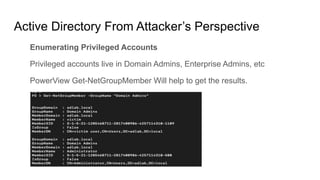
Enumerating Privileged Accounts
Privileged accounts live in Domain Admins, Enterprise Admins, etc
PowerView Get-NetGroupMember Will help to get the results.
Active Directory From Attacker’s Perspective
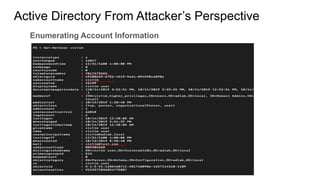
Enumerating Account Information
Active Directory From Attacker’s Perspective
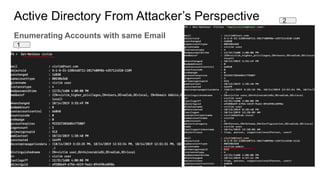
Enumerating Accounts with same Email
1
2
Active Directory From Attacker’s Perspective
Enumerating ACLS in AD
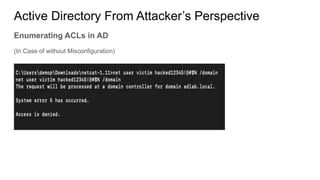
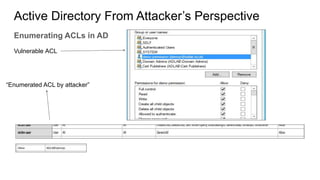
ACLs helps to determine the Permissions of the Objects.
Exploiting those results in Privilege Escalations.
demop
Victim (Higher Priv)
Reset Password
Permission
Attacker Controlled User
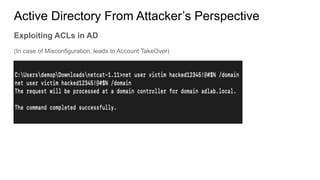
Attacker hijacks the victim user account
Active Directory From Attacker’s Perspective
Enumerating ACLs in AD
(In Case of without Misconfiguration)
Active Directory From Attacker’s Perspective
Enumerating ACLs in AD
Vulnerable ACL
“Enumerated ACL by attacker”
Active Directory From Attacker’s Perspective
Exploiting ACLs in AD
(In case of Misconfiguration, leads to Account TakeOver)
Active Directory From Attacker’s Perspective
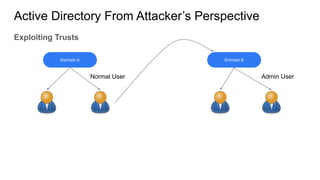
Exploiting Trusts
● Enumerating Trust (Powerview cmdlet would help)
● Enumerating Privileged Users across entity.
● Enumerating any weak ACLs, Misconfiguration, etc.
● Exploit them
Active Directory From Attacker’s Perspective
Exploiting Trusts
Domain A Domain B
Normal User Admin User
Thank you

Active directory 101

  • 1.
  • 2.
    Contents ● What isActive directory ● Groups & Group Policy ● Organizational Unit (OU) ● Trusts in Active Directory ● Active Directory Attacker’s Perspective
  • 3.
    Active Directory ● Microsofttechnology ● Centralized way to store objects ● Objects includes Users, Computers, Groups and Group Policies ● Objects stored in Hierarchical Structure ● DNS, LDAP, Kerberos ● Allows to create Groups, Group policies, OUs ● Provides security, simplifies the admin burden
  • 4.
    Why Active Directory? Security:It ensures that no one else except allowed people can access the resource. Centralization: It stores all the resource in one place. Delegation: It allows the delegation of the admin permission to other sites.
  • 5.
    Groups and GroupPolicies Groups:- ● Collection of users, computers is known as Groups ● Helpful for applying task to multiple users at one time. HR Department Prod Department GROUP FM Department Creating a Group Giving access to that Group Access Complete
  • 6.
    Groups and GroupPolicies Group Policies:- ● Centralised settings ● Settings can be of anything. ● Applied on Organizational Unit (OU) ● Provides security ● GUID in Policies folder ● Replicate in every 90 mins.
  • 7.
    Organizational Units ● OrganizationalUnits or OUs are containers which holds Groups, Computers, Users. ● Helps in GPO ● Helps in Administrative Delegation domainA SubDivision:DomainA Organizational Unit Create OU Full Control
  • 8.
    Trusts The main objectiveof Trusts is provides access to across the different entities domainA.com domainB.com sub.child.domainA.com child.domainA.com sub.child.domainB.com child.domainB.com Want to Access Resource
  • 9.
    Trusts There are differenttypes of trusts through which active directory helps to access those resources. ● Parent Child Trust ● Shortcut Trust ● Tree Trust ● Forest Trust ● External Trust ● Realm Trust
  • 10.
    Trusts Direction One WayTrust Direction Trusting Domain [domainA.com] Trusted Domain [domainB.com] Direction Of Trust Direction Of Access
  • 11.
    Trusts Direction Two WayTrust Direction Trusting Domain & Vice Versa Trusted Domain & Vice Versa
  • 12.
    Active Directory FromAttacker’s Perspective Methodology can be:- ● Getting Initial Footprint into the Organisation ● Enumerating Privileged accounts/Accounts live in Domain Admins, etc ● Identify any weak permissions ● Enumerating and Exploiting.
  • 13.
    Active Directory FromAttacker’s Perspective Enumerating Privileged Accounts Privileged accounts live in Domain Admins, Enterprise Admins, etc PowerView Get-NetGroupMember Will help to get the results.
  • 14.
    Active Directory FromAttacker’s Perspective Enumerating Account Information
  • 15.
    Active Directory FromAttacker’s Perspective Enumerating Accounts with same Email 1 2
  • 16.
    Active Directory FromAttacker’s Perspective Enumerating ACLS in AD ACLs helps to determine the Permissions of the Objects. Exploiting those results in Privilege Escalations. demop Victim (Higher Priv) Reset Password Permission Attacker Controlled User Attacker hijacks the victim user account
  • 17.
    Active Directory FromAttacker’s Perspective Enumerating ACLs in AD (In Case of without Misconfiguration)
  • 18.
    Active Directory FromAttacker’s Perspective Enumerating ACLs in AD Vulnerable ACL “Enumerated ACL by attacker”
  • 19.
    Active Directory FromAttacker’s Perspective Exploiting ACLs in AD (In case of Misconfiguration, leads to Account TakeOver)
  • 20.
    Active Directory FromAttacker’s Perspective Exploiting Trusts ● Enumerating Trust (Powerview cmdlet would help) ● Enumerating Privileged Users across entity. ● Enumerating any weak ACLs, Misconfiguration, etc. ● Exploit them
  • 21.
    Active Directory FromAttacker’s Perspective Exploiting Trusts Domain A Domain B Normal User Admin User
  • 22.