Eng Ing Eng !

<Insert tada.wav here>
About The Speaker
• Name: Pandu Poluan
• Email: pandu@poluan.info
• Experience:
  – Senior Instructor (of instructors) for Cisco, Microsoft,
    Certified Ethical Hackers
  – IT Manager of Infrastructure,
    PT Panin Sekuritas Tbk
     • 25 branches, 500 employees, 1 domain
  – Systems Administration Manager,
    PT Carrefour Indonesia
     • 85 branches, 10’000+ employees, 2 domains
Active Directory
    An Introduction
What is Active Directory?
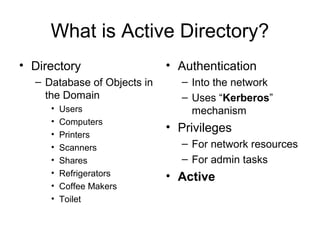
• Directory                  • Authentication
  – Database of Objects in     – Into the network
    the Domain                 – Uses “Kerberos”
     •   Users                   mechanism
     •   Computers
     •
                             • Privileges
         Printers
     •   Scanners              – For network resources
     •   Shares                – For admin tasks
     •   Refrigerators       • Active
     •   Coffee Makers
     •   Toilet
Why called “Active”
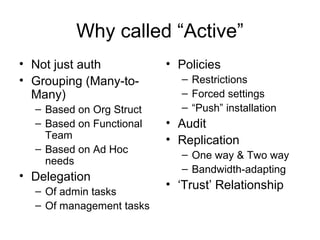
• Not just auth           • Policies
• Grouping (Many-to-        – Restrictions
  Many)                     – Forced settings
  – Based on Org Struct     – “Push” installation
  – Based on Functional   • Audit
    Team                  • Replication
  – Based on Ad Hoc
                            – One way & Two way
    needs
                            – Bandwidth-adapting
• Delegation
                          • ‘Trust’ Relationship
  – Of admin tasks
  – Of management tasks
Overview of AD Elements
• Domain Controllers
    – Writable & RODC
•   Schema
•   Security Groups
•   SYSVOL
•   Group Policy Objects (GPO)
•   Sites & Subnets
•   ... (and many others, but let’s just focus on the
    above for this “Introduction”)
Domain Controllers
• Where AD database(s) are kept
• Replicate between themselves
  – Two way with writeable DCs, One-way to RODCs
  – Also replicate “SYSVOL”
• MUST be secured at all costs!!
  – Physical security
  – Logical security  RODC
  – Hardening:
     • Allow only special ‘elevated’ accounts ‘administrator-level’
       access to the DCs
The AD “Schema”
• Definition of Objects in AD
  – Properties/Attributes
  – ‘Nature’ of Object
     • E.g., container, custom container, leaf object
• AMAT SANGAT VITAL SEKALI BANGET !!!
  – *IMMEDIATELY* replicated to other DCs
  – Feel free to commit suicide if someone gained
    Schema-editing ability … and botched the schema
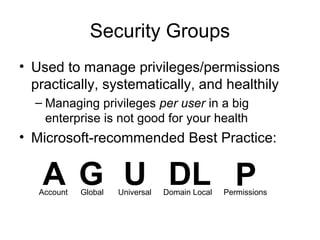
Security Groups
• Used to manage privileges/permissions
  practically, systematically, and healthily
  – Managing privileges per user in a big
    enterprise is not good for your health
• Microsoft-recommended Best Practice:


   A G U DL P
   Account   Global   Universal   Domain Local   Permissions
A-P
• The Worst privilege-assignment strategy
  – Imagine having to give 1’000 users the same
    privileges …
  – … to 100 network shares


• Only suitable for … nothing
A-G-P
• NEVER assign permissions directly to
  accounts
• At least, assign permissions to Global SGs
• Then, gather user Accounts into Gs

• Only suitable for small domains
A-G-DL-P
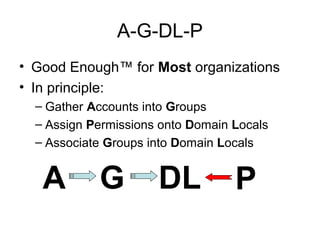
• Good Enough™ for Most organizations
• In principle:
  – Gather Accounts into Groups
  – Assign Permissions onto Domain Locals
  – Associate Groups into Domain Locals


   A        G         DL           P
A-G-U-DL-P
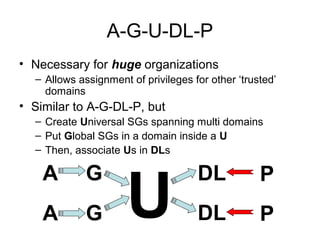
• Necessary for huge organizations
  – Allows assignment of privileges for other ‘trusted’
    domains
• Similar to A-G-DL-P, but
  – Create Universal SGs spanning multi domains
  – Put Global SGs in a domain inside a U
  – Then, associate Us in DLs


                      U
    A        G                       DL            P
    A        G                       DL            P
SYSVOL
• The mysterious, enigmatic area where important AD
  thingies are kept
   – Group Policy Objects
   – Startup/Shutdown/Logon/Logoff Scripts
   – Other small-sized SysAdmin supporting files
• Employs mysterious “Junctions”
   – Must be hosted on NTFS
   – Please please please for the love of all things holy: Do not delete
     any directory in here if you don’t understand its structure
• Automatically replicated to other DCs
   – (Except SYSVOL on RODCs – won’t replicate, but will be
     overwritten instead)
   – FRS on Windows Server 2003, DFSR on Windows Server 2008
   – Please do not put anything too big in SYSVOL …
       • else, your NetAdmin is going to find you and hurt you…
Group Policy Objects
• A method to apply:
  – Common restrictions
  – Common settings
  – Common applications
• Attached to one (or more) “Organizational Units”
• Two kinds of policies
  – Machine policies – set on boot-complete
  – User policies – set on login
     • Machine policies *may* get re-applied when user login
• Can be selectively applied
Sites and Subnets
• Active Directory enables the definition of “sites”
   – Basically, a grouping of subnets in the enterprise
   – Also, a collection of DCs in those subnets
• Features enabled by “sites”
   –   Definition of replication topology
   –   Definition of replication connection “costs”
   –   Custom scheduling of replication
   –   Nearest-DC (for login, SYSVOL access, etc.)
Other Important Things You Should
   Know If You Are A Windows
      Systems Administrator
•   FSMO Roles
•   Time Synchronization
•   Deployment tools
•   Management tools
•   Diagnostic tools
Tararengkiyu !
Sesi Tanya
dan (semoga di-) Jawab
Active directory - an introduction

Active directory - an introduction

  • 1.
    Eng Ing Eng! <Insert tada.wav here>
  • 2.
    About The Speaker •Name: Pandu Poluan • Email: pandu@poluan.info • Experience: – Senior Instructor (of instructors) for Cisco, Microsoft, Certified Ethical Hackers – IT Manager of Infrastructure, PT Panin Sekuritas Tbk • 25 branches, 500 employees, 1 domain – Systems Administration Manager, PT Carrefour Indonesia • 85 branches, 10’000+ employees, 2 domains
  • 3.
    Active Directory An Introduction
  • 4.
    What is ActiveDirectory? • Directory • Authentication – Database of Objects in – Into the network the Domain – Uses “Kerberos” • Users mechanism • Computers • • Privileges Printers • Scanners – For network resources • Shares – For admin tasks • Refrigerators • Active • Coffee Makers • Toilet
  • 5.
    Why called “Active” •Not just auth • Policies • Grouping (Many-to- – Restrictions Many) – Forced settings – Based on Org Struct – “Push” installation – Based on Functional • Audit Team • Replication – Based on Ad Hoc – One way & Two way needs – Bandwidth-adapting • Delegation • ‘Trust’ Relationship – Of admin tasks – Of management tasks
  • 6.
    Overview of ADElements • Domain Controllers – Writable & RODC • Schema • Security Groups • SYSVOL • Group Policy Objects (GPO) • Sites & Subnets • ... (and many others, but let’s just focus on the above for this “Introduction”)
  • 7.
    Domain Controllers • WhereAD database(s) are kept • Replicate between themselves – Two way with writeable DCs, One-way to RODCs – Also replicate “SYSVOL” • MUST be secured at all costs!! – Physical security – Logical security  RODC – Hardening: • Allow only special ‘elevated’ accounts ‘administrator-level’ access to the DCs
  • 8.
    The AD “Schema” •Definition of Objects in AD – Properties/Attributes – ‘Nature’ of Object • E.g., container, custom container, leaf object • AMAT SANGAT VITAL SEKALI BANGET !!! – *IMMEDIATELY* replicated to other DCs – Feel free to commit suicide if someone gained Schema-editing ability … and botched the schema
  • 9.
    Security Groups • Usedto manage privileges/permissions practically, systematically, and healthily – Managing privileges per user in a big enterprise is not good for your health • Microsoft-recommended Best Practice: A G U DL P Account Global Universal Domain Local Permissions
  • 10.
    A-P • The Worstprivilege-assignment strategy – Imagine having to give 1’000 users the same privileges … – … to 100 network shares • Only suitable for … nothing
  • 11.
    A-G-P • NEVER assignpermissions directly to accounts • At least, assign permissions to Global SGs • Then, gather user Accounts into Gs • Only suitable for small domains
  • 12.
    A-G-DL-P • Good Enough™for Most organizations • In principle: – Gather Accounts into Groups – Assign Permissions onto Domain Locals – Associate Groups into Domain Locals A G DL P
  • 13.
    A-G-U-DL-P • Necessary forhuge organizations – Allows assignment of privileges for other ‘trusted’ domains • Similar to A-G-DL-P, but – Create Universal SGs spanning multi domains – Put Global SGs in a domain inside a U – Then, associate Us in DLs U A G DL P A G DL P
  • 14.
    SYSVOL • The mysterious,enigmatic area where important AD thingies are kept – Group Policy Objects – Startup/Shutdown/Logon/Logoff Scripts – Other small-sized SysAdmin supporting files • Employs mysterious “Junctions” – Must be hosted on NTFS – Please please please for the love of all things holy: Do not delete any directory in here if you don’t understand its structure • Automatically replicated to other DCs – (Except SYSVOL on RODCs – won’t replicate, but will be overwritten instead) – FRS on Windows Server 2003, DFSR on Windows Server 2008 – Please do not put anything too big in SYSVOL … • else, your NetAdmin is going to find you and hurt you…
  • 15.
    Group Policy Objects •A method to apply: – Common restrictions – Common settings – Common applications • Attached to one (or more) “Organizational Units” • Two kinds of policies – Machine policies – set on boot-complete – User policies – set on login • Machine policies *may* get re-applied when user login • Can be selectively applied
  • 16.
    Sites and Subnets •Active Directory enables the definition of “sites” – Basically, a grouping of subnets in the enterprise – Also, a collection of DCs in those subnets • Features enabled by “sites” – Definition of replication topology – Definition of replication connection “costs” – Custom scheduling of replication – Nearest-DC (for login, SYSVOL access, etc.)
  • 17.
    Other Important ThingsYou Should Know If You Are A Windows Systems Administrator • FSMO Roles • Time Synchronization • Deployment tools • Management tools • Diagnostic tools
  • 18.
  • 19.