INTELLIGENT ACCIDENT PREVENTION & ALERT SYSTEM
WITH CALL CONTROL
Chapter 1
1.1 ABSTRACT:
As the usage of vehicles is increasing drastically, the hazards due to vehicles is also
increased. The main cause for accidents happing while driving a bike or car driver tries to
speak diverting minds, over stress and due to electronic gadgets. This paper deals with
accident prevention system that occurs due to carelessness of the person who is driving
the vehicle. This introduces accident alerting system which alerts the person who is
driving the vehicle. Mobile phone use while driving is common but it is widely
considered dangerous due to its potential for causing distracted driving and crashes.
1.2 INTRODUCTION:
Accident rates are on a rise across the world and commuters on vehicles often have it worse for
them as compared to others. Vehicle accidents lead to the majority of deaths in India and often
times there is a delay in the victim getting medical attention which puts his life in danger. In
order to prevent this from happening the smart intelligent accident system is designed which
automatically intimates the hospitals nearby saving time and reducing the probability of death.
Also, in this age of “smart devices”, the vehicle commuters seem to have been forgotten about.
There is little to no progress observed in data delivery to the riders which includes location
information, entertainment availability and inefficient communication.
1.3 Objective Of the Work
Main objectives of the project are
• To prevent the accident by avoiding the mobile phone incoming calls ring during the user
is in driving and also to send a SMS message to the caller informing that the user is in
driving.
• To create an intelligent accident detection system which detects accidents and informs
specific people via SMS with location and speed of the vehicle before the accident occurs
INTELLIGENT ACCIDENT PREVENTION & ALERT SYSTEM
WITH CALL CONTROL
with the help of GPS & GSM based tracking system, thus aiding ambulance to reach the
correct location.
Technology
Android is a software stack for mobile devices that includes an operating system, middleware
and key applications. The Android-SDK provides the tools and APIs necessary to begin
developing applications on the Android platform using the Java programming language.
On July 2005, Google announced the redemption of Android Inc. The Android team
created an operating system, named Android, based on the core of the operating system Linux.
The target of this operating system was the mobile phones market, where SymbianOS and
Windows Mobile dominated. The main benefit of Android is a rich library to enhance and ease
communication and networking. Java is offered to software developers as the main selection for
programming, enriched with software libraries developed by Google.
The first presentation of the Android platform was on November 5, 2007, along with the
establishment of Open Handset Alliance. Google has issued most of the code of Android under
the terms of Apache License. Eventually, Android is a platform that includes open source
operating system, middleware and key applications for use on mobile devices based on the
kernel Linux 2.6; in accordance with the principles of platform software design, based on
available drivers hardware device. One level up, the libraries of the platform are found and the
required virtual machine for converting and runtime applications. These are complemented by
basic applications needed for the basic management unit for the initial communication and use of
the device by the user. At the top of the platform architecture, lie the applications developed by
software developers.
Android is a software stack for mobile devices that includes an operating system,
middleware and key applications. Google Inc. purchased the initial developer of the software,
Android Inc., in 2005. Android's mobile operating system is based on the Linux kernel. Google
and other members of the Open Handset Alliance collaborated on Android's development and
release. The Android Open Source Project (AOSP) is tasked with the maintenance and further
development of Android. The Android operating system is the world's best-selling Smartphone
INTELLIGENT ACCIDENT PREVENTION & ALERT SYSTEM
WITH CALL CONTROL
platform. The first truly open and comprehensive platform for mobile devices, all of the software
to run a mobile phone but without the proprietary obstacles that have hindered mobile
innovation.
1.4.1 Features of Android and why Android
 Handset layouts: The platform is adaptable to larger, VGA, 2D graphics library, 3D
graphics library based on OpenGL ES 2.0 specifications, and traditional smart phone
layouts.
 Storage: The Database Software SQLite is used for data storage purposes.
 Connectivity: Android supports connectivity technologies including GSM/EDGE,
IDEN, CDMA, EV-DO, UMTS, Bluetooth, WI-Fi, and WiMAX.
 Messaging: SMS and MMS are available forms of messaging including threaded text
messaging.
 Web browser: The web browser available in Android is based on the open-source
WebKit application framework. The browser scores a 93/100 on the Acid3 Test.
 Java support: Software written in Java can be compiled to be executed in the Dalvik
virtual machine, which is a specialized VM implementation designed for mobile device
use, although not technically a standard Java Virtual Machine. Android does not support
J2ME, like some other mobile operating systems.
 Media support: Android supports the following audio/video/still media formats: H.263,
H.264 (in 3GP or MP4 container), MPEG-4 SP, AMR, AMR-WB (in 3GP container),
AAC, HE-AAC (in MP4 or 3GP container), MP3, MIDI, Ogg Vorbis, WAV, JPEG,
PNG, GIF and BMP.
 Additional hardware support: Android can use video/still cameras, touch screens, GPS,
accelerometers, magnetometers, accelerated 2D bit blits (with hardware orientation,
scaling, and pixel format conversion) and accelerated 3D graphics.
 Development environment: Includes a device emulator, tools for debugging, memory
INTELLIGENT ACCIDENT PREVENTION & ALERT SYSTEM
WITH CALL CONTROL
and performance profiling, and a plug-in for the Eclipse IDE.
 Market: Like many phone-based application stores, the Android Market is a catalog of
applications that can be downloaded and installed to target hardware over-the-air, without
the use of a PC. Originally only free applications were supported. Paid-for applications
have been available on the Android Market in the United States since 19 February
2009.The Android Market has been expanding rapidly. As of April 30, 2010, it had over
50,000 Android applications for download.
 Multi-touch: Android has native support for multi-touch which was initially made
available in handsets such as the HTC Hero. The feature was initially disabled at the
kernel level (possibly to avoid infringing Apple's patents on touch-screen technology).
Google has since released an update for the Nexus One and the Motorola Droid which
enables multi-touch natively.
 Bluetooth: Support for sending files over Bluetooth was added in version 2.0.
 Video calling: Android does not support video calling. However, it is possible if the
phone runs an additional UI. This is proved on the HTC Evo 4G, which runs Sense and
can support video calling.
Below are the reasons mentioned for choosing android.
 It is a simple and powerful SDK supporting GSM, EDGE, and 3G networks,
Wi-Fi, Bluetooth.
 It requires no licensing, distribution, or development fees.
 Development over many platform Linux, Mac OS, windows Excellent documentation
 Thriving developer community Java-based, easy to import 3rdparty Java library
 Funding (40+ G1 phones)Prize (amazon’s kindle)Job opportunity is tremendous
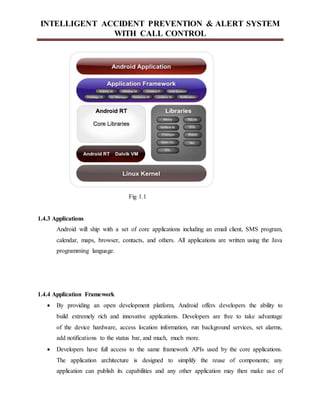
1.4.2 Android Architecture
INTELLIGENT ACCIDENT PREVENTION & ALERT SYSTEM
WITH CALL CONTROL
Fig 1.1
1.4.3 Applications
Android will ship with a set of core applications including an email client, SMS program,
calendar, maps, browser, contacts, and others. All applications are written using the Java
programming language.
1.4.4 Application Framework
 By providing an open development platform, Android offers developers the ability to
build extremely rich and innovative applications. Developers are free to take advantage
of the device hardware, access location information, run background services, set alarms,
add notifications to the status bar, and much, much more.
 Developers have full access to the same framework APIs used by the core applications.
The application architecture is designed to simplify the reuse of components; any
application can publish its capabilities and any other application may then make use of
INTELLIGENT ACCIDENT PREVENTION & ALERT SYSTEM
WITH CALL CONTROL
those capabilities (subject to security constraints enforced by the framework). This same
mechanism allows components to be replaced by the user.
1.4.5 Underlying All Applications Is a Set of Services and Systems
 A rich and extensible set of Views that can be used to build an application, including
lists, grids, text boxes, buttons, and even an embeddable web browser.
 Content Providers that enable applications to access data from other applications (such as
Contacts), or to share their own data.
 A Resource Manager, providing access to non-code resources such as localized strings,
graphics, and layout files.
 A Notification Manager that enables all applications to display custom alerts in the status
bar.
 An Activity Manager that manages the lifecycle of applications and provides a common
navigation back stack.
Android includes a set of core libraries that provides most of the functionality available in
the core libraries of the Java programming language.
1.4.6 Role of DVM
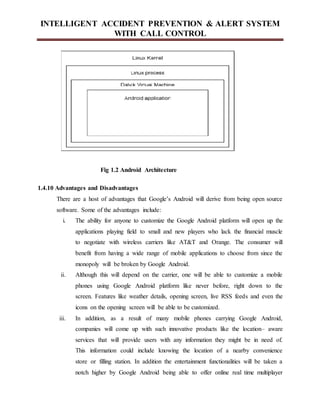
Every Android application runs in its own process, with its own instance of the Dalvik
virtual machine. Dalvik has been written so that a device can run multiple VMs
efficiently. The Dalvik VM executes files in the Dalvik Executable (.dex) format which is
optimized for minimal memory footprint. The VM is register-based, and runs classes
compiled by a Java language compiler that have been transformed into the .dex format by
the included "dx" tool. The Dali VM relies on the Linux kernel for underlying
functionality such as threading and low-level memory management.
1.4.7 Linux Kernel
Android relies on Linux version 2.6 for core system services such as security, memory
INTELLIGENT ACCIDENT PREVENTION & ALERT SYSTEM
WITH CALL CONTROL
management, process management, network stack, and driver model. The kernel also acts as an
abstraction layer between the hardware and the rest of the software stack Android relies on Linux
version 2.6 for core system services such as security, memory management, process
management, network stack, and driver model. The kernel also acts as an abstraction layer
between the hardware and the rest of the software stack.
1.4.8 Android SDK 1.5
There are several new features and UI updates included in the 1.5 update:
 Ability to record and watch videos with the camcorder mode.
 Uploading videos to YouTube and pictures to Picasa directly from the phone.
 A new soft keyboard with an "Auto complete" feature.
 Bluetooth A2DP support which in turn broke Bluetooth connectivity with many
popular cars and headsets.
 Ability to automatically connect to a Bluetooth headset within a certain distance.
 New widgets and folders that can populate the Home screens.
 Animations between screens.
 Expanded ability of Copy and paste to include web page.
1.4.9 Android Runtime
 Android includes a set of core libraries that provides most of the functionality available in
the Core libraries of the Java programming language.
 Every Android application runs in its own process, with its own instance of the Dalvik
 Virtual machine. Dalvik has been written so that a device can run multiple VMs
efficiently.
 The Dalvik VM executes files in the Dalvik Executable (.dex) format which is optimized
for minimal memory footprint. The VM is register-based, and runs classes compiled by a
Java language compiler that have been transformed into the .decks format by the included
"dx" tool.
INTELLIGENT ACCIDENT PREVENTION & ALERT SYSTEM
WITH CALL CONTROL
Fig 1.2 Android Architecture
1.4.10 Advantages and Disadvantages
There are a host of advantages that Google’s Android will derive from being open source
software. Some of the advantages include:
i. The ability for anyone to customize the Google Android platform will open up the
applications playing field to small and new players who lack the financial muscle
to negotiate with wireless carriers like AT&T and Orange. The consumer will
benefit from having a wide range of mobile applications to choose from since the
monopoly will be broken by Google Android.
ii. Although this will depend on the carrier, one will be able to customize a mobile
phones using Google Android platform like never before, right down to the
screen. Features like weather details, opening screen, live RSS feeds and even the
icons on the opening screen will be able to be customized.
iii. In addition, as a result of many mobile phones carrying Google Android,
companies will come up with such innovative products like the location– aware
services that will provide users with any information they might be in need of.
This information could include knowing the location of a nearby convenience
store or filling station. In addition the entertainment functionalities will be taken a
notch higher by Google Android being able to offer online real time multiplayer
INTELLIGENT ACCIDENT PREVENTION & ALERT SYSTEM
WITH CALL CONTROL
games.
iv. However, Google Android is likely to experience some problems as follows:
These problems might include rejection of Google Android by carriers who
charge a fee for some of the web based applications which Google Android will
enable mobile phone holders to access free of charge.
v. Since Google Android is an open source platform driving all Android phones, it
could significantly increase the risk of hacking these devices. If this happens, then
locking mobiles as a security measure will be a mockery
Literature Survey
1. Ravi Nandu and Kuldeep Singh proposed a smart accident detection idea focused upon
prevention of casualties by ensuring the safety. The system built is such that in the case of the
drunken, the ignition in the combustion chamber wouldn’t occur. The system is directly
connected to the two-wheeler ignition system by electronics. The system has the main
components as stated – a proximity sensor, alcohol sensor, accelerometer and a keypad.. At the
receiver end, on the two-wheeler, a microcontroller controls the ignition. The ignition system is
incorporated with a diode acting as cut off and on region connector. Upon the reception of the
signal from the system, the microcontroller takes care of the ignition starting the vehicle. While
the idea of this system is noble and very much the need of the hour, the implementation would be
completely infeasible because of the ignition system having to be tampered with, in every single
model of every single two-wheeler manufacturer for this idea to come to function.
INTELLIGENT ACCIDENT PREVENTION & ALERT SYSTEM
WITH CALL CONTROL
2. Kodanda Ramaiah GN et al., [3] proposed a smart helmet idea which provided a lot of
functionalities. These include cooling the inside of a helmet using a thermoelectric cooler
working on solar energy; Bluetooth headset inside the helmet to handle calls; ensuring that the
rider is wearing a helmet while on a trip; GPS and GSM modules to send the precise location of
the rider in case of an accident. The smart helmet idea here has two modules – helmet and the
two-wheeler. The helmet module consists of the solar strips, Bluetooth headphones,
thermoelectric cooler, ignition control switch and an RF Transmitter. The vehicle module on the
other hand consists of the GSM, GPS, vibration sensor, RF Receiver and a microcontroller. The
solar strips are used to power up all the peripherals interfaced into the helmet. The RF
Transmitter sends the trigger signals about the status of switches to the vehicle module. When
the RF receiver receives an alert signal from the helmet module, the same is sent to the controller
to take necessary actions. The vibration sensor along with the GSM and GPS modules work
together with the microcontroller to send alerts regarding an accident to the specified contacts
and emergency vehicles/hospitals. While this helmet provides a lot of important functionalities it
has two major problems – one, is the infeasibility of the system due to the ignition system having
to be tampered with, in every single model of every single two-wheeler manufacturer and two,
the final cost of the helmet going high due to fancy add-ons like a thermoelectric cooler.
3. Indranil Nikose et al., [6] proposed a smart helmet idea which focused on two features:
The detection of an accident using an accelerometer sensor, GPS and GSM modules, and
prevention of accidents by the detection of alcohol levels of the rider using an alcohol sensor.
The working of accident detection is fairly simple. When the helmet hits the ground, the
accelerometer sensors note this data and send it to a CMOS 8-bit microcontroller. The controller
then extracts the longitude and latitude of the location using the GPS module and initiates a timer
counting to 10 minutes. If the rider doesn’t start riding in those 10 minutes then the controller
sends the location details as an SMS to the ambulance and parents. The alcohol is detected using
an alcohol sensor which measures the amount of alcohol present in the surrounding environment.
When the alcohol level crosses a predefined value, it triggers off an alarm, notifying the makers.
INTELLIGENT ACCIDENT PREVENTION & ALERT SYSTEM
WITH CALL CONTROL
While the accident detection feature in this system is feasible, the alcohol detection system does
nothing on detection and hence is not very useful.
INTELLIGENT ACCIDENT PREVENTION & ALERT SYSTEM
WITH CALL CONTROL
Chapter 2
2.1 Problem Statement
Mobile phone use while driving is common but it is widely considered dangerous due to
its potential for causing distracted driving and crashes. Due to the number of crashes that
are related to conducting calls on a phone while driving, some jurisdictions have made
the use of calling on a phone while driving illegal. Many jurisdictions have enacted laws
to ban handheld mobile phone use.
2.2.1 DISADVANTAGES OF EXISTING SYSTEM
• Accidents, specifically in remote and/or low-profile areas often go unnoticed.
• Medical attention, in these cases, may take hours to arrive leading to a probable death.
• Also the general public often shy away from helping a victim on the streets due to the
complications in the laws.
2.2 Proposed System
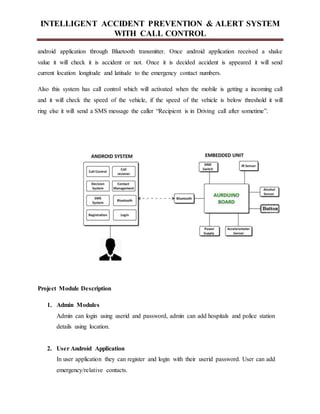
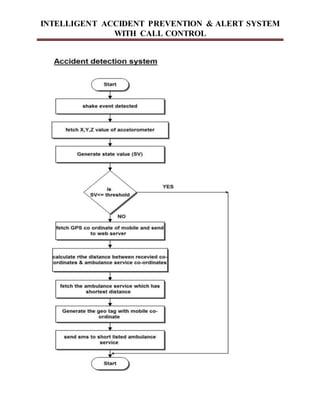
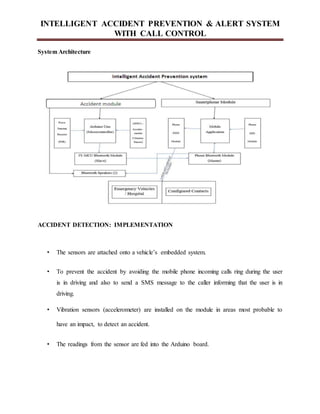
The main aim of the system is to detect the accident automatically and send the accident location
geo tag to emergency contact numbers and also to prevent the accident by avoiding the mobile
phone incoming calls ring during the user is in driving and also to send a SMS message to the
caller informing that the user is in driving.
This system has two units
Embedded unit
Android application
In embedded unit the Arduino system which is connected with Accelerometer sensor and
Bluetooth transmitter. When accident is appearing the Accelerometer sensor generate x, y, z
values with the help of these values system will generate shake values. These details send to
INTELLIGENT ACCIDENT PREVENTION & ALERT SYSTEM
WITH CALL CONTROL
android application through Bluetooth transmitter. Once android application received a shake
value it will check it is accident or not. Once it is decided accident is appeared it will send
current location longitude and latitude to the emergency contact numbers.
Also this system has call control which will activated when the mobile is getting a incoming call
and it will check the speed of the vehicle, if the speed of the vehicle is below threshold it will
ring else it will send a SMS message the caller “Recipient is in Driving call after sometime”.
Project Module Description
1. Admin Modules
Admin can login using userid and password, admin can add hospitals and police station
details using location.
2. User Android Application
In user application they can register and login with their userid password. User can add
emergency/relative contacts.
INTELLIGENT ACCIDENT PREVENTION & ALERT SYSTEM
WITH CALL CONTROL
3. Accident Alert System
If accident will happened, it will take user location, and it will check for nearest hospital
and police station, then it will send sms to police station, hospital and emergency/relative
contact with user location.
4. Panic Alert System
If user is getting some problem they can user panic button, and it will send message to the
emergency/relative contact.
Algorithm:
Distance Calculation Algorithm
INTELLIGENT ACCIDENT PREVENTION & ALERT SYSTEM
WITH CALL CONTROL
2.3 System Analysis
2.3.1 Introduction to SystemAnalysis
System
A system is an orderly group of interdependent components linked together according to a plan
to achieve a specific objective. Its main characteristics are organization, interaction,
interdependence, integration and a central objective.
System Analysis
System analysis and design are the application of the system approach to problem solving
generally using computers. To reconstruct a system the analyst must consider its elements output
and inputs, processors, controls, feedback and environment.
Analysis
Analysis is a detailed study of the various operations performed by a system and their
relationships within and outside of the system. One aspect of analysis is defining the boundaries
of the system and determining whether or not a candidate system should consider other related
systems. During analysis data are collected on the available files decision points and transactions
handled by the present system. This involves gathering information and using structured tools for
analysis.
DISADVANTAGES OF EXISTING SYSTEM
INTELLIGENT ACCIDENT PREVENTION & ALERT SYSTEM
WITH CALL CONTROL
 Accidents, specifically in remote and/or low-profile areas often go unnoticed.
 Medical attention, in these cases, may take hours to arrive leading to a probable death.
 Also the general publics often shy away from helping a victim on the streets due to the
complications in the laws.
2.4 Steps to Configure Application Development
2.4.1 Install JDK
Go to http://developers.sun.com/downloads/, Expand choice Java SE and Click on: Java
SE (JDK) 6.
2.4.2 Setting up the Android SDK
Perform the following steps to set-up Android SDK
i. Prepare your development computer and ensure it meets the system requirements.
ii. Install the SDK starter package from either one of this depending on the platform OS.
iii. Windows installer_r08-windows.exe, MacOSX(Intel)android-sdk_r08-mac_86.zip, Linux
(i386)android-sdk_r08-linux_86.tgz
iv. Install the ADT Plugin for Eclipse
v. Add Android platforms and other components to your SDK.
vi. Explore the contents of the Android SDK
2.4.3 Install Eclipse IDE
INTELLIGENT ACCIDENT PREVENTION & ALERT SYSTEM
WITH CALL CONTROL
Eclipse is a multi-language software development platform comprising an IDE and a plug-in
system to extend it. It can be used to develop applications in Java and, by means of the various
plugin, in other languages.
Go to http://www.eclipse.org/downloads/, Download the current and save it to drive C:,
Unzip the compress file to your hard drive (c:eclipse)
2.4.4 Installing the Eclipse ADT Plugin
The Android Development Tools (ADT) plugin for Eclipse adds extensions to the Eclipse IDE.
It allows you to create and debug Android applications easier and faster.
Advantages
i. It gives you access to other Android development tools from inside the Eclipse IDE. For
example:
a. take screenshots,
b. Debug / set breakpoints, and
c. View thread and process information directly from Eclipse.
ii. It provides a New Project Wizard, which helps you quickly create and set up all of the
basic files you'll need for a new Android.
Steps involved are
i. Start Eclipse, then select Help>Install New Software.
ii. Click Add, in the top-right corner.
iii. In the Add Repository dialog that appears, enter "ADT Plugin" for the Name and the
following URL for the Location: https://dl-ssl.google.com/android/eclipse/ and ClickOK.
INTELLIGENT ACCIDENT PREVENTION & ALERT SYSTEM
WITH CALL CONTROL
iv. When the installation completes, restart Eclipse.
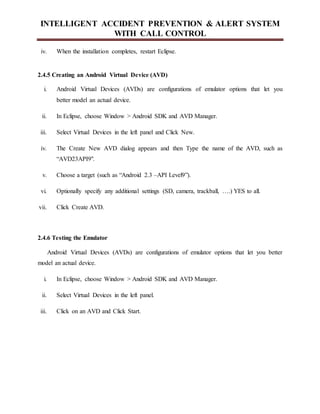
2.4.5 Creating an Android Virtual Device (AVD)
i. Android Virtual Devices (AVDs) are configurations of emulator options that let you
better model an actual device.
ii. In Eclipse, choose Window > Android SDK and AVD Manager.
iii. Select Virtual Devices in the left panel and Click New.
iv. The Create New AVD dialog appears and then Type the name of the AVD, such as
“AVD23API9".
v. Choose a target (such as “Android 2.3 –API Level9”).
vi. Optionally specify any additional settings (SD, camera, trackball, ….) YES to all.
vii. Click Create AVD.
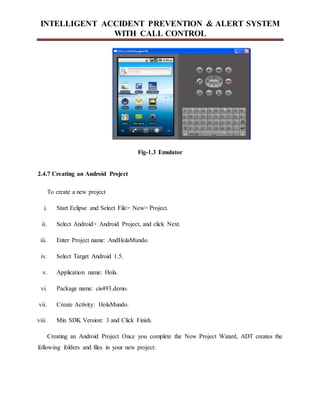
2.4.6 Testing the Emulator
Android Virtual Devices (AVDs) are configurations of emulator options that let you better
model an actual device.
i. In Eclipse, choose Window > Android SDK and AVD Manager.
ii. Select Virtual Devices in the left panel.
iii. Click on an AVD and Click Start.
INTELLIGENT ACCIDENT PREVENTION & ALERT SYSTEM
WITH CALL CONTROL
Fig-1.3 Emulator
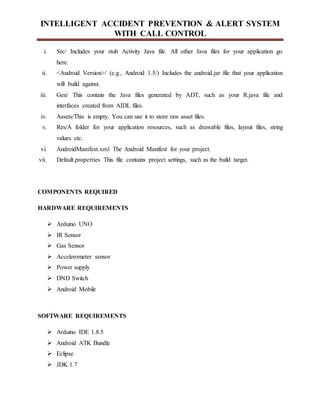
2.4.7 Creating an Android Project
To create a new project
i. Start Eclipse and Select File> New> Project.
ii. Select Android> Android Project, and click Next.
iii. Enter Project name: AndHolaMundo.
iv. Select Target Android 1.5.
v. Application name: Hola.
vi. Package name: cis493.demo.
vii. Create Activity: HolaMundo.
viii. Min SDK Version: 3 and Click Finish.
Creating an Android Project Once you complete the New Project Wizard, ADT creates the
following folders and files in your new project:
INTELLIGENT ACCIDENT PREVENTION & ALERT SYSTEM
WITH CALL CONTROL
i. Src/ Includes your stub Activity Java file. All other Java files for your application go
here.
ii. <Android Version>/ (e.g., Android 1.5/) Includes the android.jar file that your application
will build against.
iii. Gen/ This contain the Java files generated by ADT, such as your R.java file and
interfaces created from AIDL files.
iv. Assets/This is empty. You can use it to store raw asset files.
v. Res/A folder for your application resources, such as drawable files, layout files, string
values etc.
vi. AndroidManifest.xml The Android Manifest for your project.
vii. Default.properties This file contains project settings, such as the build target.
COMPONENTS REQUIRED
HARDWARE REQUIREMENTS
 Arduino UNO
 IR Sensor
 Gas Sensor
 Accelerometer sensor
 Power supply
 DND Switch
 Android Mobile
SOFTWARE REQUIREMENTS
 Arduino IDE 1.8.5
 Android ATK Bundle
 Eclipse
 JDK 1.7
INTELLIGENT ACCIDENT PREVENTION & ALERT SYSTEM
WITH CALL CONTROL
Chapter 3
REQUIRMENT SPECIFICATION
3.1 Hardware and software requirements
3.1.1 Hardware Requirements
· System : Pentium IV 2.4 GHz.
· Hard Disk : 500 GB.
· Ram : 4 GB
 Any desktop / Laptop system with above configuration or higher level
3.1.2 Software Requirements:
· Operating system : Windows XP Professional / Windows7
· Coding Language : Java (Jdk 1.7)
. Eclipse tool : Eclipse Indigo
. Android : ADT bundle
 One Smart Phone
3.2 Functional Requirements
The requirements have been elicited by interaction with the end users. The major
functional requirements are:
 Admin can add, edit and delete the locations with satellite map. They can create/add the
trusted authority users in one Location. They can do the Edit, View and Delete the same
(Users details). They can able to view the patients who are needs help. Admin can
change the password of the admin user. After adding the trusted user in one location the
login credential will be available for the trusted users.
INTELLIGENT ACCIDENT PREVENTION & ALERT SYSTEM
WITH CALL CONTROL
 Authorized users (who are added in admin module) only can login. The Authorized Users
(AU) can add/create the patients and their details in the application. Also they can view
all registered patient details and single registered users at the same time. The purpose of
viewing single patient detail is nothing but who are in under critical condition they are
visible primarily for Authorized users. The authorized user sends the Ambulance with
first aid facility. At the same time the authorized user send the SMS (about patient
condition) to their family members who are registered in the patient’s profile. AU can
change the password is also possible. The critical condition factors of patient is patient
temperature, Blood pressure, Sugar)
 The patients or clients have the login facility. If they feel their health condition to be
monitored by the authorized users then it is possible (Start monitoring service). If they
are not interested to monitor by AU then it is also possible (Start monitoring service). The
patients can able view their health conditions certainly. They use the map facility in their
device for various needs. If the patient feels unsafe condition they can send the
information to authorized users. Finally they can modify the password also not an issues.
3.3 Non Functional Requirements
Non functional requirements a description and, where possible, target values of associated non-
functional requirements. Non-functional requirements detail constraints, targets or control
mechanisms for the new system. They describe how, how well or to what standard a function
should be provided. For example, levels of required service such as response times; security and
access requirements; technical constraints; required interfacing with users' and other systems;
and project constraints such as implementation on the organization’s hardware/software
platform. Service level requirements are measures of the quality of service required, and is
crucial to capacity planning and physical design.
INTELLIGENT ACCIDENT PREVENTION & ALERT SYSTEM
WITH CALL CONTROL
Identify realistic, measurable target values for each service level. These include service
hours, service availability, responsiveness, throughput and reliability. Security includes defining
priority and frequency of backup of data, recovery, fallback and contingency planning and access
restrictions. Access restrictions should deal with what data needs protected; what data should be
restricted to a particular user role; and level of restriction required, eg physical, password, view
only. Non-functional requirements may cover the system as a whole or relate to specific
functional requirements.
Accessibility: The accessibility factor to the system depends on the availability of a broad band
connection. The access to our system is possible in places where the internet is available. Since
usually the login and password hacking happens in most of the domains which are implemented
on a global server. For our Opass system to be accessible anywhere and anytime we have
deployed our system on a global server space and this global server has to always be up and
running. The global server is provided with anti-virus, fire wall security and safe internet usage
mode in order to avoid the server being hacked or intruded.
Availability : The system has to be available anywhere and anytime whenever the user requires
the use of the system. Here we consider the issue of the service level agreement with various
domains in order to embed our system with theirs. So as for as now we have created our own
domain called as Exclusivebuy.com where we demonstrate our Opass password authentication
attack prevention mechanism.
Deployment: The deployment is carried out in various stages such as Android deployment,
Database deployment, and deployment of the source code.
Documentation: the documentation is carried out for every stage in order to summarize and
record the result of every stage since the time the system development was started.
Efficiency: The efficiency of the system is now related in terms of the number of users able to
login. We have not provided the factor of simultaneous login because our system is built under
the cost constraint and this can be further extended and developed.
INTELLIGENT ACCIDENT PREVENTION & ALERT SYSTEM
WITH CALL CONTROL
Failure management: At times of system failure the users may be puzzled about what is the
problem that is taking place in the system. So we have created various exceptions in order to
provide notifications to the users to help them assist and guide them in rectifying the errors.
Security: We are developing our system with the view of making the password authentication in
various websites and domain. So sufficient security is provided to our system in order to make it
safe for the users Usability by target user community: The usability factor can be extended to all
the domains where the password authentication phase is used and thus the security of the
password and the confidence of the password being safe from the hackers and phishing
software’s is enhanced.
These are constraints on the services or functions offered by the system. They include
timing constraints, constraints on the development process etc. Few of them are:
Communication Interfaces: The application requires an internet connection to perform
browsing And downloading files from the internet.
Safety requirements: Application ensures that it does not download malicious and infected
links from web sites.
Security requirements: Provides automatic file checking capability to ensure the security of
mobile platform and the application.
Software quality attributes: The source code of the application is going to be open as this is
going to be open source software. It will be free for further modifications and improvements.
INTELLIGENT ACCIDENT PREVENTION & ALERT SYSTEM
WITH CALL CONTROL
Chapter 4
DESIGN
4.1 Introduction to SystemAnalysis
A system is an orderly group of interdependent components linked together according to a plan
to achieve a specific objective. Its main characteristics are organization, interaction,
interdependence, integration and a central objective.
4.1.1 System Analysis
System analysis and design are the application of the system approach to problem solving
generally using computers. To reconstruct a system the analyst must consider its elements output
and inputs, processors, controls feedback and environment.
Analysis is a detailed study of the various operations performed by a system and their
relationships within and outside of the system. One aspect of analysis is defining the boundaries
of the system and determining whether or not a candidate system should consider other related
systems. During analysis data are collected on the available files decision points and transactions
handled by the present system. This involves gathering information and using structured tools for
analysis.
4.2 Feasibility study
Feasibility is the determination of whether or not a project is worth doing. The process followed
in making this determination is called feasibility Study. This type of study if a project can and
should be taken. In the conduct of the feasibility study, the analyst will usually consider seven
distinct, but inter-related types of feasibility.
4.2.1 Technical Feasibility
INTELLIGENT ACCIDENT PREVENTION & ALERT SYSTEM
WITH CALL CONTROL
This is considered with specifying equipment and software that will successful satisfy the user
requirement the technical needs of the system may vary considerably but might include
i. The facility to produce outputs in a given time.
ii. Response time under certain conditions.
iii. Ability to process a certain column of transaction at a particular speed.
4.2.2 Economic Feasibility
Economic analysis is the most frequently used technique for evaluating the effectiveness of a
proposed system. More commonly known as cost / benefit analysis. The procedure is to
determine the benefits and savings are expected form a proposed system and a compare them
with costs. It benefits outweigh costs; a decision is taken to design and implement the system
will have to be made if it is to have a chance of being approved. There is an ongoing effort that
improves in accuracy at each phase of the system life cycle.
4.2.3 Operational Feasibility
It is mainly related to human organization and political aspects. These points are considered are
i. What changes will be brought with the system?
ii. What organizational structures are distributed?
iii. What new skills will be required?
iv. Do the existing system staff members have these skills?
v. If not, can they be trained in the course of time?
INTELLIGENT ACCIDENT PREVENTION & ALERT SYSTEM
WITH CALL CONTROL
Chapter 5
5.1 HARDWARE DETAILS:
ARDUINO UNO
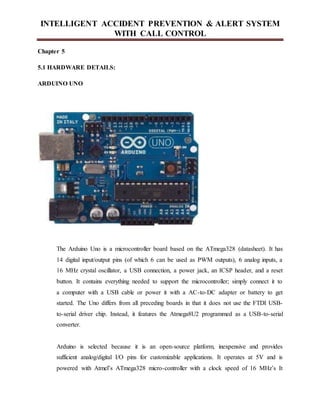
The Arduino Uno is a microcontroller board based on the ATmega328 (datasheet). It has
14 digital input/output pins (of which 6 can be used as PWM outputs), 6 analog inputs, a
16 MHz crystal oscillator, a USB connection, a power jack, an ICSP header, and a reset
button. It contains everything needed to support the microcontroller; simply connect it to
a computer with a USB cable or power it with a AC-to-DC adapter or battery to get
started. The Uno differs from all preceding boards in that it does not use the FTDI USB-
to-serial driver chip. Instead, it features the Atmega8U2 programmed as a USB-to-serial
converter.
Arduino is selected because it is an open-source platform, inexpensive and provides
sufficient analog/digital I/O pins for customizable applications. It operates at 5V and is
powered with Atmel’s ATmega328 micro-controller with a clock speed of 16 MHz’s It
INTELLIGENT ACCIDENT PREVENTION & ALERT SYSTEM
WITH CALL CONTROL
has a flash memory of 32kB and Static Random Access Memory (SRAM) of 2kB. It has
6 analog pins and serial ports. One of the serial ports is connected internally to Universal
Serial Bus (USB) port.
Summary
Microcontroller
ATmega328
Operating Voltage
5V
Input Voltage
(recommended)
7-9V
Input Voltage (limits)
6-20V
Digital I/O Pins
14 (of which 6 provide PWM output)
Analog Input Pins
6
DC Current per I/O Pin
40 mA
DC Current for 3.3V Pin
50 mA
INTELLIGENT ACCIDENT PREVENTION & ALERT SYSTEM
WITH CALL CONTROL
Flash Memory
32 KB (ATmega328) (0.5 KB used by
bootloader)
SRAM
2 KB (ATmega328)
EEPROM
1 KB (ATmega328)
Clock Speed
16 MHz
Power
The Arduino Uno can be powered via the USB connection or with an external power
supply. The power source is selected automatically. External (non-USB) power can come
either from an AC-to-DC adapter (wall-wart) or battery. The adapter can be connected by
plugging a 2.1mm centre-positive plug into the board's power jack. Leads from a battery
can be inserted in the Gnd and Vin pin headers of the POWER connector. The board can
operate on an external supply of 6 to 20 volts. If supplied with less than 7V, however, the
5V pin may supply less than five volts and the board may be unstable. If using more than
12V, the voltage regulator may overheat and damage the board. The recommended range
is 7 to 12 volts.
The power pins are as follows:
INTELLIGENT ACCIDENT PREVENTION & ALERT SYSTEM
WITH CALL CONTROL
VIN. The input voltage to the Arduino board when it's using an external power source (as
opposed to 5 volts from the USB connection or other regulated power source). You can
supply voltage through this pin, or, if supplying voltage via the power jack, access it
through this pin.
5V. The regulated power supply used to power the microcontroller and other components
on the board. This can come either from VIN via an on-board regulator, or be supplied by
USB or another regulated 5V supply.
3V3. A 3.3 volt supply generated by the on-board regulator. Maximum current draw is 50
mA.
GND. Ground pins.
Input and Output
Each of the 14 digital pins on the Uno can be used as an input or output, using
pinMode(), digitalWrite(), and digitalRead() functions. They operate at 5 volts. Each pin
can provide or receive a maximum of 40 mA and has an internal pull-up resistor
(disconnected by default) of 20-50 kOhms. In addition, some pins have specialized
functions:
Serial: 0 (RX) and 1 (TX). Used to receive (RX) and transmit (TX) TTL serial data.
These pins are connected to the corresponding pins of the ATmega8U2 USB-to-TTL
Serial chip.
External Interrupts: 2 and 3. These pins can be configured to trigger an interrupt on a low
value, a rising or falling edge, or a change in value. See the attachInterrupt() function for
details.
INTELLIGENT ACCIDENT PREVENTION & ALERT SYSTEM
WITH CALL CONTROL
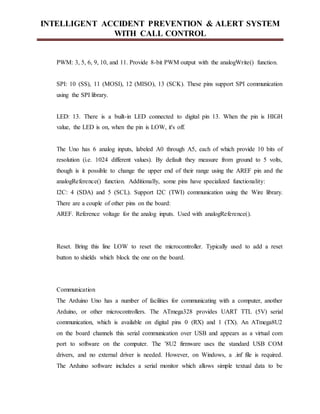
PWM: 3, 5, 6, 9, 10, and 11. Provide 8-bit PWM output with the analogWrite() function.
SPI: 10 (SS), 11 (MOSI), 12 (MISO), 13 (SCK). These pins support SPI communication
using the SPI library.
LED: 13. There is a built-in LED connected to digital pin 13. When the pin is HIGH
value, the LED is on, when the pin is LOW, it's off.
The Uno has 6 analog inputs, labeled A0 through A5, each of which provide 10 bits of
resolution (i.e. 1024 different values). By default they measure from ground to 5 volts,
though is it possible to change the upper end of their range using the AREF pin and the
analogReference() function. Additionally, some pins have specialized functionality:
I2C: 4 (SDA) and 5 (SCL). Support I2C (TWI) communication using the Wire library.
There are a couple of other pins on the board:
AREF. Reference voltage for the analog inputs. Used with analogReference().
Reset. Bring this line LOW to reset the microcontroller. Typically used to add a reset
button to shields which block the one on the board.
Communication
The Arduino Uno has a number of facilities for communicating with a computer, another
Arduino, or other microcontrollers. The ATmega328 provides UART TTL (5V) serial
communication, which is available on digital pins 0 (RX) and 1 (TX). An ATmega8U2
on the board channels this serial communication over USB and appears as a virtual com
port to software on the computer. The '8U2 firmware uses the standard USB COM
drivers, and no external driver is needed. However, on Windows, a .inf file is required.
The Arduino software includes a serial monitor which allows simple textual data to be
INTELLIGENT ACCIDENT PREVENTION & ALERT SYSTEM
WITH CALL CONTROL
sent to and from the Arduino board. The RX and TX LEDs on the board will flash when
data is being transmitted via the USB-to-serial chip and USB connection to the computer
(but not for serial communication on pins 0 and 1). A SoftwareSerial library allows for
serial communication on any of the Uno's digital pins.
The ATmega328 also supports I2C (TWI) and SPI communication. The Arduino
software includes a Wire library to simplify use of the I2C bus; see the documentation for
details. For SPI communication, use the SPI library.
Programming
The Arduino Uno can be programmed with the Arduino software (download). Select
"Arduino Uno from the Tools > Board menu (according to the microcontroller on your
board). For details, see the reference and tutorials. The ATmega328 on the Arduino Uno
comes preburned with a bootloader that allows you to upload new code to it without the
use of an external hardware programmer.
It communicates using the original STK500 protocol (reference, C header files). You can
also bypass the bootloader and program the microcontroller through the ICSP (In-Circuit
Serial Programming) header; see these instructions for details.
The ATmega8U2 firmware source code is available . The ATmega8U2 is loaded with a
DFU bootloader, which can be activated by connecting the solder jumper on the back of
the board (near the map of Italy) and then resetting the 8U2.
You can then use Atmel's FLIP software (Windows) or the DFU programmer (Mac OS X
and Linux) to load a new firmware. Or you can use the ISP header with an external
programmer (overwriting the DFU bootloader). See this user-contributed tutorial for
more information.
Automatic (Software) Reset
Rather than requiring a physical press of the reset button before an upload, the Arduino
Uno is designed in a way that allows it to be reset by software running on a connected
computer. One of the hardware flow control lines (DTR) of the ATmega8U2 is connected
to the reset line of the ATmega328 via a 100 nanofarad capacitor. When this line is
asserted (taken low), the reset line drops long enough to reset the chip. The Arduino
INTELLIGENT ACCIDENT PREVENTION & ALERT SYSTEM
WITH CALL CONTROL
software uses this capability to allow you to upload code by simply pressing the upload
button in the Arduino environment. This means that the bootloader can have a shorter
timeout, as the lowering of DTR can be well-coordinated with the start of the upload.
This setup has other implications. When the Uno is connected to either a computer
running Mac OS X or Linux, it resets each time a connection is made to it from software
(via USB). For the following half-second or so, the bootloader is running on the Uno.
While it is programmed to ignore malformed data (i.e. anything besides an upload of new
code), it will intercept the first few bytes of data sent to the board after a connection is
opened. If a sketch running on the board receives one-time configuration or other data
when it first starts, make sure that the software with which it communicates waits a
second after opening the connection and before sending this data.
The Uno contains a trace that can be cut to disable the auto-reset. The pads on either side
of the trace can be soldered together to re-enable it. It's labeled "RESET-EN". You may
also be able to disable the auto-reset by connecting a 110 ohm resistor from 5V to the
reset line; see this forum thread for details.
USB Overcurrent Protection
The Arduino Uno has a resettable polyfuse that protects your computer's USB ports from
shorts and overcurrent. Although most computers provide their own internal protection,
the fuse provides an extra layer of protection. If more than 500 mA is applied to the USB
port, the fuse will automatically break the connection until the short or overload is
removed.
Physical Characteristics
The maximum length and width of the Uno PCB are 2.7 and 2.1 inches respectively, with
the USB connector and power jack extending beyond the former dimension. Four screw
holes allow the board to be attached to a surface or case. Note that the distance between
digital pins 7 and 8 is 160 mil (0.16"), not an even multiple of the 100 mil spacing of the
other pins.
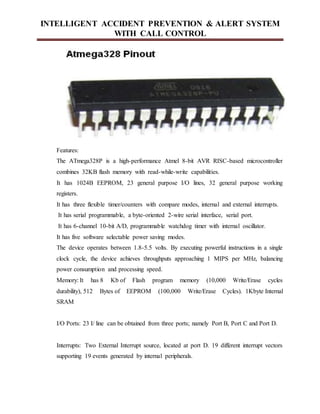
AT-Mega 328P MICROCONTROLLER
INTELLIGENT ACCIDENT PREVENTION & ALERT SYSTEM
WITH CALL CONTROL
Features:
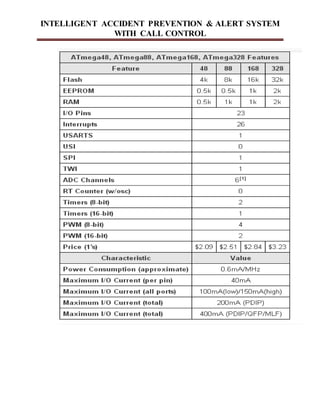
The ATmega328P is a high-performance Atmel 8-bit AVR RISC-based microcontroller
combines 32KB flash memory with read-while-write capabilities.
It has 1024B EEPROM, 23 general purpose I/O lines, 32 general purpose working
registers.
It has three flexible timer/counters with compare modes, internal and external interrupts.
It has serial programmable, a byte-oriented 2-wire serial interface, serial port.
It has 6-channel 10-bit A/D, programmable watchdog timer with internal oscillator.
It has five software selectable power saving modes.
The device operates between 1.8-5.5 volts. By executing powerful instructions in a single
clock cycle, the device achieves throughputs approaching 1 MIPS per MHz, balancing
power consumption and processing speed.
Memory: It has 8 Kb of Flash program memory (10,000 Write/Erase cycles
durability), 512 Bytes of EEPROM (100,000 Write/Erase Cycles). 1Kbyte Internal
SRAM
I/O Ports: 23 I/ line can be obtained from three ports; namely Port B, Port C and Port D.
Interrupts: Two External Interrupt source, located at port D. 19 different interrupt vectors
supporting 19 events generated by internal peripherals.
INTELLIGENT ACCIDENT PREVENTION & ALERT SYSTEM
WITH CALL CONTROL
Timer/Counter: Three Internal Timers are available, two 8 bit, one 16 bit, offering
various operating modes and supporting internal or external clocking.
SPI (Serial Peripheral interface): ATmega8 holds three communication devices
integrated. One of them is Serial Peripheral Interface. Four pins are assigned to Atmega8
to implement this scheme of communication.
USART: One of the most powerful communication solutions is USART and ATmega8
supports both synchronous and asynchronous data transfer schemes. It has three pins
assigned for that. In many projects, this module is extensively used for PC-Micro
controller communication.
TWI (Two Wire Interface): Another communication device that is present in ATmega8 is
Two Wire Interface. It allows designers to set up a commutation between two devices
using just two wires along with a common ground connection, As the TWI output is
made by means of open collector outputs, thus external pull up resistors are required to
make the circuit.
Analog Comparator: A comparator module is integrated in the IC that provides
comparison facility between two voltages connected to the two inputs of the Analog
comparator via External pins attached to the micro controller.
Analog to Digital Converter: Inbuilt analog to digital converter can convert an analog
input signal into digital data of 10bit resolution. For most of the low end application, this
much resolution is enough.
INTELLIGENT ACCIDENT PREVENTION & ALERT SYSTEM
WITH CALL CONTROL
INTELLIGENT ACCIDENT PREVENTION & ALERT SYSTEM
WITH CALL CONTROL
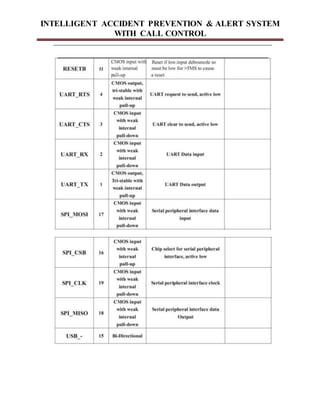
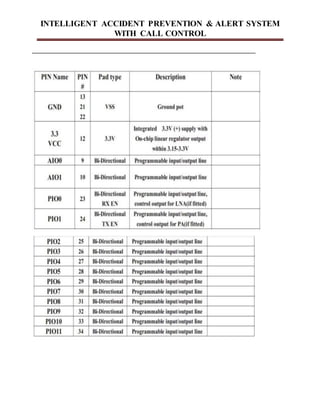
BLUETOOTH MODULE
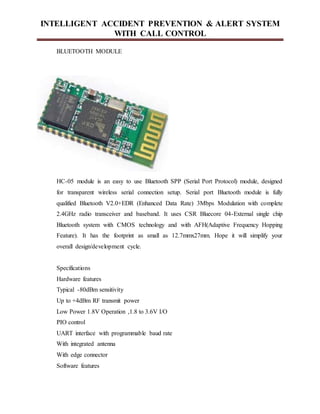
HC-05 module is an easy to use Bluetooth SPP (Serial Port Protocol) module, designed
for transparent wireless serial connection setup. Serial port Bluetooth module is fully
qualified Bluetooth V2.0+EDR (Enhanced Data Rate) 3Mbps Modulation with complete
2.4GHz radio transceiver and baseband. It uses CSR Bluecore 04-External single chip
Bluetooth system with CMOS technology and with AFH(Adaptive Frequency Hopping
Feature). It has the footprint as small as 12.7mmx27mm. Hope it will simplify your
overall design/development cycle.
Specifications
Hardware features
Typical -80dBm sensitivity
Up to +4dBm RF transmit power
Low Power 1.8V Operation ,1.8 to 3.6V I/O
PIO control
UART interface with programmable baud rate
With integrated antenna
With edge connector
Software features
INTELLIGENT ACCIDENT PREVENTION & ALERT SYSTEM
WITH CALL CONTROL
Default Baud rate: 38400, Data bits:8, Stop bit:1,Parity:No parity, Data control: has.
Supported baud rate: 9600,19200,38400,57600,115200,230400,460800.
Given a rising pulse in PIO0, device will be disconnected.
Status instruction port PIO1: low-disconnected, high-connected;
PIO10 and PIO11 can be connected to red and blue led separately. When master and
slave are paired, red and blue led blinks 1time/2s in interval, while disconnected only
blue led blinks 2times/s.
Auto-connect to the last device on power as default.
Permit pairing device to connect as default.
Auto-pairing PINCODE:”0000” as default
Auto-reconnect in 30 min when disconnected as a result of beyond the range of
connection.
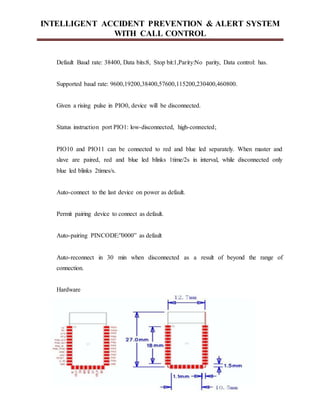
Hardware
INTELLIGENT ACCIDENT PREVENTION & ALERT SYSTEM
WITH CALL CONTROL
INTELLIGENT ACCIDENT PREVENTION & ALERT SYSTEM
WITH CALL CONTROL
INTELLIGENT ACCIDENT PREVENTION & ALERT SYSTEM
WITH CALL CONTROL
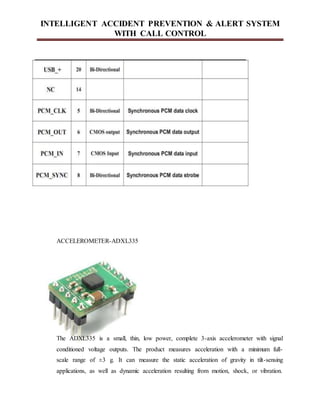
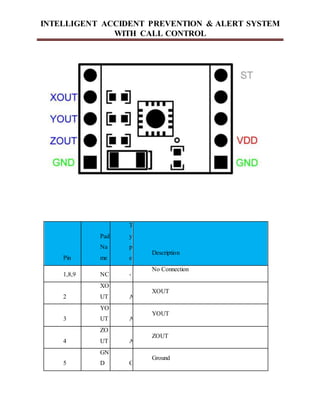
ACCELEROMETER-ADXL335
The ADXL335 is a small, thin, low power, complete 3-axis accelerometer with signal
conditioned voltage outputs. The product measures acceleration with a minimum full-
scale range of ±3 g. It can measure the static acceleration of gravity in tilt-sensing
applications, as well as dynamic acceleration resulting from motion, shock, or vibration.
INTELLIGENT ACCIDENT PREVENTION & ALERT SYSTEM
WITH CALL CONTROL
The user selects the bandwidth of the accelerometer using the CX, CY, and CZ capacitors
at the XOUT, YOUT, and ZOUT pins. Bandwidths can be selected to suit the application.
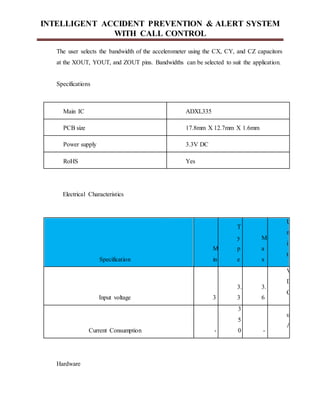
Specifications
Main IC ADXL335
PCB size 17.8mm X 12.7mm X 1.6mm
Power supply 3.3V DC
RoHS Yes
Electrical Characteristics
Specification
M
in
T
y
p
e
M
a
x
U
n
i
t
Input voltage 3
3.
3
3.
6
V
D
C
Current Consumption -
3
5
0 -
u
A
Hardware
INTELLIGENT ACCIDENT PREVENTION & ALERT SYSTEM
WITH CALL CONTROL
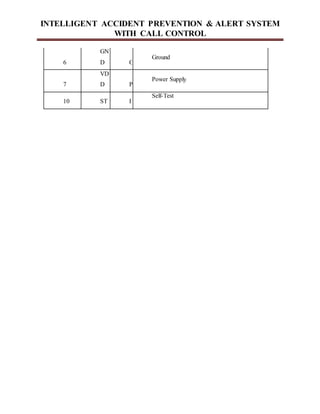
Pin
Pad
Na
me
T
y
p
e
Description
1,8,9 NC -
No Connection
2
XO
UT A
XOUT
3
YO
UT A
YOUT
4
ZO
UT A
ZOUT
5
GN
D G
Ground
INTELLIGENT ACCIDENT PREVENTION & ALERT SYSTEM
WITH CALL CONTROL
6
GN
D G
Ground
7
VD
D P
Power Supply
10 ST I
Self-Test
INTELLIGENT ACCIDENT PREVENTION & ALERT SYSTEM
WITH CALL CONTROL
System Design
6.1 Logical Design
Design for WebApps encompasses technical and non-technical activities. The look and
feel of content is developed as part of graphic design; the aesthetic layout of the user
interface is created as part of interface design; and the technical structure of the WebApp
is modeled as part of architectural and navigational design.
This argues that a Web engineer must design an interface so that it answers three primary
questions for the end-user:
Where am I? – The interface should (1) provide an indication of the WebApp has been
accessed and (2) inform the user of her location in the content.
What can I do now? – The interface should always help the user understand his current
options- what functions are available, what links are live, what content is relevant.
Where have I been; where am I going? – The interface must facilitate navigation. Hence
it must provide a “map” of where the user has been and what paths may be taken to move
elsewhere in the WebApp.
6.2 Design goals – the following are the design goals that are applicable to virtually every
WebApp regardless of application domain, size, or complexity.
Simplicity
Consistency
Identity
Visual appeal
Compatibility.
INTELLIGENT ACCIDENT PREVENTION & ALERT SYSTEM
WITH CALL CONTROL
Design leads to a model that contains the appropriate mix of aesthetics, content, and
technology. The mix will vary depending upon the nature of the WebApp, and as a
consequence the design activities that are emphasized will also vary.
The activities of the Design process:
Interface design-describes the structure and organization of the user interface. Includes a
representation of screen layout, a definition of the modes of interaction, and a description
of navigation mechanisms. Interface Control mechanisms- to implement navigation
options, the designer selects form one of a number of interaction mechanism;
Navigation menus
Graphic icons
Graphic images
Interface Design work flow- the work flow begins with the identification of user, task,
and environmental requirements. Once user tasks have been identified, user scenarios are
created and analyzed to define a set of interface objects and actions.
Aesthetic design-also called graphic design, describes the “look and feel” of the
WebApp. Includes color schemes, geometric layout. Text size, font and placement, the
use of graphics, and related aesthetic decisions.
Content design-defines the layout, structure, and outline for all content that is presented
as part of the WebApp. Establishes the relationships between content objects.
Navigation design-represents the navigational flow between contents objects and for all
WebApp functions.
INTELLIGENT ACCIDENT PREVENTION & ALERT SYSTEM
WITH CALL CONTROL
Architecture design-identifies the overall hypermedia structure for the WebApp.
Architecture design is tied to the goals establish for a WebApp, the content to be
presented, the users who will visit, and the navigation philosophy that has been
established.
Content architecture, focuses on the manner in which content objects and structured for
presentation and navigation.
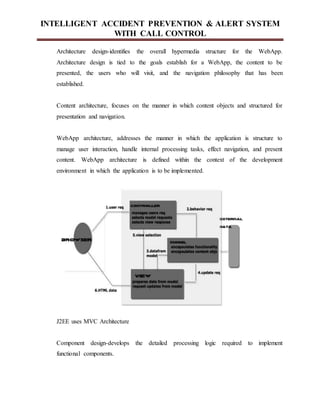
WebApp architecture, addresses the manner in which the application is structure to
manage user interaction, handle internal processing tasks, effect navigation, and present
content. WebApp architecture is defined within the context of the development
environment in which the application is to be implemented.
J2EE uses MVC Architecture
Component design-develops the detailed processing logic required to implement
functional components.
INTELLIGENT ACCIDENT PREVENTION & ALERT SYSTEM
WITH CALL CONTROL
System Architecture
ACCIDENT DETECTION: IMPLEMENTATION
• The sensors are attached onto a vehicle’s embedded system.
• To prevent the accident by avoiding the mobile phone incoming calls ring during the user
is in driving and also to send a SMS message to the caller informing that the user is in
driving.
• Vibration sensors (accelerometer) are installed on the module in areas most probable to
have an impact, to detect an accident.
• The readings from the sensor are fed into the Arduino board.
INTELLIGENT ACCIDENT PREVENTION & ALERT SYSTEM
WITH CALL CONTROL
• When the accelerometer reading exceeds a threshold value, a timer is set off for 45/90
seconds to ensure that the impact is not a false alarm. Once the timer runs out, the
Arduino send alerts to the mobile application with the details of the reading.
• The application now extracts the latitude and the longitude from the smart phone’s GPS
and sends this data to emergency vehicles/hospitals in the vicinity and specified contacts
over an SMS alerting them about an accident.
• Simple Embedded C is used to program the Arduino board.
NAVIGATION & CALL RECEPTION: IMPLEMENTATION
• The Bluetooth connectivity is used to push the data to the rider.
• To overcome the issue of call reception and to make the system road safe, the application
blocks incoming calls when threshold speed is reached and simply informs the user who
has called. Incoming text messages can be notified using the same methodology.
• Android Studio is used for the application development (JAVA) .
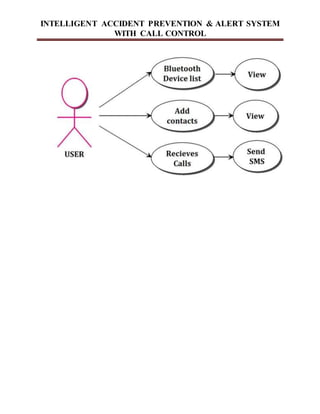
Use case
INTELLIGENT ACCIDENT PREVENTION & ALERT SYSTEM
WITH CALL CONTROL
INTELLIGENT ACCIDENT PREVENTION & ALERT SYSTEM
WITH CALL CONTROL
Appendices
Appendix-1 : Dataflow Diagrams
CHAPTER 6
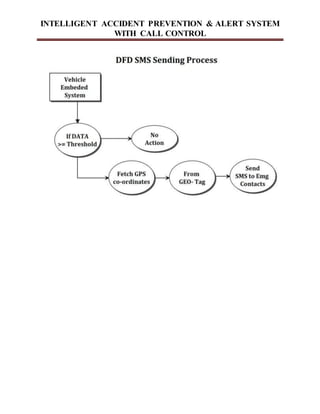
6.1 Data Flow Diagram
A data flow diagram (DFD) is a graphical representation of the “flow” of data through an
information system. A data flow diagram can also be used for the visualization of data
processing (structured design). It is common practice for a designer to draw a context-level DFD
first which shows the interaction between the system and outside entities. DFD's show the flow
of data from external entities into the system, how the data moves from one process to another,
as well as its logical storage.
There are only four symbols
i. Squares representing external entities, which are sources and destinations
of data.
ii. Rounded rectangles representing processes, which take data as input, do
some
Operation and output the data.
iii. Arrows representing the data flows, which can either, be electronic data or
physical Items.
iv. Cylinder representing the database.
INTELLIGENT ACCIDENT PREVENTION & ALERT SYSTEM
WITH CALL CONTROL
INTELLIGENT ACCIDENT PREVENTION & ALERT SYSTEM
WITH CALL CONTROL
INTELLIGENT ACCIDENT PREVENTION & ALERT SYSTEM
WITH CALL CONTROL
Appendix-2 : Android SCREEN SHOTS
INTELLIGENT ACCIDENT PREVENTION & ALERT SYSTEM
WITH CALL CONTROL
APPENDIX-3
Sample Coding
INTELLIGENT ACCIDENT PREVENTION & ALERT SYSTEM
WITH CALL CONTROL
Chapter 7
TESTING
Testing performs a very critical role for quality assurance and for ensuring the reliability
of the software. The success of testing for errors in programs depends critically on the test cases.
7.1 Testing phase
The completion of the system is achieved only after it has been thoroughly tested. Though this
gives a feel that project is completed there cannot be any project without going through this
stage. Hence in this stage it is decided whether this project can undergo real time environment
execution without any breakdowns, therefore the package can be rejected even at this stage.
A primary purpose of testing is to detect software failures so that defects may be
discovered and corrected. This is a non-trivial pursuit. Testing cannot establish that a product
functions properly under all conditions but can only establish that it does not function properly
under specific conditions. The scope of software testing often includes examination of code as
well as execution of that code in various environments and conditions as well as examining the
aspects of code: does it do what it is supposed to do and do what it needs to do. In the current
culture of software development, a testing organization may be separate from the development
team. There are various roles for testing team members. Information derived from software
testing may be used to correct the process by which software is developed.
7.2 System testing
Testing is a set of activities that can be planned in advance and conducted systematically. The
proposed system is tested in parallel with the software that consists of its own phases of its
analysis, implementation, testing and maintenance. Following are the tests conducted on the
system.
System testing of software or hardware is testing conducted on a complete, integrated
system to evaluate the system's compliance with its specified requirements. System testing falls
INTELLIGENT ACCIDENT PREVENTION & ALERT SYSTEM
WITH CALL CONTROL
within the scope of black box testing, and as such, should require no knowledge of the inner
design of the code or logic.
7.3 Unit testing
During this implementation of the system each module of the system was tested separately to
uncover errors within its boundaries. User interface is used as a guide in the process
In computer programming, unit testing is a method by which individual units of source
code are tested to determine if they are fit for use. A unit is the smallest testable part of an
application. In procedural programming a unit may be an individual function or procedure. In
object-oriented programming a unit is usually a method. Unit tests are created by programmers
or occasionally by white box testers during the development process.
Ideally, each test case is independent from the others: substitutes like method stubs, mock
objects, fakes and test harnesses can be used to assist testing a module in isolation. Unit tests are
typically written and run by software developers to ensure that code meets its design and behaves
as intended. Its implementation can vary from being very manual (pencil and paper) to being
formalized as part of build automation.
7.4 Module testing
A module is composed of various programs related to that module. Module testing is done to
check the module functionality and interaction between units within a module. It checks the
functionality of each program with relation to other programs within the same module. It then
tests the overall functionality of each module.
This module introduces the technique of functional (black box) unit testing to verify the
correctness of classes. It shows how to design unit test cases based on a class specification within
INTELLIGENT ACCIDENT PREVENTION & ALERT SYSTEM
WITH CALL CONTROL
a contract programming approach. The laboratory exercises then guide students through creating
and running tester classes in Java from a test case design, utilizing the Joint unit test framework.
It also contains a worked example on how to unit test GUI and event handling classes.
Testing is an essential part of any software development process, but it is often poorly
understood. In this module, we take a simple approach and look at two key approaches to testing.
Unit testing is done at the class level, and is designed with the aid of method pre- and post-
conditions. System testing is done at the program level, and is designed based on documented
use cases. We look at how your approach to object-oriented design is influenced by the need to
design and execute tests, and close with some other issues in testing.
7.5 Integration testing
Integration testing is a systematic technique for constructing the program structure while
conducting tests to uncover errors associated with interfacing. The object is to take unit tester
module and build a program structure that has been dictated by the design.
The purpose of integration testing is to verify functional, performance, and reliability
requirements placed on major design items. These "design items", i.e. assemblages (or groups of
units), are exercised through their interfaces using Black box testing, success and error cases
being simulated via appropriate parameter and data inputs. Simulated usage of shared data areas
and inter-process communication is tested and individual subsystems are exercised through their
input interface.
Test cases are constructed to test that all components within assemblages interact
correctly, for example across procedure calls or process activations, and this is done after testing
individual modules, i.e. unit testing. The overall idea is a "building block" approach, in which
verified assemblages are added to a verified base which is then used to support the integration
testing of further assemblages.
INTELLIGENT ACCIDENT PREVENTION & ALERT SYSTEM
WITH CALL CONTROL
7.6 Acceptance testing
This software has been tested with realistic data given by the client and produced results. Then
the client satisfying all the requirements specified by them has also developed the software
within the time limitations specified. A demonstration has been given to the client and the end
user giving all the operational features.
Acceptance testing generally involves running a suite of tests on the completed system.
Each individual test, known as a case, exercises a particular operating condition of the user's
environment or feature of the system, and will result in a pass or fail, or Boolean, outcome.
There is generally no degree of success or failure. The test environment is usually designed to be
identical, or as close as possible, to the anticipated user's environment, including extremes of
such. These test cases must each be accompanied by test case input data or a formal description
of the operational activities (or both) to be performed—intended to thoroughly exercise the
specific case—and a formal description of the expected results.
7.6.1Test plan
The test plan contains the following:
 Features to be tested.
 Approach to be tested.
 Test deliverables.
7.7 Features to be tested
All the functional features specified in the required document will be tested. Test coverage in the
test plan states what requirements will be verified during what stages of the product life. Test
Coverage is derived from design specifications and other requirements, such as safety standards
or regulatory codes, where each requirement or specification of the design ideally will have one
or more corresponding means of verification.
INTELLIGENT ACCIDENT PREVENTION & ALERT SYSTEM
WITH CALL CONTROL
Test coverage for different product life stages may overlap, but will not necessarily be
exactly the same for all stages. For example, some requirements may be verified during Design
Verification test, but not repeated during Acceptance test. Test coverage also feeds back into the
design process, since the product may have to be designed to allow test access.
Test methods in the test plan state how test coverage will be implemented. Test methods
may be determined by standards, regulatory agencies, or contractual agreement, or may have to
be created new. Test methods also specify test equipment to be used in the performance of the
tests and establish pass/fail criteria. Test methods used to verify hardware design requirements
can range from very simple steps, such as visual inspection, to elaborate test procedures that are
documented separately.
7.8 Approach for testing
For unit testing structured testing based on branch coverage criteria will be used. The goal is to
achieve branch coverage of more than 95% system testing will be functional in nature. A test
plan documents the strategy that will be used to verify and ensure that a product or system meets
its design specifications and other requirements. A test plan is usually prepared by or with
significant input from Test Engineers.
Depending on the product and the responsibility of the organization to which the test plan
applies, a test plan may include one or more of the following:
i. Design Verification or Compliance test - to be performed during the development or
approval stages of the product, typically on a small sample of units.
ii. Manufacturing or Production test - to be performed during preparation or assembly of
the product in an ongoing manner for purposes of performance verification and quality
control.
iii. Acceptance or Commissioning test - to be performed at the time of delivery or
installation of the product.
iv. Service and Repair test - to be performed as required over the service life of the
product.
INTELLIGENT ACCIDENT PREVENTION & ALERT SYSTEM
WITH CALL CONTROL
v. Regression test - to be performed on an existing operational product, to verify that
existing functionality didn't get broken when other aspects of the environment are
changed (e.g., upgrading the platform on which an existing application runs).
vi. Test deliverables
a. The following documents will be required:
b. Unit tests report for each unit.
c. Test case specification for system testing.
d. Test reports for system testing.
INTELLIGENT ACCIDENT PREVENTION & ALERT SYSTEM
WITH CALL CONTROL
Chapter 8
RESULT AND RESULT ANALYSIS
Add screenshots of your project here.
INTELLIGENT ACCIDENT PREVENTION & ALERT SYSTEM
WITH CALL CONTROL
CONCLUSION
This system is an hybrid model it will use embedded system as well as android app two separate
technologies are used in the system the most of accident are happening while driver driving his
car or bike during that time getting call he try to pick the call accident is happing with help of our
system we can able to avoid this accident we tested this thing working all the functionality its
working fine so that we can conclude by using this system we can avoid the accidents which are
happing when the drive try to talk while driving. As a future enchantment in present system
applicable only for the android mobile phones only but in future we can develop an similar type
app for an iphone and other phones also so that I will be use full to all the users.
INTELLIGENT ACCIDENT PREVENTION & ALERT SYSTEM
WITH CALL CONTROL
Chapter 9
BIBLIOGRAPHY
[1] Effective Ways to Use Internet of Things in the field of Medical and Smart Health Care:
Kaleem ullah, Munam ali Shah, Sijing zhang, IEEE Journal 2016.
[2] Heartbeat Monitoring and heart attack detection, Mamidi manisha , Katakan neeraja,
International Journal of Innovations in Engineering and Technology(IJIET).
[3]Heartbeat Sensing and Heart Attack Detection using Internet of Things, International Journal
of Engineering Science and Computing(IJESC).
[4]Heart Rate monitoring And Heart Attack Detection Using Wearable Device, International
Journal of Technical Research and Application(IJTRA).
[5] Mobile based Horne Automation using Internet of Things(IOT),Kumar Mandula, Ram
Parupalli, E.Magesh,2015 International Conference on Control, Instrumentation,

Accident detection

  • 1.
    INTELLIGENT ACCIDENT PREVENTION& ALERT SYSTEM WITH CALL CONTROL Chapter 1 1.1 ABSTRACT: As the usage of vehicles is increasing drastically, the hazards due to vehicles is also increased. The main cause for accidents happing while driving a bike or car driver tries to speak diverting minds, over stress and due to electronic gadgets. This paper deals with accident prevention system that occurs due to carelessness of the person who is driving the vehicle. This introduces accident alerting system which alerts the person who is driving the vehicle. Mobile phone use while driving is common but it is widely considered dangerous due to its potential for causing distracted driving and crashes. 1.2 INTRODUCTION: Accident rates are on a rise across the world and commuters on vehicles often have it worse for them as compared to others. Vehicle accidents lead to the majority of deaths in India and often times there is a delay in the victim getting medical attention which puts his life in danger. In order to prevent this from happening the smart intelligent accident system is designed which automatically intimates the hospitals nearby saving time and reducing the probability of death. Also, in this age of “smart devices”, the vehicle commuters seem to have been forgotten about. There is little to no progress observed in data delivery to the riders which includes location information, entertainment availability and inefficient communication. 1.3 Objective Of the Work Main objectives of the project are • To prevent the accident by avoiding the mobile phone incoming calls ring during the user is in driving and also to send a SMS message to the caller informing that the user is in driving. • To create an intelligent accident detection system which detects accidents and informs specific people via SMS with location and speed of the vehicle before the accident occurs
  • 2.
    INTELLIGENT ACCIDENT PREVENTION& ALERT SYSTEM WITH CALL CONTROL with the help of GPS & GSM based tracking system, thus aiding ambulance to reach the correct location. Technology Android is a software stack for mobile devices that includes an operating system, middleware and key applications. The Android-SDK provides the tools and APIs necessary to begin developing applications on the Android platform using the Java programming language. On July 2005, Google announced the redemption of Android Inc. The Android team created an operating system, named Android, based on the core of the operating system Linux. The target of this operating system was the mobile phones market, where SymbianOS and Windows Mobile dominated. The main benefit of Android is a rich library to enhance and ease communication and networking. Java is offered to software developers as the main selection for programming, enriched with software libraries developed by Google. The first presentation of the Android platform was on November 5, 2007, along with the establishment of Open Handset Alliance. Google has issued most of the code of Android under the terms of Apache License. Eventually, Android is a platform that includes open source operating system, middleware and key applications for use on mobile devices based on the kernel Linux 2.6; in accordance with the principles of platform software design, based on available drivers hardware device. One level up, the libraries of the platform are found and the required virtual machine for converting and runtime applications. These are complemented by basic applications needed for the basic management unit for the initial communication and use of the device by the user. At the top of the platform architecture, lie the applications developed by software developers. Android is a software stack for mobile devices that includes an operating system, middleware and key applications. Google Inc. purchased the initial developer of the software, Android Inc., in 2005. Android's mobile operating system is based on the Linux kernel. Google and other members of the Open Handset Alliance collaborated on Android's development and release. The Android Open Source Project (AOSP) is tasked with the maintenance and further development of Android. The Android operating system is the world's best-selling Smartphone
  • 3.
    INTELLIGENT ACCIDENT PREVENTION& ALERT SYSTEM WITH CALL CONTROL platform. The first truly open and comprehensive platform for mobile devices, all of the software to run a mobile phone but without the proprietary obstacles that have hindered mobile innovation. 1.4.1 Features of Android and why Android  Handset layouts: The platform is adaptable to larger, VGA, 2D graphics library, 3D graphics library based on OpenGL ES 2.0 specifications, and traditional smart phone layouts.  Storage: The Database Software SQLite is used for data storage purposes.  Connectivity: Android supports connectivity technologies including GSM/EDGE, IDEN, CDMA, EV-DO, UMTS, Bluetooth, WI-Fi, and WiMAX.  Messaging: SMS and MMS are available forms of messaging including threaded text messaging.  Web browser: The web browser available in Android is based on the open-source WebKit application framework. The browser scores a 93/100 on the Acid3 Test.  Java support: Software written in Java can be compiled to be executed in the Dalvik virtual machine, which is a specialized VM implementation designed for mobile device use, although not technically a standard Java Virtual Machine. Android does not support J2ME, like some other mobile operating systems.  Media support: Android supports the following audio/video/still media formats: H.263, H.264 (in 3GP or MP4 container), MPEG-4 SP, AMR, AMR-WB (in 3GP container), AAC, HE-AAC (in MP4 or 3GP container), MP3, MIDI, Ogg Vorbis, WAV, JPEG, PNG, GIF and BMP.  Additional hardware support: Android can use video/still cameras, touch screens, GPS, accelerometers, magnetometers, accelerated 2D bit blits (with hardware orientation, scaling, and pixel format conversion) and accelerated 3D graphics.  Development environment: Includes a device emulator, tools for debugging, memory
  • 4.
    INTELLIGENT ACCIDENT PREVENTION& ALERT SYSTEM WITH CALL CONTROL and performance profiling, and a plug-in for the Eclipse IDE.  Market: Like many phone-based application stores, the Android Market is a catalog of applications that can be downloaded and installed to target hardware over-the-air, without the use of a PC. Originally only free applications were supported. Paid-for applications have been available on the Android Market in the United States since 19 February 2009.The Android Market has been expanding rapidly. As of April 30, 2010, it had over 50,000 Android applications for download.  Multi-touch: Android has native support for multi-touch which was initially made available in handsets such as the HTC Hero. The feature was initially disabled at the kernel level (possibly to avoid infringing Apple's patents on touch-screen technology). Google has since released an update for the Nexus One and the Motorola Droid which enables multi-touch natively.  Bluetooth: Support for sending files over Bluetooth was added in version 2.0.  Video calling: Android does not support video calling. However, it is possible if the phone runs an additional UI. This is proved on the HTC Evo 4G, which runs Sense and can support video calling. Below are the reasons mentioned for choosing android.  It is a simple and powerful SDK supporting GSM, EDGE, and 3G networks, Wi-Fi, Bluetooth.  It requires no licensing, distribution, or development fees.  Development over many platform Linux, Mac OS, windows Excellent documentation  Thriving developer community Java-based, easy to import 3rdparty Java library  Funding (40+ G1 phones)Prize (amazon’s kindle)Job opportunity is tremendous 1.4.2 Android Architecture
  • 5.
    INTELLIGENT ACCIDENT PREVENTION& ALERT SYSTEM WITH CALL CONTROL Fig 1.1 1.4.3 Applications Android will ship with a set of core applications including an email client, SMS program, calendar, maps, browser, contacts, and others. All applications are written using the Java programming language. 1.4.4 Application Framework  By providing an open development platform, Android offers developers the ability to build extremely rich and innovative applications. Developers are free to take advantage of the device hardware, access location information, run background services, set alarms, add notifications to the status bar, and much, much more.  Developers have full access to the same framework APIs used by the core applications. The application architecture is designed to simplify the reuse of components; any application can publish its capabilities and any other application may then make use of
  • 6.
    INTELLIGENT ACCIDENT PREVENTION& ALERT SYSTEM WITH CALL CONTROL those capabilities (subject to security constraints enforced by the framework). This same mechanism allows components to be replaced by the user. 1.4.5 Underlying All Applications Is a Set of Services and Systems  A rich and extensible set of Views that can be used to build an application, including lists, grids, text boxes, buttons, and even an embeddable web browser.  Content Providers that enable applications to access data from other applications (such as Contacts), or to share their own data.  A Resource Manager, providing access to non-code resources such as localized strings, graphics, and layout files.  A Notification Manager that enables all applications to display custom alerts in the status bar.  An Activity Manager that manages the lifecycle of applications and provides a common navigation back stack. Android includes a set of core libraries that provides most of the functionality available in the core libraries of the Java programming language. 1.4.6 Role of DVM Every Android application runs in its own process, with its own instance of the Dalvik virtual machine. Dalvik has been written so that a device can run multiple VMs efficiently. The Dalvik VM executes files in the Dalvik Executable (.dex) format which is optimized for minimal memory footprint. The VM is register-based, and runs classes compiled by a Java language compiler that have been transformed into the .dex format by the included "dx" tool. The Dali VM relies on the Linux kernel for underlying functionality such as threading and low-level memory management. 1.4.7 Linux Kernel Android relies on Linux version 2.6 for core system services such as security, memory
  • 7.
    INTELLIGENT ACCIDENT PREVENTION& ALERT SYSTEM WITH CALL CONTROL management, process management, network stack, and driver model. The kernel also acts as an abstraction layer between the hardware and the rest of the software stack Android relies on Linux version 2.6 for core system services such as security, memory management, process management, network stack, and driver model. The kernel also acts as an abstraction layer between the hardware and the rest of the software stack. 1.4.8 Android SDK 1.5 There are several new features and UI updates included in the 1.5 update:  Ability to record and watch videos with the camcorder mode.  Uploading videos to YouTube and pictures to Picasa directly from the phone.  A new soft keyboard with an "Auto complete" feature.  Bluetooth A2DP support which in turn broke Bluetooth connectivity with many popular cars and headsets.  Ability to automatically connect to a Bluetooth headset within a certain distance.  New widgets and folders that can populate the Home screens.  Animations between screens.  Expanded ability of Copy and paste to include web page. 1.4.9 Android Runtime  Android includes a set of core libraries that provides most of the functionality available in the Core libraries of the Java programming language.  Every Android application runs in its own process, with its own instance of the Dalvik  Virtual machine. Dalvik has been written so that a device can run multiple VMs efficiently.  The Dalvik VM executes files in the Dalvik Executable (.dex) format which is optimized for minimal memory footprint. The VM is register-based, and runs classes compiled by a Java language compiler that have been transformed into the .decks format by the included "dx" tool.
  • 8.
    INTELLIGENT ACCIDENT PREVENTION& ALERT SYSTEM WITH CALL CONTROL Fig 1.2 Android Architecture 1.4.10 Advantages and Disadvantages There are a host of advantages that Google’s Android will derive from being open source software. Some of the advantages include: i. The ability for anyone to customize the Google Android platform will open up the applications playing field to small and new players who lack the financial muscle to negotiate with wireless carriers like AT&T and Orange. The consumer will benefit from having a wide range of mobile applications to choose from since the monopoly will be broken by Google Android. ii. Although this will depend on the carrier, one will be able to customize a mobile phones using Google Android platform like never before, right down to the screen. Features like weather details, opening screen, live RSS feeds and even the icons on the opening screen will be able to be customized. iii. In addition, as a result of many mobile phones carrying Google Android, companies will come up with such innovative products like the location– aware services that will provide users with any information they might be in need of. This information could include knowing the location of a nearby convenience store or filling station. In addition the entertainment functionalities will be taken a notch higher by Google Android being able to offer online real time multiplayer
  • 9.
    INTELLIGENT ACCIDENT PREVENTION& ALERT SYSTEM WITH CALL CONTROL games. iv. However, Google Android is likely to experience some problems as follows: These problems might include rejection of Google Android by carriers who charge a fee for some of the web based applications which Google Android will enable mobile phone holders to access free of charge. v. Since Google Android is an open source platform driving all Android phones, it could significantly increase the risk of hacking these devices. If this happens, then locking mobiles as a security measure will be a mockery Literature Survey 1. Ravi Nandu and Kuldeep Singh proposed a smart accident detection idea focused upon prevention of casualties by ensuring the safety. The system built is such that in the case of the drunken, the ignition in the combustion chamber wouldn’t occur. The system is directly connected to the two-wheeler ignition system by electronics. The system has the main components as stated – a proximity sensor, alcohol sensor, accelerometer and a keypad.. At the receiver end, on the two-wheeler, a microcontroller controls the ignition. The ignition system is incorporated with a diode acting as cut off and on region connector. Upon the reception of the signal from the system, the microcontroller takes care of the ignition starting the vehicle. While the idea of this system is noble and very much the need of the hour, the implementation would be completely infeasible because of the ignition system having to be tampered with, in every single model of every single two-wheeler manufacturer for this idea to come to function.
  • 10.
    INTELLIGENT ACCIDENT PREVENTION& ALERT SYSTEM WITH CALL CONTROL 2. Kodanda Ramaiah GN et al., [3] proposed a smart helmet idea which provided a lot of functionalities. These include cooling the inside of a helmet using a thermoelectric cooler working on solar energy; Bluetooth headset inside the helmet to handle calls; ensuring that the rider is wearing a helmet while on a trip; GPS and GSM modules to send the precise location of the rider in case of an accident. The smart helmet idea here has two modules – helmet and the two-wheeler. The helmet module consists of the solar strips, Bluetooth headphones, thermoelectric cooler, ignition control switch and an RF Transmitter. The vehicle module on the other hand consists of the GSM, GPS, vibration sensor, RF Receiver and a microcontroller. The solar strips are used to power up all the peripherals interfaced into the helmet. The RF Transmitter sends the trigger signals about the status of switches to the vehicle module. When the RF receiver receives an alert signal from the helmet module, the same is sent to the controller to take necessary actions. The vibration sensor along with the GSM and GPS modules work together with the microcontroller to send alerts regarding an accident to the specified contacts and emergency vehicles/hospitals. While this helmet provides a lot of important functionalities it has two major problems – one, is the infeasibility of the system due to the ignition system having to be tampered with, in every single model of every single two-wheeler manufacturer and two, the final cost of the helmet going high due to fancy add-ons like a thermoelectric cooler. 3. Indranil Nikose et al., [6] proposed a smart helmet idea which focused on two features: The detection of an accident using an accelerometer sensor, GPS and GSM modules, and prevention of accidents by the detection of alcohol levels of the rider using an alcohol sensor. The working of accident detection is fairly simple. When the helmet hits the ground, the accelerometer sensors note this data and send it to a CMOS 8-bit microcontroller. The controller then extracts the longitude and latitude of the location using the GPS module and initiates a timer counting to 10 minutes. If the rider doesn’t start riding in those 10 minutes then the controller sends the location details as an SMS to the ambulance and parents. The alcohol is detected using an alcohol sensor which measures the amount of alcohol present in the surrounding environment. When the alcohol level crosses a predefined value, it triggers off an alarm, notifying the makers.
  • 11.
    INTELLIGENT ACCIDENT PREVENTION& ALERT SYSTEM WITH CALL CONTROL While the accident detection feature in this system is feasible, the alcohol detection system does nothing on detection and hence is not very useful.
  • 12.
    INTELLIGENT ACCIDENT PREVENTION& ALERT SYSTEM WITH CALL CONTROL Chapter 2 2.1 Problem Statement Mobile phone use while driving is common but it is widely considered dangerous due to its potential for causing distracted driving and crashes. Due to the number of crashes that are related to conducting calls on a phone while driving, some jurisdictions have made the use of calling on a phone while driving illegal. Many jurisdictions have enacted laws to ban handheld mobile phone use. 2.2.1 DISADVANTAGES OF EXISTING SYSTEM • Accidents, specifically in remote and/or low-profile areas often go unnoticed. • Medical attention, in these cases, may take hours to arrive leading to a probable death. • Also the general public often shy away from helping a victim on the streets due to the complications in the laws. 2.2 Proposed System The main aim of the system is to detect the accident automatically and send the accident location geo tag to emergency contact numbers and also to prevent the accident by avoiding the mobile phone incoming calls ring during the user is in driving and also to send a SMS message to the caller informing that the user is in driving. This system has two units Embedded unit Android application In embedded unit the Arduino system which is connected with Accelerometer sensor and Bluetooth transmitter. When accident is appearing the Accelerometer sensor generate x, y, z values with the help of these values system will generate shake values. These details send to
  • 13.
    INTELLIGENT ACCIDENT PREVENTION& ALERT SYSTEM WITH CALL CONTROL android application through Bluetooth transmitter. Once android application received a shake value it will check it is accident or not. Once it is decided accident is appeared it will send current location longitude and latitude to the emergency contact numbers. Also this system has call control which will activated when the mobile is getting a incoming call and it will check the speed of the vehicle, if the speed of the vehicle is below threshold it will ring else it will send a SMS message the caller “Recipient is in Driving call after sometime”. Project Module Description 1. Admin Modules Admin can login using userid and password, admin can add hospitals and police station details using location. 2. User Android Application In user application they can register and login with their userid password. User can add emergency/relative contacts.
  • 14.
    INTELLIGENT ACCIDENT PREVENTION& ALERT SYSTEM WITH CALL CONTROL 3. Accident Alert System If accident will happened, it will take user location, and it will check for nearest hospital and police station, then it will send sms to police station, hospital and emergency/relative contact with user location. 4. Panic Alert System If user is getting some problem they can user panic button, and it will send message to the emergency/relative contact. Algorithm: Distance Calculation Algorithm
  • 15.
    INTELLIGENT ACCIDENT PREVENTION& ALERT SYSTEM WITH CALL CONTROL 2.3 System Analysis 2.3.1 Introduction to SystemAnalysis System A system is an orderly group of interdependent components linked together according to a plan to achieve a specific objective. Its main characteristics are organization, interaction, interdependence, integration and a central objective. System Analysis System analysis and design are the application of the system approach to problem solving generally using computers. To reconstruct a system the analyst must consider its elements output and inputs, processors, controls, feedback and environment. Analysis Analysis is a detailed study of the various operations performed by a system and their relationships within and outside of the system. One aspect of analysis is defining the boundaries of the system and determining whether or not a candidate system should consider other related systems. During analysis data are collected on the available files decision points and transactions handled by the present system. This involves gathering information and using structured tools for analysis. DISADVANTAGES OF EXISTING SYSTEM
  • 16.
    INTELLIGENT ACCIDENT PREVENTION& ALERT SYSTEM WITH CALL CONTROL  Accidents, specifically in remote and/or low-profile areas often go unnoticed.  Medical attention, in these cases, may take hours to arrive leading to a probable death.  Also the general publics often shy away from helping a victim on the streets due to the complications in the laws. 2.4 Steps to Configure Application Development 2.4.1 Install JDK Go to http://developers.sun.com/downloads/, Expand choice Java SE and Click on: Java SE (JDK) 6. 2.4.2 Setting up the Android SDK Perform the following steps to set-up Android SDK i. Prepare your development computer and ensure it meets the system requirements. ii. Install the SDK starter package from either one of this depending on the platform OS. iii. Windows installer_r08-windows.exe, MacOSX(Intel)android-sdk_r08-mac_86.zip, Linux (i386)android-sdk_r08-linux_86.tgz iv. Install the ADT Plugin for Eclipse v. Add Android platforms and other components to your SDK. vi. Explore the contents of the Android SDK 2.4.3 Install Eclipse IDE
  • 17.
    INTELLIGENT ACCIDENT PREVENTION& ALERT SYSTEM WITH CALL CONTROL Eclipse is a multi-language software development platform comprising an IDE and a plug-in system to extend it. It can be used to develop applications in Java and, by means of the various plugin, in other languages. Go to http://www.eclipse.org/downloads/, Download the current and save it to drive C:, Unzip the compress file to your hard drive (c:eclipse) 2.4.4 Installing the Eclipse ADT Plugin The Android Development Tools (ADT) plugin for Eclipse adds extensions to the Eclipse IDE. It allows you to create and debug Android applications easier and faster. Advantages i. It gives you access to other Android development tools from inside the Eclipse IDE. For example: a. take screenshots, b. Debug / set breakpoints, and c. View thread and process information directly from Eclipse. ii. It provides a New Project Wizard, which helps you quickly create and set up all of the basic files you'll need for a new Android. Steps involved are i. Start Eclipse, then select Help>Install New Software. ii. Click Add, in the top-right corner. iii. In the Add Repository dialog that appears, enter "ADT Plugin" for the Name and the following URL for the Location: https://dl-ssl.google.com/android/eclipse/ and ClickOK.
  • 18.
    INTELLIGENT ACCIDENT PREVENTION& ALERT SYSTEM WITH CALL CONTROL iv. When the installation completes, restart Eclipse. 2.4.5 Creating an Android Virtual Device (AVD) i. Android Virtual Devices (AVDs) are configurations of emulator options that let you better model an actual device. ii. In Eclipse, choose Window > Android SDK and AVD Manager. iii. Select Virtual Devices in the left panel and Click New. iv. The Create New AVD dialog appears and then Type the name of the AVD, such as “AVD23API9". v. Choose a target (such as “Android 2.3 –API Level9”). vi. Optionally specify any additional settings (SD, camera, trackball, ….) YES to all. vii. Click Create AVD. 2.4.6 Testing the Emulator Android Virtual Devices (AVDs) are configurations of emulator options that let you better model an actual device. i. In Eclipse, choose Window > Android SDK and AVD Manager. ii. Select Virtual Devices in the left panel. iii. Click on an AVD and Click Start.
  • 19.
    INTELLIGENT ACCIDENT PREVENTION& ALERT SYSTEM WITH CALL CONTROL Fig-1.3 Emulator 2.4.7 Creating an Android Project To create a new project i. Start Eclipse and Select File> New> Project. ii. Select Android> Android Project, and click Next. iii. Enter Project name: AndHolaMundo. iv. Select Target Android 1.5. v. Application name: Hola. vi. Package name: cis493.demo. vii. Create Activity: HolaMundo. viii. Min SDK Version: 3 and Click Finish. Creating an Android Project Once you complete the New Project Wizard, ADT creates the following folders and files in your new project:
  • 20.
    INTELLIGENT ACCIDENT PREVENTION& ALERT SYSTEM WITH CALL CONTROL i. Src/ Includes your stub Activity Java file. All other Java files for your application go here. ii. <Android Version>/ (e.g., Android 1.5/) Includes the android.jar file that your application will build against. iii. Gen/ This contain the Java files generated by ADT, such as your R.java file and interfaces created from AIDL files. iv. Assets/This is empty. You can use it to store raw asset files. v. Res/A folder for your application resources, such as drawable files, layout files, string values etc. vi. AndroidManifest.xml The Android Manifest for your project. vii. Default.properties This file contains project settings, such as the build target. COMPONENTS REQUIRED HARDWARE REQUIREMENTS  Arduino UNO  IR Sensor  Gas Sensor  Accelerometer sensor  Power supply  DND Switch  Android Mobile SOFTWARE REQUIREMENTS  Arduino IDE 1.8.5  Android ATK Bundle  Eclipse  JDK 1.7
  • 21.
    INTELLIGENT ACCIDENT PREVENTION& ALERT SYSTEM WITH CALL CONTROL Chapter 3 REQUIRMENT SPECIFICATION 3.1 Hardware and software requirements 3.1.1 Hardware Requirements · System : Pentium IV 2.4 GHz. · Hard Disk : 500 GB. · Ram : 4 GB  Any desktop / Laptop system with above configuration or higher level 3.1.2 Software Requirements: · Operating system : Windows XP Professional / Windows7 · Coding Language : Java (Jdk 1.7) . Eclipse tool : Eclipse Indigo . Android : ADT bundle  One Smart Phone 3.2 Functional Requirements The requirements have been elicited by interaction with the end users. The major functional requirements are:  Admin can add, edit and delete the locations with satellite map. They can create/add the trusted authority users in one Location. They can do the Edit, View and Delete the same (Users details). They can able to view the patients who are needs help. Admin can change the password of the admin user. After adding the trusted user in one location the login credential will be available for the trusted users.
  • 22.
    INTELLIGENT ACCIDENT PREVENTION& ALERT SYSTEM WITH CALL CONTROL  Authorized users (who are added in admin module) only can login. The Authorized Users (AU) can add/create the patients and their details in the application. Also they can view all registered patient details and single registered users at the same time. The purpose of viewing single patient detail is nothing but who are in under critical condition they are visible primarily for Authorized users. The authorized user sends the Ambulance with first aid facility. At the same time the authorized user send the SMS (about patient condition) to their family members who are registered in the patient’s profile. AU can change the password is also possible. The critical condition factors of patient is patient temperature, Blood pressure, Sugar)  The patients or clients have the login facility. If they feel their health condition to be monitored by the authorized users then it is possible (Start monitoring service). If they are not interested to monitor by AU then it is also possible (Start monitoring service). The patients can able view their health conditions certainly. They use the map facility in their device for various needs. If the patient feels unsafe condition they can send the information to authorized users. Finally they can modify the password also not an issues. 3.3 Non Functional Requirements Non functional requirements a description and, where possible, target values of associated non- functional requirements. Non-functional requirements detail constraints, targets or control mechanisms for the new system. They describe how, how well or to what standard a function should be provided. For example, levels of required service such as response times; security and access requirements; technical constraints; required interfacing with users' and other systems; and project constraints such as implementation on the organization’s hardware/software platform. Service level requirements are measures of the quality of service required, and is crucial to capacity planning and physical design.
  • 23.
    INTELLIGENT ACCIDENT PREVENTION& ALERT SYSTEM WITH CALL CONTROL Identify realistic, measurable target values for each service level. These include service hours, service availability, responsiveness, throughput and reliability. Security includes defining priority and frequency of backup of data, recovery, fallback and contingency planning and access restrictions. Access restrictions should deal with what data needs protected; what data should be restricted to a particular user role; and level of restriction required, eg physical, password, view only. Non-functional requirements may cover the system as a whole or relate to specific functional requirements. Accessibility: The accessibility factor to the system depends on the availability of a broad band connection. The access to our system is possible in places where the internet is available. Since usually the login and password hacking happens in most of the domains which are implemented on a global server. For our Opass system to be accessible anywhere and anytime we have deployed our system on a global server space and this global server has to always be up and running. The global server is provided with anti-virus, fire wall security and safe internet usage mode in order to avoid the server being hacked or intruded. Availability : The system has to be available anywhere and anytime whenever the user requires the use of the system. Here we consider the issue of the service level agreement with various domains in order to embed our system with theirs. So as for as now we have created our own domain called as Exclusivebuy.com where we demonstrate our Opass password authentication attack prevention mechanism. Deployment: The deployment is carried out in various stages such as Android deployment, Database deployment, and deployment of the source code. Documentation: the documentation is carried out for every stage in order to summarize and record the result of every stage since the time the system development was started. Efficiency: The efficiency of the system is now related in terms of the number of users able to login. We have not provided the factor of simultaneous login because our system is built under the cost constraint and this can be further extended and developed.
  • 24.
    INTELLIGENT ACCIDENT PREVENTION& ALERT SYSTEM WITH CALL CONTROL Failure management: At times of system failure the users may be puzzled about what is the problem that is taking place in the system. So we have created various exceptions in order to provide notifications to the users to help them assist and guide them in rectifying the errors. Security: We are developing our system with the view of making the password authentication in various websites and domain. So sufficient security is provided to our system in order to make it safe for the users Usability by target user community: The usability factor can be extended to all the domains where the password authentication phase is used and thus the security of the password and the confidence of the password being safe from the hackers and phishing software’s is enhanced. These are constraints on the services or functions offered by the system. They include timing constraints, constraints on the development process etc. Few of them are: Communication Interfaces: The application requires an internet connection to perform browsing And downloading files from the internet. Safety requirements: Application ensures that it does not download malicious and infected links from web sites. Security requirements: Provides automatic file checking capability to ensure the security of mobile platform and the application. Software quality attributes: The source code of the application is going to be open as this is going to be open source software. It will be free for further modifications and improvements.
  • 25.
    INTELLIGENT ACCIDENT PREVENTION& ALERT SYSTEM WITH CALL CONTROL Chapter 4 DESIGN 4.1 Introduction to SystemAnalysis A system is an orderly group of interdependent components linked together according to a plan to achieve a specific objective. Its main characteristics are organization, interaction, interdependence, integration and a central objective. 4.1.1 System Analysis System analysis and design are the application of the system approach to problem solving generally using computers. To reconstruct a system the analyst must consider its elements output and inputs, processors, controls feedback and environment. Analysis is a detailed study of the various operations performed by a system and their relationships within and outside of the system. One aspect of analysis is defining the boundaries of the system and determining whether or not a candidate system should consider other related systems. During analysis data are collected on the available files decision points and transactions handled by the present system. This involves gathering information and using structured tools for analysis. 4.2 Feasibility study Feasibility is the determination of whether or not a project is worth doing. The process followed in making this determination is called feasibility Study. This type of study if a project can and should be taken. In the conduct of the feasibility study, the analyst will usually consider seven distinct, but inter-related types of feasibility. 4.2.1 Technical Feasibility
  • 26.
    INTELLIGENT ACCIDENT PREVENTION& ALERT SYSTEM WITH CALL CONTROL This is considered with specifying equipment and software that will successful satisfy the user requirement the technical needs of the system may vary considerably but might include i. The facility to produce outputs in a given time. ii. Response time under certain conditions. iii. Ability to process a certain column of transaction at a particular speed. 4.2.2 Economic Feasibility Economic analysis is the most frequently used technique for evaluating the effectiveness of a proposed system. More commonly known as cost / benefit analysis. The procedure is to determine the benefits and savings are expected form a proposed system and a compare them with costs. It benefits outweigh costs; a decision is taken to design and implement the system will have to be made if it is to have a chance of being approved. There is an ongoing effort that improves in accuracy at each phase of the system life cycle. 4.2.3 Operational Feasibility It is mainly related to human organization and political aspects. These points are considered are i. What changes will be brought with the system? ii. What organizational structures are distributed? iii. What new skills will be required? iv. Do the existing system staff members have these skills? v. If not, can they be trained in the course of time?
  • 27.
    INTELLIGENT ACCIDENT PREVENTION& ALERT SYSTEM WITH CALL CONTROL Chapter 5 5.1 HARDWARE DETAILS: ARDUINO UNO The Arduino Uno is a microcontroller board based on the ATmega328 (datasheet). It has 14 digital input/output pins (of which 6 can be used as PWM outputs), 6 analog inputs, a 16 MHz crystal oscillator, a USB connection, a power jack, an ICSP header, and a reset button. It contains everything needed to support the microcontroller; simply connect it to a computer with a USB cable or power it with a AC-to-DC adapter or battery to get started. The Uno differs from all preceding boards in that it does not use the FTDI USB- to-serial driver chip. Instead, it features the Atmega8U2 programmed as a USB-to-serial converter. Arduino is selected because it is an open-source platform, inexpensive and provides sufficient analog/digital I/O pins for customizable applications. It operates at 5V and is powered with Atmel’s ATmega328 micro-controller with a clock speed of 16 MHz’s It
  • 28.
    INTELLIGENT ACCIDENT PREVENTION& ALERT SYSTEM WITH CALL CONTROL has a flash memory of 32kB and Static Random Access Memory (SRAM) of 2kB. It has 6 analog pins and serial ports. One of the serial ports is connected internally to Universal Serial Bus (USB) port. Summary Microcontroller ATmega328 Operating Voltage 5V Input Voltage (recommended) 7-9V Input Voltage (limits) 6-20V Digital I/O Pins 14 (of which 6 provide PWM output) Analog Input Pins 6 DC Current per I/O Pin 40 mA DC Current for 3.3V Pin 50 mA
  • 29.
    INTELLIGENT ACCIDENT PREVENTION& ALERT SYSTEM WITH CALL CONTROL Flash Memory 32 KB (ATmega328) (0.5 KB used by bootloader) SRAM 2 KB (ATmega328) EEPROM 1 KB (ATmega328) Clock Speed 16 MHz Power The Arduino Uno can be powered via the USB connection or with an external power supply. The power source is selected automatically. External (non-USB) power can come either from an AC-to-DC adapter (wall-wart) or battery. The adapter can be connected by plugging a 2.1mm centre-positive plug into the board's power jack. Leads from a battery can be inserted in the Gnd and Vin pin headers of the POWER connector. The board can operate on an external supply of 6 to 20 volts. If supplied with less than 7V, however, the 5V pin may supply less than five volts and the board may be unstable. If using more than 12V, the voltage regulator may overheat and damage the board. The recommended range is 7 to 12 volts. The power pins are as follows:
  • 30.
    INTELLIGENT ACCIDENT PREVENTION& ALERT SYSTEM WITH CALL CONTROL VIN. The input voltage to the Arduino board when it's using an external power source (as opposed to 5 volts from the USB connection or other regulated power source). You can supply voltage through this pin, or, if supplying voltage via the power jack, access it through this pin. 5V. The regulated power supply used to power the microcontroller and other components on the board. This can come either from VIN via an on-board regulator, or be supplied by USB or another regulated 5V supply. 3V3. A 3.3 volt supply generated by the on-board regulator. Maximum current draw is 50 mA. GND. Ground pins. Input and Output Each of the 14 digital pins on the Uno can be used as an input or output, using pinMode(), digitalWrite(), and digitalRead() functions. They operate at 5 volts. Each pin can provide or receive a maximum of 40 mA and has an internal pull-up resistor (disconnected by default) of 20-50 kOhms. In addition, some pins have specialized functions: Serial: 0 (RX) and 1 (TX). Used to receive (RX) and transmit (TX) TTL serial data. These pins are connected to the corresponding pins of the ATmega8U2 USB-to-TTL Serial chip. External Interrupts: 2 and 3. These pins can be configured to trigger an interrupt on a low value, a rising or falling edge, or a change in value. See the attachInterrupt() function for details.
  • 31.
    INTELLIGENT ACCIDENT PREVENTION& ALERT SYSTEM WITH CALL CONTROL PWM: 3, 5, 6, 9, 10, and 11. Provide 8-bit PWM output with the analogWrite() function. SPI: 10 (SS), 11 (MOSI), 12 (MISO), 13 (SCK). These pins support SPI communication using the SPI library. LED: 13. There is a built-in LED connected to digital pin 13. When the pin is HIGH value, the LED is on, when the pin is LOW, it's off. The Uno has 6 analog inputs, labeled A0 through A5, each of which provide 10 bits of resolution (i.e. 1024 different values). By default they measure from ground to 5 volts, though is it possible to change the upper end of their range using the AREF pin and the analogReference() function. Additionally, some pins have specialized functionality: I2C: 4 (SDA) and 5 (SCL). Support I2C (TWI) communication using the Wire library. There are a couple of other pins on the board: AREF. Reference voltage for the analog inputs. Used with analogReference(). Reset. Bring this line LOW to reset the microcontroller. Typically used to add a reset button to shields which block the one on the board. Communication The Arduino Uno has a number of facilities for communicating with a computer, another Arduino, or other microcontrollers. The ATmega328 provides UART TTL (5V) serial communication, which is available on digital pins 0 (RX) and 1 (TX). An ATmega8U2 on the board channels this serial communication over USB and appears as a virtual com port to software on the computer. The '8U2 firmware uses the standard USB COM drivers, and no external driver is needed. However, on Windows, a .inf file is required. The Arduino software includes a serial monitor which allows simple textual data to be
  • 32.
    INTELLIGENT ACCIDENT PREVENTION& ALERT SYSTEM WITH CALL CONTROL sent to and from the Arduino board. The RX and TX LEDs on the board will flash when data is being transmitted via the USB-to-serial chip and USB connection to the computer (but not for serial communication on pins 0 and 1). A SoftwareSerial library allows for serial communication on any of the Uno's digital pins. The ATmega328 also supports I2C (TWI) and SPI communication. The Arduino software includes a Wire library to simplify use of the I2C bus; see the documentation for details. For SPI communication, use the SPI library. Programming The Arduino Uno can be programmed with the Arduino software (download). Select "Arduino Uno from the Tools > Board menu (according to the microcontroller on your board). For details, see the reference and tutorials. The ATmega328 on the Arduino Uno comes preburned with a bootloader that allows you to upload new code to it without the use of an external hardware programmer. It communicates using the original STK500 protocol (reference, C header files). You can also bypass the bootloader and program the microcontroller through the ICSP (In-Circuit Serial Programming) header; see these instructions for details. The ATmega8U2 firmware source code is available . The ATmega8U2 is loaded with a DFU bootloader, which can be activated by connecting the solder jumper on the back of the board (near the map of Italy) and then resetting the 8U2. You can then use Atmel's FLIP software (Windows) or the DFU programmer (Mac OS X and Linux) to load a new firmware. Or you can use the ISP header with an external programmer (overwriting the DFU bootloader). See this user-contributed tutorial for more information. Automatic (Software) Reset Rather than requiring a physical press of the reset button before an upload, the Arduino Uno is designed in a way that allows it to be reset by software running on a connected computer. One of the hardware flow control lines (DTR) of the ATmega8U2 is connected to the reset line of the ATmega328 via a 100 nanofarad capacitor. When this line is asserted (taken low), the reset line drops long enough to reset the chip. The Arduino
  • 33.
    INTELLIGENT ACCIDENT PREVENTION& ALERT SYSTEM WITH CALL CONTROL software uses this capability to allow you to upload code by simply pressing the upload button in the Arduino environment. This means that the bootloader can have a shorter timeout, as the lowering of DTR can be well-coordinated with the start of the upload. This setup has other implications. When the Uno is connected to either a computer running Mac OS X or Linux, it resets each time a connection is made to it from software (via USB). For the following half-second or so, the bootloader is running on the Uno. While it is programmed to ignore malformed data (i.e. anything besides an upload of new code), it will intercept the first few bytes of data sent to the board after a connection is opened. If a sketch running on the board receives one-time configuration or other data when it first starts, make sure that the software with which it communicates waits a second after opening the connection and before sending this data. The Uno contains a trace that can be cut to disable the auto-reset. The pads on either side of the trace can be soldered together to re-enable it. It's labeled "RESET-EN". You may also be able to disable the auto-reset by connecting a 110 ohm resistor from 5V to the reset line; see this forum thread for details. USB Overcurrent Protection The Arduino Uno has a resettable polyfuse that protects your computer's USB ports from shorts and overcurrent. Although most computers provide their own internal protection, the fuse provides an extra layer of protection. If more than 500 mA is applied to the USB port, the fuse will automatically break the connection until the short or overload is removed. Physical Characteristics The maximum length and width of the Uno PCB are 2.7 and 2.1 inches respectively, with the USB connector and power jack extending beyond the former dimension. Four screw holes allow the board to be attached to a surface or case. Note that the distance between digital pins 7 and 8 is 160 mil (0.16"), not an even multiple of the 100 mil spacing of the other pins. AT-Mega 328P MICROCONTROLLER
  • 34.
    INTELLIGENT ACCIDENT PREVENTION& ALERT SYSTEM WITH CALL CONTROL Features: The ATmega328P is a high-performance Atmel 8-bit AVR RISC-based microcontroller combines 32KB flash memory with read-while-write capabilities. It has 1024B EEPROM, 23 general purpose I/O lines, 32 general purpose working registers. It has three flexible timer/counters with compare modes, internal and external interrupts. It has serial programmable, a byte-oriented 2-wire serial interface, serial port. It has 6-channel 10-bit A/D, programmable watchdog timer with internal oscillator. It has five software selectable power saving modes. The device operates between 1.8-5.5 volts. By executing powerful instructions in a single clock cycle, the device achieves throughputs approaching 1 MIPS per MHz, balancing power consumption and processing speed. Memory: It has 8 Kb of Flash program memory (10,000 Write/Erase cycles durability), 512 Bytes of EEPROM (100,000 Write/Erase Cycles). 1Kbyte Internal SRAM I/O Ports: 23 I/ line can be obtained from three ports; namely Port B, Port C and Port D. Interrupts: Two External Interrupt source, located at port D. 19 different interrupt vectors supporting 19 events generated by internal peripherals.
  • 35.
    INTELLIGENT ACCIDENT PREVENTION& ALERT SYSTEM WITH CALL CONTROL Timer/Counter: Three Internal Timers are available, two 8 bit, one 16 bit, offering various operating modes and supporting internal or external clocking. SPI (Serial Peripheral interface): ATmega8 holds three communication devices integrated. One of them is Serial Peripheral Interface. Four pins are assigned to Atmega8 to implement this scheme of communication. USART: One of the most powerful communication solutions is USART and ATmega8 supports both synchronous and asynchronous data transfer schemes. It has three pins assigned for that. In many projects, this module is extensively used for PC-Micro controller communication. TWI (Two Wire Interface): Another communication device that is present in ATmega8 is Two Wire Interface. It allows designers to set up a commutation between two devices using just two wires along with a common ground connection, As the TWI output is made by means of open collector outputs, thus external pull up resistors are required to make the circuit. Analog Comparator: A comparator module is integrated in the IC that provides comparison facility between two voltages connected to the two inputs of the Analog comparator via External pins attached to the micro controller. Analog to Digital Converter: Inbuilt analog to digital converter can convert an analog input signal into digital data of 10bit resolution. For most of the low end application, this much resolution is enough.
  • 36.
    INTELLIGENT ACCIDENT PREVENTION& ALERT SYSTEM WITH CALL CONTROL
  • 37.
    INTELLIGENT ACCIDENT PREVENTION& ALERT SYSTEM WITH CALL CONTROL BLUETOOTH MODULE HC-05 module is an easy to use Bluetooth SPP (Serial Port Protocol) module, designed for transparent wireless serial connection setup. Serial port Bluetooth module is fully qualified Bluetooth V2.0+EDR (Enhanced Data Rate) 3Mbps Modulation with complete 2.4GHz radio transceiver and baseband. It uses CSR Bluecore 04-External single chip Bluetooth system with CMOS technology and with AFH(Adaptive Frequency Hopping Feature). It has the footprint as small as 12.7mmx27mm. Hope it will simplify your overall design/development cycle. Specifications Hardware features Typical -80dBm sensitivity Up to +4dBm RF transmit power Low Power 1.8V Operation ,1.8 to 3.6V I/O PIO control UART interface with programmable baud rate With integrated antenna With edge connector Software features
  • 38.
    INTELLIGENT ACCIDENT PREVENTION& ALERT SYSTEM WITH CALL CONTROL Default Baud rate: 38400, Data bits:8, Stop bit:1,Parity:No parity, Data control: has. Supported baud rate: 9600,19200,38400,57600,115200,230400,460800. Given a rising pulse in PIO0, device will be disconnected. Status instruction port PIO1: low-disconnected, high-connected; PIO10 and PIO11 can be connected to red and blue led separately. When master and slave are paired, red and blue led blinks 1time/2s in interval, while disconnected only blue led blinks 2times/s. Auto-connect to the last device on power as default. Permit pairing device to connect as default. Auto-pairing PINCODE:”0000” as default Auto-reconnect in 30 min when disconnected as a result of beyond the range of connection. Hardware
  • 39.
    INTELLIGENT ACCIDENT PREVENTION& ALERT SYSTEM WITH CALL CONTROL
  • 40.
    INTELLIGENT ACCIDENT PREVENTION& ALERT SYSTEM WITH CALL CONTROL
  • 41.
    INTELLIGENT ACCIDENT PREVENTION& ALERT SYSTEM WITH CALL CONTROL ACCELEROMETER-ADXL335 The ADXL335 is a small, thin, low power, complete 3-axis accelerometer with signal conditioned voltage outputs. The product measures acceleration with a minimum full- scale range of ±3 g. It can measure the static acceleration of gravity in tilt-sensing applications, as well as dynamic acceleration resulting from motion, shock, or vibration.
  • 42.
    INTELLIGENT ACCIDENT PREVENTION& ALERT SYSTEM WITH CALL CONTROL The user selects the bandwidth of the accelerometer using the CX, CY, and CZ capacitors at the XOUT, YOUT, and ZOUT pins. Bandwidths can be selected to suit the application. Specifications Main IC ADXL335 PCB size 17.8mm X 12.7mm X 1.6mm Power supply 3.3V DC RoHS Yes Electrical Characteristics Specification M in T y p e M a x U n i t Input voltage 3 3. 3 3. 6 V D C Current Consumption - 3 5 0 - u A Hardware
  • 43.
    INTELLIGENT ACCIDENT PREVENTION& ALERT SYSTEM WITH CALL CONTROL Pin Pad Na me T y p e Description 1,8,9 NC - No Connection 2 XO UT A XOUT 3 YO UT A YOUT 4 ZO UT A ZOUT 5 GN D G Ground
  • 44.
    INTELLIGENT ACCIDENT PREVENTION& ALERT SYSTEM WITH CALL CONTROL 6 GN D G Ground 7 VD D P Power Supply 10 ST I Self-Test
  • 45.
    INTELLIGENT ACCIDENT PREVENTION& ALERT SYSTEM WITH CALL CONTROL System Design 6.1 Logical Design Design for WebApps encompasses technical and non-technical activities. The look and feel of content is developed as part of graphic design; the aesthetic layout of the user interface is created as part of interface design; and the technical structure of the WebApp is modeled as part of architectural and navigational design. This argues that a Web engineer must design an interface so that it answers three primary questions for the end-user: Where am I? – The interface should (1) provide an indication of the WebApp has been accessed and (2) inform the user of her location in the content. What can I do now? – The interface should always help the user understand his current options- what functions are available, what links are live, what content is relevant. Where have I been; where am I going? – The interface must facilitate navigation. Hence it must provide a “map” of where the user has been and what paths may be taken to move elsewhere in the WebApp. 6.2 Design goals – the following are the design goals that are applicable to virtually every WebApp regardless of application domain, size, or complexity. Simplicity Consistency Identity Visual appeal Compatibility.
  • 46.
    INTELLIGENT ACCIDENT PREVENTION& ALERT SYSTEM WITH CALL CONTROL Design leads to a model that contains the appropriate mix of aesthetics, content, and technology. The mix will vary depending upon the nature of the WebApp, and as a consequence the design activities that are emphasized will also vary. The activities of the Design process: Interface design-describes the structure and organization of the user interface. Includes a representation of screen layout, a definition of the modes of interaction, and a description of navigation mechanisms. Interface Control mechanisms- to implement navigation options, the designer selects form one of a number of interaction mechanism; Navigation menus Graphic icons Graphic images Interface Design work flow- the work flow begins with the identification of user, task, and environmental requirements. Once user tasks have been identified, user scenarios are created and analyzed to define a set of interface objects and actions. Aesthetic design-also called graphic design, describes the “look and feel” of the WebApp. Includes color schemes, geometric layout. Text size, font and placement, the use of graphics, and related aesthetic decisions. Content design-defines the layout, structure, and outline for all content that is presented as part of the WebApp. Establishes the relationships between content objects. Navigation design-represents the navigational flow between contents objects and for all WebApp functions.
  • 47.
    INTELLIGENT ACCIDENT PREVENTION& ALERT SYSTEM WITH CALL CONTROL Architecture design-identifies the overall hypermedia structure for the WebApp. Architecture design is tied to the goals establish for a WebApp, the content to be presented, the users who will visit, and the navigation philosophy that has been established. Content architecture, focuses on the manner in which content objects and structured for presentation and navigation. WebApp architecture, addresses the manner in which the application is structure to manage user interaction, handle internal processing tasks, effect navigation, and present content. WebApp architecture is defined within the context of the development environment in which the application is to be implemented. J2EE uses MVC Architecture Component design-develops the detailed processing logic required to implement functional components.
  • 48.
    INTELLIGENT ACCIDENT PREVENTION& ALERT SYSTEM WITH CALL CONTROL System Architecture ACCIDENT DETECTION: IMPLEMENTATION • The sensors are attached onto a vehicle’s embedded system. • To prevent the accident by avoiding the mobile phone incoming calls ring during the user is in driving and also to send a SMS message to the caller informing that the user is in driving. • Vibration sensors (accelerometer) are installed on the module in areas most probable to have an impact, to detect an accident. • The readings from the sensor are fed into the Arduino board.
  • 49.
    INTELLIGENT ACCIDENT PREVENTION& ALERT SYSTEM WITH CALL CONTROL • When the accelerometer reading exceeds a threshold value, a timer is set off for 45/90 seconds to ensure that the impact is not a false alarm. Once the timer runs out, the Arduino send alerts to the mobile application with the details of the reading. • The application now extracts the latitude and the longitude from the smart phone’s GPS and sends this data to emergency vehicles/hospitals in the vicinity and specified contacts over an SMS alerting them about an accident. • Simple Embedded C is used to program the Arduino board. NAVIGATION & CALL RECEPTION: IMPLEMENTATION • The Bluetooth connectivity is used to push the data to the rider. • To overcome the issue of call reception and to make the system road safe, the application blocks incoming calls when threshold speed is reached and simply informs the user who has called. Incoming text messages can be notified using the same methodology. • Android Studio is used for the application development (JAVA) . Use case
  • 50.
    INTELLIGENT ACCIDENT PREVENTION& ALERT SYSTEM WITH CALL CONTROL
  • 51.
    INTELLIGENT ACCIDENT PREVENTION& ALERT SYSTEM WITH CALL CONTROL Appendices Appendix-1 : Dataflow Diagrams CHAPTER 6 6.1 Data Flow Diagram A data flow diagram (DFD) is a graphical representation of the “flow” of data through an information system. A data flow diagram can also be used for the visualization of data processing (structured design). It is common practice for a designer to draw a context-level DFD first which shows the interaction between the system and outside entities. DFD's show the flow of data from external entities into the system, how the data moves from one process to another, as well as its logical storage. There are only four symbols i. Squares representing external entities, which are sources and destinations of data. ii. Rounded rectangles representing processes, which take data as input, do some Operation and output the data. iii. Arrows representing the data flows, which can either, be electronic data or physical Items. iv. Cylinder representing the database.
  • 52.
    INTELLIGENT ACCIDENT PREVENTION& ALERT SYSTEM WITH CALL CONTROL
  • 53.
    INTELLIGENT ACCIDENT PREVENTION& ALERT SYSTEM WITH CALL CONTROL
  • 54.
    INTELLIGENT ACCIDENT PREVENTION& ALERT SYSTEM WITH CALL CONTROL Appendix-2 : Android SCREEN SHOTS
  • 55.
    INTELLIGENT ACCIDENT PREVENTION& ALERT SYSTEM WITH CALL CONTROL APPENDIX-3 Sample Coding
  • 56.
    INTELLIGENT ACCIDENT PREVENTION& ALERT SYSTEM WITH CALL CONTROL Chapter 7 TESTING Testing performs a very critical role for quality assurance and for ensuring the reliability of the software. The success of testing for errors in programs depends critically on the test cases. 7.1 Testing phase The completion of the system is achieved only after it has been thoroughly tested. Though this gives a feel that project is completed there cannot be any project without going through this stage. Hence in this stage it is decided whether this project can undergo real time environment execution without any breakdowns, therefore the package can be rejected even at this stage. A primary purpose of testing is to detect software failures so that defects may be discovered and corrected. This is a non-trivial pursuit. Testing cannot establish that a product functions properly under all conditions but can only establish that it does not function properly under specific conditions. The scope of software testing often includes examination of code as well as execution of that code in various environments and conditions as well as examining the aspects of code: does it do what it is supposed to do and do what it needs to do. In the current culture of software development, a testing organization may be separate from the development team. There are various roles for testing team members. Information derived from software testing may be used to correct the process by which software is developed. 7.2 System testing Testing is a set of activities that can be planned in advance and conducted systematically. The proposed system is tested in parallel with the software that consists of its own phases of its analysis, implementation, testing and maintenance. Following are the tests conducted on the system. System testing of software or hardware is testing conducted on a complete, integrated system to evaluate the system's compliance with its specified requirements. System testing falls
  • 57.
    INTELLIGENT ACCIDENT PREVENTION& ALERT SYSTEM WITH CALL CONTROL within the scope of black box testing, and as such, should require no knowledge of the inner design of the code or logic. 7.3 Unit testing During this implementation of the system each module of the system was tested separately to uncover errors within its boundaries. User interface is used as a guide in the process In computer programming, unit testing is a method by which individual units of source code are tested to determine if they are fit for use. A unit is the smallest testable part of an application. In procedural programming a unit may be an individual function or procedure. In object-oriented programming a unit is usually a method. Unit tests are created by programmers or occasionally by white box testers during the development process. Ideally, each test case is independent from the others: substitutes like method stubs, mock objects, fakes and test harnesses can be used to assist testing a module in isolation. Unit tests are typically written and run by software developers to ensure that code meets its design and behaves as intended. Its implementation can vary from being very manual (pencil and paper) to being formalized as part of build automation. 7.4 Module testing A module is composed of various programs related to that module. Module testing is done to check the module functionality and interaction between units within a module. It checks the functionality of each program with relation to other programs within the same module. It then tests the overall functionality of each module. This module introduces the technique of functional (black box) unit testing to verify the correctness of classes. It shows how to design unit test cases based on a class specification within
  • 58.
    INTELLIGENT ACCIDENT PREVENTION& ALERT SYSTEM WITH CALL CONTROL a contract programming approach. The laboratory exercises then guide students through creating and running tester classes in Java from a test case design, utilizing the Joint unit test framework. It also contains a worked example on how to unit test GUI and event handling classes. Testing is an essential part of any software development process, but it is often poorly understood. In this module, we take a simple approach and look at two key approaches to testing. Unit testing is done at the class level, and is designed with the aid of method pre- and post- conditions. System testing is done at the program level, and is designed based on documented use cases. We look at how your approach to object-oriented design is influenced by the need to design and execute tests, and close with some other issues in testing. 7.5 Integration testing Integration testing is a systematic technique for constructing the program structure while conducting tests to uncover errors associated with interfacing. The object is to take unit tester module and build a program structure that has been dictated by the design. The purpose of integration testing is to verify functional, performance, and reliability requirements placed on major design items. These "design items", i.e. assemblages (or groups of units), are exercised through their interfaces using Black box testing, success and error cases being simulated via appropriate parameter and data inputs. Simulated usage of shared data areas and inter-process communication is tested and individual subsystems are exercised through their input interface. Test cases are constructed to test that all components within assemblages interact correctly, for example across procedure calls or process activations, and this is done after testing individual modules, i.e. unit testing. The overall idea is a "building block" approach, in which verified assemblages are added to a verified base which is then used to support the integration testing of further assemblages.
  • 59.
    INTELLIGENT ACCIDENT PREVENTION& ALERT SYSTEM WITH CALL CONTROL 7.6 Acceptance testing This software has been tested with realistic data given by the client and produced results. Then the client satisfying all the requirements specified by them has also developed the software within the time limitations specified. A demonstration has been given to the client and the end user giving all the operational features. Acceptance testing generally involves running a suite of tests on the completed system. Each individual test, known as a case, exercises a particular operating condition of the user's environment or feature of the system, and will result in a pass or fail, or Boolean, outcome. There is generally no degree of success or failure. The test environment is usually designed to be identical, or as close as possible, to the anticipated user's environment, including extremes of such. These test cases must each be accompanied by test case input data or a formal description of the operational activities (or both) to be performed—intended to thoroughly exercise the specific case—and a formal description of the expected results. 7.6.1Test plan The test plan contains the following:  Features to be tested.  Approach to be tested.  Test deliverables. 7.7 Features to be tested All the functional features specified in the required document will be tested. Test coverage in the test plan states what requirements will be verified during what stages of the product life. Test Coverage is derived from design specifications and other requirements, such as safety standards or regulatory codes, where each requirement or specification of the design ideally will have one or more corresponding means of verification.
  • 60.
    INTELLIGENT ACCIDENT PREVENTION& ALERT SYSTEM WITH CALL CONTROL Test coverage for different product life stages may overlap, but will not necessarily be exactly the same for all stages. For example, some requirements may be verified during Design Verification test, but not repeated during Acceptance test. Test coverage also feeds back into the design process, since the product may have to be designed to allow test access. Test methods in the test plan state how test coverage will be implemented. Test methods may be determined by standards, regulatory agencies, or contractual agreement, or may have to be created new. Test methods also specify test equipment to be used in the performance of the tests and establish pass/fail criteria. Test methods used to verify hardware design requirements can range from very simple steps, such as visual inspection, to elaborate test procedures that are documented separately. 7.8 Approach for testing For unit testing structured testing based on branch coverage criteria will be used. The goal is to achieve branch coverage of more than 95% system testing will be functional in nature. A test plan documents the strategy that will be used to verify and ensure that a product or system meets its design specifications and other requirements. A test plan is usually prepared by or with significant input from Test Engineers. Depending on the product and the responsibility of the organization to which the test plan applies, a test plan may include one or more of the following: i. Design Verification or Compliance test - to be performed during the development or approval stages of the product, typically on a small sample of units. ii. Manufacturing or Production test - to be performed during preparation or assembly of the product in an ongoing manner for purposes of performance verification and quality control. iii. Acceptance or Commissioning test - to be performed at the time of delivery or installation of the product. iv. Service and Repair test - to be performed as required over the service life of the product.
  • 61.
    INTELLIGENT ACCIDENT PREVENTION& ALERT SYSTEM WITH CALL CONTROL v. Regression test - to be performed on an existing operational product, to verify that existing functionality didn't get broken when other aspects of the environment are changed (e.g., upgrading the platform on which an existing application runs). vi. Test deliverables a. The following documents will be required: b. Unit tests report for each unit. c. Test case specification for system testing. d. Test reports for system testing.
  • 62.
    INTELLIGENT ACCIDENT PREVENTION& ALERT SYSTEM WITH CALL CONTROL Chapter 8 RESULT AND RESULT ANALYSIS Add screenshots of your project here.
  • 63.
    INTELLIGENT ACCIDENT PREVENTION& ALERT SYSTEM WITH CALL CONTROL CONCLUSION This system is an hybrid model it will use embedded system as well as android app two separate technologies are used in the system the most of accident are happening while driver driving his car or bike during that time getting call he try to pick the call accident is happing with help of our system we can able to avoid this accident we tested this thing working all the functionality its working fine so that we can conclude by using this system we can avoid the accidents which are happing when the drive try to talk while driving. As a future enchantment in present system applicable only for the android mobile phones only but in future we can develop an similar type app for an iphone and other phones also so that I will be use full to all the users.
  • 64.
    INTELLIGENT ACCIDENT PREVENTION& ALERT SYSTEM WITH CALL CONTROL Chapter 9 BIBLIOGRAPHY [1] Effective Ways to Use Internet of Things in the field of Medical and Smart Health Care: Kaleem ullah, Munam ali Shah, Sijing zhang, IEEE Journal 2016. [2] Heartbeat Monitoring and heart attack detection, Mamidi manisha , Katakan neeraja, International Journal of Innovations in Engineering and Technology(IJIET). [3]Heartbeat Sensing and Heart Attack Detection using Internet of Things, International Journal of Engineering Science and Computing(IJESC). [4]Heart Rate monitoring And Heart Attack Detection Using Wearable Device, International Journal of Technical Research and Application(IJTRA). [5] Mobile based Horne Automation using Internet of Things(IOT),Kumar Mandula, Ram Parupalli, E.Magesh,2015 International Conference on Control, Instrumentation,