ALL ABOUT
ANDROIDS
WHAT IS AN ANDROID?

 Android is a Linux-based operating system for mobile devices
  such as smartphones and tablet computers, developed
  by Google in conjunction with the Open Handset Alliance.
  Android was initially developed by Android Inc, whom Google
  financially backed and later purchased in 2005. The unveiling of
  the Android distribution in 2007 was announced with the
  founding of the Open Handset Alliance, a consortium of
  86 hardware, software, and telecommunication companies
  devoted to advancing open standards for mobile devices.
 Android has a large community of developers writing
  applications ("apps") that extend the functionality of the devices.
  Developers write primarily in a customized version of Java, and
  apps can be downloaded from online stores such as Google
  Play (formerly Android Market), the app store run by Google, or
  third-party sites. In June 2012, there were more than 600,000
  apps available for Android, and the estimated number of
  applications downloaded from Google Play was 20 billion.
 Android became the world’s leading smartphone platform at the
  end of 2010. For the first quarter of 2012, Android had a 59%
  smartphone market share worldwide. As of third quarter 2012,
  there were 400 million devices activated and 1.3 million
  activations per day.
History
Foundation
 Android, Inc. was founded in Palo Alto, California, United States
   in October 2003 by Andy Rubin (co-founder of Danger), Rich
   Miner (co-founder of Wildfire Communications, Inc.), Nick
   Sears (once VP at T-Mobile), and Chris White (headed design
   and interface development at WebTV) to develop, in Rubin's
   words "...smarter mobile devices that are more aware of its
   owner's location and preferences". Despite the obvious past
   accomplishments of the founders and early employees, Android
   Inc. operated secretly, revealing only that it was working on
   software for mobile phones. That same year, Rubin ran out of
   money. Steve Perlman, a close friend of Rubin, brought him
   $10,000 in cash in an envelope and refused a stake in the
   company.
Design
 Android consists of a kernel based on the Linux kernel 2.6 and
  Linux Kernel 3.x (Android 4.0
  onwards), with middleware, libraries and APIs written in C
  and application software running on an application
  framework which includes Java-compatible libraries based
  on Apache Harmony. Android uses the Dalvik virtual
  machine with just-in-time compilation to run Dalvik dex-code
  (Dalvik Executable), which is usually translated
  from Java bytecod.
 The main hardware platform for Android is the ARM architecture.
  There is support for x86 from the Android x86 project, and
  Google TV uses a special x86 version of Android.
Linux
 Android's kernel is based on the Linux kernel and has further
  architecture changes by Google outside the typical Linux
  kernel development cycle. Android does not have a native X
  Window System by default nor does it support the full set of
  standard GNU libraries, and this makes it difficult to port
  existing Linux applications or libraries to Android.
 Linux included the autosleep and wakelocks capablities in
  the 3.5 kernel, after many previous attempts at merger. The
  interfaces are the same but the upstream Linux
  implementation allows for two different suspend modes: to
  memory (the traditional suspend that android uses), and to
  disk (hibernate, as it is known on the desktop). In August
  2011, Linus Torvalds said that "eventually Android and Linux
  would come back to a common kernel, but it will probably not
  be for four to five years".
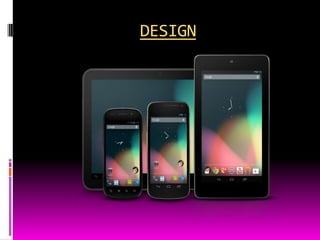
DESIGN
FEATURES
 Current features and specifications:
 Handset layouts - The platform is adaptable to larger, VGA, 2D
   graphics library, 3D graphics library based on OpenGL ES 2.0
   specifications, and traditional smartphone layouts.
 Storage - SQLite, a lightweight relational database, is used
   for data storage purposes.
 Connectivity – Android supports connectivity technologies
   including GSM/EDGE, IDEN, CDMA, EV-DO, UMTS, Bluetooth, Wi-
   Fi, LTE, NFC and WiMAX.
 Messaging - SMS and MMS are available forms of
   messaging, including threaded text messaging and Android Cloud To
   Device Messaging (C2DM) and now enhanced version of
   C2DM, Android Google Cloud Messaging (GCM) is also a part of
   Android Push Messaging service.
 Multiple language support - Android supports multiple
   languages.


 Web browser - The web browser available in Android is based on
   the open-source WebKit layout engine, coupled with Chrome's V8
   JavaScript engine. The browser scores 100/100 on the Acid3 test on
   Android 4.0.


 Java support - While most Android applications are written
   in Java, there is no Java Virtual Machine in the platform and Java byte
   code is not executed. Java classes are compiled into Dalvik
   executables and run on Dalvik, a specialized virtual machine designed
   specifically for Android and optimized for battery-powered mobile
   devices with limited memory and CPU. J2ME support can be provided
   via third-party applications.
 Media support - Android supports the following
  audio/video/still media
  formats: WebM, H.263, H.264 (in 3GP or MP4 container), MPE
  G-4 SP, AMR, AMR-WB (in 3GP container), AAC, HE-AAC (in
  MP4 or 3GP container), MP3, MIDI, Ogg
  Vorbis, FLAC, WAV, JPEG, PNG, GIF, BMP, WebP.


 Streaming media support - RTP/RTSP streaming (3GPP
  PSS, ISMA), HTML progressive download (HTML5 <video> tag).
  Adobe Flash Streaming (RTMP) and HTTP Dynamic Streaming
  are supported by the Flash plugin.[51] Apple HTTP Live
  Streaming is supported by RealPlayer for Android,[52] and by the
  operating system in Android 3.0 (Honeycomb).
 Additional hardware support - Android can use
  video/still
  cameras, touchscreens, GPS, accelerometers, gyroscopes, bar
  ometers, magnetometers, dedicated gaming
  controls, proximity and pressure
  sensors,thermometers, accelerated 2D bit blits (with hardware
  orientation, scaling, pixel format conversion) and accelerated 3D
  graphics.

 Multi-touch - Android has native support for multi-
  touch which was initially made available in handsets such as
  the HTC Hero. The feature was originally disabled at the kernel
  level (possibly to avoid infringing Apple's patents on touch-
  screen technology at the time).[54] Google has since released an
  update for the Nexus One and the Motorola Droid which enables
  multi-touch natively
 Bluetooth - Supports A2DP, AVRCP, sending files
  (OPP), accessing the phone book (PBAP), voice dialing and
  sending contacts between phones. Keyboard, mouse and
  joystick (HID) support is available in Android 3.1+, and in earlier
  versions through manufacturer customizations and third-party
  applications.

 Video calling - Android does not support native video
  calling, but some handsets have a customized version of the
  operating system that supports it, either via the UMTS network
  (like the Samsung Galaxy S) or over IP. Video calling through
  Google Talk is available in Android 2.3.4 and later. Gingerbread
  allows Nexus S to place Internet calls with a SIP account. This
  allows for enhanced VoIP dialing to other SIP accounts and
  even phone numbers. Skype 2.1 offers video calling in Android
  2.3, including front camera support.
 Multitasking - Multitasking of applications, with unique
  handling of memory allocation, is available.


 Voice based features - Google search through voice has
  been available since initial release. Voice actions for
  calling, texting, navigation, etc. are supported on Android 2.2
  onwards.


 Tethering - Android supports tethering, which allows a phone
  to be used as a wireless/wired Wi-Fi hotspot. Before Android 2.2
  this was supported by third-party applications or manufacturer
  customizations.
 Screen capture - Android supports capturing
  a screenshot by pressing the power and volume-down buttons
  at the same time. Prior to Android 4.0, the only methods of
  capturing a screenshot were through manufacturer and third-
  party customizations or otherwise by using a PC connection
  (DDMS developer's tool). These alternative methods are still
  available with the latest Android.
 External storage - Most Android devices include microSD
  slot and can read microSD cards formatted
  with FAT32, Ext3 or Ext4 file system. To allow use of high-
  capacity storage media such as USB flash drivesand USB
  HDDs, many Android tablets also include USB 'A' receptacle.
  Storage formatted with FAT32 is handled by Linux Kernel VFAT
  driver, while 3rd party solutions are required to handle other
  popular file systems such as NTFS, HFS Plus and exFAT.
Uses
 While Android is designed primarily for smartphones and
  tablets, the open and customizable nature of the operating
  system allows it to be used on other
  electronics, including laptops and netbooks, smartbooks, e
  book readers, and smart TVs (Google TV). Further, the OS
  has seen niche applications
  on wristwatches, headphones, car CD and DVD
  players, smart glasses (Project Glass), refrigerators, vehicle
  satnav systems, home automation systems, games
  consoles, mirrors, cameras, portable media players
  landlines, and treadmills.
Applications
 Applications are usually developed in the Java language
  using the Android Software Development Kit, but other
  development tools are available, including a Native
  Development Kit for applications or extensions in C or
  C++, Google App Inventor, a visual environment for novice
  programmers and various cross platform mobile web
  applications frameworks.

 Applications can be acquired by end-users either through a
  store such as Google Play or the Amazon Appstore, or by
  downloading and installing the application's APK file from a
  third-party site.
Google Play
 Google Play is an online software store developed by Google for Android
   devices. An application program ("app") called "Play Store" is preinstalled on
   most Android devices and allows users to browse and download apps
   published by third-party developers, hosted on Google Play.


 Only devices that comply with Google's compatibility requirements are
   allowed to preinstall and access the Play Store. The app filters the list of
   available applications to those that are compatible with the user's device, and
   developers may restrict their applications to particular carriers or countries for
   business reasons.


 Google offers many free applications in the Play Store including Google
   Voice, Google Goggles, Gesture Search, Google Translate, Google
   Shopper, Listen and My Tracks. In August 2010, Google launched "Voice
   Actions for Android", which allows users to search, write messages, and
   initiate calls by voice.
Security
 Android applications run in a sandbox, an isolated area of the operating
   system that does not have access to the rest of the system's
   resources, unless access permissions are granted by the user when the
   application is installed. Before installing an application, the Play
   Store displays all required permissions. A game may need to enable
   vibration, for example, but should not need to read messages or access the
   phonebook. After reviewing these permissions, the user can decide whether
   to install the application. The sandboxing and permissions system weakens
   the impact of vulnerabilities and bugs in applications, but developer confusion
   and limited documentation has resulted in applications routinely requesting
   unnecessary permissions, reducing its effectiveness. The complexity of inter-
   application communication implies Android may have opportunities to run
   unauthorized code.
 Several security firms have released antivirus software for Android devices, in
   particular, Lookout Mobile Security, AVG Technologies, Avast!, F-
   Secure, Kaspersky, McAfee and Symantec. This software is ineffective as
   sandboxing also applies to such applications, limiting their ability to scan the
   deeper system for threats.
Privacy
 Android smartphones have the ability to report the location
   of Wi-Fi access points, encountered as phone users move
   around, to build databases containing the physical locations of
   hundreds of millions of such access points. These databases
   form electronic maps to locate smartphones, allowing them to
   run apps likeFoursquare, Latitude, Places, and to deliver
   location-based ads.

 Third party monitoring software such as TaintDroid, an academic
   research-funded project, can, in some cases, detect when
   personal information is being sent from applications to remote
   servers.
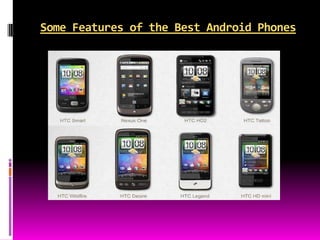
Some Features of the Best Android Phones

Androids

  • 1.
  • 2.
    WHAT IS ANANDROID?  Android is a Linux-based operating system for mobile devices such as smartphones and tablet computers, developed by Google in conjunction with the Open Handset Alliance. Android was initially developed by Android Inc, whom Google financially backed and later purchased in 2005. The unveiling of the Android distribution in 2007 was announced with the founding of the Open Handset Alliance, a consortium of 86 hardware, software, and telecommunication companies devoted to advancing open standards for mobile devices.
  • 3.
     Android hasa large community of developers writing applications ("apps") that extend the functionality of the devices. Developers write primarily in a customized version of Java, and apps can be downloaded from online stores such as Google Play (formerly Android Market), the app store run by Google, or third-party sites. In June 2012, there were more than 600,000 apps available for Android, and the estimated number of applications downloaded from Google Play was 20 billion.  Android became the world’s leading smartphone platform at the end of 2010. For the first quarter of 2012, Android had a 59% smartphone market share worldwide. As of third quarter 2012, there were 400 million devices activated and 1.3 million activations per day.
  • 4.
    History Foundation  Android, Inc.was founded in Palo Alto, California, United States in October 2003 by Andy Rubin (co-founder of Danger), Rich Miner (co-founder of Wildfire Communications, Inc.), Nick Sears (once VP at T-Mobile), and Chris White (headed design and interface development at WebTV) to develop, in Rubin's words "...smarter mobile devices that are more aware of its owner's location and preferences". Despite the obvious past accomplishments of the founders and early employees, Android Inc. operated secretly, revealing only that it was working on software for mobile phones. That same year, Rubin ran out of money. Steve Perlman, a close friend of Rubin, brought him $10,000 in cash in an envelope and refused a stake in the company.
  • 5.
    Design  Android consistsof a kernel based on the Linux kernel 2.6 and Linux Kernel 3.x (Android 4.0 onwards), with middleware, libraries and APIs written in C and application software running on an application framework which includes Java-compatible libraries based on Apache Harmony. Android uses the Dalvik virtual machine with just-in-time compilation to run Dalvik dex-code (Dalvik Executable), which is usually translated from Java bytecod.  The main hardware platform for Android is the ARM architecture. There is support for x86 from the Android x86 project, and Google TV uses a special x86 version of Android.
  • 6.
    Linux  Android's kernelis based on the Linux kernel and has further architecture changes by Google outside the typical Linux kernel development cycle. Android does not have a native X Window System by default nor does it support the full set of standard GNU libraries, and this makes it difficult to port existing Linux applications or libraries to Android.  Linux included the autosleep and wakelocks capablities in the 3.5 kernel, after many previous attempts at merger. The interfaces are the same but the upstream Linux implementation allows for two different suspend modes: to memory (the traditional suspend that android uses), and to disk (hibernate, as it is known on the desktop). In August 2011, Linus Torvalds said that "eventually Android and Linux would come back to a common kernel, but it will probably not be for four to five years".
  • 7.
  • 8.
    FEATURES  Current featuresand specifications:  Handset layouts - The platform is adaptable to larger, VGA, 2D graphics library, 3D graphics library based on OpenGL ES 2.0 specifications, and traditional smartphone layouts.  Storage - SQLite, a lightweight relational database, is used for data storage purposes.  Connectivity – Android supports connectivity technologies including GSM/EDGE, IDEN, CDMA, EV-DO, UMTS, Bluetooth, Wi- Fi, LTE, NFC and WiMAX.  Messaging - SMS and MMS are available forms of messaging, including threaded text messaging and Android Cloud To Device Messaging (C2DM) and now enhanced version of C2DM, Android Google Cloud Messaging (GCM) is also a part of Android Push Messaging service.
  • 9.
     Multiple languagesupport - Android supports multiple languages.  Web browser - The web browser available in Android is based on the open-source WebKit layout engine, coupled with Chrome's V8 JavaScript engine. The browser scores 100/100 on the Acid3 test on Android 4.0.  Java support - While most Android applications are written in Java, there is no Java Virtual Machine in the platform and Java byte code is not executed. Java classes are compiled into Dalvik executables and run on Dalvik, a specialized virtual machine designed specifically for Android and optimized for battery-powered mobile devices with limited memory and CPU. J2ME support can be provided via third-party applications.
  • 10.
     Media support- Android supports the following audio/video/still media formats: WebM, H.263, H.264 (in 3GP or MP4 container), MPE G-4 SP, AMR, AMR-WB (in 3GP container), AAC, HE-AAC (in MP4 or 3GP container), MP3, MIDI, Ogg Vorbis, FLAC, WAV, JPEG, PNG, GIF, BMP, WebP.  Streaming media support - RTP/RTSP streaming (3GPP PSS, ISMA), HTML progressive download (HTML5 <video> tag). Adobe Flash Streaming (RTMP) and HTTP Dynamic Streaming are supported by the Flash plugin.[51] Apple HTTP Live Streaming is supported by RealPlayer for Android,[52] and by the operating system in Android 3.0 (Honeycomb).
  • 11.
     Additional hardwaresupport - Android can use video/still cameras, touchscreens, GPS, accelerometers, gyroscopes, bar ometers, magnetometers, dedicated gaming controls, proximity and pressure sensors,thermometers, accelerated 2D bit blits (with hardware orientation, scaling, pixel format conversion) and accelerated 3D graphics.  Multi-touch - Android has native support for multi- touch which was initially made available in handsets such as the HTC Hero. The feature was originally disabled at the kernel level (possibly to avoid infringing Apple's patents on touch- screen technology at the time).[54] Google has since released an update for the Nexus One and the Motorola Droid which enables multi-touch natively
  • 12.
     Bluetooth -Supports A2DP, AVRCP, sending files (OPP), accessing the phone book (PBAP), voice dialing and sending contacts between phones. Keyboard, mouse and joystick (HID) support is available in Android 3.1+, and in earlier versions through manufacturer customizations and third-party applications.  Video calling - Android does not support native video calling, but some handsets have a customized version of the operating system that supports it, either via the UMTS network (like the Samsung Galaxy S) or over IP. Video calling through Google Talk is available in Android 2.3.4 and later. Gingerbread allows Nexus S to place Internet calls with a SIP account. This allows for enhanced VoIP dialing to other SIP accounts and even phone numbers. Skype 2.1 offers video calling in Android 2.3, including front camera support.
  • 13.
     Multitasking -Multitasking of applications, with unique handling of memory allocation, is available.  Voice based features - Google search through voice has been available since initial release. Voice actions for calling, texting, navigation, etc. are supported on Android 2.2 onwards.  Tethering - Android supports tethering, which allows a phone to be used as a wireless/wired Wi-Fi hotspot. Before Android 2.2 this was supported by third-party applications or manufacturer customizations.
  • 14.
     Screen capture- Android supports capturing a screenshot by pressing the power and volume-down buttons at the same time. Prior to Android 4.0, the only methods of capturing a screenshot were through manufacturer and third- party customizations or otherwise by using a PC connection (DDMS developer's tool). These alternative methods are still available with the latest Android.  External storage - Most Android devices include microSD slot and can read microSD cards formatted with FAT32, Ext3 or Ext4 file system. To allow use of high- capacity storage media such as USB flash drivesand USB HDDs, many Android tablets also include USB 'A' receptacle. Storage formatted with FAT32 is handled by Linux Kernel VFAT driver, while 3rd party solutions are required to handle other popular file systems such as NTFS, HFS Plus and exFAT.
  • 15.
    Uses  While Androidis designed primarily for smartphones and tablets, the open and customizable nature of the operating system allows it to be used on other electronics, including laptops and netbooks, smartbooks, e book readers, and smart TVs (Google TV). Further, the OS has seen niche applications on wristwatches, headphones, car CD and DVD players, smart glasses (Project Glass), refrigerators, vehicle satnav systems, home automation systems, games consoles, mirrors, cameras, portable media players landlines, and treadmills.
  • 16.
    Applications  Applications areusually developed in the Java language using the Android Software Development Kit, but other development tools are available, including a Native Development Kit for applications or extensions in C or C++, Google App Inventor, a visual environment for novice programmers and various cross platform mobile web applications frameworks.  Applications can be acquired by end-users either through a store such as Google Play or the Amazon Appstore, or by downloading and installing the application's APK file from a third-party site.
  • 17.
    Google Play  GooglePlay is an online software store developed by Google for Android devices. An application program ("app") called "Play Store" is preinstalled on most Android devices and allows users to browse and download apps published by third-party developers, hosted on Google Play.  Only devices that comply with Google's compatibility requirements are allowed to preinstall and access the Play Store. The app filters the list of available applications to those that are compatible with the user's device, and developers may restrict their applications to particular carriers or countries for business reasons.  Google offers many free applications in the Play Store including Google Voice, Google Goggles, Gesture Search, Google Translate, Google Shopper, Listen and My Tracks. In August 2010, Google launched "Voice Actions for Android", which allows users to search, write messages, and initiate calls by voice.
  • 18.
    Security  Android applicationsrun in a sandbox, an isolated area of the operating system that does not have access to the rest of the system's resources, unless access permissions are granted by the user when the application is installed. Before installing an application, the Play Store displays all required permissions. A game may need to enable vibration, for example, but should not need to read messages or access the phonebook. After reviewing these permissions, the user can decide whether to install the application. The sandboxing and permissions system weakens the impact of vulnerabilities and bugs in applications, but developer confusion and limited documentation has resulted in applications routinely requesting unnecessary permissions, reducing its effectiveness. The complexity of inter- application communication implies Android may have opportunities to run unauthorized code.  Several security firms have released antivirus software for Android devices, in particular, Lookout Mobile Security, AVG Technologies, Avast!, F- Secure, Kaspersky, McAfee and Symantec. This software is ineffective as sandboxing also applies to such applications, limiting their ability to scan the deeper system for threats.
  • 19.
    Privacy  Android smartphoneshave the ability to report the location of Wi-Fi access points, encountered as phone users move around, to build databases containing the physical locations of hundreds of millions of such access points. These databases form electronic maps to locate smartphones, allowing them to run apps likeFoursquare, Latitude, Places, and to deliver location-based ads.  Third party monitoring software such as TaintDroid, an academic research-funded project, can, in some cases, detect when personal information is being sent from applications to remote servers.
  • 20.
    Some Features ofthe Best Android Phones