Techniques and Considerations
for Improving Accessibility in
Online Media
Zack Labe(he/him/his; I live and work on Lenape Lands)
3 April 2024 – USAPECS Board Meeting
TRAINING: Accessibility and disability in online spaces
https://usapecs.org/
2
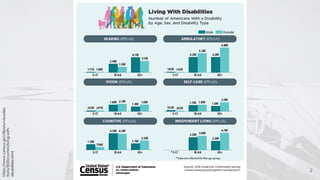
https://www.census.gov/library/visualiza
tions/2020/comm/living-with-
disabilities.html
https://dap.berkeley.edu/learn/what-digital-accessibility
“Digital accessibility means that websites, tools, and
technologies are designed and developed so that
people with disabilities can use them
– World Wide Web Consortium (W3C)”
à Equal access to information and services!
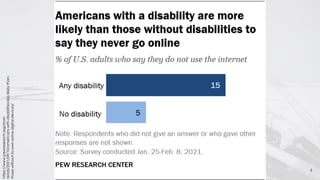
4
https://www.pewresearch.org/short-
reads/2021/09/10/americans-with-disabilities-less-likely-than-
those-without-to-own-some-digital-devices/
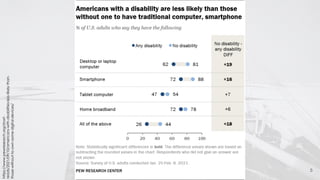
5
https://www.pewresearch.org/short-
reads/2021/09/10/americans-with-disabilities-less-likely-than-
those-without-to-own-some-digital-devices/
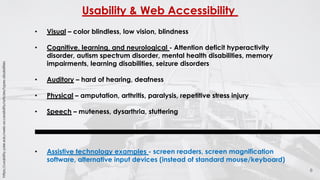
Usability & Web Accessibility
6
• Visual – color blindless, low vision, blindness
• Cognitive, learning, and neurological - Attention deficit hyperactivity
disorder, autism spectrum disorder, mental health disabilities, memory
impairments, learning disabilities, seizure disorders
• Auditory – hard of hearing, deafness
• Physical – amputation, arthritis, paralysis, repetitive stress injury
• Speech – muteness, dysarthria, stuttering
• Assistive technology examples - screen readers, screen magnification
software, alternative input devices (instead of standard mouse/keyboard)
https://usability.yale.edu/web-accessibility/articles/types-disabilities
7
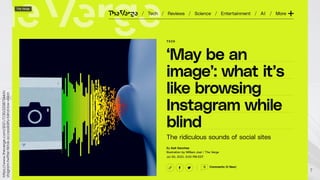
https://www.theverge.com/2021/7/30/22587544/in
stagram-twitter-tiktok-accessibility-blind-low-vision
8
https://www.theverge.com/2021/7/30/22587544/in
stagram-twitter-tiktok-accessibility-blind-low-vision
“Recently, she was scrolling through Instagram when her
screen reader said there was a photo of “two brown cats
lying on a textured surface.” Her husband informed her that
it was actually a bridal shop ad featuring a woman in a
wedding dress.
“Thank goodness I wasn’t [commenting] like, ‘Oh those cats
are cute,’ you know?””
9
https://www.theverge.com/2021/7/30/22587544/in
stagram-twitter-tiktok-accessibility-blind-low-vision
Facebook had an image outage in 2019 that showed all of
its users the photo tags that are usually hidden, displaying
machine-assigned descriptors like “Image may contain:
people standing.”
Are the people contained in that image embracing and
making goofy faces? Are they standing in front of a
breathtaking vista? Social media can feel a lot less social if
your access to the content shared within it relies on
computers’ conservative interpretations.
10
https://www.theverge.com/2021/7/30/22587544/in
stagram-twitter-tiktok-accessibility-blind-low-vision
“When she replied with a request for alt text, Smith Berman
was met with responses from people expressing disbelief
that blind people would even be on Twitter to begin with, let
alone care about video games.
Those false assumptions often mean that people are left out
of fun cultural moments on social media. Memes usually
involve rapidly evolving iterations of undescribed images
with tiny words in weird fonts.”
11
https://www.theverge.com/2021/7/30/22587544/in
stagram-twitter-tiktok-accessibility-blind-low-vision
Viral videos are reposted and shared without any kind of
description, through audio or text, of what’s happening on-
screen. “Oh, that must be somebody dancing,” thinks
McCann when she encounters a TikTok with no audio
besides music. “Well, no, it’s actually somebody making a
cheesesteak. But I didn’t know that because there’s no
audio indication.”
Things to do in meetings
12
• Video on:
- Helps people to lip read and see facial expressions
- Builds rapport and connections
• Video off:
- Can be distracting for people with neurodevelopmental disability
like Attention Deficit Hyperactivity Disorder ADHD / Autism Spectrum
Disorder ASD
- Zoom fatigue
- Saves bandwidth
- Privacy/mood
• Mute on:
- Helps active speaker if noise is limited
- Is distracting if the speaker jumps around because of noise
• Mute off:
- Less people speak or wait until they are called
• Recordings vs. breakout rooms
- Allows people the space to speak
- Private conversations
- Recording can help with transcription
- Focus on the type of conversation you are having
https://commonslibrary.org/digital-accessibility-making-online-spaces-accessible/
Things to do in meetings continued:
13
• Provide an agenda in advance
• Know the audience
• Accessible slides and media, talk through them
• Create a safe space
• Talk about functionality of the platform
• Ask participants to mute background noise
• Know you may get it wrong
• Don’t take it personally, but learn
• Share presentation with participants at the beginning using PowerPoint
instead of PDF so that people can see speaker’s notes if available
• Don’t use acronyms
• Talk through images
https://commonslibrary.org/digital-accessibility-making-online-spaces-accessible/
Things to do for social media/websites
14
• Consider inclusive design when building online interfaces
• Write hashtags with capital letters: #ArcticSeaIceExtent
• Consider the use of “content warnings”
• Use high contrast color schemes and images
• Sans Serif typefaces (large spacing, large font, only 1 (or 2)
fonts styles on a page/slide, do not use thin fonts)
https://www.epilepsy.com/volunteer/spreading-awareness
Things to do for social media/websites continued
15
• Provide options to enlarge the text font (magnification)
• Avoid tables (screen readers may struggle with them)
• Watch for colorblind issues with color choices, especially for
text over backgrounds
• Add keyboard navigation (e.g., users unable to use a mouse)
• Use descriptive URLs, headings, and captions
• Avoid using “read more” or “click here”
https://www.searchenginejournal.com/make-website-more-accessible/347450/
Things to do for social media/websites continued
16
• Check out ARIA (Accessible Rich Internet Applications) –
methods in HTML to describe a user interface that is designed
to be compatible with assistive technology devices
• WCAG (Web Content Accessibility Guidelines) developed by
the World Wide Web Consortium
Checklist: https://usability.yale.edu/web-
accessibility/articles/wcag2-checklist
• Consideration of PDF accessibility is crucial when filling out
forms
https://helpx.adobe.com/acrobat/using/accessibility-features-pdfs.html
https://blog.hubspot.com/website/aria-accessibility
https://usability.yale.edu/web-accessibility/articles/wcag2-checklist
Things to consider/avoid for social media
17
• Excessive use of unicode characters – often not
interpreted by screen readers
• Excessive use of emojis, special characters, cursive, or
other font formatting styles
• Flashing content (lights and colors) – TikTok provides an
epilepsy warning to photosensitive videos
• Avoid ableist language like: “I stand with” and instead
say “I support”
https://www.epilepsy.com/volunteer/spreading-awareness
Recall: Alternative Text
● Alternative text (alt-text): describes what is in an image
○ Read to users out loud by screen reader software
○ Indexed by search engines
○ Displayed on the page if the image fails to load
● The typical length of an alt-text: 100-125 characters
● Context is important
● Related also to transcriptions and video captioning
18
https://imageseo.io/alt-text-seo/
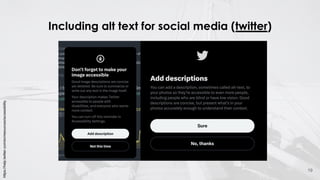
Including alt text for social media (twitter)
19
https://help.twitter.com/en/resources/accessibility
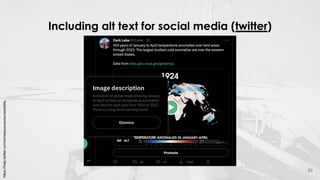
Including alt text for social media (twitter)
20
https://help.twitter.com/en/resources/accessibility
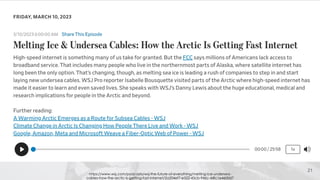
21
https://www.wsj.com/podcasts/wsj-the-future-of-everything/melting-ice-undersea-
cables-how-the-arctic-is-getting-fast-internet/2a204ef7-e522-45cb-946c-44fc1e4600d7
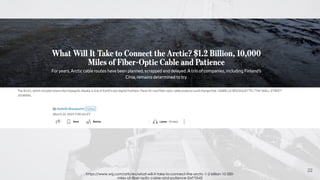
22
https://www.wsj.com/articles/what-will-it-take-to-connect-the-arctic-1-2-billion-10-000-
miles-of-fiber-optic-cable-and-patience-2af75543
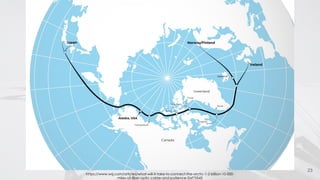
23
https://www.wsj.com/articles/what-will-it-take-to-connect-the-arctic-1-2-billion-10-000-
miles-of-fiber-optic-cable-and-patience-2af75543
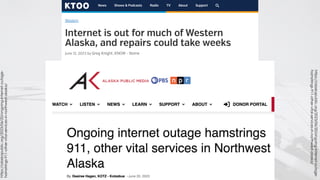
https://alaskapublic.org/2023/06/20/ongoing-internet-outage-
hamstrings-911-other-vital-services-in-northwest-alaska/
https://alaskapublic.org/2023/06/20/ongoing-internet-outage-
hamstrings-911-other-vital-services-in-northwest-alaska/
Concluding thoughts…
● Improving online accessibility should not be an
afterthought in web design and social media posts
● It takes practice and reevaluation of our own assumptions
● Accessibility options are now available on nearly all
websites, social media interfaces, and virtual meeting
platforms – often hidden in settings
● University institutions often provide great resources and
references related to online accessibility
● What are your own ideas and suggestions? Thank you!
25
Extra Slide
Info
26
27

Techniques and Considerations for Improving Accessibility in Online Media