Blogs, Wikis, Podcasts, Photo and Video Sharing:  Implications of  Web 2.0 for Education.  Michelle Eckstein [email_address] Technology and the Gifted © 2007 Michelle Eckstein All Rights Reserved
Changes Over Time In the 1990’s the internet was a read only, static source of information.  In 2000’s the internet has become a dynamic, interactive source for sharing of information. The dynamic, social characteristics of this new set of web tools is sometimes referred to as Web 2.0 or the Read-Write Web.  Teachers can use these new tools to engage students in collaborative and meaningful conversations. Students need to be literate in the new technologies
This IS the 21 st  Century www.borg.com/~rjgtoons/images/ed26.gif
Web Safety We all must understand the importance of safe Internet practices.  The students in junior and senior high schools are still adolescents.  Harassers and bullies must be held accountable for their behavior whether it happens in a classroom or in cyberspace.
Web Safety Everyone must work with the young people to insure that students do not disclose more information about themselves online than they should. First names only, No contact information Don’t disclose clubs, school name, neighborhood, activities, sports teams
Content/Planning Elementary school students should have a list of sites to visit not internet searches. Middle level should begin to learn proper searching techniques. High school students need reminders about what to do when they encounter inappropriate content.
Authentic 21st Century Learning for Gifted and Talented Students © 2007 Michelle Eckstein All rights reserved
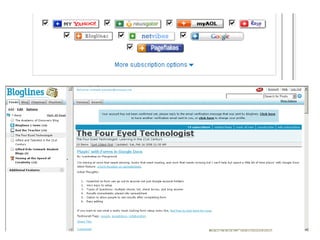
RSS – Really Simple Syndication


Blog or Weblog an online reflective and conversational journal  published via the internet facilitates critical feedback, by letting readers add comments Motivates students to continue to write Promotes critical thinking


Multi-Media Audio and Video Pedro Noguera, a sociology professor at New York University, said “You know the No. 1 complaint about school is that it’s boring because the traditional way it’s taught relies on passive learning,” Mr. Noguera said. “It’s not interactive enough.” ( New York Times , October 9, 2007)


Photo and Video Sharing Digital photography websites are numerous and offer free services to upload photos, edit them, organize photos into galleries, and share them with others.  Videos can be published on the internet, where they can be viewed and commented on by classmates and the wider community. (YouTube, TeacherTube, Yahoo Video, Google Video)


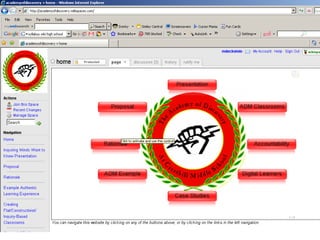
Wiki is a piece of software that allows users to freely create and edit Web page content using any Web browser.  Wiki


Student Wiki Projects Collaboration of notes / study guides Student written books  School newspaper  Showcase for student projects  Book group discussions Science lab reports and discussions Group projects
 
Comparing & Evaluating Sources Wise researchers (and students) will give thought to whether each source is reliable using the following criteria:  accuracy currency authority fairness adequacy efficiency organization
Social Bookmarking Social bookmarking is saving bookmarks to a web site and “tagging” them with keywords. Social bookmarking sites are a popular way to store, classify, share and search links.


Mapping Google Earth provides opportunities for interactive geography explorations. Students at various levels of readiness can easily study different map features or varying levels of detail.
 
 
Differentiation using 21 st  Century Tools
21 st  Century Education We are preparing our children for a future that we cannot possibly describe.  What do children need to do today to prepare for an unpredictable future? The most important thing we can teach our children, in a rapidly changing world, is to teach them how to learn and how to teach themselves.  - David Warlick
Connect, Collaborate, Create © 2007 Michelle Eckstein All rights reserved
Internet based learning group Multi –grade, interest focused groups Opportunities for students to work in areas of strength Focused toward the production of real world products or services Modeled after the ways in which knowledge utilization, thinking skills, and interpersonal relations take place in the real world. www.giftedkidsnetwork.com Gifted Kids Network © 2007 Michelle Eckstein All rights reserved
Educational Consultant, Gifted Kids Network My Blog:  www.talentedandgifted.net   Contact Information: 303-499-3084 [email_address] www.giftedkidsnetwork.com Michelle Eckstein

Technology and the Gifted

  • 1.
    Blogs, Wikis, Podcasts,Photo and Video Sharing: Implications of Web 2.0 for Education. Michelle Eckstein [email_address] Technology and the Gifted © 2007 Michelle Eckstein All Rights Reserved
  • 2.
    Changes Over TimeIn the 1990’s the internet was a read only, static source of information. In 2000’s the internet has become a dynamic, interactive source for sharing of information. The dynamic, social characteristics of this new set of web tools is sometimes referred to as Web 2.0 or the Read-Write Web. Teachers can use these new tools to engage students in collaborative and meaningful conversations. Students need to be literate in the new technologies
  • 3.
    This IS the21 st Century www.borg.com/~rjgtoons/images/ed26.gif
  • 4.
    Web Safety Weall must understand the importance of safe Internet practices. The students in junior and senior high schools are still adolescents. Harassers and bullies must be held accountable for their behavior whether it happens in a classroom or in cyberspace.
  • 5.
    Web Safety Everyonemust work with the young people to insure that students do not disclose more information about themselves online than they should. First names only, No contact information Don’t disclose clubs, school name, neighborhood, activities, sports teams
  • 6.
    Content/Planning Elementary schoolstudents should have a list of sites to visit not internet searches. Middle level should begin to learn proper searching techniques. High school students need reminders about what to do when they encounter inappropriate content.
  • 7.
    Authentic 21st CenturyLearning for Gifted and Talented Students © 2007 Michelle Eckstein All rights reserved
  • 8.
    RSS – ReallySimple Syndication
  • 9.
  • 10.
  • 11.
  • 12.
  • 13.
  • 14.
    Blog or Weblogan online reflective and conversational journal published via the internet facilitates critical feedback, by letting readers add comments Motivates students to continue to write Promotes critical thinking
  • 15.
  • 16.
  • 17.
  • 18.
  • 19.
  • 20.
    Multi-Media Audio andVideo Pedro Noguera, a sociology professor at New York University, said “You know the No. 1 complaint about school is that it’s boring because the traditional way it’s taught relies on passive learning,” Mr. Noguera said. “It’s not interactive enough.” ( New York Times , October 9, 2007)
  • 21.
  • 22.
  • 23.
  • 24.
  • 25.
    Photo and VideoSharing Digital photography websites are numerous and offer free services to upload photos, edit them, organize photos into galleries, and share them with others. Videos can be published on the internet, where they can be viewed and commented on by classmates and the wider community. (YouTube, TeacherTube, Yahoo Video, Google Video)
  • 26.
  • 27.
  • 28.
  • 29.
  • 30.
  • 31.
  • 32.
    Wiki is apiece of software that allows users to freely create and edit Web page content using any Web browser. Wiki
  • 33.
  • 34.
  • 35.
  • 36.
  • 37.
  • 38.
  • 39.
  • 40.
  • 41.
  • 42.
  • 43.
  • 44.
  • 45.
  • 46.
    Student Wiki ProjectsCollaboration of notes / study guides Student written books School newspaper Showcase for student projects Book group discussions Science lab reports and discussions Group projects
  • 47.
  • 48.
    Comparing & EvaluatingSources Wise researchers (and students) will give thought to whether each source is reliable using the following criteria: accuracy currency authority fairness adequacy efficiency organization
  • 49.
    Social Bookmarking Socialbookmarking is saving bookmarks to a web site and “tagging” them with keywords. Social bookmarking sites are a popular way to store, classify, share and search links.
  • 50.
  • 51.
  • 52.
  • 53.
  • 54.
  • 55.
  • 56.
    Mapping Google Earthprovides opportunities for interactive geography explorations. Students at various levels of readiness can easily study different map features or varying levels of detail.
  • 57.
  • 58.
  • 59.
    Differentiation using 21st Century Tools
  • 60.
    21 st Century Education We are preparing our children for a future that we cannot possibly describe. What do children need to do today to prepare for an unpredictable future? The most important thing we can teach our children, in a rapidly changing world, is to teach them how to learn and how to teach themselves. - David Warlick
  • 61.
    Connect, Collaborate, Create© 2007 Michelle Eckstein All rights reserved
  • 62.
    Internet based learninggroup Multi –grade, interest focused groups Opportunities for students to work in areas of strength Focused toward the production of real world products or services Modeled after the ways in which knowledge utilization, thinking skills, and interpersonal relations take place in the real world. www.giftedkidsnetwork.com Gifted Kids Network © 2007 Michelle Eckstein All rights reserved
  • 63.
    Educational Consultant, GiftedKids Network My Blog: www.talentedandgifted.net Contact Information: 303-499-3084 [email_address] www.giftedkidsnetwork.com Michelle Eckstein

Editor's Notes

  • #2 Introduce self Masters from UCONN BVSD TAG advisor BVGT secretary Parent of 2 gifted high schoolers Founder of Gifted Kids Network