MS-ACCESS PRACTICAL LIST
For BBA 2nd
Semester Morning , Evening
Submitted Till: 30th
April 2015
Ques.1 Define Microsoft Access? Explain the various features present in MS-
Access?
Ques.2 State some of the uses of MS-Access.
Ques.3 What are these objects-
Tables, Queries, Forms, Reports, pages, macros, modules
Ques 4 Define “validation rule and text”. Apply any “validation rule” on any
column of Table.
Ques.5 What is relationship and how we relate tables?
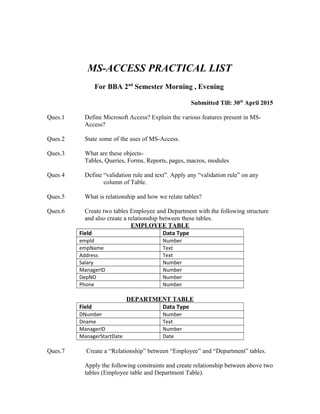
Ques.6 Create two tables Employee and Department with the following structure
and also create a relationship between these tables.
EMPLOYEE TABLE
Field Data Type
empId Number
empName Text
Address Text
Salary Number
ManagerID Number
DepNO Number
Phone Number
DEPARTMENT TABLE
Field Data Type
DNumber Number
Dname Text
ManagerID Number
ManagerStartDate Date
Ques.7 Create a “Relationship” between “Employee” and “Department” tables.
Apply the following constraints and create relationship between above two
tables (Employee table and Department Table).
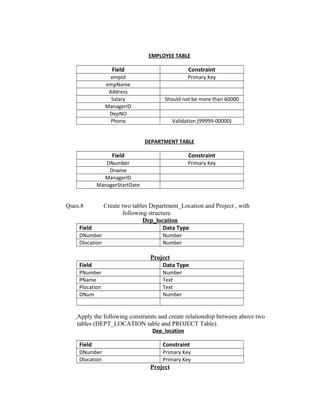
EMPLOYEE TABLE
Field Constraint
empId Primary Key
empName
Address
Salary Should not be more than 60000
ManagerID
DepNO
Phone Validation (99999-00000)
DEPARTMENT TABLE
Field Constraint
DNumber Primary Key
Dname
ManagerID
ManagerStartDate
Ques.8 Create two tables Department_Location and Project , with
following structure.
Dep_location
Field Data Type
DNumber Number
Dlocation Number
Project
Field Data Type
PNumber Number
PName Text
Plocation Text
DNum Number
Apply the following constraints and create relationship between above two
tables (DEPT_LOCATION table and PROJECT Table).
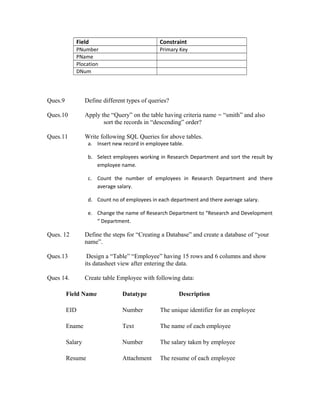
Dep_location
Field Constraint
DNumber Primary Key
Dlocation Primary Key
Project
Field Constraint
PNumber Primary Key
PName
Plocation
DNum
Ques.9 Define different types of queries?
Ques.10 Apply the “Query” on the table having criteria name = “smith” and also
sort the records in “descending” order?
Ques.11 Write following SQL Queries for above tables.
a. Insert new record in employee table.
b. Select employees working in Research Department and sort the result by
employee name.
c. Count the number of employees in Research Department and there
average salary.
d. Count no of employees in each department and there average salary.
e. Change the name of Research Department to “Research and Development
“ Department.
Ques. 12 Define the steps for “Creating a Database” and create a database of “your
name”.
Ques.13 Design a “Table” “Employee” having 15 rows and 6 columns and show
its datasheet view after entering the data.
Ques 14. Create table Employee with following data:
Field Name Datatype Description
EID Number The unique identifier for an employee
Ename Text The name of each employee
Salary Number The salary taken by employee
Resume Attachment The resume of each employee
Project_Files OLE The files made by employee
DOJ Date The date of joining of employee

Access practicals 2015

  • 1.
    MS-ACCESS PRACTICAL LIST ForBBA 2nd Semester Morning , Evening Submitted Till: 30th April 2015 Ques.1 Define Microsoft Access? Explain the various features present in MS- Access? Ques.2 State some of the uses of MS-Access. Ques.3 What are these objects- Tables, Queries, Forms, Reports, pages, macros, modules Ques 4 Define “validation rule and text”. Apply any “validation rule” on any column of Table. Ques.5 What is relationship and how we relate tables? Ques.6 Create two tables Employee and Department with the following structure and also create a relationship between these tables. EMPLOYEE TABLE Field Data Type empId Number empName Text Address Text Salary Number ManagerID Number DepNO Number Phone Number DEPARTMENT TABLE Field Data Type DNumber Number Dname Text ManagerID Number ManagerStartDate Date Ques.7 Create a “Relationship” between “Employee” and “Department” tables. Apply the following constraints and create relationship between above two tables (Employee table and Department Table).
  • 2.
    EMPLOYEE TABLE Field Constraint empIdPrimary Key empName Address Salary Should not be more than 60000 ManagerID DepNO Phone Validation (99999-00000) DEPARTMENT TABLE Field Constraint DNumber Primary Key Dname ManagerID ManagerStartDate Ques.8 Create two tables Department_Location and Project , with following structure. Dep_location Field Data Type DNumber Number Dlocation Number Project Field Data Type PNumber Number PName Text Plocation Text DNum Number Apply the following constraints and create relationship between above two tables (DEPT_LOCATION table and PROJECT Table). Dep_location Field Constraint DNumber Primary Key Dlocation Primary Key Project
  • 3.
    Field Constraint PNumber PrimaryKey PName Plocation DNum Ques.9 Define different types of queries? Ques.10 Apply the “Query” on the table having criteria name = “smith” and also sort the records in “descending” order? Ques.11 Write following SQL Queries for above tables. a. Insert new record in employee table. b. Select employees working in Research Department and sort the result by employee name. c. Count the number of employees in Research Department and there average salary. d. Count no of employees in each department and there average salary. e. Change the name of Research Department to “Research and Development “ Department. Ques. 12 Define the steps for “Creating a Database” and create a database of “your name”. Ques.13 Design a “Table” “Employee” having 15 rows and 6 columns and show its datasheet view after entering the data. Ques 14. Create table Employee with following data: Field Name Datatype Description EID Number The unique identifier for an employee Ename Text The name of each employee Salary Number The salary taken by employee Resume Attachment The resume of each employee
  • 4.
    Project_Files OLE Thefiles made by employee DOJ Date The date of joining of employee