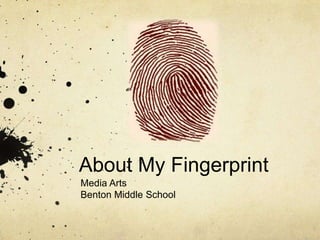
About My Fingerprint
Media Arts
Benton Middle School
About My Fingerprint
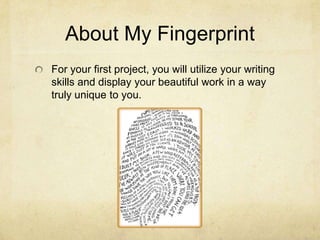
For your first project, you will utilize your writing
skills and display your beautiful work in a way
truly unique to you.
About My Fingerprint


What is a fingerprint?
About My Fingerprint
Part 1
   Write/Type Narrative Essay.
   Topic: All About Me!
   A Narrative Essay tells a story. Write a story all
   about you! Be creative and have fun with your
   writing!
   You may write your essay on paper but the Rough
   Draft must be typed in Microsoft Word and be at
   least 1 page long.
   Your essay must be read by a Peer and the Peer
   Critique from must be completed.
   Time Frame: 1-2 Class Periods.
About My Fingerprint
Part 2
   Create your fingerprint in Adobe Illustrator.
     Use your scanned fingerprint and trace it in Adobe
     Illustrator.
     Use the “Type On Path” tool to type your Narrative
     Essay.
     Be creative with your type and modify it at least
     once.
     Make sure your type is evenly spaced on your
     fingerprint.
     Layers must be used and neatly organized (think
     back to front).
     Time Frame: 2-3 Class Periods.
About My Fingerprint


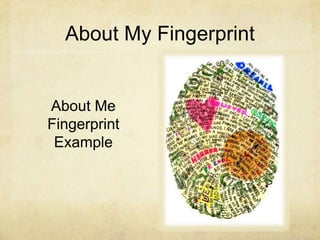
About Me
Fingerprint
 Example
About My Fingerprint
Have fun with your writing! Be creative!
Great writing always leaves a “print”
behind!
Spelling and grammar always count!
Follow directions when creating your
fingerprint and you will create
BEAUTIFUL WORK!

About My Fingerprint

  • 1.
    About My Fingerprint MediaArts Benton Middle School
  • 2.
    About My Fingerprint Foryour first project, you will utilize your writing skills and display your beautiful work in a way truly unique to you.
  • 3.
    About My Fingerprint Whatis a fingerprint?
  • 4.
    About My Fingerprint Part1 Write/Type Narrative Essay. Topic: All About Me! A Narrative Essay tells a story. Write a story all about you! Be creative and have fun with your writing! You may write your essay on paper but the Rough Draft must be typed in Microsoft Word and be at least 1 page long. Your essay must be read by a Peer and the Peer Critique from must be completed. Time Frame: 1-2 Class Periods.
  • 5.
    About My Fingerprint Part2 Create your fingerprint in Adobe Illustrator. Use your scanned fingerprint and trace it in Adobe Illustrator. Use the “Type On Path” tool to type your Narrative Essay. Be creative with your type and modify it at least once. Make sure your type is evenly spaced on your fingerprint. Layers must be used and neatly organized (think back to front). Time Frame: 2-3 Class Periods.
  • 6.
    About My Fingerprint AboutMe Fingerprint Example
  • 7.
    About My Fingerprint Havefun with your writing! Be creative! Great writing always leaves a “print” behind! Spelling and grammar always count! Follow directions when creating your fingerprint and you will create BEAUTIFUL WORK!