Sequence and Collaboration Diagrams

                                   Chapter 7


Object-Oriented Software Systems Engineering – Chapter 7   Slide 1
Objectives

 In this chapter we will:
  Review the different dynamic modelling
   techniques
  Discuss different types of messages
  Discuss different types of events
  Introduce sequence and collaboration diagrams


Object-Oriented Software Systems Engineering – Chapter 7   Slide 2
Dynamic Modelling

 Dynamics of a system
    how objects communicate and the effects of such
     communication
    how objects collaborate through communication and how
     objects change state
 Dynamics of a system is described by four diagrams
    State               Sequence
    Collaboration       Activity

 Interaction
    communication between objects in order to generate some
     function
    described in sequence, collaboration and activity diagrams


Object-Oriented Software Systems Engineering – Chapter 7   Slide 3
Dynamic Modelling diagrams

  State diagram -describes
       which states an object can have
       behaviour in those states
       what events cause the state to change


  Sequence diagram - describes how objects
    interact and communicate with each other
       primary focus is time
       shows how a sequence of messages are sent and
        received between a set of objects in order to perform
        some function


Object-Oriented Software Systems Engineering – Chapter 7    Slide 4
Dynamic Modelling diagrams

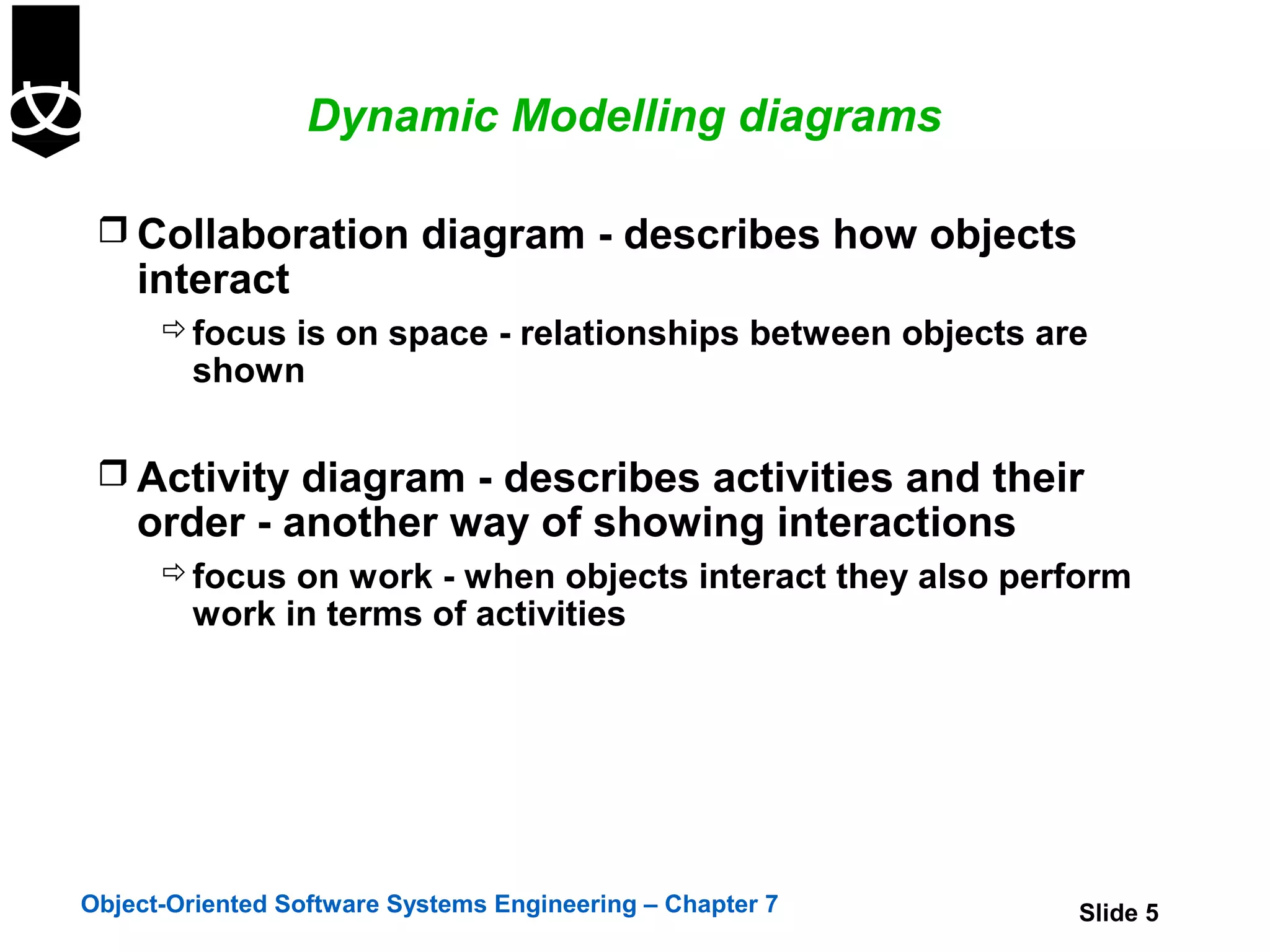
  Collaboration diagram - describes how objects
    interact
       focus is on space - relationships between objects are
        shown

  Activity diagram - describes activities and their
    order - another way of showing interactions
       focus on work - when objects interact they also perform
        work in terms of activities


Object-Oriented Software Systems Engineering – Chapter 7    Slide 5
Dynamic Modelling - Messages

  Message
     a communication between objects that conveys
      information
     has a sender and recipient
     is represented as an arrow denoting flow of control


Object-Oriented Software Systems Engineering – Chapter 7    Slide 6
Dynamic Modelling - Messages


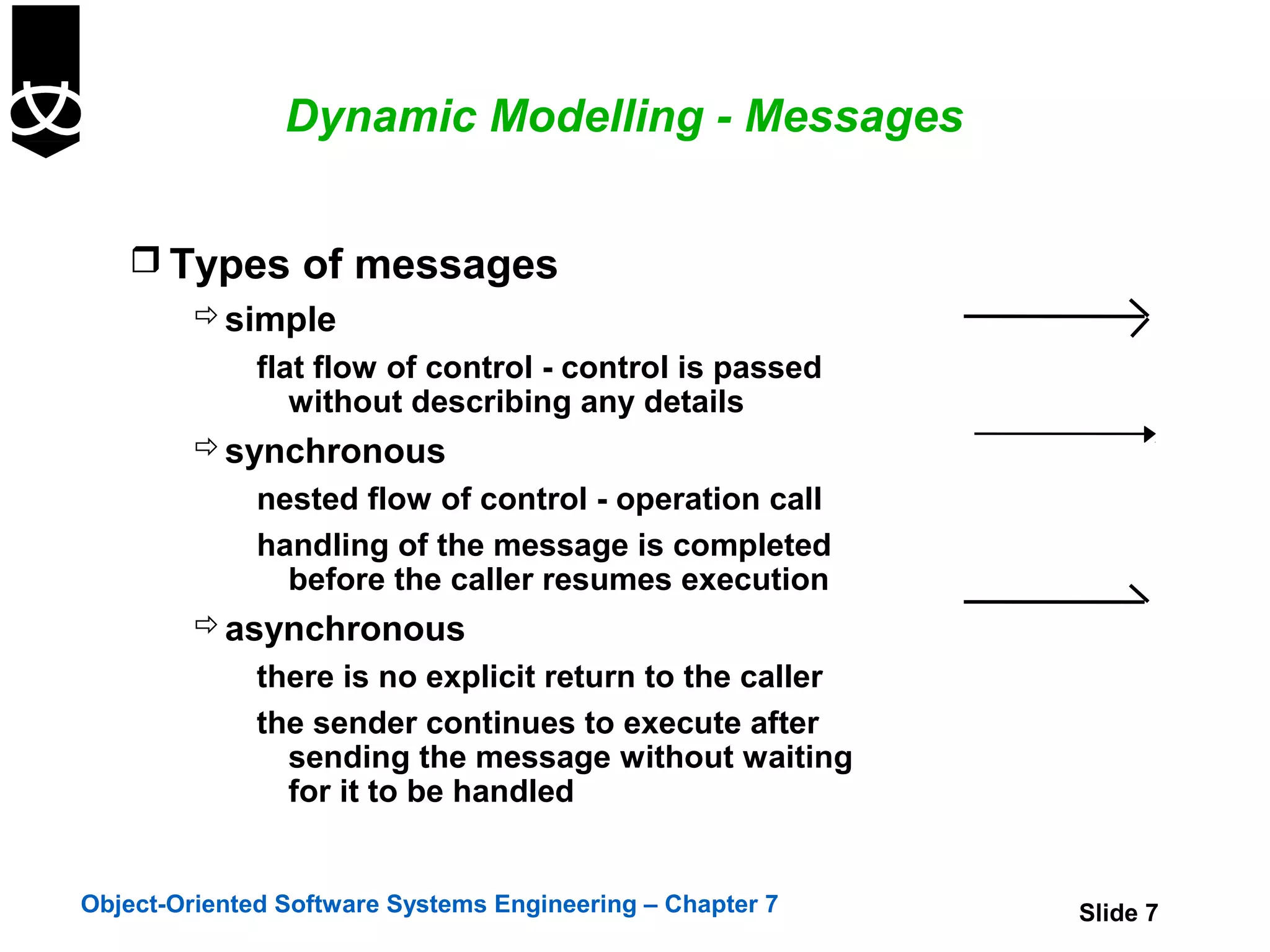
    Types of messages
       simple
              flat flow of control - control is passed
                 without describing any details
          synchronous
              nested flow of control - operation call
              handling of the message is completed
                before the caller resumes execution
          asynchronous
              there is no explicit return to the caller
              the sender continues to execute after
                sending the message without waiting
                for it to be handled


Object-Oriented Software Systems Engineering – Chapter 7   Slide 7
Dynamic Modelling

  Use cases are elaborated in two stages
       Expand the use-cases into sequence diagrams
       Use the sequence diagrams to produce finite state
        machines


Object-Oriented Software Systems Engineering – Chapter 7    Slide 8
Events


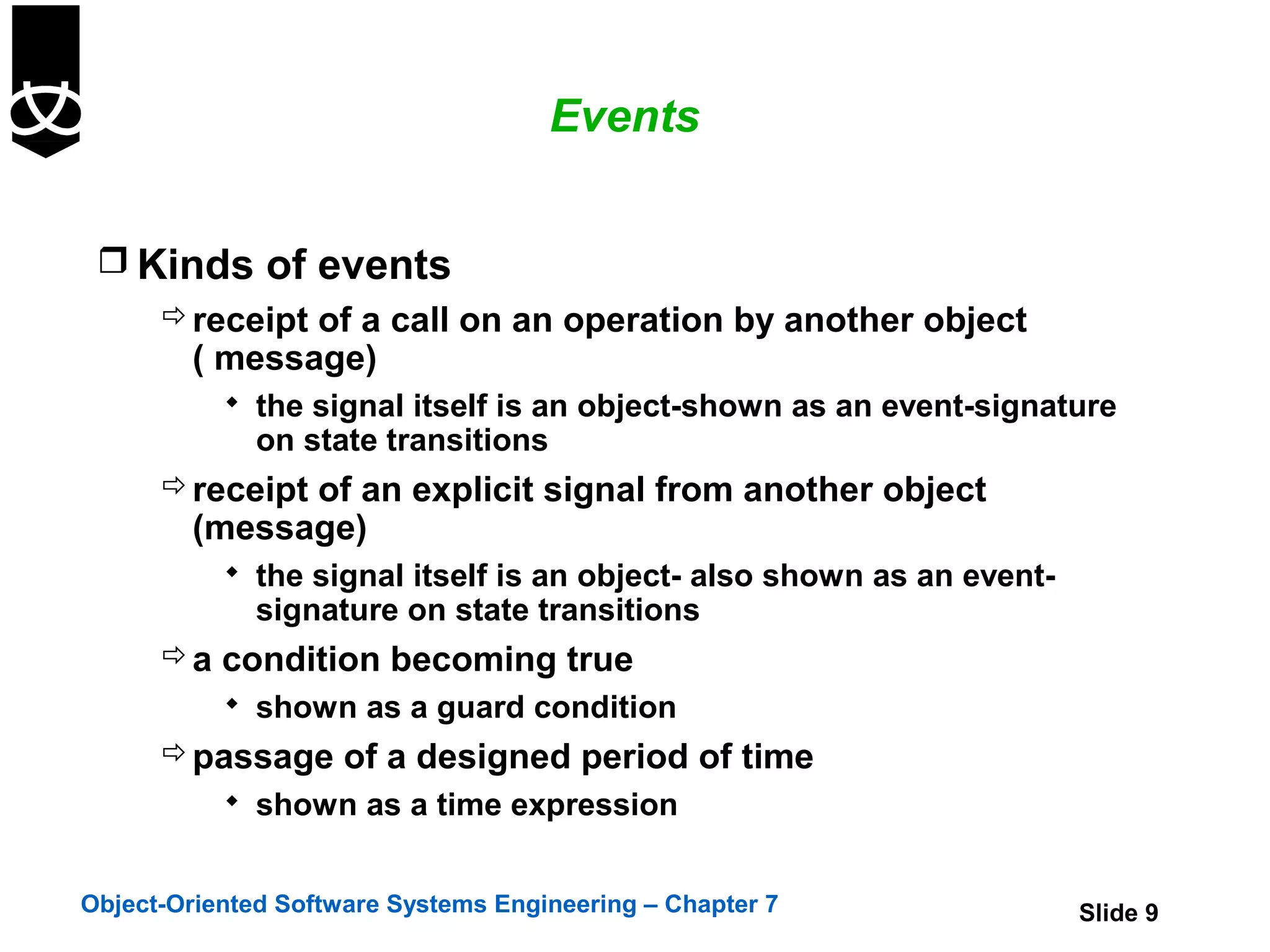
  Kinds of events
     receipt of a call on an operation by another object
      ( message)
            the signal itself is an object-shown as an event-signature
              on state transitions
       receipt of an explicit signal from another object
        (message)
            the signal itself is an object- also shown as an event-
              signature on state transitions
       a condition becoming true
            shown as a guard condition
       passage of a designed period of time
            shown as a time expression


Object-Oriented Software Systems Engineering – Chapter 7               Slide 9
Events


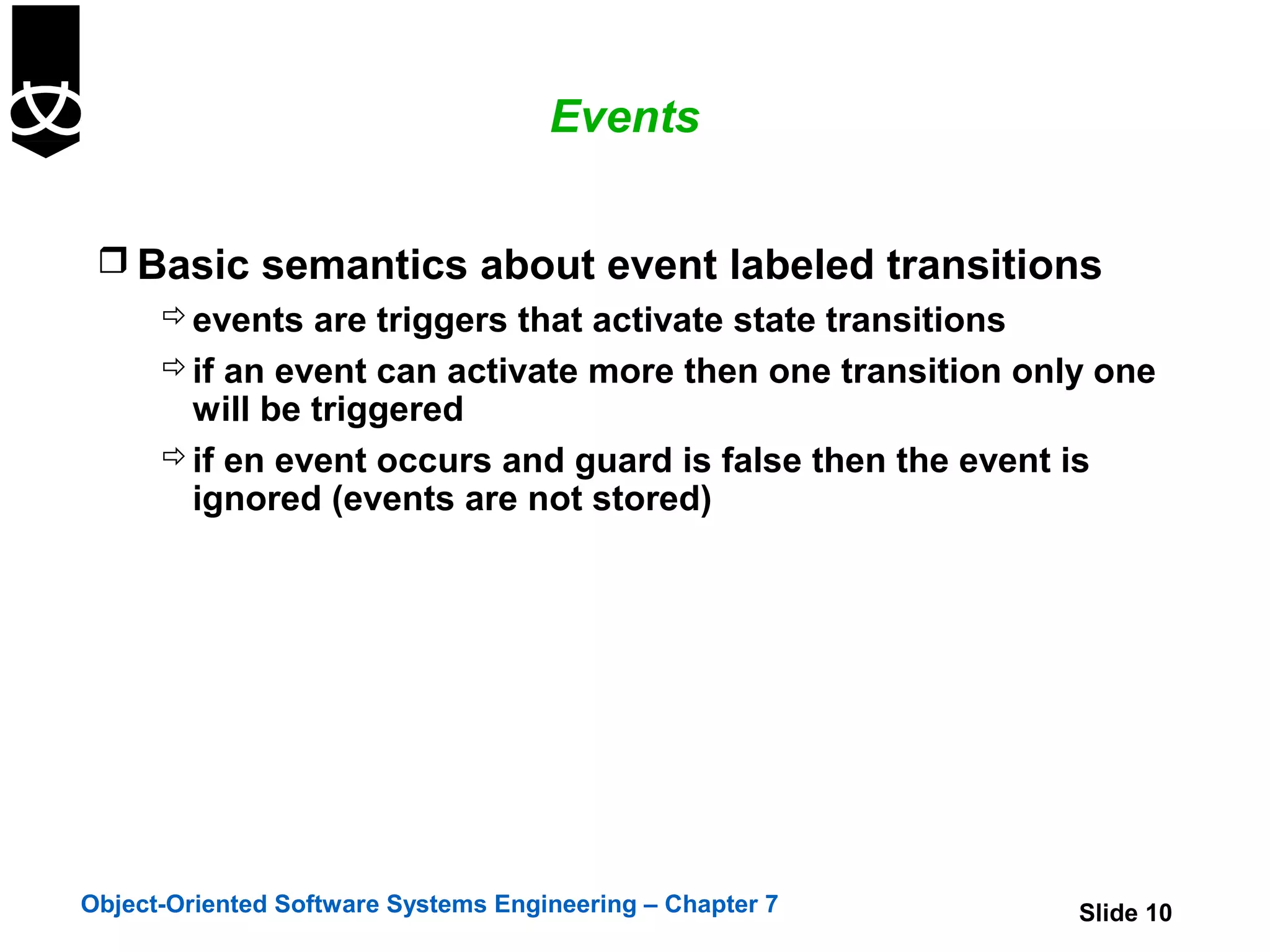
  Basic semantics about event labeled transitions
     events are triggers that activate state transitions
     if an event can activate more then one transition only one
      will be triggered
     if en event occurs and guard is false then the event is
      ignored (events are not stored)


Object-Oriented Software Systems Engineering – Chapter 7   Slide 10
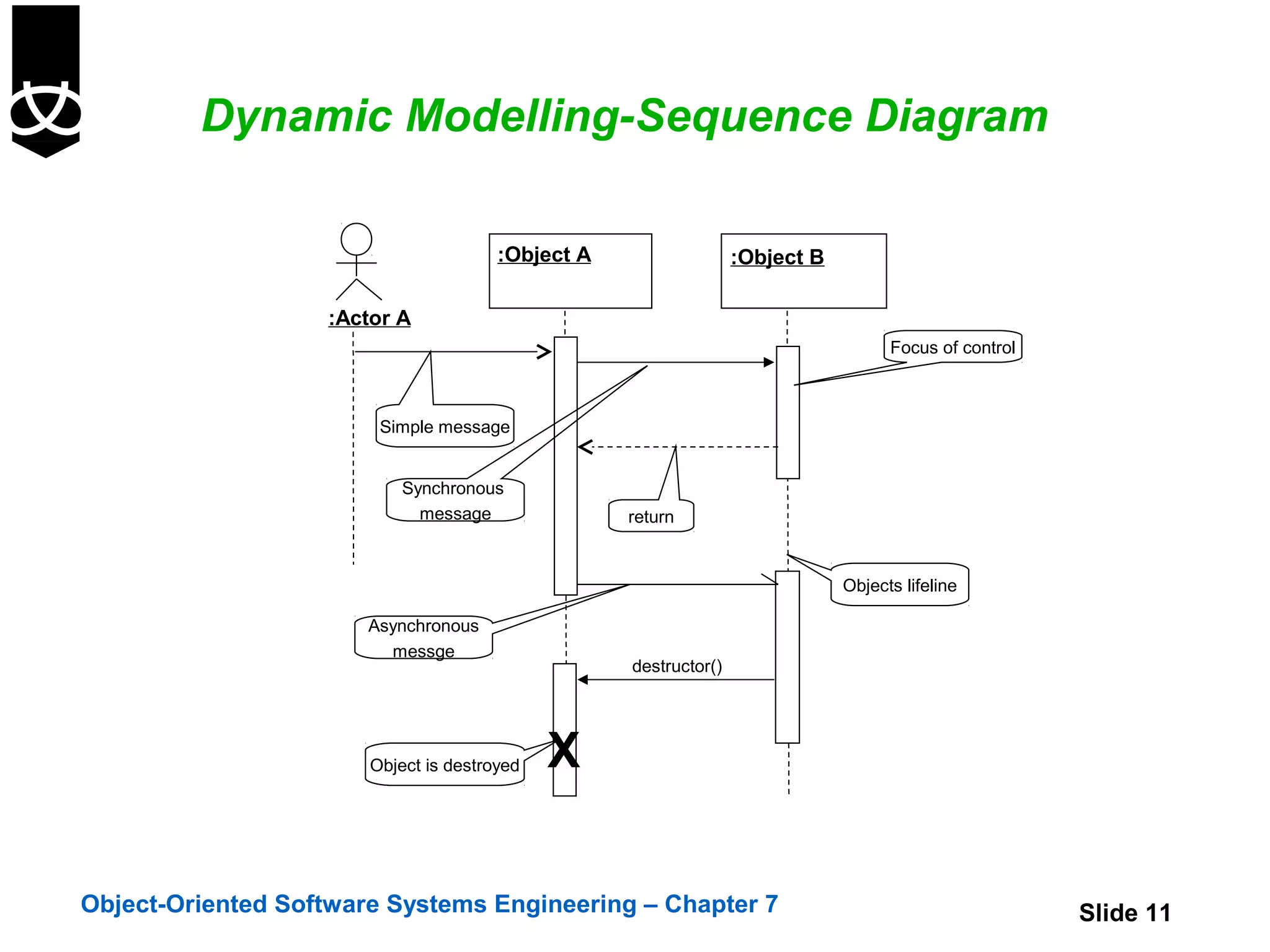
Dynamic Modelling-Sequence Diagram

                                       :Object A                  :Object B

                   :Actor A
                                                                                    Focus of control


                        Simple message


                           Synchronous
                             message               return


                                                                              Objects lifeline

                       Asynchronous
                         messge
                                                   destructor()


                       Object is destroyed   X

Object-Oriented Software Systems Engineering – Chapter 7                                               Slide 11
Sequence Diagram

                                             :A                   :B        :C

                                                  [ x>0 ] doM()


                                                  [ x<=0 doN()]
   Conditional branch


                                               :A                      :B


   Loop
                                                    *dialDigit(d)


Object-Oriented Software Systems Engineering – Chapter 7                         Slide 12
Sequence Diagram
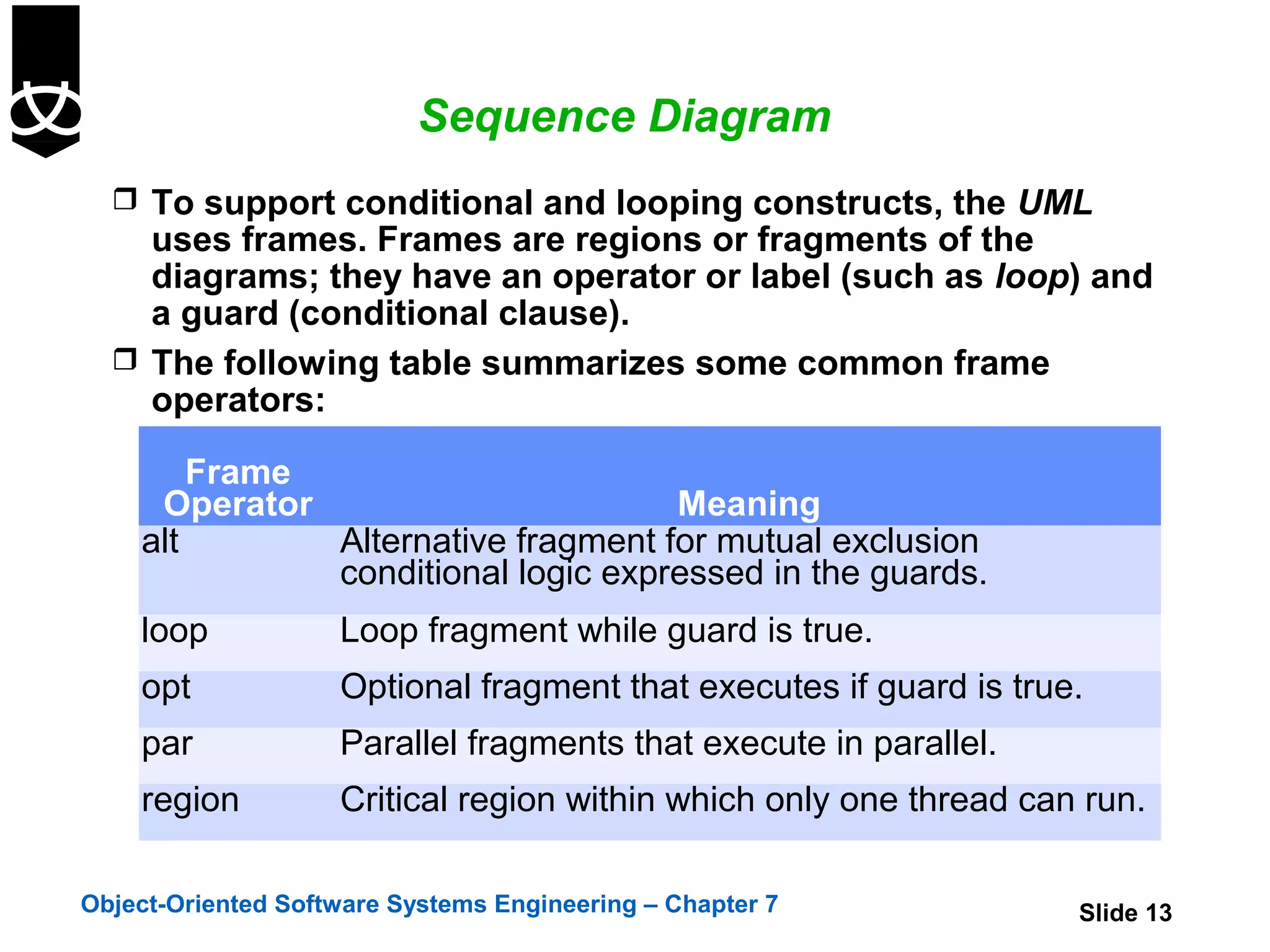
   To support conditional and looping constructs, the UML
    uses frames. Frames are regions or fragments of the
    diagrams; they have an operator or label (such as loop) and
    a guard (conditional clause).
   The following table summarizes some common frame
    operators:

        Frame
     Operator                       Meaning
    alt       Alternative fragment for mutual exclusion
              conditional logic expressed in the guards.
    loop            Loop fragment while guard is true.
    opt             Optional fragment that executes if guard is true.
    par             Parallel fragments that execute in parallel.
    region          Critical region within which only one thread can run.

Object-Oriented Software Systems Engineering – Chapter 7            Slide 13
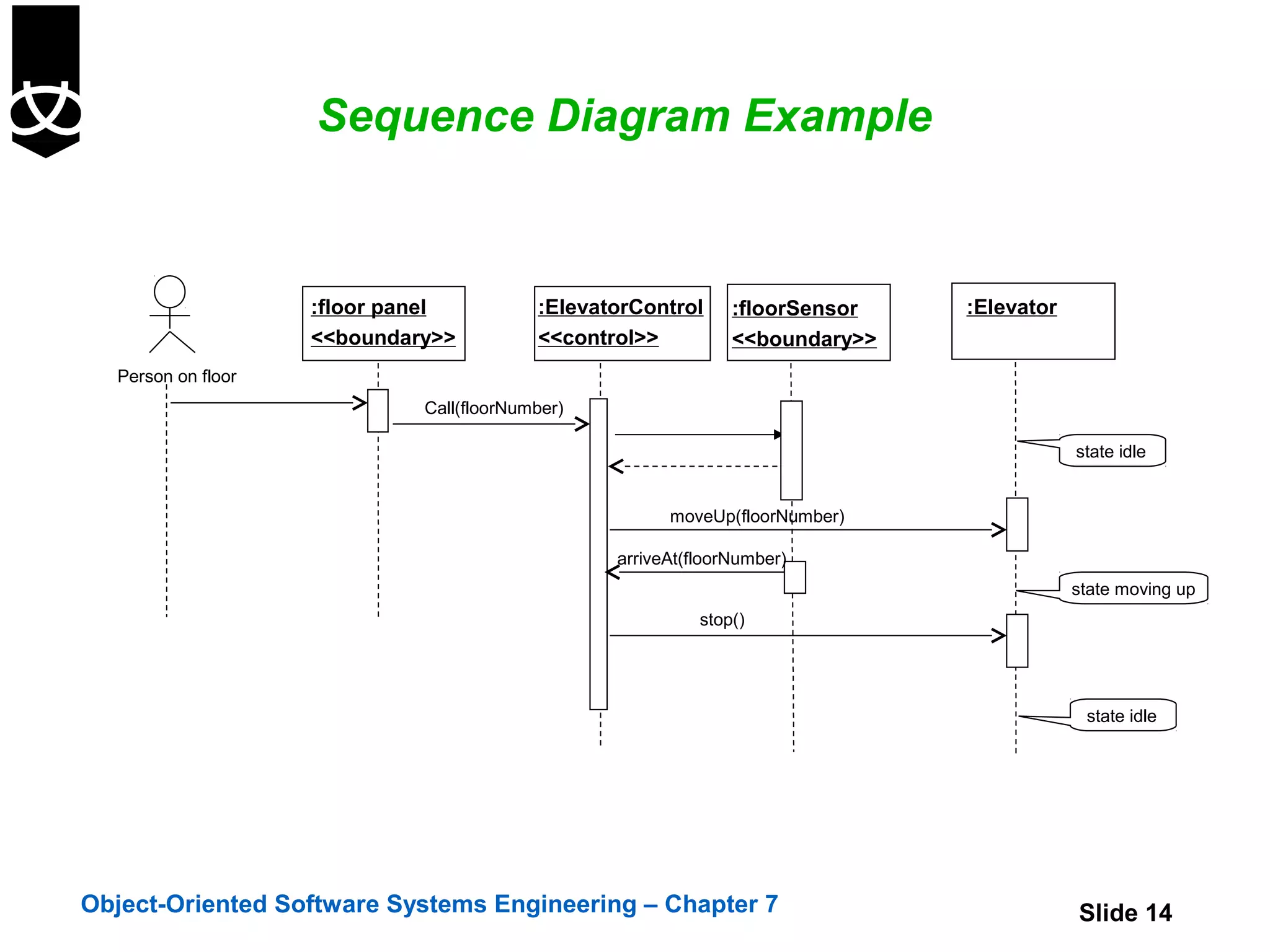
Sequence Diagram Example


                    :floor panel          :ElevatorControl     :floorSensor   :Elevator
                    <<boundary>>          <<control>>          <<boundary>>
  Person on floor
                             Call(floorNumber)

                                                                                          state idle


                                                       moveUp(floorNumber)

                                                 arriveAt(floorNumber)
                                                                                          state moving up
                                                           stop()


                                                                                           state idle


Object-Oriented Software Systems Engineering – Chapter 7                                  Slide 14
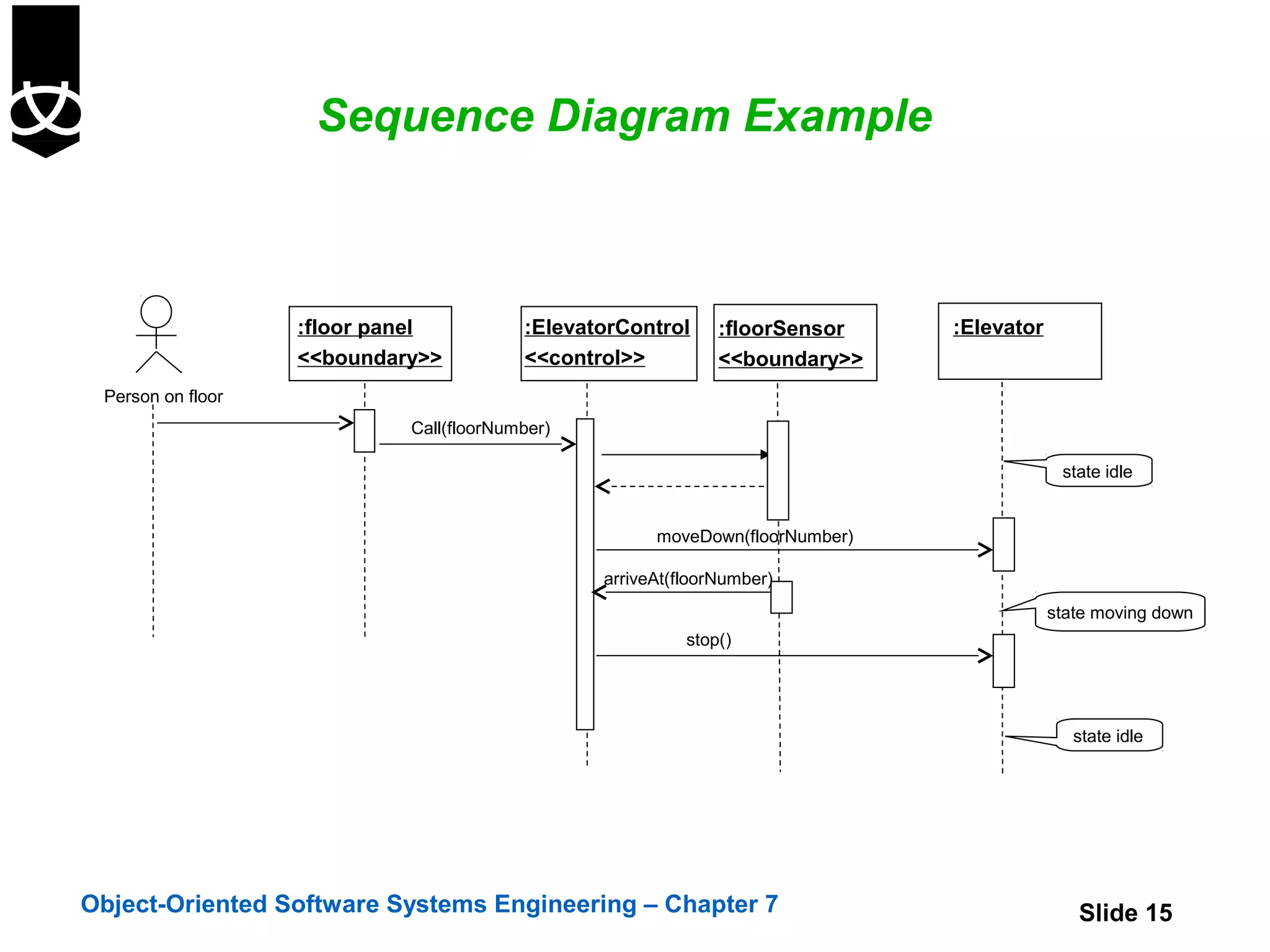
Sequence Diagram Example


                   :floor panel          :ElevatorControl     :floorSensor    :Elevator
                   <<boundary>>          <<control>>          <<boundary>>
 Person on floor
                            Call(floorNumber)

                                                                                           state idle


                                                      moveDown(floorNumber)

                                                arriveAt(floorNumber)
                                                                                          state moving down
                                                          stop()


                                                                                             state idle


Object-Oriented Software Systems Engineering – Chapter 7                                     Slide 15
Sequence Diagram Example

             :ElevatorControl       :floorSensor                :Elevator
             <<control>>            <<boundary>>

                                                                                   state idle
                        [timer=time_out]/moveDown(firstfloor)


                    arriveAt(firstfloor)
                                                                            state moving down to first floor

                                stop()


                                                                             state on first floor


Object-Oriented Software Systems Engineering – Chapter 7                                                       Slide 16
Dynamic Modelling - Collaboration Diagram


  Show:
     network of collaborating objects
       interactions
          - how messages are sent between objects
  Used to illustrate execution of
     a use case
     an operation
  Focus on time


Object-Oriented Software Systems Engineering – Chapter 7   Slide 17
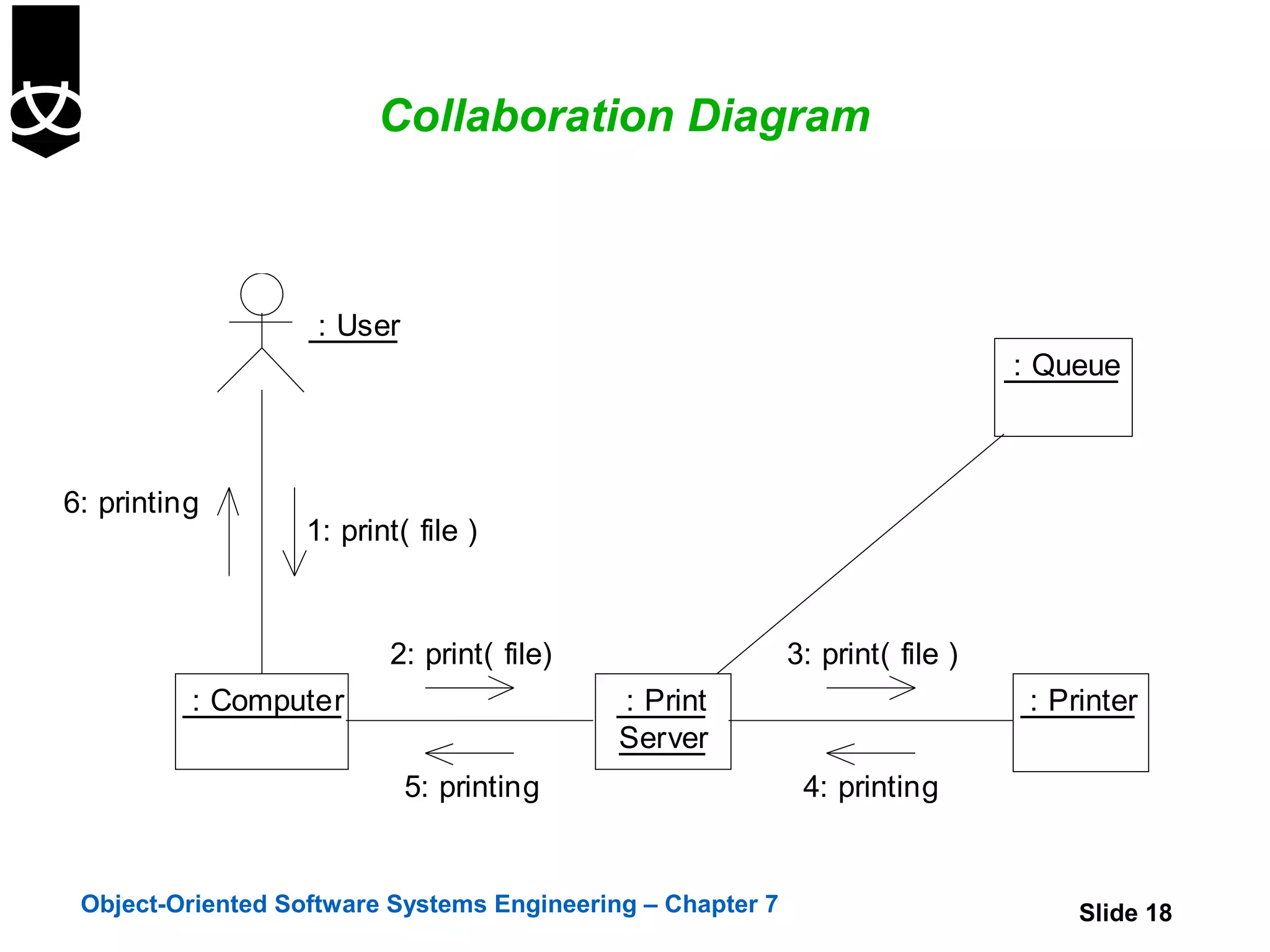
Collaboration Diagram


                    : User
                                                                               : Queue


6: printing
                   1: print( file )


                          2: print( file)                   3: print( file )
          : Computer                        : Print                             : Printer
                                            Server
                             5: printing                     4: printing


 Object-Oriented Software Systems Engineering – Chapter 7                           Slide 18
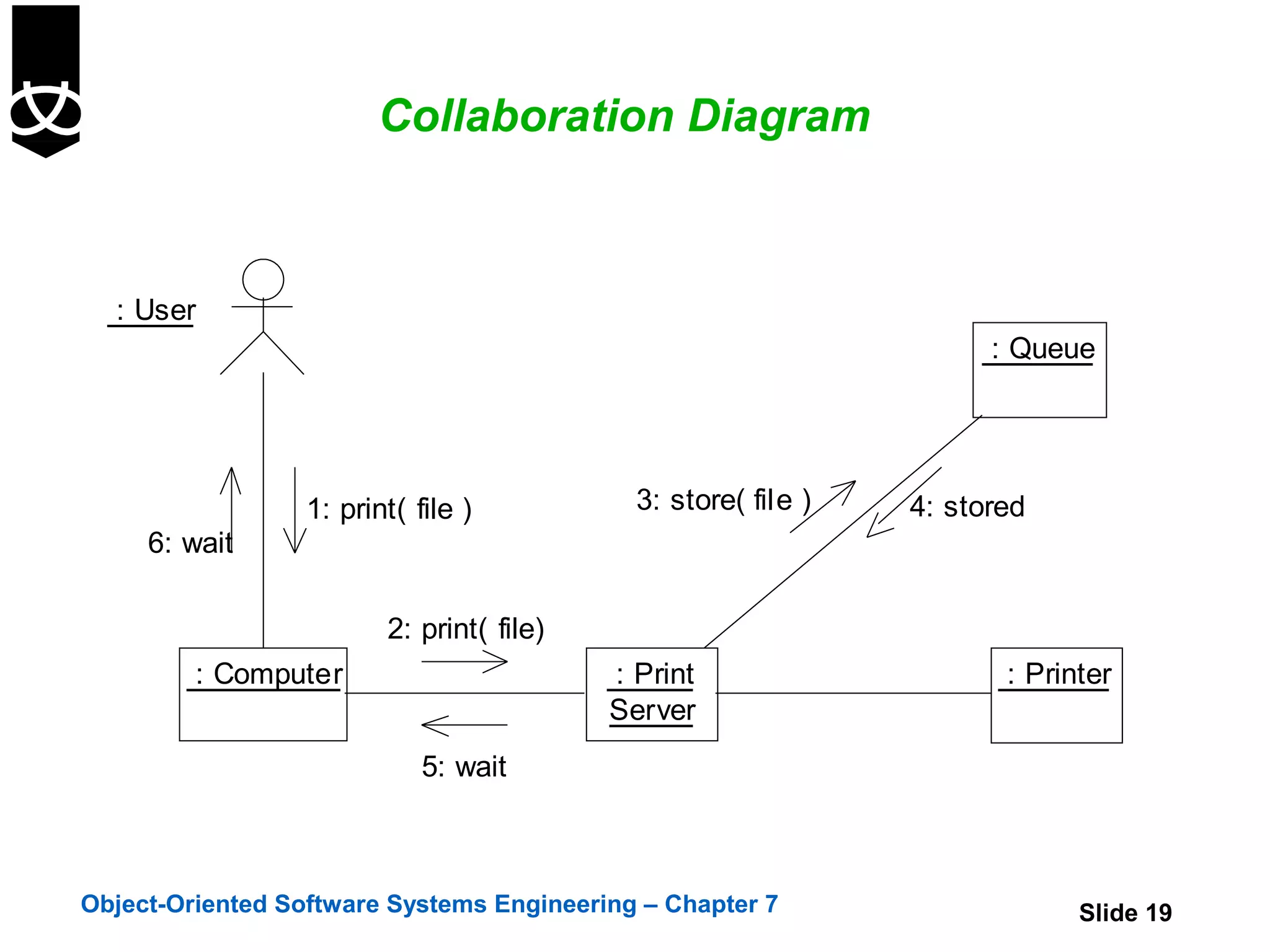
Collaboration Diagram


  : User
                                                                      : Queue


                  1: print( file )           3: store( file )   4: stored
     6: wait

                         2: print( file)
         : Computer                        : Print                     : Printer
                                           Server
                             5: wait


Object-Oriented Software Systems Engineering – Chapter 7                     Slide 19
Collaboration Diagram for ElevatorControl

          On further investigation ElevatorControl may
           need to be expanded into more classes
          revisit sequence diagrams!

:ElevatorControl


1: Call floor(number)
                                     1.1: *[all queues]:len=length(){return shortest}               2: nextjob=get()
                                                                                        :Queue                         :Dispatcher
                        :Organiser
                                     1.3:Invoke(job){join queue}


                                      1.2:Create()
                                                                                        parameter


                                                                                                                        Active object
                                                                                                                        own thread
                                                                          :Order                                        of control


      Object-Oriented Software Systems Engineering – Chapter 7                                                         Slide 20
More about Interaction Diagrams

    Different developers have different preferences
       time-ordering or spatial
    Interaction diagrams are good at showing
     collaboration between objects
    They are not good at precise definition of the
     behaviour
    They are at their best when the behaviour is simple
    To capture complex behaviour in a single diagram
     use an activity diagram
    To look at the behaviour of a single object across
         many use cases use a state diagram
         many use cases or many threads use an activity diagram


Object-Oriented Software Systems Engineering – Chapter 7   Slide 21
Summary

 In this chapter we have:
  Reviewed the different dynamic modelling
   techniques
  Discussed different types of messages
  Discussed different types of events
  Introduced sequence and collaboration diagrams


Object-Oriented Software Systems Engineering – Chapter 7   Slide 22

7. sequence and collaboration diagrams

  • 1.
    Sequence and CollaborationDiagrams Chapter 7 Object-Oriented Software Systems Engineering – Chapter 7 Slide 1
  • 2.
    Objectives In thischapter we will:  Review the different dynamic modelling techniques  Discuss different types of messages  Discuss different types of events  Introduce sequence and collaboration diagrams Object-Oriented Software Systems Engineering – Chapter 7 Slide 2
  • 3.
    Dynamic Modelling  Dynamicsof a system  how objects communicate and the effects of such communication  how objects collaborate through communication and how objects change state  Dynamics of a system is described by four diagrams State Sequence Collaboration Activity  Interaction  communication between objects in order to generate some function  described in sequence, collaboration and activity diagrams Object-Oriented Software Systems Engineering – Chapter 7 Slide 3
  • 4.
    Dynamic Modelling diagrams  State diagram -describes  which states an object can have  behaviour in those states  what events cause the state to change  Sequence diagram - describes how objects interact and communicate with each other  primary focus is time  shows how a sequence of messages are sent and received between a set of objects in order to perform some function Object-Oriented Software Systems Engineering – Chapter 7 Slide 4
  • 5.
    Dynamic Modelling diagrams  Collaboration diagram - describes how objects interact  focus is on space - relationships between objects are shown  Activity diagram - describes activities and their order - another way of showing interactions  focus on work - when objects interact they also perform work in terms of activities Object-Oriented Software Systems Engineering – Chapter 7 Slide 5
  • 6.
    Dynamic Modelling -Messages  Message  a communication between objects that conveys information  has a sender and recipient  is represented as an arrow denoting flow of control Object-Oriented Software Systems Engineering – Chapter 7 Slide 6
  • 7.
    Dynamic Modelling -Messages  Types of messages  simple flat flow of control - control is passed without describing any details  synchronous nested flow of control - operation call handling of the message is completed before the caller resumes execution  asynchronous there is no explicit return to the caller the sender continues to execute after sending the message without waiting for it to be handled Object-Oriented Software Systems Engineering – Chapter 7 Slide 7
  • 8.
    Dynamic Modelling Use cases are elaborated in two stages  Expand the use-cases into sequence diagrams  Use the sequence diagrams to produce finite state machines Object-Oriented Software Systems Engineering – Chapter 7 Slide 8
  • 9.
    Events  Kindsof events  receipt of a call on an operation by another object ( message)  the signal itself is an object-shown as an event-signature on state transitions  receipt of an explicit signal from another object (message)  the signal itself is an object- also shown as an event- signature on state transitions  a condition becoming true  shown as a guard condition  passage of a designed period of time  shown as a time expression Object-Oriented Software Systems Engineering – Chapter 7 Slide 9
  • 10.
    Events  Basicsemantics about event labeled transitions  events are triggers that activate state transitions  if an event can activate more then one transition only one will be triggered  if en event occurs and guard is false then the event is ignored (events are not stored) Object-Oriented Software Systems Engineering – Chapter 7 Slide 10
  • 11.
    Dynamic Modelling-Sequence Diagram :Object A :Object B :Actor A Focus of control Simple message Synchronous message return Objects lifeline Asynchronous messge destructor() Object is destroyed X Object-Oriented Software Systems Engineering – Chapter 7 Slide 11
  • 12.
    Sequence Diagram :A :B :C [ x>0 ] doM() [ x<=0 doN()]  Conditional branch :A :B  Loop *dialDigit(d) Object-Oriented Software Systems Engineering – Chapter 7 Slide 12
  • 13.
    Sequence Diagram  To support conditional and looping constructs, the UML uses frames. Frames are regions or fragments of the diagrams; they have an operator or label (such as loop) and a guard (conditional clause).  The following table summarizes some common frame operators: Frame Operator Meaning alt Alternative fragment for mutual exclusion conditional logic expressed in the guards. loop Loop fragment while guard is true. opt Optional fragment that executes if guard is true. par Parallel fragments that execute in parallel. region Critical region within which only one thread can run. Object-Oriented Software Systems Engineering – Chapter 7 Slide 13
  • 14.
    Sequence Diagram Example :floor panel :ElevatorControl :floorSensor :Elevator <<boundary>> <<control>> <<boundary>> Person on floor Call(floorNumber) state idle moveUp(floorNumber) arriveAt(floorNumber) state moving up stop() state idle Object-Oriented Software Systems Engineering – Chapter 7 Slide 14
  • 15.
    Sequence Diagram Example :floor panel :ElevatorControl :floorSensor :Elevator <<boundary>> <<control>> <<boundary>> Person on floor Call(floorNumber) state idle moveDown(floorNumber) arriveAt(floorNumber) state moving down stop() state idle Object-Oriented Software Systems Engineering – Chapter 7 Slide 15
  • 16.
    Sequence Diagram Example :ElevatorControl :floorSensor :Elevator <<control>> <<boundary>> state idle [timer=time_out]/moveDown(firstfloor) arriveAt(firstfloor) state moving down to first floor stop() state on first floor Object-Oriented Software Systems Engineering – Chapter 7 Slide 16
  • 17.
    Dynamic Modelling -Collaboration Diagram  Show:  network of collaborating objects  interactions - how messages are sent between objects  Used to illustrate execution of  a use case  an operation  Focus on time Object-Oriented Software Systems Engineering – Chapter 7 Slide 17
  • 18.
    Collaboration Diagram : User : Queue 6: printing 1: print( file ) 2: print( file) 3: print( file ) : Computer : Print : Printer Server 5: printing 4: printing Object-Oriented Software Systems Engineering – Chapter 7 Slide 18
  • 19.
    Collaboration Diagram : User : Queue 1: print( file ) 3: store( file ) 4: stored 6: wait 2: print( file) : Computer : Print : Printer Server 5: wait Object-Oriented Software Systems Engineering – Chapter 7 Slide 19
  • 20.
    Collaboration Diagram forElevatorControl  On further investigation ElevatorControl may need to be expanded into more classes  revisit sequence diagrams! :ElevatorControl 1: Call floor(number) 1.1: *[all queues]:len=length(){return shortest} 2: nextjob=get() :Queue :Dispatcher :Organiser 1.3:Invoke(job){join queue} 1.2:Create() parameter Active object own thread :Order of control Object-Oriented Software Systems Engineering – Chapter 7 Slide 20
  • 21.
    More about InteractionDiagrams  Different developers have different preferences  time-ordering or spatial  Interaction diagrams are good at showing collaboration between objects  They are not good at precise definition of the behaviour  They are at their best when the behaviour is simple  To capture complex behaviour in a single diagram use an activity diagram  To look at the behaviour of a single object across  many use cases use a state diagram  many use cases or many threads use an activity diagram Object-Oriented Software Systems Engineering – Chapter 7 Slide 21
  • 22.
    Summary In thischapter we have:  Reviewed the different dynamic modelling techniques  Discussed different types of messages  Discussed different types of events  Introduced sequence and collaboration diagrams Object-Oriented Software Systems Engineering – Chapter 7 Slide 22

Editor's Notes

  • #2 1
  • #12 Interaction diagrams (two types) sequence and collaboration They show the passage of time for one scenario (you can show branching * iterations) You may have a primary sequence diagram and ones which show alternative paths and flows They are semantically equivalent. i.e. you can model the dynamica of a system using one type of diagram and transform it to another type with no loss of semantic meaning The reason for two types is that modelling dynamics is hard and often you need to approach it from different angles Sequence diagram emphasises the time ordering of the messages Collaboration diagram emphasises structural organisation of objects that sent and receive messages