
www.ssc.gov.au
Email : enquiries@ssc.gov.au
LinkedIn : https://au.linkedin.com/in/rossmullen
Accessibility with Web Applications
Challenges with third party tools in Federal Government web apps
Ross Mullen
Web Collaboration Solutions
Shared Services Centre
In today’s session:
• accessibility with an off the shelf product
• vendors statement of accessibility
• approaches and ways to use these tools
that are more accessible
Background Information
• Website
• generally has static content
• Has a few client side widgets for interactivity
• Web Application
• Is dynamic
• Complex workflows
• Client-side interactions sent to server
Controls and frameworks we use
• Largest collection of custom controls
• Accessibility statement provided
• Easy to use
• Award winner
Why Telerik controls are used
The Telerik control suite
References to
the KendoUI
CSS and JS
Regular HTML
KendoUI JQuery
When
viewed on
webpage
Using KendoUI
“The Telerik ASP.NET AJAX controls follow the W3C
Web Content Accessibility Guidelines
1.0/2.0 which set the standards for applications
providing accessible content”
- http://www.telerik.com/aspnet-ajax/tech-sheets/accessibility-support
“…because we know that Kendo UI is often used in
these types of applications, we thought it best to
provide full ARIA support to all Kendo UI Widgets
out of the box.”
Telerik Accessibility Statements
<h4 style="margin-top: 2em;">Cap Size</h4>
<select id="size" style="width: 100%;" >
<option>S - 6 3/4"</option>
<option>M - 7 1/4"</option>
<option>L - 7 1/8"</option>
<option>XL - 7 5/8"</option>
</select>
<script>
$(document).ready(function() {
$("#size").kendoDropDownList();
});
</script>
KendoUI dropdown listbox
<h4 style="margin-top: 2em;">Cap Size</h4>
<select id="size" style="width: 100%;" >
<option>S - 6 3/4"</option>
<option>M - 7 1/4"</option>
<option>L - 7 1/8"</option>
<option>XL - 7 5/8"</option>
</select>
<script>
$(document).ready(function() {
$("#size").kendoDropDownList();
});
</script>
Dropdown listbox markup
HTML select element is now hidden
span element with ARIA attributes
Dropdown listbox page output
Assessing the control
1. Looks like a HTML select element
2. Function likes a HTML select element
3. Semantically it’s an input box with CSS styling
Dropdown listbox assessment
Failures identified in the WCAG 2.0 guidelines
4.2.1 Name, Role, Value – all user interface
components the name and role can be
programmatically determined
2.1.1 keyboard - all functionality of the content is
operable through a keyboard interface
Dropdown listbox failures
Keyboard controls
Problem keyboard combination when
using JAWS
Problem keyboard combinations
KendoUI DateTimePicker
Adding more accessibility
support is not necessarily
the answer
Retrofit more accessibility?
use
Do not use
on its own
with no
other means
to enter a
date
Label associated with input control with FOR attribute
Date and time format hint in label
P
Do’s and Don’t
KendoUI DateTime picker
with ‘material’ theme
JQueryUI datepicker
with default theme
• Default
• Blue Opal
• Bootstrap
• Silver
• Uniform
• Metro
• Black
• Metro Black
• High Contrast
• Moonlight
• Flat
• Material Black
• Fiori
• Office 365
will have to add extra CSS to
make it look like the KendoUI
controls
other themes KendoUI provides
Replace with more accessible controls?
Column header sort Filter icons
Pager links
Popup filter menu
KendoUI grid
filter links have no link text
and the href attribute is #
no link text when
page viewed with
JAWS Links List
Filtering with the grid
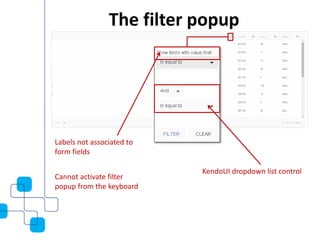
Labels not associated to
form fields
KendoUI dropdown list control
Cannot activate filter
popup from the keyboard
The filter popup
Accessible filter
and sort controls
uses filterable list pattern from gov.uk
- https://designpatterns.hackpad.com/Filterable-lists-faceted-search-UPtUJeniXZI
Our filter pattern
triggers Javascript
to filter or sort the
grid
different filter options
for each data-type
Int, String, Date, Bool
Filter pattern in detail
Sort links still visible
when page viewed with
JAWS Links List
Sort link problem
A library of reusable patterns which are accessible, usable and
interoperable for HTML and popular third-party tools such as Telerik
and JQuery
A possible solution?
Email : enquiries@ssc.gov.au
LinkedIn : https://au.linkedin.com/in/rossmullen
Any questions?

Challenges with third party tools in Federal Government web apps - A11y Camp Sydney

  • 1.
    www.ssc.gov.au Email : enquiries@ssc.gov.au LinkedIn: https://au.linkedin.com/in/rossmullen Accessibility with Web Applications Challenges with third party tools in Federal Government web apps Ross Mullen Web Collaboration Solutions Shared Services Centre
  • 2.
    In today’s session: •accessibility with an off the shelf product • vendors statement of accessibility • approaches and ways to use these tools that are more accessible
  • 3.
    Background Information • Website •generally has static content • Has a few client side widgets for interactivity • Web Application • Is dynamic • Complex workflows • Client-side interactions sent to server
  • 4.
  • 5.
    • Largest collectionof custom controls • Accessibility statement provided • Easy to use • Award winner Why Telerik controls are used
  • 6.
  • 7.
    References to the KendoUI CSSand JS Regular HTML KendoUI JQuery When viewed on webpage Using KendoUI
  • 8.
    “The Telerik ASP.NETAJAX controls follow the W3C Web Content Accessibility Guidelines 1.0/2.0 which set the standards for applications providing accessible content” - http://www.telerik.com/aspnet-ajax/tech-sheets/accessibility-support “…because we know that Kendo UI is often used in these types of applications, we thought it best to provide full ARIA support to all Kendo UI Widgets out of the box.” Telerik Accessibility Statements
  • 9.
    <h4 style="margin-top: 2em;">CapSize</h4> <select id="size" style="width: 100%;" > <option>S - 6 3/4"</option> <option>M - 7 1/4"</option> <option>L - 7 1/8"</option> <option>XL - 7 5/8"</option> </select> <script> $(document).ready(function() { $("#size").kendoDropDownList(); }); </script> KendoUI dropdown listbox
  • 10.
    <h4 style="margin-top: 2em;">CapSize</h4> <select id="size" style="width: 100%;" > <option>S - 6 3/4"</option> <option>M - 7 1/4"</option> <option>L - 7 1/8"</option> <option>XL - 7 5/8"</option> </select> <script> $(document).ready(function() { $("#size").kendoDropDownList(); }); </script> Dropdown listbox markup
  • 11.
    HTML select elementis now hidden span element with ARIA attributes Dropdown listbox page output
  • 12.
    Assessing the control 1.Looks like a HTML select element 2. Function likes a HTML select element 3. Semantically it’s an input box with CSS styling Dropdown listbox assessment
  • 13.
    Failures identified inthe WCAG 2.0 guidelines 4.2.1 Name, Role, Value – all user interface components the name and role can be programmatically determined 2.1.1 keyboard - all functionality of the content is operable through a keyboard interface Dropdown listbox failures
  • 14.
    Keyboard controls Problem keyboardcombination when using JAWS Problem keyboard combinations
  • 15.
  • 16.
    Adding more accessibility supportis not necessarily the answer Retrofit more accessibility?
  • 17.
    use Do not use onits own with no other means to enter a date Label associated with input control with FOR attribute Date and time format hint in label P Do’s and Don’t
  • 18.
    KendoUI DateTime picker with‘material’ theme JQueryUI datepicker with default theme • Default • Blue Opal • Bootstrap • Silver • Uniform • Metro • Black • Metro Black • High Contrast • Moonlight • Flat • Material Black • Fiori • Office 365 will have to add extra CSS to make it look like the KendoUI controls other themes KendoUI provides Replace with more accessible controls?
  • 19.
    Column header sortFilter icons Pager links Popup filter menu KendoUI grid
  • 20.
    filter links haveno link text and the href attribute is # no link text when page viewed with JAWS Links List Filtering with the grid
  • 21.
    Labels not associatedto form fields KendoUI dropdown list control Cannot activate filter popup from the keyboard The filter popup
  • 22.
    Accessible filter and sortcontrols uses filterable list pattern from gov.uk - https://designpatterns.hackpad.com/Filterable-lists-faceted-search-UPtUJeniXZI Our filter pattern
  • 23.
    triggers Javascript to filteror sort the grid different filter options for each data-type Int, String, Date, Bool Filter pattern in detail
  • 24.
    Sort links stillvisible when page viewed with JAWS Links List Sort link problem
  • 25.
    A library ofreusable patterns which are accessible, usable and interoperable for HTML and popular third-party tools such as Telerik and JQuery A possible solution?
  • 26.
    Email : enquiries@ssc.gov.au LinkedIn: https://au.linkedin.com/in/rossmullen Any questions?