Office of the Government Chief Information Officer


               Web For All


                                          Digital Inclusion Divison

                                                      March 2012
Agenda
•   Digital 21 Strategy and Inclusive Society
•   What is Web Accessibility?
•   Why Web Accessibility?
•   Major Concerns from Persons with Disabilities
    with Recommendations
•   International Standard
•   International & Government practices
•   Web Accessibility Campaign
•   Start your Web Accessibility Project
Digital 21 Strategy & Inclusive Society
One of five key areas of 2008 Digital 21 Strategy
•   Building an inclusive, knowledge-based society
•   bring the benefit of ICT to disadvantaged groups
•   enhance their quality of life
•   strengthen their capacity in engaging with the
    development of information society
What is Web Accessibility?
• Making website content available
  for ALL
• Including persons with disabilities
What is Web Accessibility?
• An accessible website -
Is perceivable   Can be used with       Provides          Reduces
                  assistive device     additional       impediments
                                      descriptions

•Adjustable      •Screen reader       •Text             •Some people
 font size                             transcript for    have
                 •Input devices
                                       multi-media       difficulties
•Sufficient       for persons
                                       contents          using the
 colour           with disabilities
                                                         mouse
 contrast
                 •Voice control
•Audio            software
 control
Why Web Accessibility?
• Equal opportunities
  • for persons with disabilities, elderly, etc.
• Social responsibility
• Widest possible reach-out
• Lower costs in the long term
Major concerns from persons with
disabilities with recommendations
• Engage rehabilitation organisations
• Receive surveys from over 300 persons
  with disabilities
• Understand major problems in accessing
  websites
Major concerns from persons with
disabilities with recommendations
1. Unable to skip Adobe Flash and moving
   objects
Major concerns from persons with
disabilities with recommendations
2. Small font sizes or insufficient colour
   contrast
Major concerns from persons with
disabilities with recommendations
• Example 1 – Resize Text
   All text can be resized up to 200%


     Cannot resize text          Can resize text
Major concerns from persons with
disabilities with recommendations
• Example 2 – Colour Contrast
   Contrast ratio of at least 1: 4.5


  Poor background contrast   Easier to read with higher contrast
Major concerns from persons with
disabilities with recommendations

3. No alternatives for non-text information
   • Descriptive text alternative
     for image                      Web Accessibility

   • Text transcripts for audio      Management
                                      Handbook

     and video
Major concerns from persons with
disabilities with recommendations
• Example 3 – Avoid Non-text Content
   Text alternative for all content


   Screen reader can not   Description of the picture can
      read the picture       be read by screen reader
Major concerns from persons with
disabilities with recommendations
4. Complicated website structure


 Complicated website structure   Simpler and ordered website structure
Major concerns from persons with
disabilities with recommendations

5. Missing heading structure
  • Provide appropriate heading structure for
    screen readers


    Missing heading structure   Appropriate heading structure
Major concerns from persons with
disabilities with recommendations

6. Images of text
  • Do NOT use images to display text as screen
    readers cannot read text inside an image


     An image of text heading   Text heading
Major concerns from persons with
disabilities with recommendations

7. Content and functions inaccessible by
   keyboard
  • Ensure all content and functions can be
    accessed via a keyboard, e.g. through Tab key
    and the Enter key
Major concerns from persons with
disabilities with recommendations
8. Websites with background audio
Major concerns from persons with
disabilities with recommendations

9. Difficulties in accessing PDF documents


   PDF documents not accessible   Text-based accessible PDF
Major concerns from persons with
disabilities with recommendations

10. Outdated text versions
  • Keep the text-only versions updated
  • Prevent asymmetrical contents with the
    graphical versions
  • When graphical version is verified to be
    accessible, text-only version may be considered
    to remove
International Standard
• World Wide Web Consortium (W3C) Web
  Content Accessibility Guidelines (WCAG)
• International widely adopted standard
• Latest version is 2.0
International Standard
• W3C WCAG 2.0 consist of four parts
  4 Principles

     12 Guidelines

       61 Success Criteria

          Many Techniques
Guidelines for Perceivable
1.1 Provide text alternatives for any non-text content so
    that it can be changed into other forms people need.

1.2 Provide alternatives for time-based media.

1.3 Create content that can be presented in different ways
    without losing information or structure.

1.4 Make it easier for users to see and hear content
    including separating foreground from background.
Guidelines for Operable
2.1 Make all functionality available from a keyboard.

2.2 Provide users enough time to read and use content.

2.3 Do not design content in a way that is known to cause
    seizures.

2.4 Provide ways to help users navigate, find content, and
    determine where they are.
Guidelines for Understandable & Robust

3.1 Make text content readable and understandable.

3.2 Make Web pages appear and operate in predictable
    ways.

3.3 Help users avoid and correct mistakes.

4.1 Maximize compatibility with current and future user
    agents, including assistive technologies.
International and Government Practices

 • Some governments are adopting W3C
   WCAG 2.0 for public facing websites
   Countries            Standard         Timeline to achieve standard
New Zealand      WCAG 2.0 Level AA       June 2010


United Kingdom   WCAG 1.0 Level AA       March 2011

Canada           WCAG 2.0 Level AA       July 2013


Singapore        WCAG 1.0 and key        December 2013
                 aspects of WCAG 2.0
Australia        WCAG 2.0 Level A & Level December 2014
                 AA
International and Government Practices

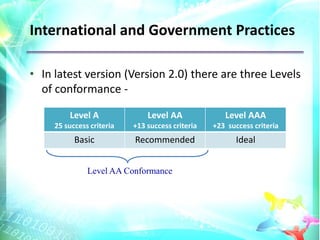
• In latest version (Version 2.0) there are three Levels
  of conformance -

         Level A               Level AA              Level AAA
     25 success criteria   +13 success criteria   +23 success criteria
           Basic           Recommended                   Ideal


               Level AA Conformance
International and Government Practices

• HK Government has been implementing web
  accessibility guidelines since 1999, based on a
  version of W3C WCAG
• HK Government websites, except archive
  materials, are required to conform to W3C
  WCAG 2.0 Level AA by 2013
• Encourage quasi-government and public
  service organisations to take corresponding
  action
Web Accessibility Campaign

Launched in 2011 -
• Focus group discussion
• Survey with persons with disabilities
• Management handbook
• Portal with Illustration webpages
  (www.webforall.gov.hk)
• Awareness building seminars
Web Accessibility Campaign

Upcoming events
• Experience sharing sessions &
  Technical workshops
• Ethics building in tertiary education
  institutions
• Recognition scheme
Start Your Web Accessibility Project

Assess the Whole Website
  • Consider rearranging the structure
  • Simplify content
  • Use simple HTML code can help a lot
    •   Alternative text for image, alt=
    •   Keyboard input, onkeypass=
    •   Define language, lang=
  • Testing
Testing Techniques

1. Code Scanning
 • Many accessibility issues can be detected
   automatically using specialist software and
   tools.
            Example Tools -
              AChecker
              WAVE
              Web Accessibility Checker
Testing Techniques

2. Manual Screen Reader Testing
• Navigate your website and determine just
  how much information you’re able to access
  through the screen reading software.

             Example Tools -
               Jaws
               VoiceOver
               Window Light
Testing Techniques

3. Human Testing – preferably by persons with
                     disabilities
• Many organisations that support persons
  with disabilities can help by providing free or
  affordable human testing services.

• Website owners are encouraged to contact
  these organisations for assistance.
Questions and Answers
Web For All
At the time building fast application
    and using modern technology
     Adopt accessibility design
 Join hands to make Hong Kong a
     caring and inclusive IT hub
Thank you

Web For All

  • 1.
    Office of theGovernment Chief Information Officer Web For All Digital Inclusion Divison March 2012
  • 2.
    Agenda • Digital 21 Strategy and Inclusive Society • What is Web Accessibility? • Why Web Accessibility? • Major Concerns from Persons with Disabilities with Recommendations • International Standard • International & Government practices • Web Accessibility Campaign • Start your Web Accessibility Project
  • 3.
    Digital 21 Strategy& Inclusive Society One of five key areas of 2008 Digital 21 Strategy • Building an inclusive, knowledge-based society • bring the benefit of ICT to disadvantaged groups • enhance their quality of life • strengthen their capacity in engaging with the development of information society
  • 4.
    What is WebAccessibility? • Making website content available for ALL • Including persons with disabilities
  • 5.
    What is WebAccessibility? • An accessible website - Is perceivable Can be used with Provides Reduces assistive device additional impediments descriptions •Adjustable •Screen reader •Text •Some people font size transcript for have •Input devices multi-media difficulties •Sufficient for persons contents using the colour with disabilities mouse contrast •Voice control •Audio software control
  • 6.
    Why Web Accessibility? •Equal opportunities • for persons with disabilities, elderly, etc. • Social responsibility • Widest possible reach-out • Lower costs in the long term
  • 7.
    Major concerns frompersons with disabilities with recommendations • Engage rehabilitation organisations • Receive surveys from over 300 persons with disabilities • Understand major problems in accessing websites
  • 8.
    Major concerns frompersons with disabilities with recommendations 1. Unable to skip Adobe Flash and moving objects
  • 9.
    Major concerns frompersons with disabilities with recommendations 2. Small font sizes or insufficient colour contrast
  • 10.
    Major concerns frompersons with disabilities with recommendations • Example 1 – Resize Text  All text can be resized up to 200% Cannot resize text Can resize text
  • 11.
    Major concerns frompersons with disabilities with recommendations • Example 2 – Colour Contrast  Contrast ratio of at least 1: 4.5 Poor background contrast Easier to read with higher contrast
  • 12.
    Major concerns frompersons with disabilities with recommendations 3. No alternatives for non-text information • Descriptive text alternative for image Web Accessibility • Text transcripts for audio Management Handbook and video
  • 13.
    Major concerns frompersons with disabilities with recommendations • Example 3 – Avoid Non-text Content  Text alternative for all content Screen reader can not Description of the picture can read the picture be read by screen reader
  • 14.
    Major concerns frompersons with disabilities with recommendations 4. Complicated website structure Complicated website structure Simpler and ordered website structure
  • 15.
    Major concerns frompersons with disabilities with recommendations 5. Missing heading structure • Provide appropriate heading structure for screen readers Missing heading structure Appropriate heading structure
  • 16.
    Major concerns frompersons with disabilities with recommendations 6. Images of text • Do NOT use images to display text as screen readers cannot read text inside an image An image of text heading Text heading
  • 17.
    Major concerns frompersons with disabilities with recommendations 7. Content and functions inaccessible by keyboard • Ensure all content and functions can be accessed via a keyboard, e.g. through Tab key and the Enter key
  • 18.
    Major concerns frompersons with disabilities with recommendations 8. Websites with background audio
  • 19.
    Major concerns frompersons with disabilities with recommendations 9. Difficulties in accessing PDF documents PDF documents not accessible Text-based accessible PDF
  • 20.
    Major concerns frompersons with disabilities with recommendations 10. Outdated text versions • Keep the text-only versions updated • Prevent asymmetrical contents with the graphical versions • When graphical version is verified to be accessible, text-only version may be considered to remove
  • 21.
    International Standard • WorldWide Web Consortium (W3C) Web Content Accessibility Guidelines (WCAG) • International widely adopted standard • Latest version is 2.0
  • 22.
    International Standard • W3CWCAG 2.0 consist of four parts 4 Principles 12 Guidelines 61 Success Criteria Many Techniques
  • 23.
    Guidelines for Perceivable 1.1Provide text alternatives for any non-text content so that it can be changed into other forms people need. 1.2 Provide alternatives for time-based media. 1.3 Create content that can be presented in different ways without losing information or structure. 1.4 Make it easier for users to see and hear content including separating foreground from background.
  • 24.
    Guidelines for Operable 2.1Make all functionality available from a keyboard. 2.2 Provide users enough time to read and use content. 2.3 Do not design content in a way that is known to cause seizures. 2.4 Provide ways to help users navigate, find content, and determine where they are.
  • 25.
    Guidelines for Understandable& Robust 3.1 Make text content readable and understandable. 3.2 Make Web pages appear and operate in predictable ways. 3.3 Help users avoid and correct mistakes. 4.1 Maximize compatibility with current and future user agents, including assistive technologies.
  • 26.
    International and GovernmentPractices • Some governments are adopting W3C WCAG 2.0 for public facing websites Countries Standard Timeline to achieve standard New Zealand WCAG 2.0 Level AA June 2010 United Kingdom WCAG 1.0 Level AA March 2011 Canada WCAG 2.0 Level AA July 2013 Singapore WCAG 1.0 and key December 2013 aspects of WCAG 2.0 Australia WCAG 2.0 Level A & Level December 2014 AA
  • 27.
    International and GovernmentPractices • In latest version (Version 2.0) there are three Levels of conformance - Level A Level AA Level AAA 25 success criteria +13 success criteria +23 success criteria Basic Recommended Ideal Level AA Conformance
  • 28.
    International and GovernmentPractices • HK Government has been implementing web accessibility guidelines since 1999, based on a version of W3C WCAG • HK Government websites, except archive materials, are required to conform to W3C WCAG 2.0 Level AA by 2013 • Encourage quasi-government and public service organisations to take corresponding action
  • 29.
    Web Accessibility Campaign Launchedin 2011 - • Focus group discussion • Survey with persons with disabilities • Management handbook • Portal with Illustration webpages (www.webforall.gov.hk) • Awareness building seminars
  • 30.
    Web Accessibility Campaign Upcomingevents • Experience sharing sessions & Technical workshops • Ethics building in tertiary education institutions • Recognition scheme
  • 31.
    Start Your WebAccessibility Project Assess the Whole Website • Consider rearranging the structure • Simplify content • Use simple HTML code can help a lot • Alternative text for image, alt= • Keyboard input, onkeypass= • Define language, lang= • Testing
  • 32.
    Testing Techniques 1. CodeScanning • Many accessibility issues can be detected automatically using specialist software and tools. Example Tools - AChecker WAVE Web Accessibility Checker
  • 33.
    Testing Techniques 2. ManualScreen Reader Testing • Navigate your website and determine just how much information you’re able to access through the screen reading software. Example Tools - Jaws VoiceOver Window Light
  • 34.
    Testing Techniques 3. HumanTesting – preferably by persons with disabilities • Many organisations that support persons with disabilities can help by providing free or affordable human testing services. • Website owners are encouraged to contact these organisations for assistance.
  • 35.
  • 36.
    Web For All Atthe time building fast application and using modern technology Adopt accessibility design Join hands to make Hong Kong a caring and inclusive IT hub
  • 37.