Word on the ServerMohamed YehiaMay 2010
Who Am ITechnical Architectwww.mohamedyehia.net@mohdyehiamyehia@live.comfacebook.com/mohdyehia
Where Am IIrelandSenegalEgyptIndia
AgendaWord Web AppWord Automation Services
WORD WEB APP
Word Web AppEnable users to view and edit documents in the browserAvailable viaSharePoint 2010Windows Live
Word Web AppWord Web App ViewerServer optimized engineDefault click for documents on SharePointConverts files to PNG or use SilverlightWord Web App EditorServer editing of Open XML documents (.docx)Utilizes Open XML SDK
Word Web AppPart of Office Web AppsRequires Office 2010 Client Enterprise CALActivate Site Collection featureConfigure Open Behavior
Word Web AppDEMO
WORD automation services
BackgroundCustomers automate Word clientNot recommended by MicrosoftApplication Object Model was not designed for bulk automationDoes not scale Dialog boxes “stop” automationRequire reboot on server every X hours
Why?DOCPDFWordWordMHTMLXPSWordSQLWordWordWord
What is Word Automation Services?In SharePoint 2010 (Standard & Enterprise)100% server-side renderingSave As on the serverRead/write any format understood by Word clientHigh volume throughput with scalabilityPagination, TOC, Content Controls, Updating fieldsPrinting on server through PDF/XPS
Performance
ConfigurationCentral Administration > Application Management > Service ApplicationRecommendationWorker processes = # of processors on the server  -1Max of 90 document conversions per worker process per minute.
Configuration
Word automation servicesDEMO - CONFIGURATION
Object ModelMicrosoft.Office.Word.Server assembly Under Microsoft Office 2010 componentStart a conversion job
Starting a JobConversionJobjob = newConversionJob(“Word Automation Services”);job.UserToken= site.UserToken;//specify job settingsjob.Settings.OutputFormat= SaveFormat.PDF;job.Settings.OutputSaveBehavior= SaveBehavior.AlwaysOverwrite;job.Settings.UpdateFields= true;//job.AddFolder(inputFolder,outputFolder);//job.AddFile(inputFilePath, outputFilePath)job.AddLibrary(inputLibrary, outputLibrary);job.Start();
Monitoring a JobConversionJobStatus status = newConversionJobStatus(wordServicesName, jobId, null);while (true)                    {Thread.Sleep(10000);                        status = newConversionJobStatus(wordServicesName, job.JobId, null);if (status.Count == status.Succeeded + status.Failed)                        {Console.WriteLine("Completed, Successful: {0}, Failed: {1}",status.Succeeded, status.Failed);System.Collections.ObjectModel.ReadOnlyCollection<ConversionItemInfo> failedItems =status.GetItems(ItemTypes.Failed);foreach (ConversionItemInfofailedIteminfailedItems)Console.WriteLine("Failed item: Name:{0}", failedItem.InputFile);break;                        }
Word automation servicesDEMO – OBJECT MODEL
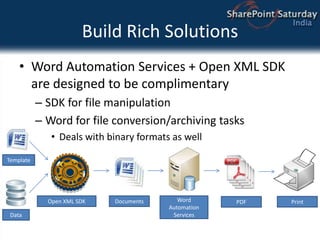
Build Rich SolutionsWord Automation Services + Open XML SDK are designed to be complimentarySDK for file manipulationWord for file conversion/archiving tasksDeals with binary formats as wellOpen XML SDKPrintTemplateDocumentsDataPDFWord Automation Services
Word automation servicesDEMO – OPEN XML SDK
Key TakeawaysWord is now on the ServerBrowse and EditSave As on the serverProgram against the documentOffice Services + Open XML SDK = Rich end to end solutionsCo-Authoring opens new solution possibilities
ResourcesBlogsEric White’s blog: http://blogs.msdn.com/ericwhiteDoug Mahugh’s blog: http://blogs.msdn.com/dmahughZeyadRajabi + Brian Jones’ blog: http://blogs.msdn.com/brian_jonesJohn Durant’s blog: http://blogs.msdn.com/johnrdurantMSDNContains how-to articles and documentationForums related to SDK, code snippets downloadhttp://msdn.microsoft.com/office/xml
ThanksNext Session Tools in Visual Studio 2010 for Sharepoint2010 byMadhurAhujaJoin us @ Microsoft EgyptSharePoint 2010 Community Launch on May 12thwww.mohamedyehia.net@mohdyehiamyehia@live.comfacebook.com/mohdyehia
Thanks to our sponsors

Word on the Server

  • 1.
    Word on theServerMohamed YehiaMay 2010
  • 2.
    Who Am ITechnicalArchitectwww.mohamedyehia.net@mohdyehiamyehia@live.comfacebook.com/mohdyehia
  • 3.
  • 4.
    AgendaWord Web AppWordAutomation Services
  • 5.
  • 6.
    Word Web AppEnableusers to view and edit documents in the browserAvailable viaSharePoint 2010Windows Live
  • 7.
    Word Web AppWordWeb App ViewerServer optimized engineDefault click for documents on SharePointConverts files to PNG or use SilverlightWord Web App EditorServer editing of Open XML documents (.docx)Utilizes Open XML SDK
  • 8.
    Word Web AppPartof Office Web AppsRequires Office 2010 Client Enterprise CALActivate Site Collection featureConfigure Open Behavior
  • 9.
  • 10.
  • 11.
    BackgroundCustomers automate WordclientNot recommended by MicrosoftApplication Object Model was not designed for bulk automationDoes not scale Dialog boxes “stop” automationRequire reboot on server every X hours
  • 12.
  • 13.
    What is WordAutomation Services?In SharePoint 2010 (Standard & Enterprise)100% server-side renderingSave As on the serverRead/write any format understood by Word clientHigh volume throughput with scalabilityPagination, TOC, Content Controls, Updating fieldsPrinting on server through PDF/XPS
  • 14.
  • 15.
    ConfigurationCentral Administration >Application Management > Service ApplicationRecommendationWorker processes = # of processors on the server -1Max of 90 document conversions per worker process per minute.
  • 16.
  • 17.
  • 18.
    Object ModelMicrosoft.Office.Word.Server assemblyUnder Microsoft Office 2010 componentStart a conversion job
  • 19.
    Starting a JobConversionJobjob= newConversionJob(“Word Automation Services”);job.UserToken= site.UserToken;//specify job settingsjob.Settings.OutputFormat= SaveFormat.PDF;job.Settings.OutputSaveBehavior= SaveBehavior.AlwaysOverwrite;job.Settings.UpdateFields= true;//job.AddFolder(inputFolder,outputFolder);//job.AddFile(inputFilePath, outputFilePath)job.AddLibrary(inputLibrary, outputLibrary);job.Start();
  • 20.
    Monitoring a JobConversionJobStatusstatus = newConversionJobStatus(wordServicesName, jobId, null);while (true) {Thread.Sleep(10000); status = newConversionJobStatus(wordServicesName, job.JobId, null);if (status.Count == status.Succeeded + status.Failed) {Console.WriteLine("Completed, Successful: {0}, Failed: {1}",status.Succeeded, status.Failed);System.Collections.ObjectModel.ReadOnlyCollection<ConversionItemInfo> failedItems =status.GetItems(ItemTypes.Failed);foreach (ConversionItemInfofailedIteminfailedItems)Console.WriteLine("Failed item: Name:{0}", failedItem.InputFile);break; }
  • 21.
  • 22.
    Build Rich SolutionsWordAutomation Services + Open XML SDK are designed to be complimentarySDK for file manipulationWord for file conversion/archiving tasksDeals with binary formats as wellOpen XML SDKPrintTemplateDocumentsDataPDFWord Automation Services
  • 23.
  • 24.
    Key TakeawaysWord isnow on the ServerBrowse and EditSave As on the serverProgram against the documentOffice Services + Open XML SDK = Rich end to end solutionsCo-Authoring opens new solution possibilities
  • 25.
    ResourcesBlogsEric White’s blog:http://blogs.msdn.com/ericwhiteDoug Mahugh’s blog: http://blogs.msdn.com/dmahughZeyadRajabi + Brian Jones’ blog: http://blogs.msdn.com/brian_jonesJohn Durant’s blog: http://blogs.msdn.com/johnrdurantMSDNContains how-to articles and documentationForums related to SDK, code snippets downloadhttp://msdn.microsoft.com/office/xml
  • 26.
    ThanksNext Session Toolsin Visual Studio 2010 for Sharepoint2010 byMadhurAhujaJoin us @ Microsoft EgyptSharePoint 2010 Community Launch on May 12thwww.mohamedyehia.net@mohdyehiamyehia@live.comfacebook.com/mohdyehia
  • 27.