Industrial and Automation System 2016
1
Our Goals
2
The final target is to design a PLC controller
in order to:
● Perform a simulation of a control of a
traffic light road system;
● Learn the use of Twido PLC model
TWDLCAA16DRF;
● Learn the use of TwidoSoft software.
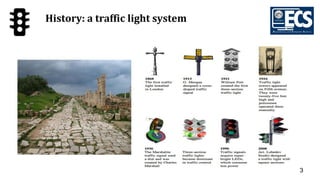
History: a traffic light system
3
4
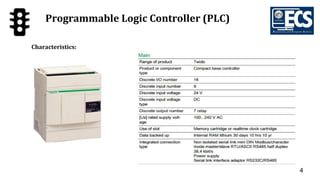
Programmable Logic Controller (PLC)
Characteristics:
5
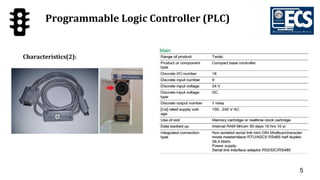
Programmable Logic Controller (PLC)
Characteristics(2):
6
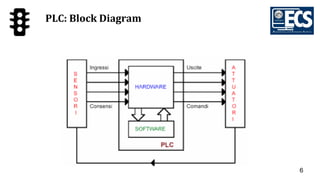
PLC: Block Diagram
7
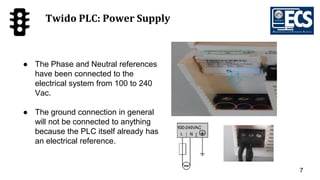
Twido PLC: Power Supply
● The Phase and Neutral references
have been connected to the
electrical system from 100 to 240
Vac.
● The ground connection in general
will not be connected to anything
because the PLC itself already has
an electrical reference.
8
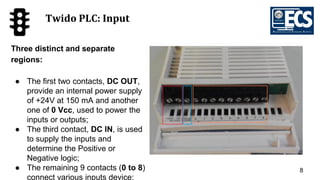
Twido PLC: Input
Three distinct and separate
regions:
● The first two contacts, DC OUT,
provide an internal power supply
of +24V at 150 mA and another
one of 0 Vcc, used to power the
inputs or outputs;
● The third contact, DC IN, is used
to supply the inputs and
determine the Positive or
Negative logic;
● The remaining 9 contacts (0 to 8)
connect various inputs device;
9
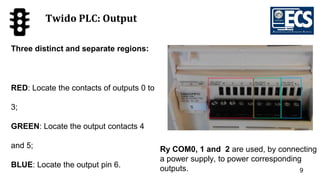
Twido PLC: Output
Three distinct and separate regions:
RED: Locate the contacts of outputs 0 to
3;
GREEN: Locate the output contacts 4
and 5;
BLUE: Locate the output pin 6.
Ry COM0, 1 and 2 are used, by connecting
a power supply, to power corresponding
outputs.
10
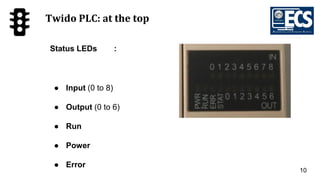
Twido PLC: at the top
Status LEDs :
● Input (0 to 8)
● Output (0 to 6)
● Run
● Power
● Error
11
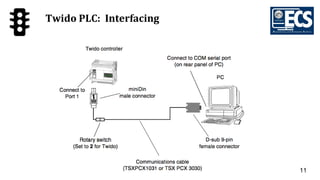
Twido PLC: Interfacing
12
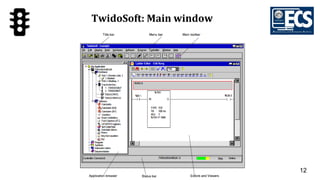
TwidoSoft: Main window
13
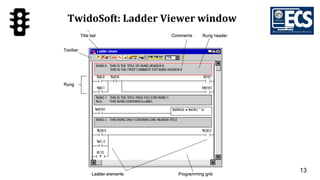
TwidoSoft: Ladder Viewer window
14
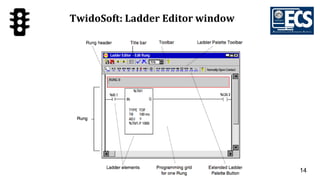
TwidoSoft: Ladder Editor window
15
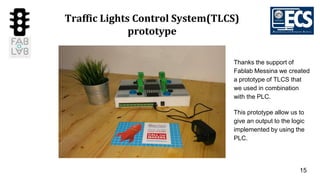
Traffic Lights Control System(TLCS)
prototype
Thanks the support of
Fablab Messina we created
a prototype of TLCS that
we used in combination
with the PLC.
This prototype allow us to
give an output to the logic
implemented by using the
PLC.
16
Main Activities
(1) PCB (printed circuit board): design and creation
(2) Traffic Lights: design and creation
(3) Packaging: design and creation
(4) Final Prototype: assembling and testing
17
(1)PCB (printed circuit board): design and
creation
PCB design with KiCad-EDA
convert Kikad-EDA to TIFF
setting laser cut software tool
painting of the copper plate
laser cutting of the painted copper plate
engraving the copper plate with the FeCI3
cleaning the copper plate with a solvent
making holes on the final PCB
component soldering on the final PCB
18
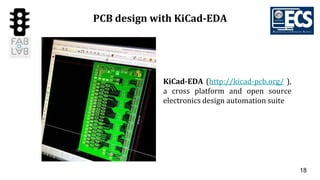
PCB design with KiCad-EDA
KiCad-EDA (http://kicad-pcb.org/ ),
a cross platform and open source
electronics design automation suite
19
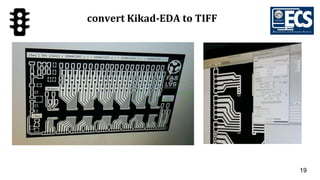
convert Kikad-EDA to TIFF
20
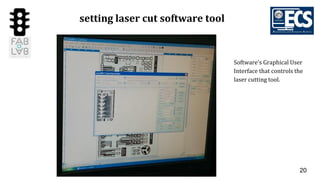
setting laser cut software tool
Software's Graphical User
Interface that controls the
laser cutting tool.
21
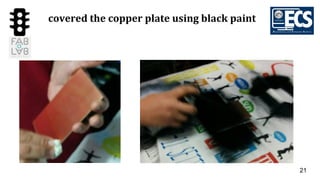
covered the copper plate using black paint
22
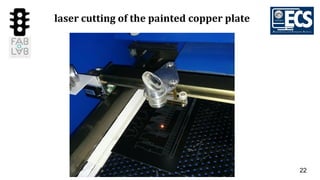
laser cutting of the painted copper plate
23
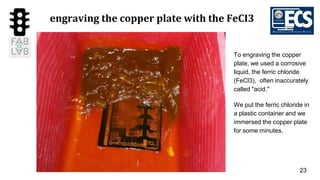
engraving the copper plate with the FeCI3
To engraving the copper
plate, we used a corrosive
liquid, the ferric chloride
(FeCl3), often inaccurately
called "acid."
We put the ferric chloride in
a plastic container and we
immersed the copper plate
for some minutes.
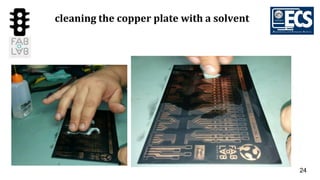
24
cleaning the copper plate with a solvent
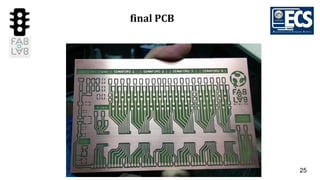
25
final PCB
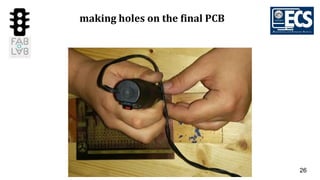
26
making holes on the final PCB
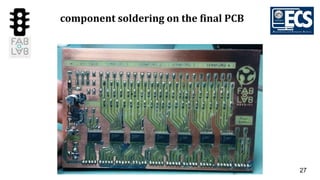
27
component soldering on the final PCB
28
(2) Traffic Lights: design and creation
Traffic Light design with Tinkercad
Traffic Light 3D printing session
Making holes on the Traffic Light 3D printed
29
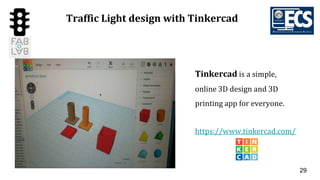
Traffic Light design with Tinkercad
Tinkercad is a simple,
online 3D design and 3D
printing app for everyone.
https://www.tinkercad.com/
30
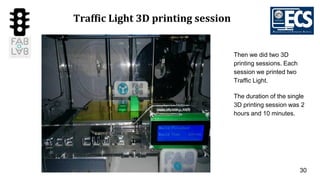
Traffic Light 3D printing session
Then we did two 3D
printing sessions. Each
session we printed two
Traffic Light.
The duration of the single
3D printing session was 2
hours and 10 minutes.
31
making holes on the Traffic Light 3D
printed
32
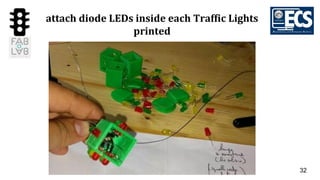
attach diode LEDs inside each Traffic Lights
printed
33
(3) Packaging: Design and Creation
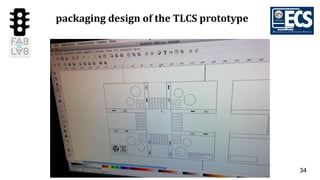
Packaging design of the TLCS prototype
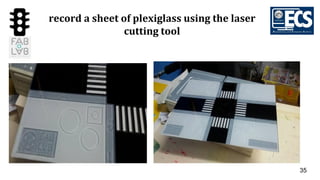
Record a sheet of plexiglass using the laser cutting tool
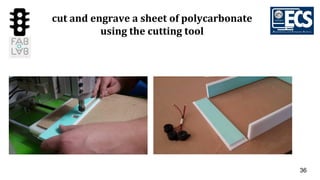
Cut a sheet of polycarbonate using the cutting tool
34
packaging design of the TLCS prototype
35
record a sheet of plexiglass using the laser
cutting tool
36
cut and engrave a sheet of polycarbonate
using the cutting tool
37
(4) Final Prototype: assembling and testing
Assembly all the components to create the final packaging
Solder wires with the PCD and testing phase.
38
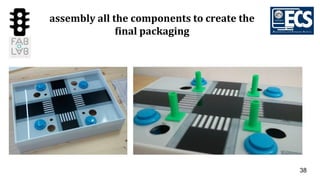
assembly all the components to create the
final packaging
39
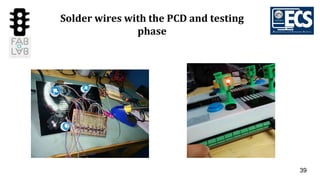
Solder wires with the PCD and testing
phase
40
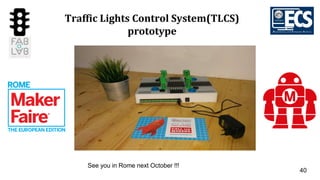
Traffic Lights Control System(TLCS)
prototype
See you in Rome next October !!!
41
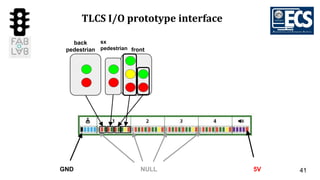
TLCS I/O prototype interface
GND 5VNULL
back
pedestrian
sx
pedestrian front
42
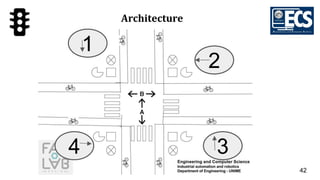
Architecture
2
1
34
43
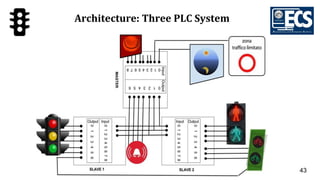
Architecture: Three PLC System
44
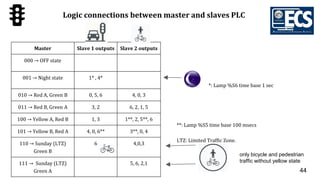
Logic connections between master and slaves PLC
Master Slave 1 outputs Slave 2 outputs
000 → OFF state
001 → Night state 1* , 4*
010 → Red A, Green B 0, 5, 6 4, 0, 3
011 → Red B, Green A 3, 2 6, 2, 1, 5
100 → Yellow A, Red B 1, 3 1**, 2, 5**, 6
101 → Yellow B, Red A 4, 0, 6** 3**, 0, 4
110 → Sunday (LTZ)
Green B
6 4,0,3
111 → Sunday (LTZ)
Green A
5, 6, 2,1
only bicycle and pedestrian
traffic without yellow state
**: Lamp %S5 time base 100 msecs
LTZ: Limited Traffic Zone.
*: Lamp %S6 time base 1 sec
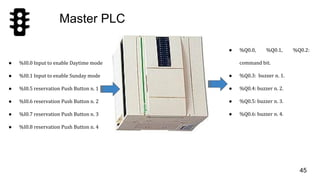
Master PLC
● %Q0.0, %Q0.1, %Q0.2:
command bit.
● %Q0.3: buzzer n. 1.
● %Q0.4: buzzer n. 2.
● %Q0.5: buzzer n. 3.
● %Q0.6: buzzer n. 4.
45
● %I0.0 Input to enable Daytime mode
● %I0.1 Input to enable Sunday mode
● %I0.5 reservation Push Button n. 1
● %I0.6 reservation Push Button n. 2
● %I0.7 reservation Push Button n. 3
● %I0.8 reservation Push Button n. 4
46
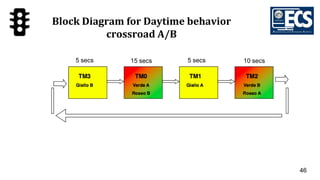
15 secs 5 secs 10 secs5 secs
Block Diagram for Daytime behavior
crossroad A/B
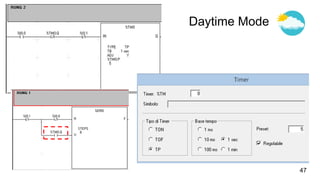
Daytime Mode
47
48
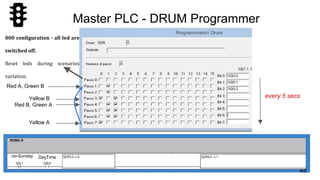
Master PLC - DRUM Programmer
000 configuration - all led are
switched off.
Reset leds during scenarios
variation.
DayTimeno-Sunday
Red A, Green B
Yellow B
Red B, Green A
Yellow A
every 5 secs
49
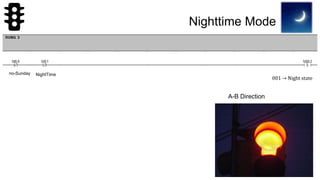
Nighttime Mode
001 → Night state
NightTimeno-Sunday
A-B Direction
50
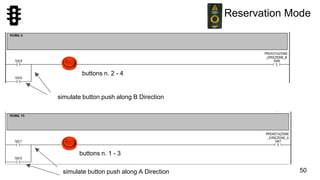
Reservation Mode
simulate button push along B Direction
simulate button push along A Direction
buttons n. 2 - 4
buttons n. 1 - 3
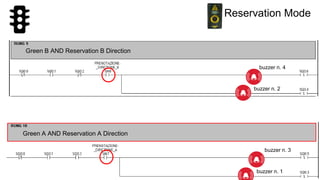
51
Reservation Mode
Green B AND Reservation B Direction
Green A AND Reservation A Direction
buzzer n. 2
buzzer n. 4
buzzer n. 3
buzzer n. 1
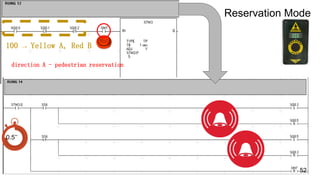
100 → Yellow A, Red B
52
Reservation Mode
direction A - pedestrian reservation
0.5’’
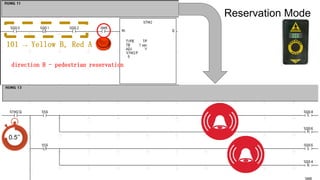
53
101 → Yellow B, Red A
direction B - pedestrian reservation
0.5’’
Reservation Mode
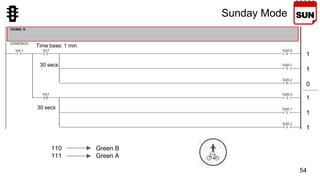
54
Sunday Mode
Time base: 1 min
1
1
0
1
1
1
110 Green B
111 Green A
30 secs
30 secs
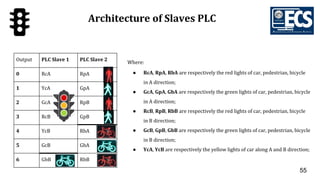
55
Architecture of Slaves PLC
Output PLC Slave 1 PLC Slave 2
0 RcA RpA
1 YcA GpA
2 GcA RpB
3 RcB GpB
4 YcB RbA
5 GcB GbA
6 GbB RbB
Where:
● RcA, RpA, RbA are respectively the red lights of car, pedestrian, bicycle
in A direction;
● GcA, GpA, GbA are respectively the green lights of car, pedestrian, bicycle
in A direction;
● RcB, RpB, RbB are respectively the red lights of car, pedestrian, bicycle
in B direction;
● GcB, GpB, GbB are respectively the green lights of car, pedestrian, bicycle
in B direction;
● YcA, YcB are respectively the yellow lights of car along A and B direction;
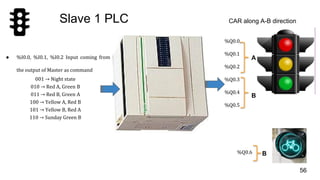
56
Slave 1 PLC
● %I0.0, %I0.1, %I0.2 Input coming from
the output of Master as command
001 → Night state
010 → Red A, Green B
011 → Red B, Green A
100 → Yellow A, Red B
101 → Yellow B, Red A
110 → Sunday Green B
%Q0.0,
%Q0.1
%Q0.2
%Q0.3
%Q0.4
%Q0.5
CAR along A-B direction
%Q0.6
A
B
B
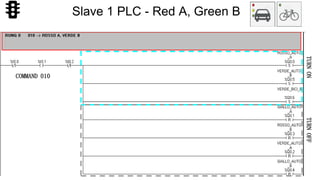
57
COMMAND 010
TURNONTURNOFF
Slave 1 PLC - Red A, Green B
58
COMMAND 101
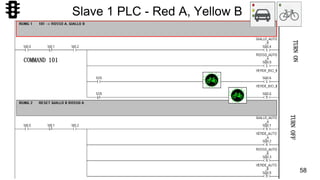
TURNONTURNOFF
Slave 1 PLC - Red A, Yellow B
59
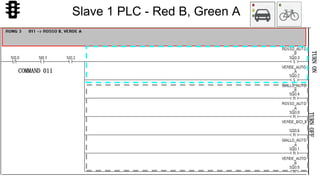
COMMAND 011
TURNONTURNOFF
Slave 1 PLC - Red B, Green A
60
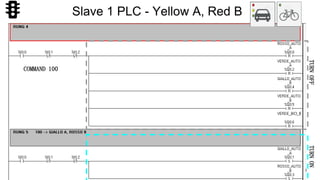
COMMAND 100
TURNONTURNOFF
Slave 1 PLC - Yellow A, Red B
61
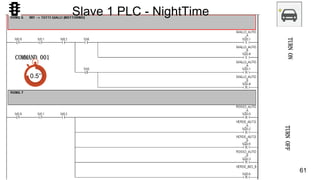
TURNONTURNOFF
COMMAND 001
0.5’’
Slave 1 PLC - NightTime
62
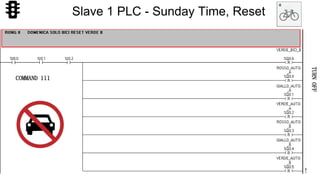
TURNOFF
COMMAND 111
Slave 1 PLC - Sunday Time, Reset
63
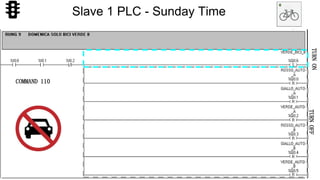
TURNOFF
COMMAND 110
TURNON
Slave 1 PLC - Sunday Time
64
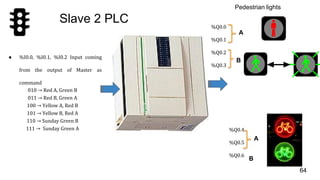
Slave 2 PLC
● %I0.0, %I0.1, %I0.2 Input coming
from the output of Master as
command
010 → Red A, Green B
011 → Red B, Green A
100 → Yellow A, Red B
101 → Yellow B, Red A
110 → Sunday Green B
111 → Sunday Green A
%Q0.0
%Q0.1
%Q0.2
%Q0.3
Pedestrian lights
%Q0.4
%Q0.5
%Q0.6
A
B
A
B
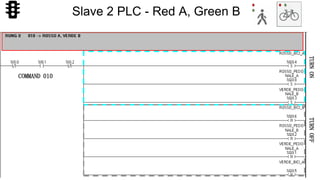
65
COMMAND 010
TURNONTURNOFF
Slave 2 PLC - Red A, Green B
66
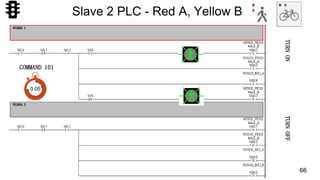
COMMAND 101
TURNONTURNOFF
Slave 2 PLC - Red A, Yellow B
0.05’’
67
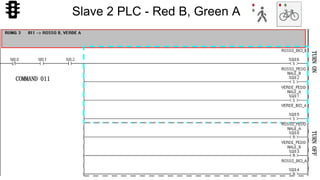
COMMAND 011
TURNONTURNOFF
Slave 2 PLC - Red B, Green A
68
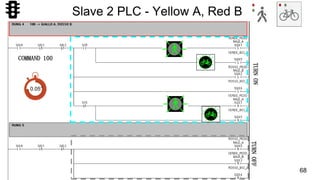
Slave 2 PLC - Yellow A, Red B
COMMAND 100
TURNONTURNOFF
0.05’’
69
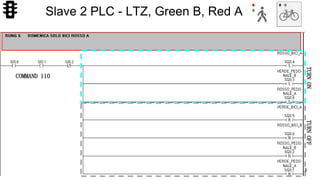
Slave 2 PLC - LTZ, Green B, Red A
COMMAND 110
TURNONTURNOFF
70
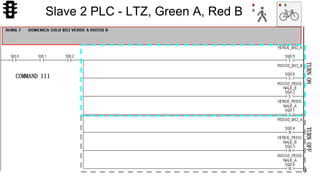
Slave 2 PLC - LTZ, Green A, Red B
TURNONTURNOFF
COMMAND 111
71
GRAZIE PER L’ATTENZIONE

A TRAFFIC LIGHT CONTROL SYSTEM USING PROGRAMMABLE LOGIC CONTROLLER

  • 1.
  • 2.
    Our Goals 2 The finaltarget is to design a PLC controller in order to: ● Perform a simulation of a control of a traffic light road system; ● Learn the use of Twido PLC model TWDLCAA16DRF; ● Learn the use of TwidoSoft software.
  • 3.
    History: a trafficlight system 3
  • 4.
    4 Programmable Logic Controller(PLC) Characteristics:
  • 5.
    5 Programmable Logic Controller(PLC) Characteristics(2):
  • 6.
  • 7.
    7 Twido PLC: PowerSupply ● The Phase and Neutral references have been connected to the electrical system from 100 to 240 Vac. ● The ground connection in general will not be connected to anything because the PLC itself already has an electrical reference.
  • 8.
    8 Twido PLC: Input Threedistinct and separate regions: ● The first two contacts, DC OUT, provide an internal power supply of +24V at 150 mA and another one of 0 Vcc, used to power the inputs or outputs; ● The third contact, DC IN, is used to supply the inputs and determine the Positive or Negative logic; ● The remaining 9 contacts (0 to 8) connect various inputs device;
  • 9.
    9 Twido PLC: Output Threedistinct and separate regions: RED: Locate the contacts of outputs 0 to 3; GREEN: Locate the output contacts 4 and 5; BLUE: Locate the output pin 6. Ry COM0, 1 and 2 are used, by connecting a power supply, to power corresponding outputs.
  • 10.
    10 Twido PLC: atthe top Status LEDs : ● Input (0 to 8) ● Output (0 to 6) ● Run ● Power ● Error
  • 11.
  • 12.
  • 13.
  • 14.
  • 15.
    15 Traffic Lights ControlSystem(TLCS) prototype Thanks the support of Fablab Messina we created a prototype of TLCS that we used in combination with the PLC. This prototype allow us to give an output to the logic implemented by using the PLC.
  • 16.
    16 Main Activities (1) PCB(printed circuit board): design and creation (2) Traffic Lights: design and creation (3) Packaging: design and creation (4) Final Prototype: assembling and testing
  • 17.
    17 (1)PCB (printed circuitboard): design and creation PCB design with KiCad-EDA convert Kikad-EDA to TIFF setting laser cut software tool painting of the copper plate laser cutting of the painted copper plate engraving the copper plate with the FeCI3 cleaning the copper plate with a solvent making holes on the final PCB component soldering on the final PCB
  • 18.
    18 PCB design withKiCad-EDA KiCad-EDA (http://kicad-pcb.org/ ), a cross platform and open source electronics design automation suite
  • 19.
  • 20.
    20 setting laser cutsoftware tool Software's Graphical User Interface that controls the laser cutting tool.
  • 21.
    21 covered the copperplate using black paint
  • 22.
    22 laser cutting ofthe painted copper plate
  • 23.
    23 engraving the copperplate with the FeCI3 To engraving the copper plate, we used a corrosive liquid, the ferric chloride (FeCl3), often inaccurately called "acid." We put the ferric chloride in a plastic container and we immersed the copper plate for some minutes.
  • 24.
    24 cleaning the copperplate with a solvent
  • 25.
  • 26.
    26 making holes onthe final PCB
  • 27.
  • 28.
    28 (2) Traffic Lights:design and creation Traffic Light design with Tinkercad Traffic Light 3D printing session Making holes on the Traffic Light 3D printed
  • 29.
    29 Traffic Light designwith Tinkercad Tinkercad is a simple, online 3D design and 3D printing app for everyone. https://www.tinkercad.com/
  • 30.
    30 Traffic Light 3Dprinting session Then we did two 3D printing sessions. Each session we printed two Traffic Light. The duration of the single 3D printing session was 2 hours and 10 minutes.
  • 31.
    31 making holes onthe Traffic Light 3D printed
  • 32.
    32 attach diode LEDsinside each Traffic Lights printed
  • 33.
    33 (3) Packaging: Designand Creation Packaging design of the TLCS prototype Record a sheet of plexiglass using the laser cutting tool Cut a sheet of polycarbonate using the cutting tool
  • 34.
    34 packaging design ofthe TLCS prototype
  • 35.
    35 record a sheetof plexiglass using the laser cutting tool
  • 36.
    36 cut and engravea sheet of polycarbonate using the cutting tool
  • 37.
    37 (4) Final Prototype:assembling and testing Assembly all the components to create the final packaging Solder wires with the PCD and testing phase.
  • 38.
    38 assembly all thecomponents to create the final packaging
  • 39.
    39 Solder wires withthe PCD and testing phase
  • 40.
    40 Traffic Lights ControlSystem(TLCS) prototype See you in Rome next October !!!
  • 41.
    41 TLCS I/O prototypeinterface GND 5VNULL back pedestrian sx pedestrian front
  • 42.
  • 43.
  • 44.
    44 Logic connections betweenmaster and slaves PLC Master Slave 1 outputs Slave 2 outputs 000 → OFF state 001 → Night state 1* , 4* 010 → Red A, Green B 0, 5, 6 4, 0, 3 011 → Red B, Green A 3, 2 6, 2, 1, 5 100 → Yellow A, Red B 1, 3 1**, 2, 5**, 6 101 → Yellow B, Red A 4, 0, 6** 3**, 0, 4 110 → Sunday (LTZ) Green B 6 4,0,3 111 → Sunday (LTZ) Green A 5, 6, 2,1 only bicycle and pedestrian traffic without yellow state **: Lamp %S5 time base 100 msecs LTZ: Limited Traffic Zone. *: Lamp %S6 time base 1 sec
  • 45.
    Master PLC ● %Q0.0,%Q0.1, %Q0.2: command bit. ● %Q0.3: buzzer n. 1. ● %Q0.4: buzzer n. 2. ● %Q0.5: buzzer n. 3. ● %Q0.6: buzzer n. 4. 45 ● %I0.0 Input to enable Daytime mode ● %I0.1 Input to enable Sunday mode ● %I0.5 reservation Push Button n. 1 ● %I0.6 reservation Push Button n. 2 ● %I0.7 reservation Push Button n. 3 ● %I0.8 reservation Push Button n. 4
  • 46.
    46 15 secs 5secs 10 secs5 secs Block Diagram for Daytime behavior crossroad A/B
  • 47.
  • 48.
    48 Master PLC -DRUM Programmer 000 configuration - all led are switched off. Reset leds during scenarios variation. DayTimeno-Sunday Red A, Green B Yellow B Red B, Green A Yellow A every 5 secs
  • 49.
    49 Nighttime Mode 001 →Night state NightTimeno-Sunday A-B Direction
  • 50.
    50 Reservation Mode simulate buttonpush along B Direction simulate button push along A Direction buttons n. 2 - 4 buttons n. 1 - 3
  • 51.
    51 Reservation Mode Green BAND Reservation B Direction Green A AND Reservation A Direction buzzer n. 2 buzzer n. 4 buzzer n. 3 buzzer n. 1
  • 52.
    100 → YellowA, Red B 52 Reservation Mode direction A - pedestrian reservation 0.5’’
  • 53.
    53 101 → YellowB, Red A direction B - pedestrian reservation 0.5’’ Reservation Mode
  • 54.
    54 Sunday Mode Time base:1 min 1 1 0 1 1 1 110 Green B 111 Green A 30 secs 30 secs
  • 55.
    55 Architecture of SlavesPLC Output PLC Slave 1 PLC Slave 2 0 RcA RpA 1 YcA GpA 2 GcA RpB 3 RcB GpB 4 YcB RbA 5 GcB GbA 6 GbB RbB Where: ● RcA, RpA, RbA are respectively the red lights of car, pedestrian, bicycle in A direction; ● GcA, GpA, GbA are respectively the green lights of car, pedestrian, bicycle in A direction; ● RcB, RpB, RbB are respectively the red lights of car, pedestrian, bicycle in B direction; ● GcB, GpB, GbB are respectively the green lights of car, pedestrian, bicycle in B direction; ● YcA, YcB are respectively the yellow lights of car along A and B direction;
  • 56.
    56 Slave 1 PLC ●%I0.0, %I0.1, %I0.2 Input coming from the output of Master as command 001 → Night state 010 → Red A, Green B 011 → Red B, Green A 100 → Yellow A, Red B 101 → Yellow B, Red A 110 → Sunday Green B %Q0.0, %Q0.1 %Q0.2 %Q0.3 %Q0.4 %Q0.5 CAR along A-B direction %Q0.6 A B B
  • 57.
  • 58.
  • 59.
  • 60.
  • 61.
  • 62.
    62 TURNOFF COMMAND 111 Slave 1PLC - Sunday Time, Reset
  • 63.
  • 64.
    64 Slave 2 PLC ●%I0.0, %I0.1, %I0.2 Input coming from the output of Master as command 010 → Red A, Green B 011 → Red B, Green A 100 → Yellow A, Red B 101 → Yellow B, Red A 110 → Sunday Green B 111 → Sunday Green A %Q0.0 %Q0.1 %Q0.2 %Q0.3 Pedestrian lights %Q0.4 %Q0.5 %Q0.6 A B A B
  • 65.
  • 66.
    66 COMMAND 101 TURNONTURNOFF Slave 2PLC - Red A, Yellow B 0.05’’
  • 67.
  • 68.
    68 Slave 2 PLC- Yellow A, Red B COMMAND 100 TURNONTURNOFF 0.05’’
  • 69.
    69 Slave 2 PLC- LTZ, Green B, Red A COMMAND 110 TURNONTURNOFF
  • 70.
    70 Slave 2 PLC- LTZ, Green A, Red B TURNONTURNOFF COMMAND 111
  • 71.