

















Mining SharePoint data with
Power BI
Naomi Moneypenny | @nmoneypenny
Treb Gatte | @tgatte
SharePoint Saturday Belgium 2018
#SPSBE
Platinum
Gold
Silver
SharePint
Community
Thanks to our sponsors!
Naomi Moneypenny
Director of Teamwork and Search in
Microsoft 365
Treb Gatte
• CEO, http://TumbleRoad.com
• Data Platform MVP for Power BI
5
Why do I need to
mine SharePoint
data?
6
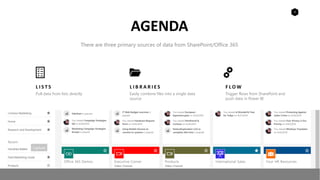
L I S T S
Pull data from lists directly
L I B R A R I E S
Easily combine files into a single data
source
F L O W
Trigger flows from SharePoint and
push data in Power BI
AGENDA
There are three primary sources of data from SharePoint/Office 365
12
Power BI Overview
13
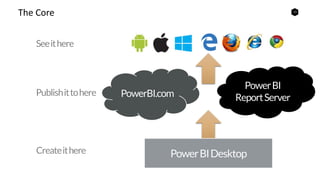
The Core
14
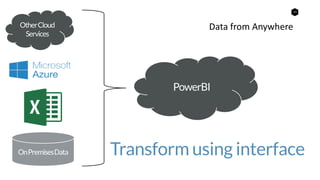
Data from Anywhere
Transform using interface
15
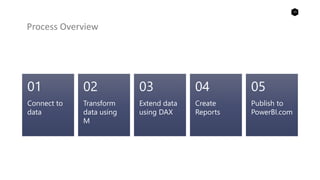
Process Overview
Connect to
data
01
Transform
data using
M
02
Extend data
using DAX
03
Create
Reports
04
Publish to
PowerBI.com
05
16
Licensing
Power BI
17
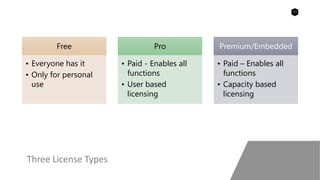
Three License Types
Free
• Everyone has it
• Only for personal
use
Pro
• Paid - Enables all
functions
• User based
licensing
Premium/Embedded
• Paid – Enables all
functions
• Capacity based
licensing
18
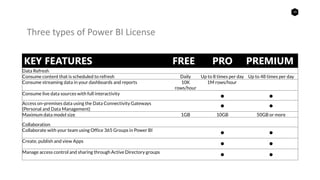
Three types of Power BI License
KEY FEATURES FREE PRO PREMIUM
Data Refresh
Consume content that is scheduled to refresh Daily Up to 8 times per day Up to 48 times per day
Consume streaming data in your dashboards and reports 10K
rows/hour
1M rows/hour
Consume live data sources with full interactivity
• •
Access on-premises data using the Data Connectivity Gateways
(Personal and Data Management) • •
Maximum data model size 1GB 10GB 50GB or more
Collaboration
Collaborate with your team using Office 365 Groups in Power BI
• •
Create, publish and view Apps
• •
Manage access control and sharing through Active Directory groups
• •
19
Cloud vs. On-
Premises
Power BI
20
Using the Enterprise Data Gateway, Power BI works with
• SharePoint 2010
• SharePoint 2013
• SharePoint 2016
On-Premises
Power BI fully supports accessing SharePoint Online as well
as data stored in Azure
Cloud
21
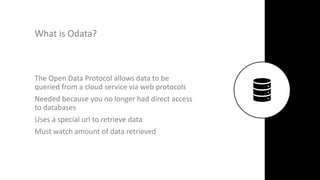
What is Odata?
The Open Data Protocol allows data to be
queried from a cloud service via web protocols
Needed because you no longer had direct access
to databases
Uses a special url to retrieve data
Must watch amount of data retrieved
22
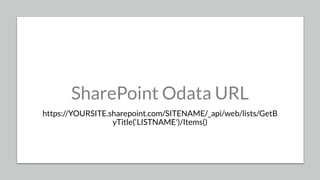
SharePoint Odata URL
https://YOURSITE.sharepoint.com/SITENAME/_api/web/lists/GetB
yTitle(‘LISTNAME')/Items()
23
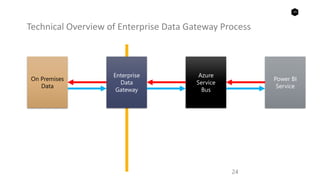
Enterprise Data Gateway
Allows Power BI, Microsoft
Flow and PowerApps to
access your on-premises
SharePoint farm
23
24
Technical Overview of Enterprise Data Gateway Process
24
On Premises
Data
Enterprise
Data
Gateway
Azure
Service
Bus
Power BI
Service
25
Lists
Power BI
26
Query a List
Microsoft Power BI and Microsoft Office 365
Demo
27
Document
Libraries
Power BI
28
Combine files from a Document Library
Microsoft Power BI and Microsoft Office 365
Demo
29
Microsoft Flow
Power BI
30
Overview
30
List
Flow
Power BI
31
Set up a Real Time Data Feed
Microsoft Power BI, Microsoft Office 365, Flow
Demo
Coming soon!
• Search as a data source for
Power BI!
• Everything becomes accessible
to Power BI
• Can currently do this with Search
in SharePoint
• Microsoft Search will be
available via MS Graph APIs in
the future
33
Tumble Road, LLC.
Enabling better decision making, using Microsoft technology
7829 Center Blvd SE STE 277
Snoqualmie, WA, USA 98065
Contact Us for Power BI Training/Consulting
P H O N E
+1 425-654-3437
E M A I L
sales@tumbleroad.com
W E B S I T E
https://tumbleroad.com
34
Questions?
Get our free Guide on how to
set up the real time feed by
filling out this form.
#SPSBE
http://spsbe.be
Please rate this session!
SharePoint Saturday Belgium 2018
#SPSBE

Mining SharePoint data with PowerBI