CLASS 3
27.03.2023
Entering a matrix
 A matrix is an array of numbers. To type a matrix into MATLAB you must
- begin with a square bracket,
- separate elements in a row with spaces or commas (,)
- use a semicolon (;) to separate rows
- end the matrix with another square bracket, ].
 Note that the use of semicolons (;) here is different from their use
mentioned earlier to suppress output or to write multiple commands in a
single line.
 Once we have entered the matrix, it is automatically stored and
remembered in the Workspace.
Example
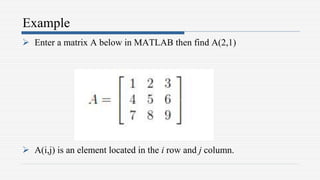
 Enter a matrix A below in MATLAB then find A(2,1)
 A(i,j) is an element located in the i row and j column.
Creating a sub-matrix
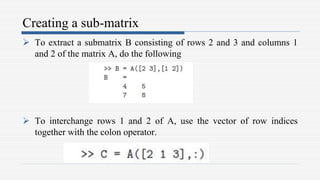
 To extract a submatrix B consisting of rows 2 and 3 and columns 1
and 2 of the matrix A, do the following
 To interchange rows 1 and 2 of A, use the vector of row indices
together with the colon operator.
Dimension
 To determine the dimensions of a matrix or vector, use the command
size.
 For example,
- Find size(A)
- Find [m,n,]=size(A)
Transposing a matrix
 The transpose operation is denoted by an apostrophe or a single quote
('). It flips a matrix about its main diagonal and it turns a row vector
into a column vector.
 Example
- Find A’
Concatenating matrices
 Matrices can be made up of sub-matrices. Here is an example. First,
let's recall our previous matrix A.
 Example
- Find B=[A 10*A;-A [1 0 0; 0 1 0; 0 01]]
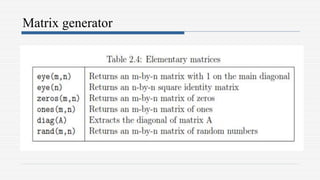
Matrix generator
Example
 Given C=[1,2;3 4] find,
- D = [C zeros(2); ones(2) eye(2)]
Matrix arithmetic operations
 As we mentioned earlier, MATLAB allows arithmetic operations: +, -
,*, and ^ to be carried out on matrices. Thus,
- A+B or B+A is valid if A and B are of the same size
- A*B is valid if A's number of column equals B's number of rows
- A^2 is valid if A is square and equals A*A
- α*A or A*α multiplies each element of A by α
Array arithmetic operations
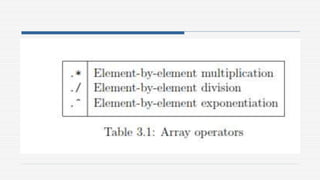
 On the other hand, array arithmetic operations or array operations for
short, are done element-by-element. The period character, .,
distinguishes the array operations from the matrix operations.
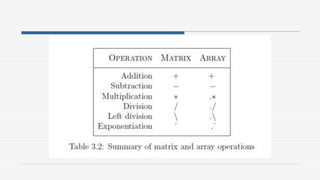
 However, since the matrix and array operations are the same for
addition (+) and subtraction (-), the character pairs (.+) and (.-) are not
used. The list of array operators is shown below in Table 3.2. If A and
B are two matrices of the same size with elements A = [aij] and B =
[bij], then the command
Example
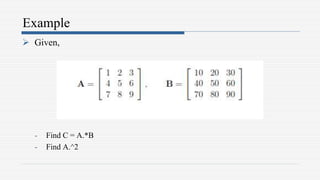
 Given,
- Find C = A.*B
- Find A.^2
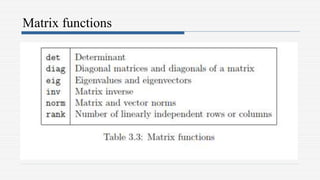
Matrix functions
Solving linear equations
 One of the problems encountered most frequently in scienti¯c
computation is the solution of systems of simultaneous linear
equations. With matrix notation, a system of simultaneous linear
equations is written 𝐴𝑥 = 𝑏 where there are as many equations as
unknown.
 A is a given square matrix of order n, b is a given column vector of n
components, and x is an unknown column vector of n components.
 In linear algebra we learn that the solution to Ax = b can be written as
x = 𝐴−1𝑏, where 𝐴−1 is the inverse of A.
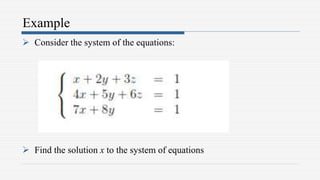
Example
 Consider the system of the equations:
 Find the solution x to the system of equations
INTRODUCTION TO MATLAB
PROGRAMING
27.03.2023
Introduction
 So far in these lab sessions, all the commands were executed in the
Command Window. The problem is that the commands entered in the
Command Window cannot be saved and executed again for several
times.
 Therefore, a different way of executing repeatedly commands with
MATLAB is:
1. to create a file with a list of commands,
2. save the file, and
3. run the file.
Cont. ..
 If needed, corrections or changes can be made to the commands in the file. The
files that are used for this purpose are called script files or scripts for short.
 This section covers the following topics:
- M-File scripts
- M-File Functions
 M-File Scripts
A script file is an external file that contains a sequence of MATLAB
statements. Script files have a filename extension .m and are often called M-
files. M-files can be scripts that simply execute a series of MATLAB
statements, or they can be functions that can accept arguments and can produce
one or more outputs.
Example
 Plot the following cosine functions, 𝑦1 = 2 cos 𝑥 , 𝑦2 = cos 𝑥 , 𝑎𝑛𝑑 𝑦3 =
0.5 ∗ cos(𝑥), in the interval 0 ≤ 𝑥 ≤ 2𝜋.
 Create a file, say example2, ten run the file by typing example2 in the command
window
Script side effects
All variables created in a script file are added to the workspace. This may have
undesirable effects, because:
 Variables already existing in in the workspace may be overwritten
 The execution of the script can be affected by the state variable in the workspace

Lecture 3.pptx

  • 1.
  • 2.
    Entering a matrix A matrix is an array of numbers. To type a matrix into MATLAB you must - begin with a square bracket, - separate elements in a row with spaces or commas (,) - use a semicolon (;) to separate rows - end the matrix with another square bracket, ].  Note that the use of semicolons (;) here is different from their use mentioned earlier to suppress output or to write multiple commands in a single line.  Once we have entered the matrix, it is automatically stored and remembered in the Workspace.
  • 3.
    Example  Enter amatrix A below in MATLAB then find A(2,1)  A(i,j) is an element located in the i row and j column.
  • 4.
    Creating a sub-matrix To extract a submatrix B consisting of rows 2 and 3 and columns 1 and 2 of the matrix A, do the following  To interchange rows 1 and 2 of A, use the vector of row indices together with the colon operator.
  • 5.
    Dimension  To determinethe dimensions of a matrix or vector, use the command size.  For example, - Find size(A) - Find [m,n,]=size(A)
  • 6.
    Transposing a matrix The transpose operation is denoted by an apostrophe or a single quote ('). It flips a matrix about its main diagonal and it turns a row vector into a column vector.  Example - Find A’
  • 7.
    Concatenating matrices  Matricescan be made up of sub-matrices. Here is an example. First, let's recall our previous matrix A.  Example - Find B=[A 10*A;-A [1 0 0; 0 1 0; 0 01]]
  • 8.
  • 9.
    Example  Given C=[1,2;34] find, - D = [C zeros(2); ones(2) eye(2)]
  • 10.
    Matrix arithmetic operations As we mentioned earlier, MATLAB allows arithmetic operations: +, - ,*, and ^ to be carried out on matrices. Thus, - A+B or B+A is valid if A and B are of the same size - A*B is valid if A's number of column equals B's number of rows - A^2 is valid if A is square and equals A*A - α*A or A*α multiplies each element of A by α
  • 11.
    Array arithmetic operations On the other hand, array arithmetic operations or array operations for short, are done element-by-element. The period character, ., distinguishes the array operations from the matrix operations.  However, since the matrix and array operations are the same for addition (+) and subtraction (-), the character pairs (.+) and (.-) are not used. The list of array operators is shown below in Table 3.2. If A and B are two matrices of the same size with elements A = [aij] and B = [bij], then the command
  • 13.
    Example  Given, - FindC = A.*B - Find A.^2
  • 15.
  • 16.
    Solving linear equations One of the problems encountered most frequently in scienti¯c computation is the solution of systems of simultaneous linear equations. With matrix notation, a system of simultaneous linear equations is written 𝐴𝑥 = 𝑏 where there are as many equations as unknown.  A is a given square matrix of order n, b is a given column vector of n components, and x is an unknown column vector of n components.  In linear algebra we learn that the solution to Ax = b can be written as x = 𝐴−1𝑏, where 𝐴−1 is the inverse of A.
  • 17.
    Example  Consider thesystem of the equations:  Find the solution x to the system of equations
  • 18.
  • 19.
    Introduction  So farin these lab sessions, all the commands were executed in the Command Window. The problem is that the commands entered in the Command Window cannot be saved and executed again for several times.  Therefore, a different way of executing repeatedly commands with MATLAB is: 1. to create a file with a list of commands, 2. save the file, and 3. run the file.
  • 20.
    Cont. ..  Ifneeded, corrections or changes can be made to the commands in the file. The files that are used for this purpose are called script files or scripts for short.  This section covers the following topics: - M-File scripts - M-File Functions  M-File Scripts A script file is an external file that contains a sequence of MATLAB statements. Script files have a filename extension .m and are often called M- files. M-files can be scripts that simply execute a series of MATLAB statements, or they can be functions that can accept arguments and can produce one or more outputs.
  • 21.
    Example  Plot thefollowing cosine functions, 𝑦1 = 2 cos 𝑥 , 𝑦2 = cos 𝑥 , 𝑎𝑛𝑑 𝑦3 = 0.5 ∗ cos(𝑥), in the interval 0 ≤ 𝑥 ≤ 2𝜋.  Create a file, say example2, ten run the file by typing example2 in the command window Script side effects All variables created in a script file are added to the workspace. This may have undesirable effects, because:  Variables already existing in in the workspace may be overwritten  The execution of the script can be affected by the state variable in the workspace