Management Information Systems,
        Sixth Edition


           Chapter 4:
       Business Hardware
Objectives

• List major hardware components of computers
  and explain their functions
• Classify computers into major categories, and
  identify their strengths and weaknesses
• Identify and evaluate key criteria for deciding
  what computers or related devices to purchase
• Discuss the possible health hazards of computer
  use


Management Information Systems, Sixth Edition   2
Computer Hardware Components

• Hardware: physical components of computers
  and related electronic devices
• Consider software before hardware
• Computer must handle four operations:
   –   Accept data
   –   Store data and instructions
   –   Process data
   –   Output data and/or information


Management Information Systems, Sixth Edition   3
Computer Hardware Components
             (continued)
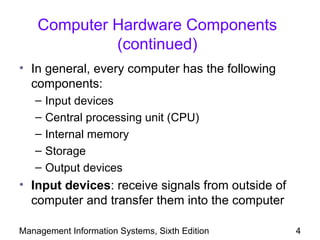
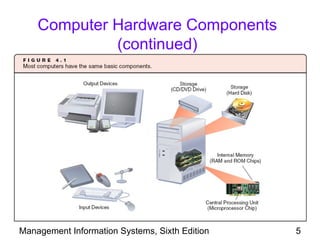
• In general, every computer has the following
  components:
   –   Input devices
   –   Central processing unit (CPU)
   –   Internal memory
   –   Storage
   –   Output devices
• Input devices: receive signals from outside of
  computer and transfer them into the computer

Management Information Systems, Sixth Edition      4
Computer Hardware Components
             (continued)


Management Information Systems, Sixth Edition   5
Computer Hardware Components
             (continued)
• Central processing unit (CPU)
   – Accepts instructions and data
   – Decodes and executes instructions
   – Stores results (output) in memory
• Internal (or primary) memory: stores data and
  instructions before and after CPU processes
  them
   – RAM: random access memory
   – ROM: read-only memory

Management Information Systems, Sixth Edition     6
Computer Hardware Components
             (continued)
• Motherboard: circuit board containing the CPU
  and primary memory
• Storage: magnetic disks, magnetic tapes,
  optical discs, DVDs, and flash memory
   – Allows permanent storage
• Output devices: deliver information from the
  computer to the user
   – Monitors and printers are the most common
     output devices
   – Audio devices also deliver output
Management Information Systems, Sixth Edition     7
Computer Hardware Components
             (continued)
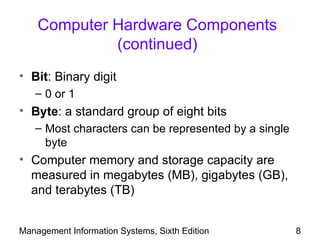
• Bit: Binary digit
   – 0 or 1
• Byte: a standard group of eight bits
   – Most characters can be represented by a single
     byte
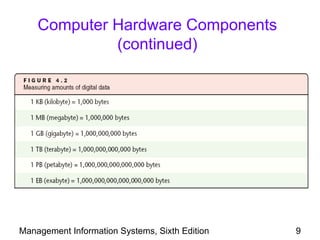
• Computer memory and storage capacity are
  measured in megabytes (MB), gigabytes (GB),
  and terabytes (TB)


Management Information Systems, Sixth Edition         8
Computer Hardware Components
             (continued)


Management Information Systems, Sixth Edition   9
Classification of Computers

• Computers vary in size and power
• Classified by power
   – Power is determined mainly by processing speed
     and memory size
• More powerful computers are more expensive


Management Information Systems, Sixth Edition    10
Supercomputers

• Supercomputers: most powerful computers at
  any given time
   – Largest in physical size and most expensive
   – Designed for complex arithmetic calculations
   – Generally impractical for business purposes
• Parallel processing: multiple processors
  running simultaneously
   – Also known as multiprocessing


Management Information Systems, Sixth Edition       11
Mainframe Computers
• Mainframe computers: store large amounts of
  data and business transactions
   – Less expensive and less powerful than
     supercomputers
   – Often used by banks, universities, and insurance
     companies as a central computer
   – 40-50% of world’s business data resides on
     mainframes
   – Use multiple processors


Management Information Systems, Sixth Edition       12
Midrange Computers

• Midrange computers: often act as servers
  within organizations or through the Internet
   – Smaller and less powerful than mainframes
   – Serve hundreds of users that connect from
     personal computers
   – Use multiple processors


Management Information Systems, Sixth Edition    13
Microcomputers

• Microcomputers: personal computers,
  notebook computers, and handhelds
• Workstation: more powerful microcomputer
  used for CAD, CAM, and scientific applications
• Power of microcomputers doubles about every
  two years


Management Information Systems, Sixth Edition      14
Computers on the Go: Notebook,
    Handheld, and Tablet Computers
• Notebook (or laptop) computer: compact
  personal computer powered by rechargeable
  battery
   – New models include wireless technology
• Personal digital assistant (PDA): handheld
  computer
   – Stylus: pen-like device used to enter data through
     a touch screen
• Tablet computer: PC in the form of a thick
  writing tablet that recognizes handwriting
Management Information Systems, Sixth Edition       15
Converging Technologies

• Technology convergence: building several
  technologies into a single piece of hardware
   – Prominent in handheld units
• Commonly merged technologies include:
   –   Cell phones
   –   Television
   –   Digital cameras
   –   Digital sound recorder
   –   MP3 players

Management Information Systems, Sixth Edition    16
A Peek Inside the Computer

• Professionals must know about computer
  components to understand their power and
  capabilities
   – They use this knowledge to make good decisions
     in purchasing or recommending a computer


Management Information Systems, Sixth Edition    17
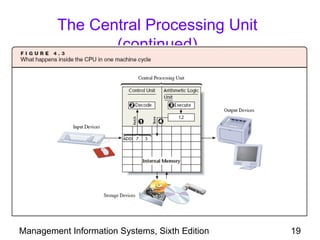
The Central Processing Unit

• CPU has two units to store and process data
   – Control unit and arithmetic logic unit
• CPU is a silicon chip with multiple circuits
• Also known as microprocessor
• Multicore processors: processors that combine
  two or more CPUs or “cores” on a single chip
• Multithreading: processing more than one
  program, or several parts of a program, at the
  same time
Management Information Systems, Sixth Edition   18
The Central Processing Unit
                (continued)


Management Information Systems, Sixth Edition   19
The Central Processing Unit
                (continued)
• Microprocessors are embedded with transistors
• Transistor: a semiconductor that can represent
  binary code’s two states
• CPU machine cycle:
   – Time period during which the CPU fetches,
     decodes, and executes each instruction
• CPU clock: special circuitry on the processor
  that synchronizes all tasks
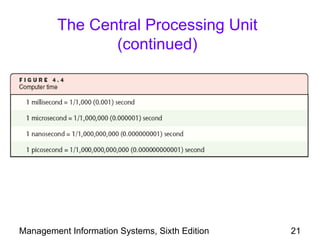
• Clock rate: number of pulses per second
   – A machine cycle takes several clock pulses

Management Information Systems, Sixth Edition     20
The Central Processing Unit
                (continued)


Management Information Systems, Sixth Edition   21
The Central Processing Unit
                (continued)
• Data word: maximum number of bits that the
  control unit can fetch from primary memory in a
  single machine cycle
   – Current microcomputers have words of 32 or 64
     bits
• Arithmetic logic unit: the part of the CPU that
  performs arithmetic and logical operations


Management Information Systems, Sixth Edition        22
Computer Power

• Computer power depends on processing speed
  and memory capacity
• Bus: electronic lines or traces used for
  communication inside computer
• Throughput: number of bits per second that the
  bus can accommodate
• MIPS: millions of instructions per second, a
  common measure of computer speed


Management Information Systems, Sixth Edition   23
Input Devices

• Computers must receive input to produce output
• Input devices include machines and devices
  used to enter instructions and data into
  computer
• Common input devices include:
   –   Keyboard
   –   Trackball
   –   Microphone
   –   Scanner

Management Information Systems, Sixth Edition   24
Keyboard
• Keyboard: an input device that contains keys
  that users press to enter data
   – Includes letters, numbers, punctuation, and
     function keys
   – QWERTY: standard keyboard layout
   – Dvorak: keyboard layout that allows faster typing
• Ergonomics: the study of the comfort and
  safety of humans in the workplace
• Ergonomic keyboard: fits the natural position
  of forearms and prevents injury
Management Information Systems, Sixth Edition      25
Mouse, Trackball, and Trackpad
• Mouse: input device that controls an on-screen
  pointer to facilitate point-and-click approach
   – Has one to five buttons for clicking, locking,
     dragging
• Trackball: similar to mouse, but user
  manipulates a ball within the device to indicate
  movement on the screen
• Trackpad: cursor movement is controlled by
  moving a finger over a touch-sensitive pad
• Mice and similar devices can be wireless units

Management Information Systems, Sixth Edition         26
Touch Screen

• Touch screen: both an input and an output
  device
   – Often used for public applications, such as kiosks
   – Prevalent in handheld devices, GPS devices, and
     mobile phones
   – Allows the user to navigate and select by
     touching the screen


Management Information Systems, Sixth Edition        27
Source Data Input Devices

• Source data input devices: copy data directly
  from sources such as bar codes, credit cards,
  and checks
• Optical mark recognition devices detect
  positions of marks or characters
• Optical character recognition (OCR) devices
  try to interpret handwritten and printed text
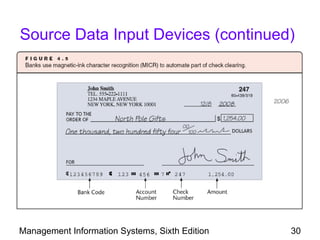
• Magnetic-ink character recognition (MICR):
  detects magnetic ink on checks

Management Information Systems, Sixth Edition     28
Source Data Input Devices (continued)

• Magnetic strips on credit cards store encoded
  data
• Bar codes on products and packages store
  encoded information


Management Information Systems, Sixth Edition     29
Source Data Input Devices (continued)


Management Information Systems, Sixth Edition   30
Imaging

• Imaging: converts documents into images
   – Saves paper
   – More efficient retrieval and filing
• Scanned document images can be:
   – Indexed and linked to relevant records in
     databases
   – Easily retrieved
• Original paper documents can be destroyed
  after scanning

Management Information Systems, Sixth Edition    31
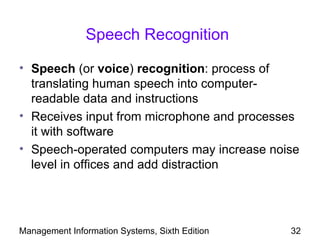
Speech Recognition

• Speech (or voice) recognition: process of
  translating human speech into computer-
  readable data and instructions
• Receives input from microphone and processes
  it with software
• Speech-operated computers may increase noise
  level in offices and add distraction


Management Information Systems, Sixth Edition   32
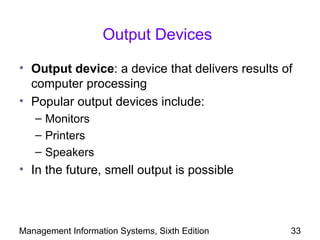
Output Devices

• Output device: a device that delivers results of
  computer processing
• Popular output devices include:
   – Monitors
   – Printers
   – Speakers
• In the future, smell output is possible


Management Information Systems, Sixth Edition    33
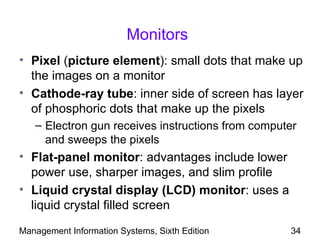
Monitors
• Pixel (picture element): small dots that make up
  the images on a monitor
• Cathode-ray tube: inner side of screen has layer
  of phosphoric dots that make up the pixels
   – Electron gun receives instructions from computer
     and sweeps the pixels
• Flat-panel monitor: advantages include lower
  power use, sharper images, and slim profile
• Liquid crystal display (LCD) monitor: uses a
  liquid crystal filled screen
Management Information Systems, Sixth Edition      34
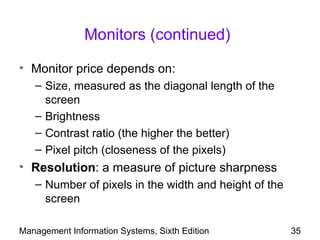
Monitors (continued)

• Monitor price depends on:
   – Size, measured as the diagonal length of the
     screen
   – Brightness
   – Contrast ratio (the higher the better)
   – Pixel pitch (closeness of the pixels)
• Resolution: a measure of picture sharpness
   – Number of pixels in the width and height of the
     screen

Management Information Systems, Sixth Edition          35
Printers
• Nonimpact printer: does not mechanically
  impact the paper
   –   Laser printer is most common in business
   –   Others include ink-jet and electrothermal printers
   –   Speed is measured in pages per minute (ppm)
   –   Density measured in dots per inch (DPI)
• Impact printers: reproduce image by using
  mechanical impact
   – Dot-matrix printer: tiny pins strike ink ribbon
     against paper
Management Information Systems, Sixth Edition           36
Storage Media
• Data must be stored on nonvolatile medium
   – Data is retained even when the storage device is
     not connected to electrical power
• Storage devices differ in the technology used to
  maintain data and physical structure
• Evaluate storage devices by comparing:
   –   Cost
   –   Capacity
   –   Access speed
   –   Access mode
Management Information Systems, Sixth Edition       37
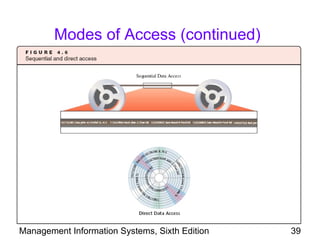
Modes of Access
• Sequential storage: data is organized one
  record after another
   – Must read through all records that are stored prior
     to the desired record
• Direct access: records are organized by
  physical address on the device
   – A record can be accessed directly (randomly)
• Flash drives: small storage devices that
  connect via universal serial bus (USB)
• Direct access storage media is the only practical
  way to organize and query databases
Management Information Systems, Sixth Edition         38
Modes of Access (continued)


Management Information Systems, Sixth Edition   39
Magnetic Tapes

• Magnetic tapes: similar to tapes used in tape
  recorders and VCRs, usually as cartridges
   –   Provide lowest cost (bytes per dollar)
   –   Can back up all data
   –   Takes a long time to copy from tape
   –   Tapes are unreliable after long periods of time or
       usage


Management Information Systems, Sixth Edition           40
Magnetic Disks

• Magnetic disk: most widely used storage
  medium
   – Includes hard disks and floppy disks
• Hard disk: stack of several rigid platters
  installed in the same box that holds the CPU
   – Stores up to one TB of data
   – External hard disks connect to computer through
     USB port


Management Information Systems, Sixth Edition      41
Optical Discs

• Optical disc: recorded by treating the disc
  surface to reflect light in different ways
• Two basic categories of optical disk:
   – Compact discs (CDs)
   – Digital video discs (DVDs)
• Compact discs: available as read-only,
  recordable, and rewritable
• DVDs: store 4.7 GB per side
• Optical discs are slower than hard disks
Management Information Systems, Sixth Edition   42
Optical Tape

• Optical tape: uses same technology as optical
  discs to store and retrieve data
• Bits are organized sequentially, similar to
  magnetic tape
• Mainly used in digital video camcorders


Management Information Systems, Sixth Edition     43
Flash Memory

• Flash memory: rewritable memory chip that
  holds content without power
   –   Consumes very little power
   –   Does not need a constant power supply
   –   Fast access times
   –   Relatively immune to shock or vibration
• Available as memory card and USB drive
• Solid state disk: storage media that does not
  have latency time

Management Information Systems, Sixth Edition     44
DAS, NAS, and SAN
• Direct access storage (DAS): disk or array of
  disks or tapes directly connected to server
   – Easy to deploy and manage
   – Does not relieve any of server’s workload
• Network-attached storage (NAS): device
  designed for networked storage
   – Includes both the storage media and the software
     to manage it
   – Offloads processing from the server
   – Highly scalable
Management Information Systems, Sixth Edition      45
DAS, NAS, and SAN (continued)
• Storage area network (SAN): a network fully
  devoted to storage and transfer of data
   – Managed separately from the rest of the LAN
   – May combine DAS and NAS devices
   – Can transfer larger blocks of data at higher
     speeds
   – Expensive and complex to manage
• RAID: redundant array of independent disks
   – Used by DAS, NAS, and SAN
   – Fault-tolerant: can continue even through disk
     failures due to redundancy
Management Information Systems, Sixth Edition         46
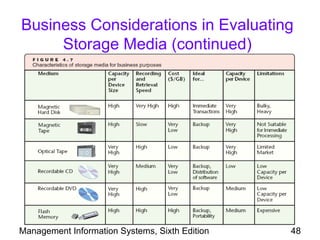
Business Considerations in Evaluating
          Storage Media

• When purchasing storage devices, managers
  must consider:
   –   Purpose of data storage
   –   Amount of data to be stored
   –   Required speed of data storage and retrieval
   –   Unit space and portability of the device
   –   Cost
   –   Reliability and life expectancy
   –   Trade-offs
Management Information Systems, Sixth Edition         47
Business Considerations in Evaluating
     Storage Media (continued)


Management Information Systems, Sixth Edition   48
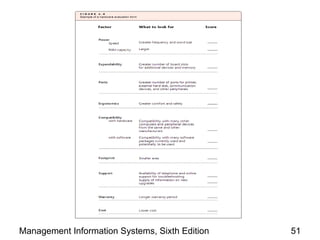
Considerations in Purchasing
                 Hardware
• Companies must consider the following when
  selecting equipment to purchase:
   – Power of the equipment (memory size, capacity,
     speed)
   – Expansion slots and ports (sockets used to
     connect computer to external devices)
   – Monitor type and resolution
   – Ergonomics
   – Compatibility with existing hardware, software,
     and networks
Management Information Systems, Sixth Edition      49
Considerations in Purchasing
           Hardware (continued)
• Considerations (continued):
   –   Hardware footprint (physical size of equipment)
   –   Reliability of vendor
   –   Warranty policy and post-warranty support
   –   Power consumption and noise
   –   Cost
• Backward compatibility: the capability to work
  with older hardware or software


Management Information Systems, Sixth Edition            50
Management Information Systems, Sixth Edition   51
Scalability and Updating Hardware

• Scalability: resources can be expanded or
  upgraded to provide increased power
• Not all hardware is scalable
• Leasing hardware is a valid option to avoid short
  useful lifetime of hardware


Management Information Systems, Sixth Edition    52
Summary

• Understanding hardware is important for
  purchasing decisions
• Computers are classified according to power
• All computers have a CPU to process
  instructions
• Clock rate measures the speed of a CPU
• Data word: the number of bits the computer can
  process in a single cycle


Management Information Systems, Sixth Edition   53
Summary (continued)
• Computer power: measured by its speed,
  memory size, and number of processor cores
• RAM: volatile memory that forms the largest part
  of computer’s memory
• ROM is nonvolatile; it does not require power
• Imaging devices help process text and graphics
• When evaluating external storage, consider
  transfer rate, capacity, portability, and form of
  data organization supported


Management Information Systems, Sixth Edition    54
Summary (continued)
• Data is organized sequentially on tapes
• Direct access storage devices such as RAM,
  magnetic disks, and optical discs allow random
  access
• Databases require direct access storage devices
• When purchasing hardware, professionals
  should consider cost, power, scalability, and
  compatibility
• Information technology may pose health risks
  such as carpal tunnel syndrome
Management Information Systems, Sixth Edition   55

ITE 101 - Week 4

  • 1.
    Management Information Systems, Sixth Edition Chapter 4: Business Hardware
  • 2.
    Objectives • List majorhardware components of computers and explain their functions • Classify computers into major categories, and identify their strengths and weaknesses • Identify and evaluate key criteria for deciding what computers or related devices to purchase • Discuss the possible health hazards of computer use Management Information Systems, Sixth Edition 2
  • 3.
    Computer Hardware Components •Hardware: physical components of computers and related electronic devices • Consider software before hardware • Computer must handle four operations: – Accept data – Store data and instructions – Process data – Output data and/or information Management Information Systems, Sixth Edition 3
  • 4.
    Computer Hardware Components (continued) • In general, every computer has the following components: – Input devices – Central processing unit (CPU) – Internal memory – Storage – Output devices • Input devices: receive signals from outside of computer and transfer them into the computer Management Information Systems, Sixth Edition 4
  • 5.
    Computer Hardware Components (continued) Management Information Systems, Sixth Edition 5
  • 6.
    Computer Hardware Components (continued) • Central processing unit (CPU) – Accepts instructions and data – Decodes and executes instructions – Stores results (output) in memory • Internal (or primary) memory: stores data and instructions before and after CPU processes them – RAM: random access memory – ROM: read-only memory Management Information Systems, Sixth Edition 6
  • 7.
    Computer Hardware Components (continued) • Motherboard: circuit board containing the CPU and primary memory • Storage: magnetic disks, magnetic tapes, optical discs, DVDs, and flash memory – Allows permanent storage • Output devices: deliver information from the computer to the user – Monitors and printers are the most common output devices – Audio devices also deliver output Management Information Systems, Sixth Edition 7
  • 8.
    Computer Hardware Components (continued) • Bit: Binary digit – 0 or 1 • Byte: a standard group of eight bits – Most characters can be represented by a single byte • Computer memory and storage capacity are measured in megabytes (MB), gigabytes (GB), and terabytes (TB) Management Information Systems, Sixth Edition 8
  • 9.
    Computer Hardware Components (continued) Management Information Systems, Sixth Edition 9
  • 10.
    Classification of Computers •Computers vary in size and power • Classified by power – Power is determined mainly by processing speed and memory size • More powerful computers are more expensive Management Information Systems, Sixth Edition 10
  • 11.
    Supercomputers • Supercomputers: mostpowerful computers at any given time – Largest in physical size and most expensive – Designed for complex arithmetic calculations – Generally impractical for business purposes • Parallel processing: multiple processors running simultaneously – Also known as multiprocessing Management Information Systems, Sixth Edition 11
  • 12.
    Mainframe Computers • Mainframecomputers: store large amounts of data and business transactions – Less expensive and less powerful than supercomputers – Often used by banks, universities, and insurance companies as a central computer – 40-50% of world’s business data resides on mainframes – Use multiple processors Management Information Systems, Sixth Edition 12
  • 13.
    Midrange Computers • Midrangecomputers: often act as servers within organizations or through the Internet – Smaller and less powerful than mainframes – Serve hundreds of users that connect from personal computers – Use multiple processors Management Information Systems, Sixth Edition 13
  • 14.
    Microcomputers • Microcomputers: personalcomputers, notebook computers, and handhelds • Workstation: more powerful microcomputer used for CAD, CAM, and scientific applications • Power of microcomputers doubles about every two years Management Information Systems, Sixth Edition 14
  • 15.
    Computers on theGo: Notebook, Handheld, and Tablet Computers • Notebook (or laptop) computer: compact personal computer powered by rechargeable battery – New models include wireless technology • Personal digital assistant (PDA): handheld computer – Stylus: pen-like device used to enter data through a touch screen • Tablet computer: PC in the form of a thick writing tablet that recognizes handwriting Management Information Systems, Sixth Edition 15
  • 16.
    Converging Technologies • Technologyconvergence: building several technologies into a single piece of hardware – Prominent in handheld units • Commonly merged technologies include: – Cell phones – Television – Digital cameras – Digital sound recorder – MP3 players Management Information Systems, Sixth Edition 16
  • 17.
    A Peek Insidethe Computer • Professionals must know about computer components to understand their power and capabilities – They use this knowledge to make good decisions in purchasing or recommending a computer Management Information Systems, Sixth Edition 17
  • 18.
    The Central ProcessingUnit • CPU has two units to store and process data – Control unit and arithmetic logic unit • CPU is a silicon chip with multiple circuits • Also known as microprocessor • Multicore processors: processors that combine two or more CPUs or “cores” on a single chip • Multithreading: processing more than one program, or several parts of a program, at the same time Management Information Systems, Sixth Edition 18
  • 19.
    The Central ProcessingUnit (continued) Management Information Systems, Sixth Edition 19
  • 20.
    The Central ProcessingUnit (continued) • Microprocessors are embedded with transistors • Transistor: a semiconductor that can represent binary code’s two states • CPU machine cycle: – Time period during which the CPU fetches, decodes, and executes each instruction • CPU clock: special circuitry on the processor that synchronizes all tasks • Clock rate: number of pulses per second – A machine cycle takes several clock pulses Management Information Systems, Sixth Edition 20
  • 21.
    The Central ProcessingUnit (continued) Management Information Systems, Sixth Edition 21
  • 22.
    The Central ProcessingUnit (continued) • Data word: maximum number of bits that the control unit can fetch from primary memory in a single machine cycle – Current microcomputers have words of 32 or 64 bits • Arithmetic logic unit: the part of the CPU that performs arithmetic and logical operations Management Information Systems, Sixth Edition 22
  • 23.
    Computer Power • Computerpower depends on processing speed and memory capacity • Bus: electronic lines or traces used for communication inside computer • Throughput: number of bits per second that the bus can accommodate • MIPS: millions of instructions per second, a common measure of computer speed Management Information Systems, Sixth Edition 23
  • 24.
    Input Devices • Computersmust receive input to produce output • Input devices include machines and devices used to enter instructions and data into computer • Common input devices include: – Keyboard – Trackball – Microphone – Scanner Management Information Systems, Sixth Edition 24
  • 25.
    Keyboard • Keyboard: aninput device that contains keys that users press to enter data – Includes letters, numbers, punctuation, and function keys – QWERTY: standard keyboard layout – Dvorak: keyboard layout that allows faster typing • Ergonomics: the study of the comfort and safety of humans in the workplace • Ergonomic keyboard: fits the natural position of forearms and prevents injury Management Information Systems, Sixth Edition 25
  • 26.
    Mouse, Trackball, andTrackpad • Mouse: input device that controls an on-screen pointer to facilitate point-and-click approach – Has one to five buttons for clicking, locking, dragging • Trackball: similar to mouse, but user manipulates a ball within the device to indicate movement on the screen • Trackpad: cursor movement is controlled by moving a finger over a touch-sensitive pad • Mice and similar devices can be wireless units Management Information Systems, Sixth Edition 26
  • 27.
    Touch Screen • Touchscreen: both an input and an output device – Often used for public applications, such as kiosks – Prevalent in handheld devices, GPS devices, and mobile phones – Allows the user to navigate and select by touching the screen Management Information Systems, Sixth Edition 27
  • 28.
    Source Data InputDevices • Source data input devices: copy data directly from sources such as bar codes, credit cards, and checks • Optical mark recognition devices detect positions of marks or characters • Optical character recognition (OCR) devices try to interpret handwritten and printed text • Magnetic-ink character recognition (MICR): detects magnetic ink on checks Management Information Systems, Sixth Edition 28
  • 29.
    Source Data InputDevices (continued) • Magnetic strips on credit cards store encoded data • Bar codes on products and packages store encoded information Management Information Systems, Sixth Edition 29
  • 30.
    Source Data InputDevices (continued) Management Information Systems, Sixth Edition 30
  • 31.
    Imaging • Imaging: convertsdocuments into images – Saves paper – More efficient retrieval and filing • Scanned document images can be: – Indexed and linked to relevant records in databases – Easily retrieved • Original paper documents can be destroyed after scanning Management Information Systems, Sixth Edition 31
  • 32.
    Speech Recognition • Speech(or voice) recognition: process of translating human speech into computer- readable data and instructions • Receives input from microphone and processes it with software • Speech-operated computers may increase noise level in offices and add distraction Management Information Systems, Sixth Edition 32
  • 33.
    Output Devices • Outputdevice: a device that delivers results of computer processing • Popular output devices include: – Monitors – Printers – Speakers • In the future, smell output is possible Management Information Systems, Sixth Edition 33
  • 34.
    Monitors • Pixel (pictureelement): small dots that make up the images on a monitor • Cathode-ray tube: inner side of screen has layer of phosphoric dots that make up the pixels – Electron gun receives instructions from computer and sweeps the pixels • Flat-panel monitor: advantages include lower power use, sharper images, and slim profile • Liquid crystal display (LCD) monitor: uses a liquid crystal filled screen Management Information Systems, Sixth Edition 34
  • 35.
    Monitors (continued) • Monitorprice depends on: – Size, measured as the diagonal length of the screen – Brightness – Contrast ratio (the higher the better) – Pixel pitch (closeness of the pixels) • Resolution: a measure of picture sharpness – Number of pixels in the width and height of the screen Management Information Systems, Sixth Edition 35
  • 36.
    Printers • Nonimpact printer:does not mechanically impact the paper – Laser printer is most common in business – Others include ink-jet and electrothermal printers – Speed is measured in pages per minute (ppm) – Density measured in dots per inch (DPI) • Impact printers: reproduce image by using mechanical impact – Dot-matrix printer: tiny pins strike ink ribbon against paper Management Information Systems, Sixth Edition 36
  • 37.
    Storage Media • Datamust be stored on nonvolatile medium – Data is retained even when the storage device is not connected to electrical power • Storage devices differ in the technology used to maintain data and physical structure • Evaluate storage devices by comparing: – Cost – Capacity – Access speed – Access mode Management Information Systems, Sixth Edition 37
  • 38.
    Modes of Access •Sequential storage: data is organized one record after another – Must read through all records that are stored prior to the desired record • Direct access: records are organized by physical address on the device – A record can be accessed directly (randomly) • Flash drives: small storage devices that connect via universal serial bus (USB) • Direct access storage media is the only practical way to organize and query databases Management Information Systems, Sixth Edition 38
  • 39.
    Modes of Access(continued) Management Information Systems, Sixth Edition 39
  • 40.
    Magnetic Tapes • Magnetictapes: similar to tapes used in tape recorders and VCRs, usually as cartridges – Provide lowest cost (bytes per dollar) – Can back up all data – Takes a long time to copy from tape – Tapes are unreliable after long periods of time or usage Management Information Systems, Sixth Edition 40
  • 41.
    Magnetic Disks • Magneticdisk: most widely used storage medium – Includes hard disks and floppy disks • Hard disk: stack of several rigid platters installed in the same box that holds the CPU – Stores up to one TB of data – External hard disks connect to computer through USB port Management Information Systems, Sixth Edition 41
  • 42.
    Optical Discs • Opticaldisc: recorded by treating the disc surface to reflect light in different ways • Two basic categories of optical disk: – Compact discs (CDs) – Digital video discs (DVDs) • Compact discs: available as read-only, recordable, and rewritable • DVDs: store 4.7 GB per side • Optical discs are slower than hard disks Management Information Systems, Sixth Edition 42
  • 43.
    Optical Tape • Opticaltape: uses same technology as optical discs to store and retrieve data • Bits are organized sequentially, similar to magnetic tape • Mainly used in digital video camcorders Management Information Systems, Sixth Edition 43
  • 44.
    Flash Memory • Flashmemory: rewritable memory chip that holds content without power – Consumes very little power – Does not need a constant power supply – Fast access times – Relatively immune to shock or vibration • Available as memory card and USB drive • Solid state disk: storage media that does not have latency time Management Information Systems, Sixth Edition 44
  • 45.
    DAS, NAS, andSAN • Direct access storage (DAS): disk or array of disks or tapes directly connected to server – Easy to deploy and manage – Does not relieve any of server’s workload • Network-attached storage (NAS): device designed for networked storage – Includes both the storage media and the software to manage it – Offloads processing from the server – Highly scalable Management Information Systems, Sixth Edition 45
  • 46.
    DAS, NAS, andSAN (continued) • Storage area network (SAN): a network fully devoted to storage and transfer of data – Managed separately from the rest of the LAN – May combine DAS and NAS devices – Can transfer larger blocks of data at higher speeds – Expensive and complex to manage • RAID: redundant array of independent disks – Used by DAS, NAS, and SAN – Fault-tolerant: can continue even through disk failures due to redundancy Management Information Systems, Sixth Edition 46
  • 47.
    Business Considerations inEvaluating Storage Media • When purchasing storage devices, managers must consider: – Purpose of data storage – Amount of data to be stored – Required speed of data storage and retrieval – Unit space and portability of the device – Cost – Reliability and life expectancy – Trade-offs Management Information Systems, Sixth Edition 47
  • 48.
    Business Considerations inEvaluating Storage Media (continued) Management Information Systems, Sixth Edition 48
  • 49.
    Considerations in Purchasing Hardware • Companies must consider the following when selecting equipment to purchase: – Power of the equipment (memory size, capacity, speed) – Expansion slots and ports (sockets used to connect computer to external devices) – Monitor type and resolution – Ergonomics – Compatibility with existing hardware, software, and networks Management Information Systems, Sixth Edition 49
  • 50.
    Considerations in Purchasing Hardware (continued) • Considerations (continued): – Hardware footprint (physical size of equipment) – Reliability of vendor – Warranty policy and post-warranty support – Power consumption and noise – Cost • Backward compatibility: the capability to work with older hardware or software Management Information Systems, Sixth Edition 50
  • 51.
  • 52.
    Scalability and UpdatingHardware • Scalability: resources can be expanded or upgraded to provide increased power • Not all hardware is scalable • Leasing hardware is a valid option to avoid short useful lifetime of hardware Management Information Systems, Sixth Edition 52
  • 53.
    Summary • Understanding hardwareis important for purchasing decisions • Computers are classified according to power • All computers have a CPU to process instructions • Clock rate measures the speed of a CPU • Data word: the number of bits the computer can process in a single cycle Management Information Systems, Sixth Edition 53
  • 54.
    Summary (continued) • Computerpower: measured by its speed, memory size, and number of processor cores • RAM: volatile memory that forms the largest part of computer’s memory • ROM is nonvolatile; it does not require power • Imaging devices help process text and graphics • When evaluating external storage, consider transfer rate, capacity, portability, and form of data organization supported Management Information Systems, Sixth Edition 54
  • 55.
    Summary (continued) • Datais organized sequentially on tapes • Direct access storage devices such as RAM, magnetic disks, and optical discs allow random access • Databases require direct access storage devices • When purchasing hardware, professionals should consider cost, power, scalability, and compatibility • Information technology may pose health risks such as carpal tunnel syndrome Management Information Systems, Sixth Edition 55