Outlines
Chapter 4:
Computer Software
Software
History
Types
 Classification based on purpose
o System & Application Software
 Classification based on availability/copyright
Status
o Shareware, Freeware, Open source
Programming Languages
 Machine, Assembly & high level languages
 Compilation and interpretation
 Algorithm
 Pseudocode
 Flowchart
 Graphical Programming
Artificial Intelligence
Information System
Dr. Rahman Ali, University of
Peshawar.
rahmanac1@gmail.com
Mr. Asmat Ali, GHSS Mingora
Swat.
aasmat76@gmail.com
3
Management Information System – by Dr. Rahman Ali & Asmat Ali
Software
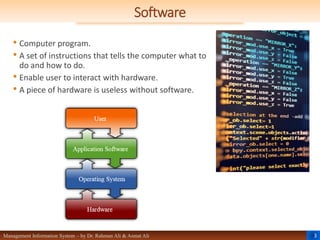
• Computer program.
• A set of instructions that tells the computer what to
do and how to do.
• Enable user to interact with hardware.
• A piece of hardware is useless without software.
4
Management Information System – by Dr. Rahman Ali & Asmat Ali
Software
 History
 Alan Turing was the first man who introduced the theory of software.
 Claude Shannon explained how binary logic can be used to program a computer.
The computer programs in the 1940’s were written directly in machine language.
 1957: The first programming language FORTRAN was introduced by IBM.
 1962: COBOL.
 Other programming languages like Pascal, C and C++.
 1970’s: Unix OS and the Unix-based Mac OS X were introduced.
 1980: Bill Gates and his co-workers introduced DOS OS.
 1980’s: Richard Stallman worked on the open source GNU project which led to the
development of Linux OS.
 1985: The first Windows OS was developed which was evolved over time from
Windows 1.0 to Windows 10.
5
Management Information System – by Dr. Rahman Ali & Asmat Ali
Types of Software
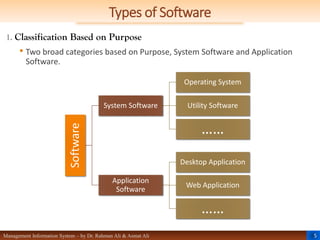
1. Classification Based on Purpose
• Two broad categories based on Purpose, System Software and Application
Software.
Software
System Software
Operating System
Utility Software
……
Application
Software
Desktop Application
Web Application
……
6
Management Information System – by Dr. Rahman Ali & Asmat Ali
Types of Software
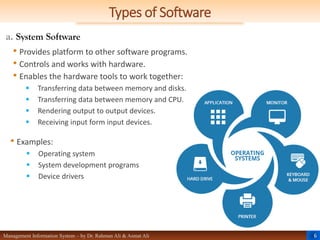
a. System Software
• Provides platform to other software programs.
• Controls and works with hardware.
• Enables the hardware tools to work together:
 Transferring data between memory and disks.
 Transferring data between memory and CPU.
 Rendering output to output devices.
 Receiving input form input devices.
• Examples:
 Operating system
 System development programs
 Device drivers
7
Management Information System – by Dr. Rahman Ali & Asmat Ali
System Software
 Types of System S/W
• Operating System
 Functions: Booting, Interfacing, Resource, Memory and process Management,
Security
 Types: Batch, Timesharing, Distributed, Network, Real-time, Embedded
 Others OS: Windows, OS X, UNIX, Linux and Chrome OS, Mobile category contains
Google Android, Apple iOS
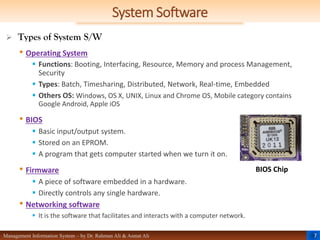
• BIOS
 Basic input/output system.
 Stored on an EPROM.
 A program that gets computer started when we turn it on.
• Firmware
 A piece of software embedded in a hardware.
 Directly controls any single hardware.
• Networking software
 It is the software that facilitates and interacts with a computer network.
BIOS Chip
8
Management Information System – by Dr. Rahman Ali & Asmat Ali
System Software
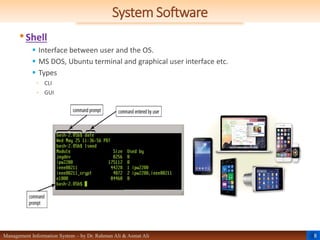
•Shell
 Interface between user and the OS.
 MS DOS, Ubuntu terminal and graphical user interface etc.
 Types
◦ CLI
◦ GUI
9
Management Information System – by Dr. Rahman Ali & Asmat Ali
System Software
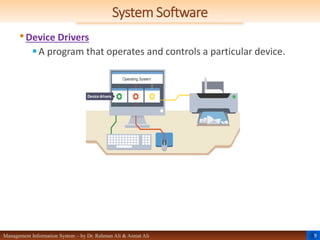
•Device Drivers
A program that operates and controls a particular device.
10
Management Information System – by Dr. Rahman Ali & Asmat Ali
System Software
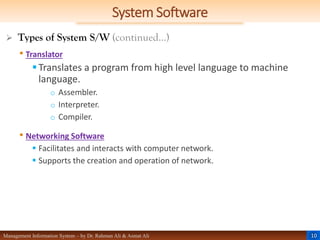
 Types of System S/W (continued…)
• Translator
Translates a program from high level language to machine
language.
o Assembler.
o Interpreter.
o Compiler.
• Networking Software
 Facilitates and interacts with computer network.
 Supports the creation and operation of network.
11
Management Information System – by Dr. Rahman Ali & Asmat Ali
System Software
Introduction To Computer & ICT – by Dr. Rahman Ali & Asmat Ali
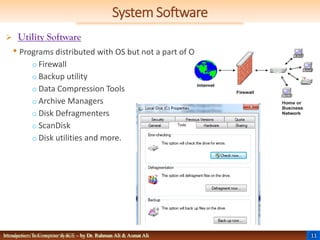
 Utility Software
• Programs distributed with OS but not a part of OS.
o Firewall
o Backup utility
o Data Compression Tools
o Archive Managers
o Disk Defragmenters
o ScanDisk
o Disk utilities and more.
12
Management Information System – by Dr. Rahman Ali & Asmat Ali
System Development Software
 System development software are tools that are used to write new software and
ensure it is working correctly.
 Tools that are classified as following:
• Editor:
 These are text editors where we write the program.
• Compiler:
 These are tools that transform the code we write in programming language into machine
language that the processor can understand.
• Interpreter:
 It works like compiler but translates one statement of the source code at a time and
directly executes the program.
• Debugger:
 It is a software tool that is used to test and find errors (bugs) in a program. Software
developers use debuggers to debug the code they write. A debugger provides a higher
level of control over the program execution so that it can be stopped according to specific
conditions. Debugger tries to point out the error in a program when it cashes.
 IDE:
 It stands for “Integrated Development Environment”. It is a software suite (a collection of
related programs) that provides a complete development environment to the developers.
13
Management Information System – by Dr. Rahman Ali & Asmat Ali
Types of Software
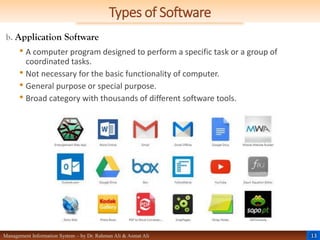
b. Application Software
• A computer program designed to perform a specific task or a group of
coordinated tasks.
• Not necessary for the basic functionality of computer.
• General purpose or special purpose.
• Broad category with thousands of different software tools.
14
Management Information System – by Dr. Rahman Ali & Asmat Ali
Application Software
 Types of Application S/W
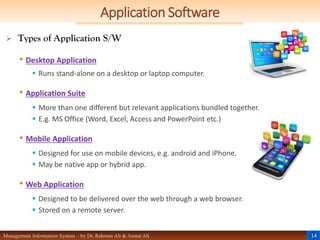
• Desktop Application
 Runs stand-alone on a desktop or laptop computer.
• Application Suite
 More than one different but relevant applications bundled together.
 E.g. MS Office (Word, Excel, Access and PowerPoint etc.)
• Mobile Application
 Designed for use on mobile devices, e.g. android and iPhone.
 May be native app or hybrid app.
• Web Application
 Designed to be delivered over the web through a web browser.
 Stored on a remote server.
15
Management Information System – by Dr. Rahman Ali & Asmat Ali
Application Software
 Types of Application S/W (continued…)
• Enterprise Software
 Designed to address the needs of a large organization.
 Often runs in a distributed environment.
• Content Access Software
 Designed to access content without editing it.
 Media players, web browsers.
• Educational Software
 Designed for use by educators and students, e.g. for delivering tests.
• Simulation Software
 Simulate physical or abstract systems.
 Used in education and research.
16
Management Information System – by Dr. Rahman Ali & Asmat Ali
Application Software
 Types of Application S/W (continued…)
• Media Development Software
 Graphic art tools, video composers etc.
 Generates electronic media.
• Product Engineering Software
 Tools used to develop software programs.
 IDE, editor, compiler and more.
• General Purpose Software
 Programs used for multiple purposes.
 Spreadsheet applications, word processors, communication software and more.
• Special Purpose Software
 Customized software.
 Designed to meet a person or organization’s unique demands.
17
Management Information System – by Dr. Rahman Ali & Asmat Ali
Types of Software
2. Classification by Copyright Status
• Availability or copyright status.
• Four main categories, shareware, freeware, free software and open source
software.
 Shareware
 Trial software.
 Full functionality for a short period of time or limited functionality unless a license is
purchased.
 Freeware
 Freely available without any payment.
 Copyrighted, i.e. can’t be illegally distributed.
18
Management Information System – by Dr. Rahman Ali & Asmat Ali
Types of Software
2. Classification by Copyright Status (continued…)
 Free Software
 Freely available.
 Free to use, copy and distribute.
 Should be redistributed with original terms of use.
 Open Source Software
 Similar to freeware.
 Source code made available to view and analyze how it was created.
 Can be modified and extended by adding additional modules.
19
Management Information System – by Dr. Rahman Ali & Asmat Ali
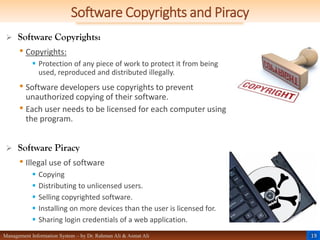
Software Copyrights and Piracy
 Software Copyrights:
• Copyrights:
 Protection of any piece of work to protect it from being
used, reproduced and distributed illegally.
• Software developers use copyrights to prevent
unauthorized copying of their software.
• Each user needs to be licensed for each computer using
the program.
 Software Piracy
• Illegal use of software
 Copying
 Distributing to unlicensed users.
 Selling copyrighted software.
 Installing on more devices than the user is licensed for.
 Sharing login credentials of a web application.
20
Management Information System – by Dr. Rahman Ali & Asmat Ali
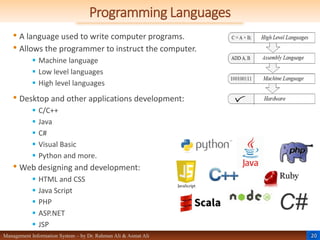
Programming Languages
• A language used to write computer programs.
• Allows the programmer to instruct the computer.
 Machine language
 Low level languages
 High level languages
• Desktop and other applications development:
 C/C++
 Java
 C#
 Visual Basic
 Python and more.
• Web designing and development:
 HTML and CSS
 Java Script
 PHP
 ASP.NET
 JSP
21
Management Information System – by Dr. Rahman Ali & Asmat Ali
Programming Languages
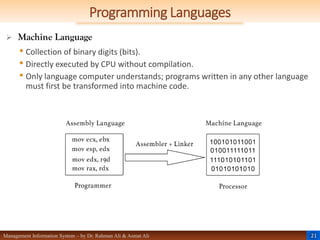
 Machine Language
• Collection of binary digits (bits).
• Directly executed by CPU without compilation.
• Only language computer understands; programs written in any other language
must first be transformed into machine code.
22
Management Information System – by Dr. Rahman Ali & Asmat Ali
Programming Languages
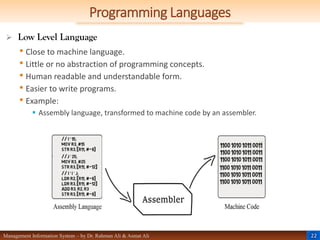
 Low Level Language
• Close to machine language.
• Little or no abstraction of programming concepts.
• Human readable and understandable form.
• Easier to write programs.
• Example:
 Assembly language, transformed to machine code by an assembler.
23
Management Information System – by Dr. Rahman Ali & Asmat Ali
Programming Languages
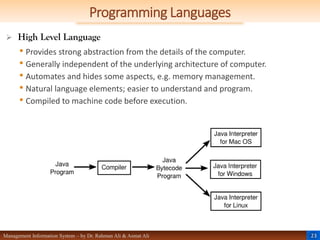
 High Level Language
• Provides strong abstraction from the details of the computer.
• Generally independent of the underlying architecture of computer.
• Automates and hides some aspects, e.g. memory management.
• Natural language elements; easier to understand and program.
• Compiled to machine code before execution.
24
Management Information System – by Dr. Rahman Ali & Asmat Ali
Programming Languages
Introduction To Computer & ICT – by Dr. Rahman Ali & Asmat Ali
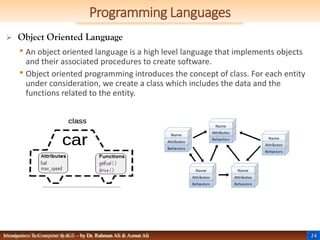
 Object Oriented Language
• An object oriented language is a high level language that implements objects
and their associated procedures to create software.
• Object oriented programming introduces the concept of class. For each entity
under consideration, we create a class which includes the data and the
functions related to the entity.
25
Management Information System – by Dr. Rahman Ali & Asmat Ali
Programming Languages
 Fourth Generation Language
•4th generation languages (4GLs) are considered to have support
for database management, report generation, mathematical
optimization, GUI creation and web development.
•These languages designed to reduce the time, effort and cost of
software development.
•They are closer to human language than the earlier generation
languages like Java, C++ and C# etc. which are third generation
languages.
•For example a 4GL command may look something like “FIND ALL
RECORDS WHERE NAME IS ‘ALI’”.
26
Management Information System – by Dr. Rahman Ali & Asmat Ali
Programming Languages
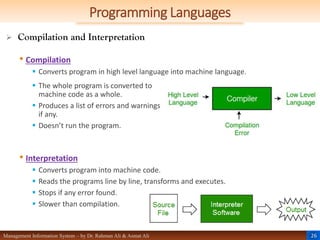
 Compilation and Interpretation
• Compilation
 Converts program in high level language into machine language.
• Interpretation
 Converts program into machine code.
 Reads the programs line by line, transforms and executes.
 Stops if any error found.
 Slower than compilation.
 The whole program is converted to
machine code as a whole.
 Produces a list of errors and warnings
if any.
 Doesn’t run the program.
27
Management Information System – by Dr. Rahman Ali & Asmat Ali
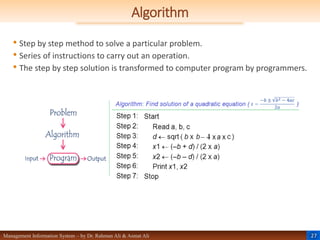
Algorithm
• Step by step method to solve a particular problem.
• Series of instructions to carry out an operation.
• The step by step solution is transformed to computer program by programmers.
28
Management Information System – by Dr. Rahman Ali & Asmat Ali
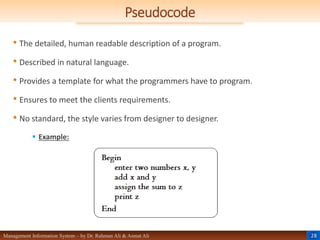
Pseudocode
• The detailed, human readable description of a program.
• Described in natural language.
• Provides a template for what the programmers have to program.
• Ensures to meet the clients requirements.
• No standard, the style varies from designer to designer.
 Example:
29
Management Information System – by Dr. Rahman Ali & Asmat Ali
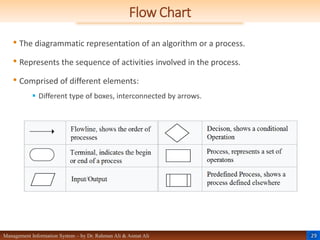
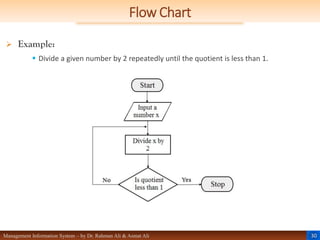
Flow Chart
• The diagrammatic representation of an algorithm or a process.
• Represents the sequence of activities involved in the process.
• Comprised of different elements:
 Different type of boxes, interconnected by arrows.
30
Management Information System – by Dr. Rahman Ali & Asmat Ali
Flow Chart
 Example:
 Divide a given number by 2 repeatedly until the quotient is less than 1.
31
Management Information System – by Dr. Rahman Ali & Asmat Ali
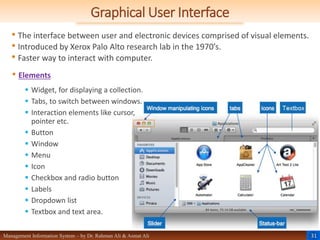
Graphical User Interface
• The interface between user and electronic devices comprised of visual elements.
• Introduced by Xerox Palo Alto research lab in the 1970’s.
• Faster way to interact with computer.
• Elements
 Widget, for displaying a collection.
 Tabs, to switch between windows.
 Interaction elements like cursor,
pointer etc.
 Button
 Window
 Menu
 Icon
 Checkbox and radio button
 Labels
 Dropdown list
 Textbox and text area.
32
Management Information System – by Dr. Rahman Ali & Asmat Ali
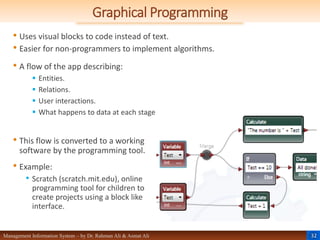
Graphical Programming
• Uses visual blocks to code instead of text.
• Easier for non-programmers to implement algorithms.
• A flow of the app describing:
 Entities.
 Relations.
 User interactions.
 What happens to data at each stage
• This flow is converted to a working
software by the programming tool.
• Example:
• Scratch (scratch.mit.edu), online
programming tool for children to
create projects using a block like
interface.
33
Management Information System – by Dr. Rahman Ali & Asmat Ali
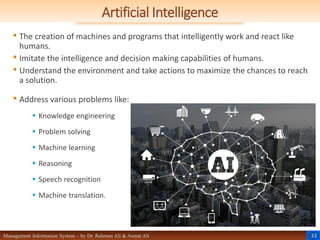
Artificial Intelligence
• The creation of machines and programs that intelligently work and react like
humans.
• Imitate the intelligence and decision making capabilities of humans.
• Understand the environment and take actions to maximize the chances to reach
a solution.
• Address various problems like:
 Knowledge engineering
 Problem solving
 Machine learning
 Reasoning
 Speech recognition
 Machine translation.
34
Management Information System – by Dr. Rahman Ali & Asmat Ali
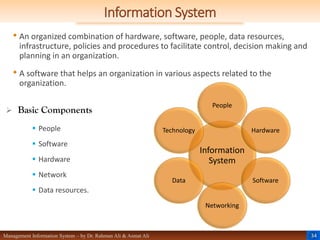
Information System
• An organized combination of hardware, software, people, data resources,
infrastructure, policies and procedures to facilitate control, decision making and
planning in an organization.
• A software that helps an organization in various aspects related to the
organization.
 Basic Components
 People
 Software
 Hardware
 Network
 Data resources.
Information
System
People
Hardware
Software
Networking
Data
Technology
35
Management Information System – by Dr. Rahman Ali & Asmat Ali
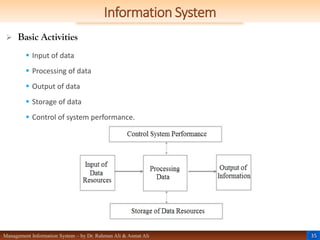
Information System
 Basic Activities
 Input of data
 Processing of data
 Output of data
 Storage of data
 Control of system performance.
36
Management Information System – by Dr. Rahman Ali & Asmat Ali
The Need for Programming
• Only hardware is of no use
 Need an operating system and some application programs to make use of hardware.
• Machine language is tedious
 The early computers were operated this way. It is very tedious, almost a non-practical
way to interact with computers.
• Interface
 Programming languages are an interface between humans and machines.
• Problem solving
 Health
 Business
 Governance
 Education
 Scientific research and more.
37
Management Information System – by Dr. Rahman Ali & Asmat Ali
Social and Legal Issues
• The software engineer needs to understand and deal with a number of issues,
such as:
• The impact of software
 A program may have adverse effects e.g.
 Malware
 A social network, not well managed.
• Reliance on software
 A vast majority of modern day machines rely on software.
 The solutions developed should be reliable, virus-free and efficient.
• Acknowledging the property of others
 Use work of others only if allowed.
 Acknowledge the original creator.
38
Management Information System – by Dr. Rahman Ali & Asmat Ali
Social and Legal Issues
• Copyrights
 Illegal use of software.
 Distribution for financial gain.
• Use of Networks
 Licenses allow use of software on a single device.
 Purchase network license to use it on several machines over a network.
• Software market
 Determine and fulfill the needs of customers.
 Understand and consider social, legal and ethical issues while developing marketing
strategies.
References
 Ali, R. & Ali, A. (2018). Chapter 4: Computer Software. Management
Information System (MIS) – 1st Edition (pp. 61-84). Muhalla Jangi, Qissa
Khawani, Peshawar, Pakistan: Al-ilum Publications.
Thanks!
Any Questions
?

Chapter 4. Computer Software first semister

  • 2.
    Outlines Chapter 4: Computer Software Software History Types Classification based on purpose o System & Application Software  Classification based on availability/copyright Status o Shareware, Freeware, Open source Programming Languages  Machine, Assembly & high level languages  Compilation and interpretation  Algorithm  Pseudocode  Flowchart  Graphical Programming Artificial Intelligence Information System Dr. Rahman Ali, University of Peshawar. rahmanac1@gmail.com Mr. Asmat Ali, GHSS Mingora Swat. aasmat76@gmail.com
  • 3.
    3 Management Information System– by Dr. Rahman Ali & Asmat Ali Software • Computer program. • A set of instructions that tells the computer what to do and how to do. • Enable user to interact with hardware. • A piece of hardware is useless without software.
  • 4.
    4 Management Information System– by Dr. Rahman Ali & Asmat Ali Software  History  Alan Turing was the first man who introduced the theory of software.  Claude Shannon explained how binary logic can be used to program a computer. The computer programs in the 1940’s were written directly in machine language.  1957: The first programming language FORTRAN was introduced by IBM.  1962: COBOL.  Other programming languages like Pascal, C and C++.  1970’s: Unix OS and the Unix-based Mac OS X were introduced.  1980: Bill Gates and his co-workers introduced DOS OS.  1980’s: Richard Stallman worked on the open source GNU project which led to the development of Linux OS.  1985: The first Windows OS was developed which was evolved over time from Windows 1.0 to Windows 10.
  • 5.
    5 Management Information System– by Dr. Rahman Ali & Asmat Ali Types of Software 1. Classification Based on Purpose • Two broad categories based on Purpose, System Software and Application Software. Software System Software Operating System Utility Software …… Application Software Desktop Application Web Application ……
  • 6.
    6 Management Information System– by Dr. Rahman Ali & Asmat Ali Types of Software a. System Software • Provides platform to other software programs. • Controls and works with hardware. • Enables the hardware tools to work together:  Transferring data between memory and disks.  Transferring data between memory and CPU.  Rendering output to output devices.  Receiving input form input devices. • Examples:  Operating system  System development programs  Device drivers
  • 7.
    7 Management Information System– by Dr. Rahman Ali & Asmat Ali System Software  Types of System S/W • Operating System  Functions: Booting, Interfacing, Resource, Memory and process Management, Security  Types: Batch, Timesharing, Distributed, Network, Real-time, Embedded  Others OS: Windows, OS X, UNIX, Linux and Chrome OS, Mobile category contains Google Android, Apple iOS • BIOS  Basic input/output system.  Stored on an EPROM.  A program that gets computer started when we turn it on. • Firmware  A piece of software embedded in a hardware.  Directly controls any single hardware. • Networking software  It is the software that facilitates and interacts with a computer network. BIOS Chip
  • 8.
    8 Management Information System– by Dr. Rahman Ali & Asmat Ali System Software •Shell  Interface between user and the OS.  MS DOS, Ubuntu terminal and graphical user interface etc.  Types ◦ CLI ◦ GUI
  • 9.
    9 Management Information System– by Dr. Rahman Ali & Asmat Ali System Software •Device Drivers A program that operates and controls a particular device.
  • 10.
    10 Management Information System– by Dr. Rahman Ali & Asmat Ali System Software  Types of System S/W (continued…) • Translator Translates a program from high level language to machine language. o Assembler. o Interpreter. o Compiler. • Networking Software  Facilitates and interacts with computer network.  Supports the creation and operation of network.
  • 11.
    11 Management Information System– by Dr. Rahman Ali & Asmat Ali System Software Introduction To Computer & ICT – by Dr. Rahman Ali & Asmat Ali  Utility Software • Programs distributed with OS but not a part of OS. o Firewall o Backup utility o Data Compression Tools o Archive Managers o Disk Defragmenters o ScanDisk o Disk utilities and more.
  • 12.
    12 Management Information System– by Dr. Rahman Ali & Asmat Ali System Development Software  System development software are tools that are used to write new software and ensure it is working correctly.  Tools that are classified as following: • Editor:  These are text editors where we write the program. • Compiler:  These are tools that transform the code we write in programming language into machine language that the processor can understand. • Interpreter:  It works like compiler but translates one statement of the source code at a time and directly executes the program. • Debugger:  It is a software tool that is used to test and find errors (bugs) in a program. Software developers use debuggers to debug the code they write. A debugger provides a higher level of control over the program execution so that it can be stopped according to specific conditions. Debugger tries to point out the error in a program when it cashes.  IDE:  It stands for “Integrated Development Environment”. It is a software suite (a collection of related programs) that provides a complete development environment to the developers.
  • 13.
    13 Management Information System– by Dr. Rahman Ali & Asmat Ali Types of Software b. Application Software • A computer program designed to perform a specific task or a group of coordinated tasks. • Not necessary for the basic functionality of computer. • General purpose or special purpose. • Broad category with thousands of different software tools.
  • 14.
    14 Management Information System– by Dr. Rahman Ali & Asmat Ali Application Software  Types of Application S/W • Desktop Application  Runs stand-alone on a desktop or laptop computer. • Application Suite  More than one different but relevant applications bundled together.  E.g. MS Office (Word, Excel, Access and PowerPoint etc.) • Mobile Application  Designed for use on mobile devices, e.g. android and iPhone.  May be native app or hybrid app. • Web Application  Designed to be delivered over the web through a web browser.  Stored on a remote server.
  • 15.
    15 Management Information System– by Dr. Rahman Ali & Asmat Ali Application Software  Types of Application S/W (continued…) • Enterprise Software  Designed to address the needs of a large organization.  Often runs in a distributed environment. • Content Access Software  Designed to access content without editing it.  Media players, web browsers. • Educational Software  Designed for use by educators and students, e.g. for delivering tests. • Simulation Software  Simulate physical or abstract systems.  Used in education and research.
  • 16.
    16 Management Information System– by Dr. Rahman Ali & Asmat Ali Application Software  Types of Application S/W (continued…) • Media Development Software  Graphic art tools, video composers etc.  Generates electronic media. • Product Engineering Software  Tools used to develop software programs.  IDE, editor, compiler and more. • General Purpose Software  Programs used for multiple purposes.  Spreadsheet applications, word processors, communication software and more. • Special Purpose Software  Customized software.  Designed to meet a person or organization’s unique demands.
  • 17.
    17 Management Information System– by Dr. Rahman Ali & Asmat Ali Types of Software 2. Classification by Copyright Status • Availability or copyright status. • Four main categories, shareware, freeware, free software and open source software.  Shareware  Trial software.  Full functionality for a short period of time or limited functionality unless a license is purchased.  Freeware  Freely available without any payment.  Copyrighted, i.e. can’t be illegally distributed.
  • 18.
    18 Management Information System– by Dr. Rahman Ali & Asmat Ali Types of Software 2. Classification by Copyright Status (continued…)  Free Software  Freely available.  Free to use, copy and distribute.  Should be redistributed with original terms of use.  Open Source Software  Similar to freeware.  Source code made available to view and analyze how it was created.  Can be modified and extended by adding additional modules.
  • 19.
    19 Management Information System– by Dr. Rahman Ali & Asmat Ali Software Copyrights and Piracy  Software Copyrights: • Copyrights:  Protection of any piece of work to protect it from being used, reproduced and distributed illegally. • Software developers use copyrights to prevent unauthorized copying of their software. • Each user needs to be licensed for each computer using the program.  Software Piracy • Illegal use of software  Copying  Distributing to unlicensed users.  Selling copyrighted software.  Installing on more devices than the user is licensed for.  Sharing login credentials of a web application.
  • 20.
    20 Management Information System– by Dr. Rahman Ali & Asmat Ali Programming Languages • A language used to write computer programs. • Allows the programmer to instruct the computer.  Machine language  Low level languages  High level languages • Desktop and other applications development:  C/C++  Java  C#  Visual Basic  Python and more. • Web designing and development:  HTML and CSS  Java Script  PHP  ASP.NET  JSP
  • 21.
    21 Management Information System– by Dr. Rahman Ali & Asmat Ali Programming Languages  Machine Language • Collection of binary digits (bits). • Directly executed by CPU without compilation. • Only language computer understands; programs written in any other language must first be transformed into machine code.
  • 22.
    22 Management Information System– by Dr. Rahman Ali & Asmat Ali Programming Languages  Low Level Language • Close to machine language. • Little or no abstraction of programming concepts. • Human readable and understandable form. • Easier to write programs. • Example:  Assembly language, transformed to machine code by an assembler.
  • 23.
    23 Management Information System– by Dr. Rahman Ali & Asmat Ali Programming Languages  High Level Language • Provides strong abstraction from the details of the computer. • Generally independent of the underlying architecture of computer. • Automates and hides some aspects, e.g. memory management. • Natural language elements; easier to understand and program. • Compiled to machine code before execution.
  • 24.
    24 Management Information System– by Dr. Rahman Ali & Asmat Ali Programming Languages Introduction To Computer & ICT – by Dr. Rahman Ali & Asmat Ali  Object Oriented Language • An object oriented language is a high level language that implements objects and their associated procedures to create software. • Object oriented programming introduces the concept of class. For each entity under consideration, we create a class which includes the data and the functions related to the entity.
  • 25.
    25 Management Information System– by Dr. Rahman Ali & Asmat Ali Programming Languages  Fourth Generation Language •4th generation languages (4GLs) are considered to have support for database management, report generation, mathematical optimization, GUI creation and web development. •These languages designed to reduce the time, effort and cost of software development. •They are closer to human language than the earlier generation languages like Java, C++ and C# etc. which are third generation languages. •For example a 4GL command may look something like “FIND ALL RECORDS WHERE NAME IS ‘ALI’”.
  • 26.
    26 Management Information System– by Dr. Rahman Ali & Asmat Ali Programming Languages  Compilation and Interpretation • Compilation  Converts program in high level language into machine language. • Interpretation  Converts program into machine code.  Reads the programs line by line, transforms and executes.  Stops if any error found.  Slower than compilation.  The whole program is converted to machine code as a whole.  Produces a list of errors and warnings if any.  Doesn’t run the program.
  • 27.
    27 Management Information System– by Dr. Rahman Ali & Asmat Ali Algorithm • Step by step method to solve a particular problem. • Series of instructions to carry out an operation. • The step by step solution is transformed to computer program by programmers.
  • 28.
    28 Management Information System– by Dr. Rahman Ali & Asmat Ali Pseudocode • The detailed, human readable description of a program. • Described in natural language. • Provides a template for what the programmers have to program. • Ensures to meet the clients requirements. • No standard, the style varies from designer to designer.  Example:
  • 29.
    29 Management Information System– by Dr. Rahman Ali & Asmat Ali Flow Chart • The diagrammatic representation of an algorithm or a process. • Represents the sequence of activities involved in the process. • Comprised of different elements:  Different type of boxes, interconnected by arrows.
  • 30.
    30 Management Information System– by Dr. Rahman Ali & Asmat Ali Flow Chart  Example:  Divide a given number by 2 repeatedly until the quotient is less than 1.
  • 31.
    31 Management Information System– by Dr. Rahman Ali & Asmat Ali Graphical User Interface • The interface between user and electronic devices comprised of visual elements. • Introduced by Xerox Palo Alto research lab in the 1970’s. • Faster way to interact with computer. • Elements  Widget, for displaying a collection.  Tabs, to switch between windows.  Interaction elements like cursor, pointer etc.  Button  Window  Menu  Icon  Checkbox and radio button  Labels  Dropdown list  Textbox and text area.
  • 32.
    32 Management Information System– by Dr. Rahman Ali & Asmat Ali Graphical Programming • Uses visual blocks to code instead of text. • Easier for non-programmers to implement algorithms. • A flow of the app describing:  Entities.  Relations.  User interactions.  What happens to data at each stage • This flow is converted to a working software by the programming tool. • Example: • Scratch (scratch.mit.edu), online programming tool for children to create projects using a block like interface.
  • 33.
    33 Management Information System– by Dr. Rahman Ali & Asmat Ali Artificial Intelligence • The creation of machines and programs that intelligently work and react like humans. • Imitate the intelligence and decision making capabilities of humans. • Understand the environment and take actions to maximize the chances to reach a solution. • Address various problems like:  Knowledge engineering  Problem solving  Machine learning  Reasoning  Speech recognition  Machine translation.
  • 34.
    34 Management Information System– by Dr. Rahman Ali & Asmat Ali Information System • An organized combination of hardware, software, people, data resources, infrastructure, policies and procedures to facilitate control, decision making and planning in an organization. • A software that helps an organization in various aspects related to the organization.  Basic Components  People  Software  Hardware  Network  Data resources. Information System People Hardware Software Networking Data Technology
  • 35.
    35 Management Information System– by Dr. Rahman Ali & Asmat Ali Information System  Basic Activities  Input of data  Processing of data  Output of data  Storage of data  Control of system performance.
  • 36.
    36 Management Information System– by Dr. Rahman Ali & Asmat Ali The Need for Programming • Only hardware is of no use  Need an operating system and some application programs to make use of hardware. • Machine language is tedious  The early computers were operated this way. It is very tedious, almost a non-practical way to interact with computers. • Interface  Programming languages are an interface between humans and machines. • Problem solving  Health  Business  Governance  Education  Scientific research and more.
  • 37.
    37 Management Information System– by Dr. Rahman Ali & Asmat Ali Social and Legal Issues • The software engineer needs to understand and deal with a number of issues, such as: • The impact of software  A program may have adverse effects e.g.  Malware  A social network, not well managed. • Reliance on software  A vast majority of modern day machines rely on software.  The solutions developed should be reliable, virus-free and efficient. • Acknowledging the property of others  Use work of others only if allowed.  Acknowledge the original creator.
  • 38.
    38 Management Information System– by Dr. Rahman Ali & Asmat Ali Social and Legal Issues • Copyrights  Illegal use of software.  Distribution for financial gain. • Use of Networks  Licenses allow use of software on a single device.  Purchase network license to use it on several machines over a network. • Software market  Determine and fulfill the needs of customers.  Understand and consider social, legal and ethical issues while developing marketing strategies.
  • 39.
    References  Ali, R.& Ali, A. (2018). Chapter 4: Computer Software. Management Information System (MIS) – 1st Edition (pp. 61-84). Muhalla Jangi, Qissa Khawani, Peshawar, Pakistan: Al-ilum Publications.
  • 40.