My Home Training 14 – 15 October 2004 Btservice MH Training
2 WIRE VIDEO SISTEM
Completion 2 wire video Target Complete the 2 wire functions New functions Pivot new release 2/3 video in the same apartment Time of conversation intercom 3 min 2 wire video colour Video signal colour Video Pivot colour Audio video node 3-4 Video outdoor station Home CCTV Interface coax/2wire Video signal on the TV Video modulator Actuator for supplementary bell New actuator 4 DIN Push button floor call staircase light door lock  New special command
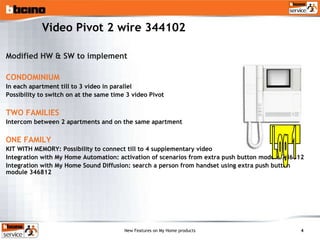
Video Pivot 2 wire 344102 Modified HW & SW to implement CONDOMINIUM In each apartment till to 3 video in parallel Possibility to switch on at the same time 3 video Pivot TWO FAMILIES Intercom between 2 apartments and on the same apartment ONE FAMILY KIT WITH MEMORY: Possibility to connect till to 4 supplementary video  Integration with My Home Automation: activation of scenarios from extra push button module 346812 Integration with My Home Sound Diffusion: search a person from handset using extra push button module 346812 Log 1
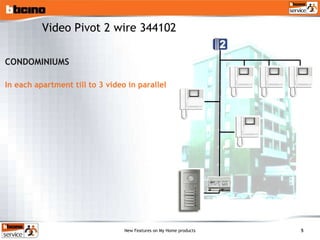
CONDOMINIUMS In each apartment till to 3 video in parallel Video Pivot 2 wire 344102
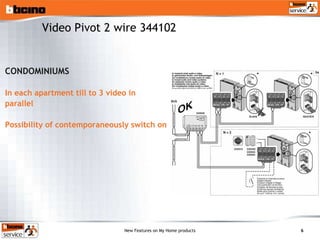
CONDOMINIUMS In each apartment till to 3 video in parallel Possibility of contemporaneously switch on Video Pivot 2 wire 344102
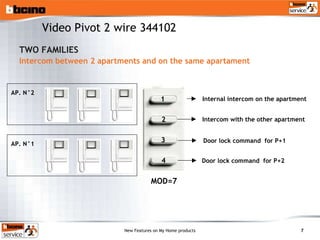
TWO FAMILIES Intercom between 2 apartments and on the same apartament AP. N°2 Internal intercom on the apartment AP. N°1 Intercom with the other apartment Door lock command  for P+1  MOD=7 Door lock command  for P+2  Video Pivot 2 wire 344102 1 2 3 4
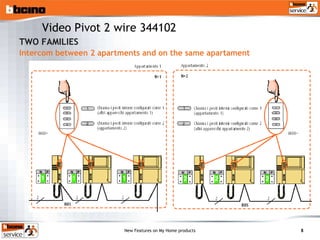
TWO FAMILIES Intercom between 2 apartments and on the same apartament Video Pivot 2 wire 344102
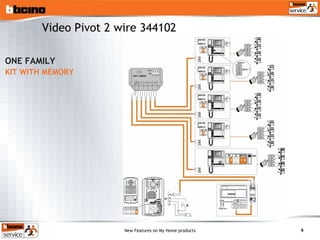
ONE FAMILY KIT WITH MEMORY Video Pivot 2 wire 344102
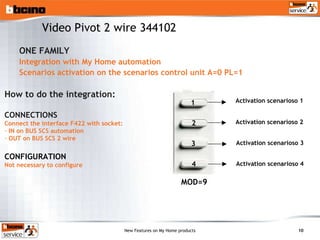
ONE FAMILY Integration with My Home automation Scenarios activation on the scenarios control unit A=0 PL=1 Activation scenarioso 1 MOD=9 Activation scenarioso 2 Activation scenarioso 3 Activation scenarioso 4 How to do the integration: CONNECTIONS Connect the interface F422 with socket: IN on BUS SCS automation OUT on BUS SCS 2 wire CONFIGURATION Not necessary to configure Video Pivot 2 wire 344102 1 2 3 4
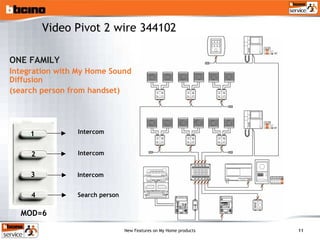
ONE FAMILY Integration with My Home Sound Diffusion (search person from handset) Intercom MOD=6 Search person Intercom Intercom Video Pivot 2 wire 344102 1 2 3 4
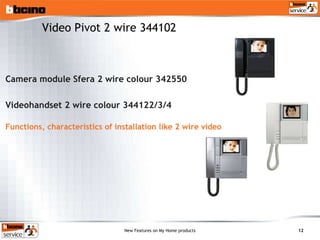
Camera module Sfera 2 wire colour 342550 Videohandset 2 wire colour 344122/3/4 Functions, characteristics of installation like 2 wire video Video Pivot 2 wire 344102
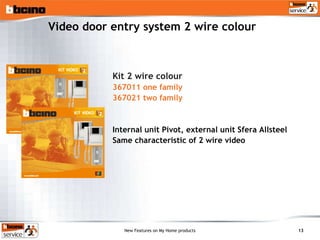
Video door entry system 2 wire colour Kit 2 wire colour 367011 one family 367021 two family Internal unit Pivot, external unit Sfera Allsteel Same characteristic of 2 wire video
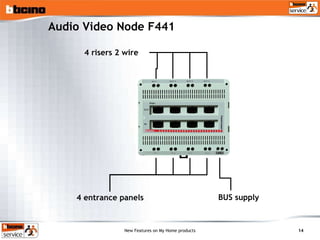
Audio Video Node F441 4 risers 2 wire BUS supply 4 entrance panels
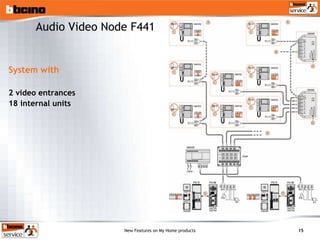
System with  2 video entrances  18 internal units Audio Video Node F441
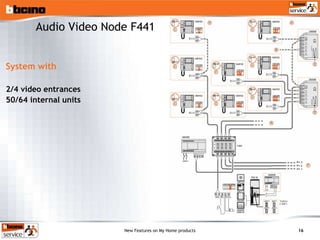
Audio Video Node F441 System with  2/4 video entrances  50/64 internal units
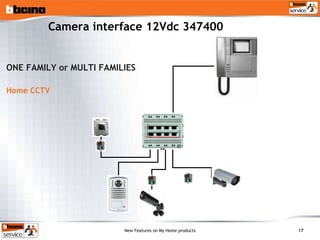
Camera interface 12Vdc 347400 ONE FAMILY or MULTI FAMILIES Home CCTV
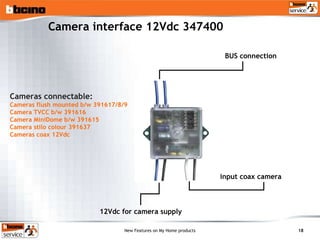
Camera interface 12Vdc 347400 Cameras connectable:  Cameras flush mounted b/w 391617/8/9  Camera TVCC b/w 391616 Camera MiniDome b/w 391615 Camera stilo colour 391637  Cameras coax 12Vdc input coax camera BUS connection 12Vdc for camera supply
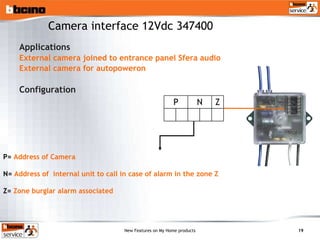
Applications External camera joined to entrance panel Sfera audio External camera for autopoweron Configuration P=  Address of Camera N=  Address of  internal unit to call in case of alarm in the zone Z Z=  Zone burglar alarm associated Camera interface 12Vdc 347400 Z N P
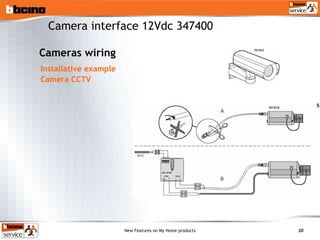
Installative example Camera CCTV Camera interface 12Vdc 347400 Cameras wiring
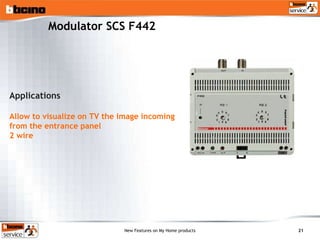
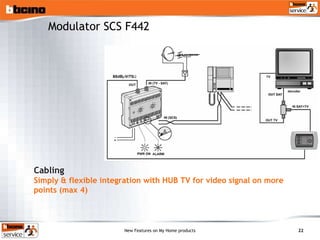
Modulator SCS F442 Applications Allow to visualize on TV the image incoming from the entrance panel  2 wire
Modulator SCS F442 Cabling Simply & flexible integration with HUB TV for video signal on more points (max 4)
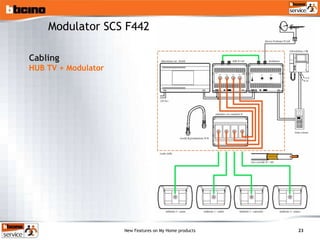
Modulator SCS F442 Cabling HUB TV + Modulator
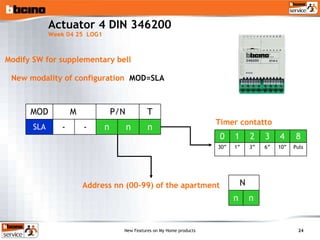
Actuator 4 DIN 346200  Week 04 25  LOG1 Modify SW for supplementary bell Address nn (00-99) of the apartment New modality of configuration  MOD=SLA Timer contatto n n n - - SLA T P/N M  MOD Puls 10” 6” 3” 1” 30” 8 4 3 2 1 0 n n N
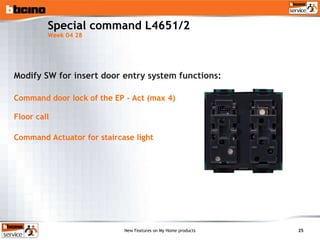
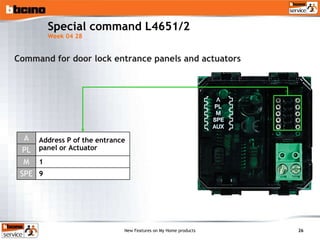
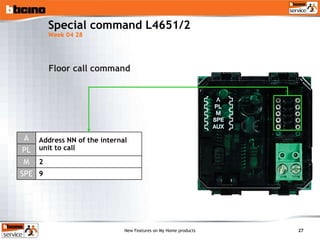
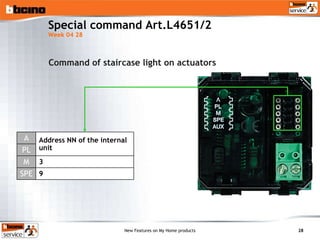
Special command L4651/2  Week 04 28 Modify SW for insert door entry system functions: Command door lock of the EP - Act (max 4) Floor call  Command Actuator for staircase light
Command for door lock entrance panels and actuators Special command L4651/2  Week 04 28 n n 1 9 SPE M PL A 9 1 Address P of the entrance panel or Actuator
Floor call command Special command L4651/2  Week 04 28 SPE M PL A 9 2 Address NN of the internal unit to call
Special command Art.L4651/2  Week 04 28 Command of staircase light on actuators SPE M PL A 9 3 Address NN of the internal unit
8 WIRE DIGITAL SYSTEM VIDEO ANALOG SYSTEM VIDEO
Video door entry system analog digital colour Quality improwed Camera new PCB (03/42) Video unit new display (04/09) Modify HW video accessories  Mixer video 346960 (03/26) Riser shunt video 346100 (03/47) Great installations distance EP-IU till to 1 Km
8 WIRE DIGITAL SYSTEM VIDEO ANALOG SYSTEM VIDEO TELEPHONE SYSTEM
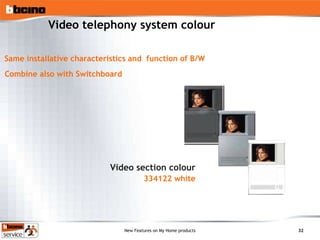
Video telephony system colour Video section colour 334122 white Combine also with Switchboard Same installative characteristics and  function of B/W
My Home Sound Diffusion Btservice MH Training
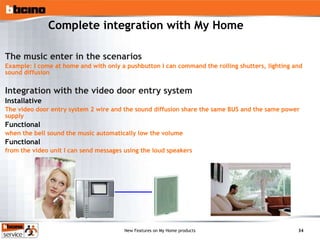
Complete integration with My Home The music enter in the scenarios Example: I come at home and with only a pushbutton I can command the rolling shutters, lighting and sound diffusion Integration with the video door entry system Installative   The video door entry system 2 wire and the sound diffusion share the same BUS and the same power supply Functional when the bell sound the music automatically low the volume Functional from the video unit I can send messages using the loud speakers
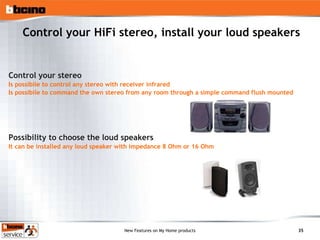
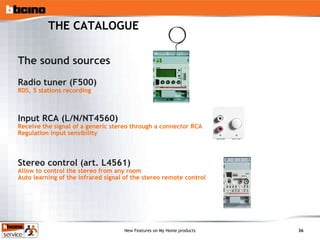
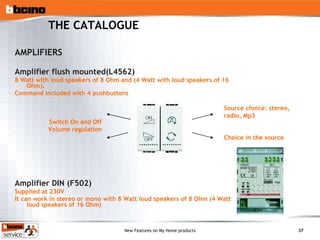
Control your HiFi stereo, install your loud speakers Control your stereo Is possibile to control any stereo with receiver infrared Is possibile to command the own stereo from any room through a simple command flush mounted Possibility to choose the loud speakers It can be installed any loud speaker with impedance 8 Ohm or 16 Ohm
THE CATALOGUE The sound sources  Radio tuner (F500) RDS, 5 stations recording Input RCA (L/N/NT4560) Receive the signal of a generic stereo through a connector RCA Regulation input sensibility Stereo control (art. L4561) Allow to control the stereo from any room Auto learning of the infrared signal of the stereo remote control
THE CATALOGUE AMPLIFIERS Amplifier flush mounted(L4562) 8 Watt with loud speakers of 8 Ohm and (4 Watt with loud speakers of 16 Ohm).  Command included with 4 pushbuttons Amplifier DIN (F502) Supplied at 230V It can work in stereo or mono with 8 Watt loud speakers of 8 Ohm (4 Watt loud speakers of 16 Ohm) Switch On and Off Volume regulation Source choice: stereo, radio, Mp3 Choice in the source
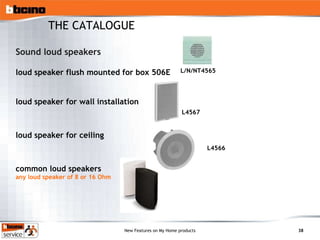
Sound loud speakers loud speaker flush mounted for box 506E  loud speaker for wall installation loud speaker for ceiling common loud speakers any loud speaker of 8 or 16 Ohm L4566 L4567 L/N/NT4565 THE CATALOGUE
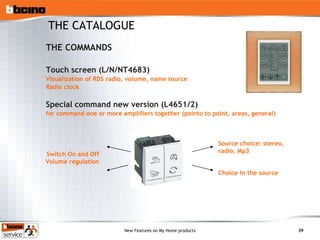
THE COMMANDS Touch screen (L/N/NT4683) Visualization of RDS radio, volume, name source Radio clock Special command new version (L4651/2) for command one or more amplifiers together (pointo to point, areas, general) THE CATALOGUE Switch On and Off Volume regulation Source choice: stereo, radio, Mp3 Choice in the source
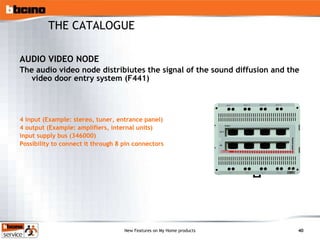
AUDIO VIDEO NODE The audio video node distribiutes the signal of the sound diffusion and the video door entry system (F441) 4 input (Example: stereo, tuner, entrance panel) 4 output (Example: amplifiers, internal units) input supply bus (346000) Possibility to connect it through 8 pin connectors THE CATALOGUE
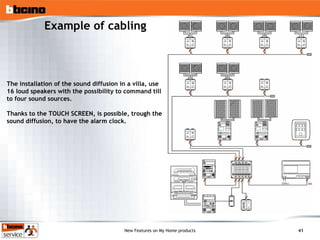
Example of cabling The installation of the sound diffusion in a villa, use 16 loud speakers with the possibility to command till to four sound sources. Thanks to the TOUCH SCREEN, is possible, trough the sound diffusion, to have the alarm clock.
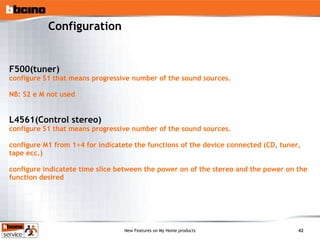
Configuration F500(tuner) configure S1 that means progressive number of the sound sources.  NB: S2 e M not used L4561(Control stereo) configure S1 that means progressive number of the sound sources.  configure M1 from 1 ÷4  for indicatete the functions of the device connected (CD, tuner, tape ecc.) configure indicatete time slice between the power on of the stereo and the power on the function desired
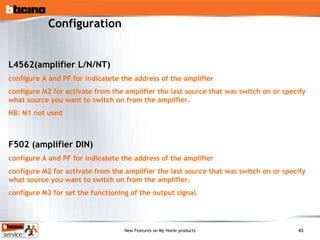
Configuration L4562(amplifier L/N/NT) configure A and PF for indicatete the address of the amplifier  configure M2 for activate from the amplifier the last source that was switch on or specify what source you want to switch on from the amplifier. NB: M1 not used F502 (amplifier DIN) configure A and PF for indicatete the address of the amplifier configure M2 for activate from the amplifier the last source that was switch on or specify what source you want to switch on from the amplifier. configure M3 for set the functioning of the output signal.
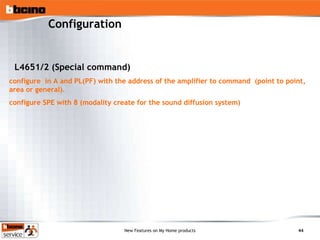
Configuration L4651/2 (Special command) configure  in A and PL(PF) with the address of the amplifier to command  (point to point, area or general). configure SPE with 8 (modality create for the sound diffusion system)
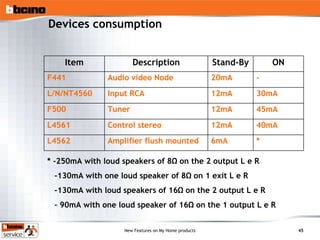
Devices consumption * -250mA with loud speakers of 8 Ω on the 2 output L e R - 130mA with one loud speaker of 8Ω on 1 exit L e R -130mA with loud speakers of 16Ω on the 2 output L e R - 90mA with one loud speaker of 16Ω on the 1 output L e R * 6mA Amplifier flush mounted L4562 40mA 12mA Control stereo L4561 45mA 12mA Tuner F500 30mA 12mA Input RCA L/N/NT4560 - 20mA Audio video Node F441 ON Stand-By Description Item
Scenario module & Special command Btservice MH Training
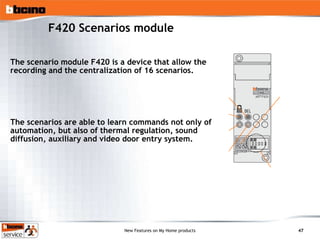
F420 Scenarios module The scenario module F420 is a device that allow the recording and the centralization of 16 scenarios.  The scenarios are able to learn commands not only of  automation, but also of thermal regulation, sound diffusion, auxiliary and video door entry system.
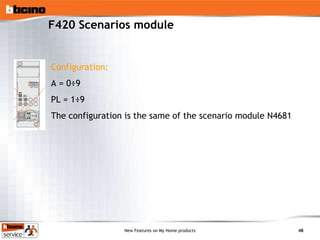
F420 Scenarios module Configuration: A = 0 ÷9 PL = 1 ÷9 The configuration is the same of the scenario module N4681
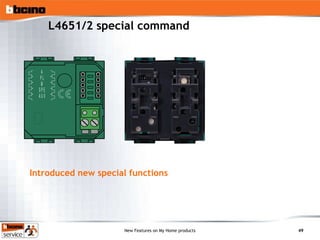
L4651/2 special command Introduced new special functions
New functions SPE=6  repeat the scenarios recording in the scenario module SPE=8  allow to command the amplifiers of the sound diffusion SPE=9  allow to command  door lock, floor call and staircase light of  the installation 2 wire. L4651/2 Special command
Mecchanical support  Btservice MH Training
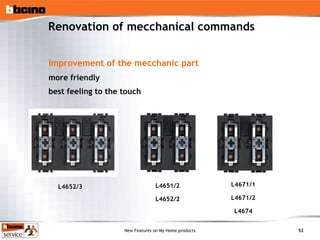
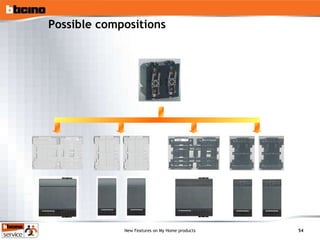
Renovation of mecchanical commands Improvement of the mecchanic part more friendly best feeling to the touch   L4652/3 L4651/2 L4652/2 L4671/2 L4671/1 L4674
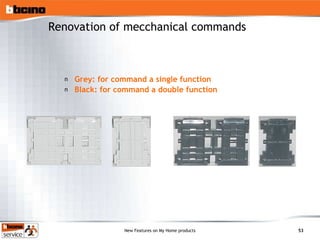
Grey: for command a single function Black: for command a double function Renovation of mecchanical commands
Possible compositions

9 My Home Mh New

  • 1.
    My Home Training14 – 15 October 2004 Btservice MH Training
  • 2.
  • 3.
    Completion 2 wirevideo Target Complete the 2 wire functions New functions Pivot new release 2/3 video in the same apartment Time of conversation intercom 3 min 2 wire video colour Video signal colour Video Pivot colour Audio video node 3-4 Video outdoor station Home CCTV Interface coax/2wire Video signal on the TV Video modulator Actuator for supplementary bell New actuator 4 DIN Push button floor call staircase light door lock New special command
  • 4.
    Video Pivot 2wire 344102 Modified HW & SW to implement CONDOMINIUM In each apartment till to 3 video in parallel Possibility to switch on at the same time 3 video Pivot TWO FAMILIES Intercom between 2 apartments and on the same apartment ONE FAMILY KIT WITH MEMORY: Possibility to connect till to 4 supplementary video Integration with My Home Automation: activation of scenarios from extra push button module 346812 Integration with My Home Sound Diffusion: search a person from handset using extra push button module 346812 Log 1
  • 5.
    CONDOMINIUMS In eachapartment till to 3 video in parallel Video Pivot 2 wire 344102
  • 6.
    CONDOMINIUMS In eachapartment till to 3 video in parallel Possibility of contemporaneously switch on Video Pivot 2 wire 344102
  • 7.
    TWO FAMILIES Intercombetween 2 apartments and on the same apartament AP. N°2 Internal intercom on the apartment AP. N°1 Intercom with the other apartment Door lock command for P+1 MOD=7 Door lock command for P+2 Video Pivot 2 wire 344102 1 2 3 4
  • 8.
    TWO FAMILIES Intercombetween 2 apartments and on the same apartament Video Pivot 2 wire 344102
  • 9.
    ONE FAMILY KITWITH MEMORY Video Pivot 2 wire 344102
  • 10.
    ONE FAMILY Integrationwith My Home automation Scenarios activation on the scenarios control unit A=0 PL=1 Activation scenarioso 1 MOD=9 Activation scenarioso 2 Activation scenarioso 3 Activation scenarioso 4 How to do the integration: CONNECTIONS Connect the interface F422 with socket: IN on BUS SCS automation OUT on BUS SCS 2 wire CONFIGURATION Not necessary to configure Video Pivot 2 wire 344102 1 2 3 4
  • 11.
    ONE FAMILY Integrationwith My Home Sound Diffusion (search person from handset) Intercom MOD=6 Search person Intercom Intercom Video Pivot 2 wire 344102 1 2 3 4
  • 12.
    Camera module Sfera2 wire colour 342550 Videohandset 2 wire colour 344122/3/4 Functions, characteristics of installation like 2 wire video Video Pivot 2 wire 344102
  • 13.
    Video door entrysystem 2 wire colour Kit 2 wire colour 367011 one family 367021 two family Internal unit Pivot, external unit Sfera Allsteel Same characteristic of 2 wire video
  • 14.
    Audio Video NodeF441 4 risers 2 wire BUS supply 4 entrance panels
  • 15.
    System with 2 video entrances 18 internal units Audio Video Node F441
  • 16.
    Audio Video NodeF441 System with 2/4 video entrances 50/64 internal units
  • 17.
    Camera interface 12Vdc347400 ONE FAMILY or MULTI FAMILIES Home CCTV
  • 18.
    Camera interface 12Vdc347400 Cameras connectable: Cameras flush mounted b/w 391617/8/9 Camera TVCC b/w 391616 Camera MiniDome b/w 391615 Camera stilo colour 391637 Cameras coax 12Vdc input coax camera BUS connection 12Vdc for camera supply
  • 19.
    Applications External camerajoined to entrance panel Sfera audio External camera for autopoweron Configuration P= Address of Camera N= Address of internal unit to call in case of alarm in the zone Z Z= Zone burglar alarm associated Camera interface 12Vdc 347400 Z N P
  • 20.
    Installative example CameraCCTV Camera interface 12Vdc 347400 Cameras wiring
  • 21.
    Modulator SCS F442Applications Allow to visualize on TV the image incoming from the entrance panel 2 wire
  • 22.
    Modulator SCS F442Cabling Simply & flexible integration with HUB TV for video signal on more points (max 4)
  • 23.
    Modulator SCS F442Cabling HUB TV + Modulator
  • 24.
    Actuator 4 DIN346200 Week 04 25 LOG1 Modify SW for supplementary bell Address nn (00-99) of the apartment New modality of configuration MOD=SLA Timer contatto n n n - - SLA T P/N M MOD Puls 10” 6” 3” 1” 30” 8 4 3 2 1 0 n n N
  • 25.
    Special command L4651/2 Week 04 28 Modify SW for insert door entry system functions: Command door lock of the EP - Act (max 4) Floor call Command Actuator for staircase light
  • 26.
    Command for doorlock entrance panels and actuators Special command L4651/2 Week 04 28 n n 1 9 SPE M PL A 9 1 Address P of the entrance panel or Actuator
  • 27.
    Floor call commandSpecial command L4651/2 Week 04 28 SPE M PL A 9 2 Address NN of the internal unit to call
  • 28.
    Special command Art.L4651/2 Week 04 28 Command of staircase light on actuators SPE M PL A 9 3 Address NN of the internal unit
  • 29.
    8 WIRE DIGITALSYSTEM VIDEO ANALOG SYSTEM VIDEO
  • 30.
    Video door entrysystem analog digital colour Quality improwed Camera new PCB (03/42) Video unit new display (04/09) Modify HW video accessories Mixer video 346960 (03/26) Riser shunt video 346100 (03/47) Great installations distance EP-IU till to 1 Km
  • 31.
    8 WIRE DIGITALSYSTEM VIDEO ANALOG SYSTEM VIDEO TELEPHONE SYSTEM
  • 32.
    Video telephony systemcolour Video section colour 334122 white Combine also with Switchboard Same installative characteristics and function of B/W
  • 33.
    My Home SoundDiffusion Btservice MH Training
  • 34.
    Complete integration withMy Home The music enter in the scenarios Example: I come at home and with only a pushbutton I can command the rolling shutters, lighting and sound diffusion Integration with the video door entry system Installative The video door entry system 2 wire and the sound diffusion share the same BUS and the same power supply Functional when the bell sound the music automatically low the volume Functional from the video unit I can send messages using the loud speakers
  • 35.
    Control your HiFistereo, install your loud speakers Control your stereo Is possibile to control any stereo with receiver infrared Is possibile to command the own stereo from any room through a simple command flush mounted Possibility to choose the loud speakers It can be installed any loud speaker with impedance 8 Ohm or 16 Ohm
  • 36.
    THE CATALOGUE Thesound sources Radio tuner (F500) RDS, 5 stations recording Input RCA (L/N/NT4560) Receive the signal of a generic stereo through a connector RCA Regulation input sensibility Stereo control (art. L4561) Allow to control the stereo from any room Auto learning of the infrared signal of the stereo remote control
  • 37.
    THE CATALOGUE AMPLIFIERSAmplifier flush mounted(L4562) 8 Watt with loud speakers of 8 Ohm and (4 Watt with loud speakers of 16 Ohm). Command included with 4 pushbuttons Amplifier DIN (F502) Supplied at 230V It can work in stereo or mono with 8 Watt loud speakers of 8 Ohm (4 Watt loud speakers of 16 Ohm) Switch On and Off Volume regulation Source choice: stereo, radio, Mp3 Choice in the source
  • 38.
    Sound loud speakersloud speaker flush mounted for box 506E loud speaker for wall installation loud speaker for ceiling common loud speakers any loud speaker of 8 or 16 Ohm L4566 L4567 L/N/NT4565 THE CATALOGUE
  • 39.
    THE COMMANDS Touchscreen (L/N/NT4683) Visualization of RDS radio, volume, name source Radio clock Special command new version (L4651/2) for command one or more amplifiers together (pointo to point, areas, general) THE CATALOGUE Switch On and Off Volume regulation Source choice: stereo, radio, Mp3 Choice in the source
  • 40.
    AUDIO VIDEO NODEThe audio video node distribiutes the signal of the sound diffusion and the video door entry system (F441) 4 input (Example: stereo, tuner, entrance panel) 4 output (Example: amplifiers, internal units) input supply bus (346000) Possibility to connect it through 8 pin connectors THE CATALOGUE
  • 41.
    Example of cablingThe installation of the sound diffusion in a villa, use 16 loud speakers with the possibility to command till to four sound sources. Thanks to the TOUCH SCREEN, is possible, trough the sound diffusion, to have the alarm clock.
  • 42.
    Configuration F500(tuner) configureS1 that means progressive number of the sound sources. NB: S2 e M not used L4561(Control stereo) configure S1 that means progressive number of the sound sources. configure M1 from 1 ÷4 for indicatete the functions of the device connected (CD, tuner, tape ecc.) configure indicatete time slice between the power on of the stereo and the power on the function desired
  • 43.
    Configuration L4562(amplifier L/N/NT)configure A and PF for indicatete the address of the amplifier configure M2 for activate from the amplifier the last source that was switch on or specify what source you want to switch on from the amplifier. NB: M1 not used F502 (amplifier DIN) configure A and PF for indicatete the address of the amplifier configure M2 for activate from the amplifier the last source that was switch on or specify what source you want to switch on from the amplifier. configure M3 for set the functioning of the output signal.
  • 44.
    Configuration L4651/2 (Specialcommand) configure in A and PL(PF) with the address of the amplifier to command (point to point, area or general). configure SPE with 8 (modality create for the sound diffusion system)
  • 45.
    Devices consumption *-250mA with loud speakers of 8 Ω on the 2 output L e R - 130mA with one loud speaker of 8Ω on 1 exit L e R -130mA with loud speakers of 16Ω on the 2 output L e R - 90mA with one loud speaker of 16Ω on the 1 output L e R * 6mA Amplifier flush mounted L4562 40mA 12mA Control stereo L4561 45mA 12mA Tuner F500 30mA 12mA Input RCA L/N/NT4560 - 20mA Audio video Node F441 ON Stand-By Description Item
  • 46.
    Scenario module &Special command Btservice MH Training
  • 47.
    F420 Scenarios moduleThe scenario module F420 is a device that allow the recording and the centralization of 16 scenarios. The scenarios are able to learn commands not only of automation, but also of thermal regulation, sound diffusion, auxiliary and video door entry system.
  • 48.
    F420 Scenarios moduleConfiguration: A = 0 ÷9 PL = 1 ÷9 The configuration is the same of the scenario module N4681
  • 49.
    L4651/2 special commandIntroduced new special functions
  • 50.
    New functions SPE=6 repeat the scenarios recording in the scenario module SPE=8 allow to command the amplifiers of the sound diffusion SPE=9 allow to command door lock, floor call and staircase light of the installation 2 wire. L4651/2 Special command
  • 51.
    Mecchanical support Btservice MH Training
  • 52.
    Renovation of mecchanicalcommands Improvement of the mecchanic part more friendly best feeling to the touch L4652/3 L4651/2 L4652/2 L4671/2 L4671/1 L4674
  • 53.
    Grey: for commanda single function Black: for command a double function Renovation of mecchanical commands
  • 54.

Editor's Notes

  • #31 New monitor a colour for il Video unit analogico . Il New monitor del VCT analogico/digitale “334122” migliora in maniera sensibile la Quality delle immagini. Questo prodotto adatto ad installazioni analogico/digitali formette installazioni con distances fino ad 1 km ed installations fino a 4000 interni In sintesi stesse characteristics funzionali/installative of theanaloga versione in B/N. Display 4’’ a colour Massima flessibilità installativa (da parete, da tavolo, da incasso) colour bianco * Accessori video Modifyti (for estensione 1 Km/4000 interni): > 332550 Camera a colour > 346100 Derivatore di montante > 346960 Miscelatore video > 332540 interface for Camera scorporata > 337320 Convertitore optoisolato ( New codice ) Nota:tutti gli accessori di cui sopra saranno, al lancio, disponibili nella New versione.
  • #33 New monitor a colour for il Video unit analogico . Il New monitor del VCT analogico/digitale “334122” migliora in maniera sensibile la Quality delle immagini. Questo prodotto adatto ad installazioni analogico/digitali formette installazioni con distances fino ad 1 km ed installations fino a 4000 interni In sintesi stesse characteristics funzionali/installative of theanaloga versione in B/N. Display 4’’ a colour Massima flessibilità installativa (da parete, da tavolo, da incasso) colour bianco * Accessori video Modifyti (for estensione 1 Km/4000 interni): > 332550 Camera a colour > 346100 Derivatore di montante > 346960 Miscelatore video > 332540 interface for Camera scorporata > 337320 Convertitore optoisolato ( New codice ) Nota:tutti gli accessori di cui sopra saranno, al lancio, disponibili nella New versione.
  • #35 Utilizzando il New module scenarios (art. F420 in vendita da ottobre, cfr. argomentario dedicato) è possibile inserire la music dentro gli scenarios. Così al risveglio sarà possibile con un solo pulsante alzare le tapparelle e accendere la stazione radio preferita. Sulla stessa infrastruttura, ovvero utilizzando lo same power supply e lo same cavo è possibile collegare sia i dispositivi della diffusion sound sia quelli della video door entry system 2 wire. In questo modo si ha un duplice vantaggio: un beneficio economico visto che si utilizza un solo power supply e un solo nodo audio/video e un system complessivamente more simple da cablare. from the punto di vista Functional il nostro installatore potrà proporre queste functions: when qualcuno suona il campanello la music si abbassa automaticamente e poi riprende when attacco la cornetta del internal unit. Premendo un tasto sul internal unit è possibile inviare messaggi su tutti i loud speakers della casa for Example utile for effettuare la function ricerca forsona. Queste ultime due functions sono disponibili sul Pivot inserendo il blocchetto 4 pulsanti art. 346812 (occorre configure questo accessorio con MOD=6): premendo il pulsante numero 4 si attivano gli amplifiers e posso diffondere messaggi. Solo i Pivot con data di produzione suforiore a ottobre 2004 formettono queste integrazioni.
  • #36 Con la New diffusion sound è possibile utilizzare any stereo come source sound. Attraverso of the semplici comandi da incasso è possibile to control il proprio stereo da any locale, quindi non è necessario come in altri sistemi concorrenti andare in giro for casa con il teleCommand dedicato. Infatti un device denominato “Control stereo” è capace di ripetere i segnali infrared che ha memorizzato in fase di programmazione. Ovviamente for poter usufruire di questo Control lo stereo deve essere dotato di teleCommand a infrarossi. Agli amplifiers della New diffusion onora possono essere collegati loud speakers di mercato con impedance di 8 o 16 Ohm (praticamente il 90% of the loud speakers in commercio). In questo modo il cliente può sfruttare i loud speakers che già possiede.
  • #37 Sono disponibili tre tipi di sources: Il sintonizzatore radio con RDS , 5 stazioni memorizzabili, ricerca manuale e automatica delle stazioni, occupa 4 moduli DIN ed ha un display for la visualizzazione delle informazione. Si consiglia vivamente l’installazione del sintonizzatore abbinata con il touch screen in grado di visualizzare tutte le informazioni (RDS, frequenza) e con il quale è possibile cambiare i programmi memorizzati senza accedere al sintonizzatore installato nel quadro. L’input RCA formette di prelevare il signal di un generico stereo. E’ dotato di una manopola di pre-Regulation della sensibilità d’input, e di connector RCA standard. Il cavo di connection allo stereo con connettori RCA-RCA è a corredo of thearticolo. Il Control stereo è uno of the dispositivi che qualifica la New diffusion sound forché formette di to control in modo simple il proprio stereo da any locale della casa senza dover portare con sè il teleCommand dello stereo. Questo device è in grado di memorizzare 4 comandi infrarossi (o sequenze di comandi) che poi vengono ripetuti dai quattro pulsanti of theamplifier o del Command. for Example è possibile to control sia il lettore CD, sia il sintonizzatore radio del proprio stereo e in questo caso è inutile installare anche il sintonizzatore F500. Si tratta di un oggetto volante che deve essere posto nelle vicinanze dello stereo. for il connection con il bus occorre prevedere un connector bus nelle vicinanze dello stereo (for i collegamenti vedi slide “cabling a stella”). I cavi di connection allo stereo e al connector BUS e un foglio istruzioni dedicato alla programmazione (con esempi) sono a corredo del prodotto.
  • #38 L’amplifier da incasso occupa solo due moduli L&L ed è l’ideale for Applications in ambito residenziale . Questo amplifier è in grado di fornire una potenza musicle di 8 Watt con loud speakers da 8 Ohm oppure 4 Watt con loud speakers da 16 Ohm. In questo amplifier il Command è già integrated. Con i quattro tasti è possibile: accendere l’amplifier (pressione breve) e alzare il volume (pressione prolungata. spegnere l’amplifier (pressione breve) e abbassare il volume (pressione prolungata) to choose quale source ascoltare: stereo, radio, Mp3 to choose all’interno della source selezionata quale brano ascoltare o quale stazione radio. for Example avendo scelto di ascoltare un CD, con questo tasto è possibile passare al brano successivo. for completare esteticamente questo amplifier occorrono i copritasti L/N/NT4911AI (già a catalogo, copritasto a sinistra in figura) e i copritasti L/N/NT4911BF (New, copritasto a destra in figura). L’amplifier DIN occupa 4 moduli DIN ed è l’ideale nel terziario e nel residenziale di grandi metrature (ville oltre i 200 mq). Infatti questo amplifier essendo alimentato direttamente from thela 230V assorbe pochissima corrente from the bus formettendo di estendere l’installation fino a 40 amplifiers (80 loud speakers) con un solo power supply. Inoltre a seconda di come viene configurato può distribuire un signal monofonico a due casse (a volte richiesto nel terziario) o un signal stereofonico a due casse. Fornisce la stessa potenza of theamplifier da incasso.
  • #39 Vengono messi a catalogo 3 differenti loud speakers: loud speaker da incasso for 506E , esteticamente identici a quelli già a catalogo ma è stata migliorata la resa sound. Hanno un’impedance di 16 Ohm e possono emettere fino a 16 Watt musicli. Sono ideali nel residenziale. loud speaker da parete è l’ideale nelle installazioni del residenziale o del terziario dove occorre un’installazione suforficiale. Può essere installato al muro con una simple vite. for la predisposizione è sufficiente arrivare con un tubo corrugato, oppure con una 503E o con una 506E (il loud speaker ha dimensioni tali da coprire completamente la scatola 506E). E’una cassa due vie e può emettere fino a 40 Watt musicli. loud speaker da controsoffitto , ideale for il terziario. Sono le classiche casse rotonde visibili in molti suformercati. E’ un loud speaker a due vie e può emettere fino a 100 Watt. La sua rese sound è eccellente. E’ prevista una dima all’interno della confezione for facilitarne l’installazione. E’ possibile installare any loud speaker di mercato con i seguenti requisiti: impedance 8 Ohm o 16 Ohm e con potenze musicli comprese tra i 10 e i 200 Watt. Attenzione: non installare i loud speakers L/N/NT4565, L4567 e L4566 con la diffusion sound già a catalogo.
  • #40 I comandi servono nei seguenti casi: è già stato installato un amplifier da incasso con Command integrated ma è necessario to command tale amplifier da un altro punto si vogliono to command more amplifiers together (Command d’ambiente) si vogliono accendere o spegnere tutti gli amplifiers (Command generale) è stato installato un amplifier DIN e quindi è necessario installare un Command for to control tale amplifier Sono disponibili due comandi: Il touch screen è il Command more ricco con un’interface simple e intuitiva. Abbinato al sintonizzatore radio art. F500 è in grado di visualizzare l’RDS della radio, di memorizzare le stazioni preferite e di effettuare la ricerca automatica e manuale delle stazioni radio. Il touch screen può to command un singolo amplifier (punto-punto), un ambiente o tutti gli amplifiers together (generale). Inoltre è possibile creare un together virtuale di amplifiers e regolarli contemporaneamente. Ha la function radio sveglia: posso accendere un amplifier a una determinata ora (l’amplifier si spegne automaticamente dopo 2 minuti o alla pressione del touch screen). Il Command special configurato in modo opportuno (occorre inserire il configuratore 8 nella sede SPE) è in grado di to command uno o more amplifiers. In particolare può accendere, spegnere e regolare il volume di un singolo amplifier o di un ambiente oppure accendere e spegnere tutti gli amplifiers (Command generale: in questo caso effettua l’ON e l’OFF ma non la Regulation, for avere anche la function di Regulation occorre utilizzare il touch screen).
  • #41 Il nodo audio/video, già lanciato nel mese di giugno, distribuisce il signal della diffusion sound e della video door entry system 2 wire. E’ dotato di 4 input ai quali devono essere collegate le sources. for ogni input deve essere collegata una sola source e nessun altro device . Le sources collegabili sono: sintonizzatore radio, Control stereo, input RCA, entrance panel due fili (sia audio che video, Sfera o Minisfera). Su ogni uscita è possibile collegare gli amplifiers, i comandi e i internal units 2 wire. Sia gli input che le output possono essere connesse al nodo through morsetti o through connector 8 poli. Non è possibile utilizzare contemporaneamente il morsetto e il connector. for Example se al morsetto 1 è collegato il sintonizzatore radio non può essere utilizzato il connector 8 poli 1 in alcun modo. I connettori a 8 poli sono stati pensati for l’utilizzo del nodo audio/video nelle Applications del cabling multimediale. E’ previsto un morsetto for il connection of thepower supply art. 346000.
  • #49 In un installation con soli fan-coil a 2 tubi for entrambe le functions di riscaldamento e raffrescamento (tipica installazione da terziario), è sufficiente utilizzare un Actuator F430/4 for ogni Actuator, se si vogliono to control in automatico le tre velocità del fan-coil. Negli installations a 4 tubi servono invece 2 actuators for fan-coil in quanto le elettrovalvole for le due functions sono distinte.
  • #53 A partire da giugno vengono Modifyti tutti i comandi e gli actuators-Command . In particolare viene Modifyto il meccanismo di Command migliorandone il cinematismo. Questo consente di incrementare notevolmente l’affidabilità del Command in quanto il meccanismo risulta sicuramente more robusto, e di avere inoltre una forcezione al tatto di alto livello . La Modify riguarda i seguenti articoli: - Command special L4651/2 (giungo ‘04) - Command a 2 moduli L4652/2 (luglio ‘04) - Command a 3 moduli L4652/3 (luglio ‘04) - Actuator-Command L4671/1 (luglio ‘04) - Actuator Command for tapparelle L4671/2 (luglio ‘04) - Actuator for dimmer slave L4674 (luglio ‘04)
  • #54 Con il rifacimento of the meccanismi di Command si sono Modifyti anche i sottotasti . for i comandi a singola function si continuerà ad utilizzare il grigio , mentre for quelli a doppia function il nero . La variazione principale riguarda l’introduzione del sottotasto a 2 moduli , utile for Example nel Command for tapparelle o nel Command special. Cò formette di eliminare i sottotasti rosso e arancione rendendo more simple l’installazione ed evitando che i comandi a 2 moduli non siano sensibili in alcuni points. for Example for gli articoli L4651/2, L4652/2, L4671/1, L4674 nella confezione a corredo of thearticolo saranno disponibili: - 2 sottotasti neri a un module -1 sottotasto nero a 2 moduli - 2 sottotasti grigi a un module -1 sottotasto grigio a 2 moduli
  • #55 Rispetto alle possibili composizioni precedenti, l’introduzione of the nuovi meccanismi comporta solo una differenza: la composizione sottotasto a un module + falso sottotasto viene sostituita from the sottotasto a 2 moduli .