1
Naveed Siddiqui
PhD. M.B.E. PgDip Information Technology
Founder & CEO – Naveed Media Academy
www.facebook.com/NaveedAhmedSiddiqui33
www.linkedin.com/in/dr-naveed-siddiqui-191a4b2b
www.youtube.com/user/nvd30
www.youtube.com/user/NaveedAhmedSiddiqui3
nasiddiqui333@gmail.com
0092 337 0492400
Electronic Commerce
Launching a Successful
Online Business
3
Learning Objectives
1. Understand the fundamental
requirements for initiating an online
business.
2. Describe the funding options
available to startup businesses.
3. Evaluate the options for hosting Web
sites.
4
Learning Objectives (cont.)
4. Understand the processes and
business decisions associated with
managing Web site development.
5. Understand the importance of
providing content that meets the
needs and expectations of the
intended audience.
5
Learning Objectives (cont.)
6. Evaluate Web sites on design criteria
such as appearance, navigation,
consistency, and performance.
7. Know the techniques of search
engine optimization to obtain high
placement in search engines.
6
Learning Objectives (cont.)
8. Understand the benefits of customer
relationship management through
customer self-service, listening to
customers, and increasing trust.
7
OBO Sets
Its Goals for Success
The Problem
OBO sells protective gear for field
hockey goalkeepers
OBO’s unique three-dimensional
thermo-bonding manufacturing
process produces equipment that is
shaped to reflect the way the body
moves
8
OBO Sets
Its Goals for Success (cont.)
By manufacturing a quality product
and listening to the customer, OBO
has become the market leader
OBO is based in a small provincial
town in New Zealand that is a very
long way from its principal markets
9
OBO Sets
Its Goals for Success (cont.)
OBO sells a niche product that is
best sold thorough agents or stores
to ensure a proper fit
How does OBO use its Web site to
market an experiential product to a
global market from New Zealand?
10
OBO Sets
Its Goals for Success (cont.)
The Solution
The goals of the obo.co.nz Web site
are:
community building
product sales
research and development
11
OBO Sets
Its Goals for Success (cont.)
Community building happens
through:
online discussion forums
sponsored players
an image gallery
The principal marketing and sales
goal of the Web site is to:
convince the visitor of the value of the
product
direct the customer to a store or agent
to make the purchase
12
OBO Sets
Its Goals for Success (cont.)
The Web site is a support
mechanism for the brand and the
sale of equipment through the
agents
Research and development goal is
met through:
online surveys
solicitation of players’ opinions of the
products
focus groups
13
OBO Sets
Its Goals for Success (cont.)
The Results
The OBO Web site is most successful at
community building
The site also builds community by
promoting a goalie-friendly approach to
OBO’s customers
Online product sales are modest because
the Web site supports, not competes, with
OBO’s agent network
14
OBO Sets
Its Goals for Success (cont.)
Online sales are expected to grow
because OBO has introduced a new
line of clothes designed to be sold
exclusively through the Web site
The focus groups deliver high-value
feedback at almost no cost
The discussion forums contribute to
both community building and
feedback about OBO’s product
15
OBO Sets
Its Goals for Success (cont.)
What we can learn…
A small company with a great
product is using its Web site to
reach its target markets in distant
countries
OBO is using the site to support
business goals, as well as to meet
the needs and expectations of its
target audience
16
OBO Sets
Its Goals for Success (cont.)
The Web site is simple and well
designed, includes:
“attractors” that encourage customer
interaction and keep customers coming
back
content that promotes cross selling
effectively promotes sustainable
customer relationships
17
Doing Business Online:
Getting Started
Business formation process:
Identify a consumer or business
need in the marketplace
Investigate the opportunity
Determine the business owner’s
ability to meet the need
18
Doing Business Online:
Getting Started (cont.)
Requirements that reflect the online
nature of a business:
Need to understand Internet culture
Customers are active in how they
absorb and use information, and the
Internet is a personal, helping, and
sharing place for most users
Consider the nature of appropriate
products and services
© Prentice Hall 2004 19
Doing Business Online:
Getting Started (cont.)
E-business planning
Business plan: A written document
that identifies a company’s goals
and outlines how the company
intends to achieve the goals
20
Doing Business Online:
Getting Started (cont.)
Biggest difference in e-business
planning is for the ontrepreneur to
recognize that the Internet is unlike
any other sales channel; companies
can:
interact with consumers with both
reach and richness
introduce new and innovative business
models
distribute information at the speed of
light at almost zero cost
21
Doing Business Online:
Getting Started (cont.)
An existing brick-and-mortar
business looking to move online also
needs a:
Business case: A document that is
used to justify the investment of
internal, organizational resources
in a specific application or project
22
Doing Business Online:
Getting Started (cont.)
Business case template includes:
Goals
Cost savings
New revenue
Extra benefits
Cost of the solution
Net benefits
Recommendation
23
Doing Business Online:
Getting Started (cont.)
Funding the online business
Venture capital (VC): Money
invested in a business by an
individual or a group of individuals
(venture capitalists) in exchange for
equity in the business
24
Doing Business Online:
Getting Started (cont.)
Angel investor: A
wealthy
individual who
contributes
personal funds
and expertise at
the earliest stage
of business
development
25
Doing Business Online:
Getting Started (cont.)
Incubator: A company, university, or
not-for-profit organization that
supports businesses in their initial
stages of development
26
Doing Business Online:
Building the Web Site
Classifications of Web sites
Informational Web site: A Web site
that does little more than provide
information about the business and
its products and services
Interactive Web site: A Web site
that provides opportunities for the
customers and the business to
communicate and share information
27
Doing Business Online:
Building the Web Site (cont.)
Attractors: Web site features that
attract and interact with visitors in
the target stakeholder group
Transactional Web site: A Web site
that sells products and services
28
Doing Business Online:
Building the Web Site (cont.)
Building the Web site
1. Select a Web host
2. Register a domain name
3. Create and manage content
4. Design the Web site
5. Construct the Web site and test
6. Market and promote the Web site
29
Web Site Hosting
Web hosting options:
Storebuilder service: A hosting
service that provides disk space and
services to help small and micro
businesses build a Web site quickly
and cheaply
ISP hosting service: A hosting service
that provides an independent,
standalone Web site for small- and
medium-sized businesses
30
Web Site Hosting (cont.)
Web hosting service: A dedicated
Web site hosting company that
offers a wide range of hosting
services and functionality to
businesses of all sizes
Mirror site: An exact duplicate of the
original Web site, but it is physically
located on a Web server on another
continent
31
Web Site Hosting (cont.)
Co-location: A Web server owned and
maintained by the business is placed
in a Web hosting service that
manages the server’s connection to
the Internet
Self-hosting: When a business
acquires the hardware, software,
staff, and dedicated
telecommunications services
necessary to set up and manage its
own Web site
32
Web Site Hosting (cont.)
Contracting the Web host
The search for an ISP host:
contacting local ISPs for information
asking others in the business
community for recommendations
consulting with local
telecommunications and computer user
groups
33
Web Site Hosting (cont.)
When a short list of potential ISPs
has been compiled, a RFQ can be
used to ensure that complete and
consistent bids for provision of
service are submitted
34
Web Site Hosting (cont.)
Consider:
service quality
measures
guaranteed
uptime
number of clients
current traffic
rates
software support
security
site traffic
analysis
technical support
services
costs
35
Web Site Hosting (cont.)
Registering a domain name
Domain name: A name-based
address that identifies an Internet-
connected server
Domain name registrar: A business
that assists prospective Web site
owners with finding and registering
a domain name of their choice
36
Web Site Hosting (cont.)
Selecting a good domain name:
Make it memorable
Make it easy to spell
Avoid numbers and special
characters
Keep it short and sensible
37
Web Site Hosting (cont.)
Be flexible
Think about the future
Give products their own name
Investigate the competition
Avoid trademarked names
38
Content Creation
and Management
Content: The text, images, sound, and
video that make up a Web page
Commodity content: Information that
is widely available and generally free
to access on the Web
39
Content Creation
and Management (cont.)
Premium content: Content not
available elsewhere on the Web
Cross selling: Offering similar or
related products and services to
increase sales
Up selling: Offering an upgraded
version of the product in order to
boost sales and profit
40
Content Creation
and Management (cont.)
Up-selling activities usually include
offering products with a different
design, color, fabric, or size
Promotion
secondary content that can increase
sales or improve customer service
Comment
further explanation about the product
can be offered after introducing the
product
41
Content Creation
and Management (cont.)
Creating content
collecting all the content that is
currently available
value of additional content is assessed
for inclusion in the Web site
consider how each bit of content will
serve the site’s goals and whether
customers will want it or expect it
created by customers through reviews
etc.
42
Content Creation
and Management (cont.)
Buying content
Content can be purchased or licensed
Content that is acquired from outside
sources should be supplemental
content, not primary content
If primary content is purchased and no
value is added, visitors will go to the
originating site and not return
43
Content Creation
and Management (cont.)
Personalizing content
Personalized content: Web content that
is prepared to match the needs and
expectations of the individual visitor
Delivering content by e-newsletter
E-newsletter: A collection of short,
informative articles sent at regular
intervals by e-mail to individuals who
have an interest in the newsletter’s
topic
44
Content Creation
and Management (cont.)
Writing effective content
Write scannable text
Break long sections into smaller ones
with clearly noted headings
Grab the reader’s attention at the
beginning of every page and section
Write in a tone and with language that
reflects the purpose of the material
45
Content Creation
and Management (cont.)
Consistency in site content can be
achieved using a style guide
Make the material available in a .pdf file
when necessary
Create compelling links that encourage
a reader to click
External links can offer good content for
visitors
Avoid material that is not highly valued
by customers
46
Content Creation
and Management (cont.)
Content management
Content management: The process
of adding, revising, and removing
content from a Web site to keep
content fresh, accurate, compelling,
and credible
47
Content Creation
and Management (cont.)
Content testing—frequent checks of
material for:
Accuracy
Clarity
Typos
poor punctuation
misspelled words
inconsistencies
48
Content Creation
and Management (cont.)
Content removal
Expired pages should be deleted or
moved to an off-line location that can
serve as an archive
Content management software
Allows nontechnical staff to create, edit,
and delete content on the company’s
Web site
49
Content Creation
and Management (cont.)
Purchasing a content management
software
1. Do a thorough needs analysis
2. Document requirements and discuss with
at least two companies that have
purchased a CMS
3. Start small with CMS that has a trial
version or low entry cost
4. Assess the system after 30 days
5. Repeat the assessment process regularly
50
Web Site Design
The goal of any Web site is to deliver
quality content to its intended
audience and to do so with an elegant
design
51
Web Site Design (cont.)
Information architecture
Information architecture: How the
site and its Web pages are
organized, labeled, and navigated to
support browsing and searching
throughout the Web site
52
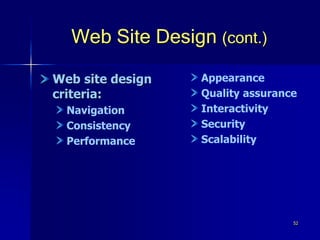
Web Site Design (cont.)
Web site design
criteria:
Navigation
Consistency
Performance
Appearance
Quality assurance
Interactivity
Security
Scalability
53
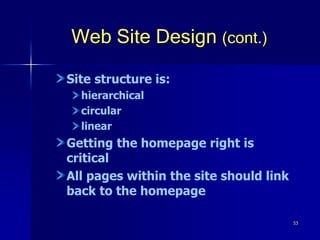
Web Site Design (cont.)
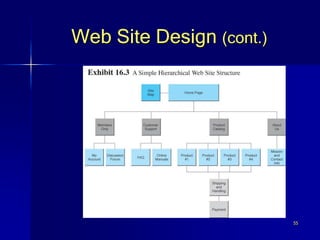
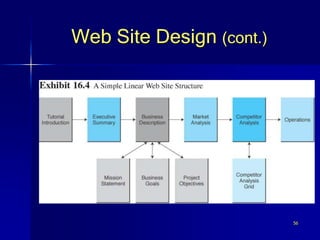
Site structure is:
hierarchical
circular
linear
Getting the homepage right is
critical
All pages within the site should link
back to the homepage
54
Web Site Design (cont.)
Deep linking: Entry into a Web site
via the site’s interior pages, not the
homepage, typically through search
engines or external links
55
Web Site Design (cont.)
56
Web Site Design (cont.)
57
Web Site Design (cont.)
Organizing and labeling the site
support browsing and searching:
Obey the three-click rule
Place the most important content at
the top of the page
Keep pages short
58
Web Site Design (cont.)
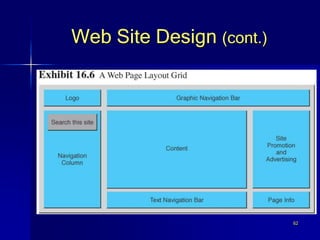
Keep page layouts simple
Follow commonsense publishing
rules
Make the primary content easy to
find
Show the products in many ways
59
Web Site Design (cont.)
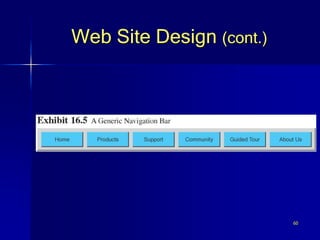
Site navigation
Site navigation: Aids that help visitors
find the information they need quickly
and easily
The simplest navigation aid is a
navigation bar at the top and bottom
of each page
Frame: An HTML element that divides
the browser window into two or more
separate windows
60
Web Site Design (cont.)
61
Web Site Design (cont.)
Other suggestions for designing
successful Web site navigation:
Use small lists and menus
Do not rely entirely on graphical
images for navigation
Make the homepage easy to find
Integrate navigation into content
Avoid frames
Follow accessibility guidelines
62
Web Site Design (cont.)
63
Web Site Design (cont.)
Consistency
Look and feel: The elements that visually
distinguish a site from any other,
including layout, typeface, colors,
graphics, and navigation aids
64
Web Site Design (cont.)
Elements of page content also
should be consistent:
company logo
contact information
short, descriptive title
Design a Web site for all of these
browsers, but to use designated
World Wide Web Consortium
standards
65
Web Site Design (cont.)
Performance
Speed ranks at or near the top of
every list of essential design
considerations
The most widely recognized cause of
long download times is a large
graphic or a large number of small
graphics on a single page
66
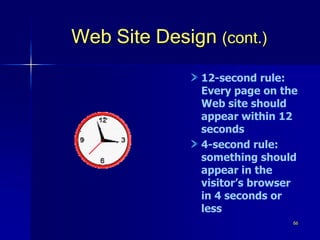
Web Site Design (cont.)
12-second rule:
Every page on the
Web site should
appear within 12
seconds
4-second rule:
something should
appear in the
visitor’s browser
in 4 seconds or
less
67
Web Site Design (cont.)
Colors and graphics rules:
Match the expectations of the target
audience
Use standard colors
Follow color standards
Use complementary colors
Specify the background color
68
Web Site Design (cont.)
Use bandwidth-intensive features
selectively
Design for visually or hearing-
impaired visitors
Use the ALT tag
Avoid distracting features
69
Web Site Design (cont.)
Quality assurance
make sure the Web site design is
properly tested before it is launched
ensure that it continues to perform
up to expectations after launch
70
Web Site Design (cont.)
design the site for easy maintenance
responsible owners frequently test
all features of the site personally
quality Web sites are tested
regularly
Web site performance is also an
ongoing concern
71
Web Site Construction
Who builds the Web site?
Internal staff, an outside contractor,
or a combination of these two
Internal Web site development: The
process of building and/or
maintaining the Web site with
company staff
72
Web Site Construction (cont.)
Companies build their own site
because:
Use of existing in-house expertise
Desire to build in-house expertise
Protection of proprietary
technologies
Tighter control and responsiveness
73
Web Site Construction (cont.)
External Web site development: When
the business hires another firm to
build and/or maintain the Web site
Speed to market
Not a core competency
Access to special expertise
74
Web Site Construction (cont.)
Partnering Web site development:
When a mixture of internal and
external development is used to build
and/or maintain a Web site
The principal downside to partnering
is the additional overhead of
contract and relationship
management
75
Web Site Construction (cont.)
Web site construction: The initial
content creation, design,
programming, and installation phases
of a Web site’s development
Web site maintenance: The on-going
process of keeping the Web site open
for business, managing content, fixing
problems, and making incremental
additions to the site
76
Web Site Construction (cont.)
Managing Web site construction:
Start with a plan
Set goals early and stick to them
Use a fixed-price contract
Justify graphics and features
77
Web Site Construction (cont.)
Accepting credit cards
Card-not-present (CNP) transaction:
When there is no signature and no
verification of the credit card
signature by the merchant
78
Web Site Construction (cont.)
To accept credit cards online a
company must:
Open a merchant account
Purchase credit card processing
software
Integrate the credit card processing
software into the transaction system
79
Web Site Promotion
Internal Web site promotion
Include content that establishes the
site as a useful site for customers to
remember so that they return and
make a purchase
Signature file: A simple text
message an e-mail program
automatically adds to outgoing
messages
80
Web Site Promotion (cont.)
Search engine optimization (SEO):
The application of strategies
intended to position a Web site at
the top of Web search engines
The key to SEO is understanding the
algorithms the search engines use to
determine the ranking of the results
returned to the searcher
81
Web Site Promotion (cont.)
Strategies for keyword creation and
placement:
Create keywords the target audience
is most likely to use
Use specific phrases, not general
keywords
Optimize the title
82
Web Site Promotion (cont.)
Use meta tags
Meta tag: An HTML element that
describes the contents of a Web page
Use keywords early and often in
page content
Include keywords in ALT tags
Avoid spider-hostile features
Do not spam search engines
83
Web Site Promotion (cont.)
Strategies for maximizing link
popularity:
Create content that promotes linking
Seek reciprocal links
Determine what sites already link to
the target site
84
Web Site Promotion (cont.)
Visit competitors
Seek highly placed links
Seek links from well-known sites
Do not use free-for-all (FFA) or link
farms
85
Customer Relationship
Management
Customer relationship management
(CRM): A customer service approach
that focuses on building long-term and
sustainable customer relationships that
add value for the customer and the
company
86
Customer Relationship
Management (cont.)
Using content to create customer
relationships
Provide membership
Personalize the user experience
Support users
Communicate via the community
Reward visitors
Market effectively
Set up smart affiliate relationships
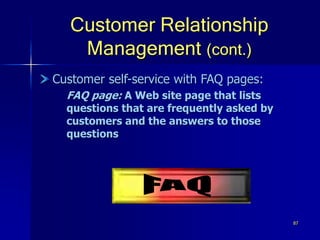
87
Customer Relationship
Management (cont.)
Customer self-service with FAQ pages:
FAQ page: A Web site page that lists
questions that are frequently asked by
customers and the answers to those
questions
88
Customer Relationship
Management (cont.)
Characteristics of an effective FAQ
page:
The FAQ page is easy to find
The FAQ page loads fast
The questions are easy to find
89
Customer Relationship
Management (cont.)
The answers are written from a
customer’s perspective
The answers do not repeat
information offered elsewhere
Offer an opportunity to ask a
question not on the FAQ
The FAQ page is never done
90
Customer Relationship
Management (cont.)
Listening to customers
Mine e-mail for information
Survey customers quickly and
frequently
Create an e-mail list
E-mail discussion list: A group of people
who share a common interest and who
communicate with each other via e-mail
messages managed by e-mail list
software
91
Customer Relationship
Management (cont.)
Create a discussion forum
Electronic discussion forum: A portion of
the Web site where visitors can post
questions, comments, and answers
Create a chat group
Chat group: A portion of the Web site
where visitors can communicate
synchronously
92
Customer Relationship
Management (cont.)
Increasing trust
Trust: A psychological state-of-mind
when two or more parties are willing
to pursue further interactions to
achieve a planned goal
93
Customer Relationship
Management (cont.)
Ways to increase trust:
Tell the customer about the
company
Include testimonials from loyal,
satisfied customers
Provide numerous opportunities for
feedback
Answer customer e-mail promptly
Provide information to the customer
about an order
94
Managerial Issues
1. What does it take to create a
successful online business?
2. Is creating a Web site a technical
task or a management task?
3. How do we attract visitors to the
Web site?
4. How do we turn visitors into buyers?
95
Summary
1. Fundamental requirements for
initiating an online business.
2. Funding options for a start-up online
business.
3. Web site hosting options for an
online business.
4. Web site construction options for an
online business.
96
Summary (cont.)
5. Provide content that attracts and
keeps Web site visitors.
6. Design a visitor-friendly site.
7. High placement in search engines is
key.
8. Customer relationship management
can contribute to success.

9 launching a business

  • 1.
    1 Naveed Siddiqui PhD. M.B.E.PgDip Information Technology Founder & CEO – Naveed Media Academy www.facebook.com/NaveedAhmedSiddiqui33 www.linkedin.com/in/dr-naveed-siddiqui-191a4b2b www.youtube.com/user/nvd30 www.youtube.com/user/NaveedAhmedSiddiqui3 nasiddiqui333@gmail.com 0092 337 0492400 Electronic Commerce
  • 2.
  • 3.
    3 Learning Objectives 1. Understandthe fundamental requirements for initiating an online business. 2. Describe the funding options available to startup businesses. 3. Evaluate the options for hosting Web sites.
  • 4.
    4 Learning Objectives (cont.) 4.Understand the processes and business decisions associated with managing Web site development. 5. Understand the importance of providing content that meets the needs and expectations of the intended audience.
  • 5.
    5 Learning Objectives (cont.) 6.Evaluate Web sites on design criteria such as appearance, navigation, consistency, and performance. 7. Know the techniques of search engine optimization to obtain high placement in search engines.
  • 6.
    6 Learning Objectives (cont.) 8.Understand the benefits of customer relationship management through customer self-service, listening to customers, and increasing trust.
  • 7.
    7 OBO Sets Its Goalsfor Success The Problem OBO sells protective gear for field hockey goalkeepers OBO’s unique three-dimensional thermo-bonding manufacturing process produces equipment that is shaped to reflect the way the body moves
  • 8.
    8 OBO Sets Its Goalsfor Success (cont.) By manufacturing a quality product and listening to the customer, OBO has become the market leader OBO is based in a small provincial town in New Zealand that is a very long way from its principal markets
  • 9.
    9 OBO Sets Its Goalsfor Success (cont.) OBO sells a niche product that is best sold thorough agents or stores to ensure a proper fit How does OBO use its Web site to market an experiential product to a global market from New Zealand?
  • 10.
    10 OBO Sets Its Goalsfor Success (cont.) The Solution The goals of the obo.co.nz Web site are: community building product sales research and development
  • 11.
    11 OBO Sets Its Goalsfor Success (cont.) Community building happens through: online discussion forums sponsored players an image gallery The principal marketing and sales goal of the Web site is to: convince the visitor of the value of the product direct the customer to a store or agent to make the purchase
  • 12.
    12 OBO Sets Its Goalsfor Success (cont.) The Web site is a support mechanism for the brand and the sale of equipment through the agents Research and development goal is met through: online surveys solicitation of players’ opinions of the products focus groups
  • 13.
    13 OBO Sets Its Goalsfor Success (cont.) The Results The OBO Web site is most successful at community building The site also builds community by promoting a goalie-friendly approach to OBO’s customers Online product sales are modest because the Web site supports, not competes, with OBO’s agent network
  • 14.
    14 OBO Sets Its Goalsfor Success (cont.) Online sales are expected to grow because OBO has introduced a new line of clothes designed to be sold exclusively through the Web site The focus groups deliver high-value feedback at almost no cost The discussion forums contribute to both community building and feedback about OBO’s product
  • 15.
    15 OBO Sets Its Goalsfor Success (cont.) What we can learn… A small company with a great product is using its Web site to reach its target markets in distant countries OBO is using the site to support business goals, as well as to meet the needs and expectations of its target audience
  • 16.
    16 OBO Sets Its Goalsfor Success (cont.) The Web site is simple and well designed, includes: “attractors” that encourage customer interaction and keep customers coming back content that promotes cross selling effectively promotes sustainable customer relationships
  • 17.
    17 Doing Business Online: GettingStarted Business formation process: Identify a consumer or business need in the marketplace Investigate the opportunity Determine the business owner’s ability to meet the need
  • 18.
    18 Doing Business Online: GettingStarted (cont.) Requirements that reflect the online nature of a business: Need to understand Internet culture Customers are active in how they absorb and use information, and the Internet is a personal, helping, and sharing place for most users Consider the nature of appropriate products and services
  • 19.
    © Prentice Hall2004 19 Doing Business Online: Getting Started (cont.) E-business planning Business plan: A written document that identifies a company’s goals and outlines how the company intends to achieve the goals
  • 20.
    20 Doing Business Online: GettingStarted (cont.) Biggest difference in e-business planning is for the ontrepreneur to recognize that the Internet is unlike any other sales channel; companies can: interact with consumers with both reach and richness introduce new and innovative business models distribute information at the speed of light at almost zero cost
  • 21.
    21 Doing Business Online: GettingStarted (cont.) An existing brick-and-mortar business looking to move online also needs a: Business case: A document that is used to justify the investment of internal, organizational resources in a specific application or project
  • 22.
    22 Doing Business Online: GettingStarted (cont.) Business case template includes: Goals Cost savings New revenue Extra benefits Cost of the solution Net benefits Recommendation
  • 23.
    23 Doing Business Online: GettingStarted (cont.) Funding the online business Venture capital (VC): Money invested in a business by an individual or a group of individuals (venture capitalists) in exchange for equity in the business
  • 24.
    24 Doing Business Online: GettingStarted (cont.) Angel investor: A wealthy individual who contributes personal funds and expertise at the earliest stage of business development
  • 25.
    25 Doing Business Online: GettingStarted (cont.) Incubator: A company, university, or not-for-profit organization that supports businesses in their initial stages of development
  • 26.
    26 Doing Business Online: Buildingthe Web Site Classifications of Web sites Informational Web site: A Web site that does little more than provide information about the business and its products and services Interactive Web site: A Web site that provides opportunities for the customers and the business to communicate and share information
  • 27.
    27 Doing Business Online: Buildingthe Web Site (cont.) Attractors: Web site features that attract and interact with visitors in the target stakeholder group Transactional Web site: A Web site that sells products and services
  • 28.
    28 Doing Business Online: Buildingthe Web Site (cont.) Building the Web site 1. Select a Web host 2. Register a domain name 3. Create and manage content 4. Design the Web site 5. Construct the Web site and test 6. Market and promote the Web site
  • 29.
    29 Web Site Hosting Webhosting options: Storebuilder service: A hosting service that provides disk space and services to help small and micro businesses build a Web site quickly and cheaply ISP hosting service: A hosting service that provides an independent, standalone Web site for small- and medium-sized businesses
  • 30.
    30 Web Site Hosting(cont.) Web hosting service: A dedicated Web site hosting company that offers a wide range of hosting services and functionality to businesses of all sizes Mirror site: An exact duplicate of the original Web site, but it is physically located on a Web server on another continent
  • 31.
    31 Web Site Hosting(cont.) Co-location: A Web server owned and maintained by the business is placed in a Web hosting service that manages the server’s connection to the Internet Self-hosting: When a business acquires the hardware, software, staff, and dedicated telecommunications services necessary to set up and manage its own Web site
  • 32.
    32 Web Site Hosting(cont.) Contracting the Web host The search for an ISP host: contacting local ISPs for information asking others in the business community for recommendations consulting with local telecommunications and computer user groups
  • 33.
    33 Web Site Hosting(cont.) When a short list of potential ISPs has been compiled, a RFQ can be used to ensure that complete and consistent bids for provision of service are submitted
  • 34.
    34 Web Site Hosting(cont.) Consider: service quality measures guaranteed uptime number of clients current traffic rates software support security site traffic analysis technical support services costs
  • 35.
    35 Web Site Hosting(cont.) Registering a domain name Domain name: A name-based address that identifies an Internet- connected server Domain name registrar: A business that assists prospective Web site owners with finding and registering a domain name of their choice
  • 36.
    36 Web Site Hosting(cont.) Selecting a good domain name: Make it memorable Make it easy to spell Avoid numbers and special characters Keep it short and sensible
  • 37.
    37 Web Site Hosting(cont.) Be flexible Think about the future Give products their own name Investigate the competition Avoid trademarked names
  • 38.
    38 Content Creation and Management Content:The text, images, sound, and video that make up a Web page Commodity content: Information that is widely available and generally free to access on the Web
  • 39.
    39 Content Creation and Management(cont.) Premium content: Content not available elsewhere on the Web Cross selling: Offering similar or related products and services to increase sales Up selling: Offering an upgraded version of the product in order to boost sales and profit
  • 40.
    40 Content Creation and Management(cont.) Up-selling activities usually include offering products with a different design, color, fabric, or size Promotion secondary content that can increase sales or improve customer service Comment further explanation about the product can be offered after introducing the product
  • 41.
    41 Content Creation and Management(cont.) Creating content collecting all the content that is currently available value of additional content is assessed for inclusion in the Web site consider how each bit of content will serve the site’s goals and whether customers will want it or expect it created by customers through reviews etc.
  • 42.
    42 Content Creation and Management(cont.) Buying content Content can be purchased or licensed Content that is acquired from outside sources should be supplemental content, not primary content If primary content is purchased and no value is added, visitors will go to the originating site and not return
  • 43.
    43 Content Creation and Management(cont.) Personalizing content Personalized content: Web content that is prepared to match the needs and expectations of the individual visitor Delivering content by e-newsletter E-newsletter: A collection of short, informative articles sent at regular intervals by e-mail to individuals who have an interest in the newsletter’s topic
  • 44.
    44 Content Creation and Management(cont.) Writing effective content Write scannable text Break long sections into smaller ones with clearly noted headings Grab the reader’s attention at the beginning of every page and section Write in a tone and with language that reflects the purpose of the material
  • 45.
    45 Content Creation and Management(cont.) Consistency in site content can be achieved using a style guide Make the material available in a .pdf file when necessary Create compelling links that encourage a reader to click External links can offer good content for visitors Avoid material that is not highly valued by customers
  • 46.
    46 Content Creation and Management(cont.) Content management Content management: The process of adding, revising, and removing content from a Web site to keep content fresh, accurate, compelling, and credible
  • 47.
    47 Content Creation and Management(cont.) Content testing—frequent checks of material for: Accuracy Clarity Typos poor punctuation misspelled words inconsistencies
  • 48.
    48 Content Creation and Management(cont.) Content removal Expired pages should be deleted or moved to an off-line location that can serve as an archive Content management software Allows nontechnical staff to create, edit, and delete content on the company’s Web site
  • 49.
    49 Content Creation and Management(cont.) Purchasing a content management software 1. Do a thorough needs analysis 2. Document requirements and discuss with at least two companies that have purchased a CMS 3. Start small with CMS that has a trial version or low entry cost 4. Assess the system after 30 days 5. Repeat the assessment process regularly
  • 50.
    50 Web Site Design Thegoal of any Web site is to deliver quality content to its intended audience and to do so with an elegant design
  • 51.
    51 Web Site Design(cont.) Information architecture Information architecture: How the site and its Web pages are organized, labeled, and navigated to support browsing and searching throughout the Web site
  • 52.
    52 Web Site Design(cont.) Web site design criteria: Navigation Consistency Performance Appearance Quality assurance Interactivity Security Scalability
  • 53.
    53 Web Site Design(cont.) Site structure is: hierarchical circular linear Getting the homepage right is critical All pages within the site should link back to the homepage
  • 54.
    54 Web Site Design(cont.) Deep linking: Entry into a Web site via the site’s interior pages, not the homepage, typically through search engines or external links
  • 55.
  • 56.
  • 57.
    57 Web Site Design(cont.) Organizing and labeling the site support browsing and searching: Obey the three-click rule Place the most important content at the top of the page Keep pages short
  • 58.
    58 Web Site Design(cont.) Keep page layouts simple Follow commonsense publishing rules Make the primary content easy to find Show the products in many ways
  • 59.
    59 Web Site Design(cont.) Site navigation Site navigation: Aids that help visitors find the information they need quickly and easily The simplest navigation aid is a navigation bar at the top and bottom of each page Frame: An HTML element that divides the browser window into two or more separate windows
  • 60.
  • 61.
    61 Web Site Design(cont.) Other suggestions for designing successful Web site navigation: Use small lists and menus Do not rely entirely on graphical images for navigation Make the homepage easy to find Integrate navigation into content Avoid frames Follow accessibility guidelines
  • 62.
  • 63.
    63 Web Site Design(cont.) Consistency Look and feel: The elements that visually distinguish a site from any other, including layout, typeface, colors, graphics, and navigation aids
  • 64.
    64 Web Site Design(cont.) Elements of page content also should be consistent: company logo contact information short, descriptive title Design a Web site for all of these browsers, but to use designated World Wide Web Consortium standards
  • 65.
    65 Web Site Design(cont.) Performance Speed ranks at or near the top of every list of essential design considerations The most widely recognized cause of long download times is a large graphic or a large number of small graphics on a single page
  • 66.
    66 Web Site Design(cont.) 12-second rule: Every page on the Web site should appear within 12 seconds 4-second rule: something should appear in the visitor’s browser in 4 seconds or less
  • 67.
    67 Web Site Design(cont.) Colors and graphics rules: Match the expectations of the target audience Use standard colors Follow color standards Use complementary colors Specify the background color
  • 68.
    68 Web Site Design(cont.) Use bandwidth-intensive features selectively Design for visually or hearing- impaired visitors Use the ALT tag Avoid distracting features
  • 69.
    69 Web Site Design(cont.) Quality assurance make sure the Web site design is properly tested before it is launched ensure that it continues to perform up to expectations after launch
  • 70.
    70 Web Site Design(cont.) design the site for easy maintenance responsible owners frequently test all features of the site personally quality Web sites are tested regularly Web site performance is also an ongoing concern
  • 71.
    71 Web Site Construction Whobuilds the Web site? Internal staff, an outside contractor, or a combination of these two Internal Web site development: The process of building and/or maintaining the Web site with company staff
  • 72.
    72 Web Site Construction(cont.) Companies build their own site because: Use of existing in-house expertise Desire to build in-house expertise Protection of proprietary technologies Tighter control and responsiveness
  • 73.
    73 Web Site Construction(cont.) External Web site development: When the business hires another firm to build and/or maintain the Web site Speed to market Not a core competency Access to special expertise
  • 74.
    74 Web Site Construction(cont.) Partnering Web site development: When a mixture of internal and external development is used to build and/or maintain a Web site The principal downside to partnering is the additional overhead of contract and relationship management
  • 75.
    75 Web Site Construction(cont.) Web site construction: The initial content creation, design, programming, and installation phases of a Web site’s development Web site maintenance: The on-going process of keeping the Web site open for business, managing content, fixing problems, and making incremental additions to the site
  • 76.
    76 Web Site Construction(cont.) Managing Web site construction: Start with a plan Set goals early and stick to them Use a fixed-price contract Justify graphics and features
  • 77.
    77 Web Site Construction(cont.) Accepting credit cards Card-not-present (CNP) transaction: When there is no signature and no verification of the credit card signature by the merchant
  • 78.
    78 Web Site Construction(cont.) To accept credit cards online a company must: Open a merchant account Purchase credit card processing software Integrate the credit card processing software into the transaction system
  • 79.
    79 Web Site Promotion InternalWeb site promotion Include content that establishes the site as a useful site for customers to remember so that they return and make a purchase Signature file: A simple text message an e-mail program automatically adds to outgoing messages
  • 80.
    80 Web Site Promotion(cont.) Search engine optimization (SEO): The application of strategies intended to position a Web site at the top of Web search engines The key to SEO is understanding the algorithms the search engines use to determine the ranking of the results returned to the searcher
  • 81.
    81 Web Site Promotion(cont.) Strategies for keyword creation and placement: Create keywords the target audience is most likely to use Use specific phrases, not general keywords Optimize the title
  • 82.
    82 Web Site Promotion(cont.) Use meta tags Meta tag: An HTML element that describes the contents of a Web page Use keywords early and often in page content Include keywords in ALT tags Avoid spider-hostile features Do not spam search engines
  • 83.
    83 Web Site Promotion(cont.) Strategies for maximizing link popularity: Create content that promotes linking Seek reciprocal links Determine what sites already link to the target site
  • 84.
    84 Web Site Promotion(cont.) Visit competitors Seek highly placed links Seek links from well-known sites Do not use free-for-all (FFA) or link farms
  • 85.
    85 Customer Relationship Management Customer relationshipmanagement (CRM): A customer service approach that focuses on building long-term and sustainable customer relationships that add value for the customer and the company
  • 86.
    86 Customer Relationship Management (cont.) Usingcontent to create customer relationships Provide membership Personalize the user experience Support users Communicate via the community Reward visitors Market effectively Set up smart affiliate relationships
  • 87.
    87 Customer Relationship Management (cont.) Customerself-service with FAQ pages: FAQ page: A Web site page that lists questions that are frequently asked by customers and the answers to those questions
  • 88.
    88 Customer Relationship Management (cont.) Characteristicsof an effective FAQ page: The FAQ page is easy to find The FAQ page loads fast The questions are easy to find
  • 89.
    89 Customer Relationship Management (cont.) Theanswers are written from a customer’s perspective The answers do not repeat information offered elsewhere Offer an opportunity to ask a question not on the FAQ The FAQ page is never done
  • 90.
    90 Customer Relationship Management (cont.) Listeningto customers Mine e-mail for information Survey customers quickly and frequently Create an e-mail list E-mail discussion list: A group of people who share a common interest and who communicate with each other via e-mail messages managed by e-mail list software
  • 91.
    91 Customer Relationship Management (cont.) Createa discussion forum Electronic discussion forum: A portion of the Web site where visitors can post questions, comments, and answers Create a chat group Chat group: A portion of the Web site where visitors can communicate synchronously
  • 92.
    92 Customer Relationship Management (cont.) Increasingtrust Trust: A psychological state-of-mind when two or more parties are willing to pursue further interactions to achieve a planned goal
  • 93.
    93 Customer Relationship Management (cont.) Waysto increase trust: Tell the customer about the company Include testimonials from loyal, satisfied customers Provide numerous opportunities for feedback Answer customer e-mail promptly Provide information to the customer about an order
  • 94.
    94 Managerial Issues 1. Whatdoes it take to create a successful online business? 2. Is creating a Web site a technical task or a management task? 3. How do we attract visitors to the Web site? 4. How do we turn visitors into buyers?
  • 95.
    95 Summary 1. Fundamental requirementsfor initiating an online business. 2. Funding options for a start-up online business. 3. Web site hosting options for an online business. 4. Web site construction options for an online business.
  • 96.
    96 Summary (cont.) 5. Providecontent that attracts and keeps Web site visitors. 6. Design a visitor-friendly site. 7. High placement in search engines is key. 8. Customer relationship management can contribute to success.