Chapter 9
Information Systems Ethics,
Computer Crime, and
Security
Chapter 9 Objectives
• Understand how computer ethics affects
IS
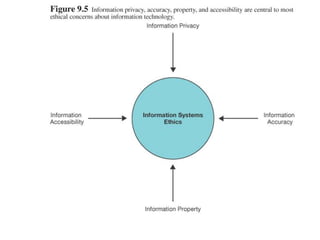
• Understand information privacy, accuracy,
property, and accessibility
• Understand types of computer crime
• Understand the terms virus, worm, Trojan
horse, and logic or time bomb
• Understand computer security
Information Systems Ethics
• Toffler’s three waves of change
– Agriculture
– Industrial Revolution
– Information Age
Information Systems Ethics
• Computer Literacy
– Knowing how to use a computer
• Digital Divide
– That gap between those with computer access and
those who don’t have it
• Computer Ethics
– Standards of conduct as they pertain to the use of
information systems
Information Systems Ethics
• Privacy
– Protecting one’s personal information
• Identity theft
– Stealing of another’s social security number, credit
card number, or other personal information
Information Systems Ethics
• Information accuracy
– Deals with authentication and fidelity of information
• Information property
– Deals with who owns information about individuals
and how information can be sold and exchanged
Information Systems Ethics
• Information accessibility
– Deals with what information a person has the right to
obtain about others and how the information can be used
• Issues in information accessibility
– Carnivore: software application designed to be connected
to Internet Service Providers’ computers and eavesdrops
on all communications.
– Electronic Communications Privacy Act (ECPA): it offered
stronger support for voice mail than it did for e-mail. No
other laws at federal or state levels protect e-mail privacy
– Monitoring e-mail
Information Systems Ethics
• The need for a code of ethical conduct
– Business ethics
– Plagiarism
– Cybersquatting: registering a domain name and
then trying to sell the name for big bucks to a
person, company. Domain names are a scarce
resource – one of the few scarce resources in
cyberspace
Computer Crime
• Definition: the act of using a computer to
commit an illegal act
– Authorized and unauthorized computer access
– Examples
• Stealing time on company computers
• Breaking into government Web sites
• Stealing credit card information
Computer Crime
• Federal and State Laws
– Stealing or compromising data
– Gaining unauthorized computer access
– Violating data belonging to banks
– Intercepting communications
– Threatening to damage computer systems
– Disseminating viruses
Computer Crime
• Hacking and Cracking
– Hacker – one who gains unauthorized computer
access, but without doing damage
– Cracker – one who breaks into computer systems
for the purpose of doing damage
Computer Crime
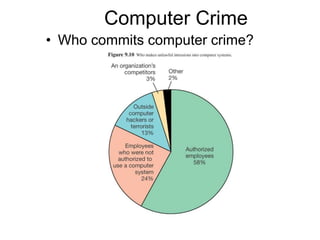
• Who commits computer crime?
Computer Crime
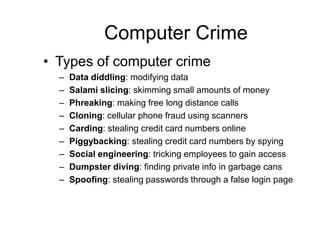
• Types of computer crime
– Data diddling: modifying data
– Salami slicing: skimming small amounts of money
– Phreaking: making free long distance calls
– Cloning: cellular phone fraud using scanners
– Carding: stealing credit card numbers online
– Piggybacking: stealing credit card numbers by spying
– Social engineering: tricking employees to gain access
– Dumpster diving: finding private info in garbage cans
– Spoofing: stealing passwords through a false login page
Computer Crime
• Software piracy
– North America – 25%
– Western Europe – 34%
– Asia / Pacific – 51%
– Mid East / Africa – 55%
– Latin America – 58%
– Eastern Europe – 63%
Computer Crime
• Computer viruses and destructive code
– Virus – a destructive program that disrupts the normal
functioning of computer systems
– Types:
• Worm: usually does not destroy files; copies itself
• Trojan horses: Activates without being detected;
does not copy itself
• Logic or time bombs: A type of Trojan horse that
stays dormant for a period of time before activating
Computer Security
• Computer Security – precautions taken to
keep computers and the information they
contain safe from unauthorized access
Computer Security
• Recommended Safeguards
– Implement a security plan to prevent break-ins
– Have a plan if break-ins do occur
– Make backups!
– Only allow access to key employees
– Change passwords frequently
– Keep stored information secure
– Use antivirus software
– Use biometrics for access to computing resources
– Hire trustworthy employees
Computer Security
• Encryption – the process of encoding
messages before they enter the network or
airwaves, then decoding them at the
receiving end of the transfer
Computer Security
• How encryption works
– Symmetric secret key system
• Both sender and recipient use the same key
• Key management can be a problem
– Public key technology
• A private key and a public key
– Certificate authority
• To implement public-key encryption on a busy Web site,
requires a more sophisticated solution. A third party, called
certificate authority, is used.
• A trusted middleman verifies that a Web site is a trusted site
(provides public keys to trusted partners)
• Secure socket layers (SSL), developed by Netscape, is a
popular public-key encryption method
Computer Security
• Other encryption approaches
– Pretty good privacy (PGP)
• Phil Zimmerman
– Clipper Chip: a chip that could generate uncrackable codes.
There was a flaw.
Computer Security
• Internet Security
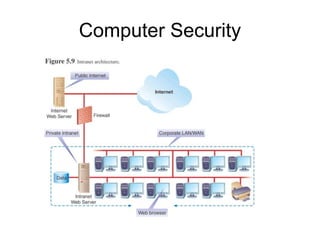
– Firewall – hardware and software designed to keep
unauthorized users out of network systems
Computer Security
Computer Security
• Virus prevention
– Install antivirus software
– Make backups
– Avoid unknown sources of shareware
– Delete e-mails from unknown sources
– If your computer gets a virus…
Computer Security
• How to maintain your privacy online
– Choose Web sites monitored by privacy advocates
– Avoid “cookies”
– Visit sites anonymously
– Use caution when requesting confirming e-mail
Computer Security
• Avoid getting conned in cyberspace
– Internet auctions
– Internet access
– International modem dialing
– Web cramming
– Multilevel marketing (pyramid schemes)
– Travel/vacations
– Business opportunities
– Investments
– Health-care products

9. Computer Ethics.ppt

  • 1.
    Chapter 9 Information SystemsEthics, Computer Crime, and Security
  • 2.
    Chapter 9 Objectives •Understand how computer ethics affects IS • Understand information privacy, accuracy, property, and accessibility • Understand types of computer crime • Understand the terms virus, worm, Trojan horse, and logic or time bomb • Understand computer security
  • 3.
    Information Systems Ethics •Toffler’s three waves of change – Agriculture – Industrial Revolution – Information Age
  • 4.
    Information Systems Ethics •Computer Literacy – Knowing how to use a computer • Digital Divide – That gap between those with computer access and those who don’t have it • Computer Ethics – Standards of conduct as they pertain to the use of information systems
  • 5.
    Information Systems Ethics •Privacy – Protecting one’s personal information • Identity theft – Stealing of another’s social security number, credit card number, or other personal information
  • 6.
    Information Systems Ethics •Information accuracy – Deals with authentication and fidelity of information • Information property – Deals with who owns information about individuals and how information can be sold and exchanged
  • 8.
    Information Systems Ethics •Information accessibility – Deals with what information a person has the right to obtain about others and how the information can be used • Issues in information accessibility – Carnivore: software application designed to be connected to Internet Service Providers’ computers and eavesdrops on all communications. – Electronic Communications Privacy Act (ECPA): it offered stronger support for voice mail than it did for e-mail. No other laws at federal or state levels protect e-mail privacy – Monitoring e-mail
  • 9.
    Information Systems Ethics •The need for a code of ethical conduct – Business ethics – Plagiarism – Cybersquatting: registering a domain name and then trying to sell the name for big bucks to a person, company. Domain names are a scarce resource – one of the few scarce resources in cyberspace
  • 10.
    Computer Crime • Definition:the act of using a computer to commit an illegal act – Authorized and unauthorized computer access – Examples • Stealing time on company computers • Breaking into government Web sites • Stealing credit card information
  • 11.
    Computer Crime • Federaland State Laws – Stealing or compromising data – Gaining unauthorized computer access – Violating data belonging to banks – Intercepting communications – Threatening to damage computer systems – Disseminating viruses
  • 12.
    Computer Crime • Hackingand Cracking – Hacker – one who gains unauthorized computer access, but without doing damage – Cracker – one who breaks into computer systems for the purpose of doing damage
  • 13.
    Computer Crime • Whocommits computer crime?
  • 14.
    Computer Crime • Typesof computer crime – Data diddling: modifying data – Salami slicing: skimming small amounts of money – Phreaking: making free long distance calls – Cloning: cellular phone fraud using scanners – Carding: stealing credit card numbers online – Piggybacking: stealing credit card numbers by spying – Social engineering: tricking employees to gain access – Dumpster diving: finding private info in garbage cans – Spoofing: stealing passwords through a false login page
  • 15.
    Computer Crime • Softwarepiracy – North America – 25% – Western Europe – 34% – Asia / Pacific – 51% – Mid East / Africa – 55% – Latin America – 58% – Eastern Europe – 63%
  • 16.
    Computer Crime • Computerviruses and destructive code – Virus – a destructive program that disrupts the normal functioning of computer systems – Types: • Worm: usually does not destroy files; copies itself • Trojan horses: Activates without being detected; does not copy itself • Logic or time bombs: A type of Trojan horse that stays dormant for a period of time before activating
  • 17.
    Computer Security • ComputerSecurity – precautions taken to keep computers and the information they contain safe from unauthorized access
  • 18.
    Computer Security • RecommendedSafeguards – Implement a security plan to prevent break-ins – Have a plan if break-ins do occur – Make backups! – Only allow access to key employees – Change passwords frequently – Keep stored information secure – Use antivirus software – Use biometrics for access to computing resources – Hire trustworthy employees
  • 19.
    Computer Security • Encryption– the process of encoding messages before they enter the network or airwaves, then decoding them at the receiving end of the transfer
  • 20.
    Computer Security • Howencryption works – Symmetric secret key system • Both sender and recipient use the same key • Key management can be a problem – Public key technology • A private key and a public key – Certificate authority • To implement public-key encryption on a busy Web site, requires a more sophisticated solution. A third party, called certificate authority, is used. • A trusted middleman verifies that a Web site is a trusted site (provides public keys to trusted partners) • Secure socket layers (SSL), developed by Netscape, is a popular public-key encryption method
  • 21.
    Computer Security • Otherencryption approaches – Pretty good privacy (PGP) • Phil Zimmerman – Clipper Chip: a chip that could generate uncrackable codes. There was a flaw.
  • 22.
    Computer Security • InternetSecurity – Firewall – hardware and software designed to keep unauthorized users out of network systems
  • 23.
  • 24.
    Computer Security • Virusprevention – Install antivirus software – Make backups – Avoid unknown sources of shareware – Delete e-mails from unknown sources – If your computer gets a virus…
  • 25.
    Computer Security • Howto maintain your privacy online – Choose Web sites monitored by privacy advocates – Avoid “cookies” – Visit sites anonymously – Use caution when requesting confirming e-mail
  • 26.
    Computer Security • Avoidgetting conned in cyberspace – Internet auctions – Internet access – International modem dialing – Web cramming – Multilevel marketing (pyramid schemes) – Travel/vacations – Business opportunities – Investments – Health-care products