________________________________________________________________________


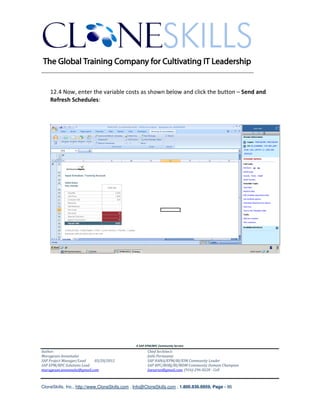
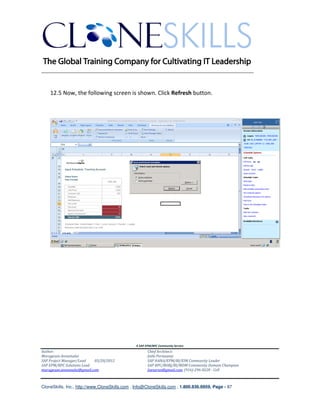
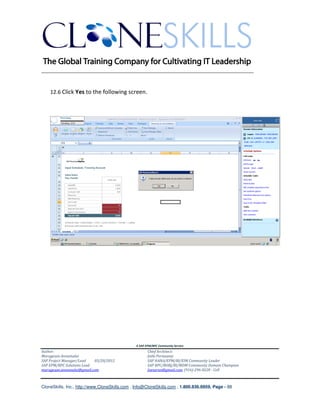
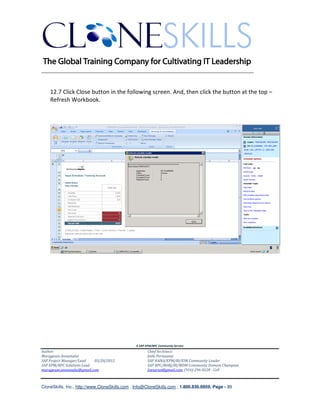
              SAP BPC NW 10.0|7.5 KNOWLEDGEBASE


                   SCRIPT LOGIC IMPLEMENTATION GUIDE


                                                                                             A SAP EPM/BPC Community Service


                                               A SAP EPM/BPC Community Service
Author:                                               Chief Architect:
Murugesan Annamalai                                   Jothi Periasamy
SAP Project Manager/Lead   03/20/2012                 SAP HANA/EPM/BI/EIM Community Leader
SAP EPM/BPC Solutions Lead                            SAP BPC/BOBJ/BI/MDM Community Domain Champion
murugesan.annamalai@gmail.com                         Joesaran@gmail.com, (916)-296-0228 - Cell


CloneSkills, Inc., http://www.CloneSkills.com , Info@CloneSkills.com , 1.800.836.8959, Page - 1
________________________________________________________________________


Table of Contents
Executive Summary: ..................................................................................................... 3
Business Scenario: ........................................................................................................ 3
Data Model: .................................................................................................................. 4
Solutions Building Blocks: ............................................................................................ 5
Script Logic - Structure: .............................................................................................. 12
Script Logic – Implemention Steps: ........................................................................... 13
List of Script Logic Commands: .................................................................................. 14
Script Logic in Action .................................................................................................. 16
Debugging Script Logic ............................................................................................. 120
Benefits of Script Logic ............................................................................................. 125
Golden Rules of Script Logic .................................................................................... 126
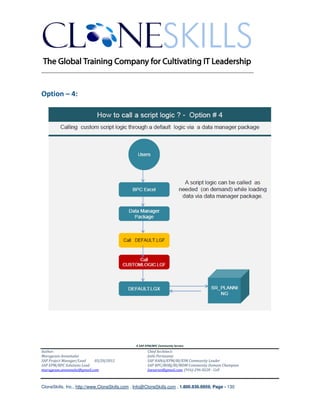
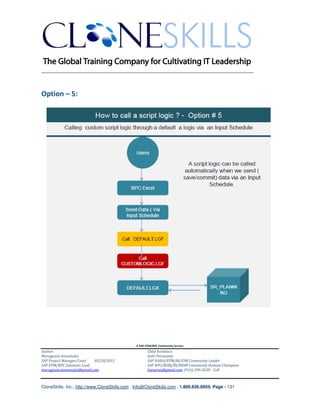
Appendix 1 : Calling Script Logic – Various Options ............................................... 127
Disclaimer:................................................................................................................. 132
_______________________________________________________________________ .
SAP Community Contributors: ........................................................................... 132


                                                         A SAP EPM/BPC Community Service
Author:                                                         Chief Architect:
Murugesan Annamalai                                             Jothi Periasamy
SAP Project Manager/Lead   03/20/2012                           SAP HANA/EPM/BI/EIM Community Leader
SAP EPM/BPC Solutions Lead                                      SAP BPC/BOBJ/BI/MDM Community Domain Champion
murugesan.annamalai@gmail.com                                   Joesaran@gmail.com, (916)-296-0228 - Cell


CloneSkills, Inc., http://www.CloneSkills.com , Info@CloneSkills.com , 1.800.836.8959, Page - 2
________________________________________________________________________

Executive Summary:
The purpose of this document is to demonstrate the implementation of script logic in real-
life projects, which includes designing, creating, executing and debugging Script Logic in a
SAP BPC 10. /7.5 NW environment. This document educates the user only the essential
topics that are required to solve practical problems and it expose the user to the Script
Logic commands that are widely used in any business process automations such as
               Budget Allocation
               Revenue Distributions
               Cost Calculations
               Revenue and Cost Implementation Impact of Financial Statements
               Scenario (“What If”) Analysis
               Adjustment to plan to formalizing forecasting

It is assumed that the user has basic knowledge/understanding about SAP BPC NW
10.0/7.5 version.

Business Scenario:
CloneSkills, Inc. automates their Sales Revenue Planning process through SAP BPC NW 7.5
software and here, we are using SAP BPC’s core function of Script Logic to perform key
business calculations and also automatic data management. Also it has been identified to
implement a special requirements on the planning calculations and distribution.


                                               A SAP EPM/BPC Community Service
Author:                                               Chief Architect:
Murugesan Annamalai                                   Jothi Periasamy
SAP Project Manager/Lead   03/20/2012                 SAP HANA/EPM/BI/EIM Community Leader
SAP EPM/BPC Solutions Lead                            SAP BPC/BOBJ/BI/MDM Community Domain Champion
murugesan.annamalai@gmail.com                         Joesaran@gmail.com, (916)-296-0228 - Cell


CloneSkills, Inc., http://www.CloneSkills.com , Info@CloneSkills.com , 1.800.836.8959, Page - 3
________________________________________________________________________
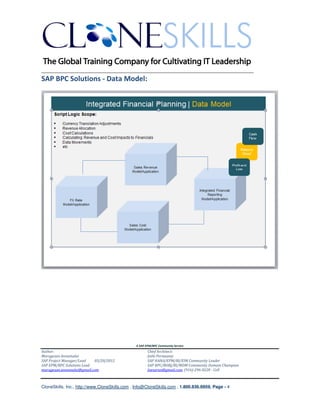
SAP BPC Solutions - Data Model:


                                               A SAP EPM/BPC Community Service
Author:                                               Chief Architect:
Murugesan Annamalai                                   Jothi Periasamy
SAP Project Manager/Lead   03/20/2012                 SAP HANA/EPM/BI/EIM Community Leader
SAP EPM/BPC Solutions Lead                            SAP BPC/BOBJ/BI/MDM Community Domain Champion
murugesan.annamalai@gmail.com                         Joesaran@gmail.com, (916)-296-0228 - Cell


CloneSkills, Inc., http://www.CloneSkills.com , Info@CloneSkills.com , 1.800.836.8959, Page - 4
________________________________________________________________________

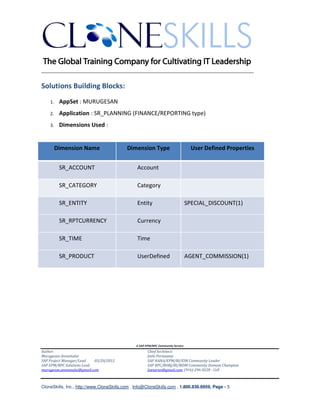
Solutions Building Blocks:
    1.    AppSet : MURUGESAN
    2.    Application : SR_PLANNING (FINANCE/REPORTING type)
    3.    Dimensions Used :


         Dimension Name                    Dimension Type                          User Defined Properties


          SR_ACCOUNT                            Account

          SR_CATEGORY                           Category

          SR_ENTITY                             Entity                           SPECIAL_DISCOUNT(1)

          SR_RPTCURRENCY                        Currency

          SR_TIME                               Time

          SR_PRODUCT                            UserDefined                      AGENT_COMMISSION(1)


                                               A SAP EPM/BPC Community Service
Author:                                               Chief Architect:
Murugesan Annamalai                                   Jothi Periasamy
SAP Project Manager/Lead   03/20/2012                 SAP HANA/EPM/BI/EIM Community Leader
SAP EPM/BPC Solutions Lead                            SAP BPC/BOBJ/BI/MDM Community Domain Champion
murugesan.annamalai@gmail.com                         Joesaran@gmail.com, (916)-296-0228 - Cell


CloneSkills, Inc., http://www.CloneSkills.com , Info@CloneSkills.com , 1.800.836.8959, Page - 5
________________________________________________________________________

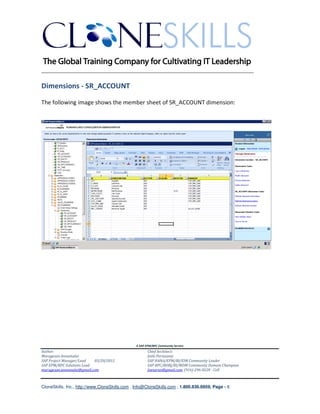
Dimensions - SR_ACCOUNT

The following image shows the member sheet of SR_ACCOUNT dimension:


                                               A SAP EPM/BPC Community Service
Author:                                               Chief Architect:
Murugesan Annamalai                                   Jothi Periasamy
SAP Project Manager/Lead   03/20/2012                 SAP HANA/EPM/BI/EIM Community Leader
SAP EPM/BPC Solutions Lead                            SAP BPC/BOBJ/BI/MDM Community Domain Champion
murugesan.annamalai@gmail.com                         Joesaran@gmail.com, (916)-296-0228 - Cell


CloneSkills, Inc., http://www.CloneSkills.com , Info@CloneSkills.com , 1.800.836.8959, Page - 6
________________________________________________________________________


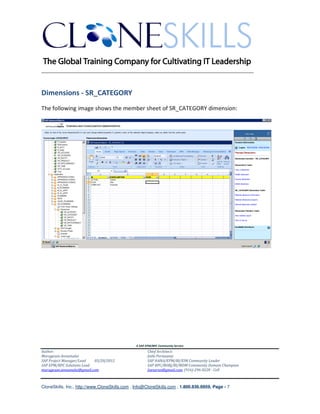
Dimensions - SR_CATEGORY
The following image shows the member sheet of SR_CATEGORY dimension:


                                               A SAP EPM/BPC Community Service
Author:                                               Chief Architect:
Murugesan Annamalai                                   Jothi Periasamy
SAP Project Manager/Lead   03/20/2012                 SAP HANA/EPM/BI/EIM Community Leader
SAP EPM/BPC Solutions Lead                            SAP BPC/BOBJ/BI/MDM Community Domain Champion
murugesan.annamalai@gmail.com                         Joesaran@gmail.com, (916)-296-0228 - Cell


CloneSkills, Inc., http://www.CloneSkills.com , Info@CloneSkills.com , 1.800.836.8959, Page - 7
________________________________________________________________________


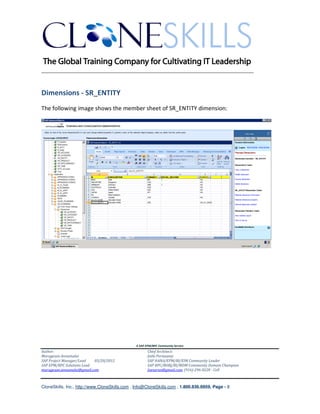
Dimensions - SR_ENTITY
The following image shows the member sheet of SR_ENTITY dimension:


                                               A SAP EPM/BPC Community Service
Author:                                               Chief Architect:
Murugesan Annamalai                                   Jothi Periasamy
SAP Project Manager/Lead   03/20/2012                 SAP HANA/EPM/BI/EIM Community Leader
SAP EPM/BPC Solutions Lead                            SAP BPC/BOBJ/BI/MDM Community Domain Champion
murugesan.annamalai@gmail.com                         Joesaran@gmail.com, (916)-296-0228 - Cell


CloneSkills, Inc., http://www.CloneSkills.com , Info@CloneSkills.com , 1.800.836.8959, Page - 8
________________________________________________________________________


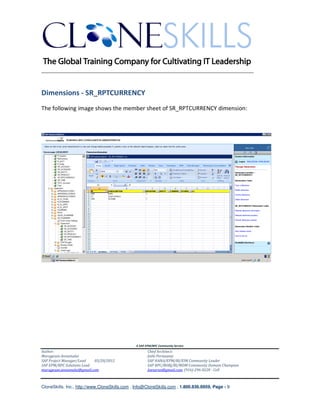
Dimensions - SR_RPTCURRENCY
The following image shows the member sheet of SR_RPTCURRENCY dimension:


                                               A SAP EPM/BPC Community Service
Author:                                               Chief Architect:
Murugesan Annamalai                                   Jothi Periasamy
SAP Project Manager/Lead   03/20/2012                 SAP HANA/EPM/BI/EIM Community Leader
SAP EPM/BPC Solutions Lead                            SAP BPC/BOBJ/BI/MDM Community Domain Champion
murugesan.annamalai@gmail.com                         Joesaran@gmail.com, (916)-296-0228 - Cell


CloneSkills, Inc., http://www.CloneSkills.com , Info@CloneSkills.com , 1.800.836.8959, Page - 9
________________________________________________________________________


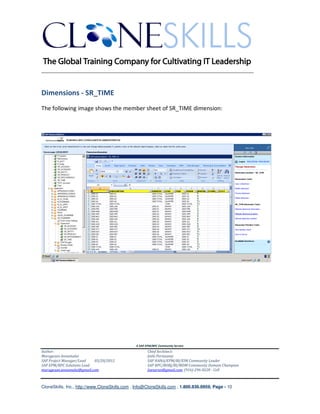
Dimensions - SR_TIME
The following image shows the member sheet of SR_TIME dimension:


                                               A SAP EPM/BPC Community Service
Author:                                               Chief Architect:
Murugesan Annamalai                                   Jothi Periasamy
SAP Project Manager/Lead   03/20/2012                 SAP HANA/EPM/BI/EIM Community Leader
SAP EPM/BPC Solutions Lead                            SAP BPC/BOBJ/BI/MDM Community Domain Champion
murugesan.annamalai@gmail.com                         Joesaran@gmail.com, (916)-296-0228 - Cell


CloneSkills, Inc., http://www.CloneSkills.com , Info@CloneSkills.com , 1.800.836.8959, Page - 10
________________________________________________________________________


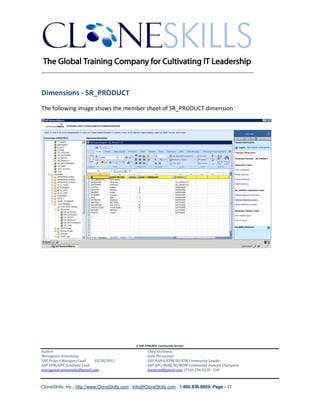
Dimensions - SR_PRODUCT
The following image shows the member sheet of SR_PRODUCT dimension:


                                               A SAP EPM/BPC Community Service
Author:                                               Chief Architect:
Murugesan Annamalai                                   Jothi Periasamy
SAP Project Manager/Lead   03/20/2012                 SAP HANA/EPM/BI/EIM Community Leader
SAP EPM/BPC Solutions Lead                            SAP BPC/BOBJ/BI/MDM Community Domain Champion
murugesan.annamalai@gmail.com                         Joesaran@gmail.com, (916)-296-0228 - Cell


CloneSkills, Inc., http://www.CloneSkills.com , Info@CloneSkills.com , 1.800.836.8959, Page - 11
________________________________________________________________________


Script Logic - Structure:
Script Logic code can be broken down into 3 components:

    1. Scoping [ the data on which the Logic is to be applied]
    2. Body/Code[ the processing/logic to be applied to the data]
    3. Saving/writing the record.

The following code snippet shows the three parts:


We will be discussing all of the above sections in details of the above in a short while.


                                               A SAP EPM/BPC Community Service
Author:                                               Chief Architect:
Murugesan Annamalai                                   Jothi Periasamy
SAP Project Manager/Lead   03/20/2012                 SAP HANA/EPM/BI/EIM Community Leader
SAP EPM/BPC Solutions Lead                            SAP BPC/BOBJ/BI/MDM Community Domain Champion
murugesan.annamalai@gmail.com                         Joesaran@gmail.com, (916)-296-0228 - Cell


CloneSkills, Inc., http://www.CloneSkills.com , Info@CloneSkills.com , 1.800.836.8959, Page - 12
________________________________________________________________________
Script Logic – Implementation Steps (Sample):


        Step # 1: Launch BPC Admin client and implement Application, Dimensions and
        Members.

        Step # 2: In BPC Admin, Go to SR_PLANNING (Note: need to use your own application)
        application’s Script Logic folder. Create a new Logic file. Validate and Save it.

        Step # 3: In BPC Admin, Go to SR_PLANNING (Note: You need to use your own application)
        application’s Script Logic folder. Look for Default.lgf. If it does not exist, create a
        new one. Validate and Save it.

        Step # 4: In BPC Admin, Inside Default.lgf file, include the just created Logic file.
        Validate and Save it.

        Step # 5: In BPC Admin, launch Interface for Excel. Connect to SR_PLANNING (Note:
        need to use your own application) application.


        Step # 6: Verify the data using EVDRE () command or using the Report Template(s)
        provided by SAP.

Note:

        Instead of having a separate logic file, the code can be put into the Default.lgf file
        and it will get executed when data is sent to the BPC server. This may not be a good
        practice and may not be manageable if the script has lots of lines of code.

        These are all sample steps, there are several different ways to implement a Script
        logic


                                               A SAP EPM/BPC Community Service
Author:                                               Chief Architect:
Murugesan Annamalai                                   Jothi Periasamy
SAP Project Manager/Lead   03/20/2012                 SAP HANA/EPM/BI/EIM Community Leader
SAP EPM/BPC Solutions Lead                            SAP BPC/BOBJ/BI/MDM Community Domain Champion
murugesan.annamalai@gmail.com                         Joesaran@gmail.com, (916)-296-0228 - Cell


CloneSkills, Inc., http://www.CloneSkills.com , Info@CloneSkills.com , 1.800.836.8959, Page - 13
________________________________________________________________________


List of Script Logic Commands (Sample):
Script Logic commands can be grouped into 3 categories as follows:

Scoping Commands
   1. *XDIM_MEMBERSET

   2. *XDIM_ADDMEMBERSET

   3. *XDIM_MAXMEMBERS

   4. *XDIM_FILTER

Body/Code/Processing Commands
   5. *INCLUDE

   6. *WHEN/ENDWHEN

   7. *REC

   8. TMVL Parameter

   9. *SELECT

   10. *SELECTCASE/ENDSELECT

   11. *FOR / *NEXT

   12. *ADD / *ENDADD

   13. *BEGIN / *END

   14. *FUNCTION / *ENDFUNCTION
                                               A SAP EPM/BPC Community Service
Author:                                               Chief Architect:
Murugesan Annamalai                                   Jothi Periasamy
SAP Project Manager/Lead   03/20/2012                 SAP HANA/EPM/BI/EIM Community Leader
SAP EPM/BPC Solutions Lead                            SAP BPC/BOBJ/BI/MDM Community Domain Champion
murugesan.annamalai@gmail.com                         Joesaran@gmail.com, (916)-296-0228 - Cell


CloneSkills, Inc., http://www.CloneSkills.com , Info@CloneSkills.com , 1.800.836.8959, Page - 14
________________________________________________________________________
   15. *SUB / *ENDSUB

   16. *LOOKUP

   17. *RUNALLOCATION


Saving Commands
   18. COMMIT


                                               A SAP EPM/BPC Community Service
Author:                                               Chief Architect:
Murugesan Annamalai                                   Jothi Periasamy
SAP Project Manager/Lead   03/20/2012                 SAP HANA/EPM/BI/EIM Community Leader
SAP EPM/BPC Solutions Lead                            SAP BPC/BOBJ/BI/MDM Community Domain Champion
murugesan.annamalai@gmail.com                         Joesaran@gmail.com, (916)-296-0228 - Cell


CloneSkills, Inc., http://www.CloneSkills.com , Info@CloneSkills.com , 1.800.836.8959, Page - 15
________________________________________________________________________


Script Logic in Action:
    1. *XDIM_MEMBERSET

    Syntax:

    *XDIM_MEMBERSET {Dimension name} = {Members Set}
    *XDIM_MEMBERSET {Dimension}<>{MemberSet}

    Description:

    *XDIM_MEMBERSET defines the scope of the data in which the subsequent business
    logic is applied.


    Example:

    *XDIM_MEMBERSET SR_ACCOUNT                                    =          TOP_PER_UNIT
    *XDIM_MEMBERSET SR_CATEGORY                                   =          PLAN
    *XDIM_MEMBERSET SR_ENTITY                                     =          USA
    *XDIM_MEMBERSET SR_PRODUCT                                    =          LAPTOP
    *XDIM_MEMBERSET SR_RPTCURRENCY                                =          LC
    *XDIM_MEMBERSET SR_TIME                                       =          2006.JAN


    Business Scenario:
    Increase the discount given to the PRODUCT [LAPTOP] by 10% and book the value to
    the SPL_DISCOUNT [ACCOUNT] for PLAN data for the period – 2006, JAN.


                                               A SAP EPM/BPC Community Service
Author:                                               Chief Architect:
Murugesan Annamalai                                   Jothi Periasamy
SAP Project Manager/Lead   03/20/2012                 SAP HANA/EPM/BI/EIM Community Leader
SAP EPM/BPC Solutions Lead                            SAP BPC/BOBJ/BI/MDM Community Domain Champion
murugesan.annamalai@gmail.com                         Joesaran@gmail.com, (916)-296-0228 - Cell


CloneSkills, Inc., http://www.CloneSkills.com , Info@CloneSkills.com , 1.800.836.8959, Page - 16
________________________________________________________________________


Implementation Steps:

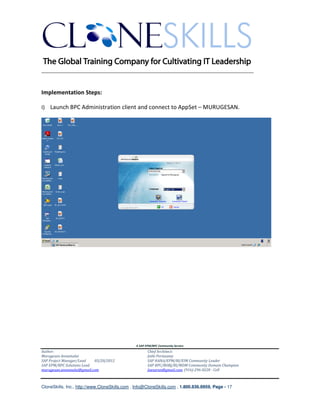
I) Launch BPC Administration client and connect to AppSet – MURUGESAN.


                                               A SAP EPM/BPC Community Service
Author:                                               Chief Architect:
Murugesan Annamalai                                   Jothi Periasamy
SAP Project Manager/Lead   03/20/2012                 SAP HANA/EPM/BI/EIM Community Leader
SAP EPM/BPC Solutions Lead                            SAP BPC/BOBJ/BI/MDM Community Domain Champion
murugesan.annamalai@gmail.com                         Joesaran@gmail.com, (916)-296-0228 - Cell


CloneSkills, Inc., http://www.CloneSkills.com , Info@CloneSkills.com , 1.800.836.8959, Page - 17
________________________________________________________________________


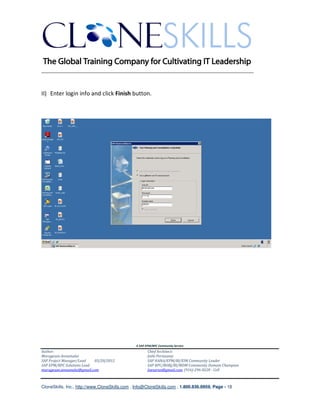
II) Enter login info and click Finish button.


                                               A SAP EPM/BPC Community Service
Author:                                               Chief Architect:
Murugesan Annamalai                                   Jothi Periasamy
SAP Project Manager/Lead   03/20/2012                 SAP HANA/EPM/BI/EIM Community Leader
SAP EPM/BPC Solutions Lead                            SAP BPC/BOBJ/BI/MDM Community Domain Champion
murugesan.annamalai@gmail.com                         Joesaran@gmail.com, (916)-296-0228 - Cell


CloneSkills, Inc., http://www.CloneSkills.com , Info@CloneSkills.com , 1.800.836.8959, Page - 18
________________________________________________________________________


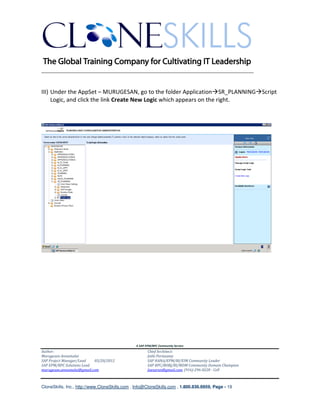
III) Under the AppSet – MURUGESAN, go to the folder Application SR_PLANNING Script
     Logic, and click the link Create New Logic which appears on the right.


                                               A SAP EPM/BPC Community Service
Author:                                               Chief Architect:
Murugesan Annamalai                                   Jothi Periasamy
SAP Project Manager/Lead   03/20/2012                 SAP HANA/EPM/BI/EIM Community Leader
SAP EPM/BPC Solutions Lead                            SAP BPC/BOBJ/BI/MDM Community Domain Champion
murugesan.annamalai@gmail.com                         Joesaran@gmail.com, (916)-296-0228 - Cell


CloneSkills, Inc., http://www.CloneSkills.com , Info@CloneSkills.com , 1.800.836.8959, Page - 19
________________________________________________________________________


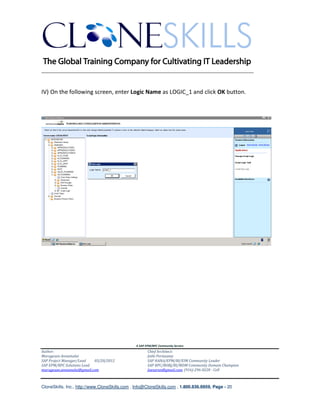
IV) On the following screen, enter Logic Name as LOGIC_1 and click OK button.


                                               A SAP EPM/BPC Community Service
Author:                                               Chief Architect:
Murugesan Annamalai                                   Jothi Periasamy
SAP Project Manager/Lead   03/20/2012                 SAP HANA/EPM/BI/EIM Community Leader
SAP EPM/BPC Solutions Lead                            SAP BPC/BOBJ/BI/MDM Community Domain Champion
murugesan.annamalai@gmail.com                         Joesaran@gmail.com, (916)-296-0228 - Cell


CloneSkills, Inc., http://www.CloneSkills.com , Info@CloneSkills.com , 1.800.836.8959, Page - 20
________________________________________________________________________


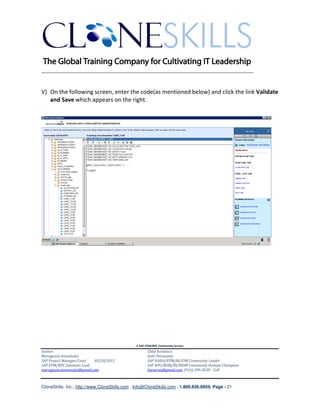
V) On the following screen, enter the code(as mentioned below) and click the link Validate
   and Save which appears on the right.


                                               A SAP EPM/BPC Community Service
Author:                                               Chief Architect:
Murugesan Annamalai                                   Jothi Periasamy
SAP Project Manager/Lead   03/20/2012                 SAP HANA/EPM/BI/EIM Community Leader
SAP EPM/BPC Solutions Lead                            SAP BPC/BOBJ/BI/MDM Community Domain Champion
murugesan.annamalai@gmail.com                         Joesaran@gmail.com, (916)-296-0228 - Cell


CloneSkills, Inc., http://www.CloneSkills.com , Info@CloneSkills.com , 1.800.836.8959, Page - 21
________________________________________________________________________


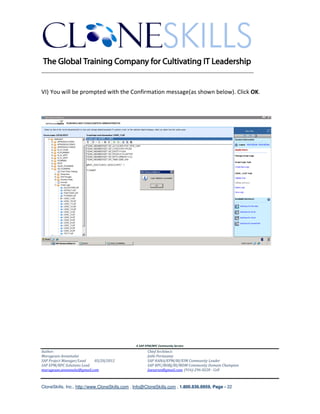
VI) You will be prompted with the Confirmation message(as shown below). Click OK.


                                               A SAP EPM/BPC Community Service
Author:                                               Chief Architect:
Murugesan Annamalai                                   Jothi Periasamy
SAP Project Manager/Lead   03/20/2012                 SAP HANA/EPM/BI/EIM Community Leader
SAP EPM/BPC Solutions Lead                            SAP BPC/BOBJ/BI/MDM Community Domain Champion
murugesan.annamalai@gmail.com                         Joesaran@gmail.com, (916)-296-0228 - Cell


CloneSkills, Inc., http://www.CloneSkills.com , Info@CloneSkills.com , 1.800.836.8959, Page - 22
________________________________________________________________________


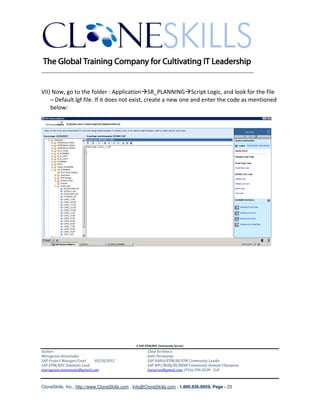
VII) Now, go to the folder : Application SR_PLANNING Script Logic, and look for the file
    – Default.lgf file. If it does not exist, create a new one and enter the code as mentioned
    below:


                                               A SAP EPM/BPC Community Service
Author:                                               Chief Architect:
Murugesan Annamalai                                   Jothi Periasamy
SAP Project Manager/Lead   03/20/2012                 SAP HANA/EPM/BI/EIM Community Leader
SAP EPM/BPC Solutions Lead                            SAP BPC/BOBJ/BI/MDM Community Domain Champion
murugesan.annamalai@gmail.com                         Joesaran@gmail.com, (916)-296-0228 - Cell


CloneSkills, Inc., http://www.CloneSkills.com , Info@CloneSkills.com , 1.800.836.8959, Page - 23
________________________________________________________________________


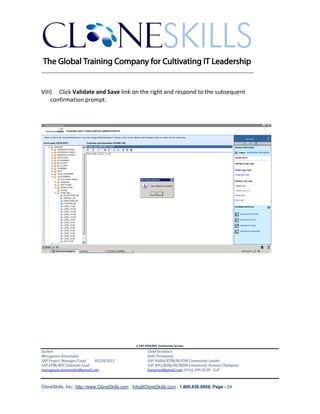
VIII) Click Validate and Save link on the right and respond to the subsequent
    confirmation prompt.


                                               A SAP EPM/BPC Community Service
Author:                                               Chief Architect:
Murugesan Annamalai                                   Jothi Periasamy
SAP Project Manager/Lead   03/20/2012                 SAP HANA/EPM/BI/EIM Community Leader
SAP EPM/BPC Solutions Lead                            SAP BPC/BOBJ/BI/MDM Community Domain Champion
murugesan.annamalai@gmail.com                         Joesaran@gmail.com, (916)-296-0228 - Cell


CloneSkills, Inc., http://www.CloneSkills.com , Info@CloneSkills.com , 1.800.836.8959, Page - 24
________________________________________________________________________


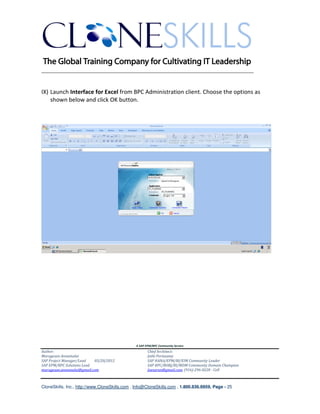
IX) Launch Interface for Excel from BPC Administration client. Choose the options as
    shown below and click OK button.


                                               A SAP EPM/BPC Community Service
Author:                                               Chief Architect:
Murugesan Annamalai                                   Jothi Periasamy
SAP Project Manager/Lead   03/20/2012                 SAP HANA/EPM/BI/EIM Community Leader
SAP EPM/BPC Solutions Lead                            SAP BPC/BOBJ/BI/MDM Community Domain Champion
murugesan.annamalai@gmail.com                         Joesaran@gmail.com, (916)-296-0228 - Cell


CloneSkills, Inc., http://www.CloneSkills.com , Info@CloneSkills.com , 1.800.836.8959, Page - 25
________________________________________________________________________


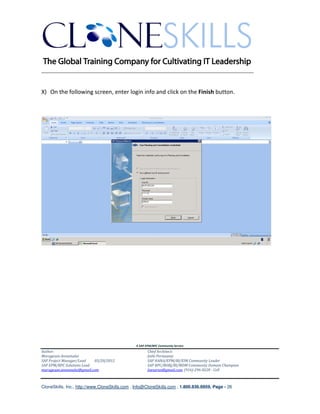
X) On the following screen, enter login info and click on the Finish button.


                                               A SAP EPM/BPC Community Service
Author:                                               Chief Architect:
Murugesan Annamalai                                   Jothi Periasamy
SAP Project Manager/Lead   03/20/2012                 SAP HANA/EPM/BI/EIM Community Leader
SAP EPM/BPC Solutions Lead                            SAP BPC/BOBJ/BI/MDM Community Domain Champion
murugesan.annamalai@gmail.com                         Joesaran@gmail.com, (916)-296-0228 - Cell


CloneSkills, Inc., http://www.CloneSkills.com , Info@CloneSkills.com , 1.800.836.8959, Page - 26
________________________________________________________________________


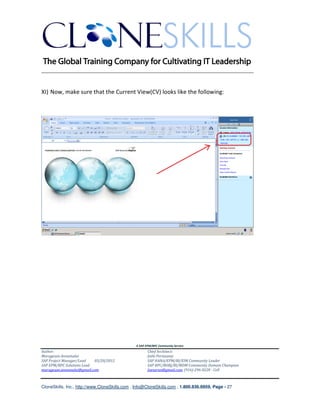
XI) Now, make sure that the Current View(CV) looks like the following:


                                               A SAP EPM/BPC Community Service
Author:                                               Chief Architect:
Murugesan Annamalai                                   Jothi Periasamy
SAP Project Manager/Lead   03/20/2012                 SAP HANA/EPM/BI/EIM Community Leader
SAP EPM/BPC Solutions Lead                            SAP BPC/BOBJ/BI/MDM Community Domain Champion
murugesan.annamalai@gmail.com                         Joesaran@gmail.com, (916)-296-0228 - Cell


CloneSkills, Inc., http://www.CloneSkills.com , Info@CloneSkills.com , 1.800.836.8959, Page - 27
________________________________________________________________________


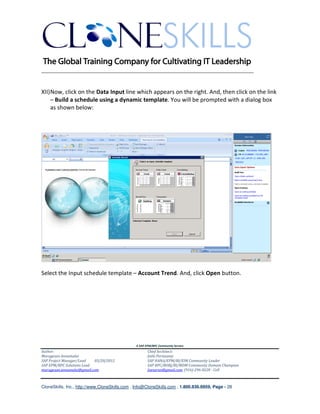
XII) Now, click on the Data Input line which appears on the right. And, then click on the link
     – Build a schedule using a dynamic template. You will be prompted with a dialog box
     as shown below:


Select the Input schedule template – Account Trend. And, click Open button.


                                               A SAP EPM/BPC Community Service
Author:                                               Chief Architect:
Murugesan Annamalai                                   Jothi Periasamy
SAP Project Manager/Lead   03/20/2012                 SAP HANA/EPM/BI/EIM Community Leader
SAP EPM/BPC Solutions Lead                            SAP BPC/BOBJ/BI/MDM Community Domain Champion
murugesan.annamalai@gmail.com                         Joesaran@gmail.com, (916)-296-0228 - Cell


CloneSkills, Inc., http://www.CloneSkills.com , Info@CloneSkills.com , 1.800.836.8959, Page - 28
________________________________________________________________________


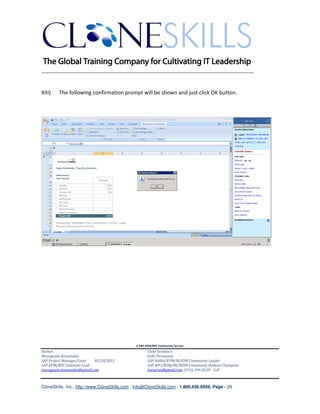
XIII)   The following confirmation prompt will be shown and just click OK button.


                                               A SAP EPM/BPC Community Service
Author:                                               Chief Architect:
Murugesan Annamalai                                   Jothi Periasamy
SAP Project Manager/Lead   03/20/2012                 SAP HANA/EPM/BI/EIM Community Leader
SAP EPM/BPC Solutions Lead                            SAP BPC/BOBJ/BI/MDM Community Domain Champion
murugesan.annamalai@gmail.com                         Joesaran@gmail.com, (916)-296-0228 - Cell


CloneSkills, Inc., http://www.CloneSkills.com , Info@CloneSkills.com , 1.800.836.8959, Page - 29
________________________________________________________________________


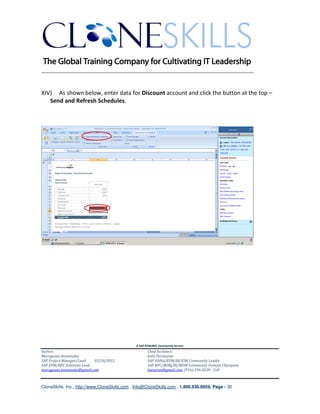
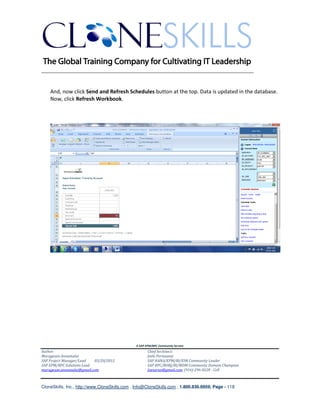
XIV) As shown below, enter data for Discount account and click the button at the top –
   Send and Refresh Schedules.


                                               A SAP EPM/BPC Community Service
Author:                                               Chief Architect:
Murugesan Annamalai                                   Jothi Periasamy
SAP Project Manager/Lead   03/20/2012                 SAP HANA/EPM/BI/EIM Community Leader
SAP EPM/BPC Solutions Lead                            SAP BPC/BOBJ/BI/MDM Community Domain Champion
murugesan.annamalai@gmail.com                         Joesaran@gmail.com, (916)-296-0228 - Cell


CloneSkills, Inc., http://www.CloneSkills.com , Info@CloneSkills.com , 1.800.836.8959, Page - 30
________________________________________________________________________


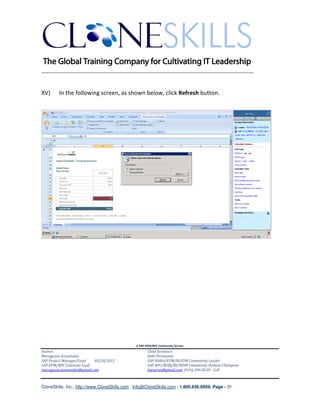
XV)     In the following screen, as shown below, click Refresh button.


                                               A SAP EPM/BPC Community Service
Author:                                               Chief Architect:
Murugesan Annamalai                                   Jothi Periasamy
SAP Project Manager/Lead   03/20/2012                 SAP HANA/EPM/BI/EIM Community Leader
SAP EPM/BPC Solutions Lead                            SAP BPC/BOBJ/BI/MDM Community Domain Champion
murugesan.annamalai@gmail.com                         Joesaran@gmail.com, (916)-296-0228 - Cell


CloneSkills, Inc., http://www.CloneSkills.com , Info@CloneSkills.com , 1.800.836.8959, Page - 31
________________________________________________________________________


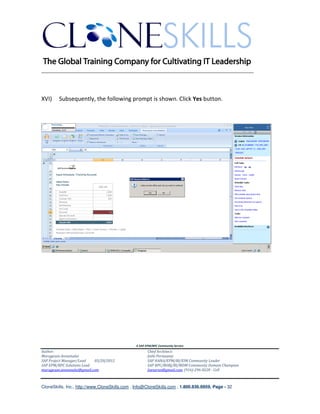
XVI)    Subsequently, the following prompt is shown. Click Yes button.


                                               A SAP EPM/BPC Community Service
Author:                                               Chief Architect:
Murugesan Annamalai                                   Jothi Periasamy
SAP Project Manager/Lead   03/20/2012                 SAP HANA/EPM/BI/EIM Community Leader
SAP EPM/BPC Solutions Lead                            SAP BPC/BOBJ/BI/MDM Community Domain Champion
murugesan.annamalai@gmail.com                         Joesaran@gmail.com, (916)-296-0228 - Cell


CloneSkills, Inc., http://www.CloneSkills.com , Info@CloneSkills.com , 1.800.836.8959, Page - 32
________________________________________________________________________


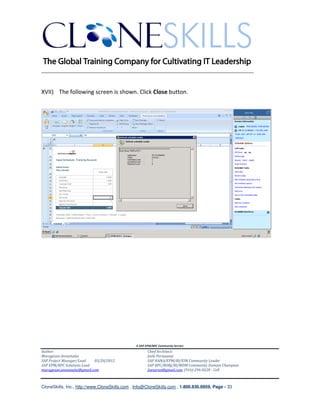
XVII) The following screen is shown. Click Close button.


                                               A SAP EPM/BPC Community Service
Author:                                               Chief Architect:
Murugesan Annamalai                                   Jothi Periasamy
SAP Project Manager/Lead   03/20/2012                 SAP HANA/EPM/BI/EIM Community Leader
SAP EPM/BPC Solutions Lead                            SAP BPC/BOBJ/BI/MDM Community Domain Champion
murugesan.annamalai@gmail.com                         Joesaran@gmail.com, (916)-296-0228 - Cell


CloneSkills, Inc., http://www.CloneSkills.com , Info@CloneSkills.com , 1.800.836.8959, Page - 33
________________________________________________________________________

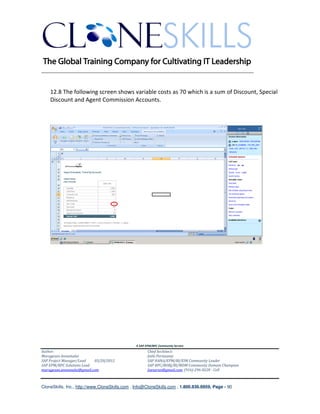
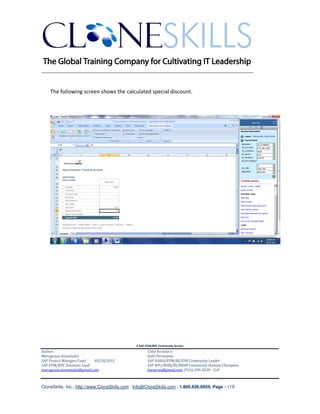
XVIII) Following screen shows the value – 5, which is 10% of 50[ DISCOUNT Account], in
   the Special Discount Account.


                                               A SAP EPM/BPC Community Service
Author:                                               Chief Architect:
Murugesan Annamalai                                   Jothi Periasamy
SAP Project Manager/Lead   03/20/2012                 SAP HANA/EPM/BI/EIM Community Leader
SAP EPM/BPC Solutions Lead                            SAP BPC/BOBJ/BI/MDM Community Domain Champion
murugesan.annamalai@gmail.com                         Joesaran@gmail.com, (916)-296-0228 - Cell


CloneSkills, Inc., http://www.CloneSkills.com , Info@CloneSkills.com , 1.800.836.8959, Page - 34
________________________________________________________________________


    2. *XDIM_ADDMEMBERSET

    Syntax :

    *XDIM_ADDMEMBERSET {dimension} = {members set}

    Description:

    *XDIM_ADDMEMBERSET allows you to add/join/union members to the data region
    already passed by *XDIM_MEMBERSET command. This is different from
    *XDIM_MEMBERSET command in that, the data region defined by subsequent
    *XDIM_MEMBERSET overrides the data region defined by earlier *XDIM_MEMBERSET.


    Example:

    *XDIM_MEMBERSET SR_TIME=BAS(2006.Q1)

    *XDIM_ADDMEMBERSET SR_TIME=2006.APR

    Business Scenario:
    Calculate special discount and copy it to 2006 first quarter. And also, calculate and copy the
    same to 2006.Apr.


                                               A SAP EPM/BPC Community Service
Author:                                               Chief Architect:
Murugesan Annamalai                                   Jothi Periasamy
SAP Project Manager/Lead   03/20/2012                 SAP HANA/EPM/BI/EIM Community Leader
SAP EPM/BPC Solutions Lead                            SAP BPC/BOBJ/BI/MDM Community Domain Champion
murugesan.annamalai@gmail.com                         Joesaran@gmail.com, (916)-296-0228 - Cell


CloneSkills, Inc., http://www.CloneSkills.com , Info@CloneSkills.com , 1.800.836.8959, Page - 35
________________________________________________________________________

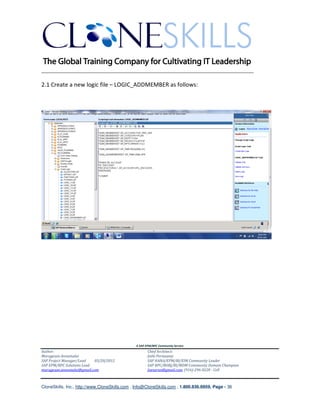
2.1 Create a new logic file – LOGIC_ADDMEMBER as follows:


                                               A SAP EPM/BPC Community Service
Author:                                               Chief Architect:
Murugesan Annamalai                                   Jothi Periasamy
SAP Project Manager/Lead   03/20/2012                 SAP HANA/EPM/BI/EIM Community Leader
SAP EPM/BPC Solutions Lead                            SAP BPC/BOBJ/BI/MDM Community Domain Champion
murugesan.annamalai@gmail.com                         Joesaran@gmail.com, (916)-296-0228 - Cell


CloneSkills, Inc., http://www.CloneSkills.com , Info@CloneSkills.com , 1.800.836.8959, Page - 36
________________________________________________________________________


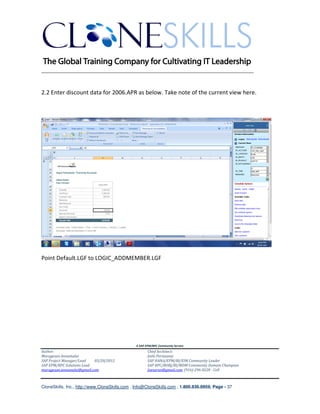
2.2 Enter discount data for 2006.APR as below. Take note of the current view here.


Point Default.LGF to LOGIC_ADDMEMBER.LGF


                                               A SAP EPM/BPC Community Service
Author:                                               Chief Architect:
Murugesan Annamalai                                   Jothi Periasamy
SAP Project Manager/Lead   03/20/2012                 SAP HANA/EPM/BI/EIM Community Leader
SAP EPM/BPC Solutions Lead                            SAP BPC/BOBJ/BI/MDM Community Domain Champion
murugesan.annamalai@gmail.com                         Joesaran@gmail.com, (916)-296-0228 - Cell


CloneSkills, Inc., http://www.CloneSkills.com , Info@CloneSkills.com , 1.800.836.8959, Page - 37
________________________________________________________________________


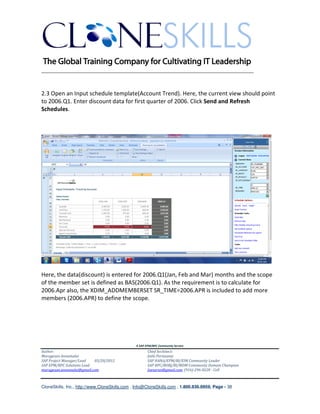
2.3 Open an Input schedule template(Account Trend). Here, the current view should point
to 2006.Q1. Enter discount data for first quarter of 2006. Click Send and Refresh
Schedules.


Here, the data(discount) is entered for 2006.Q1(Jan, Feb and Mar) months and the scope
of the member set is defined as BAS(2006.Q1). As the requirement is to calculate for
2006.Apr also, the XDIM_ADDMEMBERSET SR_TIME=2006.APR is included to add more
members (2006.APR) to define the scope.


                                               A SAP EPM/BPC Community Service
Author:                                               Chief Architect:
Murugesan Annamalai                                   Jothi Periasamy
SAP Project Manager/Lead   03/20/2012                 SAP HANA/EPM/BI/EIM Community Leader
SAP EPM/BPC Solutions Lead                            SAP BPC/BOBJ/BI/MDM Community Domain Champion
murugesan.annamalai@gmail.com                         Joesaran@gmail.com, (916)-296-0228 - Cell


CloneSkills, Inc., http://www.CloneSkills.com , Info@CloneSkills.com , 1.800.836.8959, Page - 38
________________________________________________________________________


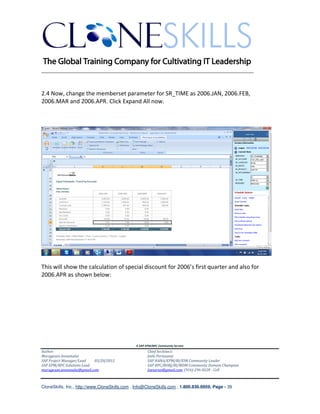
2.4 Now, change the memberset parameter for SR_TIME as 2006.JAN, 2006.FEB,
2006.MAR and 2006.APR. Click Expand All now.


This will show the calculation of special discount for 2006’s first quarter and also for
2006.APR as shown below:


                                               A SAP EPM/BPC Community Service
Author:                                               Chief Architect:
Murugesan Annamalai                                   Jothi Periasamy
SAP Project Manager/Lead   03/20/2012                 SAP HANA/EPM/BI/EIM Community Leader
SAP EPM/BPC Solutions Lead                            SAP BPC/BOBJ/BI/MDM Community Domain Champion
murugesan.annamalai@gmail.com                         Joesaran@gmail.com, (916)-296-0228 - Cell


CloneSkills, Inc., http://www.CloneSkills.com , Info@CloneSkills.com , 1.800.836.8959, Page - 39
________________________________________________________________________


    3. *XDIM_MAXMEMBERS

    Syntax :

    *XDIM_MAXMEMBERS {dimension} = {max number of members}

    Description:

    When there are too many records to be processed, *XDIM_MAXMEMBERS can be used
    to do batch processing, i.e. you can tell the server to process the first batch of
    records(say 100 records) and when that is completed, next batch can be started. This
    stops the server from slowing down which arises when too many records are being
    processed in-memory.

    Example:
    *XDIM_MEMBERSET SR_CATEGORY=ACTUAL
    *XDIM_MEMBERSET SR_TIME=2005.JAN
    *XDIM_MEMBERSET SR_ACCOUNT=QTY,U_PRICE,U_COST

    *XDIM_MAXMEMBERS SR_PRODUCT=5

    *WHEN SR_ACCOUNT
    *IS "QTY"
        *REC(EXPRESSION=%VALUE%*1.1,SR_CATEGORY=PLAN,SR_TIME=2006.JAN)
    *IS "U_PRICE","U_COST"
        *REC(EXPRESSION=%VALUE%,SR_CATEGORY=PLAN,SR_TIME=2006.JAN)
    *ENDWHEN

    *COMMIT

The above example processes 5 Products at a time. Once that is completed, it picks the
next 5 Products and it goes on like that.


                                               A SAP EPM/BPC Community Service
Author:                                               Chief Architect:
Murugesan Annamalai                                   Jothi Periasamy
SAP Project Manager/Lead   03/20/2012                 SAP HANA/EPM/BI/EIM Community Leader
SAP EPM/BPC Solutions Lead                            SAP BPC/BOBJ/BI/MDM Community Domain Champion
murugesan.annamalai@gmail.com                         Joesaran@gmail.com, (916)-296-0228 - Cell


CloneSkills, Inc., http://www.CloneSkills.com , Info@CloneSkills.com , 1.800.836.8959, Page - 40
________________________________________________________________________


    4. *XDIM_FILTER

    Syntax :


    *XDIM_FILTER {Dimension name} = { Dimension name }.properties(“Property Name”) =
    “Property Value”

    Description:

    This command selects all the members satisfying the condition.


    Example:

    *XDIM_FILTER SR_ENTITY=[SR_ENTITY].properties("SPECIAL_DISCOUNT")="Y"

    Business Scenario:
    Calculate special discount which is 10% of discount for first quarter of 2006 for the entities for
    which, the special discount property is “Y”.


                                               A SAP EPM/BPC Community Service
Author:                                               Chief Architect:
Murugesan Annamalai                                   Jothi Periasamy
SAP Project Manager/Lead   03/20/2012                 SAP HANA/EPM/BI/EIM Community Leader
SAP EPM/BPC Solutions Lead                            SAP BPC/BOBJ/BI/MDM Community Domain Champion
murugesan.annamalai@gmail.com                         Joesaran@gmail.com, (916)-296-0228 - Cell


CloneSkills, Inc., http://www.CloneSkills.com , Info@CloneSkills.com , 1.800.836.8959, Page - 41
________________________________________________________________________


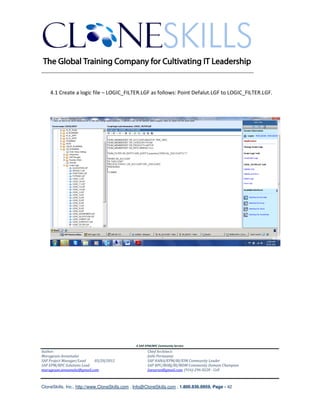
    4.1 Create a logic file – LOGIC_FILTER.LGF as follows: Point Defalut.LGF to LOGIC_FILTER.LGF.


                                               A SAP EPM/BPC Community Service
Author:                                               Chief Architect:
Murugesan Annamalai                                   Jothi Periasamy
SAP Project Manager/Lead   03/20/2012                 SAP HANA/EPM/BI/EIM Community Leader
SAP EPM/BPC Solutions Lead                            SAP BPC/BOBJ/BI/MDM Community Domain Champion
murugesan.annamalai@gmail.com                         Joesaran@gmail.com, (916)-296-0228 - Cell


CloneSkills, Inc., http://www.CloneSkills.com , Info@CloneSkills.com , 1.800.836.8959, Page - 42
________________________________________________________________________


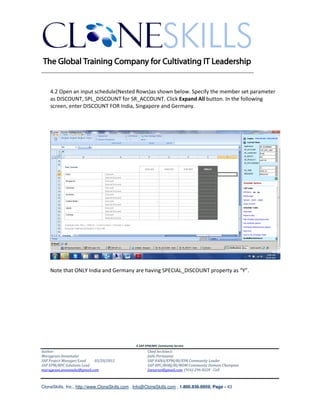
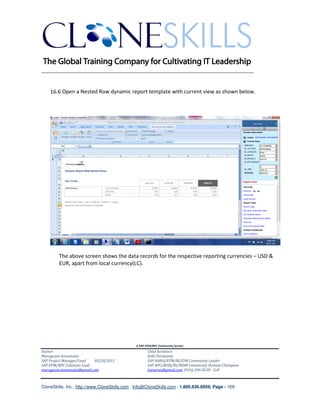
    4.2 Open an input schedule(Nested Rows)as shown below. Specify the member set parameter
    as DISCOUNT, SPL_DISCOUNT for SR_ACCOUNT. Click Expand All button. In the following
    screen, enter DISCOUNT FOR India, Singapore and Germany.


    Note that ONLY India and Germany are having SPECIAL_DISCOUNT property as “Y”.


                                               A SAP EPM/BPC Community Service
Author:                                               Chief Architect:
Murugesan Annamalai                                   Jothi Periasamy
SAP Project Manager/Lead   03/20/2012                 SAP HANA/EPM/BI/EIM Community Leader
SAP EPM/BPC Solutions Lead                            SAP BPC/BOBJ/BI/MDM Community Domain Champion
murugesan.annamalai@gmail.com                         Joesaran@gmail.com, (916)-296-0228 - Cell


CloneSkills, Inc., http://www.CloneSkills.com , Info@CloneSkills.com , 1.800.836.8959, Page - 43
________________________________________________________________________


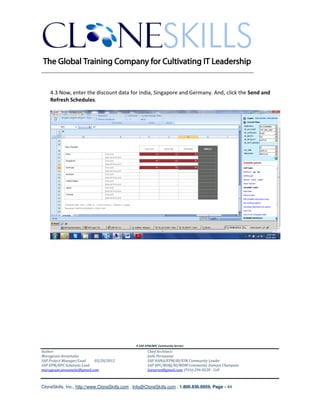
    4.3 Now, enter the discount data for India, Singapore and Germany. And, click the Send and
    Refresh Schedules.


                                               A SAP EPM/BPC Community Service
Author:                                               Chief Architect:
Murugesan Annamalai                                   Jothi Periasamy
SAP Project Manager/Lead   03/20/2012                 SAP HANA/EPM/BI/EIM Community Leader
SAP EPM/BPC Solutions Lead                            SAP BPC/BOBJ/BI/MDM Community Domain Champion
murugesan.annamalai@gmail.com                         Joesaran@gmail.com, (916)-296-0228 - Cell


CloneSkills, Inc., http://www.CloneSkills.com , Info@CloneSkills.com , 1.800.836.8959, Page - 44
________________________________________________________________________


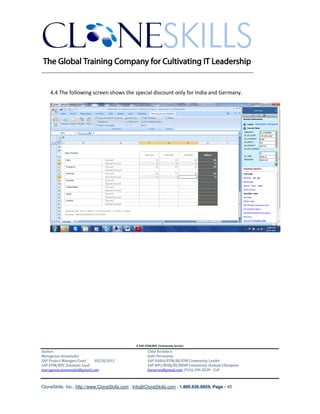
    4.4 The following screen shows the special discount only for India and Germany.


                                               A SAP EPM/BPC Community Service
Author:                                               Chief Architect:
Murugesan Annamalai                                   Jothi Periasamy
SAP Project Manager/Lead   03/20/2012                 SAP HANA/EPM/BI/EIM Community Leader
SAP EPM/BPC Solutions Lead                            SAP BPC/BOBJ/BI/MDM Community Domain Champion
murugesan.annamalai@gmail.com                         Joesaran@gmail.com, (916)-296-0228 - Cell


CloneSkills, Inc., http://www.CloneSkills.com , Info@CloneSkills.com , 1.800.836.8959, Page - 45
________________________________________________________________________


    5. *INCLUDE

    Syntax :

    *INCLUDE {Logic file Name}

    Description:

    Multiple files can be put into a single logic file and this file can then be included in the main
    logic file. When .LGF file is generated, main logic file is stuffed with the code in the included
    logic file.

    Example:


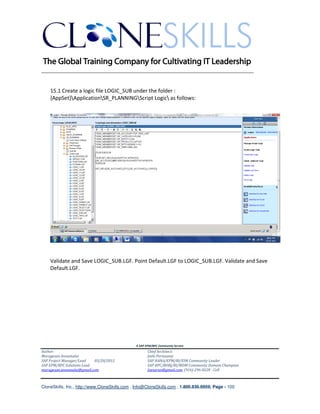
*INCLUDE LOGIC_SUB.LGF


                                               A SAP EPM/BPC Community Service
Author:                                               Chief Architect:
Murugesan Annamalai                                   Jothi Periasamy
SAP Project Manager/Lead   03/20/2012                 SAP HANA/EPM/BI/EIM Community Leader
SAP EPM/BPC Solutions Lead                            SAP BPC/BOBJ/BI/MDM Community Domain Champion
murugesan.annamalai@gmail.com                         Joesaran@gmail.com, (916)-296-0228 - Cell


CloneSkills, Inc., http://www.CloneSkills.com , Info@CloneSkills.com , 1.800.836.8959, Page - 46
________________________________________________________________________


    6. *WHEN / *ENDWHEN

    Syntax :

    *WHEN {criteria}
    *IS [=]{value1}[,{value2},…] | <>{value}
    *REC(FACTOR={Real number}|EXPRESSION={Expression}[,{dim1}={member},{dim2}=…])
    [ *REC(FACTOR={Real number}|EXPRESSION={Expression}[,{dim1}={member},{dim2}=…])]
    [*ELSE]

    *ENDWHEN

    Description:

    {Criteria} is the member property name to test. *IS is followed the values to be testes against.
    It has to be comma delimited if multiple values are to be checked against. The operators
    allowed are = and <>. If no operator is specified, then = is assumed.

    Example:

    *WHEN SR_ACCOUNT

    *IS QTY

        *REC(EXPRESSION=%VALUE%, SR_CATEGORY=PLAN, SR_TIME=2007.JAN)
        *REC(EXPRESSION=%VALUE%, SR_CATEGORY=PLAN, SR_TIME=2007.FEB)
        *REC(EXPRESSION=%VALUE%, SR_CATEGORY=PLAN, SR_TIME=2007.MAR)

    *ENDWHEN


                                               A SAP EPM/BPC Community Service
Author:                                               Chief Architect:
Murugesan Annamalai                                   Jothi Periasamy
SAP Project Manager/Lead   03/20/2012                 SAP HANA/EPM/BI/EIM Community Leader
SAP EPM/BPC Solutions Lead                            SAP BPC/BOBJ/BI/MDM Community Domain Champion
murugesan.annamalai@gmail.com                         Joesaran@gmail.com, (916)-296-0228 - Cell


CloneSkills, Inc., http://www.CloneSkills.com , Info@CloneSkills.com , 1.800.836.8959, Page - 47
________________________________________________________________________


    Business Scenario:
    Copy Quantity account’s ACTUAL data for JAN, 2006 to JAN,FEB & MAR, 2007 PLAN data for
    the product - LAPTOP.

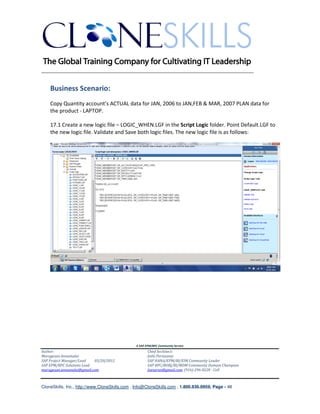
    17.1 Create a new logic file – LOGIC_WHEN.LGF in the Script Logic folder. Point Default.LGF to
    the new logic file. Validate and Save both logic files. The new logic file is as follows:


                                               A SAP EPM/BPC Community Service
Author:                                               Chief Architect:
Murugesan Annamalai                                   Jothi Periasamy
SAP Project Manager/Lead   03/20/2012                 SAP HANA/EPM/BI/EIM Community Leader
SAP EPM/BPC Solutions Lead                            SAP BPC/BOBJ/BI/MDM Community Domain Champion
murugesan.annamalai@gmail.com                         Joesaran@gmail.com, (916)-296-0228 - Cell


CloneSkills, Inc., http://www.CloneSkills.com , Info@CloneSkills.com , 1.800.836.8959, Page - 48
________________________________________________________________________


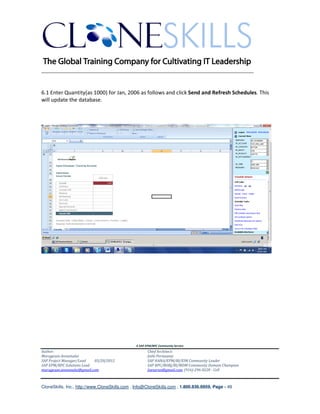
6.1 Enter Quantity(as 1000) for Jan, 2006 as follows and click Send and Refresh Schedules. This
will update the database.


                                               A SAP EPM/BPC Community Service
Author:                                               Chief Architect:
Murugesan Annamalai                                   Jothi Periasamy
SAP Project Manager/Lead   03/20/2012                 SAP HANA/EPM/BI/EIM Community Leader
SAP EPM/BPC Solutions Lead                            SAP BPC/BOBJ/BI/MDM Community Domain Champion
murugesan.annamalai@gmail.com                         Joesaran@gmail.com, (916)-296-0228 - Cell


CloneSkills, Inc., http://www.CloneSkills.com , Info@CloneSkills.com , 1.800.836.8959, Page - 49
________________________________________________________________________


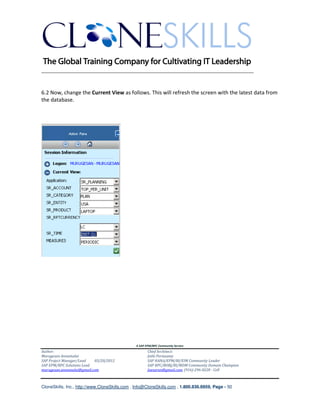
6.2 Now, change the Current View as follows. This will refresh the screen with the latest data from
the database.


                                               A SAP EPM/BPC Community Service
Author:                                               Chief Architect:
Murugesan Annamalai                                   Jothi Periasamy
SAP Project Manager/Lead   03/20/2012                 SAP HANA/EPM/BI/EIM Community Leader
SAP EPM/BPC Solutions Lead                            SAP BPC/BOBJ/BI/MDM Community Domain Champion
murugesan.annamalai@gmail.com                         Joesaran@gmail.com, (916)-296-0228 - Cell


CloneSkills, Inc., http://www.CloneSkills.com , Info@CloneSkills.com , 1.800.836.8959, Page - 50
________________________________________________________________________


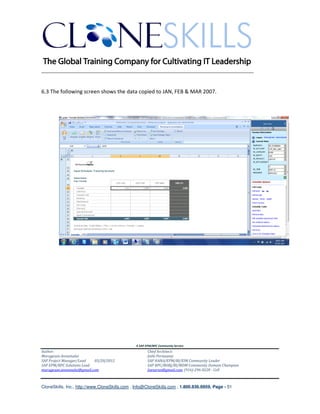
6.3 The following screen shows the data copied to JAN, FEB & MAR 2007.


                                               A SAP EPM/BPC Community Service
Author:                                               Chief Architect:
Murugesan Annamalai                                   Jothi Periasamy
SAP Project Manager/Lead   03/20/2012                 SAP HANA/EPM/BI/EIM Community Leader
SAP EPM/BPC Solutions Lead                            SAP BPC/BOBJ/BI/MDM Community Domain Champion
murugesan.annamalai@gmail.com                         Joesaran@gmail.com, (916)-296-0228 - Cell


CloneSkills, Inc., http://www.CloneSkills.com , Info@CloneSkills.com , 1.800.836.8959, Page - 51
________________________________________________________________________


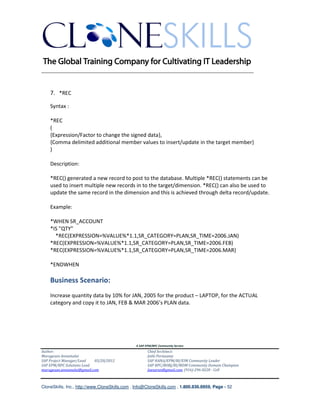
    7. *REC

    Syntax :

    *REC
    (
    {Expression/Factor to change the signed data},
    {Comma delimited additional member values to insert/update in the target member}
    )

    Description:

    *REC() generated a new record to post to the database. Multiple *REC() statements can be
    used to insert multiple new records in to the target/dimension. *REC() can also be used to
    update the same record in the dimension and this is achieved through delta record/update.

    Example:

    *WHEN SR_ACCOUNT
    *IS "QTY"
      *REC(EXPRESSION=%VALUE%*1.1,SR_CATEGORY=PLAN,SR_TIME=2006.JAN)
    *REC(EXPRESSION=%VALUE%*1.1,SR_CATEGORY=PLAN,SR_TIME=2006.FEB)
    *REC(EXPRESSION=%VALUE%*1.1,SR_CATEGORY=PLAN,SR_TIME=2006.MAR)

    *ENDWHEN

    Business Scenario:
    Increase quantity data by 10% for JAN, 2005 for the product – LAPTOP, for the ACTUAL
    category and copy it to JAN, FEB & MAR 2006’s PLAN data.


                                               A SAP EPM/BPC Community Service
Author:                                               Chief Architect:
Murugesan Annamalai                                   Jothi Periasamy
SAP Project Manager/Lead   03/20/2012                 SAP HANA/EPM/BI/EIM Community Leader
SAP EPM/BPC Solutions Lead                            SAP BPC/BOBJ/BI/MDM Community Domain Champion
murugesan.annamalai@gmail.com                         Joesaran@gmail.com, (916)-296-0228 - Cell


CloneSkills, Inc., http://www.CloneSkills.com , Info@CloneSkills.com , 1.800.836.8959, Page - 52
________________________________________________________________________


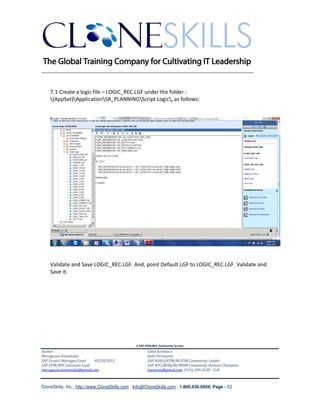
    7.1 Create a logic file – LOGIC_REC.LGF under the folder :
    {AppSet}ApplicationSR_PLANNINGScript Logic, as follows:


    Validate and Save LOGIC_REC.LGF. And, point Default.LGF to LOGIC_REC.LGF. Validate and
    Save it.


                                               A SAP EPM/BPC Community Service
Author:                                               Chief Architect:
Murugesan Annamalai                                   Jothi Periasamy
SAP Project Manager/Lead   03/20/2012                 SAP HANA/EPM/BI/EIM Community Leader
SAP EPM/BPC Solutions Lead                            SAP BPC/BOBJ/BI/MDM Community Domain Champion
murugesan.annamalai@gmail.com                         Joesaran@gmail.com, (916)-296-0228 - Cell


CloneSkills, Inc., http://www.CloneSkills.com , Info@CloneSkills.com , 1.800.836.8959, Page - 53
________________________________________________________________________

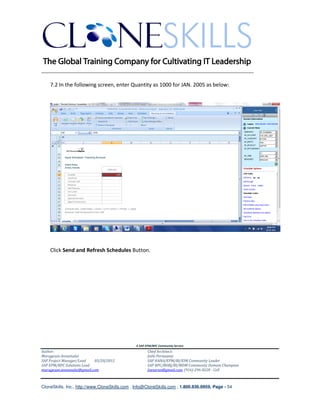
    7.2 In the following screen, enter Quantity as 1000 for JAN. 2005 as below:


    Click Send and Refresh Schedules Button.


                                               A SAP EPM/BPC Community Service
Author:                                               Chief Architect:
Murugesan Annamalai                                   Jothi Periasamy
SAP Project Manager/Lead   03/20/2012                 SAP HANA/EPM/BI/EIM Community Leader
SAP EPM/BPC Solutions Lead                            SAP BPC/BOBJ/BI/MDM Community Domain Champion
murugesan.annamalai@gmail.com                         Joesaran@gmail.com, (916)-296-0228 - Cell


CloneSkills, Inc., http://www.CloneSkills.com , Info@CloneSkills.com , 1.800.836.8959, Page - 54
________________________________________________________________________


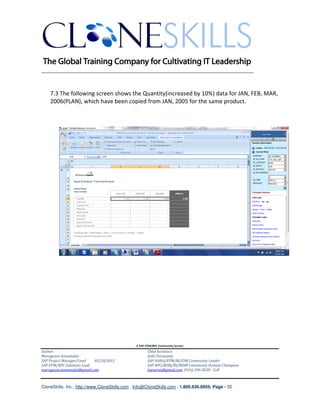
    7.3 The following screen shows the Quantity(increased by 10%) data for JAN, FEB, MAR,
    2006(PLAN), which have been copied from JAN, 2005 for the same product.


                                               A SAP EPM/BPC Community Service
Author:                                               Chief Architect:
Murugesan Annamalai                                   Jothi Periasamy
SAP Project Manager/Lead   03/20/2012                 SAP HANA/EPM/BI/EIM Community Leader
SAP EPM/BPC Solutions Lead                            SAP BPC/BOBJ/BI/MDM Community Domain Champion
murugesan.annamalai@gmail.com                         Joesaran@gmail.com, (916)-296-0228 - Cell


CloneSkills, Inc., http://www.CloneSkills.com , Info@CloneSkills.com , 1.800.836.8959, Page - 55
________________________________________________________________________


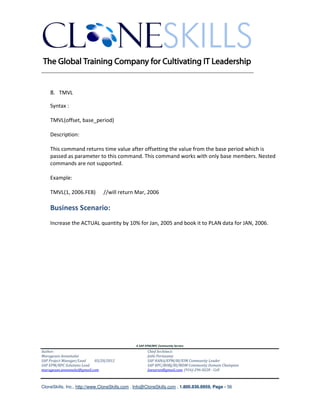
    8. TMVL

    Syntax :

    TMVL(offset, base_period)

    Description:

    This command returns time value after offsetting the value from the base period which is
    passed as parameter to this command. This command works with only base members. Nested
    commands are not supported.

    Example:

    TMVL(1, 2006.FEB)          //will return Mar, 2006

    Business Scenario:
    Increase the ACTUAL quantity by 10% for Jan, 2005 and book it to PLAN data for JAN, 2006.


                                               A SAP EPM/BPC Community Service
Author:                                               Chief Architect:
Murugesan Annamalai                                   Jothi Periasamy
SAP Project Manager/Lead   03/20/2012                 SAP HANA/EPM/BI/EIM Community Leader
SAP EPM/BPC Solutions Lead                            SAP BPC/BOBJ/BI/MDM Community Domain Champion
murugesan.annamalai@gmail.com                         Joesaran@gmail.com, (916)-296-0228 - Cell


CloneSkills, Inc., http://www.CloneSkills.com , Info@CloneSkills.com , 1.800.836.8959, Page - 56
________________________________________________________________________


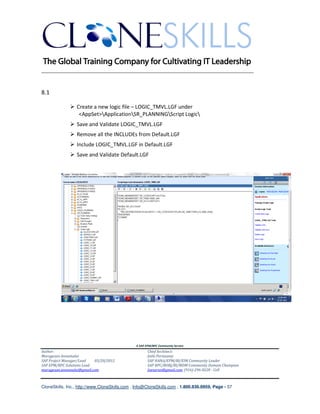
8.1

                 Create a new logic file – LOGIC_TMVL.LGF under
                  <AppSet>ApplicationSR_PLANNINGScript Logic
                 Save and Validate LOGIC_TMVL.LGF
                 Remove all the INCLUDEs from Default.LGF
                 Include LOGIC_TMVL.LGF in Default.LGF
                 Save and Validate Default.LGF


                                               A SAP EPM/BPC Community Service
Author:                                               Chief Architect:
Murugesan Annamalai                                   Jothi Periasamy
SAP Project Manager/Lead   03/20/2012                 SAP HANA/EPM/BI/EIM Community Leader
SAP EPM/BPC Solutions Lead                            SAP BPC/BOBJ/BI/MDM Community Domain Champion
murugesan.annamalai@gmail.com                         Joesaran@gmail.com, (916)-296-0228 - Cell


CloneSkills, Inc., http://www.CloneSkills.com , Info@CloneSkills.com , 1.800.836.8959, Page - 57
________________________________________________________________________


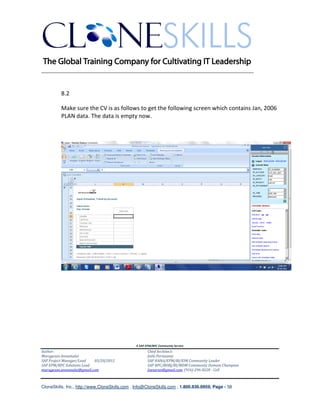
          8.2

          Make sure the CV is as follows to get the following screen which contains Jan, 2006
          PLAN data. The data is empty now.


                                               A SAP EPM/BPC Community Service
Author:                                               Chief Architect:
Murugesan Annamalai                                   Jothi Periasamy
SAP Project Manager/Lead   03/20/2012                 SAP HANA/EPM/BI/EIM Community Leader
SAP EPM/BPC Solutions Lead                            SAP BPC/BOBJ/BI/MDM Community Domain Champion
murugesan.annamalai@gmail.com                         Joesaran@gmail.com, (916)-296-0228 - Cell


CloneSkills, Inc., http://www.CloneSkills.com , Info@CloneSkills.com , 1.800.836.8959, Page - 58
________________________________________________________________________


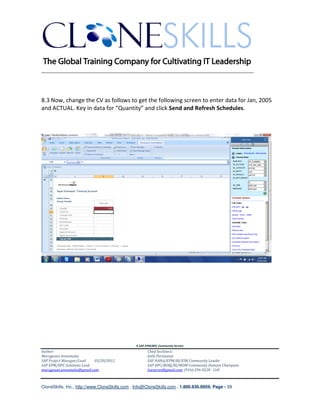
8.3 Now, change the CV as follows to get the following screen to enter data for Jan, 2005
and ACTUAL. Key in data for “Quantity” and click Send and Refresh Schedules.


                                               A SAP EPM/BPC Community Service
Author:                                               Chief Architect:
Murugesan Annamalai                                   Jothi Periasamy
SAP Project Manager/Lead   03/20/2012                 SAP HANA/EPM/BI/EIM Community Leader
SAP EPM/BPC Solutions Lead                            SAP BPC/BOBJ/BI/MDM Community Domain Champion
murugesan.annamalai@gmail.com                         Joesaran@gmail.com, (916)-296-0228 - Cell


CloneSkills, Inc., http://www.CloneSkills.com , Info@CloneSkills.com , 1.800.836.8959, Page - 59
________________________________________________________________________


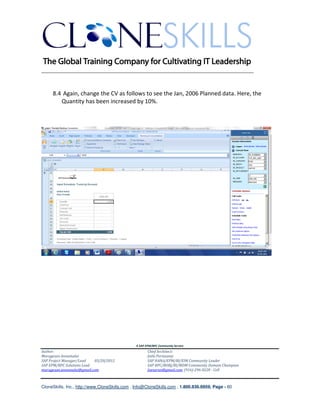
     8.4 Again, change the CV as follows to see the Jan, 2006 Planned data. Here, the
        Quantity has been increased by 10%.


                                               A SAP EPM/BPC Community Service
Author:                                               Chief Architect:
Murugesan Annamalai                                   Jothi Periasamy
SAP Project Manager/Lead   03/20/2012                 SAP HANA/EPM/BI/EIM Community Leader
SAP EPM/BPC Solutions Lead                            SAP BPC/BOBJ/BI/MDM Community Domain Champion
murugesan.annamalai@gmail.com                         Joesaran@gmail.com, (916)-296-0228 - Cell


CloneSkills, Inc., http://www.CloneSkills.com , Info@CloneSkills.com , 1.800.836.8959, Page - 60
________________________________________________________________________


    9. *SELECT

    Syntax :


    *SELECT ({variable}, {[What]}, {from dimension}, {Where})

    Variable              -         Holds the selected (retrieved) data
    What                  -         Property which need to be retrieved
    From Dimension        -         From which Dimension the data need to retrieved
    Where                 -         The selection criteria

    Description:

    The special instruction *SELECT allows the user to retrieve a list of elements from a dimension
    and save it in a user-defined variable for later use anywhere else in the logic.

    The SELECT instruction is not specific to a given logic section, but it can be written once
    anywhere in the logic and used across multiple commit sections.

    The SELECT statement is fairly limited, as it only supports the equal sign (=), not equal to (<>)
    and cannot be used to combine multiple filter criteria with AND or OR keywords.

    The dataset retrieved using *SELECT can be used in XDIM_MEMBERSET to define scope.

    The memory variables are defined at compile time, not at run-time, so the logic file needs to
    be revalidated when new members are added to the dimensions.

    Example:

    *SELECT(%PRODSET%,"ID",SR_PRODUCT,"AGENT_COMMISSION='A'")


                                               A SAP EPM/BPC Community Service
Author:                                               Chief Architect:
Murugesan Annamalai                                   Jothi Periasamy
SAP Project Manager/Lead   03/20/2012                 SAP HANA/EPM/BI/EIM Community Leader
SAP EPM/BPC Solutions Lead                            SAP BPC/BOBJ/BI/MDM Community Domain Champion
murugesan.annamalai@gmail.com                         Joesaran@gmail.com, (916)-296-0228 - Cell


CloneSkills, Inc., http://www.CloneSkills.com , Info@CloneSkills.com , 1.800.836.8959, Page - 61
________________________________________________________________________

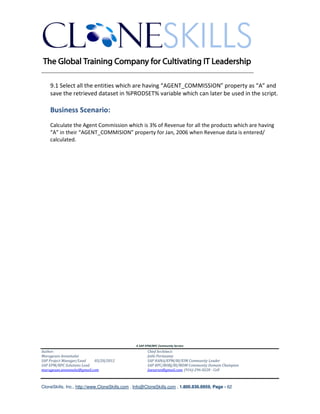
    9.1 Select all the entities which are having “AGENT_COMMISSION” property as “A” and
    save the retrieved dataset in %PRODSET% variable which can later be used in the script.

    Business Scenario:
    Calculate the Agent Commission which is 3% of Revenue for all the products which are having
    “A” in their “AGENT_COMMISION” property for Jan, 2006 when Revenue data is entered/
    calculated.


                                               A SAP EPM/BPC Community Service
Author:                                               Chief Architect:
Murugesan Annamalai                                   Jothi Periasamy
SAP Project Manager/Lead   03/20/2012                 SAP HANA/EPM/BI/EIM Community Leader
SAP EPM/BPC Solutions Lead                            SAP BPC/BOBJ/BI/MDM Community Domain Champion
murugesan.annamalai@gmail.com                         Joesaran@gmail.com, (916)-296-0228 - Cell


CloneSkills, Inc., http://www.CloneSkills.com , Info@CloneSkills.com , 1.800.836.8959, Page - 62
________________________________________________________________________
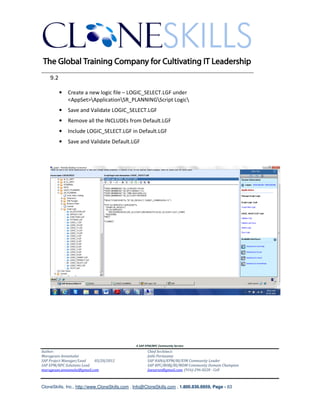
    9.2

          •   Create a new logic file – LOGIC_SELECT.LGF under
              <AppSet>ApplicationSR_PLANNINGScript Logic
          •   Save and Validate LOGIC_SELECT.LGF
          •   Remove all the INCLUDEs from Default.LGF
          •   Include LOGIC_SELECT.LGF in Default.LGF
          •   Save and Validate Default.LGF


                                               A SAP EPM/BPC Community Service
Author:                                               Chief Architect:
Murugesan Annamalai                                   Jothi Periasamy
SAP Project Manager/Lead   03/20/2012                 SAP HANA/EPM/BI/EIM Community Leader
SAP EPM/BPC Solutions Lead                            SAP BPC/BOBJ/BI/MDM Community Domain Champion
murugesan.annamalai@gmail.com                         Joesaran@gmail.com, (916)-296-0228 - Cell


CloneSkills, Inc., http://www.CloneSkills.com , Info@CloneSkills.com , 1.800.836.8959, Page - 63
________________________________________________________________________


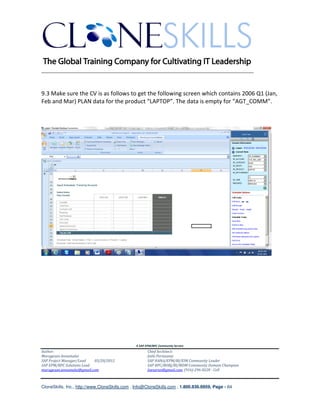
9.3 Make sure the CV is as follows to get the following screen which contains 2006 Q1 (Jan,
Feb and Mar) PLAN data for the product “LAPTOP”. The data is empty for “AGT_COMM”.


                                               A SAP EPM/BPC Community Service
Author:                                               Chief Architect:
Murugesan Annamalai                                   Jothi Periasamy
SAP Project Manager/Lead   03/20/2012                 SAP HANA/EPM/BI/EIM Community Leader
SAP EPM/BPC Solutions Lead                            SAP BPC/BOBJ/BI/MDM Community Domain Champion
murugesan.annamalai@gmail.com                         Joesaran@gmail.com, (916)-296-0228 - Cell


CloneSkills, Inc., http://www.CloneSkills.com , Info@CloneSkills.com , 1.800.836.8959, Page - 64
________________________________________________________________________


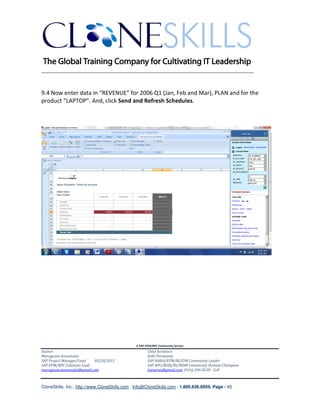
9.4 Now enter data in “REVENUE” for 2006 Q1 (Jan, Feb and Mar), PLAN and for the
product “LAPTOP”. And, click Send and Refresh Schedules.


                                               A SAP EPM/BPC Community Service
Author:                                               Chief Architect:
Murugesan Annamalai                                   Jothi Periasamy
SAP Project Manager/Lead   03/20/2012                 SAP HANA/EPM/BI/EIM Community Leader
SAP EPM/BPC Solutions Lead                            SAP BPC/BOBJ/BI/MDM Community Domain Champion
murugesan.annamalai@gmail.com                         Joesaran@gmail.com, (916)-296-0228 - Cell


CloneSkills, Inc., http://www.CloneSkills.com , Info@CloneSkills.com , 1.800.836.8959, Page - 65
________________________________________________________________________


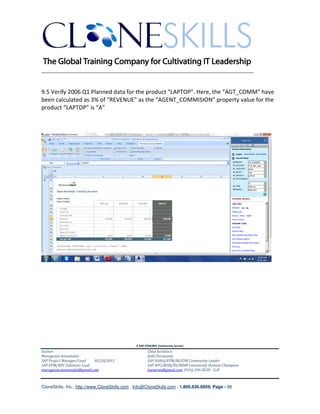
9.5 Verify 2006 Q1 Planned data for the product “LAPTOP”. Here, the “AGT_COMM” have
been calculated as 3% of “REVENUE” as the “AGENT_COMMISION” property value for the
product “LAPTOP” is “A”


                                               A SAP EPM/BPC Community Service
Author:                                               Chief Architect:
Murugesan Annamalai                                   Jothi Periasamy
SAP Project Manager/Lead   03/20/2012                 SAP HANA/EPM/BI/EIM Community Leader
SAP EPM/BPC Solutions Lead                            SAP BPC/BOBJ/BI/MDM Community Domain Champion
murugesan.annamalai@gmail.com                         Joesaran@gmail.com, (916)-296-0228 - Cell


CloneSkills, Inc., http://www.CloneSkills.com , Info@CloneSkills.com , 1.800.836.8959, Page - 66
________________________________________________________________________


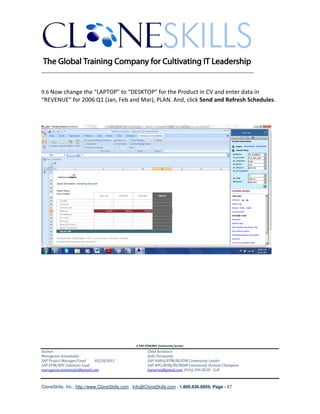
9.6 Now change the “LAPTOP” to “DESKTOP” for the Product in CV and enter data in
“REVENUE” for 2006 Q1 (Jan, Feb and Mar), PLAN. And, click Send and Refresh Schedules.


                                               A SAP EPM/BPC Community Service
Author:                                               Chief Architect:
Murugesan Annamalai                                   Jothi Periasamy
SAP Project Manager/Lead   03/20/2012                 SAP HANA/EPM/BI/EIM Community Leader
SAP EPM/BPC Solutions Lead                            SAP BPC/BOBJ/BI/MDM Community Domain Champion
murugesan.annamalai@gmail.com                         Joesaran@gmail.com, (916)-296-0228 - Cell


CloneSkills, Inc., http://www.CloneSkills.com , Info@CloneSkills.com , 1.800.836.8959, Page - 67
________________________________________________________________________


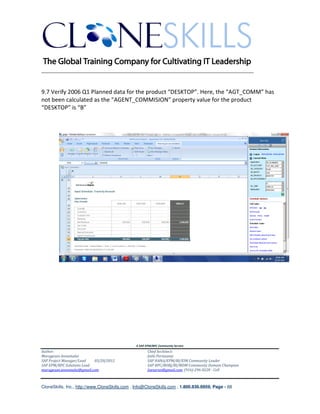
9.7 Verify 2006 Q1 Planned data for the product “DESKTOP”. Here, the “AGT_COMM” has
not been calculated as the “AGENT_COMMISION” property value for the product
“DESKTOP” is “B”


                                               A SAP EPM/BPC Community Service
Author:                                               Chief Architect:
Murugesan Annamalai                                   Jothi Periasamy
SAP Project Manager/Lead   03/20/2012                 SAP HANA/EPM/BI/EIM Community Leader
SAP EPM/BPC Solutions Lead                            SAP BPC/BOBJ/BI/MDM Community Domain Champion
murugesan.annamalai@gmail.com                         Joesaran@gmail.com, (916)-296-0228 - Cell


CloneSkills, Inc., http://www.CloneSkills.com , Info@CloneSkills.com , 1.800.836.8959, Page - 68
________________________________________________________________________


    10. *SELECTCASE / *ENDSELECT


    Syntax :


    *SELECTCASE {expression}
    *CASE {value1}[,{value2},…]
    {Formulae}
    [*CASE {value1}[,{value2},…]
    {Formulae}
    [*CASEELSE]
    {Formulae}
    *ENDSELECT

    where
    {Expression} is the condition to be evaluated

    {value1},.. is the range of comma-delimited results that satisfy the condition for the current
    case

    Description:

    *SELECTCASE is an alternate to IIF MDX statements and expands into IIF when executed. IIF
    and SELECTCASE have same impact on the performance.

    Example:

    *SELECTCASE [SR_PRODUCT].CURRENTMEMBER.PROPERTIES("AGENT_COMMISSION")
    *CASE "A"
    [#AGT_COMM]=[REVENUE]*0.03
    *CASE "B"
    [#AGT_COMM]=[REVENUE]*0.02

                                               A SAP EPM/BPC Community Service
Author:                                               Chief Architect:
Murugesan Annamalai                                   Jothi Periasamy
SAP Project Manager/Lead   03/20/2012                 SAP HANA/EPM/BI/EIM Community Leader
SAP EPM/BPC Solutions Lead                            SAP BPC/BOBJ/BI/MDM Community Domain Champion
murugesan.annamalai@gmail.com                         Joesaran@gmail.com, (916)-296-0228 - Cell


CloneSkills, Inc., http://www.CloneSkills.com , Info@CloneSkills.com , 1.800.836.8959, Page - 69
________________________________________________________________________

    *CASEELSE
    [#AGT_COMM]=[REVENUE]*0.01
    *ENDSELECT

    Agent Commission for the each product is calculated based on the Product DIMs
    AGENT_COMMISSION property.

    Business Scenario:
    Calculate the Agent Commission for all the products based on the “AGENT_COMMISION”
    property (“A” – 3% 0f Revenue, “B” – 2% of Revenue, <empty> - 1% of Revenue) for 2006 Q1
    when Revenue data is entered/ calculated.


                                               A SAP EPM/BPC Community Service
Author:                                               Chief Architect:
Murugesan Annamalai                                   Jothi Periasamy
SAP Project Manager/Lead   03/20/2012                 SAP HANA/EPM/BI/EIM Community Leader
SAP EPM/BPC Solutions Lead                            SAP BPC/BOBJ/BI/MDM Community Domain Champion
murugesan.annamalai@gmail.com                         Joesaran@gmail.com, (916)-296-0228 - Cell


CloneSkills, Inc., http://www.CloneSkills.com , Info@CloneSkills.com , 1.800.836.8959, Page - 70
________________________________________________________________________


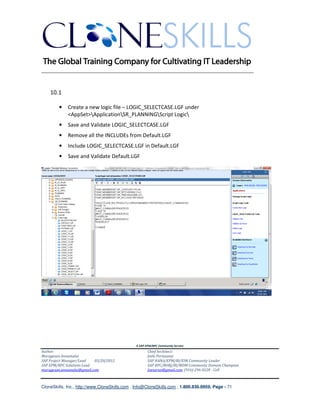
    10.1

        •    Create a new logic file – LOGIC_SELECTCASE.LGF under
             <AppSet>ApplicationSR_PLANNINGScript Logic
        •    Save and Validate LOGIC_SELECTCASE.LGF
        •    Remove all the INCLUDEs from Default.LGF
        •    Include LOGIC_SELECTCASE.LGF in Default.LGF
        •    Save and Validate Default.LGF


                                               A SAP EPM/BPC Community Service
Author:                                               Chief Architect:
Murugesan Annamalai                                   Jothi Periasamy
SAP Project Manager/Lead   03/20/2012                 SAP HANA/EPM/BI/EIM Community Leader
SAP EPM/BPC Solutions Lead                            SAP BPC/BOBJ/BI/MDM Community Domain Champion
murugesan.annamalai@gmail.com                         Joesaran@gmail.com, (916)-296-0228 - Cell


CloneSkills, Inc., http://www.CloneSkills.com , Info@CloneSkills.com , 1.800.836.8959, Page - 71
________________________________________________________________________


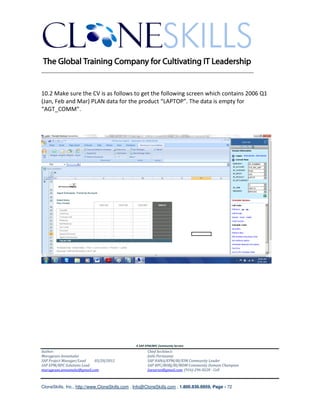
10.2 Make sure the CV is as follows to get the following screen which contains 2006 Q1
(Jan, Feb and Mar) PLAN data for the product “LAPTOP”. The data is empty for
“AGT_COMM”.


                                               A SAP EPM/BPC Community Service
Author:                                               Chief Architect:
Murugesan Annamalai                                   Jothi Periasamy
SAP Project Manager/Lead   03/20/2012                 SAP HANA/EPM/BI/EIM Community Leader
SAP EPM/BPC Solutions Lead                            SAP BPC/BOBJ/BI/MDM Community Domain Champion
murugesan.annamalai@gmail.com                         Joesaran@gmail.com, (916)-296-0228 - Cell


CloneSkills, Inc., http://www.CloneSkills.com , Info@CloneSkills.com , 1.800.836.8959, Page - 72
________________________________________________________________________


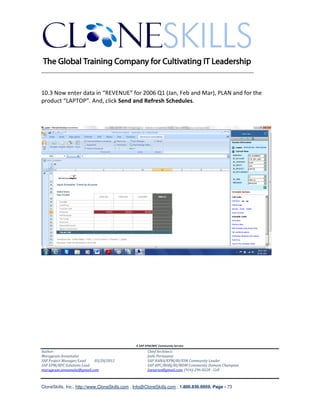
10.3 Now enter data in “REVENUE” for 2006 Q1 (Jan, Feb and Mar), PLAN and for the
product “LAPTOP”. And, click Send and Refresh Schedules.


                                               A SAP EPM/BPC Community Service
Author:                                               Chief Architect:
Murugesan Annamalai                                   Jothi Periasamy
SAP Project Manager/Lead   03/20/2012                 SAP HANA/EPM/BI/EIM Community Leader
SAP EPM/BPC Solutions Lead                            SAP BPC/BOBJ/BI/MDM Community Domain Champion
murugesan.annamalai@gmail.com                         Joesaran@gmail.com, (916)-296-0228 - Cell


CloneSkills, Inc., http://www.CloneSkills.com , Info@CloneSkills.com , 1.800.836.8959, Page - 73
________________________________________________________________________


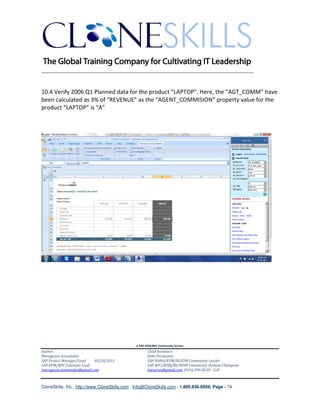
10.4 Verify 2006 Q1 Planned data for the product “LAPTOP”. Here, the “AGT_COMM” have
been calculated as 3% of “REVENUE” as the “AGENT_COMMISION” property value for the
product “LAPTOP” is “A”


                                               A SAP EPM/BPC Community Service
Author:                                               Chief Architect:
Murugesan Annamalai                                   Jothi Periasamy
SAP Project Manager/Lead   03/20/2012                 SAP HANA/EPM/BI/EIM Community Leader
SAP EPM/BPC Solutions Lead                            SAP BPC/BOBJ/BI/MDM Community Domain Champion
murugesan.annamalai@gmail.com                         Joesaran@gmail.com, (916)-296-0228 - Cell


CloneSkills, Inc., http://www.CloneSkills.com , Info@CloneSkills.com , 1.800.836.8959, Page - 74
________________________________________________________________________


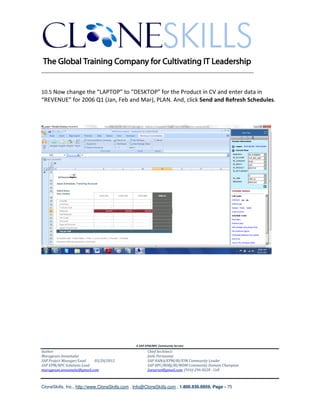
10.5 Now change the “LAPTOP” to “DESKTOP” for the Product in CV and enter data in
“REVENUE” for 2006 Q1 (Jan, Feb and Mar), PLAN. And, click Send and Refresh Schedules.


                                               A SAP EPM/BPC Community Service
Author:                                               Chief Architect:
Murugesan Annamalai                                   Jothi Periasamy
SAP Project Manager/Lead   03/20/2012                 SAP HANA/EPM/BI/EIM Community Leader
SAP EPM/BPC Solutions Lead                            SAP BPC/BOBJ/BI/MDM Community Domain Champion
murugesan.annamalai@gmail.com                         Joesaran@gmail.com, (916)-296-0228 - Cell


CloneSkills, Inc., http://www.CloneSkills.com , Info@CloneSkills.com , 1.800.836.8959, Page - 75
________________________________________________________________________


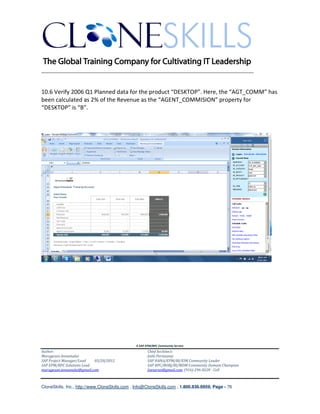
10.6 Verify 2006 Q1 Planned data for the product “DESKTOP”. Here, the “AGT_COMM” has
been calculated as 2% of the Revenue as the “AGENT_COMMISION” property for
“DESKTOP” is “B”.


                                               A SAP EPM/BPC Community Service
Author:                                               Chief Architect:
Murugesan Annamalai                                   Jothi Periasamy
SAP Project Manager/Lead   03/20/2012                 SAP HANA/EPM/BI/EIM Community Leader
SAP EPM/BPC Solutions Lead                            SAP BPC/BOBJ/BI/MDM Community Domain Champion
murugesan.annamalai@gmail.com                         Joesaran@gmail.com, (916)-296-0228 - Cell


CloneSkills, Inc., http://www.CloneSkills.com , Info@CloneSkills.com , 1.800.836.8959, Page - 76
________________________________________________________________________


    11. *FOR / *NEXT

    Syntax :

    *FOR {variable1} = {set1} [ AND {variable2={set2}]
    {text}
    {text}
    …
    *NEXT


    Description:

    *FOR / *NEXT is used to execute the scripts written between *FOR and *NEXT repeatedly.
    Variables will be used in FOR loop to identify the records.

    Example:

    *WHEN SR_ACCOUNT
    *IS "QTY"
    *FOR%CURMONTH%=2005.JAN,2005.FEB,2005.MAR
    *REC(EXPRESSION=%VALUE%*1.1,SR_CATEGORY=PLAN,SR_TIME=TMVL(12,%CURMONTH%))
    *NEXT
    *ENDWHEN

    Here, the *REC function will get executed for each month (2005.JAN,2005.FEB, 2005.MAR) and
    the %CURMONTH% variable is used to hold the time value.

    Business Scenario:
    Increase the ACTUAL quantity by 10% for 2005 Q1 and book it to PLAN data for 2006 in same
    months.


                                               A SAP EPM/BPC Community Service
Author:                                               Chief Architect:
Murugesan Annamalai                                   Jothi Periasamy
SAP Project Manager/Lead   03/20/2012                 SAP HANA/EPM/BI/EIM Community Leader
SAP EPM/BPC Solutions Lead                            SAP BPC/BOBJ/BI/MDM Community Domain Champion
murugesan.annamalai@gmail.com                         Joesaran@gmail.com, (916)-296-0228 - Cell


CloneSkills, Inc., http://www.CloneSkills.com , Info@CloneSkills.com , 1.800.836.8959, Page - 77
________________________________________________________________________


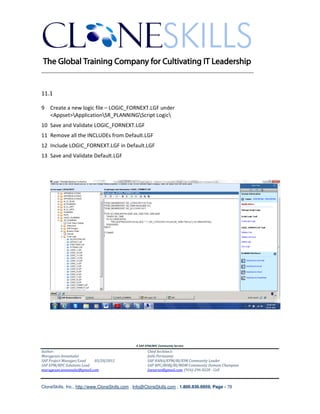
11.1

9 Create a new logic file – LOGIC_FORNEXT.LGF under
  <Appset>ApplicationSR_PLANNINGScript Logic
10 Save and Validate LOGIC_FORNEXT.LGF
11 Remove all the INCLUDEs from Default.LGF
12 Include LOGIC_FORNEXT.LGF in Default.LGF
13 Save and Validate Default.LGF


                                               A SAP EPM/BPC Community Service
Author:                                               Chief Architect:
Murugesan Annamalai                                   Jothi Periasamy
SAP Project Manager/Lead   03/20/2012                 SAP HANA/EPM/BI/EIM Community Leader
SAP EPM/BPC Solutions Lead                            SAP BPC/BOBJ/BI/MDM Community Domain Champion
murugesan.annamalai@gmail.com                         Joesaran@gmail.com, (916)-296-0228 - Cell


CloneSkills, Inc., http://www.CloneSkills.com , Info@CloneSkills.com , 1.800.836.8959, Page - 78
________________________________________________________________________


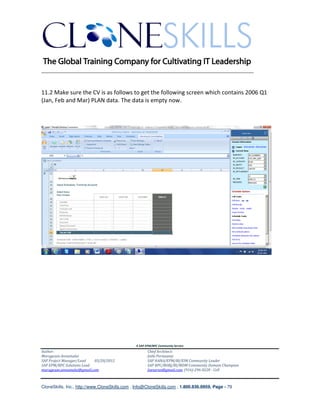
11.2 Make sure the CV is as follows to get the following screen which contains 2006 Q1
(Jan, Feb and Mar) PLAN data. The data is empty now.


                                               A SAP EPM/BPC Community Service
Author:                                               Chief Architect:
Murugesan Annamalai                                   Jothi Periasamy
SAP Project Manager/Lead   03/20/2012                 SAP HANA/EPM/BI/EIM Community Leader
SAP EPM/BPC Solutions Lead                            SAP BPC/BOBJ/BI/MDM Community Domain Champion
murugesan.annamalai@gmail.com                         Joesaran@gmail.com, (916)-296-0228 - Cell


CloneSkills, Inc., http://www.CloneSkills.com , Info@CloneSkills.com , 1.800.836.8959, Page - 79
________________________________________________________________________


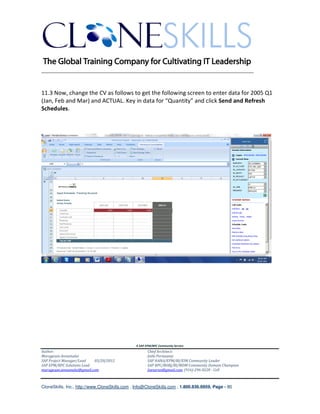
11.3 Now, change the CV as follows to get the following screen to enter data for 2005 Q1
(Jan, Feb and Mar) and ACTUAL. Key in data for “Quantity” and click Send and Refresh
Schedules.


                                               A SAP EPM/BPC Community Service
Author:                                               Chief Architect:
Murugesan Annamalai                                   Jothi Periasamy
SAP Project Manager/Lead   03/20/2012                 SAP HANA/EPM/BI/EIM Community Leader
SAP EPM/BPC Solutions Lead                            SAP BPC/BOBJ/BI/MDM Community Domain Champion
murugesan.annamalai@gmail.com                         Joesaran@gmail.com, (916)-296-0228 - Cell


CloneSkills, Inc., http://www.CloneSkills.com , Info@CloneSkills.com , 1.800.836.8959, Page - 80
________________________________________________________________________


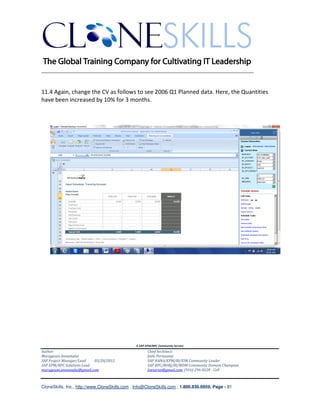
11.4 Again, change the CV as follows to see 2006 Q1 Planned data. Here, the Quantities
have been increased by 10% for 3 months.


                                               A SAP EPM/BPC Community Service
Author:                                               Chief Architect:
Murugesan Annamalai                                   Jothi Periasamy
SAP Project Manager/Lead   03/20/2012                 SAP HANA/EPM/BI/EIM Community Leader
SAP EPM/BPC Solutions Lead                            SAP BPC/BOBJ/BI/MDM Community Domain Champion
murugesan.annamalai@gmail.com                         Joesaran@gmail.com, (916)-296-0228 - Cell


CloneSkills, Inc., http://www.CloneSkills.com , Info@CloneSkills.com , 1.800.836.8959, Page - 81
________________________________________________________________________


    12. *ADD / *ENDADD

    Syntax :

    *ADD {variable} = {set}
    {Formula}
    *ENDADD

    Description:

    *ADD / *ENDADD allows members values, delimited by comma, to be
    accumulated/added and then to be stored in a calculated member.

    Example:

    *ADD %VARCOST% = [DISCOUNT], [SPL_DISCOUNT], [AGT_COMM]

    [#VAR_COSTS]= %VARCOST%

    *ENDADD


    Business Scenario:
    Calculate the variable costs[VAR_COSTS] by adding Discount, Special Discount & Agent
    Commission, and then booking it to VAR_COSTS account for PLAN data for the period
    – 2006, JAN.


                                               A SAP EPM/BPC Community Service
Author:                                               Chief Architect:
Murugesan Annamalai                                   Jothi Periasamy
SAP Project Manager/Lead   03/20/2012                 SAP HANA/EPM/BI/EIM Community Leader
SAP EPM/BPC Solutions Lead                            SAP BPC/BOBJ/BI/MDM Community Domain Champion
murugesan.annamalai@gmail.com                         Joesaran@gmail.com, (916)-296-0228 - Cell


CloneSkills, Inc., http://www.CloneSkills.com , Info@CloneSkills.com , 1.800.836.8959, Page - 82
________________________________________________________________________
    12.1 Create a new Script Logic under the folder –
    MURUGESAN Application SR_PLANNING Script Logic, in the name LOGIC_2. And,
    key in the code as follows:


                                               A SAP EPM/BPC Community Service
Author:                                               Chief Architect:
Murugesan Annamalai                                   Jothi Periasamy
SAP Project Manager/Lead   03/20/2012                 SAP HANA/EPM/BI/EIM Community Leader
SAP EPM/BPC Solutions Lead                            SAP BPC/BOBJ/BI/MDM Community Domain Champion
murugesan.annamalai@gmail.com                         Joesaran@gmail.com, (916)-296-0228 - Cell


CloneSkills, Inc., http://www.CloneSkills.com , Info@CloneSkills.com , 1.800.836.8959, Page - 83
________________________________________________________________________


    12.2 Modify Default.lgf file to point to LOGIC_2.LGF file. And, then click Validate and
    Save link on the right.


                                               A SAP EPM/BPC Community Service
Author:                                               Chief Architect:
Murugesan Annamalai                                   Jothi Periasamy
SAP Project Manager/Lead   03/20/2012                 SAP HANA/EPM/BI/EIM Community Leader
SAP EPM/BPC Solutions Lead                            SAP BPC/BOBJ/BI/MDM Community Domain Champion
murugesan.annamalai@gmail.com                         Joesaran@gmail.com, (916)-296-0228 - Cell


CloneSkills, Inc., http://www.CloneSkills.com , Info@CloneSkills.com , 1.800.836.8959, Page - 84
________________________________________________________________________


    12.3 The following screen shows the data for before the calculation of variable costs:


                                               A SAP EPM/BPC Community Service
Author:                                               Chief Architect:
Murugesan Annamalai                                   Jothi Periasamy
SAP Project Manager/Lead   03/20/2012                 SAP HANA/EPM/BI/EIM Community Leader
SAP EPM/BPC Solutions Lead                            SAP BPC/BOBJ/BI/MDM Community Domain Champion
murugesan.annamalai@gmail.com                         Joesaran@gmail.com, (916)-296-0228 - Cell


CloneSkills, Inc., http://www.CloneSkills.com , Info@CloneSkills.com , 1.800.836.8959, Page - 85
________________________________________________________________________


    12.4 Now, enter the variable costs as shown below and click the button – Send and
    Refresh Schedules:


                                               A SAP EPM/BPC Community Service
Author:                                               Chief Architect:
Murugesan Annamalai                                   Jothi Periasamy
SAP Project Manager/Lead   03/20/2012                 SAP HANA/EPM/BI/EIM Community Leader
SAP EPM/BPC Solutions Lead                            SAP BPC/BOBJ/BI/MDM Community Domain Champion
murugesan.annamalai@gmail.com                         Joesaran@gmail.com, (916)-296-0228 - Cell


CloneSkills, Inc., http://www.CloneSkills.com , Info@CloneSkills.com , 1.800.836.8959, Page - 86
________________________________________________________________________


    12.5 Now, the following screen is shown. Click Refresh button.


                                               A SAP EPM/BPC Community Service
Author:                                               Chief Architect:
Murugesan Annamalai                                   Jothi Periasamy
SAP Project Manager/Lead   03/20/2012                 SAP HANA/EPM/BI/EIM Community Leader
SAP EPM/BPC Solutions Lead                            SAP BPC/BOBJ/BI/MDM Community Domain Champion
murugesan.annamalai@gmail.com                         Joesaran@gmail.com, (916)-296-0228 - Cell


CloneSkills, Inc., http://www.CloneSkills.com , Info@CloneSkills.com , 1.800.836.8959, Page - 87
________________________________________________________________________


    12.6 Click Yes to the following screen.


                                               A SAP EPM/BPC Community Service
Author:                                               Chief Architect:
Murugesan Annamalai                                   Jothi Periasamy
SAP Project Manager/Lead   03/20/2012                 SAP HANA/EPM/BI/EIM Community Leader
SAP EPM/BPC Solutions Lead                            SAP BPC/BOBJ/BI/MDM Community Domain Champion
murugesan.annamalai@gmail.com                         Joesaran@gmail.com, (916)-296-0228 - Cell


CloneSkills, Inc., http://www.CloneSkills.com , Info@CloneSkills.com , 1.800.836.8959, Page - 88
________________________________________________________________________


    12.7 Click Close button in the following screen. And, then click the button at the top –
    Refresh Workbook.


                                               A SAP EPM/BPC Community Service
Author:                                               Chief Architect:
Murugesan Annamalai                                   Jothi Periasamy
SAP Project Manager/Lead   03/20/2012                 SAP HANA/EPM/BI/EIM Community Leader
SAP EPM/BPC Solutions Lead                            SAP BPC/BOBJ/BI/MDM Community Domain Champion
murugesan.annamalai@gmail.com                         Joesaran@gmail.com, (916)-296-0228 - Cell


CloneSkills, Inc., http://www.CloneSkills.com , Info@CloneSkills.com , 1.800.836.8959, Page - 89
________________________________________________________________________


    12.8 The following screen shows variable costs as 70 which is a sum of Discount, Special
    Discount and Agent Commission Accounts.


                                               A SAP EPM/BPC Community Service
Author:                                               Chief Architect:
Murugesan Annamalai                                   Jothi Periasamy
SAP Project Manager/Lead   03/20/2012                 SAP HANA/EPM/BI/EIM Community Leader
SAP EPM/BPC Solutions Lead                            SAP BPC/BOBJ/BI/MDM Community Domain Champion
murugesan.annamalai@gmail.com                         Joesaran@gmail.com, (916)-296-0228 - Cell


CloneSkills, Inc., http://www.CloneSkills.com , Info@CloneSkills.com , 1.800.836.8959, Page - 90
________________________________________________________________________


    13. *BEGIN / *END


    Syntax :

    *BEGIN
       {Formula}….
       {Continuation of same Formula}
       {Continuation of same Formula}
    *END

    Description:

    *BEGIN / *END is used to split long formulae into multiple lines to improve readability.

    Example:

    *BEGIN

                 [#VAR_COSTS]               =          [DISCOUNT] +
                                                       [SPL_DISCOUNT] +
                                                       [AGT_COMM]
    *END

    Business Scenario:
    Calculate the variable costs[VAR_COSTS] by adding Discount, Special Discount & Agent
    Commission, and then booking it to VAR_COSTS account for PLAN data for the period
    – 2006, JAN. Ensure that the formula, adding the values, is spread across multiple line.


                                                A SAP EPM/BPC Community Service
Author:                                                Chief Architect:
Murugesan Annamalai                                    Jothi Periasamy
SAP Project Manager/Lead   03/20/2012                  SAP HANA/EPM/BI/EIM Community Leader
SAP EPM/BPC Solutions Lead                             SAP BPC/BOBJ/BI/MDM Community Domain Champion
murugesan.annamalai@gmail.com                          Joesaran@gmail.com, (916)-296-0228 - Cell


CloneSkills, Inc., http://www.CloneSkills.com , Info@CloneSkills.com , 1.800.836.8959, Page - 91
________________________________________________________________________


    13.1Create a new LOGIC_3 file in the folder -
        MURUGESANApplicationSR_PLANNINGScript Logic and enter the code as
        shown below. And, modify the Default.lgf to point to LOGIC_3.LGF.


                                               A SAP EPM/BPC Community Service
Author:                                               Chief Architect:
Murugesan Annamalai                                   Jothi Periasamy
SAP Project Manager/Lead   03/20/2012                 SAP HANA/EPM/BI/EIM Community Leader
SAP EPM/BPC Solutions Lead                            SAP BPC/BOBJ/BI/MDM Community Domain Champion
murugesan.annamalai@gmail.com                         Joesaran@gmail.com, (916)-296-0228 - Cell


CloneSkills, Inc., http://www.CloneSkills.com , Info@CloneSkills.com , 1.800.836.8959, Page - 92
________________________________________________________________________


    13.2After entering the data, click the Button – Send and Refresh Schedules. In the
        following confirmation prompt, click Refresh button and then Yes button. Then
        click the Close button in the following button. Now, click Refresh Workbook and
        the following screen shows the calculated data.


                                               A SAP EPM/BPC Community Service
Author:                                               Chief Architect:
Murugesan Annamalai                                   Jothi Periasamy
SAP Project Manager/Lead   03/20/2012                 SAP HANA/EPM/BI/EIM Community Leader
SAP EPM/BPC Solutions Lead                            SAP BPC/BOBJ/BI/MDM Community Domain Champion
murugesan.annamalai@gmail.com                         Joesaran@gmail.com, (916)-296-0228 - Cell


CloneSkills, Inc., http://www.CloneSkills.com , Info@CloneSkills.com , 1.800.836.8959, Page - 93
________________________________________________________________________


    14. *FUNCTION / *ENDFUNCTION

    Syntax :

    * FUNCTION Function_Name( param1, param2, etc…)
     Function Text
    * ENDFUNCTION

    Description:

    *FUNCTION / *ENDFUNCTION allows you to write user defined functions where in formulae
    can be put in and can be called from the main logic. These functions could be in a separate
    logic file or part of the mail logic file(in-line). This can improve the readability of the logic
    statement. Unlike Subroutines, Functions return a value.

    Example:

    *FUNCTION GETREV(%QUANTITY%,%UNIT_PRICE%)

        %QUANTITY%*%UNIT_PRICE%

    *ENDFUNCTION

    Business Scenario:
    Multiply Quantity by Unit Price and boot it to REVENUE account for the year Jan, 2006 for the
    product - LAPTOP.


                                               A SAP EPM/BPC Community Service
Author:                                               Chief Architect:
Murugesan Annamalai                                   Jothi Periasamy
SAP Project Manager/Lead   03/20/2012                 SAP HANA/EPM/BI/EIM Community Leader
SAP EPM/BPC Solutions Lead                            SAP BPC/BOBJ/BI/MDM Community Domain Champion
murugesan.annamalai@gmail.com                         Joesaran@gmail.com, (916)-296-0228 - Cell


CloneSkills, Inc., http://www.CloneSkills.com , Info@CloneSkills.com , 1.800.836.8959, Page - 94
________________________________________________________________________


14.1 Create a new logic file –FUNCTIONS.LGF under the folder :
{AppSet}ApplicationSR_PLANNINGScript Logic. This should contain the
function(GETREV) which will be called from the mail logic file – LOGIC_FUNCTIONS.LGF.
Script the FUNCTIONS.LGF file as follows:


                                               A SAP EPM/BPC Community Service
Author:                                               Chief Architect:
Murugesan Annamalai                                   Jothi Periasamy
SAP Project Manager/Lead   03/20/2012                 SAP HANA/EPM/BI/EIM Community Leader
SAP EPM/BPC Solutions Lead                            SAP BPC/BOBJ/BI/MDM Community Domain Champion
murugesan.annamalai@gmail.com                         Joesaran@gmail.com, (916)-296-0228 - Cell


CloneSkills, Inc., http://www.CloneSkills.com , Info@CloneSkills.com , 1.800.836.8959, Page - 95
________________________________________________________________________


14.2 Create a new logic file –LOGIC_FUNCTIONS.LGF under the folder :
{AppSet}ApplicationSR_PLANNINGScript Logic. Script the LOGIC_FUNCTIONS.LGF file as
follows:


First line in the script includes the FUNCTIONS.LGF. And, the last line in the script calls the
GETREV() function that is stuffed in the FUNCTIONS.LGF. Now, point Default.LGF to
LOGIC_FUNCTIONS.LGF. Validate and Save the two .LGF files.


                                               A SAP EPM/BPC Community Service
Author:                                               Chief Architect:
Murugesan Annamalai                                   Jothi Periasamy
SAP Project Manager/Lead   03/20/2012                 SAP HANA/EPM/BI/EIM Community Leader
SAP EPM/BPC Solutions Lead                            SAP BPC/BOBJ/BI/MDM Community Domain Champion
murugesan.annamalai@gmail.com                         Joesaran@gmail.com, (916)-296-0228 - Cell


CloneSkills, Inc., http://www.CloneSkills.com , Info@CloneSkills.com , 1.800.836.8959, Page - 96
________________________________________________________________________


14.3 Now, enter the quantity value as 100 and unit price as 1000 as shown below:


Click Send and Refresh Schedules now.


                                               A SAP EPM/BPC Community Service
Author:                                               Chief Architect:
Murugesan Annamalai                                   Jothi Periasamy
SAP Project Manager/Lead   03/20/2012                 SAP HANA/EPM/BI/EIM Community Leader
SAP EPM/BPC Solutions Lead                            SAP BPC/BOBJ/BI/MDM Community Domain Champion
murugesan.annamalai@gmail.com                         Joesaran@gmail.com, (916)-296-0228 - Cell


CloneSkills, Inc., http://www.CloneSkills.com , Info@CloneSkills.com , 1.800.836.8959, Page - 97
________________________________________________________________________


14.4 The following screen shows the REVENUE calculated by the GETREV() function:


                                               A SAP EPM/BPC Community Service
Author:                                               Chief Architect:
Murugesan Annamalai                                   Jothi Periasamy
SAP Project Manager/Lead   03/20/2012                 SAP HANA/EPM/BI/EIM Community Leader
SAP EPM/BPC Solutions Lead                            SAP BPC/BOBJ/BI/MDM Community Domain Champion
murugesan.annamalai@gmail.com                         Joesaran@gmail.com, (916)-296-0228 - Cell


CloneSkills, Inc., http://www.CloneSkills.com , Info@CloneSkills.com , 1.800.836.8959, Page - 98
________________________________________________________________________


    15. *SUB / *ENDSUB

    Syntax :

    *SUB {SubName}({Param1,[,{Param2}…])
    {body text}
    {body text}
    {body text}
    […]
    *ENDSUB

    Description:

    *SUB / *ENDSUB allows you to create sub routines which can be called from the main logic. It
    is similar to *FUNCTION except that subroutines can not return values. And, *SUB / *ENDSUB
    does not have to be in a separate a file – it can be part of the main logic. If a particular
    segment of the code is to be repeated, then it can be coded as a subroutine and called from
    main code.


    Example:

    *SUB SET_REV ( %QUANTITY%, %PRICE% )
    [SR_ACCOUNT].[#REVENUE] = %QUANTITY% * %PRICE%
    *ENDSUB

    SET_REV( [SR_ACCOUNT].[QTY], [SR_ACCOUNT].[U_PRICE] )


    Business Scenario:
    Calculate REVENUE by multiplying QTY and U_PRICE and book it to REVENUE account for the
    PLAN data for the year JAN, 2006 for the product - LAPTOP.


                                               A SAP EPM/BPC Community Service
Author:                                               Chief Architect:
Murugesan Annamalai                                   Jothi Periasamy
SAP Project Manager/Lead   03/20/2012                 SAP HANA/EPM/BI/EIM Community Leader
SAP EPM/BPC Solutions Lead                            SAP BPC/BOBJ/BI/MDM Community Domain Champion
murugesan.annamalai@gmail.com                         Joesaran@gmail.com, (916)-296-0228 - Cell


CloneSkills, Inc., http://www.CloneSkills.com , Info@CloneSkills.com , 1.800.836.8959, Page - 99
________________________________________________________________________


    15.1 Create a logic file LOGIC_SUB under the folder :
    {AppSet}ApplicationSR_PLANNINGScript Logic as follows:


    Validate and Save LOGIC_SUB.LGF. Point Default.LGF to LOGIC_SUB.LGF. Validate and Save
    Default.LGF.


                                               A SAP EPM/BPC Community Service
Author:                                               Chief Architect:
Murugesan Annamalai                                   Jothi Periasamy
SAP Project Manager/Lead   03/20/2012                 SAP HANA/EPM/BI/EIM Community Leader
SAP EPM/BPC Solutions Lead                            SAP BPC/BOBJ/BI/MDM Community Domain Champion
murugesan.annamalai@gmail.com                         Joesaran@gmail.com, (916)-296-0228 - Cell


CloneSkills, Inc., http://www.CloneSkills.com , Info@CloneSkills.com , 1.800.836.8959, Page - 100
________________________________________________________________________

    15. 2 Make sure the Current View is as follows. And, key in the data for Quantity and Unit Price
    as follows too:


    Now, click Send and Refresh Schedules button.


                                               A SAP EPM/BPC Community Service
Author:                                               Chief Architect:
Murugesan Annamalai                                   Jothi Periasamy
SAP Project Manager/Lead   03/20/2012                 SAP HANA/EPM/BI/EIM Community Leader
SAP EPM/BPC Solutions Lead                            SAP BPC/BOBJ/BI/MDM Community Domain Champion
murugesan.annamalai@gmail.com                         Joesaran@gmail.com, (916)-296-0228 - Cell


CloneSkills, Inc., http://www.CloneSkills.com , Info@CloneSkills.com , 1.800.836.8959, Page - 101
________________________________________________________________________

    15.3 The following screen shows the calculated REVENUE, which is performed by the sub
    routine.


                                               A SAP EPM/BPC Community Service
Author:                                               Chief Architect:
Murugesan Annamalai                                   Jothi Periasamy
SAP Project Manager/Lead   03/20/2012                 SAP HANA/EPM/BI/EIM Community Leader
SAP EPM/BPC Solutions Lead                            SAP BPC/BOBJ/BI/MDM Community Domain Champion
murugesan.annamalai@gmail.com                         Joesaran@gmail.com, (916)-296-0228 - Cell


CloneSkills, Inc., http://www.CloneSkills.com , Info@CloneSkills.com , 1.800.836.8959, Page - 102
________________________________________________________________________


    16. LOOKUP

    Syntax :

    *LOOKUP {App}
    *DIM [{LookupID}:]{DimensionName}="Value" | {CallingDimensionName}[.{Property}]
    *DIM MEASURES=”MeasureName”
    *ENDLOOKUP

    Description:

    When a value, which is not inside the current data region, is required for calculation, LOOKUP
    can be used. LOOKUP can be used to retrieve value from current application or another
    application. Only one LOOKUP is allowed per COMMIT block.

    Example:

    *LOOKUP RATE
    *DIM TIME=SR_TIME.ID
    *DIM CATEGORY="ACTUAL"
    *DIM R_ACCT="AVG"
    *DIM R_ENTITY="GLOBAL"
    *DIM SRCCURR:INPUTCURRENCY=SR_ENTITY.CURRENCY
    *DIM RATEEUR:INPUTCURRENCY="EUR"
    *DIM RATEUSD:INPUTCURRENCY="USD"
    *DIM MEASURES="PERIODIC"
    *ENDLOOKUP

    Business Scenario:

    Convert NETREVENUE from SR_ENTITY’s local currency to the reporting currencies(USD &
    EUR).


                                               A SAP EPM/BPC Community Service
Author:                                               Chief Architect:
Murugesan Annamalai                                   Jothi Periasamy
SAP Project Manager/Lead   03/20/2012                 SAP HANA/EPM/BI/EIM Community Leader
SAP EPM/BPC Solutions Lead                            SAP BPC/BOBJ/BI/MDM Community Domain Champion
murugesan.annamalai@gmail.com                         Joesaran@gmail.com, (916)-296-0228 - Cell


CloneSkills, Inc., http://www.CloneSkills.com , Info@CloneSkills.com , 1.800.836.8959, Page - 103
________________________________________________________________________
   16.1 Create a new logic file – LOGIC_LOOKUP.LGF. Point Default.LGF to LOGIC_LOOKUP.LGF.
   The following screen shows the code for LOGIC_LOOKUP.LGF:


                                               A SAP EPM/BPC Community Service
Author:                                               Chief Architect:
Murugesan Annamalai                                   Jothi Periasamy
SAP Project Manager/Lead   03/20/2012                 SAP HANA/EPM/BI/EIM Community Leader
SAP EPM/BPC Solutions Lead                            SAP BPC/BOBJ/BI/MDM Community Domain Champion
murugesan.annamalai@gmail.com                         Joesaran@gmail.com, (916)-296-0228 - Cell


CloneSkills, Inc., http://www.CloneSkills.com , Info@CloneSkills.com , 1.800.836.8959, Page - 104
________________________________________________________________________


    16.2 Open the Nested Rows Dynamic Report Template as per the current view and member
    set parameters shown below to view the data available before running the
    LOGIC_LOOKUP.LGF:


                                               A SAP EPM/BPC Community Service
Author:                                               Chief Architect:
Murugesan Annamalai                                   Jothi Periasamy
SAP Project Manager/Lead   03/20/2012                 SAP HANA/EPM/BI/EIM Community Leader
SAP EPM/BPC Solutions Lead                            SAP BPC/BOBJ/BI/MDM Community Domain Champion
murugesan.annamalai@gmail.com                         Joesaran@gmail.com, (916)-296-0228 - Cell


CloneSkills, Inc., http://www.CloneSkills.com , Info@CloneSkills.com , 1.800.836.8959, Page - 105
________________________________________________________________________


    16.3 Following screen shows no NETREVENUE data for all the currencies for first quarter of
    2006.


    There is no data available for any currencies for Account - NETREVENUE, Product – LAPTOP and
    Entity – India.


                                               A SAP EPM/BPC Community Service
Author:                                               Chief Architect:
Murugesan Annamalai                                   Jothi Periasamy
SAP Project Manager/Lead   03/20/2012                 SAP HANA/EPM/BI/EIM Community Leader
SAP EPM/BPC Solutions Lead                            SAP BPC/BOBJ/BI/MDM Community Domain Champion
murugesan.annamalai@gmail.com                         Joesaran@gmail.com, (916)-296-0228 - Cell


CloneSkills, Inc., http://www.CloneSkills.com , Info@CloneSkills.com , 1.800.836.8959, Page - 106
________________________________________________________________________


    16.4 Now, use the Trend by Account Dynamic Input schedule, enter the NETREVNUE data for
    local currency (Indian Rupees) for first quarter for 2006.


    Now, click Send and Refresh Schedules button. This will save the data in local currency (INR)
    and the LOGIC_LOOKUP will insert two more records (one for USD currency and another one
    for EUR currency) by coverting the NETREVENUE for the Indian Rupees using the exchange
    rates from RATE application.


                                               A SAP EPM/BPC Community Service
Author:                                               Chief Architect:
Murugesan Annamalai                                   Jothi Periasamy
SAP Project Manager/Lead   03/20/2012                 SAP HANA/EPM/BI/EIM Community Leader
SAP EPM/BPC Solutions Lead                            SAP BPC/BOBJ/BI/MDM Community Domain Champion
murugesan.annamalai@gmail.com                         Joesaran@gmail.com, (916)-296-0228 - Cell


CloneSkills, Inc., http://www.CloneSkills.com , Info@CloneSkills.com , 1.800.836.8959, Page - 107
________________________________________________________________________


    16.5 The following screen shows the exchange rates for local(INR) and reporting
    currencies(USD,EUR):


    Note that this is a new EVDRE() report for RATE application.


                                               A SAP EPM/BPC Community Service
Author:                                               Chief Architect:
Murugesan Annamalai                                   Jothi Periasamy
SAP Project Manager/Lead   03/20/2012                 SAP HANA/EPM/BI/EIM Community Leader
SAP EPM/BPC Solutions Lead                            SAP BPC/BOBJ/BI/MDM Community Domain Champion
murugesan.annamalai@gmail.com                         Joesaran@gmail.com, (916)-296-0228 - Cell


CloneSkills, Inc., http://www.CloneSkills.com , Info@CloneSkills.com , 1.800.836.8959, Page - 108
________________________________________________________________________


    16.6 Open a Nested Row dynamic report template with current view as shown below.


        The above screen shows the data records for the respective reporting currencies – USD &
        EUR, apart from local currency(LC).


                                               A SAP EPM/BPC Community Service
Author:                                               Chief Architect:
Murugesan Annamalai                                   Jothi Periasamy
SAP Project Manager/Lead   03/20/2012                 SAP HANA/EPM/BI/EIM Community Leader
SAP EPM/BPC Solutions Lead                            SAP BPC/BOBJ/BI/MDM Community Domain Champion
murugesan.annamalai@gmail.com                         Joesaran@gmail.com, (916)-296-0228 - Cell


CloneSkills, Inc., http://www.CloneSkills.com , Info@CloneSkills.com , 1.800.836.8959, Page - 109
________________________________________________________________________


    17. RUN ALLOCATION

    Syntax :

    *RUNALLOCATION
    *FACTOR=<driver>
    *DIM P_ACCT WHAT=<source>; WHERE=<target>; USING=<distribution key>;
    [TOTAL=<distribution key>]
    *DIM <other dimensions>
    *ENDALLOCATION


    Description:

    Allocation engine helps to distribute the data from a source region to a target region using the
    specified driver. Allocation is often used in Planning as a top-down scenario.

    The following are the elements which define the allocation:

    WHAT: Source (Base members which holds the data(amount) to be allocated)
    WHERE: Target (Destination Base members where the allocated data(amount) will be written)
    USING: (Optional) Member storing an Allocation Factor/ the "Amount" of the Driver
    TOTAL: (Optional) Sum of the driver or the Using Amounts
    FACTOR: (Optional) How to calculate the Distribution Key using "USING" and "TOTAL"


                                               A SAP EPM/BPC Community Service
Author:                                               Chief Architect:
Murugesan Annamalai                                   Jothi Periasamy
SAP Project Manager/Lead   03/20/2012                 SAP HANA/EPM/BI/EIM Community Leader
SAP EPM/BPC Solutions Lead                            SAP BPC/BOBJ/BI/MDM Community Domain Champion
murugesan.annamalai@gmail.com                         Joesaran@gmail.com, (916)-296-0228 - Cell


CloneSkills, Inc., http://www.CloneSkills.com , Info@CloneSkills.com , 1.800.836.8959, Page - 110
________________________________________________________________________

    Example:
    *RUNALLOCATION
    *FACTOR=USING/TOTAL

    *DIM SR_ENTITY              WHAT=ALLOC_ENTITY;      WHERE=BAS(HQ);            USING= <<<; TOTAL= <<<;
    *DIM SR_ACCOUNT WHAT=REV_TARGET;        WHERE= <<<; USING= NETREVENUE;        TOTAL= <<<;
    *DIM SR_CATEGORY WHAT=PLAN; WHERE= <<<; USING= ACTUAL;          TOTAL= <<<;
    *DIM SR_RPTCURRENCY         WHAT=USD; WHERE= <<<;               USING= <<<;   TOTAL= <<<;
    *DIM SR_TIME                WHAT=2006.JAN;       WHERE= 2006.JAN;             USING= 2005.JAN;     TOTAL= <<<;

    *ENDALLOCATION

    The above can be written as follows:
    *RUNALLOCATION
    *FACTOR=USING/TOTAL

    *DIM SR_ENTITY              WHAT=ALLOC_ENTITY;     WHERE=BAS(HQ);          USING= BAS(HQ);          TOTAL= BAS(HQ);
    *DIM SR_ACCOUNT WHAT=REV_TARGET;        WHERE= REV_TARGET;     USING= NETREVENUE;       TOTAL= NETREVENUE;
    *DIM SR_CATEGORY WHAT=PLAN; WHERE= PLAN;           USING= ACTUAL;          TOTAL= ACTUAL;
    *DIM SR_RPTCURRENCY         WHAT=USD; WHERE= USD;              USING= USD; TOTAL= USD;
    *DIM SR_TIME                WHAT=2006.JAN;      WHERE= 2006.JAN;           USING= 2005.JAN;     TOTAL= 2005.JAN;

    *ENDALLOCATION


                                                             A SAP EPM/BPC Community Service
Author:                                                              Chief Architect:
Murugesan Annamalai                                                  Jothi Periasamy
SAP Project Manager/Lead   03/20/2012                                SAP HANA/EPM/BI/EIM Community Leader
SAP EPM/BPC Solutions Lead                                           SAP BPC/BOBJ/BI/MDM Community Domain Champion
murugesan.annamalai@gmail.com                                        Joesaran@gmail.com, (916)-296-0228 - Cell


CloneSkills, Inc., http://www.CloneSkills.com , Info@CloneSkills.com , 1.800.836.8959, Page - 111
________________________________________________________________________


    Business Scenario:
    Allocate the amount USD : 30 million in revenue target account, to all the entities which are
    coming under the head quarter for the year/month – JAN, 2006, using the ACTUAL net revenue
    generated by those entities in JAN, 2005.

    13.1 The following screen shows the net revenue generated by the concerned entities for the
    year/month – JAN, 2005:


    The amount shown in the above screen will be used by the allocation engine to calculate the
    amount to be allocated to those entities for JAN, 2006.


                                               A SAP EPM/BPC Community Service
Author:                                               Chief Architect:
Murugesan Annamalai                                   Jothi Periasamy
SAP Project Manager/Lead   03/20/2012                 SAP HANA/EPM/BI/EIM Community Leader
SAP EPM/BPC Solutions Lead                            SAP BPC/BOBJ/BI/MDM Community Domain Champion
murugesan.annamalai@gmail.com                         Joesaran@gmail.com, (916)-296-0228 - Cell


CloneSkills, Inc., http://www.CloneSkills.com , Info@CloneSkills.com , 1.800.836.8959, Page - 112
________________________________________________________________________


    17.1 Enter the allocation amount USD : 30 million, in the ALLOC_ENTITY(which is the entity to
    hold the amount to be allocated) as in the following screen:


    Now, click Send and Refresh Schedules button. This will do the allocation. The following
    screen will show the allocated amount to the respective entities.


                                               A SAP EPM/BPC Community Service
Author:                                               Chief Architect:
Murugesan Annamalai                                   Jothi Periasamy
SAP Project Manager/Lead   03/20/2012                 SAP HANA/EPM/BI/EIM Community Leader
SAP EPM/BPC Solutions Lead                            SAP BPC/BOBJ/BI/MDM Community Domain Champion
murugesan.annamalai@gmail.com                         Joesaran@gmail.com, (916)-296-0228 - Cell


CloneSkills, Inc., http://www.CloneSkills.com , Info@CloneSkills.com , 1.800.836.8959, Page - 113
________________________________________________________________________


    17.2 The following screen shows how the 30 million USD is distributed to the revenue targets
    to those entities.


                                               A SAP EPM/BPC Community Service
Author:                                               Chief Architect:
Murugesan Annamalai                                   Jothi Periasamy
SAP Project Manager/Lead   03/20/2012                 SAP HANA/EPM/BI/EIM Community Leader
SAP EPM/BPC Solutions Lead                            SAP BPC/BOBJ/BI/MDM Community Domain Champion
murugesan.annamalai@gmail.com                         Joesaran@gmail.com, (916)-296-0228 - Cell


CloneSkills, Inc., http://www.CloneSkills.com , Info@CloneSkills.com , 1.800.836.8959, Page - 114
________________________________________________________________________


    18. *COMMIT

    Syntax :

    *COMMIT

    Description:

    Logic engine performs the processing in memory. And, *COMMIT is used to post the
    processed data to the database. In the logic file, there could be multiple *COMMIT
    statements. This is needed when the logic file contains multiple sections of code
    wherein, one section of the code needs the output of another section. Under these
    circumstances, the section containing the output has to be committed so that the other
    section can use the output value in its processing.

    After committing the records, data generated by XDIM_MEMBERSET will be destroyed
    and will have to be rebuilt(scoping again) by executing XDIM_MEMBERSET again.

    Example:

    *WHEN SR_ACCOUNT
    *IS "DISCOUNT"
    *REC(FACTOR=0.1, SR_ACCOUNT=SPL_DISCOUNT)
    *ENDWHEN
    *COMMIT


    Business Scenario:
    Calculate and book the special discount which is 10% of Discount for the plan data for the
    entity – USA, for the year Jan, 2006.


                                               A SAP EPM/BPC Community Service
Author:                                               Chief Architect:
Murugesan Annamalai                                   Jothi Periasamy
SAP Project Manager/Lead   03/20/2012                 SAP HANA/EPM/BI/EIM Community Leader
SAP EPM/BPC Solutions Lead                            SAP BPC/BOBJ/BI/MDM Community Domain Champion
murugesan.annamalai@gmail.com                         Joesaran@gmail.com, (916)-296-0228 - Cell


CloneSkills, Inc., http://www.CloneSkills.com , Info@CloneSkills.com , 1.800.836.8959, Page - 115
________________________________________________________________________


    Create a new logic file – LOGIC_COMMIT.LGF, under the folder :
    {AppSet}ApplicationSR_PLANNINGScript Logic, as mentioned below:


    Modify Default.LGF to point to LOGIC_COMMIT.LGF. Validate and Save the Default.LGF file and
    LOGIC_COMMIT.LGF.


                                               A SAP EPM/BPC Community Service
Author:                                               Chief Architect:
Murugesan Annamalai                                   Jothi Periasamy
SAP Project Manager/Lead   03/20/2012                 SAP HANA/EPM/BI/EIM Community Leader
SAP EPM/BPC Solutions Lead                            SAP BPC/BOBJ/BI/MDM Community Domain Champion
murugesan.annamalai@gmail.com                         Joesaran@gmail.com, (916)-296-0228 - Cell


CloneSkills, Inc., http://www.CloneSkills.com , Info@CloneSkills.com , 1.800.836.8959, Page - 116
________________________________________________________________________


    In the following screen(Excel interface), enter Discount as 100.


                                               A SAP EPM/BPC Community Service
Author:                                               Chief Architect:
Murugesan Annamalai                                   Jothi Periasamy
SAP Project Manager/Lead   03/20/2012                 SAP HANA/EPM/BI/EIM Community Leader
SAP EPM/BPC Solutions Lead                            SAP BPC/BOBJ/BI/MDM Community Domain Champion
murugesan.annamalai@gmail.com                         Joesaran@gmail.com, (916)-296-0228 - Cell


CloneSkills, Inc., http://www.CloneSkills.com , Info@CloneSkills.com , 1.800.836.8959, Page - 117
________________________________________________________________________


    And, now click Send and Refresh Schedules button at the top. Data is updated in the database.
    Now, click Refresh Workbook.


                                               A SAP EPM/BPC Community Service
Author:                                               Chief Architect:
Murugesan Annamalai                                   Jothi Periasamy
SAP Project Manager/Lead   03/20/2012                 SAP HANA/EPM/BI/EIM Community Leader
SAP EPM/BPC Solutions Lead                            SAP BPC/BOBJ/BI/MDM Community Domain Champion
murugesan.annamalai@gmail.com                         Joesaran@gmail.com, (916)-296-0228 - Cell


CloneSkills, Inc., http://www.CloneSkills.com , Info@CloneSkills.com , 1.800.836.8959, Page - 118
________________________________________________________________________


    The following screen shows the calculated special discount.


                                               A SAP EPM/BPC Community Service
Author:                                               Chief Architect:
Murugesan Annamalai                                   Jothi Periasamy
SAP Project Manager/Lead   03/20/2012                 SAP HANA/EPM/BI/EIM Community Leader
SAP EPM/BPC Solutions Lead                            SAP BPC/BOBJ/BI/MDM Community Domain Champion
murugesan.annamalai@gmail.com                         Joesaran@gmail.com, (916)-296-0228 - Cell


CloneSkills, Inc., http://www.CloneSkills.com , Info@CloneSkills.com , 1.800.836.8959, Page - 119
________________________________________________________________________

Debugging Script Logic :
Script Logic can be debugged using the TCODE – UJKT.

Launch SAP GUI and go to Data Warehouse – Modeling Workbench(RSA1). Then, on the screen,
key in /NUJKT as shown below:


                                               A SAP EPM/BPC Community Service
Author:                                               Chief Architect:
Murugesan Annamalai                                   Jothi Periasamy
SAP Project Manager/Lead   03/20/2012                 SAP HANA/EPM/BI/EIM Community Leader
SAP EPM/BPC Solutions Lead                            SAP BPC/BOBJ/BI/MDM Community Domain Champion
murugesan.annamalai@gmail.com                         Joesaran@gmail.com, (916)-296-0228 - Cell


CloneSkills, Inc., http://www.CloneSkills.com , Info@CloneSkills.com , 1.800.836.8959, Page - 120
________________________________________________________________________
Following screen is shown:


                                               A SAP EPM/BPC Community Service
Author:                                               Chief Architect:
Murugesan Annamalai                                   Jothi Periasamy
SAP Project Manager/Lead   03/20/2012                 SAP HANA/EPM/BI/EIM Community Leader
SAP EPM/BPC Solutions Lead                            SAP BPC/BOBJ/BI/MDM Community Domain Champion
murugesan.annamalai@gmail.com                         Joesaran@gmail.com, (916)-296-0228 - Cell


CloneSkills, Inc., http://www.CloneSkills.com , Info@CloneSkills.com , 1.800.836.8959, Page - 121
________________________________________________________________________
To debug the script, specify the settings, at the top, as shown below:


                                               A SAP EPM/BPC Community Service
Author:                                               Chief Architect:
Murugesan Annamalai                                   Jothi Periasamy
SAP Project Manager/Lead   03/20/2012                 SAP HANA/EPM/BI/EIM Community Leader
SAP EPM/BPC Solutions Lead                            SAP BPC/BOBJ/BI/MDM Community Domain Champion
murugesan.annamalai@gmail.com                         Joesaran@gmail.com, (916)-296-0228 - Cell


CloneSkills, Inc., http://www.CloneSkills.com , Info@CloneSkills.com , 1.800.836.8959, Page - 122
________________________________________________________________________
Copy the script to be debugged from the BPC admin client(from Script Logic folder) and paste it
into the text area at the bottom left side as shown below:


                                               A SAP EPM/BPC Community Service
Author:                                               Chief Architect:
Murugesan Annamalai                                   Jothi Periasamy
SAP Project Manager/Lead   03/20/2012                 SAP HANA/EPM/BI/EIM Community Leader
SAP EPM/BPC Solutions Lead                            SAP BPC/BOBJ/BI/MDM Community Domain Champion
murugesan.annamalai@gmail.com                         Joesaran@gmail.com, (916)-296-0228 - Cell


CloneSkills, Inc., http://www.CloneSkills.com , Info@CloneSkills.com , 1.800.836.8959, Page - 123
________________________________________________________________________
An error has been introduced in the script intentionally. The script contains WHEN1 instead of
WHEN.

After pasting the script in the text area, click VALIDATE button. This will throw an error message in
the text area at the bottom right side of the screen. The following screen shows that.


Scripts can be debugged this way. Note that, there are two more buttons – EXECUTE and
EXCUTE(simulate). EXECUTE will actually execute the script and update the database accordingly.
But, EXCUTE(simulate) will compile and execute the script WITHOUT updating the database.
Instead, it will show the records to be selected/inserted in the text area – bottom right side.


                                               A SAP EPM/BPC Community Service
Author:                                               Chief Architect:
Murugesan Annamalai                                   Jothi Periasamy
SAP Project Manager/Lead   03/20/2012                 SAP HANA/EPM/BI/EIM Community Leader
SAP EPM/BPC Solutions Lead                            SAP BPC/BOBJ/BI/MDM Community Domain Champion
murugesan.annamalai@gmail.com                         Joesaran@gmail.com, (916)-296-0228 - Cell


CloneSkills, Inc., http://www.CloneSkills.com , Info@CloneSkills.com , 1.800.836.8959, Page - 124
________________________________________________________________________


    Benefits of Script Logic :
    •   Script Logic allows for Real-time calculations.

    •   Script Logic can re-run from Data Manager.

    •   Different formulas to different applications within the AppSet can be applied through
        Script Logic.

    •   It is powerful and effective tool to perform calculations, delivering the desired results
        efficiently and accurately.


                                               A SAP EPM/BPC Community Service
Author:                                               Chief Architect:
Murugesan Annamalai                                   Jothi Periasamy
SAP Project Manager/Lead   03/20/2012                 SAP HANA/EPM/BI/EIM Community Leader
SAP EPM/BPC Solutions Lead                            SAP BPC/BOBJ/BI/MDM Community Domain Champion
murugesan.annamalai@gmail.com                         Joesaran@gmail.com, (916)-296-0228 - Cell


CloneSkills, Inc., http://www.CloneSkills.com , Info@CloneSkills.com , 1.800.836.8959, Page - 125
________________________________________________________________________


        Golden Rules of Script Logic:

                 Load only the required data in memory

                 Logic structure has to be as short and compact as possible

                 Use less number of COMMITs, under/after a logical unit of work

                 Use default Logic only when it is absolutely necessary i.e. when calculations are to
                 be performed in real-time

                 Try not to use MDX logic as there is a performance penalty associated with it

                 Avoid refresh-after-send in Excel

                 Effective script logic design should be in place in order to achieve the desired
                 performance and avoid potential system response issues

                 Effective script logic includes

                          What business functions/process should be written in script logic VS BADI/ABAP

                          Alignment between data region to user profile

                          Using dynamic SELECT VS hard coding values

                          Using global VS local variables

                          Using Modular approach though SUB’s and Functions

                          Much more …


                                               A SAP EPM/BPC Community Service
Author:                                               Chief Architect:
Murugesan Annamalai                                   Jothi Periasamy
SAP Project Manager/Lead   03/20/2012                 SAP HANA/EPM/BI/EIM Community Leader
SAP EPM/BPC Solutions Lead                            SAP BPC/BOBJ/BI/MDM Community Domain Champion
murugesan.annamalai@gmail.com                         Joesaran@gmail.com, (916)-296-0228 - Cell


CloneSkills, Inc., http://www.CloneSkills.com , Info@CloneSkills.com , 1.800.836.8959, Page - 126
________________________________________________________________________


Calling Script Logic – Various Options:

Script Logic can be called/executed in many different ways, the following screens shows the users
options to call a script logic.

Option – 1:


                                               A SAP EPM/BPC Community Service
Author:                                               Chief Architect:
Murugesan Annamalai                                   Jothi Periasamy
SAP Project Manager/Lead   03/20/2012                 SAP HANA/EPM/BI/EIM Community Leader
SAP EPM/BPC Solutions Lead                            SAP BPC/BOBJ/BI/MDM Community Domain Champion
murugesan.annamalai@gmail.com                         Joesaran@gmail.com, (916)-296-0228 - Cell


CloneSkills, Inc., http://www.CloneSkills.com , Info@CloneSkills.com , 1.800.836.8959, Page - 127
________________________________________________________________________


Option – 2:


                                               A SAP EPM/BPC Community Service
Author:                                               Chief Architect:
Murugesan Annamalai                                   Jothi Periasamy
SAP Project Manager/Lead   03/20/2012                 SAP HANA/EPM/BI/EIM Community Leader
SAP EPM/BPC Solutions Lead                            SAP BPC/BOBJ/BI/MDM Community Domain Champion
murugesan.annamalai@gmail.com                         Joesaran@gmail.com, (916)-296-0228 - Cell


CloneSkills, Inc., http://www.CloneSkills.com , Info@CloneSkills.com , 1.800.836.8959, Page - 128
________________________________________________________________________


Option – 3:


                                               A SAP EPM/BPC Community Service
Author:                                               Chief Architect:
Murugesan Annamalai                                   Jothi Periasamy
SAP Project Manager/Lead   03/20/2012                 SAP HANA/EPM/BI/EIM Community Leader
SAP EPM/BPC Solutions Lead                            SAP BPC/BOBJ/BI/MDM Community Domain Champion
murugesan.annamalai@gmail.com                         Joesaran@gmail.com, (916)-296-0228 - Cell


CloneSkills, Inc., http://www.CloneSkills.com , Info@CloneSkills.com , 1.800.836.8959, Page - 129
________________________________________________________________________


Option – 4:


                                               A SAP EPM/BPC Community Service
Author:                                               Chief Architect:
Murugesan Annamalai                                   Jothi Periasamy
SAP Project Manager/Lead   03/20/2012                 SAP HANA/EPM/BI/EIM Community Leader
SAP EPM/BPC Solutions Lead                            SAP BPC/BOBJ/BI/MDM Community Domain Champion
murugesan.annamalai@gmail.com                         Joesaran@gmail.com, (916)-296-0228 - Cell


CloneSkills, Inc., http://www.CloneSkills.com , Info@CloneSkills.com , 1.800.836.8959, Page - 130
________________________________________________________________________


Option – 5:


                                               A SAP EPM/BPC Community Service
Author:                                               Chief Architect:
Murugesan Annamalai                                   Jothi Periasamy
SAP Project Manager/Lead   03/20/2012                 SAP HANA/EPM/BI/EIM Community Leader
SAP EPM/BPC Solutions Lead                            SAP BPC/BOBJ/BI/MDM Community Domain Champion
murugesan.annamalai@gmail.com                         Joesaran@gmail.com, (916)-296-0228 - Cell


CloneSkills, Inc., http://www.CloneSkills.com , Info@CloneSkills.com , 1.800.836.8959, Page - 131
________________________________________________________________________
Disclaimer:
This description is a preliminary version and not subject to a license agreement or any other
agreement with SAP®. This document contains only intended strategies, developments, and
functionalities of the SAP product and is not intended to be binding upon SAP to any particular
course of business, product strategy, and/or development. Please note that this preview is subject
to change and may be changed by SAP at any time without notice.

SAP/We assume no responsibility for errors or omissions in this document. SAP/We does not
warrant the accuracy or completeness of the information, text, graphics, links, or other items
contained within this material. This preview is provided without a warranty of any kind, either
express or implied, including but not limited to the implied warranties of merchantability, fitness
for a particular purpose, or non-infringement.

SAP/We shall have no liability for damages of any kind including without limitation direct, special,
indirect, or consequential damages that may result from the use of these materials. This limitation
shall not apply in cases of intent or gross negligence. The statutory liability for personal injury and
defective products is not affected.

____________________________________________________________
SAP Community Contributors:
Author:                                               Chief Architect:

Murugesan Annamalai                                   Jothi Periasamy
SAP Project Manager/Lead                              SAP HANA/EPM/BI/EIM Community Leader
SAP EPM/BPC Solutions Lead                            SAP BPC/BOBJ/BI/MDM Community Domain Champion
murugesan.annamalai@gmail.com                         Joesaran@gmail.com , (916)-296-0228 – Cell


We always appreciate your help and support in growing SAP HANA/EPM/BI/EIM community. Don’t
hesitate to contact us for any of your needs, including
          Script Logic Optimization
          Script Logic Best Practices
          Complex Script Logic Implementation
          Script Logic Design Audit/Recommendations
          etc

                                               A SAP EPM/BPC Community Service
Author:                                               Chief Architect:
Murugesan Annamalai                                   Jothi Periasamy
SAP Project Manager/Lead   03/20/2012                 SAP HANA/EPM/BI/EIM Community Leader
SAP EPM/BPC Solutions Lead                            SAP BPC/BOBJ/BI/MDM Community Domain Champion
murugesan.annamalai@gmail.com                         Joesaran@gmail.com, (916)-296-0228 - Cell


CloneSkills, Inc., http://www.CloneSkills.com , Info@CloneSkills.com , 1.800.836.8959, Page - 132

87004425 sap-bpc-nw-10-0-7-5-script-logic-implementation-guide

  • 1.
    ________________________________________________________________________ SAP BPC NW 10.0|7.5 KNOWLEDGEBASE SCRIPT LOGIC IMPLEMENTATION GUIDE A SAP EPM/BPC Community Service A SAP EPM/BPC Community Service Author: Chief Architect: Murugesan Annamalai Jothi Periasamy SAP Project Manager/Lead 03/20/2012 SAP HANA/EPM/BI/EIM Community Leader SAP EPM/BPC Solutions Lead SAP BPC/BOBJ/BI/MDM Community Domain Champion murugesan.annamalai@gmail.com Joesaran@gmail.com, (916)-296-0228 - Cell CloneSkills, Inc., http://www.CloneSkills.com , Info@CloneSkills.com , 1.800.836.8959, Page - 1
  • 2.
    ________________________________________________________________________ Table of Contents ExecutiveSummary: ..................................................................................................... 3 Business Scenario: ........................................................................................................ 3 Data Model: .................................................................................................................. 4 Solutions Building Blocks: ............................................................................................ 5 Script Logic - Structure: .............................................................................................. 12 Script Logic – Implemention Steps: ........................................................................... 13 List of Script Logic Commands: .................................................................................. 14 Script Logic in Action .................................................................................................. 16 Debugging Script Logic ............................................................................................. 120 Benefits of Script Logic ............................................................................................. 125 Golden Rules of Script Logic .................................................................................... 126 Appendix 1 : Calling Script Logic – Various Options ............................................... 127 Disclaimer:................................................................................................................. 132 _______________________________________________________________________ . SAP Community Contributors: ........................................................................... 132 A SAP EPM/BPC Community Service Author: Chief Architect: Murugesan Annamalai Jothi Periasamy SAP Project Manager/Lead 03/20/2012 SAP HANA/EPM/BI/EIM Community Leader SAP EPM/BPC Solutions Lead SAP BPC/BOBJ/BI/MDM Community Domain Champion murugesan.annamalai@gmail.com Joesaran@gmail.com, (916)-296-0228 - Cell CloneSkills, Inc., http://www.CloneSkills.com , Info@CloneSkills.com , 1.800.836.8959, Page - 2
  • 3.
    ________________________________________________________________________ Executive Summary: The purposeof this document is to demonstrate the implementation of script logic in real- life projects, which includes designing, creating, executing and debugging Script Logic in a SAP BPC 10. /7.5 NW environment. This document educates the user only the essential topics that are required to solve practical problems and it expose the user to the Script Logic commands that are widely used in any business process automations such as Budget Allocation Revenue Distributions Cost Calculations Revenue and Cost Implementation Impact of Financial Statements Scenario (“What If”) Analysis Adjustment to plan to formalizing forecasting It is assumed that the user has basic knowledge/understanding about SAP BPC NW 10.0/7.5 version. Business Scenario: CloneSkills, Inc. automates their Sales Revenue Planning process through SAP BPC NW 7.5 software and here, we are using SAP BPC’s core function of Script Logic to perform key business calculations and also automatic data management. Also it has been identified to implement a special requirements on the planning calculations and distribution. A SAP EPM/BPC Community Service Author: Chief Architect: Murugesan Annamalai Jothi Periasamy SAP Project Manager/Lead 03/20/2012 SAP HANA/EPM/BI/EIM Community Leader SAP EPM/BPC Solutions Lead SAP BPC/BOBJ/BI/MDM Community Domain Champion murugesan.annamalai@gmail.com Joesaran@gmail.com, (916)-296-0228 - Cell CloneSkills, Inc., http://www.CloneSkills.com , Info@CloneSkills.com , 1.800.836.8959, Page - 3
  • 4.
    ________________________________________________________________________ SAP BPC Solutions- Data Model: A SAP EPM/BPC Community Service Author: Chief Architect: Murugesan Annamalai Jothi Periasamy SAP Project Manager/Lead 03/20/2012 SAP HANA/EPM/BI/EIM Community Leader SAP EPM/BPC Solutions Lead SAP BPC/BOBJ/BI/MDM Community Domain Champion murugesan.annamalai@gmail.com Joesaran@gmail.com, (916)-296-0228 - Cell CloneSkills, Inc., http://www.CloneSkills.com , Info@CloneSkills.com , 1.800.836.8959, Page - 4
  • 5.
    ________________________________________________________________________ Solutions Building Blocks: 1. AppSet : MURUGESAN 2. Application : SR_PLANNING (FINANCE/REPORTING type) 3. Dimensions Used : Dimension Name Dimension Type User Defined Properties SR_ACCOUNT Account SR_CATEGORY Category SR_ENTITY Entity SPECIAL_DISCOUNT(1) SR_RPTCURRENCY Currency SR_TIME Time SR_PRODUCT UserDefined AGENT_COMMISSION(1) A SAP EPM/BPC Community Service Author: Chief Architect: Murugesan Annamalai Jothi Periasamy SAP Project Manager/Lead 03/20/2012 SAP HANA/EPM/BI/EIM Community Leader SAP EPM/BPC Solutions Lead SAP BPC/BOBJ/BI/MDM Community Domain Champion murugesan.annamalai@gmail.com Joesaran@gmail.com, (916)-296-0228 - Cell CloneSkills, Inc., http://www.CloneSkills.com , Info@CloneSkills.com , 1.800.836.8959, Page - 5
  • 6.
    ________________________________________________________________________ Dimensions - SR_ACCOUNT Thefollowing image shows the member sheet of SR_ACCOUNT dimension: A SAP EPM/BPC Community Service Author: Chief Architect: Murugesan Annamalai Jothi Periasamy SAP Project Manager/Lead 03/20/2012 SAP HANA/EPM/BI/EIM Community Leader SAP EPM/BPC Solutions Lead SAP BPC/BOBJ/BI/MDM Community Domain Champion murugesan.annamalai@gmail.com Joesaran@gmail.com, (916)-296-0228 - Cell CloneSkills, Inc., http://www.CloneSkills.com , Info@CloneSkills.com , 1.800.836.8959, Page - 6
  • 7.
    ________________________________________________________________________ Dimensions - SR_CATEGORY Thefollowing image shows the member sheet of SR_CATEGORY dimension: A SAP EPM/BPC Community Service Author: Chief Architect: Murugesan Annamalai Jothi Periasamy SAP Project Manager/Lead 03/20/2012 SAP HANA/EPM/BI/EIM Community Leader SAP EPM/BPC Solutions Lead SAP BPC/BOBJ/BI/MDM Community Domain Champion murugesan.annamalai@gmail.com Joesaran@gmail.com, (916)-296-0228 - Cell CloneSkills, Inc., http://www.CloneSkills.com , Info@CloneSkills.com , 1.800.836.8959, Page - 7
  • 8.
    ________________________________________________________________________ Dimensions - SR_ENTITY Thefollowing image shows the member sheet of SR_ENTITY dimension: A SAP EPM/BPC Community Service Author: Chief Architect: Murugesan Annamalai Jothi Periasamy SAP Project Manager/Lead 03/20/2012 SAP HANA/EPM/BI/EIM Community Leader SAP EPM/BPC Solutions Lead SAP BPC/BOBJ/BI/MDM Community Domain Champion murugesan.annamalai@gmail.com Joesaran@gmail.com, (916)-296-0228 - Cell CloneSkills, Inc., http://www.CloneSkills.com , Info@CloneSkills.com , 1.800.836.8959, Page - 8
  • 9.
    ________________________________________________________________________ Dimensions - SR_RPTCURRENCY Thefollowing image shows the member sheet of SR_RPTCURRENCY dimension: A SAP EPM/BPC Community Service Author: Chief Architect: Murugesan Annamalai Jothi Periasamy SAP Project Manager/Lead 03/20/2012 SAP HANA/EPM/BI/EIM Community Leader SAP EPM/BPC Solutions Lead SAP BPC/BOBJ/BI/MDM Community Domain Champion murugesan.annamalai@gmail.com Joesaran@gmail.com, (916)-296-0228 - Cell CloneSkills, Inc., http://www.CloneSkills.com , Info@CloneSkills.com , 1.800.836.8959, Page - 9
  • 10.
    ________________________________________________________________________ Dimensions - SR_TIME Thefollowing image shows the member sheet of SR_TIME dimension: A SAP EPM/BPC Community Service Author: Chief Architect: Murugesan Annamalai Jothi Periasamy SAP Project Manager/Lead 03/20/2012 SAP HANA/EPM/BI/EIM Community Leader SAP EPM/BPC Solutions Lead SAP BPC/BOBJ/BI/MDM Community Domain Champion murugesan.annamalai@gmail.com Joesaran@gmail.com, (916)-296-0228 - Cell CloneSkills, Inc., http://www.CloneSkills.com , Info@CloneSkills.com , 1.800.836.8959, Page - 10
  • 11.
    ________________________________________________________________________ Dimensions - SR_PRODUCT Thefollowing image shows the member sheet of SR_PRODUCT dimension: A SAP EPM/BPC Community Service Author: Chief Architect: Murugesan Annamalai Jothi Periasamy SAP Project Manager/Lead 03/20/2012 SAP HANA/EPM/BI/EIM Community Leader SAP EPM/BPC Solutions Lead SAP BPC/BOBJ/BI/MDM Community Domain Champion murugesan.annamalai@gmail.com Joesaran@gmail.com, (916)-296-0228 - Cell CloneSkills, Inc., http://www.CloneSkills.com , Info@CloneSkills.com , 1.800.836.8959, Page - 11
  • 12.
    ________________________________________________________________________ Script Logic -Structure: Script Logic code can be broken down into 3 components: 1. Scoping [ the data on which the Logic is to be applied] 2. Body/Code[ the processing/logic to be applied to the data] 3. Saving/writing the record. The following code snippet shows the three parts: We will be discussing all of the above sections in details of the above in a short while. A SAP EPM/BPC Community Service Author: Chief Architect: Murugesan Annamalai Jothi Periasamy SAP Project Manager/Lead 03/20/2012 SAP HANA/EPM/BI/EIM Community Leader SAP EPM/BPC Solutions Lead SAP BPC/BOBJ/BI/MDM Community Domain Champion murugesan.annamalai@gmail.com Joesaran@gmail.com, (916)-296-0228 - Cell CloneSkills, Inc., http://www.CloneSkills.com , Info@CloneSkills.com , 1.800.836.8959, Page - 12
  • 13.
    ________________________________________________________________________ Script Logic –Implementation Steps (Sample): Step # 1: Launch BPC Admin client and implement Application, Dimensions and Members. Step # 2: In BPC Admin, Go to SR_PLANNING (Note: need to use your own application) application’s Script Logic folder. Create a new Logic file. Validate and Save it. Step # 3: In BPC Admin, Go to SR_PLANNING (Note: You need to use your own application) application’s Script Logic folder. Look for Default.lgf. If it does not exist, create a new one. Validate and Save it. Step # 4: In BPC Admin, Inside Default.lgf file, include the just created Logic file. Validate and Save it. Step # 5: In BPC Admin, launch Interface for Excel. Connect to SR_PLANNING (Note: need to use your own application) application. Step # 6: Verify the data using EVDRE () command or using the Report Template(s) provided by SAP. Note: Instead of having a separate logic file, the code can be put into the Default.lgf file and it will get executed when data is sent to the BPC server. This may not be a good practice and may not be manageable if the script has lots of lines of code. These are all sample steps, there are several different ways to implement a Script logic A SAP EPM/BPC Community Service Author: Chief Architect: Murugesan Annamalai Jothi Periasamy SAP Project Manager/Lead 03/20/2012 SAP HANA/EPM/BI/EIM Community Leader SAP EPM/BPC Solutions Lead SAP BPC/BOBJ/BI/MDM Community Domain Champion murugesan.annamalai@gmail.com Joesaran@gmail.com, (916)-296-0228 - Cell CloneSkills, Inc., http://www.CloneSkills.com , Info@CloneSkills.com , 1.800.836.8959, Page - 13
  • 14.
    ________________________________________________________________________ List of ScriptLogic Commands (Sample): Script Logic commands can be grouped into 3 categories as follows: Scoping Commands 1. *XDIM_MEMBERSET 2. *XDIM_ADDMEMBERSET 3. *XDIM_MAXMEMBERS 4. *XDIM_FILTER Body/Code/Processing Commands 5. *INCLUDE 6. *WHEN/ENDWHEN 7. *REC 8. TMVL Parameter 9. *SELECT 10. *SELECTCASE/ENDSELECT 11. *FOR / *NEXT 12. *ADD / *ENDADD 13. *BEGIN / *END 14. *FUNCTION / *ENDFUNCTION A SAP EPM/BPC Community Service Author: Chief Architect: Murugesan Annamalai Jothi Periasamy SAP Project Manager/Lead 03/20/2012 SAP HANA/EPM/BI/EIM Community Leader SAP EPM/BPC Solutions Lead SAP BPC/BOBJ/BI/MDM Community Domain Champion murugesan.annamalai@gmail.com Joesaran@gmail.com, (916)-296-0228 - Cell CloneSkills, Inc., http://www.CloneSkills.com , Info@CloneSkills.com , 1.800.836.8959, Page - 14
  • 15.
    ________________________________________________________________________ 15. *SUB / *ENDSUB 16. *LOOKUP 17. *RUNALLOCATION Saving Commands 18. COMMIT A SAP EPM/BPC Community Service Author: Chief Architect: Murugesan Annamalai Jothi Periasamy SAP Project Manager/Lead 03/20/2012 SAP HANA/EPM/BI/EIM Community Leader SAP EPM/BPC Solutions Lead SAP BPC/BOBJ/BI/MDM Community Domain Champion murugesan.annamalai@gmail.com Joesaran@gmail.com, (916)-296-0228 - Cell CloneSkills, Inc., http://www.CloneSkills.com , Info@CloneSkills.com , 1.800.836.8959, Page - 15
  • 16.
    ________________________________________________________________________ Script Logic inAction: 1. *XDIM_MEMBERSET Syntax: *XDIM_MEMBERSET {Dimension name} = {Members Set} *XDIM_MEMBERSET {Dimension}<>{MemberSet} Description: *XDIM_MEMBERSET defines the scope of the data in which the subsequent business logic is applied. Example: *XDIM_MEMBERSET SR_ACCOUNT = TOP_PER_UNIT *XDIM_MEMBERSET SR_CATEGORY = PLAN *XDIM_MEMBERSET SR_ENTITY = USA *XDIM_MEMBERSET SR_PRODUCT = LAPTOP *XDIM_MEMBERSET SR_RPTCURRENCY = LC *XDIM_MEMBERSET SR_TIME = 2006.JAN Business Scenario: Increase the discount given to the PRODUCT [LAPTOP] by 10% and book the value to the SPL_DISCOUNT [ACCOUNT] for PLAN data for the period – 2006, JAN. A SAP EPM/BPC Community Service Author: Chief Architect: Murugesan Annamalai Jothi Periasamy SAP Project Manager/Lead 03/20/2012 SAP HANA/EPM/BI/EIM Community Leader SAP EPM/BPC Solutions Lead SAP BPC/BOBJ/BI/MDM Community Domain Champion murugesan.annamalai@gmail.com Joesaran@gmail.com, (916)-296-0228 - Cell CloneSkills, Inc., http://www.CloneSkills.com , Info@CloneSkills.com , 1.800.836.8959, Page - 16
  • 17.
    ________________________________________________________________________ Implementation Steps: I) LaunchBPC Administration client and connect to AppSet – MURUGESAN. A SAP EPM/BPC Community Service Author: Chief Architect: Murugesan Annamalai Jothi Periasamy SAP Project Manager/Lead 03/20/2012 SAP HANA/EPM/BI/EIM Community Leader SAP EPM/BPC Solutions Lead SAP BPC/BOBJ/BI/MDM Community Domain Champion murugesan.annamalai@gmail.com Joesaran@gmail.com, (916)-296-0228 - Cell CloneSkills, Inc., http://www.CloneSkills.com , Info@CloneSkills.com , 1.800.836.8959, Page - 17
  • 18.
    ________________________________________________________________________ II) Enter logininfo and click Finish button. A SAP EPM/BPC Community Service Author: Chief Architect: Murugesan Annamalai Jothi Periasamy SAP Project Manager/Lead 03/20/2012 SAP HANA/EPM/BI/EIM Community Leader SAP EPM/BPC Solutions Lead SAP BPC/BOBJ/BI/MDM Community Domain Champion murugesan.annamalai@gmail.com Joesaran@gmail.com, (916)-296-0228 - Cell CloneSkills, Inc., http://www.CloneSkills.com , Info@CloneSkills.com , 1.800.836.8959, Page - 18
  • 19.
    ________________________________________________________________________ III) Under theAppSet – MURUGESAN, go to the folder Application SR_PLANNING Script Logic, and click the link Create New Logic which appears on the right. A SAP EPM/BPC Community Service Author: Chief Architect: Murugesan Annamalai Jothi Periasamy SAP Project Manager/Lead 03/20/2012 SAP HANA/EPM/BI/EIM Community Leader SAP EPM/BPC Solutions Lead SAP BPC/BOBJ/BI/MDM Community Domain Champion murugesan.annamalai@gmail.com Joesaran@gmail.com, (916)-296-0228 - Cell CloneSkills, Inc., http://www.CloneSkills.com , Info@CloneSkills.com , 1.800.836.8959, Page - 19
  • 20.
    ________________________________________________________________________ IV) On thefollowing screen, enter Logic Name as LOGIC_1 and click OK button. A SAP EPM/BPC Community Service Author: Chief Architect: Murugesan Annamalai Jothi Periasamy SAP Project Manager/Lead 03/20/2012 SAP HANA/EPM/BI/EIM Community Leader SAP EPM/BPC Solutions Lead SAP BPC/BOBJ/BI/MDM Community Domain Champion murugesan.annamalai@gmail.com Joesaran@gmail.com, (916)-296-0228 - Cell CloneSkills, Inc., http://www.CloneSkills.com , Info@CloneSkills.com , 1.800.836.8959, Page - 20
  • 21.
    ________________________________________________________________________ V) On thefollowing screen, enter the code(as mentioned below) and click the link Validate and Save which appears on the right. A SAP EPM/BPC Community Service Author: Chief Architect: Murugesan Annamalai Jothi Periasamy SAP Project Manager/Lead 03/20/2012 SAP HANA/EPM/BI/EIM Community Leader SAP EPM/BPC Solutions Lead SAP BPC/BOBJ/BI/MDM Community Domain Champion murugesan.annamalai@gmail.com Joesaran@gmail.com, (916)-296-0228 - Cell CloneSkills, Inc., http://www.CloneSkills.com , Info@CloneSkills.com , 1.800.836.8959, Page - 21
  • 22.
    ________________________________________________________________________ VI) You willbe prompted with the Confirmation message(as shown below). Click OK. A SAP EPM/BPC Community Service Author: Chief Architect: Murugesan Annamalai Jothi Periasamy SAP Project Manager/Lead 03/20/2012 SAP HANA/EPM/BI/EIM Community Leader SAP EPM/BPC Solutions Lead SAP BPC/BOBJ/BI/MDM Community Domain Champion murugesan.annamalai@gmail.com Joesaran@gmail.com, (916)-296-0228 - Cell CloneSkills, Inc., http://www.CloneSkills.com , Info@CloneSkills.com , 1.800.836.8959, Page - 22
  • 23.
    ________________________________________________________________________ VII) Now, goto the folder : Application SR_PLANNING Script Logic, and look for the file – Default.lgf file. If it does not exist, create a new one and enter the code as mentioned below: A SAP EPM/BPC Community Service Author: Chief Architect: Murugesan Annamalai Jothi Periasamy SAP Project Manager/Lead 03/20/2012 SAP HANA/EPM/BI/EIM Community Leader SAP EPM/BPC Solutions Lead SAP BPC/BOBJ/BI/MDM Community Domain Champion murugesan.annamalai@gmail.com Joesaran@gmail.com, (916)-296-0228 - Cell CloneSkills, Inc., http://www.CloneSkills.com , Info@CloneSkills.com , 1.800.836.8959, Page - 23
  • 24.
    ________________________________________________________________________ VIII) Click Validateand Save link on the right and respond to the subsequent confirmation prompt. A SAP EPM/BPC Community Service Author: Chief Architect: Murugesan Annamalai Jothi Periasamy SAP Project Manager/Lead 03/20/2012 SAP HANA/EPM/BI/EIM Community Leader SAP EPM/BPC Solutions Lead SAP BPC/BOBJ/BI/MDM Community Domain Champion murugesan.annamalai@gmail.com Joesaran@gmail.com, (916)-296-0228 - Cell CloneSkills, Inc., http://www.CloneSkills.com , Info@CloneSkills.com , 1.800.836.8959, Page - 24
  • 25.
    ________________________________________________________________________ IX) Launch Interfacefor Excel from BPC Administration client. Choose the options as shown below and click OK button. A SAP EPM/BPC Community Service Author: Chief Architect: Murugesan Annamalai Jothi Periasamy SAP Project Manager/Lead 03/20/2012 SAP HANA/EPM/BI/EIM Community Leader SAP EPM/BPC Solutions Lead SAP BPC/BOBJ/BI/MDM Community Domain Champion murugesan.annamalai@gmail.com Joesaran@gmail.com, (916)-296-0228 - Cell CloneSkills, Inc., http://www.CloneSkills.com , Info@CloneSkills.com , 1.800.836.8959, Page - 25
  • 26.
    ________________________________________________________________________ X) On thefollowing screen, enter login info and click on the Finish button. A SAP EPM/BPC Community Service Author: Chief Architect: Murugesan Annamalai Jothi Periasamy SAP Project Manager/Lead 03/20/2012 SAP HANA/EPM/BI/EIM Community Leader SAP EPM/BPC Solutions Lead SAP BPC/BOBJ/BI/MDM Community Domain Champion murugesan.annamalai@gmail.com Joesaran@gmail.com, (916)-296-0228 - Cell CloneSkills, Inc., http://www.CloneSkills.com , Info@CloneSkills.com , 1.800.836.8959, Page - 26
  • 27.
    ________________________________________________________________________ XI) Now, makesure that the Current View(CV) looks like the following: A SAP EPM/BPC Community Service Author: Chief Architect: Murugesan Annamalai Jothi Periasamy SAP Project Manager/Lead 03/20/2012 SAP HANA/EPM/BI/EIM Community Leader SAP EPM/BPC Solutions Lead SAP BPC/BOBJ/BI/MDM Community Domain Champion murugesan.annamalai@gmail.com Joesaran@gmail.com, (916)-296-0228 - Cell CloneSkills, Inc., http://www.CloneSkills.com , Info@CloneSkills.com , 1.800.836.8959, Page - 27
  • 28.
    ________________________________________________________________________ XII) Now, clickon the Data Input line which appears on the right. And, then click on the link – Build a schedule using a dynamic template. You will be prompted with a dialog box as shown below: Select the Input schedule template – Account Trend. And, click Open button. A SAP EPM/BPC Community Service Author: Chief Architect: Murugesan Annamalai Jothi Periasamy SAP Project Manager/Lead 03/20/2012 SAP HANA/EPM/BI/EIM Community Leader SAP EPM/BPC Solutions Lead SAP BPC/BOBJ/BI/MDM Community Domain Champion murugesan.annamalai@gmail.com Joesaran@gmail.com, (916)-296-0228 - Cell CloneSkills, Inc., http://www.CloneSkills.com , Info@CloneSkills.com , 1.800.836.8959, Page - 28
  • 29.
    ________________________________________________________________________ XIII) The following confirmation prompt will be shown and just click OK button. A SAP EPM/BPC Community Service Author: Chief Architect: Murugesan Annamalai Jothi Periasamy SAP Project Manager/Lead 03/20/2012 SAP HANA/EPM/BI/EIM Community Leader SAP EPM/BPC Solutions Lead SAP BPC/BOBJ/BI/MDM Community Domain Champion murugesan.annamalai@gmail.com Joesaran@gmail.com, (916)-296-0228 - Cell CloneSkills, Inc., http://www.CloneSkills.com , Info@CloneSkills.com , 1.800.836.8959, Page - 29
  • 30.
    ________________________________________________________________________ XIV) As shownbelow, enter data for Discount account and click the button at the top – Send and Refresh Schedules. A SAP EPM/BPC Community Service Author: Chief Architect: Murugesan Annamalai Jothi Periasamy SAP Project Manager/Lead 03/20/2012 SAP HANA/EPM/BI/EIM Community Leader SAP EPM/BPC Solutions Lead SAP BPC/BOBJ/BI/MDM Community Domain Champion murugesan.annamalai@gmail.com Joesaran@gmail.com, (916)-296-0228 - Cell CloneSkills, Inc., http://www.CloneSkills.com , Info@CloneSkills.com , 1.800.836.8959, Page - 30
  • 31.
    ________________________________________________________________________ XV) In the following screen, as shown below, click Refresh button. A SAP EPM/BPC Community Service Author: Chief Architect: Murugesan Annamalai Jothi Periasamy SAP Project Manager/Lead 03/20/2012 SAP HANA/EPM/BI/EIM Community Leader SAP EPM/BPC Solutions Lead SAP BPC/BOBJ/BI/MDM Community Domain Champion murugesan.annamalai@gmail.com Joesaran@gmail.com, (916)-296-0228 - Cell CloneSkills, Inc., http://www.CloneSkills.com , Info@CloneSkills.com , 1.800.836.8959, Page - 31
  • 32.
    ________________________________________________________________________ XVI) Subsequently, the following prompt is shown. Click Yes button. A SAP EPM/BPC Community Service Author: Chief Architect: Murugesan Annamalai Jothi Periasamy SAP Project Manager/Lead 03/20/2012 SAP HANA/EPM/BI/EIM Community Leader SAP EPM/BPC Solutions Lead SAP BPC/BOBJ/BI/MDM Community Domain Champion murugesan.annamalai@gmail.com Joesaran@gmail.com, (916)-296-0228 - Cell CloneSkills, Inc., http://www.CloneSkills.com , Info@CloneSkills.com , 1.800.836.8959, Page - 32
  • 33.
    ________________________________________________________________________ XVII) The followingscreen is shown. Click Close button. A SAP EPM/BPC Community Service Author: Chief Architect: Murugesan Annamalai Jothi Periasamy SAP Project Manager/Lead 03/20/2012 SAP HANA/EPM/BI/EIM Community Leader SAP EPM/BPC Solutions Lead SAP BPC/BOBJ/BI/MDM Community Domain Champion murugesan.annamalai@gmail.com Joesaran@gmail.com, (916)-296-0228 - Cell CloneSkills, Inc., http://www.CloneSkills.com , Info@CloneSkills.com , 1.800.836.8959, Page - 33
  • 34.
    ________________________________________________________________________ XVIII) Following screenshows the value – 5, which is 10% of 50[ DISCOUNT Account], in the Special Discount Account. A SAP EPM/BPC Community Service Author: Chief Architect: Murugesan Annamalai Jothi Periasamy SAP Project Manager/Lead 03/20/2012 SAP HANA/EPM/BI/EIM Community Leader SAP EPM/BPC Solutions Lead SAP BPC/BOBJ/BI/MDM Community Domain Champion murugesan.annamalai@gmail.com Joesaran@gmail.com, (916)-296-0228 - Cell CloneSkills, Inc., http://www.CloneSkills.com , Info@CloneSkills.com , 1.800.836.8959, Page - 34
  • 35.
    ________________________________________________________________________ 2. *XDIM_ADDMEMBERSET Syntax : *XDIM_ADDMEMBERSET {dimension} = {members set} Description: *XDIM_ADDMEMBERSET allows you to add/join/union members to the data region already passed by *XDIM_MEMBERSET command. This is different from *XDIM_MEMBERSET command in that, the data region defined by subsequent *XDIM_MEMBERSET overrides the data region defined by earlier *XDIM_MEMBERSET. Example: *XDIM_MEMBERSET SR_TIME=BAS(2006.Q1) *XDIM_ADDMEMBERSET SR_TIME=2006.APR Business Scenario: Calculate special discount and copy it to 2006 first quarter. And also, calculate and copy the same to 2006.Apr. A SAP EPM/BPC Community Service Author: Chief Architect: Murugesan Annamalai Jothi Periasamy SAP Project Manager/Lead 03/20/2012 SAP HANA/EPM/BI/EIM Community Leader SAP EPM/BPC Solutions Lead SAP BPC/BOBJ/BI/MDM Community Domain Champion murugesan.annamalai@gmail.com Joesaran@gmail.com, (916)-296-0228 - Cell CloneSkills, Inc., http://www.CloneSkills.com , Info@CloneSkills.com , 1.800.836.8959, Page - 35
  • 36.
    ________________________________________________________________________ 2.1 Create anew logic file – LOGIC_ADDMEMBER as follows: A SAP EPM/BPC Community Service Author: Chief Architect: Murugesan Annamalai Jothi Periasamy SAP Project Manager/Lead 03/20/2012 SAP HANA/EPM/BI/EIM Community Leader SAP EPM/BPC Solutions Lead SAP BPC/BOBJ/BI/MDM Community Domain Champion murugesan.annamalai@gmail.com Joesaran@gmail.com, (916)-296-0228 - Cell CloneSkills, Inc., http://www.CloneSkills.com , Info@CloneSkills.com , 1.800.836.8959, Page - 36
  • 37.
    ________________________________________________________________________ 2.2 Enter discountdata for 2006.APR as below. Take note of the current view here. Point Default.LGF to LOGIC_ADDMEMBER.LGF A SAP EPM/BPC Community Service Author: Chief Architect: Murugesan Annamalai Jothi Periasamy SAP Project Manager/Lead 03/20/2012 SAP HANA/EPM/BI/EIM Community Leader SAP EPM/BPC Solutions Lead SAP BPC/BOBJ/BI/MDM Community Domain Champion murugesan.annamalai@gmail.com Joesaran@gmail.com, (916)-296-0228 - Cell CloneSkills, Inc., http://www.CloneSkills.com , Info@CloneSkills.com , 1.800.836.8959, Page - 37
  • 38.
    ________________________________________________________________________ 2.3 Open anInput schedule template(Account Trend). Here, the current view should point to 2006.Q1. Enter discount data for first quarter of 2006. Click Send and Refresh Schedules. Here, the data(discount) is entered for 2006.Q1(Jan, Feb and Mar) months and the scope of the member set is defined as BAS(2006.Q1). As the requirement is to calculate for 2006.Apr also, the XDIM_ADDMEMBERSET SR_TIME=2006.APR is included to add more members (2006.APR) to define the scope. A SAP EPM/BPC Community Service Author: Chief Architect: Murugesan Annamalai Jothi Periasamy SAP Project Manager/Lead 03/20/2012 SAP HANA/EPM/BI/EIM Community Leader SAP EPM/BPC Solutions Lead SAP BPC/BOBJ/BI/MDM Community Domain Champion murugesan.annamalai@gmail.com Joesaran@gmail.com, (916)-296-0228 - Cell CloneSkills, Inc., http://www.CloneSkills.com , Info@CloneSkills.com , 1.800.836.8959, Page - 38
  • 39.
    ________________________________________________________________________ 2.4 Now, changethe memberset parameter for SR_TIME as 2006.JAN, 2006.FEB, 2006.MAR and 2006.APR. Click Expand All now. This will show the calculation of special discount for 2006’s first quarter and also for 2006.APR as shown below: A SAP EPM/BPC Community Service Author: Chief Architect: Murugesan Annamalai Jothi Periasamy SAP Project Manager/Lead 03/20/2012 SAP HANA/EPM/BI/EIM Community Leader SAP EPM/BPC Solutions Lead SAP BPC/BOBJ/BI/MDM Community Domain Champion murugesan.annamalai@gmail.com Joesaran@gmail.com, (916)-296-0228 - Cell CloneSkills, Inc., http://www.CloneSkills.com , Info@CloneSkills.com , 1.800.836.8959, Page - 39
  • 40.
    ________________________________________________________________________ 3. *XDIM_MAXMEMBERS Syntax : *XDIM_MAXMEMBERS {dimension} = {max number of members} Description: When there are too many records to be processed, *XDIM_MAXMEMBERS can be used to do batch processing, i.e. you can tell the server to process the first batch of records(say 100 records) and when that is completed, next batch can be started. This stops the server from slowing down which arises when too many records are being processed in-memory. Example: *XDIM_MEMBERSET SR_CATEGORY=ACTUAL *XDIM_MEMBERSET SR_TIME=2005.JAN *XDIM_MEMBERSET SR_ACCOUNT=QTY,U_PRICE,U_COST *XDIM_MAXMEMBERS SR_PRODUCT=5 *WHEN SR_ACCOUNT *IS "QTY" *REC(EXPRESSION=%VALUE%*1.1,SR_CATEGORY=PLAN,SR_TIME=2006.JAN) *IS "U_PRICE","U_COST" *REC(EXPRESSION=%VALUE%,SR_CATEGORY=PLAN,SR_TIME=2006.JAN) *ENDWHEN *COMMIT The above example processes 5 Products at a time. Once that is completed, it picks the next 5 Products and it goes on like that. A SAP EPM/BPC Community Service Author: Chief Architect: Murugesan Annamalai Jothi Periasamy SAP Project Manager/Lead 03/20/2012 SAP HANA/EPM/BI/EIM Community Leader SAP EPM/BPC Solutions Lead SAP BPC/BOBJ/BI/MDM Community Domain Champion murugesan.annamalai@gmail.com Joesaran@gmail.com, (916)-296-0228 - Cell CloneSkills, Inc., http://www.CloneSkills.com , Info@CloneSkills.com , 1.800.836.8959, Page - 40
  • 41.
    ________________________________________________________________________ 4. *XDIM_FILTER Syntax : *XDIM_FILTER {Dimension name} = { Dimension name }.properties(“Property Name”) = “Property Value” Description: This command selects all the members satisfying the condition. Example: *XDIM_FILTER SR_ENTITY=[SR_ENTITY].properties("SPECIAL_DISCOUNT")="Y" Business Scenario: Calculate special discount which is 10% of discount for first quarter of 2006 for the entities for which, the special discount property is “Y”. A SAP EPM/BPC Community Service Author: Chief Architect: Murugesan Annamalai Jothi Periasamy SAP Project Manager/Lead 03/20/2012 SAP HANA/EPM/BI/EIM Community Leader SAP EPM/BPC Solutions Lead SAP BPC/BOBJ/BI/MDM Community Domain Champion murugesan.annamalai@gmail.com Joesaran@gmail.com, (916)-296-0228 - Cell CloneSkills, Inc., http://www.CloneSkills.com , Info@CloneSkills.com , 1.800.836.8959, Page - 41
  • 42.
    ________________________________________________________________________ 4.1 Create a logic file – LOGIC_FILTER.LGF as follows: Point Defalut.LGF to LOGIC_FILTER.LGF. A SAP EPM/BPC Community Service Author: Chief Architect: Murugesan Annamalai Jothi Periasamy SAP Project Manager/Lead 03/20/2012 SAP HANA/EPM/BI/EIM Community Leader SAP EPM/BPC Solutions Lead SAP BPC/BOBJ/BI/MDM Community Domain Champion murugesan.annamalai@gmail.com Joesaran@gmail.com, (916)-296-0228 - Cell CloneSkills, Inc., http://www.CloneSkills.com , Info@CloneSkills.com , 1.800.836.8959, Page - 42
  • 43.
    ________________________________________________________________________ 4.2 Open an input schedule(Nested Rows)as shown below. Specify the member set parameter as DISCOUNT, SPL_DISCOUNT for SR_ACCOUNT. Click Expand All button. In the following screen, enter DISCOUNT FOR India, Singapore and Germany. Note that ONLY India and Germany are having SPECIAL_DISCOUNT property as “Y”. A SAP EPM/BPC Community Service Author: Chief Architect: Murugesan Annamalai Jothi Periasamy SAP Project Manager/Lead 03/20/2012 SAP HANA/EPM/BI/EIM Community Leader SAP EPM/BPC Solutions Lead SAP BPC/BOBJ/BI/MDM Community Domain Champion murugesan.annamalai@gmail.com Joesaran@gmail.com, (916)-296-0228 - Cell CloneSkills, Inc., http://www.CloneSkills.com , Info@CloneSkills.com , 1.800.836.8959, Page - 43
  • 44.
    ________________________________________________________________________ 4.3 Now, enter the discount data for India, Singapore and Germany. And, click the Send and Refresh Schedules. A SAP EPM/BPC Community Service Author: Chief Architect: Murugesan Annamalai Jothi Periasamy SAP Project Manager/Lead 03/20/2012 SAP HANA/EPM/BI/EIM Community Leader SAP EPM/BPC Solutions Lead SAP BPC/BOBJ/BI/MDM Community Domain Champion murugesan.annamalai@gmail.com Joesaran@gmail.com, (916)-296-0228 - Cell CloneSkills, Inc., http://www.CloneSkills.com , Info@CloneSkills.com , 1.800.836.8959, Page - 44
  • 45.
    ________________________________________________________________________ 4.4 The following screen shows the special discount only for India and Germany. A SAP EPM/BPC Community Service Author: Chief Architect: Murugesan Annamalai Jothi Periasamy SAP Project Manager/Lead 03/20/2012 SAP HANA/EPM/BI/EIM Community Leader SAP EPM/BPC Solutions Lead SAP BPC/BOBJ/BI/MDM Community Domain Champion murugesan.annamalai@gmail.com Joesaran@gmail.com, (916)-296-0228 - Cell CloneSkills, Inc., http://www.CloneSkills.com , Info@CloneSkills.com , 1.800.836.8959, Page - 45
  • 46.
    ________________________________________________________________________ 5. *INCLUDE Syntax : *INCLUDE {Logic file Name} Description: Multiple files can be put into a single logic file and this file can then be included in the main logic file. When .LGF file is generated, main logic file is stuffed with the code in the included logic file. Example: *INCLUDE LOGIC_SUB.LGF A SAP EPM/BPC Community Service Author: Chief Architect: Murugesan Annamalai Jothi Periasamy SAP Project Manager/Lead 03/20/2012 SAP HANA/EPM/BI/EIM Community Leader SAP EPM/BPC Solutions Lead SAP BPC/BOBJ/BI/MDM Community Domain Champion murugesan.annamalai@gmail.com Joesaran@gmail.com, (916)-296-0228 - Cell CloneSkills, Inc., http://www.CloneSkills.com , Info@CloneSkills.com , 1.800.836.8959, Page - 46
  • 47.
    ________________________________________________________________________ 6. *WHEN / *ENDWHEN Syntax : *WHEN {criteria} *IS [=]{value1}[,{value2},…] | <>{value} *REC(FACTOR={Real number}|EXPRESSION={Expression}[,{dim1}={member},{dim2}=…]) [ *REC(FACTOR={Real number}|EXPRESSION={Expression}[,{dim1}={member},{dim2}=…])] [*ELSE] *ENDWHEN Description: {Criteria} is the member property name to test. *IS is followed the values to be testes against. It has to be comma delimited if multiple values are to be checked against. The operators allowed are = and <>. If no operator is specified, then = is assumed. Example: *WHEN SR_ACCOUNT *IS QTY *REC(EXPRESSION=%VALUE%, SR_CATEGORY=PLAN, SR_TIME=2007.JAN) *REC(EXPRESSION=%VALUE%, SR_CATEGORY=PLAN, SR_TIME=2007.FEB) *REC(EXPRESSION=%VALUE%, SR_CATEGORY=PLAN, SR_TIME=2007.MAR) *ENDWHEN A SAP EPM/BPC Community Service Author: Chief Architect: Murugesan Annamalai Jothi Periasamy SAP Project Manager/Lead 03/20/2012 SAP HANA/EPM/BI/EIM Community Leader SAP EPM/BPC Solutions Lead SAP BPC/BOBJ/BI/MDM Community Domain Champion murugesan.annamalai@gmail.com Joesaran@gmail.com, (916)-296-0228 - Cell CloneSkills, Inc., http://www.CloneSkills.com , Info@CloneSkills.com , 1.800.836.8959, Page - 47
  • 48.
    ________________________________________________________________________ Business Scenario: Copy Quantity account’s ACTUAL data for JAN, 2006 to JAN,FEB & MAR, 2007 PLAN data for the product - LAPTOP. 17.1 Create a new logic file – LOGIC_WHEN.LGF in the Script Logic folder. Point Default.LGF to the new logic file. Validate and Save both logic files. The new logic file is as follows: A SAP EPM/BPC Community Service Author: Chief Architect: Murugesan Annamalai Jothi Periasamy SAP Project Manager/Lead 03/20/2012 SAP HANA/EPM/BI/EIM Community Leader SAP EPM/BPC Solutions Lead SAP BPC/BOBJ/BI/MDM Community Domain Champion murugesan.annamalai@gmail.com Joesaran@gmail.com, (916)-296-0228 - Cell CloneSkills, Inc., http://www.CloneSkills.com , Info@CloneSkills.com , 1.800.836.8959, Page - 48
  • 49.
    ________________________________________________________________________ 6.1 Enter Quantity(as1000) for Jan, 2006 as follows and click Send and Refresh Schedules. This will update the database. A SAP EPM/BPC Community Service Author: Chief Architect: Murugesan Annamalai Jothi Periasamy SAP Project Manager/Lead 03/20/2012 SAP HANA/EPM/BI/EIM Community Leader SAP EPM/BPC Solutions Lead SAP BPC/BOBJ/BI/MDM Community Domain Champion murugesan.annamalai@gmail.com Joesaran@gmail.com, (916)-296-0228 - Cell CloneSkills, Inc., http://www.CloneSkills.com , Info@CloneSkills.com , 1.800.836.8959, Page - 49
  • 50.
    ________________________________________________________________________ 6.2 Now, changethe Current View as follows. This will refresh the screen with the latest data from the database. A SAP EPM/BPC Community Service Author: Chief Architect: Murugesan Annamalai Jothi Periasamy SAP Project Manager/Lead 03/20/2012 SAP HANA/EPM/BI/EIM Community Leader SAP EPM/BPC Solutions Lead SAP BPC/BOBJ/BI/MDM Community Domain Champion murugesan.annamalai@gmail.com Joesaran@gmail.com, (916)-296-0228 - Cell CloneSkills, Inc., http://www.CloneSkills.com , Info@CloneSkills.com , 1.800.836.8959, Page - 50
  • 51.
    ________________________________________________________________________ 6.3 The followingscreen shows the data copied to JAN, FEB & MAR 2007. A SAP EPM/BPC Community Service Author: Chief Architect: Murugesan Annamalai Jothi Periasamy SAP Project Manager/Lead 03/20/2012 SAP HANA/EPM/BI/EIM Community Leader SAP EPM/BPC Solutions Lead SAP BPC/BOBJ/BI/MDM Community Domain Champion murugesan.annamalai@gmail.com Joesaran@gmail.com, (916)-296-0228 - Cell CloneSkills, Inc., http://www.CloneSkills.com , Info@CloneSkills.com , 1.800.836.8959, Page - 51
  • 52.
    ________________________________________________________________________ 7. *REC Syntax : *REC ( {Expression/Factor to change the signed data}, {Comma delimited additional member values to insert/update in the target member} ) Description: *REC() generated a new record to post to the database. Multiple *REC() statements can be used to insert multiple new records in to the target/dimension. *REC() can also be used to update the same record in the dimension and this is achieved through delta record/update. Example: *WHEN SR_ACCOUNT *IS "QTY" *REC(EXPRESSION=%VALUE%*1.1,SR_CATEGORY=PLAN,SR_TIME=2006.JAN) *REC(EXPRESSION=%VALUE%*1.1,SR_CATEGORY=PLAN,SR_TIME=2006.FEB) *REC(EXPRESSION=%VALUE%*1.1,SR_CATEGORY=PLAN,SR_TIME=2006.MAR) *ENDWHEN Business Scenario: Increase quantity data by 10% for JAN, 2005 for the product – LAPTOP, for the ACTUAL category and copy it to JAN, FEB & MAR 2006’s PLAN data. A SAP EPM/BPC Community Service Author: Chief Architect: Murugesan Annamalai Jothi Periasamy SAP Project Manager/Lead 03/20/2012 SAP HANA/EPM/BI/EIM Community Leader SAP EPM/BPC Solutions Lead SAP BPC/BOBJ/BI/MDM Community Domain Champion murugesan.annamalai@gmail.com Joesaran@gmail.com, (916)-296-0228 - Cell CloneSkills, Inc., http://www.CloneSkills.com , Info@CloneSkills.com , 1.800.836.8959, Page - 52
  • 53.
    ________________________________________________________________________ 7.1 Create a logic file – LOGIC_REC.LGF under the folder : {AppSet}ApplicationSR_PLANNINGScript Logic, as follows: Validate and Save LOGIC_REC.LGF. And, point Default.LGF to LOGIC_REC.LGF. Validate and Save it. A SAP EPM/BPC Community Service Author: Chief Architect: Murugesan Annamalai Jothi Periasamy SAP Project Manager/Lead 03/20/2012 SAP HANA/EPM/BI/EIM Community Leader SAP EPM/BPC Solutions Lead SAP BPC/BOBJ/BI/MDM Community Domain Champion murugesan.annamalai@gmail.com Joesaran@gmail.com, (916)-296-0228 - Cell CloneSkills, Inc., http://www.CloneSkills.com , Info@CloneSkills.com , 1.800.836.8959, Page - 53
  • 54.
    ________________________________________________________________________ 7.2 In the following screen, enter Quantity as 1000 for JAN. 2005 as below: Click Send and Refresh Schedules Button. A SAP EPM/BPC Community Service Author: Chief Architect: Murugesan Annamalai Jothi Periasamy SAP Project Manager/Lead 03/20/2012 SAP HANA/EPM/BI/EIM Community Leader SAP EPM/BPC Solutions Lead SAP BPC/BOBJ/BI/MDM Community Domain Champion murugesan.annamalai@gmail.com Joesaran@gmail.com, (916)-296-0228 - Cell CloneSkills, Inc., http://www.CloneSkills.com , Info@CloneSkills.com , 1.800.836.8959, Page - 54
  • 55.
    ________________________________________________________________________ 7.3 The following screen shows the Quantity(increased by 10%) data for JAN, FEB, MAR, 2006(PLAN), which have been copied from JAN, 2005 for the same product. A SAP EPM/BPC Community Service Author: Chief Architect: Murugesan Annamalai Jothi Periasamy SAP Project Manager/Lead 03/20/2012 SAP HANA/EPM/BI/EIM Community Leader SAP EPM/BPC Solutions Lead SAP BPC/BOBJ/BI/MDM Community Domain Champion murugesan.annamalai@gmail.com Joesaran@gmail.com, (916)-296-0228 - Cell CloneSkills, Inc., http://www.CloneSkills.com , Info@CloneSkills.com , 1.800.836.8959, Page - 55
  • 56.
    ________________________________________________________________________ 8. TMVL Syntax : TMVL(offset, base_period) Description: This command returns time value after offsetting the value from the base period which is passed as parameter to this command. This command works with only base members. Nested commands are not supported. Example: TMVL(1, 2006.FEB) //will return Mar, 2006 Business Scenario: Increase the ACTUAL quantity by 10% for Jan, 2005 and book it to PLAN data for JAN, 2006. A SAP EPM/BPC Community Service Author: Chief Architect: Murugesan Annamalai Jothi Periasamy SAP Project Manager/Lead 03/20/2012 SAP HANA/EPM/BI/EIM Community Leader SAP EPM/BPC Solutions Lead SAP BPC/BOBJ/BI/MDM Community Domain Champion murugesan.annamalai@gmail.com Joesaran@gmail.com, (916)-296-0228 - Cell CloneSkills, Inc., http://www.CloneSkills.com , Info@CloneSkills.com , 1.800.836.8959, Page - 56
  • 57.
    ________________________________________________________________________ 8.1 Create a new logic file – LOGIC_TMVL.LGF under <AppSet>ApplicationSR_PLANNINGScript Logic Save and Validate LOGIC_TMVL.LGF Remove all the INCLUDEs from Default.LGF Include LOGIC_TMVL.LGF in Default.LGF Save and Validate Default.LGF A SAP EPM/BPC Community Service Author: Chief Architect: Murugesan Annamalai Jothi Periasamy SAP Project Manager/Lead 03/20/2012 SAP HANA/EPM/BI/EIM Community Leader SAP EPM/BPC Solutions Lead SAP BPC/BOBJ/BI/MDM Community Domain Champion murugesan.annamalai@gmail.com Joesaran@gmail.com, (916)-296-0228 - Cell CloneSkills, Inc., http://www.CloneSkills.com , Info@CloneSkills.com , 1.800.836.8959, Page - 57
  • 58.
    ________________________________________________________________________ 8.2 Make sure the CV is as follows to get the following screen which contains Jan, 2006 PLAN data. The data is empty now. A SAP EPM/BPC Community Service Author: Chief Architect: Murugesan Annamalai Jothi Periasamy SAP Project Manager/Lead 03/20/2012 SAP HANA/EPM/BI/EIM Community Leader SAP EPM/BPC Solutions Lead SAP BPC/BOBJ/BI/MDM Community Domain Champion murugesan.annamalai@gmail.com Joesaran@gmail.com, (916)-296-0228 - Cell CloneSkills, Inc., http://www.CloneSkills.com , Info@CloneSkills.com , 1.800.836.8959, Page - 58
  • 59.
    ________________________________________________________________________ 8.3 Now, changethe CV as follows to get the following screen to enter data for Jan, 2005 and ACTUAL. Key in data for “Quantity” and click Send and Refresh Schedules. A SAP EPM/BPC Community Service Author: Chief Architect: Murugesan Annamalai Jothi Periasamy SAP Project Manager/Lead 03/20/2012 SAP HANA/EPM/BI/EIM Community Leader SAP EPM/BPC Solutions Lead SAP BPC/BOBJ/BI/MDM Community Domain Champion murugesan.annamalai@gmail.com Joesaran@gmail.com, (916)-296-0228 - Cell CloneSkills, Inc., http://www.CloneSkills.com , Info@CloneSkills.com , 1.800.836.8959, Page - 59
  • 60.
    ________________________________________________________________________ 8.4 Again, change the CV as follows to see the Jan, 2006 Planned data. Here, the Quantity has been increased by 10%. A SAP EPM/BPC Community Service Author: Chief Architect: Murugesan Annamalai Jothi Periasamy SAP Project Manager/Lead 03/20/2012 SAP HANA/EPM/BI/EIM Community Leader SAP EPM/BPC Solutions Lead SAP BPC/BOBJ/BI/MDM Community Domain Champion murugesan.annamalai@gmail.com Joesaran@gmail.com, (916)-296-0228 - Cell CloneSkills, Inc., http://www.CloneSkills.com , Info@CloneSkills.com , 1.800.836.8959, Page - 60
  • 61.
    ________________________________________________________________________ 9. *SELECT Syntax : *SELECT ({variable}, {[What]}, {from dimension}, {Where}) Variable - Holds the selected (retrieved) data What - Property which need to be retrieved From Dimension - From which Dimension the data need to retrieved Where - The selection criteria Description: The special instruction *SELECT allows the user to retrieve a list of elements from a dimension and save it in a user-defined variable for later use anywhere else in the logic. The SELECT instruction is not specific to a given logic section, but it can be written once anywhere in the logic and used across multiple commit sections. The SELECT statement is fairly limited, as it only supports the equal sign (=), not equal to (<>) and cannot be used to combine multiple filter criteria with AND or OR keywords. The dataset retrieved using *SELECT can be used in XDIM_MEMBERSET to define scope. The memory variables are defined at compile time, not at run-time, so the logic file needs to be revalidated when new members are added to the dimensions. Example: *SELECT(%PRODSET%,"ID",SR_PRODUCT,"AGENT_COMMISSION='A'") A SAP EPM/BPC Community Service Author: Chief Architect: Murugesan Annamalai Jothi Periasamy SAP Project Manager/Lead 03/20/2012 SAP HANA/EPM/BI/EIM Community Leader SAP EPM/BPC Solutions Lead SAP BPC/BOBJ/BI/MDM Community Domain Champion murugesan.annamalai@gmail.com Joesaran@gmail.com, (916)-296-0228 - Cell CloneSkills, Inc., http://www.CloneSkills.com , Info@CloneSkills.com , 1.800.836.8959, Page - 61
  • 62.
    ________________________________________________________________________ 9.1 Select all the entities which are having “AGENT_COMMISSION” property as “A” and save the retrieved dataset in %PRODSET% variable which can later be used in the script. Business Scenario: Calculate the Agent Commission which is 3% of Revenue for all the products which are having “A” in their “AGENT_COMMISION” property for Jan, 2006 when Revenue data is entered/ calculated. A SAP EPM/BPC Community Service Author: Chief Architect: Murugesan Annamalai Jothi Periasamy SAP Project Manager/Lead 03/20/2012 SAP HANA/EPM/BI/EIM Community Leader SAP EPM/BPC Solutions Lead SAP BPC/BOBJ/BI/MDM Community Domain Champion murugesan.annamalai@gmail.com Joesaran@gmail.com, (916)-296-0228 - Cell CloneSkills, Inc., http://www.CloneSkills.com , Info@CloneSkills.com , 1.800.836.8959, Page - 62
  • 63.
    ________________________________________________________________________ 9.2 • Create a new logic file – LOGIC_SELECT.LGF under <AppSet>ApplicationSR_PLANNINGScript Logic • Save and Validate LOGIC_SELECT.LGF • Remove all the INCLUDEs from Default.LGF • Include LOGIC_SELECT.LGF in Default.LGF • Save and Validate Default.LGF A SAP EPM/BPC Community Service Author: Chief Architect: Murugesan Annamalai Jothi Periasamy SAP Project Manager/Lead 03/20/2012 SAP HANA/EPM/BI/EIM Community Leader SAP EPM/BPC Solutions Lead SAP BPC/BOBJ/BI/MDM Community Domain Champion murugesan.annamalai@gmail.com Joesaran@gmail.com, (916)-296-0228 - Cell CloneSkills, Inc., http://www.CloneSkills.com , Info@CloneSkills.com , 1.800.836.8959, Page - 63
  • 64.
    ________________________________________________________________________ 9.3 Make surethe CV is as follows to get the following screen which contains 2006 Q1 (Jan, Feb and Mar) PLAN data for the product “LAPTOP”. The data is empty for “AGT_COMM”. A SAP EPM/BPC Community Service Author: Chief Architect: Murugesan Annamalai Jothi Periasamy SAP Project Manager/Lead 03/20/2012 SAP HANA/EPM/BI/EIM Community Leader SAP EPM/BPC Solutions Lead SAP BPC/BOBJ/BI/MDM Community Domain Champion murugesan.annamalai@gmail.com Joesaran@gmail.com, (916)-296-0228 - Cell CloneSkills, Inc., http://www.CloneSkills.com , Info@CloneSkills.com , 1.800.836.8959, Page - 64
  • 65.
    ________________________________________________________________________ 9.4 Now enterdata in “REVENUE” for 2006 Q1 (Jan, Feb and Mar), PLAN and for the product “LAPTOP”. And, click Send and Refresh Schedules. A SAP EPM/BPC Community Service Author: Chief Architect: Murugesan Annamalai Jothi Periasamy SAP Project Manager/Lead 03/20/2012 SAP HANA/EPM/BI/EIM Community Leader SAP EPM/BPC Solutions Lead SAP BPC/BOBJ/BI/MDM Community Domain Champion murugesan.annamalai@gmail.com Joesaran@gmail.com, (916)-296-0228 - Cell CloneSkills, Inc., http://www.CloneSkills.com , Info@CloneSkills.com , 1.800.836.8959, Page - 65
  • 66.
    ________________________________________________________________________ 9.5 Verify 2006Q1 Planned data for the product “LAPTOP”. Here, the “AGT_COMM” have been calculated as 3% of “REVENUE” as the “AGENT_COMMISION” property value for the product “LAPTOP” is “A” A SAP EPM/BPC Community Service Author: Chief Architect: Murugesan Annamalai Jothi Periasamy SAP Project Manager/Lead 03/20/2012 SAP HANA/EPM/BI/EIM Community Leader SAP EPM/BPC Solutions Lead SAP BPC/BOBJ/BI/MDM Community Domain Champion murugesan.annamalai@gmail.com Joesaran@gmail.com, (916)-296-0228 - Cell CloneSkills, Inc., http://www.CloneSkills.com , Info@CloneSkills.com , 1.800.836.8959, Page - 66
  • 67.
    ________________________________________________________________________ 9.6 Now changethe “LAPTOP” to “DESKTOP” for the Product in CV and enter data in “REVENUE” for 2006 Q1 (Jan, Feb and Mar), PLAN. And, click Send and Refresh Schedules. A SAP EPM/BPC Community Service Author: Chief Architect: Murugesan Annamalai Jothi Periasamy SAP Project Manager/Lead 03/20/2012 SAP HANA/EPM/BI/EIM Community Leader SAP EPM/BPC Solutions Lead SAP BPC/BOBJ/BI/MDM Community Domain Champion murugesan.annamalai@gmail.com Joesaran@gmail.com, (916)-296-0228 - Cell CloneSkills, Inc., http://www.CloneSkills.com , Info@CloneSkills.com , 1.800.836.8959, Page - 67
  • 68.
    ________________________________________________________________________ 9.7 Verify 2006Q1 Planned data for the product “DESKTOP”. Here, the “AGT_COMM” has not been calculated as the “AGENT_COMMISION” property value for the product “DESKTOP” is “B” A SAP EPM/BPC Community Service Author: Chief Architect: Murugesan Annamalai Jothi Periasamy SAP Project Manager/Lead 03/20/2012 SAP HANA/EPM/BI/EIM Community Leader SAP EPM/BPC Solutions Lead SAP BPC/BOBJ/BI/MDM Community Domain Champion murugesan.annamalai@gmail.com Joesaran@gmail.com, (916)-296-0228 - Cell CloneSkills, Inc., http://www.CloneSkills.com , Info@CloneSkills.com , 1.800.836.8959, Page - 68
  • 69.
    ________________________________________________________________________ 10. *SELECTCASE / *ENDSELECT Syntax : *SELECTCASE {expression} *CASE {value1}[,{value2},…] {Formulae} [*CASE {value1}[,{value2},…] {Formulae} [*CASEELSE] {Formulae} *ENDSELECT where {Expression} is the condition to be evaluated {value1},.. is the range of comma-delimited results that satisfy the condition for the current case Description: *SELECTCASE is an alternate to IIF MDX statements and expands into IIF when executed. IIF and SELECTCASE have same impact on the performance. Example: *SELECTCASE [SR_PRODUCT].CURRENTMEMBER.PROPERTIES("AGENT_COMMISSION") *CASE "A" [#AGT_COMM]=[REVENUE]*0.03 *CASE "B" [#AGT_COMM]=[REVENUE]*0.02 A SAP EPM/BPC Community Service Author: Chief Architect: Murugesan Annamalai Jothi Periasamy SAP Project Manager/Lead 03/20/2012 SAP HANA/EPM/BI/EIM Community Leader SAP EPM/BPC Solutions Lead SAP BPC/BOBJ/BI/MDM Community Domain Champion murugesan.annamalai@gmail.com Joesaran@gmail.com, (916)-296-0228 - Cell CloneSkills, Inc., http://www.CloneSkills.com , Info@CloneSkills.com , 1.800.836.8959, Page - 69
  • 70.
    ________________________________________________________________________ *CASEELSE [#AGT_COMM]=[REVENUE]*0.01 *ENDSELECT Agent Commission for the each product is calculated based on the Product DIMs AGENT_COMMISSION property. Business Scenario: Calculate the Agent Commission for all the products based on the “AGENT_COMMISION” property (“A” – 3% 0f Revenue, “B” – 2% of Revenue, <empty> - 1% of Revenue) for 2006 Q1 when Revenue data is entered/ calculated. A SAP EPM/BPC Community Service Author: Chief Architect: Murugesan Annamalai Jothi Periasamy SAP Project Manager/Lead 03/20/2012 SAP HANA/EPM/BI/EIM Community Leader SAP EPM/BPC Solutions Lead SAP BPC/BOBJ/BI/MDM Community Domain Champion murugesan.annamalai@gmail.com Joesaran@gmail.com, (916)-296-0228 - Cell CloneSkills, Inc., http://www.CloneSkills.com , Info@CloneSkills.com , 1.800.836.8959, Page - 70
  • 71.
    ________________________________________________________________________ 10.1 • Create a new logic file – LOGIC_SELECTCASE.LGF under <AppSet>ApplicationSR_PLANNINGScript Logic • Save and Validate LOGIC_SELECTCASE.LGF • Remove all the INCLUDEs from Default.LGF • Include LOGIC_SELECTCASE.LGF in Default.LGF • Save and Validate Default.LGF A SAP EPM/BPC Community Service Author: Chief Architect: Murugesan Annamalai Jothi Periasamy SAP Project Manager/Lead 03/20/2012 SAP HANA/EPM/BI/EIM Community Leader SAP EPM/BPC Solutions Lead SAP BPC/BOBJ/BI/MDM Community Domain Champion murugesan.annamalai@gmail.com Joesaran@gmail.com, (916)-296-0228 - Cell CloneSkills, Inc., http://www.CloneSkills.com , Info@CloneSkills.com , 1.800.836.8959, Page - 71
  • 72.
    ________________________________________________________________________ 10.2 Make surethe CV is as follows to get the following screen which contains 2006 Q1 (Jan, Feb and Mar) PLAN data for the product “LAPTOP”. The data is empty for “AGT_COMM”. A SAP EPM/BPC Community Service Author: Chief Architect: Murugesan Annamalai Jothi Periasamy SAP Project Manager/Lead 03/20/2012 SAP HANA/EPM/BI/EIM Community Leader SAP EPM/BPC Solutions Lead SAP BPC/BOBJ/BI/MDM Community Domain Champion murugesan.annamalai@gmail.com Joesaran@gmail.com, (916)-296-0228 - Cell CloneSkills, Inc., http://www.CloneSkills.com , Info@CloneSkills.com , 1.800.836.8959, Page - 72
  • 73.
    ________________________________________________________________________ 10.3 Now enterdata in “REVENUE” for 2006 Q1 (Jan, Feb and Mar), PLAN and for the product “LAPTOP”. And, click Send and Refresh Schedules. A SAP EPM/BPC Community Service Author: Chief Architect: Murugesan Annamalai Jothi Periasamy SAP Project Manager/Lead 03/20/2012 SAP HANA/EPM/BI/EIM Community Leader SAP EPM/BPC Solutions Lead SAP BPC/BOBJ/BI/MDM Community Domain Champion murugesan.annamalai@gmail.com Joesaran@gmail.com, (916)-296-0228 - Cell CloneSkills, Inc., http://www.CloneSkills.com , Info@CloneSkills.com , 1.800.836.8959, Page - 73
  • 74.
    ________________________________________________________________________ 10.4 Verify 2006Q1 Planned data for the product “LAPTOP”. Here, the “AGT_COMM” have been calculated as 3% of “REVENUE” as the “AGENT_COMMISION” property value for the product “LAPTOP” is “A” A SAP EPM/BPC Community Service Author: Chief Architect: Murugesan Annamalai Jothi Periasamy SAP Project Manager/Lead 03/20/2012 SAP HANA/EPM/BI/EIM Community Leader SAP EPM/BPC Solutions Lead SAP BPC/BOBJ/BI/MDM Community Domain Champion murugesan.annamalai@gmail.com Joesaran@gmail.com, (916)-296-0228 - Cell CloneSkills, Inc., http://www.CloneSkills.com , Info@CloneSkills.com , 1.800.836.8959, Page - 74
  • 75.
    ________________________________________________________________________ 10.5 Now changethe “LAPTOP” to “DESKTOP” for the Product in CV and enter data in “REVENUE” for 2006 Q1 (Jan, Feb and Mar), PLAN. And, click Send and Refresh Schedules. A SAP EPM/BPC Community Service Author: Chief Architect: Murugesan Annamalai Jothi Periasamy SAP Project Manager/Lead 03/20/2012 SAP HANA/EPM/BI/EIM Community Leader SAP EPM/BPC Solutions Lead SAP BPC/BOBJ/BI/MDM Community Domain Champion murugesan.annamalai@gmail.com Joesaran@gmail.com, (916)-296-0228 - Cell CloneSkills, Inc., http://www.CloneSkills.com , Info@CloneSkills.com , 1.800.836.8959, Page - 75
  • 76.
    ________________________________________________________________________ 10.6 Verify 2006Q1 Planned data for the product “DESKTOP”. Here, the “AGT_COMM” has been calculated as 2% of the Revenue as the “AGENT_COMMISION” property for “DESKTOP” is “B”. A SAP EPM/BPC Community Service Author: Chief Architect: Murugesan Annamalai Jothi Periasamy SAP Project Manager/Lead 03/20/2012 SAP HANA/EPM/BI/EIM Community Leader SAP EPM/BPC Solutions Lead SAP BPC/BOBJ/BI/MDM Community Domain Champion murugesan.annamalai@gmail.com Joesaran@gmail.com, (916)-296-0228 - Cell CloneSkills, Inc., http://www.CloneSkills.com , Info@CloneSkills.com , 1.800.836.8959, Page - 76
  • 77.
    ________________________________________________________________________ 11. *FOR / *NEXT Syntax : *FOR {variable1} = {set1} [ AND {variable2={set2}] {text} {text} … *NEXT Description: *FOR / *NEXT is used to execute the scripts written between *FOR and *NEXT repeatedly. Variables will be used in FOR loop to identify the records. Example: *WHEN SR_ACCOUNT *IS "QTY" *FOR%CURMONTH%=2005.JAN,2005.FEB,2005.MAR *REC(EXPRESSION=%VALUE%*1.1,SR_CATEGORY=PLAN,SR_TIME=TMVL(12,%CURMONTH%)) *NEXT *ENDWHEN Here, the *REC function will get executed for each month (2005.JAN,2005.FEB, 2005.MAR) and the %CURMONTH% variable is used to hold the time value. Business Scenario: Increase the ACTUAL quantity by 10% for 2005 Q1 and book it to PLAN data for 2006 in same months. A SAP EPM/BPC Community Service Author: Chief Architect: Murugesan Annamalai Jothi Periasamy SAP Project Manager/Lead 03/20/2012 SAP HANA/EPM/BI/EIM Community Leader SAP EPM/BPC Solutions Lead SAP BPC/BOBJ/BI/MDM Community Domain Champion murugesan.annamalai@gmail.com Joesaran@gmail.com, (916)-296-0228 - Cell CloneSkills, Inc., http://www.CloneSkills.com , Info@CloneSkills.com , 1.800.836.8959, Page - 77
  • 78.
    ________________________________________________________________________ 11.1 9 Create anew logic file – LOGIC_FORNEXT.LGF under <Appset>ApplicationSR_PLANNINGScript Logic 10 Save and Validate LOGIC_FORNEXT.LGF 11 Remove all the INCLUDEs from Default.LGF 12 Include LOGIC_FORNEXT.LGF in Default.LGF 13 Save and Validate Default.LGF A SAP EPM/BPC Community Service Author: Chief Architect: Murugesan Annamalai Jothi Periasamy SAP Project Manager/Lead 03/20/2012 SAP HANA/EPM/BI/EIM Community Leader SAP EPM/BPC Solutions Lead SAP BPC/BOBJ/BI/MDM Community Domain Champion murugesan.annamalai@gmail.com Joesaran@gmail.com, (916)-296-0228 - Cell CloneSkills, Inc., http://www.CloneSkills.com , Info@CloneSkills.com , 1.800.836.8959, Page - 78
  • 79.
    ________________________________________________________________________ 11.2 Make surethe CV is as follows to get the following screen which contains 2006 Q1 (Jan, Feb and Mar) PLAN data. The data is empty now. A SAP EPM/BPC Community Service Author: Chief Architect: Murugesan Annamalai Jothi Periasamy SAP Project Manager/Lead 03/20/2012 SAP HANA/EPM/BI/EIM Community Leader SAP EPM/BPC Solutions Lead SAP BPC/BOBJ/BI/MDM Community Domain Champion murugesan.annamalai@gmail.com Joesaran@gmail.com, (916)-296-0228 - Cell CloneSkills, Inc., http://www.CloneSkills.com , Info@CloneSkills.com , 1.800.836.8959, Page - 79
  • 80.
    ________________________________________________________________________ 11.3 Now, changethe CV as follows to get the following screen to enter data for 2005 Q1 (Jan, Feb and Mar) and ACTUAL. Key in data for “Quantity” and click Send and Refresh Schedules. A SAP EPM/BPC Community Service Author: Chief Architect: Murugesan Annamalai Jothi Periasamy SAP Project Manager/Lead 03/20/2012 SAP HANA/EPM/BI/EIM Community Leader SAP EPM/BPC Solutions Lead SAP BPC/BOBJ/BI/MDM Community Domain Champion murugesan.annamalai@gmail.com Joesaran@gmail.com, (916)-296-0228 - Cell CloneSkills, Inc., http://www.CloneSkills.com , Info@CloneSkills.com , 1.800.836.8959, Page - 80
  • 81.
    ________________________________________________________________________ 11.4 Again, changethe CV as follows to see 2006 Q1 Planned data. Here, the Quantities have been increased by 10% for 3 months. A SAP EPM/BPC Community Service Author: Chief Architect: Murugesan Annamalai Jothi Periasamy SAP Project Manager/Lead 03/20/2012 SAP HANA/EPM/BI/EIM Community Leader SAP EPM/BPC Solutions Lead SAP BPC/BOBJ/BI/MDM Community Domain Champion murugesan.annamalai@gmail.com Joesaran@gmail.com, (916)-296-0228 - Cell CloneSkills, Inc., http://www.CloneSkills.com , Info@CloneSkills.com , 1.800.836.8959, Page - 81
  • 82.
    ________________________________________________________________________ 12. *ADD / *ENDADD Syntax : *ADD {variable} = {set} {Formula} *ENDADD Description: *ADD / *ENDADD allows members values, delimited by comma, to be accumulated/added and then to be stored in a calculated member. Example: *ADD %VARCOST% = [DISCOUNT], [SPL_DISCOUNT], [AGT_COMM] [#VAR_COSTS]= %VARCOST% *ENDADD Business Scenario: Calculate the variable costs[VAR_COSTS] by adding Discount, Special Discount & Agent Commission, and then booking it to VAR_COSTS account for PLAN data for the period – 2006, JAN. A SAP EPM/BPC Community Service Author: Chief Architect: Murugesan Annamalai Jothi Periasamy SAP Project Manager/Lead 03/20/2012 SAP HANA/EPM/BI/EIM Community Leader SAP EPM/BPC Solutions Lead SAP BPC/BOBJ/BI/MDM Community Domain Champion murugesan.annamalai@gmail.com Joesaran@gmail.com, (916)-296-0228 - Cell CloneSkills, Inc., http://www.CloneSkills.com , Info@CloneSkills.com , 1.800.836.8959, Page - 82
  • 83.
    ________________________________________________________________________ 12.1 Create a new Script Logic under the folder – MURUGESAN Application SR_PLANNING Script Logic, in the name LOGIC_2. And, key in the code as follows: A SAP EPM/BPC Community Service Author: Chief Architect: Murugesan Annamalai Jothi Periasamy SAP Project Manager/Lead 03/20/2012 SAP HANA/EPM/BI/EIM Community Leader SAP EPM/BPC Solutions Lead SAP BPC/BOBJ/BI/MDM Community Domain Champion murugesan.annamalai@gmail.com Joesaran@gmail.com, (916)-296-0228 - Cell CloneSkills, Inc., http://www.CloneSkills.com , Info@CloneSkills.com , 1.800.836.8959, Page - 83
  • 84.
    ________________________________________________________________________ 12.2 Modify Default.lgf file to point to LOGIC_2.LGF file. And, then click Validate and Save link on the right. A SAP EPM/BPC Community Service Author: Chief Architect: Murugesan Annamalai Jothi Periasamy SAP Project Manager/Lead 03/20/2012 SAP HANA/EPM/BI/EIM Community Leader SAP EPM/BPC Solutions Lead SAP BPC/BOBJ/BI/MDM Community Domain Champion murugesan.annamalai@gmail.com Joesaran@gmail.com, (916)-296-0228 - Cell CloneSkills, Inc., http://www.CloneSkills.com , Info@CloneSkills.com , 1.800.836.8959, Page - 84
  • 85.
    ________________________________________________________________________ 12.3 The following screen shows the data for before the calculation of variable costs: A SAP EPM/BPC Community Service Author: Chief Architect: Murugesan Annamalai Jothi Periasamy SAP Project Manager/Lead 03/20/2012 SAP HANA/EPM/BI/EIM Community Leader SAP EPM/BPC Solutions Lead SAP BPC/BOBJ/BI/MDM Community Domain Champion murugesan.annamalai@gmail.com Joesaran@gmail.com, (916)-296-0228 - Cell CloneSkills, Inc., http://www.CloneSkills.com , Info@CloneSkills.com , 1.800.836.8959, Page - 85
  • 86.
    ________________________________________________________________________ 12.4 Now, enter the variable costs as shown below and click the button – Send and Refresh Schedules: A SAP EPM/BPC Community Service Author: Chief Architect: Murugesan Annamalai Jothi Periasamy SAP Project Manager/Lead 03/20/2012 SAP HANA/EPM/BI/EIM Community Leader SAP EPM/BPC Solutions Lead SAP BPC/BOBJ/BI/MDM Community Domain Champion murugesan.annamalai@gmail.com Joesaran@gmail.com, (916)-296-0228 - Cell CloneSkills, Inc., http://www.CloneSkills.com , Info@CloneSkills.com , 1.800.836.8959, Page - 86
  • 87.
    ________________________________________________________________________ 12.5 Now, the following screen is shown. Click Refresh button. A SAP EPM/BPC Community Service Author: Chief Architect: Murugesan Annamalai Jothi Periasamy SAP Project Manager/Lead 03/20/2012 SAP HANA/EPM/BI/EIM Community Leader SAP EPM/BPC Solutions Lead SAP BPC/BOBJ/BI/MDM Community Domain Champion murugesan.annamalai@gmail.com Joesaran@gmail.com, (916)-296-0228 - Cell CloneSkills, Inc., http://www.CloneSkills.com , Info@CloneSkills.com , 1.800.836.8959, Page - 87
  • 88.
    ________________________________________________________________________ 12.6 Click Yes to the following screen. A SAP EPM/BPC Community Service Author: Chief Architect: Murugesan Annamalai Jothi Periasamy SAP Project Manager/Lead 03/20/2012 SAP HANA/EPM/BI/EIM Community Leader SAP EPM/BPC Solutions Lead SAP BPC/BOBJ/BI/MDM Community Domain Champion murugesan.annamalai@gmail.com Joesaran@gmail.com, (916)-296-0228 - Cell CloneSkills, Inc., http://www.CloneSkills.com , Info@CloneSkills.com , 1.800.836.8959, Page - 88
  • 89.
    ________________________________________________________________________ 12.7 Click Close button in the following screen. And, then click the button at the top – Refresh Workbook. A SAP EPM/BPC Community Service Author: Chief Architect: Murugesan Annamalai Jothi Periasamy SAP Project Manager/Lead 03/20/2012 SAP HANA/EPM/BI/EIM Community Leader SAP EPM/BPC Solutions Lead SAP BPC/BOBJ/BI/MDM Community Domain Champion murugesan.annamalai@gmail.com Joesaran@gmail.com, (916)-296-0228 - Cell CloneSkills, Inc., http://www.CloneSkills.com , Info@CloneSkills.com , 1.800.836.8959, Page - 89
  • 90.
    ________________________________________________________________________ 12.8 The following screen shows variable costs as 70 which is a sum of Discount, Special Discount and Agent Commission Accounts. A SAP EPM/BPC Community Service Author: Chief Architect: Murugesan Annamalai Jothi Periasamy SAP Project Manager/Lead 03/20/2012 SAP HANA/EPM/BI/EIM Community Leader SAP EPM/BPC Solutions Lead SAP BPC/BOBJ/BI/MDM Community Domain Champion murugesan.annamalai@gmail.com Joesaran@gmail.com, (916)-296-0228 - Cell CloneSkills, Inc., http://www.CloneSkills.com , Info@CloneSkills.com , 1.800.836.8959, Page - 90
  • 91.
    ________________________________________________________________________ 13. *BEGIN / *END Syntax : *BEGIN {Formula}…. {Continuation of same Formula} {Continuation of same Formula} *END Description: *BEGIN / *END is used to split long formulae into multiple lines to improve readability. Example: *BEGIN [#VAR_COSTS] = [DISCOUNT] + [SPL_DISCOUNT] + [AGT_COMM] *END Business Scenario: Calculate the variable costs[VAR_COSTS] by adding Discount, Special Discount & Agent Commission, and then booking it to VAR_COSTS account for PLAN data for the period – 2006, JAN. Ensure that the formula, adding the values, is spread across multiple line. A SAP EPM/BPC Community Service Author: Chief Architect: Murugesan Annamalai Jothi Periasamy SAP Project Manager/Lead 03/20/2012 SAP HANA/EPM/BI/EIM Community Leader SAP EPM/BPC Solutions Lead SAP BPC/BOBJ/BI/MDM Community Domain Champion murugesan.annamalai@gmail.com Joesaran@gmail.com, (916)-296-0228 - Cell CloneSkills, Inc., http://www.CloneSkills.com , Info@CloneSkills.com , 1.800.836.8959, Page - 91
  • 92.
    ________________________________________________________________________ 13.1Create a new LOGIC_3 file in the folder - MURUGESANApplicationSR_PLANNINGScript Logic and enter the code as shown below. And, modify the Default.lgf to point to LOGIC_3.LGF. A SAP EPM/BPC Community Service Author: Chief Architect: Murugesan Annamalai Jothi Periasamy SAP Project Manager/Lead 03/20/2012 SAP HANA/EPM/BI/EIM Community Leader SAP EPM/BPC Solutions Lead SAP BPC/BOBJ/BI/MDM Community Domain Champion murugesan.annamalai@gmail.com Joesaran@gmail.com, (916)-296-0228 - Cell CloneSkills, Inc., http://www.CloneSkills.com , Info@CloneSkills.com , 1.800.836.8959, Page - 92
  • 93.
    ________________________________________________________________________ 13.2After entering the data, click the Button – Send and Refresh Schedules. In the following confirmation prompt, click Refresh button and then Yes button. Then click the Close button in the following button. Now, click Refresh Workbook and the following screen shows the calculated data. A SAP EPM/BPC Community Service Author: Chief Architect: Murugesan Annamalai Jothi Periasamy SAP Project Manager/Lead 03/20/2012 SAP HANA/EPM/BI/EIM Community Leader SAP EPM/BPC Solutions Lead SAP BPC/BOBJ/BI/MDM Community Domain Champion murugesan.annamalai@gmail.com Joesaran@gmail.com, (916)-296-0228 - Cell CloneSkills, Inc., http://www.CloneSkills.com , Info@CloneSkills.com , 1.800.836.8959, Page - 93
  • 94.
    ________________________________________________________________________ 14. *FUNCTION / *ENDFUNCTION Syntax : * FUNCTION Function_Name( param1, param2, etc…) Function Text * ENDFUNCTION Description: *FUNCTION / *ENDFUNCTION allows you to write user defined functions where in formulae can be put in and can be called from the main logic. These functions could be in a separate logic file or part of the mail logic file(in-line). This can improve the readability of the logic statement. Unlike Subroutines, Functions return a value. Example: *FUNCTION GETREV(%QUANTITY%,%UNIT_PRICE%) %QUANTITY%*%UNIT_PRICE% *ENDFUNCTION Business Scenario: Multiply Quantity by Unit Price and boot it to REVENUE account for the year Jan, 2006 for the product - LAPTOP. A SAP EPM/BPC Community Service Author: Chief Architect: Murugesan Annamalai Jothi Periasamy SAP Project Manager/Lead 03/20/2012 SAP HANA/EPM/BI/EIM Community Leader SAP EPM/BPC Solutions Lead SAP BPC/BOBJ/BI/MDM Community Domain Champion murugesan.annamalai@gmail.com Joesaran@gmail.com, (916)-296-0228 - Cell CloneSkills, Inc., http://www.CloneSkills.com , Info@CloneSkills.com , 1.800.836.8959, Page - 94
  • 95.
    ________________________________________________________________________ 14.1 Create anew logic file –FUNCTIONS.LGF under the folder : {AppSet}ApplicationSR_PLANNINGScript Logic. This should contain the function(GETREV) which will be called from the mail logic file – LOGIC_FUNCTIONS.LGF. Script the FUNCTIONS.LGF file as follows: A SAP EPM/BPC Community Service Author: Chief Architect: Murugesan Annamalai Jothi Periasamy SAP Project Manager/Lead 03/20/2012 SAP HANA/EPM/BI/EIM Community Leader SAP EPM/BPC Solutions Lead SAP BPC/BOBJ/BI/MDM Community Domain Champion murugesan.annamalai@gmail.com Joesaran@gmail.com, (916)-296-0228 - Cell CloneSkills, Inc., http://www.CloneSkills.com , Info@CloneSkills.com , 1.800.836.8959, Page - 95
  • 96.
    ________________________________________________________________________ 14.2 Create anew logic file –LOGIC_FUNCTIONS.LGF under the folder : {AppSet}ApplicationSR_PLANNINGScript Logic. Script the LOGIC_FUNCTIONS.LGF file as follows: First line in the script includes the FUNCTIONS.LGF. And, the last line in the script calls the GETREV() function that is stuffed in the FUNCTIONS.LGF. Now, point Default.LGF to LOGIC_FUNCTIONS.LGF. Validate and Save the two .LGF files. A SAP EPM/BPC Community Service Author: Chief Architect: Murugesan Annamalai Jothi Periasamy SAP Project Manager/Lead 03/20/2012 SAP HANA/EPM/BI/EIM Community Leader SAP EPM/BPC Solutions Lead SAP BPC/BOBJ/BI/MDM Community Domain Champion murugesan.annamalai@gmail.com Joesaran@gmail.com, (916)-296-0228 - Cell CloneSkills, Inc., http://www.CloneSkills.com , Info@CloneSkills.com , 1.800.836.8959, Page - 96
  • 97.
    ________________________________________________________________________ 14.3 Now, enterthe quantity value as 100 and unit price as 1000 as shown below: Click Send and Refresh Schedules now. A SAP EPM/BPC Community Service Author: Chief Architect: Murugesan Annamalai Jothi Periasamy SAP Project Manager/Lead 03/20/2012 SAP HANA/EPM/BI/EIM Community Leader SAP EPM/BPC Solutions Lead SAP BPC/BOBJ/BI/MDM Community Domain Champion murugesan.annamalai@gmail.com Joesaran@gmail.com, (916)-296-0228 - Cell CloneSkills, Inc., http://www.CloneSkills.com , Info@CloneSkills.com , 1.800.836.8959, Page - 97
  • 98.
    ________________________________________________________________________ 14.4 The followingscreen shows the REVENUE calculated by the GETREV() function: A SAP EPM/BPC Community Service Author: Chief Architect: Murugesan Annamalai Jothi Periasamy SAP Project Manager/Lead 03/20/2012 SAP HANA/EPM/BI/EIM Community Leader SAP EPM/BPC Solutions Lead SAP BPC/BOBJ/BI/MDM Community Domain Champion murugesan.annamalai@gmail.com Joesaran@gmail.com, (916)-296-0228 - Cell CloneSkills, Inc., http://www.CloneSkills.com , Info@CloneSkills.com , 1.800.836.8959, Page - 98
  • 99.
    ________________________________________________________________________ 15. *SUB / *ENDSUB Syntax : *SUB {SubName}({Param1,[,{Param2}…]) {body text} {body text} {body text} […] *ENDSUB Description: *SUB / *ENDSUB allows you to create sub routines which can be called from the main logic. It is similar to *FUNCTION except that subroutines can not return values. And, *SUB / *ENDSUB does not have to be in a separate a file – it can be part of the main logic. If a particular segment of the code is to be repeated, then it can be coded as a subroutine and called from main code. Example: *SUB SET_REV ( %QUANTITY%, %PRICE% ) [SR_ACCOUNT].[#REVENUE] = %QUANTITY% * %PRICE% *ENDSUB SET_REV( [SR_ACCOUNT].[QTY], [SR_ACCOUNT].[U_PRICE] ) Business Scenario: Calculate REVENUE by multiplying QTY and U_PRICE and book it to REVENUE account for the PLAN data for the year JAN, 2006 for the product - LAPTOP. A SAP EPM/BPC Community Service Author: Chief Architect: Murugesan Annamalai Jothi Periasamy SAP Project Manager/Lead 03/20/2012 SAP HANA/EPM/BI/EIM Community Leader SAP EPM/BPC Solutions Lead SAP BPC/BOBJ/BI/MDM Community Domain Champion murugesan.annamalai@gmail.com Joesaran@gmail.com, (916)-296-0228 - Cell CloneSkills, Inc., http://www.CloneSkills.com , Info@CloneSkills.com , 1.800.836.8959, Page - 99
  • 100.
    ________________________________________________________________________ 15.1 Create a logic file LOGIC_SUB under the folder : {AppSet}ApplicationSR_PLANNINGScript Logic as follows: Validate and Save LOGIC_SUB.LGF. Point Default.LGF to LOGIC_SUB.LGF. Validate and Save Default.LGF. A SAP EPM/BPC Community Service Author: Chief Architect: Murugesan Annamalai Jothi Periasamy SAP Project Manager/Lead 03/20/2012 SAP HANA/EPM/BI/EIM Community Leader SAP EPM/BPC Solutions Lead SAP BPC/BOBJ/BI/MDM Community Domain Champion murugesan.annamalai@gmail.com Joesaran@gmail.com, (916)-296-0228 - Cell CloneSkills, Inc., http://www.CloneSkills.com , Info@CloneSkills.com , 1.800.836.8959, Page - 100
  • 101.
    ________________________________________________________________________ 15. 2 Make sure the Current View is as follows. And, key in the data for Quantity and Unit Price as follows too: Now, click Send and Refresh Schedules button. A SAP EPM/BPC Community Service Author: Chief Architect: Murugesan Annamalai Jothi Periasamy SAP Project Manager/Lead 03/20/2012 SAP HANA/EPM/BI/EIM Community Leader SAP EPM/BPC Solutions Lead SAP BPC/BOBJ/BI/MDM Community Domain Champion murugesan.annamalai@gmail.com Joesaran@gmail.com, (916)-296-0228 - Cell CloneSkills, Inc., http://www.CloneSkills.com , Info@CloneSkills.com , 1.800.836.8959, Page - 101
  • 102.
    ________________________________________________________________________ 15.3 The following screen shows the calculated REVENUE, which is performed by the sub routine. A SAP EPM/BPC Community Service Author: Chief Architect: Murugesan Annamalai Jothi Periasamy SAP Project Manager/Lead 03/20/2012 SAP HANA/EPM/BI/EIM Community Leader SAP EPM/BPC Solutions Lead SAP BPC/BOBJ/BI/MDM Community Domain Champion murugesan.annamalai@gmail.com Joesaran@gmail.com, (916)-296-0228 - Cell CloneSkills, Inc., http://www.CloneSkills.com , Info@CloneSkills.com , 1.800.836.8959, Page - 102
  • 103.
    ________________________________________________________________________ 16. LOOKUP Syntax : *LOOKUP {App} *DIM [{LookupID}:]{DimensionName}="Value" | {CallingDimensionName}[.{Property}] *DIM MEASURES=”MeasureName” *ENDLOOKUP Description: When a value, which is not inside the current data region, is required for calculation, LOOKUP can be used. LOOKUP can be used to retrieve value from current application or another application. Only one LOOKUP is allowed per COMMIT block. Example: *LOOKUP RATE *DIM TIME=SR_TIME.ID *DIM CATEGORY="ACTUAL" *DIM R_ACCT="AVG" *DIM R_ENTITY="GLOBAL" *DIM SRCCURR:INPUTCURRENCY=SR_ENTITY.CURRENCY *DIM RATEEUR:INPUTCURRENCY="EUR" *DIM RATEUSD:INPUTCURRENCY="USD" *DIM MEASURES="PERIODIC" *ENDLOOKUP Business Scenario: Convert NETREVENUE from SR_ENTITY’s local currency to the reporting currencies(USD & EUR). A SAP EPM/BPC Community Service Author: Chief Architect: Murugesan Annamalai Jothi Periasamy SAP Project Manager/Lead 03/20/2012 SAP HANA/EPM/BI/EIM Community Leader SAP EPM/BPC Solutions Lead SAP BPC/BOBJ/BI/MDM Community Domain Champion murugesan.annamalai@gmail.com Joesaran@gmail.com, (916)-296-0228 - Cell CloneSkills, Inc., http://www.CloneSkills.com , Info@CloneSkills.com , 1.800.836.8959, Page - 103
  • 104.
    ________________________________________________________________________ 16.1 Create a new logic file – LOGIC_LOOKUP.LGF. Point Default.LGF to LOGIC_LOOKUP.LGF. The following screen shows the code for LOGIC_LOOKUP.LGF: A SAP EPM/BPC Community Service Author: Chief Architect: Murugesan Annamalai Jothi Periasamy SAP Project Manager/Lead 03/20/2012 SAP HANA/EPM/BI/EIM Community Leader SAP EPM/BPC Solutions Lead SAP BPC/BOBJ/BI/MDM Community Domain Champion murugesan.annamalai@gmail.com Joesaran@gmail.com, (916)-296-0228 - Cell CloneSkills, Inc., http://www.CloneSkills.com , Info@CloneSkills.com , 1.800.836.8959, Page - 104
  • 105.
    ________________________________________________________________________ 16.2 Open the Nested Rows Dynamic Report Template as per the current view and member set parameters shown below to view the data available before running the LOGIC_LOOKUP.LGF: A SAP EPM/BPC Community Service Author: Chief Architect: Murugesan Annamalai Jothi Periasamy SAP Project Manager/Lead 03/20/2012 SAP HANA/EPM/BI/EIM Community Leader SAP EPM/BPC Solutions Lead SAP BPC/BOBJ/BI/MDM Community Domain Champion murugesan.annamalai@gmail.com Joesaran@gmail.com, (916)-296-0228 - Cell CloneSkills, Inc., http://www.CloneSkills.com , Info@CloneSkills.com , 1.800.836.8959, Page - 105
  • 106.
    ________________________________________________________________________ 16.3 Following screen shows no NETREVENUE data for all the currencies for first quarter of 2006. There is no data available for any currencies for Account - NETREVENUE, Product – LAPTOP and Entity – India. A SAP EPM/BPC Community Service Author: Chief Architect: Murugesan Annamalai Jothi Periasamy SAP Project Manager/Lead 03/20/2012 SAP HANA/EPM/BI/EIM Community Leader SAP EPM/BPC Solutions Lead SAP BPC/BOBJ/BI/MDM Community Domain Champion murugesan.annamalai@gmail.com Joesaran@gmail.com, (916)-296-0228 - Cell CloneSkills, Inc., http://www.CloneSkills.com , Info@CloneSkills.com , 1.800.836.8959, Page - 106
  • 107.
    ________________________________________________________________________ 16.4 Now, use the Trend by Account Dynamic Input schedule, enter the NETREVNUE data for local currency (Indian Rupees) for first quarter for 2006. Now, click Send and Refresh Schedules button. This will save the data in local currency (INR) and the LOGIC_LOOKUP will insert two more records (one for USD currency and another one for EUR currency) by coverting the NETREVENUE for the Indian Rupees using the exchange rates from RATE application. A SAP EPM/BPC Community Service Author: Chief Architect: Murugesan Annamalai Jothi Periasamy SAP Project Manager/Lead 03/20/2012 SAP HANA/EPM/BI/EIM Community Leader SAP EPM/BPC Solutions Lead SAP BPC/BOBJ/BI/MDM Community Domain Champion murugesan.annamalai@gmail.com Joesaran@gmail.com, (916)-296-0228 - Cell CloneSkills, Inc., http://www.CloneSkills.com , Info@CloneSkills.com , 1.800.836.8959, Page - 107
  • 108.
    ________________________________________________________________________ 16.5 The following screen shows the exchange rates for local(INR) and reporting currencies(USD,EUR): Note that this is a new EVDRE() report for RATE application. A SAP EPM/BPC Community Service Author: Chief Architect: Murugesan Annamalai Jothi Periasamy SAP Project Manager/Lead 03/20/2012 SAP HANA/EPM/BI/EIM Community Leader SAP EPM/BPC Solutions Lead SAP BPC/BOBJ/BI/MDM Community Domain Champion murugesan.annamalai@gmail.com Joesaran@gmail.com, (916)-296-0228 - Cell CloneSkills, Inc., http://www.CloneSkills.com , Info@CloneSkills.com , 1.800.836.8959, Page - 108
  • 109.
    ________________________________________________________________________ 16.6 Open a Nested Row dynamic report template with current view as shown below. The above screen shows the data records for the respective reporting currencies – USD & EUR, apart from local currency(LC). A SAP EPM/BPC Community Service Author: Chief Architect: Murugesan Annamalai Jothi Periasamy SAP Project Manager/Lead 03/20/2012 SAP HANA/EPM/BI/EIM Community Leader SAP EPM/BPC Solutions Lead SAP BPC/BOBJ/BI/MDM Community Domain Champion murugesan.annamalai@gmail.com Joesaran@gmail.com, (916)-296-0228 - Cell CloneSkills, Inc., http://www.CloneSkills.com , Info@CloneSkills.com , 1.800.836.8959, Page - 109
  • 110.
    ________________________________________________________________________ 17. RUN ALLOCATION Syntax : *RUNALLOCATION *FACTOR=<driver> *DIM P_ACCT WHAT=<source>; WHERE=<target>; USING=<distribution key>; [TOTAL=<distribution key>] *DIM <other dimensions> *ENDALLOCATION Description: Allocation engine helps to distribute the data from a source region to a target region using the specified driver. Allocation is often used in Planning as a top-down scenario. The following are the elements which define the allocation: WHAT: Source (Base members which holds the data(amount) to be allocated) WHERE: Target (Destination Base members where the allocated data(amount) will be written) USING: (Optional) Member storing an Allocation Factor/ the "Amount" of the Driver TOTAL: (Optional) Sum of the driver or the Using Amounts FACTOR: (Optional) How to calculate the Distribution Key using "USING" and "TOTAL" A SAP EPM/BPC Community Service Author: Chief Architect: Murugesan Annamalai Jothi Periasamy SAP Project Manager/Lead 03/20/2012 SAP HANA/EPM/BI/EIM Community Leader SAP EPM/BPC Solutions Lead SAP BPC/BOBJ/BI/MDM Community Domain Champion murugesan.annamalai@gmail.com Joesaran@gmail.com, (916)-296-0228 - Cell CloneSkills, Inc., http://www.CloneSkills.com , Info@CloneSkills.com , 1.800.836.8959, Page - 110
  • 111.
    ________________________________________________________________________ Example: *RUNALLOCATION *FACTOR=USING/TOTAL *DIM SR_ENTITY WHAT=ALLOC_ENTITY; WHERE=BAS(HQ); USING= <<<; TOTAL= <<<; *DIM SR_ACCOUNT WHAT=REV_TARGET; WHERE= <<<; USING= NETREVENUE; TOTAL= <<<; *DIM SR_CATEGORY WHAT=PLAN; WHERE= <<<; USING= ACTUAL; TOTAL= <<<; *DIM SR_RPTCURRENCY WHAT=USD; WHERE= <<<; USING= <<<; TOTAL= <<<; *DIM SR_TIME WHAT=2006.JAN; WHERE= 2006.JAN; USING= 2005.JAN; TOTAL= <<<; *ENDALLOCATION The above can be written as follows: *RUNALLOCATION *FACTOR=USING/TOTAL *DIM SR_ENTITY WHAT=ALLOC_ENTITY; WHERE=BAS(HQ); USING= BAS(HQ); TOTAL= BAS(HQ); *DIM SR_ACCOUNT WHAT=REV_TARGET; WHERE= REV_TARGET; USING= NETREVENUE; TOTAL= NETREVENUE; *DIM SR_CATEGORY WHAT=PLAN; WHERE= PLAN; USING= ACTUAL; TOTAL= ACTUAL; *DIM SR_RPTCURRENCY WHAT=USD; WHERE= USD; USING= USD; TOTAL= USD; *DIM SR_TIME WHAT=2006.JAN; WHERE= 2006.JAN; USING= 2005.JAN; TOTAL= 2005.JAN; *ENDALLOCATION A SAP EPM/BPC Community Service Author: Chief Architect: Murugesan Annamalai Jothi Periasamy SAP Project Manager/Lead 03/20/2012 SAP HANA/EPM/BI/EIM Community Leader SAP EPM/BPC Solutions Lead SAP BPC/BOBJ/BI/MDM Community Domain Champion murugesan.annamalai@gmail.com Joesaran@gmail.com, (916)-296-0228 - Cell CloneSkills, Inc., http://www.CloneSkills.com , Info@CloneSkills.com , 1.800.836.8959, Page - 111
  • 112.
    ________________________________________________________________________ Business Scenario: Allocate the amount USD : 30 million in revenue target account, to all the entities which are coming under the head quarter for the year/month – JAN, 2006, using the ACTUAL net revenue generated by those entities in JAN, 2005. 13.1 The following screen shows the net revenue generated by the concerned entities for the year/month – JAN, 2005: The amount shown in the above screen will be used by the allocation engine to calculate the amount to be allocated to those entities for JAN, 2006. A SAP EPM/BPC Community Service Author: Chief Architect: Murugesan Annamalai Jothi Periasamy SAP Project Manager/Lead 03/20/2012 SAP HANA/EPM/BI/EIM Community Leader SAP EPM/BPC Solutions Lead SAP BPC/BOBJ/BI/MDM Community Domain Champion murugesan.annamalai@gmail.com Joesaran@gmail.com, (916)-296-0228 - Cell CloneSkills, Inc., http://www.CloneSkills.com , Info@CloneSkills.com , 1.800.836.8959, Page - 112
  • 113.
    ________________________________________________________________________ 17.1 Enter the allocation amount USD : 30 million, in the ALLOC_ENTITY(which is the entity to hold the amount to be allocated) as in the following screen: Now, click Send and Refresh Schedules button. This will do the allocation. The following screen will show the allocated amount to the respective entities. A SAP EPM/BPC Community Service Author: Chief Architect: Murugesan Annamalai Jothi Periasamy SAP Project Manager/Lead 03/20/2012 SAP HANA/EPM/BI/EIM Community Leader SAP EPM/BPC Solutions Lead SAP BPC/BOBJ/BI/MDM Community Domain Champion murugesan.annamalai@gmail.com Joesaran@gmail.com, (916)-296-0228 - Cell CloneSkills, Inc., http://www.CloneSkills.com , Info@CloneSkills.com , 1.800.836.8959, Page - 113
  • 114.
    ________________________________________________________________________ 17.2 The following screen shows how the 30 million USD is distributed to the revenue targets to those entities. A SAP EPM/BPC Community Service Author: Chief Architect: Murugesan Annamalai Jothi Periasamy SAP Project Manager/Lead 03/20/2012 SAP HANA/EPM/BI/EIM Community Leader SAP EPM/BPC Solutions Lead SAP BPC/BOBJ/BI/MDM Community Domain Champion murugesan.annamalai@gmail.com Joesaran@gmail.com, (916)-296-0228 - Cell CloneSkills, Inc., http://www.CloneSkills.com , Info@CloneSkills.com , 1.800.836.8959, Page - 114
  • 115.
    ________________________________________________________________________ 18. *COMMIT Syntax : *COMMIT Description: Logic engine performs the processing in memory. And, *COMMIT is used to post the processed data to the database. In the logic file, there could be multiple *COMMIT statements. This is needed when the logic file contains multiple sections of code wherein, one section of the code needs the output of another section. Under these circumstances, the section containing the output has to be committed so that the other section can use the output value in its processing. After committing the records, data generated by XDIM_MEMBERSET will be destroyed and will have to be rebuilt(scoping again) by executing XDIM_MEMBERSET again. Example: *WHEN SR_ACCOUNT *IS "DISCOUNT" *REC(FACTOR=0.1, SR_ACCOUNT=SPL_DISCOUNT) *ENDWHEN *COMMIT Business Scenario: Calculate and book the special discount which is 10% of Discount for the plan data for the entity – USA, for the year Jan, 2006. A SAP EPM/BPC Community Service Author: Chief Architect: Murugesan Annamalai Jothi Periasamy SAP Project Manager/Lead 03/20/2012 SAP HANA/EPM/BI/EIM Community Leader SAP EPM/BPC Solutions Lead SAP BPC/BOBJ/BI/MDM Community Domain Champion murugesan.annamalai@gmail.com Joesaran@gmail.com, (916)-296-0228 - Cell CloneSkills, Inc., http://www.CloneSkills.com , Info@CloneSkills.com , 1.800.836.8959, Page - 115
  • 116.
    ________________________________________________________________________ Create a new logic file – LOGIC_COMMIT.LGF, under the folder : {AppSet}ApplicationSR_PLANNINGScript Logic, as mentioned below: Modify Default.LGF to point to LOGIC_COMMIT.LGF. Validate and Save the Default.LGF file and LOGIC_COMMIT.LGF. A SAP EPM/BPC Community Service Author: Chief Architect: Murugesan Annamalai Jothi Periasamy SAP Project Manager/Lead 03/20/2012 SAP HANA/EPM/BI/EIM Community Leader SAP EPM/BPC Solutions Lead SAP BPC/BOBJ/BI/MDM Community Domain Champion murugesan.annamalai@gmail.com Joesaran@gmail.com, (916)-296-0228 - Cell CloneSkills, Inc., http://www.CloneSkills.com , Info@CloneSkills.com , 1.800.836.8959, Page - 116
  • 117.
    ________________________________________________________________________ In the following screen(Excel interface), enter Discount as 100. A SAP EPM/BPC Community Service Author: Chief Architect: Murugesan Annamalai Jothi Periasamy SAP Project Manager/Lead 03/20/2012 SAP HANA/EPM/BI/EIM Community Leader SAP EPM/BPC Solutions Lead SAP BPC/BOBJ/BI/MDM Community Domain Champion murugesan.annamalai@gmail.com Joesaran@gmail.com, (916)-296-0228 - Cell CloneSkills, Inc., http://www.CloneSkills.com , Info@CloneSkills.com , 1.800.836.8959, Page - 117
  • 118.
    ________________________________________________________________________ And, now click Send and Refresh Schedules button at the top. Data is updated in the database. Now, click Refresh Workbook. A SAP EPM/BPC Community Service Author: Chief Architect: Murugesan Annamalai Jothi Periasamy SAP Project Manager/Lead 03/20/2012 SAP HANA/EPM/BI/EIM Community Leader SAP EPM/BPC Solutions Lead SAP BPC/BOBJ/BI/MDM Community Domain Champion murugesan.annamalai@gmail.com Joesaran@gmail.com, (916)-296-0228 - Cell CloneSkills, Inc., http://www.CloneSkills.com , Info@CloneSkills.com , 1.800.836.8959, Page - 118
  • 119.
    ________________________________________________________________________ The following screen shows the calculated special discount. A SAP EPM/BPC Community Service Author: Chief Architect: Murugesan Annamalai Jothi Periasamy SAP Project Manager/Lead 03/20/2012 SAP HANA/EPM/BI/EIM Community Leader SAP EPM/BPC Solutions Lead SAP BPC/BOBJ/BI/MDM Community Domain Champion murugesan.annamalai@gmail.com Joesaran@gmail.com, (916)-296-0228 - Cell CloneSkills, Inc., http://www.CloneSkills.com , Info@CloneSkills.com , 1.800.836.8959, Page - 119
  • 120.
    ________________________________________________________________________ Debugging Script Logic: Script Logic can be debugged using the TCODE – UJKT. Launch SAP GUI and go to Data Warehouse – Modeling Workbench(RSA1). Then, on the screen, key in /NUJKT as shown below: A SAP EPM/BPC Community Service Author: Chief Architect: Murugesan Annamalai Jothi Periasamy SAP Project Manager/Lead 03/20/2012 SAP HANA/EPM/BI/EIM Community Leader SAP EPM/BPC Solutions Lead SAP BPC/BOBJ/BI/MDM Community Domain Champion murugesan.annamalai@gmail.com Joesaran@gmail.com, (916)-296-0228 - Cell CloneSkills, Inc., http://www.CloneSkills.com , Info@CloneSkills.com , 1.800.836.8959, Page - 120
  • 121.
    ________________________________________________________________________ Following screen isshown: A SAP EPM/BPC Community Service Author: Chief Architect: Murugesan Annamalai Jothi Periasamy SAP Project Manager/Lead 03/20/2012 SAP HANA/EPM/BI/EIM Community Leader SAP EPM/BPC Solutions Lead SAP BPC/BOBJ/BI/MDM Community Domain Champion murugesan.annamalai@gmail.com Joesaran@gmail.com, (916)-296-0228 - Cell CloneSkills, Inc., http://www.CloneSkills.com , Info@CloneSkills.com , 1.800.836.8959, Page - 121
  • 122.
    ________________________________________________________________________ To debug thescript, specify the settings, at the top, as shown below: A SAP EPM/BPC Community Service Author: Chief Architect: Murugesan Annamalai Jothi Periasamy SAP Project Manager/Lead 03/20/2012 SAP HANA/EPM/BI/EIM Community Leader SAP EPM/BPC Solutions Lead SAP BPC/BOBJ/BI/MDM Community Domain Champion murugesan.annamalai@gmail.com Joesaran@gmail.com, (916)-296-0228 - Cell CloneSkills, Inc., http://www.CloneSkills.com , Info@CloneSkills.com , 1.800.836.8959, Page - 122
  • 123.
    ________________________________________________________________________ Copy the scriptto be debugged from the BPC admin client(from Script Logic folder) and paste it into the text area at the bottom left side as shown below: A SAP EPM/BPC Community Service Author: Chief Architect: Murugesan Annamalai Jothi Periasamy SAP Project Manager/Lead 03/20/2012 SAP HANA/EPM/BI/EIM Community Leader SAP EPM/BPC Solutions Lead SAP BPC/BOBJ/BI/MDM Community Domain Champion murugesan.annamalai@gmail.com Joesaran@gmail.com, (916)-296-0228 - Cell CloneSkills, Inc., http://www.CloneSkills.com , Info@CloneSkills.com , 1.800.836.8959, Page - 123
  • 124.
    ________________________________________________________________________ An error hasbeen introduced in the script intentionally. The script contains WHEN1 instead of WHEN. After pasting the script in the text area, click VALIDATE button. This will throw an error message in the text area at the bottom right side of the screen. The following screen shows that. Scripts can be debugged this way. Note that, there are two more buttons – EXECUTE and EXCUTE(simulate). EXECUTE will actually execute the script and update the database accordingly. But, EXCUTE(simulate) will compile and execute the script WITHOUT updating the database. Instead, it will show the records to be selected/inserted in the text area – bottom right side. A SAP EPM/BPC Community Service Author: Chief Architect: Murugesan Annamalai Jothi Periasamy SAP Project Manager/Lead 03/20/2012 SAP HANA/EPM/BI/EIM Community Leader SAP EPM/BPC Solutions Lead SAP BPC/BOBJ/BI/MDM Community Domain Champion murugesan.annamalai@gmail.com Joesaran@gmail.com, (916)-296-0228 - Cell CloneSkills, Inc., http://www.CloneSkills.com , Info@CloneSkills.com , 1.800.836.8959, Page - 124
  • 125.
    ________________________________________________________________________ Benefits of Script Logic : • Script Logic allows for Real-time calculations. • Script Logic can re-run from Data Manager. • Different formulas to different applications within the AppSet can be applied through Script Logic. • It is powerful and effective tool to perform calculations, delivering the desired results efficiently and accurately. A SAP EPM/BPC Community Service Author: Chief Architect: Murugesan Annamalai Jothi Periasamy SAP Project Manager/Lead 03/20/2012 SAP HANA/EPM/BI/EIM Community Leader SAP EPM/BPC Solutions Lead SAP BPC/BOBJ/BI/MDM Community Domain Champion murugesan.annamalai@gmail.com Joesaran@gmail.com, (916)-296-0228 - Cell CloneSkills, Inc., http://www.CloneSkills.com , Info@CloneSkills.com , 1.800.836.8959, Page - 125
  • 126.
    ________________________________________________________________________ Golden Rules of Script Logic: Load only the required data in memory Logic structure has to be as short and compact as possible Use less number of COMMITs, under/after a logical unit of work Use default Logic only when it is absolutely necessary i.e. when calculations are to be performed in real-time Try not to use MDX logic as there is a performance penalty associated with it Avoid refresh-after-send in Excel Effective script logic design should be in place in order to achieve the desired performance and avoid potential system response issues Effective script logic includes What business functions/process should be written in script logic VS BADI/ABAP Alignment between data region to user profile Using dynamic SELECT VS hard coding values Using global VS local variables Using Modular approach though SUB’s and Functions Much more … A SAP EPM/BPC Community Service Author: Chief Architect: Murugesan Annamalai Jothi Periasamy SAP Project Manager/Lead 03/20/2012 SAP HANA/EPM/BI/EIM Community Leader SAP EPM/BPC Solutions Lead SAP BPC/BOBJ/BI/MDM Community Domain Champion murugesan.annamalai@gmail.com Joesaran@gmail.com, (916)-296-0228 - Cell CloneSkills, Inc., http://www.CloneSkills.com , Info@CloneSkills.com , 1.800.836.8959, Page - 126
  • 127.
    ________________________________________________________________________ Calling Script Logic– Various Options: Script Logic can be called/executed in many different ways, the following screens shows the users options to call a script logic. Option – 1: A SAP EPM/BPC Community Service Author: Chief Architect: Murugesan Annamalai Jothi Periasamy SAP Project Manager/Lead 03/20/2012 SAP HANA/EPM/BI/EIM Community Leader SAP EPM/BPC Solutions Lead SAP BPC/BOBJ/BI/MDM Community Domain Champion murugesan.annamalai@gmail.com Joesaran@gmail.com, (916)-296-0228 - Cell CloneSkills, Inc., http://www.CloneSkills.com , Info@CloneSkills.com , 1.800.836.8959, Page - 127
  • 128.
    ________________________________________________________________________ Option – 2: A SAP EPM/BPC Community Service Author: Chief Architect: Murugesan Annamalai Jothi Periasamy SAP Project Manager/Lead 03/20/2012 SAP HANA/EPM/BI/EIM Community Leader SAP EPM/BPC Solutions Lead SAP BPC/BOBJ/BI/MDM Community Domain Champion murugesan.annamalai@gmail.com Joesaran@gmail.com, (916)-296-0228 - Cell CloneSkills, Inc., http://www.CloneSkills.com , Info@CloneSkills.com , 1.800.836.8959, Page - 128
  • 129.
    ________________________________________________________________________ Option – 3: A SAP EPM/BPC Community Service Author: Chief Architect: Murugesan Annamalai Jothi Periasamy SAP Project Manager/Lead 03/20/2012 SAP HANA/EPM/BI/EIM Community Leader SAP EPM/BPC Solutions Lead SAP BPC/BOBJ/BI/MDM Community Domain Champion murugesan.annamalai@gmail.com Joesaran@gmail.com, (916)-296-0228 - Cell CloneSkills, Inc., http://www.CloneSkills.com , Info@CloneSkills.com , 1.800.836.8959, Page - 129
  • 130.
    ________________________________________________________________________ Option – 4: A SAP EPM/BPC Community Service Author: Chief Architect: Murugesan Annamalai Jothi Periasamy SAP Project Manager/Lead 03/20/2012 SAP HANA/EPM/BI/EIM Community Leader SAP EPM/BPC Solutions Lead SAP BPC/BOBJ/BI/MDM Community Domain Champion murugesan.annamalai@gmail.com Joesaran@gmail.com, (916)-296-0228 - Cell CloneSkills, Inc., http://www.CloneSkills.com , Info@CloneSkills.com , 1.800.836.8959, Page - 130
  • 131.
    ________________________________________________________________________ Option – 5: A SAP EPM/BPC Community Service Author: Chief Architect: Murugesan Annamalai Jothi Periasamy SAP Project Manager/Lead 03/20/2012 SAP HANA/EPM/BI/EIM Community Leader SAP EPM/BPC Solutions Lead SAP BPC/BOBJ/BI/MDM Community Domain Champion murugesan.annamalai@gmail.com Joesaran@gmail.com, (916)-296-0228 - Cell CloneSkills, Inc., http://www.CloneSkills.com , Info@CloneSkills.com , 1.800.836.8959, Page - 131
  • 132.
    ________________________________________________________________________ Disclaimer: This description isa preliminary version and not subject to a license agreement or any other agreement with SAP®. This document contains only intended strategies, developments, and functionalities of the SAP product and is not intended to be binding upon SAP to any particular course of business, product strategy, and/or development. Please note that this preview is subject to change and may be changed by SAP at any time without notice. SAP/We assume no responsibility for errors or omissions in this document. SAP/We does not warrant the accuracy or completeness of the information, text, graphics, links, or other items contained within this material. This preview is provided without a warranty of any kind, either express or implied, including but not limited to the implied warranties of merchantability, fitness for a particular purpose, or non-infringement. SAP/We shall have no liability for damages of any kind including without limitation direct, special, indirect, or consequential damages that may result from the use of these materials. This limitation shall not apply in cases of intent or gross negligence. The statutory liability for personal injury and defective products is not affected. ____________________________________________________________ SAP Community Contributors: Author: Chief Architect: Murugesan Annamalai Jothi Periasamy SAP Project Manager/Lead SAP HANA/EPM/BI/EIM Community Leader SAP EPM/BPC Solutions Lead SAP BPC/BOBJ/BI/MDM Community Domain Champion murugesan.annamalai@gmail.com Joesaran@gmail.com , (916)-296-0228 – Cell We always appreciate your help and support in growing SAP HANA/EPM/BI/EIM community. Don’t hesitate to contact us for any of your needs, including Script Logic Optimization Script Logic Best Practices Complex Script Logic Implementation Script Logic Design Audit/Recommendations etc A SAP EPM/BPC Community Service Author: Chief Architect: Murugesan Annamalai Jothi Periasamy SAP Project Manager/Lead 03/20/2012 SAP HANA/EPM/BI/EIM Community Leader SAP EPM/BPC Solutions Lead SAP BPC/BOBJ/BI/MDM Community Domain Champion murugesan.annamalai@gmail.com Joesaran@gmail.com, (916)-296-0228 - Cell CloneSkills, Inc., http://www.CloneSkills.com , Info@CloneSkills.com , 1.800.836.8959, Page - 132