Course 2: Programming Issues, Section 7 Pascal Meunier, Ph.D., M.Sc., CISSP May 2004; updated November 3, 2004 Developed thanks to the support of Symantec Corporation, NSF SFS Capacity Building Program (Award Number 0113725) and the Purdue e-Enterprise Center Copyright (2004) Purdue Research Foundation. All rights reserved.
Course 2 Learning Plan Buffer Overflows Format String Vulnerabilities Code Injection and Input Validation Cross-site Scripting Vulnerabilities Links and Race Conditions Temporary Files and Randomness Canonicalization and Directory Traversal
Learning objectives Understand that there are many ways of representing “addresses” and names, like a path to a file, but only one standard way:  the canonical one Understand how canonicalization issues can result in directory traversal vulnerabilities Learn which OS-provided function calls help with canonicalization issues Learn how to use chroot to defend against directory traversal vulnerabilities
Canonicalization and Directory Traversal: Outline Importance of Directory Traversal Vulnerabilities Canonical names BearShare example How to canonicalize Mitigating solutions (e.g., chroot) Lab
Importance Directory traversal vulnerabilities are very common, but not as much as buffer overflows They may allow remotely writing or reading files, depending.  These may be executable files, or be secret or confidential documents. Canonicalization issues are more complex in Windows, due to the many ways of naming a file short name (8.3) long name Unicode name Streams Trailing dots, forward slashes or backslashes etc...
Directory Traversal Vulnerabilities Basic Idea:  the characters ‘..’ mean “Go up a directory” They can be inserted in file paths for Browsing Reading Execution Often a network services problem (e.g., ftp) Web sites Web-enabled applications Applications using networks
Synonyms “..” (“dot dot”) attacks Also “...” on Windows Windows 95, 98 Goes up two directories
Definition of Canonical Canonical means *the* standard form or representation of something Canonicalization: "process by which various equivalent forms of a name can be resolved to a single, standard name – the so-called canonical name.” Usually the simplest form Without symlinks “/usr/../home/student” is the same as “/home/student” /home/student is the canonical path
Question Given that there is a symbolic link: /home/alfred/sss -> /home/myhomebiz/accounting/spreadsheets/ What is the canonical path to: “/home/bob/../mary/../alfred/.//sss/may.xls” ? a) /home/alfred/sss/may.xls b) /home/myhomebiz/accounting/spreadsheets/may.xls c) /home/alfred/may.xls
The Problem If you forbid access to /home/private but enable access to /home/public, what do you do with a request for: “/home/public/../private”  ? “/home/PRIVATE”  ? (This one is dependent on the file system)
Answer “/home/public/../private” should of course be forbidden, but many programs are fooled by the presence of “..” and equivalent character encodings and obfuscations.  Programs filtering out only “..” are still vulnerable.
Mismatched Object and Access Control The HFS+ file system is case insensitive.  “/home/PRIVATE” == “/home/private” Apache directory access control is case sensitive, as it is designed for UFS (UNIX File System).  It thinks that “/home/PRIVATE” is different from “/home/private”. Join the two together and you have a canonicalization (“directory traversal”) vulnerability, even though both systems alone are correct.  Fixed since
Url Vulnerabilities protocol://server/path http://www.host.com/path path contains ‘..’;  what do you do?
Symantec Example CVE-1999-0842 Symantec Mail-Gear 1.0 web interface server allows remote users to read arbitrary files via a .. (dot dot) attack.
Example With Bad Patches (Instructive) BearShare  Peer-to-peer file sharing service Also had a vulnerable web server component!
BearShare 2.2.2 CVE-2001-0368 http://vulnerable:6346/........../windows/win.ini This would download the win.ini file from the windows directory. This is a classic Directory Traversal vulnerability.
Wrong Way to Patch First attempt to patch, Apr 30 2001 Guess they forbid ‘{/\}.(.)*’ (unencoded) in the path Why is it bad?
BearShare 4.05 Vulnerability Attempt to fix previous exploit by filtering bad stuff New exploit: http://127.0.0.1:6346/%5c..%5c..%5c..%5cwindows%5cwin.ini  %5c == ‘\’ This passes the filter Then it translates into: http://127.0.0.1:6346/\..\..\..\windows\win.ini  Returning the win.ini file.
BearShare 4.06 http://127.0.0.1:6346/%5c..%5c..%5c..%5cwindows%5cwin%2eini  %2e is "." Also returns the win.ini file.  What went wrong twice? Filter is a black list instead of white list Filter is applied before canonicalization Good time to remind of "How to obscure any URL" http://www.pc-help.org/obscure.htm
Other Character Encoding Example CAN-2004-0072  Directory traversal vulnerability in Accipiter Direct Server 6.0 allows remote attackers to read arbitrary files via encoded \.. (backslash .., "%5c%2e%2e") sequences in an HTTP request. Hundreds of similar vulnerabilities
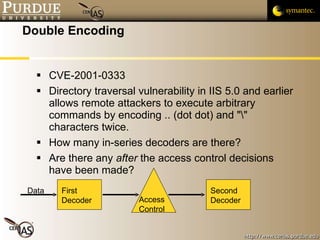
Double Encoding CVE-2001-0333 Directory traversal vulnerability in IIS 5.0 and earlier allows remote attackers to execute arbitrary commands by encoding .. (dot dot) and "\" characters twice. How many in-series decoders are there? Are there any  after  the access control decisions have been made? First Decoder Access Control Second Decoder Data
Repeated Mistake Attempt to cleanse ‘..’ and things that have certain meanings (‘.ini’) directly from input These attempts to do semantic validation before resolving encoding and canonicalization will fail Too many ways to represent the same thing
Windows: Trailing Characters Files ending with an extra “.” (dot) or “\” can fool some access control mechanisms, but the filesystem automatically corrects the names by removing the trailing characters! file.txt. is the same as file.txt for the filesystem See “Writing Secure Code” by Howard and Leblanc Conclusion:  It is important to use the Operating System’s functions for file canonicalization, so that your semantic validation and the OS’s match.
How to Canonicalize Paths Goal: Find the absolute name of a file which contains no ".", ".." components nor any repeated path separators (/) or symlinks Note that race conditions may be possible in unsecured directories UNIX: realpath  (obsolescent but may be only available function) Requires buffer allocation ahead of time Buffer should be of length PATH_MAX What if PATH_MAX is undefined because a system has no limit on path length? canonicalize_file_name  (new) Allocates the needed memory
Canonical Names PHP:  string realpath ( string path) Windows:  GetFullPathName Java:  File.getCanonicalPath() or File.getCanonicalFile()
Differences Between UNIX and Windows UNIX: All but the last component of pathname must exist when realpath() is called. Windows: "This function does not verify that the resulting path and file name are valid or that they see an existing file on the associated volume." Need to standardize on either short or long file names Long names are prefered
Things That Look Like Files But Aren't Devices (Windows, UNIX) Special cases (Linux) /proc/self contains information reflecting the state of the process accessing the directory. Sockets Unix domain sockets can be bound to locations in the file system. While these cannot be opened like normal files, they can still be used to create things like lock files.  NTFS Alternate Data Streams Named Pipes and Mailslots UNC (\\UNC\share\name\here)
Windows Code Example 3 page-long program Howard and Leblanc 2003, "CleanCanon.cpp" In theory available from http://www.microsoft.com/mspress/books/companion/5957.asp#Companion%20Content Requires Windows (.exe) This yields the first edition code, with problems that were corrected in the second edition Use the second edition code from the book
Solutions Without Code Chroot "jail" Confine a process to a specific directory Independent microsphere self-contained Derivatives FreeBSD "jail" Solaris "zones" Subdomain (Immunix) Applies an access control list to file references No duplication of files Windows doesn't have equivalent (closest functionality is virtual machines)
Chroot Chroot changes the filesystem "root". The applications in a chroot jail can't use files outside the visible root of the filesystem They are "jailed" down in a subdirectory Example chdir("/foo/bar"); chroot("/foo/bar"); chroot [-u -user] [-g -group] [-G -group,group,...] newroot [command]
Chroot Can Fail Doesn’t work against root Is service running as root? If not, is there a vulnerability that yields root access? Yes -> “Get Out of Jail”  http://www.bpfh.net/simes/computing/chroot-break.html Important to run with lowers privileges Special users FreeBSD "jail" claims to have closed those loopholes
Lab Write an application that will: Take as input two command-line arguments a path to a file or directory a path to a directory Output the canonicalized path equivalent for the first argument.  If the path would not refer to a real path (UNIX semantics as described before), issue a warning. Decide whether or not the first argument refers to a file inside the second argument Think of the second argument as a filesystem root for a server of some kind (web, FTP)
Lab notes Use canonicalize_file_name http://www.delorie.com/gnu/docs/glibc/libc_279.html Canonical path resolution always goes left to right
Questions or Comments?
About These Slides You are free to copy, distribute, display, and perform the work; and to make derivative works, under the following conditions. You must give the original author and other contributors credit The work will be used for personal or non-commercial educational uses only, and not for commercial activities and purposes For any reuse or distribution, you must make clear to others the terms of use for this work Derivative works must retain and be subject to the same conditions, and contain a note identifying the new contributor(s) and date of modification For other uses please contact the Purdue Office of Technology Commercialization.  Developed thanks to the support of Symantec Corporation
Pascal Meunier [email_address] Contributors: Jared Robinson, Alan Krassowski, Craig Ozancin, Tim Brown, Wes Higaki, Melissa Dark, Chris Clifton, Gustavo Rodriguez-Rivera

7.Canon & Dt

  • 1.
    Course 2: ProgrammingIssues, Section 7 Pascal Meunier, Ph.D., M.Sc., CISSP May 2004; updated November 3, 2004 Developed thanks to the support of Symantec Corporation, NSF SFS Capacity Building Program (Award Number 0113725) and the Purdue e-Enterprise Center Copyright (2004) Purdue Research Foundation. All rights reserved.
  • 2.
    Course 2 LearningPlan Buffer Overflows Format String Vulnerabilities Code Injection and Input Validation Cross-site Scripting Vulnerabilities Links and Race Conditions Temporary Files and Randomness Canonicalization and Directory Traversal
  • 3.
    Learning objectives Understandthat there are many ways of representing “addresses” and names, like a path to a file, but only one standard way: the canonical one Understand how canonicalization issues can result in directory traversal vulnerabilities Learn which OS-provided function calls help with canonicalization issues Learn how to use chroot to defend against directory traversal vulnerabilities
  • 4.
    Canonicalization and DirectoryTraversal: Outline Importance of Directory Traversal Vulnerabilities Canonical names BearShare example How to canonicalize Mitigating solutions (e.g., chroot) Lab
  • 5.
    Importance Directory traversalvulnerabilities are very common, but not as much as buffer overflows They may allow remotely writing or reading files, depending. These may be executable files, or be secret or confidential documents. Canonicalization issues are more complex in Windows, due to the many ways of naming a file short name (8.3) long name Unicode name Streams Trailing dots, forward slashes or backslashes etc...
  • 6.
    Directory Traversal VulnerabilitiesBasic Idea: the characters ‘..’ mean “Go up a directory” They can be inserted in file paths for Browsing Reading Execution Often a network services problem (e.g., ftp) Web sites Web-enabled applications Applications using networks
  • 7.
    Synonyms “..” (“dotdot”) attacks Also “...” on Windows Windows 95, 98 Goes up two directories
  • 8.
    Definition of CanonicalCanonical means *the* standard form or representation of something Canonicalization: "process by which various equivalent forms of a name can be resolved to a single, standard name – the so-called canonical name.” Usually the simplest form Without symlinks “/usr/../home/student” is the same as “/home/student” /home/student is the canonical path
  • 9.
    Question Given thatthere is a symbolic link: /home/alfred/sss -> /home/myhomebiz/accounting/spreadsheets/ What is the canonical path to: “/home/bob/../mary/../alfred/.//sss/may.xls” ? a) /home/alfred/sss/may.xls b) /home/myhomebiz/accounting/spreadsheets/may.xls c) /home/alfred/may.xls
  • 10.
    Question Given thatthere is a symbolic link: /home/alfred/sss -> /home/myhomebiz/accounting/spreadsheets/ What is the canonical path to: “/home/bob/../mary/../alfred/.//sss/may.xls” ? a) /home/alfred/sss/may.xls b) /home/myhomebiz/accounting/spreadsheets/may.xls c) /home/alfred/may.xls
  • 11.
    The Problem Ifyou forbid access to /home/private but enable access to /home/public, what do you do with a request for: “/home/public/../private” ? “/home/PRIVATE” ? (This one is dependent on the file system)
  • 12.
    Answer “/home/public/../private” shouldof course be forbidden, but many programs are fooled by the presence of “..” and equivalent character encodings and obfuscations. Programs filtering out only “..” are still vulnerable.
  • 13.
    Mismatched Object andAccess Control The HFS+ file system is case insensitive. “/home/PRIVATE” == “/home/private” Apache directory access control is case sensitive, as it is designed for UFS (UNIX File System). It thinks that “/home/PRIVATE” is different from “/home/private”. Join the two together and you have a canonicalization (“directory traversal”) vulnerability, even though both systems alone are correct. Fixed since
  • 14.
    Url Vulnerabilities protocol://server/pathhttp://www.host.com/path path contains ‘..’; what do you do?
  • 15.
    Symantec Example CVE-1999-0842Symantec Mail-Gear 1.0 web interface server allows remote users to read arbitrary files via a .. (dot dot) attack.
  • 16.
    Example With BadPatches (Instructive) BearShare Peer-to-peer file sharing service Also had a vulnerable web server component!
  • 17.
    BearShare 2.2.2 CVE-2001-0368http://vulnerable:6346/........../windows/win.ini This would download the win.ini file from the windows directory. This is a classic Directory Traversal vulnerability.
  • 18.
    Wrong Way toPatch First attempt to patch, Apr 30 2001 Guess they forbid ‘{/\}.(.)*’ (unencoded) in the path Why is it bad?
  • 19.
    BearShare 4.05 VulnerabilityAttempt to fix previous exploit by filtering bad stuff New exploit: http://127.0.0.1:6346/%5c..%5c..%5c..%5cwindows%5cwin.ini %5c == ‘\’ This passes the filter Then it translates into: http://127.0.0.1:6346/\..\..\..\windows\win.ini Returning the win.ini file.
  • 20.
    BearShare 4.06 http://127.0.0.1:6346/%5c..%5c..%5c..%5cwindows%5cwin%2eini %2e is "." Also returns the win.ini file. What went wrong twice? Filter is a black list instead of white list Filter is applied before canonicalization Good time to remind of "How to obscure any URL" http://www.pc-help.org/obscure.htm
  • 21.
    Other Character EncodingExample CAN-2004-0072 Directory traversal vulnerability in Accipiter Direct Server 6.0 allows remote attackers to read arbitrary files via encoded \.. (backslash .., "%5c%2e%2e") sequences in an HTTP request. Hundreds of similar vulnerabilities
  • 22.
    Double Encoding CVE-2001-0333Directory traversal vulnerability in IIS 5.0 and earlier allows remote attackers to execute arbitrary commands by encoding .. (dot dot) and "\" characters twice. How many in-series decoders are there? Are there any after the access control decisions have been made? First Decoder Access Control Second Decoder Data
  • 23.
    Repeated Mistake Attemptto cleanse ‘..’ and things that have certain meanings (‘.ini’) directly from input These attempts to do semantic validation before resolving encoding and canonicalization will fail Too many ways to represent the same thing
  • 24.
    Windows: Trailing CharactersFiles ending with an extra “.” (dot) or “\” can fool some access control mechanisms, but the filesystem automatically corrects the names by removing the trailing characters! file.txt. is the same as file.txt for the filesystem See “Writing Secure Code” by Howard and Leblanc Conclusion: It is important to use the Operating System’s functions for file canonicalization, so that your semantic validation and the OS’s match.
  • 25.
    How to CanonicalizePaths Goal: Find the absolute name of a file which contains no ".", ".." components nor any repeated path separators (/) or symlinks Note that race conditions may be possible in unsecured directories UNIX: realpath (obsolescent but may be only available function) Requires buffer allocation ahead of time Buffer should be of length PATH_MAX What if PATH_MAX is undefined because a system has no limit on path length? canonicalize_file_name (new) Allocates the needed memory
  • 26.
    Canonical Names PHP: string realpath ( string path) Windows: GetFullPathName Java: File.getCanonicalPath() or File.getCanonicalFile()
  • 27.
    Differences Between UNIXand Windows UNIX: All but the last component of pathname must exist when realpath() is called. Windows: "This function does not verify that the resulting path and file name are valid or that they see an existing file on the associated volume." Need to standardize on either short or long file names Long names are prefered
  • 28.
    Things That LookLike Files But Aren't Devices (Windows, UNIX) Special cases (Linux) /proc/self contains information reflecting the state of the process accessing the directory. Sockets Unix domain sockets can be bound to locations in the file system. While these cannot be opened like normal files, they can still be used to create things like lock files. NTFS Alternate Data Streams Named Pipes and Mailslots UNC (\\UNC\share\name\here)
  • 29.
    Windows Code Example3 page-long program Howard and Leblanc 2003, "CleanCanon.cpp" In theory available from http://www.microsoft.com/mspress/books/companion/5957.asp#Companion%20Content Requires Windows (.exe) This yields the first edition code, with problems that were corrected in the second edition Use the second edition code from the book
  • 30.
    Solutions Without CodeChroot "jail" Confine a process to a specific directory Independent microsphere self-contained Derivatives FreeBSD "jail" Solaris "zones" Subdomain (Immunix) Applies an access control list to file references No duplication of files Windows doesn't have equivalent (closest functionality is virtual machines)
  • 31.
    Chroot Chroot changesthe filesystem "root". The applications in a chroot jail can't use files outside the visible root of the filesystem They are "jailed" down in a subdirectory Example chdir("/foo/bar"); chroot("/foo/bar"); chroot [-u -user] [-g -group] [-G -group,group,...] newroot [command]
  • 32.
    Chroot Can FailDoesn’t work against root Is service running as root? If not, is there a vulnerability that yields root access? Yes -> “Get Out of Jail” http://www.bpfh.net/simes/computing/chroot-break.html Important to run with lowers privileges Special users FreeBSD "jail" claims to have closed those loopholes
  • 33.
    Lab Write anapplication that will: Take as input two command-line arguments a path to a file or directory a path to a directory Output the canonicalized path equivalent for the first argument. If the path would not refer to a real path (UNIX semantics as described before), issue a warning. Decide whether or not the first argument refers to a file inside the second argument Think of the second argument as a filesystem root for a server of some kind (web, FTP)
  • 34.
    Lab notes Usecanonicalize_file_name http://www.delorie.com/gnu/docs/glibc/libc_279.html Canonical path resolution always goes left to right
  • 35.
  • 36.
    About These SlidesYou are free to copy, distribute, display, and perform the work; and to make derivative works, under the following conditions. You must give the original author and other contributors credit The work will be used for personal or non-commercial educational uses only, and not for commercial activities and purposes For any reuse or distribution, you must make clear to others the terms of use for this work Derivative works must retain and be subject to the same conditions, and contain a note identifying the new contributor(s) and date of modification For other uses please contact the Purdue Office of Technology Commercialization. Developed thanks to the support of Symantec Corporation
  • 37.
    Pascal Meunier [email_address]Contributors: Jared Robinson, Alan Krassowski, Craig Ozancin, Tim Brown, Wes Higaki, Melissa Dark, Chris Clifton, Gustavo Rodriguez-Rivera