© eG Innovations, Inc. | www.eginnovations.com
Citrix Masterclass: Enhance
Digital Employee Experience
with 3 Proven Strategies
Session-1: Optimize Your Citrix
Strategy with Expert Insights and Best
Practices
© eG Innovations, Inc. | www.eginnovations.com
2
Secure remote
access
Cost-effective Accessible from
anywhere,
at any time
Webinar Logistics
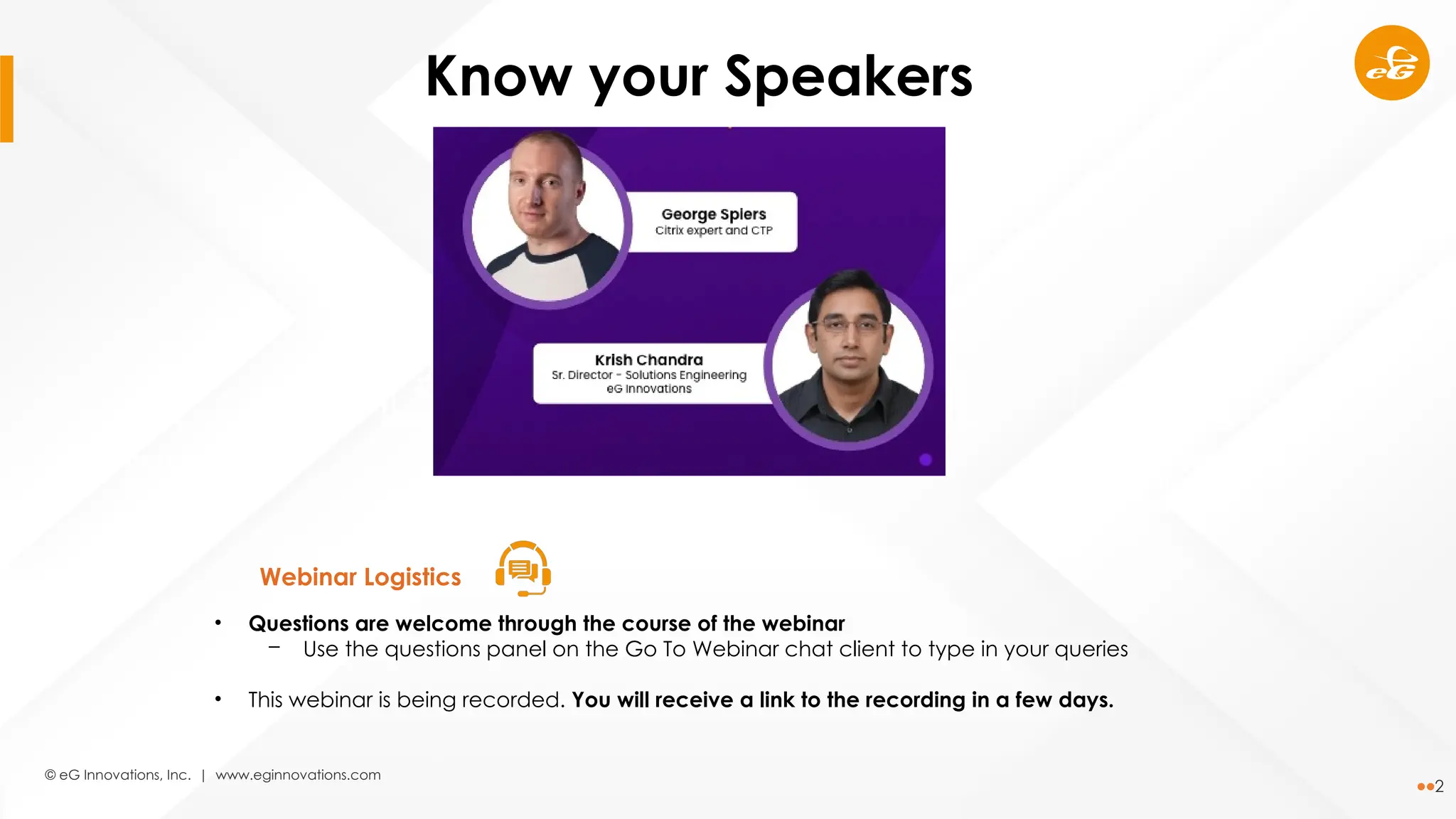
Know your Speakers
• Questions are welcome through the course of the webinar
─ Use the questions panel on the Go To Webinar chat client to type in your queries
• This webinar is being recorded. You will receive a link to the recording in a few days.
© eG Innovations, Inc. | www.eginnovations.com
3
• Why Citrix technologies remain critical for
business success
• Updates on the latest enhancements in the
Citrix technology stack
• Insights into Citrix licensing changes
Agenda
© eG Innovations, Inc. | www.eginnovations.com
4
Why Citrix technologies
remain critical for
business success
© eG Innovations, Inc. | www.eginnovations.com
5
Why Citrix technologies remain critical
for business success
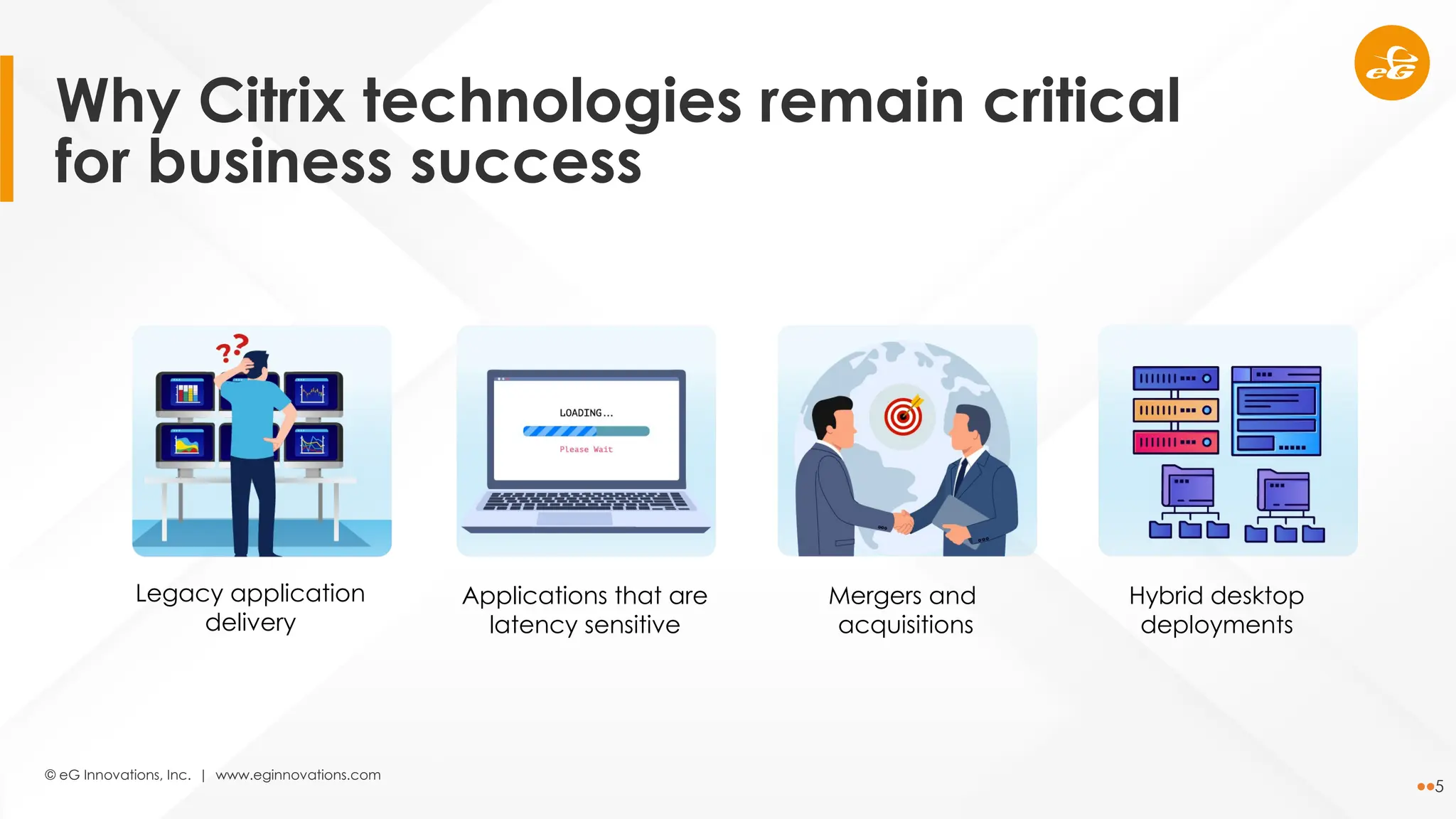
Legacy application
delivery
Applications that are
latency sensitive
Mergers and
acquisitions
Hybrid desktop
deployments
© eG Innovations, Inc. | www.eginnovations.com
6
Why Citrix technologies remain critical
for business success
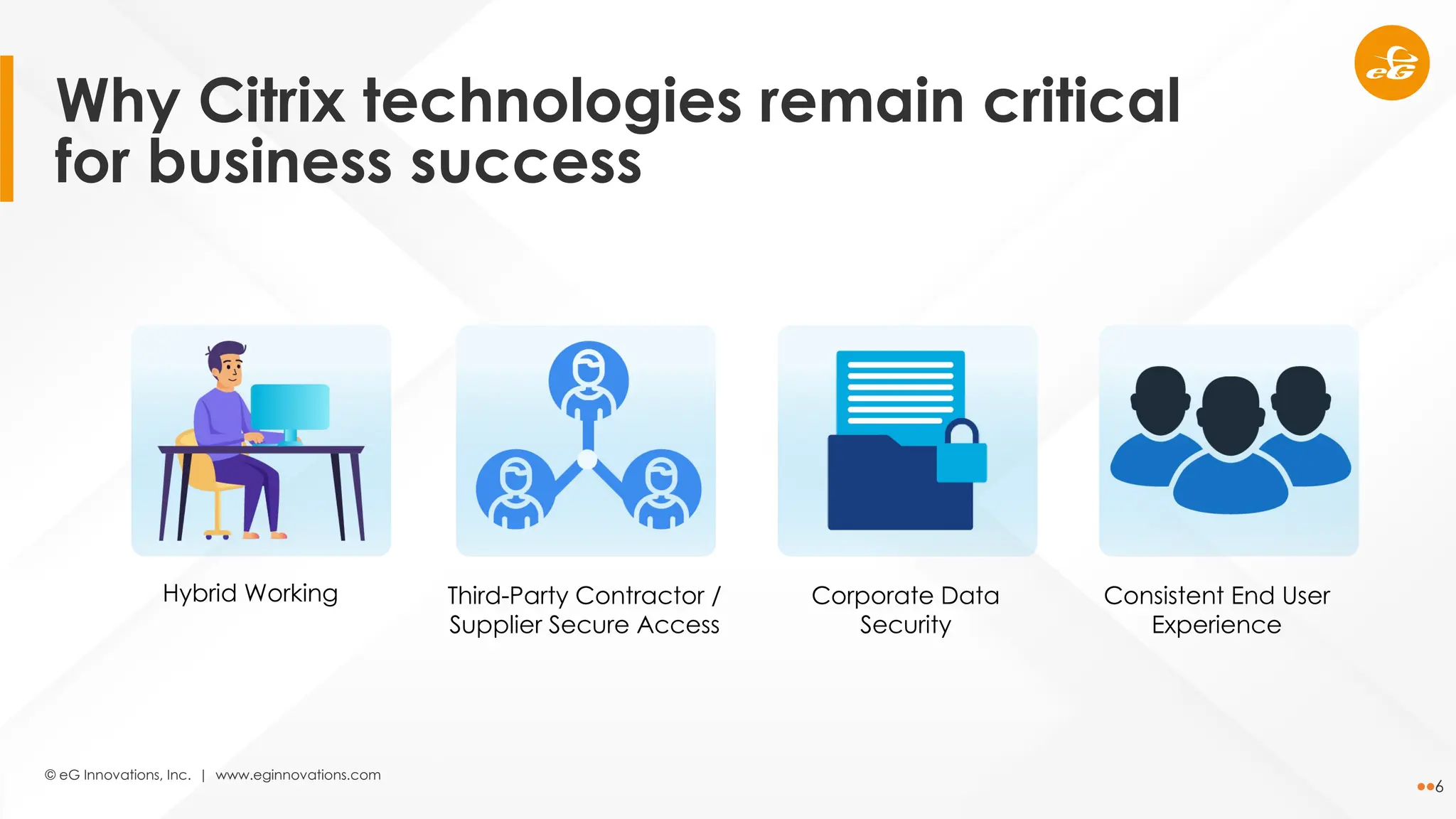
Hybrid Working Third-Party Contractor /
Supplier Secure Access
Corporate Data
Security
Consistent End User
Experience
© eG Innovations, Inc. | www.eginnovations.com
7
Updates on the latest
enhancements in the
Citrix technology stack
© eG Innovations, Inc. | www.eginnovations.com
8
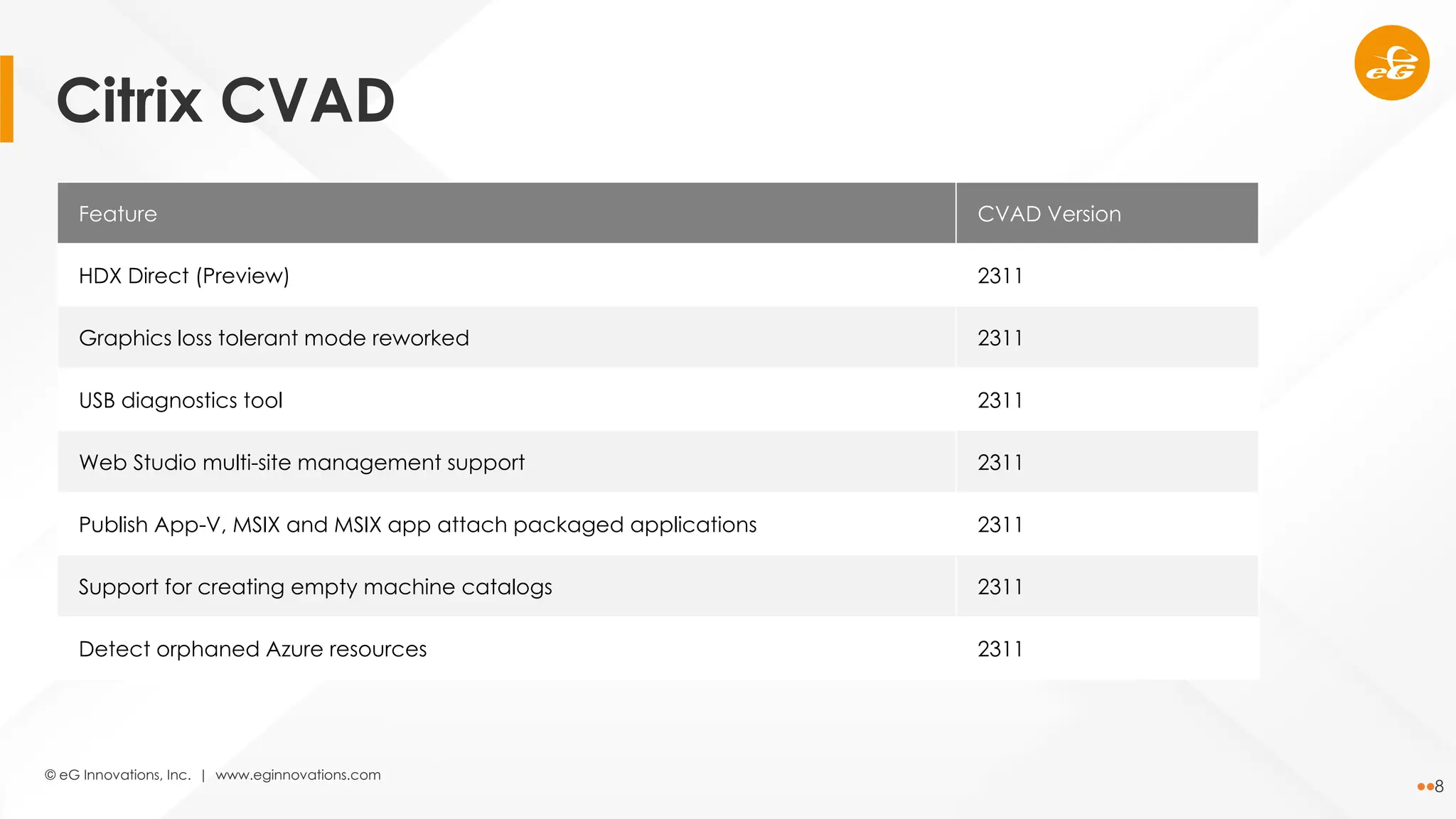
Feature CVAD Version
HDX Direct (Preview) 2311
Graphics loss tolerant mode reworked 2311
USB diagnostics tool 2311
Web Studio multi-site management support 2311
Publish App-V, MSIX and MSIX app attach packaged applications 2311
Support for creating empty machine catalogs 2311
Detect orphaned Azure resources 2311
Citrix CVAD
© eG Innovations, Inc. | www.eginnovations.com
9
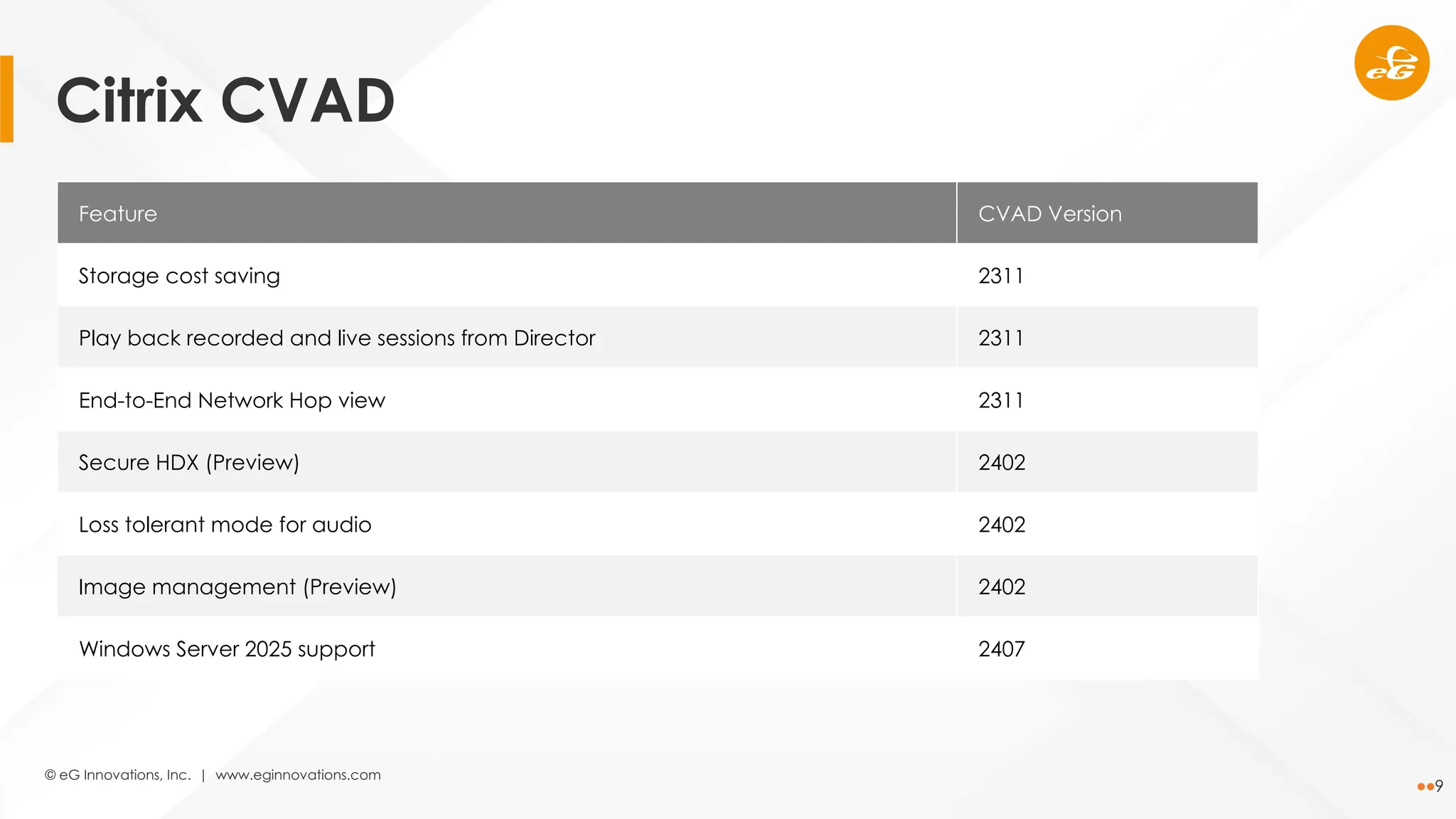
Feature CVAD Version
Storage cost saving 2311
Play back recorded and live sessions from Director 2311
End-to-End Network Hop view 2311
Secure HDX (Preview) 2402
Loss tolerant mode for audio 2402
Image management (Preview) 2402
Windows Server 2025 support 2407
Citrix CVAD
© eG Innovations, Inc. | www.eginnovations.com
10
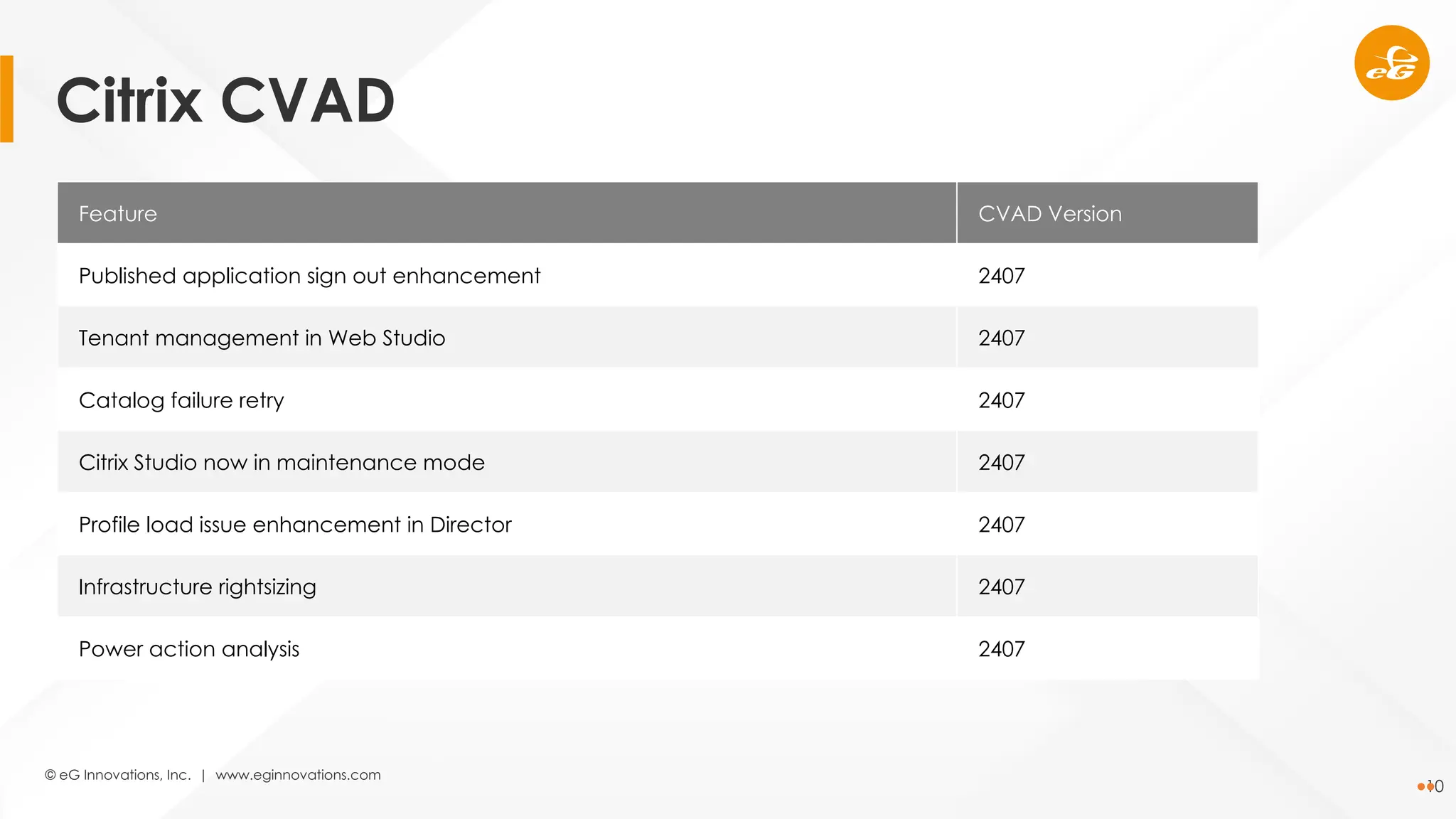
Feature CVAD Version
Published application sign out enhancement 2407
Tenant management in Web Studio 2407
Catalog failure retry 2407
Citrix Studio now in maintenance mode 2407
Profile load issue enhancement in Director 2407
Infrastructure rightsizing 2407
Power action analysis 2407
Citrix CVAD
© eG Innovations, Inc. | www.eginnovations.com
11
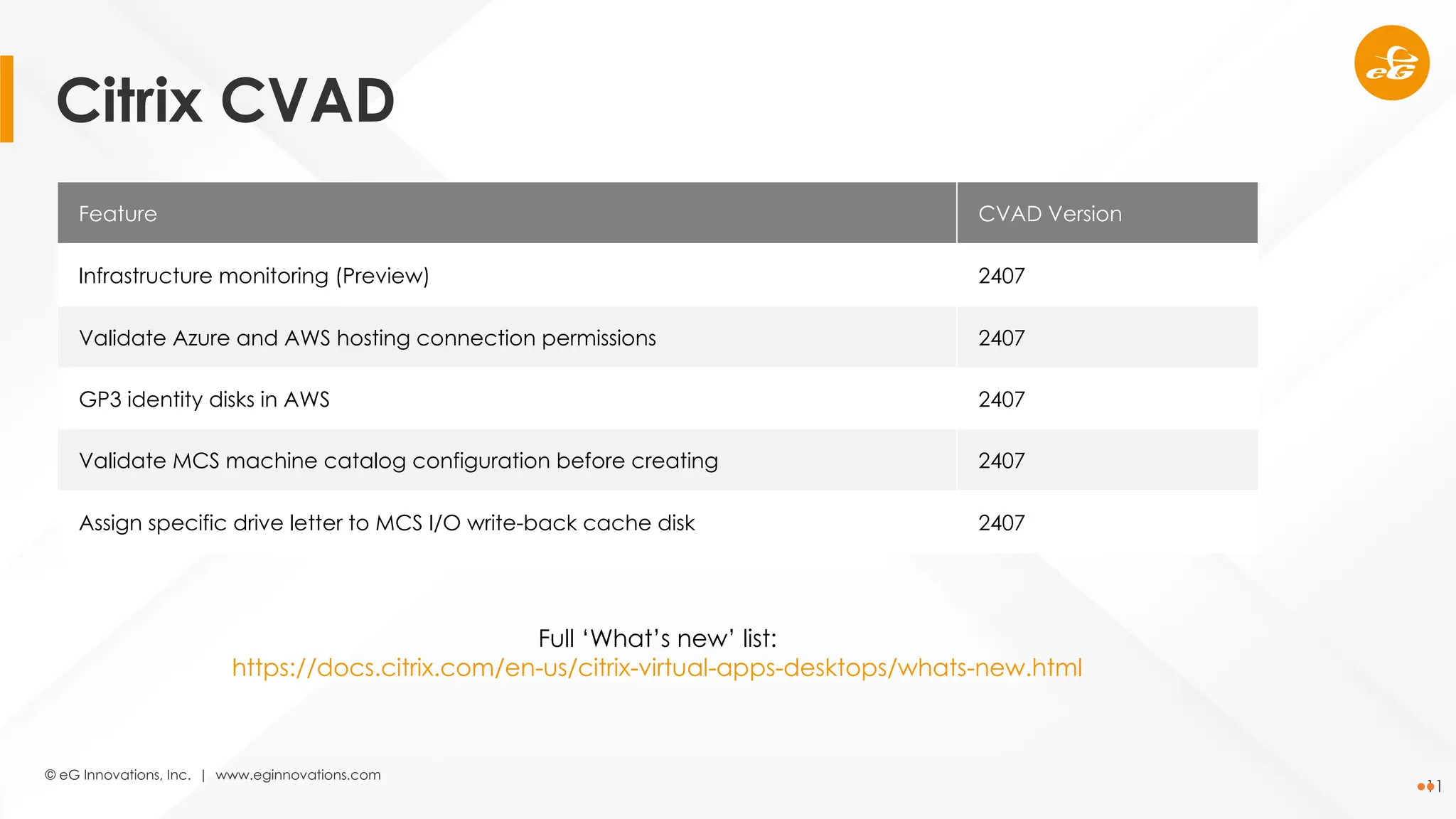
Feature CVAD Version
Infrastructure monitoring (Preview) 2407
Validate Azure and AWS hosting connection permissions 2407
GP3 identity disks in AWS 2407
Validate MCS machine catalog configuration before creating 2407
Assign specific drive letter to MCS I/O write-back cache disk 2407
Full ‘What’s new’ list:
https://docs.citrix.com/en-us/citrix-virtual-apps-desktops/whats-new.html
Citrix CVAD
© eG Innovations, Inc. | www.eginnovations.com
12
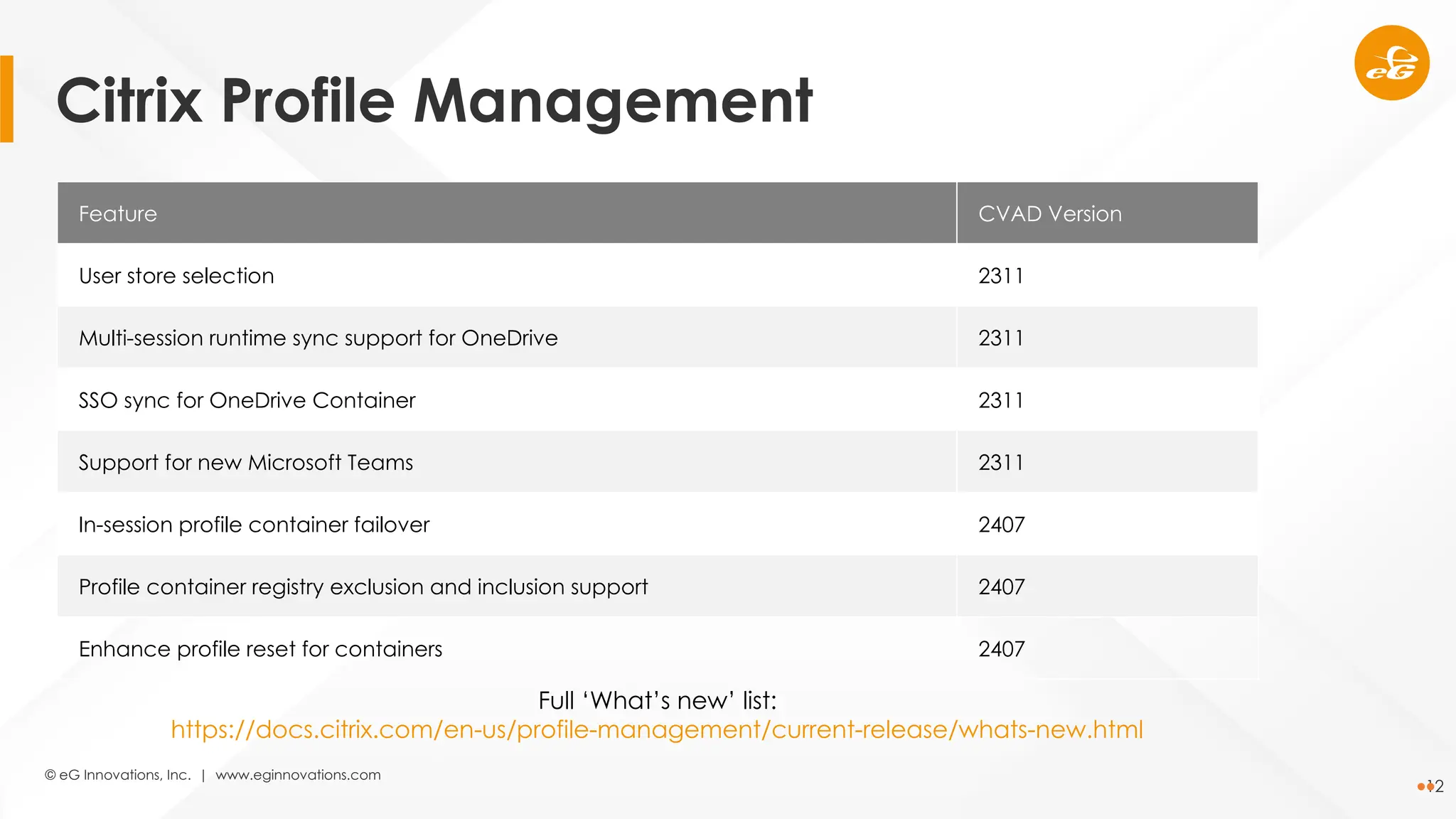
Feature CVAD Version
User store selection 2311
Multi-session runtime sync support for OneDrive 2311
SSO sync for OneDrive Container 2311
Support for new Microsoft Teams 2311
In-session profile container failover 2407
Profile container registry exclusion and inclusion support 2407
Enhance profile reset for containers 2407
Full ‘What’s new’ list:
https://docs.citrix.com/en-us/profile-management/current-release/whats-new.html
Citrix Profile Management
© eG Innovations, Inc. | www.eginnovations.com
13
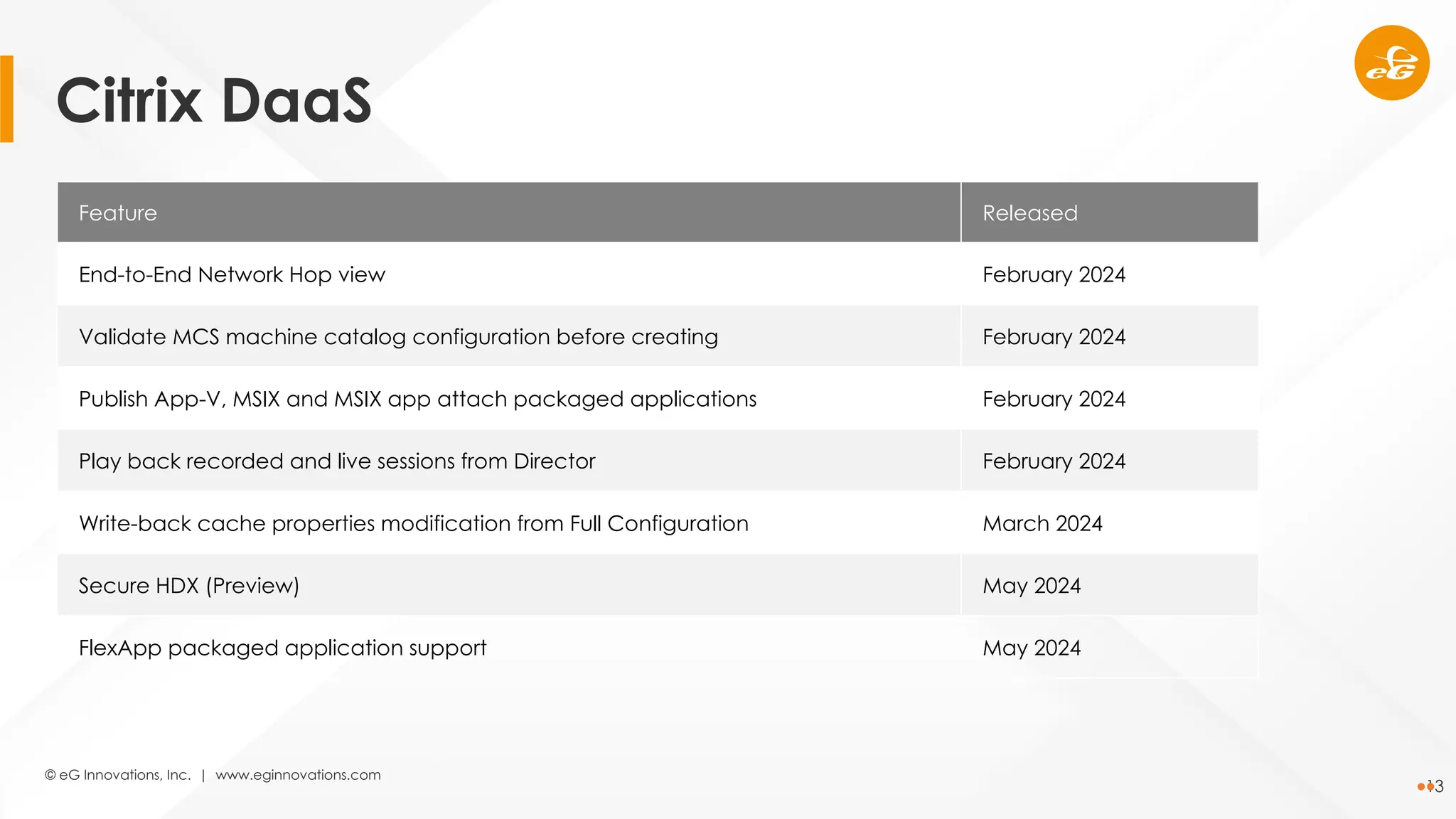
Feature Released
End-to-End Network Hop view February 2024
Validate MCS machine catalog configuration before creating February 2024
Publish App-V, MSIX and MSIX app attach packaged applications February 2024
Play back recorded and live sessions from Director February 2024
Write-back cache properties modification from Full Configuration March 2024
Secure HDX (Preview) May 2024
FlexApp packaged application support May 2024
Citrix DaaS
© eG Innovations, Inc. | www.eginnovations.com
14
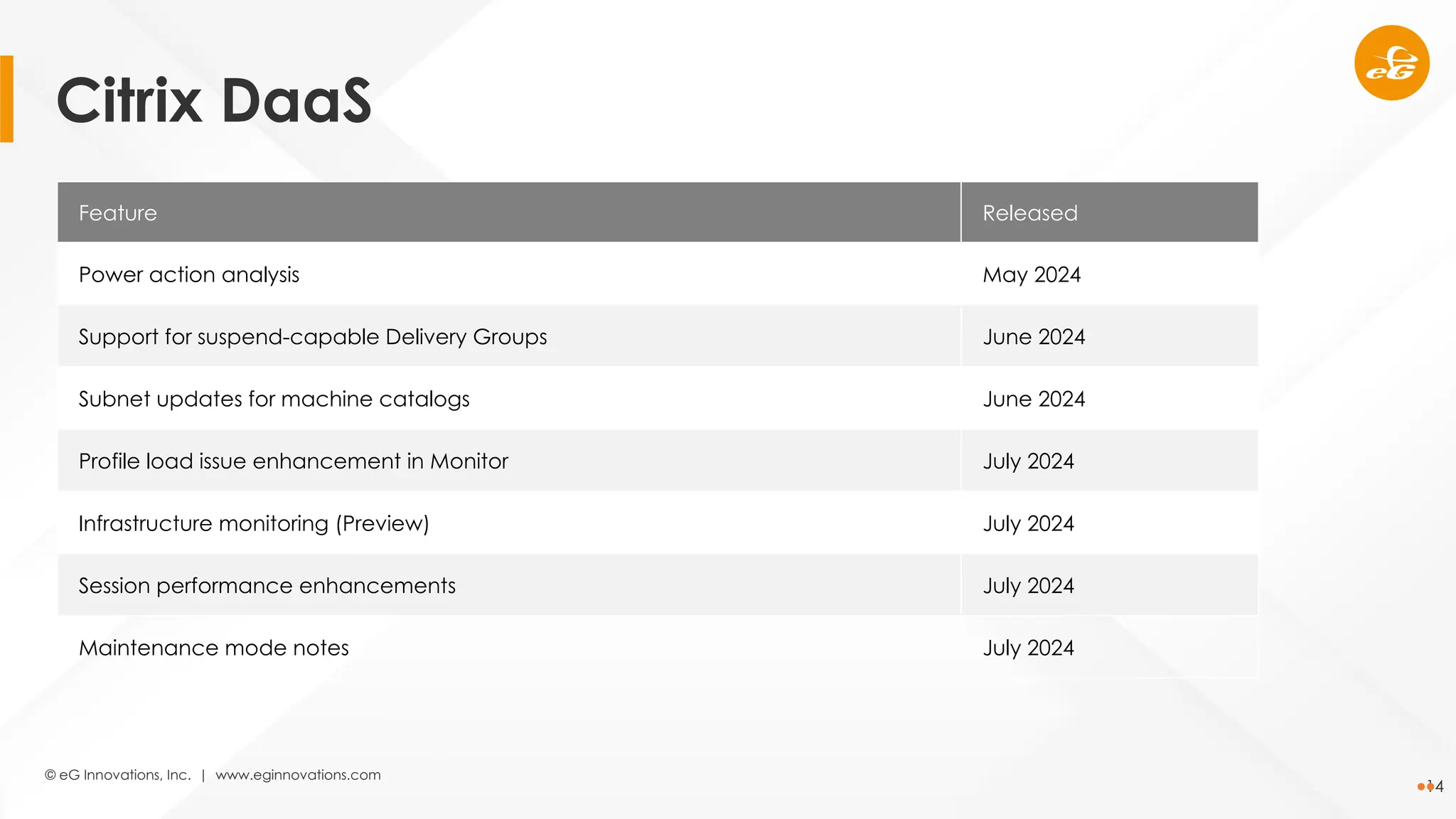
Feature Released
Power action analysis May 2024
Support for suspend-capable Delivery Groups June 2024
Subnet updates for machine catalogs June 2024
Profile load issue enhancement in Monitor July 2024
Infrastructure monitoring (Preview) July 2024
Session performance enhancements July 2024
Maintenance mode notes July 2024
Citrix DaaS
© eG Innovations, Inc. | www.eginnovations.com
15
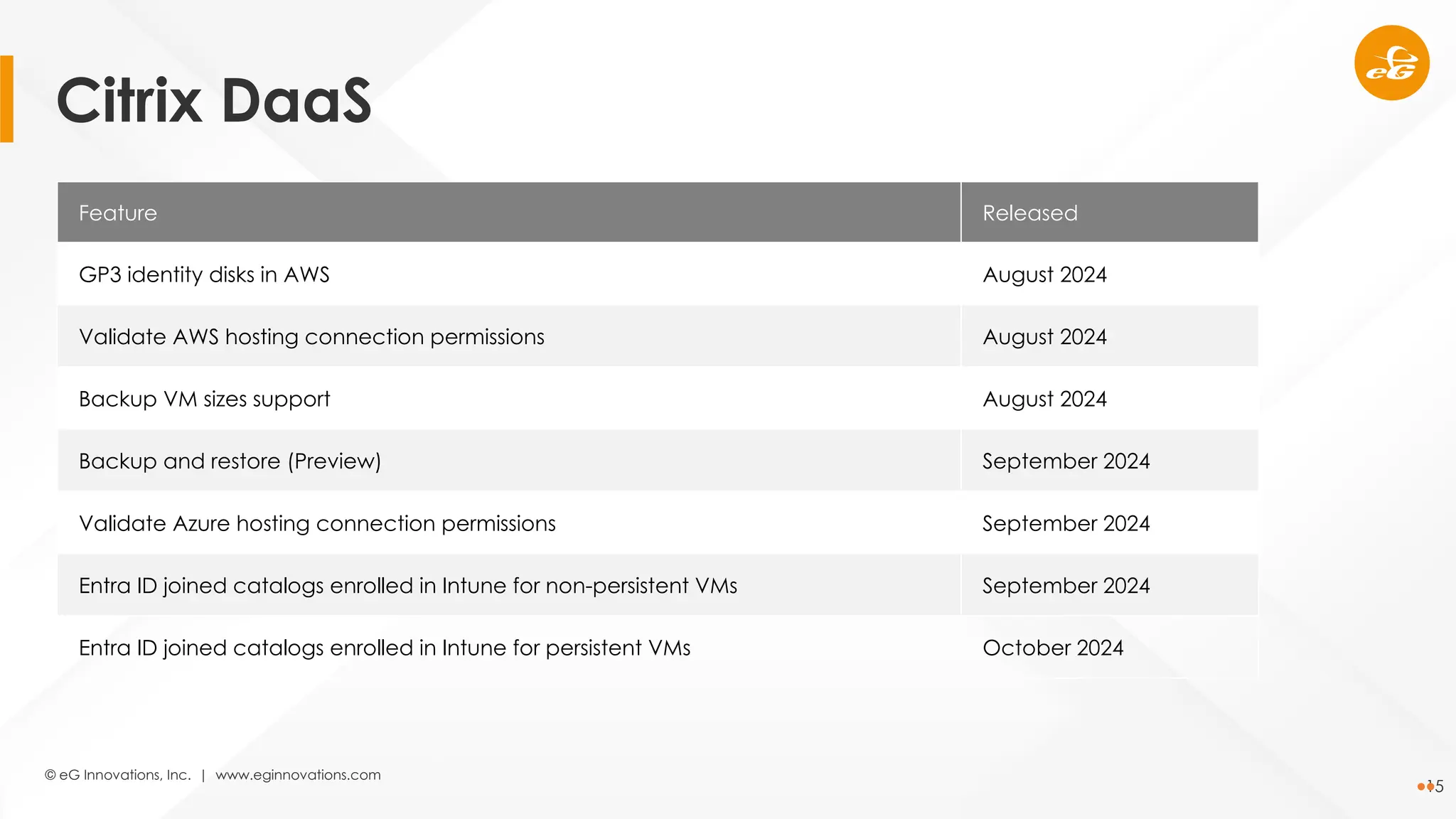
Feature Released
GP3 identity disks in AWS August 2024
Validate AWS hosting connection permissions August 2024
Backup VM sizes support August 2024
Backup and restore (Preview) September 2024
Validate Azure hosting connection permissions September 2024
Entra ID joined catalogs enrolled in Intune for non-persistent VMs September 2024
Entra ID joined catalogs enrolled in Intune for persistent VMs October 2024
Citrix DaaS
© eG Innovations, Inc. | www.eginnovations.com
16
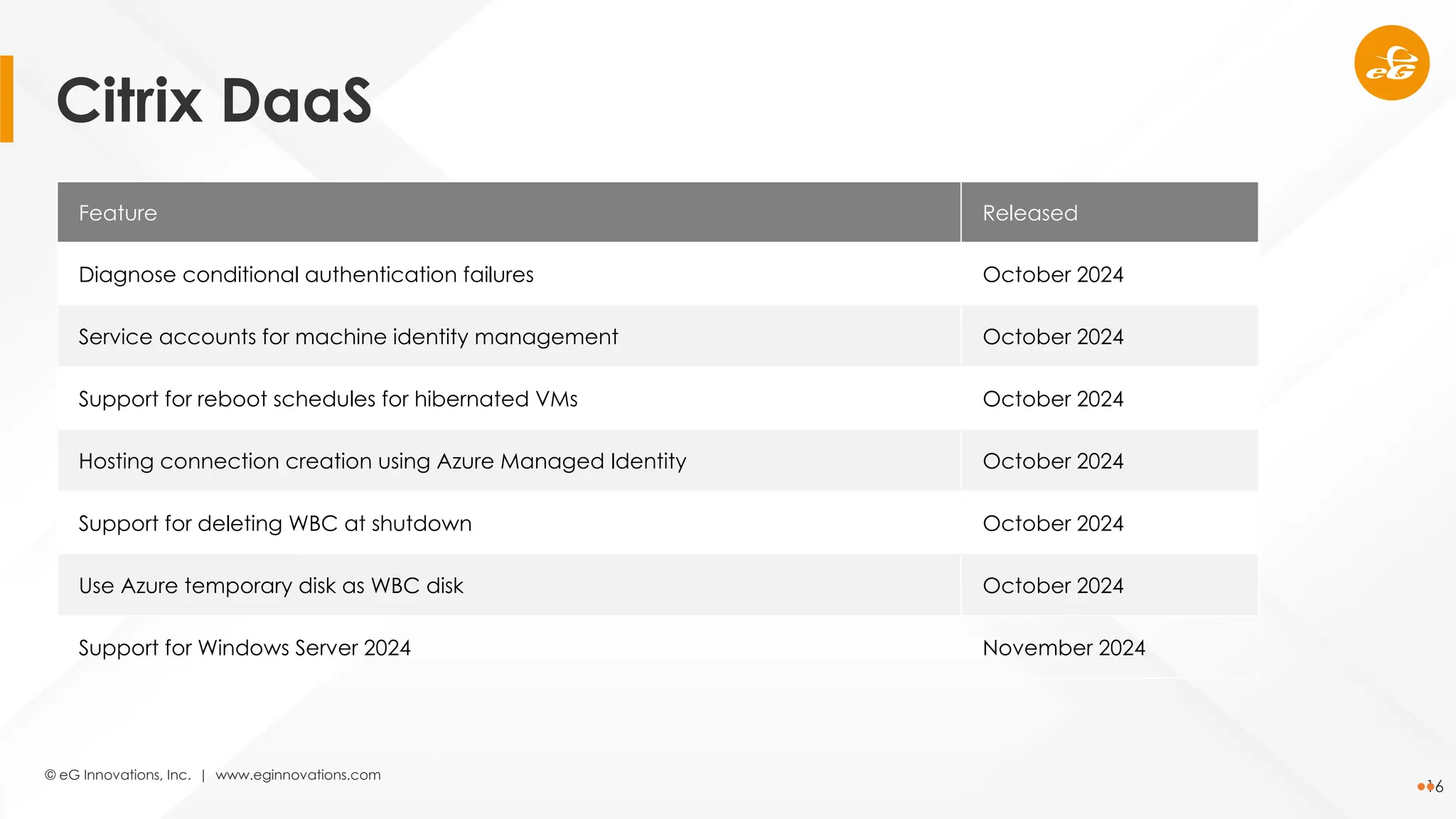
Feature Released
Diagnose conditional authentication failures October 2024
Service accounts for machine identity management October 2024
Support for reboot schedules for hibernated VMs October 2024
Hosting connection creation using Azure Managed Identity October 2024
Support for deleting WBC at shutdown October 2024
Use Azure temporary disk as WBC disk October 2024
Support for Windows Server 2024 November 2024
Citrix DaaS
© eG Innovations, Inc. | www.eginnovations.com
17
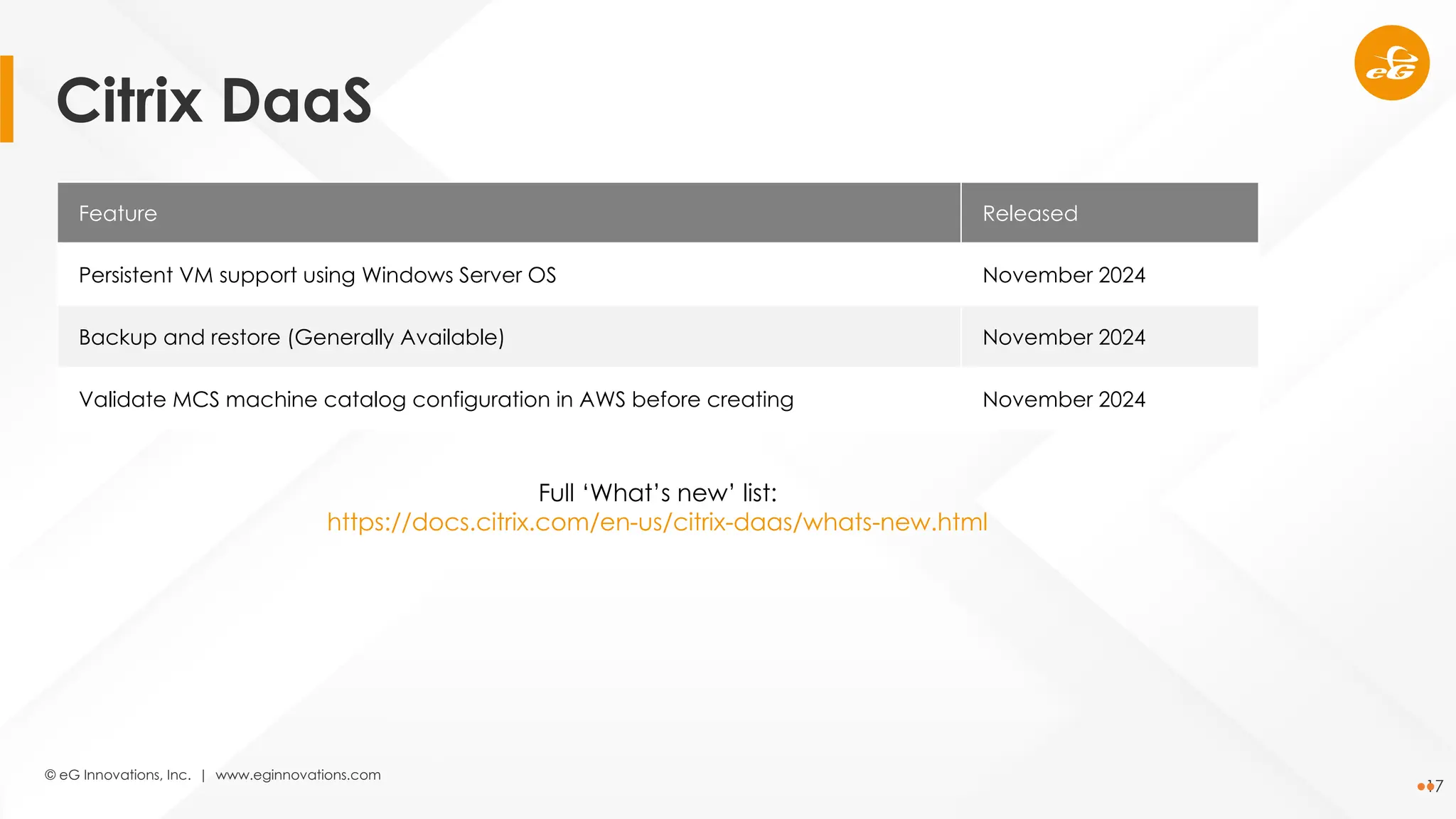
Feature Released
Persistent VM support using Windows Server OS November 2024
Backup and restore (Generally Available) November 2024
Validate MCS machine catalog configuration in AWS before creating November 2024
Full ‘What’s new’ list:
https://docs.citrix.com/en-us/citrix-daas/whats-new.html
Citrix DaaS
© eG Innovations, Inc. | www.eginnovations.com
18
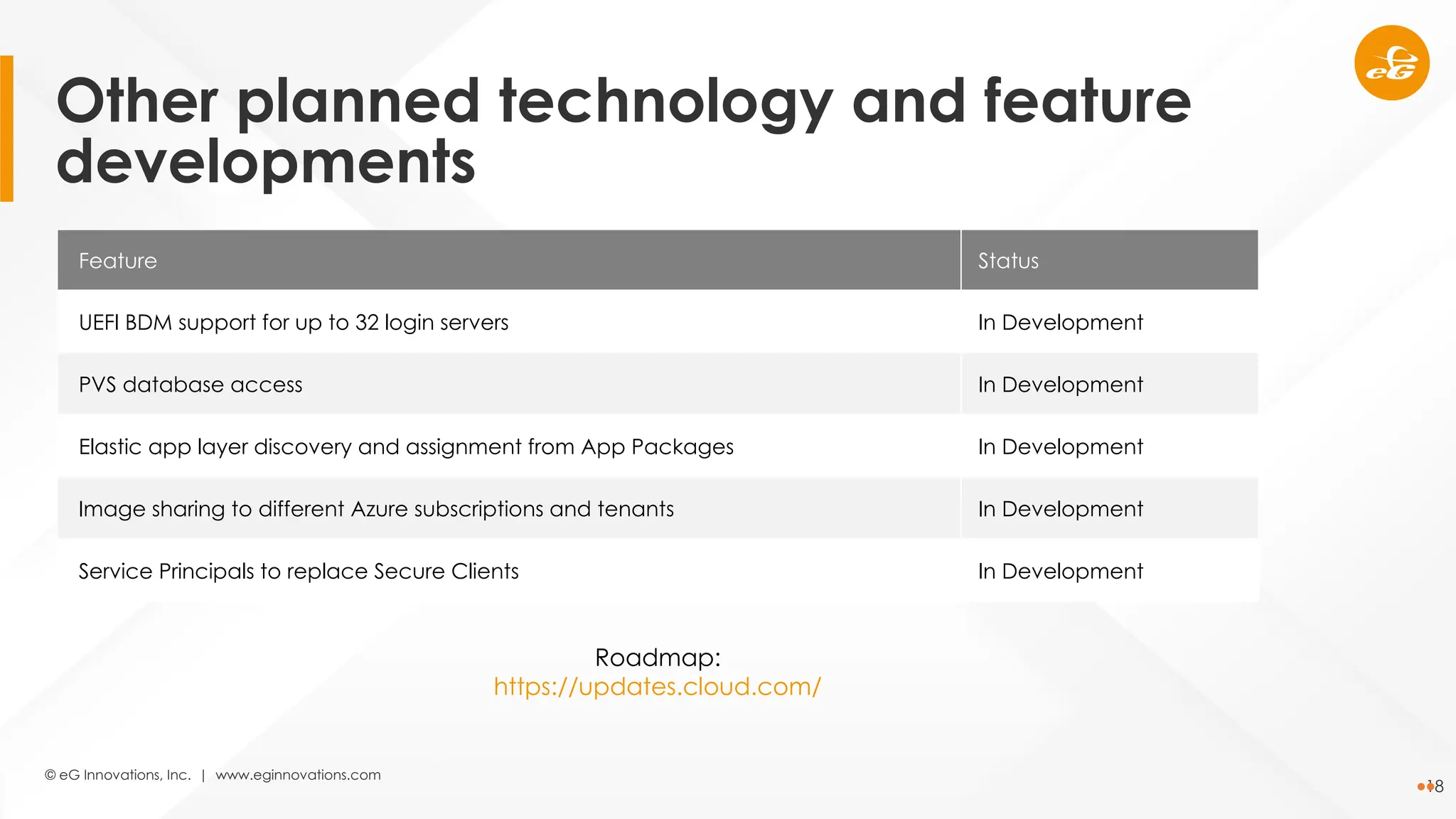
Feature Status
UEFI BDM support for up to 32 login servers In Development
PVS database access In Development
Elastic app layer discovery and assignment from App Packages In Development
Image sharing to different Azure subscriptions and tenants In Development
Service Principals to replace Secure Clients In Development
Roadmap:
https://updates.cloud.com/
Other planned technology and feature
developments
© eG Innovations, Inc. | www.eginnovations.com
19
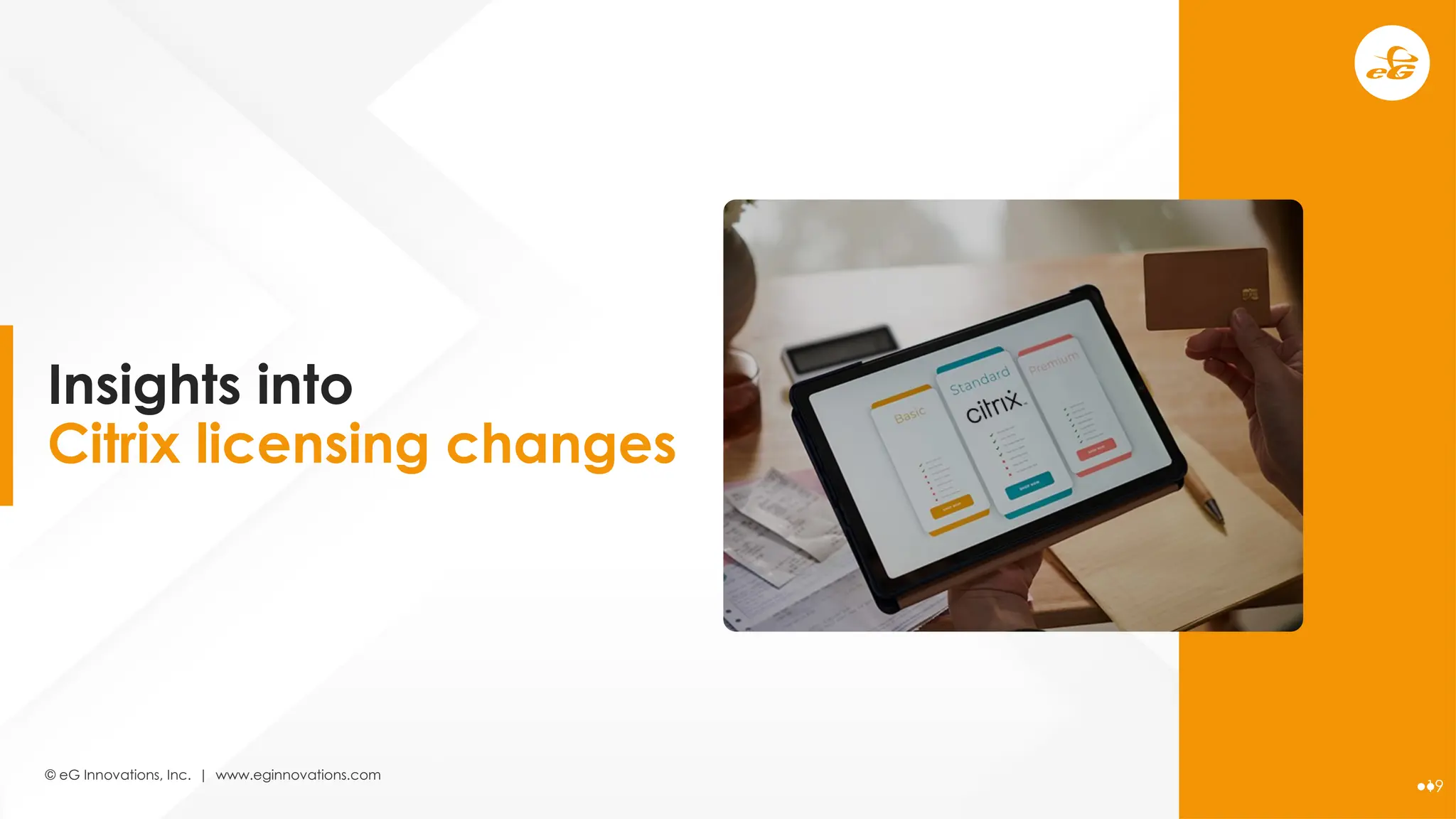
Insights into
Citrix licensing changes
© eG Innovations, Inc. | www.eginnovations.com
20
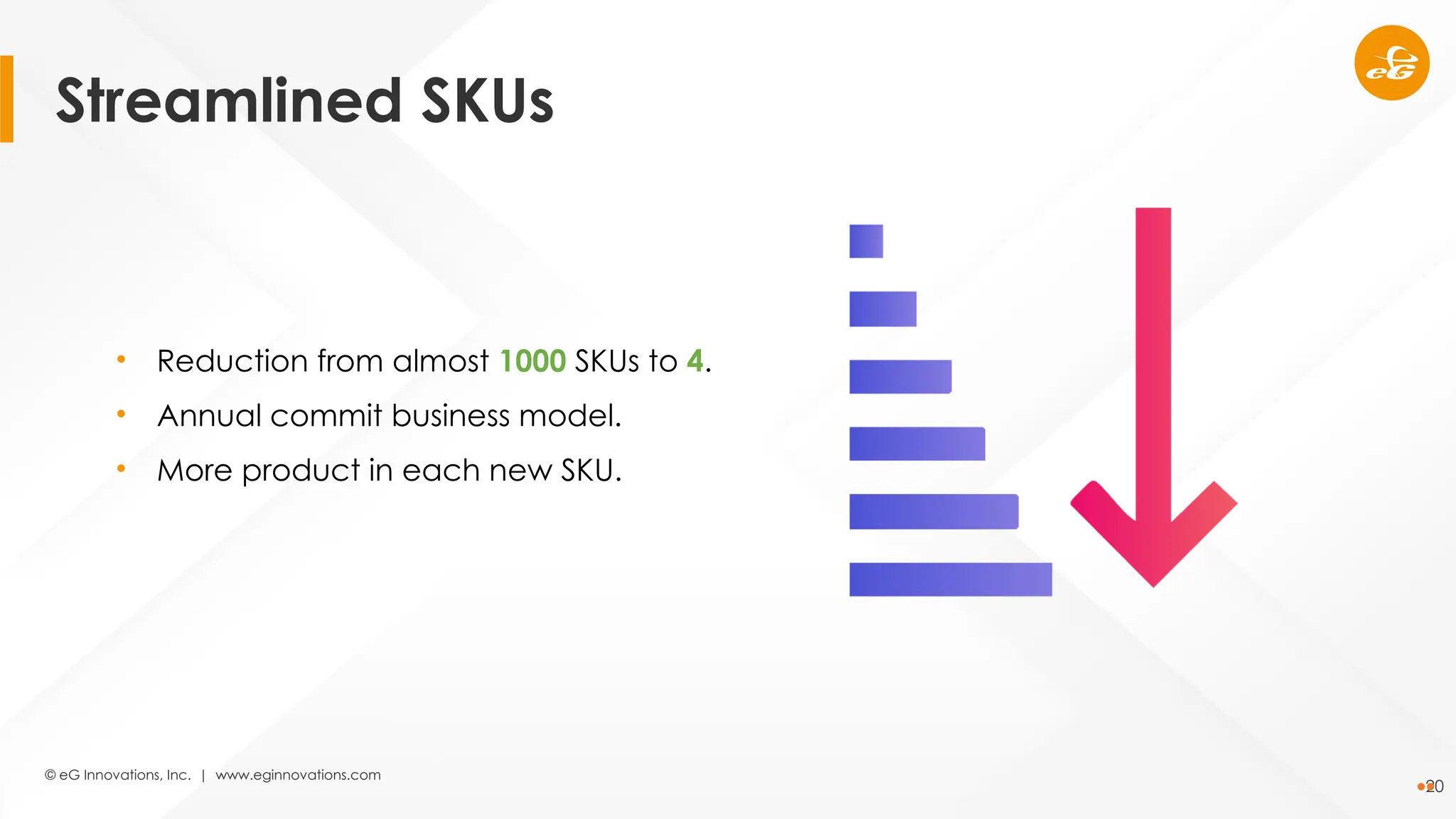
• Reduction from almost 1000 SKUs to 4.
• Annual commit business model.
• More product in each new SKU.
Streamlined SKUs
© eG Innovations, Inc. | www.eginnovations.com
21
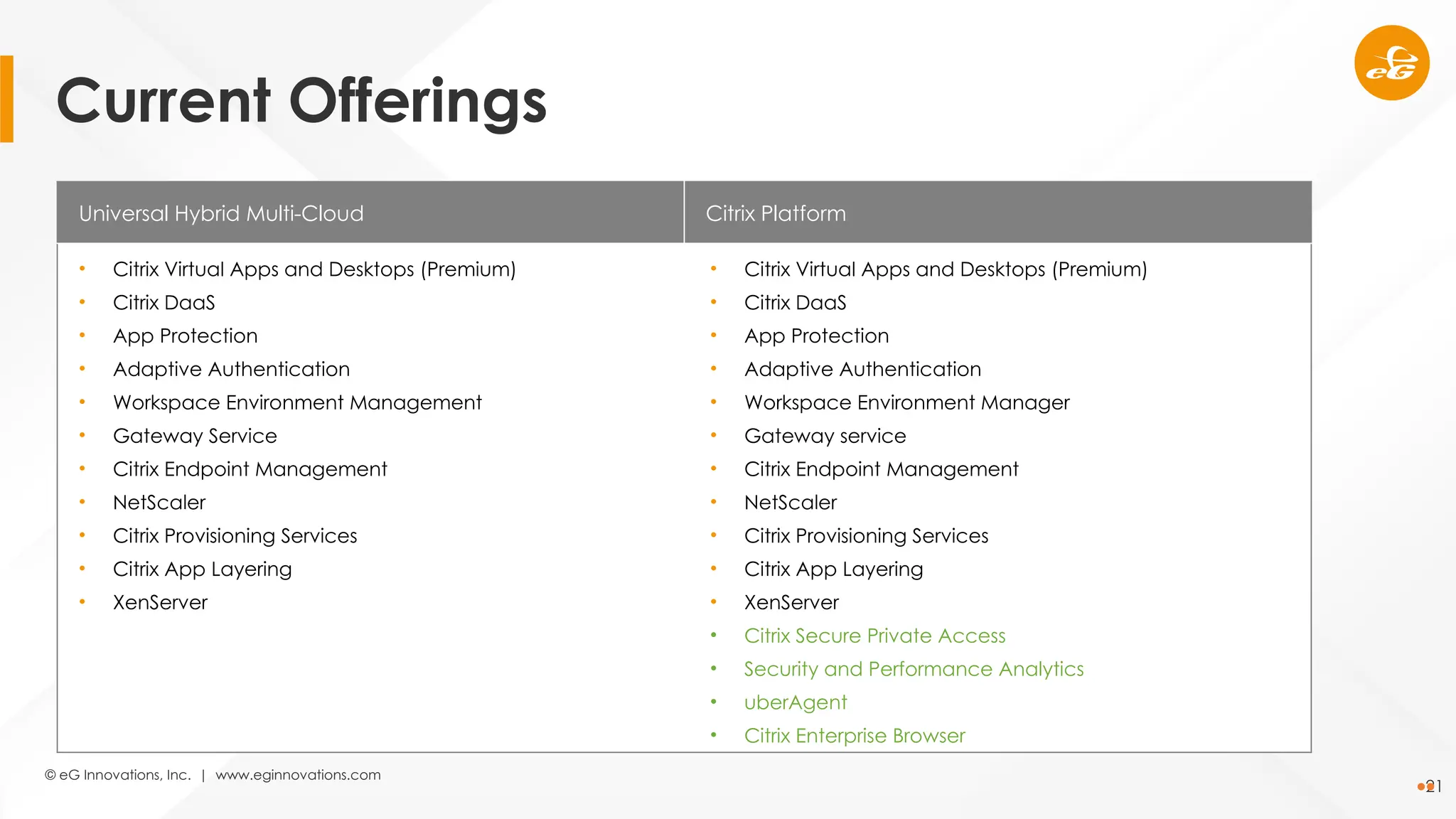
Universal Hybrid Multi-Cloud Citrix Platform
• Citrix Virtual Apps and Desktops (Premium)
• Citrix DaaS
• App Protection
• Adaptive Authentication
• Workspace Environment Management
• Gateway Service
• Citrix Endpoint Management
• NetScaler
• Citrix Provisioning Services
• Citrix App Layering
• XenServer
• Citrix Virtual Apps and Desktops (Premium)
• Citrix DaaS
• App Protection
• Adaptive Authentication
• Workspace Environment Manager
• Gateway service
• Citrix Endpoint Management
• NetScaler
• Citrix Provisioning Services
• Citrix App Layering
• XenServer
• Citrix Secure Private Access
• Security and Performance Analytics
• uberAgent
• Citrix Enterprise Browser
Current Offerings
© eG Innovations, Inc. | www.eginnovations.com
22
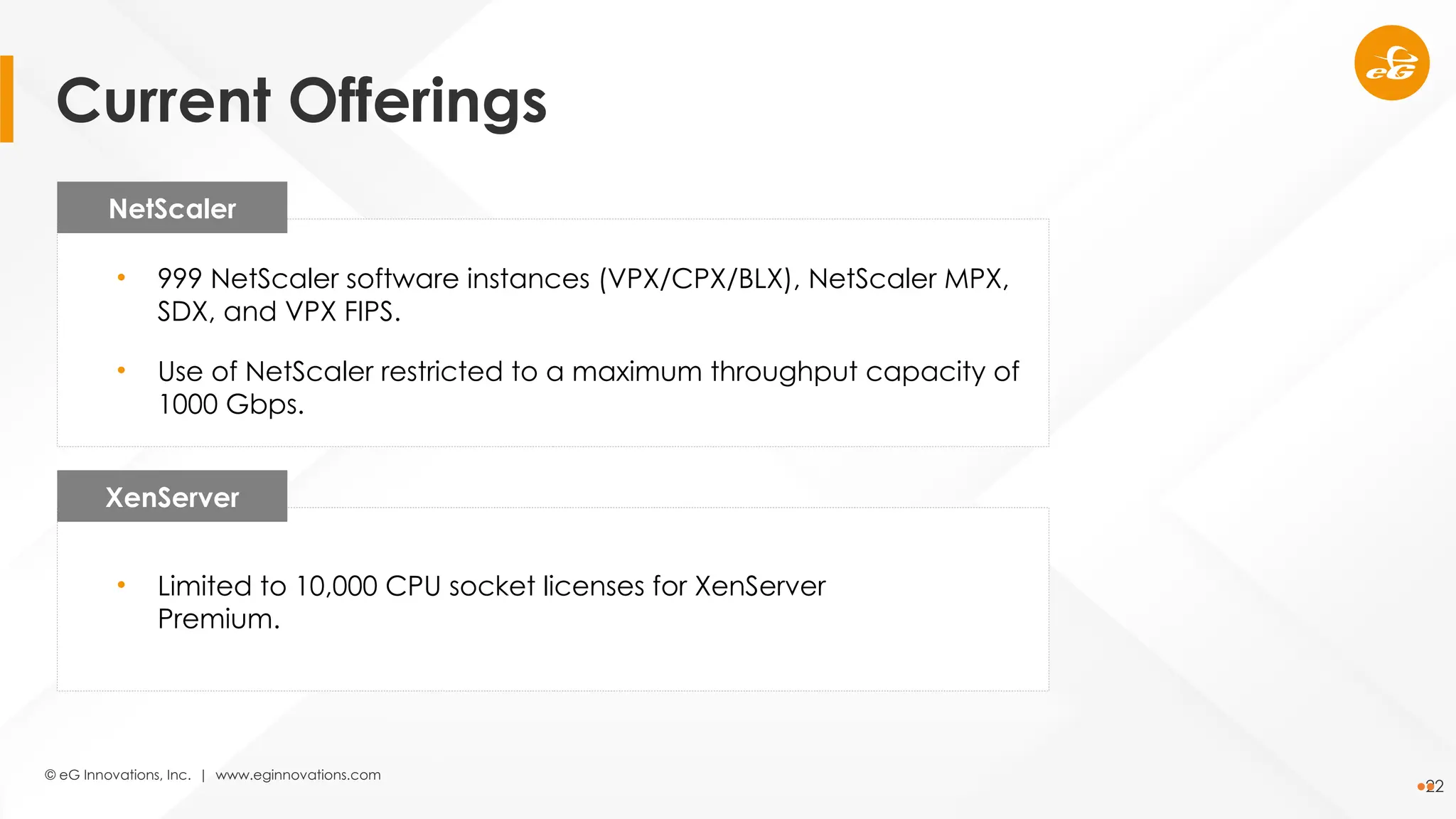
NetScaler
XenServer
• 999 NetScaler software instances (VPX/CPX/BLX), NetScaler MPX,
SDX, and VPX FIPS.
• Use of NetScaler restricted to a maximum throughput capacity of
1000 Gbps.
• Limited to 10,000 CPU socket licenses for XenServer
Premium.
Current Offerings
© eG Innovations, Inc. | www.eginnovations.com
23
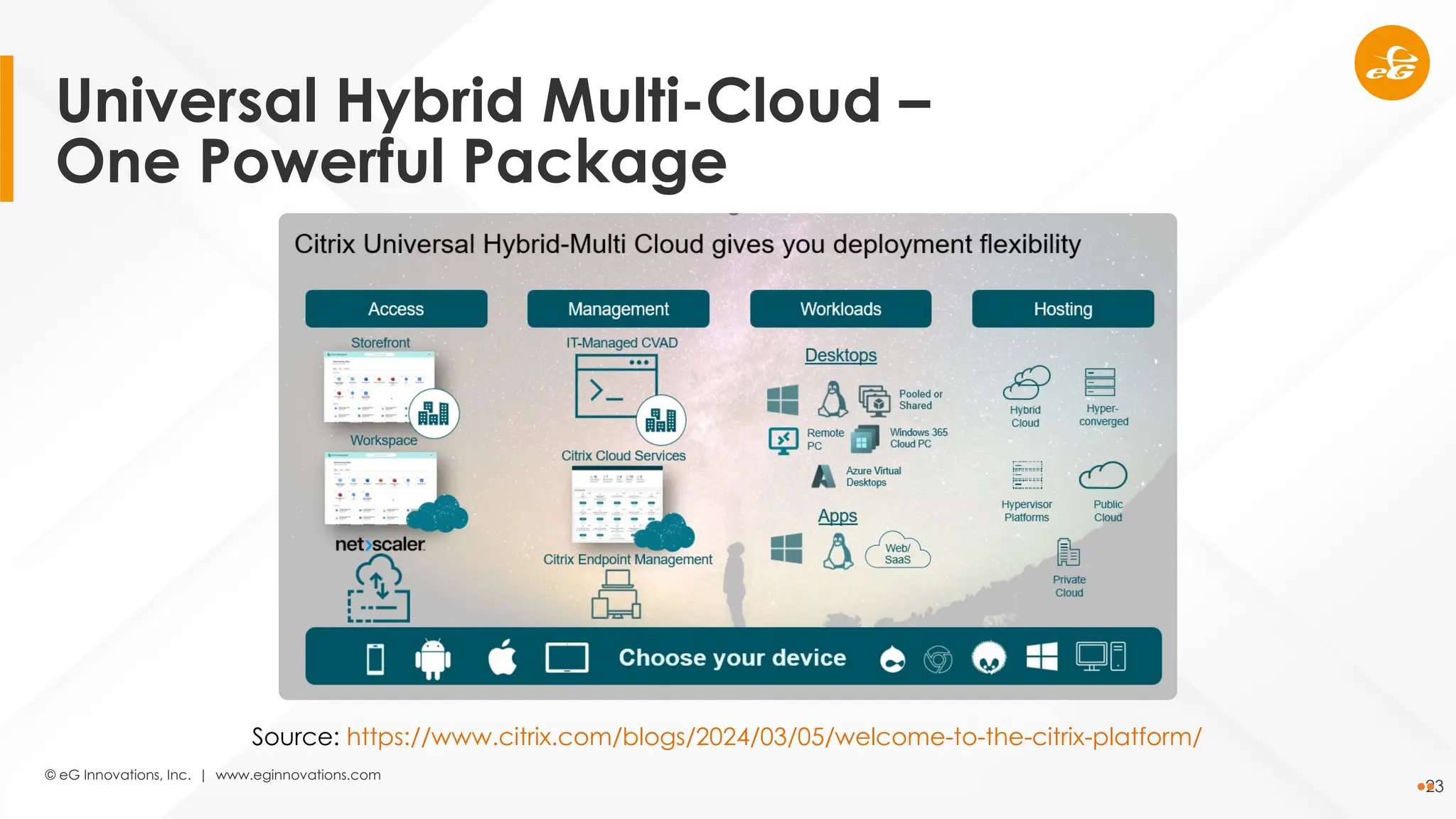
Source: https://www.citrix.com/blogs/2024/03/05/welcome-to-the-citrix-platform/
Universal Hybrid Multi-Cloud –
One Powerful Package
© eG Innovations, Inc. | www.eginnovations.com
24
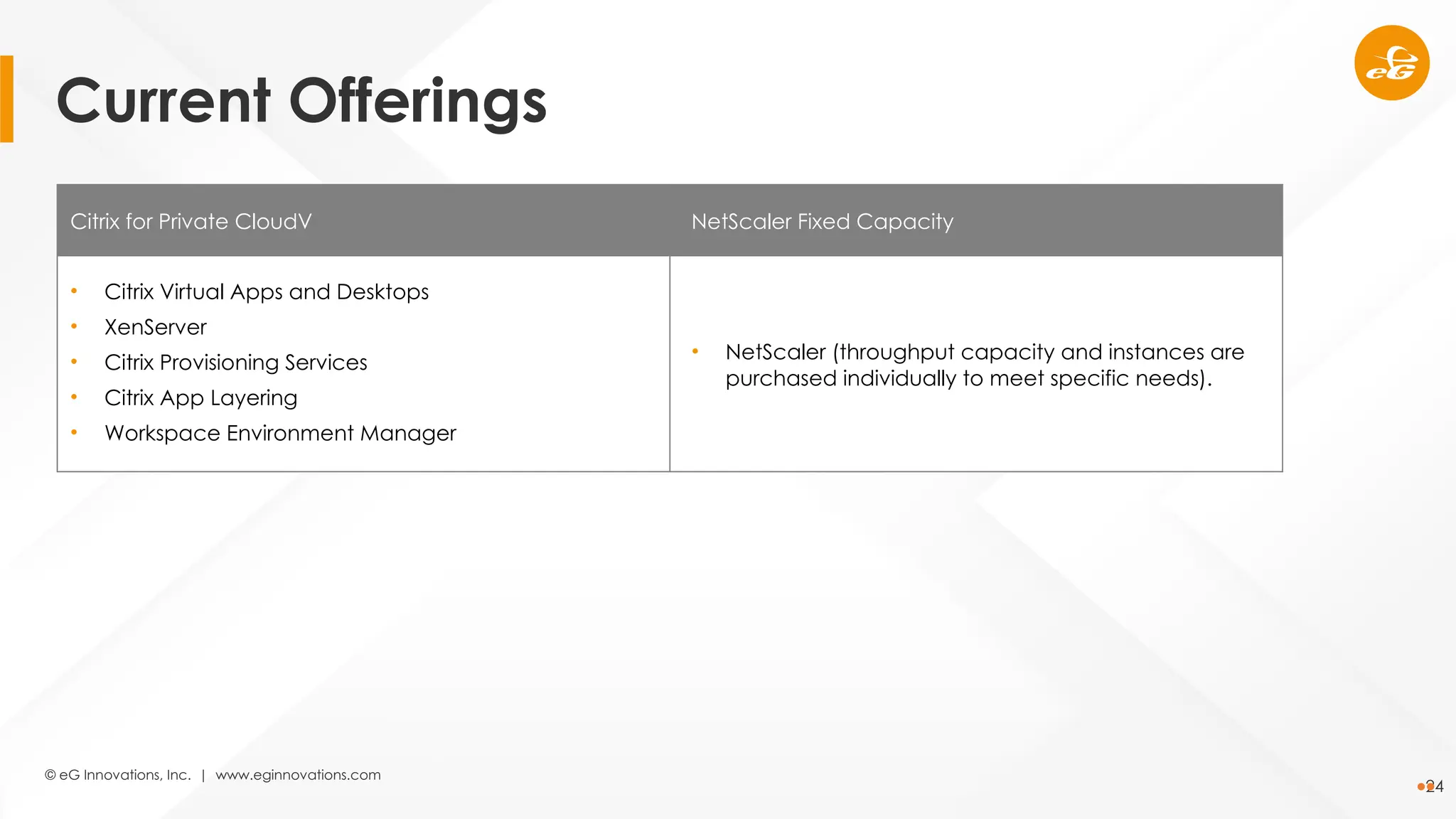
Citrix for Private CloudV NetScaler Fixed Capacity
• Citrix Virtual Apps and Desktops
• XenServer
• Citrix Provisioning Services
• Citrix App Layering
• Workspace Environment Manager
• NetScaler (throughput capacity and instances are
purchased individually to meet specific needs).
Current Offerings
© eG Innovations, Inc. | www.eginnovations.com
25
Thank
You

Citrix Masterclass Session-1: Optimize Your Citrix Strategy with Expert Insights and Best Practices

  • 1.
    © eG Innovations,Inc. | www.eginnovations.com Citrix Masterclass: Enhance Digital Employee Experience with 3 Proven Strategies Session-1: Optimize Your Citrix Strategy with Expert Insights and Best Practices
  • 2.
    © eG Innovations,Inc. | www.eginnovations.com 2 Secure remote access Cost-effective Accessible from anywhere, at any time Webinar Logistics Know your Speakers • Questions are welcome through the course of the webinar ─ Use the questions panel on the Go To Webinar chat client to type in your queries • This webinar is being recorded. You will receive a link to the recording in a few days.
  • 3.
    © eG Innovations,Inc. | www.eginnovations.com 3 • Why Citrix technologies remain critical for business success • Updates on the latest enhancements in the Citrix technology stack • Insights into Citrix licensing changes Agenda
  • 4.
    © eG Innovations,Inc. | www.eginnovations.com 4 Why Citrix technologies remain critical for business success
  • 5.
    © eG Innovations,Inc. | www.eginnovations.com 5 Why Citrix technologies remain critical for business success Legacy application delivery Applications that are latency sensitive Mergers and acquisitions Hybrid desktop deployments
  • 6.
    © eG Innovations,Inc. | www.eginnovations.com 6 Why Citrix technologies remain critical for business success Hybrid Working Third-Party Contractor / Supplier Secure Access Corporate Data Security Consistent End User Experience
  • 7.
    © eG Innovations,Inc. | www.eginnovations.com 7 Updates on the latest enhancements in the Citrix technology stack
  • 8.
    © eG Innovations,Inc. | www.eginnovations.com 8 Feature CVAD Version HDX Direct (Preview) 2311 Graphics loss tolerant mode reworked 2311 USB diagnostics tool 2311 Web Studio multi-site management support 2311 Publish App-V, MSIX and MSIX app attach packaged applications 2311 Support for creating empty machine catalogs 2311 Detect orphaned Azure resources 2311 Citrix CVAD
  • 9.
    © eG Innovations,Inc. | www.eginnovations.com 9 Feature CVAD Version Storage cost saving 2311 Play back recorded and live sessions from Director 2311 End-to-End Network Hop view 2311 Secure HDX (Preview) 2402 Loss tolerant mode for audio 2402 Image management (Preview) 2402 Windows Server 2025 support 2407 Citrix CVAD
  • 10.
    © eG Innovations,Inc. | www.eginnovations.com 10 Feature CVAD Version Published application sign out enhancement 2407 Tenant management in Web Studio 2407 Catalog failure retry 2407 Citrix Studio now in maintenance mode 2407 Profile load issue enhancement in Director 2407 Infrastructure rightsizing 2407 Power action analysis 2407 Citrix CVAD
  • 11.
    © eG Innovations,Inc. | www.eginnovations.com 11 Feature CVAD Version Infrastructure monitoring (Preview) 2407 Validate Azure and AWS hosting connection permissions 2407 GP3 identity disks in AWS 2407 Validate MCS machine catalog configuration before creating 2407 Assign specific drive letter to MCS I/O write-back cache disk 2407 Full ‘What’s new’ list: https://docs.citrix.com/en-us/citrix-virtual-apps-desktops/whats-new.html Citrix CVAD
  • 12.
    © eG Innovations,Inc. | www.eginnovations.com 12 Feature CVAD Version User store selection 2311 Multi-session runtime sync support for OneDrive 2311 SSO sync for OneDrive Container 2311 Support for new Microsoft Teams 2311 In-session profile container failover 2407 Profile container registry exclusion and inclusion support 2407 Enhance profile reset for containers 2407 Full ‘What’s new’ list: https://docs.citrix.com/en-us/profile-management/current-release/whats-new.html Citrix Profile Management
  • 13.
    © eG Innovations,Inc. | www.eginnovations.com 13 Feature Released End-to-End Network Hop view February 2024 Validate MCS machine catalog configuration before creating February 2024 Publish App-V, MSIX and MSIX app attach packaged applications February 2024 Play back recorded and live sessions from Director February 2024 Write-back cache properties modification from Full Configuration March 2024 Secure HDX (Preview) May 2024 FlexApp packaged application support May 2024 Citrix DaaS
  • 14.
    © eG Innovations,Inc. | www.eginnovations.com 14 Feature Released Power action analysis May 2024 Support for suspend-capable Delivery Groups June 2024 Subnet updates for machine catalogs June 2024 Profile load issue enhancement in Monitor July 2024 Infrastructure monitoring (Preview) July 2024 Session performance enhancements July 2024 Maintenance mode notes July 2024 Citrix DaaS
  • 15.
    © eG Innovations,Inc. | www.eginnovations.com 15 Feature Released GP3 identity disks in AWS August 2024 Validate AWS hosting connection permissions August 2024 Backup VM sizes support August 2024 Backup and restore (Preview) September 2024 Validate Azure hosting connection permissions September 2024 Entra ID joined catalogs enrolled in Intune for non-persistent VMs September 2024 Entra ID joined catalogs enrolled in Intune for persistent VMs October 2024 Citrix DaaS
  • 16.
    © eG Innovations,Inc. | www.eginnovations.com 16 Feature Released Diagnose conditional authentication failures October 2024 Service accounts for machine identity management October 2024 Support for reboot schedules for hibernated VMs October 2024 Hosting connection creation using Azure Managed Identity October 2024 Support for deleting WBC at shutdown October 2024 Use Azure temporary disk as WBC disk October 2024 Support for Windows Server 2024 November 2024 Citrix DaaS
  • 17.
    © eG Innovations,Inc. | www.eginnovations.com 17 Feature Released Persistent VM support using Windows Server OS November 2024 Backup and restore (Generally Available) November 2024 Validate MCS machine catalog configuration in AWS before creating November 2024 Full ‘What’s new’ list: https://docs.citrix.com/en-us/citrix-daas/whats-new.html Citrix DaaS
  • 18.
    © eG Innovations,Inc. | www.eginnovations.com 18 Feature Status UEFI BDM support for up to 32 login servers In Development PVS database access In Development Elastic app layer discovery and assignment from App Packages In Development Image sharing to different Azure subscriptions and tenants In Development Service Principals to replace Secure Clients In Development Roadmap: https://updates.cloud.com/ Other planned technology and feature developments
  • 19.
    © eG Innovations,Inc. | www.eginnovations.com 19 Insights into Citrix licensing changes
  • 20.
    © eG Innovations,Inc. | www.eginnovations.com 20 • Reduction from almost 1000 SKUs to 4. • Annual commit business model. • More product in each new SKU. Streamlined SKUs
  • 21.
    © eG Innovations,Inc. | www.eginnovations.com 21 Universal Hybrid Multi-Cloud Citrix Platform • Citrix Virtual Apps and Desktops (Premium) • Citrix DaaS • App Protection • Adaptive Authentication • Workspace Environment Management • Gateway Service • Citrix Endpoint Management • NetScaler • Citrix Provisioning Services • Citrix App Layering • XenServer • Citrix Virtual Apps and Desktops (Premium) • Citrix DaaS • App Protection • Adaptive Authentication • Workspace Environment Manager • Gateway service • Citrix Endpoint Management • NetScaler • Citrix Provisioning Services • Citrix App Layering • XenServer • Citrix Secure Private Access • Security and Performance Analytics • uberAgent • Citrix Enterprise Browser Current Offerings
  • 22.
    © eG Innovations,Inc. | www.eginnovations.com 22 NetScaler XenServer • 999 NetScaler software instances (VPX/CPX/BLX), NetScaler MPX, SDX, and VPX FIPS. • Use of NetScaler restricted to a maximum throughput capacity of 1000 Gbps. • Limited to 10,000 CPU socket licenses for XenServer Premium. Current Offerings
  • 23.
    © eG Innovations,Inc. | www.eginnovations.com 23 Source: https://www.citrix.com/blogs/2024/03/05/welcome-to-the-citrix-platform/ Universal Hybrid Multi-Cloud – One Powerful Package
  • 24.
    © eG Innovations,Inc. | www.eginnovations.com 24 Citrix for Private CloudV NetScaler Fixed Capacity • Citrix Virtual Apps and Desktops • XenServer • Citrix Provisioning Services • Citrix App Layering • Workspace Environment Manager • NetScaler (throughput capacity and instances are purchased individually to meet specific needs). Current Offerings
  • 25.
    © eG Innovations,Inc. | www.eginnovations.com 25 Thank You

Editor's Notes

  • #5 Legacy application delivery Applications that don’t cope well with network latency Mergers and acquisitions Hybrid desktop deployments
  • #6 Legacy application delivery Applications that don’t cope well with network latency Mergers and acquisitions Hybrid desktop deployments
  • #8 HDX Direct - With this feature, you can automatically establish a secure direct connection with the VDA when direct communication is available while you access your resources through Workspace and Gateway Service. Loss tolerant mode - https://docs.citrix.com/en-us/citrix-virtual-apps-desktops/2311/graphics/edt-loss-tolerant-mode USB diagnostics tool - https://docs.citrix.com/en-us/citrix-virtual-apps-desktops/2311/devices/usb-diagnostics-tool.md Web Studio multi-site management support - https://docs.citrix.com/en-us/citrix-virtual-apps-desktops/2311/install-configure/install-core/multisite-mgmt. Publish packaged applications - https://docs.citrix.com/en-us/citrix-virtual-apps-desktops/2311/manage-deployment/applications-manage/app-packages#publish-packaged-applications-on-single-session-or-shared-desktop-vdas Empty machine catalogs – You can now create a machine catalog without immediate VM creation. With this feature, you can postpone VM creation until back-end hosts are fully prepared or VM provisioning is completed, gaining more flexibility in creating catalogs. Orphaned Azure resources - https://docs.citrix.com/en-us/citrix-virtual-apps-desktops/2311/install-configure/connections#detect-orphaned-azure-resources
  • #9 Storage cost saving - A new option, Enable storage cost saving, is now available on the Disk Settings page when you create or update Azure catalogs. The option saves storage costs by downgrading to Standard HDD for the storage disk and the write-back cache disk when the VM shuts down. The VM switches to its original settings on restart. Live and recorded session playback - Citrix Director now supports playing back recorded and live user sessions that are recorded using the Session Recording service. You can quickly understand the session-related issues encountered by the user from the replay. With this feature, you get ready access to recordings along with session-related metrics within the Director console. It helps corelate the issues discovered in the recordings with the performance metrics. It eliminates the requirement of searching for recordings across multiple session recording servers or looking for third-party apps to view the recordings. This feature requires the following: VDA and the Session Recording server are on version 2308 or later. Delivery Controller and Director are on version 2311 or later. End-to-End Network Hop View - https://docs.citrix.com/en-us/citrix-virtual-apps-desktops/2311/director/troubleshoot-deployments/user-issues/session-performance#session-topology Secure HDX - https://docs.citrix.com/en-us/citrix-virtual-apps-desktops/2402-ltsr/hdx-transport/secure-hdx Loss tolerant mode for audio - https://docs.citrix.com/en-us/citrix-virtual-apps-desktops/2402-ltsr/policies/reference/ica-policy-settings#loss-tolerant-mode-for-audio Image management - https://docs.citrix.com/en-us/citrix-virtual-apps-desktops/2402-ltsr/install-configure/image-management Windows Server 2025 support
  • #10 Published application sign out enhancement - https://docs.citrix.com/en-us/citrix-virtual-apps-desktops/manage-deployment/applications-manage#troubleshooting-session-sign-out-issues-with-published-applications Tenant management - https://docs.citrix.com/en-us/citrix-virtual-apps-desktops/manage-deployment/delegated-administration#set-up-tenant-management Catalog failure retry - When catalog creation fails, you can now retry creating the catalog. To ensure successful creation, check the troubleshooting information and resolve the issues. The information describes the issues found and provides recommendations for resolving them. Failed catalogs are marked with an error icon. To see the details, go to the Troubleshoot tab of each catalog. Citrix Studio maintenance mode - Starting with this release, Citrix Studio enters maintenance mode. We’ll no longer add new features to it but will focus on its stability and security through regular bug fixes and security patches. We recommend transitioning to Web Studio, the next generation of Citrix Studio. Web Studio is a web-based management console that offers full feature parity with Citrix Studio, along with a modern management experience, enhanced capabilities, and powerful new features Profile load issue enhancement in Director - https://docs.citrix.com/en-us/citrix-virtual-apps-desktops/director/troubleshoot-deployments/user-issues/user-logon#profile-load Infrastructure rightsizing - https://docs.citrix.com/en-us/citrix-virtual-apps-desktops/director/cost-optimization#infrastructure-rightsizing Power action analysis - https://docs.citrix.com/en-us/citrix-virtual-apps-desktops/director/troubleshoot-deployments/machines#inspect-machines-with-recent-power-actions
  • #11 Infrastructure monitoring - https://docs.citrix.com/en-us/citrix-virtual-apps-desktops/director/infrastructure-monitoring Validate Azure and AWS hosting connection permissions – https://docs.citrix.com/en-us/citrix-virtual-apps-desktops/install-configure/connections/connection-azure-resource-manager#validate-permissions-on-host-connection https://docs.citrix.com/en-us/citrix-virtual-apps-desktops/install-configure/connections/connection-aws#validate-permissions-on-host-connection GP3 identity disks in AWS - Previously, in AWS environments, the Identity disks (ID) of VMs were of GP2 volume type. With this feature, MCS can now provision VMs with Identity disks of GP3 volume type. As GP3 volume type is the cheapest option offered by AWS, this feature minimizes cost. The feature is applicable only to the VMs added to a new catalog and new VMs added to an existing catalog. Existing VMs created before this feature continues to have ID disks with GP2 volume type, unless the ID disk is reset. Validate MCS machine catalog configuration before creating - https://docs.citrix.com/en-us/citrix-virtual-apps-desktops/install-configure/machine-catalogs-create#validate-configuration-before-creating-an-mcs-machine-catalog Specific drive letter for MCS IO disk - Previously, the Windows operating system automatically assigned a drive letter to MCS I/O write-back cache disk. With this feature, you can now assign a specific drive letter to an MCS I/O write-back cache disk. This implementation helps you to avoid conflicts between the drive letter of any applications that you use and the drive letter of MCS I/O write-back cache disk. This feature is applicable to only Windows operating system.
  • #12 User store selection - By default, when multiple user stores are available, Profile Management selects the store with the latest profile data. If more than one store has the latest profile, Profile Management selects the one configured earliest. With a new policy, User store selection method, you can now enable Profile Management to select the store with the best access performance. Multi-session runtime sync support for OneDrive - With the OneDrive container enabled, any changes a user makes to OneDrive files in a session are now instantly visible in its concurrent sessions. This improvement reduces synchronization conflicts and ensures data integrity. SSO sync for OneDrive Container - With this enhancement, users now don’t have to reenter credentials for OneDrive during subsequent logons, improving user convenience Support for new Microsoft Teams - With the UWP app roaming policy enabled, the new Microsoft Teams app can now roam with users. Therefore, users can access the same Microsoft Teams app with their personalized settings and data from different devices. In-session profile container failover - By default, when multiple user stores are deployed, profile container failover occurs only at user logon. A new policy, Enable in-session policy container failover among user stores, now expands the failover scope to the entire session, ensuring profile redundancy throughout the session. With this policy enabled, if Profile Management loses connection to the active profile container during a session, it automatically switches to another available one. Profile container registry exclusion and inclusion support - The existing registry exclusion and inclusion policies now apply to the container-based profile solution. With those policies, you can specify registry keys in the HKCU hive that Profile Management excludes from syncing to profile containers during user logoff. Enhanced profile reset for containers - When resetting container-based profiles, Profile Management now not only restores policy settings to defaults but also preserves user data. With this enhancement, you can reset container-based profiles without the risk of losing user data.
  • #13 End-to-End Network Hop View - https://docs.citrix.com/en-us/citrix-virtual-apps-desktops/2311/director/troubleshoot-deployments/user-issues/session-performance#session-topology Validate MCS machine catalog configuration before creating - https://docs.citrix.com/en-us/citrix-virtual-apps-desktops/install-configure/machine-catalogs-create#validate-configuration-before-creating-an-mcs-machine-catalog Publish packaged applications - https://docs.citrix.com/en-us/citrix-virtual-apps-desktops/2311/manage-deployment/applications-manage/app-packages#publish-packaged-applications-on-single-session-or-shared-desktop-vdas Live and recorded session playback - Citrix Director now supports playing back recorded and live user sessions that are recorded using the Session Recording service. You can quickly understand the session-related issues encountered by the user from the replay. With this feature, you get ready access to recordings along with session-related metrics within the Director console. It helps corelate the issues discovered in the recordings with the performance metrics. It eliminates the requirement of searching for recordings across multiple session recording servers or looking for third-party apps to view the recordings. This feature requires the following: VDA and the Session Recording server are on version 2308 or later. Write-back cache properties Full Configuration - For Azure VMs provisioned using Machine Creation Services (MCS), you can now change their write-back cache (WBC) properties using Full Configuration, such as Disk cache size, Memory cache size, and Enable storage cost saving. In addition, when you select a new machine size or machine profile for those VMs, Full Configuration validates WBC settings to prevent conflicts, such as exceeding the memory limit of the new selection. If conflicts occur, you’ll be prompted to re-configure WBC settings. Secure HDX - https://docs.citrix.com/en-us/citrix-virtual-apps-desktops/2402-ltsr/hdx-transport/secure-hdx FlexApp Support - https://docs.citrix.com/en-us/citrix-daas/manage-deployment/app-packages
  • #14 Power action analysis - https://docs.citrix.com/en-us/citrix-virtual-apps-desktops/director/troubleshoot-deployments/machines#inspect-machines-with-recent-power-actions Suspend-capable Delivery Groups - https://docs.citrix.com/en-us/citrix-daas/install-configure/delivery-groups-create Subnet updates for machine catalogs - reviously, to change the subnet settings of a machine catalog, you had to delete and recreate it. With this feature, you can now achieve the same functionality by editing the catalog. Note that only new virtual machines created under the catalog will be on the newly associated subnets. This enhancement reduces the need for catalog deletion and associated tasks. Profile load issue enhancement in Director - https://docs.citrix.com/en-us/citrix-virtual-apps-desktops/director/troubleshoot-deployments/user-issues/user-logon#profile-load Infrastructure monitoring - https://docs.citrix.com/en-us/citrix-virtual-apps-desktops/director/infrastructure-monitoring Session performance enhancements - The Session Topology section of the Session Performance tab is enhanced to include the following endpoint metrics which exists in the Citrix Workspace app for Windows: WIFI signal strength Throughput incoming and outgoing Network interface type Link speed This enhancement helps to troubleshoot issues with respect to sessions quickly. Maintenance mode notes - You can now add notes when placing a machine, delivery group, or connection into maintenance mode. Those notes are visible in the Maintenance reason field of the Details pane, helping you and other administrators understand the reason for maintenance.
  • #15 GP3 identity disks in AWS - Previously, in AWS environments, the Identity disks (ID) of VMs were of GP2 volume type. With this feature, MCS can now provision VMs with Identity disks of GP3 volume type. As GP3 volume type is the cheapest option offered by AWS, this feature minimizes cost. The feature is applicable only to the VMs added to a new catalog and new VMs added to an existing catalog. Existing VMs created before this feature continues to have ID disks with GP2 volume type, unless the ID disk is reset Validate AWS hosting connection permissions - In AWS environments, you can now validate permissions on a host connection to do tasks related to creating and managing MCS machine catalogs. This implementation helps you to find out the missing permissions required for different scenarios such as creating, deleting, and updating VMs, power management of VMs, and EBS encryption, ahead of time so that you can avoid being blocked at critical times. Backup VM sizes support - Public clouds can sometimes run out of capacity for a specific VM size. Also, if you use Azure Spot VMs, then the VMs are evicted at any time based on Azure’s capacity needs. In such a case of insufficient capacity on Azure or a Spot VM power-on failure, MCS now falls back on the backup VM sizes. You can provide a list of backup VM sizes using a custom property BackupVmConfiguration. MCS tries to fall back on the backup VM sizes in the order that is provided by you in the list. In case, MCS fails to fall back on all backup VM sizes provided, you get an error message. This feature is supported only for a catalog that uses a machine profile and is applicable to both persistent and non-persistent MCS machine catalogs. This feature is currently supported only for Azure environments. Backup and restore (Preview) - You can now use the Backup and Restore node available in the left pane of your Manage DaaS console. This feature enables you to create on-demand and scheduled backups and restore deleted applications, policies, and more. Validate Azure hosting connection permissions - Previously, in Azure environments, you could validate only the host connection credentials (client id or application id) used to create a connection to Azure. With this feature, you can: Get the list of permissions assigned to your host connection credential Get the list of operations that can be performed with the permissions assigned Information on the permissions required Information on how to add the desired permissions This helps you to troubleshoot and get necessary permissions ahead of time so that you can perform the tasks without being blocked. Entra ID joined catalogs enrolled in Intune - You can now create Azure AD joined catalogs enrolled in Microsoft Intune for non-persistent single-session and multi-session. This feature is applicable only to VDA version 2407 and later. Entra ID joined catalogs enrolled in Intune - During machine catalog creation, you can now enroll persistent machines of the hybrid Azure AD joined type into Microsoft Intune (with Configuration Manager) for co-management. This feature applies to single and multi-session, persistent VMs and on all hypervisors and cloud services, ensuring uniform device management across your infrastructure. This feature is applicable only to VDA version 2407 and later.
  • #16 Diagnose conditional authentication failures - Whenever any conditional authentication fails, you can use the transaction ID available in the failure message and search in the Monitor for the failure details. Monitor helps you to troubleshoot conditional authentication failure events by displaying failure reasons and conditional policies on the Monitor UI. Service accounts for machine identity management - MCS has developed a new mechanism for managing on-premises Active Directory and Azure Active Directory (Azure AD) identity service accounts to simplify and enhance the management of machine identities including computer accounts in on-premises Active Directory, Azure AD joined devices and Intune enrolled devices. Firstly, we have introduced on-premises Active Directory service account support which allows administrators to manage computer accounts in on-premises Active Directory without having to enter domain credentials every time. Secondly, we have introduced Azure AD identity Service Principal Names (SPN) support which allows administrators to manage Azure AD joined or Intune enrolled devices in the Azure AD tenant, in a secure and streamlined manner. Lastly, we have implemented a new mechanism for service account management in our Studio, simplifying the process and making it easier to maintain security and compliance. Reboot schedules for hibernated VMs - With this feature, you can configure reboot schedules for hibernated VMs if the Delivery Group is hibernation enabled. In the reboot cycle, the VMs are resumed and, then shut down. The reboot schedule can be set as weekly, daily, monthly, and once. You can configure multiple schedules. Note that VMs resuming from hibernation can take few mins. Hosting connection creation using Azure Managed Identity - Previously, you could create an Azure hosting connection using a service principal. This required providing and storing of the application ID and secret of the service principal. The Azure Managed Identities offers a secure and scalable way to access Azure services without the need to manage credentials. This approach eliminates the risks associated with storing, rotating, and managing secrets. Managed identities also support automatic token refresh, ensuring that applications always use valid credentials without any additional code for token lifecycle management. Support for deleting WBC at shutdown - With this feature, you have the option to delete the write-back cache (WBC) disk after you shut down the VM for MCS provisioned Citrix Provisioning catalogs in Azure. This implementation helps to save cost when you do not need a persistent WBC disk. This feature is also applicable to an existing catalog. Use Azure temporary disk as WBC disk - With this feature, you can now use Azure Temporary disk as a write-back cache (WBC) disk for existing MCS machine catalogs and existing VMs. Use the Set-ProvScheme PowerShell command to update existing catalogs. This implementation saves storage cost because Azure temporary disk is free of charge.
  • #17 Persistent VM support using Windows Server OS - Studio now supports provisioning persistent VMs on Windows Server OS using the Full Copy Clone approach. This approach improves data recovery and migration capabilities and can help reduce IOPS after machines are created. Validate MCS machine catalog configuration in AWS before creating - With this feature, you can now validate configuration settings before creating an MCS machine catalog in AWS environments using the parameter -validate in New-ProvScheme command. After you run this PowerShell command with the parameter, you get an appropriate error message if there’s an incorrect parameter used or a parameter has conflict with another parameter. You can then use the error message to resolve the issue and successfully create an MCS machine catalog using PowerShell. This feature is applicable to AWS, Azure, GCP, and VMware virtualization environments.
  • #18 UEFI BDM support for up to 32 login servers - When creating a BDM boot disk for an on-prem target, the number of login servers has a hard-coded maximum of 4, with this update, admin can now specify up to 32 login servers when creating BDM disks for UEFI target devices. PVS database access - With this feature, PVS will remove and allow admins to enter the database instance manually, which will improve the experience when setting up new farms and upgrading.  Elastic app layer discovery and assignment from App Packages - An enhancement to Studio App Packages enabling discovery and assignment of Elastic App Layers. Image sharing to different Azure subscriptions and tenants - This feature enables sharing prepared image to different subscriptions and tenants on Azure. This enables an admin to use a single image to create and update multiple catalogs across different Azure subscriptions and tenants Service Principals to replace Secure Clients - We're adding the Service Principal feature to replace Secure Client usage for Citrix Cloud automation. This new feature enhances security on Citrix Cloud by de-coupling rights and visibility from the creating admin, supporting secret key expiration, and enabling the use of multiple secret keys to facilitate key rotation workflows. This feature also provides the ability to migrate existing secure clients to service principals without disrupting existing automation.
  • #20 There used to be a variety of editions and add-ons to get valuable features such as WEM, PVS, and ServiceNow integration, etc. DaaS Advanced Plus / Premium / Premium Plus There was also countless variations of NetScaler features and capacity to decide on (Standard, Advanced, Premium). VPX 200, VPX 1000, etc. Citrix have eliminated all of that complexity.
  • #21 Platform license is invitation only. It’s for those customers for which Citrix is a strategic part of their business and IT operations, and they want to leverage that foundation to expand into other use cases for the entire enterprise. - Secure Private Access could allow you to replace VPNs with a ZTNA approach solution, and all of the unlimited capacity for NetScaler would allow you to replace F5 and VMware Horizon. Universal Hybrid Multi-Cloud comes with permanent hybrid-rights Universal Hybrid Multi-Cloud was previously called Citrix Universal subscription. NetScaler is full featured meaning you are getting things like IP Reputation and Application Firewall. Everything you need to address your core application delivery needs it included in one simple package.
  • #23 Pick your endpoint – Windows, macOS, chromeOS Choose your access – StoreFront, Workspace, on-premises NetScaler or Gateway service Choose traditional on-premises CVAD or DaaS, or a mixture Wrap your mobile devices in endpoint management Deliver apps and desktops on Windows or Linux OS, Remote PC to your corporate devices, spport for AVD and W365, or delivery Web and SaaS apps Host your workloads in public cloud, private cloud, a mixture of both Total flexibility to meet your needs and one subscription to achieve it.