Case Study – Inverclyde Council's
Community Learning and Development

“By being introduced to the internet
and email you open up a whole new
world, one we can't begin to measure
the impact of.”

“Learned how to upload my CV - most
important thing to learn. It made a big
difference being able to take the time to
learn.”

"I'm not scared of computers
anymore!"
“Got loads out of this group.... Huge
sense of achievement”

Version 1.2: 20/11/13
Presented by: Colin Crook
CASE STUDY: INVERCLYDE COUNCIL'S COMMUNITY LEARNING AND DEVELOPMENT

Branch

IBM Greenock

Address

IBM United Kingdom Limited
PO Box 30
Inverkip Road
Valley Park

City, state, ZIP Code

Greenock, Renfrewshire, PA16 0AH

Phone number

02392561000

Contact name

Colin Crook

Title

Service Lead for Digital Inclusion

Phone number

07717547803

E-mail address

colincrook@uk.ibm.com

Solution group

IBM OnDemand

Solution offering

Digital Inclusion

Project name or title

Inverclyde Council Digital Inclusion Events

Customer profile
Customer name

Inverclyde Council

Division

Community Learning and Development

Address

32 Nicolson Street

City, state, ZIP Code

Greenock, PA15 1UL

Phone number

01475 717 171

Web site address

http://www.inverclyde.gov.uk/

Industry

Public

Number of employees

>4000

Contact name

Dehra Macdonald

Title

Senior Literacies Worker

Phone number

01475 715 450

Fax number
E-mail address

IBM

dehra.macdonald@inverclyde.gov.uk

PAGE 2
CASE STUDY: INVERCLYDE COUNCIL'S COMMUNITY LEARNING AND DEVELOPMENT

Case Study: Inverclyde Council's Community
Learning and Development
Company profile
The council provide public services for Greenock, Gourock, Inverkip, Kilmacolm, Port Glasgow,
Quarriers Village and Wemyss Bay. The following nicely sums up the Council’s ambitions:
“Our aim is simple, to make Inverclyde confident and inclusive. To create a place where safe,
sustainable, healthy communities enjoy a thriving prosperous economy. It's an impressive goal,
but we're an ambitious, confident council that aims to provide strong community leadership, listen
to the needs of the communities we serve and create a better quality of life for the people of
Inverclyde.” (Inverlyde Coucil)

The Challenge
I am going to site the Inverclyde Council's Community Learning and Development team’s own
words to describe the problem:
“Universal Job Match (UJM) has replaced the Jobcentre Plus Job Search Tool. Clients now need
search and apply for all vacancies on line. To be able to use the tool, clients must have a current
email account, be able to navigate and complete online application form and attach files, i.e. CVs
to their applications. They then need regular access to their email accounts, which will be used to
notify them of any new vacancies and interviews.
As with any new online process, learning to navigate the site can be challenging. Many literacies
learners in our groups reported that they found the site impossible to use as they lacked both the
IT skills to navigate the site and the literacies skills to read and respond to the questions to the
level they wanted. Learners reported that they were at risk of having their benefits sanctioned if
they did not develop the necessary skills.” (Macdonald)

Solution
Initial contact was made through IBM Greenock by Dehra Macdonald to see if we could help
address the problem. This fitted in with the OnDemand Digital Inclusion Program in IBM. We
proposed 5 events to be run over a week in various locations in Inverclyde staffed by IBM
volunteers. The venues were:
 Enterprise Centre
 i-zone
 Youth Connections Larkfield
 Branchton Community Centre
 Greenock Central Library

The ultimate goal was help people access the Universal Job Match site. That sounds like a
simple thing but you need to take into account that you have people that have never touched a
computer before or that they have very limited experience. This means that even the most basic
skills you take for granted are just not there. Another aspect is confidence; many of the people
are very wary of computers as they think they will break them or they are doing something wrong.
This is a real impediment to getting people online and making them comfortable enough to stay
there.
IBM

PAGE 3
CASE STUDY: INVERCLYDE COUNCIL'S COMMUNITY LEARNING AND DEVELOPMENT

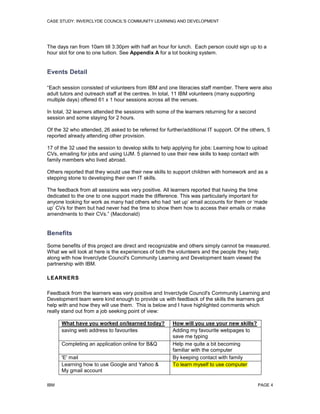
The days ran from 10am till 3:30pm with half an hour for lunch. Each person could sign up to a
hour slot for one to one tuition. See Appendix A for a lot booking system.

Events Detail
“Each session consisted of volunteers from IBM and one literacies staff member. There were also
adult tutors and outreach staff at the centres. In total, 11 IBM volunteers (many supporting
multiple days) offered 61 x 1 hour sessions across all the venues.
In total, 32 learners attended the sessions with some of the learners returning for a second
session and some staying for 2 hours.
Of the 32 who attended, 26 asked to be referred for further/additional IT support. Of the others, 5
reported already attending other provision.
17 of the 32 used the session to develop skills to help applying for jobs: Learning how to upload
CVs, emailing for jobs and using UJM. 5 planned to use their new skills to keep contact with
family members who lived abroad.
Others reported that they would use their new skills to support children with homework and as a
stepping stone to developing their own IT skills.
The feedback from all sessions was very positive. All learners reported that having the time
dedicated to the one to one support made the difference. This was particularly important for
anyone looking for work as many had others who had ‘set up’ email accounts for them or ‘made
up’ CVs for them but had never had the time to show them how to access their emails or make
amendments to their CVs.” (Macdonald)

Benefits
Some benefits of this project are direct and recognizable and others simply cannot be measured.
What we will look at here is the experiences of both the volunteers and the people they help
along with how Inverclyde Council's Community Learning and Development team viewed the
partnership with IBM.
LEARNERS
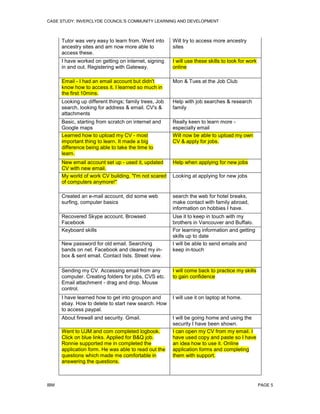
Feedback from the learners was very positive and Inverclyde Council's Community Learning and
Development team were kind enough to provide us with feedback of the skills the learners got
help with and how they will use them. This is below and I have highlighted comments which
really stand out from a job seeking point of view:
What have you worked on/learned today?
saving web address to favourites
Completing an application online for B&Q
'E' mail
Learning how to use Google and Yahoo &
My gmail account
IBM

How will you use your new skills?
Adding my favourite webpages to
save me typing
Help me quite a bit becoming
familiar with the computer
By keeping contact with family
To learn myself to use computer

PAGE 4
CASE STUDY: INVERCLYDE COUNCIL'S COMMUNITY LEARNING AND DEVELOPMENT

Tutor was very easy to learn from. Went into
ancestry sites and am now more able to
access these.

Will try to access more ancestry
sites

I have worked on getting on internet, signing
in and out. Registering with Gateway.

I will use these skills to look for work
online

Email - I had an email account but didn't
know how to access it. I learned so much in
the first 10mins.

Mon & Tues at the Job Club

Looking up different things; family trees, Job
search, looking for address & email. CV's &
attachments

Help with job searches & research
family

Basic, starting from scratch on internet and
Google maps
Learned how to upload my CV - most
important thing to learn. It made a big
difference being able to take the time to
learn.

Really keen to learn more especially email
Will now be able to upload my own
CV & apply for jobs.

New email account set up - used it, updated
CV with new email.
My world of work CV building. "I'm not scared
of computers anymore!"

Help when applying for new jobs

Created an e-mail account, did some web
surfing, computer basics

search the web for hotel breaks,
make contact with family abroad,
information on hobbies I have.

Recovered Skype account, Browsed
Facebook
Keyboard skills

Use it to keep in touch with my
brothers in Vancouver and Buffalo.
For learning information and getting
skills up to date
I will be able to send emails and
keep in-touch

New password for old email. Searching
bands on net. Facebook and cleared my inbox & sent email. Contact lists. Street view.

Looking at applying for new jobs

Sending my CV. Accessing email from any
computer. Creating folders for jobs, CVS etc.
Email attachment - drag and drop. Mouse
control.

I will come back to practice my skills
to gain confidence

I have learned how to get into groupon and
ebay. How to delete to start new search. How
to access paypal.

I will use it on laptop at home.

About firewall and security. Gmail.

I will be going home and using the
security I have been shown.
I can open my CV from my email. I
have used copy and paste so I have
an idea how to use it. Online
application forms and completing
them with support.

Went to UJM and com completed logbook.
Click on blue links. Applied for B&Q job.
Ronnie supported me in completed the
application form. He was able to read out the
questions which made me comfortable in
answering the questions.

IBM

PAGE 5
CASE STUDY: INVERCLYDE COUNCIL'S COMMUNITY LEARNING AND DEVELOPMENT

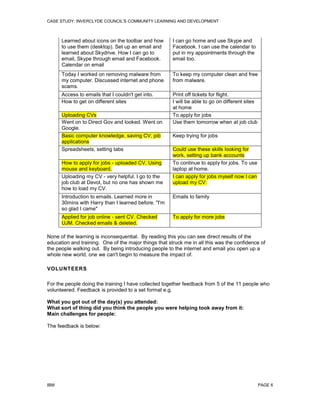
Learned about icons on the toolbar and how
to use them (desktop). Set up an email and
learned about Skydrive. How I can go to
email, Skype through email and Facebook.
Calendar on email

I can go home and use Skype and
Facebook. I can use the calendar to
put in my appointments through the
email too.

Today I worked on removing malware from
my computer. Discussed internet and phone
scams.

To keep my computer clean and free
from malware.

Access to emails that I couldn't get into.
How to get on different sites

Print off tickets for flight.
I will be able to go on different sites
at home
To apply for jobs
Use them tomorrow when at job club

Uploading CVs
Went on to Direct Gov and looked. Went on
Google.
Basic computer knowledge, saving CV, job
applications
Spreadsheets, setting tabs
How to apply for jobs - uploaded CV, Using
mouse and keyboard.
Uploading my CV - very helpful. I go to the
job club at Devol, but no one has shown me
how to load my CV.

Keep trying for jobs
Could use these skills looking for
work, setting up bank accounts
To continue to apply for jobs. To use
laptop at home.
I can apply for jobs myself now I can
upload my CV.

Introduction to emails. Learned more in
30mins with Harry than I learned before. "I'm
so glad I came"

Emails to family

Applied for job online - sent CV. Checked
UJM. Checked emails & deleted.

To apply for more jobs

None of the learning is inconsequential. By reading this you can see direct results of the
education and training. One of the major things that struck me in all this was the confidence of
the people walking out. By being introducing people to the internet and email you open up a
whole new world, one we can't begin to measure the impact of.
VOLUNTEERS
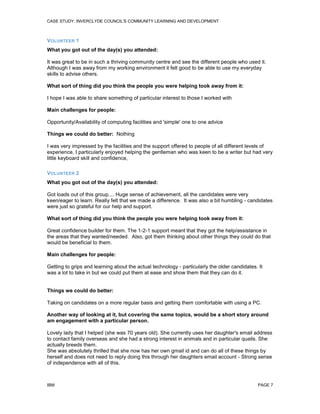
For the people doing the training I have collected together feedback from 5 of the 11 people who
volunteered. Feedback is provided to a set format e.g.
What you got out of the day(s) you attended:
What sort of thing did you think the people you were helping took away from it:
Main challenges for people:
The feedback is below:

IBM

PAGE 6
CASE STUDY: INVERCLYDE COUNCIL'S COMMUNITY LEARNING AND DEVELOPMENT

VOLUNTEER 1
What you got out of the day(s) you attended:
It was great to be in such a thriving community centre and see the different people who used it.
Although I was away from my working environment it felt good to be able to use my everyday
skills to advise others.
What sort of thing did you think the people you were helping took away from it:
I hope I was able to share something of particular interest to those I worked with
Main challenges for people:
Opportunity/Availability of computing facilities and 'simple' one to one advice
Things we could do better: Nothing
I was very impressed by the facilities and the support offered to people of all different levels of
experience, I particularly enjoyed helping the gentleman who was keen to be a writer but had very
little keyboard skill and confidence,
VOLUNTEER 2
What you got out of the day(s) you attended:
Got loads out of this group.... Huge sense of achievement, all the candidates were very
keen/eager to learn. Really felt that we made a difference. It was also a bit humbling - candidates
were just so grateful for our help and support.
What sort of thing did you think the people you were helping took away from it:
Great confidence builder for them. The 1-2-1 support meant that they got the help/assistance in
the areas that they wanted/needed. Also, got them thinking about other things they could do that
would be beneficial to them.
Main challenges for people:
Getting to grips and learning about the actual technology - particularly the older candidates. It
was a lot to take in but we could put them at ease and show them that they can do it.

Things we could do better:
Taking on candidates on a more regular basis and getting them comfortable with using a PC.
Another way of looking at it, but covering the same topics, would be a short story around
am engagement with a particular person.
Lovely lady that I helped (she was 70 years old). She currently uses her daughter's email address
to contact family overseas and she had a strong interest in animals and in particular quails. She
actually breeds them.
She was absolutely thrilled that she now has her own gmail id and can do all of these things by
herself and does not need to reply doing this through her daughters email account - Strong sense
of independence with all of this.

IBM

PAGE 7
CASE STUDY: INVERCLYDE COUNCIL'S COMMUNITY LEARNING AND DEVELOPMENT

VOLUNTEER 3
What you got out of the day(s) you attended:
The attendees were thankful for the help and advice and one of the things I got out of it was to
remember to sit back and advise as opposed to taking over...it is easy to fall into that trap at
these events so best advice to anyone doing this is to act like a driving instructor as the learner
will be at the wheel but you just advise!
What sort of thing did you think the people you were helping took away from it:
I think with the people we dealt with it is a case of learning through practice and additional use
with the computer...a lot of these people don't use them a lot and it is a confidence things and
giving small hints and tips to get through. But with anything the more you practice the better you
normally get!
Main challenges for people:
Main challenge is confidence in using the computer. Think most of them already had their e-mails
and logins etc...but getting access to a computer to use and practice is not everyone’s priority I
believe.
Things we could do better:
Not sure on this one as the courses are useful to the attendees so the ones that attend are there
because they are obviously willing to learn, We as volunteers would maybe benefit from using the
web links more that these people have to use and know exactly what is expected of them to show
they are looking for employment. It looks like a lot of them are genuinely looking for work but
circumstances are not in their favour to get employment, but every additional course they attend
is in their favour and we should be willing to help them help themselves at any given opportunity.
VOLUNTEER 4
What you got out of the day(s) you attended:
A sense of achievement in being able to help people who are not as IT literate as myself.
Working in IT you take it for granted how easy it is to search the internet and use email. For
myself this was a bit of an eye opener.
What sort of thing did you think the people you were helping took away from it:
The one to one session allowed the user by the end of the session to be able to check their
emails and search and apply for jobs via the universal job match site.
Main challenges for people:
 How to use a computer
 How to access email
 How to access universal jobsite match website and search for jobs that match their
experience
Things we could do better:
Nothing as each session is tailored to the individual’s needs.

IBM

PAGE 8
CASE STUDY: INVERCLYDE COUNCIL'S COMMUNITY LEARNING AND DEVELOPMENT

VOLUNTEER 5
What you got out of the day(s) you attended:
Great to meet new people and see the kind of initiatives that local government and charities are
doing.
What sort of thing did you think the people you were helping took away from it:
Some real basic IT skills. For some a new E-mail address or just a way to create a secure
password. For others details on how to access websites, apply for jobs, download files etc
Main challenges for people:
Very variable. Most were "afraid" of the computer. Some had difficulty typing associated with
reading / writing skills. Others had general lack of knowledge of computers which really surprised
me giving I had grown up with them. I thought everyone had!
Things we could do better:
More people.
Hopefully this should give you a solid idea of the benefits for volunteering.
PARTNER
Next we move onto the view from Inverclyde Council's Community Learning and
Development division who we partnered with in terms of how the events ran and their opinion of
the value to the people we helped.
“The feedback from all sessions was very positive. All learners reported that having the time
dedicated to the one to one support was what made the difference. This was particularly
important for anyone looking for work as many had others who had ‘set up’ email accounts for
them or ‘made up’ CVs for them but had never had the time to show them how to access their
emails or make amendments to their CVs.” (Macdonald)
“Firstly, can I thank you for organising this for us. Partner agencies such as Jobcentre Plus had
fed back to us that there was a significant need for this type of basic IT support. Tight deadlines
for job applications and appointment slots make it challenging for employability agencies to
provide the intense one to one support that is needed in many cases. Often agencies only have
time to fix the immediate problem, i.e. compile CV's, set up email accounts etc on the clients
behalf with the result that the clients often did not know how to update CV's or use their emails.
Having the luxury of one full hour to receive one to one support was something they didn't have.
You made the organisation for this week effortless from my end. All I had to do was book 5
suitable venues for delivery and give you an overview of the issues. You recruited the volunteers,
and provided training materials. Also, your flexibility with the timings, numbers and content made
it so much more successful.
On a general point, the feedback from all the learners who participated was that all the volunteers
were very helpful and knowledgeable. They all felt at ease with the volunteers and learned a
great deal in such a short space of time. The fact that you were all willing to be flexible on the
days was also greatly appreciated and made it a much more rewarding experience. For example,
each learner was given a 1 hour slot but if the next learner did not turn up the volunteers were
happy to spend the extra time with them. Also, they were given the option of 3 things to learn,
IBM

PAGE 9
CASE STUDY: INVERCLYDE COUNCIL'S COMMUNITY LEARNING AND DEVELOPMENT

however, if there was something specific that would have a positive impact on the learner's life,
i.e. loading a CV to an email, the volunteers made the time to show them how to do it.
Taking a step back, this wasn't about you and the other volunteers just helping people use
computers. The week was spent helping people apply for jobs - applying for B&Q (new store
opening soon in Port Glasgow )posts came up over and over again in the feedback. Helping
someone set up an email account meant they could continue to apply for jobs without relying on
the support of others. These sessions gave them independence in the digitally literate world, not
just basic IT skills. The majority of the learners were looking for help to become more
independent when searching for work and hopefully they are feeling the impact just now with
interviews and job offers. In addition, there were others who had been given laptops and tablets
by family members who lived abroad to keep in touch, but they didn't have the skills to use them.
By being introduced to the internet and email you open up a whole new world, one we can't begin
to measure the impact of.
Finally, as someone who works and lives locally it has been a really positive experience to know
that one of our main local employers can see how crucial their support is within the local
community. Hopefully it is something we can repeat at a later date. Thank you again for all your
support Colin. It would never have happened without your input.” (Extract from an email)
From this I think the value demonstrated in this type of event is obvious. IBM and Inverclyde
Council's Community Learning and Development team had a very good working relationship here
and that is key as well. It is obviously something that can be emulated.

Conclusion
Hopefully you have read this and come to the conclusion that what we did here is of vital
importance and makes a real impact on people lives. Not only that but if you have managed to
read this then you have the skills needed. The volunteers you read about are not ‘deep’ techies.
They are like you and me.
If you are an organization looking for help then please feel free to contact me.
If you are an organization that is looking to set something up in a similar vein then I am also
happy to advise.
Everyone involved in this feels a difference. Whether this is confidence in new skills or the
pleasure gained from helping someone it is honestly a win win for everybody involved.

IBM

PAGE 10
CASE STUDY: INVERCLYDE COUNCIL'S COMMUNITY LEARNING AND DEVELOPMENT

Appendix A
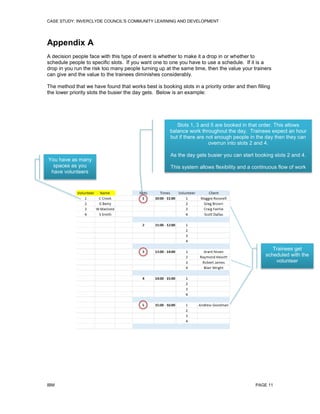
A decision people face with this type of event is whether to make it a drop in or whether to
schedule people to specific slots. If you want one to one you have to use a schedule. If it is a
drop in you run the risk too many people turning up at the same time, then the value your trainers
can give and the value to the trainees diminishes considerably.
The method that we have found that works best is booking slots in a priority order and then filling
the lower priority slots the busier the day gets. Below is an example:

Slots 1, 3 and 5 are booked in that order. This allows
balance work throughout the day. Trainees expect an hour
but if there are not enough people in the day then they can
overrun into slots 2 and 4.
You have as many
spaces as you
have volunteers

As the day gets busier you can start booking slots 2 and 4.
This system allows flexibility and a continuous flow of work

Trainees get
scheduled with the
volunteer

IBM

PAGE 11

Digital inclusion Case Study For Inverclyde Council's Community Learning and Development

  • 1.
    Case Study –Inverclyde Council's Community Learning and Development “By being introduced to the internet and email you open up a whole new world, one we can't begin to measure the impact of.” “Learned how to upload my CV - most important thing to learn. It made a big difference being able to take the time to learn.” "I'm not scared of computers anymore!" “Got loads out of this group.... Huge sense of achievement” Version 1.2: 20/11/13 Presented by: Colin Crook
  • 2.
    CASE STUDY: INVERCLYDECOUNCIL'S COMMUNITY LEARNING AND DEVELOPMENT Branch IBM Greenock Address IBM United Kingdom Limited PO Box 30 Inverkip Road Valley Park City, state, ZIP Code Greenock, Renfrewshire, PA16 0AH Phone number 02392561000 Contact name Colin Crook Title Service Lead for Digital Inclusion Phone number 07717547803 E-mail address colincrook@uk.ibm.com Solution group IBM OnDemand Solution offering Digital Inclusion Project name or title Inverclyde Council Digital Inclusion Events Customer profile Customer name Inverclyde Council Division Community Learning and Development Address 32 Nicolson Street City, state, ZIP Code Greenock, PA15 1UL Phone number 01475 717 171 Web site address http://www.inverclyde.gov.uk/ Industry Public Number of employees >4000 Contact name Dehra Macdonald Title Senior Literacies Worker Phone number 01475 715 450 Fax number E-mail address IBM dehra.macdonald@inverclyde.gov.uk PAGE 2
  • 3.
    CASE STUDY: INVERCLYDECOUNCIL'S COMMUNITY LEARNING AND DEVELOPMENT Case Study: Inverclyde Council's Community Learning and Development Company profile The council provide public services for Greenock, Gourock, Inverkip, Kilmacolm, Port Glasgow, Quarriers Village and Wemyss Bay. The following nicely sums up the Council’s ambitions: “Our aim is simple, to make Inverclyde confident and inclusive. To create a place where safe, sustainable, healthy communities enjoy a thriving prosperous economy. It's an impressive goal, but we're an ambitious, confident council that aims to provide strong community leadership, listen to the needs of the communities we serve and create a better quality of life for the people of Inverclyde.” (Inverlyde Coucil) The Challenge I am going to site the Inverclyde Council's Community Learning and Development team’s own words to describe the problem: “Universal Job Match (UJM) has replaced the Jobcentre Plus Job Search Tool. Clients now need search and apply for all vacancies on line. To be able to use the tool, clients must have a current email account, be able to navigate and complete online application form and attach files, i.e. CVs to their applications. They then need regular access to their email accounts, which will be used to notify them of any new vacancies and interviews. As with any new online process, learning to navigate the site can be challenging. Many literacies learners in our groups reported that they found the site impossible to use as they lacked both the IT skills to navigate the site and the literacies skills to read and respond to the questions to the level they wanted. Learners reported that they were at risk of having their benefits sanctioned if they did not develop the necessary skills.” (Macdonald) Solution Initial contact was made through IBM Greenock by Dehra Macdonald to see if we could help address the problem. This fitted in with the OnDemand Digital Inclusion Program in IBM. We proposed 5 events to be run over a week in various locations in Inverclyde staffed by IBM volunteers. The venues were:  Enterprise Centre  i-zone  Youth Connections Larkfield  Branchton Community Centre  Greenock Central Library  The ultimate goal was help people access the Universal Job Match site. That sounds like a simple thing but you need to take into account that you have people that have never touched a computer before or that they have very limited experience. This means that even the most basic skills you take for granted are just not there. Another aspect is confidence; many of the people are very wary of computers as they think they will break them or they are doing something wrong. This is a real impediment to getting people online and making them comfortable enough to stay there. IBM PAGE 3
  • 4.
    CASE STUDY: INVERCLYDECOUNCIL'S COMMUNITY LEARNING AND DEVELOPMENT The days ran from 10am till 3:30pm with half an hour for lunch. Each person could sign up to a hour slot for one to one tuition. See Appendix A for a lot booking system. Events Detail “Each session consisted of volunteers from IBM and one literacies staff member. There were also adult tutors and outreach staff at the centres. In total, 11 IBM volunteers (many supporting multiple days) offered 61 x 1 hour sessions across all the venues. In total, 32 learners attended the sessions with some of the learners returning for a second session and some staying for 2 hours. Of the 32 who attended, 26 asked to be referred for further/additional IT support. Of the others, 5 reported already attending other provision. 17 of the 32 used the session to develop skills to help applying for jobs: Learning how to upload CVs, emailing for jobs and using UJM. 5 planned to use their new skills to keep contact with family members who lived abroad. Others reported that they would use their new skills to support children with homework and as a stepping stone to developing their own IT skills. The feedback from all sessions was very positive. All learners reported that having the time dedicated to the one to one support made the difference. This was particularly important for anyone looking for work as many had others who had ‘set up’ email accounts for them or ‘made up’ CVs for them but had never had the time to show them how to access their emails or make amendments to their CVs.” (Macdonald) Benefits Some benefits of this project are direct and recognizable and others simply cannot be measured. What we will look at here is the experiences of both the volunteers and the people they help along with how Inverclyde Council's Community Learning and Development team viewed the partnership with IBM. LEARNERS Feedback from the learners was very positive and Inverclyde Council's Community Learning and Development team were kind enough to provide us with feedback of the skills the learners got help with and how they will use them. This is below and I have highlighted comments which really stand out from a job seeking point of view: What have you worked on/learned today? saving web address to favourites Completing an application online for B&Q 'E' mail Learning how to use Google and Yahoo & My gmail account IBM How will you use your new skills? Adding my favourite webpages to save me typing Help me quite a bit becoming familiar with the computer By keeping contact with family To learn myself to use computer PAGE 4
  • 5.
    CASE STUDY: INVERCLYDECOUNCIL'S COMMUNITY LEARNING AND DEVELOPMENT Tutor was very easy to learn from. Went into ancestry sites and am now more able to access these. Will try to access more ancestry sites I have worked on getting on internet, signing in and out. Registering with Gateway. I will use these skills to look for work online Email - I had an email account but didn't know how to access it. I learned so much in the first 10mins. Mon & Tues at the Job Club Looking up different things; family trees, Job search, looking for address & email. CV's & attachments Help with job searches & research family Basic, starting from scratch on internet and Google maps Learned how to upload my CV - most important thing to learn. It made a big difference being able to take the time to learn. Really keen to learn more especially email Will now be able to upload my own CV & apply for jobs. New email account set up - used it, updated CV with new email. My world of work CV building. "I'm not scared of computers anymore!" Help when applying for new jobs Created an e-mail account, did some web surfing, computer basics search the web for hotel breaks, make contact with family abroad, information on hobbies I have. Recovered Skype account, Browsed Facebook Keyboard skills Use it to keep in touch with my brothers in Vancouver and Buffalo. For learning information and getting skills up to date I will be able to send emails and keep in-touch New password for old email. Searching bands on net. Facebook and cleared my inbox & sent email. Contact lists. Street view. Looking at applying for new jobs Sending my CV. Accessing email from any computer. Creating folders for jobs, CVS etc. Email attachment - drag and drop. Mouse control. I will come back to practice my skills to gain confidence I have learned how to get into groupon and ebay. How to delete to start new search. How to access paypal. I will use it on laptop at home. About firewall and security. Gmail. I will be going home and using the security I have been shown. I can open my CV from my email. I have used copy and paste so I have an idea how to use it. Online application forms and completing them with support. Went to UJM and com completed logbook. Click on blue links. Applied for B&Q job. Ronnie supported me in completed the application form. He was able to read out the questions which made me comfortable in answering the questions. IBM PAGE 5
  • 6.
    CASE STUDY: INVERCLYDECOUNCIL'S COMMUNITY LEARNING AND DEVELOPMENT Learned about icons on the toolbar and how to use them (desktop). Set up an email and learned about Skydrive. How I can go to email, Skype through email and Facebook. Calendar on email I can go home and use Skype and Facebook. I can use the calendar to put in my appointments through the email too. Today I worked on removing malware from my computer. Discussed internet and phone scams. To keep my computer clean and free from malware. Access to emails that I couldn't get into. How to get on different sites Print off tickets for flight. I will be able to go on different sites at home To apply for jobs Use them tomorrow when at job club Uploading CVs Went on to Direct Gov and looked. Went on Google. Basic computer knowledge, saving CV, job applications Spreadsheets, setting tabs How to apply for jobs - uploaded CV, Using mouse and keyboard. Uploading my CV - very helpful. I go to the job club at Devol, but no one has shown me how to load my CV. Keep trying for jobs Could use these skills looking for work, setting up bank accounts To continue to apply for jobs. To use laptop at home. I can apply for jobs myself now I can upload my CV. Introduction to emails. Learned more in 30mins with Harry than I learned before. "I'm so glad I came" Emails to family Applied for job online - sent CV. Checked UJM. Checked emails & deleted. To apply for more jobs None of the learning is inconsequential. By reading this you can see direct results of the education and training. One of the major things that struck me in all this was the confidence of the people walking out. By being introducing people to the internet and email you open up a whole new world, one we can't begin to measure the impact of. VOLUNTEERS For the people doing the training I have collected together feedback from 5 of the 11 people who volunteered. Feedback is provided to a set format e.g. What you got out of the day(s) you attended: What sort of thing did you think the people you were helping took away from it: Main challenges for people: The feedback is below: IBM PAGE 6
  • 7.
    CASE STUDY: INVERCLYDECOUNCIL'S COMMUNITY LEARNING AND DEVELOPMENT VOLUNTEER 1 What you got out of the day(s) you attended: It was great to be in such a thriving community centre and see the different people who used it. Although I was away from my working environment it felt good to be able to use my everyday skills to advise others. What sort of thing did you think the people you were helping took away from it: I hope I was able to share something of particular interest to those I worked with Main challenges for people: Opportunity/Availability of computing facilities and 'simple' one to one advice Things we could do better: Nothing I was very impressed by the facilities and the support offered to people of all different levels of experience, I particularly enjoyed helping the gentleman who was keen to be a writer but had very little keyboard skill and confidence, VOLUNTEER 2 What you got out of the day(s) you attended: Got loads out of this group.... Huge sense of achievement, all the candidates were very keen/eager to learn. Really felt that we made a difference. It was also a bit humbling - candidates were just so grateful for our help and support. What sort of thing did you think the people you were helping took away from it: Great confidence builder for them. The 1-2-1 support meant that they got the help/assistance in the areas that they wanted/needed. Also, got them thinking about other things they could do that would be beneficial to them. Main challenges for people: Getting to grips and learning about the actual technology - particularly the older candidates. It was a lot to take in but we could put them at ease and show them that they can do it. Things we could do better: Taking on candidates on a more regular basis and getting them comfortable with using a PC. Another way of looking at it, but covering the same topics, would be a short story around am engagement with a particular person. Lovely lady that I helped (she was 70 years old). She currently uses her daughter's email address to contact family overseas and she had a strong interest in animals and in particular quails. She actually breeds them. She was absolutely thrilled that she now has her own gmail id and can do all of these things by herself and does not need to reply doing this through her daughters email account - Strong sense of independence with all of this. IBM PAGE 7
  • 8.
    CASE STUDY: INVERCLYDECOUNCIL'S COMMUNITY LEARNING AND DEVELOPMENT VOLUNTEER 3 What you got out of the day(s) you attended: The attendees were thankful for the help and advice and one of the things I got out of it was to remember to sit back and advise as opposed to taking over...it is easy to fall into that trap at these events so best advice to anyone doing this is to act like a driving instructor as the learner will be at the wheel but you just advise! What sort of thing did you think the people you were helping took away from it: I think with the people we dealt with it is a case of learning through practice and additional use with the computer...a lot of these people don't use them a lot and it is a confidence things and giving small hints and tips to get through. But with anything the more you practice the better you normally get! Main challenges for people: Main challenge is confidence in using the computer. Think most of them already had their e-mails and logins etc...but getting access to a computer to use and practice is not everyone’s priority I believe. Things we could do better: Not sure on this one as the courses are useful to the attendees so the ones that attend are there because they are obviously willing to learn, We as volunteers would maybe benefit from using the web links more that these people have to use and know exactly what is expected of them to show they are looking for employment. It looks like a lot of them are genuinely looking for work but circumstances are not in their favour to get employment, but every additional course they attend is in their favour and we should be willing to help them help themselves at any given opportunity. VOLUNTEER 4 What you got out of the day(s) you attended: A sense of achievement in being able to help people who are not as IT literate as myself. Working in IT you take it for granted how easy it is to search the internet and use email. For myself this was a bit of an eye opener. What sort of thing did you think the people you were helping took away from it: The one to one session allowed the user by the end of the session to be able to check their emails and search and apply for jobs via the universal job match site. Main challenges for people:  How to use a computer  How to access email  How to access universal jobsite match website and search for jobs that match their experience Things we could do better: Nothing as each session is tailored to the individual’s needs. IBM PAGE 8
  • 9.
    CASE STUDY: INVERCLYDECOUNCIL'S COMMUNITY LEARNING AND DEVELOPMENT VOLUNTEER 5 What you got out of the day(s) you attended: Great to meet new people and see the kind of initiatives that local government and charities are doing. What sort of thing did you think the people you were helping took away from it: Some real basic IT skills. For some a new E-mail address or just a way to create a secure password. For others details on how to access websites, apply for jobs, download files etc Main challenges for people: Very variable. Most were "afraid" of the computer. Some had difficulty typing associated with reading / writing skills. Others had general lack of knowledge of computers which really surprised me giving I had grown up with them. I thought everyone had! Things we could do better: More people. Hopefully this should give you a solid idea of the benefits for volunteering. PARTNER Next we move onto the view from Inverclyde Council's Community Learning and Development division who we partnered with in terms of how the events ran and their opinion of the value to the people we helped. “The feedback from all sessions was very positive. All learners reported that having the time dedicated to the one to one support was what made the difference. This was particularly important for anyone looking for work as many had others who had ‘set up’ email accounts for them or ‘made up’ CVs for them but had never had the time to show them how to access their emails or make amendments to their CVs.” (Macdonald) “Firstly, can I thank you for organising this for us. Partner agencies such as Jobcentre Plus had fed back to us that there was a significant need for this type of basic IT support. Tight deadlines for job applications and appointment slots make it challenging for employability agencies to provide the intense one to one support that is needed in many cases. Often agencies only have time to fix the immediate problem, i.e. compile CV's, set up email accounts etc on the clients behalf with the result that the clients often did not know how to update CV's or use their emails. Having the luxury of one full hour to receive one to one support was something they didn't have. You made the organisation for this week effortless from my end. All I had to do was book 5 suitable venues for delivery and give you an overview of the issues. You recruited the volunteers, and provided training materials. Also, your flexibility with the timings, numbers and content made it so much more successful. On a general point, the feedback from all the learners who participated was that all the volunteers were very helpful and knowledgeable. They all felt at ease with the volunteers and learned a great deal in such a short space of time. The fact that you were all willing to be flexible on the days was also greatly appreciated and made it a much more rewarding experience. For example, each learner was given a 1 hour slot but if the next learner did not turn up the volunteers were happy to spend the extra time with them. Also, they were given the option of 3 things to learn, IBM PAGE 9
  • 10.
    CASE STUDY: INVERCLYDECOUNCIL'S COMMUNITY LEARNING AND DEVELOPMENT however, if there was something specific that would have a positive impact on the learner's life, i.e. loading a CV to an email, the volunteers made the time to show them how to do it. Taking a step back, this wasn't about you and the other volunteers just helping people use computers. The week was spent helping people apply for jobs - applying for B&Q (new store opening soon in Port Glasgow )posts came up over and over again in the feedback. Helping someone set up an email account meant they could continue to apply for jobs without relying on the support of others. These sessions gave them independence in the digitally literate world, not just basic IT skills. The majority of the learners were looking for help to become more independent when searching for work and hopefully they are feeling the impact just now with interviews and job offers. In addition, there were others who had been given laptops and tablets by family members who lived abroad to keep in touch, but they didn't have the skills to use them. By being introduced to the internet and email you open up a whole new world, one we can't begin to measure the impact of. Finally, as someone who works and lives locally it has been a really positive experience to know that one of our main local employers can see how crucial their support is within the local community. Hopefully it is something we can repeat at a later date. Thank you again for all your support Colin. It would never have happened without your input.” (Extract from an email) From this I think the value demonstrated in this type of event is obvious. IBM and Inverclyde Council's Community Learning and Development team had a very good working relationship here and that is key as well. It is obviously something that can be emulated. Conclusion Hopefully you have read this and come to the conclusion that what we did here is of vital importance and makes a real impact on people lives. Not only that but if you have managed to read this then you have the skills needed. The volunteers you read about are not ‘deep’ techies. They are like you and me. If you are an organization looking for help then please feel free to contact me. If you are an organization that is looking to set something up in a similar vein then I am also happy to advise. Everyone involved in this feels a difference. Whether this is confidence in new skills or the pleasure gained from helping someone it is honestly a win win for everybody involved. IBM PAGE 10
  • 11.
    CASE STUDY: INVERCLYDECOUNCIL'S COMMUNITY LEARNING AND DEVELOPMENT Appendix A A decision people face with this type of event is whether to make it a drop in or whether to schedule people to specific slots. If you want one to one you have to use a schedule. If it is a drop in you run the risk too many people turning up at the same time, then the value your trainers can give and the value to the trainees diminishes considerably. The method that we have found that works best is booking slots in a priority order and then filling the lower priority slots the busier the day gets. Below is an example: Slots 1, 3 and 5 are booked in that order. This allows balance work throughout the day. Trainees expect an hour but if there are not enough people in the day then they can overrun into slots 2 and 4. You have as many spaces as you have volunteers As the day gets busier you can start booking slots 2 and 4. This system allows flexibility and a continuous flow of work Trainees get scheduled with the volunteer IBM PAGE 11